

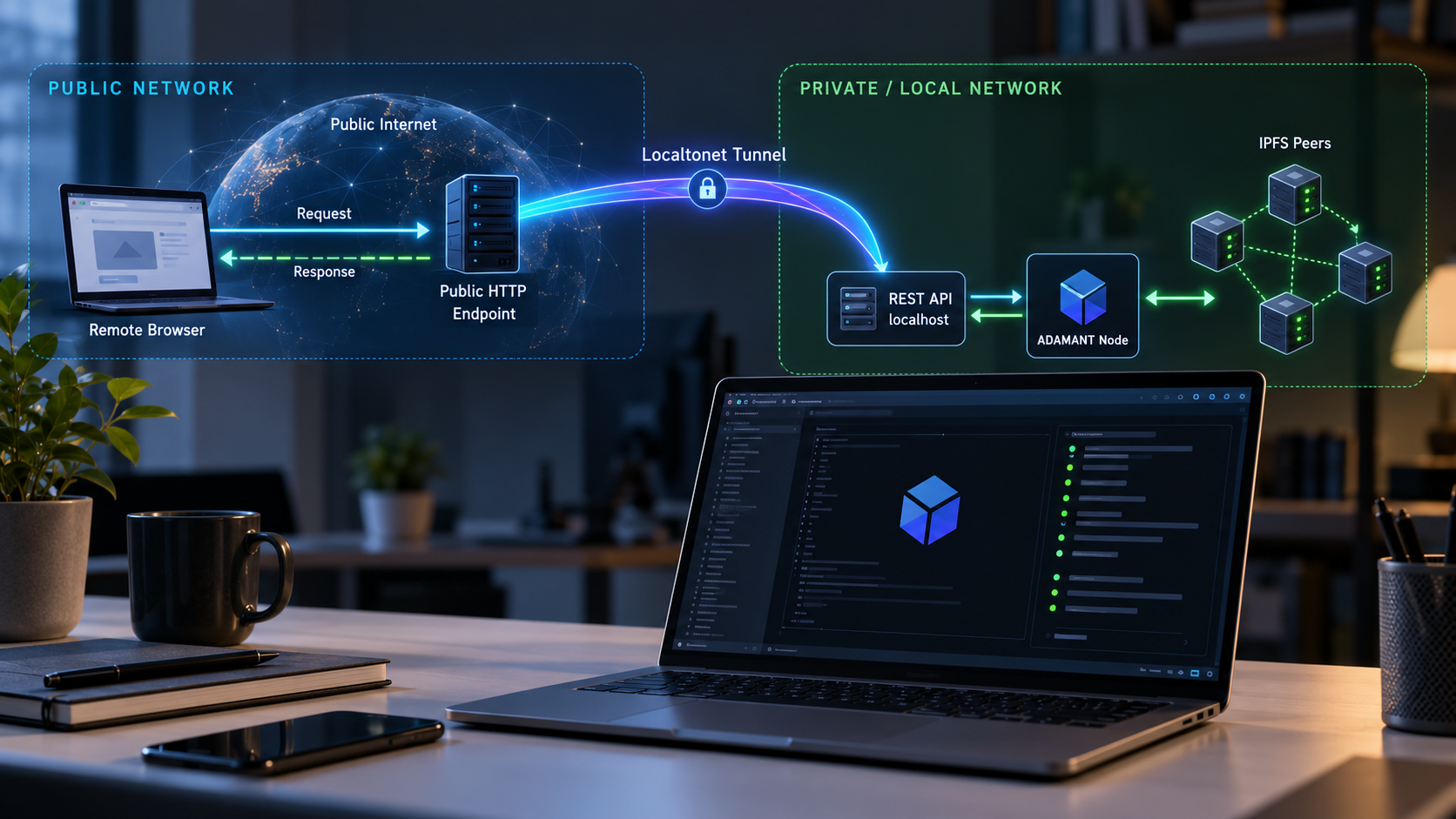
Run a controlled, content-addressed storage service on your own hardware and reach its REST API remotely
ADAMANT IPFS Node is a standalone Node.js and Helia service designed for application-owned file delivery across a small, controlled peer set. In this guide, we build it from source with Node.js 24, explain the documented Docker alternative, verify its local HTTP listener, and review the operational boundaries that distinguish it from Kubo and public IPFS. Once the service works locally, we connect its REST API to an HTTP tunnel with Localtonet. Because uploads and downloads are unauthenticated by design, the guide also explains why publishing the API requires deliberate access controls rather than simply exposing every route.
📋 What's in this guide
What ADAMANT IPFS Node is, and what it is not
ADAMANT IPFS Node is a self-hosted storage service for applications that upload files over HTTP and retrieve them by content identifier, or CID. Internally, it runs a Helia node and a libp2p host in the same Node.js process. Externally, applications interact with an Express REST API rather than embedding an IPFS library or speaking to a Kubo daemon.
This architecture is intended for controlled deployments. A deployment consists of nodes whose operators explicitly configure one another by multiaddress. Those nodes exchange blocks, replicas, repair traffic, and health attestations within that known peer set. The project uses TCP for peer communication, Noise for encrypted libp2p connections, and Yamux for stream multiplexing. Only the identify and ping protocols are registered for the general libp2p host, while project-specific replication and repair behavior is managed by the service.
The word “IPFS” can otherwise create the wrong expectation. This service does not participate in the public IPFS distributed hash table, does not publish through a public gateway, does not use a public bootstrap list, and does not provide IPNS. It also has no mDNS discovery, circuit relay, or built-in NAT traversal. Uploading content to this node does not announce that content to the public IPFS network. Likewise, a CID that exists only on public IPFS cannot automatically be fetched by this service.
It is also not a Kubo wrapper and does not expose a Kubo-compatible API. Software written for the Kubo API cannot simply change its base URL and use ADAMANT IPFS Node. Integrations must follow this project's own REST API specification and behavior.
When it is a good fit
The node is most appropriate when an application owns the file-delivery workflow and needs a predictable REST interface, content-addressed retrieval, bounded local storage, replication, repair, and health reporting. It is especially relevant to a small or fixed group of mutually trusted storage operators. Messenger attachments, application media, and other application-controlled file stores are representative use cases.
When to choose a different architecture
Choose another solution if the goal is public IPFS participation, arbitrary retrieval from the public network, IPNS, a public gateway, or Kubo API compatibility. It is also not intended to replace object storage when an application requires S3-compatible APIs, mature cloud IAM, built-in egress accounting, monthly quotas, or managed global delivery. Large, highly dynamic clusters and peer groups made up of mutually untrusted operators also fall outside its stated design center.
Removing public discovery and public gateway routing reduces exposure of content-routing metadata. It does not make the deployment anonymous, trustless, censorship-proof, or automatically private. Availability and confidentiality still depend on the selected operators, host security, replication policy, network controls, and application design.
Prerequisites and deployment decisions
Before installing the node, decide whether this is a single-node evaluation or part of a multi-node deployment. The repository includes a standalone Docker configuration example that joins no network, which is useful for an initial local test. A production peer mesh requires every participating node to list every other node. Because peer membership is static, changing that list resets the health checkpoint membership epoch.
The project is at an early release stage. Version 0.1.0 is its first tagged release and its first published container image. That does not make it unsuitable for testing or every production scenario, but it does make careful version pinning, configuration review, backups, monitoring, and staged upgrades particularly important.
| Requirement | Source installation | Docker installation |
|---|---|---|
| Runtime | Node.js 24 and npm | Docker with support for the target image architecture |
| Architectures documented for v0.1.0 | Depends on the host and native dependency availability | linux/amd64 and linux/arm64 |
| Configuration | Repository configuration based on the shipped JSON5 defaults and current configuration reference | A JSON5 file mounted read-only at /app/config.json5 |
| Persistent state | Stored under $HOME/<storeFolder> |
A volume mounted at /data, which is the container's home directory |
| REST API binding | Confirm the configured bind address and port from the active configuration and startup log | The documented run command maps 127.0.0.1:4000 to container port 4000 |
| Peer transport | Configure according to the intended peer set | The documented example publishes TCP port 4001 |
For a source build, install Git, Node.js 24, npm, and the build tools required by native Node.js dependencies on the host. The repository includes an .nvmrc, so Node Version Manager can select the expected Node.js release with nvm use. If Node.js is installed another way, confirm that node --version reports a Node.js 24 release before installing packages.
Dependency installation must be allowed to run package install scripts. Helia depends on @libp2p/webrtc, whose node-datachannel native module downloads a prebuilt binary from GitHub releases. The repository already includes the necessary npm 12 allowScripts entry. Using npm ci --ignore-scripts, or installing from a host that cannot reach the required GitHub release asset, can produce a dependency tree that later fails at startup.
The service has one administrative credential for operator endpoints. Use a unique, high-entropy value and keep it out of shell history, source control, screenshots, logs, and article examples. The exact JSON5 property and validation rules should be taken from the configuration reference shipped with the version being deployed. We do not reproduce a guessed property name here.
A public deployment also requires TLS termination according to the project's requirements. An HTTP tunnel with Localtonet gives the assigned public HTTP endpoint an HTTPS address while forwarding to the local service. However, TLS termination does not add end-user authentication to routes that the application intentionally leaves unauthenticated. If the API should only be used by known people or systems, place an appropriate authentication and authorization layer in front of it and point the tunnel at that protected local endpoint.
Build and start ADAMANT IPFS Node from source
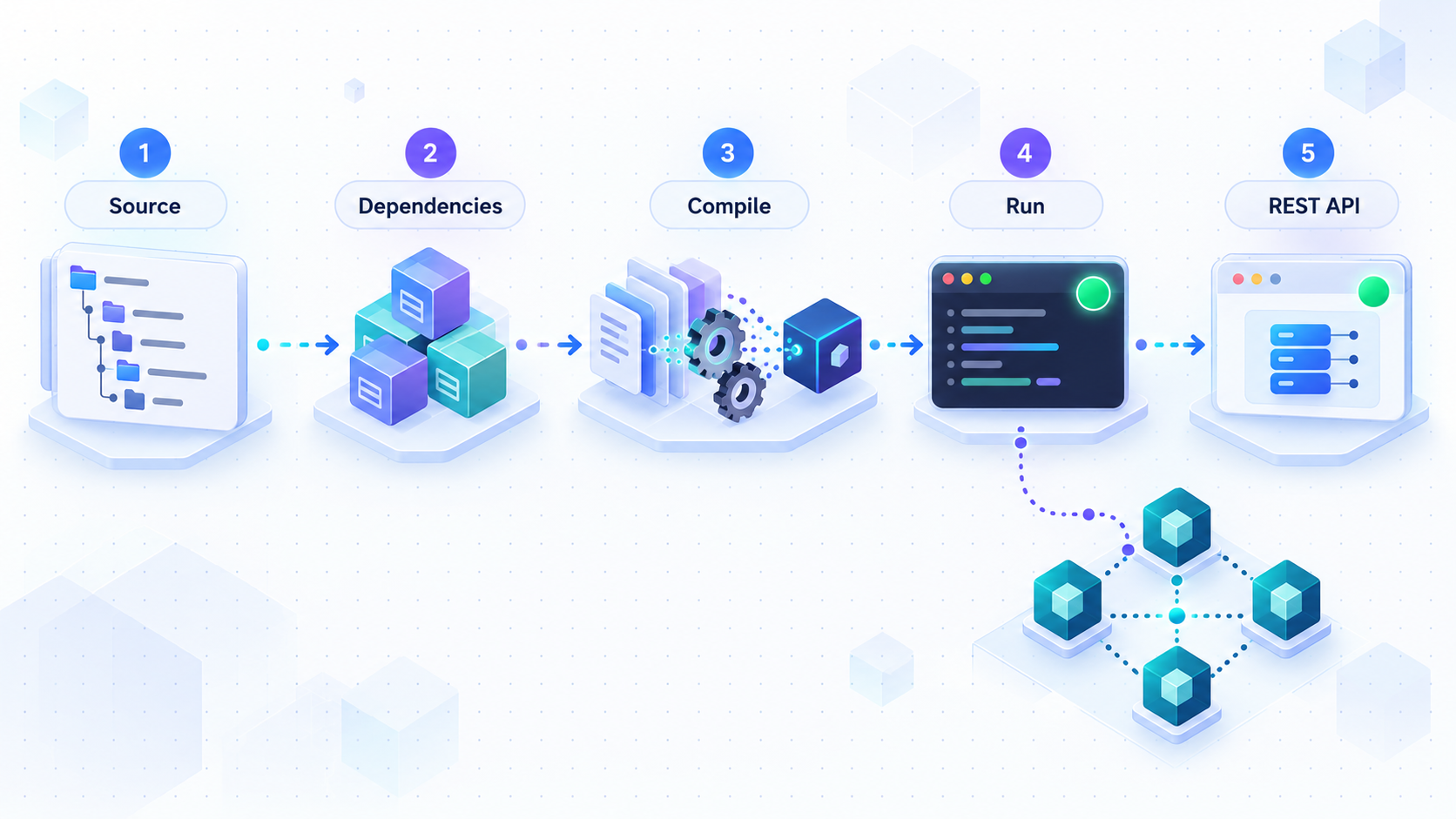
Building from source is useful when you need to inspect the code, develop against the current repository, or manage the Node.js process directly. The documented quick-start sequence uses Node.js 24, installs the locked dependency tree, creates a production build, and starts the compiled entry point.
Clone the official repository
Clone the project and enter its working directory. For a reproducible deployment, review available releases and deploy a deliberate tag or reviewed commit rather than automatically tracking a moving branch.
Select Node.js 24
Run nvm use in the repository. The included .nvmrc selects the project's required Node.js release. Stop and correct the runtime if Node.js 24 is not active.
Install the locked dependencies
Use npm ci. Do not suppress install scripts, because the native WebRTC-related dependency requires its installation step.
Create the production build
Run the documented build script. A successful build produces the compiled application used by the production start command.
Review configuration and start the service
Review config.default.json5 and the configuration reference for the exact version you checked out. Set a unique administrative key and validate storage, peer, lifecycle, bind, and resource settings before public use. Then start the compiled entry point with node dist/index.js.
git clone https://github.com/Adamant-im/ipfs-node.git
cd ipfs-node
nvm use
npm ci
npm run build
node dist/index.js
Keep the terminal open during initial testing so startup failures and bound addresses remain visible. The process is running in the foreground at this stage. Record the HTTP bind address and port reported by the active configuration or startup output rather than assuming that a customized source deployment uses the same binding as the documented container command.
The project documents PM2 as an optional process manager. A process manager can restart the service after a crash or host reboot and can centralize process logs. The supplied evidence does not establish an exact PM2 command, application file, working directory, or startup-unit sequence, so we do not invent one. Whatever supervisor you select must run the compiled entry point from the correct working directory, provide access to the intended configuration and home directory, and stop the process gracefully.
The quick-start commands prove that the project can be installed and built. They do not replace production configuration. Before remote exposure, review the administrative credential, bind addresses, CORS policy, disk reserve, watermarks, temporary-upload TTL, request limits, concurrency limits, peer membership, and replication behavior using the configuration reference for the deployed version.
Alternative: run the pinned v0.1.0 Docker image
Docker offers the most clearly documented local network mapping. The v0.1.0 image is published as ghcr.io/adamant-im/ipfs-node:0.1.0 for linux/amd64 and linux/arm64. It runs as an unprivileged user and includes an attached software bill of materials and provenance attestation.
The image contains no configuration. You must mount a JSON5 configuration file at /app/config.json5. The repository's docker/config.example.json5 is a standalone starting point that joins no network. Review and edit that copy before considering the deployment production-ready.
Obtain and review the example configuration
Clone or otherwise obtain the matching v0.1.0 repository content, copy docker/config.example.json5 to config.json5, and review every setting against the versioned configuration documentation. Add a unique administrative key without committing the resulting file.
Create the persistent data volume
Create the named ipfs-node-data volume. Mounted at /data, it holds the blockstore, datastore, libp2p peer identity, pin set, lifecycle registry, repair cursor, and health checkpoint.
Start the pinned container
Run the image with the configuration mounted read-only, the persistent volume mounted at /data, REST port 4000 bound only to host loopback, and peer port 4001 published for the controlled libp2p mesh.
git clone https://github.com/Adamant-im/ipfs-node.git
cd ipfs-node
git checkout v0.1.0
cp docker/config.example.json5 config.json5

docker volume create ipfs-node-data

docker run -d \
  --name ipfs-node \
  --restart unless-stopped \
  --stop-timeout 20 \
  -v ipfs-node-data:/data \
  -v "$PWD/config.json5:/app/config.json5:ro" \
  -p 127.0.0.1:4000:4000 \
  -p 4001:4001 \
  ghcr.io/adamant-im/ipfs-node:0.1.0
The mapping 127.0.0.1:4000:4000 is intentionally important. It makes the REST service reachable from the Docker host without listening on every host interface. A Localtonet client running on that same host can then reach 127.0.0.1:4000. If the Localtonet client runs in another container, a virtual machine, or a different device, loopback refers to that environment rather than the Docker host. In that topology, establish a deliberate private route to the service and use the reachable local address as the tunnel target.
Port 4001 has a different purpose. It carries the controlled libp2p peer mesh and is not the REST API. Do not configure an HTTP tunnel to port 4001. Its firewall exposure should be limited to the known peers that require it.
Deleting and recreating a container does not delete a separately managed named volume. That preserves more than uploaded blocks. It also preserves the node's peer identity and operational state. Back up the configuration and persistent data according to your recovery requirements, protect both from unauthorized access, and test restoration before relying on the node for important files.
Verify the service locally before creating a tunnel
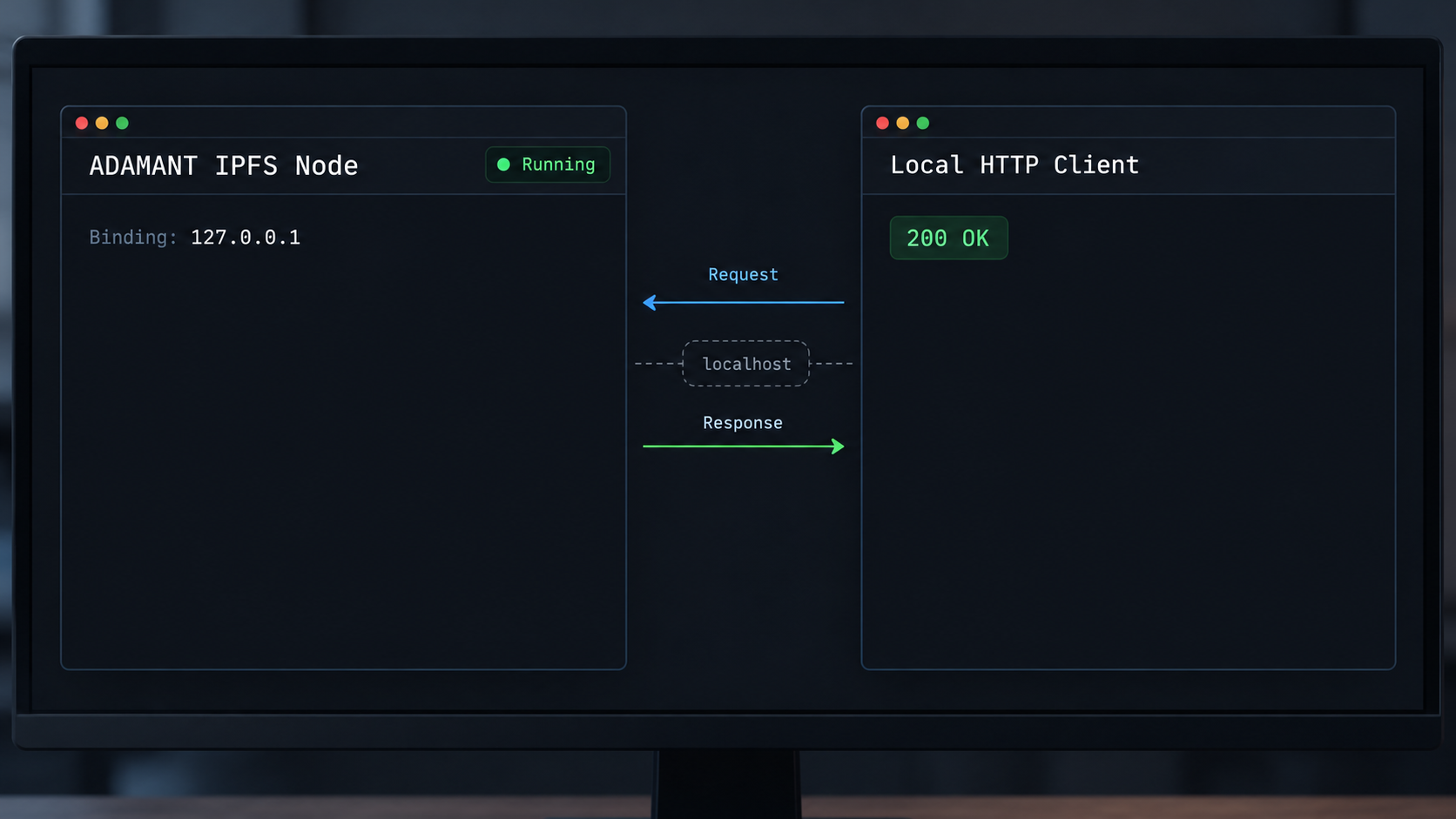
Remote-access work should begin only after the local service is stable. Verification has three layers: process health, network reachability, and application behavior. A listening port alone does not prove that storage, replication, lifecycle checks, or peer attestations are healthy.
Inspect the container or foreground process
For Docker, confirm that the container is running and inspect its structured newline-delimited JSON logs. The project scrubs content identifiers, peer IDs, and credentials from its structured logs, but logs should still be handled as operational data rather than published openly.
docker ps --filter name=ipfs-node
docker logs --tail 100 ipfs-node
For the source installation, review the terminal output from node dist/index.js or the logs collected by the process manager. Resolve configuration validation, native-module, storage, permission, or bind errors before continuing.
Test the local HTTP listener
With the documented Docker mapping, the local REST base is http://127.0.0.1:4000. The following request tests whether an HTTP server answers on that socket:
curl -i http://127.0.0.1:4000/
The base path is not documented in the supplied evidence as a health endpoint, so a non-success application status such as 404 can still prove that the HTTP listener is reachable. It does not prove application health. For an authoritative functional check, use the health, lifecycle, metrics, upload, and download routes defined in the OpenAPI specification for the exact deployed version.
The project distinguishes public status information from administrative operations. Lifecycle status, upload policy, and storage metrics are readable without an API key, while administrative routes require the administrative key. Do not guess endpoint paths or authentication headers. Generate test requests from the versioned OpenAPI definition and keep the real key in a protected secret mechanism.
Perform an application-level test
A complete functional test should upload a small non-sensitive file through the documented multipart upload route, record the returned CID, and retrieve that CID through the documented download route. Confirm that the retrieved bytes match the original file. In a multi-node deployment, also examine placement, replication, repair, peer connectivity, and health checkpoint behavior.
We intentionally do not provide guessed upload field names or endpoint paths. Those details are part of the project's API contract and can change between releases. Copying a plausible but incorrect command could upload with the wrong policy, omit a required field, or send an administrative credential to the wrong route.
Upload and download are unauthenticated by design. Use a disposable test file with no personal, confidential, regulated, or secret content. Confirm deletion and retention behavior through the documented lifecycle before placing real application data on the node.
Publish the local REST API with Localtonet
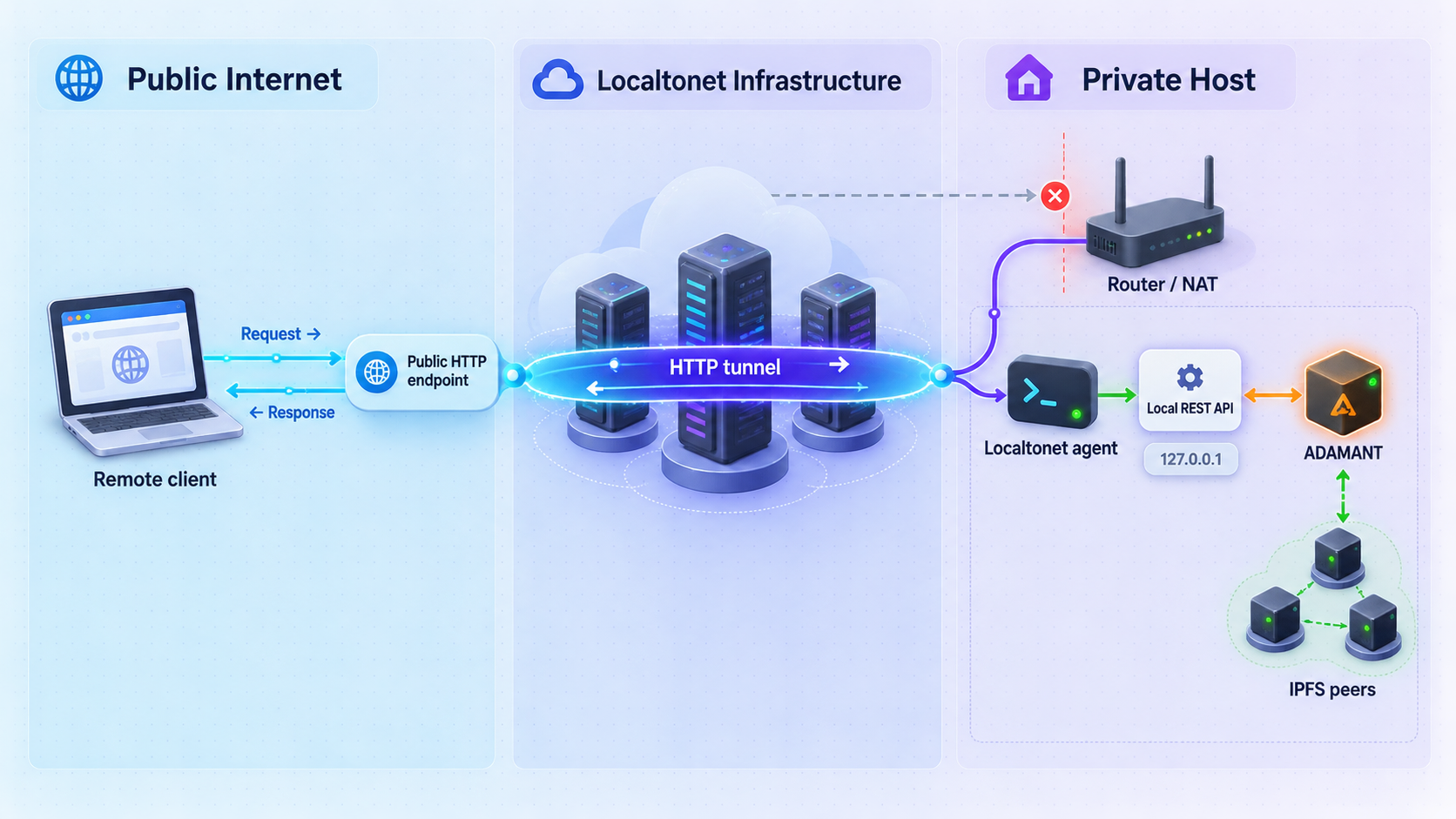
Once http://127.0.0.1:4000 works locally, an HTTP tunnel can provide a public HTTPS address without inbound router port forwarding, firewall changes, a VPN setup, or a public IP address. Our client establishes an outbound connection from the device to a Localtonet relay server. The tunnel remains available only while that selected client is connected and the tunnel is running.
For the documented Docker topology, the Localtonet client should run on the Docker host so it can reach the loopback-bound API. If the client runs elsewhere, verify network reachability from the client device to the target before configuring the tunnel. A browser on your laptop being able to reach a service does not prove that a client inside another container or virtual machine can reach the same loopback address.
Install and run the Localtonet client
Install our client on the device that can reach the ADAMANT IPFS Node REST service. Keep the client running while the public endpoint is needed.
Authenticate and select the client device
Use the device-specific authentication token created for that client. Treat the token as a secret, never place it in documentation or source control, and select the corresponding connected device in the dashboard.
Select an available relay server
Choose a server or region currently offered in your dashboard. Availability can vary, so do not copy a hardcoded server code from an unrelated tutorial.
Create an HTTP tunnel to the REST service
Configure the local target as IP address 127.0.0.1 and port 4000 when the client runs on the same host as the documented Docker deployment. Select the available HTTP process type appropriate to your deployment, such as a generated subdomain, a supported selected subdomain, or a custom domain. Check current DNS instructions before using a custom domain.
Start the tunnel
Creating a tunnel does not start it. Use the Start button, wait for the tunnel to become active, and copy the assigned public HTTPS address from the dashboard.
Test the public address and stop it when finished
Test the public address with the same non-sensitive verification approach used locally. When remote access is no longer required, stop the tunnel. Delete it as well if the endpoint should not be reused.
For the current dashboard workflow and fields, consult our Localtonet HTTP tunnel documentation. The public address forwards HTTP requests to the configured local target. It does not transform the ADAMANT API into a Kubo API, add application users, or change the node's storage and replication behavior.
ADAMANT IPFS Node intentionally has no end-user identity system, and uploads and downloads are unauthenticated. Publishing port 4000 directly may let anyone who can reach the URL exercise those public routes, subject only to the node's configured admission and rate controls. Those controls limit resource use but do not establish who a user is or whether that user is authorized.
Design a safer public-access boundary
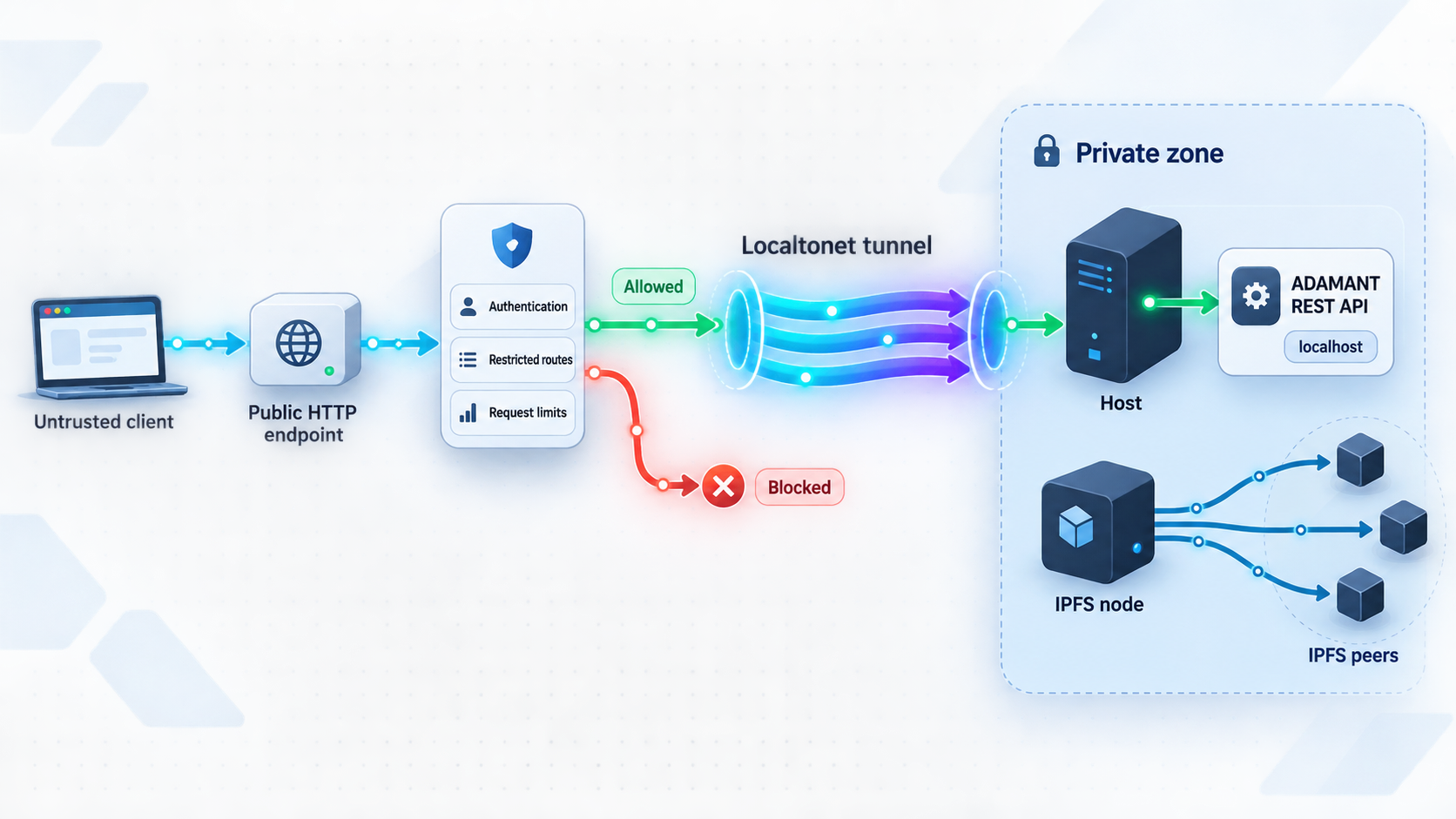
The safest exposure design depends on who must use the API. If only one backend application needs access, avoid distributing the public URL broadly. Put an authentication-aware reverse proxy or application gateway in front of the node, expose only required routes, and point Localtonet to that protected local listener instead of directly to port 4000.
The exact proxy software and policy are deployment choices rather than ADAMANT IPFS Node defaults. A suitable layer should authenticate callers, authorize operations, cap request-body sizes, preserve streaming where the API requires it, and avoid logging administrative secrets. Test multipart uploads and streamed downloads through the complete chain before production use.
| Control | What it addresses | What it does not replace |
|---|---|---|
| Public HTTPS tunnel | Provides an HTTPS address and reaches a local HTTP service through an outbound client connection | Application authentication and authorization |
| Reverse-proxy authentication | Restricts access to approved callers before requests reach the node | Node storage limits, replication policy, and backups |
| Administrative API key | Protects operator endpoints that require the project's administrative credential | End-user identity for upload and download routes |
| Rate and concurrency limits | Bounds request rates and simultaneous uploads or downloads | Per-user authorization, byte accounting, and monthly quotas |
| Loopback binding | Prevents direct REST listening on every host interface | Protection from processes already running on the same host |
| Peer firewall rules | Limits port 4001 access to intended storage peers | REST API access policy on port 4000 |
Apply least privilege to routes
A consumer that only downloads known CIDs should not automatically receive upload or administrative access. If a proxy can distinguish and restrict route groups safely, publish only the minimum route set needed by that consumer. Validate this against the versioned API definition instead of relying on route names remembered from another release.
Protect the administrative credential
Never include the administrative API key in a URL, public frontend bundle, mobile application, shared command history, or Localtonet tunnel definition. Browser-delivered code cannot keep a shared administrative secret. Administrative operations should originate from a trusted backend or operator environment.
Review CORS separately from authentication
The v0.1.0 release includes CORS work for desktop application origins, Tor onion origins, and opaque null origins. CORS controls which browser origins may read responses and issue certain cross-origin requests. It is not an authentication mechanism and does not prevent non-browser clients from sending requests directly.
Plan for abuse and storage pressure
Public unauthenticated uploads can consume bandwidth, temporary storage, processing capacity, and eventually retained storage according to policy. Configure disk reserve, aggregate request limits, temporary-upload TTL, high and low garbage-collection watermarks, endpoint rate limits, and concurrent request limits for the host's actual capacity. Monitor free space and rejection behavior during load testing.
The HTTP tunnel provides remote access to the REST application endpoint. Port 4001 is the node-to-node libp2p transport for configured peers. Do not combine them into one HTTP tunnel or describe the tunnel as peer discovery, NAT traversal for the mesh, or public IPFS participation.
Routine operations and troubleshooting
Start, stop, restart, and inspect the Docker deployment
The container uses a restart policy of unless-stopped, so Docker can restart it after daemon or host restarts unless an operator explicitly stopped it. Use standard Docker lifecycle commands for planned operations:
docker stop ipfs-node
docker start ipfs-node
docker restart ipfs-node
docker logs --tail 100 ipfs-node
Stopping the node interrupts REST access, replication, repair, and health progress. The Localtonet tunnel may remain configured, but requests cannot succeed while its local target is unavailable. Likewise, stopping the Localtonet client or tunnel removes remote access even if the node itself remains healthy.
Update deliberately
Do not replace a pinned container tag with an unreviewed moving tag in a production deployment. Read release notes, compare configuration validation rules, back up the configuration and persistent state, test the new version with non-sensitive content, and retain a rollback plan. Recreating the container with the existing volume preserves state only if the new version is compatible with that state.
For source deployments, update the checked-out revision, rerun npm ci, rebuild, and restart under the chosen process manager only after reviewing changes. Do not run npm update as a substitute for the project's locked dependency installation.
Back up configuration and state
Treat the JSON5 configuration and persistent data as separate backup subjects. The configuration contains topology and security-sensitive values. The data directory includes blocks, databases, peer identity, pin state, lifecycle metadata, repair progress, and health checkpoint state. Protect backup copies with access controls and encryption appropriate to the data, and verify a restoration procedure on an isolated host.
Diagnose common failures
| Symptom | Likely area to inspect | Safe next action |
|---|---|---|
| Source build installs but fails at startup | Node.js version, suppressed install scripts, or failure to download the native prebuilt dependency | Confirm Node.js 24, reinstall with npm ci without --ignore-scripts, and verify access to required GitHub release assets |
| Container exits immediately | Missing, unreadable, or invalid /app/config.json5 |
Inspect container logs and validate the mounted configuration against the v0.1.0 rules |
| Local port 4000 does not answer | Container state, port collision, configuration, or process startup failure | Inspect docker ps, logs, and host port usage before changing the binding |
| Local API works but the public URL fails | Localtonet client state, tunnel state, selected device, or an unreachable local target from the client environment | Test the target from the same device and network namespace as the client, then confirm that the tunnel was started |
| REST request was sent to port 4001 | REST and peer ports were confused | Use port 4000 for the documented Docker REST mapping and reserve port 4001 for peer transport |
| Peers do not form the expected mesh | Static peer lists, multiaddresses, firewall policy, or inconsistent membership | Confirm that every node lists every intended peer and that port 4001 is reachable only where required |
| Health checkpoint stops advancing | One or more checkpoint prerequisites, peer attestations, repair backlog, or storage conditions | Inspect health details, peer connectivity, repair state, disk reserve, and configured grace behavior |
| Uploads are rejected | Rate limits, concurrency admission, request limits, disk reserve, or storage pressure | Read the machine-readable error response and review capacity before increasing any limit |
Monitor what matters
Monitor the process, HTTP reachability, disk capacity, configured reserve, garbage-collection activity, upload and download rejection rates, replication failures, repair progress, peer liveness, and health checkpoint height. A monotonically advancing checkpoint is stronger evidence than a process that merely remains alive, because checkpoint advancement depends on the configured prerequisites passing.
Also monitor the access boundary in front of the REST API. Authentication failures, unexpected request origins, repeated uploads, large request bodies, and sudden bandwidth growth can signal abuse even when the node remains technically healthy.
Frequently asked questions
Is ADAMANT IPFS Node a replacement for Kubo?
No. It is a standalone Node.js and Helia service with its own REST API. It is not a Kubo wrapper, does not expose a Kubo-compatible API, and cannot be used as a controller for an existing Kubo fleet.
Does content uploaded to this node become available on public IPFS?
No. The node has no public DHT, public gateway, public bootstrap list, or IPNS support. Uploaded content is not announced to the public IPFS network, and arbitrary public-network CIDs cannot be fetched unless the content exists within the configured deployment.
Which port should an HTTP tunnel target?
In the documented Docker command, the REST API is available at 127.0.0.1:4000 on the host. Port 4001 is the libp2p peer transport and is not an HTTP REST endpoint. For a customized source deployment, confirm the active bind address and port from its configuration and startup output.
Does publishing the API with Localtonet add user authentication?
No. Our HTTP tunnel provides remote connectivity and a public HTTPS address for the configured local target. It does not create end-user accounts or authorization rules inside ADAMANT IPFS Node. Place an authentication-aware proxy or application gateway in front of the node when access must be restricted.
Are uploads and downloads protected by the administrative API key?
No. Upload and download are unauthenticated by design. The single administrative key protects operator endpoints that require it. Rate limits and admission controls reduce resource pressure, but they do not authenticate users.
Can the Localtonet client run in a different container?
It can run wherever it can reach the local target, but 127.0.0.1 always refers to the current network namespace. A client in a separate container cannot automatically reach a service bound to the Docker host's loopback interface. Provide a deliberate private network path and test it from the client environment before starting the tunnel.
Does the node support automatic peer discovery?
No. Peer lists are static, and every node must list every other node in the deployment. Changing membership resets the health checkpoint epoch. This model is better suited to a small or fixed peer set than a large, frequently changing cluster.
Can I configure an absolute data-directory path?
The documented limitation is that the store remains under $HOME/<storeFolder>. In the published container, HOME is /data, which is why the example mounts one persistent volume there.
Connect your verified local API with Localtonet
After ADAMANT IPFS Node is healthy on its local REST endpoint and you have chosen an appropriate authentication boundary, create an HTTP tunnel to reach it remotely without opening an inbound router port.
Get Started Free →

