

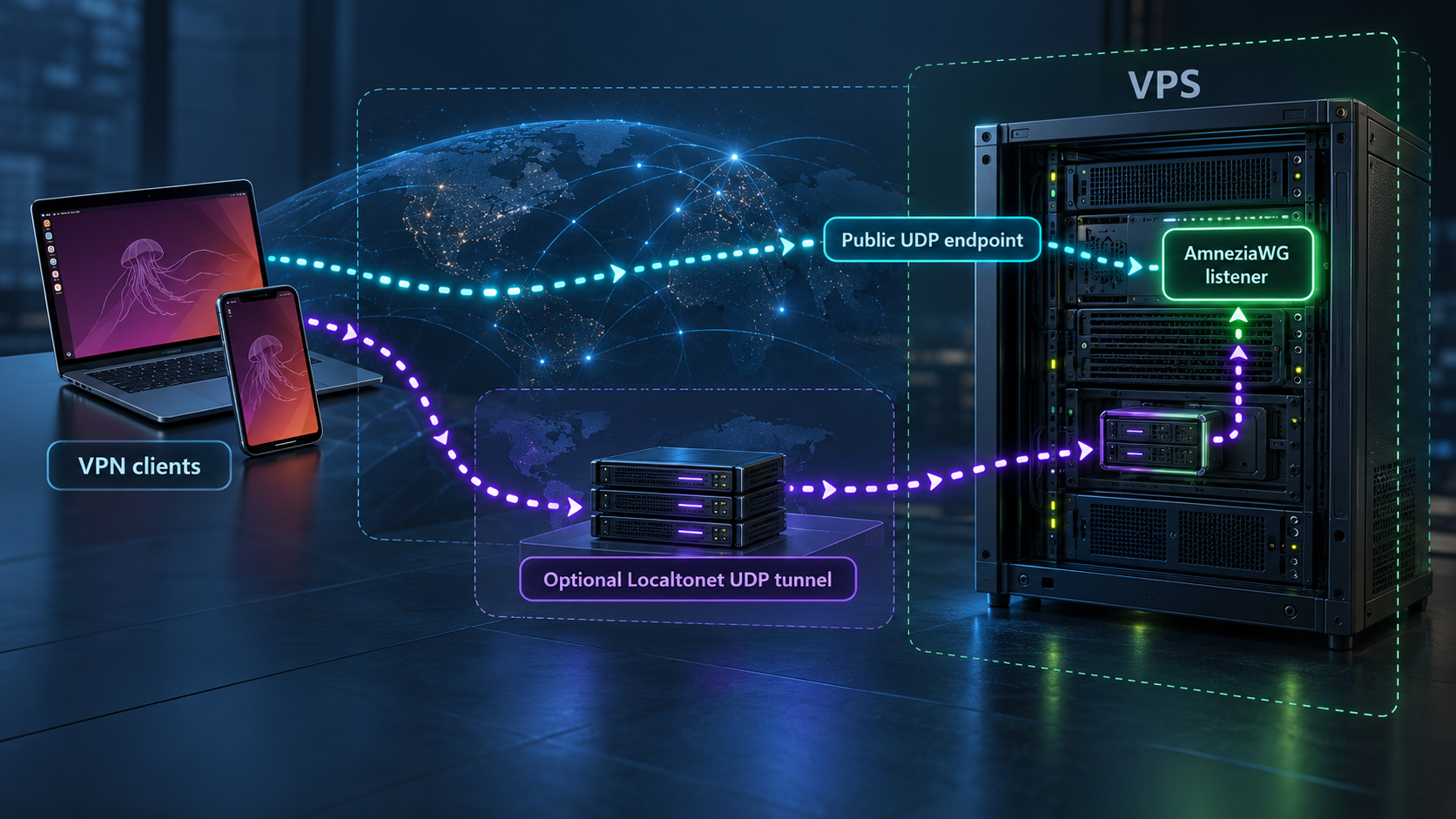
Build a self-hosted AmneziaWG VPN first, verify it locally, then decide whether UDP forwarding fits your network
This guide explains how to turn a fresh Ubuntu or Debian VPS into an AmneziaWG VPN server with the official amneziawg-installer workflow. We cover server requirements, protocol compatibility, installation, client enrollment, verification, routine operation, firewall considerations, and troubleshooting. After the VPN works through its normal VPS endpoint, we show how a Localtonet UDP tunnel can optionally publish the listener through a separate public host and port. That forwarding layer is useful in selected network designs, but it is not required for a conventional internet-accessible VPS.
📋 What's in this guide
Understand the AmneziaWG and Localtonet architecture
AmneziaWG is a WireGuard-derived VPN protocol designed to make its traffic less recognizable to deep packet inspection systems. The amneziawg-installer project configures a Linux server as a dedicated VPN gateway. It installs the required kernel module and tools, enables forwarding, creates firewall rules, applies system settings, and produces client profiles that authorized devices can import.
In the normal deployment, the AmneziaWG UDP listener is exposed directly through the public IP address of the VPS. A client profile points to that public address and the selected UDP port. The client sends encrypted VPN traffic to the listener, and the VPS forwards permitted traffic toward the internet.
Localtonet is optional in this design. If you add it, our client runs on the VPS or another device that can reach the AmneziaWG listener. The Localtonet client establishes an outbound connection to one of our relay servers. A UDP tunnel then provides a public host and port and forwards received datagrams to the configured local IP address and UDP port.
The distinction matters: AmneziaWG remains the VPN. A Localtonet UDP tunnel is a forwarding path to the VPN listener, not a replacement for the VPN protocol, its client authentication, or its routing configuration. The Localtonet tunnel must also be running for its assigned public endpoint to remain available.
When optional forwarding makes sense
Forwarding can be useful when the machine running AmneziaWG does not have a usable public IP address, cannot accept inbound router port forwarding, or needs a public endpoint supplied independently from its local network. It can also be relevant for a temporary test in which you want to evaluate an alternate path without immediately changing upstream routing.
A typical VPS already has a public IP address and is designed to receive inbound traffic. In that common case, direct exposure is simpler and introduces fewer dependencies. Adding a relay creates another endpoint and another service lifecycle to monitor. It may also alter latency and packet behavior, so test the complete VPN workload rather than assuming a successful tunnel start proves the VPN will perform as expected.
Complete the AmneziaWG installation and verify a direct client connection before adding Localtonet. This separates VPN installation problems from forwarding problems and gives you a known-good baseline.
Prepare a suitable VPS
The installer is intended for a fresh, minimal Ubuntu or Debian VPS dedicated primarily to VPN service. It is not designed for shared hosting, and the documented workflow is not a Docker deployment. Because it changes networking, packages, the firewall, kernel components, and system settings, avoid running it casually on a production server that already hosts unrelated applications.
For a new server, the project currently recommends Ubuntu 24.04 LTS or Debian 13. Ubuntu 26.04 is also documented as supported. Debian 12 can run the installer, but it is not the preferred choice for a new deployment and normally receives AmneziaWG 2.0 because its stock kernel is older than 6.7. Ubuntu 25.10 is not supported by installer version 6.0.0 and later because vendor support for that Ubuntu release ended.
| Requirement | Documented baseline | Practical guidance |
|---|---|---|
| Operating system | Clean Ubuntu or Debian server installation | Prefer Ubuntu 24.04 LTS or Debian 13 for a new VPS. |
| Architecture | amd64 or ARM64 | Protocol generation and kernel-module handling can differ on ARM. |
| CPU | 1 vCPU minimum | Choose more capacity if many clients will transfer data concurrently. |
| Memory | 512 MB minimum | Leave enough headroom for package upgrades and kernel-module compilation. |
| Disk | 2 GB free, 3 GB recommended | Confirm free space before installing packages or a new kernel. |
| Administrative access | Root access over SSH, or sudo capable of performing root operations | Keep the existing SSH session open during firewall and network changes. |
| Network | Working package repositories and HTTPS access to the release download | Verify DNS, outbound HTTPS, and package manager health before starting. |
Take a snapshot and preserve recovery access
Create a VPS snapshot or provider backup before running the installer. Also confirm that you can access the provider's serial console, recovery console, or equivalent out-of-band interface. An SSH session alone is not an adequate recovery strategy when a process will change firewall and networking configuration.
Record the VPS public IP address, current SSH port, active network interface, operating-system version, kernel version, and any provider-level firewall rules. Do not assume that opening a port with UFW also opens the provider's external firewall. Conversely, do not assume that allowing a port in the provider firewall makes the guest operating system accept it.
Understand the system changes before approving them
The installer runs with root privileges and performs a system package upgrade using apt-get upgrade --with-new-pkgs. A new kernel can therefore be installed. The documented workflow can require two reboots, and the installer is designed to resume when run again after each reboot.
The installation includes packages such as AmneziaWG DKMS and tools, WireGuard tools, kernel headers, build tools, UFW, Fail2Ban, QR-code tooling, and supporting utilities. Debian also receives an additional Python systemd package. Depending on the platform and selected module path, it may install Git, a particular compiler, or a prebuilt ARM module.
With consent, the installer can remove packages considered unnecessary for a dedicated VPN server. The documented list includes ModemManager, networkd-dispatcher, unattended-upgrades, PackageKit, and udisks2. On Ubuntu it can also remove snapd and associated data paths. Cloud-init is removed only when it is not managing the network.
Removing unattended-upgrades stops automatic security updates. The noninteractive --yes option counts as consent where the installer requests approval, including relevant package-removal decisions. Review the current installer behavior and use its package-preservation option when appropriate instead of applying unattended mode to an unfamiliar server.
Check storage and package-manager health
Before installation, verify that no other package process is running and that the server has sufficient free space. The installer configures an APT lock timeout, but waiting for a legitimate package task is safer than competing with it. Resolve interrupted package transactions before continuing.
cat /etc/os-release
uname -m
uname -r
df -h
sudo apt-get update
These commands identify the operating system, architecture, kernel, disk availability, and basic package-repository health. They do not modify the VPN configuration. If apt-get update fails, correct repository, DNS, clock, or network problems before running a root-level installer.
Choose between AmneziaWG 3.1 and 2.0
A fresh installation uses AmneziaWG 3.1 by default when the server platform and installed module support it. Version 3.1 adds header protection and additional padding behavior. The installer automatically selects 2.0 where 3.1 cannot be used, including ARM systems and kernels older than 6.7 under the documented decision rules.
Server and client compatibility must match. A client without 3.1 support will not connect to a 3.1 server, and it may not display a useful error. Older router firmware, older AmneziaWG applications, Hiddify, and some OpenWrt package combinations can therefore require a 2.0 server profile.
| Situation | Likely choice | Reason |
|---|---|---|
| New x86_64 VPS with Ubuntu 24.04, Ubuntu 26.04, or Debian 13 | AmneziaWG 3.1 | The current installer uses 3.1 by default when module and kernel checks pass. |
| ARM server | AmneziaWG 2.0 | The installer currently selects the 2.0 profile for ARM. |
| Kernel older than 6.7, including the stock Debian 12 kernel | AmneziaWG 2.0 | The installer falls back automatically when 3.1 is not supported. |
| Older router firmware or client software without 3.1 support | Explicitly request 2.0 | A 2.0-only client cannot connect to a 3.1 server. |
| Existing working server | Keep its current generation | Updating scripts or forcing a normal rerun does not switch the protocol generation. |
Decide before distributing profiles. Changing a server from 3.1 to 2.0, or from 2.0 to 3.1, requires uninstalling and performing a new installation. Client profiles must then be issued again. A generation change is therefore a migration, not a routine in-place update.
Current Android options documented for compatible deployments include WG Tunnel and AmneziaWG. AmneziaWG is available for iPhone, macOS, and Windows, while Amnezia VPN can import the generated vpn:// link. Linux can use awg-quick. Confirm 3.1 support in the exact client version you intend to deploy before accepting the installer default.
If 3.1 cannot run on the detected module, utility, architecture, or kernel combination, an explicit 3.1 request stops rather than silently creating an unusable installation. Use the automatic selection unless you have validated every server and client compatibility requirement.
Install AmneziaWG with the official release script
Connect to the clean VPS over SSH. Use the English release script shown below. The URL points to the latest published installer release, so the downloaded content can change over time. For a controlled production deployment, inspect the script, retain a copy of the version you approved, and use the project's documented signature-verification procedure before executing it.
Connect to the fresh VPS with administrative access
Open an SSH session as root or as a user that can run sudo. Keep provider recovery access available, verify that the server matches the supported operating-system and architecture requirements, and make sure the package manager is healthy.
Download and run the release installer
Download the latest English installer script, make it executable, and run it with sudo. Answer its prompts after reviewing the proposed protocol, package, firewall, and network changes. If the script reboots the VPS, reconnect and run the final command again. Repeat after the next requested reboot so the installer can resume its saved state.
Retrieve and import the generated client profile
After installation completes, review the final report and retrieve the generated files from /root/awg/. Import the appropriate configuration, QR code, or vpn:// link into a client that supports the installed AmneziaWG generation. Protect every generated profile as a credential.
Run the documented quick-start commands:
wget -O install_amneziawg_en.sh https://github.com/bivlked/amneziawg-installer/releases/latest/download/install_amneziawg_en.sh
chmod +x install_amneziawg_en.sh
sudo bash ./install_amneziawg_en.sh
The installer can require two reboots. After each reboot, reconnect over SSH, return to the directory containing the downloaded script, and run:
sudo bash ./install_amneziawg_en.shThe resume mechanism continues from the appropriate stage. Do not start a separate manual installation while that process is incomplete. A typical documented installation takes about twenty minutes, although package download speed, kernel installation, module compilation, and VPS performance can change the actual duration.
Optional noninteractive invocation
The installer supports automation flags, including --yes and --route-all. A documented noninteractive invocation is:
sudo bash ./install_amneziawg_en.sh --yes --route-allUse this only after testing the interactive workflow and reviewing the current help output. Noninteractive approval can accept package and system changes that deserve human review. It can also make a mistake repeatable across multiple servers. Pinning and verifying an approved installer release is safer for managed automation than downloading an unspecified latest release on every run.
What a successful installation creates
On a compatible x86_64 installation, the expected result is an AmneziaWG server with forwarding, system tuning, firewall configuration when accepted, and initial client profiles. The documented default output includes two clients named my_phone and my_laptop. Their configuration files, QR-code images, and supported import links are stored under /root/awg/.
The installer also configures the kernel module to load during startup. On the standard DKMS path, the module is rebuilt for new kernels. Supporting hooks and a service check the module after kernel changes, with related activity written to /var/log/amneziawg-ensure-module.log. On an ARM system using a prebuilt module, rerun the installer after a kernel update so it can install a matching module.
Verify the server before exposing another endpoint
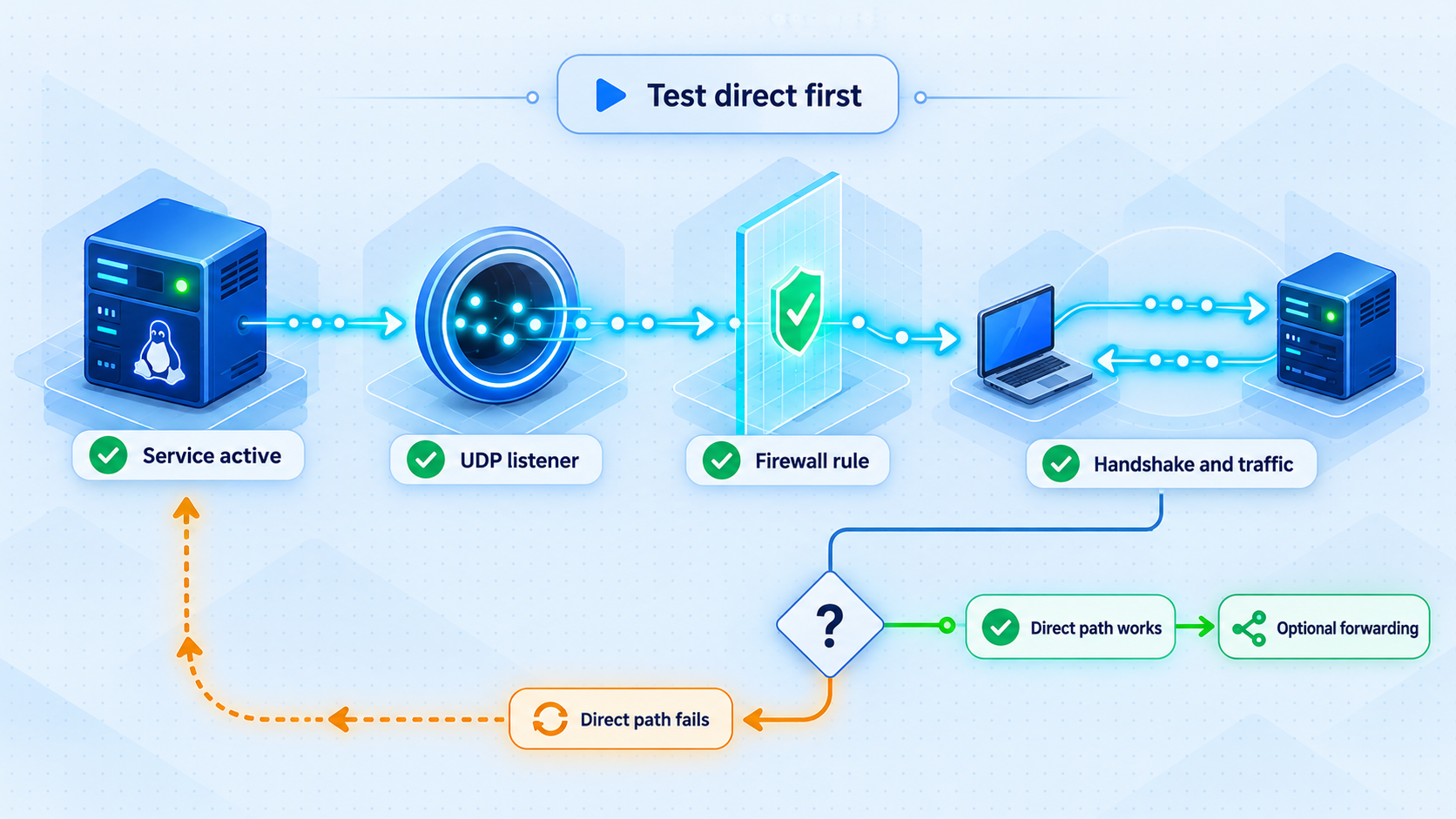
Verification should proceed from the server outward. First confirm that the operating system completed its reboot and the expected interface exists. Next identify the actual UDP listener and port selected during installation. Then inspect firewall status. Finally, import one client profile and test a real VPN connection.
Check the AmneziaWG interface
sudo ip link show awg0
The installer uses awg0 as its active interface marker. If the command reports that the interface does not exist, do not proceed to Localtonet. Reconnect after any required reboot and rerun the installer so it can resume. If installation reported completion, inspect the module recovery log and run the project's current check or diagnostic operation according to the installed version's help.
Find the UDP listener
sudo ss -lunpLocate the AmneziaWG UDP listener and record its actual port and binding. This guide deliberately does not state a universal default port because the supplied installation evidence does not establish one. The installer can also select or accept different ports for different profiles. The port shown by the running server is the value to use for firewall validation and any later UDP forwarding target.
Review UFW without changing it blindly
sudo ufw status verboseConfirm that SSH remains permitted and that the VPN's selected UDP port is treated as expected. Also review any firewall maintained by the VPS provider. Keep in mind that a wildcard listener does not by itself prove internet reachability, and an allowed provider rule does not prove that the guest firewall accepts the packet.
Test a real client
Securely retrieve one generated profile from /root/awg/ and import it into a compatible application. The private configuration should not be pasted into chat systems, tickets, public repositories, or screenshots. If you transfer it through an administrative workstation, remove temporary copies after secure storage or import.
Disconnect the test device from any other VPN, activate the new profile, and verify that ordinary network access works. Test using a network separate from the VPS, such as a mobile connection, so the result represents actual remote access. If the profile is a full-tunnel configuration, check that the observed public IPv4 address changes to the server's exit address. Also test DNS resolution and several ordinary HTTPS destinations.
A successful interface check is not equivalent to a successful VPN test. The listener can exist while firewall, routing, NAT, client-generation compatibility, or endpoint settings remain incorrect. Do not add another forwarding layer until the direct connection works reliably.
Save the installed protocol generation, kernel version, UDP port, server endpoint, client application version, and direct-connection result. This small deployment record makes later updates and forwarding tests much easier to diagnose.
Connect clients and operate the server safely
Choose the correct import method
The generated output supports several client workflows. A phone can scan its assigned QR-code image in a compatible application. Desktop applications can import the corresponding .conf file. Amnezia VPN can use the generated vpn:// link. Linux systems can use the AmneziaWG command-line tooling through awg-quick.
Do not reuse one client profile across many devices. Separate profiles make removal and incident response manageable. If one phone is lost, you should be able to revoke that phone without replacing every other device's credentials.
Add, list, remove, and regenerate clients
The installer includes client-management capabilities for adding, removing, listing, and regenerating clients. It also supports QR codes, import links, and time-limited guest configurations. Some management operations support JSON output for automation.
Exact management command syntax is intentionally not reproduced here because the available evidence does not provide the complete current command table, and guessing a subcommand could remove or alter the wrong client. Use the help provided by the installed management tooling and the documentation corresponding to the installer version deployed on your server. Before removing a client, list the existing entries and confirm the exact identifier.
Protect the profile directory
Treat /root/awg/ as sensitive. Anyone who obtains a valid client profile may be able to authenticate as that client until its access is removed. Keep the directory restricted to root, avoid serving it through a web server or shared folder, and never expose it through a Localtonet File Server tunnel.
Handle operating-system and kernel updates
Continue applying security updates after installation. If you approved removal of unattended-upgrades, establish another explicit update process. Reboot when a kernel update requires it, then verify awg0, the listener, and a real client connection.
DKMS installations are designed to rebuild the module for a new kernel. The installer also adds recovery support for that path. ARM installations using a prebuilt module require the installer to be run again after a kernel change. Never assume that successful package installation proves the VPN module loaded into the new kernel.
Back up what can be restored securely
Keep a protected record of the installer version, selected protocol generation, important installation choices, client inventory, and recovery procedure. If you back up client configurations, encrypt the backup and restrict access. A VPS snapshot can contain all issued client secrets, so protect snapshots with the same care as the live server.
Optionally publish the listener with a Localtonet UDP tunnel
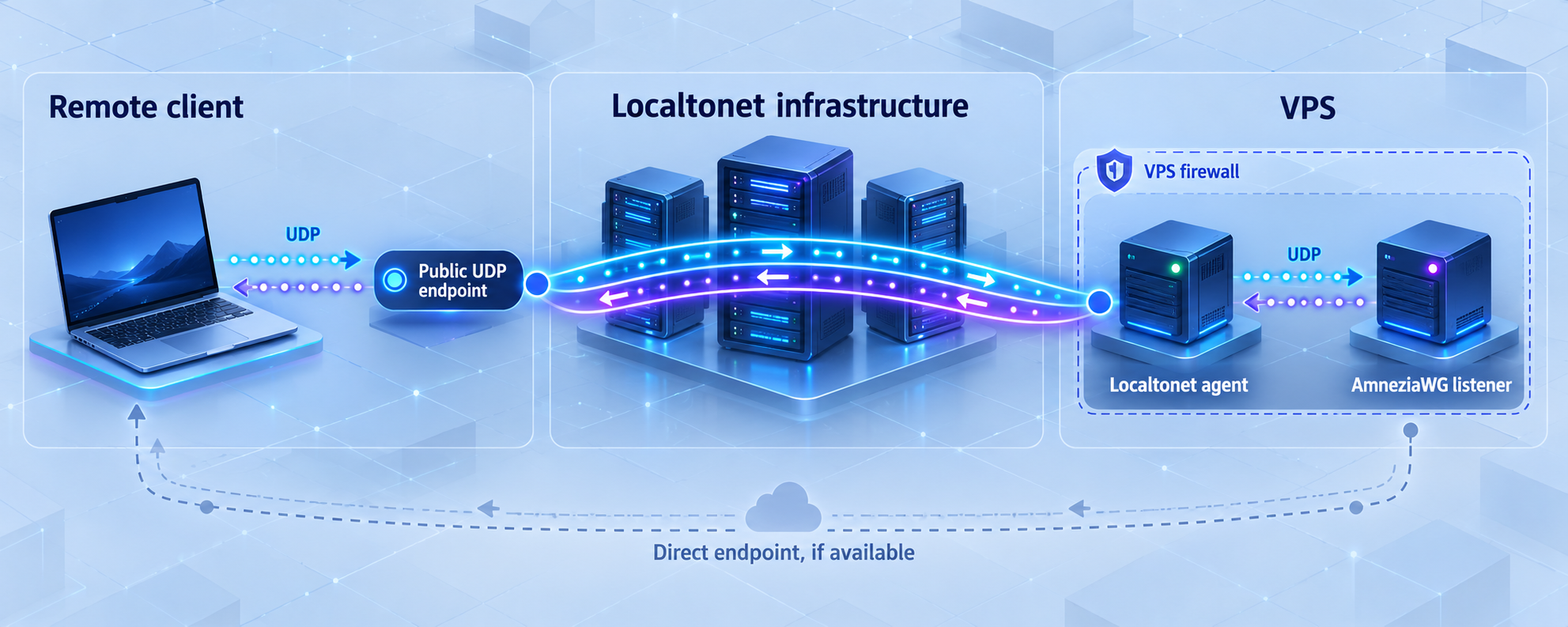
Only begin this stage after the direct AmneziaWG connection works. Install and run the Localtonet client on the VPS itself or on another device that can reach the VPN listener. The client establishes an outbound connection to our relay, so the Localtonet side does not require inbound router port forwarding, a public IP address, firewall changes for an inbound relay connection, or VPN setup.
A UDP tunnel needs the listener's reachable local IP address and exact UDP port. Determine both from the running server. Do not copy an example port, assume a default, or assume that 127.0.0.1 is appropriate. The correct address depends on the listener binding, firewall, and where the Localtonet client runs.
Install and run the Localtonet client
Run our client on the AmneziaWG VPS or on a device with network reachability to its UDP listener. Keep the device online for as long as the forwarded endpoint is required.
Authenticate or select the client device
Use the device-specific authentication token through the current Localtonet workflow. Never place the token in an article, shell history, public repository, client profile, or support screenshot.
Select an available relay server
Choose from the relay server or region values currently available in the Localtonet dashboard. Availability can vary, so this guide does not hardcode a server code or region name.
Create a UDP tunnel to the verified listener
Select the UDP tunnel family and enter the local IP address reachable from the Localtonet client together with the exact AmneziaWG UDP port found during verification.
Start the tunnel and record its public endpoint
Creating a tunnel does not start it. Use the Start button, wait for the selected device and tunnel to be connected, and record the assigned public host and port.
Test the assigned host and port with a client profile
Use a separate test profile whose server endpoint is the Localtonet public host and port. Preserve the known-good direct profile so you can compare paths and recover access. Stop or delete the tunnel when it is no longer needed.
The current list of available relay choices and any plan-specific limits must be checked in the dashboard. We do not claim that every server, region, option, or capacity level is included in every subscription.
Update the client endpoint carefully
The profile generated during the original installation normally references the endpoint selected for direct VPS access. To test Localtonet, the client must send its UDP traffic to the public host and port assigned to the Localtonet tunnel instead.
Keep the profile's cryptographic and AmneziaWG-specific parameters unchanged. Only the server endpoint should differ for the forwarding test. The precise editing workflow depends on the client application and profile format, so use that application's supported profile editor or import process. If an application cannot safely edit an imported profile, make a copy, update the endpoint before import, and label it clearly.
Retain the original direct profile during testing. If the forwarded profile fails while the original still works, the VPN installation is probably healthy and the problem is in the endpoint, UDP path, Localtonet target, tunnel lifecycle, or firewall behavior.
Understand tunnel availability
The public endpoint works only while the selected Localtonet device is connected and the UDP tunnel is running. A reboot can temporarily interrupt both the VPN and the Localtonet client. Plan startup behavior and monitoring around both components if the forwarded path is important.
Localtonet provides the forwarding endpoint, but AmneziaWG still authenticates VPN peers and applies the VPN configuration. Do not weaken the VPN profile because traffic reaches it through a tunnel. UDP forwarding makes the listener reachable; it does not authorize a client.
Anyone on the internet can send UDP datagrams to the assigned host and port. Keep AmneziaWG authentication intact, issue separate client profiles, remove lost-device access promptly, and expose only the intended listener. Never point the tunnel at SSH, a management panel, or an unrelated UDP service by mistake.
Harden and maintain the deployment
Verify the installer before root execution
Downloading a script from a latest-release URL and immediately running it as root is convenient, but it places significant trust in the download path and current release. The project publishes a minisign verification process. Use that documented process for controlled deployments, inspect release changes, and avoid overriding the installer branch unless you have independently reviewed what will be downloaded.
The installer verifies the supporting scripts it downloads against embedded SHA-256 hashes tied to its version under the normal workflow. That protection should not be treated as permission to skip verification of the initial root-level installer.
Preserve SSH and recovery access
Confirm SSH access after every reboot and before closing the existing session. The installer can configure UFW with a deny-oriented policy and SSH rate limiting. Provider firewall settings, a changed SSH port, or a customized preexisting firewall can still produce lockout if they are inconsistent.
Do not expose administrative material
Keep Localtonet device tokens, VPN profiles, private keys, QR-code images, vpn:// links, and administrative endpoints out of logs and public issue reports. Redact them before sharing diagnostics. A QR code is not merely a convenience image. It contains importable configuration and should be treated like the underlying profile.
Consider the unprivileged user namespace warning
The AmneziaWG installer documentation identifies a kernel-module concern involving malformed negative values in certain I1-related parameters. Installer-generated and managed values are rejected safely, but a local unprivileged user may be able to interact with the installed module through user namespaces on systems where that capability is unrestricted.
The project's check and diagnostic operations warn about the condition in applicable environments. One mitigation is disabling unprivileged user namespaces with kernel.unprivileged_userns_clone = 0, but that can break software that relies on them. Evaluate the trade-off for your host instead of applying the setting without understanding its effect.
Avoid duplicate public paths unless intentional
If the VPS UDP port remains publicly allowed and Localtonet also forwards to it, the server may have two reachable endpoints. That can be useful during migration, but it may be contrary to a design that intends the relay to be the only public path.
Do not close the direct path until the forwarded profile has been tested from an external network and you understand how the local listener receives relayed traffic. Firewall rules can distinguish interfaces and source paths, but the correct rule depends on the VPS network, listener binding, and Localtonet client placement. There is no universal UFW command that is safe for every deployment.
Troubleshoot installation, VPN, and forwarding failures
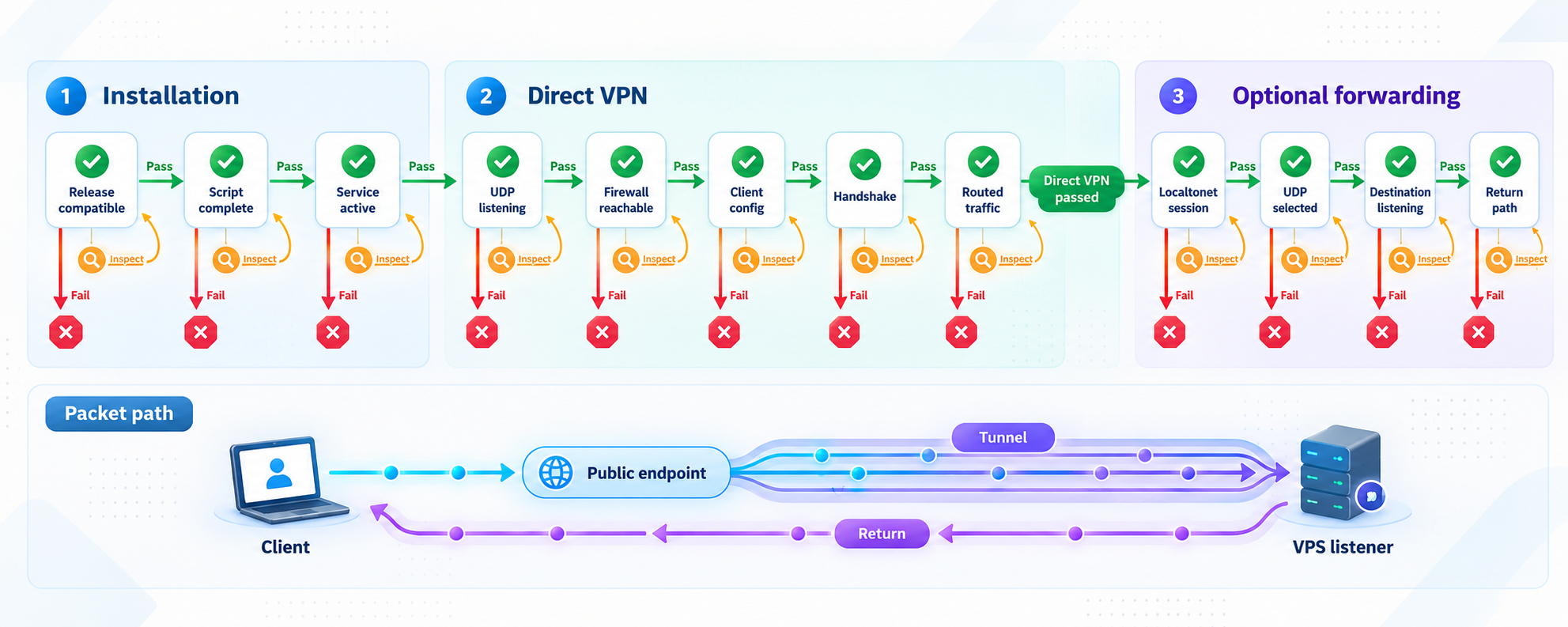
The installer reboots and appears to start over
Reconnect to the same VPS, return to the directory containing install_amneziawg_en.sh, and run the same sudo command again. The installer includes a resume-after-reboot state machine. Do not delete its state or replace the server between stages.
The awg0 interface does not exist
Confirm that all requested reboots and resume runs completed. Check the current kernel and compare it with the installed module path. On a DKMS installation, inspect /var/log/amneziawg-ensure-module.log. On an ARM system using a prebuilt module, rerun the installer after a kernel update.
If the installer stopped during module checks, do not attempt to create profiles manually. Resolve the reported kernel, header, utility, or module mismatch and rerun the supported workflow.
The client imports successfully but never connects
Verify that client and server use compatible protocol generations. A 2.0-only client may fail silently against a 3.1 server. Confirm that the client profile references the correct host and UDP port, the server listener is active, UFW permits the intended path, and the VPS provider firewall allows the required traffic.
Test direct access before testing the Localtonet endpoint. If direct access also fails, troubleshoot AmneziaWG first. If direct access works, preserve that profile and isolate the forwarding path.
The Localtonet tunnel is created but unavailable
Confirm that the selected Localtonet device is connected and that the tunnel has actually been started. Creation alone does not make a tunnel run. Check that the UDP tunnel targets the listener's real port and an IP address reachable from the Localtonet client.
If the client runs on another machine, verify ordinary network reachability from that machine to the VPS listener. If it runs on the same VPS, verify the listener binding rather than assuming that a particular loopback or interface address will work.
The forwarded profile fails while the direct profile works
This is a useful result because it narrows the fault. Compare only the endpoint values. Check for a hostname typo, wrong assigned public port, stale profile, stopped tunnel, disconnected Localtonet device, incorrect local target, or firewall rule that accepts traffic only through the public network interface.
Restarting or recreating unrelated VPN configuration is not the first step. Keep the verified AmneziaWG keys and obfuscation parameters unchanged while testing the transport path.
The VPN connects but traffic does not pass
Check whether the problem affects IPv4, IPv6, DNS, or every destination. The default profile sends IPv4 traffic through the tunnel. Its default IPv6 behavior prevents the device's normal IPv6 address from continuing directly, but it does not provide working IPv6 internet access inside the tunnel unless native server IPv6 and the corresponding installation option were configured.
Also review forwarding, NAT, UFW, and provider restrictions. A handshake can succeed while forwarding to the internet fails. Test by IP address as well as hostname to separate routing from DNS.
Local network devices become unreachable while connected
The default full-tunnel behavior can include the client's IPv4 local network. Whether local devices remain reachable then depends on the client and chosen routing configuration. The installer documents a --route-amnezia installation option for deployments that need a different local-network routing arrangement. Treat a routing-mode change as a planned configuration decision and retest all clients afterward.
Performance is worse through the forwarded endpoint
Compare the direct profile and Localtonet profile from the same client network at similar times. A forwarded path adds a relay and can follow a different network route. Check packet loss, application behavior, and relay selection rather than relying only on a bandwidth test.
If direct VPS access is reliable and there is no requirement for an alternate public endpoint, the simpler direct architecture may be the better operational choice.
Frequently asked questions
Does an AmneziaWG VPS require Localtonet?
No. A conventional VPS has a public IP address, and the installer is designed to expose its selected UDP port directly. Localtonet is an optional forwarding layer for deployments that need a separate public endpoint or cannot accept ordinary inbound access.
Is a Localtonet UDP tunnel itself a VPN?
No. In this workflow, AmneziaWG is the VPN. The Localtonet UDP tunnel publishes and forwards the VPN listener. It does not replace AmneziaWG peer authentication, client profiles, routes, or VPN encryption.
Which UDP port should I use?
Use the port selected by your actual installation and confirmed on the running server. This guide does not assign a universal default because the documented installer can use different values. Check the final installation report and verify the live listener with sudo ss -lunp.
Should I install AmneziaWG 3.1 or 2.0?
Use the automatic installer choice unless client compatibility requires 2.0. A new compatible x86_64 host normally receives 3.1. ARM systems, kernels older than 6.7, and older clients may require 2.0. Confirm every client before distributing profiles.
Can I switch an existing server between 3.1 and 2.0?
Not as an ordinary in-place update. Changing generations requires uninstalling and performing a new installation. All client profiles then need to be issued again. Back up operational records and plan the change as a migration.
Why does the installer need multiple reboots?
The installer can upgrade the system and kernel while installing a kernel-native VPN module. Its documented workflow can involve two reboots. Run the same installer command after each reboot so its resume mechanism can continue.
Can I close the VPS public UDP port after enabling Localtonet?
Potentially, but only after verifying that the Localtonet client can still reach the listener through the chosen local address and firewall path. The correct rule depends on the listener binding, client placement, network interfaces, UFW configuration, and provider firewall. Preserve recovery access and test before removing the direct path.
What happens if the Localtonet client disconnects?
The assigned Localtonet endpoint stops forwarding when the selected client device is disconnected or the tunnel is stopped. The AmneziaWG server may continue running locally, and a separately permitted direct VPS endpoint may continue working.
Add an optional public UDP endpoint with Localtonet
Once your AmneziaWG server works through its direct VPS endpoint, run our client on a device that can reach the verified listener, create a UDP tunnel, and test the assigned public host and port with a separate client profile.
Get Started Free →

