

Run a controlled Docker Compose GitOps workflow, verify every local boundary, and publish only the webhook receiver
doco-cd is a lightweight, declarative continuous delivery service for Docker Compose projects and Docker Swarm stacks. This tutorial installs a version-pinned release from the official repository, explains the Docker control boundary, verifies repository and Docker-context access, tests reconciliation, and prepares a signed GitHub webhook. It then maps the verified local HTTP listener to a Localtonet tunnel without inbound router port forwarding, firewall changes, VPN setup, or a public IP address. The deployment examples use doco-cd 0.115.0, the fixed-version example in the stable documentation reviewed for this revision; check the current releases before adopting that pin for a new production installation.
📋 What's in this guide
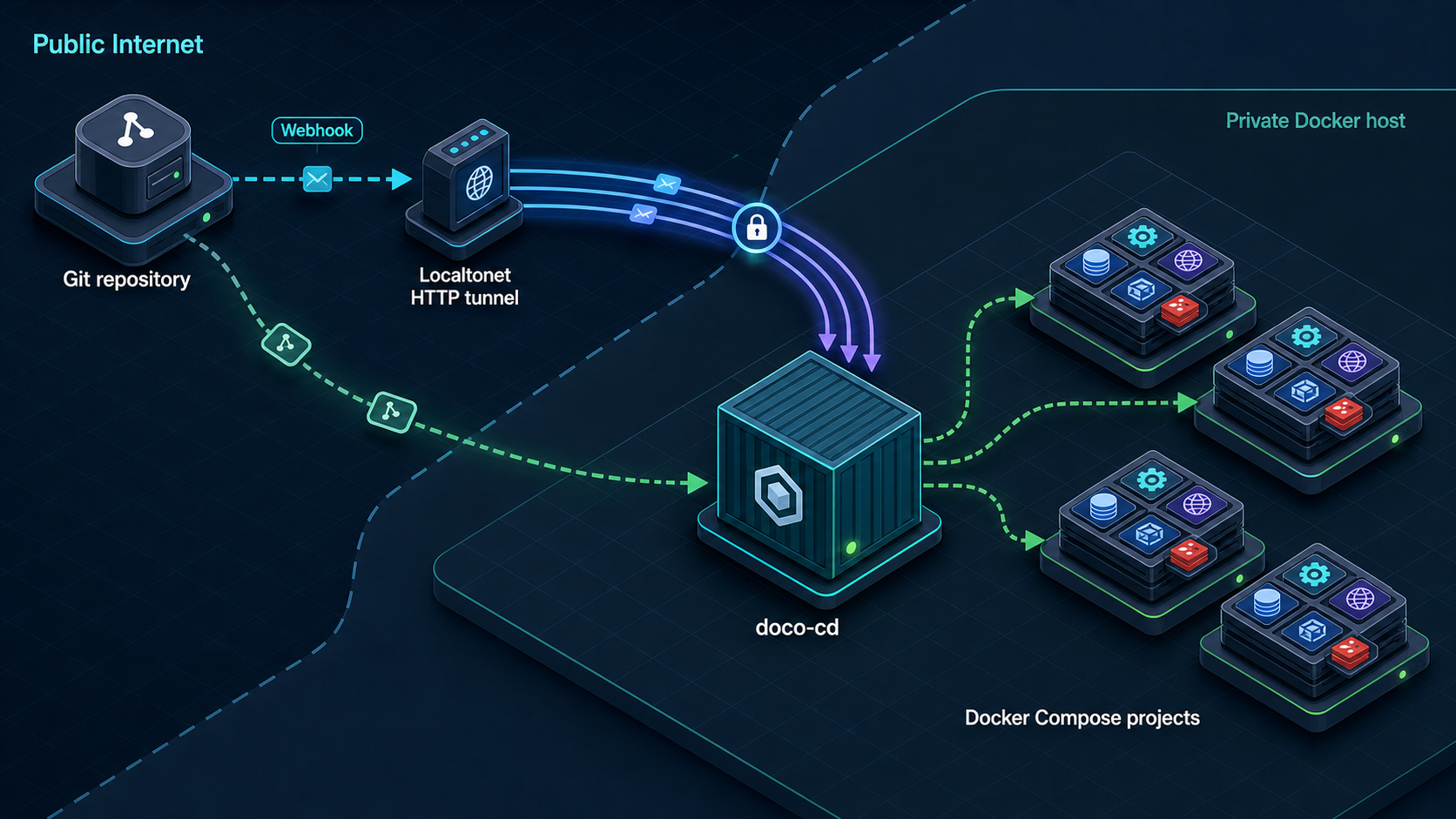
How doco-cd fits into a Docker Compose GitOps workflow
doco-cd stands for Docker Compose Continuous Deployment. It monitors deployment definitions stored in Git repositories or OCI artifacts and reconciles Docker Compose projects or Docker Swarm stacks when the desired configuration changes. The project supports polling, webhooks, or both, along with scheduled jobs, notifications, external secret-management integrations, SOPS-encrypted data, and Prometheus metrics.
The core GitOps idea is that a repository describes the desired workload state. An operator reviews and merges a change, doco-cd retrieves the selected revision, and Docker applies the corresponding Compose or Swarm definition. The repository remains the change record, while doco-cd provides the controller that connects source changes to a Docker environment.
Three security boundaries deserve separate treatment. The source boundary contains repository credentials and webhook validation. The control boundary gives doco-cd access to a Docker daemon or Docker context. The ingress boundary exposes the webhook receiver to a Git provider. A public webhook does not require the Docker API, metrics endpoint, configuration files, or unrelated management services to be publicly reachable.
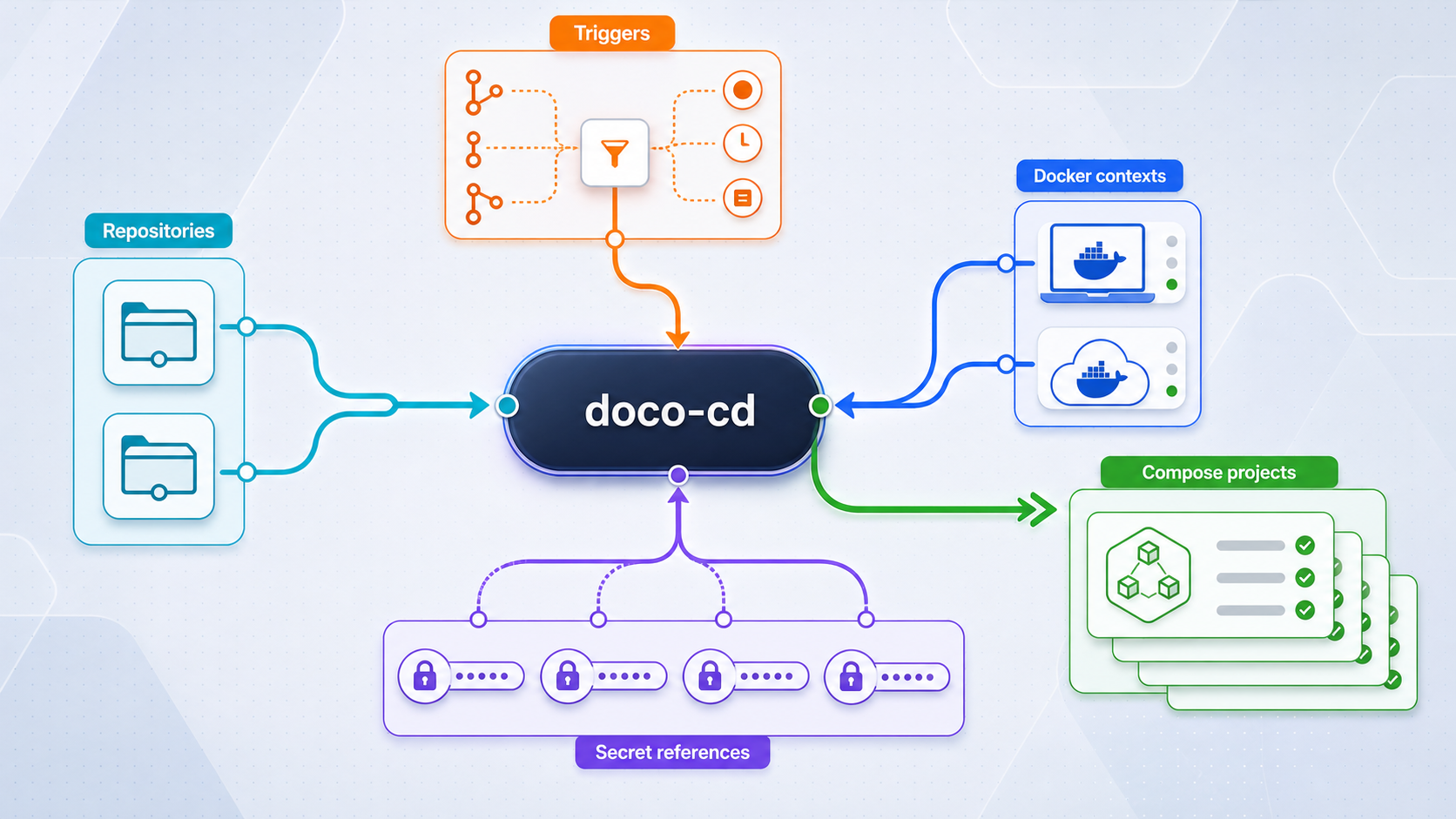
A process that can control a Docker daemon can create privileged containers, mount host paths, alter networks, stop services, and replace running workloads. Treat access to the Docker socket or an authenticated remote Docker context as host-level administrative access. Do not rely on container isolation alone to protect the host from a controller that can issue Docker API operations.
Prerequisites and deployment decisions
Start with a non-critical Docker host and a small repository whose expected result is easy to inspect. Avoid making the first reconciliation against a production host. The initial acceptance test should prove that the source, controller, Docker target, trigger, and rollback procedure all behave as expected.
The official project repository and documentation are the primary references for this installation. Review the doco-cd repository, the doco-cd documentation, and the doco-cd release history before changing a production pin. The documentation page may display an unreleased-version notice depending on which documentation branch is being viewed, so follow its link to the latest stable documentation when that notice appears.
| Requirement | Purpose | Preflight check |
|---|---|---|
| Docker Engine | Runs doco-cd and the managed workloads | docker version completes against the intended daemon |
| Docker Compose plugin | Renders and starts the official Compose deployment | docker compose version returns successfully |
| Git | Checks out the version-matched official deployment definition | git --version returns successfully |
| Repository or OCI source | Stores the desired deployment configuration | The chosen credential can read only the required source |
| Docker control method | Allows doco-cd to inspect and update workloads | The socket or named context reaches the intended daemon |
| Persistent storage | Preserves state required by the checked-out deployment definition | Every bind-mounted path and named volume is included in the backup plan |
| Webhook secret | Authenticates provider webhook requests | A random secret is stored outside the repository and supplied to both endpoints |
| Rollback material | Restores the controller or managed workload | The previous image pin, configuration, source revision, and state backup are retained |
Install Docker Engine using the instructions appropriate to the host operating system. Docker maintains its installation material in the Docker Engine installation documentation. This tutorial assumes the modern docker compose plugin rather than the retired standalone docker-compose command.
Confirm the local tools and daemon before downloading doco-cd:
docker version
docker compose version
docker info
git --version
If docker info targets a remote daemon, stop and inspect the active context. A valid remote context can make the commands succeed while pointing at a different host than intended.
docker context show
docker context ls
docker context inspect "$(docker context show)"
Record the context name and Docker endpoint in the change record. Do not continue until the target is unambiguous.
Select and pin the image version
The official image is ghcr.io/kimdre/doco-cd. Release tags omit the leading v used by GitHub releases. For example, GitHub release v0.115.0 maps to image ghcr.io/kimdre/doco-cd:0.115.0.
This tutorial pins 0.115.0 because that is the fixed-version example in the stable documentation reviewed for the revision. A pin is not a claim that the version will remain newest. Before installation, compare it with the current releases page, review intervening release notes, and update the commands only after testing the newer version.
export DOCO_CD_VERSION=0.115.0
docker pull "ghcr.io/kimdre/doco-cd:${DOCO_CD_VERSION}"
docker image inspect "ghcr.io/kimdre/doco-cd:${DOCO_CD_VERSION}"Image inspection proves that Docker retrieved the requested artifact. It does not prove that configuration files are valid, persistent state is mounted, Docker access works, a repository is readable, or the HTTP receiver is listening.
Install doco-cd from the version-matched official Compose definition
The doco-cd repository contains the project's official docker-compose.yml. Checking out the same release as the image pin keeps that deployment definition aligned with the selected application version and avoids silently using a newer file from the default branch.
Create a dedicated installation directory
Keep the controller definition, local configuration, and backup procedure separate from the repositories it deploys.
Check out the selected release
Clone the official repository and detach the working tree at the version-matched release tag.
Pin the service image
Add a small local override that selects the reviewed fixed image without rewriting the official base definition.
Render and audit the merged configuration
Use Docker Compose to display the effective service, ports, mounts, environment, restart behavior, and Docker-access mechanism before starting it.
Start and inspect the service
Pull the pinned image, create the service in detached mode, and inspect its status and startup logs.
mkdir -p "$HOME/self-hosted"
cd "$HOME/self-hosted"

git clone https://github.com/kimdre/doco-cd.git
cd doco-cd
git checkout v0.115.0

git status --short
git describe --tags --exact-match
The final command should report v0.115.0. If that tag is not available, do not substitute an arbitrary branch. Recheck the official releases page and choose a published release whose documentation and image are available.
Create a local override that pins the image while retaining the official release's service definition:
services:
  doco-cd:
    image: ghcr.io/kimdre/doco-cd:0.115.0
Save that content as compose.override.yaml beside the checked-out docker-compose.yml. The service name must match the official file. Confirm it rather than changing it speculatively:
docker compose config --services
docker compose config --images
docker compose config > rendered-compose.yaml
Read rendered-compose.yaml before startup. It is the reproducible record of the effective Compose model. Specifically inspect:
- The pinned
ghcr.io/kimdre/doco-cd:0.115.0image. - The host listening address and published HTTP port.
- Every bind mount and named volume.
- The Docker socket, Docker endpoint, or context material made available to doco-cd.
- Configuration and secret files referenced by the service.
- The restart policy and any documented health check.
- Environment values that contain a host path, repository credential, webhook secret, or listening setting.
Do not commit rendered-compose.yaml if it contains expanded secrets. It is useful as a local audit artifact, but Compose interpolation can place sensitive values into rendered output.
Start the release after supplying the configuration and secret values required by the checked-out definition:
docker compose pull
docker compose config --quiet
docker compose up -d
docker compose ps
docker compose logs --tail=200 doco-cd
docker compose config --quiet catches Compose-model errors, but it cannot validate repository credentials or prove that the selected Docker daemon is safe to use. The logs must show a successful startup without a repeated restart loop.
Understand the Docker access mount
A local installation commonly controls the host daemon through the Docker Unix socket exposed to the container by the official deployment definition. That socket is not ordinary application data. It is an administrative API. Anyone who can change doco-cd configuration, inject an untrusted deployment definition, or execute through the controller may be able to affect the host.
Where the project configuration and your environment support it, a named remote Docker context can separate the controller from the workload host. A protected remote endpoint still grants substantial control over that daemon, so require authenticated transport, restrict network reachability, and protect the client key material. A Docker socket proxy can reduce the available API surface only when its allowlist includes the exact operations doco-cd needs. An incomplete allowlist causes deployments to fail; an overly broad allowlist provides little security improvement.
Additional containment options include running doco-cd on a dedicated management host, assigning it only non-production contexts during initial testing, restricting who can modify managed repositories, requiring reviewed pull requests, and keeping deployment credentials separate from ordinary developer credentials. Rootless Docker may reduce some host risks, but compatibility must be validated against the operations required by your workloads.
Persistent state and clean removal
Identify persistence from the rendered Compose file rather than assuming that deleting the container is harmless. Back up bind-mounted configuration directories, secret references, context material, and any named volumes before upgrades.
To stop the controller without deleting its containers:
docker compose stopTo start it again with the same checked-out definition:
docker compose start
docker compose ps
To remove the controller containers and network while preserving named volumes:
docker compose down
Do not add --volumes unless the documented state has been backed up and permanent removal is intentional. Removing doco-cd does not automatically roll managed applications back. Those workloads remain separate Docker resources and must be changed through an explicit, reviewed deployment or recovery procedure.
Configure a bounded test repository and Docker target
Begin with one harmless service. Its only purpose is to demonstrate that doco-cd reads the intended repository, selects the intended Docker context, applies a Compose change, and records the result. Do not put databases, personal data, host mounts, privileged mode, production credentials, or externally published services in this first test.
A minimal Compose workload can be kept deliberately small:
services:
  acceptance-test:
    image: nginx:alpine
    labels:
      tutorial.change: "initial"
This is a standard Docker Compose workload, not a complete doco-cd controller configuration. Add the repository to doco-cd using the repository and deployment fields documented by the checked-out 0.115.0 configuration. Use the repository's exact clone URL, the intended branch or revision, the path to the Compose file, and the explicit Docker context. Do not translate field names from an older release without checking the version-matched documentation.
Use least-privilege source credentials
Give doco-cd read access to the required repository unless the selected feature explicitly requires more. Prefer a repository-scoped token or deploy key over a broad personal token. Keep private keys, tokens, and webhook secrets in the secret input supported by the checked-out deployment rather than in the repository URL or committed YAML.
Supported Git providers documented by the project include GitHub, GitLab, Gitea, Forgejo, Gogs, and Azure DevOps. Azure DevOps service hooks are documented as unsupported, so use polling unless current version-specific documentation establishes another supported event path.
Choose polling, webhooks, or both
| Trigger | Connectivity | Operational effect |
|---|---|---|
| Polling | Outbound access from doco-cd to the source | Requires no public callback; detection follows the configured interval |
| Webhook | Provider access to the doco-cd HTTP receiver | Delivers events promptly but requires signature validation and reliable ingress |
| Webhook and polling | Outbound source access plus webhook ingress | Can provide event-driven updates with periodic reconciliation when configured |
Polling is the simplest initial trigger because it avoids public ingress while the deployment is still being tested. After polling successfully reconciles the acceptance workload, enable a webhook and test its validation locally. Only then add the public tunnel.
Verify the selected Docker context
Release 0.113.0 introduced multi-context support across deployment, reconciliation, scheduled jobs, certificate rotation for external secrets, REST API behavior, and Prometheus metrics. Named contexts must exist in the Docker CLI context store available to doco-cd. It is not enough for a context to exist only in the interactive account used by an administrator if that context store is not mounted or otherwise available to the controller.
On the host, inspect the intended context:
docker context ls
docker --context default info
docker --context default ps
Replace default with the configured context name when using another target. Compare a known container, daemon name, Swarm state, or other non-secret identifier with what doco-cd reports in its logs or API. Stop immediately if the identities do not match.
A Compose file can request privileged mode, host networking, host-path mounts, Linux capabilities, device access, and sensitive environment values. Protect the managed repository with branch controls and review deployment changes before reconciliation. Webhook validation proves who sent a request; it does not prove that the repository content is safe.
Verify process health, repository access, context selection, and reconciliation
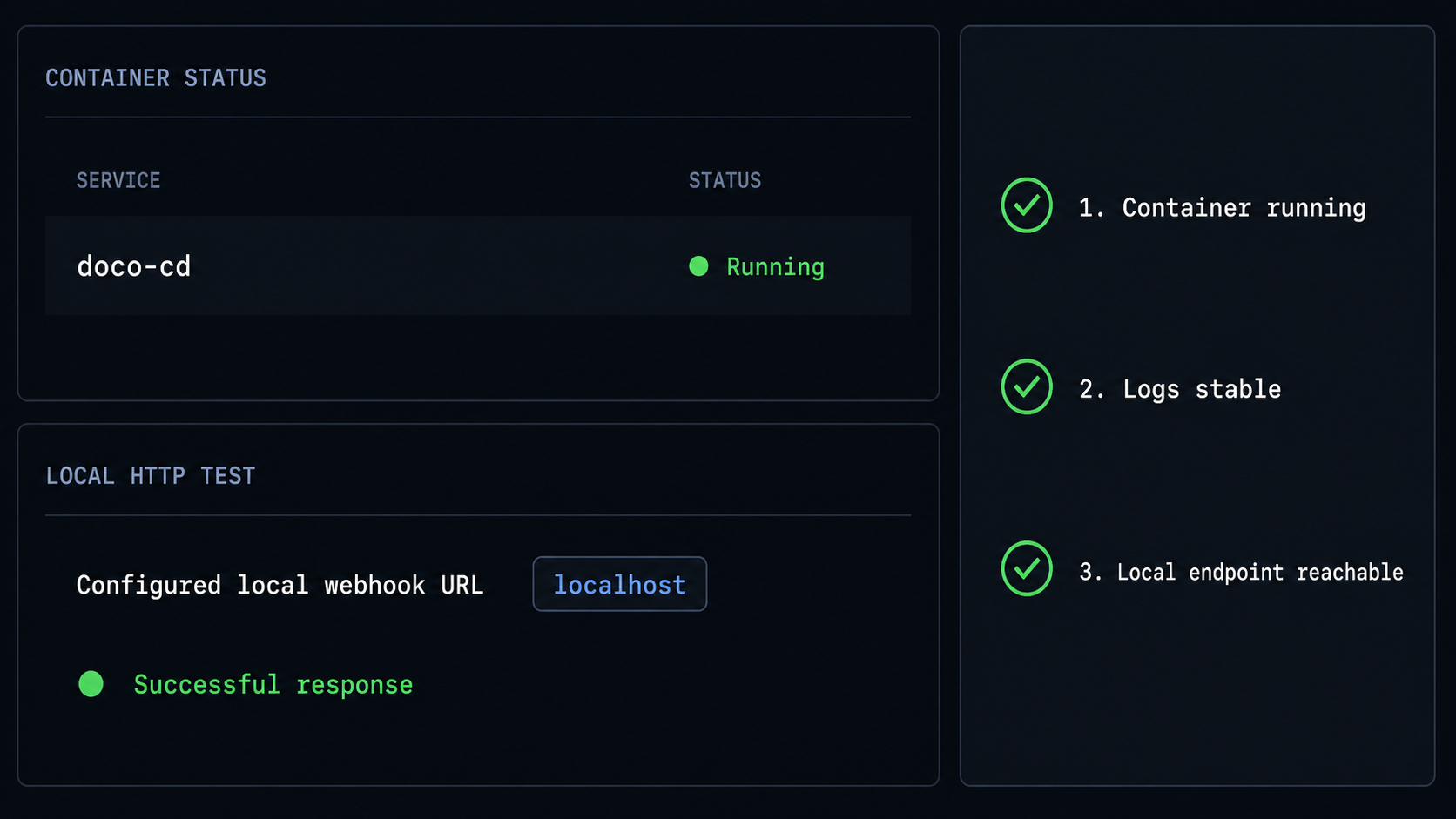
Perform verification from the inside out. The correct order is controller process, persistent configuration, source access, Docker target, reconciliation, HTTP receiver, webhook signature, and finally public delivery.
Check container and health status
Confirm that the service remains running. If the official Compose definition includes a health check, wait for it to become healthy and inspect the health output when it does not.
Read startup logs
Look for configuration parsing, state-directory, repository authentication, Docker endpoint, listener, and context errors.
Prove source access
Confirm that doco-cd discovers the acceptance repository and selected revision without printing credentials.
Prove Docker target identity
Match the configured context with the intended daemon before permitting reconciliation.
Perform a harmless reconciliation
Change the test label, merge the commit, trigger polling or reconciliation, and verify the resulting container labels.
docker compose ps
docker compose logs --since=10m doco-cd
docker inspect --format '{{ index .Config.Labels "tutorial.change" }}' acceptance-test
The exact test container name may include the Compose project prefix. Find it first when necessary:
docker ps --filter label=com.docker.compose.service=acceptance-test
docker ps --format 'table {{.Names}}\t{{.Image}}\t{{.Status}}'
Change tutorial.change from initial to second, commit it, and trigger the configured reconciliation method. The inspected label should become second. Record the commit ID, event time, doco-cd log time, target context, and resulting container ID.
To test workload rollback, revert the test commit through Git rather than manually editing the running container:
git revert <test-change-commit>
git push
Reconcile again and confirm that the label returns to the known-good value. This proves that repository rollback works for the acceptance workload. It does not guarantee application-data rollback for stateful services, which requires a separate backup and migration design.
Verify the HTTP receiver and a signed GitHub webhook
Use the listening address, published port, webhook path, and secret setting from the rendered 0.115.0 configuration and its version-matched documentation. Do not infer them from a screenshot or from another controller. The commands below use shell variables so the same verified values flow into local testing and the Localtonet setup.
export DOCO_CD_ADDRESS=127.0.0.1
export DOCO_CD_PORT='<published-port-from-docker-compose-port>'
export DOCO_CD_WEBHOOK_PATH='<documented-github-webhook-path>'

docker compose port doco-cd '<documented-container-http-port>'
printf 'http://%s:%s%s\n' \
  "$DOCO_CD_ADDRESS" \
  "$DOCO_CD_PORT" \
  "$DOCO_CD_WEBHOOK_PATH"
Place the actual documented values in the variables before running a request. This revision does not replace those fields with guessed defaults because the effective host port can be changed by Compose, and provider routes can change between versions. The authoritative local endpoint is the combination printed from the running version's Compose mapping and provider configuration.
A generic browser request does not prove webhook compatibility. GitHub signs the raw request body with the shared secret and sends the result in X-Hub-Signature-256. The receiver must compute the same HMAC-SHA256 value over the unchanged payload and reject a missing or incorrect signature.
Store the shared secret in the doco-cd secret setting documented for GitHub and enter the same value in the GitHub webhook configuration. Keep it out of Git, Compose command-line arguments, terminal recordings, screenshots, and shell history. For a local acceptance test, load it from a protected file:
umask 077
printf '%s' '<random-webhook-secret>' > webhook-secret
printf '%s' '{"ref":"refs/heads/main","repository":{"full_name":"example/acceptance"}}' > webhook-payload.json

signature="$(
  openssl dgst -sha256 \
    -hmac "$(cat webhook-secret)" \
    webhook-payload.json |
  awk '{print $2}'
)"

curl --fail-with-body \
  -X POST \
  -H 'Content-Type: application/json' \
  -H 'X-GitHub-Event: push' \
  -H "X-Hub-Signature-256: sha256=${signature}" \
  --data-binary @webhook-payload.json \
  "http://${DOCO_CD_ADDRESS}:${DOCO_CD_PORT}${DOCO_CD_WEBHOOK_PATH}"
The sample payload is intentionally bounded and may not map to a configured repository. Its purpose is to send a correctly signed GitHub-style request to the documented receiver. Judge signature acceptance from the HTTP response and doco-cd logs. For an end-to-end deployment test, use GitHub's actual test delivery or redelivery for the configured acceptance repository after the public URL is available.
Repeat the local request with a deliberately incorrect signature:
curl \
  -X POST \
  -H 'Content-Type: application/json' \
  -H 'X-GitHub-Event: push' \
  -H 'X-Hub-Signature-256: sha256=invalid' \
  --data-binary @webhook-payload.json \
  "http://${DOCO_CD_ADDRESS}:${DOCO_CD_PORT}${DOCO_CD_WEBHOOK_PATH}"
The invalid request must be rejected and must not initiate reconciliation. If both valid and invalid signatures are accepted, stop the integration and correct the webhook-secret configuration before creating public ingress.
A secret in the URL is not a substitute for request-signature verification. The provider and doco-cd must share a strong secret, and validation must cover the raw body delivered by the provider. Rotate the secret immediately if it appears in logs, screenshots, shell history, committed files, or support material.
Expose the verified webhook with a Localtonet HTTP tunnel
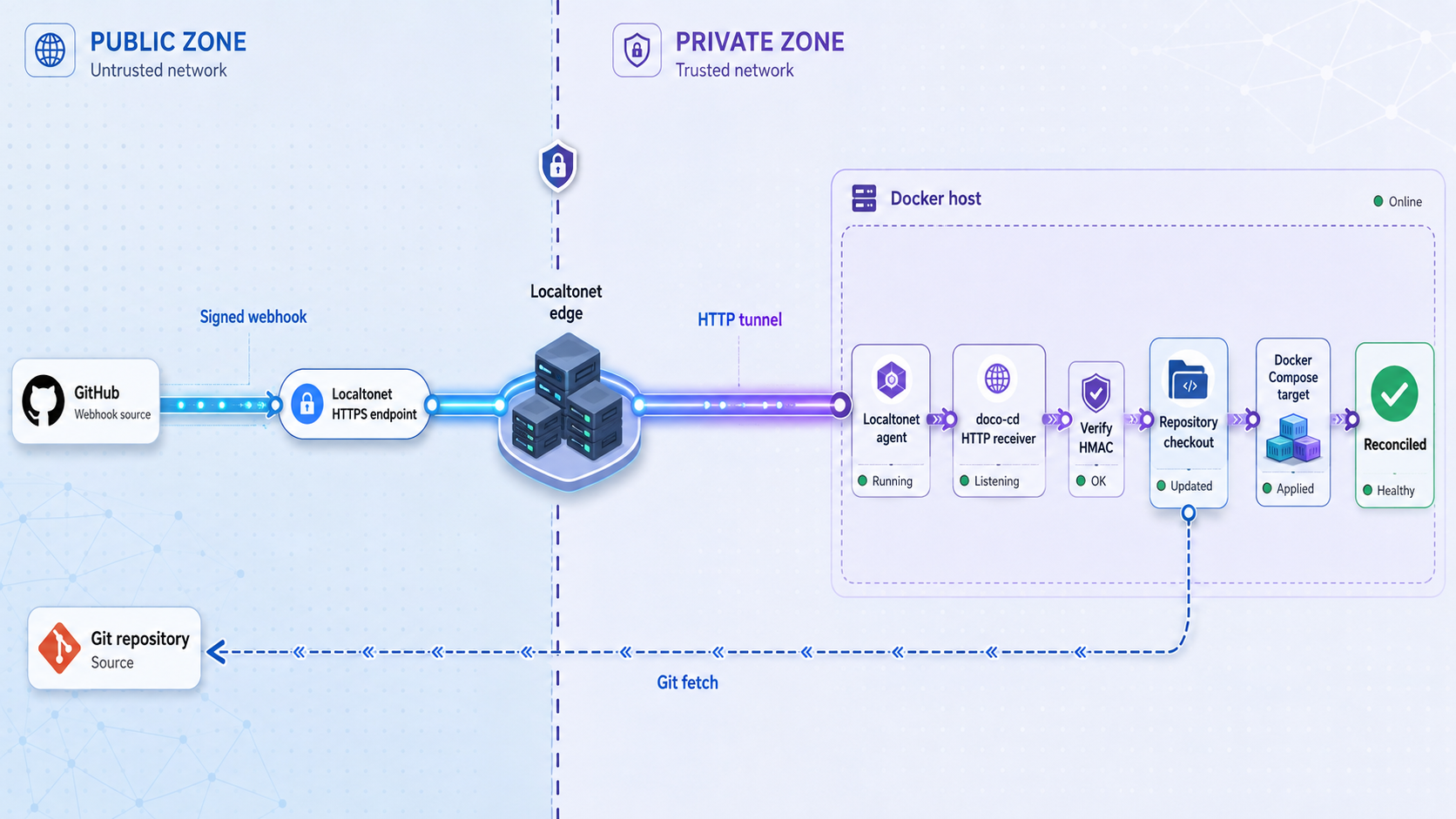
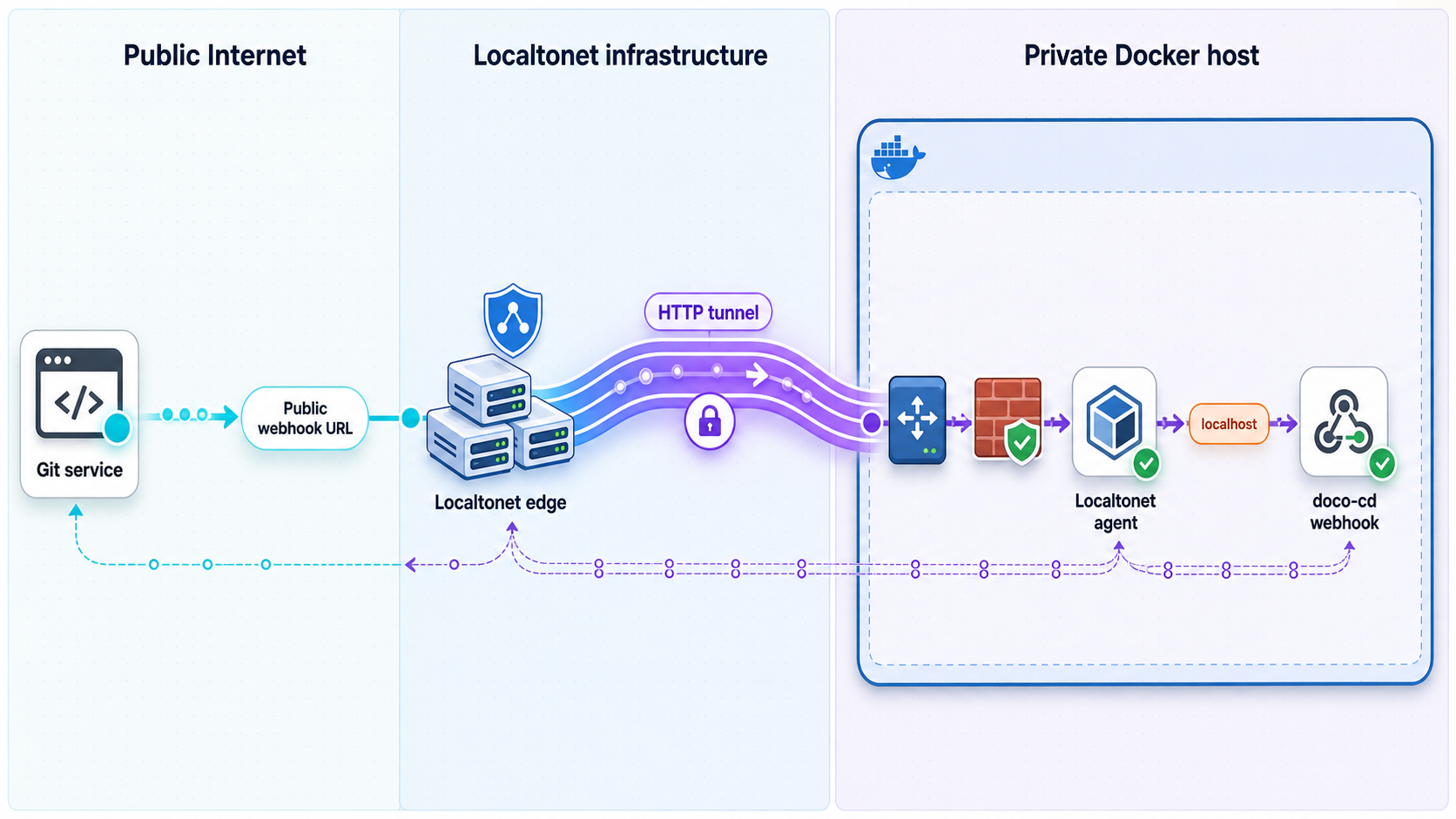
After the local signed request succeeds and an invalid signature is rejected, create a Localtonet HTTP tunnel. Our client establishes an outbound connection to a Localtonet relay and provides a public HTTPS address for the selected local target. The host does not need an inbound router port-forwarding rule, a public IP address, firewall changes, or a VPN.
Keep the local values from the verification stage. The Localtonet target is the verified address and published port, not the container's internal address unless the Localtonet client can directly reach that container network. If the client runs on the same host and Compose publishes only to loopback, use 127.0.0.1 and the confirmed host port.
For the current dashboard workflow and related options, consult the Localtonet HTTP tunnel documentation.
Install and run the Localtonet client
Run our client on the doco-cd host or another device that can reach the verified local HTTP listener.
Select the correct device token
Choose the device-specific authentication token associated with that client. Never publish or reuse a real token in documentation.
Select an available relay server
Choose a currently available server or region from the dashboard rather than copying a server code from an article.
Create the HTTP tunnel
Enter the verified local IP address and published host port from the doco-cd acceptance test.
Start the tunnel
Creating a tunnel does not start it. Use the Start button and confirm that the selected client is connected.
Append the documented webhook path
Combine the assigned public HTTPS origin with the exact path stored in DOCO_CD_WEBHOOK_PATH. Configure that full URL at the Git provider.
export PUBLIC_ORIGIN='https://<assigned-localtonet-host>'
printf '%s%s\n' "$PUBLIC_ORIGIN" "$DOCO_CD_WEBHOOK_PATH"
Copy the resulting URL into the GitHub webhook configuration, select the event required by the documented doco-cd integration, and enter the same protected webhook secret. Send a test delivery or redeliver a recent event. Confirm all four records:
- GitHub reports the delivery status and response.
- doco-cd logs show the event at the same time.
- The repository and branch map to the acceptance deployment.
- The expected Docker context receives the reconciliation.
Localtonet forwards requests to the configured local HTTP target. doco-cd must still validate the provider signature and apply its repository and event rules. Keep metrics, Docker endpoints, and unrelated management routes outside the public integration unless they have a separate, justified access design.
The public URL is available only while the selected Localtonet client is connected and the tunnel is running. If either stops, webhook deliveries fail until connectivity returns. GitHub retains delivery records that can be redelivered manually. Do not assume every provider retries indefinitely; review the provider's current delivery behavior and keep polling enabled if it is part of your resilience design.
Back up, upgrade, roll back, and recover safely
Back up controller material
Back up the checked-out Compose definition, local override, non-secret configuration, persistent state, and the inventory of secret references. Back up the Docker context material only through a protected process because it may contain client keys or endpoint credentials. Test restoration on a separate host or non-production context.
A useful backup record includes the Git release tag, image digest, rendered configuration checksum, active Docker context, repository definitions, polling settings, webhook path, and secret-rotation date. Store the actual secret in the approved secret system, not in the record.
git describe --tags --exact-match
docker image inspect \
  --format '{{index .RepoDigests 0}}' \
  ghcr.io/kimdre/doco-cd:0.115.0
docker compose config --images
docker context show
Upgrade with a staged pin
Read every release note between the installed and target versions. Pull the new fixed tag without changing the running service, back up persistent state, update the override, render the merged configuration, and test it against the acceptance repository and a non-production Docker context.
export NEW_VERSION='<reviewed-version>'
docker pull "ghcr.io/kimdre/doco-cd:${NEW_VERSION}"
docker image inspect "ghcr.io/kimdre/doco-cd:${NEW_VERSION}"
docker compose config --quiet
After changing the image pin, recreate the controller and follow the same acceptance sequence used during installation:
docker compose up -d
docker compose ps
docker compose logs --since=10m doco-cd
Validate startup, source access, context identity, polling, signed webhooks, scheduled jobs, notifications, and metrics for every feature your installation uses. A healthy container alone is not an upgrade acceptance test.
Roll back the controller
If the new controller fails before any incompatible state change, restore the previous image pin and configuration, then recreate the service:
docker compose down
git checkout <previous-release-tag>
docker compose up -d
docker compose logs --since=10m doco-cd
Restore persistent state only according to the project's release notes and documented migration behavior. Do not copy an older state directory over a newer one while the controller is running. Controller rollback and workload rollback are separate operations: reverting doco-cd does not undo a Compose deployment already applied to an application.
Restart and tunnel behavior
Confirm the restart policy in the rendered Compose model. After a host restart, verify doco-cd, its Docker target, and the Localtonet client independently. A running controller does not imply a running tunnel, and a running tunnel does not imply that doco-cd is healthy.
When the tunnel is unavailable, preserve the provider delivery identifier and timestamp. Restore the Localtonet client and start the tunnel, verify the local receiver, then use the provider's supported redelivery function. Correlate the redelivery with doco-cd logs before making another repository change.
Recover compromised credentials
If a repository credential is exposed, revoke it, create a least-privilege replacement, update the protected secret input, restart or reload doco-cd as documented, and verify source access. If a webhook secret is exposed, replace it in doco-cd and at the provider, then prove that the old signature is rejected and the new one is accepted.
If Docker context credentials or the Docker socket boundary may have been compromised, treat the affected Docker host as potentially compromised. Stop reconciliation, disable public ingress, rotate remote Docker credentials where applicable, inspect running containers and host mounts, and follow the host incident-response procedure.
Upgrade note for installations crossing 0.113.0
Release v0.113.0 removed the deprecated one_shot job alias; use one_off. It retired legacy auto-discovery labels in favor of cd.doco.deployment.auto_discovery and cd.doco.deployment.auto_discovery.config. Existing labels are described as automatically migrated, but new definitions should use the current names.
That release also removed support for PKCS#1 encrypted private keys because the underlying Go API was deprecated. Convert affected keys to a supported modern OpenSSH format or another format accepted by the current documentation. It introduced cd.doco.deployment.autostart, which defaults to true. Setting it to false allows an external tool to preserve a service in a created or stopped state.
services:
  on-demand:
    image: example/on-demand:latest
    labels:
      cd.doco.deployment.autostart: "false"
This historical migration information matters only to installations upgrading from a release before or around 0.113.0. It is not the primary deployment target for this tutorial.
Troubleshooting doco-cd and webhook delivery
| Symptom | Boundary to inspect | Diagnostic action |
|---|---|---|
| The image does not pull | Registry, image name, or release tag | Check access to ghcr.io, confirm the release exists, and omit the leading v from the image tag |
| Compose uses the wrong image | Override merge | Run docker compose config --images and verify the fixed version before startup |
| The container repeatedly restarts | Configuration, mounts, permissions, or secrets | Run docker compose ps and docker compose logs --tail=200 doco-cd, then compare the rendered model with the checked-out release |
| Health status is unhealthy | Documented health check or listener | Inspect the container health output and verify the published port and required state paths |
| The repository cannot be read | Clone URL, token, key, or repository permission | Confirm the version-supported authentication method and replace the credential without printing it |
| The wrong host is changed | Docker context selection | Stop reconciliation and compare docker context inspect with the context available inside the controller |
| Polling sees no update | Branch, path, revision, or polling configuration | Check the repository mapping and correlate the commit ID with doco-cd logs |
| A signed local request is rejected | Secret, raw payload, algorithm, or webhook path | Recompute HMAC-SHA256 over the unchanged file and verify the configured GitHub secret and documented route |
| An invalid signature is accepted | Webhook validation | Stop public ingress immediately and correct the doco-cd provider-secret configuration |
| Local delivery works but public delivery fails | Localtonet client, tunnel state, or public URL | Confirm the client is connected, the tunnel is started, and the public URL includes the exact webhook path |
| The provider reports success but no deployment occurs | Event filter, repository mapping, branch, or context | Match the provider delivery time and identifier to doco-cd logs, then inspect the selected context |
| Events were missed during downtime | Tunnel or controller availability | Restore local health first, restart the tunnel, and use provider redelivery while watching doco-cd logs |
| Jobs fail after crossing 0.113.0 | Removed job alias | Replace one_shot with one_off in affected job definitions |
Correlate evidence instead of making several changes at once. Keep UTC timestamps for the provider delivery, Localtonet request, doco-cd log entry, Docker event, and resulting container. Change only one boundary after collecting the current state.
Useful operational commands include:
docker compose ps
docker compose logs --since=15m --timestamps doco-cd
docker events --since=15m
docker context show
docker ps --format 'table {{.Names}}\t{{.Image}}\t{{.Status}}'
If secret values appear in logs, stop copying or sharing those logs. Rotate the affected credential, remove it from retained diagnostic files where your policy permits, and collect a new redacted log sample.
Frequently asked questions
What is doco-cd used for?
doco-cd is a lightweight GitOps continuous delivery service for Docker Compose projects and Docker Swarm stacks. It can retrieve deployment definitions from Git repositories or OCI artifacts and reconcile them through polling, webhooks, or both.
Why does this tutorial pin version 0.115.0?
Version 0.115.0 is the fixed-image example in the stable documentation reviewed for this revision. Pinning makes installation and rollback more predictable. Check the current releases before deployment because a newer stable release may exist when you read this.
Why use the official release Compose definition?
It preserves the project's version-matched service, mounts, ports, health behavior, and runtime relationships. A local override can pin the image without replacing those definitions. Always inspect the merged result with docker compose config.
Does doco-cd require direct access to Docker?
It needs access to the Docker daemon or context that owns the managed workloads. This is a powerful administrative capability. Protect the socket or remote context, restrict repository changes, and verify the selected target before reconciliation.
Must doco-cd have a public webhook?
No. Polling can discover changes through outbound repository access. A public callback is required only when you choose webhook delivery. Some installations use both polling and webhooks.
How do I determine the Localtonet target port?
Use docker compose port and the rendered Compose model to identify the host address and published port for the documented doco-cd HTTP listener. Test the complete webhook route locally before entering that address and port in Localtonet.
Does Localtonet validate GitHub signatures?
No. Our HTTP tunnel provides reachability to the configured local target. doco-cd must validate the GitHub HMAC signature using the shared webhook secret and reject invalid requests.
What happens if the Localtonet client disconnects?
The public route is unavailable while the selected client is disconnected or the tunnel is stopped. Restore local health, reconnect the client, start the tunnel, and use the provider's supported redelivery workflow for missed events.
Does rolling back doco-cd roll back deployed applications?
No. Controller rollback restores the doco-cd version and configuration. Application rollback requires reverting the desired deployment revision and reconciling it. Stateful applications also need an independent data-backup and migration plan.
Connect your verified doco-cd webhook with Localtonet
After the pinned controller is healthy, the acceptance repository reconciles against the correct Docker context, and invalid webhook signatures are rejected, create a Localtonet HTTP tunnel for the verified local listener and use its public HTTPS address at your Git provider.
Get Started Free →

