

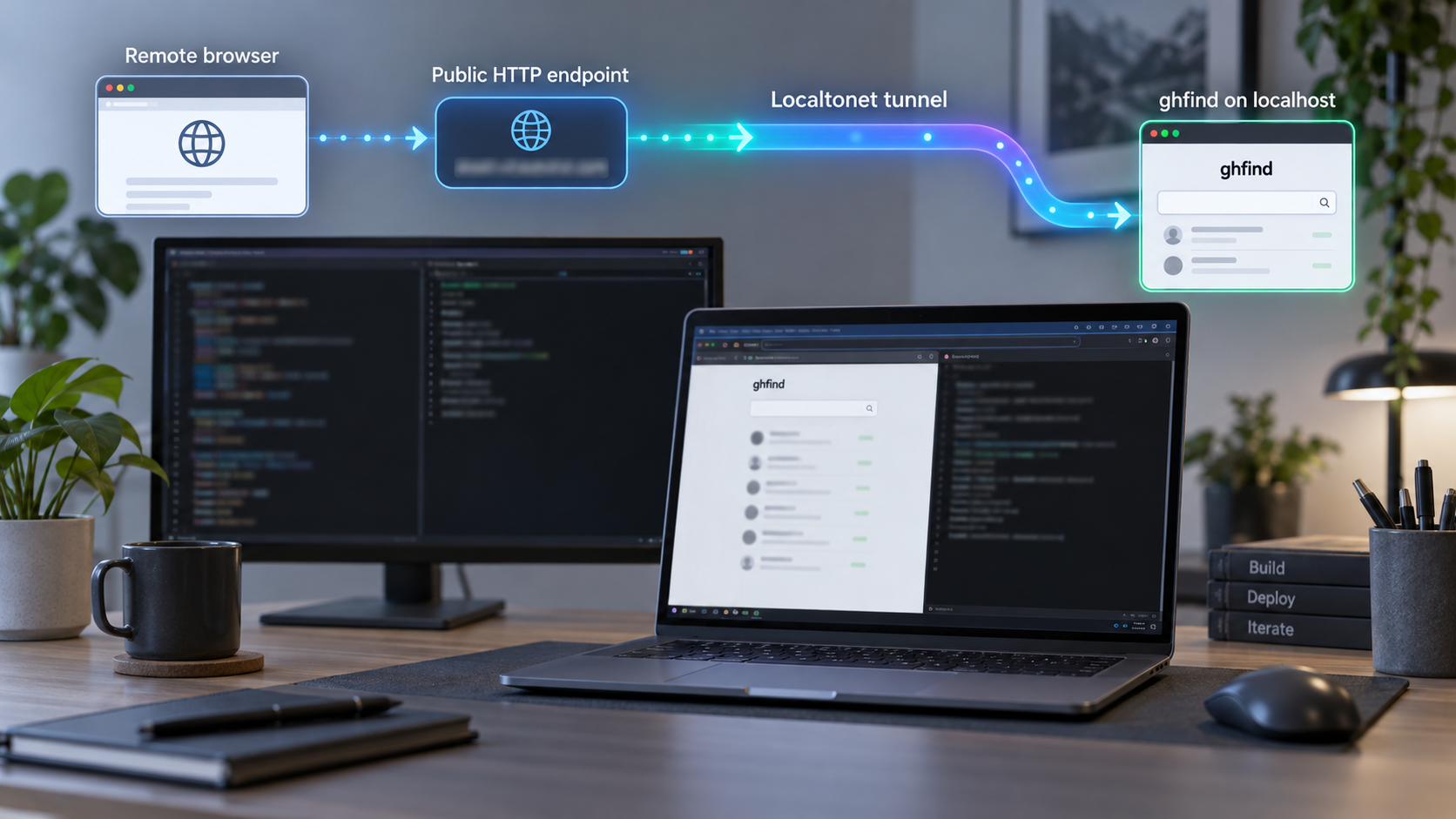
Run developer scoring, REST API, and MCP workflows from your own machine
ghfind is a self-hostable Next.js application for evaluating public GitHub profiles, discovering developers, and using the scoring engine through browser, REST API, and MCP interfaces. This guide walks through the documented local setup with pnpm, the Wrangler local D1 emulator, two database migrations, and a server-side GitHub token. We then verify the application locally before exposing its HTTP service through Localtonet. The result is a practical remote-access workflow that does not require inbound router port forwarding, a public IP address, or a VPN.
📋 What's in this guide
What you are self-hosting
ghfind is an evidence-based developer discovery and GitHub profile scoring application. A user submits a public GitHub handle, and the application evaluates public account activity to produce a value and trust score from 0 to 100. The scoring model considers six dimensions: account maturity, original project quality, contribution quality, ecosystem impact, community influence, and activity authenticity. It also checks for farming-related warning signals intended to distinguish sustained engineering work from easily inflated metrics.
The base score is deterministic and is computed on the server. ghfind also supports an optional language-model workflow in two separated passes. A bounded judge pass may calibrate a score within a limited range, while a writer pass creates report text and tags without changing the fixed result. The deterministic scoring path does not require an LLM. Because the documented environment-variable names for every optional model provider are not included in the available installation evidence, this guide does not invent them. If you want optional generated reports, use the variable names and provider instructions present in the version of .env.example that you checked out.
The same application exposes several surfaces. The browser interface is useful for interactive searches and reports. The REST API supports programmatic scoring. The MCP endpoint lets compatible AI clients use ghfind tools through Streamable HTTP. These surfaces run behind the same local Next.js HTTP service, which is why one Localtonet HTTP tunnel can provide remote transport to the application.
How requests move through the application
A browser scoring request is sent to ghfind's server-side API. The server obtains public GitHub information through GitHub's REST and GraphQL interfaces using the operator's configured token, runs the scoring logic, and may write cache or database state. The repository documentation describes Redis as optional in this flow, so a separate Redis deployment is not part of the basic local installation documented here.
This separation matters for security. A visitor does not need to receive your GitHub token in order to request a score. The token belongs in the server's local environment file and must remain on the machine running ghfind. Remote visitors communicate with ghfind, and ghfind communicates with GitHub.
The documented setup is primarily a local development workflow using Wrangler's local D1 emulator. The repository also documents build and start commands, but the available evidence does not define a complete hardened production architecture, backup policy, authentication layer, process supervisor, or high-availability design. Treat internet exposure as an operator-managed deployment decision.
Prerequisites and planning
Prepare the host before cloning the repository. The machine must be able to reach GitHub over outbound HTTPS, run the Node.js toolchain required by the checked-out ghfind version, and run pnpm. You also need Git if you plan to clone the repository from its upstream URL. The exact supported Node.js and pnpm versions were not established in the supplied project evidence, so this article deliberately does not guess them. Check the repository's current package metadata, package-manager declaration, lockfile, and any engine constraints before choosing versions.
You also need a GitHub personal access token for the server-side GITHUB_TOKEN setting. Create and manage that token through GitHub, grant only the permissions required by the ghfind version you are deploying, and do not paste it into terminal history, screenshots, support messages, source control, or a public tunnel configuration. The available evidence does not specify a universal scope set, so we cannot safely prescribe scopes that might be excessive or insufficient.
| Requirement | Why it is needed | What to verify |
|---|---|---|
| Git | Retrieves and updates the ghfind source tree | The git command is available and the host can reach the repository |
| Compatible Node.js runtime | Runs the Next.js application and project tooling | The installed version satisfies the current repository metadata |
| Compatible pnpm release | Installs dependencies and runs the documented scripts | The version agrees with the current package-manager declaration or lockfile |
| GitHub token | Lets the server retrieve public GitHub data through GitHub APIs | The token is valid, minimally privileged, and stored only in the local environment file |
| Writable local storage | Stores dependencies, build output, and local D1 emulator state | The account running ghfind can write inside the project directory |
| Localtonet client | Creates the outbound connection used for remote access | Install it on the ghfind host or another device that can reach the local service |
Choose the Localtonet client location
The simplest arrangement is to run ghfind and our client on the same machine. In that case, the HTTP tunnel can target 127.0.0.1 on port 3000, matching the documented local ghfind endpoint. If our client runs on another device, that device must be able to reach ghfind over the local network, and ghfind must listen on an address reachable from that device. The supplied ghfind evidence does not document a supported bind-address flag, so this guide does not invent one. Use the same-host arrangement unless the current project documentation explicitly establishes a different binding procedure.
Decide who should be able to use the deployment
The upstream score API is described as requiring no caller authentication. That statement concerns the ghfind application endpoint, not the security of your GitHub token. It also means that placing your self-hosted service on a public URL can make the scoring route callable by anyone who knows the address unless you add an independently verified access-control layer.
Before creating a tunnel, decide whether the deployment is intended for public sharing, a controlled team integration, or temporary testing. A tunnel solves reachability. It does not automatically add application-level authorization to a route that does not implement it.
Install the ghfind source and dependencies
The following sequence follows the project's documented pnpm installation path. Run it from a terminal under the operating-system account that will own the application files.
Clone the ghfind repository
Retrieve the source and enter the project directory. If you already have a reviewed checkout, use that directory instead of cloning another copy.
Install dependencies with pnpm
Run the documented dependency installation command from the repository root. Keep the lockfile intact so pnpm resolves the versions selected by the project.
Create the local environment file
Copy .env.example to .env.local. The copied file is where the local server configuration, including GITHUB_TOKEN, is supplied.
git clone https://github.com/hikariming/ghfind.git
cd ghfind
pnpm install
cp .env.example .env.local
On Windows PowerShell, the equivalent file-copy operation is:
Copy-Item .env.example .env.localDo not remove variables from the example file merely because this guide does not discuss them. The template belongs to the checked-out ghfind release and is more current than a static article. Review its comments, keep required settings, and change only values you understand.
Treat .env.local as secret-bearing configuration. Confirm that it remains excluded from version control before adding a real token. If a token is accidentally committed, displayed publicly, or sent to an untrusted party, revoke it through GitHub and replace it rather than merely deleting the visible text.
Configure GitHub access and initialize local D1
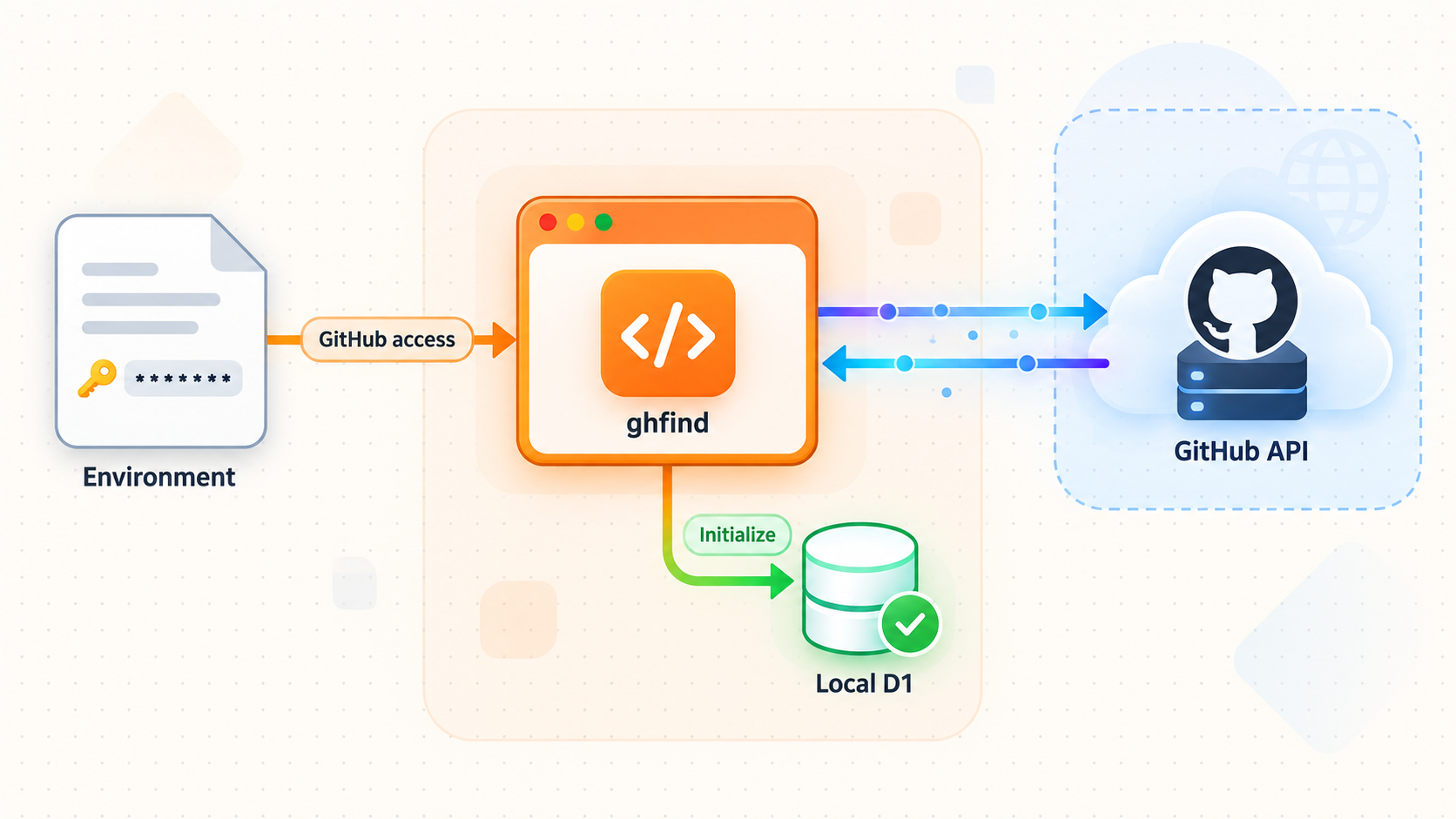
Open .env.local in a local text editor and assign your GitHub token to the documented variable. The line has this form:
GITHUB_TOKEN=your_github_token_here
Replace the placeholder locally. Do not include quotation marks unless the current example file specifically requires them, and do not copy the completed line into logs or issue reports. Optional LLM settings should also come from the checked-out .env.example. We do not provide guessed model-provider variable names because those details can change and were not fully established by the supplied evidence.
Apply both local database migrations
ghfind uses Wrangler's local D1 emulator for the documented development workflow. Two local D1 databases must receive their migrations before database-backed features are used. Run both commands from the repository root and preserve their documented order:
pnpm exec wrangler d1 migrations apply ghfind --local
pnpm exec wrangler d1 migrations apply ghfind-feed-dev --local
The first command applies migrations to the local ghfind database. The second initializes the local ghfind-feed-dev database. The --local option is important because this workflow is meant to use the local emulator. According to the project documentation, local development never connects to Cloudflare and does not require wrangler login.
Local D1 state persists under:
.wrangler/state/v3That directory is operational data, not a substitute for the migration files in source control. Preserve it if you need to retain local records between restarts. Before copying it for an operator-managed backup, stop the application so files are not changing during the copy. The project evidence does not define a formal production backup and restoration procedure, so test any backup process before depending on it.
Start the development server
After the environment file and migrations are ready, start ghfind:
pnpm dev
Keep the terminal open while testing. The documented local host value is http://localhost:3000. If the terminal reports a startup error or a different address, trust the running version's output and resolve that discrepancy before creating a tunnel.
The two migration commands initialize the local D1 schemas. After pulling a newer ghfind revision, review release notes and migration changes, then apply pending local migrations before relying on newly added database-backed behavior.
Verify the browser, REST API, and MCP surfaces locally
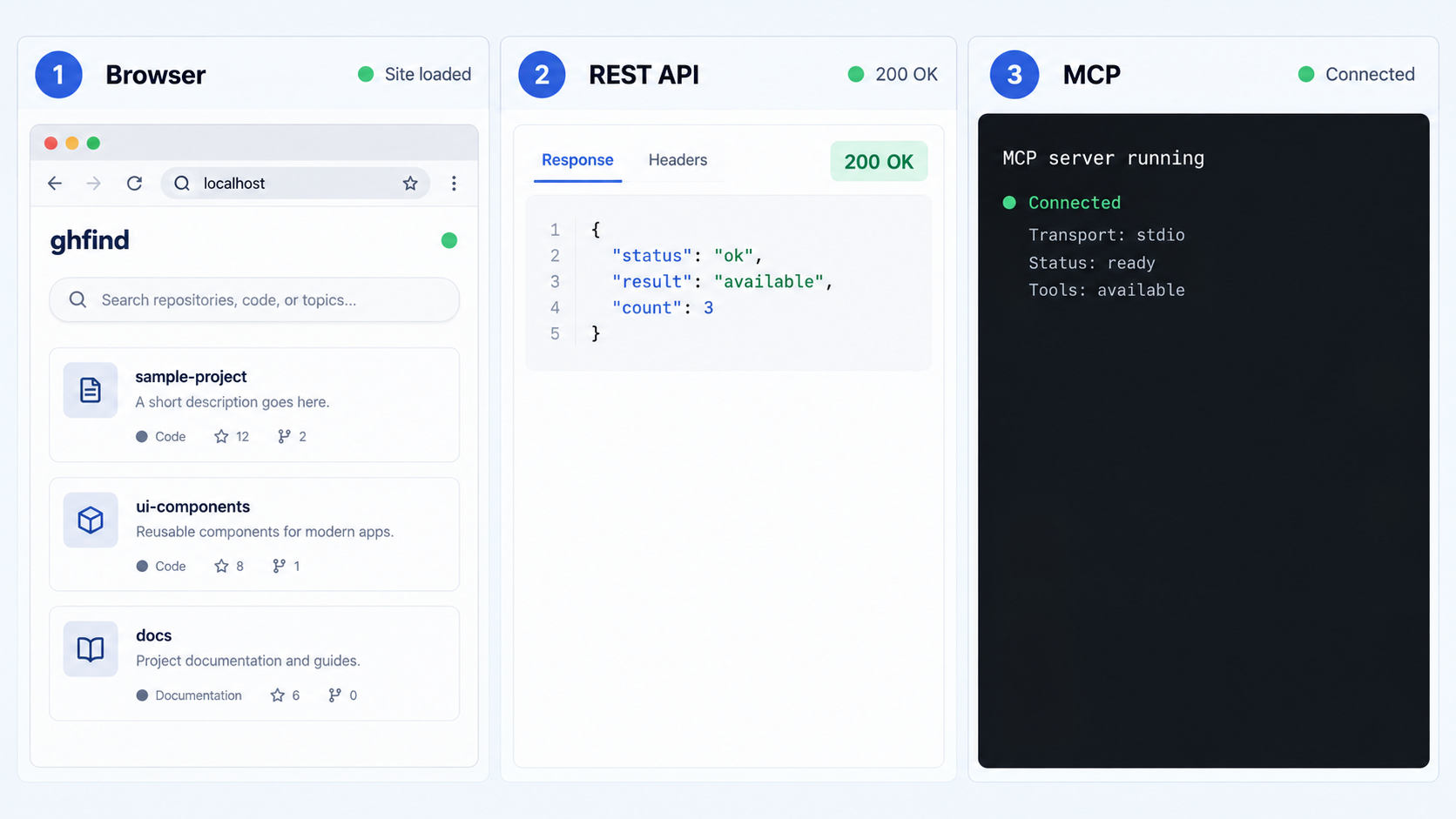
Do not expose ghfind remotely until all required local surfaces work. Local verification separates application problems from tunnel problems and gives you a known-good target for Localtonet.
Verify the browser application
On the ghfind host, open:
http://localhost:3000Confirm that the page loads without a server error. Submit a public GitHub username through the interface and watch the terminal for failures. A rendered home page alone does not prove that the GitHub token, API calls, migrations, and scoring path all work, so complete an actual profile request.
Verify the deterministic REST score route
The documented REST route is /api/score/{username}. The following request uses the public octocat account as a replaceable example:
curl -i http://localhost:3000/api/score/octocatA working route should return an HTTP response containing API output rather than a connection failure, an unhandled server error, or an HTML framework error page. The exact JSON schema can evolve, so integrations should follow the OpenAPI document supplied by the running ghfind release rather than depending on fields guessed by this article.
Although the score route does not require caller authentication, the local server still uses its configured operator token when retrieving GitHub data. If the browser shell loads but this request fails, inspect the ghfind terminal first. Invalid credentials, API limits, missing environment settings, and upstream connectivity are application-layer issues rather than Localtonet tunnel issues.
Verify the MCP endpoint correctly
The MCP endpoint is available at:
http://localhost:3000/mcpMCP over Streamable HTTP is a protocol endpoint, not necessarily a human-readable web page. Opening it in a browser or sending an arbitrary GET request may not constitute a valid MCP test. Configure a compatible MCP client to use the URL, initialize a session according to that client's supported Streamable HTTP workflow, and invoke one of the tools exposed by your running ghfind version.
The project's public documentation describes tools for scoring and scanning users, comparing accounts, retrieving leaderboards, and searching users. Tool names and schemas are part of the running MCP implementation, so let your MCP client discover them rather than hardcoding an unverified request body.
| Surface | Local address | Valid verification |
|---|---|---|
| Web interface | http://localhost:3000 |
Load the page and complete a profile scoring request |
| REST score API | http://localhost:3000/api/score/{username} |
Send an HTTP GET request and inspect the HTTP status and API response |
| MCP server | http://localhost:3000/mcp |
Connect with a Streamable HTTP-compatible MCP client and discover or invoke tools |
| OpenAPI description | http://localhost:3000/openapi.json |
Retrieve the document from the running release and use it to generate or validate API calls |
Build and run ghfind outside development mode
The development server is appropriate for installation checks and local iteration. The project also documents a production build and start path using the package scripts:
pnpm build
pnpm start
Run the build from a clean, configured checkout. If it fails, fix the reported type, dependency, configuration, or build error rather than exposing the development server as a workaround. Once the build succeeds, start it with pnpm start and repeat every local verification test. A successful development run does not guarantee that the production build has the same configuration or runtime behavior.
The available evidence also mentions pnpm start as a documented run option. Package scripts can evolve, so inspect the current package.json before automating startup. This guide can confirm the documented commands, but it cannot establish an unsupported process-manager configuration, operating-system service file, container deployment, restart policy, or cloud D1 production architecture.
Routine operation
For an interactive run, stop the foreground process with the terminal's normal interrupt action, commonly Ctrl+C. Stop the Localtonet tunnel separately when remote access is no longer required. Remember that creating a tunnel in our dashboard does not mean it is running, and stopping ghfind does not automatically delete its tunnel configuration.
When updating ghfind, preserve your environment configuration and local data, fetch or check out the intended release, install dependencies according to the lockfile, review new environment settings, apply pending local migrations, rebuild if appropriate, and verify locally before restoring public access. Avoid performing an unreviewed source update directly against an internet-accessible instance.
What this setup does not claim
A successful pnpm build and pnpm start provides a production-mode application process, but it does not by itself create a fully hardened production service. A durable deployment may also require supervised restarts, operating-system patching, log handling, resource controls, tested backups, access restrictions, and monitoring. Those controls depend on your environment and are not defined by the supplied ghfind installation evidence.
Expose the working ghfind service with Localtonet
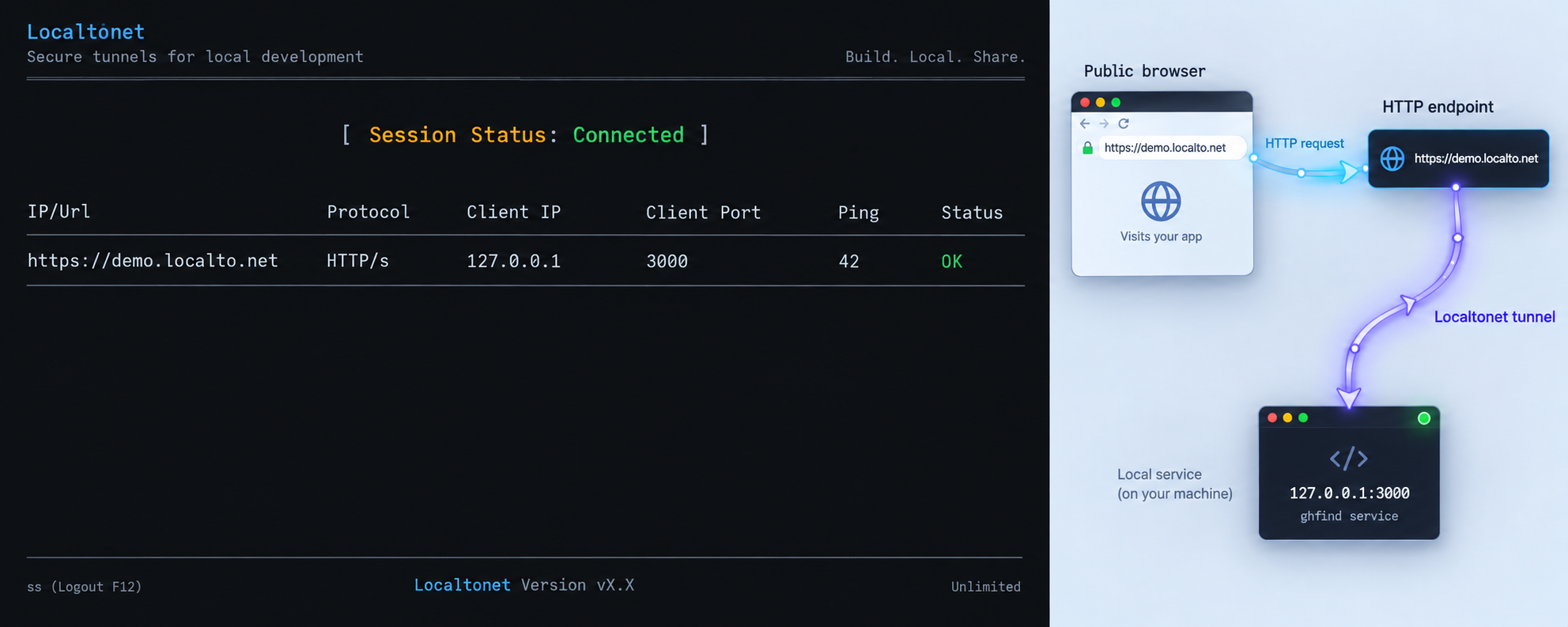
Once http://localhost:3000 works on the host, Localtonet can provide a public HTTP address for the service. Our client establishes an outbound connection to a Localtonet relay server, so you do not need to configure inbound router port forwarding, obtain a public IP address, modify the router firewall, or set up a VPN.
An HTTP tunnel is the appropriate tunnel family because ghfind serves its browser application, REST routes, OpenAPI document, and MCP Streamable HTTP endpoint through one HTTP service. The public URL keeps the same path structure. For example, if the assigned public origin is represented as https://your-assigned-address, the score route is under /api/score/{username} and the MCP endpoint is under /mcp. Use the actual URL assigned by the dashboard rather than copying this illustrative placeholder.
Install and run our client
Install the Localtonet application for the operating system on the ghfind host. Running it on the same host allows the tunnel to reach the loopback service directly.
Authenticate the client device
Use the device-specific authentication token provided through our platform. Treat the token as a secret and never place it in an article, public repository, screenshot, or client-facing configuration.
Select an available relay server
Choose a current server or region from the dashboard. Available server codes can vary, so obtain the value from the current product interface rather than hardcoding one from an old guide.
Create an HTTP tunnel to ghfind
Select the HTTP tunnel family and point the local target to 127.0.0.1 on port 3000 when our client and ghfind run on the same machine.
Choose the HTTP process type
Select Random Sub Domain, Custom Sub Domain, or Custom Domain according to the options currently available for your account. Each process type serves the tunnel at a public HTTPS address. Check current DNS documentation before configuring a custom domain.
Start and test the tunnel
Use the Start button, copy the assigned public URL, and repeat the browser, REST, and MCP checks through that URL. Creating the configuration alone does not start it.
For the current product interface and documented field sequence, review our HTTP tunnel documentation while creating the tunnel. Exact server selections, subscription availability, and domain options can change, so the live dashboard is authoritative for the choices available to your device.
The ghfind server must be running and our selected client device must remain connected with the tunnel started. If either process stops, the public endpoint cannot reach the local application. A saved tunnel configuration is not the same as an active tunnel.
Remote verification sequence
Begin with the public root URL in a browser. Then append the REST path and test a known public username. Finally, update your compatible MCP client from the local endpoint to the public /mcp URL and perform a protocol-level initialization. Testing in this order makes failures easier to isolate.
If the home page works remotely but an API route fails, the HTTP tunnel is generally reaching the application and the problem is likely route-specific or upstream. If every public path fails while local tests continue to work, inspect the Localtonet client connection, tunnel state, selected device, target IP, and target port.
Security and exposure checklist
Internet reachability changes the risk profile of a local application. ghfind consumes a server-side GitHub token, performs outbound API calls, and exposes routes that can trigger work. The upstream score endpoint is documented as unauthenticated for callers, so do not assume that possession of the URL provides meaningful access control.
Only expose ghfind to the audiences and for the duration you intend. If the deployment requires authenticated or restricted access, add a verified access-control layer suitable for your environment before making it public. Do not describe an unprotected URL as private merely because it uses a hard-to-guess subdomain.
.env.local, use the least privileges supported by the deployment, and rotate it immediately after suspected disclosure.
Also consider the privacy boundary of the data itself. ghfind evaluates public GitHub signals. Private organizational work is not visible to the scoring engine, so a score represents a public footprint rather than a complete judgment about a person's engineering ability or contribution quality. If you integrate scores into review workflows, use them as one input and retain human review.
Troubleshooting installation and remote access
| Symptom | Likely area | What to check |
|---|---|---|
pnpm is not found |
Toolchain | Install a pnpm version compatible with the current project metadata, then open a new terminal and confirm it is on the command path |
| Dependency installation fails | Node.js, pnpm, network, or lockfile | Confirm runtime compatibility, preserve the repository lockfile, and inspect the first actionable package-manager error |
| D1 migration command fails | Repository root or Wrangler tooling | Run from the ghfind root, confirm dependencies installed successfully, and retain the documented database names and --local option |
| Home page loads but scoring fails | GitHub token or upstream API | Confirm GITHUB_TOKEN is set in .env.local, restart after changes, and inspect server logs without printing the token |
localhost:3000 refuses the connection |
Application process | Confirm pnpm dev or pnpm start is still running and read its terminal output for the actual listening address |
| MCP URL looks blank or rejects a browser request | Protocol test method | Use a Streamable HTTP-compatible MCP client instead of treating the endpoint as a normal web page |
| Local access works but public access fails | Localtonet connection or tunnel target | Confirm our client is connected, the correct device and relay are selected, the tunnel is started, and the target is 127.0.0.1:3000 |
| Public root works but API calls fail | Application route or upstream dependency | Repeat the same route locally, inspect the HTTP status, and check ghfind logs for GitHub, environment, migration, or rate-limit errors |
| Data appears missing after moving the checkout | Local D1 state | Remember that local state persists under .wrangler/state/v3; verify whether that directory was preserved and whether migrations were applied in the new checkout |
Use a layer-by-layer diagnostic order
Start with the process itself. Confirm that ghfind is running and that the terminal does not show an immediate exception. Next, test the root page on localhost. Then test the REST route locally. After that, test MCP with a compatible client. Only when those checks pass should you investigate the public URL.
For the tunnel layer, verify that our client is connected, the intended device token is selected, the tunnel is running, and the target matches the local service. Avoid changing application settings and tunnel settings at the same time. One controlled change followed by one test gives you clearer evidence than several simultaneous changes.
Frequently asked questions
Does local ghfind development require a Cloudflare account or Wrangler login?
No. The documented local workflow uses Wrangler's local D1 emulator, does not connect to Cloudflare, and does not require wrangler login. Keep the --local option on both documented migration commands.
Where does ghfind store local D1 data?
The documented emulator state persists under .wrangler/state/v3 inside the project. Preserve that directory if you need the same local state after moving or replacing a checkout, and test any operator-defined backup and restore procedure before relying on it.
Is an LLM required to calculate the ghfind score?
No. The base score is deterministic and computed by the scoring logic. Optional LLM processing is separated into calibration and writing passes. Use the current .env.example if you choose to configure those optional capabilities.
Can one Localtonet HTTP tunnel expose the web app, API, and MCP server?
Yes. These are paths served by the same local HTTP application. The root web interface, /api/score/{username}, /openapi.json, and /mcp can use the same public origin when the tunnel targets the ghfind service.
Does Localtonet require inbound port forwarding for this setup?
No. Our client establishes an outbound connection to a relay server. You do not need an inbound router port-forwarding rule, a public IP address, firewall changes for an inbound listener, or a VPN for this HTTP tunnel workflow.
Does the public Localtonet URL automatically protect the ghfind API with authentication?
No. A tunnel provides connectivity to the local application. It does not automatically add application authorization to routes that ghfind exposes without caller authentication. Add independently verified access controls when your use case requires restricted access.
Why does the MCP endpoint not display a normal page in my browser?
The endpoint implements MCP over Streamable HTTP. It is designed for compatible MCP clients, not ordinary browser navigation. Test it by configuring an MCP client with the complete local or public /mcp URL and performing a protocol initialization.
Is this a complete hardened production deployment?
No. This guide documents the evidenced local installation, migrations, development startup, production build commands, local verification, and HTTP tunnel integration. A hardened deployment may additionally require authentication, supervision, monitoring, backups, resource limits, patch management, and other controls appropriate to your environment.
Make your verified ghfind service reachable
After the browser, REST API, and MCP endpoint work on localhost:3000, create a Localtonet HTTP tunnel to provide remote access without configuring inbound router port forwarding.


