

Run Langfuse on infrastructure you control, validate every dependency locally, and publish only the protected web endpoint
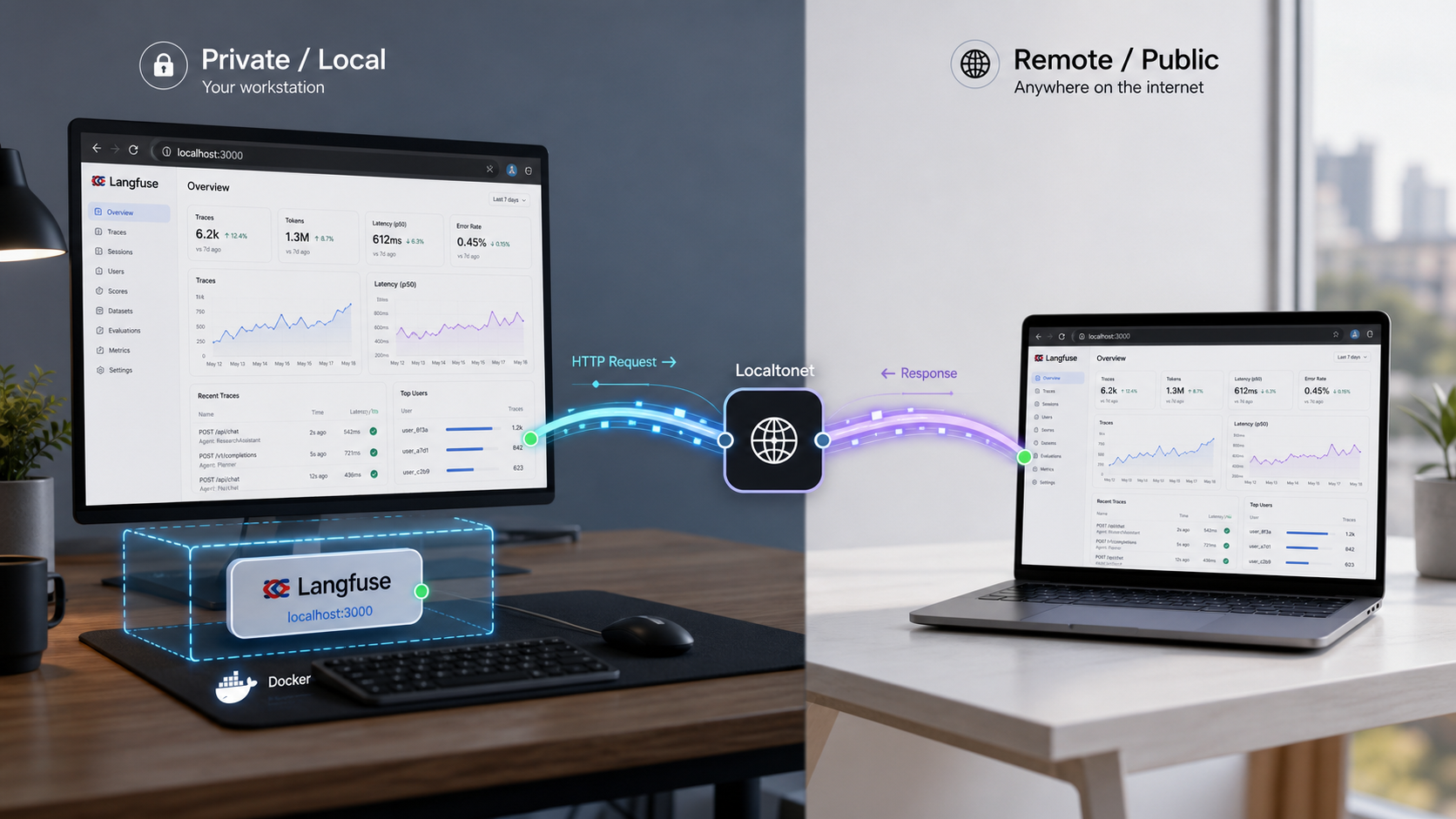
Langfuse is an open-source AI engineering platform for observability, evaluations, prompt management, datasets, and experiments. This tutorial uses its repository-provided Docker Compose deployment, which serves the web application on host port 3000 in the current Compose configuration. You will prepare deployment secrets, start and validate the persistent services, complete the first account setup, operate and back up the stack, and then create a Localtonet HTTP tunnel for authorized remote access. Localtonet provides the public HTTPS path without inbound router port forwarding, firewall changes, VPN setup, or a public IP address.
📋 What's in this guide
What Langfuse provides
Langfuse is an open-source platform for developing, observing, evaluating, and debugging LLM applications and AI agents. Its observability model records traces containing LLM calls and surrounding application activity, including retrieval, embeddings, tool invocations, and agent actions. Engineers can inspect those traces to understand how a workflow produced an answer, compare sessions, investigate latency or cost, and find failed or low-quality outputs.
The platform also includes prompt management, evaluations, datasets, experiments, a playground, human feedback workflows, and APIs for custom LLMOps processes. Prompt management separates prompts from application code and supports collaborative iteration. Evaluations can use model-based judges, code evaluators, user feedback, manual labeling, or custom API and SDK pipelines. Datasets provide repeatable test cases for regression checks and experiments.
Self-hosting gives the operator control over the infrastructure and deployment lifecycle. It also transfers responsibility for secrets, identity configuration, application updates, service health, persistent data, backups, recovery, and public-access policy. That distinction matters for Langfuse because traces can contain prompts, outputs, metadata, user or session identifiers, tool arguments, and other information from an AI application.
Understand the Docker Compose architecture
The repository-provided Compose deployment is not a single stateless web container. The current stack separates the Langfuse web application from background processing and includes several supporting data services. The web interface is published on host port 3000, while service-to-service communication takes place through the Compose network.
| Component | Role | Persistence or exposure consideration |
|---|---|---|
| Langfuse web | Serves the dashboard, account flows, and HTTP API | The current Compose mapping publishes the application at localhost:3000. |
| Langfuse worker | Processes asynchronous application work | It must be healthy even when the web page itself appears reachable. |
| PostgreSQL | Stores relational application state | Its data volume and credentials are part of the backup and recovery plan. |
| ClickHouse | Stores and queries observability data | Both its data and relevant metadata must be protected consistently. |
| Redis | Supports queues and coordination | Authentication values must agree between Redis and the Langfuse services. |
| MinIO | Provides S3-compatible object storage in the local stack | Its object data and access credentials must be included in recovery planning. |
Docker volumes preserve data when containers are recreated. They do not, by themselves, create an independent backup. Removing a Compose project with volume deletion, losing the host disk, or restoring inconsistent database and object-storage states can still cause data loss. Before storing important traces, identify the actual volumes created by your Compose project and establish application-consistent backups.
Choose evaluation or managed deployment practices
Langfuse documents local and virtual-machine deployments with Docker Compose. It identifies Kubernetes with Helm as the preferred production deployment path and also provides Terraform templates for AWS, Azure, and Google Cloud Platform. The right option depends on the operational requirements of the environment rather than only on whether the application starts successfully.
| Deployment path | Typical purpose | Change-management expectation |
|---|---|---|
Latest main with Docker Compose |
Fast local evaluation | The deployment is unpinned and can change whenever the repository changes. |
| Release tag with Docker Compose | Reproducible local or single-VM deployment | Record the selected tag, configuration, images, and tested upgrade procedure. |
| Kubernetes with Helm | Production-oriented orchestration | Langfuse identifies this as its preferred production deployment path. |
| Cloud Terraform templates | AWS, Azure, or GCP infrastructure | Review the current provider-specific architecture and configuration before use. |
The quick-start command retrieves the latest state of the default branch at clone time. That is convenient for evaluation but does not define a reproducible release. For a managed deployment, select and record a tested release tag from the Langfuse releases page. The release tag v4.22.0 is present in the supplied current evidence, but operators should still confirm the release they intend to deploy and test its configuration and migration path.
Prepare the Docker host
Install Git, Docker Engine or Docker Desktop, and a Docker Compose implementation that supports the docker compose command. Confirm that the Docker daemon is running and that the account performing the installation can create containers, networks, and volumes. On a shared or production-managed host, limit Docker administration to trusted operators because Docker access is highly privileged.
The full stack includes two Langfuse application services plus PostgreSQL, ClickHouse, Redis, and MinIO. It therefore needs materially more memory, CPU, and storage than a single lightweight web container. Current Langfuse self-hosting guidance should be treated as authoritative for minimum sizing, especially before production use. Allocate additional capacity according to trace volume, payload size, retention, evaluation activity, concurrent users, and backup overhead. Monitor actual consumption rather than assuming that an idle evaluation footprint represents production demand.
Make sure host port 3000 is available. The current Compose file maps the Langfuse web application to this port. If another process already owns it, Docker will report a bind error. You can either stop the conflicting process or deliberately change the host-side mapping and then use that changed port consistently for local validation and the Localtonet target.
You also need enough persistent disk space for relational data, ClickHouse observations, and object data. Place Docker storage on a suitable filesystem, account for database growth, and leave capacity for temporary files, image downloads, upgrades, and backups. A tunnel does not change these local resource requirements.
Verify the tools before cloning
git --version
docker --version
docker compose version
docker info
The first three commands confirm that the required clients are installed. docker info also checks whether the current account can communicate with the running Docker daemon. Correct any installation, permission, or daemon problem before continuing.
Review configuration and generate deployment secrets
The Compose file wires the application services to PostgreSQL, ClickHouse, Redis, and MinIO through environment variables. Important settings include the public application URL, the authentication secret, the application salt, the encryption key, the database connection, ClickHouse connection values, Redis authentication, and S3-compatible object-storage credentials.
The repository configuration may include development-oriented defaults so the stack can start quickly. Do not retain predictable example values for a remotely reachable or durable deployment. At minimum, review and replace values associated with NEXTAUTH_SECRET, SALT, ENCRYPTION_KEY, PostgreSQL, ClickHouse, Redis, and MinIO. Every producer and consumer of a credential must receive the same replacement value. For example, changing a Redis password only on the Redis service will prevent the Langfuse services from connecting.
Generate unique values, store them in a secrets manager or another protected operational store, and include them in the recovery plan. Do not commit a populated environment file to Git. Losing or unexpectedly changing encryption-related values can make protected application data unusable, while disclosing them weakens the deployment.
Generate strong random values
Run the following commands in a trusted shell. Each command prints a new value. Capture the output directly in your protected secret-management process rather than in screenshots or shared transcripts.
openssl rand -base64 32
openssl rand -base64 32
openssl rand -hex 32
Use separately generated base64 values for NEXTAUTH_SECRET and SALT. The hexadecimal command produces the 32-byte, 64-character hexadecimal value required for ENCRYPTION_KEY. Generate separate strong credentials for PostgreSQL, ClickHouse, Redis, and MinIO rather than reusing either application secret.
Before editing, inspect the exact variable references in the checked-out release:
docker compose configThis renders the resolved Compose configuration and catches many interpolation or syntax errors. It may also print resolved sensitive values, so run it only in a protected terminal and do not paste its output into tickets or public logs. Do not use this command as a substitute for reading the checked-out Compose file and the environment examples associated with that release.
Set the application URL deliberately
For local-only validation, the web application is reached at http://localhost:3000. Authentication systems use the configured application URL when constructing callbacks and redirects. Once you decide to use a stable public Localtonet hostname, review the checked-out Langfuse release's URL and authentication settings and set the canonical application URL to the exact external HTTPS origin where required.
Do not guess custom-domain DNS records or identity-provider callback paths. If you connect an external identity provider, copy the callback URL shown or documented for the exact Langfuse release and configure the provider to accept only the intended HTTPS origin. A mismatch commonly appears as a redirect to localhost, an invalid callback error, or a login loop.
Install Langfuse with Docker Compose
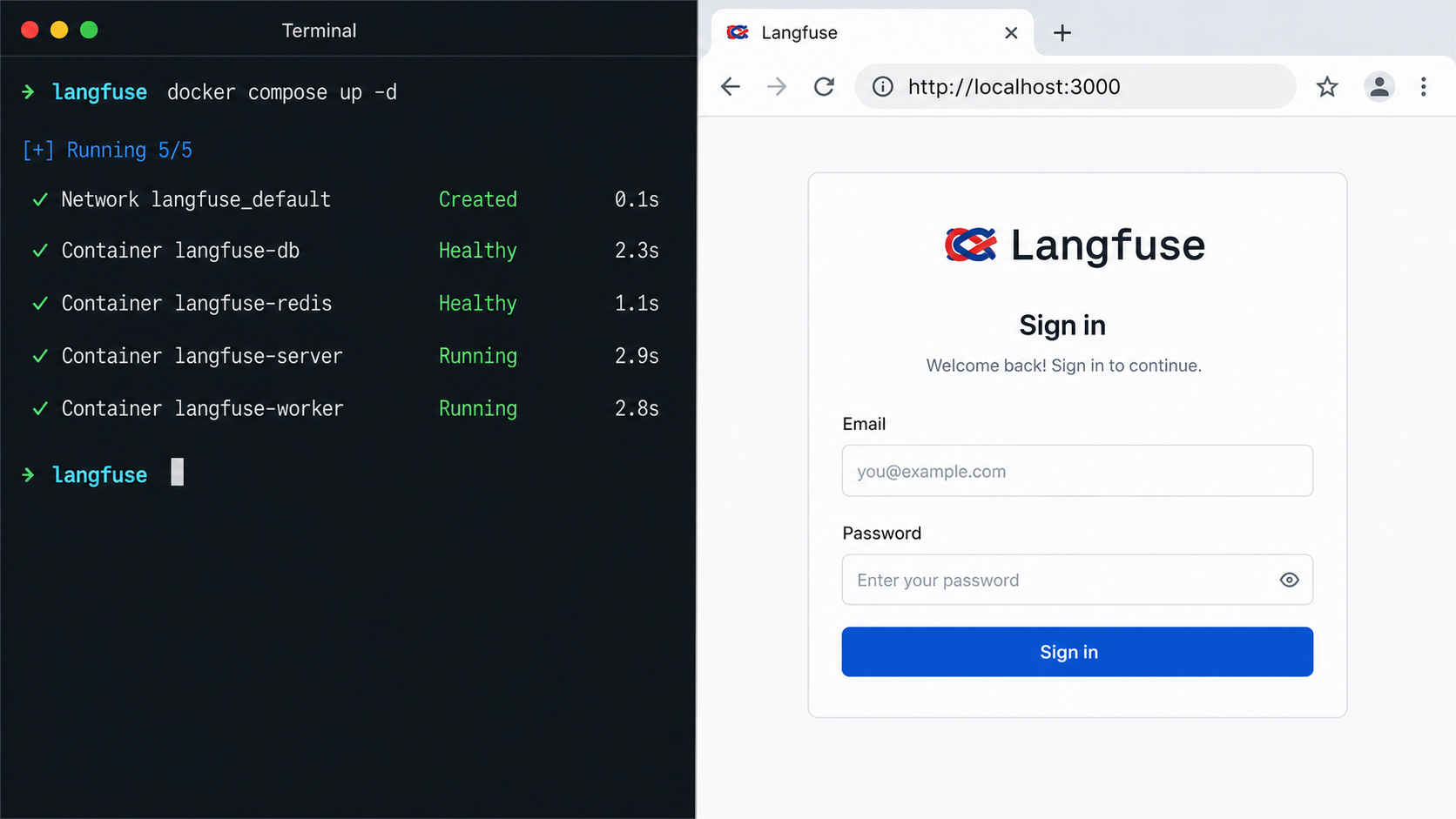
http://localhost:3000. All required services should become healthy before initial setup.
Option A: quick evaluation from the latest main branch
Use this path when you want the repository's latest state and accept that the result is not pinned to a release. The three commands are the current repository quick start.
Clone the latest repository state
Create a shallow clone of the current default branch in the working directory.
git clone --depth=1 https://github.com/langfuse/langfuse.gitEnter the repository
Change into the directory containing the repository-provided Compose configuration.
cd langfuseStart the stack
After reviewing and protecting the configuration, start all services in the foreground so startup messages remain visible.
docker compose upOption B: clone a specific release tag
A release tag provides a reproducible source reference. The following example uses the evidenced v4.22.0 release. If your organization approves another release, replace the tag with that reviewed version and record it in the deployment runbook.
git clone --branch v4.22.0 --depth=1 https://github.com/langfuse/langfuse.git langfuse-v4.22.0
cd langfuse-v4.22.0
docker compose up
Pinning source is only one part of reproducibility. Preserve the reviewed Compose configuration, environment-variable names, secret references, image versions resolved for the deployment, and backup and upgrade procedure. Do not silently move a managed environment from one release to another.
Run in detached mode after the first review
Foreground mode is useful for the initial start because dependency and migration messages remain visible. After you have reviewed startup and want the stack to continue after the terminal closes, use detached mode:
docker compose up -dDetached mode does not guarantee health. It only changes how Compose runs the containers. Continue with explicit status, log, readiness, and browser checks.
Verify readiness and complete initial setup
Begin with the Compose service list:
docker compose psLook for services that are running, unhealthy, restarting, or exited. A working web container is not enough if PostgreSQL, ClickHouse, Redis, MinIO, or the worker is failing. During the first start, initialization and migrations can take time, so use logs to distinguish normal startup from repeated failure.
docker compose logs --tail=200
docker compose logs -f
The first command gives a bounded startup history. The second follows new output until you stop following with Ctrl+C; it does not stop the containers.
Check the HTTP readiness endpoint
The current Compose host mapping makes the web service available on port 3000. Check the public health endpoint locally:
curl -fsS http://localhost:3000/api/public/health
A successful HTTP response shows that the web endpoint is answering. Also open http://localhost:3000 in a browser on the Docker host. If the Localtonet client will run on another LAN device, test the Docker host's reachable LAN address from that device instead. A service bound only to loopback cannot be reached from a different machine.
Complete the first account and project setup
On a new instance, use the Langfuse web interface to create the initial account while the service is still local. Then create or select the organization and project needed for your workload. Keep administrative membership limited to the operators who need it.
If your application will send traces, create project API credentials through the authenticated Langfuse interface and store them in the calling application's secret store. Do not put Langfuse API secrets in browser bookmarks, public environment examples, Localtonet settings, screenshots, or source control. Send a small non-sensitive test trace through the integration you intend to use and confirm that it appears in the expected project.
Validate more than the landing page. Sign out and back in, open the project, inspect the test trace, and confirm that the worker is not repeatedly failing. If you will use prompt management, evaluations, datasets, or uploads, exercise the relevant local workflow before adding public reachability.
This tutorial and the retained installation image now use localhost:3000 consistently because that is the current repository Compose mapping. If you intentionally change the host-side mapping, substitute your verified port in the browser, health check, and Localtonet target. The container-side and host-side numbers do not have to match.
Secure Langfuse before publishing it
A public HTTPS URL changes network reachability. It does not replace Langfuse authentication, role assignment, identity-provider policy, project separation, or data governance. Treat the instance as an observability system that may contain production prompts, model responses, identifiers, metadata, and tool inputs or outputs.
Use this exposure checklist
Langfuse releases expose authentication-related configuration through environment variables, but available identity providers and exact variable names can change. Use the environment examples and configuration documentation shipped with the pinned release when enabling an external provider or disabling username and password access. Do not disable a working login method until the replacement has been tested in a separate session.
If a signed-out visitor can see protected data, if users receive broader project access than intended, or if the public hostname bypasses the expected sign-in flow, stop the Localtonet tunnel. Correct the Langfuse identity and authorization configuration locally before starting the tunnel again.
Create the Localtonet HTTP tunnel
Configure the tunnel only after http://localhost:3000, or your intentionally changed host mapping, passes local health and browser checks. The Localtonet client must run on the Docker host or another device that can reach that exact endpoint. Our client establishes an outbound connection to a Localtonet relay, so this workflow does not require inbound router port forwarding, firewall changes, VPN setup, or a public IP address.
The sequence below follows the Localtonet HTTP tunnel lifecycle. For the current client installation and dashboard workflow, use the Localtonet HTTP tunnel documentation. Available servers, regions, and Process Type options must come from the current dashboard rather than from a hardcoded value in an article.
Install and run the Localtonet client
Follow the installation instructions linked from the HTTP tunnel documentation for the operating system on the device that can reach Langfuse. Keep the client process connected whenever remote access is required.
Select the device AuthToken
In the Localtonet dashboard, select the device-specific AuthToken associated with the running client. Treat the token as a secret. Never paste it into an article, repository, screenshot, support transcript, or Langfuse configuration.
Select an available server
Choose an available Localtonet relay server or region from the current dashboard. Do not copy an old server code because availability can vary by product state, plan, or deployment.
Create the HTTP tunnel target
Select an HTTP tunnel and enter the local IP address and port that passed validation. If the client runs on the Docker host with the stock mapping, use 127.0.0.1 and 3000. If the client runs elsewhere, use a reachable Docker-host address rather than that other device's loopback address. Select Random Sub Domain, Custom Sub Domain, or Custom Domain according to the Process Type options available in your dashboard.
Start and verify the tunnel
Creating the configuration does not start it. Press Start, wait for the tunnel to run, and open the assigned public HTTPS URL from a separate network or mobile connection. Confirm that the Langfuse sign-in flow appears, authenticated users can complete the intended workflow, and signed-out visitors cannot access protected content.
Stop or delete remote access
Stop the tunnel when temporary access is no longer needed. Delete it if the configuration should not be retained. The public endpoint is available only while the selected Localtonet client is connected and the tunnel is running.
HTTP and File Server tunnels support Random Sub Domain, Custom Sub Domain, or Custom Domain Process Types, with content served from a public HTTPS address. Follow current Localtonet documentation for exact custom-domain DNS requirements rather than applying records copied from an older deployment.
A test performed only from the Docker host does not verify the public path. Use another network and a signed-out browser session. Confirm the expected hostname, HTTPS address, redirects, login behavior, project permissions, and tunnel lifecycle before sharing the URL.
Operate, update, back up, and recover the stack
Inspect status and logs
Use detached mode for routine operation, then check status and logs explicitly:
docker compose ps
docker compose logs --tail=200
docker compose logs -f langfuse-web
docker compose logs -f langfuse-worker
Service names can change between repository releases. If a named log command does not match your checked-out configuration, use docker compose config --services to list the actual names. Avoid publishing logs without review because application errors can include URLs, identifiers, or portions of processed data.
Stop without deleting persistent volumes
docker compose stopThis stops the containers while retaining them and their volumes. To remove the Compose containers and network while retaining named volumes, use:
docker compose downA destructive Compose shutdown option can remove named volumes. That may delete PostgreSQL, ClickHouse, and MinIO data belonging to the project. Confirm tested backups before any cleanup or reinitialization command that removes volumes.
Update a pinned deployment deliberately
Before updating, read the release notes between the deployed and target versions, review configuration changes, confirm available disk space, and take tested backups. Stop the Localtonet tunnel during maintenance so remote users do not reach a partially upgraded application.
For a release-tag deployment, fetch the intended tag, check it out, review the changed Compose and environment requirements, pull its images, and recreate the stack:
git fetch --tags
git checkout v4.22.0
docker compose pull
docker compose up -d
Replace the example tag with the approved target release. Do not run migrations against important data until you have confirmed the target version and recovery procedure. A database rollback is not guaranteed merely because Git can switch the source tree back to an older tag.
An evaluation clone that tracks main can be refreshed with Git and Compose, but it remains unpinned:
git pull --ff-only
docker compose pull
docker compose up -d
After every update, repeat docker compose ps, log review, the health request, browser authentication, and a test trace. Then restart and externally verify the Localtonet tunnel.
Back up configuration and persistent data
A complete recovery plan must cover the deployment configuration, the exact release, secret references, PostgreSQL, ClickHouse, and MinIO object data. Redis participates in queueing and coordination, but restoring the durable application stores consistently is the central requirement. Record the actual named volumes and mounts rather than relying on names from another Compose project.
docker compose config --services
docker volume ls
Use the backup procedure supported by each data service and your storage platform. A raw copy of a live database volume can be inconsistent. For a small maintenance window, stop writes or stop the application services, create database-consistent PostgreSQL and ClickHouse backups, protect MinIO object data, and preserve the matching configuration and secrets. Store backups outside the Docker host and test restoration on an isolated system.
Recover in a controlled order
Recovery should begin with the same tested Langfuse release and compatible service configuration used to create the backups. Restore the durable data stores and object data with their service-supported procedures, restore the original encryption-related values and credentials, start the dependencies, and then start the Langfuse web and worker services. Validate locally before reopening the tunnel.
If an update fails after a schema migration, do not assume that checking out an older release is safe. Preserve logs, stop public access, and follow the migration and recovery guidance for the involved Langfuse releases. Restore from the pre-upgrade backup when that is the tested recovery path.
Troubleshoot by isolating each layer
Diagnose the local application first, then the network target, then the Localtonet lifecycle, and finally browser authentication and origin behavior. This avoids treating every public error as a tunnel problem.
| Symptom | Likely layer | Focused checks and recovery |
|---|---|---|
| Docker reports that port 3000 is already allocated | Host port mapping | Find and stop the conflicting process, or deliberately change the host-side Compose mapping. Use the new port for health checks and the tunnel target. |
| Langfuse does not load locally | Compose application or dependency | Run docker compose ps and inspect logs for failed migrations, unavailable databases, invalid credentials, or unhealthy services. |
| The web page loads but traces do not appear | Worker, queue, project, or client integration | Inspect worker and Redis status, verify the application's project credentials, and send a small non-sensitive test trace. |
| The Localtonet device is disconnected | Client lifecycle | Confirm the selected device is powered on, online, authenticated with its own token, and running the Localtonet client. |
| The tunnel exists but the public URL is unavailable | Tunnel lifecycle | Creating a tunnel does not run it. Use Start and confirm both the selected client and tunnel report an active state. |
| Localhost works on the Docker host but not from another Localtonet device | Incorrect target address | 127.0.0.1 refers to the client device itself. Use the Docker host's reachable LAN address and confirm the Compose port is listening on an interface reachable from that client. |
| The wrong application appears publicly | Incorrect host port | Stop the tunnel and compare its target with the endpoint that passed the local Langfuse health and browser tests. |
| Login redirects to localhost or loops | Canonical URL or proxy-aware authentication | Review the Langfuse public URL and authentication-origin settings for the checked-out release. Make the configured origin match the exact public HTTPS hostname. |
| An identity provider rejects the callback | Provider configuration | Compare its registered callback with the exact HTTPS callback required by the deployed Langfuse release. Do not guess the callback path. |
| Protected content is visible while signed out | Application authentication or authorization | Stop the tunnel immediately, correct Langfuse access controls locally, and retest from a private external browser session. |
| A service restarts after secrets were changed | Credential mismatch | Verify that every service consuming PostgreSQL, ClickHouse, Redis, or MinIO credentials has the same corresponding value. |
| An update starts but the application remains unhealthy | Release configuration or migration | Keep the tunnel stopped, preserve logs, review release-specific changes, and use the tested backup recovery plan rather than attempting an unverified downgrade. |
Confirm the listening address when the client is remote
If Localtonet runs on the same machine as Docker, targeting 127.0.0.1:3000 is appropriate for the stock mapping. If it runs on another device, 127.0.0.1 points back to that device and not to the Docker host. Test the Docker host's LAN address from the client device before entering it in the tunnel.
Separate reachability from application authorization
A successful health request proves only that the HTTP application responds. It does not prove that account enrollment is restricted, that organization and project permissions are correct, or that an identity provider works through the external origin. Perform each test independently and stop the tunnel when a security expectation fails.
Frequently asked questions
Which port does the current Langfuse Docker Compose deployment use?
The current repository Compose configuration publishes the Langfuse web application on host port 3000, so the stock local URL is http://localhost:3000. If you deliberately change the host mapping, use the changed and locally verified port in Localtonet.
How can I tell whether Langfuse is ready?
Check docker compose ps, review web, worker, and dependency logs, request http://localhost:3000/api/public/health, and open the interface in a browser. Also complete a sign-in and test-trace workflow before creating the tunnel.
Is cloning the main branch reproducible?
No. A shallow clone of the default branch captures whatever is current at clone time. Use a reviewed release tag, preserve the matching configuration, and record the resolved deployment details when reproducibility matters.
Does creating a Localtonet tunnel make it active?
No. Creating the configuration does not start the tunnel. Use the Start button. The public endpoint remains available only while the selected client is connected and the tunnel is running.
Does a Localtonet HTTP tunnel replace Langfuse authentication?
No. The tunnel provides network reachability to the configured HTTP target. Langfuse must enforce user authentication, organization and project access, and any identity-provider policy. Test those controls from outside the local network before sharing the URL.
Do I need router port forwarding or a public IP address?
No. The Localtonet client creates an outbound connection to our relay server, so this workflow does not require inbound router port forwarding, firewall changes, VPN setup, or a public IP address.
Can the Localtonet client run on another machine?
Yes, provided that machine can reach the Langfuse host and port. In that arrangement, do not target 127.0.0.1 unless Langfuse is on the same machine. Use the Docker host's reachable local address and test it from the client device first.
Are Docker volumes sufficient as backups?
No. Volumes provide persistence across container recreation but remain vulnerable to host loss, accidental deletion, and inconsistent copies. Back up PostgreSQL, ClickHouse, MinIO object data, configuration, release information, and required secrets with tested service-appropriate procedures.
Is Docker Compose the preferred production deployment?
Langfuse documents Docker Compose for local and single-VM deployment, but identifies Kubernetes with Helm as its preferred production deployment path. A production decision should account for sizing, security, persistence, monitoring, backup, recovery, and controlled upgrades.
Publish your verified Langfuse endpoint with Localtonet
Start with a healthy, backed-up, and authenticated Langfuse deployment. Then create a Localtonet HTTP tunnel to the confirmed host endpoint and verify the public authentication flow from a separate network.
Get Started Free →

