

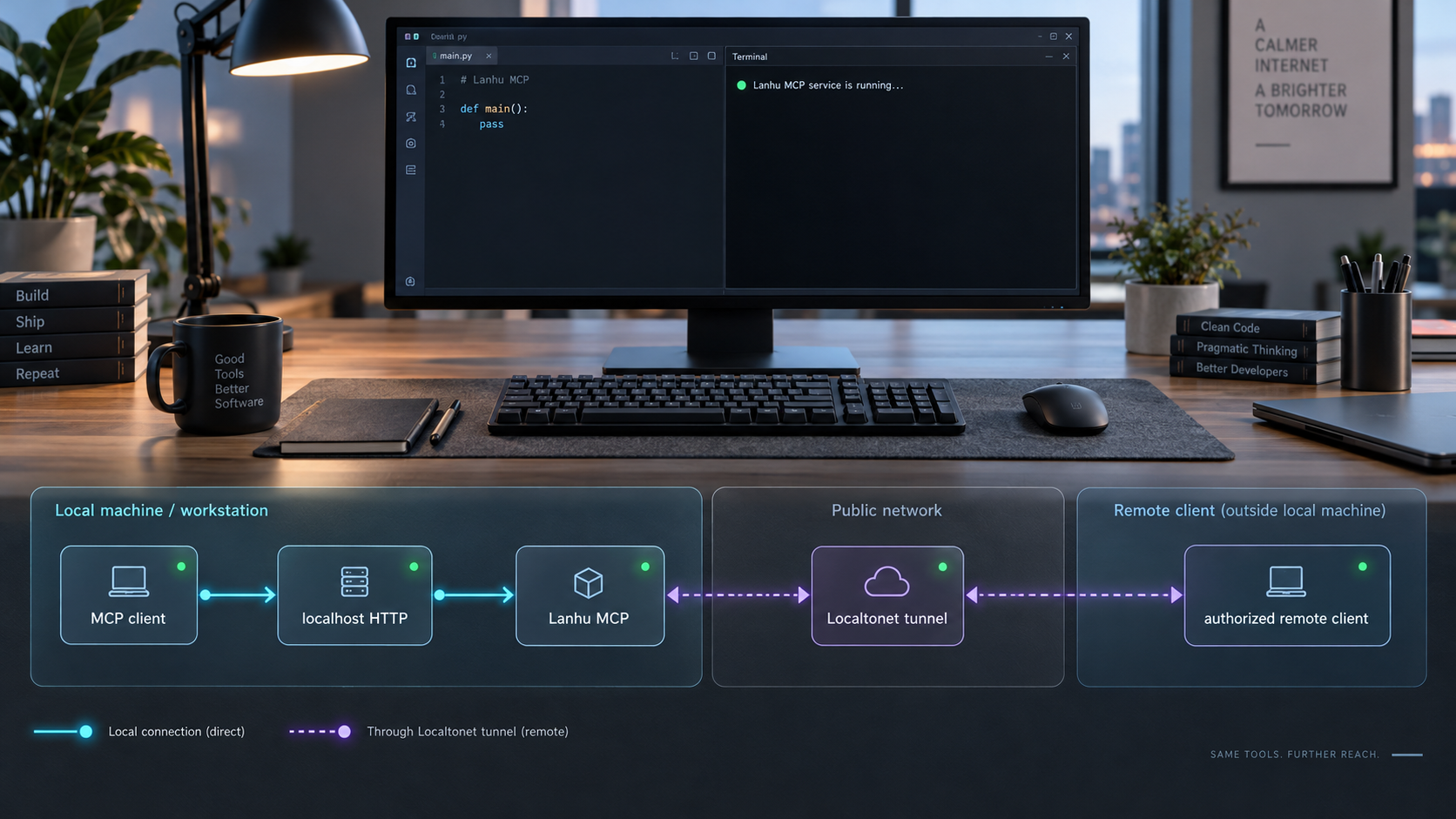
Run a shared Lanhu design and requirements service locally, verify its MCP endpoint, and prepare it for controlled remote access
Lanhu MCP connects MCP-compatible AI development tools to Lanhu requirements, design assets, visual evidence, and shared team knowledge. This guide covers the complete installation workflow using Docker Compose or Python 3.10+, explains how to configure the required Lanhu cookie, starts the HTTP transport, and verifies the local MCP endpoint before any public connectivity is added. After the service works locally, we show how to publish its HTTP endpoint with Localtonet for authorized remote Cursor, Claude Code, Windsurf, or other compatible MCP clients. Because the project documentation does not establish built-in authentication for its HTTP endpoint, the remote-access section also explains the controls that should be added before exposing sensitive project information.
📋 What's in this guide
What Lanhu MCP provides and how the deployment works
Lanhu MCP is a self-hosted Model Context Protocol server designed around Lanhu design delivery and requirements analysis. Instead of asking every developer or tester to manually copy the same requirement text, screenshots, annotations, and design details into an AI conversation, a team can connect compatible AI tools to a shared MCP service. The server retrieves source material from Lanhu and exposes project-oriented tools that an MCP client can invoke while helping a user analyze or implement a requirement.
The project supports requirement-document extraction, Axure page analysis, design previews, design asset delivery, image slicing, and team knowledge-sharing workflows. Its analysis modes include development, testing, and quick-exploration perspectives. Current releases also provide focused inspection of requirement regions using rendered text, stable block identifiers, long-page tile identifiers, or explicit source coordinates. Visual interpretation still belongs to the connected AI model, so the project recommends a model with image understanding rather than a text-only model.
There are two relevant ways to run the server. The recommended deployment uses Docker Compose, which keeps the application and its dependencies in a containerized environment. The alternative is a Python 3.10 or newer source installation using the repository's installer scripts or a manually created virtual environment. Both approaches require a valid Lanhu browser-session cookie. For a network service shared by multiple MCP clients, the server can run with HTTP transport and expose the documented local endpoint at http://localhost:8000/mcp.
Use stdio when Cursor, Claude Code, or another local client will launch Lanhu MCP on the same computer through a command-and-arguments configuration. Use HTTP when the server must remain running as a network service or when more than one authorized client needs to connect. A Localtonet HTTP tunnel applies to the HTTP deployment, not to an stdio-only process.
Prerequisites and security preparation
Decide first which installation path you will use. Docker users need Git, Docker, and a working Docker Compose command. Current Docker installations normally use docker compose. Older installations may expose the command as docker-compose. Source-installation users need Git and Python 3.10 or newer. The project explicitly notes that the Python 3.9 version historically bundled with some macOS installations is not sufficient.
Verify Python before selecting the source path:
python3 --versionOn Windows, the corresponding launcher may be:
python --version
You also need access to the Lanhu web account and projects that the server is expected to read. The mandatory LANHU_COOKIE value comes from an authenticated Lanhu browser session. Log in to Lanhu in the browser, open the browser developer tools, inspect an authenticated request to Lanhu, and copy its Cookie request-header value into the local environment configuration.
A browser-session cookie can grant access associated with its Lanhu account. Never paste it into an article, support ticket, public command, MCP client configuration, container image, source file, or Git commit. Store it only in the local environment or untracked .env file, limit access to the host, and replace it if it is accidentally disclosed. The project release does not include an account cookie in its source, wheel, or release assets, so every operator must supply an authorized cookie separately.
For the complete HTTP workflow, reserve local TCP port 8000 unless you plan to change SERVER_PORT. Ensure another application is not already listening there. If you run the Localtonet client on a different machine, that device must be able to reach the Lanhu MCP host and port over your private network. Running both on the same host is simpler because the tunnel can target the local listener.
| Requirement | Docker Compose path | Python source path |
|---|---|---|
| Git | Required to clone and update the repository | Required to clone and update the repository |
| Application runtime | Docker with Compose support | Python 3.10 or newer |
| Browser runtime | Handled as part of the container build | Install Chromium through Playwright |
| Lanhu credential | LANHU_COOKIE in the local .env file |
LANHU_COOKIE in .env or the process environment |
| Recommended use | Persistent and isolated service deployment | Development, direct source operation, or environments without Docker |
Install Lanhu MCP with Docker Compose
Docker Compose is the project's recommended manual deployment path. It provides environment isolation and gives the service a repeatable build and startup workflow. Run the following commands in a terminal on the machine that will host Lanhu MCP.
Clone the Lanhu MCP repository
Download the project and change into its repository directory.
git clone https://github.com/dsphper/lanhu-mcp.git
cd lanhu-mcpCreate the local environment file
Copy the supplied example configuration. On Linux or macOS, use cp. On Windows Command Prompt, use copy.
cp .env.example .envcopy .env.example .envAdd the authorized Lanhu cookie
Open .env in a local text editor and replace the example LANHU_COOKIE value with the cookie copied from your authenticated Lanhu browser session. Do not commit the completed file.
Build and start the service
Build the image and start the Compose service in detached mode.
docker compose up -d --build
If the installed Compose release uses the legacy executable, substitute docker-compose for docker compose.
After startup, inspect the Compose service status and logs rather than assuming that a running container means the application initialized correctly:
docker compose ps
docker compose logs
The logs are particularly important after the first build because they can reveal a missing cookie, dependency problem, browser setup failure, port conflict, or application startup error. Avoid sharing unredacted logs publicly if they contain request details, project names, paths, or credentials.
Install Lanhu MCP from source with Python 3.10+
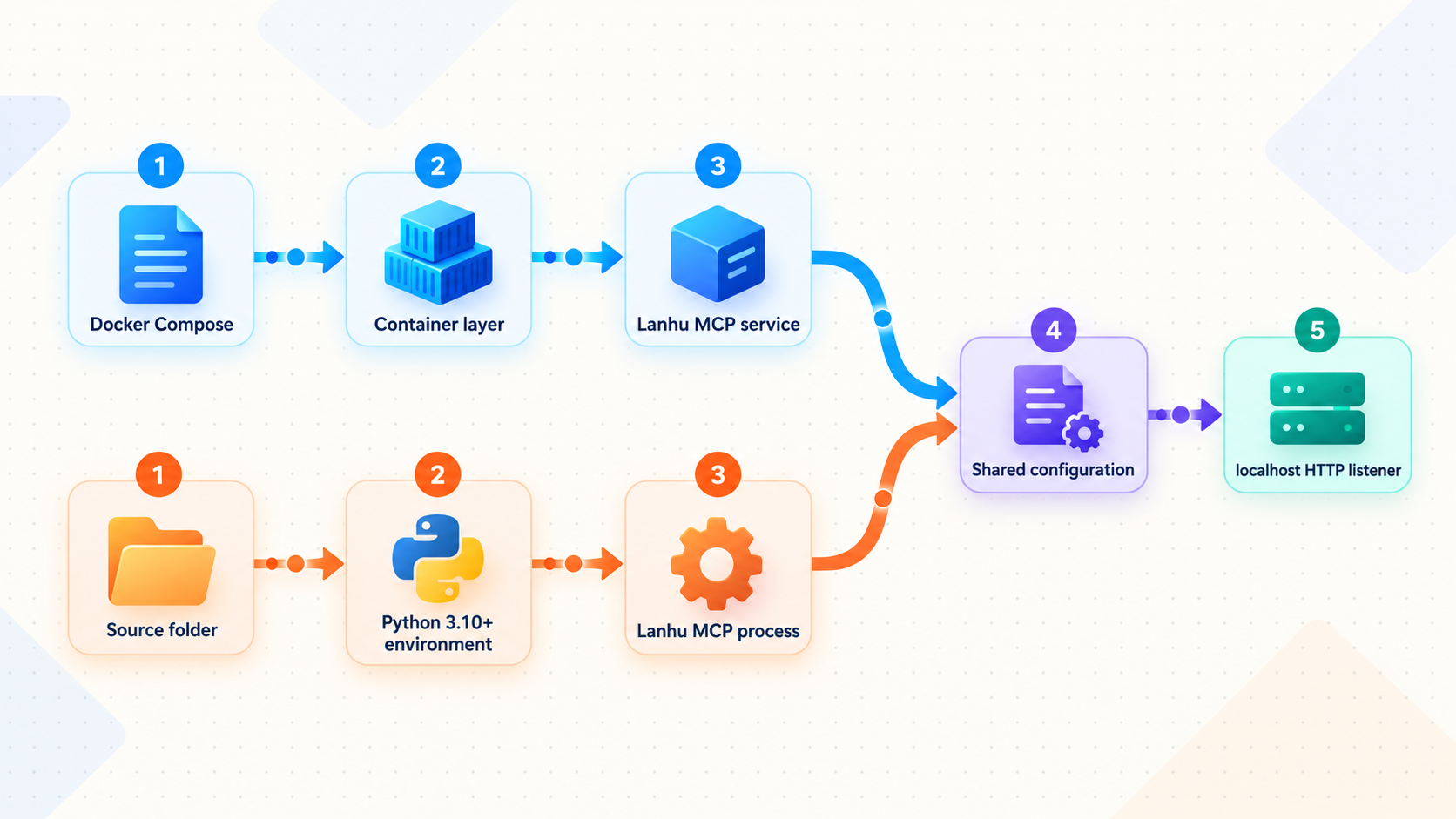
A source installation is useful when you want to inspect or modify the code, run without Docker, or integrate the process with an existing Python-oriented service manager. The project supplies an easy installer for Linux, macOS, and Windows. It also documents a manual virtual-environment path for operators who want to perform every dependency step explicitly.
Recommended installer-script path
Clone and enter the repository
Download the source and move into the project directory.
git clone https://github.com/dsphper/lanhu-mcp.git
cd lanhu-mcpRun the platform installer
On Linux or macOS, run the shell installer. On Windows, run the batch installer. The installer handles dependencies and guides the cookie configuration.
bash easy-install.sheasy-install.bat
The shell installer can select package and browser-download mirrors and fall back to other configured sources. The project documents PIP_INDEX_URL, PLAYWRIGHT_DOWNLOAD_HOST, and PLAYWRIGHT_CHROMIUM_DOWNLOAD_HOST as overrides for environments that need different download infrastructure. Leave them unset unless your network or package policy requires an override.
Manual virtual-environment path
On Linux or macOS, create a virtual environment, install the project in editable mode, install Playwright Chromium, and create the environment file:
python3 -m venv venv
./venv/bin/python -m pip install -e .
./venv/bin/python -m playwright install chromium
cp .env.example .env
On Windows, use the virtual environment's Python executable:
python -m venv venv
venv\Scripts\python.exe -m pip install -e .
venv\Scripts\python.exe -m playwright install chromium
copy .env.example .env
Edit .env and set LANHU_COOKIE before starting the server. A shell environment variable can also supply the value for the current process, but entering a real cookie directly into terminal history may expose it to other users or diagnostic tools. An access-restricted environment file or managed secret mechanism is safer for a persistent deployment.
Configure the server and its HTTP listener
The required setting is LANHU_COOKIE. Other settings let you control the listener, data directory, outbound timeout, browser viewport, debugging, and optional Feishu integration. Begin with the example file shipped by the project and change only the values you understand. This makes future upgrades easier because you can compare your local configuration with the current example.
| Variable | Documented example | Purpose |
|---|---|---|
LANHU_COOKIE |
User-supplied credential | Authenticates the server's authorized requests to Lanhu and is required. |
SERVER_HOST |
0.0.0.0 |
Controls the network address on which the HTTP server listens. |
SERVER_PORT |
8000 |
Controls the local HTTP port. The documented MCP endpoint uses port 8000. |
DATA_DIR |
./data |
Selects the local data-storage directory. |
HTTP_TIMEOUT |
30 |
Sets the HTTP request timeout in seconds. |
VIEWPORT_WIDTH |
1920 |
Sets the browser viewport width used by applicable rendering workflows. |
VIEWPORT_HEIGHT |
1080 |
Sets the browser viewport height used by applicable rendering workflows. |
DEBUG |
false |
Controls debug mode. Keep it disabled for normal operation unless diagnosing a specific problem. |
FEISHU_WEBHOOK_URL |
Optional webhook URL | Enables the optional Feishu robot integration used by supported notification workflows. |
A host value of 0.0.0.0 allows the process to listen on available network interfaces, subject to the operating system and container configuration. That can make port 8000 reachable from other devices on the same network. If only a Localtonet client on the same host needs access, restrict host-level network exposure where your deployment supports it. Always review local firewall rules, container port publication, and network policy before treating the endpoint as private.
The optional Feishu integration should be configured with an environment variable rather than by embedding a webhook URL in lanhu_mcp_server.py. A webhook URL is also a credential-like secret. The project supports a user-ID mapping for mention workflows, but the correct values depend on the team's Feishu environment and must not be guessed.
Start the HTTP server and verify it locally
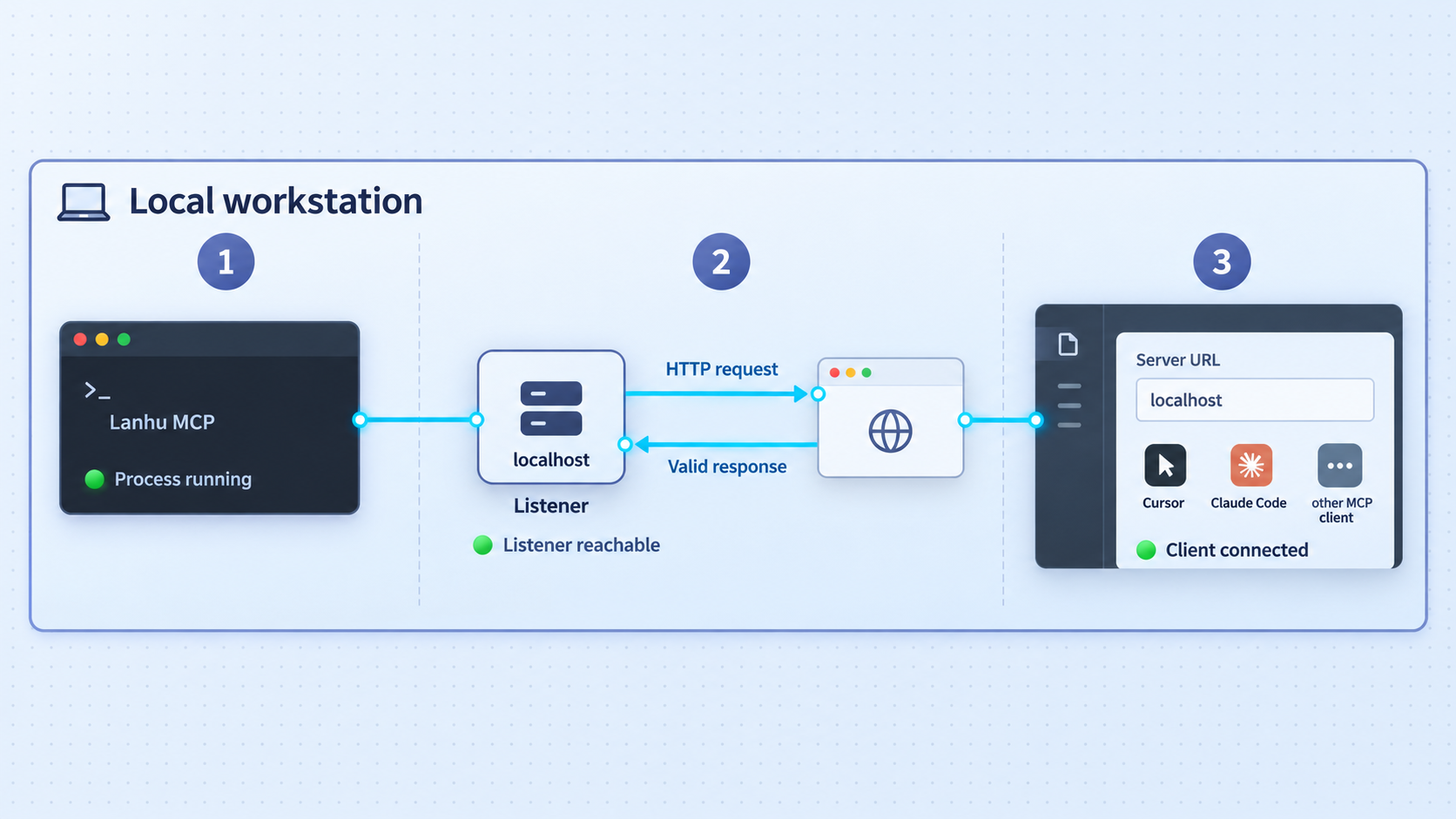
Docker Compose already starts the configured service when you run docker compose up -d --build. For a source installation, launch the installed command with HTTP transport.
On Linux or macOS:
./venv/bin/lanhu-mcp --transport httpOn Windows:
venv\Scripts\lanhu-mcp.exe --transport httpLeave the foreground process running while testing. If it exits immediately, read the terminal output before restarting it. Common first checks are the Python version, dependency installation, Playwright Chromium installation, cookie configuration, and availability of port 8000.
With the documented host and port, the local MCP URL is:
http://localhost:8000/mcp
Verification should occur in layers. First confirm that the server process remains running. For Docker, check docker compose ps and inspect the logs. For a source process, confirm that the terminal shows no fatal startup error. Next, test whether the HTTP listener is reachable from the same machine:
curl --verbose --max-time 5 http://localhost:8000/mcpMCP over HTTP has protocol requirements that a plain browser or simple GET request may not satisfy. An HTTP error indicating an unsupported method, media type, or missing protocol data can still show that the server accepted the network connection. By contrast, a connection-refused or timeout result means the client did not reach the listener. Complete functional verification requires an MCP-compatible client to initialize a session and discover or invoke the server's tools.
For meaningful validation, connect a compatible MCP client locally, allow it to enumerate the available tools, and perform a read-only request against a Lanhu project the configured account is authorized to access. Confirm that the returned project, page, and design information belongs to the expected workspace. Do not begin with a broad production workflow. A narrow read test makes cookie, authorization, model capability, and rendering failures easier to distinguish.
Visual tools require a vision-capable AI model. If text operations work but the client cannot reason about screenshots or design regions, check the selected model before changing the server. The server provides source data and images, while the connected model performs the visual interpretation.
Connect Cursor, Claude Code, or another MCP client
Lanhu MCP supports two client patterns. A local stdio client can launch the process when needed, while a network client can connect to the persistent HTTP endpoint. Choose one pattern per client configuration so that it is clear which process owns startup and shutdown.
| Connection pattern | Best fit | Important behavior |
|---|---|---|
| Local stdio | One MCP client on the Lanhu MCP host | The client starts the supplied script through its command-and-arguments configuration. |
| Local HTTP | Persistent service used by local clients | The client connects to http://localhost:8000/mcp while the server remains running. |
| Remote HTTP through Localtonet | Authorized clients outside the server's local network | The client uses the assigned public HTTPS URL with the /mcp path after the local service and tunnel are running. |
Local stdio connection
The repository includes run-stdio.sh for Linux and macOS and run-stdio.bat for Windows. These scripts enter the project directory, read the environment configuration, and start the service using stdio transport. In an MCP client that supports command-and-arguments server definitions, select the appropriate script as the launched command.
./run-stdio.shrun-stdio.batExact Cursor and Claude Code configuration formats can change by client release, and the supplied evidence does not establish a single stable configuration key or settings path. Use the client's current MCP configuration interface, choose a local command-based server, and point it to the script using an absolute path if the client does not start in the repository directory.
Local or remote HTTP connection
For HTTP mode, choose the client's remote or HTTP MCP server option and enter the full endpoint URL, including /mcp. During local verification, use http://localhost:8000/mcp. After configuring Localtonet, replace the local origin with the assigned public HTTPS origin while preserving the endpoint path.
Do not place LANHU_COOKIE in the MCP client. The cookie belongs on the Lanhu MCP server. The client only needs the MCP endpoint and any separate access credential required by the protective authentication layer you place in front of that endpoint.
Provide remote HTTP access with Localtonet
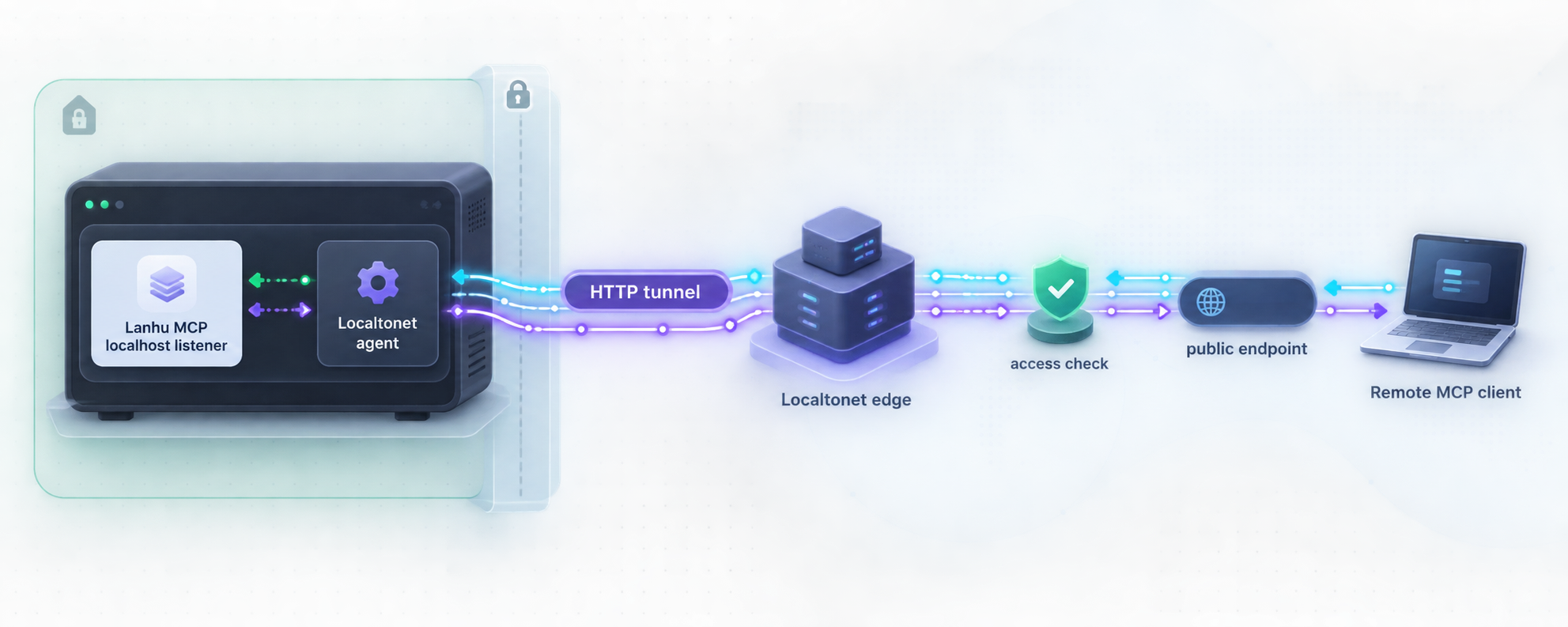
Once local HTTP operation is verified, Localtonet can expose the service without inbound router port forwarding, a public IP address, VPN setup, or direct firewall changes. Our client runs on a device that can reach Lanhu MCP and establishes an outbound connection to a Localtonet relay server. An HTTP tunnel then provides a public HTTPS address for the local HTTP service.
Keep the dependency order clear: Lanhu MCP must be running, the Localtonet client must be connected, and the HTTP tunnel must be started. Creating a tunnel in the dashboard does not start it automatically. The public address remains available only while the selected device is connected and the tunnel is running.
The available Lanhu MCP documentation does not establish built-in authentication or authorization for the HTTP endpoint. Do not assume that an obscure URL, the MCP protocol, HTTPS transport, or the Localtonet tunnel itself restricts access to approved users. Before exposing project requirements and design data, place an authenticated gateway or reverse proxy in front of Lanhu MCP, enforce least privilege, and tunnel the protected local listener instead of an unprotected endpoint. Test that unauthenticated requests are rejected before distributing the URL.
HTTPS on the public address protects transport to the tunnel edge, but transport security and user authorization solve different problems. The receiving MCP client also needs a supported way to present credentials to the protective gateway. Confirm that compatibility before rollout. If the client cannot authenticate to your gateway, keep the service local or use an access architecture that provides authenticated private connectivity rather than publishing the bare endpoint.
Install and run the Localtonet client
Install our client on the Lanhu MCP host or another trusted device that can reach the protected local HTTP listener. Start the client and keep it running for as long as remote access is required.
Authenticate and select the device
Use the device-specific authentication token associated with the client that will run the tunnel. Keep this token private and select the connected device in the dashboard. Never copy a token into a public guide, shared client configuration, or source repository.
Select an available relay server
Choose a currently available relay server or region from the dashboard. Availability can vary, so use the values shown in the current product rather than a server code copied from an old tutorial.
Create an HTTP tunnel to the protected local service
Create an HTTP tunnel and set its local target to the IP address and port of the authenticated gateway or protected Lanhu MCP listener. If the Localtonet client and protected service run on the same host and the listener uses port 8000, the target can be the corresponding local host address and port 8000. If they run on different devices, use a private address that the Localtonet client can actually reach.
Start the tunnel and build the remote MCP URL
Press Start, wait for the tunnel to run, and copy the assigned public HTTPS address. Append /mcp if the displayed address is the origin rather than the complete MCP path. Enter that complete URL in the authorized remote client's HTTP MCP configuration.
Stop or delete access when it is no longer required
Stop the tunnel to remove active remote reachability while retaining its configuration, or delete it when the endpoint should no longer exist. Also revoke or rotate gateway credentials and the Lanhu cookie when personnel, devices, or access requirements change.
HTTP and File Server tunnels can use a generated subdomain, a selected subdomain where supported, or a custom domain. Exact custom-domain DNS requirements can change, so verify the current dashboard and documentation before modifying DNS. A generated address is usually sufficient for initial MCP connectivity testing.
Test remote access from a network that is not the server's local network. First verify that an unauthenticated request is denied by your protective layer. Then connect with an authorized MCP client and confirm tool discovery and a narrow read operation. Finally, stop the Localtonet tunnel and verify that the public endpoint becomes unavailable. This confirms both the positive path and the intended shutdown behavior.
Routine operation, shutdown, and upgrades
A shared MCP server should be treated as an application service rather than a command that is launched once and forgotten. Monitor whether the process is running, review failures without publishing sensitive logs, keep the Lanhu cookie valid, and periodically verify that connected clients can perform a small read operation.
Docker Compose operations
Use Compose to inspect status and logs:
docker compose ps
docker compose logs
Stop and remove the running Compose containers when the service should be taken offline:
docker compose downDocker users upgrading to a new Lanhu MCP release need to rebuild the image. After updating the repository and reviewing configuration changes, rebuild and restart:
docker compose up -d --buildSource-installation operations
A foreground source process can be stopped from its terminal. For a managed deployment, use the operating system's normal service-management mechanism, but do not invent startup flags beyond the documented --transport http option. Keep the working directory, environment file, virtual environment, and data directory permissions limited to the service account.
A normal source upgrade should retrieve the intended release, upgrade its dependencies, reinstall the package, and restart the MCP client or HTTP process. Review release notes before upgrading because dependencies, tools, cache formats, and configuration examples can change. Version 1.8.6 introduced screenshot cache schema 4, which rebuilds tile metadata once after upgrading.
The release documentation notes that an existing compatible single-file deployment can replace lanhu_mcp_server.py because that file embeds the matching lanhu_design package. A full repository, wheel, or Docker installation remains preferable for normal production maintenance because it keeps application code and dependencies synchronized.
Credential lifecycle
Replace the Lanhu cookie whenever the associated browser session expires, access is revoked, or exposure is suspected. Use a dedicated account with only the Lanhu permissions needed for the intended projects where organizational policy permits it. Recheck access when team membership changes. Removing a user from an MCP client does not automatically revoke a server-side browser cookie or an external gateway credential.
Keep Localtonet device tokens private as well. A token identifies the client device that runs a tunnel and should not be embedded in screenshots, shell history, issue reports, or shared project configuration. Stop tunnels that are no longer needed instead of leaving dormant services publicly addressable.
Troubleshooting the installation and connection
The source installer reports an unsupported Python version
Run python3 --version or python --version and confirm that the selected interpreter is Python 3.10 or newer. Installing a newer interpreter does not always change the command used by an existing virtual environment. Delete and recreate the virtual environment with the correct interpreter if it was originally built with an older version.
The server cannot start on port 8000
Another process may already be using the port. Stop the conflicting service or set SERVER_PORT to an available port in the Lanhu MCP environment. If the port changes, update the local verification URL, MCP client endpoint, container publication where applicable, and Localtonet local target. All layers must point to the same final listener.
The local request returns connection refused
Connection refused normally means no process is listening at the requested address and port. Check that the source command is still running or that Compose reports an active service. Read the startup logs for missing configuration, package errors, or a failed Chromium installation. Also verify that you did not configure a different port.
The endpoint returns an HTTP error to curl
Do not interpret every HTTP error as a failed server. A simple curl request does not perform a complete MCP handshake and may omit the method, headers, session state, or body expected by the transport. If curl establishes a connection and receives an HTTP response, continue testing with a compatible MCP client. Use server logs to distinguish an expected protocol rejection from an internal application failure.
The client connects but cannot retrieve Lanhu data
Confirm that LANHU_COOKIE contains the complete current Cookie request-header value from an authenticated Lanhu request and that the account can access the target project in the browser. Remove accidental quotation or whitespace problems introduced while editing the environment file. If the browser session has expired, obtain a new authorized cookie and restart the service so the process receives the updated value.
Text tools work but screenshot analysis fails
Confirm that Playwright Chromium was installed for the same virtual environment used to run Lanhu MCP. For Docker, review the image build and runtime logs. Also verify that the MCP client is using a model with visual understanding. A text-only model cannot reliably interpret requirement screenshots or design images even when the server returns them correctly.
The Localtonet public URL cannot reach the service
Test the local target from the device running our client. A service bound only to another machine's loopback interface cannot be reached across the LAN. Confirm the target IP and port, ensure the selected Localtonet device is connected, and verify that the tunnel has been started. Remember that merely creating the tunnel does not make it run.
The public origin opens, but the MCP client fails
Confirm that the client uses the full URL ending in /mcp, not only the public origin. Then check whether your authentication gateway accepts the client's credential method and preserves the HTTP behavior required by the MCP transport. Compare the remote test with a local HTTP connection to separate an MCP configuration problem from a gateway or tunnel problem.
The endpoint works without credentials
Stop the Localtonet tunnel immediately if unauthenticated remote requests can reach Lanhu MCP. The project documentation supplied for this guide does not establish built-in HTTP authorization. Configure and test an authenticated gateway, then point the tunnel at that protected listener. Do not distribute the endpoint until unauthorized requests are rejected.
Frequently asked questions
What is the default local Lanhu MCP HTTP endpoint?
The documented local endpoint is http://localhost:8000/mcp. If you change SERVER_PORT, update the URL in every MCP client and in the Localtonet tunnel's local target.
Should I use Docker Compose or install from source?
Docker Compose is the project's recommended manual deployment and is usually the simplest choice for a persistent, isolated service. Use the Python 3.10+ source path when you need direct code access, cannot use Docker, or want the process integrated into an existing Python environment.
Is the Lanhu cookie sent to Cursor or Claude Code?
It should not be placed in the MCP client's server definition. The cookie is a server-side credential used by Lanhu MCP to access authorized Lanhu resources. Store it in the server's protected environment configuration and expose only the MCP endpoint to the client.
Does Lanhu MCP require a vision-capable AI model?
Yes, for workflows involving screenshots, visual requirement evidence, and design interpretation. The server can provide images and source information, but a text-only model cannot perform the intended visual analysis reliably.
Can I use stdio through a Localtonet HTTP tunnel?
No. Stdio is a local process transport in which the MCP client launches and communicates with the server through standard input and output. For an HTTP tunnel, start Lanhu MCP with --transport http and target its reachable HTTP listener.
Does creating a Localtonet tunnel immediately make Lanhu MCP public?
No. The selected Localtonet device must be connected and the tunnel must be started. The public endpoint is available only while that client remains connected and the tunnel is running.
Does the Localtonet URL automatically authenticate MCP users?
Do not assume that it does. A tunnel provides connectivity to the configured local target. The Lanhu MCP evidence used for this guide does not establish built-in authorization for its HTTP endpoint. Put an authenticated access layer in front of the service and confirm that unauthorized requests are rejected before enabling remote access.
Can the Localtonet client run on a different device from Lanhu MCP?
Yes, provided that the device running our client can reach the protected Lanhu MCP IP address and port. Do not use localhost as the target when the service runs on a different machine, because localhost would refer to the Localtonet client device itself.
Connect your protected Lanhu MCP endpoint with Localtonet
Verify Lanhu MCP locally, place appropriate authentication in front of its HTTP endpoint, and then use our outbound HTTP tunneling workflow to connect authorized remote MCP clients without opening an inbound router port.
Get Started Free →

