

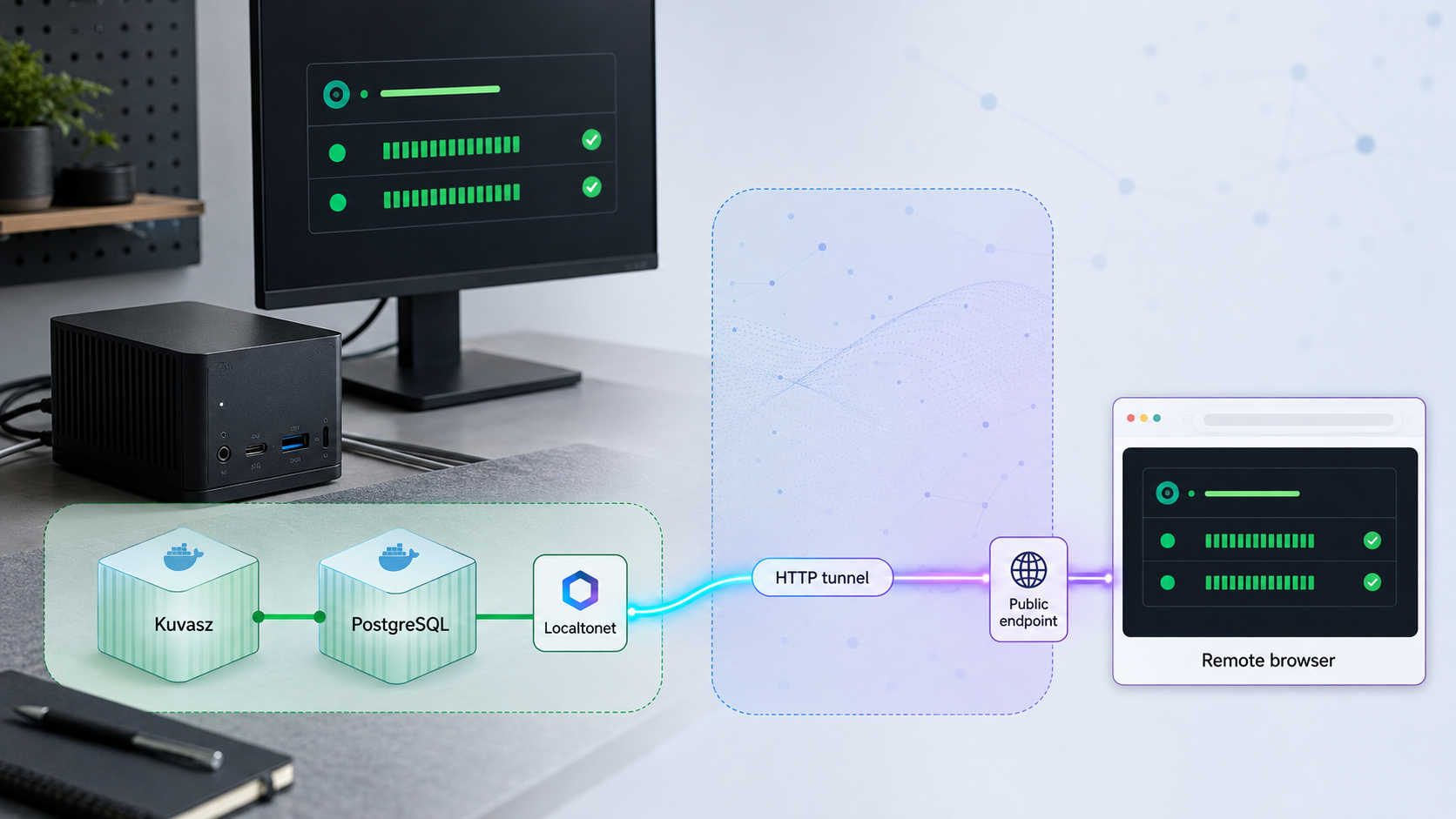
Deploy a pinned Kuvasz release, create a useful status page, verify it locally, and make its web origin remotely reachable
Kuvasz is an open-source, self-hosted uptime and SSL monitoring service with multiple monitor types, notifications, maintenance windows, status pages, a REST API, metrics exporters, and an MCP server. This tutorial uses the documented Kuvasz 4.2.0 container release as a reproducible reference rather than claiming it is the newest release available when you read this. You will prepare PostgreSQL, start Kuvasz with Docker Compose, verify the documented local address, create a monitor and status page, and then publish the Kuvasz web origin through a Localtonet HTTP tunnel. Because an HTTP tunnel forwards an IP address and port rather than one URL path, Kuvasz authentication and status-page visibility remain essential parts of the access-control design.
📋 What's in this guide
How Kuvasz and Localtonet fit together
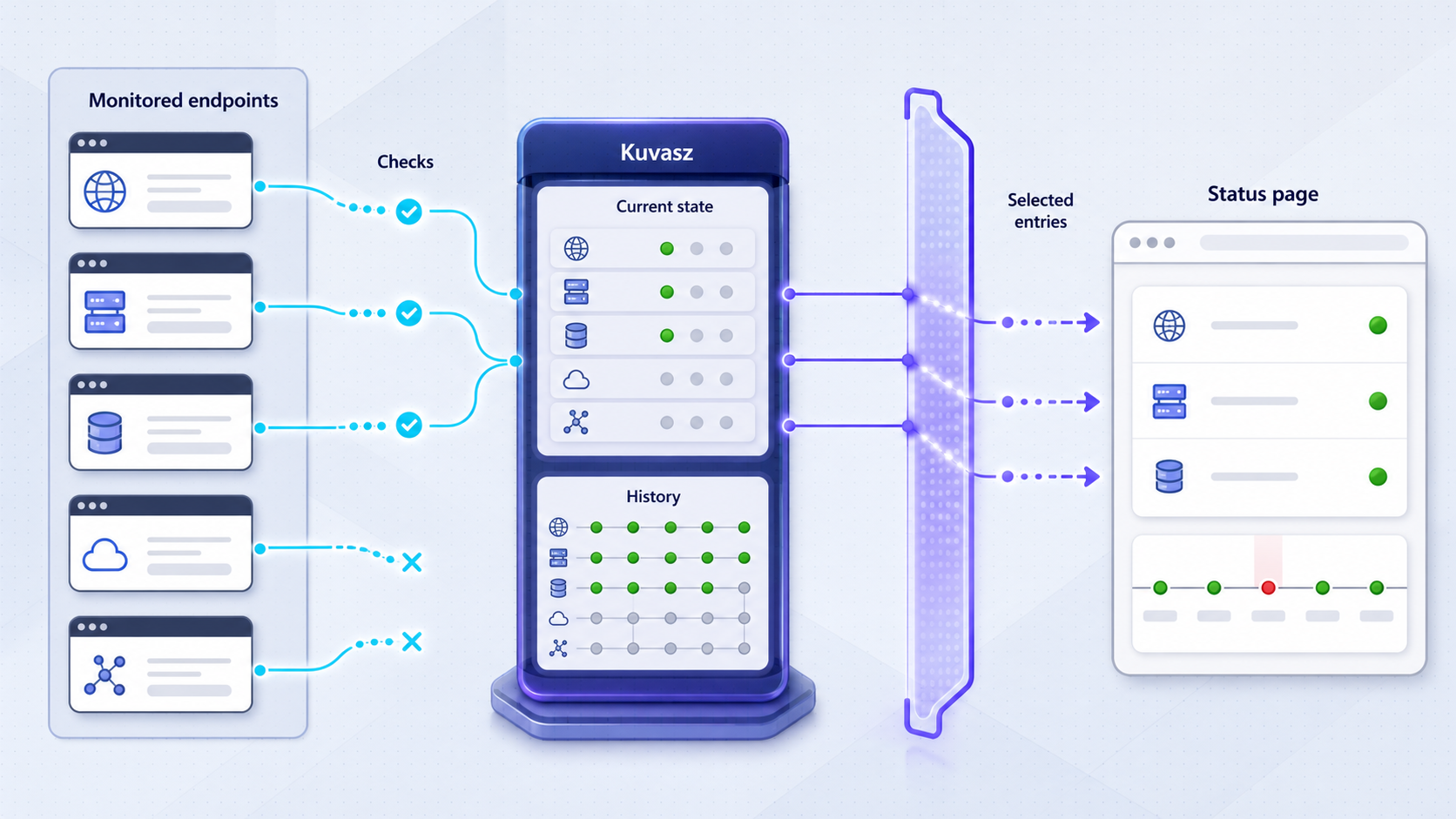
Kuvasz performs monitoring from the host or network where it runs. It can send HTTP and HTTPS requests, check SSL certificates daily, receive heartbeat pushes, test ICMP reachability, attempt TCP connections, and validate DNS responses. It records the resulting state in PostgreSQL and presents selected information through its web interface and status pages.
Localtonet provides a separate connectivity layer. Our client runs on the Kuvasz host or another device that can reach it, then establishes an outbound connection to a Localtonet relay server. An HTTP tunnel assigns a public HTTPS address and forwards requests to the local IP address and port configured for Kuvasz. This workflow does not require inbound router port forwarding, a public IP address, firewall changes, or VPN setup.
The tunnel does not change how Kuvasz reaches monitored services. If Kuvasz monitors a private application, the Kuvasz container and host must already have a valid network route to that application. Localtonet also does not repair an unhealthy Kuvasz deployment. PostgreSQL, the Kuvasz container, the local web listener, the Localtonet client, and the tunnel must all be working for remote visitors to reach the status page.
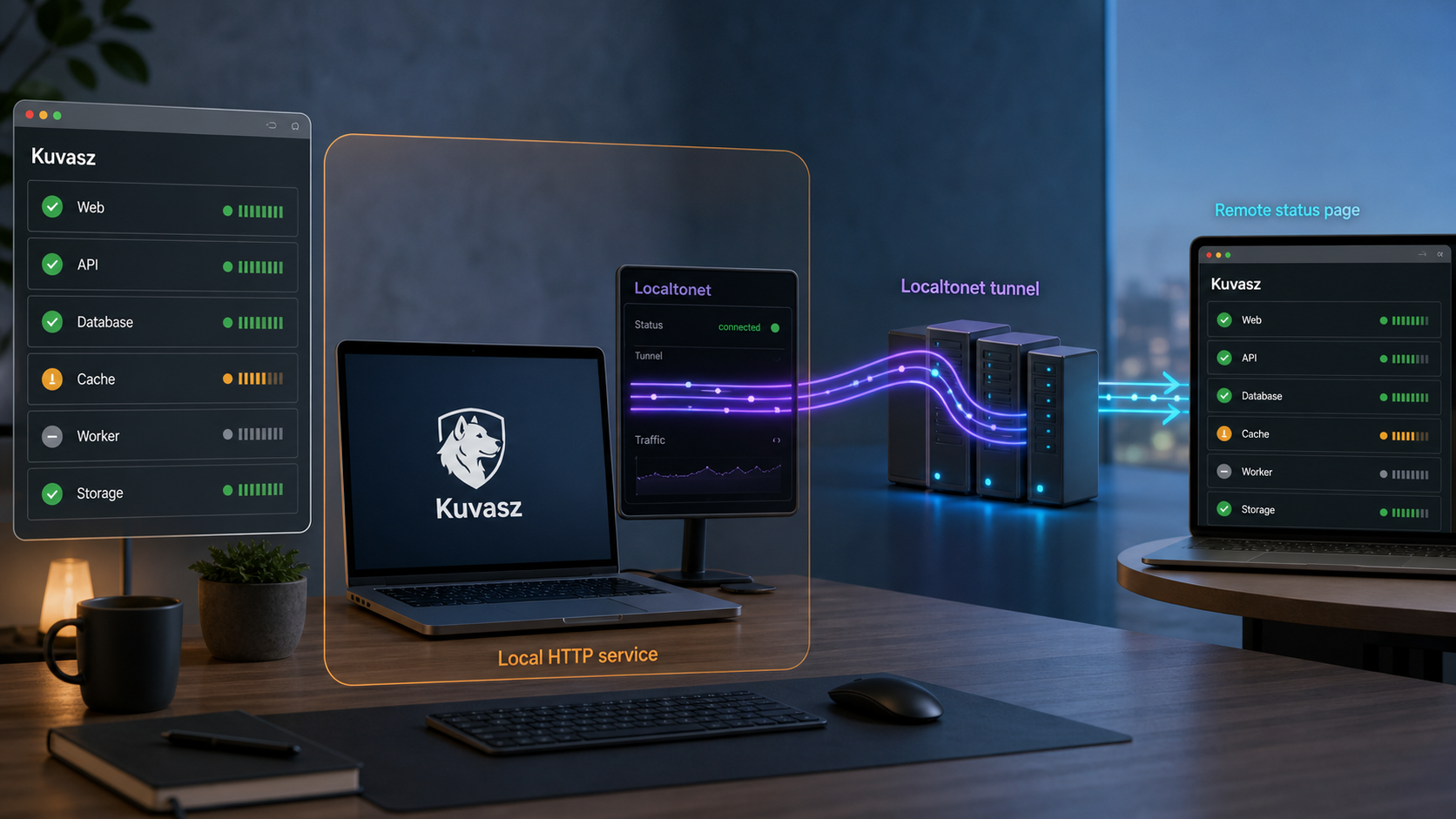
A Localtonet HTTP tunnel forwards the Kuvasz origin identified by its local IP address and port. If the status page is below that origin, visitors can still request other paths on the same origin. Keep Kuvasz authentication enabled for the dashboard and management features, verify public and private status-page behavior, and review the API, MCP, heartbeat, and other operational routes before sharing the tunnel address.
Prepare the host, release, secrets, and storage
This walkthrough uses Kuvasz 4.2.0 because that release has a documented immutable image tag, kuvaszmonitoring/kuvasz:4.2.0. It also includes TCP and DNS monitors in addition to the earlier monitor types. This is a pinned tutorial baseline, not a statement that 4.2.0 is the newest stable release. Before a new installation, compare it with the current project release and read all upgrade notes that apply to the version you select.
Kuvasz is distributed as a Docker image and requires PostgreSQL. The deployment host therefore needs a working Docker Engine and the Docker Compose plugin. Run the following checks before creating any files:
docker version
docker compose version
Both commands must complete successfully. If either command is unavailable, install Docker and its Compose plugin using the procedure supported by the host operating system. Do not continue with an unprivileged account that cannot communicate with the Docker daemon.
You also need enough access to create a private deployment directory, maintain a Compose file and environment file, inspect container logs, and back up PostgreSQL. The final Localtonet client can run on this host or another device with network access to the published Kuvasz port.
| Requirement | Purpose | Verification |
|---|---|---|
| Docker Engine | Runs the Kuvasz and PostgreSQL containers | docker version |
| Docker Compose plugin | Creates and operates the multi-container deployment | docker compose version |
| PostgreSQL | Stores Kuvasz configuration, state, incidents, and monitoring history | Database container is healthy and Kuvasz connects without recurring errors |
| Persistent database volume | Preserves PostgreSQL data across container recreation | Compose configuration shows a named volume attached to PostgreSQL |
| Private secret storage | Protects database and administrator credentials | Environment and secret files are excluded from public source control |
| Reachable local port | Provides the browser and Localtonet target | http://127.0.0.1:8080 responds on the Kuvasz host |
Use the maintained deployment example as the configuration authority
The Kuvasz repository contains maintained deployment examples in its Docker examples directory. Use the Compose example matching the selected release rather than copying an unversioned configuration from an unrelated tutorial. The application image, PostgreSQL connection keys, administrator settings, port mapping, and any Kuvasz-specific persistent paths must remain consistent with that example.
The commands below deliberately keep actual passwords out of the article. Generate unique values locally and place them in the environment or secret files expected by the official Compose example. Do not reuse the public live-demo credentials. Those credentials belong only to the project demonstration instance and must never be treated as installation defaults.
mkdir -p kuvasz
cd kuvasz
umask 077
touch .env
chmod 600 .env
Populate .env with the variable names required by the version-matched example. Use a unique PostgreSQL password and a separate, strong Kuvasz administrator password. If you keep the deployment in Git, add .env, Docker secret files, database dumps, and backup archives to .gitignore before the first commit.
Shell commands can be retained in history, process arguments may be visible to other users, and repository history can preserve a secret after the file is edited. Kuvasz 4.2.0 documents configuration placeholders and the ability to split configuration with MICRONAUT_CONFIG_FILES, including a workflow where sensitive values come from a Docker secret. Follow the syntax in the configuration documentation for the selected release.
Deploy Kuvasz and PostgreSQL with Docker Compose
The supported container workflow consists of PostgreSQL plus the Kuvasz application. PostgreSQL needs persistent storage, while Kuvasz must receive the database connection and administrator configuration expected by the selected release. Kuvasz 4.2.0 serves its local web interface on port 8080 when the documented host mapping is retained, giving this tutorial the local endpoint http://127.0.0.1:8080.
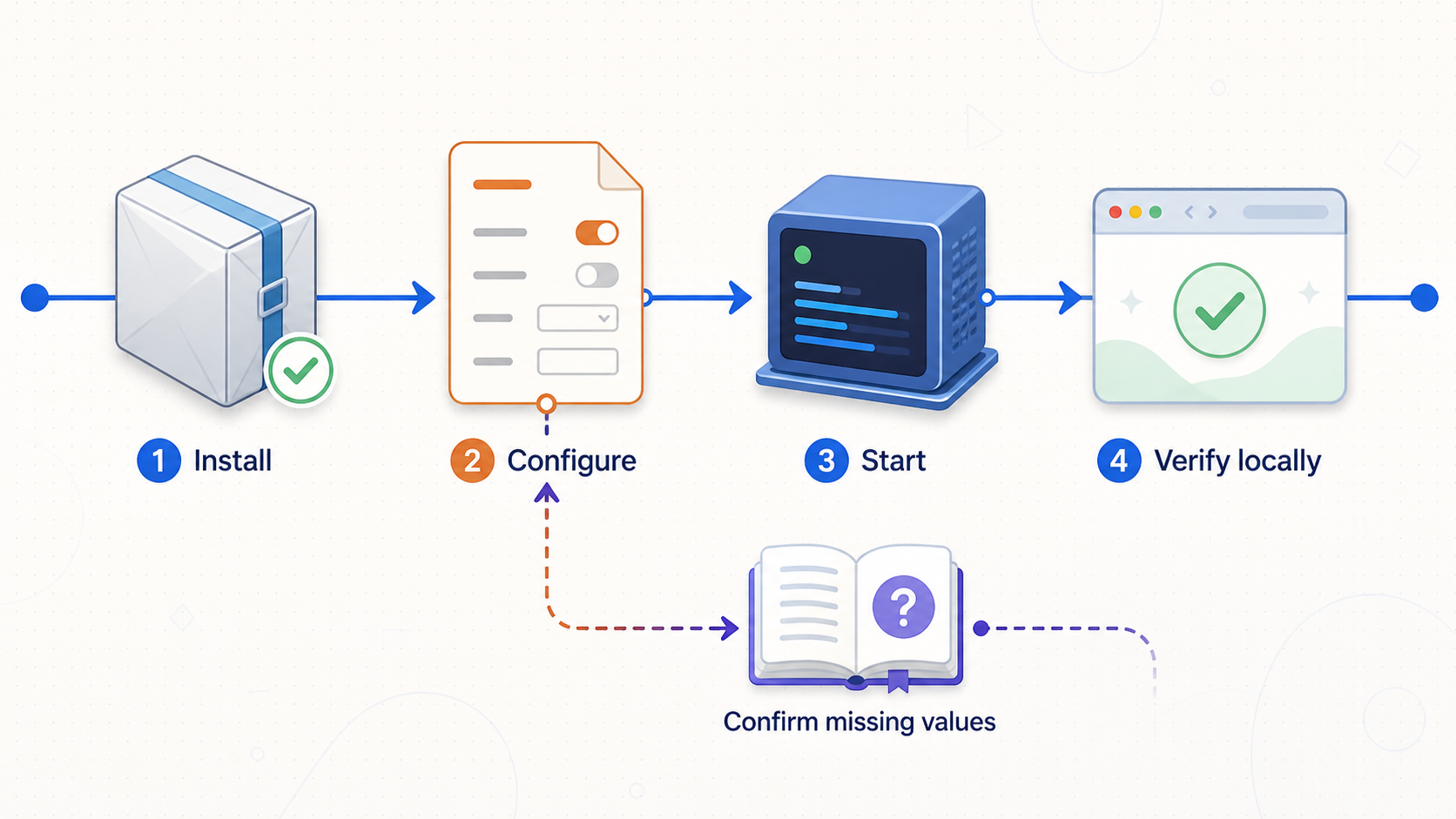
Copy the release-matched Docker Compose example
Obtain the Compose file from the Kuvasz Docker examples for the release you selected. Pin the application image to kuvaszmonitoring/kuvasz:4.2.0 for this tutorial. Do not replace the tag with latest unless you have reviewed and accepted the resulting update behavior.
Configure PostgreSQL and Kuvasz secrets
Set the PostgreSQL database name, database user, database password, Kuvasz database connection values, and initial administrator credentials using the names in the official example. The values supplied to Kuvasz must match the PostgreSQL service. Keep the environment file private or use the documented Docker secret pattern.
Confirm persistent PostgreSQL storage
Verify that the PostgreSQL data directory is attached to the named volume defined by the Compose example. Container recreation must not create a fresh empty database. Record the volume name for backup and recovery planning.
Validate the resolved Compose configuration
Run docker compose config. Review the resolved image tag, service names, database volume, Kuvasz port mapping, and environment structure. Be careful when saving this output because resolved configuration can contain secrets.
Pull the pinned images
Run docker compose pull. For Kuvasz 4.2.0, this obtains the documented kuvaszmonitoring/kuvasz:4.2.0 image together with the PostgreSQL image selected by the maintained example.
Start the deployment
Run docker compose up -d. Compose creates the network and persistent volume, starts PostgreSQL, and starts Kuvasz using the configured database and administrator values.
Inspect containers and startup logs
Run docker compose ps, followed by docker compose logs --tail=200. Confirm that PostgreSQL remains available and Kuvasz completes startup without repeating authentication, migration, configuration, or port-binding errors.
Open the local Kuvasz interface
On the deployment host, open http://127.0.0.1:8080. Sign in with the administrator username and password you configured for this deployment. Change weak temporary values before allowing any remote access.
docker compose config
docker compose pull
docker compose up -d
docker compose ps
docker compose logs --tail=200
curl -I http://127.0.0.1:8080/
A successful curl response establishes that something is listening, but it does not replace browser testing. Open the interface, sign in, navigate between pages, and confirm that the UI loads its supporting resources. If the response is unavailable, inspect the port mapping and logs before changing anything in Localtonet.
Only the Kuvasz web port is needed for this tutorial. Do not publish PostgreSQL through Localtonet or expose its port on a public host interface. PostgreSQL should remain inside the controlled Compose or private network unless your database architecture explicitly requires another protected arrangement.
Create and validate the first Kuvasz monitor
A status page needs useful monitor data. Start with a target whose behavior and ownership you understand. Kuvasz supports management through its web interface, REST API, or YAML, but the UI is the clearest path for a first deployment because it lets you confirm the available fields in the installed release.
| Monitor type | What it checks | Suitable target |
|---|---|---|
| HTTP or HTTPS | HTTP availability, response behavior, and response timing | Web application, API, or dedicated health endpoint |
| SSL certificate | Certificate validity and expiration | HTTPS services with managed certificates |
| Heartbeat | Arrival of an expected push | Backup, cron job, import, or scheduled task |
| Ping or ICMP | Host reachability and latency | Hosts and network devices that permit ICMP |
| TCP | TCP connection availability and latency | SSH, SMTP, database, broker, or other TCP listener |
| DNS | Resolution, records, response code, and optional record drift | Public or internal DNS names |
Open the monitor list
Sign in to Kuvasz and open the monitor area corresponding to the check you want to create, such as HTTP monitors. Use the create action shown by the installed interface.
Enter the monitor identity and target
Give the monitor a clear display name and enter the target URL, host, port, DNS name, or heartbeat configuration required by that monitor type. Use labels appropriate for the eventual status-page audience.
Set check expectations
Configure the interval and the response, latency, record, or availability expectations supported by the selected monitor. For HTTP monitoring, prefer a dedicated health endpoint when it accurately represents critical application dependencies.
Select notifications if required
Attach only the channels that should receive incidents for this monitor. Begin with a non-disruptive test destination and verify delivery before applying a production escalation route.
Save and wait for recorded checks
Save the monitor and wait for several check cycles. Confirm that its state, latency, and incident history match the known behavior of the target. Creating a monitor successfully does not prove that its test criteria are correct.
If you prefer infrastructure as code, Kuvasz supports monitor management with a YAML configuration file. Use the current Kuvasz configuration documentation for the schema matching your release. Do not mix UI-managed and read-only configuration-managed resources without understanding which source controls later changes.
Planned work should use Kuvasz maintenance windows instead of leaving predictable downtime to generate false incidents. Maintenance can be manual, recurring through a cron schedule, or configured as a one-off event. Review the project documentation for the exact options available in the selected version.
Create the Kuvasz status page and copy its route
Kuvasz status pages present selected monitoring information separately from the administrative workflow. They can be public or private and can be branded for their audience. A public status page is intended to be reachable without the same sign-in flow as the dashboard. A private page is intended for a restricted audience, but you must test the actual access behavior in your installed release before treating it as an access-control boundary.
Open Status pages
Sign in to the Kuvasz administration interface and select Status pages. Use the page creation action shown in the current interface.
Set the page identity
Enter the page name and the branding information supported by your release. Choose a customer-friendly name that does not expose private hostnames, deployment identifiers, or internal network structure.
Choose public or private visibility
Select public visibility only when the page content is suitable for anonymous visitors. Select private visibility for an internal audience, then verify how that release authenticates or authorizes viewers before sharing it.
Select the monitors to display
Add only monitors whose names, states, uptime information, and incident details are appropriate for the audience. Exclude sensitive infrastructure and rewrite labels that reveal internal implementation details.
Save and open the resulting page
Save the status page, then use its open or view action. Confirm that the rendered page contains the intended monitors and current states.
Copy the complete local route
Copy the full path after http://127.0.0.1:8080 from the browser address bar. Preserve that path when testing the public Localtonet address. Do not assume the status page is the application root.
Test access without an administrator session
Open a private browser window. Verify that a public page loads as intended or that a private page enforces its configured access requirement. Also request the application root and confirm that administrative access still requires authentication.
Kuvasz also provides a REST API, but this tutorial does not reproduce an unverified API payload because the status-page schema can change between releases. For API automation, use the API documentation served for the installed version and avoid placing API credentials in scripts committed to source control.
A public status page can be intentionally anonymous while the Kuvasz dashboard remains authenticated. Test both outcomes independently. Do not disable dashboard authentication merely to make the status page accessible, and do not assume that a private status page automatically protects unrelated routes on the same origin.
Verify the complete local deployment
Local verification isolates application and network problems before the tunnel is introduced. Test first on the Docker host, then from the exact device that will run the Localtonet client if that is a different machine.
docker compose ps
docker compose logs --tail=200
curl -I http://127.0.0.1:8080/
Replace 127.0.0.1 with the Kuvasz host's LAN address when testing from another device. Append the exact status-page route copied from Kuvasz:
curl -I http://KUVAZ_HOST_LAN_IP:8080/EXACT_STATUS_PAGE_PATHThe uppercase values above are placeholders, not literal hostnames or a claimed Kuvasz route. Use the tested LAN IP and the path displayed by your installation. If the page is private, a response requiring authentication may be correct. Validate protected behavior in a browser rather than placing credentials directly in a command.
Check both containers
Confirm that PostgreSQL and Kuvasz remain running. Investigate restart loops, unhealthy states, or exited containers before continuing.
Review logs for recurring failures
Look for database authentication errors, failed migrations, unsupported configuration, port conflicts, or application exceptions. A single successful page load does not make repeated backend failures harmless.
Open the dashboard locally
Browse to http://127.0.0.1:8080, sign in, and confirm that the monitor list, recent checks, incidents, and status-page management interface load correctly.
Open the exact status-page path
Confirm the selected monitors, current states, branding, and public or private behavior. Repeat the test in a private browser session.
Test from the Localtonet device
If our client will run on another device, test the Kuvasz host's LAN IP and port from that device. Access from a laptop does not prove that a server or appliance on another network segment can reach the same target.
Stop at this point if local access fails. Check the Docker port mapping, host address, local firewall policy, container logs, and PostgreSQL state. Do not repeatedly edit the tunnel in an attempt to fix a local service that is not reachable.
Publish the Kuvasz web origin with Localtonet
Use a Localtonet HTTP tunnel for the Kuvasz web interface and status-page routes. The target is the tested local IP address and port, not the complete status-page URL. The status-page path is appended to the public HTTPS address after the tunnel starts.
HTTP Process Type options are Random Sub Domain, Custom Sub Domain, and Custom Domain. They serve the same configured local content through a public HTTPS address. Select a currently available relay server or region from the dashboard rather than copying a server code from an older tutorial.
Install and run the Localtonet client
Install our client on the Kuvasz host or another device that passed the local reachability test. The device must remain online and the client must remain connected while remote access is needed.
Authenticate and select the device
Use the device-specific authentication token associated with the client that will run the tunnel. Treat the token as a credential. Never include it in screenshots, public commands, repositories, or support posts.
Select an available relay server
Choose a currently available relay server or region from the Localtonet dashboard. Available values must come from the current product interface.
Choose the HTTP Process Type
Select Random Sub Domain, Custom Sub Domain, or Custom Domain according to the address workflow you need. Check the current DNS instructions before configuring a custom domain.
Enter the verified local IP and port
If the client runs on the same host and can reach the published loopback port, use the verified local address. If it runs elsewhere, enter the Kuvasz host's tested LAN IP. For the documented mapping in this tutorial, the local port is 8080.
Create and explicitly start the tunnel
Creating the configuration does not make it active. Use the Start button and confirm that the selected device is connected and the tunnel is running.
Test the assigned public address
Open the assigned public HTTPS origin from an external network. Append the exact status-page path copied from Kuvasz, then verify content, monitor states, branding, and public or private access behavior.
Stop or delete the tunnel when appropriate
Stop the tunnel when remote access is temporarily unnecessary. Delete it when the configuration should no longer be retained. The public address works only while the chosen client is connected and the tunnel is running.
See our Localtonet HTTP tunnel documentation for the current dashboard workflow. If you use a custom domain, follow the DNS values displayed by the current configuration instead of reusing records from an older deployment.
The tunnel supplies the public HTTPS origin. Kuvasz supplies the status-page path. If the assigned origin is shown in the dashboard, append the exact path copied from the working local status page. Do not enter that path in the Local IP or Local Port fields.
Protect Kuvasz routes that share the published origin
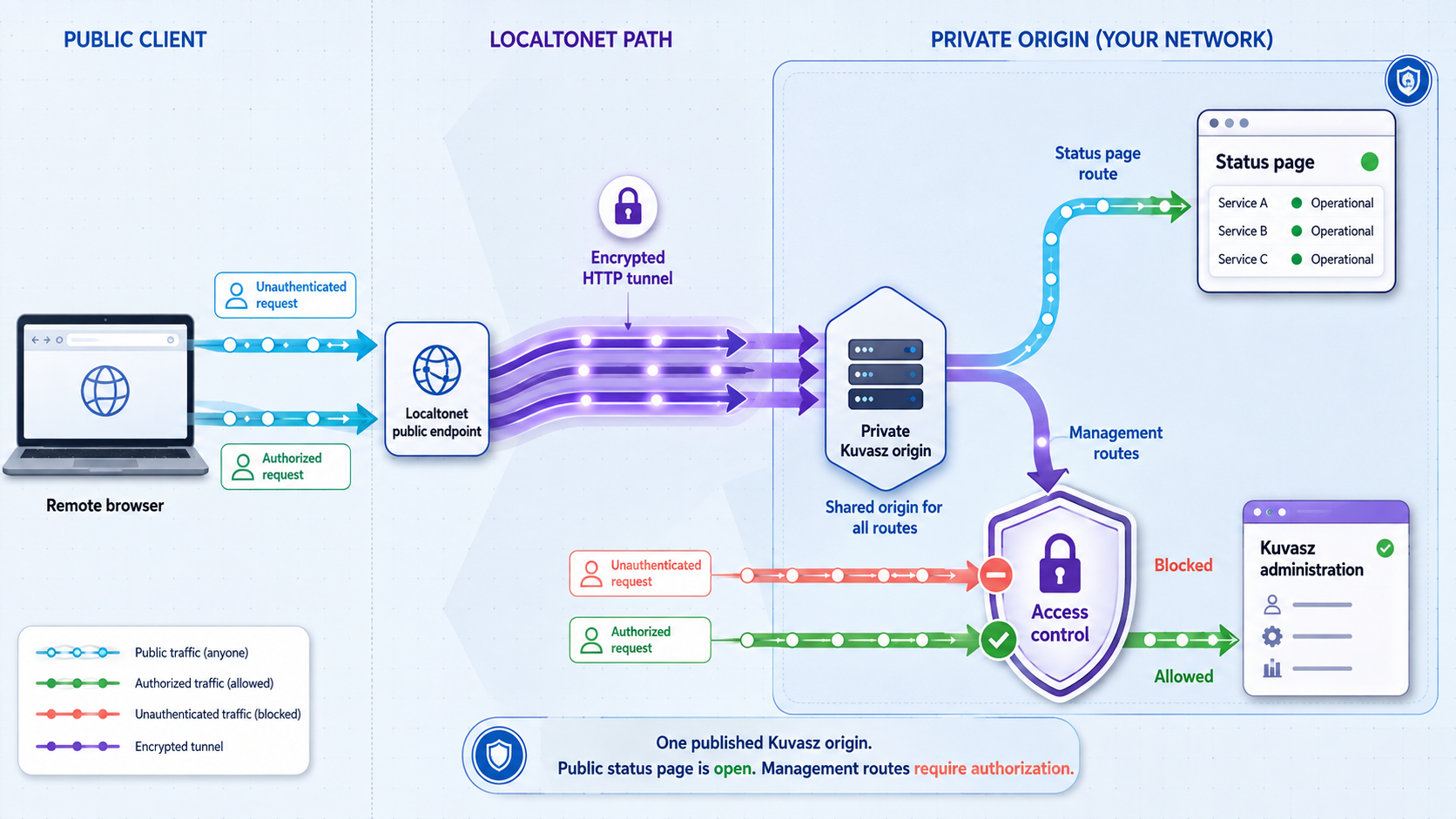
The most important security property of this design is accurate scope. Localtonet forwards the configured Kuvasz web origin. It does not inherently filter requests so that only one status-page path reaches the application. The application must therefore distinguish anonymous status-page access from authenticated administration.
Keep the Kuvasz dashboard authentication enabled and use unique administrator credentials. Test the application root from a logged-out browser. Review the REST API, MCP server, heartbeat endpoints, and any integration or management routes enabled in your deployment. An operational endpoint can be sensitive even when it displays no dashboard.
When path-level isolation is mandatory
If your policy requires the public listener to accept only a particular status-page route, do not rely on the Localtonet HTTP tunnel itself for that restriction. Place a separately configured reverse proxy in front of Kuvasz, allow only the documented status-page route and required static resources, reject all other paths, and target Localtonet at that proxy rather than Kuvasz directly.
Such a proxy must be tested against the exact Kuvasz release because status pages may require additional assets or supporting requests. An incomplete allowlist can produce a page shell with missing styles, scripts, data, or incident details. This article does not provide a generic proxy rule because the correct path set must come from the observed requests and route documentation for the installed release.
Validate allowed and denied routes directly. Confirm that the intended status page and required assets work, while dashboard, API, MCP, heartbeat, and management routes are rejected. Keep Kuvasz authentication enabled as defense in depth.
Operate, back up, troubleshoot, and upgrade the deployment
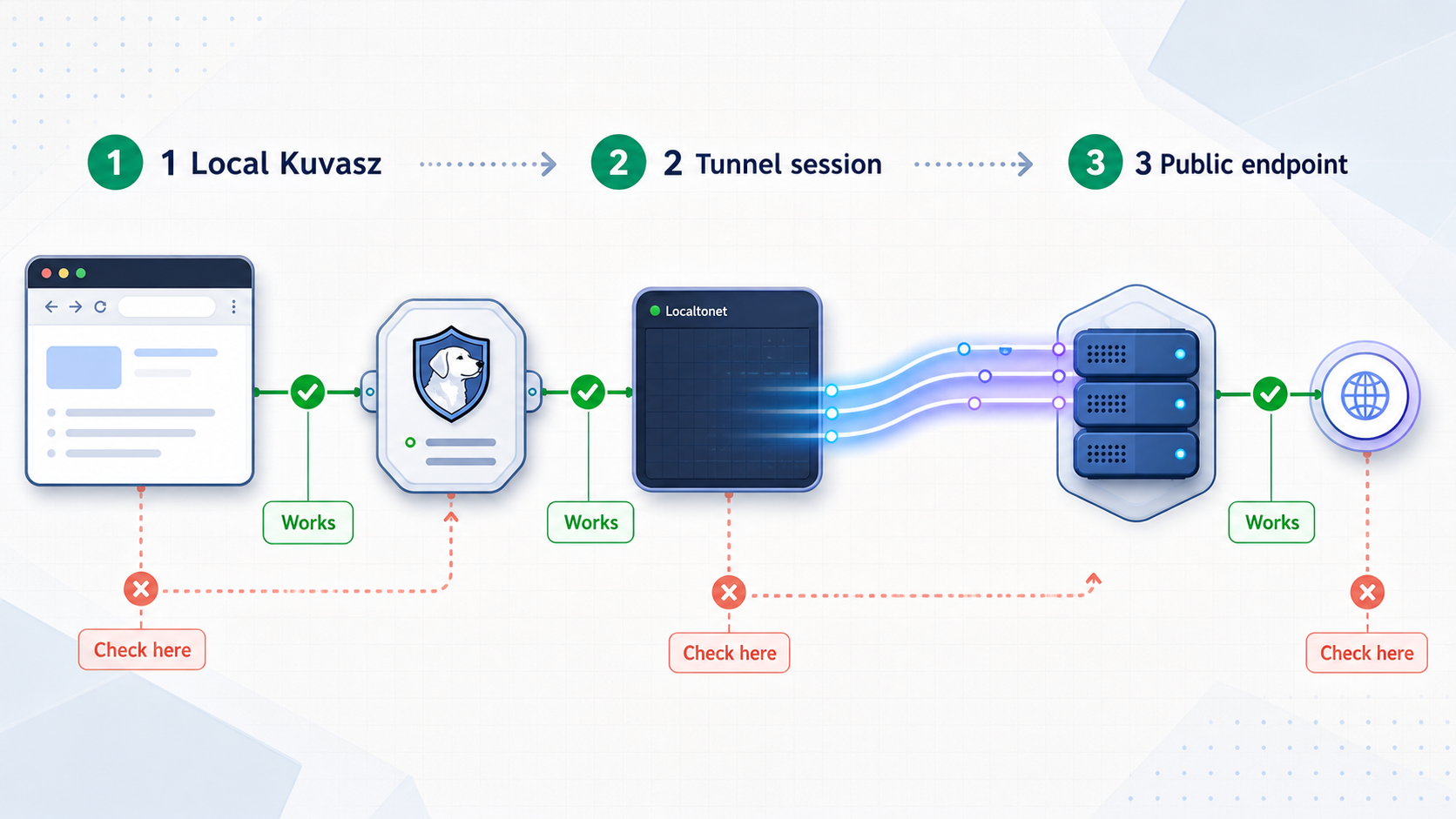
Back up PostgreSQL and deployment configuration
The PostgreSQL volume preserves data when containers are recreated, but persistence is not a backup. A volume can still be lost through host failure, deletion, storage corruption, or an operational mistake. Use a PostgreSQL-aware backup procedure and test restoration on a separate system or isolated deployment.
Back up the Compose file and non-secret configuration alongside the database. Store secrets in an appropriately protected system and document how they are restored without placing them in the same broadly accessible archive. Record the Kuvasz image tag, PostgreSQL image version, volume name, port mapping, and any additional configuration files used through MICRONAUT_CONFIG_FILES.
Before maintenance, create a database backup, verify that the backup completed, and use a Kuvasz maintenance window where planned service interruption would otherwise create false incidents. After maintenance, confirm that new checks are being recorded rather than relying only on historical data in the dashboard.
Perform a safe upgrade
Identify the installed and target releases
Record the running image tag and choose a specific target tag. Do not assume that configuration and database migrations are compatible across every intervening release.
Read every applicable upgrade note
Review the Kuvasz changelog and upgrade notes between the installed and target versions. Apply required configuration changes before starting the new image.
Back up PostgreSQL and configuration
Create and verify a database backup. Preserve the working Compose file, environment structure, secret references, and current image tag so that rollback can be planned.
Validate and start the target configuration
Change only the reviewed values, run docker compose config, pull the target image, and recreate the deployment according to the project's upgrade procedure.
Inspect logs and functional behavior
Watch for migration and configuration errors. Sign in, verify monitor checks, confirm notifications, open the status page locally, and test its public or private behavior.
Verify the Localtonet path
Confirm that the local IP and port have not changed, then test the public origin and exact status-page route from an external network.
Kuvasz does not start
Run docker compose ps and inspect both service logs. Common categories include mismatched PostgreSQL credentials, an unavailable database service, unsupported configuration keys, migration failures, and a host port already used by another process. Compare the resolved configuration with the version-matched Docker example. Do not print a secret-bearing configuration into a public support request.
Kuvasz works on the host but not from the Localtonet device
A loopback address such as 127.0.0.1 refers to the device making the connection. If Localtonet runs on another machine, targeting its own 127.0.0.1 will not reach the Kuvasz host. Test the Kuvasz host's LAN IP and port from the Localtonet device, then use that verified address in the tunnel.
The public origin opens the sign-in page instead of the status page
The tunnel publishes the origin, so its root can legitimately show the Kuvasz application entry point. Append the exact status-page path copied from the local browser. Verify that the path was not truncated and that the status page remains enabled after an upgrade.
The public page opens, but assets or monitor data are missing
Test the same URL locally and inspect Kuvasz logs. If a path-filtering reverse proxy is present, confirm that it permits every static asset and data request required by the status page. Also review any documented external URL or proxy configuration for the installed Kuvasz release rather than guessing setting names.
The public address suddenly stops responding
Check PostgreSQL, Kuvasz, and the local endpoint first. Then confirm that the selected Localtonet device remains connected and that the tunnel is still running. A sleeping or restarted host, disconnected client, stopped tunnel, changed LAN address, or changed container port can interrupt access.
The status page reveals sensitive information
Stop the tunnel while investigating. Remove inappropriate monitors, revise labels that reveal internal systems, and reconsider whether the page should be public. Test the application root and operational routes again before restarting the tunnel.
Frequently asked questions
Is Kuvasz 4.2.0 the latest release?
This tutorial uses 4.2.0 as a pinned, documented reference release. It does not claim that 4.2.0 is the newest release available when you read the guide. Check the current Kuvasz release and upgrade notes before choosing a version for a new installation.
What local Kuvasz address does this deployment use?
With the documented port mapping retained, Kuvasz is available on the deployment host at http://127.0.0.1:8080. A Localtonet client on another device must use the Kuvasz host's reachable LAN IP with port 8080, not that other device's loopback address.
Does Kuvasz require PostgreSQL?
Yes. Kuvasz is distributed as a Docker image and requires PostgreSQL. Persist the PostgreSQL data directory and maintain tested database backups. A Docker volume provides persistence across container recreation, but it is not a substitute for a backup.
Can Kuvasz create public and private status pages?
Yes. Kuvasz supports public and private brandable status pages. Test the actual access behavior in a logged-out browser before sharing either type, especially after configuration changes or upgrades.
Does Localtonet expose only the status-page path?
No. A Localtonet HTTP tunnel forwards the configured local IP address and port. Other paths on the same Kuvasz origin can also be requested. Kuvasz authentication must protect administrative functionality, and a separately tested path-filtering reverse proxy is needed when strict route-level isolation is mandatory.
Which Localtonet tunnel type should I use?
Use an HTTP tunnel for the browser-based Kuvasz service. Enter the local IP address and port reachable from the selected Localtonet client, explicitly start the tunnel, and append the Kuvasz status-page path to the assigned public HTTPS origin.
Does this require router port forwarding or a public IP address?
No. Our client establishes an outbound connection to a Localtonet relay server. This workflow does not require inbound router port forwarding, firewall changes, VPN setup, or a public IP address.
Will the public page remain available if the host is turned off?
No. PostgreSQL and Kuvasz must be running, the selected Localtonet client must be connected, and the tunnel must be running. If any part of that chain stops, the public status-page URL becomes unavailable.
Should I expose PostgreSQL through Localtonet too?
No PostgreSQL tunnel is required for this status-page workflow. Keep the database inside the controlled private network used by Kuvasz. Publish only the web origin needed for browser access.
Publish your verified Kuvasz status page with Localtonet
After Kuvasz and PostgreSQL are healthy, monitor checks are recording results, and the status page behaves correctly in a logged-out local test, create a Localtonet HTTP tunnel to the verified Kuvasz IP address and port. Start the tunnel, append the exact status-page path, test from an external network, and retain authentication for every operational route that should remain private.
Get Started Free →

