

Deploy a reproducible Plausible Community Edition stack, verify it locally, and publish its HTTP endpoint securely
Plausible Community Edition is the official self-hosted edition of Plausible Analytics. This tutorial uses its supported Docker Compose deployment path, pins an explicit release, creates the required configuration, starts the application and databases, and verifies the local service with both browser and command-line checks. It then maps the verified HTTP endpoint to a public HTTPS address with Localtonet, without inbound router port forwarding, firewall changes, VPN setup, or a public IP address. You will also configure Plausible's canonical BASE_URL, protect persistent data, apply security updates, and test the complete analytics path.
📋 What's in this guide

Understand the Plausible CE and Localtonet architecture
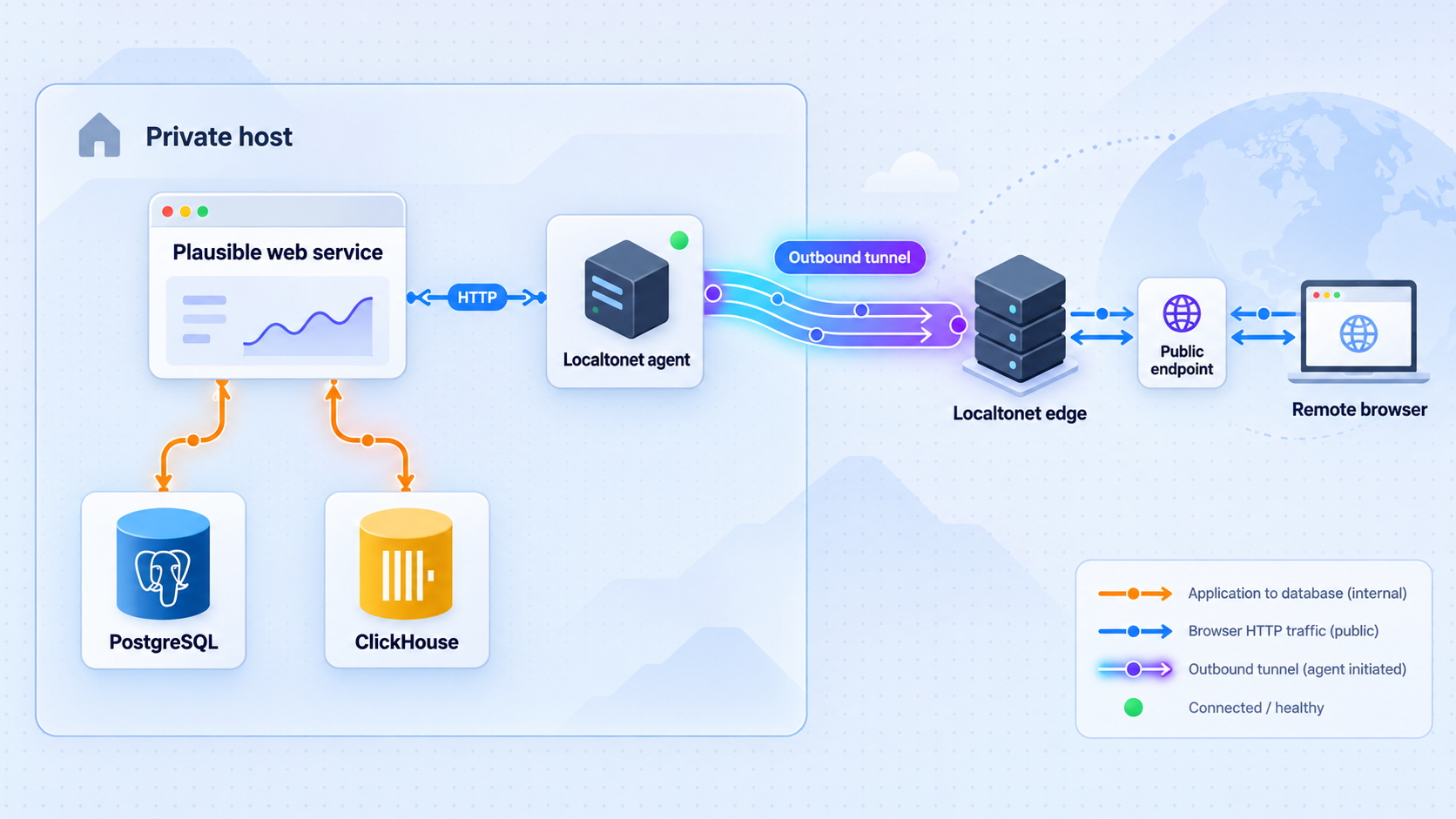
Plausible Analytics is an open-source, privacy-focused web analytics application. Plausible Community Edition, usually shortened to Plausible CE, is its official self-hosted edition. It provides the analytics application, dashboard, tracking functionality, Events API, and Stats API while leaving infrastructure management to the operator.
For a packaged self-hosted deployment, use the official
Plausible Community Edition repository.
Do not substitute the development workflow from the main plausible/analytics source repository. The CE repository contains the Docker Compose definition intended to coordinate the application, PostgreSQL, and ClickHouse.
PostgreSQL stores relational application data such as accounts and site configuration. ClickHouse stores analytics event data. The Plausible web container serves the dashboard and HTTP endpoints. These components form one application stack and must be operated, backed up, restored, and upgraded coherently.
Localtonet is added only after that stack works locally. Our client runs on the Plausible host, or on another device that can reach it, and establishes an outbound connection to a Localtonet relay server. An HTTP tunnel maps a public HTTPS address to the tested local Plausible address and port. The public endpoint remains available only while the selected client is connected, the tunnel is running, and Plausible is healthy.
Localtonet provides connectivity to a local service. It does not install Plausible or repair an unhealthy stack. Complete the installation, confirm every Compose service, and test the local HTTP endpoint before creating the tunnel.
Prepare the Plausible CE host
The supported CE deployment path uses Docker Compose on a Linux host. Prepare a server or virtual machine with a supported Docker Engine installation and the Docker Compose plugin. You also need Git to check out a reproducible repository revision, OpenSSL to generate the application secret, and a shell capable of running the commands below.
Use a 64-bit host with at least 2 GB of available memory. Treat that as an installation floor rather than a universal production sizing recommendation. Required CPU, memory, and storage grow with traffic, retention, query activity, and the number of sites. Leave enough free disk space for the PostgreSQL and ClickHouse data, application updates, temporary files, database maintenance, and backups.
Confirm the required tools before downloading Plausible:
docker --version
docker compose version
git --version
openssl version
Each command should print a version instead of reporting that the program is missing. Install Docker Engine and its Compose plugin using the instructions for your Linux distribution if either Docker command fails. The account performing the installation must be authorized to use Docker.
Membership in a group that can control the Docker daemon commonly grants extensive control over the host. Limit that access to trusted administrators and follow Docker's host-hardening guidance.
Choose an explicit CE release
A production installation should use an exact release tag rather than a floating branch or broad image tag. The supplied release record identifies v3.2.1 as a security release that removes the vulnerable /storybook endpoint. Before installing, review current releases in the CE project and Plausible's security notices. If a newer supported security release exists, use its exact tag throughout the procedure instead of automatically treating v3.2.1 as permanently current.
The examples below deliberately set one release value. Change it only after confirming that the corresponding exact tag exists in the official CE repository:
export CE_VERSION=v3.2.1Record the selected tag in your deployment notes. Pinning the repository revision and the image version referenced by its Compose definition makes it possible to identify what was deployed, compare it with security advisories, and reproduce the files during recovery.
Plan the public address before production use
Plausible uses BASE_URL as its canonical external URL. This value should match the final address through which browsers, tracked websites, and integrations reach the deployment. It includes the scheme and hostname, such as https://analytics.example.com, without an extra path.
You can begin with http://localhost:8000 for private installation and verification. Before adding production tracking code, switch BASE_URL to the final Localtonet HTTPS address and restart the Plausible service. Redirects, generated links, tracker delivery, ingestion behavior, and integrations can depend on the canonical address.
A random generated subdomain is useful for a temporary test. If websites will permanently send analytics events through this deployment, choose a stable Localtonet custom subdomain or custom domain where available before distributing the tracker configuration. Options and plan availability can vary. Obtain available process types and current DNS instructions from the dashboard rather than copying DNS values from another account.
Install and configure Plausible Community Edition
The procedure below checks out the selected CE release, creates the environment configuration expected by its Compose deployment, generates a unique secret, and starts the stack. Run it from the Linux account that will administer this installation.
Clone the exact Community Edition release
Clone the official CE repository at the explicit release tag. The --depth 1 option limits the checkout to that revision.
Create the required environment file
Create .env in the checked-out deployment directory. Set the canonical base URL and generate a fresh SECRET_KEY_BASE with OpenSSL.
Review the resolved Compose configuration
Ask Docker Compose to parse the project before starting it. This catches malformed configuration and lets you confirm the services, image tags, port mapping, and volumes supplied by the selected release.
Pull and start the stack
Pull the images pinned by the selected deployment definition, then start the application and database services in detached mode.
Inspect service status and startup logs
Confirm that every expected service is running. Review logs for failed migrations, invalid secrets, database connection failures, or repeated restarts before opening the browser.
1. Clone the selected release
export CE_VERSION=v3.2.1

git clone \
  --branch "$CE_VERSION" \
  --depth 1 \
  https://github.com/plausible/community-edition.git \
  plausible-ce

cd plausible-ce
git describe --tags --exact-match
The final command should print the tag you selected. If the tag does not exist, stop and review the current official CE releases. Do not silently fall back to the default branch, an old tutorial tag, or a broad image tag such as v3.
2. Generate the application secret and configuration
Generate a unique secret directly into the local environment file. The following shell block avoids printing the generated value to the terminal:
umask 077
SECRET_KEY_BASE="$(openssl rand -base64 48)"

cat > .env <<EOF
BASE_URL=http://localhost:8000
SECRET_KEY_BASE=${SECRET_KEY_BASE}
EOF

unset SECRET_KEY_BASE
chmod 600 .env
The SECRET_KEY_BASE protects application cryptographic operations and must remain stable for the life of the deployment. Do not regenerate it during every restart or upgrade. Do not commit .env to source control, paste it into an issue, or reuse a Localtonet device token as this secret.
BASE_URL=http://localhost:8000 is appropriate for the initial local check. It is not the final production value when users and websites will reach Plausible through a public Localtonet HTTPS address. The public URL configuration is updated later, after you have selected a stable address.
3. Validate the deployment definition
docker compose config --services
docker compose config --images
docker compose config --volumes
docker compose config --quiet
The first three commands display the service names, exact container images, and persistent volumes defined by the checked-out release. Expect the stack to represent Plausible, PostgreSQL, and ClickHouse responsibilities. The quiet validation command should finish without an error.
Save the output of these commands in your private deployment record, excluding secret values. They provide a release-specific inventory without relying on service or volume names copied from a different CE version.
4. Start Plausible CE
docker compose pull
docker compose up -d
The initial start can take longer than later restarts because Docker must obtain the images, initialize persistent databases, and run required application setup or migrations. Do not interrupt database initialization merely because the browser does not respond immediately.
5. Check status and logs
docker compose ps
docker compose logs --tail=200
The status table should show the expected services running rather than repeatedly restarting or exiting. Review the logs for startup completion and investigate errors relating to database connectivity, file permissions, missing variables, migrations, or exhausted storage.
To follow new messages while troubleshooting, use:
docker compose logs --follow --tail=100
Press Ctrl+C to stop following the log output. This does not stop the containers.
Verify Plausible locally before creating a tunnel
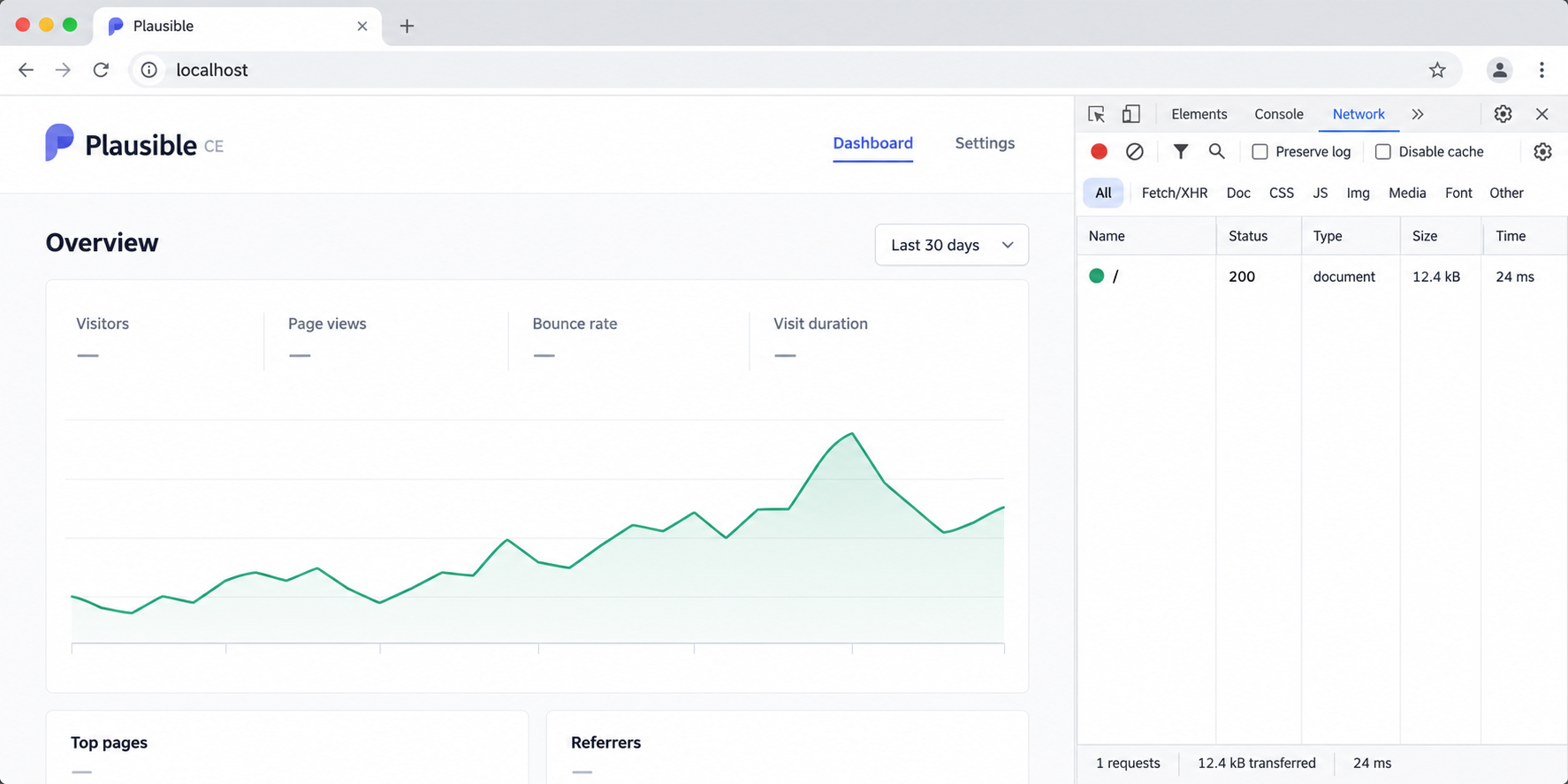
Local testing separates Plausible or Docker problems from Localtonet configuration problems. The default CE Compose deployment makes the application available at http://localhost:8000. Verify that address from the Docker host first.
Check the HTTP response from the command line
curl --silent --show-error \
  --dump-header - \
  --output /dev/null \
  http://127.0.0.1:8000/
Expect an HTTP response from Plausible. Depending on the current application state and route behavior, the root request may return a successful page or an HTTP redirect to a setup, login, or application route. Connection refusal, a timeout, a response from an unrelated service, or repeated server errors indicate that local setup is not ready.
Retrieve part of the response body as an additional identity check:
curl --silent --show-error \
  http://127.0.0.1:8000/ |
  head -n 20
The output should be HTML associated with the Plausible application or its redirect destination. Do not use an HTTP status alone to assume that the correct application owns the port.
Complete first-run setup in a browser
Open http://localhost:8000 in a browser on the host. If you administer the server remotely, use an existing trusted method to access its local interface while the public tunnel is not yet running. Complete the account registration or sign-in flow presented by the installed CE release, use a unique administrator password, and store it in a password manager.
Add a test site and confirm that the dashboard opens. Use the tracking instructions presented by your installed Plausible version rather than copying a script URL from the managed service or an older tutorial. At this stage the canonical URL is still local, so do not deploy the final tracking integration to a production website yet.
Test persistence across a controlled restart
docker compose restart
docker compose ps

curl --silent --show-error \
  --dump-header - \
  --output /dev/null \
  http://127.0.0.1:8000/
After the services return to a running state, sign in again and confirm that the account and test site remain present. A Compose restart should not erase database state because the deployment uses persistent volumes.
docker compose down -v during routine operation
The -v option removes the project's named volumes. Those volumes contain persistent database data. A normal docker compose down leaves them in place, but you should still have a tested backup before maintenance.
Verify from the Localtonet client device
If the Localtonet client will run on the same host, the tested target can be 127.0.0.1 on port 8000. If the client runs on a different device, 127.0.0.1 refers to that other device and will not reach Plausible. In that topology, Plausible must be deliberately reachable over the local network, and you must test its private address from the Localtonet device:
curl --silent --show-error \
  --dump-header - \
  --output /dev/null \
  http://PLAUSIBLE_PRIVATE_IP:8000/
Replace PLAUSIBLE_PRIVATE_IP with the actual private address. If this fails while the loopback test succeeds, review the Compose port binding, host firewall, routing, and network policy. Do not expose PostgreSQL or ClickHouse to solve an HTTP reachability problem. Only the Plausible web listener is the Localtonet target.
Align Plausible BASE_URL with the Localtonet address
Plausible's BASE_URL must represent the canonical external origin. For production, choose the final Localtonet process type and address before distributing the Plausible tracker or configuring integrations. HTTP and File Server tunnels can use Random Sub Domain, Custom Sub Domain, or Custom Domain process types, subject to current availability.
| Address choice | Best use | BASE_URL consideration |
|---|---|---|
| Random Sub Domain | Short-lived installation and connectivity testing | Do not embed a disposable address in production websites if it may later change. |
| Custom Sub Domain | A stable Localtonet-hosted public name where available | Set BASE_URL to its exact HTTPS origin after reserving the address. |
| Custom Domain | A production analytics hostname under a domain you control | Complete the current dashboard and DNS process, then use the final HTTPS origin. |
Suppose the final assigned address is https://analytics.example.com. Update only the BASE_URL line in .env, preserving the existing secret:
BASE_URL=https://analytics.example.comThen recreate the Plausible service so the container receives the updated environment:
docker compose up -d
docker compose ps
Inspect the logs after the change and repeat the local HTTP test. The local target remains HTTP on port 8000; BASE_URL describes the external HTTPS origin. Do not point the Localtonet tunnel back to its own public URL.
Websites may load the tracking script or send events through the canonical Plausible origin. API clients, generated links, redirects, and integrations can also depend on it. Changing the address later may require updating Plausible, every website integration, and any client that stores the previous URL.
Publish Plausible CE with a Localtonet HTTP tunnel
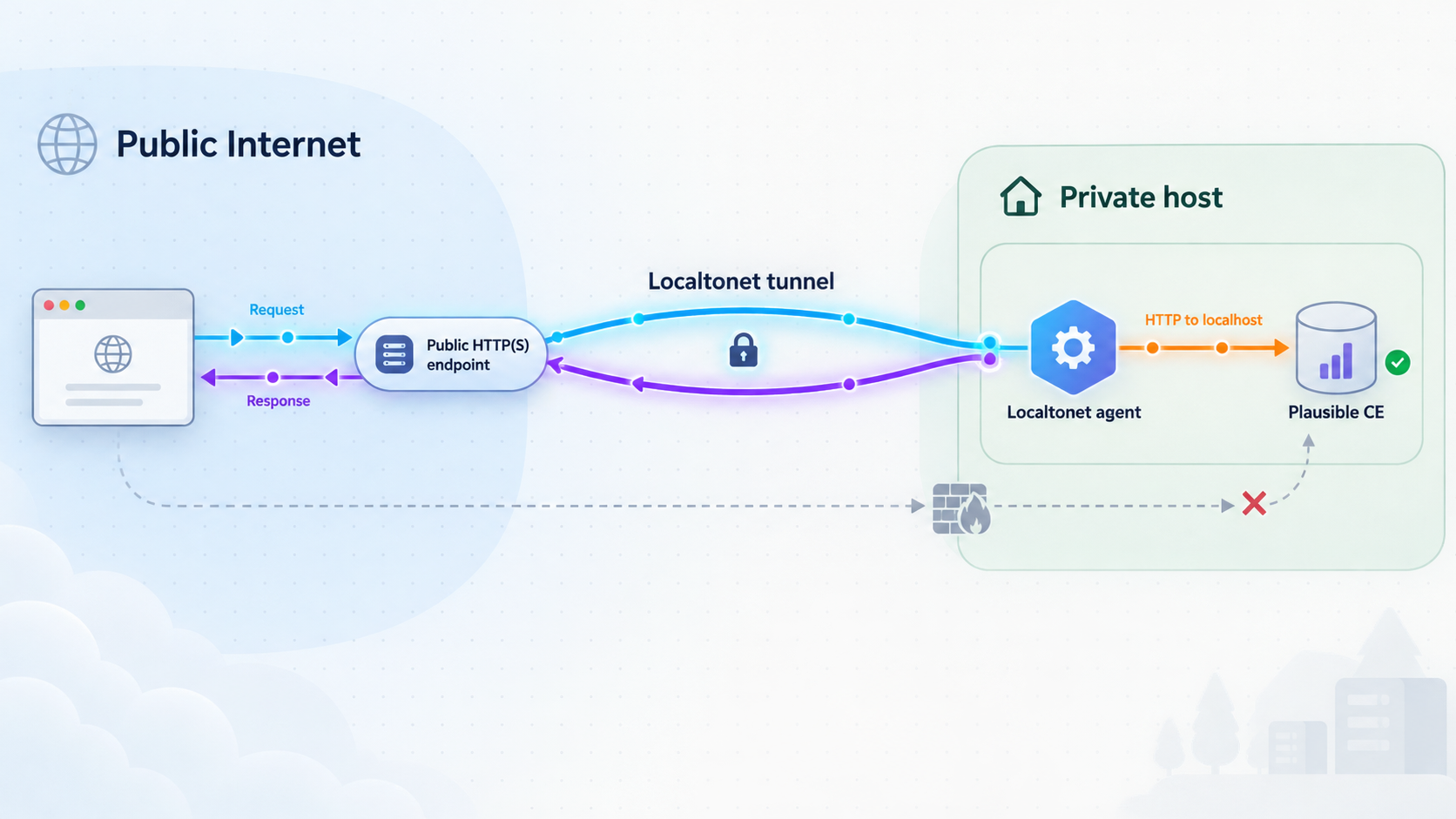
Once the application responds locally and BASE_URL matches the intended public origin, create the HTTP tunnel. For current client installation choices and dashboard details, use the
Localtonet HTTP tunnel documentation.
The sequence below covers the complete configuration workflow without guessing operating-system-specific installer commands.
Install and run the Localtonet client
Install our client on the Plausible host or another device that passed the local reachability test. Keep the client running whenever the public analytics endpoint must be available.
Authenticate and select the device
Use the device-specific authentication token for the client that will carry the tunnel. Treat the token as a secret and never place it in Plausible configuration, source control, screenshots, or public logs.
Select an available relay server
Choose a server or region from the values currently available in the dashboard. Do not copy a server code from another account or an old tutorial.
Create the HTTP tunnel
Select the HTTP tunnel type and an available Process Type. Enter 127.0.0.1 and port 8000 when the Localtonet client runs on the Plausible host. If it runs elsewhere, enter the private address and port that succeeded during testing from that device.
Start the tunnel
Creating the configuration does not make it active. Use the Start button and confirm that the selected device is connected and the tunnel reports a running state.
Verify the public endpoint
Open the assigned HTTPS address from outside the local network. Confirm sign-in, dashboard navigation, tracking-script retrieval, event delivery, and every API function your deployment will expose.
Run an external command-line check
From a machine outside the Plausible host's private network, replace the example hostname with the real Localtonet address:
curl --silent --show-error \
  --dump-header - \
  --output /dev/null \
  https://analytics.example.com/
Expect an HTTPS response from Plausible. Compare its behavior with the local request. A public response from the wrong application usually means the tunnel targets the wrong port. A gateway or connection failure usually means the Localtonet client is disconnected, the tunnel was created but not started, or the configured target cannot be reached from the client device.
Verify the analytics flow
A visible login page does not prove that analytics collection works. Follow the tracking instructions generated by your installed CE version, place the tracker on a controlled test page, load that page, and confirm the visit or event appears in the Plausible dashboard. Use the browser's network tools to verify that script and event requests go to the intended public hostname.
If you use the Events API or Stats API, test the required endpoint and authentication method separately. Do not include private API credentials in public command examples, browser screenshots, or client-side code that should not contain secrets.
Treat the endpoint as public even if you share it with only a small team. Preserve Plausible authentication, use unique administrator credentials, install security updates, and expose only the application functions required by your analytics workflow.
Secure, back up, and update the deployment
Apply the Plausible v3.2.1 security fix where relevant
The
Plausible v3.2.1 security release
addresses CVE-2026-8467 and GHSA-55hg-8qxv-qj4p. Plausible reports that affected CE tags expose an HTTP /storybook endpoint which, under certain conditions, can allow remote code execution with the privileges of the system user running the application.
The notice identifies v3.0, v3.0.1, v3.1, v3.1.0, v3.2, v3.2.0, the broad v3 tag, and listed release candidates as affected when that endpoint is exposed to a public or otherwise untrusted network. Version v3.2.1 removes the endpoint, with no other changes included in that release.
Affected deployments should update to v3.2.1 or a newer supported security release. If an immediate update is temporarily impossible, Plausible recommends blocking access to /storybook through the reverse proxy or another applicable control. That is an immediate mitigation, not a substitute for updating.
curl --silent --show-error \
  --output /dev/null \
  --write-out '%{http_code}\n' \
  https://analytics.example.com/storybook
On a fixed deployment, the removed route must not expose Storybook content. Check current project security information whenever you install or upgrade rather than assuming that v3.2.1 remains the newest supported version.
Back up the complete persistent state
A recoverable Plausible CE backup must cover both databases and the deployment configuration. PostgreSQL and ClickHouse hold different data, so protecting only one produces an incomplete recovery set. Preserve the following:
- PostgreSQL data containing accounts, sites, and relational application state.
- ClickHouse data containing analytics events and related event storage.
- The checked-out Compose definition and the exact CE release tag.
- The protected
.envfile, including the originalSECRET_KEY_BASE. - Any additional mail, registration, authentication, proxy, or integration settings you added.
- A written restore procedure and the date of the last successful restore test.
Start by recording the exact project inventory:
git describe --tags --exact-match
docker compose config --services
docker compose config --images
docker compose config --volumes
docker volume ls
Use PostgreSQL and ClickHouse backup methods compatible with the exact database versions shown by docker compose config --images. Database-consistent exports or snapshots are preferable to copying files from actively changing volumes. The CE Compose definition does not make an arbitrary live filesystem copy transactionally consistent.
Keep backups outside the Docker host's failure boundary, encrypt them appropriately, restrict access, and test restoration on an isolated host. A successful archive command does not prove that Plausible can be recovered.
Perform a release-pinned update
Read the target release notes first, confirm its migration requirements, and complete a tested backup. Then stop changing the existing checkout in place and obtain the exact target release in a separate directory. This preserves the previous deployment files for inspection and avoids unintentionally mixing files from different tags.
export NEW_CE_VERSION=v3.2.1

cd ..
git clone \
  --branch "$NEW_CE_VERSION" \
  --depth 1 \
  https://github.com/plausible/community-edition.git \
  "plausible-ce-${NEW_CE_VERSION}"
Copy the existing .env into the new release directory using a secure local operation. Preserve SECRET_KEY_BASE and the production BASE_URL. Compare the new release's sample configuration and Compose definition with the previous version, then add any newly required values according to that release's instructions.
cd "plausible-ce-${NEW_CE_VERSION}"
chmod 600 .env

docker compose config --quiet
docker compose pull
docker compose up -d
docker compose ps
docker compose logs --tail=200
The precise migration and rollback constraints are release-specific. Do not assume a database changed by a newer version can safely be opened by an older application. After updating, repeat the local curl test, browser sign-in, dashboard check, external HTTPS test, and controlled analytics event test.
Manage application and tunnel lifecycles deliberately
| Task | Command or action | Effect |
|---|---|---|
| View local service state | docker compose ps |
Shows the current Compose containers and their state. |
| Restart the CE stack | docker compose restart |
Restarts services while retaining named volumes. |
| Stop containers | docker compose stop |
Stops Plausible and its databases without deleting them. |
| Start stopped containers | docker compose start |
Starts containers created by the existing project. |
| Stop public access | Use the Localtonet Stop action | Ends public tunnel availability without removing the configuration. |
| Remove obsolete public access | Delete the Localtonet tunnel | Removes a tunnel configuration that is no longer needed. |
Stopping the Localtonet tunnel interrupts dashboard access, tracker delivery, event ingestion, and API calls that depend on its address. Stopping Plausible while leaving the tunnel running produces failures because the local target is unavailable. Coordinate both lifecycles during maintenance.
Troubleshoot Plausible CE and tunnel problems
Docker Compose reports a missing variable
Confirm that .env exists in the same project directory as the Compose file and is readable by the administrative account. Check the variable names without printing their secret values:
test -f .env && echo ".env exists"
grep -E '^(BASE_URL|SECRET_KEY_BASE)=' .env |
  sed 's/=.*$/=[set]/'
docker compose config --quiet
If SECRET_KEY_BASE is absent during a new installation, generate it once with openssl rand -base64 48. If this is an existing installation, recover the original value from protected configuration or backup rather than replacing it casually.
One or more services keep restarting
docker compose ps
docker compose logs --tail=300
Look for a database that is still initializing, failed migrations, incompatible image versions, invalid settings, permissions errors, or exhausted memory and storage. Verify free space with the operating system's disk tools and compare the current Compose files with the exact release tag you intended to deploy.
Port 8000 is already in use
Identify the process or container already bound to the port before changing anything. Do not stop an unrelated production service blindly. If you deliberately change Plausible's host port through a supported Compose override, update local verification commands and the Localtonet target to match. The container's internal port and the host's published port are not necessarily interchangeable.
Local curl works, but another device cannot connect
A loopback-only binding accepts connections only from the Docker host. This is ideal when the Localtonet client runs on that same host. If the client is elsewhere, use a deliberate private-network binding supported by your Compose configuration, apply an appropriate host firewall policy, and verify the private address from the Localtonet device. Never expose the database ports merely to make the web service reachable.
The public URL does not respond
Confirm that the Localtonet client is connected and that you pressed Start for the correct tunnel. Then test the configured local target directly from the client device. If that local request fails, repair local routing or Plausible before changing relay settings.
Also compare the tunnel target with the endpoint that passed verification. If the client runs on the Plausible host, target 127.0.0.1:8000. If it runs elsewhere, targeting 127.0.0.1 reaches the wrong machine.
The public URL redirects to localhost or another hostname
Inspect BASE_URL in .env. It must match the final public HTTPS origin exactly. Correct it without changing SECRET_KEY_BASE, then apply the configuration and inspect the result:
docker compose up -d
docker compose ps
docker compose logs --tail=100
Clear a cached browser redirect if necessary and repeat the external curl test.
The dashboard loads, but tracking events do not appear
Use browser developer tools on the tracked website. Confirm that the tracking script loads from the intended public Plausible hostname and that event requests are sent successfully. Check the site domain configured in Plausible, browser errors, content-security policy, extensions that block analytics requests, and Plausible application logs.
Confirm that the Localtonet tunnel remained running when the event was sent. Testing only the dashboard proves administrative connectivity, not tracker delivery or event ingestion.
A scanner finds the Storybook endpoint
Identify the exact CE image and repository tag immediately:
git describe --tags --exact-match
docker compose config --images
Compare them with the affected versions in the v3.2.1 security notice. Update affected deployments to v3.2.1 or a newer supported security release. If an update cannot be completed immediately, block /storybook using Plausible's documented mitigation and verify from an untrusted network that Storybook content is inaccessible.
Frequently asked questions
What is Plausible Community Edition?
Plausible Community Edition is the official self-hosted edition of Plausible Analytics. You operate its application, PostgreSQL database, ClickHouse database, configuration, updates, backups, security, capacity, and recovery process on infrastructure you manage.
Why should I use the Community Edition repository?
The official plausible/community-edition repository contains the packaged Docker Compose deployment intended for CE operators. The main plausible/analytics repository is the application source repository and includes developer-oriented material that should not be mistaken for the supported CE installation workflow.
What local URL does this deployment use?
The standard CE Compose deployment is verified locally at http://localhost:8000, or equivalently http://127.0.0.1:8000 from the Docker host. If you intentionally modify the host port or network binding, use the resulting tested address as the Localtonet target.
What should Plausible BASE_URL contain?
During initial local setup it can be http://localhost:8000. Before production use, set it to the exact public HTTPS origin assigned to the Localtonet tunnel, such as https://analytics.example.com. Use a stable address before deploying tracking code broadly.
Which Localtonet tunnel type should I use?
Use an HTTP tunnel for the Plausible web endpoint. Point it at 127.0.0.1:8000 when the Localtonet client runs on the Plausible host, or at the verified private address and port when the client runs on another device.
Does Localtonet require router port forwarding?
No. Our client establishes an outbound connection to a Localtonet relay server. The running tunnel can provide a public URL without inbound router port forwarding, firewall changes, VPN setup, or a public IP address.
Will the public address work after the Localtonet client stops?
No. The endpoint is available only while the selected client is connected and the tunnel is running. Plausible must also remain healthy and reachable from that client. If any part of this path stops, public dashboard, tracker, event, and API requests fail.
What must a Plausible CE backup include?
Include PostgreSQL, ClickHouse, the exact release and Compose configuration, the protected .env file with its original SECRET_KEY_BASE, and any additional integration settings. Store backups away from the live host and prove them with an isolated restore test.
Should every new installation use Plausible CE v3.2.1?
Use v3.2.1 instead of the affected v3.0 through v3.2 tags identified in its security notice, but first check whether Plausible has released a newer supported security version. Pin the exact current release you select rather than using a floating tag such as v3.
Does the Localtonet tunnel secure the Plausible administrator account?
No. Localtonet provides connectivity to the configured local target. Plausible authentication, administrator passwords, software updates, least privilege, dashboard-sharing settings, database protection, backups, and host security remain your responsibility.
Publish your verified Plausible CE deployment
Pin a supported Plausible CE release, start and verify the Docker Compose stack, align BASE_URL with a stable public address, and create an HTTP tunnel from the Localtonet device that can reach it.


