

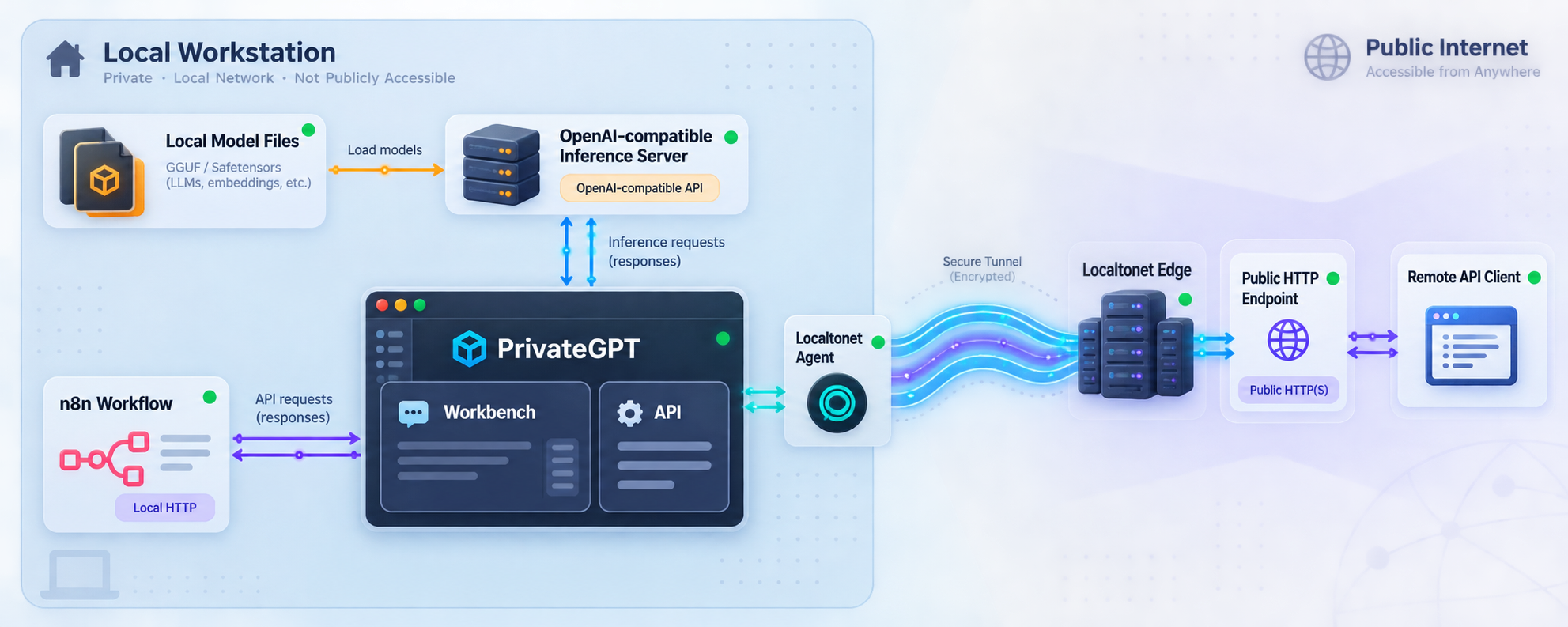
Build a local AI workflow first, verify every layer, then expose only the API endpoint your automation needs
PrivateGPT provides an open-source API layer for applications built on local models, while n8n can use that API as part of an automated workflow. This guide installs PrivateGPT on macOS, Linux, or Windows, connects it to a separately running OpenAI-compatible inference server, verifies the workbench and local API, and explains a careful n8n integration workflow. Once the local stack works, we show how to make the PrivateGPT HTTP service reachable through Localtonet without inbound router port forwarding, firewall changes, VPN setup, or a public IP address. The result is a practical separation between local inference, application logic, workflow automation, and controlled remote connectivity.
📋 What's in this guide
How PrivateGPT, the model server, n8n, and Localtonet fit together
The most important architectural fact is that PrivateGPT does not run an AI model by itself. It is an application and API layer that connects to a separate OpenAI-compatible inference server. That inference server must expose compatible model discovery and chat-completion interfaces, including /v1/models and /v1/chat/completions.
Ollama is the example used by the PrivateGPT quickstart, but it is not the only possible inference backend. PrivateGPT can work with another server when that server offers the required OpenAI-compatible interface. Examples named by the project include llama.cpp and vLLM. Model installation, memory requirements, acceleration support, and endpoint configuration vary between inference servers, so confirm those details for the backend and hardware you choose.
PrivateGPT sits above inference and adds application-level capabilities. Its documented feature set includes messages, streaming, asynchronous processing, token counting, file and artifact ingestion, retrieval with citations, agentic RAG, tools, MCP connectors, database and CSV access, embeddings, and orchestration. The included workbench is useful for testing these capabilities, but the API is the primary interface for applications.
n8n occupies a different layer. It orchestrates triggers, data transformations, API calls, branching logic, and follow-up actions. A workflow can collect input from another system, send an appropriate request to PrivateGPT, process the response, and pass the result to later nodes. Keeping n8n separate from PrivateGPT makes failures easier to identify because inference, AI application behavior, and workflow logic can each be tested independently.
Localtonet is the final connectivity layer. After PrivateGPT works locally, our client can establish an outbound connection to a Localtonet relay and provide a public HTTP address for the local service. This avoids opening an inbound router port or requiring a public IP address. It does not replace authentication, workflow authorization, or safe API design.
| Layer | Responsibility | Primary verification |
|---|---|---|
| Model server | Load models and provide OpenAI-compatible inference | Confirm its model and chat-completion interfaces respond locally |
| PrivateGPT | Expose the AI application API and workbench | Open http://localhost:8080/ui and complete a test |
| n8n | Trigger, prepare, send, and process API operations | Execute one minimal workflow with known input |
| Localtonet | Provide remote HTTP reachability to the local target | Use the assigned public address from a separate network |
Prerequisites and planning decisions
Prepare the stack before installing PrivateGPT. The supported quickstart path differs by operating system: Homebrew is documented for macOS, while Linux and Windows use uv with Python 3.11. You also need an OpenAI-compatible inference server, enough storage and memory for the models you choose, a working n8n installation or instance, and permission to install the Localtonet client on a device that can reach PrivateGPT.
Model size is a practical constraint. The PrivateGPT quickstart uses qwen3.5:35b as its example language model and describes it as approximately 24 GB. It also uses mxbai-embed-large for embeddings and describes that model as approximately 670 MB. The language model may be unsuitable for machines with limited memory or storage. The fact that it is the documented example does not mean it is the right model for every computer.
Decide where each component will run. The simplest arrangement puts the inference server, PrivateGPT, n8n, and the Localtonet client on one machine. A distributed arrangement is also possible, but every hostname, bind address, firewall rule, and local target must then reflect real network reachability between those machines.
Checklist before installation
- A supported macOS, Linux, or Windows environment for the documented installation path.
- Homebrew on macOS, or permission to install
uvon Linux or Windows. - Python 3.11 available through the documented
uv tool installworkflow where applicable. - A running OpenAI-compatible inference server with model discovery and chat-completion support.
- A language model and, for retrieval workflows, an embedding model appropriate for the available hardware.
- A running n8n environment that can reach either the local PrivateGPT address or its later Localtonet public address.
- A Localtonet account and client installation for the device that can reach PrivateGPT.
Complete installation and local verification before creating a tunnel. If PrivateGPT cannot answer through its local workbench and API, publishing port 8080 will not repair the model connection, configuration, or workflow. It will only make the existing failure reachable from another network.
PrivateGPT links to Docker installation documentation, but the installation evidence available for this article does not establish the current Docker commands, volumes, environment files, or networking behavior. We therefore use only the documented Homebrew and uv paths and do not invent a Docker deployment.
Prepare the OpenAI-compatible inference server
PrivateGPT requires the inference service to be running separately. Its language model endpoint is supplied through OPENAI_API_BASE, and its embedding endpoint is supplied through OPENAI_EMBEDDING_API_BASE. Both values use an OpenAI-compatible base ending in /v1.
The official quickstart presents Ollama as the easiest starting point and uses the following example models:
ollama pull qwen3.5:35b
ollama pull mxbai-embed-large
ollama serve
Run the pull commands only after installing Ollama through its supported installation process for your operating system. Model downloads can be large. Check available storage before starting and keep the terminal running if your installation uses ollama serve as a foreground process.
The supplied PrivateGPT quickstart represents the language and embedding addresses with placeholders rather than establishing a port for every inference configuration. Determine the actual OpenAI-compatible port exposed by your Ollama or alternative inference installation. Do not copy a guessed port from an unrelated deployment.
Before moving forward, verify that the inference server exposes both required capabilities. PrivateGPT expects model discovery at /v1/models and chat generation at /v1/chat/completions. If an alternative server uses another native API, enable or select its OpenAI-compatible interface instead of pointing PrivateGPT at an incompatible route.
OPENAI_API_BASE and OPENAI_EMBEDDING_API_BASE are separate settings. They may point to the same compatible server or to different services. Preserve that distinction when diagnosing chat failures versus ingestion or retrieval failures.
Install and start PrivateGPT
Choose the installation procedure for the operating system that will run PrivateGPT. Do not combine the Homebrew and uv methods on the same installation unless you intentionally manage multiple copies and understand which executable your shell resolves.
macOS installation with Homebrew
brew tap zylon-ai/tap
brew install private-gpt
This adds the PrivateGPT tap and installs the private-gpt command. If the shell cannot find the command afterward, verify that Homebrew itself is available in the current shell and that its executable directory is included in the shell path.
Linux installation with uv and Python 3.11
curl -LsSf https://astral.sh/uv/install.sh | sh
uv tool install --python 3.11 \
  --find-links https://wheels.privategpt.dev/packages/ \
  "private-gpt[core]"
The first command installs uv using the documented installer. The second installs the PrivateGPT core tool with Python 3.11 and the specified PrivateGPT wheel location. If uv is not found immediately after installation, follow the installer's shell-path instructions or begin a new shell session before retrying.
Windows installation with PowerShell
powershell -ExecutionPolicy ByPass -c "irm https://astral.sh/uv/install.ps1 | iex"

uv tool install --python 3.11 `
  --find-links https://wheels.privategpt.dev/packages/ `
  "private-gpt[core]"
Run the commands in PowerShell. The backtick is PowerShell's line-continuation character. If preferred, the uv tool install arguments can be entered on one line. Open a new PowerShell session if the newly installed uv command is not yet available.
Start PrivateGPT on macOS or Linux
Replace both placeholders with the actual ports exposed by your compatible language and embedding services:
OPENAI_API_BASE=http://localhost:<llm-port>/v1 \
OPENAI_EMBEDDING_API_BASE=http://localhost:<embedding-port>/v1 \
private-gpt serve
Start PrivateGPT on Windows
$env:OPENAI_API_BASE = "http://localhost:<llm-port>/v1"
$env:OPENAI_EMBEDDING_API_BASE = "http://localhost:<embedding-port>/v1"
private-gpt serve
These environment variables are scoped according to the behavior of the shell that launches the process. Starting PrivateGPT from another terminal, service manager, or user session may require supplying the settings there again. Do not assume that values assigned in one terminal automatically apply to every future process.
Install PrivateGPT for the host operating system
Use Homebrew on macOS or the documented uv tool install command with Python 3.11 on Linux and Windows.
Start the compatible inference server
Load the selected language and embedding models, then confirm that the service is listening on its configured local address.
Set both API base addresses
Point OPENAI_API_BASE and OPENAI_EMBEDDING_API_BASE at the actual OpenAI-compatible /v1 bases. Keep the two values separate even if they happen to use the same server.
Run the PrivateGPT service
Start it with private-gpt serve and keep the process running while completing local tests.
Verify the workbench and API locally
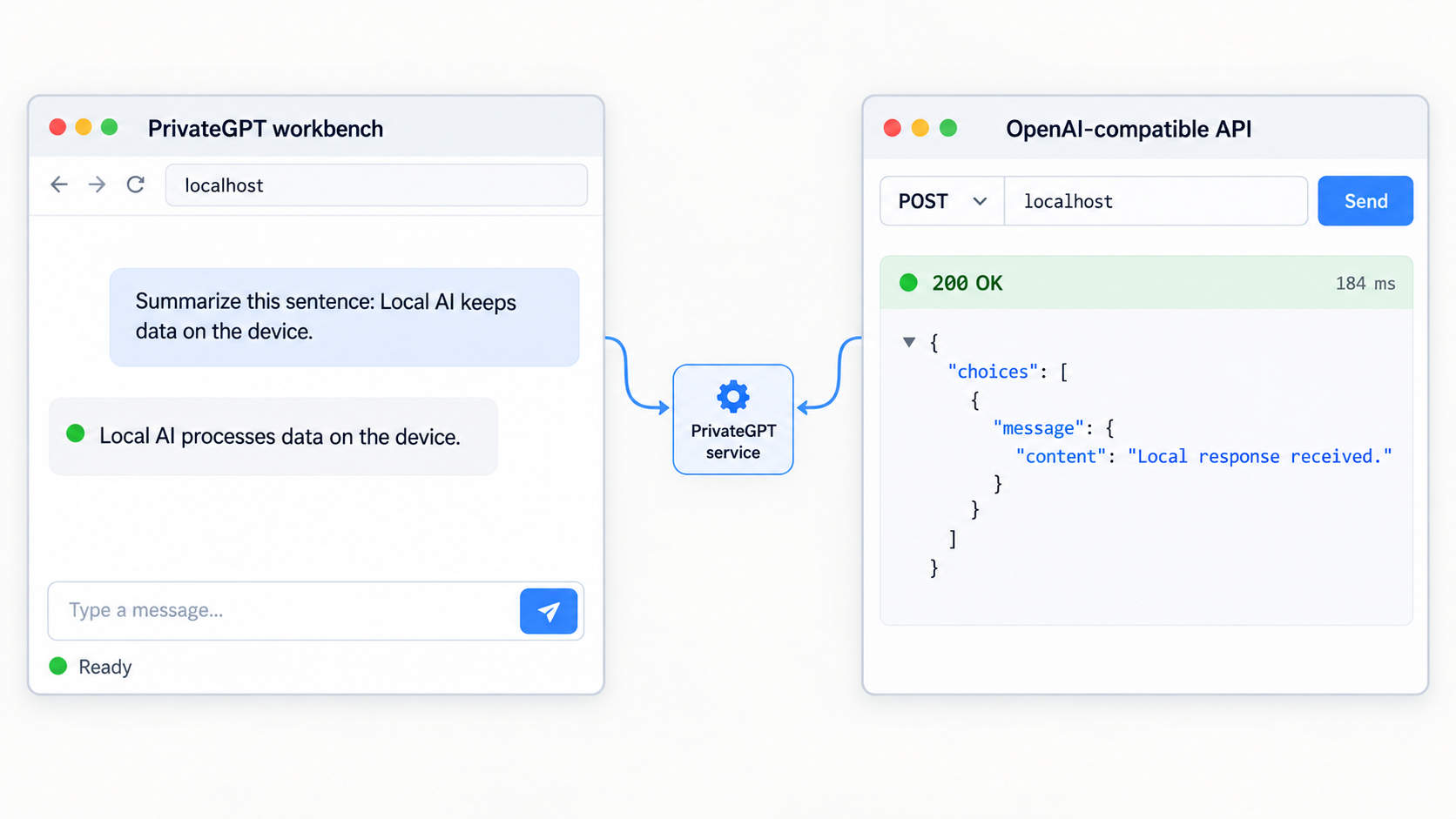
PrivateGPT's documented local API base is http://localhost:8080. Its workbench is available at http://localhost:8080/ui. Open the workbench on the PrivateGPT host before configuring n8n or Localtonet.
The workbench can send messages, select models obtained through /v1/models, upload documents, test retrieval with citations, enable tools for a chat, configure databases and MCP connectors, manage skills and custom tools, and inspect requests and responses through its API Debugger. It is a demonstrator and testing interface rather than the core product, but it provides an effective way to validate the local stack.
Recommended local verification sequence
- Open
http://localhost:8080/uiin a browser on the PrivateGPT machine. - Confirm that the workbench loads without a connection error.
- Check whether the expected model appears in model selection.
- Send a short test message that does not depend on uploaded documents.
- If retrieval is part of the intended workflow, upload a non-sensitive test document and ask a question whose answer is clearly present in it.
- Inspect the API Debugger to understand the exact request and response used by the installed version.
- Record the request path, HTTP method, headers, authentication behavior, request body, response structure, and streaming behavior needed by n8n.
The API Debugger is especially useful because PrivateGPT follows the Anthropic API model, while its upstream inference server follows an OpenAI-compatible interface. These are two separate boundaries. n8n should call the PrivateGPT application API, not accidentally call the upstream inference endpoint unless that is explicitly the workflow you intend to build.
The /v1/chat/completions route belongs to the OpenAI-compatible inference contract required behind PrivateGPT. The external PrivateGPT application API follows the Anthropic API model. Capture the exact PrivateGPT route and payload from the installed version's API Debugger instead of reusing an Ollama or other inference-server request without verification.
If the UI loads but messages fail, the HTTP service itself is running and the likely problem is farther downstream. Check the two API base variables, the inference server process, installed model names, and available system resources. If ordinary messages work but document retrieval fails, focus on the embedding endpoint and ingestion path rather than the language model alone.
Connect n8n to the verified PrivateGPT API
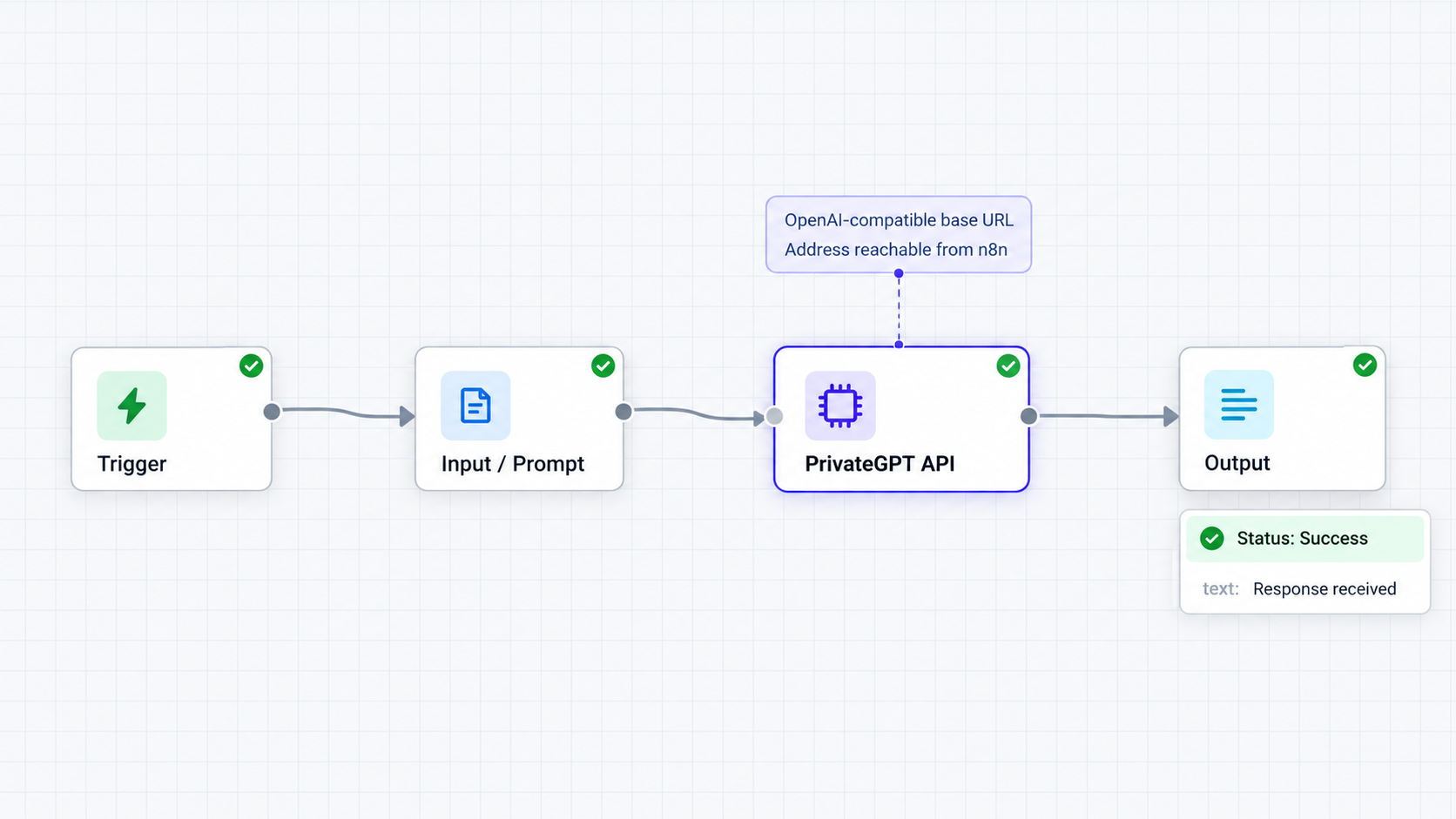
PrivateGPT lists n8n as an integration, but the supplied project evidence does not establish a fixed n8n credential type, node template, or version-independent field mapping. n8n and PrivateGPT can both evolve, so the safest integration procedure is to begin with a request proven by the PrivateGPT workbench and reproduce that request in n8n.
Use an n8n HTTP request operation when a dedicated, verified PrivateGPT node is not available in your installation. Configure the operation from the API Debugger output rather than guessing. The request needs the same method, PrivateGPT API path, content type, authentication, and JSON structure that succeeded locally.
Choose the correct base address
If n8n runs on the same host and outside a container, its PrivateGPT base can normally use http://localhost:8080. If n8n runs on another computer, localhost refers to that other computer and will not reach the PrivateGPT host. Use an address reachable from n8n, subject to your network policy.
Container networking requires extra attention. Inside a container, localhost identifies the container itself. The appropriate host or service name depends on how n8n was deployed. This guide cannot specify a universal container hostname because it is determined by the user's Docker, Compose, Kubernetes, or other networking configuration.
When n8n is hosted outside the private network, first verify PrivateGPT locally and then use the Localtonet public URL described in the next section. Avoid exposing the upstream inference server when n8n only needs PrivateGPT. Publishing the application API creates a narrower and more intentional interface.
Build a minimal test workflow
Create a manually triggered workflow
Begin with a manual trigger so tests run only when requested. This avoids repeatedly calling a large local model while the payload is still being developed.
Add the API request operation
Use n8n's HTTP request capability and enter the base address that is reachable from the n8n runtime. Append the exact PrivateGPT route observed in the workbench API Debugger.
Reproduce a known working request
Copy the verified method, required headers, model identifier, message structure, and other necessary fields. Start with fixed test data before replacing values with n8n expressions.
Handle authentication safely
PrivateGPT documents token-based authentication support. If authentication is enabled in your deployment, store the secret using n8n's credential facilities rather than placing it directly in a workflow body, node name, execution log, or exported workflow.
Execute and inspect the response
Compare the n8n status code and response structure with the successful workbench request. Confirm that the expected generated content can be selected by the following workflow node.
Replace fixed input with workflow data
After the static test succeeds, map fields from the trigger or previous nodes. Validate empty input, unexpected data types, model errors, and timeout behavior before activating the workflow.
Streaming and long-running requests
PrivateGPT supports streaming and asynchronous message processing, but the best mode depends on the n8n operation and the workflow's required behavior. A normal request-response workflow is usually easier to validate first. Streaming responses may require handling multiple events rather than one final JSON document, while asynchronous work may require status checks or later retrieval.
Do not assume a specific timeout value. Generation time depends on model size, available CPU or GPU resources, prompt length, retrieval work, and concurrent use. Configure timeouts based on observed execution time and ensure that retries cannot create unwanted duplicate downstream actions.
Use a staged test instead of a full production workflow
A good first workflow uses a manual trigger, one known request, one output inspection step, and no external side effects. After that succeeds, add document identifiers, retrieval settings, tools, branching, database operations, or outbound notifications one capability at a time. This approach makes it clear which change introduced a failure.
| n8n symptom | Likely layer | What to check |
|---|---|---|
| Connection refused | Network or PrivateGPT process | Reachable hostname, port 8080, service state, and container networking |
| HTTP route not found | Request configuration | Exact path shown by the PrivateGPT API Debugger |
| Authentication rejected | PrivateGPT access control | Current token configuration and securely stored request header |
| Model unavailable | Inference server | Loaded model, model identifier, and /v1/models response |
| Chat works but retrieval fails | Embeddings or ingestion | Embedding API base, uploaded file state, and retrieval configuration |
Provide remote PrivateGPT access through Localtonet
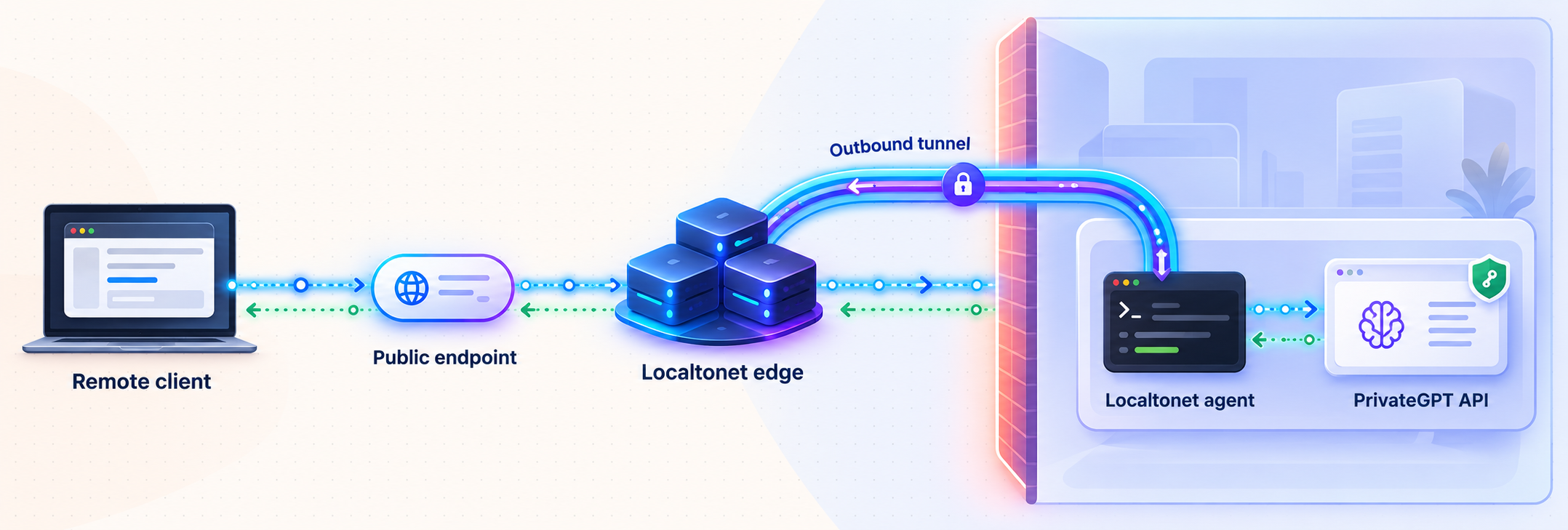
Add remote access only after the local workbench and n8n request have succeeded. With Localtonet, our client on the PrivateGPT device establishes an outbound connection to a relay server. The HTTP tunnel then provides a public address that forwards requests to the configured local IP address and port.
This workflow does not require inbound router port forwarding, firewall changes, VPN setup, or a public IP address. The tunnel is available only while the selected Localtonet client is connected and the tunnel is running.
Install and run the Localtonet client on the PrivateGPT machine or on another device that can reach it. If the client and PrivateGPT share a host, the local target can be the loopback service on port 8080. If they run on separate devices, use the PrivateGPT address that is reachable from the Localtonet client device. Do not use 127.0.0.1 on a separate tunnel host because that would refer to the tunnel host itself.
Install and run the Localtonet client
Run our client on the device that hosts PrivateGPT or on a device that can reach the PrivateGPT HTTP service over the local network.
Authenticate or select the client device
Use the device-specific authentication token associated with the intended client. Keep this token private and never place it in an article, n8n workflow export, public repository, or screenshot.
Select an available relay server
Choose from the server or region values currently available in the Localtonet dashboard. Availability can vary, so this guide does not hardcode a server code.
Create an HTTP tunnel to PrivateGPT
Configure the local target as the PrivateGPT host and port 8080. Use 127.0.0.1 only when the Localtonet client and PrivateGPT run on the same machine. Select the currently available HTTP process type appropriate for the deployment.
Start the tunnel
Creating a tunnel does not start it. Press Start, confirm that the selected client is connected, and wait for the assigned public HTTP address to become available.
Use and manage the public address
Test the assigned address from a separate network, update the n8n base URL if n8n is remote, and stop or delete the tunnel when public access is no longer needed.
HTTP tunnels can use a random subdomain, a custom subdomain, or a custom domain where the selected configuration supports it. These process types serve the same target at a public HTTPS address. Exact custom-domain DNS requirements should be taken from the current Localtonet documentation before changing DNS because they are not established in the supplied evidence for this guide.
For the current product workflow, consult our Localtonet documentation. Available relay values, options, and plan-specific capabilities must be confirmed in the current dashboard rather than assumed from an example.
Test from outside the local network
A remote test should prove that the tunnel is actually involved. Turn off Wi-Fi on a test phone or use another external network, then request the assigned public address. If the workbench is intentionally reachable, its path remains /ui beneath the public base. For an n8n integration, use the verified API route instead of relying on the workbench as the operational interface.
Test the smallest possible authenticated request first. Then run the manual n8n workflow with its base URL changed from the private address to the public Localtonet address. Confirm that response parsing still works and that no proxy-related assumptions were embedded in the workflow.
A service that was previously reachable only through localhost can receive internet traffic after the tunnel starts. Enable and verify PrivateGPT authentication where required, keep secrets outside workflow bodies, avoid exposing sensitive workbench functions unnecessarily, and stop the tunnel when remote access is not needed. A Localtonet tunnel provides connectivity, not application-level authorization.
Security and operational practices
The word “private” in PrivateGPT does not automatically make every deployment private under every configuration. Local inference can reduce dependence on external model APIs, but actual data boundaries depend on the inference backend, enabled tools, remote MCP connectors, web-search features, databases, n8n nodes, logs, and any public tunnel. Review the complete data path rather than focusing only on where the model runs.
Protect credentials at each boundary
PrivateGPT documents token-based authentication support. The exact procedure for enabling or configuring it can vary with the installed release and is not established in the evidence available for this article, so we will not invent configuration keys. Follow the current PrivateGPT configuration for your installed version, then verify that unauthenticated requests are rejected before allowing remote traffic.
Store PrivateGPT credentials in n8n's credential system. Restrict who can view and edit workflows, and remember that execution data may contain prompts, document excerpts, generated answers, headers, or error details. Configure n8n data retention according to the sensitivity of the workflow.
A Localtonet device token identifies the client device that runs the tunnel. Treat it as a secret. Do not confuse it with a PrivateGPT API token, an n8n credential, or an inference-server key. Each credential belongs to a different trust boundary.
Expose the narrowest useful service
If remote n8n only needs the PrivateGPT API, expose PrivateGPT rather than the lower-level inference server. This preserves the intended application layer and avoids publishing an additional model-serving interface. It also keeps the n8n request aligned with the same interface tested through the workbench.
Consider whether the workbench should be accessible on the same endpoint in a production-style deployment. Because it shares the PrivateGPT service, tunnel-level publication may make both the API and /ui reachable. Application authentication and deployment controls should account for that fact.
Apply least privilege to tools and connected systems
PrivateGPT can use web search, web fetching, code execution, custom tools, databases, CSVs, and MCP connectors. Enable only the capabilities needed by the workflow. A model-triggered tool can have consequences beyond text generation, especially when n8n subsequently sends emails, modifies records, or invokes another API.
Validate model-produced values before using them as file paths, commands, database statements, recipients, URLs, or authorization decisions. Human approval is appropriate for high-impact actions. Local execution changes where processing occurs, but it does not eliminate prompt injection, unsafe tool invocation, or excessive permissions.
Plan for availability
The remote workflow depends on several processes: the model server, PrivateGPT, the Localtonet client, and the Localtonet tunnel. n8n may also be self-hosted and add another dependency. If any required component is stopped, the workflow can fail.
For long-running use, employ operating-system or deployment tooling suitable for managing processes, logs, restarts, and environment variables. The supplied project evidence does not define one universal service-manager configuration, so this guide does not invent systemd, launchd, Windows service, Docker, or orchestration files.
Troubleshooting the complete stack
The private-gpt command is not found
Confirm that the installation completed successfully. On Linux or Windows, restart the shell or apply the path instructions printed by the uv installer. On macOS, check that Homebrew works in the current shell. If more than one installation method was attempted, inspect which executable the shell resolves and remove ambiguity before proceeding.
The workbench does not open on port 8080
Check whether private-gpt serve is still running and inspect its terminal output for startup errors. Test http://localhost:8080/ui from the same host first. A failure at this stage is not a Localtonet or n8n issue.
The workbench opens but cannot list models
Verify OPENAI_API_BASE, including the actual host, port, and /v1 suffix. Confirm that the inference server is running and that its /v1/models interface responds. If PrivateGPT and inference run in different containers or machines, replace localhost with an address that is reachable from the PrivateGPT process.
Messages fail after the model appears
Confirm that the chosen model is fully downloaded and that the system has enough resources to load it. Check the model identifier used by the request. Inspect both PrivateGPT and inference-server logs, since an HTTP connection can succeed even when model loading or generation fails afterward.
Document retrieval fails while ordinary chat works
Treat this as a separate embedding or ingestion problem. Verify OPENAI_EMBEDDING_API_BASE, confirm that the embedding model is available, and repeat the operation with a small non-sensitive test document. Do not change the language-model endpoint unless evidence points there.
n8n receives “connection refused”
Determine what localhost means from the n8n runtime. If n8n is remote or containerized, it is not the PrivateGPT host. Use a reachable private address or the active Localtonet public address. Confirm that the n8n runtime, not merely your browser, can reach it.
n8n receives a route or payload error
Compare the request against one captured from PrivateGPT's API Debugger. Check the method, path, headers, JSON structure, model value, and streaming mode. Do not substitute the inference server's OpenAI-compatible request for the PrivateGPT application request.
The Localtonet URL is unavailable
Confirm that the Localtonet client is connected and that the tunnel was started. Creating a tunnel alone is not sufficient. Check that the selected device is the one running the client and that the local target points to the correct PrivateGPT host and port.
The tunnel is active but returns a local-target error
Test PrivateGPT from the device running the Localtonet client. If both processes share a host, verify 127.0.0.1:8080. If they are on different hosts, use the reachable LAN address of the PrivateGPT machine and confirm that PrivateGPT is listening in a way that permits that local connection. Do not expose it broadly merely to work around an unverified bind or network configuration.
The workflow times out during generation
Measure a direct local request first. Large models and long prompts can take substantial time, especially without adequate acceleration. Reduce the test prompt, avoid retrieval during the first timing test, and use a model suitable for the hardware. Then set n8n's request handling according to observed behavior rather than an assumed universal timeout.
A previously working remote workflow suddenly fails
Check dependencies in order: inference server, PrivateGPT, local API, Localtonet client, tunnel state, public request, and n8n. This sequence prevents a tunnel symptom from being mistaken for a model problem. Also verify whether the public address or selected tunnel configuration changed after a tunnel was stopped, deleted, or recreated.
Frequently asked questions
Does PrivateGPT run the local model itself?
No. PrivateGPT is the application and API layer. It connects to a separately running OpenAI-compatible inference server through OPENAI_API_BASE. The inference server must provide model discovery and chat-completion interfaces.
Is Ollama required?
No. Ollama is the example used by the PrivateGPT quickstart. PrivateGPT can work with another inference server when it provides compatible /v1/models and /v1/chat/completions behavior. Confirm the installation and OpenAI-compatible endpoint details for the chosen server.
What local address does PrivateGPT use?
The documented local API base is http://localhost:8080, and the workbench is at http://localhost:8080/ui. Verify these locally before configuring n8n or a Localtonet tunnel.
Should n8n call PrivateGPT or the Ollama-compatible endpoint?
For the architecture in this guide, n8n should call PrivateGPT. PrivateGPT provides the higher-level application interface, retrieval, tools, and orchestration. The OpenAI-compatible endpoint is the upstream interface PrivateGPT uses to communicate with the inference server.
Why does this guide not provide a fixed PrivateGPT message endpoint and JSON payload?
The verified evidence establishes that PrivateGPT follows the Anthropic API model and includes an API Debugger, but it does not provide a complete version-specific request example for this article. Rather than guessing a path or schema, use the workbench to generate a successful request and reproduce its exact method, route, headers, and body in n8n.
Can n8n use localhost to reach PrivateGPT?
Only when the n8n process and PrivateGPT share the same network namespace. If n8n runs on another machine or inside a separate container, localhost refers to that environment rather than the PrivateGPT host. Use a reachable private hostname, service name, or Localtonet public address as appropriate.
Does Localtonet require router port forwarding?
No. Our client establishes an outbound connection to a Localtonet relay. This makes the configured local service reachable without inbound router port forwarding, firewall changes, VPN setup, or a public IP address.
Is the PrivateGPT service permanently online after creating a tunnel?
No. The selected Localtonet client must remain connected, the tunnel must be running, and PrivateGPT and its inference server must remain available. Creating a tunnel does not automatically start it.
Does a Localtonet tunnel secure the PrivateGPT API by itself?
It provides remote connectivity and a public HTTPS address for the HTTP tunnel, but it does not replace PrivateGPT authentication, least-privilege tool configuration, n8n credential protection, or application authorization. Verify those controls before starting public access.
Can this setup be installed with Docker?
PrivateGPT provides Docker-related documentation, but the verified evidence used for this guide does not contain the current Docker procedure. This article therefore documents Homebrew on macOS and uv with Python 3.11 on Linux and Windows instead of inventing container commands or networking details.
Make your verified PrivateGPT API reachable with Localtonet
Install and test PrivateGPT locally, confirm the n8n request, then use an HTTP tunnel to provide remote access without opening an inbound router port. Keep authentication enabled and stop the tunnel whenever remote access is no longer required.
Get Started Free →

