

Design one controlled ingress boundary for a changing pool of agent workspaces
This is a conceptual architecture and design guide, not a ready-to-run gateway implementation. It explains how a stable host-side gateway can route authorized requests to ephemeral AI sandboxes while a Localtonet HTTP tunnel exposes only the gateway. The registry records, endpoint paths, lifecycle states, credentials, and commands shown below are implementation examples that must be adapted to a documented gateway, sandbox runtime, and state store selected by your team. You will learn the required boundaries, routing contract, lifecycle safeguards, security controls, verification plan, Localtonet setup, and failure-recovery expectations before choosing implementation-specific components.
📋 What's in this guide
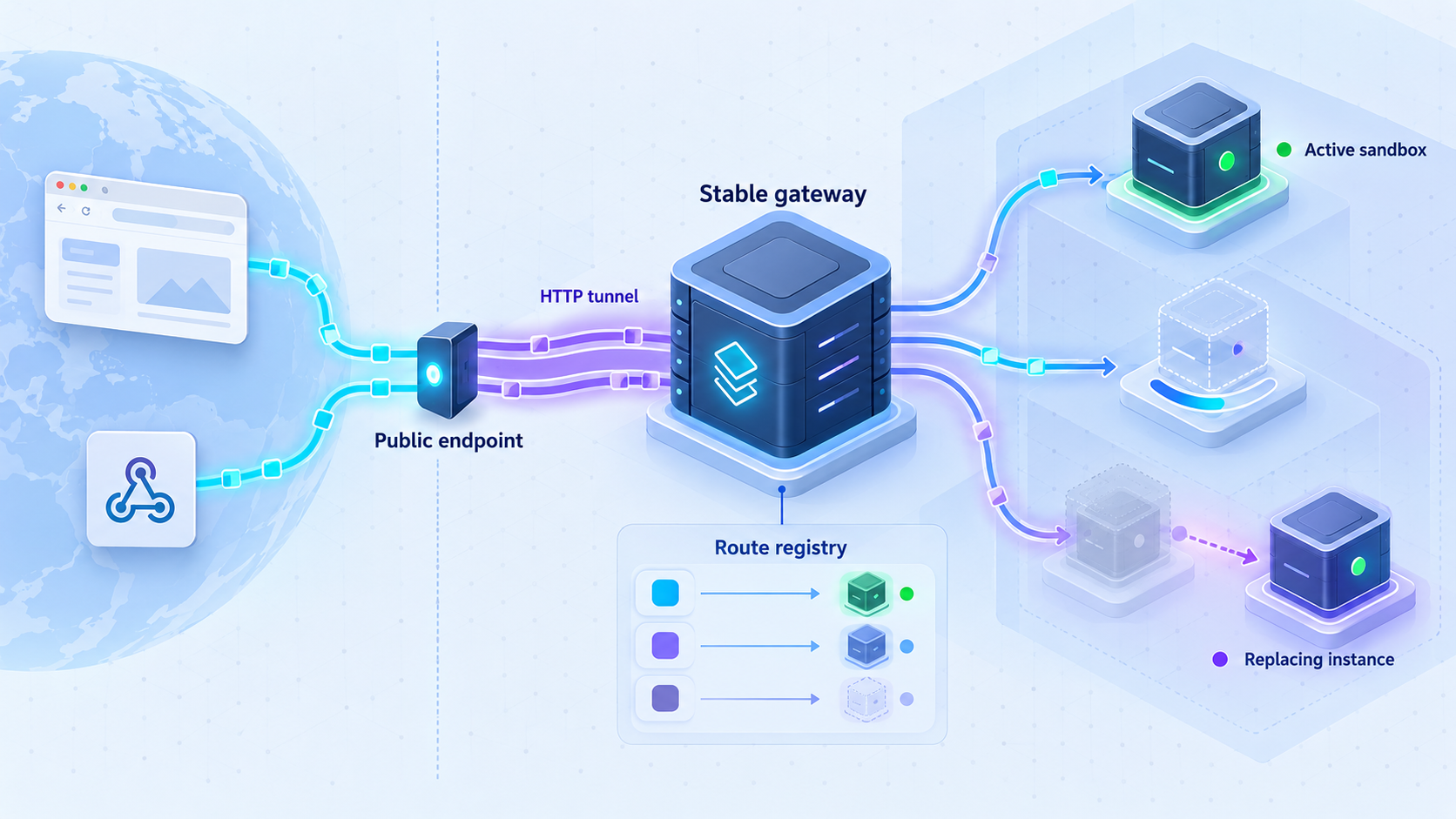
Scope, prerequisites, and implementation assumptions
The architecture in this guide is useful when external systems need a dependable HTTPS address but the internal execution environments are temporary. Examples include webhook-driven agents, browser-accessible development previews, evaluation workers, coding workspaces, and task-specific automation environments. Instead of assigning public ingress directly to each sandbox, the design places a stable gateway between the public tunnel and the private sandbox network.
The guide deliberately does not select a gateway framework, container orchestrator, sandbox provider, database, queue, or identity system. Those components determine exact installation commands, API paths, health checks, network names, persistence behavior, and deployment procedures. The JSON documents and HTTP paths in later sections illustrate the contracts an implementation needs, but they do not describe an existing Localtonet API or a complete deployable project.
You cannot deploy the entire design by copying the example records and curl requests from this article. Before implementation, choose documented products for the gateway, sandbox runtime, registry, identity provider, and optional queue. Replace every placeholder with values from those products and test the completed system in your own environment.
Prerequisites for applying the design
- A host or trusted device that can run a long-lived HTTP gateway.
- A sandbox runtime or orchestrator that can create isolated workspaces and report their reachable internal service addresses.
- Private network connectivity from the gateway host to the sandbox service.
- A registry or state store that supports authenticated updates and atomic replacement of route records.
- An application authentication and authorization mechanism for public callers.
- A documented readiness signal for the service inside each sandbox.
- A Localtonet account, a device-specific auth token, and the Localtonet client installed on a device that can reach the gateway.
- A test identity and test workspace that can be used without exposing production data or credentials.
Decisions you must make before implementation
Some current sandbox products support on-demand creation, sleep or pause behavior, and filesystem snapshots. These are provider-specific capabilities rather than universal properties of an AI sandbox. For example, Cloudflare describes on-demand agent workspaces, pause and resume requirements, runtime-selected images, and filesystem snapshots for its current Containers architecture in its Cloudflare Containers sandbox announcement. If you use another runtime, verify its lifecycle and persistence semantics in that provider's primary documentation.
Why ephemeral sandboxes benefit from a stable ingress layer
An AI agent sandbox is often a disposable execution environment rather than a conventional application server. A controller may create it only after a task arrives, select an image and resource profile, populate a workspace, run tools, preserve selected files, and finally destroy it. Its process identity, private address, listening ports, and runtime credentials may be valid only for that instance.
External systems operate on a different timeline. A webhook provider, browser, automation service, or collaborating agent may need an address before a particular sandbox exists. It may retry minutes later, retain a callback URL for the duration of a job, or deliver an event after the original runtime has been replaced. Making the public endpoint as temporary as the sandbox turns every runtime transition into a public networking change.
The stable-gateway pattern separates those lifecycles. A gateway runs on the host or another trusted machine that can reach the private sandbox network. It owns the durable HTTP listener, authenticates callers, authorizes access to logical workspaces, looks up the current runtime, and forwards only approved requests. A trusted controller updates the route registry as sandboxes become ready or leave service.
With Localtonet, our client establishes an outbound connection to a Localtonet relay server. An HTTP tunnel then provides a public HTTPS address that targets the gateway's local IP address and port. The design does not require inbound router port forwarding, a public IP address, firewall changes for public inbound access, or VPN setup. The public tunnel remains available only while the selected client is connected and the tunnel is running.
Separate the data plane from the control plane
The data plane carries an accepted HTTP request from the public address to the gateway and then to the selected sandbox service. The control plane creates sandboxes, assigns logical ownership, performs readiness checks, updates route records, rotates credentials, and decides whether a stopped environment may be started again.
Public requests should not gain direct access to low-level lifecycle operations merely by naming a workspace. A path parameter must not become an unchecked container name, hostname, process command, port, or target URL. The gateway should resolve a validated logical identifier through records written by the trusted controller.
Creating a Localtonet tunnel does not create or start a sandbox. Starting a sandbox does not make it publicly reachable. The controller, registry, gateway, Localtonet client, and tunnel each have independent state and should be monitored independently.
Define a routing contract that survives replacement
A durable public route should identify a logical workspace, task, or session rather than a transient private address. If a request refers to workspace ws_7f3, the gateway can resolve that identifier through its registry. When the workspace moves to a replacement runtime, the controller changes the registry record while the external route remains stable.
One possible design uses a route such as /sandboxes/{workspace-id}/.... Another keeps the path generic and carries the workspace identity in an authenticated claim. These are application design choices. In either case, the identifier should be opaque, strictly validated, and authorized for the current caller. It should not expose filesystem paths, internal hostnames, sequential database keys, or credentials.
Illustrative registry record
The following JSON is an implementation example only. It is not a Localtonet object, dashboard export, or standardized sandbox schema. A production implementation must define exact field types, validation rules, storage behavior, concurrency controls, and timestamps.
{
  "workspaceId": "ws_7f3",
  "instanceId": "runtime_92b",
  "target": {
    "scheme": "http",
    "host": "sandbox-private-name",
    "port": 0
  },
  "status": "ready",
  "generation": 12,
  "expiresAt": "implementation-defined timestamp"
}
The port value 0 is intentionally unusable. Replace it with the actual application port documented for your sandbox service. There is no universal AI sandbox port, and Localtonet does not assign the internal port used between a gateway and a sandbox.
The example generation value represents a controller-managed revision. Its purpose is to prevent a delayed event from an older runtime from deleting or replacing the record for a newer runtime. This generation mechanism is an architectural recommendation, not a Localtonet feature or an industry-wide sandbox behavior.
| Example condition | Recommended gateway behavior | Design objective |
|---|---|---|
| Authorized workspace is ready | Forward to the registered and validated target | Only a current instance that passed readiness may receive traffic. |
| Workspace is starting | Return a temporary unavailable response or use a bounded queue | Do not forward requests before the application is ready. |
| Workspace is paused | Reject the request or invoke a separately authorized resume workflow | Ordinary public traffic should not receive unrestricted lifecycle control. |
| Workspace is draining | Reject new work while handling accepted work according to policy | Reduce partial operations during shutdown or replacement. |
| Record is missing or expired | Return not found or unavailable without revealing a target | Never guess a private destination or reuse stale state. |
| Identity lacks permission | Return a generic authorization failure | Prevent callers from probing other tenants or workspaces. |
Build a constrained reverse proxy, not an open proxy
The gateway should accept destinations only from its trusted registry and should validate those destinations against the private networks, schemes, service identities, and ports intended for sandbox traffic. It must not accept an arbitrary target URL from the caller. Paths should be normalized before policy evaluation, and absolute-form targets, unsupported schemes, traversal attempts, malformed authorities, and unexpected host values should be rejected.
HTTP intermediaries must also handle connection-specific fields correctly. The Connection header requirements in RFC 9110 explain that a proxy or gateway must parse the Connection field and remove connection-specific fields before forwarding. This is one standards-based requirement, not a complete secure-proxy implementation. Your selected gateway must also define trusted proxy boundaries, forwarded-header behavior, body limits, response limits, timeouts, streaming rules, and redirect policy.
Do not trust caller-supplied identity headers that the gateway itself is expected to create. Remove or overwrite them at the boundary. If a sandbox needs caller context, provide only the minimum authorized claims and protect their integrity. Never forward the Localtonet device token, gateway administration credential, or reusable controller credential to a sandbox.
Coordinate route eligibility with the sandbox lifecycle
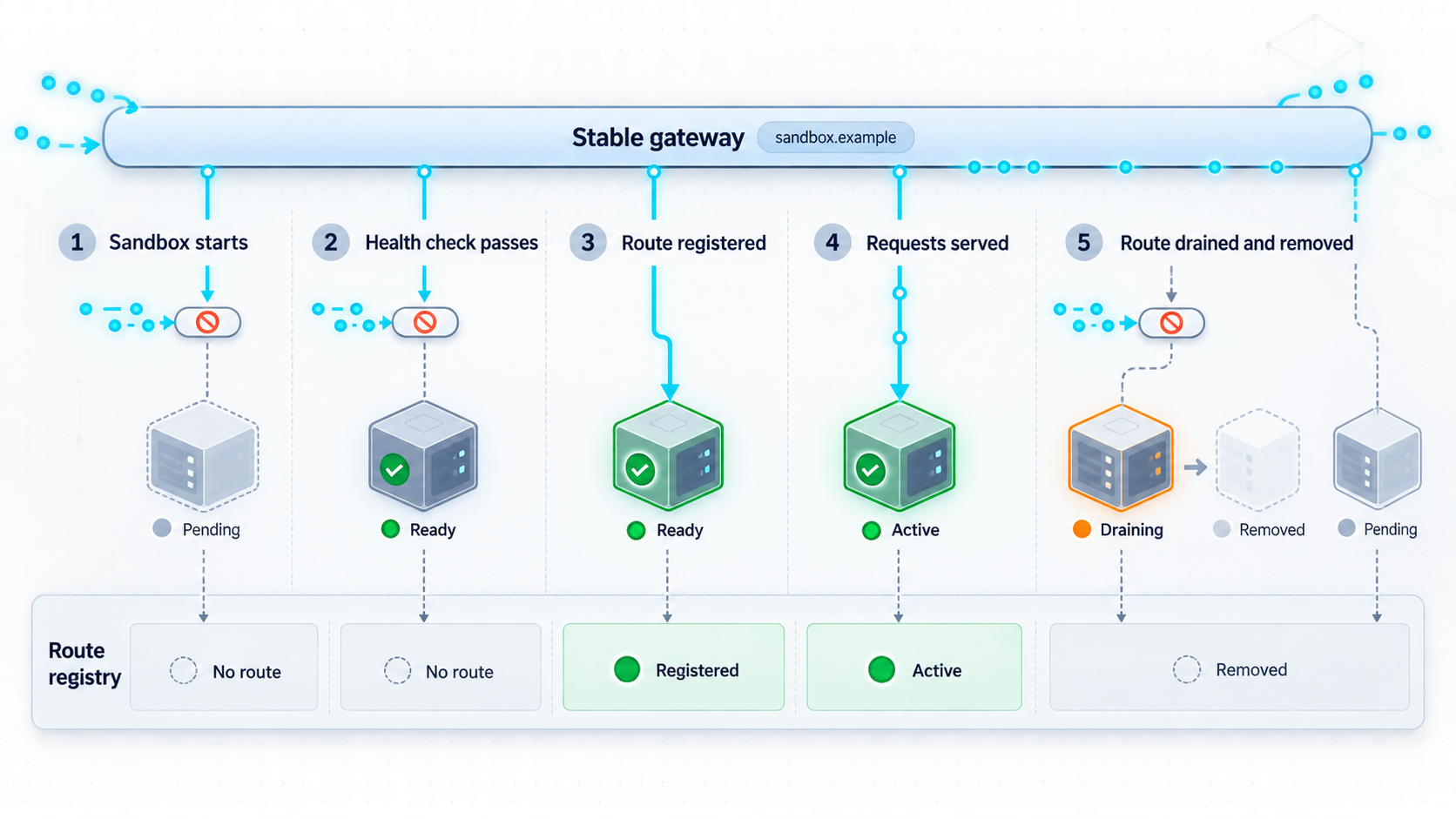
A sandbox process existing is not the same as its application being ready. Image startup, dependency initialization, repository checkout, migrations, or an agent-side server may still be incomplete. Registering a destination too early sends traffic to an unavailable service. Removing the destination only after termination leaves a period in which the gateway continues trying to reach a dying runtime.
The following sequence is an implementation recommendation for a custom controller and gateway. It is not a universal sandbox API and does not describe Localtonet tunnel configuration.
Allocate a logical workspace identity
Create an opaque identifier and authorization policy before starting the runtime. Keep raw container identifiers and private addresses out of the public contract.
Create the sandbox without an eligible route
Start the selected image and resources on an isolated network. Keep the workspace unavailable through the gateway while initialization is in progress.
Test readiness from the gateway network
Confirm that the actual gateway host can reach the intended service and that the application is ready to accept its supported workload.
Register the approved destination atomically
Store the workspace identity, runtime identity, approved destination, status, generation, and any application-defined expiry in one controlled update.
Maintain ownership and health
Recheck health and ownership according to your runtime and failure model. If you implement leases, require the legitimate controller and current generation to renew them.
Drain and unregister before termination
Stop admitting new work, handle accepted requests according to application policy, and remove only the registry record belonging to the terminating generation.
Revoke runtime resources
Terminate the sandbox, revoke its short-lived credentials, detach temporary storage as appropriate, and verify that no stale route or callback worker remains.
Leases are a design option, not a universal sandbox feature
Graceful shutdown hooks cannot cover every failure. A host can crash, a process can be killed, or a network partition can prevent an unregister operation. A custom registry can reduce stale-route risk by assigning each route a bounded lease that expires unless the legitimate controller renews it.
Lease duration and renewal frequency are application decisions. They depend on startup cost, expected request duration, control-plane availability, and the acceptable stale-access window. If you implement leases, the gateway should reject expired records and renewal should verify both runtime identity and generation. Do not assume your chosen sandbox provider supplies this mechanism automatically.
Replace instances with an atomic route change
When replacing a runtime, prepare and verify the new instance before making it active. Change the current registry pointer atomically if your state store supports that operation. Existing requests may finish on the previous instance only if your application supports draining safely. Avoid allowing two instances to perform conflicting writes against one logical workspace unless the application has been designed for concurrent writers.
Do not concatenate a workspace identifier into a hostname, internal URL, socket path, container command, or shell expression. Resolve it through an authenticated registry, validate the resulting destination against policy, and reject missing, expired, or ambiguous records.
Separate snapshots, routing state, and secrets
Filesystem persistence does not guarantee persistence of a valid network identity. Even where a provider supports snapshots, a restored workspace may receive a different runtime identifier, private address, process state, or credential. Treat restoration as the creation of a new runtime generation unless your chosen provider explicitly documents stronger identity guarantees.
Keep the public-to-private route registry outside the sandbox filesystem. Restoring a snapshot that contains authoritative route state could revive an obsolete destination or ownership claim. The trusted controller should remain authoritative, and a restored runtime should complete new readiness and registration checks before it becomes reachable.
| State category | Recommended boundary | Recommended restore behavior |
|---|---|---|
| Workspace files and generated artifacts | Documented snapshot or durable workspace storage | Restore only after verifying integrity and tenant ownership. |
| Gateway route registry | Trusted external control plane | Recreate eligibility after readiness instead of trusting snapshot contents. |
| Runtime identity and generation | Controller metadata | Issue a new identity or generation for the restored instance. |
| Short-lived service credentials | Runtime secret-delivery mechanism | Rotate or reissue rather than restoring reusable credentials from disk. |
| Authorization policy | Central policy store | Re-evaluate access when the workspace returns to service. |
| In-flight requests and memory state | Runtime-specific behavior | Do not assume a filesystem snapshot preserves active operations. |
Do not place Localtonet device tokens, gateway administration credentials, webhook secrets, broad cloud keys, or user credentials in reusable sandbox images or snapshots. The Localtonet client should normally run with the stable gateway host or another trusted device, not inside each disposable workspace. This keeps the device token and public tunnel lifecycle outside frequently rebuilt execution environments.
Treat the gateway as a public trust boundary
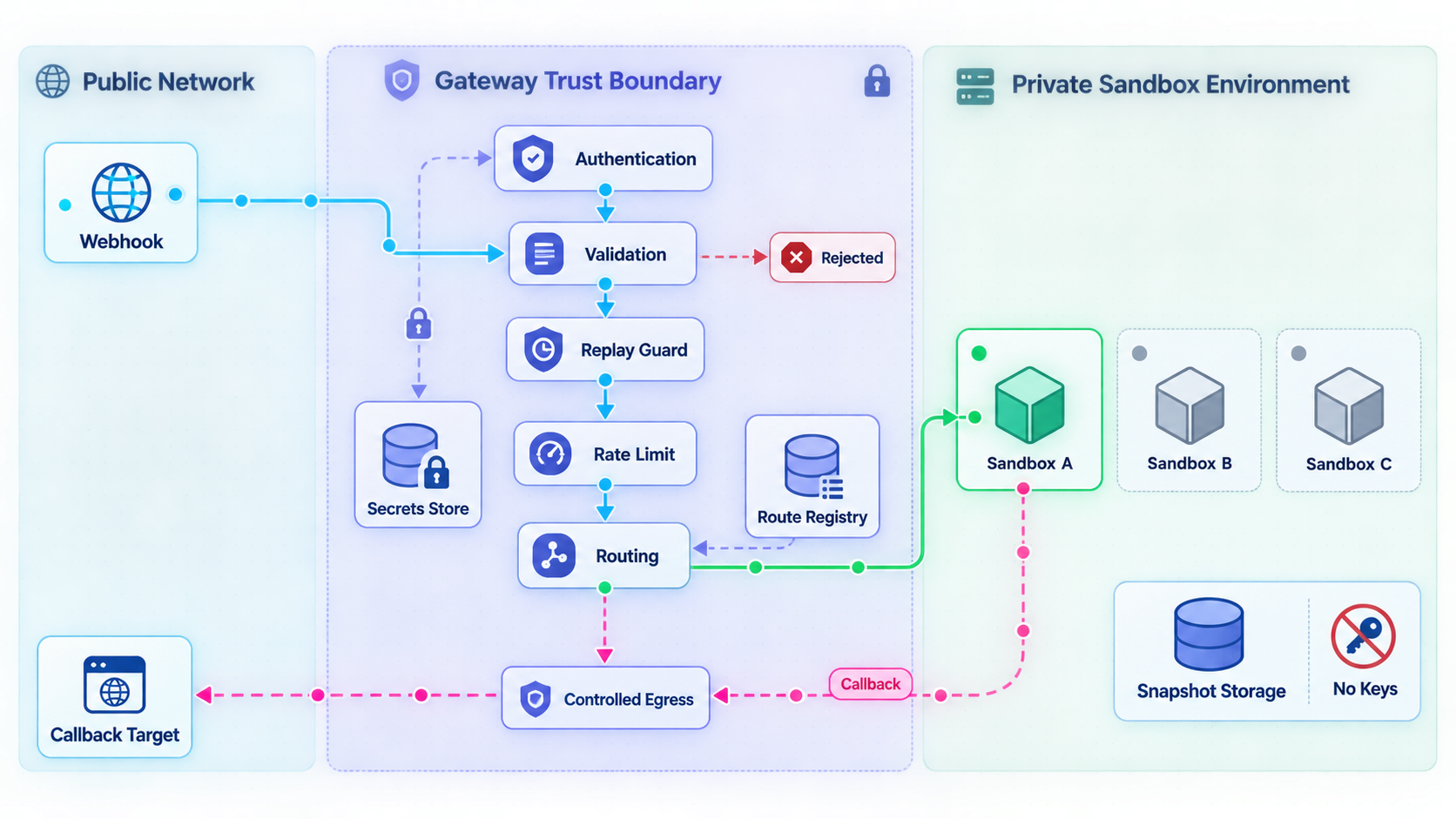
A public HTTPS address provides connectivity, not application authorization. The gateway must decide who may access a workspace and what each identity may do. This is especially important for agent environments that can execute commands, modify files, install packages, use browsers, or call external services.
Expose the smallest application interface that the integration needs. If a provider only delivers job events, publish a narrow event receiver rather than an entire development server. If users need a preview, separate preview access from command and administration endpoints. Creation, termination, snapshotting, credential issuance, and route updates belong on a separately protected control plane.
Authenticate before disclosing route-specific information
Validate the caller before returning details that reveal whether a workspace exists. Bind authorization to the relevant tenant, workspace, operation, and expiration where your identity system supports it. A credential for a read-only preview should not authorize command execution, route updates, or lifecycle management.
Apply least privilege at every boundary
- Allow each external identity to access only its permitted workspaces and operations.
- Allow the gateway to connect only to approved private sandbox destinations.
- Prevent sandboxes from reaching the gateway administration interface.
- Keep the registry update interface private and authenticate its controller.
- Restrict sandbox outbound access according to the task and risk model.
- Use different credentials for public callers, gateway-to-sandbox traffic, and control-plane updates.
- Record important security decisions without logging tokens, secrets, private endpoints, or sensitive request bodies.
Control request processing
Define request-body and header limits, supported content types, timeouts, concurrency controls, and rate limits. Long-running agent tasks are often better represented by a submitted job and a later result than by an unbounded HTTP request. If streaming is required, test client disconnects, backpressure, partial output, and gateway restart behavior.
Treat archives, repositories, prompts, uploaded files, tool arguments, and callback configuration as untrusted. Isolation reduces some consequences, but it does not replace input validation or authorization. Ensure that one workspace cannot access another workspace's files or services, and keep host management sockets and sensitive host paths outside sandbox reach.
Prevent server-side request forgery
Any feature that accepts a URL, follows redirects, resolves hostnames, imports repositories, or calls user-selected callbacks can become a server-side request forgery path. The OWASP SSRF Prevention Cheat Sheet describes allowlisting, input validation, network-layer controls, and protections for applications that make outbound requests.
In this architecture, keep route destinations in a trusted registry rather than accepting them from public requests. For user-configurable callbacks, validate the scheme and destination, block prohibited private and metadata ranges, define redirect behavior, and apply egress controls. DNS resolution and redirect handling require particular care because an initially acceptable name can resolve or redirect to a prohibited target.
Publish only the gateway port and keep individual sandbox ports private. Require authentication, enforce workspace-level authorization, and avoid exposing an unauthenticated command shell, container administration socket, registry administration route, or host management interface.
Log security decisions without logging secrets
Useful events include authentication outcome, logical workspace identity, policy decision, selected runtime generation, request class, response status, route changes, expiry, and lifecycle transitions. Avoid recording access tokens, Localtonet device tokens, private destination details, raw credentials, or sensitive prompt contents. Correlation identifiers should be random and safe to share with operators.
Design inbound events and outbound callbacks separately
Inbound ingress and outbound callbacks are different flows. An inbound event starts at an external provider and arrives through the public Localtonet URL. An outbound callback starts inside your application and connects to an external destination. The outbound request generally does not need to travel backward through the Localtonet tunnel.
For inbound events, configure the provider with a stable route owned by the gateway rather than a sandbox address. The gateway should authenticate the request according to the provider's documented method, verify a signature when the provider supports signing, authorize the destination workspace, and either forward to a ready sandbox or place the event into a bounded application queue.
Signature validation is provider-specific. Follow the sender's primary documentation for the exact header, canonicalization algorithm, key format, timestamp tolerance, and replay controls. Where a protocol is designed around HTTP message signatures, the HTTP Message Signatures specification in RFC 9421 provides a standardized framework, but its existence does not mean a particular webhook provider implements it.
Use idempotent event processing
External services may retry after timeouts or errors. The gateway may also lose its client connection after a sandbox has accepted work. Preserve a provider event identifier where available, or assign an application identifier, and make processing idempotent. Receiving the same event twice should not create duplicate work unless duplicate execution is explicitly intended.
Store deduplication state outside a disposable sandbox if it must survive replacement. Retention should reflect the provider's documented retry behavior and your application requirements. A restored filesystem snapshot should not be assumed to contain current delivery or deduplication state.
Keep durable callback delivery outside short-lived workers
If callback delivery must continue after a sandbox terminates, let the sandbox submit its result to a trusted worker or queue outside the runtime. That component can validate the configured destination, perform outbound delivery, handle bounded retries, and record status. This is an architectural recommendation rather than a built-in Localtonet callback service.
If users can supply callback URLs, protect that configuration against SSRF and unauthorized modification. Prefer allowlisted destinations when the workflow permits them. Do not give a sandbox a broad credential that can change callback destinations for other tenants or jobs.
Create a local verification plan before public exposure
Test from the same device that will run the Localtonet client, because that device must be able to reach the configured gateway target. A service responding inside a sandbox does not prove that the gateway host can reach it. A listening gateway does not prove that authentication, authorization, registry lookup, and forwarding work.
The following commands are templates, not executable defaults. The endpoint paths are illustrative because this guide does not select a gateway implementation. Replace every bracketed value and path with a documented value from your application. Never paste a production token into shell history.
1. Verify the example gateway health endpoint
curl -i http://127.0.0.1:<gateway-port>/<health-path>This should confirm that the gateway process and its required dependencies are ready according to your implementation. A response from the listener alone should not imply that the registry or sandbox network is healthy.
2. Verify an authorized workspace through the gateway
curl -i \
  -H "Authorization: Bearer <short-lived-test-credential>" \
  http://127.0.0.1:<gateway-port>/<workspace-route>
A successful result should exercise authentication, workspace authorization, registry lookup, destination validation, private connectivity, and the sandbox application. Use a credential limited to the test workspace and operation.
3. Verify denied and stale routes
Repeat the request without a credential, with an invalid credential, and with an identity that lacks access to the selected workspace. Remove or expire the route and test again. Each case should fail without disclosing the internal hostname, port, registry contents, or another tenant's workspace status.
4. Verify unexpected termination
Stop a test sandbox without running its normal cleanup hook. Confirm that your chosen controller or lease mechanism eventually makes the route ineligible. If you do not implement leases, document the alternative reconciliation process that discovers and removes stale records.
5. Verify replacement and delayed events
Start a replacement runtime for the same logical workspace, wait for readiness, and switch the registry to the new generation. Then simulate a delayed cleanup event from the previous instance. The older event must not remove the current record.
6. Verify restoration behavior where supported
If your selected runtime supports snapshots, restore a workspace into a new instance. Confirm that it cannot receive traffic until it has a current runtime identity, valid credentials, readiness approval, and a newly registered destination. Verify that obsolete credentials and route state were not revived from the filesystem.
7. Verify request and destination boundaries
Test an oversized request, unsupported content type, malformed workspace identifier, absolute target URL, prohibited destination, timeout, and redirect toward a blocked address. Confirm that each case is rejected predictably and does not reach an unintended internal service.
If the Localtonet client and gateway run on the same device, a loopback target can reduce unnecessary local exposure. If they run on different devices, the gateway needs a reachable private address and appropriate local network controls. Verify reachability from the Localtonet client device before creating the tunnel.
Expose the verified gateway with a Localtonet HTTP tunnel
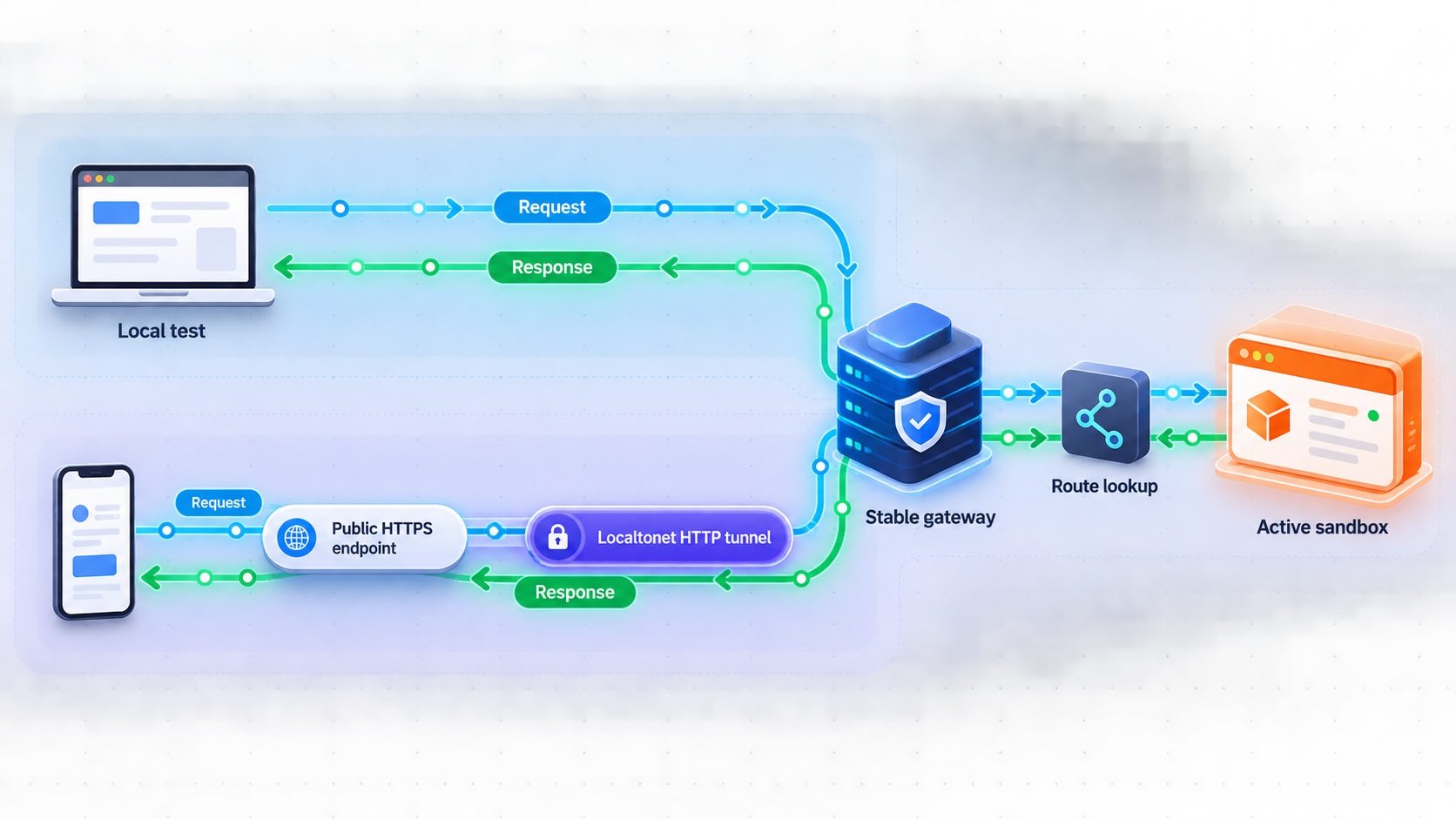
Configure Localtonet only after the gateway works from the Localtonet client device. The tunnel's local IP address and port should identify the stable gateway. Do not point the tunnel at a sandbox destination that may disappear or be reassigned.
Localtonet provides client applications for supported operating systems. Install the current client package appropriate for the gateway device, launch it, and associate that device with its device-specific auth token. Exact package commands and installer filenames can change by operating system and client release, and the verified evidence for this article does not contain current OS-specific commands. For that reason, this guide does not invent a package-manager command. Obtain the current installer and operating-system instructions from the Localtonet application or documentation, then continue with the complete dashboard sequence below.
HTTP tunnels can use Random Sub Domain, Custom Sub Domain, or Custom Domain as the Process Type. Each publishes the same configured local HTTP content through a public HTTPS address. Availability can vary by current plan or dashboard configuration. If you select Custom Domain, confirm the current DNS requirements before changing DNS records.
The current verified HTTP tunnel workflow is:
Install and run the Localtonet client
Install the client for the operating system on the gateway device, or on another trusted device that can reach the gateway. Start the client before configuring the tunnel.
Open the HTTP tunnel page and select Process Type
Create an HTTP tunnel and choose Random Sub Domain, Custom Sub Domain, or Custom Domain from the options currently available in your dashboard.
Select the AuthToken
Select the device-specific auth token for the Localtonet client that will carry the tunnel. Treat the token as a secret and do not place it in a sandbox image, source repository, log, or article example.
Select an available server
Choose a relay server or region shown in the current product. Do not copy a server code from an old deployment because available values can vary.
Enter the gateway's local IP address and port
Use the exact address and port already verified from the selected client device. This target belongs to the stable gateway, not an individual sandbox.
Press Start
Creating the configuration does not start it. Press Start, wait for the tunnel to run, and use the assigned public HTTPS address for external verification.
The Localtonet HTTP tunnel documentation provides the current product interface and should be checked for operating-system-specific installation details and current dashboard presentation. The architectural target remains the same: a stable gateway address and port that the selected Localtonet client can reach.
The public address is available only while the selected Localtonet client is connected and the tunnel is running. Monitor client connectivity, tunnel state, gateway readiness, registry health, and sandbox readiness separately.
Verify the public path
Test from a network that does not have direct access to the gateway host. Use the public HTTPS address with the same application path and test identity used for local verification. Confirm a successful request to the authorized test workspace, then repeat the negative cases for missing credentials, unauthorized access, expired routes, and malformed input.
A successful gateway health response does not prove that sandbox routing works. A complete test traverses the public HTTPS address, Localtonet tunnel, local gateway, authentication layer, registry lookup, target validation, private sandbox connection, and application response.
Stop and remove public access safely
Stop the tunnel when the shared gateway should no longer be publicly reachable. Delete the tunnel when its configuration is no longer required. Also remove webhook registrations or third-party integrations that still point to its public address. Stopping one sandbox should not automatically stop a shared tunnel that still serves other authorized workspaces.
Operate, troubleshoot, and recover each boundary independently
Stable ingress reduces endpoint churn, but it makes the gateway important infrastructure. Plan its startup, restart, dependency failure, credential rotation, logging, and upgrade behavior. Persist only authoritative control-plane data, and avoid trusting stale in-memory mappings after a restart.
| Boundary | What to verify | Likely interpretation of failure |
|---|---|---|
| Localtonet client | The selected device is connected | The relay cannot deliver traffic to the configured local target while the client is disconnected. |
| HTTP tunnel | The tunnel is running | A created but stopped configuration does not provide active public reachability. |
| Gateway listener | The configured local address accepts requests | The process may be stopped, bound elsewhere, or blocked by local policy. |
| Identity and policy | Expected allow and deny decisions occur | Credential validity, claims, or authorization data may be wrong. |
| Route registry | The current generation and eligibility state are valid | The workspace may be starting, draining, expired, or owned by another runtime. |
| Sandbox service | Gateway-side readiness succeeds | The runtime may exist while its application is unavailable. |
Troubleshoot from the private service outward
Confirm that the sandbox application is listening on its documented interface and port. From the gateway device, test the exact private destination stored in the registry. Then test the request through the gateway's local address. Only after those checks pass should you investigate Localtonet client connectivity, tunnel state, and the configured local IP address and port.
A connection refusal often means that no process is listening or that the destination is wrong. A timeout can indicate network isolation, an unresponsive application, or an operation that exceeded policy. A not-found or unavailable response can mean the route is absent, starting, draining, or expired. An authorization failure should be diagnosed through identity and policy logs rather than bypassing access controls.
Recover from gateway restart
On restart, the gateway should load or reconstruct route eligibility from the authoritative control plane. It should not automatically trust a stale cache without checking status and ownership. If registry access is unavailable, fail closed rather than guessing destinations. Once dependencies recover, revalidate routes according to your implementation's consistency model.
Recover from controller or sandbox failure
If the sandbox dies but its route remains, the gateway should stop forwarding after the controller reconciles the failure or an implemented lease expires. If the controller fails, prevent public requests from creating uncontrolled replacement instances. Recovery should require authenticated control-plane action and should preserve generation checks so delayed updates cannot overwrite newer state.
Use a deliberate termination sequence
Mark the route as draining, stop accepting new work, complete or cancel accepted operations according to application policy, remove the exact route generation, revoke runtime credentials, and then terminate the sandbox. Clean temporary storage, queue entries, and callback state according to documented retention requirements.
Do not stop the shared Localtonet tunnel merely because one workspace ends. The tunnel belongs to the gateway lifecycle and can continue serving other authorized routes. Stop it when the whole public ingress boundary should become unavailable.
Plan gateway availability honestly
One gateway simplifies the public route but can also become a failure point. The appropriate redundancy design depends on your registry, session behavior, network, and gateway implementation. Localtonet does not define the internal high-availability architecture for your application.
At minimum, supervise the gateway process, make startup deterministic, protect required control-plane data, and test restart recovery. If multiple gateway instances share traffic, they need consistent routing and authorization state. Do not keep essential ownership information only in one process's memory.
Frequently asked questions
Is this a deployable reference implementation?
No. It is an architecture guide. The schemas, endpoint paths, states, leases, and curl commands are implementation examples. You must choose documented gateway, sandbox, registry, identity, and queue components before producing deployable configuration.
Does every AI sandbox need its own Localtonet tunnel?
No. In this design, one Localtonet HTTP tunnel targets a stable gateway. The gateway resolves an authorized logical workspace to its current private runtime destination.
Should the Localtonet client run inside each sandbox?
The stable-gateway pattern normally runs our client on the gateway host or another trusted device that can reach it. This keeps the device-specific auth token and tunnel lifecycle outside disposable images and snapshots.
Does starting the tunnel start or resume a sandbox?
No. The tunnel exposes the configured gateway target. Sandbox creation, readiness, pause, resume, restoration, and termination belong to the selected sandbox control plane. Any public resume workflow should be separately authenticated, authorized, and rate controlled.
Do all sandbox platforms support pausing and snapshots?
No. Those capabilities are provider-specific. Verify pause, resume, snapshot, network identity, and restoration behavior in the primary documentation for the runtime you select.
What happens when a sandbox address changes?
Treat the replacement as a new runtime generation. Verify readiness, issue appropriate credentials, and update the registry atomically. The public route can remain stable because it identifies the logical workspace rather than the old private address.
Can the gateway expose an agent command shell directly?
It should not expose an unrestricted or unauthenticated shell. Prefer a narrow application API with strong identity checks, workspace authorization, input validation, bounded operations, and audit logging. Keep host and container administration interfaces private.
Is the public URL active as soon as the tunnel is created?
No. Creating the tunnel does not start it. The selected Localtonet client must be connected and the tunnel must be running. The gateway and its selected sandbox route must also be healthy for a request to complete.
Should outbound callbacks use the Localtonet URL?
Usually not. An outbound callback is an outgoing connection from the application or a trusted delivery worker to an external service. The Localtonet public URL is for external systems that need to initiate inbound requests to the gateway.
How do we stop a terminated sandbox from receiving later requests?
Remove the exact runtime generation before termination and use reconciliation or bounded leases if your implementation supports them. The gateway should reject missing or expired records and must never derive a private destination from untrusted request data.
Publish a verified sandbox gateway with Localtonet
Choose and secure your gateway, sandbox runtime, registry, and identity controls first. After the complete private path passes local tests, use a Localtonet HTTP tunnel to provide one controlled public HTTPS entry point while keeping individual sandbox services private.
Get Started Free →

