

Prove that your local server is receiving real QUIC traffic from a remote client
Seeing an HTTP response in a browser does not prove that a local development server received HTTP/3 end to end. A valid test must send UDP-based QUIC traffic from an external network, carry it through the public endpoint, deliver it to the local QUIC listener, and confirm the negotiated protocol at both endpoints. This guide builds a reproducible Caddy HTTP/3 test server, creates a short-lived test certificate chain, verifies the server locally, exposes its UDP listener with Localtonet, and uses curl destination mapping to test it remotely without disabling certificate validation.
📋 What's in this guide
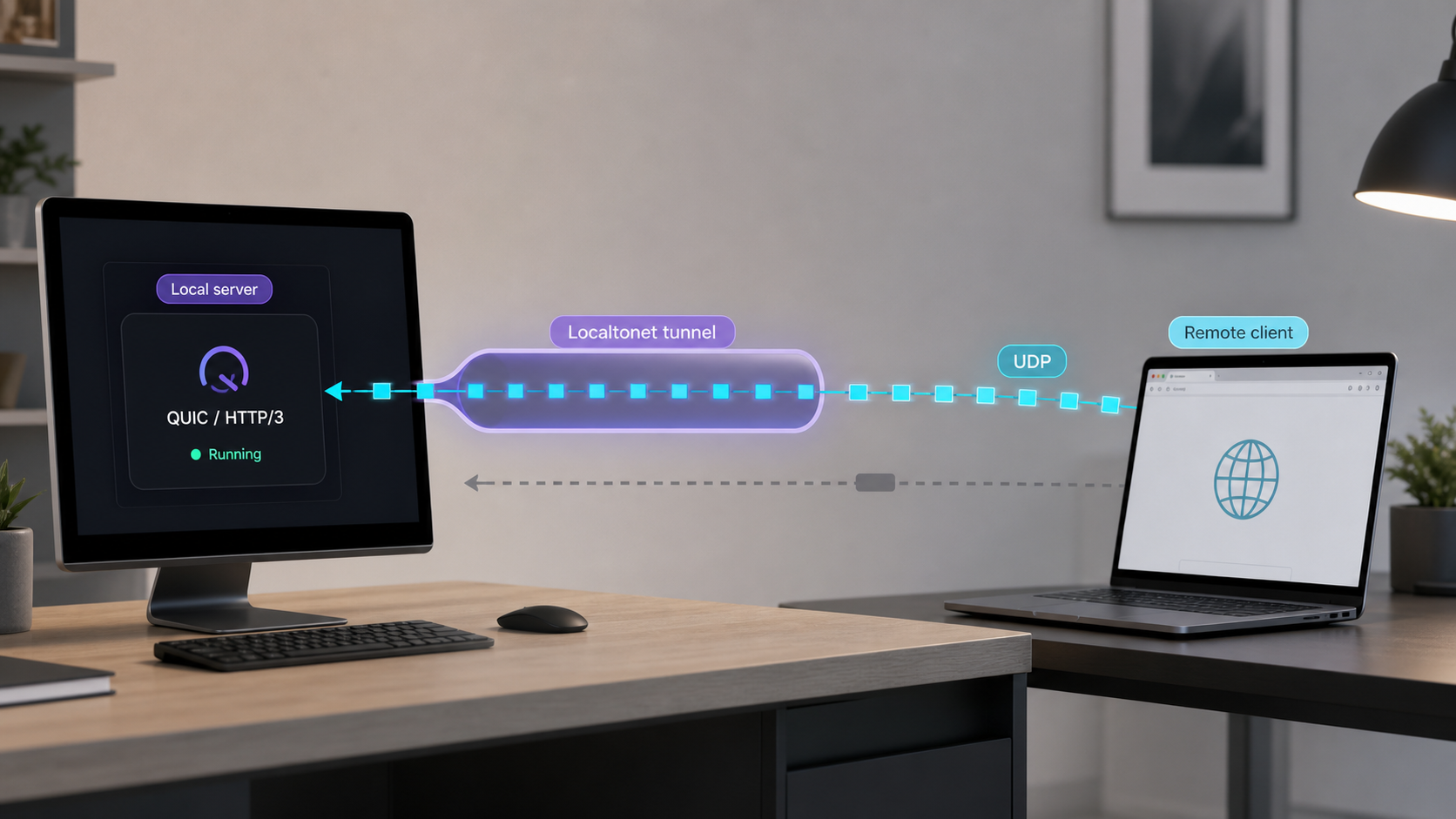
Why remote HTTP/3 testing requires protocol fidelity
HTTP/3 maps HTTP semantics onto QUIC, and QUIC runs over UDP. HTTP/2 and HTTP/1.1 normally use TCP, with TLS layered above TCP for HTTPS. The standards defining the transport and application protocol are RFC 9000 for QUIC and RFC 9114 for HTTP/3.
This transport difference matters when the objective is to validate a local QUIC implementation, UDP reachability, QUIC-specific logging, HTTP/3 request handling, or behavior when TCP is unavailable. An HTTP response alone does not identify the transport that reached the local application.
A test can therefore appear successful while validating the wrong path. A public web endpoint might negotiate HTTP/3 with a remote browser and then communicate with the local application using HTTP/2 or HTTP/1.1. That proves the public endpoint can speak HTTP/3, but it does not prove that the local development server accepted QUIC packets.
For a genuine local QUIC test, UDP datagrams must reach the port on which the local server is listening. The remote client and local server must complete a QUIC handshake, negotiate HTTP/3 through ALPN, validate the certificate according to the client's trust policy, and exchange the HTTP request and response over that QUIC connection.
Record the protocol selected by the remote client and confirm the connection in the local server's QUIC or HTTP/3 logs. When possible, also inspect the local UDP listener or observe packets arriving at that port.
With Localtonet, the appropriate primitive for this test is a UDP tunnel pointing to the local QUIC server's IP address and port. Our client establishes an outbound connection to a Localtonet relay, so the workflow does not require inbound router port forwarding, inbound firewall changes, VPN setup, or a public IP address. The tunnel provides a public host and port while the selected client is connected and the tunnel is running.
What this test does not automatically establish
A successful request demonstrates that a remote client can exchange HTTP/3 traffic with the local server through the tunnel. It does not, by itself, measure production latency, throughput, packet-loss behavior, maximum datagram size, or deployment capacity. Relay placement and the path through the tunnel can affect those observations.
It also should not be treated as proof of representative QUIC connection migration behavior. QUIC can support continuity when a client's network path changes, but meaningful migration testing depends on how addresses and connection state are observed across the complete route. The available Localtonet product evidence does not establish source-address transparency or guarantee that a relay-based path represents direct-client migration semantics. Test migration directly in the intended deployment architecture if that behavior is a requirement.
Understand the complete client-to-server path
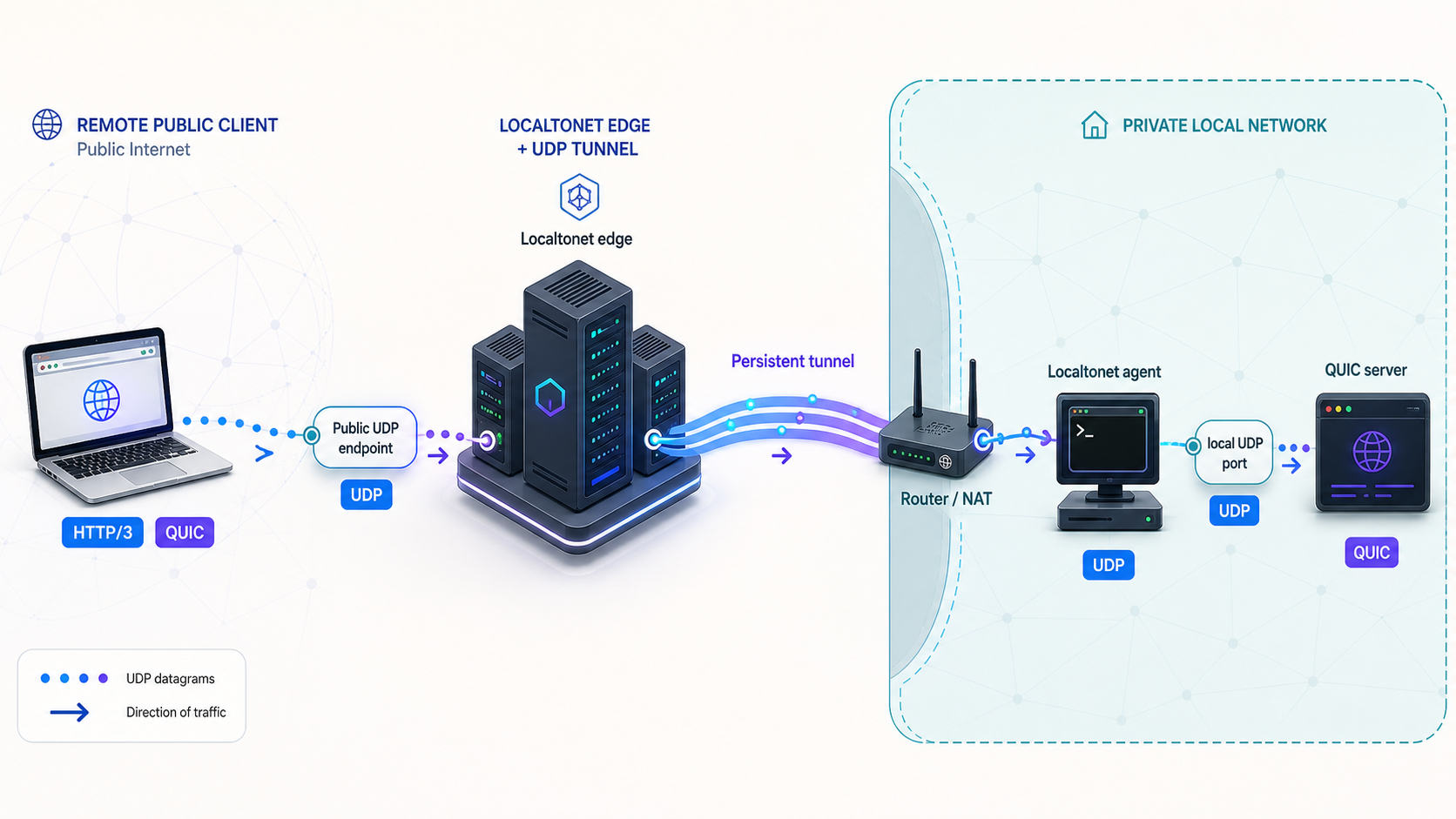
A useful HTTP/3 test separates the path into components. This makes it easier to identify whether a failure originates in name resolution, certificate validation, the remote network, the public UDP endpoint, the tunnel lifecycle, the local operating system, or the QUIC server.
The logical packet path is:
Remote HTTP/3 curl
        |
        | UDP and QUIC
        v
Localtonet public UDP host and port
        |
        | Localtonet tunnel path
        v
Localtonet client on the target device
        |
        | UDP to 127.0.0.1:8443
        v
Local Caddy QUIC listener
        |
        | HTTP/3 request handling
        v
Static test response
Keep four different names and ports separate
The remote command in this guide deliberately separates URL identity from connection destination. Understanding that distinction prevents most certificate and routing errors.
| Value | Example | Role in the test |
|---|---|---|
| Certificate hostname | quic.test |
Appears in the URL, certificate SAN, TLS server name, and certificate validation decision. |
| Local QUIC port | 8443 |
The UDP port owned by Caddy and configured as the Localtonet target. |
| Public tunnel hostname | PUBLIC_HOST |
The network destination assigned to the running Localtonet UDP tunnel. |
| Public tunnel port | PUBLIC_PORT |
The destination UDP port assigned to the running tunnel. It does not need to equal 8443. |
| ALPN | An HTTP/3 protocol identifier | Negotiated inside the QUIC TLS handshake to select HTTP/3 as the application protocol. |
DNS normally converts a hostname into an address. In this test, curl's --connect-to option changes the connection destination without changing the URL hostname. The URL still identifies quic.test, so curl uses that name for URL identity, SNI, and certificate verification. Curl resolves the mapped public destination and sends the connection to the assigned Localtonet host and port.
The curl documentation for --connect-to describes this separation explicitly: the option redirects the network connection while leaving the hostname used for TLS and application protocols unchanged. This is more precise than editing public DNS for a temporary test, and it avoids expecting the Localtonet-assigned hostname to match the certificate presented by the local server.
Prepare the local and remote test environments
The reproducible example below targets a Debian or Ubuntu-compatible local host and uses Caddy as the HTTP/3 server. Caddy supports HTTP/3 for HTTPS listeners, while OpenSSL creates a short-lived private test CA and server certificate. The remote device needs a curl build with HTTP/3 support.
Commands differ on Windows, macOS, and other Linux distributions. If you use another platform, install the same components through their official packages and retain the Caddyfile, certificate identity, listener checks, and curl command structure shown here.
| Requirement | Where it is needed | Purpose |
|---|---|---|
| Caddy | Local server device | Provides the reproducible HTTPS and HTTP/3 listener. |
| OpenSSL | Local server device | Creates the private test CA and server certificate. |
| HTTP/3-enabled curl | Local test environment and remote client | Forces HTTP/3 and reports negotiation details. |
| Localtonet client | Server device or a device that can reach it | Connects outward to our relay and runs the UDP tunnel. |
| External network | Remote client | Exercises the public UDP path rather than only the local LAN. |
| Secure file-transfer method | Between local and remote devices | Transfers only the public CA certificate, never the CA private key. |
Install Caddy on Debian or Ubuntu
The following package-repository procedure follows the official Caddy installation instructions for Debian, Ubuntu, and Raspbian. Run it on the local server device:
sudo apt install -y debian-keyring debian-archive-keyring apt-transport-https curl gnupg openssl

curl -1sLf 'https://dl.cloudsmith.io/public/caddy/stable/gpg.key' \
  | sudo gpg --dearmor -o /usr/share/keyrings/caddy-stable-archive-keyring.gpg

curl -1sLf 'https://dl.cloudsmith.io/public/caddy/stable/debian.deb.txt' \
  | sudo tee /etc/apt/sources.list.d/caddy-stable.list

sudo chmod o+r /usr/share/keyrings/caddy-stable-archive-keyring.gpg
sudo chmod o+r /etc/apt/sources.list.d/caddy-stable.list

sudo apt update
sudo apt install caddy
Confirm that the binary is available:
caddy version
openssl version
The package may also install a system service. This tutorial runs a separate Caddy configuration in the foreground so its output remains visible. If another Caddy instance already occupies TCP or UDP port 8443, stop that instance or choose another unused test port consistently throughout the commands.
Confirm curl has HTTP/3 support
Run this on every device that will issue a protocol-verification request:
curl --version
Inspect the output for HTTP/3 support. Curl packages vary by operating system and distribution. A build without HTTP/3 cannot execute this tutorial's --http3-only requests. Install an HTTP/3-capable build using the curl project's documented packages or your platform's current supported packaging method before proceeding.
The relevant options are documented in the curl --http3-only documentation, the --resolve documentation, and the --cacert documentation.
-k or --insecure as the successful test path
Those options disable certificate verification and can hide a hostname, trust-chain, or server-name error. This guide gives curl the private CA certificate explicitly with --cacert, preserving both hostname and chain validation.
Build and validate a reproducible local HTTP/3 server
This example uses quic.test as a test-only hostname and UDP port 8443. The certificate contains quic.test as a DNS Subject Alternative Name. Curl maps that name to the required local or public destination without depending on public DNS.
Create a private test CA and server certificate
Create a dedicated working directory and restrict newly created files:
mkdir -p "$HOME/quic-tunnel-test/certs"
cd "$HOME/quic-tunnel-test"
umask 077
Generate the private CA key and a short-lived self-signed CA certificate:
openssl genrsa -out certs/test-ca.key 3072

openssl req -x509 -new \
  -key certs/test-ca.key \
  -sha256 \
  -days 30 \
  -subj "/CN=QUIC Tunnel Test CA" \
  -out certs/test-ca.crt
Create the server key and certificate request:
openssl genrsa -out certs/quic.test.key 2048

openssl req -new \
  -key certs/quic.test.key \
  -subj "/CN=quic.test" \
  -out certs/quic.test.csr
Create the certificate extensions. The SAN is the identity curl will verify:
cat > certs/quic.test.ext <<'EOF'
basicConstraints=CA:FALSE
keyUsage=digitalSignature,keyEncipherment
extendedKeyUsage=serverAuth
subjectAltName=DNS:quic.test
EOF
Sign a seven-day server certificate with the test CA:
openssl x509 -req \
  -in certs/quic.test.csr \
  -CA certs/test-ca.crt \
  -CAkey certs/test-ca.key \
  -CAcreateserial \
  -days 7 \
  -sha256 \
  -extfile certs/quic.test.ext \
  -out certs/quic.test.crt
Inspect the SAN and verify the chain before starting the server:
openssl x509 -in certs/quic.test.crt -noout -subject -issuer -dates
openssl x509 -in certs/quic.test.crt -noout -ext subjectAltName
openssl verify -CAfile certs/test-ca.crt certs/quic.test.crt
The final command should report certs/quic.test.crt: OK. The private CA key, test-ca.key, can issue certificates trusted by anyone who installs the CA. Keep it on the local test machine and delete it when the experiment is complete.
Configure Caddy for HTTP/3
Create a Caddyfile in $HOME/quic-tunnel-test:
cat > Caddyfile <<'EOF'
{
	servers {
		protocols h1 h2 h3
	}
}

https://quic.test:8443 {
	tls ./certs/quic.test.crt ./certs/quic.test.key
	respond "HTTP/3 reached local Caddy"
}
EOF
The global server option explicitly enables HTTP/1.1, HTTP/2, and HTTP/3. Keeping all three available makes the later negative comparison useful, while --http3-only prevents curl from satisfying the verification request through a TCP fallback. See Caddy's protocol configuration and TLS directive documentation for the underlying settings.
Validate the configuration before startup:
caddy validate --config ./Caddyfile --adapter caddyfileStart Caddy and keep its output visible
Run Caddy from the test directory:
cd "$HOME/quic-tunnel-test"
caddy run --config ./Caddyfile --adapter caddyfile
Leave this terminal open. Caddy should report that it loaded the configuration. Startup errors about address conflicts, unreadable keys, invalid certificates, or unsupported configuration must be fixed before creating the tunnel.
Inspect the UDP listener
In a second terminal, verify that a process is bound to UDP port 8443:
sudo ss -lunp | grep ':8443'Look for a UDP socket associated with Caddy. Depending on address-family and operating-system behavior, the local address may appear as an IPv4 address, an IPv6 address, or a wildcard. A TCP listener on the same numeric port is not a substitute for this result. TCP and UDP use separate transport endpoints.
If no UDP socket appears, review Caddy's startup output and confirm that the installed build supports HTTP/3. Do not proceed to the Localtonet configuration until the UDP listener exists.
Make an HTTP/3-only local request
The URL must retain quic.test because that is the certificate identity. Curl's --resolve option maps it to local loopback for this request:
cd "$HOME/quic-tunnel-test"

curl -v \
  --http3-only \
  --cacert ./certs/test-ca.crt \
  --resolve quic.test:8443:127.0.0.1 \
  https://quic.test:8443/
A successful result returns HTTP/3 reached local Caddy. Curl's verbose output should identify HTTP/3, and Caddy should log or otherwise observe the request according to its active logging configuration. Because --http3-only forbids TCP fallback, an HTTP response from this command is strong client-side evidence that the local QUIC path works.
If the listener is reachable only through IPv6, use the matching loopback or reachable address. If the Localtonet client will run on a separate LAN device, repeat a direct test from that device using an address that reaches the server. A server bound only to loopback is not reachable from a different machine.
Record the local baseline
- Certificate hostname:
quic.test. - Local target:
127.0.0.1:8443when the Localtonet client runs on the same machine. - Expected response:
HTTP/3 reached local Caddy. - Trust anchor:
certs/test-ca.crt. - Required protocol: HTTP/3 with no fallback.
- Observed UDP listener and successful local request time.
If the Localtonet client runs on the Caddy host, target the verified loopback address and UDP port. If it runs elsewhere, use a LAN address that the client device has already demonstrated it can reach.
Expose the local QUIC listener with a Localtonet UDP tunnel
Localtonet UDP tunnels point to a local IP address and port on, or reachable from, the connected client device. Relay and region choices can vary, so obtain the current values from our dashboard rather than copying a server code from an older tutorial.
Install and run the Localtonet client
Run the client on the Caddy host or on another device that can reach the verified UDP listener. The client establishes the outbound connection used by the tunnel.
Authenticate and select the correct device
Use the device-specific authentication token through the supported application workflow, then select that device for the tunnel. Never place the token in commands, screenshots, repositories, or shared logs.
Select a currently available relay server or region
Choose from the values currently offered in our dashboard. Availability can vary by current product configuration, so do not guess or hardcode a server code.
Create a UDP tunnel to the QUIC target
Select the UDP tunnel type and enter the verified local IP address and UDP port. For this example, use 127.0.0.1 and 8443 only when the Localtonet client and Caddy run on the same device.
Start the tunnel
Creating a tunnel does not start it. Use the Start control and wait until the selected client is connected and the tunnel is running.
Record the assigned public host and port
Copy the public UDP host and port shown for the running tunnel. These values become the connection destination in the remote curl command.
The public endpoint is usable only while the selected Localtonet client is connected and the tunnel is running. Check both states before changing the Caddy or certificate configuration.
Follow the current Localtonet UDP tunnel documentation for the protocol-specific setup, with the general Localtonet documentation as a supplemental installation reference. Current region names, server codes, endpoint assignments, and plan availability should be read from the product rather than assumed from this article.
Do not replace the certificate hostname with the public host
The assigned Localtonet host identifies the public network destination. It is not automatically a certificate identity for the Caddy server. Entering the public host directly in the URL would cause Caddy to present a certificate for quic.test while curl validates it against a different name.
Keep quic.test in the URL and map the connection to the assigned Localtonet destination with --connect-to. No public DNS record for quic.test is required for this curl test.
Prove that the remote request negotiated HTTP/3
Transfer only the public CA certificate
Copy test-ca.crt to the remote test device using a trusted file-transfer method. The remote device does not need the server private key or CA private key. Never transfer these files:
test-ca.keyquic.test.key
Keep the CA certificate in a known test directory on the remote device. If your organization's policy permits installing development roots, you can instead add test-ca.crt to that operating system's or application runtime's trust store using its documented administrative process. Trust-store commands differ across Linux distributions, Windows, macOS, containers, browsers, and language runtimes, so the portable curl example uses --cacert rather than changing system-wide trust.
Prefer request-scoped trust with --cacert for a short experiment. If you install the CA in a system trust store, remove it after testing. Never install a development CA on unmanaged or production devices without authorization.
Run the mapped remote request
From a different network, replace PUBLIC_HOST and PUBLIC_PORT with the exact endpoint assigned to the running UDP tunnel:
curl -v \
  --http3-only \
  --cacert ./test-ca.crt \
  --connect-to quic.test:8443:PUBLIC_HOST:PUBLIC_PORT \
  https://quic.test:8443/
Do not change the URL to PUBLIC_HOST. The URL remains https://quic.test:8443/, so the certificate name, URL authority, and TLS server name remain aligned. The mapping changes only the destination to which curl opens the connection.
The two ports in the mapping serve different purposes. The first, 8443, matches the URL and certificate-hostname connection rule. The second is the assigned public UDP port. Curl sends the QUIC traffic to that public port, and Localtonet forwards it to the configured local UDP port.
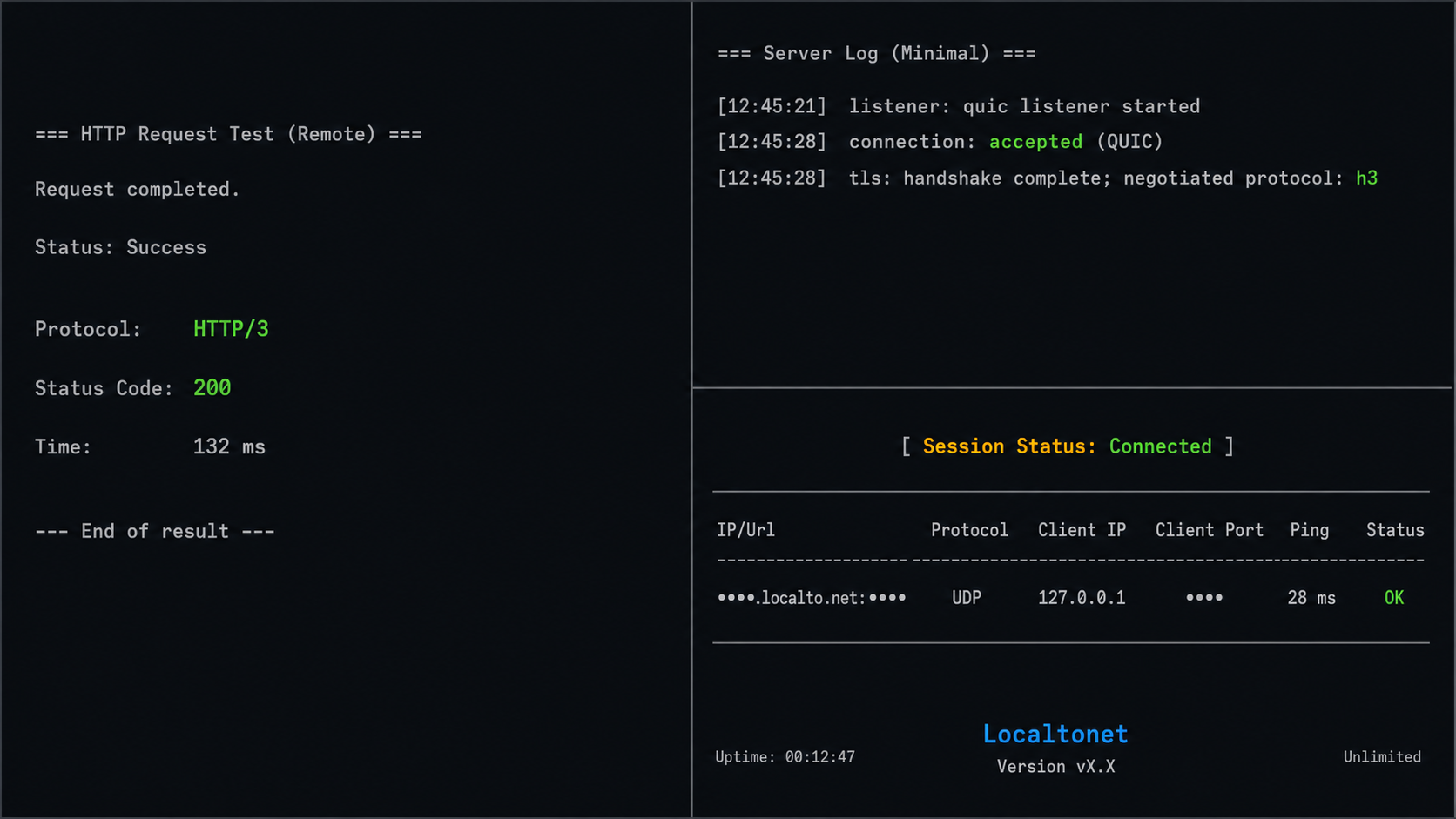
A successful test should produce all of the following:
- Curl completes in
--http3-onlymode. - Certificate validation succeeds using
test-ca.crt. - Curl reports HTTP/3 in its verbose protocol output.
- The response contains
HTTP/3 reached local Caddy. - The local server observes the request at the matching time.
- UDP traffic appears on local port 8443 during the request if packet observation is enabled.
Collect evidence at multiple layers
| Evidence layer | Successful indication | What it proves |
|---|---|---|
| Remote curl | The request succeeds in HTTP/3-only mode and reports HTTP/3. | Curl did not satisfy the request through HTTP/2 or HTTP/1.1. |
| Certificate validation | Curl accepts the chain through test-ca.crt without an insecure option. |
The certificate chain and quic.test hostname match the intended test identity. |
| QUIC negotiation | The connection negotiates an HTTP/3 ALPN value. | The endpoints selected HTTP/3 as the application protocol over QUIC. |
| Local server | Caddy returns the configured unique response during the remote request. | The request reached the intended local test service. |
| Local socket or packet view | UDP datagrams arrive on port 8443 during the request. | The transport reaching the local listener is UDP. |
| Tunnel lifecycle | The selected client is connected and the UDP tunnel is running. | The assigned public destination corresponds to an active tunnel path. |
No single observation is as strong as the combined result. Client output can be misread, server output can be incomplete, and packet capture shows encrypted UDP without necessarily identifying application semantics. Together, they provide a defensible end-to-end test.
Observe local UDP traffic when needed
If packet-capture authorization and local policy permit it, run a narrowly scoped capture on the Caddy host while issuing one remote request:
sudo tcpdump -ni any udp port 8443
Stop the capture with Ctrl+C after the request. This confirms that UDP datagrams reached the local port, but the encrypted packets alone do not prove the HTTP version. Pair this observation with curl's HTTP/3-only result and the local server response.
Run a negative control
Temporarily stop the Localtonet UDP tunnel while leaving Caddy running, then repeat the same remote command. The HTTP/3-only request should fail. Restart the tunnel and verify that the command succeeds again using the current assigned endpoint.
Alternatively, stop Caddy while keeping the tunnel running. If a separate TCP HTTPS listener exists, leave it untouched. The HTTP/3-only request should still fail because no local QUIC listener is available.
If the request succeeds during the negative control, verify that the command still contains --http3-only, that its --connect-to destination is current, and that no other server is listening on the target UDP port.
Detect silent fallback to TCP-based HTTP
User-facing clients often prioritize page delivery over protocol diagnostics. If QUIC fails, they may retry using HTTP/2 or HTTP/1.1 over TCP. That behavior is useful for browsing, but it creates a false positive when the objective is to validate the local QUIC listener.
| Test mode | Possible result | Interpretation |
|---|---|---|
| HTTP/3-only curl | Request succeeds and reports HTTP/3. | Strong client-side evidence that QUIC and HTTP/3 worked. |
| HTTP/3-preferred client | Request succeeds as HTTP/2. | The application is reachable, but the HTTP/3 attempt failed or was not selected. |
| Ordinary browser navigation | The page loads without protocol inspection. | Application reachability is proven, but the transport remains unknown. |
| TCP HTTPS request | TCP succeeds while HTTP/3-only fails. | The TCP path works, but UDP routing, QUIC, or HTTP/3 still has a problem. |
Caddy may also listen on TCP port 8443 because the example enables HTTP/1.1 and HTTP/2. That does not weaken the HTTP/3-only test. Curl's enforced mode is what prevents fallback. It also lets you compare TCP and UDP behavior without changing the application response.
A public endpoint negotiating HTTP/3 with a browser does not establish that the local application received QUIC. Use a UDP tunnel to the local QUIC listener and verify the protocol at the local server when end-to-end fidelity is the objective.
Troubleshoot remote QUIC connectivity systematically
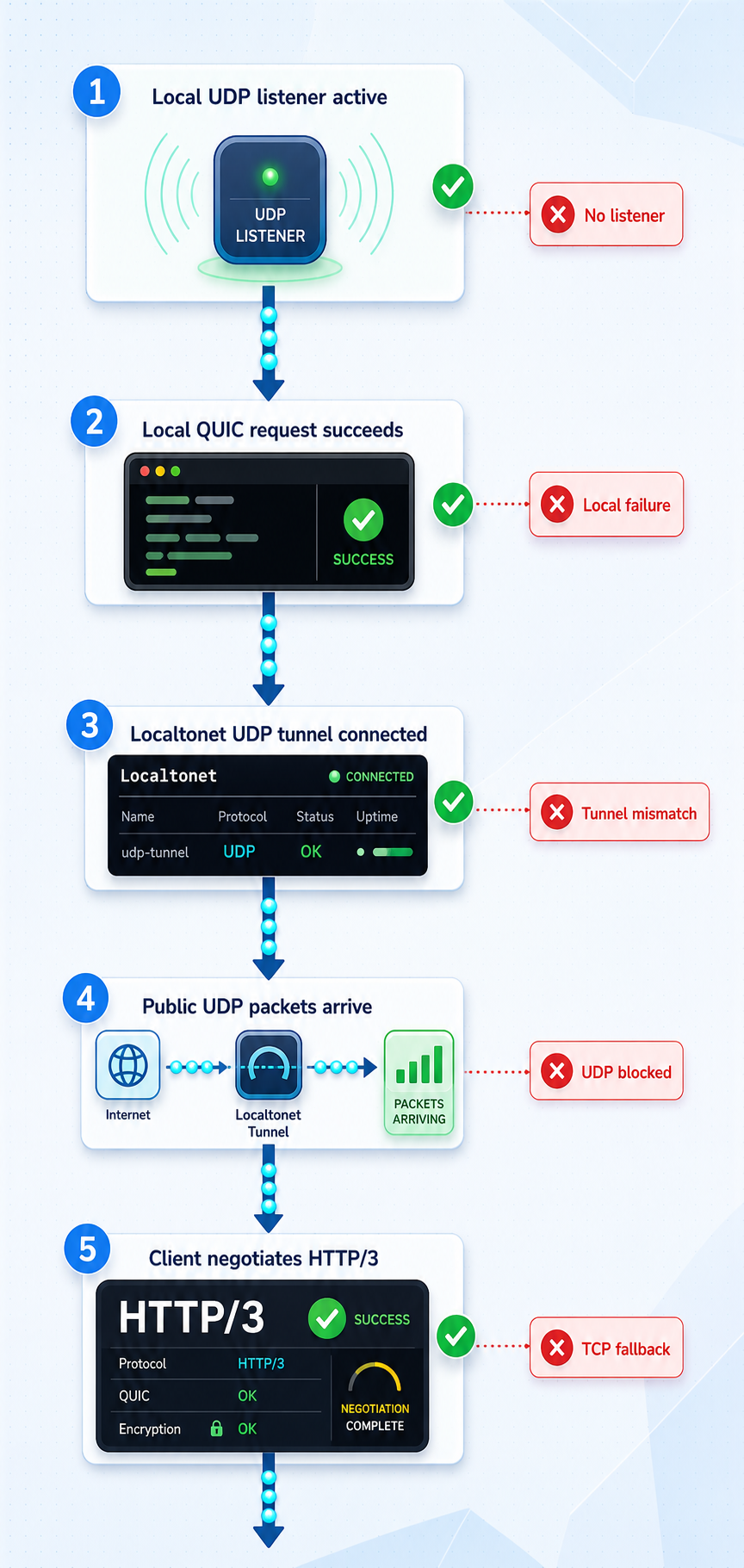
Troubleshooting is fastest when it proceeds from the local server outward. Avoid changing certificates, listener ports, relay selections, and client options simultaneously. Change one layer, repeat the same HTTP/3-only request, and record the result.
Caddy fails to start
Run the validation command again and inspect the foreground output. Common causes include a malformed Caddyfile, an unreadable private key, a certificate and key that do not match, or another process already using port 8443.
Verify the certificate and key match by comparing their public-key digests:
openssl x509 -in certs/quic.test.crt -pubkey -noout \
  | openssl sha256

openssl pkey -in certs/quic.test.key -pubout \
  | openssl sha256
The resulting digests should match. If the port is occupied, identify the existing process before stopping it. Do not terminate an unrelated production service merely to run this test.
No UDP listener appears on port 8443
Confirm that Caddy remains running and that the Caddyfile contains h3 in the protocol list. Check the installed Caddy version and startup messages. A TCP result from ss is insufficient, so keep the UDP-specific -u inspection in the command.
The local HTTP/3-only request reports unsupported functionality
The installed curl build likely lacks HTTP/3 support. The presence of a recent curl command does not guarantee that its linked libraries enable HTTP/3. Inspect curl --version and replace the client with an HTTP/3-capable build before changing Caddy or Localtonet.
The local request cannot resolve quic.test
Confirm that the command contains:
--resolve quic.test:8443:127.0.0.1
This per-request mapping avoids a hosts-file change. The hostname and port in --resolve must exactly match the URL authority.
The local request reports an unknown certificate authority
Confirm that --cacert points to test-ca.crt, not the server certificate and not the CA private key. Verify the server certificate with:
openssl verify -CAfile certs/test-ca.crt certs/quic.test.crtIf verification fails, regenerate the certificate chain rather than bypassing validation.
The certificate reports a hostname mismatch
Inspect the SAN:
openssl x509 -in certs/quic.test.crt -noout -ext subjectAltName
It must include DNS:quic.test. The URL must also use quic.test. The Localtonet public hostname belongs only in the destination portion of --connect-to.
The local test works but the remote request times out
Check the Localtonet lifecycle and destination values in order:
- The intended device is selected.
- The Localtonet client on that device is connected.
- The UDP tunnel is running rather than merely created.
- The local target matches the verified UDP listener.
- The remote command contains the currently assigned public host and port.
- The remote network permits outbound UDP.
If the Localtonet client runs on another LAN device, 127.0.0.1 refers to that client device, not to the Caddy server. Configure a reachable LAN address and make sure Caddy is bound appropriately before exposing it.
Curl cannot resolve PUBLIC_HOST
Replace the placeholder with the exact public hostname shown for the running tunnel. Do not include a scheme, path, brackets, or extra punctuation. The mapping has this structure:
--connect-to quic.test:8443:assigned-public-host:assigned-public-portIf the actual destination is an IPv6 literal, follow curl's documented IPv6 syntax. Do not guess an address for the assigned hostname.
UDP reaches Caddy but the QUIC handshake fails
This points away from basic tunnel reachability and toward TLS or QUIC negotiation. Check the certificate dates, SAN, test CA, URL hostname, Caddy protocol configuration, and curl HTTP/3 capability. Ensure the remote device received the correct test-ca.crt from this test environment.
Packet observation may show two-way UDP exchange while certificate or ALPN negotiation still fails. Use endpoint diagnostics for application-level interpretation because QUIC payloads are encrypted.
The request fails only from one external network
Some client networks restrict or impair outbound UDP. Repeat the same command from a second external network while leaving Caddy and the tunnel unchanged. If one path consistently works and the other does not, investigate the failing network before modifying the server.
A browser may hide this condition by falling back to TCP. Continue using --http3-only for the diagnostic comparison.
The browser loads a page but curl HTTP/3-only fails
The browser may have selected HTTP/2 or HTTP/1.1, reached a different endpoint, reused an existing connection, or served cached content. Inspect the exact browser request protocol, but treat the enforced curl test and corresponding Caddy observation as the primary evidence for this tutorial.
The public endpoint stopped responding
Confirm that the Localtonet client is still connected and the tunnel remains running. A tunnel is available only while both conditions hold. Also confirm that Caddy did not exit and that the current public endpoint matches the running tunnel shown in the dashboard.
Stop the test server and remove temporary trust
Return to the terminal running Caddy and press Ctrl+C. Then stop or delete the Localtonet tunnel. Confirm that port 8443 is no longer listening:
sudo ss -lunp | grep ':8443'
No output is expected if no other process uses that UDP port. Remove any copy of test-ca.crt that you installed in a system trust store using that operating system's documented trust-management procedure.
When the test artifacts are no longer required, delete the working directory securely according to your storage and organizational requirements:
rm -rf "$HOME/quic-tunnel-test"Review the path before running the removal command. Deleting the directory removes the CA private key, server private key, certificates, and Caddy configuration created by this tutorial.
Keep public QUIC testing controlled
Publishing a development listener makes it reachable through a public endpoint while the tunnel is running. Treat that endpoint as internet-accessible, even when the experiment is brief and the hostname is not advertised.
A transport certificate authenticates the configured server identity, but it does not replace application authentication or authorization. If you adapt this tutorial to an application with state-changing routes, require appropriate authorization and apply least privilege.
Do not expose debug dashboards, unauthenticated administrative endpoints, stack traces containing secrets, or unrestricted internal APIs. If the real application cannot be published safely, keep the minimal Caddy response from this tutorial or create a dedicated test service containing only the behavior needed for protocol validation.
Localtonet removes the need for inbound router port forwarding and inbound firewall changes in this workflow, but it does not remove the application's security responsibilities. Safe key handling, authentication, authorization, input validation, log hygiene, and controlled tunnel lifetime remain necessary.
Frequently asked questions
Can I test a local HTTP/3 server with an ordinary HTTP or HTTPS tunnel?
Not when the goal is to prove that the local server itself received QUIC. HTTP/3 uses QUIC over UDP, so protocol-fidelity testing requires UDP traffic to reach the local QUIC listener. A public HTTPS response can succeed without proving that the local connection used HTTP/3.
Why use curl --connect-to for the remote request?
It separates URL identity from network destination. Curl keeps quic.test as the URL hostname, TLS server name, and certificate-validation name while connecting to the Localtonet-assigned public host and port.
Do I need a public DNS record for quic.test?
No. The local command uses --resolve, and the remote command uses --connect-to. These per-request mappings preserve the certificate hostname without requiring public DNS for the test name.
Why should I use --cacert instead of --insecure?
--cacert gives curl the intended private trust root while preserving chain and hostname validation. --insecure disables those checks and can hide a certificate, SNI, or identity error.
Can HTTP/3 and HTTPS over TCP use the same port number?
Yes. UDP and TCP are separate transports, so a server can use the same numeric port for both. Verify the UDP listener directly because a working TCP listener does not prove that a QUIC listener exists.
Does a successful browser page load prove HTTP/3 is working?
No. Browsers can fall back to HTTP/2 or HTTP/1.1 over TCP. Use an HTTP/3-only client and correlate its result with the local server response and UDP listener activity.
Why does QUIC work from one network but fail from another?
The failing network may restrict or impair outbound UDP. Repeat the same HTTP/3-only command from another external network while keeping the server and tunnel unchanged. A browser may conceal the difference by falling back to TCP.
Can this tunnel test validate QUIC connection migration?
It can confirm HTTP/3 connectivity through the tested relay path, but it should not be treated as proof of representative connection migration. Migration behavior can depend on source-address visibility and path characteristics that are not established by the available Localtonet product evidence.
Does creating a Localtonet UDP tunnel start it automatically?
No. Creating and running a tunnel are separate lifecycle states. Start the tunnel and keep the selected Localtonet client connected. The public endpoint is available only while both conditions hold.
Do I need router port forwarding or a public IP address?
No. The Localtonet client establishes an outbound connection to our relay, so this workflow does not require inbound router port forwarding, inbound firewall changes, VPN setup, or a public IP address.
What is the strongest proof that the local server handled HTTP/3?
Combine a successful remote --http3-only request, valid certificate verification for the intended hostname, the expected Caddy response, and observation of UDP traffic on the configured local port. The negative control should fail when the tunnel or QUIC listener is stopped.
Test your local QUIC listener from a real external network
Verify the HTTP/3 server locally, run our client on a device that can reach its UDP listener, create and start a UDP tunnel, then map an HTTP/3-only curl request to the assigned public destination without giving up certificate validation.
Get Started Free →

