

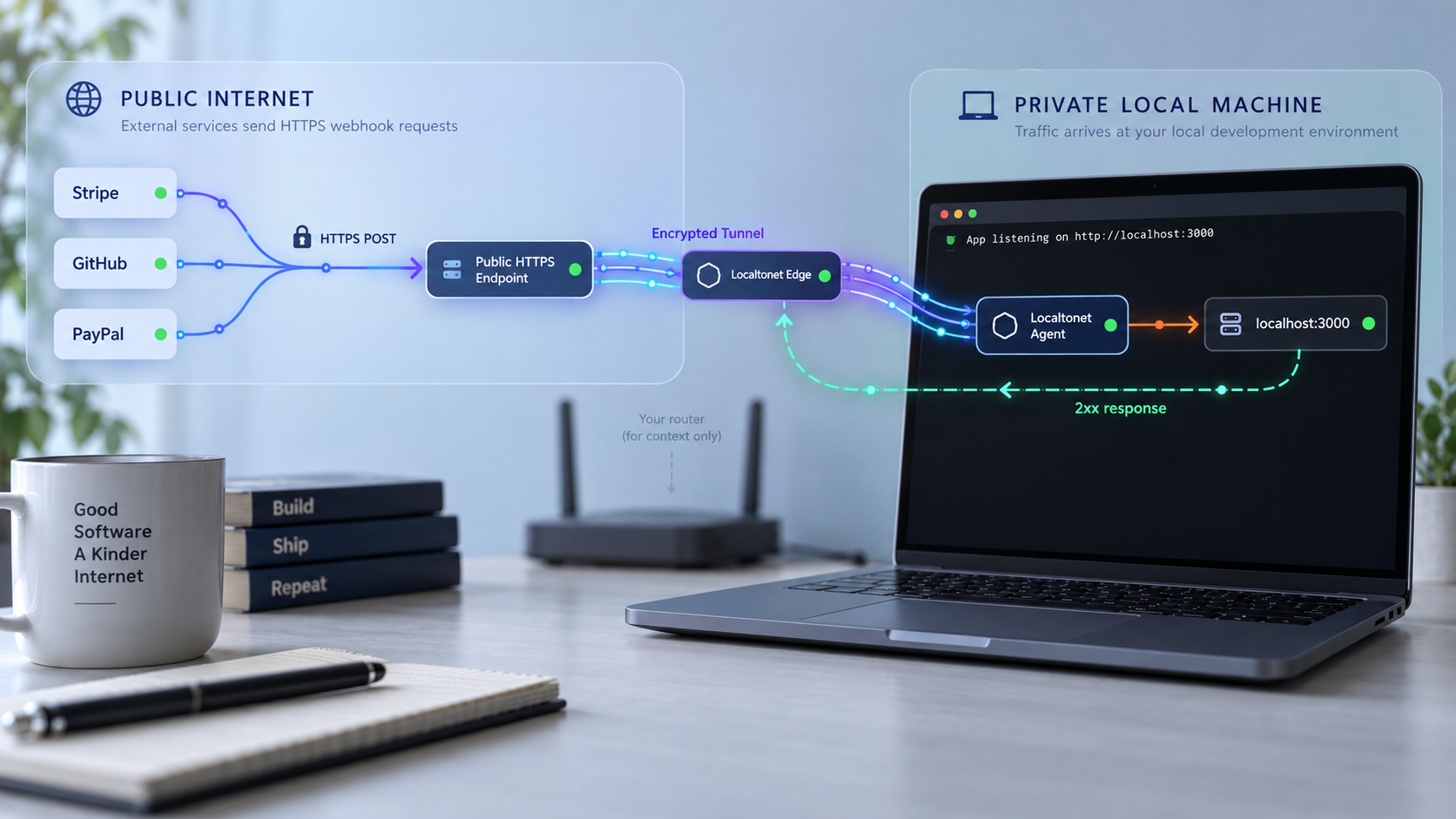
Give external webhook providers a public HTTPS route to your local HTTP application
A service running on 127.0.0.1 cannot receive requests directly from Stripe, GitHub, or PayPal. In this guide, you will build a small Node.js webhook server, verify its routes locally, and expose its HTTP port through a Localtonet HTTP tunnel. Providers send HTTPS requests to the assigned public address, while your application continues listening over ordinary HTTP on your development machine. The guide also covers provider-specific verification, safe sandbox testing, duplicate handling, troubleshooting, and tunnel shutdown.
📋 What's in this guide
Use an HTTP tunnel for the HTTPS-to-localhost workflow
Webhooks are server-to-server HTTP requests. A provider sends an event to a registered route when something relevant happens, such as a completed payment, a repository push, or a PayPal transaction update. The receiving application normally validates the request, records the event, acknowledges delivery, and processes the event without relying on a browser session.
The networking problem is that addresses such as http://127.0.0.1:3000 and http://localhost:3000 are meaningful only on your own computer. An external provider cannot route a request to either address. Opening a router port can also be impractical when the connection is behind carrier-grade NAT, uses a changing public IP address, or is subject to network policies you do not control.
Localtonet solves this by running a client on the device that can reach your application. The client establishes an outbound connection to a Localtonet relay. An HTTP tunnel then supplies a public HTTPS address and forwards incoming web requests to the local IP address and port you configured. You do not need inbound router port forwarding, a public IP address, VPN setup, or a certificate on the local Node.js server for this workflow.
This tutorial uses a Localtonet HTTP tunnel because the target is an ordinary local HTTP application. The provider calls the public HTTPS address assigned to that HTTP tunnel, and the request is forwarded to the configured local HTTP target. Do not select the separate TLS tunnel type merely because the provider-facing URL begins with https://. A TLS tunnel is relevant only when your intended target and protocol require that separate tunnel family.
http://127.0.0.1:3000/webhooks/stripe.
The tunnel provides reachability, not webhook authenticity. Your application still has to apply the verification protocol required by each provider. Stripe and GitHub both sign webhook data, but their headers and verification procedures are not interchangeable. PayPal REST webhooks use PayPal's verification service, while legacy PayPal IPN uses a separate postback protocol.
| Provider or protocol | Public URL guidance | Verification model | Delivery behavior to plan for |
|---|---|---|---|
| Stripe registered endpoint | Registered live webhook endpoints use HTTPS. Use Stripe test mode while developing. | Verify Stripe-Signature with the endpoint signing secret and the exact raw request bytes. |
Stripe retries failed deliveries automatically, but live and sandbox retry schedules differ. |
| Stripe CLI forwarding | The Stripe CLI can forward test events directly to localhost as an alternative to registering a public tunnel URL. | Use the signing secret printed for the CLI forwarding session. | Useful for Stripe-only development, but it does not test a shared public URL used by other providers. |
| GitHub webhook | GitHub accepts HTTP payload URLs, but HTTPS with SSL verification is strongly recommended. | Verify X-Hub-Signature-256 with HMAC-SHA256 and the configured webhook secret. |
GitHub does not automatically redeliver failed webhook deliveries. Use its delivery view to redeliver manually where available. |
| PayPal REST webhook | Use a sandbox REST app and its webhook configuration during development. | Submit PayPal transmission headers, the webhook ID, and the event to PayPal's verification endpoint. | Treat every delivery as potentially duplicated and make processing idempotent. |
| Legacy PayPal IPN | Configure a dedicated IPN listener only when maintaining an IPN integration. | Post the original form payload back to PayPal with cmd=_notify-validate, then require VERIFIED. |
IPN is a different protocol from PayPal REST webhooks and should use a separate handler. |
Prerequisites and safe test data
This tutorial uses Node.js and Express so that all three provider routes can run in one small application. The server is intentionally bounded to local development and sandbox-oriented testing. It demonstrates transport, request verification, event identifiers, and acknowledgement behavior. It does not implement business actions such as granting account access, shipping an order, or changing a subscription.
You will need:
- Node.js 18 or later, which provides the built-in
fetchAPI used by the PayPal verification example. - A terminal with
npmandcurl. - A Localtonet account and a device-specific authentication token.
- The Localtonet client installed on the same device as the server, or on a device that can reach the server's local IP address and port.
- A Stripe test-mode account if you want to test Stripe deliveries.
- A GitHub repository on which you have permission to configure webhooks.
- A PayPal developer sandbox app if you want to test PayPal REST webhooks.
Do not use real cardholder data, customer personal information, production PayPal credentials, or production webhook secrets in a development exercise. Subscribe only to the event types your handler needs. If a test payload still contains personal or payment-related fields, avoid printing the complete body to a terminal, source-control artifact, shared chat, or long-lived log.
The Localtonet authentication token identifies the client device that will run the tunnel. It is not a generic personal token to paste into source files. Keep it out of screenshots, shell history where practical, repositories, issue reports, and application logs. The commands below always use <YOUR_DEVICE_TOKEN> as a nonfunctional placeholder.
Build a minimal runnable webhook server
Create the project and install dependencies
Create an empty project directory, initialize it, and install Express, the Stripe SDK, and dotenv:
mkdir local-webhook-lab
cd local-webhook-lab
npm init -y
npm install express stripe dotenv
Create a file named .env. Populate only the providers you intend to test. Use test or sandbox values, never the literal placeholders shown here:
PORT=3000

STRIPE_SECRET_KEY=replace_with_a_test_mode_api_key
STRIPE_WEBHOOK_SECRETS=replace_with_a_test_endpoint_signing_secret

GITHUB_WEBHOOK_SECRETS=replace_with_a_long_random_webhook_secret

PAYPAL_CLIENT_ID=replace_with_a_sandbox_client_id
PAYPAL_CLIENT_SECRET=replace_with_a_sandbox_client_secret
PAYPAL_WEBHOOK_ID=replace_with_the_sandbox_webhook_id
PAYPAL_API_BASE=https://api-m.sandbox.paypal.com
Add .env to .gitignore before creating a commit:
printf ".env\nnode_modules/\n" >> .gitignoreThe Stripe and GitHub variables in this example accept comma-separated values. That lets a development handler temporarily accept an old and a new signing secret during a controlled rotation. Remove the retired secret after every configured sender has switched. Do not keep obsolete secrets indefinitely.
Add the server implementation
Save the following as server.js. Route order matters. Stripe and GitHub verification must receive raw bytes before any JSON middleware transforms the request. PayPal REST verification is different: it sends the parsed event and PayPal transmission metadata to PayPal's verification API. The IPN route preserves the original URL-encoded payload for its postback.
require('dotenv').config();

const crypto = require('crypto');
const express = require('express');
const Stripe = require('stripe');

const app = express();
const port = Number(process.env.PORT || 3000);

const stripe = process.env.STRIPE_SECRET_KEY
  ? new Stripe(process.env.STRIPE_SECRET_KEY)
  : null;

const seenEvents = new Set();

function configuredSecrets(name) {
  return (process.env[name] || '')
    .split(',')
    .map((value) => value.trim())
    .filter(Boolean);
}

function alreadyProcessed(provider, eventId) {
  const key = `${provider}:${eventId}`;

  if (seenEvents.has(key)) {
    return true;
  }

  seenEvents.add(key);
  return false;
}

function enqueueForDevelopment(provider, eventId, eventType) {
  // This demo deliberately logs metadata only, not the complete payload.
  console.log('accepted webhook', {
    provider,
    eventId,
    eventType
  });
}

function safeTextEqual(left, right) {
  const leftBuffer = Buffer.from(left);
  const rightBuffer = Buffer.from(right);

  if (leftBuffer.length !== rightBuffer.length) {
    return false;
  }

  return crypto.timingSafeEqual(leftBuffer, rightBuffer);
}

app.get('/health', (req, res) => {
  res.status(200).json({ status: 'ok' });
});

app.post(
  '/webhooks/probe',
  express.json({ type: '*/*', limit: '16kb' }),
  (req, res) => {
    console.log('connectivity probe received');
    res.sendStatus(204);
  }
);

app.post(
  '/webhooks/stripe',
  express.raw({ type: 'application/json', limit: '1mb' }),
  (req, res) => {
    if (!stripe) {
      return res.status(503).send('Stripe is not configured');
    }

    const signature = req.get('stripe-signature');
    const secrets = configuredSecrets('STRIPE_WEBHOOK_SECRETS');

    if (!signature || secrets.length === 0) {
      return res.status(400).send('Missing Stripe signature or secret');
    }

    let event = null;

    for (const secret of secrets) {
      try {
        event = stripe.webhooks.constructEvent(
          req.body,
          signature,
          secret
        );
        break;
      } catch {
        // Try the next active secret during a controlled rotation.
      }
    }

    if (!event) {
      return res.status(400).send('Invalid Stripe signature');
    }

    if (!alreadyProcessed('stripe', event.id)) {
      enqueueForDevelopment('stripe', event.id, event.type);
    }

    return res.sendStatus(200);
  }
);

app.post(
  '/webhooks/github',
  express.raw({ type: 'application/json', limit: '1mb' }),
  (req, res) => {
    const signature = req.get('x-hub-signature-256') || '';
    const deliveryId = req.get('x-github-delivery') || '';
    const eventType = req.get('x-github-event') || '';
    const secrets = configuredSecrets('GITHUB_WEBHOOK_SECRETS');

    if (!signature || !deliveryId || secrets.length === 0) {
      return res.status(401).send('Missing GitHub verification data');
    }

    const valid = secrets.some((secret) => {
      const expected =
        'sha256=' +
        crypto
          .createHmac('sha256', secret)
          .update(req.body)
          .digest('hex');

      return safeTextEqual(signature, expected);
    });

    if (!valid) {
      return res.status(401).send('Invalid GitHub signature');
    }

    let payload;

    try {
      payload = JSON.parse(req.body.toString('utf8'));
    } catch {
      return res.status(400).send('Invalid JSON');
    }

    if (!alreadyProcessed('github', deliveryId)) {
      enqueueForDevelopment(
        'github',
        deliveryId,
        eventType || payload.zen || 'unknown'
      );
    }

    return res.sendStatus(200);
  }
);

async function getPayPalAccessToken() {
  const base = process.env.PAYPAL_API_BASE;
  const clientId = process.env.PAYPAL_CLIENT_ID;
  const clientSecret = process.env.PAYPAL_CLIENT_SECRET;

  if (!base || !clientId || !clientSecret) {
    throw new Error('PayPal sandbox credentials are not configured');
  }

  const basic = Buffer
    .from(`${clientId}:${clientSecret}`)
    .toString('base64');

  const response = await fetch(`${base}/v1/oauth2/token`, {
    method: 'POST',
    headers: {
      Authorization: `Basic ${basic}`,
      'Content-Type': 'application/x-www-form-urlencoded'
    },
    body: 'grant_type=client_credentials'
  });

  if (!response.ok) {
    throw new Error(`PayPal token request failed with ${response.status}`);
  }

  const body = await response.json();
  return body.access_token;
}

async function verifyPayPalRestWebhook(req) {
  const requiredHeaders = {
    auth_algo: req.get('paypal-auth-algo'),
    cert_url: req.get('paypal-cert-url'),
    transmission_id: req.get('paypal-transmission-id'),
    transmission_sig: req.get('paypal-transmission-sig'),
    transmission_time: req.get('paypal-transmission-time')
  };

  if (Object.values(requiredHeaders).some((value) => !value)) {
    return false;
  }

  const webhookId = process.env.PAYPAL_WEBHOOK_ID;
  const base = process.env.PAYPAL_API_BASE;

  if (!webhookId || !base) {
    throw new Error('PayPal webhook configuration is incomplete');
  }

  const accessToken = await getPayPalAccessToken();

  const response = await fetch(
    `${base}/v1/notifications/verify-webhook-signature`,
    {
      method: 'POST',
      headers: {
        Authorization: `Bearer ${accessToken}`,
        'Content-Type': 'application/json'
      },
      body: JSON.stringify({
        ...requiredHeaders,
        webhook_id: webhookId,
        webhook_event: req.body
      })
    }
  );

  if (!response.ok) {
    throw new Error(
      `PayPal webhook verification failed with ${response.status}`
    );
  }

  const result = await response.json();
  return result.verification_status === 'SUCCESS';
}

app.post(
  '/webhooks/paypal',
  express.json({ type: 'application/json', limit: '1mb' }),
  async (req, res) => {
    try {
      const valid = await verifyPayPalRestWebhook(req);

      if (!valid) {
        return res.status(401).send('Invalid PayPal REST webhook');
      }

      const eventId = req.body.id;
      const eventType = req.body.event_type;

      if (!eventId || !eventType) {
        return res.status(400).send('Missing PayPal event metadata');
      }

      if (!alreadyProcessed('paypal-rest', eventId)) {
        enqueueForDevelopment('paypal-rest', eventId, eventType);
      }

      return res.sendStatus(200);
    } catch (error) {
      console.error('PayPal verification error', error.message);
      return res.status(503).send('PayPal verification unavailable');
    }
  }
);

app.post(
  '/webhooks/paypal-ipn',
  express.raw({
    type: 'application/x-www-form-urlencoded',
    limit: '1mb'
  }),
  async (req, res) => {
    try {
      const originalBody = req.body.toString('utf8');
      const validationBody =
        `cmd=_notify-validate&${originalBody}`;

      const response = await fetch(
        'https://ipnpb.sandbox.paypal.com/cgi-bin/webscr',
        {
          method: 'POST',
          headers: {
            'Content-Type': 'application/x-www-form-urlencoded',
            'User-Agent': 'local-webhook-lab'
          },
          body: validationBody
        }
      );

      const verdict = (await response.text()).trim();

      if (verdict !== 'VERIFIED') {
        return res.status(400).send('Invalid IPN');
      }

      const fields = new URLSearchParams(originalBody);
      const transactionId =
        fields.get('txn_id') || fields.get('ipn_track_id');

      if (!transactionId) {
        return res.status(400).send('Missing IPN identifier');
      }

      if (!alreadyProcessed('paypal-ipn', transactionId)) {
        enqueueForDevelopment(
          'paypal-ipn',
          transactionId,
          fields.get('txn_type') || 'unknown'
        );
      }

      return res.sendStatus(200);
    } catch (error) {
      console.error('IPN verification error', error.message);
      return res.status(503).send('IPN verification unavailable');
    }
  }
);

app.listen(port, '127.0.0.1', () => {
  console.log(`Webhook server listening on http://127.0.0.1:${port}`);
});
The Set is cleared whenever the process restarts, and it cannot coordinate multiple application instances. A production implementation should store the provider and event ID in a durable database with a unique constraint. It should also enqueue accepted work into a durable queue before returning success when losing that work would be harmful.
Start the application
node server.jsThe expected startup message is:
Webhook server listening on http://127.0.0.1:3000Leave this process running. If it exits, Localtonet can still have an active tunnel configuration, but the relay will have no working application at the configured local target.
Verify every local route before creating the tunnel
Local testing separates application problems from tunnel problems. Begin with the health and connectivity routes:
curl -i http://127.0.0.1:3000/health

curl -i \
  -X POST \
  -H "Content-Type: application/json" \
  -d '{"source":"local-test"}' \
  http://127.0.0.1:3000/webhooks/probe
The health route should return 200 OK. The probe should return 204 No Content, and the server should print connectivity probe received.
Next, deliberately send unsigned requests to the real provider paths. These requests must fail because they were not generated and signed by the corresponding provider:
curl -i \
  -X POST \
  -H "Content-Type: application/json" \
  -d '{"id":"evt_unsigned","type":"test"}' \
  http://127.0.0.1:3000/webhooks/stripe

curl -i \
  -X POST \
  -H "Content-Type: application/json" \
  -d '{"ref":"refs/heads/test"}' \
  http://127.0.0.1:3000/webhooks/github

curl -i \
  -X POST \
  -H "Content-Type: application/json" \
  -d '{"id":"WH-UNSIGNED","event_type":"TEST"}' \
  http://127.0.0.1:3000/webhooks/paypal
The Stripe request should return 400, GitHub should return 401, and PayPal should return 401 or a configuration error if its sandbox credentials are not set. Those failures are correct. They prove that the paths exist while confirming that unsigned traffic is not accepted as a genuine event.
A successful connectivity probe and a rejected unsigned provider request are the safe expected results. End-to-end success should come from a provider test delivery that contains valid verification data. Never add a development bypass that accepts a provider event merely because the request came through the tunnel.
Create and start the Localtonet HTTP tunnel
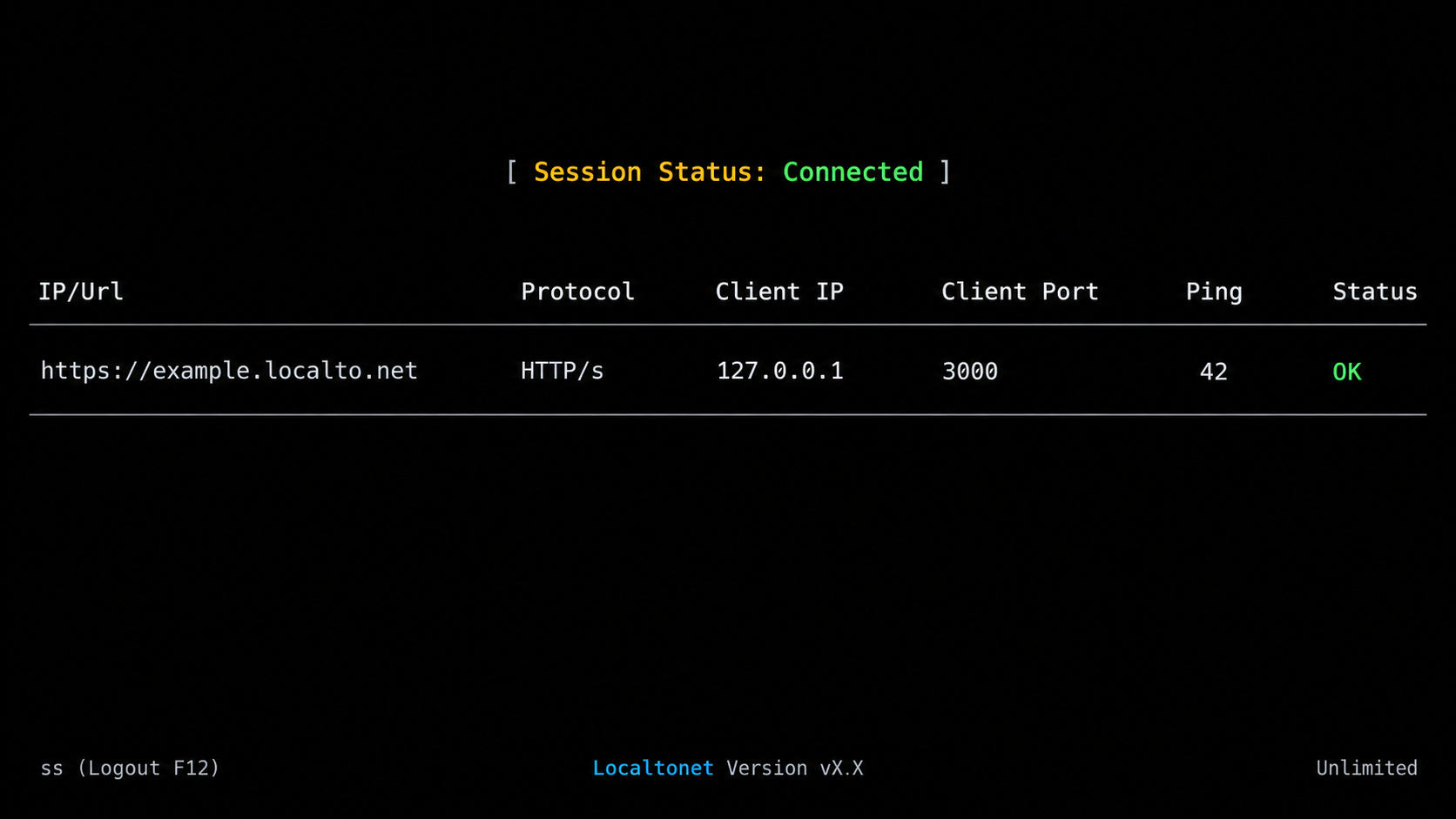
Localtonet separates tunnel configuration from tunnel lifecycle. Creating or saving a tunnel does not mean it is running. The selected device must be connected, the local application must be reachable from that device, and you must explicitly start the tunnel.
Available relay servers, regions, process options, and plan-dependent capabilities can change. Select from the current values shown in your dashboard rather than copying a server code or assuming that a particular option is available.
Install and authenticate the Localtonet client
Download the appropriate client from the Localtonet download page. Run it directly and paste the device token when prompted, or authenticate from a terminal with the current --authtoken option:
localtonet --authtoken <YOUR_DEVICE_TOKEN>The token identifies this client device and is stored locally by the client. Never publish the real value.
Open the HTTP tunnel configuration
In the Localtonet dashboard, create an HTTP tunnel. For an HTTP tunnel, choose the appropriate Process Type from the current options: Random Sub Domain, Custom Sub Domain, or Custom Domain. These process types expose the same local web content through a public HTTPS address, but availability and domain configuration can vary.
Select the connected device or AuthToken
Select the device-specific AuthToken associated with the client you just started. The selected device must be able to reach the webhook application. A token for another disconnected device will not make the local server accessible.
Select an available relay server
Choose one of the relay servers currently offered in the dashboard. Do not hardcode a server name from an old tutorial because available values can vary by current product configuration, region, or subscription.
Enter the local IP address and port, then create the tunnel
For the example server, enter 127.0.0.1 as the local IP address and 3000 as the local port when the Localtonet client runs on the same machine. If the client runs on another device, use a local address that device can actually reach and configure the application to listen appropriately. Save or create the configuration.
Start the tunnel and record the assigned public HTTPS address
Press Start for the created tunnel. Once it is running, copy the exact public HTTPS address shown by Localtonet. The examples below use https://your-assigned-host.example as a placeholder. Replace the entire hostname with the address actually assigned to your tunnel.
For current product details, consult the Localtonet HTTP tunnel documentation. The tunnel remains available only while the selected client is connected and the tunnel is running.
Test the public address with representative POST requests
Begin with the public probe route:
curl -i \
  -X POST \
  -H "Content-Type: application/json" \
  -d '{"source":"public-tunnel-test"}' \
  https://your-assigned-host.example/webhooks/probe
Expect 204 No Content and the local log message. This confirms that an HTTPS POST reached the intended local application through the tunnel.
Then test each real handler path. These unsigned examples should reach the server and be rejected by its verification logic:
curl -i \
  -X POST \
  -H "Content-Type: application/json" \
  -d '{"id":"evt_public_unsigned","type":"test"}' \
  https://your-assigned-host.example/webhooks/stripe

curl -i \
  -X POST \
  -H "Content-Type: application/json" \
  -d '{"test":true}' \
  https://your-assigned-host.example/webhooks/github

curl -i \
  -X POST \
  -H "Content-Type: application/json" \
  -d '{"id":"WH-PUBLIC-UNSIGNED","event_type":"TEST"}' \
  https://your-assigned-host.example/webhooks/paypal
A provider path returning 400 or 401 is evidence that routing worked and verification rejected an unauthenticated request. A connection error, timeout, or generic relay failure instead points to the tunnel, client, local address, port, or server process.
Configure and test Stripe, GitHub, and PayPal
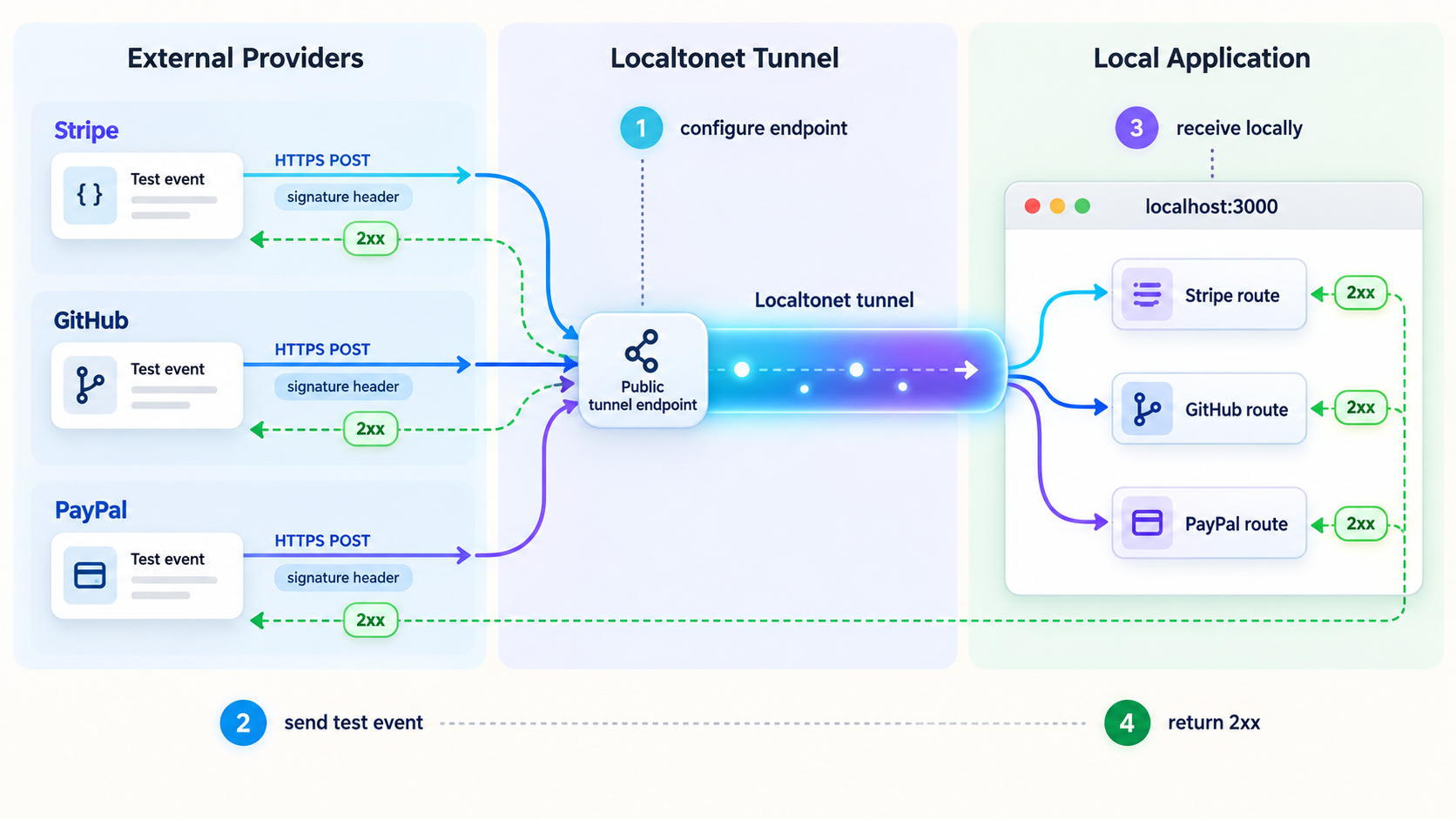
Stripe test-mode webhooks
Registered Stripe live endpoints use HTTPS. During development, stay in test mode and register the exact route:
https://your-assigned-host.example/webhooks/stripeIn the Stripe Dashboard, open the current webhook endpoint controls, add the public URL, and select only the test events your application needs. Adding an endpoint does not mean that a relevant business event has occurred. Use Stripe's available test-delivery controls or perform an action in test mode that generates the selected event.
Copy the endpoint's test-mode signing secret into STRIPE_WEBHOOK_SECRETS, then restart the local server so it reads the updated environment. Do not confuse the endpoint signing secret with a Stripe API key. They serve different purposes.
A successful verified delivery should return 200 and produce a metadata-only log similar to:
accepted webhook {
  provider: 'stripe',
  eventId: 'evt_...',
  eventType: 'payment_intent.succeeded'
}
Stripe verification depends on the exact request bytes and the timestamped Stripe-Signature header. The Stripe SDK checks the signature and applies its timestamp tolerance. A JSON parser placed before the Stripe route can alter the body and make every valid delivery fail.
Stripe automatically retries some failed deliveries. Its live and sandbox schedules are not identical, so use the current Stripe dashboard and documentation when timing matters. Your handler should be correct even when the same event ID arrives more than once.
The Stripe CLI can listen for Stripe test events and forward them directly to a localhost route. It also supplies a signing secret for that forwarding session. This is useful when you only need Stripe. A Localtonet HTTP tunnel is useful when you need a provider-accessible HTTPS URL, want to exercise the same public routing model used by several providers, or need to test providers without an equivalent forwarding CLI.
GitHub repository webhooks
GitHub webhooks are not GitHub Actions. A webhook is an HTTP delivery sent for selected repository or organization events. GitHub Actions is a workflow automation system that may react to repository events but should not be used as a synonym for webhook delivery.
In a repository where you have permission, open Settings, then Webhooks, and add a webhook with this payload URL:
https://your-assigned-host.example/webhooks/github
Choose application/json, generate a long random secret, place the same value in GITHUB_WEBHOOK_SECRETS, and keep SSL verification enabled. GitHub can accept an HTTP payload URL, but HTTPS with certificate verification is strongly recommended. The Localtonet HTTP tunnel gives you a public HTTPS address for this test.
Select only the repository events required by the application. When the webhook is created, GitHub normally issues a ping delivery. The sample verifies the HMAC-SHA256 value from X-Hub-Signature-256 with a constant-time comparison and uses X-GitHub-Delivery as the delivery identifier.
Inspect the webhook's recent deliveries in GitHub. A successful ping or selected event should show a 2xx response, and the local server should log the delivery ID and event type. If you repair a failed handler, use GitHub's redelivery control for the relevant recent delivery where available.
GitHub does not automatically redeliver failed webhook deliveries. Monitor failed deliveries and redeliver them explicitly after correcting the route, tunnel, secret, or application error.
PayPal REST webhooks
Create or select a sandbox REST app in the PayPal Developer Dashboard. Add a webhook to that sandbox app using:
https://your-assigned-host.example/webhooks/paypal
Select the minimum event types needed by the integration. Copy the webhook ID generated for that exact sandbox webhook into PAYPAL_WEBHOOK_ID. Also configure the sandbox client ID and client secret used by the example to request an access token.
A PayPal REST webhook includes transmission headers such as the transmission ID, transmission signature, transmission time, certificate URL, and authentication algorithm. The example sends those values, the configured webhook ID, and the event object to PayPal's verify-webhook-signature API. It processes the event only when PayPal returns a successful verification status.
Use PayPal's current sandbox tools to generate a test delivery, or perform a sandbox operation associated with the app that produces one of the subscribed event types. For the strongest end-to-end test, generate an event associated with the configured sandbox app and webhook. Confirm a 200 response in PayPal's delivery information and a metadata-only local log.
A missing or stale webhook ID is a common source of verification failure. The webhook ID is tied to a particular registered webhook. Copying an ID from a different app, environment, or old tunnel configuration will not validate the current delivery.
Legacy PayPal IPN is a separate protocol
Do not send REST webhooks and IPN messages to the same route. The sample uses /webhooks/paypal for REST webhooks and /webhooks/paypal-ipn for legacy IPN.
An IPN listener receives a URL-encoded form POST. It must send the original payload back to PayPal with cmd=_notify-validate prepended. PayPal answers VERIFIED or INVALID. Only a VERIFIED result allows the listener to continue with its own checks.
Verification does not establish that every field represents the transaction your application expected. An IPN integration must also validate relevant business fields, such as the receiver, transaction identifier, currency, amount, and payment status, against its own records. The sample stops at protocol verification and duplicate identification.
Its postback URL is deliberately the PayPal sandbox endpoint. If you maintain a production IPN system, use PayPal's current production requirements and endpoint only in the deployed production configuration. Do not silently switch environments based on untrusted request data.
Secure webhook processing during development
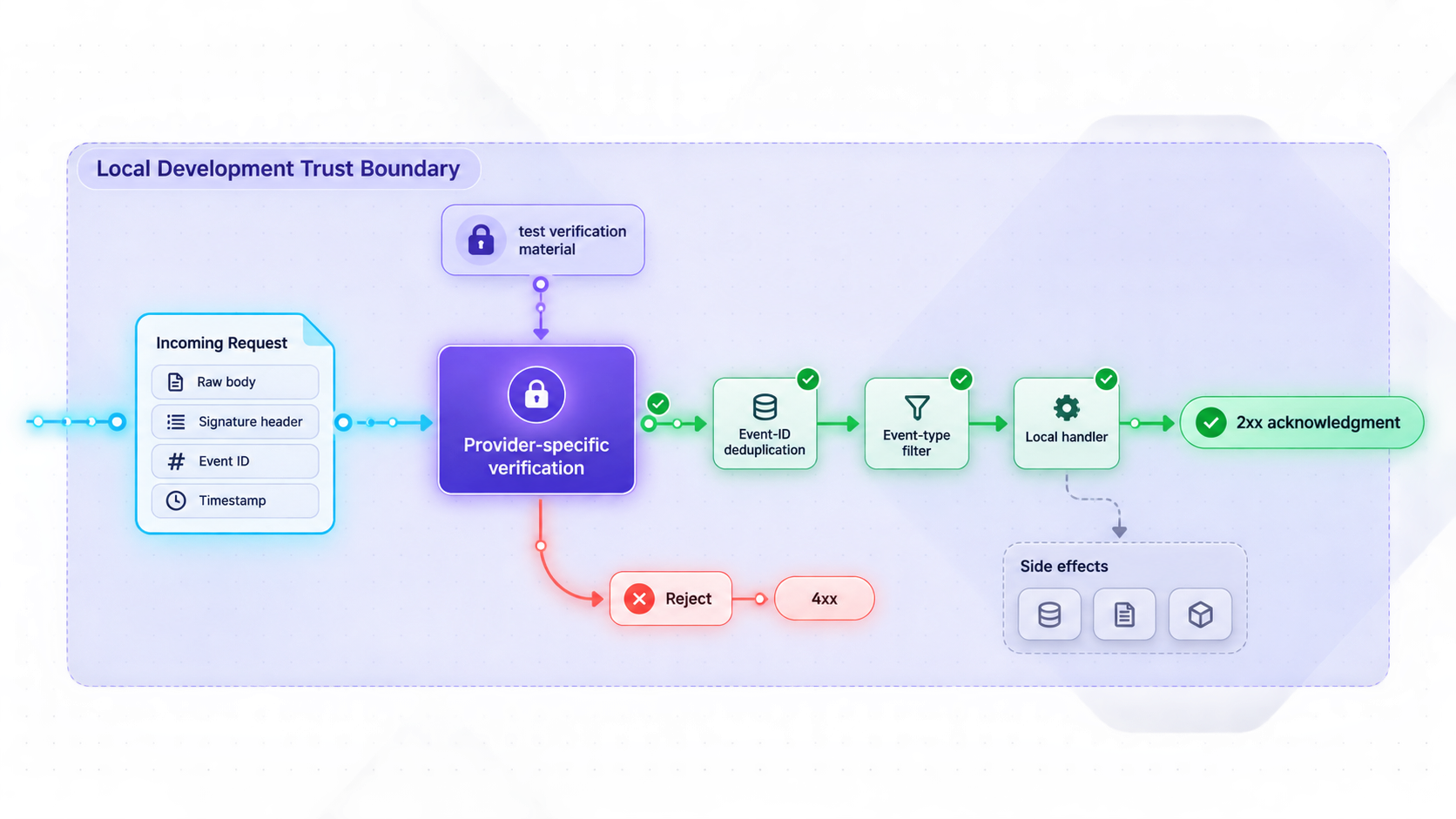
A public tunnel makes the configured route reachable from the internet. It does not prove that a request came from the provider named in its JSON body. Apply the same authentication and data-handling discipline in development that you expect to use after deployment.
Preserve raw bodies only where the protocol requires them
Stripe signs the exact request bytes. GitHub's HMAC also covers the payload bytes. Their route-specific raw middleware must run before a global JSON parser. Parsing and then serializing an object can change whitespace, character escaping, or property representation, producing a different byte sequence.
PayPal REST webhook verification is not the same raw-body HMAC workflow. The application sends PayPal's transmission headers, webhook ID, and webhook event to PayPal for verification. IPN is different again: it posts the original URL-encoded form data back to PayPal and evaluates the text verdict.
Use constant-time comparison where your code compares MACs
A direct string equality check can return as soon as it finds a differing byte. When comparing a computed HMAC to a received HMAC, use a timing-safe primitive after confirming equal lengths. The GitHub example uses crypto.timingSafeEqual. Stripe's SDK performs its own verification, so application code should not recreate Stripe's signature algorithm unnecessarily.
Store and rotate secrets deliberately
Keep secrets in environment variables or a dedicated secret manager, not source code. During rotation, temporarily accept the old and new secret only for the transition window. Remove retired values, restart the process, and confirm a new signed test delivery. Keep test and production secrets separate.
Do not place interactive authentication in front of provider routes
Generic HTTP Basic Authentication, login forms, or browser-based access challenges can break webhook delivery because the provider cannot necessarily complete that authentication flow. Authenticate the webhook with the provider's documented verification mechanism instead. Keep unrelated administrative, debug, database, and application routes outside the exposed process or otherwise protected.
Acknowledge only after safe acceptance
Returning success before verification can cause an attacker-controlled payload to enter your processing pipeline. Returning success before durable queueing can lose an event if the process crashes. A robust sequence is:
- Read the request under a strict size limit.
- Verify the provider-specific signature or validation protocol.
- Validate required metadata and allowlisted event types.
- Insert the event ID into durable storage using a unique constraint.
- Commit the queue job or required state change.
- Return a successful status promptly.
If verification infrastructure is temporarily unavailable, a non-success response may be appropriate so providers with retry behavior can attempt delivery again. Because retry behavior differs, monitor provider dashboards rather than assuming every service will retry automatically.
Stop exposure when the test is complete
When you finish testing, press Stop for the tunnel in the Localtonet dashboard. Stop the local webhook process as well. Delete the tunnel if you no longer need its configuration. If a secret was exposed in a terminal recording, screenshot, repository, or log, rotate it rather than merely deleting the file.
Expected results and day-to-day test workflow
| Test | Expected response | What it proves |
|---|---|---|
Local GET /health |
200 |
The application is listening on the expected local IP and port. |
Local or public POST /webhooks/probe |
204 |
The POST route is reachable without claiming provider authenticity. |
| Unsigned Stripe request | 400 |
The Stripe path is reachable and rejects an invalid signature. |
| Unsigned GitHub request | 401 |
The GitHub path is reachable and requires verification metadata. |
| Unsigned PayPal REST request | 401 or a configuration error |
The PayPal path does not trust an arbitrary JSON body. |
| Valid provider sandbox delivery | 2xx |
Public routing, provider configuration, verification, and acknowledgement all worked. |
| Duplicate valid delivery | 2xx without repeating the work |
The idempotency mechanism recognizes the delivery identifier. |
A practical test session starts the application, verifies localhost, starts the Localtonet client, starts the configured HTTP tunnel, verifies the public probe, and then generates provider sandbox deliveries. When a handler changes, use an appropriate provider test event or dashboard redelivery function rather than editing a captured request and bypassing verification.
Finish by reviewing only the metadata needed to diagnose the session, stopping the tunnel, stopping the local process, and removing temporary secrets that are no longer needed.
Troubleshoot common webhook and tunnel failures
Connection refused at the local target
Confirm that node server.js is still running and that curl http://127.0.0.1:3000/health succeeds on the Localtonet client device. Check the configured local IP and port. If the client runs on another device, 127.0.0.1 refers to that other device, not the computer running Node.
The local route works, but the public URL does not
Confirm that the Localtonet client is connected under the selected device/AuthToken and that the correct tunnel has been explicitly started. Creating or saving the tunnel is not enough. Also confirm that you copied the current assigned public address exactly.
The provider receives 404 Not Found
Compare the registered path character for character. The provider URLs in this guide end with /webhooks/stripe, /webhooks/github, or /webhooks/paypal. Registering only the public root, using an old path, or sending PayPal REST webhooks to the IPN route will produce incorrect results.
Every Stripe delivery reports an invalid signature
Confirm that the signing secret belongs to the exact endpoint or forwarding session that sent the event. Test-mode, live-mode, registered-endpoint, and Stripe CLI secrets are not interchangeable. Make sure the Stripe route receives a raw Buffer before JSON parsing. Restart Node after changing .env.
GitHub signatures fail
Verify that the secret in GitHub exactly matches one of the comma-separated values in GITHUB_WEBHOOK_SECRETS. Check for copied whitespace. Confirm that GitHub is using application/json and that no middleware has modified the raw body before the route.
PayPal REST verification fails
Confirm that the client ID, client secret, webhook ID, and API base all belong to the same sandbox environment. The webhook ID must identify the webhook that received the delivery. Check whether all PayPal transmission headers reached the application. A copied webhook ID from another sandbox app or an old registration is not valid for the current webhook.
IPN returns INVALID
Make sure the route received application/x-www-form-urlencoded data and posted the original payload to the correct PayPal environment. Do not parse the form and construct a materially different payload before validation. Do not treat an INVALID response as a successful notification.
The provider times out
Remove slow work from the request path. Verify the event, durably record its ID, enqueue the job, and respond. Network calls used for verification still need sensible application-level timeout handling. If verification cannot complete safely, return an error and inspect the provider's retry or redelivery options.
An event is processed twice
Retries and manual redelivery are normal operational conditions. Use the provider's event or delivery identifier as an idempotency key. A database unique constraint is safer than checking and then inserting in separate operations because concurrent deliveries can otherwise race.
The server logs expose sensitive data
Remove complete payload logging and rotate any credential or secret that appeared in logs. Log event IDs, event types, route names, response statuses, and internal correlation IDs instead. Restrict access to development logs and apply retention limits.
The setup worked earlier but suddenly stopped
Check all three lifecycle components: the local Node process, the selected Localtonet client device, and the tunnel's running state. Also confirm that the provider still has the currently assigned public URL. URL persistence and process options can vary, so do not assume that a previous address remains assigned after configuration or lifecycle changes.
Frequently asked questions
Why does this guide use an HTTP tunnel instead of a TLS tunnel?
The target application listens over ordinary HTTP on 127.0.0.1:3000. A Localtonet HTTP tunnel is the documented family for exposing that web application through a public HTTPS address. The separate TLS tunnel family should not be selected solely because the provider-facing address uses HTTPS.
Does creating a Localtonet tunnel make it active immediately?
No. Creating or saving the configuration does not start it. The selected client device must be connected, and you must press Start for the tunnel. You can later stop it or delete the configuration.
Can I test webhook reachability with curl?
Yes. Send a POST to the dedicated probe route to confirm end-to-end forwarding. You can also send unsigned POST requests to provider paths and confirm that they reach the handler but receive 400 or 401. A curl request cannot impersonate a valid provider delivery unless you reproduce that provider's complete verification protocol.
Does GitHub require every webhook URL to use HTTPS?
GitHub accepts HTTP payload URLs, but it strongly recommends HTTPS with SSL verification. For localhost testing through this workflow, use the public HTTPS address provided by the Localtonet HTTP tunnel and keep GitHub's SSL verification enabled.
Will GitHub automatically retry a failed webhook?
No. GitHub does not automatically redeliver failed webhook deliveries. Inspect the delivery in the webhook settings and use the available redelivery control after correcting the failure.
Are PayPal REST webhooks and PayPal IPN interchangeable?
No. PayPal REST webhooks use REST app configuration, transmission headers, a webhook ID, and PayPal's webhook-signature verification API. Legacy IPN sends URL-encoded form data that must be posted back to PayPal and accepted only after a VERIFIED response. Use separate routes and implementations.
Should I put HTTP Basic Authentication in front of webhook routes?
Not unless the provider explicitly supports sending the required credentials. An interactive or generic authentication layer can prevent delivery. Protect each webhook with its documented signature or validation protocol, expose only necessary routes, and keep administrative routes separate.
Can I use a localhost tunnel as my permanent production webhook endpoint?
This guide is designed for controlled development and sandbox testing. A production endpoint needs durable storage, monitoring, queueing, recovery procedures, carefully managed secrets, and an availability model appropriate to the application. A Localtonet tunnel is reachable only while the selected client is connected and the tunnel is running.
Test your webhook handlers through a Localtonet HTTP tunnel
Run your local application, authenticate a Localtonet client with its device-specific token, create and explicitly start an HTTP tunnel, then send verified Stripe, GitHub, or PayPal sandbox deliveries to the assigned public HTTPS routes.
Get Started Free →

