

VLESS + Reality Proxy Tunnel with Localtonet: Full Setup Guide
VLESS over WebSocket survives most firewalls. VLESS + Reality survives the rest. Advanced censorship systems like GFW use active probing: they knock on your server's TLS port and check whether it behaves like the website it claims to be. Standard TLS proxies fail this test. Reality doesn't, because it borrows the TLS certificate and behavior of a real site you don't even own. This guide shows you how to create a VLESS + Reality tunnel on Localtonet, configure your Xray client, and stay connected on networks where every other proxy method gets blocked.
Why VLESS + WS Isn't Always Enough
A VLESS + WebSocket tunnel wraps your traffic inside HTTPS. To a passive observer, the connection looks like a browser loading a web app. That defeats port-based blocking and basic DPI. But sophisticated censorship infrastructure goes further: it actively connects back to your proxy endpoint and probes it. If your server responds like an Xray node instead of a real website, the IP gets flagged and blocked within minutes.
This is how GFW-style deep inspection works in 2026. Active probing is no longer a niche technique. Corporate SASE platforms and some university networks now run similar probes. A VLESS + WS tunnel that works at home can stop working the moment you connect from a restricted region or enterprise network.
VLESS + Reality solves this by making your proxy endpoint impersonate a real site's TLS stack at the handshake level, one that active probes will probe and accept as legitimate.
What VLESS + Reality Actually Does
Reality is a TLS extension built into Xray. Instead of presenting its own certificate, the server
forwards the TLS handshake to a real destination site (called the "steal" target, e.g.,
www.microsoft.com) and relays its certificate back to the connecting client. An active probe
sees exactly the same TLS behavior as the real site. Legitimate clients authenticate using a shared
key pair (public key + short ID) that is invisible to outside observers.
Localtonet handles the server side automatically. When you create a VLESS + Reality tunnel, Localtonet
provisions a public subdomain (e.g., pjrcaez2cb.localtonetproxy.com) on port 443 and
configures the Reality parameters for you. You get a public key, short ID, and UUID from the tunnel
detail panel. Plug those values into your Xray client and the tunnel is live. No VPS, no certificate
management, no Nginx config.
xtls-rprx-vision flow enabled on the client. This reduces inner TLS overhead for HTTPS destinations and is the recommended production setting.
How to Create a VLESS + Reality Tunnel in Localtonet: Step-by-Step (2026)
Create a free account and copy your token
Sign up at Register page. After logging in, go to My Tokens and copy your personal auth token you'll need it in step 3.
Download and install the Localtonet agent
Head to Downloads and grab the binary for your OS. Works on Windows, Linux, macOS, Android, and Docker.
Open Proxy Server and select "VLESS + Reality" as the Proxy Type
In your Localtonet dashboard, click Proxy Server. Click the "Proxy Type" dropdown. You will see five options: HTTP, SOCKS5, ShadowSocks, VLESS + WS, and VLESS + Reality. Select "VLESS + Reality".
Choose your Auth Token and Server location
Select the auth token you copied in Step 1. Under "Server", pick the Localtonet server closest to the region you want your traffic to exit from. The server location is your public IP from the client's perspective, so pick accordingly.
Set a Domain Type and click Create
Choose "Random SubDomain" unless you have a reserved domain on your plan. Click "Create".
Localtonet provisions the tunnel instantly and assigns a public subdomain such as
pjrcaez2cb.localtonetproxy.com on port 443.
Retrieve your Reality credentials from "VLESS Data"
Find your new tunnel in the list. Click the settings icon on the right to open the tunnel detail panel, then click "Manage" next to "Vless Data". A modal appears with your UUID, Public Key, and Short ID. Copy all three. You need them in Step 7.
Configure your Xray client with the VLESS + Reality settings
Open your Xray-compatible client (v2rayN, NekoBox, Hiddify, Shadowrocket, or the raw Xray binary). Add a new VLESS outbound using the values below. All fields come directly from the Localtonet tunnel page.
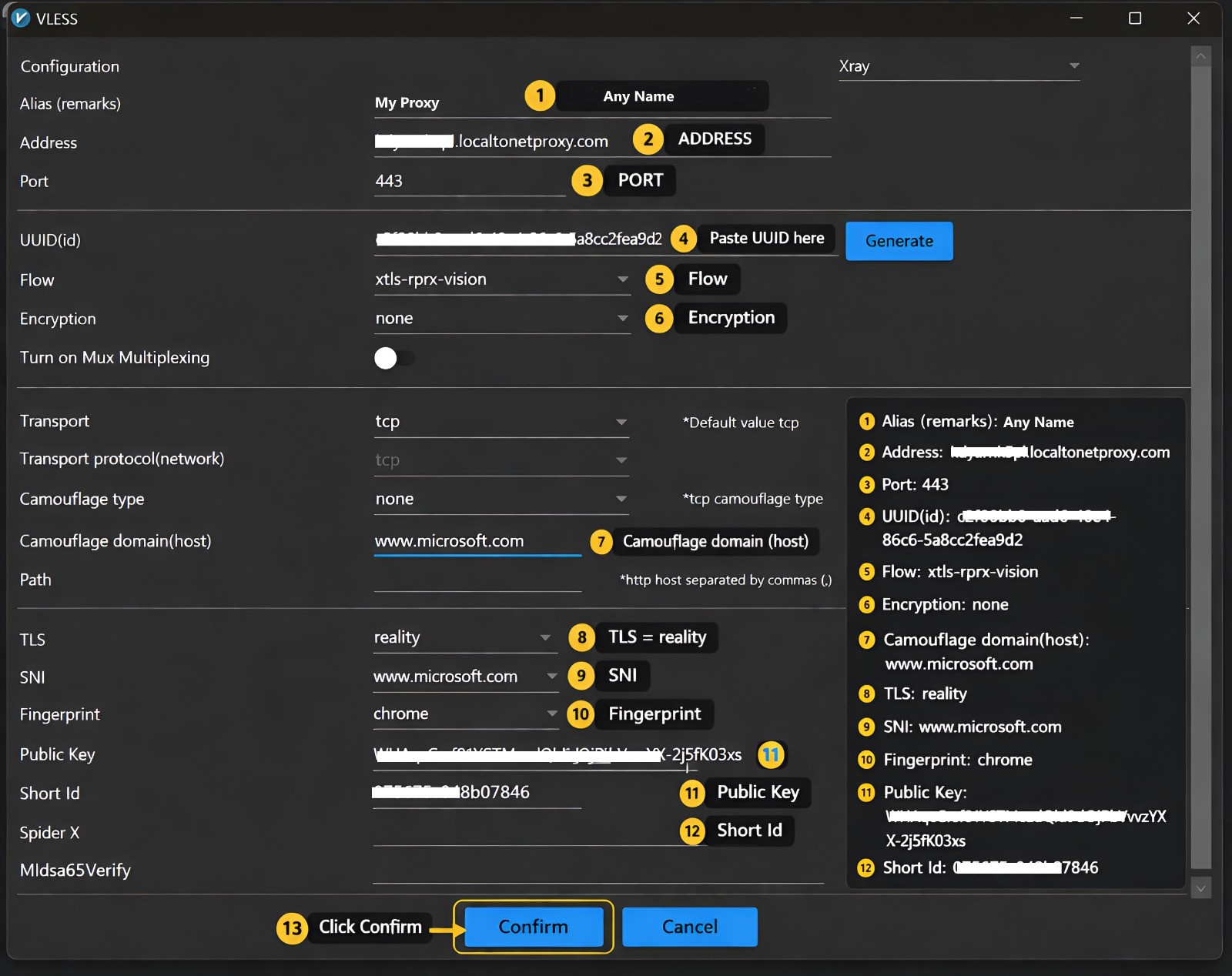
Address      : pjrcaez2cb.localtonetproxy.com  (your assigned subdomain)
Port         : 443
UUID         : 7b637c36-9dd4-4005-a0cf-1960b31f1fb1  (from VLESS Data modal)
Flow         : xtls-rprx-vision
Encryption   : none
Network      : tcp
TLS          : reality
Fingerprint  : chrome
SNI          : www.microsoft.com  (or the steal target shown in your dashboard)
Public Key   : (from VLESS Data modal)
Short ID     : (from VLESS Data modal)
Allow Insecure: false
For raw Xray on Linux, your outbound block in config.json looks like this:
{
  "outbounds": [{
    "protocol": "vless",
    "settings": {
      "vnext": [{
        "address": "pjrcaez2cb.localtonetproxy.com",
        "port": 443,
        "users": [{
          "id": "7b637c36-9dd4-4005-a0cf-1960b31f1fb1",
          "flow": "xtls-rprx-vision",
          "encryption": "none"
        }]
      }]
    },
    "streamSettings": {
      "network": "tcp",
      "security": "reality",
      "realitySettings": {
        "serverName": "www.microsoft.com",
        "fingerprint": "chrome",
        "publicKey": "YOUR_PUBLIC_KEY_HERE",
        "shortId": "YOUR_SHORT_ID_HERE"
      }
    }
  }]
}
Reality is designed to work with the xtls-rprx-vision flow value. If you leave
Flow blank or set it to an empty string, the tunnel connects but inner HTTPS traffic generates
a detectable TLS-in-TLS pattern. Some advanced inspection systems flag this pattern specifically.
Set flow: xtls-rprx-vision in every client config that uses a Reality tunnel.
Clients that don't support XTLS Vision (older V2Ray forks) should be updated before using Reality.
Reality does not use a self-signed or self-issued certificate. The TLS certificate your client sees belongs to the steal target (e.g., Microsoft). It is a valid, CA-signed certificate. Disabling certificate verification with "Allow Insecure: true" provides no benefit here and removes a layer of protection. Keep it set to false.
Tips for Getting the Most Out of VLESS + Reality
www.microsoft.com or www.apple.com. Niche or low-traffic domains attract more suspicion because active probes know what normal traffic to them looks like.
chrome on Windows and Android, safari on iOS and macOS. A Chrome fingerprint from an iOS device is a minor inconsistency that advanced probes can detect.
Frequently Asked Questions
What is the difference between VLESS + Reality and VLESS + WS in Localtonet?
VLESS + WS uses WebSocket as the transport layer wrapped in TLS. It's widely supported and defeats passive DPI. VLESS + Reality uses raw TCP and the Reality TLS extension to impersonate a real site's TLS fingerprint during the handshake. This makes it resistant to active probing, which is the next layer of censorship after DPI. Use VLESS + WS for most situations; switch to Reality when your WS tunnel gets blocked on a specific network.
Do I need to own or configure the SNI steal target domain?
No. Reality borrows the TLS certificate from the steal target (e.g., www.microsoft.com) by forwarding the handshake to that server in real time. You don't own, control, or configure that domain. You only reference it in your client config as the SNI value. The Localtonet dashboard shows you which steal target is configured for your tunnel.
Which Xray clients support VLESS + Reality?
Any client running Xray core 1.8 or later supports Reality: v2rayN (Windows), NekoBox (Android/Desktop), Hiddify (cross-platform), Shadowrocket (iOS), and the raw Xray binary on Linux. V2Ray forks that have not merged the Reality extension do not support it. Check that your client version includes Reality settings before configuring. The "Configuration" mode in Shadowrocket should be set to "Xray" if that option is available.
Why does my VLESS + Reality tunnel connect but traffic doesn't flow?
The most common cause is a wrong or missing Short ID. The Short ID in your client config must match exactly what Localtonet generated, including length and capitalization. A mismatched Short ID completes the TLS handshake but drops all VLESS frames silently. The second most common cause is an incorrect Public Key. Copy both values directly from the "Vless Data" modal and don't retype them by hand.
Can multiple devices share the same VLESS + Reality tunnel?
Yes. Multiple clients can connect simultaneously using the same UUID, public key, and short ID. All sessions share the tunnel's total bandwidth. For per-device access control, use the "IP Restriction" setting in the tunnel panel, or create a separate tunnel with its own credentials for each user group.
Does VLESS + Reality support UDP?
Reality with XTLS Vision flow is optimized for TCP traffic. UDP tunneling through a Reality tunnel depends on your Xray client's XUDP support and the specific Localtonet plan. If UDP routing is a primary requirement, VLESS + WS (which lists explicit UDP support) may be the better choice. Test UDP behavior with a DNS query through the tunnel and verify resolution before relying on it.
What does "Is Reserved?" do in the tunnel settings?
When "Is Reserved?" is checked, the tunnel keeps the same public subdomain every time the Localtonet client reconnects. This is the default and correct setting for any tunnel shared with multiple devices, since those devices have the subdomain hardcoded in their Xray config. If "Is Reserved?" is off, every reconnect assigns a new subdomain and every client config must be updated manually.
How much does a VLESS + Reality tunnel cost on Localtonet?
VLESS + Reality tunnels are available on all Localtonet plans including the free tier. The free plan includes bandwidth limits and non-reserved subdomains by default. Paid plans start with reserved subdomains, higher bandwidth caps, speed limit controls, and IP restriction management. Check current pricing at localtonet.com, as plans are updated periodically.
Ready to set up your first VLESS + Reality tunnel?
Create your Localtonet account for free. No credit card needed. Your first Reality proxy is a few clicks away.
Get Started Free →

