

Route selected client traffic through a connected Localtonet device
Localtonet includes a shipping Shadowsocks proxy capability for routing traffic through a device connected to our platform. Unlike a conventional tunnel that forwards requests to a local IP address and port, a proxy configuration makes the connected device the traffic exit node. This guide explains that architecture, the verified platform-level setup workflow, safe credential handling, verification, routine operation, and troubleshooting. Because Shadowsocks is not currently listed in the main public documentation navigation and the public Proxy Server page requires authentication, exact dashboard labels, ciphers, transport behavior, client compatibility, availability, and plan limits must be confirmed in your current authenticated dashboard before use.
📋 What's in this guide
How a Localtonet Shadowsocks proxy works
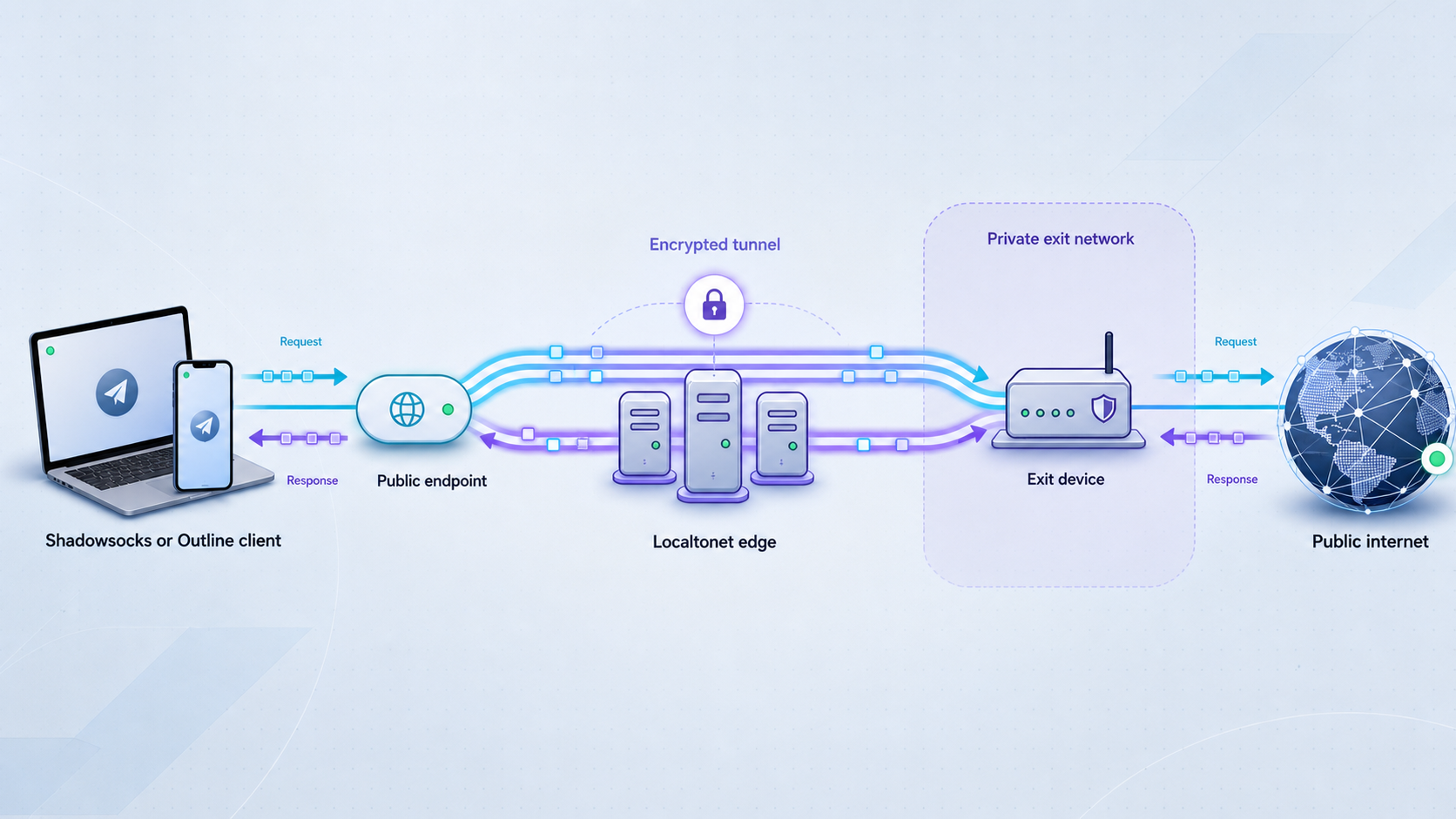
Shadowsocks is a proxy protocol. A compatible client receives connection information, establishes a connection to the public proxy endpoint, and sends configured application traffic through that connection. This is different from publishing a local website, API, game server, or other service. Those conventional tunnel types accept public traffic and forward it to a specific local IP address and port. A proxy instead uses the connected Localtonet device as the point from which proxied traffic exits.
With Localtonet, the client application on your selected device establishes an outbound connection to a Localtonet relay. This means the device does not need a public IP address, inbound router port forwarding, or a newly opened inbound firewall port for the Localtonet connection. Once the proxy is created and started, a compatible remote client connects through the assigned public endpoint. Traffic then reaches the selected Localtonet device and exits through that device's network connection.
A simplified traffic path is:
Configured application → Shadowsocks client → Localtonet public relay endpoint → connected Localtonet device → destination service
A Localtonet proxy target does not point to an ordinary local IP address and port. If your goal is to expose a particular application running on the Localtonet device, use the relevant HTTP, TCP, UDP, combined UDP/TCP, TLS, or File Server tunnel instead.
What the destination sees
Because the selected device acts as the exit node, a destination normally observes a connection associated with that device's outbound network rather than the original proxy client's direct connection. The exact result can depend on the destination, application protocol, DNS handling, local network design, and any upstream gateways used by the exit device. Do not assume that every application or DNS request is using the proxy until you verify it.
The exit device is also subject to its local network rules. Corporate filtering, captive portals, endpoint security software, upstream firewalls, provider restrictions, and destination access controls can still allow or deny traffic. A proxy does not bypass authorization requirements or make prohibited activity acceptable. Use it only on devices and networks you are authorized to operate.
When to use Shadowsocks, another proxy, or VPN Manager
Start by identifying what must be reachable and which traffic should move through Localtonet. Shadowsocks, HTTP proxy, SOCKS5 proxy, ordinary tunnels, and VPN Manager solve different problems. Choosing the wrong category can produce confusing client behavior or expose more access than intended.
| Option | Use it for | Traffic model | Important distinction |
|---|---|---|---|
| HTTP proxy | Applications with explicit HTTP proxy support | The application sends supported web proxy traffic through the selected exit device | It is not a public URL that forwards to a local web server |
| SOCKS5 proxy | Applications that can use a general SOCKS5 proxy | Configured application connections use the selected device as their exit | Application and DNS proxy behavior must be verified in the chosen client |
| Shadowsocks | A workflow requiring a currently supported Shadowsocks client and Localtonet configuration | The client connects to the Localtonet proxy endpoint and exits through the connected device | Current cipher, transport, import, and client support must be checked in the authenticated dashboard |
| HTTP, TCP, UDP, combined UDP/TCP, or TLS tunnel | Publishing a specific service reachable from the Localtonet device | Public traffic is forwarded to a defined local IP address and port | The device is forwarding to a target service, not acting as a general proxy exit |
| VPN Manager | Building a private mesh network or bridging authorized local networks | Participating devices communicate through a private network with granular firewall rules | This is Localtonet's actual VPN feature and is separate from proxy tunnels |
Shadowsocks is not Localtonet VPN Manager
A Shadowsocks client generally proxies traffic selected by the client, application, or operating-system integration. It does not automatically create a Localtonet private mesh, bridge LANs, or apply VPN Manager firewall rules. If you need private connectivity among devices or networks, use Localtonet VPN Manager instead.
Do not infer interoperability from product terminology
Outline publicly describes its broader product as a VPN-oriented system and uses access keys with its own client and server workflow. That language does not prove that every Outline client release can import every Localtonet Shadowsocks configuration. The current public evidence also does not establish specific Outline interoperability for Localtonet. Use a client only when its supported cipher, URI or import format, and transport behavior match the values shown by your authenticated Localtonet dashboard.
Do not distribute a connection profile to users merely because their application says it supports Shadowsocks. Confirm the exact client version, supported cipher, import format, TCP behavior, UDP behavior if needed, and operating-system integration with a non-sensitive test configuration first.
Prerequisites and preflight checks
Prepare both sides of the connection before creating the proxy. One side is the Localtonet exit device. The other is the computer or mobile device that will run a compatible proxy client. The Localtonet exit device must remain online whenever the proxy is expected to work.
Localtonet account and dashboard access
- A Localtonet account with access to the authenticated dashboard.
- Current availability of Shadowsocks in your Proxy Server interface.
- A subscription or account configuration that permits the displayed proxy option. Public evidence supplied for this article does not establish plan availability.
- Permission to create and operate an internet exit node on the selected device and network.
The public Localtonet Proxy Server page redirects unauthenticated visitors to sign in. As a result, publicly visible evidence does not confirm the current Shadowsocks label, field order, buttons, cipher list, generated connection format, or plan restrictions. Treat the authenticated interface as the current authority for these details.
A connected Localtonet device
- Install and run the current Localtonet client application on the device that will act as the proxy exit node.
- Ensure the client can establish its outbound connection to Localtonet.
- Authenticate or select that device using its device-specific auth token.
- Keep the token private. Do not paste it into support posts, source control, client profiles, screenshots, or shared documents.
- Confirm the device has permission to reach the destinations required by your use case.
A device token identifies the Localtonet client that runs the proxy. It is not a value to guess, and it should not be confused with the connection information imported into a Shadowsocks client. Even if both values are presented near the same workflow, they serve different purposes and both may grant meaningful access.
Relay selection
Choose only from the relay servers or regions currently available in your dashboard. Do not copy a server code from an old tutorial, another account, or an example configuration. Available choices can vary by current product configuration, plan, region, or client version.
Relay choice can influence network routing, but this article does not claim a particular latency, throughput, geographic reach, or availability result. If multiple choices are presented, test them using your real application and network. A nearby label alone does not guarantee the best path.
A verified Shadowsocks client
- Use a client obtained from a source you trust.
- Confirm that its current version supports the exact cipher and configuration format displayed by Localtonet.
- Check whether it applies the proxy per application, through a local SOCKS listener, or through an operating-system network integration.
- If your use case needs UDP, verify explicit UDP support in both the Localtonet configuration and the chosen client.
- Understand how the client handles DNS before sending sensitive queries through it.
Exit-device readiness
Test ordinary internet access directly from the exit device before troubleshooting the proxy. Confirm that the device can resolve DNS names and reach the required destination while the Localtonet proxy is not involved. If the exit device cannot reach a destination directly, routing the same request through it as a proxy will not fix the underlying restriction.
Proxy traffic uses the selected device's network connection. Confirm that this is permitted by the device owner, network administrator, internet provider, destination service, and applicable organizational policy. Use least privilege and provide access only to authorized users.
Verified platform-level setup workflow
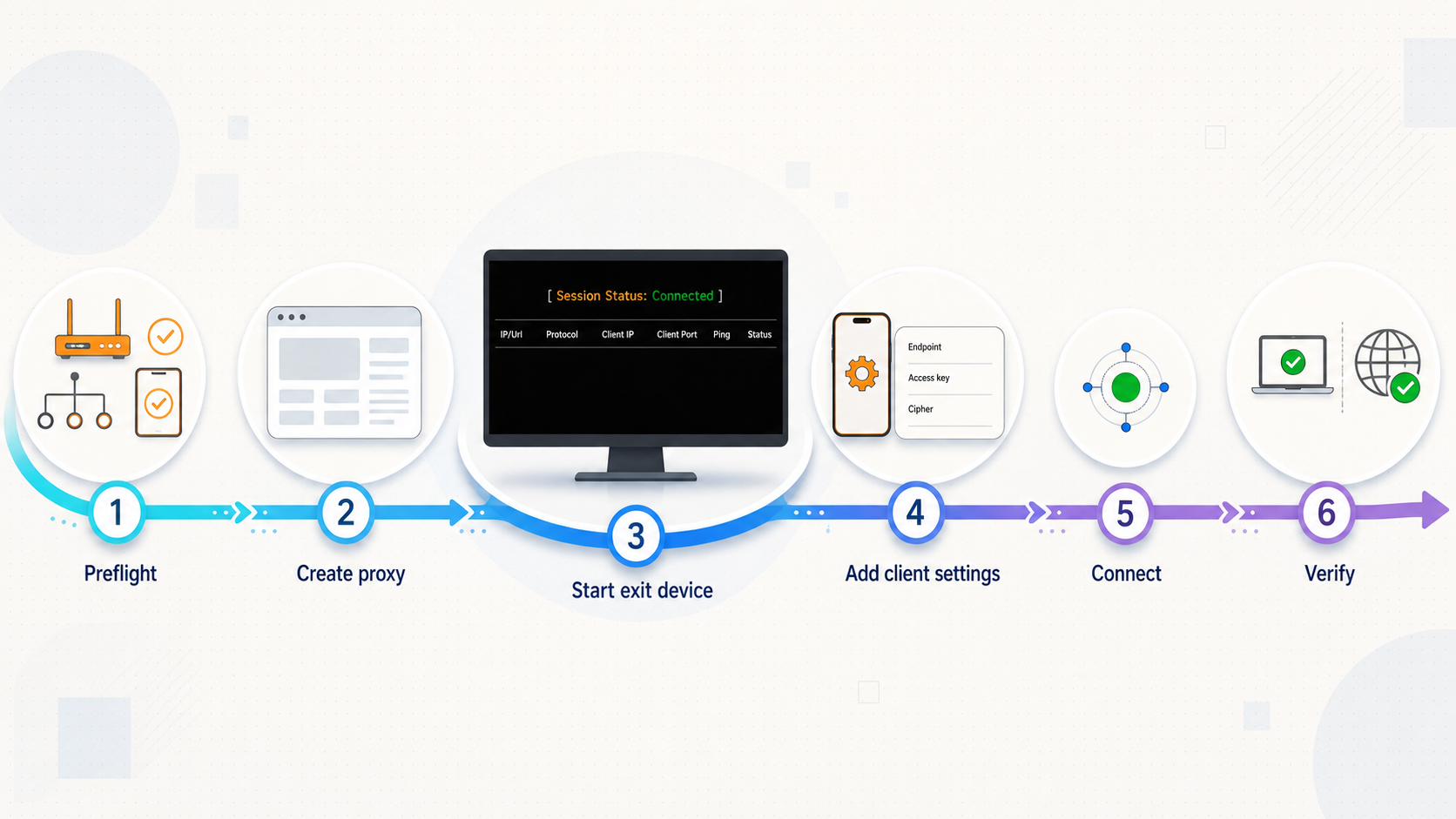
The following sequence reflects the verified Localtonet lifecycle: install and run the client, select the device, select a current relay, create the appropriate proxy, start it, and stop or delete it when finished. The exact Shadowsocks-specific dashboard fields are intentionally not named because the public Proxy Server page does not expose them and Shadowsocks is not yet listed in the main public documentation navigation.
Before publishing an internal runbook, an administrator should sign in and record the current field sequence in the authenticated dashboard. Redact all tokens, credentials, endpoints, hostnames, ports, passwords, import links, QR codes, and access keys from screenshots.
Install and run the Localtonet client
Install the current Localtonet application on the device that will become the proxy exit node. Launch it and verify that it can establish an outbound connection. This device must remain connected while the proxy is in use.
Authenticate or select the exit device
In the authenticated dashboard, select the device-specific auth token associated with the intended exit device. Verify the device identity carefully if your account contains multiple systems. Never place this token in the remote Shadowsocks client.
Select an available relay
Choose a relay server or region from the values currently offered by the dashboard. Do not hardcode a server code from this or another article. If the current Shadowsocks workflow does not present a relay selector, follow the authenticated interface rather than inventing one.
Create the current Shadowsocks proxy configuration
Open the authenticated Proxy Server interface and use the Shadowsocks option only if it is currently available to your account. Review every displayed value, including any cipher, transport, access, or client-import settings. Public evidence does not confirm the current names or supported values, so preserve the dashboard's actual sequence.
Start the proxy and retrieve connection details safely
Creating the proxy is not the same as running it. Use the current Start control, then confirm that both the tunnel and selected device report a connected state. Retrieve connection details only from the authenticated dashboard and transfer them to the authorized client through a private channel. Do not place a realistic connection string in documentation.
Stop or delete the proxy when access is no longer required
Stop the proxy to make the endpoint unavailable while retaining the configuration if that behavior matches your operational need. Delete it when it is no longer required. Confirm that former client configurations can no longer connect, and remove stored connection details from authorized devices where appropriate.
A Shadowsocks import value can contain reusable connection material. Even a realistic-looking sample can be copied, mistaken for a live endpoint, or reveal an internal hostname and port pattern. Use placeholders in private documentation and retrieve the real value only from your authenticated dashboard.
Import into the client without exposing the secret
Use the import method supported by both the dashboard and the chosen client. Depending on current implementations, a client might accept structured fields, a URI, a clipboard value, a file, or a QR code. This article does not assert that Localtonet currently generates every one of those forms.
- Retrieve the connection information while signed in to Localtonet.
- Transfer it directly to the authorized client without posting it in chat rooms, issue trackers, or public notes.
- Verify each imported field against the dashboard, especially the endpoint, port, cipher, secret, and any optional parameters actually shown.
- Name the profile without including its password, token, or full endpoint.
- Disable automatic sharing, cloud clipboard synchronization, or profile backup if those features conflict with your security requirements.
- Connect only after confirming that the selected Localtonet device and proxy are running.
Client, cipher, TCP, UDP, and DNS limitations
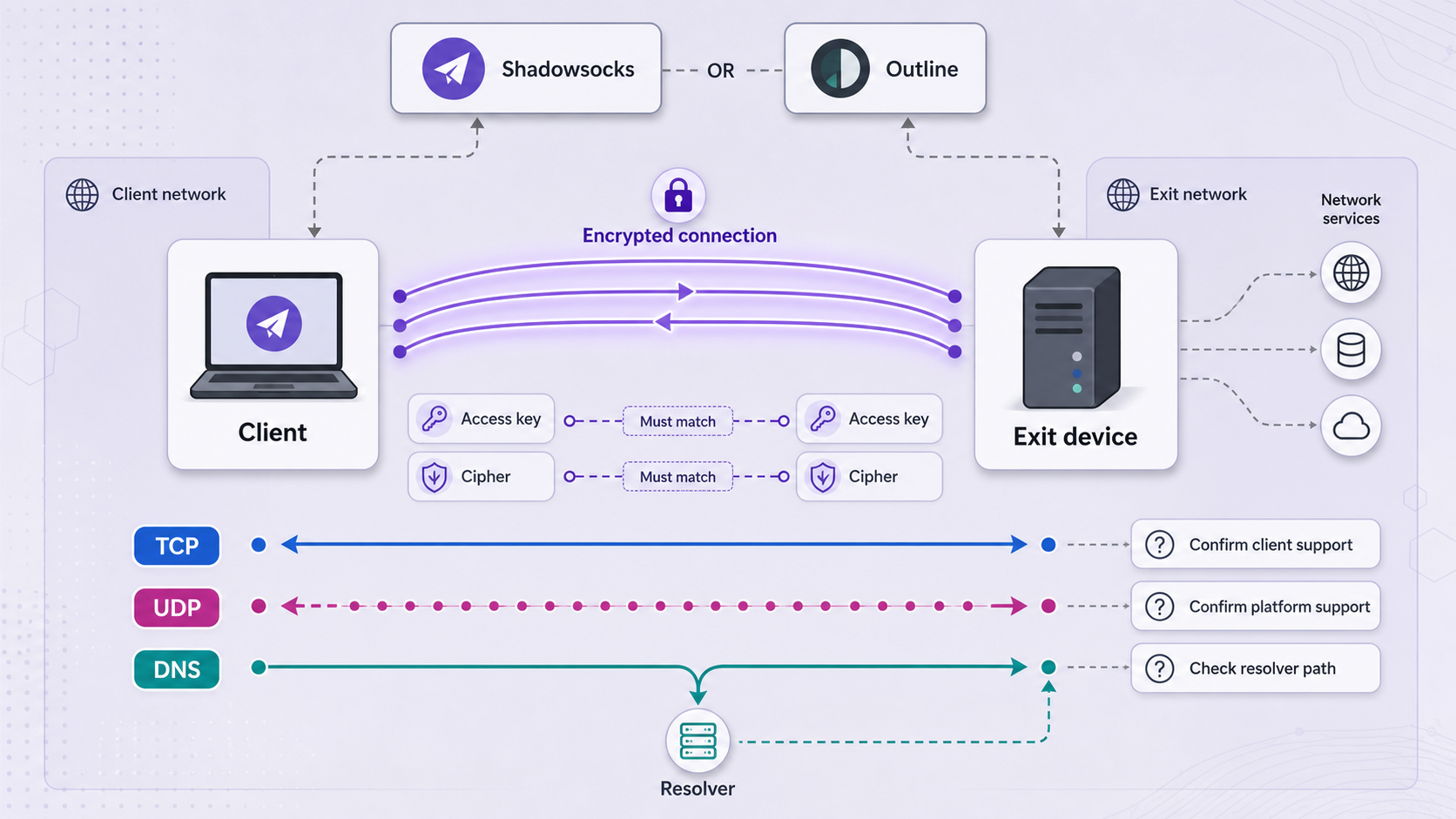
“Shadowsocks compatible” is not a complete compatibility statement. Implementations can differ in supported ciphers, parsing rules, optional parameters, UDP behavior, DNS handling, operating-system integration, and maintenance status. A successful import only proves that the client accepted the data. It does not prove that all required traffic is using the proxy correctly.
Cipher compatibility
Use exactly the cipher selected or issued by the current Localtonet configuration. Do not substitute a cipher because a different tutorial calls it modern, fast, or secure. The supplied public evidence does not confirm Localtonet's current Shadowsocks cipher list, so this article does not name one.
If the client does not list the dashboard's cipher, choose another currently supported client or, if the dashboard permits it, select a mutually supported option after reviewing your security requirements. Never alter the cipher name manually and assume equivalent behavior.
TCP behavior
Test the specific TCP applications you intend to proxy. A browser test can show that one web request works, but it does not prove that every application, port, authentication flow, long-lived connection, or certificate check will work. Some applications ignore system proxy settings or use their own network stack.
UDP behavior
Do not assume UDP support from the word Shadowsocks alone. UDP operation must be supported by the active Localtonet implementation, the selected client, its current mode, the source network, and the destination path. The public Proxy Server page does not substantiate a general Localtonet TCP and UDP guarantee for Shadowsocks.
If a TCP test works but a UDP-dependent application fails, check whether UDP is explicitly enabled or documented in both authenticated Localtonet settings and the client. Also test whether the source network permits the required UDP traffic. Fall back to a supported TCP workflow only when the application itself supports that fallback.
DNS behavior
DNS resolution may happen on the proxy client device, through a local proxy mode, or from the exit side, depending on the client and application. A working web page does not prove that DNS queries followed your intended path. Review the client's DNS documentation and test with a domain you control or another authorized diagnostic method.
If names fail but direct destination addresses work, investigate DNS configuration before changing the Localtonet endpoint. If both names and addresses fail, inspect the proxy state, device connection, endpoint values, local firewall, and destination reachability.
Operating-system support
This revision does not claim universal Windows, macOS, Linux, Android, or iOS support. Localtonet client availability, the chosen Shadowsocks client, operating-system proxy behavior, and supported import methods are separate compatibility questions. Verify the current Localtonet client and a maintained Shadowsocks client for each operating system in your deployment.
Protect access keys and the exit device
Treat every complete proxy connection profile as a secret. Anyone who obtains usable connection information may be able to send traffic through the exit device while the proxy is running. That can consume resources, expose the network address associated with the exit, trigger destination abuse controls, or violate network policy.
Safe screenshot and documentation practice
- Redact device tokens, passwords, secrets, access keys, import strings, QR codes, hostnames, ports, and tunnel identifiers.
- Crop unrelated account and device information from screenshots.
- Do not rely on blurring that could be reversed or read at higher resolution.
- Use obvious placeholders in examples rather than realistic endpoint values.
- Review terminal output, clipboard history, browser autofill, and screen recordings before sharing them.
Credential rotation
The public evidence does not show the current credential-rotation control or whether rotation is performed by editing, regenerating, recreating, or deleting a proxy. Use the method currently presented in your authenticated dashboard. After rotation, verify that the previous profile fails and the replacement works. Remove the old profile from every authorized client and from any approved secret store.
Stopping a proxy makes the running endpoint unavailable, but it should not be assumed to replace its stored credentials. If connection details were exposed, use the current dashboard mechanism that actually invalidates or replaces them, then test the old profile.
Verify the proxy from local and external perspectives
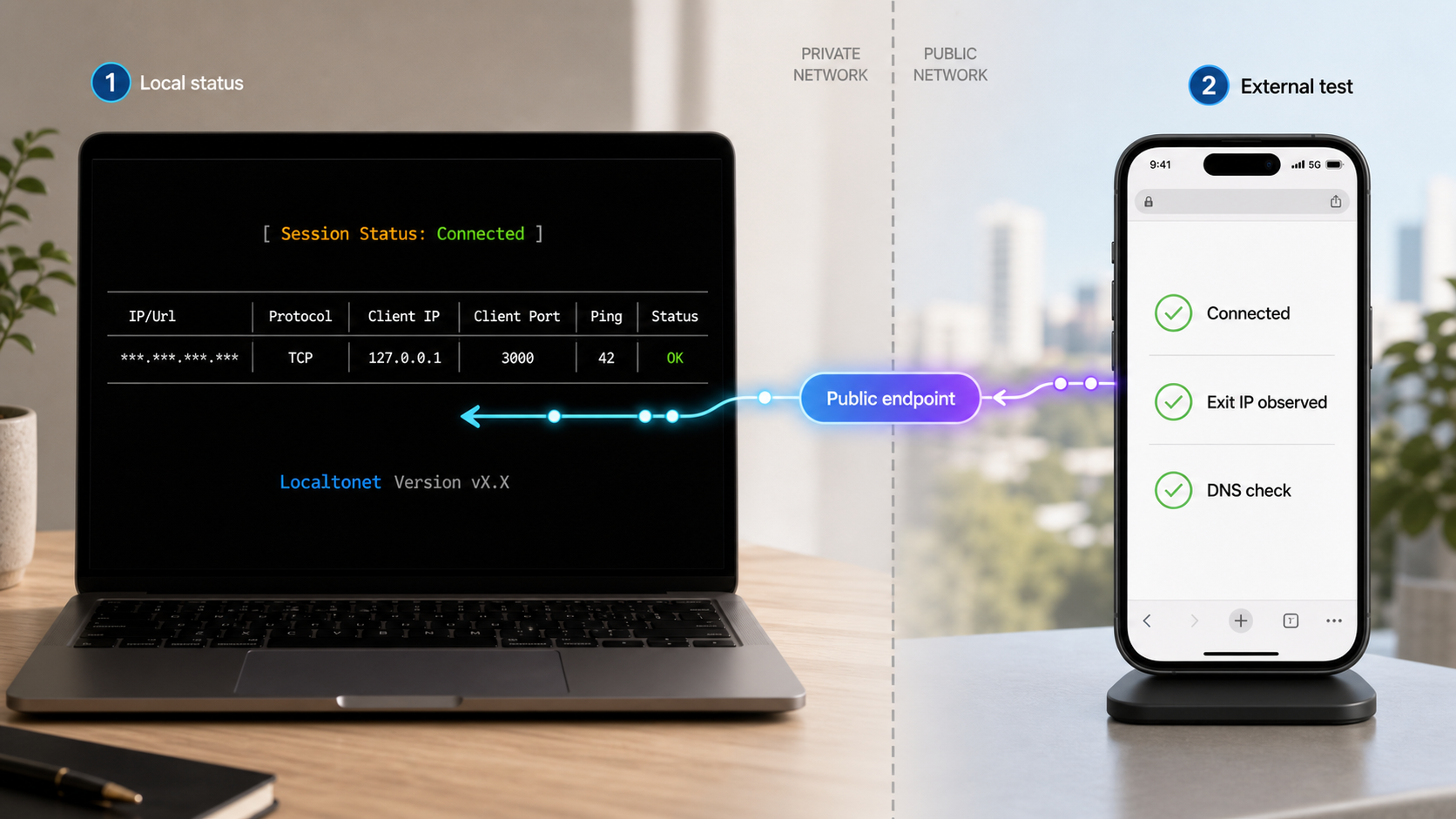
Verification should prove more than a green status indicator. Confirm the Localtonet device, the proxy lifecycle, the client connection, the observed exit path, application routing, DNS behavior, and any required transport behavior separately.
1. Verify the exit device first
- Confirm that the Localtonet client is running on the intended device.
- Confirm that the authenticated dashboard identifies that device as connected.
- From the exit device itself, test DNS resolution and access to an authorized destination.
- Check the device clock, firewall, endpoint security software, and upstream network if its outbound access fails.
2. Verify the proxy lifecycle
- Confirm that the proxy was created successfully.
- Use Start and verify that it reports a running or connected state in the current interface.
- Check that the selected device remains connected after the proxy starts.
- Do not assume that a saved configuration is active.
3. Verify client import
- Compare the imported endpoint, port, cipher, secret, and optional parameters with the authenticated dashboard.
- Check for extra spaces, truncated clipboard values, changed capitalization, or a partially scanned QR code.
- Confirm that the client profile is enabled and that the intended application is configured to use it.
- Review client logs without publishing secrets.
4. Confirm the exit path
From an authorized test application, compare its observed public network identity before and after enabling the proxy. The proxied result should be consistent with the exit device's outbound path. Avoid using a single IP display as your only test because applications can split traffic, cache results, use IPv4 and IPv6 differently, or bypass proxy settings.
A stronger check combines several observations: the client reports connected, an authorized destination is reachable, the observed exit changes as expected, and disabling the proxy restores the original path. If only one observation changes, investigate application routing before declaring the setup complete.
5. Test DNS and required protocols
- Test a hostname that resolves correctly from the exit device.
- Compare behavior with the client enabled and disabled.
- Check the client's DNS mode rather than assuming resolution occurs at the exit.
- Test every application protocol needed by the deployment.
- If UDP is required, perform a separate authorized UDP test and do not infer support from a successful TCP request.
6. Perform a shutdown test
Stop the proxy and verify that the remote client can no longer use it. Start it again only if access remains authorized and required. Then disconnect the Localtonet client briefly during a maintenance window and confirm that monitoring or user guidance reflects the resulting outage. This establishes expected behavior before a real device restart or network failure occurs.
Routine operation and troubleshooting
A proxy remains available only while the selected Localtonet device is connected and the proxy is running. Plan for device reboots, sleep, network changes, Localtonet client updates, credential changes, and intentional shutdowns. Do not treat a development workstation as an always-available exit node unless its operating model supports that requirement.
Routine operating checklist
- Confirm that the correct exit device is online before a scheduled session.
- Start the proxy only when access is required.
- Verify the device and proxy states after a restart or network change.
- Review who still needs connection details and remove obsolete client profiles.
- Rotate credentials after suspected exposure or when required by your access policy.
- Test critical application and DNS behavior after changing clients, ciphers, relays, networks, or operating systems.
- Stop or delete the proxy at the end of its approved lifecycle.
The client rejects or cannot import the configuration
First confirm that the client supports the exact format supplied by the authenticated dashboard. A client may support manually entered Shadowsocks fields but reject a URI, QR code, optional parameter, or cipher used by another implementation. Update to a trusted supported version where appropriate, or select another client that explicitly supports the displayed configuration.
If using the clipboard, retrieve a fresh value and check for truncation, added line breaks, spaces, or punctuation changes. Do not paste the real value into an online decoder or public validation service. If manual entry is supported, compare each field privately with the dashboard.
The client imports successfully but cannot connect
- Confirm that the proxy was started after it was created.
- Confirm that the selected Localtonet device is connected.
- Verify that the profile contains the current endpoint and credentials rather than an older rotated value.
- Check whether the source network blocks the required connection.
- Inspect local firewall and endpoint security rules on both the proxy client and exit device.
- Try an authorized test from another source network to separate local network filtering from configuration errors.
The Localtonet device is disconnected
Check that the Localtonet client application is running and authenticated on the intended exit device. Verify ordinary outbound internet access from that device. A sleeping laptop, suspended virtual machine, captive portal, changed firewall rule, expired session, or interrupted network connection can make the proxy unavailable.
Do not create additional proxies to mask a device connectivity problem. Restore the device connection first, then restart or verify the existing proxy using the current dashboard controls.
Web browsing works but another application does not
The other application may ignore system proxy settings, require a different proxy type, use unsupported UDP traffic, validate its network path differently, or establish direct connections outside the configured client. Review that application's proxy capabilities. If it cannot use the selected Shadowsocks client mode, choose a supported architecture rather than assuming all device traffic is protected.
TCP works but UDP does not
Verify UDP support independently at every layer: the current Localtonet Shadowsocks option, selected configuration, client implementation, client mode, source network, exit network, and destination. If public Localtonet documentation or the authenticated dashboard does not state that the current configuration supports UDP, do not rely on it for a UDP-dependent deployment.
Hostnames fail but direct addresses work
This usually points to DNS handling rather than basic endpoint reachability. Check whether the application resolves names locally, whether the client proxies DNS, and whether the exit device's resolver can resolve the same name. Also check split DNS, private zones, IPv4 and IPv6 differences, and cached failures.
The observed exit does not change
Confirm that the tested application is actually using the proxy. Disable other proxy or VPN software that might make the result ambiguous. Clear application caches where appropriate, test both IPv4 and IPv6 behavior, and compare results before and after disabling the Localtonet client profile. If only some requests follow the proxy, review the client's routing or bypass rules.
The proxy stopped after a restart
Tunnel creation does not guarantee that it is running, and this article does not claim a particular automatic-start behavior for Shadowsocks. After a device or client restart, check both the Localtonet device connection and proxy state in the dashboard. Start the proxy manually if the current product workflow requires it.
A connection profile may have leaked
- Stop the proxy to interrupt current use.
- Use the authenticated dashboard's current method to invalidate or replace the exposed connection information.
- Verify that the old profile no longer connects.
- Distribute the replacement only to authorized users through a private channel.
- Remove the old profile from clients, documentation, issue trackers, chat history, repositories, and approved secret stores where possible.
- Review the exit device and destination systems for unexpected activity using the logs available to you.
Shadowsocks is a real shipping Localtonet capability, but it is not currently listed in the main public documentation navigation. Confirm its current name, account availability, relay choices, ciphers, connection format, transport support, client compatibility, and plan limitations in the authenticated dashboard before building a production dependency around it.
Frequently asked questions
Is Localtonet Shadowsocks a VPN?
No. It is a proxy capability. Traffic selected by a compatible client is sent through the proxy and exits through the connected Localtonet device. Localtonet VPN Manager is our separate private mesh VPN feature with granular firewall rules and LAN-bridging capabilities.
Does a Shadowsocks proxy forward to a local IP address and port?
No. Proxy tunnel types make the connected Localtonet device the exit node. Conventional HTTP, TCP, UDP, combined UDP/TCP, and TLS tunnels instead forward public traffic to a specific local IP address and port.
Can I use Outline Client with Localtonet Shadowsocks?
This article cannot confirm general Outline interoperability from the supplied public evidence. Verify that the specific Outline Client version accepts the exact cipher, import format, and optional parameters shown by your authenticated Localtonet dashboard. A successful import should then be followed by exit-path, DNS, TCP, and any required UDP tests.
Does Localtonet Shadowsocks support both TCP and UDP?
The available public Proxy Server evidence does not confirm a general TCP and UDP guarantee for the Shadowsocks implementation. Check the authenticated dashboard and current product guidance for your configuration. UDP also requires support from the client, client mode, source network, exit network, and destination path.
Which Shadowsocks cipher should I select?
Select only a cipher currently offered by Localtonet and supported by your chosen client. The public evidence supplied for this guide does not expose the current cipher list, so no particular cipher is prescribed here. Do not copy a cipher from an old example or substitute one without confirming compatibility.
Does creating the proxy make it available immediately?
No. Creating a Localtonet tunnel or proxy does not mean it is running. Start it using the current dashboard control, and keep the selected Localtonet device connected. Stopping the proxy or disconnecting that device makes the endpoint unavailable.
Do I need router port forwarding or a public IP?
No inbound router port forwarding or public IP is required for the Localtonet device connection. The client application establishes an outbound connection to a Localtonet relay. The device and its network must still permit that outbound connection and the destinations reached through the proxy.
What should I do if my connection details are exposed?
Stop the proxy, use the current authenticated dashboard mechanism to invalidate or replace the exposed details, and verify that the old profile no longer works. Distribute the replacement privately and remove the old material from clients, screenshots, repositories, tickets, and messages where possible.
Configure a proxy from your authenticated Localtonet dashboard
Connect the device that will act as your exit node, review the proxy options currently available to your account, and verify client compatibility before distributing any connection details.
Get Started Free →

