

Design controlled tunnel lifecycles for CI pipelines and supervised AI coding agents
Safe tunnel automation requires more than creating a configuration and assuming it is reachable. The Localtonet client must be connected, the local target must already be healthy, the tunnel must be started explicitly, public availability must be verified, and exposure must end when the job or development session finishes. This guide explains the architecture, security controls, CI gates, webhook handling, ownership rules, and cleanup patterns behind that lifecycle. It is intentionally a design-pattern guide rather than a copy-and-paste REST API tutorial because verified routes, authentication headers, request fields, response fields, and retry contracts are not included in the evidence available for this revision.
📋 What's in this guide
Scope and evidence boundary
Localtonet is a multi-protocol tunneling and proxy platform that exposes a service, device, folder, or supported endpoint running on a user's machine to the public internet. The Localtonet client on that device establishes an outbound connection to a Localtonet relay server, so ordinary tunnel workflows do not require inbound router port forwarding, firewall changes, VPN setup, or a public IP address. Depending on the tunnel family, the result is a public URL or a public host and port.
Our platform can be managed from the dashboard or REST API. We also provide the Localtonet MCP Server for supported actions initiated from compatible AI coding assistants. However, an automation guide should never infer exact API behavior from those high-level capabilities. A statement such as “create a tunnel through the API” does not, by itself, establish a route, authentication scheme, request body, response property, identifier format, polling method, error code, retry rule, or deletion contract.
The available verified evidence does not contain the current Localtonet REST API routes, fields, authentication method, response schemas, or operation-specific retry guarantees. For that reason, this article does not provide fabricated API calls or a runnable CI configuration. Implementers must map the workflow gates below to the current first-party API reference available for their account and deployment. Start with the Localtonet documentation hub and do not substitute guessed endpoints or fields.
This distinction is especially important for unattended systems. The controller concepts used below, including ownership records, observed states, reconciliation, finalizers, and orphan cleanup, are implementation patterns. They are not claims that Localtonet returns a particular field or uses the same state names. Where this guide says that automation should record a resource identity or inspect current state, the actual supported mechanism must be confirmed against the current API documentation before deployment.
The same evidence rule applies to relay selection and plan availability. Available relay servers or regions must be obtained from the current product or dashboard. Do not copy a server code from an old article, place a guessed value in source control, or assume that every option is included in every subscription plan, client version, region, or deployment.
Prerequisites and ownership decisions
Complete these prerequisites before building a pipeline or granting tunnel tools to an AI assistant. Most automation failures become easier to prevent when device identity, local service health, secret handling, relay selection, and resource ownership are decided before the first tunnel is created.
Store secrets in the CI platform
Supply credentials through the CI system's protected secret mechanism rather than a tracked configuration file. Restrict which repositories, branches, environments, and maintainers may use those secrets. A pull request from an untrusted source should not automatically receive credentials that can expose a service from a connected device.
Masking is only a backup control. A secret can escape redaction when it is encoded, split, embedded in JSON, included in a crash dump, printed by verbose diagnostics, or copied into a build artifact. Configure the workflow so that sensitive values are not printed in the first place.
Separate device identity from application authorization
A Localtonet authentication token identifies the client device that runs a tunnel. It is not an application login and should not be reused as one. If the public target requires authentication, provide a separate test credential with the least privilege necessary for the dependent test. Keep that credential separate from Localtonet control credentials.
Development, test, and production should not depend on one broadly shared device identity. A test pipeline should not receive credentials for an unrelated developer workstation or production host. This separation limits accidental exposure and makes cleanup ownership easier to establish.
Define resource ownership before cleanup
An ephemeral pipeline normally owns the tunnel it creates for that run. A long-lived shared tunnel may instead be owned by a team or human operator. Write this distinction into the controller's policy. Automation should never delete a resource merely because it looks old, has a familiar public address, or was the most recently displayed item.
The ownership record should contain the minimum non-secret information required to correlate the workflow with its tunnel using fields supported by the current API. Because the verified evidence here does not establish those fields, this article does not prescribe a tag, name, metadata property, or response key.
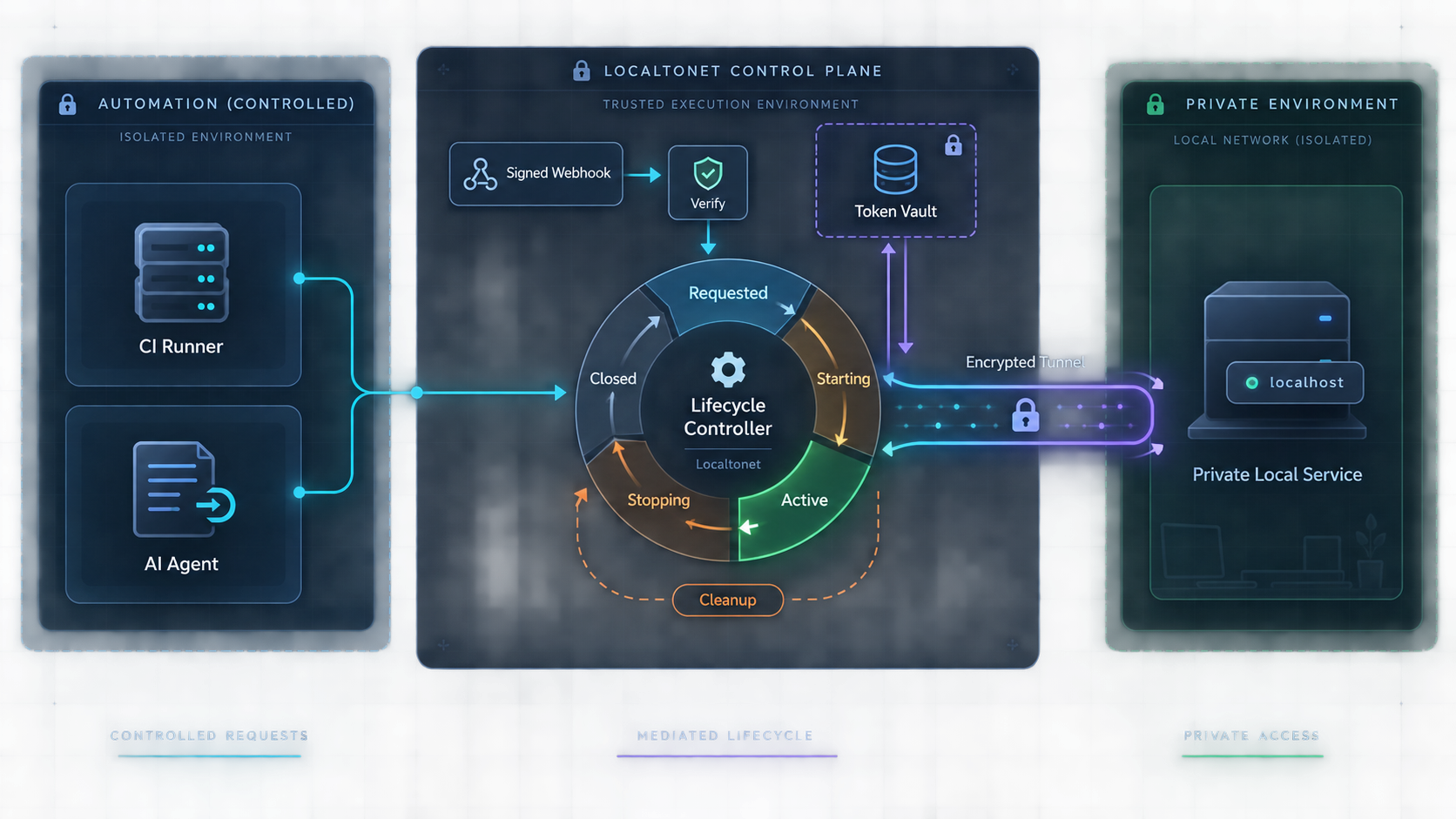
The correct mental model for tunnel automation
A Localtonet tunnel is available only while the selected client device is connected and the tunnel is running. Creating the configuration does not make it active. The target application must also remain reachable from the client device, and consumers should test the assigned public address rather than inferring readiness from a successful configuration action.
This produces several distinct conditions that should not be collapsed into one boolean named deployed:
A safe controller tracks desired state separately from observed state. Desired state might be “the approved HTTP tunnel should be available for this integration test.” Observed state includes what can actually be established, such as the local health check passing, the device being connected, a tunnel lifecycle event arriving, and the public endpoint returning the expected result.
A platform-level Connected state can be useful, but the application might still be starting, bound to the wrong local interface, returning an error, or waiting for another dependency. Always keep the public application probe as a separate readiness gate.
Choose the appropriate control interface
Localtonet supports dashboard and REST API management. The Localtonet MCP Server also lets compatible AI coding assistants, including Claude Code and Cursor, create, start, and stop tunnels from the assistant. These interfaces address different operating models and should not automatically receive the same authority.
| Interface | Best fit | Verified scope used here | Main safety concern |
|---|---|---|---|
| REST API | Deterministic CI controllers and scheduled automation | Localtonet can be managed through a REST API, but exact operations and schemas must come from the current API reference | Do not guess routes, credentials, identifiers, response fields, or retry behavior |
| Localtonet MCP Server | Supervised work in compatible AI coding assistants | Create, start, and stop Localtonet tunnels from the assistant | Constrain tools, targets, duration, and approval boundaries |
| Dashboard | Manual setup, review, recovery, and low-frequency administration | Create configurations, start tunnels, and later stop or delete them through current product controls | Avoid conflicting with resources owned by active automation |
REST API controllers need an implementation contract
Before writing CI code, record the exact API contract from the current first-party documentation. At minimum, an implementation needs verified answers for authentication, tunnel creation, explicit startup, current-state inspection, public-address retrieval, stopping, deletion, error classification, and any supported mechanism for correlating a resource with a workflow.
Do not begin implementation if any required operation depends on an assumed route or field. A controller that guesses a returned tunnel identifier, interprets undocumented state strings, or retries an uncertain create request can create duplicates or remove the wrong resource. The safe response to missing API evidence is to pause the API implementation and use an approved manual workflow until the contract is verified.
MCP is for supervised assistant workflows
The MCP Server is useful when a developer asks an assistant to expose a locally running development service for debugging or review. It should be treated as a controlled operator interface, not as proof that every REST API operation is available as an MCP tool.
Use the current Localtonet MCP Server setup and management article as the authority for installation and configuration. This guide does not reproduce unverified package names, configuration keys, commands, or client-specific setup fields. After configuration, verify the integration by confirming that the assistant can enumerate only the approved Localtonet tools, request an allowed action, and return a sanitized result without exposing credentials.
Keep the dashboard available for recovery
The dashboard remains valuable when a runner disappears, an API response is ambiguous, or an agent cannot confirm cleanup. Operators should still honor ownership. If a human takes control of an automation-owned tunnel during an incident, pause the controller first so it does not recreate or modify the resource while recovery is in progress.
Design an explicit Localtonet tunnel lifecycle
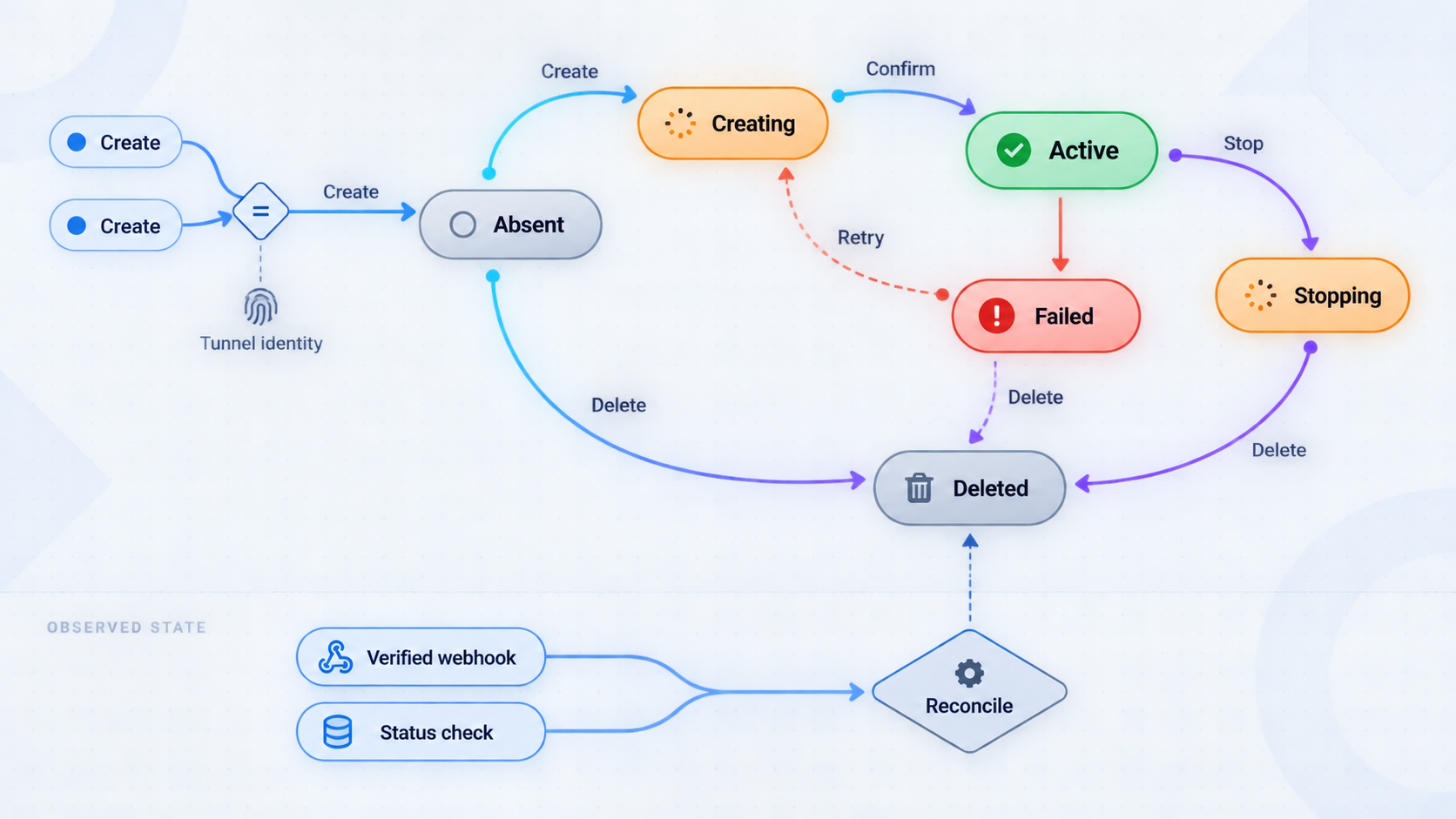
The following sequence is the documented Localtonet workflow at the product level. It is not a claim that the REST API exposes six calls with matching names. Each automated action must be mapped to the current API contract before use.
Install and run the Localtonet client
Run the client on the device that hosts the target or can reach it. Confirm that the client remains connected for the full period in which the tunnel is required.
Authenticate or select the intended device
Use the device-specific authentication token associated with the client that should run the tunnel. Obtain it through an authorized workflow and keep it out of logs, examples, prompts, and artifacts.
Select a currently available relay
Choose a relay server or region from current Localtonet product data. Validate the selection for the account and deployment instead of embedding a guessed code.
Create the appropriate configuration
Match the tunnel family to the target. HTTP, TCP, UDP, combined UDP/TCP, and TLS tunnels point to a local IP address and port. File Server points to a local folder path. Proxy tunnels make the connected device the exit node rather than forwarding to a conventional local IP and port target.
Start and verify the tunnel
Start the tunnel explicitly. Use the assigned public URL or host and port only after the relevant platform state and a protocol-aware public probe meet the workflow's readiness criteria.
Stop or delete during cleanup
Stop exposure when it is no longer needed. Delete an ephemeral configuration only when the workflow owns it and retention is unnecessary. Cleanup must be attempted after success, failure, cancellation, and timeout.
Choose the correct tunnel family
| Tunnel family | Localtonet target | Readiness check |
|---|---|---|
| HTTP/s | Local IP address and port | Request a meaningful HTTP health route through the public URL and validate the expected status or response |
| TCP or TLS | Local IP address and port | Connect and complete the minimum protocol exchange needed to prove that the intended service responds |
| UDP | Local IP address and port | Use a protocol-aware request and response because UDP has no connection handshake |
| Combined UDP/TCP | Local IP address and port | Test both transports required by the application |
| File Server | Local folder path | Confirm that the intended folder is published and that permissions do not expose unrelated files |
| HTTP or SOCKS5 proxy | Connected device as the exit node | Verify the required proxy behavior without modeling it as an ordinary local application target |
Confirm the local service, interface, port, folder, or proxy purpose before startup. Use application authentication, authorization, least privilege, and suitable network policy. A tunnel provides connectivity, but it does not replace application access controls.
A complete CI workflow without fabricated API calls
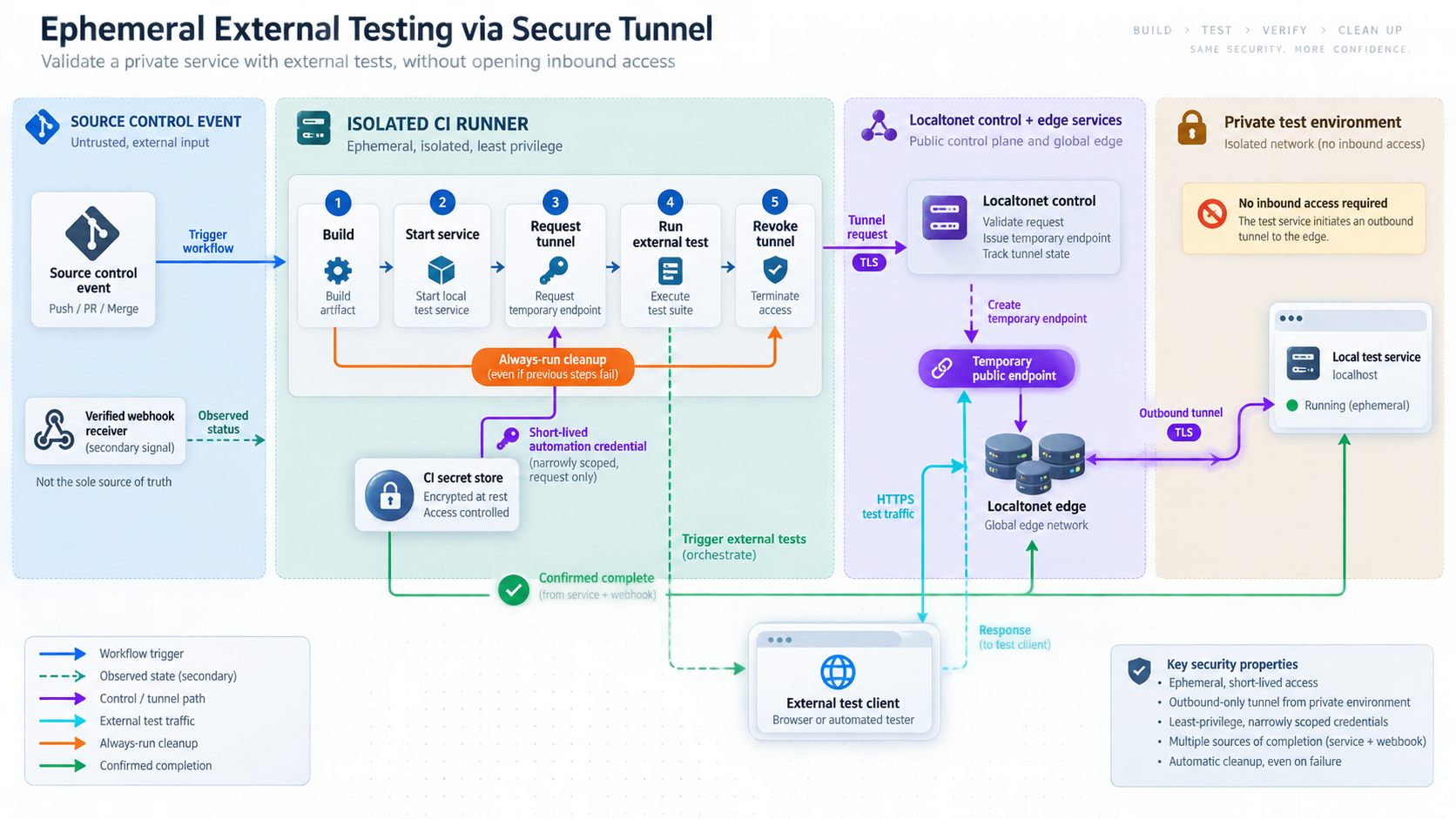
The workflow below is concrete at the level supported by verified product behavior. It defines inputs, gates, outputs, failure handling, cleanup, and orphan reconciliation. It deliberately does not name REST routes, payload fields, authentication headers, response keys, or CI-vendor syntax that have not been verified.
Prepare the runner and connected client
Confirm that the Localtonet client is installed and running on the runner or on another approved device that can reach the target. Load required credentials from protected CI secrets without printing them. Fail before public exposure if the intended device is unavailable.
Start the application locally
Use the project's normal startup procedure. Wait for dependencies such as a database or test fixture to initialize. Keep startup logs sanitized and do not place Localtonet credentials in application environment dumps.
Pass a local health gate
Probe the target directly from the Localtonet client device. Confirm the intended IP address, port, protocol, and application behavior. Stop the job before tunnel creation if this gate fails.
Resolve approved Localtonet inputs
Select the intended device identity, tunnel family, local target, and a currently available relay. Validate those values against current Localtonet product data. Do not infer a relay code or API field from this guide.
Create the pipeline-owned tunnel configuration
Use only a verified current interface. Record whatever authoritative resource identity the documented interface provides in protected job state. If the operation times out or returns an ambiguous result, do not submit another create request until the documented reconciliation method establishes whether the first operation succeeded.
Start the tunnel explicitly
Use the supported start operation after creation. Apply a bounded readiness deadline. A created configuration that has not been started must not be passed to dependent tests.
Observe platform state and probe the public path
Use documented state inspection and, where configured, a matching lifecycle webhook as signals. Then perform an application-aware check through the assigned public URL or host and port. Continue only when both the required platform condition and public behavior are satisfied.
Run dependent integration tests
Pass the public address only to stages that require it. Use separate application test credentials where necessary. Avoid printing sensitive URLs, authorization values, Localtonet credentials, or complete callback payloads in public logs.
Execute unconditional cleanup
In an always-run finalizer, stop the exact tunnel owned by the workflow. Delete it if it is ephemeral and the ownership policy requires deletion. Preserve the primary test failure while reporting cleanup failure separately.
Reconcile orphans outside the runner
A separate scheduled controller or operator process should review ownership records for jobs that ended without cleanup. It must confirm the exact resource and expired owner before acting. If correlation is uncertain, request human review instead of deleting a similar resource.
These ten phases are pipeline gates, not ten Localtonet API operations. Some phases are project-specific actions, and others may require several verified API interactions. The implementation must derive every Localtonet route, field, response, and status interpretation from the current API documentation.
Use bounded retries and deadlines
Retry only failures that the current API documentation or transport behavior identifies as transient. Authentication failures, invalid targets, unsupported options, and malformed requests need correction rather than repetition. Apply an overall readiness deadline so a broken environment does not remain exposed while a job waits indefinitely.
If a create request has an uncertain outcome, treat it as a reconciliation incident. Blindly repeating creation can produce duplicate resources. If current API capabilities do not provide a safe correlation method, stop the workflow and request operator review.
Handle cancellation and runner loss
An always-run finalizer covers ordinary failures only while the runner remains alive. It cannot execute after a hard termination, host failure, or lost network connection. This is why orphan reconciliation must run independently of the job that created the resource.
The reconciler should be conservative. Age alone is not proof of ownership. It should act only when the resource can be correlated through documented fields or protected controller state and the owning job is confirmed finished. Otherwise, flag the tunnel for manual review in the dashboard.
Retain useful evidence without retaining secrets
Useful diagnostics include sanitized timestamps, tunnel family, local probe result, whether the selected device was observed connected, whether the tunnel was observed connected, the public probe result, the cleanup outcome, and a non-secret ownership reference. Do not retain device tokens, API credentials, unrestricted application secrets, or token-valued webhook identifiers.
Operate platform webhooks as untrusted state signals
Localtonet provides platform-wide Token/Tunnel webhooks for changes associated with a selected Token Group. These webhooks fire when a token or tunnel changes to Connected or Disconnected. See the official Localtonet webhook documentation when configuring the current product controls.
Documented setup requirements
The verified webhook model requires a receiver endpoint and a selected Token Group whose Token and Tunnel connection changes should generate events. In operational terms, the setup path is:
- Prepare an HTTPS receiver that accepts the documented JSON request body.
- Open the platform webhook configuration described in the official webhook documentation.
- Select the intended Token Group rather than assuming that every account resource is included.
- Configure the receiver destination using the current product controls.
- Cause an approved test token or tunnel in that group to change state.
- Confirm receipt, safe parsing, redacted logging, and reconciliation behavior before depending on events in CI.
Product labels and exact UI controls can change, so the linked first-party documentation remains authoritative for the current screen sequence. Do not invent an API route for webhook creation if the current documentation does not provide one.
The webhook sends a WebHookRequest JSON body with these documented properties:
{
  "Id": "tunnel id or auth token",
  "ActionDate": "event action date",
  "Type": "Token or Tunnel",
  "Status": "Connected or Disconnected"
}
Type is Token or Tunnel. Status is Connected or Disconnected. The meaning of Id depends on the event type: it is a tunnel ID for a tunnel event or an authentication token for a token event.
Do not write the raw Id to logs when Type is Token. Do not place it in metrics labels, traces, exception messages, chat alerts, analytics, or dead-letter payloads that have broader access. Redact or irreversibly transform sensitive identifiers according to your security policy.
Do not use a lifecycle event as authorization
Verified evidence establishes optional HMAC signing for File Server file-event webhooks, but it does not establish equivalent signing for platform-wide Token/Tunnel webhooks. Do not invent a signature header. Treat a platform lifecycle event as an untrusted notification, not as authorization to expose a target, delete a resource, release a deployment, or run privileged work.
Validate the JSON structure and accept only the documented Type and Status values. Correlate tunnel events only with resources the workflow already expects. Unknown identifiers should be ignored or sent for review rather than triggering broad corrective actions.
After an event arrives, reconcile through the current documented control interface. Confirm present state and then perform the public application probe. A Connected event can wake a waiting controller, but it cannot prove that the event is authentic, current, uniquely delivered, correctly ordered, or evidence that the target application works.
Combine events, reconciliation, and deadlines
Event-only workflows can stall when the receiver is unavailable or delivery assumptions are wrong. Polling-only workflows can add delay and unnecessary requests. A robust architecture uses webhook delivery as a prompt, documented state reads for reconciliation, and a bounded deadline for the entire readiness process.
The supplied evidence does not establish platform webhook signing, ordering, delivery guarantees, retry timing, or the representation of ActionDate. Implementations should not assume any of those properties without current documentation.
Keep platform and File Server webhooks separate
Platform Token/Tunnel webhooks report Connected and Disconnected changes for resources in a selected Token Group. File Server webhooks report file-level upload, delete, rename, and move events, support optional path filtering, and support HMAC signing. File Server signing behavior must not be copied into a platform lifecycle receiver unless current platform documentation explicitly adds that feature.
Constrain AI-agent tunnel management
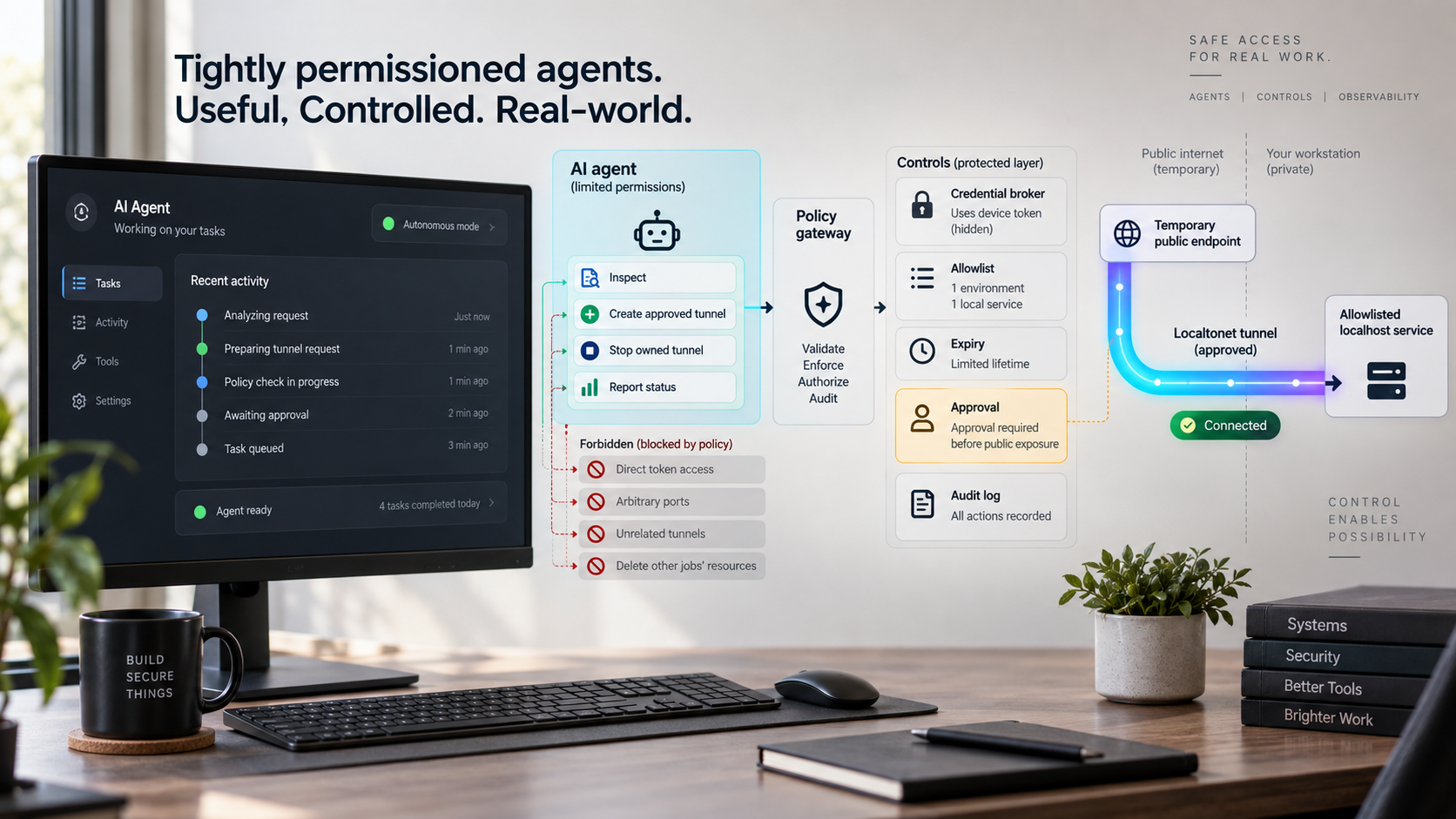
The Localtonet MCP Server lets compatible AI coding assistants create, start, and stop Localtonet tunnels. Follow the current official MCP Server article for supported setup and client configuration. Do not ask an assistant to invent package names, commands, configuration fields, or tool parameters from memory.
Verify the MCP integration before granting exposure
After completing the current documented setup, review the tools visible to the assistant. Confirm that the integration exposes only the intended capabilities and that tool results do not reveal authentication tokens. Perform the first tunnel operation against a non-sensitive local test service while a human observes the requested target, lifecycle transition, returned public address, and cleanup result.
If the assistant cannot show which approved tool it intends to call, or if the tool schema does not support the required action, stop and use the dashboard or a verified API implementation. Never compensate for a missing tool by giving the model a reusable device token in chat.
Require clear intent before exposure
Before a create or start action, the assistant should identify the exact target service, tunnel family, purpose, expected duration, and cleanup decision. It should confirm that the service has passed a local health check and that the user expects it to become publicly reachable.
A request such as “share this” is not sufficient when the workspace contains multiple services. The assistant should ask which target is intended rather than scanning for an open port and exposing the first result. Administrative interfaces, databases, debugging consoles, credential stores, and broad folders deserve explicit review and should not be exposed by inference.
| Agent action | Suggested policy | Reason |
|---|---|---|
| Check local application health | Allow within the approved workspace | This establishes local readiness without creating public exposure |
| Create a tunnel configuration | Require validated target and ownership scope | Creation establishes a resource even though it does not start the tunnel |
| Start a tunnel | Require explicit user awareness or approval | Startup makes the configured route available while the selected client is connected |
| Stop a session-owned tunnel | Allow when ownership is unambiguous | Stopping the temporary exposure is part of safe session cleanup |
| Act on an unknown resource | Require human review | The assistant may lack enough context to establish ownership |
Make uncertainty visible
Tool results should separate the requested action, non-secret resource identity, observed state, public address where appropriate, and any error. If a call times out, the assistant should not automatically repeat a create action. It should use a supported reconciliation path or tell the user that the outcome is uncertain.
Every agent session should end with a cleanup decision. Temporary exposure should be stopped after testing. If cleanup cannot be confirmed, the assistant should clearly identify that operator review is required without revealing tokens or other sensitive values.
Troubleshoot each layer independently
Avoid immediately deleting and recreating a tunnel when something fails. Repeated creation can conceal the original problem and leave duplicate resources. Test the local application, device connection, tunnel lifecycle, public route, webhook receiver, and cleanup controller as separate layers.
| Symptom | Checks | Safe response |
|---|---|---|
| Configuration exists but there is no public availability | Confirm explicit startup, connected client, intended device identity, and current relay selection | Correct the failed lifecycle prerequisite instead of creating another tunnel |
| Tunnel appears Connected but the application probe fails | Test the local IP, port, protocol, application health, and required dependencies from the client device | Fix the local target and repeat the public probe |
| No webhook arrives | Check the selected Token Group, receiver reachability, JSON handling, and current webhook configuration | Reconcile through the documented interface and do not wait indefinitely |
| Duplicate tunnels appear | Find where a create response became ambiguous or an operation was retried without reconciliation | Stop blind retries and correlate ownership using documented fields |
| Cleanup fails | Preserve the known resource reference and sanitized failure details | Raise an operator alert and review the exact resource in the dashboard |
| A relay value stops working | Compare the configured selection with current product data and account availability | Choose a current supported value rather than reusing an old code |
| An agent requests an unsupported action | Inspect the actual MCP tool schema and current official documentation | Decline to fabricate a tool call and hand control to an approved interface |
When local health passes but public health fails
Verify that the tunnel points to the same local IP address, port, and protocol used by the passing local test. Check whether the application expects a particular host, path, authentication value, or protocol handshake. For HTTP, use a health route that reflects required dependencies. For TCP, TLS, or UDP, use a protocol-aware exchange rather than treating an open socket as complete proof.
When cleanup status is uncertain
Do not delete similarly named or recently created tunnels. Preserve the ownership information already recorded by the workflow and use the dashboard or verified API behavior to inspect the exact resource. If ownership cannot be established, escalate for human review.
When a credential may have leaked
Remove the value from logs and artifacts where possible, restrict access to affected records, stop relying on the exposed credential, and follow the current Localtonet process for replacing it. This guide does not invent a rotation endpoint or dashboard sequence. Also review whether the secret entered model context, shell history, crash reports, caches, or CI debug output.
Frequently asked questions
Does creating a Localtonet tunnel make it immediately available?
No. Creating a configuration does not mean the tunnel is running. It must be started explicitly, the selected client must be connected, and the target must be reachable. Automation should then test the assigned public URL or host and port with a protocol-aware probe.
Why does this guide not include copy-and-paste REST API calls?
The verified evidence available for this revision does not include current REST routes, authentication headers, payload fields, response schemas, identifier properties, or retry contracts. Publishing guessed calls would create unsafe automation. Use the architecture here with the current first-party API reference for your account and deployment.
Should CI use the REST API or the Localtonet MCP Server?
A verified REST API integration is the architectural fit for deterministic, unattended CI control. The MCP Server is intended for supported actions initiated through compatible AI coding assistants and is better suited to supervised development. Use the dashboard for manual review and recovery.
Can one device token be copied into every pipeline?
A Localtonet authentication token identifies a specific client device and must remain secret. Avoid broad sharing across unrelated projects and environments. Store required credentials in protected secret systems, restrict where they can be used, and never commit or print them.
Can a Connected webhook replace a public health check?
No. It is a platform-state signal, not proof that the application is healthy. Reconcile current state through a documented interface and then run an application-aware check through the public address.
Can a platform lifecycle webhook authorize a deployment or cleanup action?
No. The available evidence does not establish signing for platform Token/Tunnel webhooks. Treat an event as an untrusted notification. Correlate it with expected state, reconcile through the documented control interface, and apply your own authorization policy before any consequential action.
Are platform webhooks the same as File Server webhooks?
No. Platform webhooks report Token or Tunnel changes to Connected or Disconnected for a selected Token Group. File Server webhooks report file operations such as upload, delete, rename, and move and support HMAC signing. Do not merge the two systems.
Should an ephemeral tunnel be stopped or deleted?
Stop it when public exposure is no longer needed. Delete the configuration when the workflow owns it, it was intended to be ephemeral, and there is no reason to retain it. A deliberately reusable configuration may instead be stopped and retained.
Can automation permanently hardcode a relay server code?
Automation should obtain and validate relay server or region values from current Localtonet product data. Available values can vary by plan, client version, region, or deployment, so this article does not publish a guessed code.
Does Localtonet replace application authentication?
No. Localtonet provides connectivity to the configured target. The exposed application still needs appropriate authentication, authorization, least-privilege access, and safe handling of sensitive data.
Build a controlled tunnel workflow with Localtonet
Start by connecting the intended client device, validating the local service, protecting credentials, and defining explicit startup, readiness, ownership, and cleanup gates. Use the current Localtonet documentation for exact API behavior, or follow our MCP Server guide when an approved coding assistant needs supervised tunnel control.
Get Started Free →

