

Run a persistent Waline comment server with Docker, test the complete comment flow, and publish it securely
This tutorial deploys Waline with its official Docker image and a persistent SQLite data directory. You will create the container definition, initialize storage, claim the first administrator account, test comment submission and retrieval locally, and connect the verified service to a Localtonet HTTP tunnel. You will then configure the Waline browser client with the public HTTPS URL and validate the complete path from a website visitor to the database.
📋 What's in this guide
How the Waline and Localtonet architecture works
Waline separates the browser client, server application, and storage layer. The client renders the comment interface on your website. It sends comment and account requests to the Waline server. The server validates those requests and stores the resulting information in its configured database.
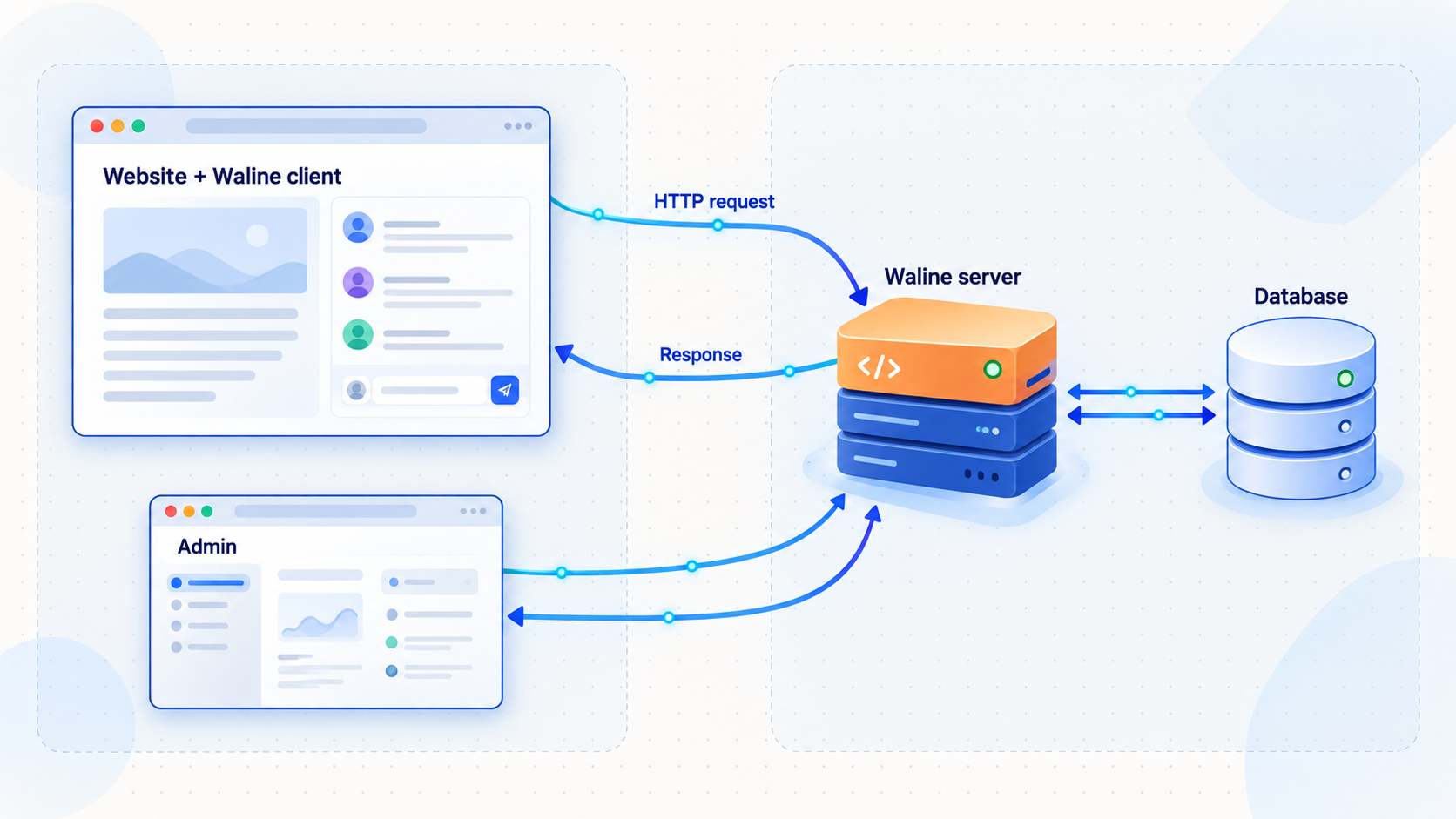
In this tutorial, Docker runs the Waline server and SQLite stores its data in a host directory mounted at /app/data inside the container. SQLite keeps the deployment compact because it does not require a separate database server or a publicly reachable database port. Waline creates and manages the required SQLite data in the configured directory when the server starts.
Localtonet enters the design only after the application works locally. Our client establishes an outbound connection from your device to a Localtonet relay server. The HTTP tunnel receives requests at a public HTTPS address and forwards them to the host-side Waline endpoint.
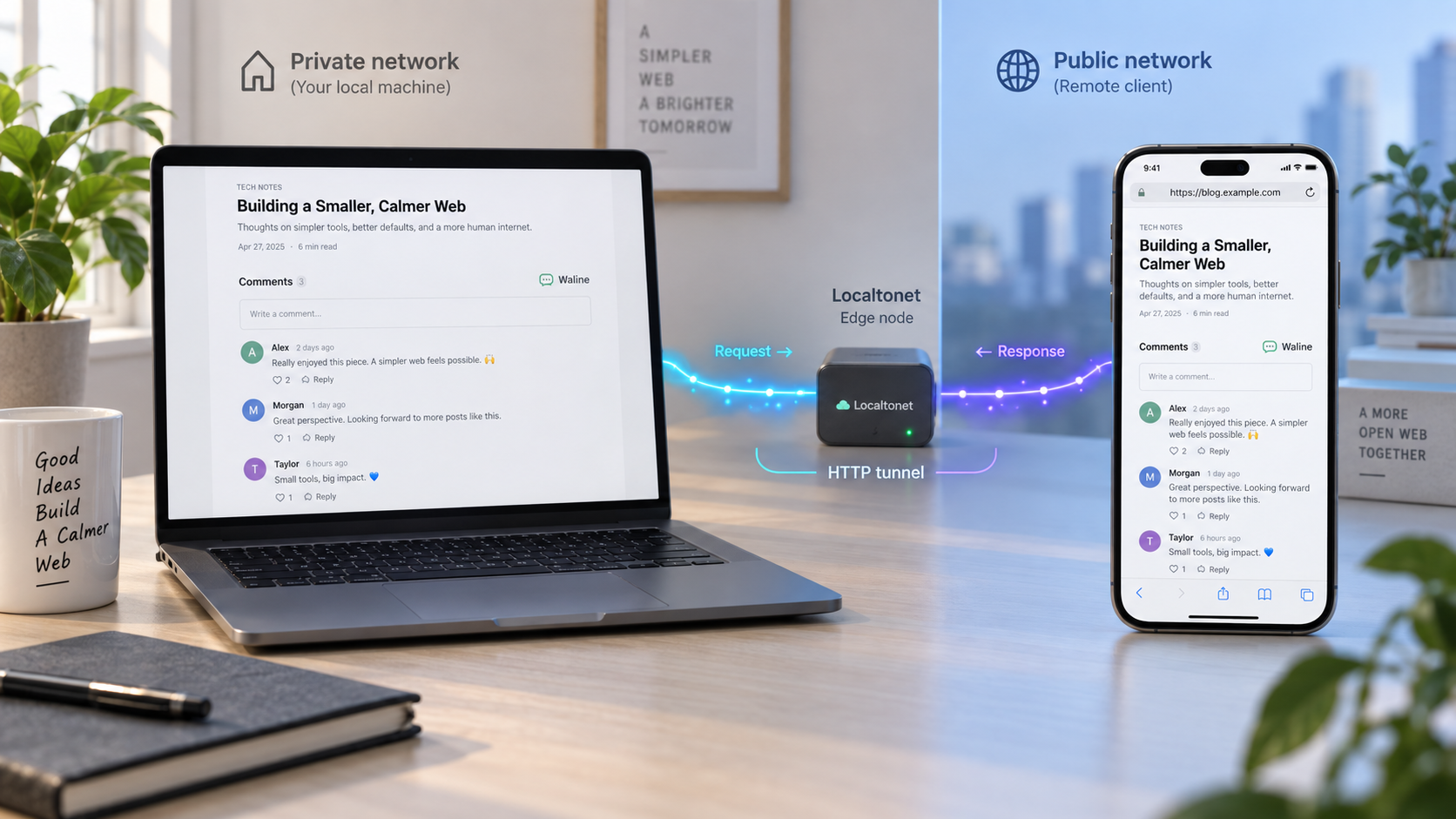
serverURL setting to contact the Waline server.
Waline controls comments, accounts, moderation, storage, and browser integration. Localtonet publishes the already-running HTTP endpoint. A tunnel does not install Waline, initialize its storage, repair its configuration, or replace application-level access controls.
Prerequisites and deployment scope
This walkthrough uses the official lizheming/waline Docker image with SQLite. It is intended for a Linux host or another system that supports Docker Engine and Docker Compose. Docker Desktop can also provide Docker and Compose, although host paths and shell commands may need normal platform-specific adjustments.
Prepare the following before beginning:
- A host that can remain online while the comment service is needed.
- Docker Engine with the
docker composecommand available. - A shell account permitted to create directories and run Docker commands.
- Approximately one free local TCP port. This guide uses host port
8360. - A website or test page where the Waline browser client can be loaded.
- A Localtonet account and client device capable of reaching the Waline host endpoint.
- A backup destination separate from the live Waline data directory.
Confirm Docker and the Compose plugin before creating any application files:
docker --version
docker compose version
docker info
The first two commands should print version information. The final command confirms that the Docker daemon is available to the current user. If it reports a permission or daemon connection error, correct that Docker problem before continuing.
Why this tutorial uses SQLite
Waline supports multiple storage choices, including SQLite, PostgreSQL, MySQL, MongoDB, TiDB, and CloudBase. This tutorial selects SQLite so that the deployment has one application container and one persistent data directory. The configuration is easier to reproduce, back up, and restore without exposing a separate database service.
A larger or existing environment may prefer a separate database server. That requires the database-specific schema and connection variables documented for the selected Waline release. Do not combine those instructions with the SQLite configuration below. This tutorial is complete for its selected SQLite path.
| Component | Value used in this guide | Purpose |
|---|---|---|
| Container image | lizheming/waline:latest |
Official Waline Docker image used by the documented Docker deployment path |
| Container port | 8360 |
Waline HTTP listener inside the container |
| Host endpoint | 127.0.0.1:8360 |
Local endpoint used when Localtonet runs on the same host |
| Container data path | /app/data |
Directory selected through SQLITE_PATH |
| Host data path | ./data |
Persistent directory retained when the container is recreated |
| Restart policy | unless-stopped |
Restarts Waline after failures or host reboots unless it was deliberately stopped |
The website needs the Waline HTTP API, not direct access to the database file. Do not share the data directory through a web server, file-sharing service, or public tunnel. Restrict local filesystem access and include the directory in your protected backup process.
Install Waline with Docker Compose
The following deployment creates a dedicated project directory, a persistent data directory, a protected environment file, and a Compose definition. Run these commands from the host where Waline will operate.
Create the Waline project and data directories
Keep the Compose file, protected environment file, and persistent SQLite data together in a directory that is included in your operational backups.
Generate the JWT token and site configuration
Create a long random JWT token without printing it into this article or committing it to a repository. Define the site URL and permitted frontend hostname for the initial local test.
Create the Compose definition
Configure the official image, port mapping, SQLite directory, persistent bind mount, environment variables, and restart policy.
Start Waline
Pull the image, create the container, and start it in the background with Docker Compose.
Inspect status and startup logs
Confirm that the container remains running and that SQLite initialization does not report a path, permission, or configuration failure.
1. Create the project directories
mkdir -p "$HOME/waline/data"
cd "$HOME/waline"
chmod 700 .
chmod 700 data
Avoid making the directory world-writable. If the container later reports that it cannot write to /app/data, inspect the actual ownership expected by the image and correct the host directory accordingly. Do not use chmod 777 as a routine fix.
2. Create the protected environment file
The JWT_TOKEN value protects Waline session tokens and should remain stable across container restarts. Generate it once and keep it with the protected deployment configuration:
umask 077
printf 'WALINE_JWT_TOKEN=%s\n' "$(openssl rand -hex 32)" > .env
cat >> .env <<'EOF'
WALINE_SITE_NAME=Example Comments
WALINE_SITE_URL=http://localhost:8080
WALINE_SECURE_DOMAINS=localhost
EOF
chmod 600 .env
Change Example Comments to your site name. The local site URL and secure domain are temporary values for the test page created later. SECURE_DOMAINS identifies the frontend website hostname that may call Waline. It is not the Localtonet tunnel hostname. When you move to your real website, replace these values with that site's URL and hostname.
The generated .env file contains the JWT secret. Do not serve the project directory from a web server, copy the value into browser code, include it in screenshots, or commit it to a public repository. If the token is disclosed, replace it and restart Waline.
3. Create compose.yaml
services:
  waline:
    image: lizheming/waline:latest
    container_name: waline
    restart: unless-stopped
    ports:
      - "127.0.0.1:8360:8360"
    volumes:
      - ./data:/app/data
    environment:
      TZ: UTC
      SQLITE_PATH: /app/data
      JWT_TOKEN: "${WALINE_JWT_TOKEN}"
      SITE_NAME: "${WALINE_SITE_NAME}"
      SITE_URL: "${WALINE_SITE_URL}"
      SECURE_DOMAINS: "${WALINE_SECURE_DOMAINS}"
The mapping 127.0.0.1:8360:8360 publishes Waline only on the host loopback interface. This is the preferred scope when the Localtonet client runs on the same host. It prevents other machines on the local network from reaching the port directly.
If the Localtonet client must run on another trusted LAN device, the loopback-only binding will not work. Change the port mapping to 8360:8360, start the service, and apply host firewall rules that allow the port only from the Localtonet client device or trusted private network. Then use the Waline host's private IP address as the tunnel target.
4. Pull and start the container
docker compose pull
docker compose up -d
Docker downloads the image if necessary, creates the container, mounts ./data at /app/data, and starts Waline. Because SQLITE_PATH points to that mounted directory, SQLite data remains on the host when the application container is removed and recreated.
5. Check status, logs, and the mounted directory
docker compose ps
docker compose logs --tail=100 waline
find data -maxdepth 2 -type f -ls
The status should show the Waline container running rather than repeatedly restarting. Review the earliest error if the container exits. Common causes include an unwritable data directory, malformed environment values, a host port conflict, or an image that is incompatible with the host architecture.
SQLite initialization does not require a separate database server or a manual SQL import in this deployment. Waline initializes its required SQLite storage under the configured data path. The meaningful validation is not merely the presence of a file. You will create a comment, retrieve it, restart the container, and confirm that the same data remains available.
The official Waline Docker instructions remain useful when checking release-specific changes. Compare this deployment with the current Waline Docker documentation before an upgrade, especially if you plan to move between major versions.
Initialize administration and verify Waline locally
Do not create a public tunnel as soon as the container starts. First confirm HTTP reachability, register the initial administrator, load the official browser client, submit a test comment, retrieve it, and prove that it survives a restart.
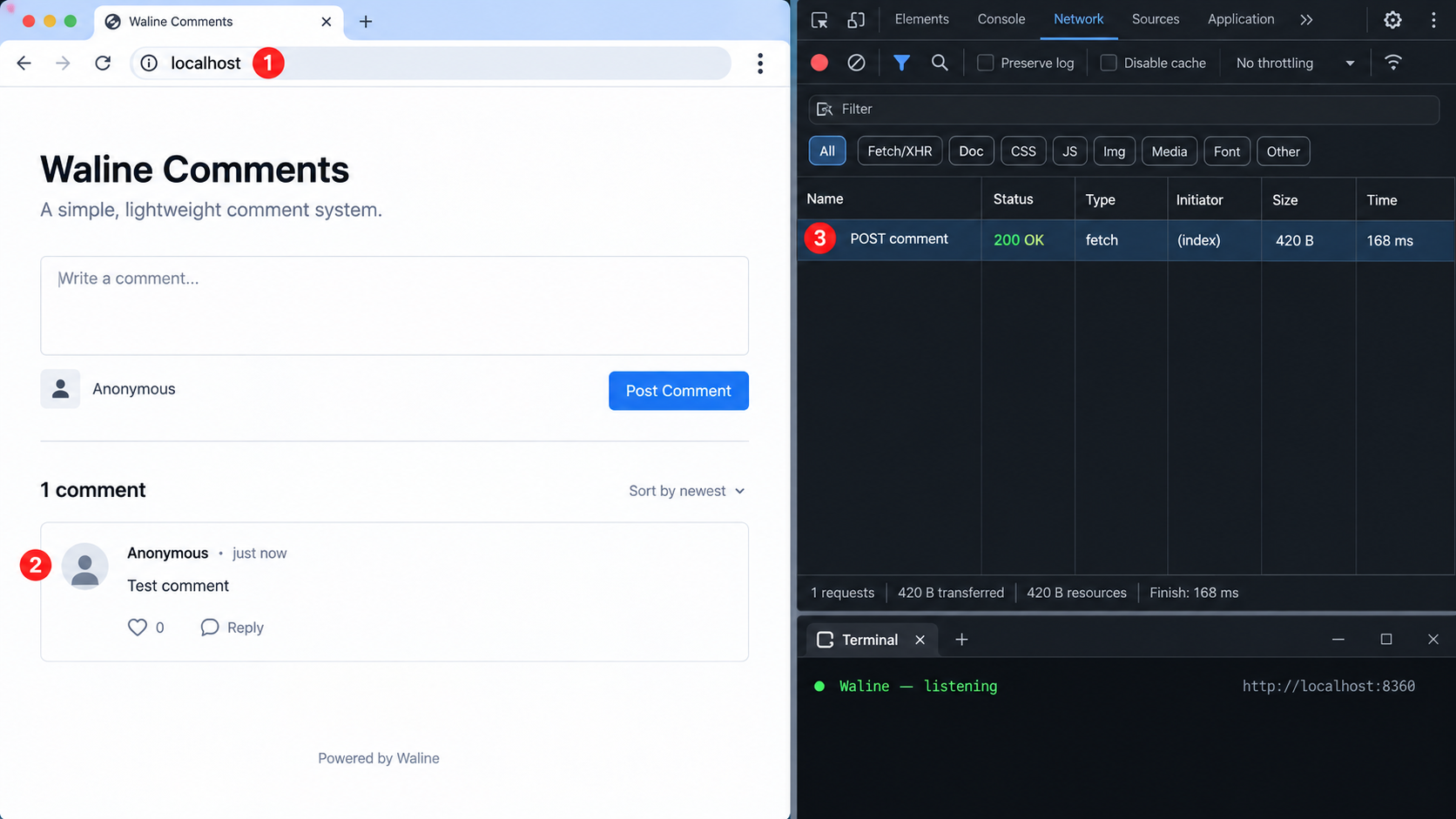
Confirm the HTTP endpoint
curl -i http://127.0.0.1:8360/
A returned HTTP response proves that the host port reaches the Waline container. If the connection is refused, inspect docker compose ps, the startup logs, and whether another process already occupies port 8360.
Register the first administrator before public exposure
Open the following address from a browser on the Waline host:
http://127.0.0.1:8360/ui/register
In a new Waline database, the first registered account becomes the administrator. Register a controlled account before publishing the endpoint. Use a strong, unique password and store it in your password manager. After registration, use the Waline management interface under /ui to confirm that the account can sign in.
Do not expose a fresh Waline installation before the intended administrator account has been created. Otherwise, an unintended visitor could reach the registration path first.
Create a local browser test page
The following page loads Waline Client v3, targets the local server, and fixes the test comment path at /localtonet-check. Create it outside the protected Waline project directory:
mkdir -p "$HOME/waline-client-test"
cd "$HOME/waline-client-test"
cat > index.html <<'EOF'
<!doctype html>
<html lang="en">
<head>
  <meta charset="utf-8">
  <meta name="viewport" content="width=device-width, initial-scale=1">
  <title>Waline local verification</title>
  <link
    rel="stylesheet"
    href="https://unpkg.com/@waline/client@v3/dist/waline.css"
  >
</head>
<body>
  <h1>Waline local verification</h1>
  <div id="waline"></div>

  <script type="module">
    import { init } from 'https://unpkg.com/@waline/client@v3/dist/waline.js';

    init({
      el: '#waline',
      serverURL: 'http://127.0.0.1:8360',
      path: '/localtonet-check',
    });
  </script>
</body>
</html>
EOF
python3 -m http.server 8080
Keep that terminal open and visit http://localhost:8080/. Serving the file over HTTP gives the page a normal browser origin. Opening it directly as a file: URL can produce different origin behavior and is not a useful test of the website integration.
The example uses the major-version URL @waline/client@v3. For a production site, install the package through your normal build system or pin a tested release instead of allowing an external major-version asset to move independently of your deployment.
Submit and retrieve a test comment
In the local test page:
- Confirm that the Waline widget loads without a browser console error.
- Enter an identifiable test nickname and comment.
- Submit the comment according to the posting policy active in your Waline configuration.
- If moderation is enabled, approve it through the administration interface.
- Reload the page and confirm that the comment is returned for
/localtonet-check.
You can also request the comments for the fixed test path from the command line:
curl --get \
  --data-urlencode "path=/localtonet-check" \
  http://127.0.0.1:8360/api/comment
The response should be valid application data rather than a connection failure or database exception. Browser submission is the primary write test because it exercises the supported Waline client, origin policy, server, and storage together.
Prove that SQLite data persists
Restart the application container and repeat the retrieval:
cd "$HOME/waline"
docker compose restart waline
docker compose ps
docker compose logs --tail=100 waline

curl --get \
  --data-urlencode "path=/localtonet-check" \
  http://127.0.0.1:8360/api/comment
Reload the browser test page as well. The test comment and administrator account should still exist. If they disappear, stop before publishing. Verify that ./data is mounted at /app/data, that SQLITE_PATH still points there, and that you restarted the same Compose project.
A stronger persistence test recreates the disposable application container while retaining the host directory:
docker compose down
docker compose up -d
docker compose logs --tail=100 waline
The data should remain because docker compose down removes the container and network but does not delete the bind-mounted ./data directory. Do not manually remove that directory.
Create a Localtonet HTTP tunnel to Waline
At this point, Waline should respond at http://127.0.0.1:8360, the intended administrator should exist, and the test comment should survive a restart. You can now publish that verified endpoint through Localtonet.
Our client establishes an outbound connection to a Localtonet relay server. You do not need inbound router port forwarding, a public IP address, VPN setup, or an inbound public firewall rule for this workflow.
Install and run the Localtonet client
Run our client on the Waline host when using the loopback-only port mapping in this guide. If it runs on another device, first adjust the Docker port binding and verify private-network access from that device.
Authenticate or select the client device
Use the device-specific authentication token through the supported client and dashboard workflow. Keep the token out of frontend code, public repositories, screenshots, and shared logs.
Select an available relay server
Choose a currently available server or region from the Localtonet dashboard. Obtain the value from the current product rather than copying a historical server code.
Create the HTTP tunnel
Select an HTTP tunnel. For a client running on the same host, enter local IP 127.0.0.1 and port 8360. Select the available Process Type that fits your public address requirements.
Start the tunnel
Creating a tunnel does not make it run. Press Start, wait for the selected client and tunnel to show as connected, and copy the assigned public HTTPS address.
Test the public endpoint
Request the assigned HTTPS address from an external network, monitor Waline's logs, and verify that the request reaches the intended container before changing the website.
HTTP Process Type options can include Random Sub Domain, Custom Sub Domain, or Custom Domain. They serve the same local Waline content at a public HTTPS address. Option and plan availability can vary. If you use a custom domain, follow the current DNS instructions shown by the dashboard rather than copying records from an unrelated example.
For the current interface and field sequence, see our HTTP tunnel documentation.
Test the public URL before editing the website
Replace the placeholder below with the public HTTPS address assigned to your running tunnel:
WALINE_PUBLIC_URL="https://your-assigned-public-host"
curl -i "$WALINE_PUBLIC_URL/"

curl --get \
  --data-urlencode "path=/localtonet-check" \
  "$WALINE_PUBLIC_URL/api/comment"
Run the same tests from a device on another network, such as a phone using mobile data. Watch the Waline logs while sending a request:
cd "$HOME/waline"
docker compose logs --follow waline
A corresponding request in the logs helps confirm that the public hostname reaches this Waline deployment rather than an unrelated local service.
Waline must remain healthy, and the selected Localtonet client must remain connected with the tunnel running. Stopping the host, Docker container, Localtonet client, network connection, or tunnel interrupts public comment access.
Connect the Waline client to the public HTTPS URL
The website's browser code must use the Localtonet public HTTPS address as Waline's serverURL. Do not place the local address 127.0.0.1:8360 in a production page. In a visitor's browser, 127.0.0.1 refers to that visitor's device, not your server.
Update the permitted website origin
Edit $HOME/waline/.env and replace the local test values with your real website. The secure domain is the website hosting the comment widget, not the Localtonet endpoint:
WALINE_SITE_NAME=Example Comments
WALINE_SITE_URL=https://www.example.com
WALINE_SECURE_DOMAINS=www.example.com
If the widget is intentionally used from more than one hostname, configure the supported comma-separated domain list for your Waline release. Include only the sites that should call the comment service. Do not use an unrestricted wildcard as a shortcut for diagnosing origin problems on a public deployment.
Recreate the container so Compose applies the changed environment:
cd "$HOME/waline"
docker compose up -d
docker compose logs --tail=100 waline
A plain restart does not reliably import edited Compose environment values into an existing container. Running docker compose up -d reconciles the service definition and recreates the container when required.
Configure the browser client
For a site that installs @waline/client through its package manager, the integration takes this form:
import { init } from '@waline/client';
import '@waline/client/style';

init({
  el: '#waline',
  serverURL: 'https://your-assigned-public-host',
});
Replace the placeholder with the exact HTTPS address from the running Localtonet tunnel. Keep the scheme as https://. A website loaded over HTTPS should not call an HTTP backend because browsers can block that request as mixed content.
If your theme already contains a Waline integration field, enter the same public HTTPS address in its server URL setting rather than initializing a second client. Avoid loading two Waline clients into the same page.
Perform the complete public comment test
- Deploy the updated frontend to the real website.
- Open the page in a private browser window or a browser with a cleared cache.
- Open developer tools and select the Network and Console panels.
- Confirm that Waline requests use the Localtonet HTTPS hostname.
- Submit an identifiable test comment.
- Approve it if the current moderation policy requires approval.
- Reload the page and confirm that the comment is retrieved.
- Open the Waline administration interface and verify that the same record is present.
- Restart the Waline container and confirm that the comment remains available.
- Delete the test content when verification is complete.
This validates the full chain: website origin, Waline browser client, public DNS and HTTPS endpoint, Localtonet tunnel, Docker host port, Waline server, and persistent SQLite data.
Interpret browser failures correctly
A browser CORS error does not normally mean that Localtonet failed to forward the connection. It means the browser did not receive an acceptable cross-origin response for the website origin. Check SECURE_DOMAINS, the exact website hostname, and whether the container was recreated after the environment file changed.
A mixed-content error means an HTTPS website attempted to contact an HTTP server URL. Use the Localtonet HTTPS address in serverURL. A request to localhost or 127.0.0.1 from a visitor's browser means the production frontend still contains a development endpoint.
Secure, back up, restart, and update Waline
Once real visitors depend on the service, treat the Docker definition, environment file, SQLite data, Waline administrator account, and Localtonet device token as production assets.
Back up the SQLite data directory
Stopping Waline briefly provides a simple, consistent file-level backup for this SQLite deployment:
cd "$HOME/waline"
mkdir -p "$HOME/waline-backups"

docker compose stop waline

tar -czf \
  "$HOME/waline-backups/waline-data-$(date +%F-%H%M%S).tar.gz" \
  data

docker compose start waline
docker compose ps
curl -i http://127.0.0.1:8360/
Back up compose.yaml and the protected .env file separately using storage appropriate for secrets. The data archive alone preserves SQLite content, but a full recovery also needs the image choice, environment settings, JWT token, site configuration, and tunnel information.
Copy backups to another system or storage location. A backup left only on the Waline host can be lost with the same disk failure that destroys the live database.
Test a restore
Restore into an isolated test directory first whenever possible. For a direct recovery on the original host, stop the service, preserve the current directory, extract the selected archive, and start Waline:
cd "$HOME/waline"
docker compose down

mv data "data.before-restore-$(date +%F-%H%M%S)"
tar -xzf "$HOME/waline-backups/selected-waline-data-backup.tar.gz"

docker compose up -d
docker compose logs --tail=100 waline
Verify administrator login, retrieve several known comment paths, and create a temporary comment. Do not delete the pre-restore directory until the restored service has been validated.
Restart after a host reboot
The Compose definition uses restart: unless-stopped. Docker can restart the container after the Docker daemon starts, unless an operator deliberately stopped it. This does not guarantee that the Localtonet client or tunnel will return to the intended state.
Perform a controlled reboot and verify each layer in order:
- The host filesystem and
$HOME/waline/dataare available. - The Docker daemon is running.
- The Waline container is running without a restart loop.
- The local endpoint responds at
127.0.0.1:8360. - The Localtonet client is connected.
- The HTTP tunnel is running.
- The public URL retrieves an existing comment.
- The production website widget loads and can retrieve comments.
Update without losing data
The latest image tag can point to a newer image after a pull. Before updating, create and test a backup, review current Waline release information, and record the image digest currently in use:
cd "$HOME/waline"

docker image inspect lizheming/waline:latest \
  --format '{{index .RepoDigests 0}}'

docker compose pull
docker compose up -d
docker compose logs --tail=100 waline
After the update, test administrator login, comment retrieval, a temporary comment submission, persistence after restart, and the public tunnel path. For stricter production change control, replace the moving tag with a tested version tag or digest obtained from the image you reviewed. Do not invent a version pin from an old tutorial.
Minimize the public surface
Publish only the Waline HTTP service required by the browser client. Do not create a separate public tunnel to the SQLite files, Docker socket, shell, or host administration interface. Localtonet provides connectivity, while Waline remains responsible for user authentication, comment policy, moderation, and administrative authorization.
Troubleshoot by testing one boundary at a time
The container exits or repeatedly restarts
Start with the earliest application error:
cd "$HOME/waline"
docker compose ps
docker compose logs --tail=200 waline
docker inspect waline --format '{{.State.Status}} {{.State.ExitCode}} {{.State.Error}}'
Check for an unwritable ./data directory, malformed environment values, image or host architecture incompatibility, and a port already in use. Confirm the host port with:
docker compose config
docker compose port waline 8360
Waline cannot write to SQLite
Confirm that the mount exists and points to the expected location:
docker inspect waline \
  --format '{{range .Mounts}}{{println .Source "->" .Destination}}{{end}}'

ls -ld "$HOME/waline" "$HOME/waline/data"
find "$HOME/waline/data" -maxdepth 2 -ls
Correct ownership or mandatory access-control rules according to the user used by the current image. Do not solve permission errors by exposing the directory to every local user. Also verify that the filesystem is writable and not full.
The local port does not respond
Check whether the container is running and whether another service uses port 8360:
docker compose ps
docker compose logs --tail=100 waline
ss -ltn | grep ':8360'
If you changed the host-side port, use that changed port in curl and in the Localtonet tunnel target. The container-side port remains the value to the right of the Compose mapping.
Waline works on the host but not from another Localtonet client device
The provided Compose definition binds to 127.0.0.1, so it intentionally accepts connections only from the Waline host. Run the Localtonet client on that same host, or change the mapping to 8360:8360 and restrict LAN access with the host firewall. Test the private endpoint from the Localtonet client device before creating the tunnel.
The public URL returns an error
Confirm that the tunnel target exactly matches the endpoint that worked locally. With the same-host setup, that target is 127.0.0.1 on port 8360. Check that Waline is running, the Localtonet client is connected, and the tunnel has been started. Follow Waline logs while making a fresh public request.
The public API works, but the widget shows a CORS or origin error
Verify that WALINE_SECURE_DOMAINS contains the website's hostname, not merely the tunnel hostname. Check the exact hostname used by the browser, including whether the site uses a www subdomain. After editing .env, run docker compose up -d so the container receives the new environment.
Inspect the browser Network panel. If the request reaches the public Waline endpoint and receives an origin-related rejection, correct Waline's allowed domain configuration. Recreating the tunnel will not repair an application origin policy.
The browser still requests localhost
The production bundle probably contains the development serverURL. Search the generated site assets and configuration for 127.0.0.1, localhost, or port 8360. Rebuild and redeploy the frontend with the Localtonet HTTPS address.
Comments disappear after the container is recreated
Verify that the active Compose project uses ./data:/app/data and SQLITE_PATH=/app/data. Check whether the container was started from a different working directory, which would make ./data resolve to another host path. Inspect the effective mount with docker inspect waline.
Also check whether the application created a new empty data directory because the original storage was unavailable during startup. Stop writing new comments until you identify the correct data directory and recover it safely.
Registration or posting behaves differently from the tutorial
Waline's moderation, registration, spam protection, content verification, and optional integrations can change the visible flow. Review the active Waline settings and logs. A comment awaiting moderation may have been stored successfully even though it is not yet visible to ordinary visitors.
The public service stops working after a reboot
Test the dependency chain in order: Docker daemon, Waline container, SQLite data mount, local HTTP endpoint, Localtonet client, tunnel state, public URL, and browser widget. A healthy tunnel cannot serve a stopped Waline container, and a healthy container cannot be reached through a disconnected client.
Verify persistent storage, then Waline inside Docker, then the host-side port, then reachability from the Localtonet client, then the public tunnel URL, and finally the website widget. The first failing boundary usually identifies the responsible configuration layer.
Frequently asked questions
Which Docker image and port does this tutorial use?
It uses the official lizheming/waline:latest image and maps container port 8360 to 127.0.0.1:8360 on the host. For controlled production updates, record the working digest and pin a tested version or digest after reviewing the corresponding Waline release.
Do I need to import a SQL schema for this SQLite deployment?
No separate SQL import is required for the Docker and SQLite path shown here. Waline initializes its SQLite storage under the directory selected by SQLITE_PATH. Validate initialization by creating an administrator, submitting and retrieving a comment, and confirming that the data survives container recreation.
Why is Waline bound to 127.0.0.1?
A loopback binding limits direct access to the host and works when the Localtonet client runs on that same machine. If the client runs elsewhere, publish the port on a private interface and restrict access with local firewall rules before targeting the host's private IP address.
Should I expose SQLite through Localtonet?
No. Expose only the Waline HTTP endpoint. The SQLite files should remain on protected local storage and should be accessed by Waline, not by website visitors or a public tunnel.
What value belongs in the Waline client serverURL setting?
Use the public HTTPS address assigned to the running Localtonet HTTP tunnel. Do not use localhost or 127.0.0.1 in a production website because those addresses refer to each visitor's own device.
Is SECURE_DOMAINS the Localtonet hostname?
It normally identifies the frontend website hostname permitted to call Waline. For example, if the widget appears on www.example.com, that website hostname belongs in the allowed domain configuration. The Localtonet address remains the client's serverURL.
Do I need router port forwarding or a public IP address?
No. The Localtonet client establishes an outbound connection to our relay server. This workflow does not require inbound router port forwarding, a public IP address, VPN setup, or an inbound public listener on the Waline host.
Does creating the Localtonet tunnel start it automatically?
No. Creation and execution are separate lifecycle actions. After creating the HTTP tunnel, press Start. The endpoint is available only while the selected client is connected and the tunnel is running.
Does Localtonet replace Waline moderation or authentication?
No. Localtonet provides public connectivity to the HTTP service. Waline remains responsible for registration, login, administrator access, comment policy, moderation, anti-spam controls, and content handling.
Publish your verified Waline service with Localtonet
After the local widget can submit and retrieve a persistent comment, create a Localtonet HTTP tunnel to port 8360, start it, and use the assigned HTTPS address as the Waline client's server URL.
Get Started Free →

