

Run ServerBee directly on Linux, verify its real-time dashboard locally, and provide remote access without opening an inbound router port
ServerBee combines a central monitoring server, an embedded web interface, SQLite storage, and WebSocket-based communication. This guide installs the central server as a supported native Linux binary, explains where its configuration and generated administrator credential are exposed, verifies the dashboard on port 9527, and covers enrollment, upgrades, backup planning, and troubleshooting. After the local installation works, we connect it to an HTTP tunnel with Localtonet and verify the complete route, including ServerBee's required WebSocket behavior.
📋 What's in this guide
How the ServerBee deployment works
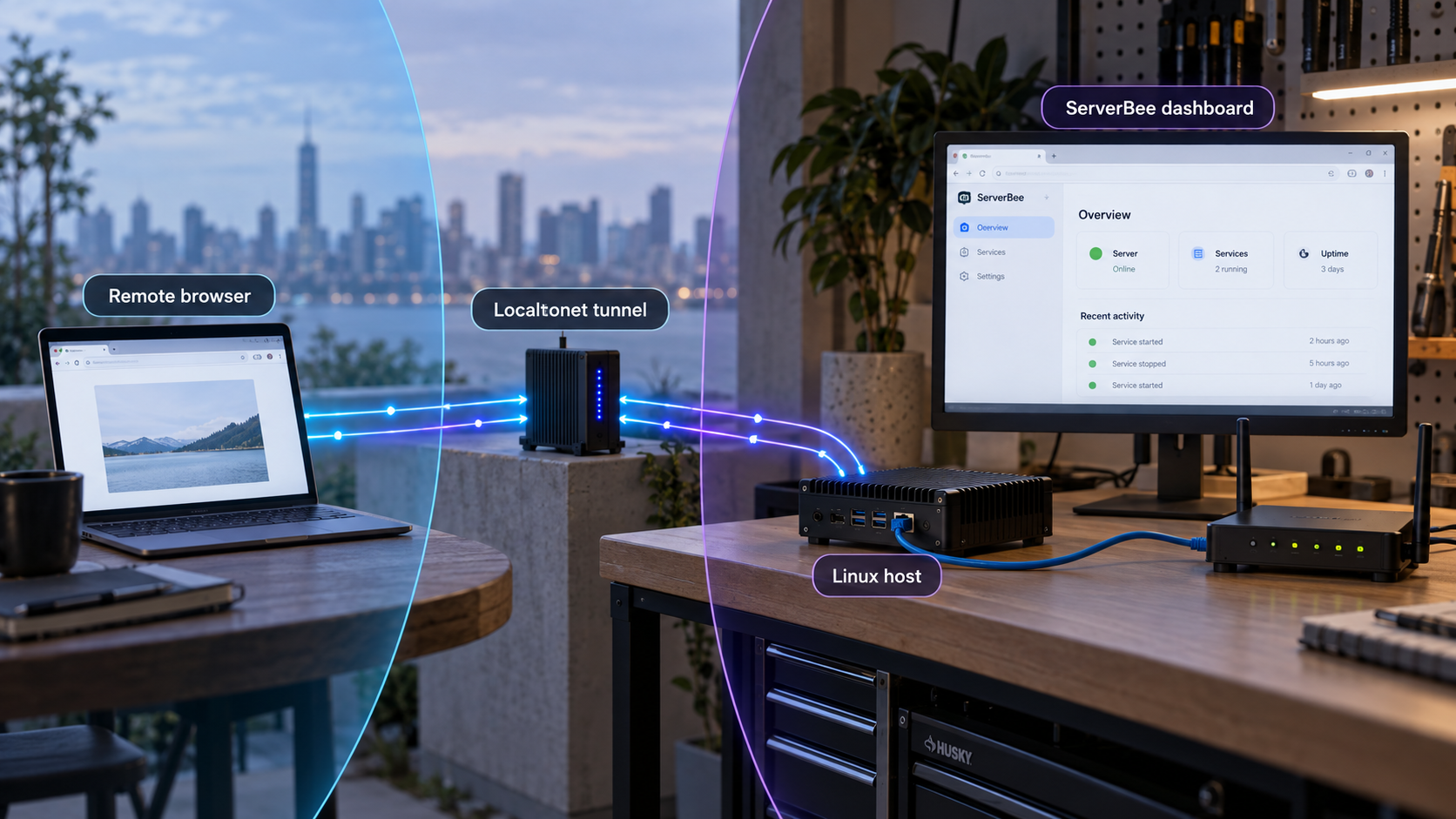
ServerBee is a self-hosted monitoring platform built around a central server and lightweight agents. The central server receives metrics from enrolled agents over WebSocket connections, stores data in embedded SQLite, and serves a real-time web dashboard. The available monitoring data includes CPU, memory, disk, network, load, temperature, disk I/O, and optional NVIDIA GPU metrics when an agent is built with the project's GPU feature. Prebuilt agent binaries do not include that optional GPU support.
This tutorial runs the central server as a native Linux binary. ServerBee supports both Docker and native binary installation for the server, although the project recommends Docker for that role. A native installation can still be appropriate when you want systemd to manage the service directly, do not want a container runtime on the monitoring host, or prefer to inspect the binary, configuration, and service state through ordinary Linux tools.
The documented default listener is 0.0.0.0:9527. On the ServerBee machine itself, the dashboard can normally be reached at:
http://127.0.0.1:9527
On another device that already has network access to the host, the corresponding address is normally http://SERVER_ADDRESS:9527. That does not mean port 9527 is automatically reachable from the internet. Host firewalls, cloud network controls, NAT, and router configuration can all prevent inbound access. Directly publishing an administrative monitoring interface through a router port-forwarding rule may also create unnecessary exposure.
With Localtonet, our client runs on the ServerBee host or another device that can reach it. The client establishes an outbound connection to a Localtonet relay server. An HTTP tunnel then supplies a public URL that forwards requests to the configured local IP address and port. This approach does not require inbound router port forwarding, an inbound firewall change, VPN setup, or a public IP address. The endpoint remains available only while the selected Localtonet client is connected and the tunnel is running.
serverbee management CLI at /usr/local/bin/serverbee.
ServerBee explicitly supports --method docker|binary for its central server, but its repository recommends Docker for that role. This guide intentionally uses the supported binary method. If your environment requires container isolation or image-based deployment, follow the project's Docker workflow instead of translating these native instructions into unverified container commands.
Prerequisites and deployment decisions
Prepare a Linux host on which you can run commands through sudo or an equivalent privileged session. The native installer creates a systemd-managed deployment, so this workflow assumes systemd is available. The host also needs outbound HTTPS connectivity to retrieve the installer and ServerBee release artifacts.
The available project material does not establish a complete list of supported Linux distributions, processor architectures, minimum kernels, memory requirements, or disk requirements. Do not guess a release asset if the installer rejects the host. Let the current official installer evaluate the machine, and stop if it reports an unsupported operating system or architecture.
Prepare the following:
- A Linux server or virtual machine using systemd.
- Administrative access through
sudoor an equivalent root session. curlfor retrieving the installer and testing the local endpoint.- Outbound HTTPS access to the official ServerBee repository and release files.
- Persistent local storage for configuration, logs, and SQLite-backed monitoring data.
- A browser for signing in and verifying real-time dashboard behavior.
- A Localtonet account and connected client if remote access is required.
Review the current ServerBee documentation and the official ServerBee installation script before running the installer in a sensitive environment. The project is under active development, so installation behavior and available management operations can evolve.
Decide how agents will reach the central server before enrolling them. Agents require a server URL that remains reachable after initial enrollment. Private-network agents may use a stable internal address. Remote agents can use another controlled route, including a Localtonet public address, but that makes continued tunnel availability part of the monitoring design.
| Decision | Choice used here | Operational effect |
|---|---|---|
| Server deployment | Native binary | The service runs directly on Linux and is managed through systemd and the installed serverbee CLI. |
| Default listener | 0.0.0.0:9527 |
The service accepts connections through available IPv4 interfaces where host and network policy allow them. |
| Persistent data | /var/lib/serverbee in the minimum configuration |
This directory contains server state and must be handled carefully during backup, restoration, and migration. |
| Remote browser access | Localtonet HTTP tunnel | The public address forwards to ServerBee without requiring an inbound router port-forwarding rule. |
| Agent enrollment | Dashboard-generated command | The server-bound offer is single-use and expires in about ten minutes. |
The quick-start command pipes a remotely downloaded script into a privileged shell. That is convenient, but the retrieved script can make system-level changes. In security-sensitive environments, download and inspect the current installer from the official repository before executing it. Do not replace the repository URL with an untrusted mirror.
Install the ServerBee server as a native binary
The official installer accepts a component and an installation method. For this tutorial, the component is server and the method is binary. Supplying the method explicitly prevents the interactive installer from selecting Docker.
Open an administrative shell on the central host
Connect to the Linux machine that will store ServerBee's persistent data and serve the dashboard. Confirm that it is the intended monitoring host before making system-level changes.
Run the official installer in binary mode
Retrieve the installer from the ServerBee repository and explicitly select the central server and native binary installation method.
Check the installed service state
Use the installed management CLI to confirm that the central server is active before trying to open the dashboard or create a public tunnel.
Retrieve the generated administrator password
When no administrator password is configured, ServerBee generates one and writes the credentials banner to the server's startup log. Retrieve it from that log, store it securely, and change it after the first login.
Run the supported binary installation command:
curl -fsSL https://raw.githubusercontent.com/ZingerLittleBee/ServerBee/main/deploy/install.sh | sudo sh -s -- server --method binary
The installer places the serverbee management CLI at /usr/local/bin/serverbee and arranges for systemd to manage the installed service. Read the complete installer output rather than assuming that release numbers, downloaded artifacts, or status messages will remain unchanged.
Check the installed components:
sudo serverbee statusDo not create the Localtonet tunnel if the central service is inactive or failed. A tunnel cannot repair a service that did not install, cannot read its configuration, or is not listening on the expected port.
Find the generated administrator credential
ServerBee generates an administrator password when the configured password is empty. The project specifies that this credential is printed to the server's startup log. It should not be assumed to appear only in the interactive installer output, especially when systemd starts or restarts the service after installation.
The current documentation identifies the native service as serverbee-server.service. On a systemd host, inspect its startup log with:
sudo journalctl -u serverbee-server.service --no-pager
Look for the initial credentials banner generated during first startup. If the installed release uses a different unit name, use sudo serverbee status to identify the installed component and inspect that unit's startup log instead of guessing. After obtaining the credential, avoid leaving copied log output in shell transcripts, tickets, or shared messages.
Do not publish complete startup logs or screenshots without removing the generated administrator credential. Store the password in a password manager, sign in through a trusted route, and replace it during the first administrative session.
Understand and configure the native service
The documented native-server configuration file is /etc/serverbee/server.toml. ServerBee also supports environment variables prefixed with SERVERBEE_. Nested settings use two underscores as separators. For example, SERVERBEE_AUTH__MAX_SERVERS represents a nested authentication setting.
Consult the current ServerBee configuration reference before adding settings beyond the minimum configuration. A basic server configuration has this form:
[server]
listen = "0.0.0.0:9527"
data_dir = "/var/lib/serverbee"

[admin]
password = ""
The listen value selects the address and port accepted by the central server. The data_dir value identifies the persistent data location. Leaving the initial administrator password empty instructs ServerBee to generate it and write the credentials banner to the startup log.
Do not overwrite an installer-generated configuration blindly. First inspect the active configuration using the installed management interface:
sudo serverbee configThe management command supports viewing and setting configuration. Its prompts and available settings can change between ServerBee releases, so follow the current command output rather than applying undocumented flags from an older example.
Choose the listener address deliberately
A listener of 0.0.0.0:9527 allows ServerBee to accept connections through the host's IPv4 interfaces, subject to firewall and network policy. This is useful when agents on other machines connect directly to the central server over a private network. It can also expose the dashboard more broadly than intended when host or cloud firewall rules are permissive.
A loopback listener such as 127.0.0.1:9527 limits direct connections to software running on the same host. That can be appropriate when all browser and agent traffic intentionally enters through a local proxy or tunnel client. It also prevents agents on other machines from connecting directly to port 9527.
Select the listener based on the complete topology. Do not change it to loopback merely because the Localtonet client runs locally if private agents still need direct network access.
Apply and validate configuration changes
Restart ServerBee after changing a setting that requires the service to reload:
sudo serverbee restartThen confirm its state:
sudo serverbee statusIf startup fails after an edit, restore the previous known-good configuration. Invalid TOML, incorrect section names, malformed quotations, inaccessible data directories, and unavailable listener addresses can all prevent a service from starting. Change one group of settings at a time so failures remain easy to isolate.
Verify ServerBee locally before exposing it
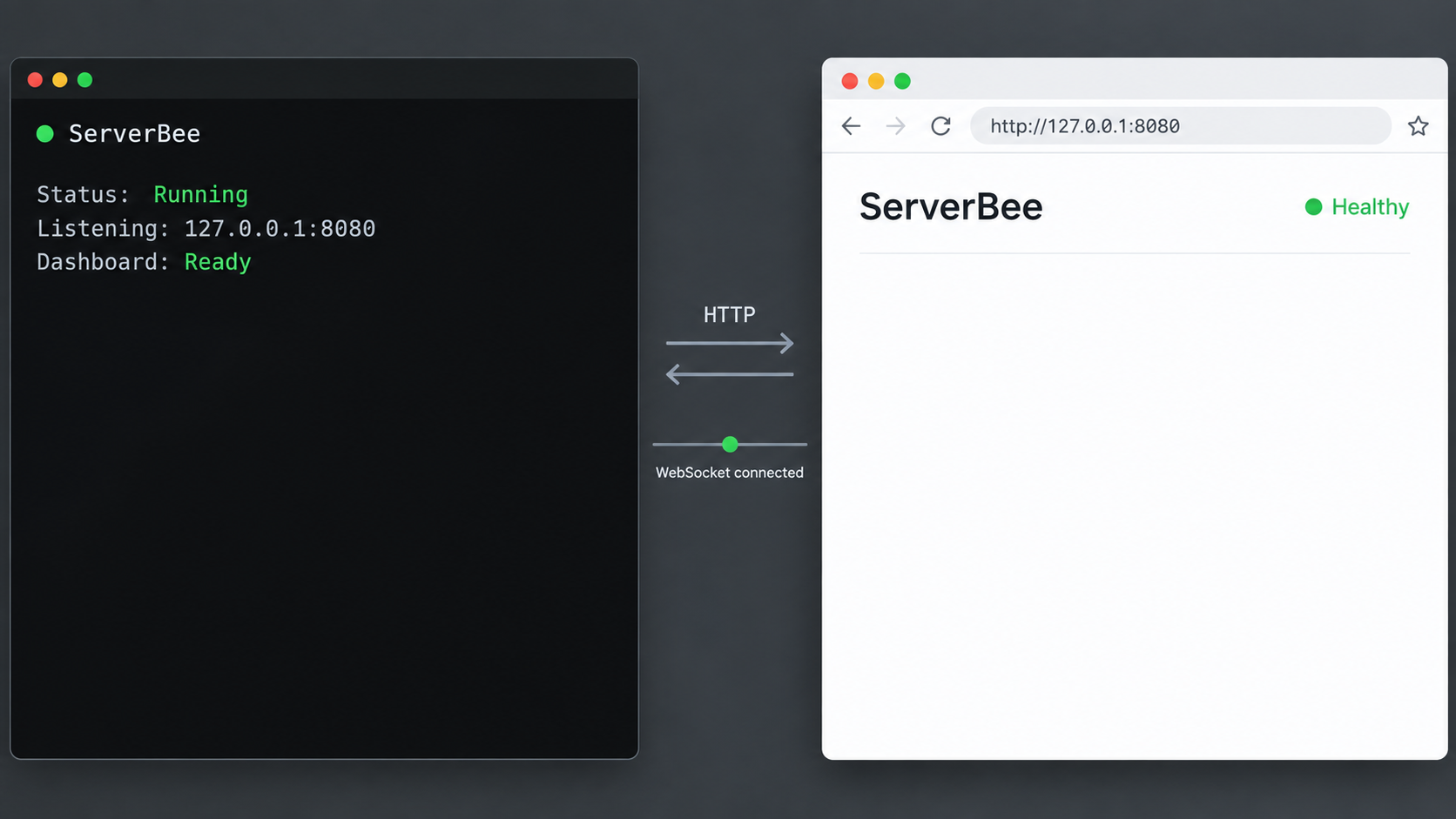
Local verification separates ServerBee failures from remote-routing failures. A healthy central service should answer on port 9527 before the Localtonet client becomes involved. Start on the ServerBee machine so that routing, NAT, and external filtering cannot obscure the result.
Confirm that the service is active
Run sudo serverbee status. Resolve an inactive or failed server component before proceeding.
Request the local HTTP endpoint
Send a request to http://127.0.0.1:9527/. A returned HTTP response confirms that a process is accepting requests at the expected local target.
Open the dashboard in a browser
Use the loopback address from a browser on the host, or use the host's private address from a trusted device already permitted to reach port 9527.
Sign in and replace the generated password
Use the credential from the startup log, replace it during the first session, and confirm that the dashboard remains connected and updates normally.
Test the local endpoint with:
curl -v http://127.0.0.1:9527/The response body can change between releases. The important result is that the TCP connection succeeds and ServerBee returns an HTTP response. A connection-refused error usually means nothing is listening at that address and port. A timeout from another device can indicate an incorrect address, network filtering, or a routing problem.
If the service is active but the request fails, confirm which sockets are listening. On Linux systems that provide ss, use:
sudo ss -ltn
Find port 9527 and compare its bound address with the URL being tested. A socket bound to 127.0.0.1:9527 accepts only same-host connections. A socket bound to 0.0.0.0:9527 can accept connections through the host's IPv4 interfaces where network policy permits them.
ServerBee uses WebSockets for live dashboard updates and agent communication. Initial HTML can load even if another component later in the route mishandles a WebSocket connection. After signing in, confirm that values and connection states update without repeated disconnections.
Enroll agents and perform routine operations
After the central service is healthy, sign in as an administrator and choose Add Server. ServerBee generates an installation command containing a server-bound enrollment offer. The offer is single-use and expires in about ten minutes, so generate it only when you are ready to install the target agent.
The documented command has this structure:
curl -fsSL https://raw.githubusercontent.com/ZingerLittleBee/ServerBee/main/deploy/install.sh | sudo sh -s -- agent --method binary \
  --server-url http://YOUR_SERVER:9527 \
  --enrollment-code YOUR_ONE_TIME_CODE
This block explains the command structure. It is not a reusable enrollment command. Copy the current command from your own dashboard so that it contains the intended server URL and a fresh one-time code. Do not guess either value or reuse one offer across multiple machines.
The project recommends a native binary for agents because it provides host-level metrics with the smallest documented deployment footprint. Docker agents are also supported, but container isolation changes which host resources are visible. Prebuilt agents exclude optional NVIDIA GPU metrics; that feature requires a self-built agent with the project's GPU feature enabled.
During initial enrollment, the agent generates and persists its run token before claiming the offer. The one-time enrollment code is used only for that first claim. The agent then uses its own persisted token when reconnecting. Never clone an enrolled agent's token onto another machine.
Use the installed management CLI
The native installation provides these documented lifecycle commands:
sudo serverbee status
sudo serverbee restart
sudo serverbee config
Select an upgrade channel explicitly
Current ServerBee installer behavior recognizes auto, stable, and beta release tracks. The repository also documents an unqualified upgrade command:
sudo serverbee upgrade -yThat command means upgrade to the latest release selected by the CLI's current default or previously resolved channel behavior. The available evidence does not justify describing every unqualified invocation as a forced stable-channel upgrade. If you need a specific track, select it explicitly rather than relying on an assumption about the default:
sudo serverbee upgrade --channel stable -y
sudo serverbee upgrade --channel beta -y
The auto track is also accepted by the current installer and upgrade tooling, but its exact resolution can depend on current project behavior. Use stable when your policy requires the stable track, and use beta only when you intentionally accept prerelease software.
Back up recoverable state before an upgrade, review the selected release track, and verify the dashboard and connected agents afterward. Do not install a beta release on an operational monitoring server solely because it has a newer version number.
Uninstall only the intended component
The project documents this command for removing an agent:
sudo serverbee uninstall agent -y
The supplied primary documentation does not establish the exact current central-server uninstall command or whether a server removal automatically preserves or deletes every item in its data directory. Do not replace agent with server by assumption. Inspect the current CLI help and preserve the configuration and persistent data before attempting central-server removal.
Back up and restore ServerBee safely
ServerBee's repository lists backup and restore as management capabilities, but the available current evidence does not provide the exact native CLI commands, arguments, archive format, destination behavior, or version-compatibility rules. This guide therefore does not invent a serverbee backup or serverbee restore command.
Before relying on a built-in procedure, inspect the current management CLI and documentation for the installed version. Record the exact command, resulting files, and supported restoration target in your operational runbook. Test restoration on a non-production instance before treating any backup job as complete.
Account for configuration and persistent data
A recoverable native deployment should account for at least:
- The effective server configuration, normally associated with
/etc/serverbee/server.toml. - The configured persistent data directory, shown as
/var/lib/serverbeein the minimum configuration. - Any environment-based settings supplied outside the TOML file.
- The installed ServerBee version and selected release channel.
- Credential-handling and post-restore validation procedures.
Do not assume that copying a live SQLite directory is consistent
SQLite can have active transactions and auxiliary files while ServerBee is running. Copying only the main database file, or copying a changing data directory without a documented snapshot method, can produce an inconsistent backup. The precise safe online-backup procedure depends on how the installed ServerBee release uses SQLite and whether its built-in backup operation coordinates with active writes.
Prefer the project's documented backup function when its exact commands are available for your installed version. If you must use a filesystem-level backup and do not have a storage snapshot mechanism with established application-consistency guarantees, schedule downtime, stop or otherwise quiesce ServerBee using the project's supported service controls, capture the complete configured data directory and configuration, and restart the service afterward. Do not present an untested live file copy as a reliable backup.
Validate restoration instead of only validating archive creation
A backup is useful only if it can be restored. In an isolated test environment, restore according to the procedure supported by the same ServerBee version, start the service, and verify:
- The service starts without configuration or database errors.
- The administrator can sign in using the expected recovery process.
- Monitored servers and historical information appear as expected.
- Agents can reconnect without cloning or exposing their tokens.
- Dashboard and agent WebSocket connections remain stable.
Restoring data into an older binary can be unsafe if a newer release changed its database schema. Use a documented, version-compatible restore path. Do not downgrade by replacing only the executable unless ServerBee explicitly supports that path for the versions involved.
Expose the verified dashboard with Localtonet
Configure remote access only after ServerBee works locally. The Localtonet client must run on the ServerBee machine or on another device that can reach ServerBee's configured IP address and port. Running both on the same host allows the tunnel to target 127.0.0.1:9527.
An HTTP tunnel is appropriate because ServerBee presents a browser-based HTTP application. Localtonet HTTP tunnels can use Random Sub Domain, Custom Sub Domain, or Custom Domain process types, depending on the options available for the deployment. Each process type serves the configured local content through a public HTTPS address.
The current product workflow separates tunnel creation from tunnel startup. Creating or saving a tunnel does not make it active. The selected device must be connected, and you must start the tunnel before the assigned public address works.
Install and run the Localtonet client
Install the current Localtonet application on the ServerBee host or another device that can reach it. Run the client before configuring the tunnel.
Authenticate and select the intended device
Use the device-specific authentication token supplied through your Localtonet account. Keep it private and confirm that the correct client device is connected.
Select an available relay server
Choose a relay server or region from the values currently offered in the dashboard. Do not copy a hardcoded server code from an old tutorial because availability can change.
Create the HTTP tunnel configuration
Select the HTTP tunnel family, choose the required process type, and set the local target. For a same-host deployment, use local IP 127.0.0.1 and local port 9527.
Start the tunnel
Use the Start action after reviewing the selected device, relay, process type, local IP address, and local port. The assigned public address becomes available only while the tunnel is running and its client remains connected.
Test the assigned public address
Open the public HTTPS URL, sign in, and verify ordinary page navigation, real-time dashboard updates, and any agent route that depends on this address. Stop or delete the tunnel when it is no longer required.
For a same-host deployment, the essential target values are:
Tunnel family: HTTP
Local IP:      127.0.0.1
Local port:    9527
If the Localtonet client runs on another machine, do not use 127.0.0.1. On that client machine, loopback points back to the client itself. Use a private ServerBee address that the client can actually reach, and test that address from the client device before starting the tunnel.
Follow the current Localtonet HTTP tunnel documentation for the latest dashboard fields and available process types. This guide intentionally does not hardcode a relay code, device token, custom-domain DNS value, or plan-specific capability.
Verify ServerBee's WebSocket requirements through the final route
ServerBee's reverse-proxy documentation identifies /api/ws/ and /api/agent/ws as WebSocket routes that must work through the deployed route. These are ServerBee application requirements, not a separate Localtonet configuration claim. If you insert Nginx, Caddy, a load balancer, or another reverse proxy between the Localtonet client and ServerBee, that intermediary must preserve the WebSocket Upgrade and Connection behavior and allow a suitably long read timeout.
Validate the final public route in layers:
- Open the assigned public HTTPS address and confirm that the login page appears.
- Sign in and navigate between dashboard views.
- Confirm that metrics update without manually refreshing the page.
- Watch for repeated connected and disconnected state changes.
- Use browser developer tools to inspect WebSocket requests if live behavior fails.
- If agents use the public URL, verify both initial enrollment and sustained connectivity.
- Test terminal or other privileged real-time functions only after granting the minimum necessary ServerBee capabilities.
A normal HTTP response proves that the public URL reaches ServerBee, but it does not prove that long-lived application connections are healthy. Verify the browser workflow associated with /api/ws/ and, when agents use the public endpoint, the agent workflow associated with /api/agent/ws through the complete final route.
Secure the dashboard and remote workflow
A ServerBee dashboard contains infrastructure information and can provide administrative functions. Depending on enabled capabilities, the platform supports browser terminals, file management, Docker operations, firewall controls, and remote commands. Publishing its login page deserves the same care as publishing any privileged operations console.
Replace the generated administrator password during the first session. ServerBee supports OAuth, TOTP two-factor authentication, administrator and member roles, audit logs, and agent-owned capability gates. Apply those controls according to your deployment. Do not rely on the obscurity of a generated public hostname.
Enrollment codes are server-bound, single-use, and valid for about ten minutes, but they remain credentials while active. Do not store them in permanent scripts, documentation, screenshots, issue reports, or ticket history. Generate an offer immediately before installation and issue a new one if the original expires or may have been disclosed.
A Localtonet tunnel removes the need for inbound port forwarding, but it does not replace ServerBee authentication, authorization, or capability controls. Anyone who can reach the public URL can attempt to access the exposed login surface. Keep ServerBee updated on an intentional release track, review audit activity, disable unused capabilities, and protect every credential involved.
If remote agents use the public tunnel as their central-server route, stopping the tunnel also interrupts those agents. In that topology, tunnel availability is part of the monitoring design. If agents connect through a private network and only administrators use the public URL, stopping the tunnel can remove browser access without interrupting private agent connections.
Troubleshoot installation, dashboard, and tunnel problems
The installer does not complete
Confirm that the host is Linux, uses systemd for this workflow, has curl, can reach the official repository over HTTPS, and permits the requested administrative operation. Read the installer's error instead of manually selecting an unverified binary asset. The available project evidence does not define every supported distribution and architecture, so do not bypass an explicit compatibility failure by guessing.
Preserve existing configuration and data before rerunning the installer on a host that already contains a deployment. The current project describes safer reruns, atomic configuration writes, and recovery behavior for failed installations, but that does not remove the need for a tested backup.
The administrator password is not in the installer output
The generated credential is written to the server's startup log. It is not safe to assume that it will always remain visible in the interactive installer output. Inspect the systemd journal for the installed server unit:
sudo journalctl -u serverbee-server.service --no-pager
If that unit name is not present, run sudo serverbee status and identify the server component installed by the current release. Do not repeatedly reinstall merely to generate another password before checking the startup log.
The management command reports an inactive service
Begin with:
sudo serverbee statusIf the failure followed a configuration change, restore the last known-good TOML and restart:
sudo serverbee restart
sudo serverbee status
Review the listener syntax, data-directory path, TOML section names, and quotation marks. Avoid changing the listener, storage location, and administrator settings simultaneously because multiple changes make the failure harder to isolate.
Port 9527 refuses a local connection
Verify that the server is active and that its configured listener still uses port 9527:
curl -v http://127.0.0.1:9527/
sudo ss -ltn
If ServerBee listens on another address or port, test that configured endpoint. If the Localtonet client runs on a different device, remember that 127.0.0.1 on the client does not refer to the ServerBee host.
The public URL shows a gateway or connection error
Reconfirm the local ServerBee endpoint first. Then confirm that the intended Localtonet device is connected, the correct relay and target are selected, and the HTTP tunnel has been started. Creating the tunnel without starting it does not make the public endpoint available. The route also becomes unavailable when its selected client disconnects.
If the client runs on another host, request http://SERVER_ADDRESS:9527 from that client host. Local success on the ServerBee machine does not prove that a separate tunnel client can reach the service.
The page loads but metrics do not update
This narrows the problem toward real-time communication rather than basic HTTP reachability. Inspect WebSocket activity associated with /api/ws/. If Nginx, Caddy, a load balancer, or another application proxy is also present, confirm its WebSocket Upgrade and Connection handling and read-timeout settings.
Test the same dashboard directly through the local ServerBee address. If real-time behavior also fails locally, troubleshoot ServerBee before changing the Localtonet configuration. If it works locally but fails through the public address, inspect each intermediary in the final route.
Agents cannot enroll or remain connected
Generate a fresh command from Add Server. An enrollment offer expires after about ten minutes and can be used only once. Confirm that the agent host can reach the exact server URL contained in the command. If it uses the Localtonet address, the selected client and tunnel must remain active during enrollment and subsequent operation.
Do not reuse one enrollment offer across hosts. Each agent should claim its own offer and persist its own run token. For later disconnections, check continued reachability and the route associated with /api/agent/ws.
An upgrade installs an unexpected release
Check which channel was selected. The current tooling recognizes auto, stable, and beta. An unqualified serverbee upgrade -y should not be described as always forcing stable behavior. Select --channel stable or --channel beta explicitly when the release track matters.
If a new release is incompatible with your environment, use a documented recovery or restoration path. Do not replace only the executable or restore a database into an older version unless the project confirms that the specific downgrade is supported.
Frequently asked questions
Does ServerBee support a native binary for the central server?
Yes. The official installer supports both Docker and binary methods for the central server. Docker is the project's recommended server deployment, but the native binary method used here is explicitly supported.
Where is the native ServerBee management CLI installed?
The installer places the serverbee management CLI at /usr/local/bin/serverbee. It provides documented operations for status, restart, configuration, upgrades, and agent removal.
Where can I find the generated administrator password?
When the configured password is empty, ServerBee writes the generated credential to the central server's startup log. For the documented native systemd service, inspect the journal for serverbee-server.service. Do not assume the credential will always remain visible in the interactive installer output.
What port does ServerBee use by default?
The documented default listener is 0.0.0.0:9527. A same-host browser or Localtonet client can normally use http://127.0.0.1:9527, provided the configuration has not changed.
Does the unqualified upgrade command always select the stable channel?
That should not be assumed. Current tooling recognizes auto, stable, and beta. Use --channel stable or --channel beta explicitly when your release policy requires a particular track.
Can I back up ServerBee by copying its live data directory?
Do not assume that an ordinary live copy is consistent. ServerBee uses embedded SQLite, which can have active transactions and auxiliary files. Prefer the documented backup function for your installed release. If exact online-backup instructions are unavailable, use an established application-consistent snapshot method or quiesce the service before capturing the complete data directory and configuration.
Does exposing ServerBee with Localtonet require router port forwarding?
No. Our client establishes an outbound connection to a Localtonet relay server. The HTTP tunnel can provide a public address without an inbound router port-forwarding rule, inbound firewall change, VPN setup, or public IP address.
Why can the page load while live data remains disconnected?
Ordinary HTTP can succeed while a WebSocket connection fails. ServerBee identifies /api/ws/ and /api/agent/ws as required WebSocket routes. Test live dashboard updates and agent connectivity through the final route, and inspect any additional reverse proxy for correct WebSocket handling.
Can remote agents connect through the Localtonet public URL?
An agent needs a reachable central-server URL that supports its required communication. If you use the Localtonet public address for that purpose, verify both enrollment and sustained agent connectivity. The selected Localtonet client and tunnel must remain running for those agents to stay connected.
Will the public dashboard remain available if the Localtonet client stops?
No. The tunnel is available only while its selected client is connected and the tunnel is running. ServerBee can remain healthy locally while its public Localtonet address is offline.
Connect your verified ServerBee dashboard with Localtonet
Install ServerBee, retrieve its initial credential from the startup log, and verify the service, dashboard, and real-time behavior locally. Then create a Localtonet HTTP tunnel from the same host or another device that can reach it, start the tunnel, and test the complete public route before depending on it.
Get Started Free →

