

Make remote media previews faster without letting stale files, private responses, or hidden application defects mislead reviewers
A media-heavy application can feel instant on localhost but slow down when every image, video, audio file, or document repeatedly travels through a developer's upload connection. Selective HTTP caching reduces unnecessary transfers, but an overly broad policy can conceal updates, retain sensitive responses, and make a preview behave unlike the application under test. This guide explains the cache boundary, provides a complete Python reference server with validators and byte-range support, verifies it locally and through a Localtonet HTTP tunnel, and covers bypass, invalidation, routine operation, and cleanup. Localtonet supplies the public route to the local service, while the application and any separately configured cache remain responsible for response policy.
📋 What's in this guide
Understand the preview architecture before adding a cache
A typical remote preview begins with an application listening on a local IP address and port. The Localtonet client runs on a device that can reach that application, establishes an outbound connection to one of our relay servers, and provides a public URL for an HTTP tunnel. A reviewer requests that URL, and the request reaches the local service through the running tunnel. This avoids inbound router port forwarding, direct firewall changes, VPN setup, and the need for a public IP address.
That public route does not by itself determine whether a browser, service worker, reverse proxy, or CDN may store a response. HTTP caching is controlled primarily by the response metadata emitted by the application and by any deliberately configured cache between the browser and origin. Localtonet should therefore be treated as the transport path in this design, not as an implicit media cache.
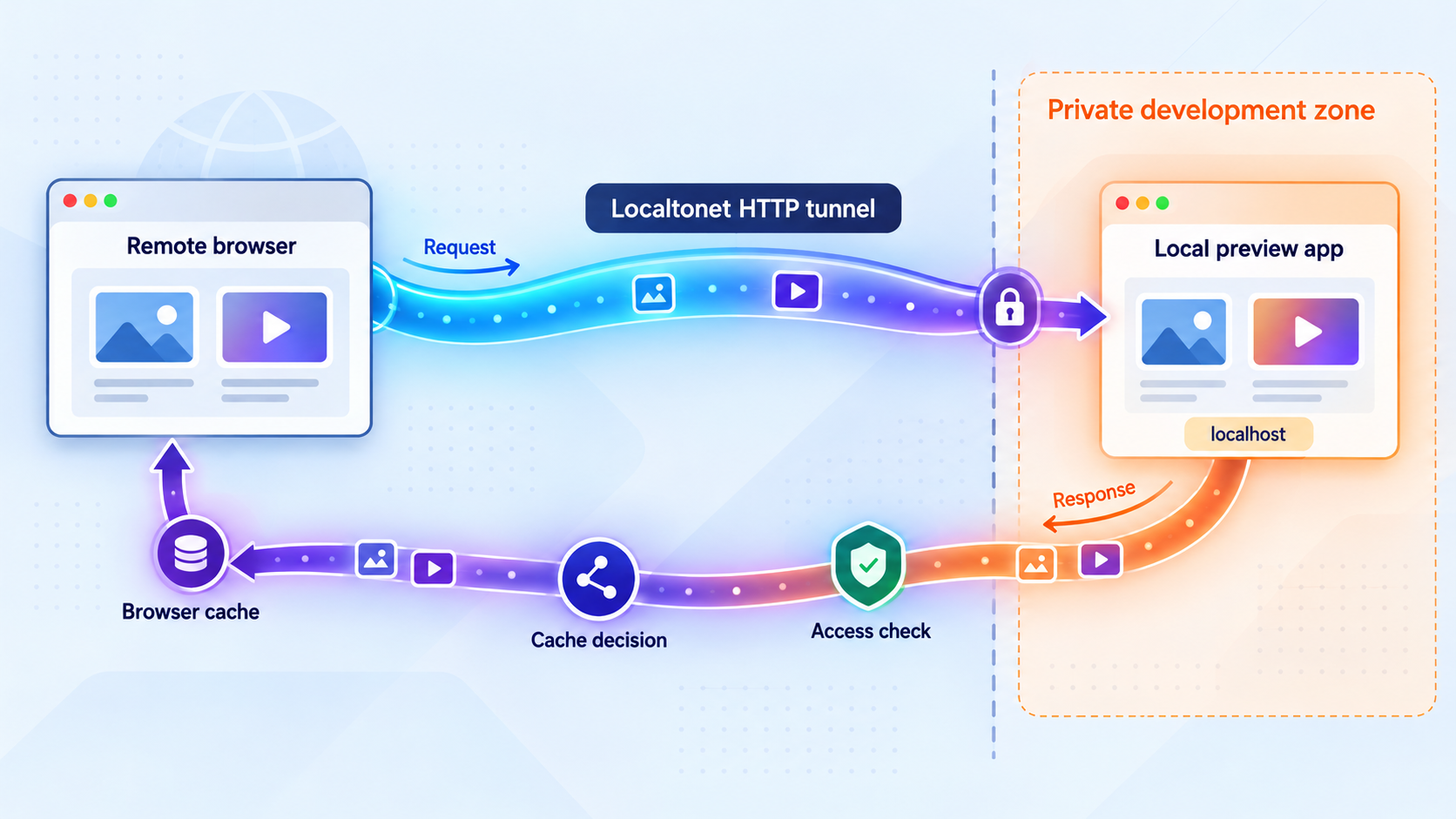
This separation of responsibilities matters during diagnosis. If a stale image appears, investigate the requested URL, origin headers, browser cache, service worker, and any separately configured shared cache. Do not assume that the tunnel transformed the asset. Likewise, adding a public tunnel does not make an application response safe to cache. Authorization, tenant isolation, cookies, content sensitivity, and update behavior remain application concerns.
Caching helps most when the same large, unchanged object is requested repeatedly. A replayed video, a font used on every page, or a stable image opened by several reviewers can be a good candidate. Server-rendered HTML, live API output, authenticated media, and files being edited every few minutes usually need more conservative treatment.
Once a browser, service worker, or shared cache can answer a request, that request may no longer exercise the local origin or the complete tunnel path. This is useful for realistic warm-cache review, but it is not a substitute for cold-load testing. Test both states so caching does not hide slow generation, broken delivery, or an inadequate upload connection.
Classify every response by sensitivity and mutability
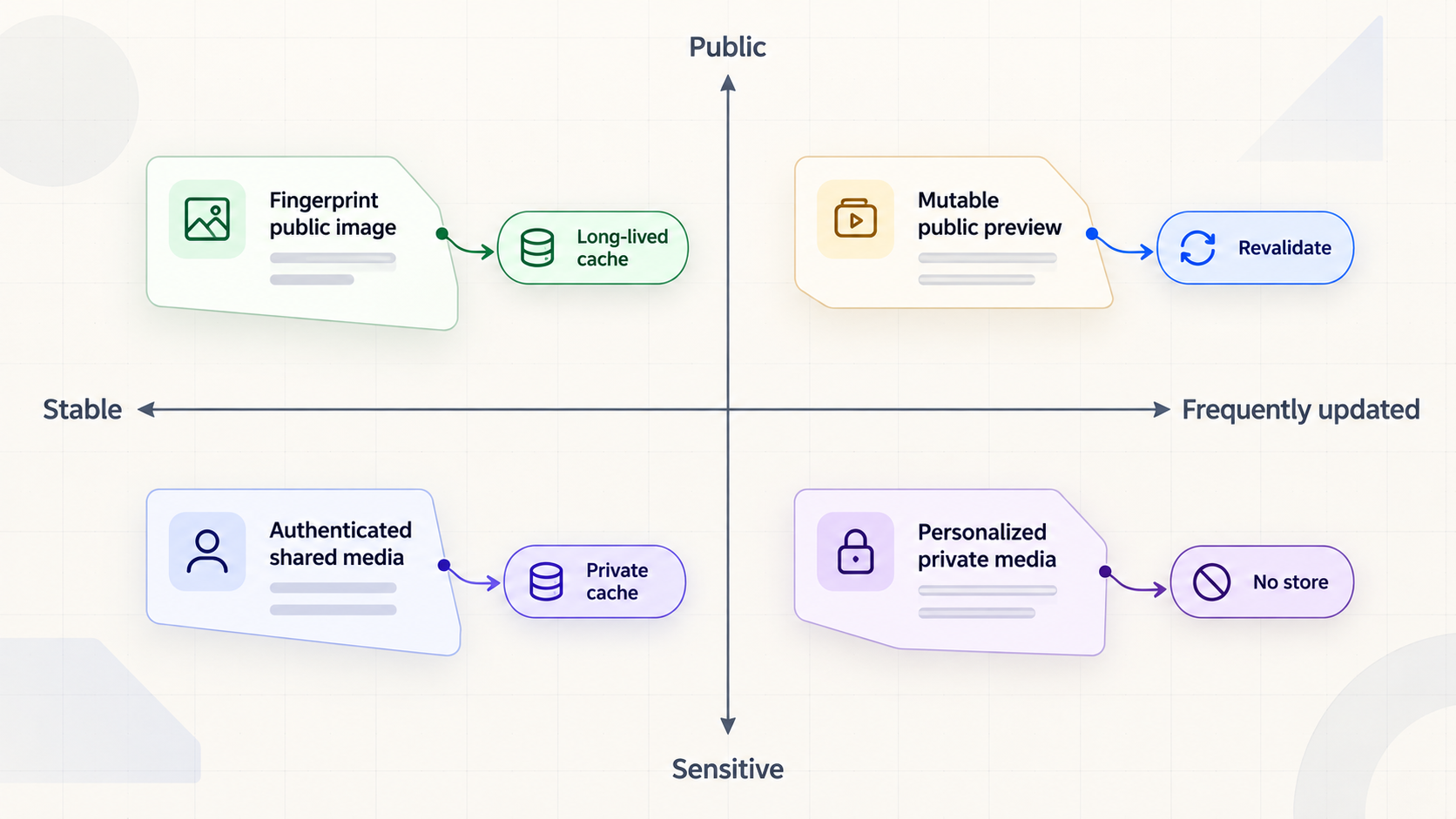
Safe caching starts with classification, not a list of file extensions. An extension can suggest a media type, but it does not establish whether the response is public, personalized, or stable. Two JPEG responses can require opposite policies. A public fingerprinted background image may be safely reusable for a long time, while a temporary account document rendered as a JPEG should not enter a shared cache.
For each route family, ask four questions: Does the representation contain confidential or user-specific information? Can two authorized users receive different bytes from the same URL? How quickly can the content change? Does the URL change whenever the bytes change? These answers define the cache policy more reliably than object size alone.
| Response class | Typical examples | Recommended starting policy | Main risk |
|---|---|---|---|
| Fingerprint-addressed public asset | Versioned image, font, script, poster, or media file whose URL changes with its content | Long-lived public caching can be appropriate, potentially with immutable |
Reusing the URL after changing its bytes defeats the design |
| Stable public asset at a fixed URL | Public logo, sample audio, or reusable preview image | Short freshness or no-cache, plus a correct validator |
A long freshness lifetime can conceal an updated file |
| Actively edited media | Draft image, video, audio mix, generated PDF, or 3D asset | no-cache with an ETag, or no-store during sensitive diagnosis |
Reviewers may comment on an obsolete revision |
| HTML and application shell | Development page, server-rendered route, or entry document | Usually no-store for live development previews |
Stored HTML can reference old bundles or conceal server-side changes |
| Public API data | Non-personal catalog data or public metadata | A deliberately short policy only when temporary staleness is acceptable | Incorrect freshness can hide state changes and API defects |
| Authenticated or personalized response | Private documents, account media, user thumbnails, or signed-in HTML | Default to private, no-store unless a reviewed design proves otherwise |
Cross-user disclosure through shared storage |
| Error or diagnostic response | Authorization failure, missing asset, stack trace, or temporary server error | Do not intentionally cache during development | A repair can appear ineffective, or diagnostics can persist |
A practical default is to allow aggressive caching only when content-derived or build-derived names make the URL immutable. Keep HTML, API output, authenticated media, errors, and frequently edited assets conservative. Expand the cacheable set route by route after confirming that the request target and any relevant representation dimensions uniquely identify the response.
A query parameter normally contributes to the URI, but a separately configured intermediary can normalize or omit selected parameters from its cache key. If revision identity matters, a filename or path containing a content hash is usually easier to audit than an undocumented query-key rule. Never assume that adding a random query string repairs a flawed cache configuration.
Build a standards-based cache header policy
The Cache-Control response header communicates whether a response may be stored and how it may be reused. Validators such as ETag and Last-Modified identify representations so clients can make conditional requests. The normative caching model is defined by HTTP Caching, RFC 9111, while validators, conditional requests, and range requests are defined in HTTP Semantics, RFC 9110.
Freshness and validation solve different problems. A fresh response can be reused without contacting the origin. A stale response with a validator can be checked, potentially producing 304 Not Modified without retransmitting the body. A policy should state which behavior is intended rather than relying on browser defaults.
Use no-store when storage is undesirable
Cache-Control: no-storeUnder RFC 9111's no-store semantics, a compliant cache must not store the response and must make a best effort to remove it from volatile storage as soon as practical. This is appropriate for sensitive previews, authenticated HTML, private documents, debugging output, and routes whose retained content could cause disclosure or confusion.
no-store is not an origin-reachability guarantee or purge command
A newly returned no-store directive governs that response when processed by compliant caches. It does not guarantee that every request reaches the application, erase a response stored under an older policy, clear a service worker's application-managed cache, remove downloaded files, or force a noncompliant intermediary to behave correctly. A previously stored response may answer before the new policy is received. When correcting an unsafe policy, invalidate shared caches using their documented controls, clear or update service-worker storage, use a fresh browser profile for verification, and rotate sensitive URLs where appropriate.
Use no-cache when storage is acceptable but reuse requires validation
Cache-Control: no-cache
ETag: "representation-revision"
Despite its name, no-cache permits storage. It requires successful validation before reuse. A client can send the stored ETag in If-None-Match, and the origin can answer with 304 Not Modified when the selected representation is unchanged. Conditional request evaluation is specified in RFC 9110's conditional request section.
This is useful for mutable, non-sensitive media. Reviewers check for updates on reuse, while unchanged objects avoid another full body transfer. The validator must change whenever the selected representation changes. A constant or incorrectly reused ETag can hide an update just as effectively as an excessive freshness lifetime.
Use long-lived public caching only with immutable URLs
Cache-Control: public, max-age=31536000, immutableA fingerprinted URL binds an asset location to one revision. When bytes change, the build or export process publishes a different filename and updates references to it. The one-year lifetime above is an example policy, not a universal requirement. The critical condition is that the bytes at that URL do not change. If a development process overwrites a fingerprinted file, the URL is not immutable and the policy becomes unsafe.
Separate browser and shared-cache freshness only when necessary
Cache-Control: public, max-age=60, s-maxage=600
max-age defines freshness broadly, while s-maxage applies to shared caches. A distinct shared lifetime can be useful when a browser should revalidate sooner than an explicitly configured shared cache. Only use it when the response is safe for multiple users. Large size does not make a private representation safe to share.
Choose validators that identify the actual representation
An ETag is an opaque representation identifier. A strong ETag indicates that the representation data is byte-for-byte equivalent for the relevant comparison. A weak ETag, prefixed with W/, indicates semantic equivalence without promising identical bytes. The distinction and validator rules are covered by RFC 9110's validator requirements.
Last-Modified can be convenient for file-backed assets, but timestamp precision and deployment behavior may fail to distinguish rapid changes. A strong ETag derived from the response bytes is more precise, although hashing a large file has a computation cost. The reference implementation below caches hashes in memory until the file size or modification timestamp changes.
Use Vary only for genuine representation dimensions
If request headers select different representations at one URL, a cache needs to include the relevant fields when choosing a stored response. The Vary field definition in RFC 9110 describes this relationship. Vary: Accept-Encoding is common when encoded and unencoded representations differ, while content negotiation may involve Accept.
Avoid broad variation on volatile headers because it can produce many entries with little reuse. More importantly, Vary is not access control. If authorization, tenant identity, or a session changes the body, a publicly shared cache is usually the wrong design.
Protect authenticated, personalized, and sensitive media
The most serious cache failure is serving one user's private representation to another user. This can happen when an intermediary stores an authenticated response under a key that omits authorization context, tenant identity, or another input that changed the body.
For ordinary remote development previews, begin with Cache-Control: private, no-store on authenticated and personalized routes. The private directive prevents storage by shared caches, while no-store instructs compliant caches not to store the response at all.
Cache-Control: private, no-storeDo not add raw session identifiers, access tokens, or signed credentials to public cache keys. That can expose secrets in logs and storage while leaving subtle isolation failures. If an advanced system genuinely needs shared caching for protected media, it requires a separately reviewed design with strict key isolation, controlled lifetimes, authorization-aware invalidation, and defenses against cache poisoning and cache deception.
| Security condition | Safe preview default | Required verification |
|---|---|---|
| Response depends on login or session cookie | private, no-store; bypass shared caching |
Signed-out and second-account requests cannot receive the body |
| Response contains an expiring signed URL | Treat as private unless the complete retention model is reviewed | Stored content cannot outlive the intended authorization boundary |
| Public immutable media | Long-lived public caching at a content-specific URL | Changing bytes always creates a new URL |
| Mutable public preview | no-cache with a changing validator |
An edit changes the ETag and returns the new body |
| Error or diagnostic output | no-store |
Repairing the origin is visible immediately in a controlled cold test |
| Unknown route class | Do not admit it to shared storage | Policy is reviewed before cacheability is expanded |
Signed URLs also require care. An expiring signature does not automatically prevent a stored response from surviving beyond the authorization window. Cookies present a similar problem. If a response sets a session cookie or depends on one, do not make it publicly cacheable without a deliberate and tested architecture.
Keep the Localtonet device authentication token secret. It identifies the client device that runs the tunnel and should never appear in source code, public HTML, screenshots, terminal recordings shared with reviewers, cache keys, or example commands. Apply the same rule to application credentials and private endpoints.
Choose between browser, reverse-proxy, and remote caching
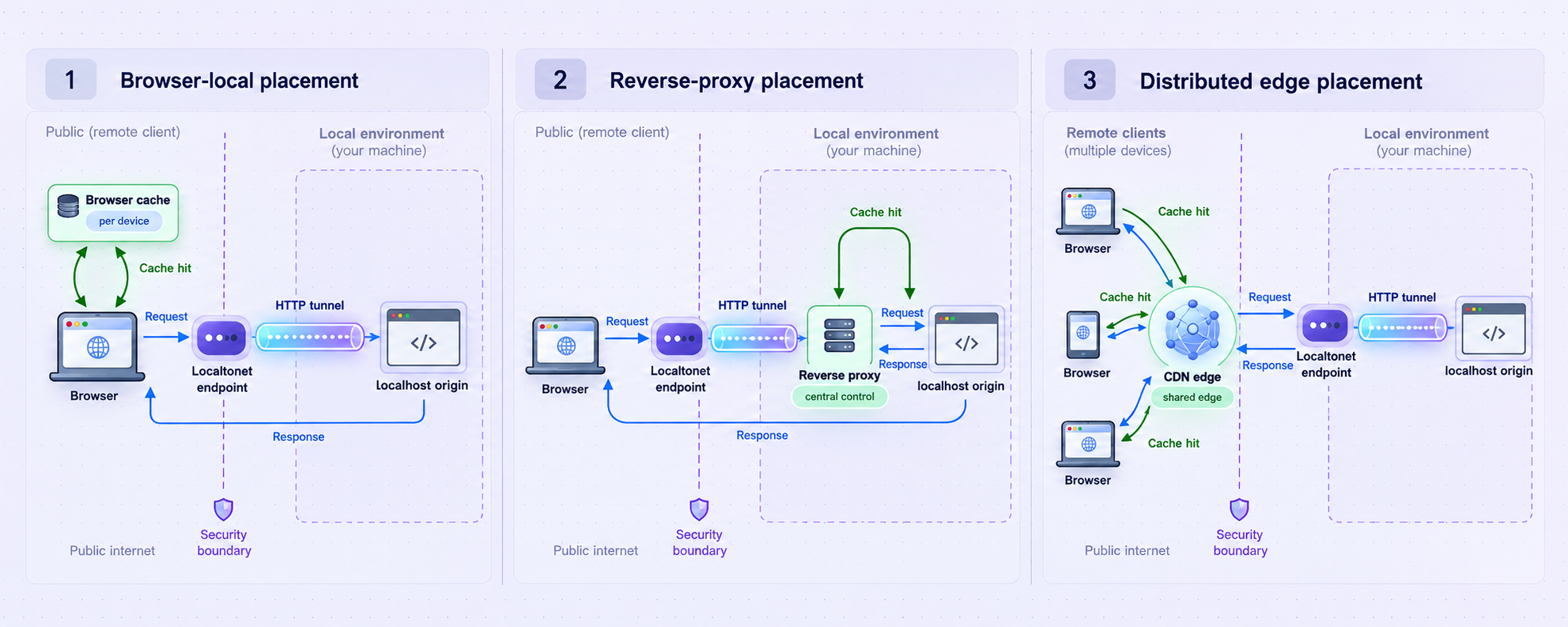
Not every preview needs an additional shared cache. Browser caching is the smallest place to start because it primarily benefits repeated requests by the same reviewer. A local reverse proxy can centralize policy and avoid repeated generation. A remotely operated shared cache can avoid repeated origin transfer after a successful fill, but it creates another storage, security, and invalidation boundary.
| Layer | Who benefits | Good fit | Key limitation |
|---|---|---|---|
| Browser cache | One browser profile or user agent | Repeated review by the same person and conditional validation | Another reviewer fetches the object independently |
| Service worker | Clients controlled by the application's worker logic | Purpose-built offline or application caching | Can answer independently of HTTP cache expectations and retain old entries |
| Local reverse proxy | Requests that reach the local proxy | Header normalization, controlled cache experiments, and shielding an expensive generator | Responses still traverse the developer's upload connection |
| Remote shared cache | Multiple remote reviewers | Public, stable, large assets requested repeatedly | Requires separate cache keys, purge controls, security review, and operational ownership |
| No storage | No reuse | Sensitive debugging, live HTML, authorization checks, and rapidly changing output | Every network request that reaches the path requires a new response |
A local reverse proxy can reduce repeated rendering or file reads, but it does not necessarily reduce internet upload usage. If it runs behind the tunnel on the same local network, each response still leaves that network. A remote cache may avoid later origin transfers, but its exact behavior belongs to that separately selected service and configuration. This tutorial does not attribute caching, WebSocket handling, framework integration, or CDN behavior to the Localtonet HTTP tunnel without current product evidence.
Account for byte-range requests
Video, audio, and large documents may use the Range request header to request only part of a selected representation. Under RFC 9110's range-request rules, a server that supports a satisfiable byte range can return 206 Partial Content. A single-range response includes Content-Range, identifying the returned interval and complete representation length.
A server is not required to honor every Range request. It can ignore the field and return the full representation with 200 OK. An unsatisfiable byte range normally produces 416 Range Not Satisfiable with Content-Range: bytes */complete-length. A valid 206 response must describe the partial bytes, not a complete body mislabeled as partial content.
Validators matter when a client resumes or seeks within changing media. If-Range lets a client request a range only if the representation still matches its validator. If it does not match, the server sends the full current representation rather than combining old and new bytes. Strong validators are appropriate for this comparison. Do not assume every browser or shared cache stores and combines partial responses identically. Verify the origin's protocol behavior, then check the documentation and observed behavior of every added cache layer.
Run a complete application-level caching reference server
The following implementation is deliberately narrow. It is a static media-preview server for Python 3.11 or later, using only the standard library. It demonstrates three policy classes, strong SHA-256 ETags, If-None-Match, single byte ranges, If-Range, HEAD, conservative error handling, and an explicit diagnostic bypass. It is suitable for learning and controlled previews, not as a general production web server.
Prerequisites and directory layout
- Python 3.11 or later available as
python3. curlfor protocol verification.- A Localtonet client only when you reach the public-tunnel stage.
- Media you are authorized to expose to the intended reviewers.
Create a working directory with mutable media in preview/media and content-versioned assets in preview/assets/immutable:
mkdir -p media-preview/preview/media
mkdir -p media-preview/preview/assets/immutable
cd media-preview

printf '<!doctype html><html><body><h2>Media preview</h2><img src="/media/draft.jpg" alt="Draft"></body></html>' > preview/index.html

# Copy your own test files into these locations:
# preview/media/draft.jpg
# preview/media/sample.mp4
# preview/assets/immutable/logo.CONTENT_HASH.webp
The server intentionally refuses paths beginning with /private/. It does not implement authentication, so private material must not be placed in the published directory. Real application authorization must happen before a protected response is returned.
Save the server as preview_server.py
from __future__ import annotations

import hashlib
import mimetypes
import os
from email.utils import formatdate, parsedate_to_datetime
from http.server import BaseHTTPRequestHandler, ThreadingHTTPServer
from pathlib import Path
from urllib.parse import parse_qs, unquote, urlsplit

ROOT = (Path(__file__).parent / "preview").resolve()
HOST = "127.0.0.1"
PORT = 8000
ETAG_CACHE = {}

def strong_etag(path: Path, stat_result: os.stat_result) -> str:
    key = (str(path), stat_result.st_size, stat_result.st_mtime_ns)
    cached = ETAG_CACHE.get(key)
    if cached:
        return cached

    digest = hashlib.sha256()
    with path.open("rb") as source:
        for block in iter(lambda: source.read(1024 * 1024), b""):
            digest.update(block)

    value = '"' + digest.hexdigest() + '"'
    ETAG_CACHE.clear()
    ETAG_CACHE[key] = value
    return value

def parse_single_range(value: str, size: int):
    if not value.startswith("bytes=") or "," in value:
        return None

    specification = value[6:].strip()
    if "-" not in specification:
        return None

    first, last = specification.split("-", 1)

    try:
        if first == "":
            suffix_length = int(last)
            if suffix_length <= 0:
                raise ValueError
            start = max(size - suffix_length, 0)
            end = size - 1
        else:
            start = int(first)
            end = size - 1 if last == "" else int(last)
            if start < 0 or end < start:
                raise ValueError
            if start >= size:
                return "unsatisfiable"
            end = min(end, size - 1)
    except ValueError:
        return None

    return start, end

def if_range_matches(value: str, etag: str, modified_seconds: int) -> bool:
    value = value.strip()

    if value.startswith('"') or value.startswith("W/"):
        return value == etag and not value.startswith("W/")

    try:
        supplied = parsedate_to_datetime(value)
        return int(supplied.timestamp()) >= modified_seconds
    except (TypeError, ValueError, OverflowError):
        return False

class PreviewHandler(BaseHTTPRequestHandler):
    server_version = "MediaPreview/1.0"

    def send_preview_error(self, status: int, message: str):
        body = (message + "\n").encode("utf-8")
        self.send_response(status)
        self.send_header("Content-Type", "text/plain; charset=utf-8")
        self.send_header("Content-Length", str(len(body)))
        self.send_header("Cache-Control", "no-store")
        self.end_headers()
        if self.command != "HEAD":
            self.wfile.write(body)

    def resolve_file(self):
        parsed = urlsplit(self.path)
        request_path = unquote(parsed.path)

        if request_path.startswith("/private/"):
            return None, parsed

        relative = request_path.lstrip("/")
        candidate = (ROOT / relative).resolve()

        try:
            candidate.relative_to(ROOT)
        except ValueError:
            return None, parsed

        if candidate.is_dir():
            candidate = candidate / "index.html"

        if not candidate.is_file():
            return None, parsed

        return candidate, parsed

    def cache_control(self, request_path: str, query: dict) -> str:
        if query.get("cache_bypass") == ["1"]:
            return "no-store"

        if request_path == "/" or request_path.endswith(".html"):
            return "no-store"

        if request_path.startswith("/assets/immutable/"):
            return "public, max-age=31536000, immutable"

        return "no-cache"

    def do_HEAD(self):
        self.serve_file(send_body=False)

    def do_GET(self):
        self.serve_file(send_body=True)

    def serve_file(self, send_body: bool):
        path, parsed = self.resolve_file()
        if path is None:
            self.send_preview_error(404, "Not found")
            return

        stat_result = path.stat()
        size = stat_result.st_size
        modified_seconds = int(stat_result.st_mtime)
        etag = strong_etag(path, stat_result)
        query = parse_qs(parsed.query)
        policy = self.cache_control(parsed.path, query)
        content_type = mimetypes.guess_type(path.name)[0] or "application/octet-stream"

        if_none_match = self.headers.get("If-None-Match")
        if if_none_match:
            candidates = [item.strip() for item in if_none_match.split(",")]
            if "*" in candidates or etag in candidates:
                self.send_response(304)
                self.send_header("ETag", etag)
                self.send_header("Last-Modified", formatdate(modified_seconds, usegmt=True))
                self.send_header("Cache-Control", policy)
                self.end_headers()
                return

        selected_range = None
        range_header = self.headers.get("Range")
        if range_header:
            if_range = self.headers.get("If-Range")
            if if_range is None or if_range_matches(if_range, etag, modified_seconds):
                selected_range = parse_single_range(range_header, size)

        if selected_range == "unsatisfiable":
            self.send_response(416)
            self.send_header("Content-Range", f"bytes */{size}")
            self.send_header("Cache-Control", "no-store")
            self.send_header("Content-Length", "0")
            self.end_headers()
            return

        if isinstance(selected_range, tuple):
            start, end = selected_range
            response_length = end - start + 1
            self.send_response(206)
            self.send_header("Content-Range", f"bytes {start}-{end}/{size}")
        else:
            start, end = 0, size - 1
            response_length = size
            self.send_response(200)

        self.send_header("Content-Type", content_type)
        self.send_header("Content-Length", str(response_length))
        self.send_header("Accept-Ranges", "bytes")
        self.send_header("ETag", etag)
        self.send_header("Last-Modified", formatdate(modified_seconds, usegmt=True))
        self.send_header("Cache-Control", policy)
        self.send_header("X-Content-Type-Options", "nosniff")
        self.end_headers()

        if not send_body:
            return

        with path.open("rb") as source:
            source.seek(start)
            remaining = response_length
            while remaining:
                block = source.read(min(64 * 1024, remaining))
                if not block:
                    break
                self.wfile.write(block)
                remaining -= len(block)

if __name__ == "__main__":
    if not ROOT.is_dir():
        raise SystemExit(f"Preview directory does not exist: {ROOT}")

    server = ThreadingHTTPServer((HOST, PORT), PreviewHandler)
    print(f"Serving {ROOT} at http://{HOST}:{PORT}")
    print("Press Ctrl+C to stop.")

    try:
        server.serve_forever()
    except KeyboardInterrupt:
        print("\nStopping preview server.")
    finally:
        server.server_close()
Start the local preview
python3 preview_server.py
Keep this terminal open. The service listens only on 127.0.0.1:8000. A Localtonet client running on the same device can target that address. If the client runs on another device, the service must listen on an address reachable from that client, and the change should be made only with an understanding of the resulting LAN exposure.
Verify the policy locally before opening a tunnel
curl -sS -D - -o /dev/null http://127.0.0.1:8000/
curl -sS -D - -o /dev/null http://127.0.0.1:8000/media/draft.jpg
curl -sS -D - -o /dev/null http://127.0.0.1:8000/assets/immutable/logo.CONTENT_HASH.webp
The HTML response should contain Cache-Control: no-store. Mutable media should contain Cache-Control: no-cache and an ETag. The fingerprinted asset should contain the long-lived public policy. If a test file does not exist, the server returns a 404 with no-store.
Copy the ETag from the mutable media response and test conditional validation:
curl -sS -D - -o /dev/null \
  -H 'If-None-Match: "ETAG-FROM-FIRST-RESPONSE"' \
  http://127.0.0.1:8000/media/draft.jpg
An unchanged file should produce 304 Not Modified. Replace the file, repeat the request, and confirm that the ETag changes and the response returns the new representation.
Use the diagnostic bypass carefully
curl -sS -D - -o /dev/null \
  'http://127.0.0.1:8000/media/draft.jpg?cache_bypass=1'
When this request reaches the reference server, its response uses no-store. The parameter does not purge an earlier response and cannot force a service worker or misconfigured intermediary to contact the server. For a controlled cold test, combine it with a fresh browser profile or disabled browser cache, inspect service-worker registrations, and verify server logs to establish that the origin was reached.
Publish only files intended for the review audience. Do not add confidential material to the preview directory, and do not interpret a difficult-to-guess URL as authorization. For protected previews, use an application that authenticates every request before reading or returning private media.
Expose the verified origin with a Localtonet HTTP tunnel
Add remote access only after the local tests pass. The Localtonet client must run on a device that can reach the preview service. Creating a tunnel does not start it, and the public route remains available only while the selected client is connected and the tunnel is running.
Install and run the Localtonet client
Install the Localtonet application for the operating system on the device that can reach 127.0.0.1:8000, then run the client. Use the current installation instructions presented by our platform rather than an unverified command from an older article.
Open the HTTP tunnel configuration
Go to the HTTP tunnel page in the current Localtonet dashboard. HTTP tunnels point to a local IP address and port reachable from the selected client device.
Select the Process Type
Choose Random Sub Domain, Custom Sub Domain, or Custom Domain as appropriate and available for your account. All three provide a public HTTPS address for the configured content. Check current Localtonet documentation before configuring custom-domain DNS because exact requirements can change.
Select the AuthToken and relay server
Select the device-specific authentication token for the client that will run the tunnel, then choose an available server or region shown in the dashboard. Treat the token as a secret, and do not assume that every server, region, or option is included in every plan.
Enter the local IP address and port
For this reference implementation, use 127.0.0.1 and port 8000 when the Localtonet client runs on the same machine. If you are tunneling another application, use the actual address and port reachable from the client device.
Start the tunnel
Use the Start control after creating the tunnel. Confirm that the selected client is connected and the tunnel is running before opening the assigned public HTTPS URL.
For current dashboard details, use our Localtonet HTTP tunnel documentation. The documented HTTP workflow establishes the route to the local target. Application-framework compatibility, development host checks, persistent connections, and custom-domain DNS behavior should be verified against the current documentation for the specific software involved rather than assumed.
Remove debug consoles, directory listings, secrets, unsafe administrative actions, and test accounts that should not be public. Require application authentication for restricted previews and apply least privilege. A tunnel avoids inbound port forwarding, but it does not make an unauthenticated application private or replace origin authorization.
Verify local, public, conditional, and range behavior
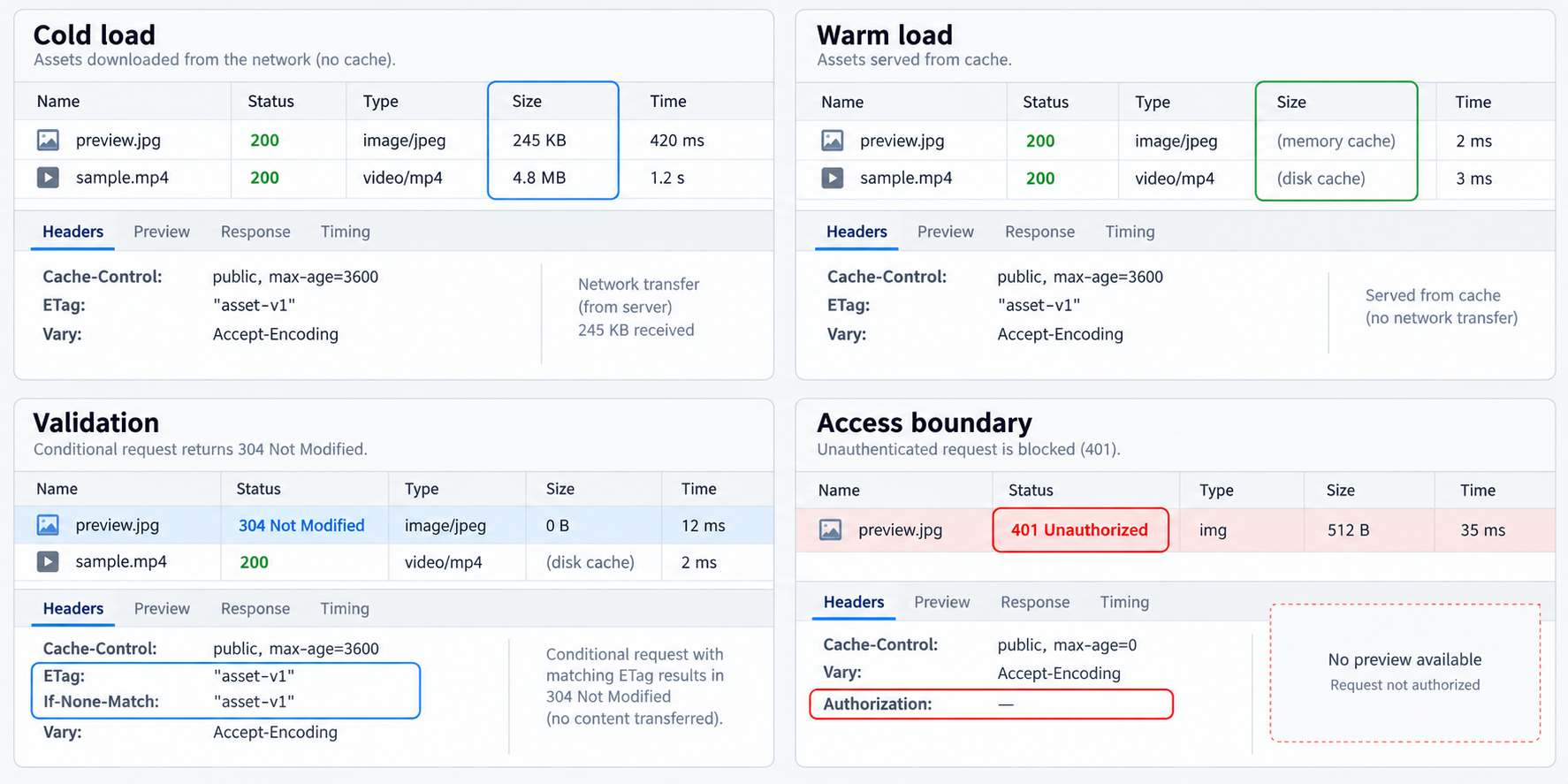
Replace PUBLIC-URL in the examples with the HTTPS hostname assigned to the running tunnel. Do not include credentials in shell history or copied commands.
Compare local and public response metadata
curl -sS -D - -o /dev/null \
  http://127.0.0.1:8000/media/draft.jpg

curl -sS -D - -o /dev/null \
  https://PUBLIC-URL/media/draft.jpg
Compare the status, Cache-Control, ETag, Last-Modified, Content-Type, Content-Length, and Accept-Ranges fields. The reference implementation gives HEAD and GET consistent metadata, but a different framework may handle them through separate code paths. When uncertain, use a normal GET and discard the body as shown above.
Verify conditional requests through the public URL
curl -sS -D - -o /dev/null \
  -H 'If-None-Match: "ETAG-FROM-FIRST-RESPONSE"' \
  https://PUBLIC-URL/media/draft.jpg
An unchanged representation should produce 304 Not Modified without a media body. Replace the local file and repeat the request. The ETag should change, and a request using the old validator should receive the current representation rather than 304.
Compare full and partial representations
First request the complete object:
curl -sS -D - -o /dev/null \
  https://PUBLIC-URL/media/sample.mp4
The reference server should return 200 OK, the full Content-Length, an ETag, and no Content-Range. Next request a satisfiable single range:
curl -sS -D - -o /dev/null \
  -H 'Range: bytes=0-1023' \
  https://PUBLIC-URL/media/sample.mp4
For a file of at least 1,024 bytes, the reference server returns 206 Partial Content, Content-Length: 1024, and a field shaped like Content-Range: bytes 0-1023/COMPLETE-LENGTH. The ETag should identify the same selected representation as the full response.
Test an unsatisfiable range:
curl -sS -D - -o /dev/null \
  -H 'Range: bytes=999999999999-' \
  https://PUBLIC-URL/media/sample.mp4
The expected result is 416 Range Not Satisfiable with Content-Range: bytes */COMPLETE-LENGTH. A different conforming origin may ignore a malformed range and send a full 200; do not treat every non-206 response as a tunnel failure.
Verify If-Range with matching and stale validators
curl -sS -D - -o /dev/null \
  -H 'Range: bytes=0-1023' \
  -H 'If-Range: "CURRENT-ETAG"' \
  https://PUBLIC-URL/media/sample.mp4

curl -sS -D - -o /dev/null \
  -H 'Range: bytes=0-1023' \
  -H 'If-Range: "STALE-ETAG"' \
  https://PUBLIC-URL/media/sample.mp4
With the current strong ETag, the reference server returns the requested 206. With a stale ETag, it ignores the range and returns the complete current representation with 200. This prevents a client from combining bytes from two revisions. Browser seeking should also be tested near the beginning, middle, and end because command-line checks do not exercise player buffering behavior.
Run the cache and security correctness matrix
| Test | Expected observation | Bug it detects |
|---|---|---|
| First public media load | Correct body, MIME type, status, and intended cache fields | Routing, metadata, or policy errors |
| Immediate repeat | Reuse or validation consistent with the declared policy | Missing cacheability or unexpected storage |
| Edit mutable media | The validator changes and the next checked request receives the new revision | Stale validators or excessive freshness |
| Publish fingerprinted media | References use a new URL while the old URL retains its original bytes | Overwriting immutable objects |
| Signed-out request for private media | Access is denied without disclosing the body | Missing origin authorization |
| Second authorized account | It cannot receive the first account's personalized representation | Shared-cache isolation failure |
| Origin file removed | Observed behavior matches the documented expiry or invalidation plan | Persisting sensitive or obsolete copies |
| Controlled cold profile | Server logs show the request reaching the origin through the tunnel | Performance defects hidden by stored responses |
| Satisfiable byte range | 206 with an accurate Content-Range |
Broken seeking or incorrect partial metadata |
Stale If-Range |
A complete current 200 representation |
Combining partial bytes from different revisions |
Browser developer tools can distinguish transferred bytes from some locally reused resources, but use a fresh profile or controlled cache setting for cold tests. Service workers require separate inspection because their fetch handlers and storage APIs can answer independently of ordinary HTTP cache processing. A single fast reload is not proof of correct caching.
Handle bypass, invalidation, routine operation, and cleanup
Use two explicit review modes
Maintain a warm-cache mode for normal visual review and a cold or bypassed mode for origin diagnosis. Record which mode produced a result. A warm request measures the user experience after storage or validation. A controlled cold request measures local generation, media reads, upload capacity, tunnel transit, and first-response behavior.
Sending Cache-Control: no-cache in a request asks caches to validate according to HTTP rules, but it should not be treated as a universal purge or proof that application code ran. Browser reload controls also vary. Stronger evidence includes a fresh profile, disabled service worker, server request logs, and a new versioned URL.
Invalidate immutable assets by publishing a new URL
Do not overwrite /assets/immutable/logo.CONTENT_HASH.webp. Generate a new content hash, save the replacement under the new name, and update the HTML reference. The previous URL can remain cached because it still identifies the previous bytes. This avoids dependence on a successful global purge.
Invalidate mutable media through validation or an explicit purge
For /media/draft.jpg, replace the file and verify that the strong ETag changes. Clients using no-cache should validate before reuse and receive the current representation. If a separately configured shared cache ignored or overrode the origin policy, use that provider's documented purge mechanism. There is no universal purge command for all reverse proxies, browsers, service workers, and CDNs.
Changing a route from a cacheable policy to no-store does not retroactively erase existing entries. Purge shared storage, update service-worker cache names or deletion logic, use new URLs for sensitive replacements, and tell reviewers when local browser data must be cleared.
Use a repeatable startup checklist
- Confirm that only intended files are inside the preview directory.
- Start the reference server and verify
http://127.0.0.1:8000/. - Run the local header, validator, and range checks.
- Start the Localtonet client and then start the configured HTTP tunnel.
- Test the assigned public URL from a separate browser profile or network.
- Share the public URL only with the intended review audience.
- Monitor the local server terminal for unexpected paths or request volume.
Shut down and clean up after review
Stop the Localtonet tunnel when public access is no longer needed. Stop the Python server with Ctrl+C. If the tunnel will not be reused, delete it from the dashboard. Remove temporary preview media, especially anything copied from a protected environment. If sensitive content was accidentally exposed, stopping the route is only the first containment step. Review application logs, invalidate any separately configured shared cache, rotate affected URLs or credentials, and account for copies that may remain in browser or service-worker storage.
To remove the complete reference project after stopping its processes, delete the media-preview working directory using the normal file-management tools for your operating system. Inspect the directory before deletion if it contains the only copy of any media.
Troubleshoot stale content and slow media systematically
The asset stays stale after an edit
Inspect the requested URL first. If it was advertised as immutable but its file was overwritten, publish a new fingerprinted URL. If the URL is intentionally mutable, inspect its freshness policy and validator. Confirm that the ETag changes after the edit. Then examine each possible storage layer: service worker, browser, local proxy, remote cache, and origin.
Do not add random query strings as a permanent repair. They can create unbounded entries, can be ignored by a customized cache key, and do not correct the underlying versioning mistake.
The same asset downloads in full on every request
Check whether the response uses no-store, lacks a validator, or produces a different ETag on identical bytes. Confirm that the client sends If-None-Match and that the server evaluates it. Authorization and cookies may also cause a deliberate shared-cache bypass.
Private media appears for the wrong reviewer
Treat this as a security incident. Stop or bypass the shared cache, stop the public tunnel if necessary, and remove access to the affected route. Review origin authorization, cache keys, cookies, response directives, logs, and stored objects. Use the cache provider's documented invalidation controls, while recognizing that centrally deleting every browser copy may not be possible.
Video starts but seeking fails
Inspect requests for Range and responses for 206, an accurate Content-Range, a partial Content-Length, and a stable validator. Compare local and public requests. If behavior changes only after adding a separate cache, consult that cache's documented treatment of complete and partial representations rather than assuming uniform behavior.
The first load remains slow
A cache cannot serve an object it has not stored. The first request can still be constrained by local generation time, disk reads, media size, and upload capacity. Optimize source dimensions and encoding, avoid serving assets larger than the preview requires, and preload only genuinely critical media. Caching improves eligible repeated access, not the inherent cost of the initial response.
Local access works but the public URL does not
Confirm that the Localtonet client is connected, the tunnel has been started, and its local IP and port match the listening service. The reference server uses 127.0.0.1:8000, so the client must run on the same machine. For another application, verify its bind address and any host or origin checks according to that application's documentation. Do not broadly disable host protection without understanding the security consequences.
The public page works, but framework live updates do not
Live-update channels are separate from cacheable media delivery and may use persistent or framework-specific connections. Do not pass them through a cache rule intended for images or videos. Their exact requirements depend on the framework, development server, proxy, and current Localtonet behavior. This reference implementation intentionally covers ordinary HTTP GET and HEAD requests and does not claim WebSocket or framework-specific compatibility.
A new no-store response appears, but old content is still visible
Determine whether the request reached the origin. An existing service-worker entry, browser entry, shared-cache object, open document, or downloaded file may still supply the old bytes. Clear or update the responsible storage layer, use the shared cache's purge facility where applicable, unregister or revise the service worker, and publish a new URL when immediate separation from the old object is required.
Prove the origin locally, then test the Localtonet URL, then add any separate shared cache. Comparing these stages is faster and safer than changing origin headers, tunnel settings, service-worker code, and cache rules simultaneously.
Frequently asked questions
Does a Localtonet HTTP tunnel automatically cache my images or videos?
No automatic media caching behavior is established by the supplied Localtonet product documentation. Treat our HTTP tunnel as the public route to the local origin. Define response policy in the application or a deliberate reverse proxy, and configure any remote shared cache separately.
What is the safest default for a live development preview?
Use no-store for HTML, authenticated responses, errors, diagnostics, and routes under active debugging. Use validation for mutable public media. Reserve long-lived public caching for assets whose URLs change whenever their bytes change.
Does no-store guarantee that every request reaches my application?
No. It tells compliant caches not to store the response they receive, but it does not purge older entries, control application-managed service-worker storage, remove downloaded copies, or force a noncompliant intermediary to contact the origin. Verify origin reachability using controlled browser state and server logs.
What is the difference between no-cache and no-store?
no-store instructs compliant caches not to store the response. no-cache permits storage but requires successful validation before reuse. For mutable public media, no-cache with a correct ETag can avoid retransmitting unchanged bytes.
Should authenticated media be stored in a shared cache?
Not by default. Shared caching of authenticated media requires a reviewed isolation and invalidation design. For an ordinary development preview, enforce authorization at the origin, return private, no-store, and keep access tokens and session secrets out of cache keys.
Are query-string version parameters enough for invalidation?
They can distinguish request URIs, but a separately configured cache may normalize or ignore selected parameters. Content-hashed filenames or paths are usually clearer for immutable media. Verify the actual cache-key behavior and never overwrite bytes behind a URL declared immutable.
Must every valid Range request produce 206 Partial Content?
No. An origin can ignore a Range field and return a complete 200 representation. When it honors a satisfiable byte range, the 206 response must include accurate partial-response metadata. Unsatisfiable ranges normally produce 416 with the complete length identified in Content-Range.
Will a local reverse-proxy cache reduce internet upload usage?
It can reduce repeated generation or file reads, but a response from a proxy behind the tunnel still crosses the local internet connection. Avoiding repeated upload for multiple reviewers requires a separately configured remote cache that is allowed to store and serve the public object.
Does stopping the Localtonet tunnel remove cached copies?
No. Stopping the tunnel ends the active public route to the origin, but it is not a purge operation for browsers, service workers, downloaded files, or separately configured shared caches. Invalidate content through the controls of the layer that stored it.
Test your cache boundary through a Localtonet HTTP tunnel
Verify the origin locally, expose only the intended application port, and compare complete, conditional, bypassed, and range requests through the assigned public URL. Keep private responses uncacheable, publish immutable replacements at new URLs, and stop the tunnel when the review session ends.
Get Started Free →

