

Keep browser-facing APIs and WebSockets working as Chrome tightens access to local destinations
A public web application that connects to localhost, a loopback address, or a private-network device crosses a browser security boundary. Chrome now handles that boundary through Local Network Access permission, with HTTP coverage introduced in Chrome 142 and WebSocket coverage added in Chrome 147. This guide explains the direct compliance path, including secure contexts, permission handling, iframe delegation, denial recovery, and managed-browser policy. It also shows when a public Localtonet HTTPS endpoint is the more appropriate architecture and how to verify HTTP, CORS, and WebSocket behavior independently.
📋 What's in this guide
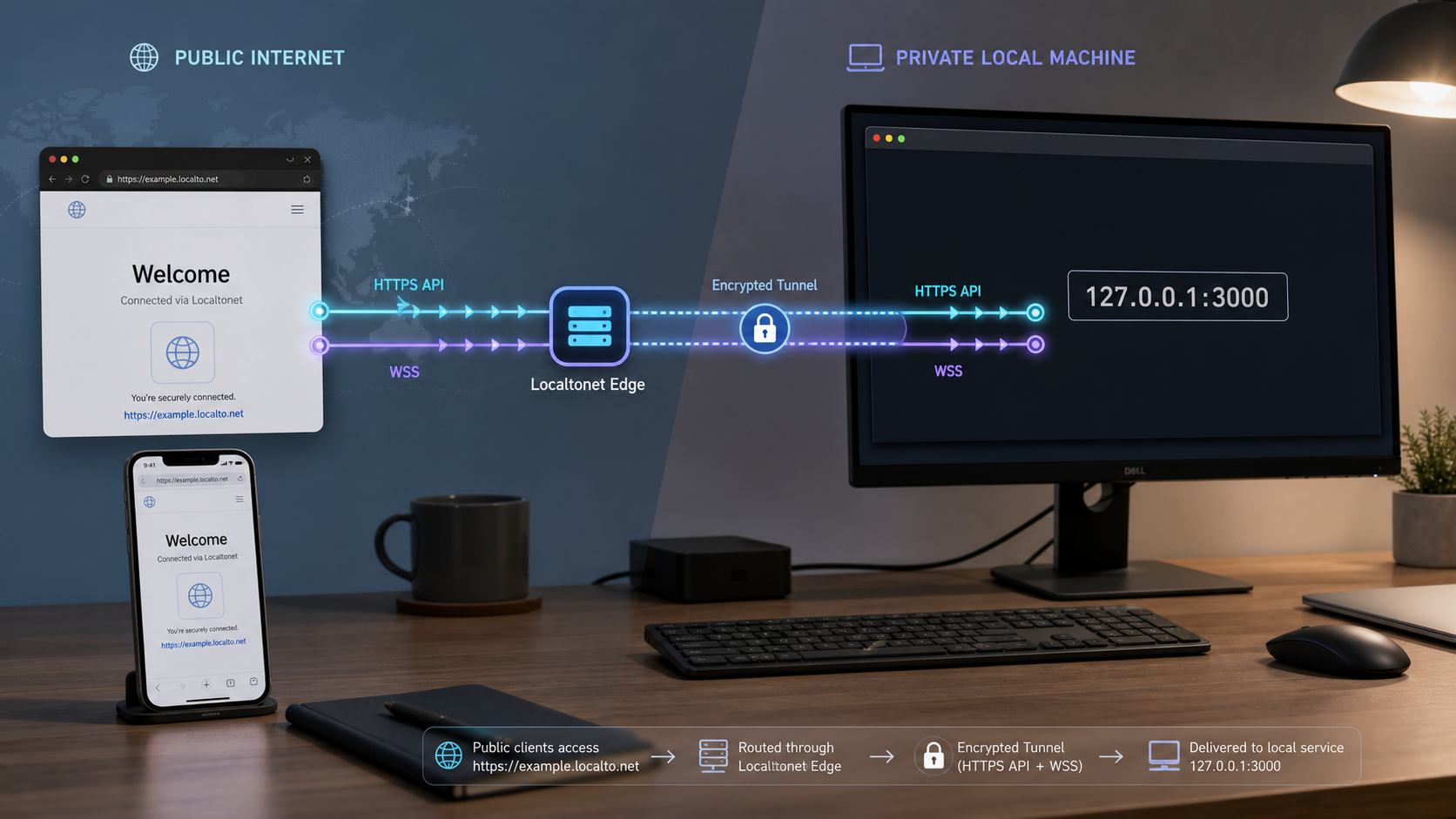
Chrome Local Network Access rollout for HTTP APIs and WebSockets
Chrome Local Network Access, usually shortened to LNA, prevents a public website from silently using a visitor's browser to reach services on loopback or the visitor's local network. Typical affected destinations include localhost, 127.0.0.1, ::1, private IP addresses, link-local addresses, and local names that resolve into a protected address space.
The rollout did not cover every browser networking API at the same time. According to the official Chrome Local Network Access announcement and the associated Chrome platform rollout information, Chrome 142 introduced the permission-based model for covered HTTP requests, subresources, and subframe navigations in October 2025. Chrome 147 extended LNA enforcement to WebSocket connections in April 2026. These dates and milestones were rechecked for this article on August 20, 2026.
| Chrome milestone | Stable rollout | Relevant behavior |
|---|---|---|
| Before Chrome 142 | Before October 2025 | LNA could appear in development or staged configurations, but the Chrome 142 permission rollout described here was not yet the stable baseline. |
| Chrome 142 | October 2025 | Permission-based Local Network Access enforcement covered applicable fetch, XHR, subresource, and subframe requests from public origins to protected local destinations. |
| Chrome 147 | April 2026 | Local Network Access enforcement expanded to applicable WebSocket connections, including public-origin pages connecting toward loopback or private-network targets. |
A common affected pattern is a hosted dashboard at a public HTTPS origin calling a desktop helper on localhost. Another is a cloud application connecting to a printer, controller, development server, or local agent through a private address. Starting with the applicable milestone, Chrome requires the site to operate in a secure context and the user or browser administrator to permit local-network access before the covered connection can proceed.
Chrome evaluates the destination after name resolution. Giving a loopback or private service a public-looking DNS name does not reliably turn it into a public destination. If the name resolves to a protected local address, Chrome can still apply LNA. The current model and its address-space definitions are documented in the WICG Local Network Access specification.
The milestone statements in this guide apply to Google Chrome. Other Chromium-based browsers use related browser code but can ship features, permission labels, and enterprise controls on their own schedules. Do not infer Firefox or Safari behavior from a Chrome milestone. Test every browser and version that your application officially supports, and use that browser vendor's primary documentation for deployment instructions.
What the user permission actually grants
Local Network Access permission allows an origin to attempt covered connections to protected destinations. It does not grant access to every operation on the destination. It also does not prove that the user is authenticated to the API, that a WebSocket subscription is authorized, or that the target service intended to be exposed to browser callers.
The browser can report the permission as prompt, granted, or denied. A site can inspect that state through the Permissions API where the current browser supports the LNA permission descriptor. The actual Chrome prompt is initiated by a qualifying network operation rather than by a general JavaScript permission-request method.
A user clicking Allow only permits the browser to try the connection. The API or WebSocket server must still authenticate the caller, authorize each operation, validate origins where appropriate, reject unsafe inputs, and protect sensitive routes.
LNA, the earlier PNA proposal, CORS and mixed content are different layers
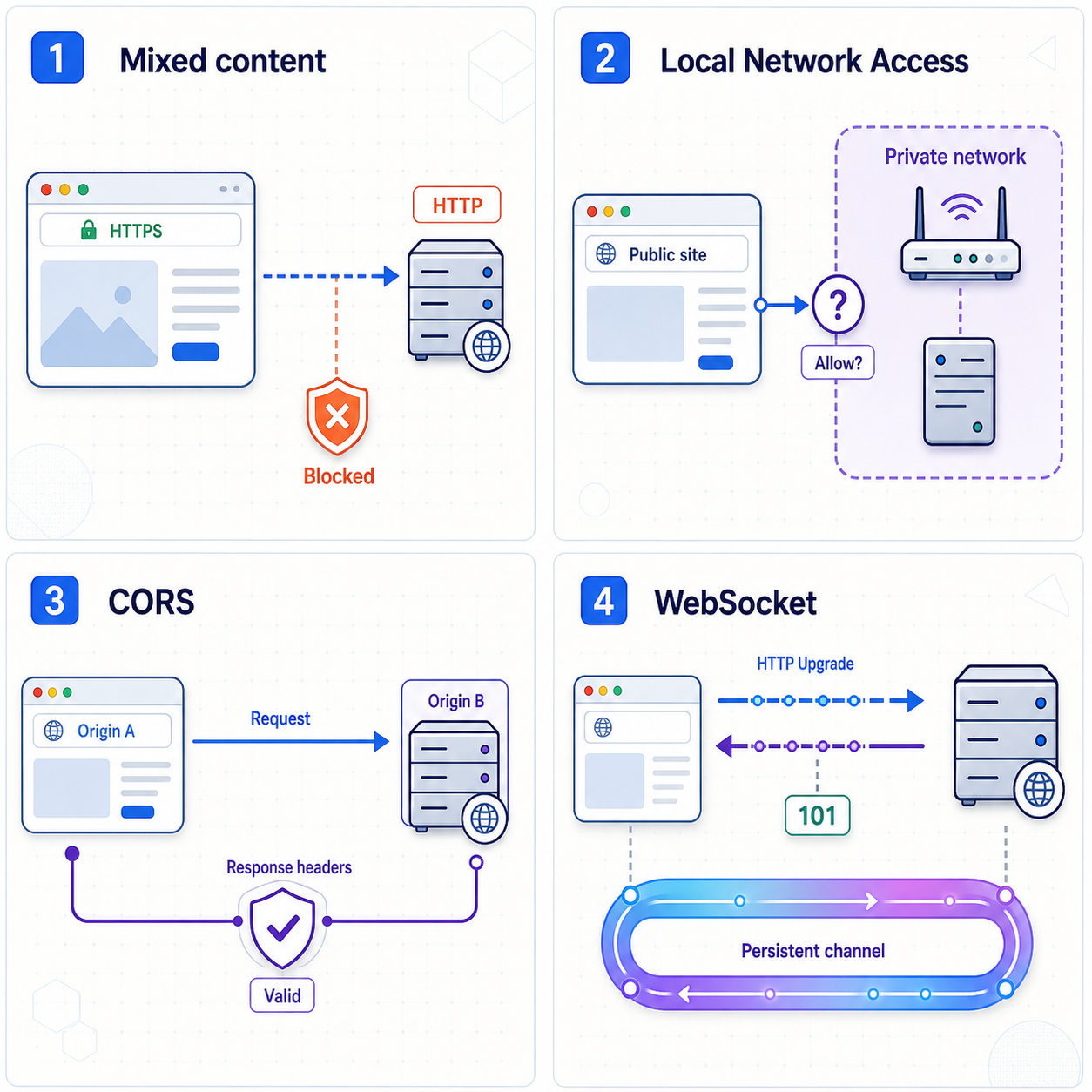
Local Network Access is the permission-based model implemented by current Chrome releases. It should not be confused with the earlier Private Network Access proposal, commonly called PNA. PNA attempted to extend CORS-style preflight behavior to requests entering a more-private address space. A local server could be asked to opt in with an Access-Control-Allow-Private-Network response header.
Chrome moved away from that PNA deployment model for this use case and adopted LNA, which places the decision in a browser permission. Therefore, adding Access-Control-Allow-Private-Network: true is not the general fix for Chrome's current LNA permission requirement. Existing application CORS requirements still apply, but developers should not mix the obsolete PNA preflight instructions into a current LNA implementation.
The distinction is described by the official Chrome LNA migration explanation and the current WICG specification.
| Control or layer | Primary question | Typical failure evidence | What success does not prove |
|---|---|---|---|
| Local Network Access | May this site attempt a connection toward a protected local destination? | Permission prompt, denied permission state, or Chrome local-network diagnostic | That the API operation or WebSocket client is authorized |
| CORS | May browser script access this cross-origin HTTP response? | Failed OPTIONS preflight or missing and mismatched CORS response headers |
That the destination is reachable or outside an LNA-protected address space |
| Mixed content | May a secure page connect to a resource using an insecure scheme? | Console message showing that an http:// or ws:// resource was blocked |
That TLS, CORS, authentication, or application routing will succeed |
| TLS | Can the browser establish and validate an encrypted connection for this hostname? | Certificate, hostname, protocol, or handshake error | That browser script may read the response |
| WebSocket upgrade | Did the server accept the HTTP request and switch protocols? | HTTP status other than 101 Switching Protocols, or missing upgrade headers |
That later WebSocket messages are valid or authorized |
| Application security | May this identity perform the requested action? | HTTP 401 or 403, application error frame, policy close code, or server log entry | That the browser has network permission |
The secure-context requirement
Chrome limits LNA permission to secure contexts. In the normal public-web case, the calling page must be delivered over HTTPS. A plain HTTP public origin cannot rely on receiving an LNA permission prompt and should be treated as unsupported for a production direct-local workflow.
A secure calling page does not make every target URL acceptable. Mixed-content handling is a separate browser layer. For a normal public endpoint, an HTTPS page should call an https:// API and use wss:// for WebSockets. Direct access to legacy local HTTP devices can have additional address-space and request-declaration considerations, so it must be tested against the current Chrome model rather than generalized from ordinary HTTPS behavior.
CORS still applies to HTTP APIs
If a public page calls a local API on another origin, the API's standard CORS policy still matters. An origin consists of the scheme, hostname, and port. A page at https://app.example.test and a service at http://127.0.0.1:8080 are cross-origin.
Requests with non-simple methods, headers, or content types can cause an OPTIONS preflight. The local server must handle that preflight and return a policy appropriate to the actual frontend origin, requested method, requested headers, and credential model. Do not add a wildcard policy merely to remove an error, especially when the service handles credentials or sensitive data.
WebSockets do not use CORS as an API authorization mechanism
A WebSocket begins as an HTTP request with an Upgrade negotiation. Browsers include an Origin header, and a WebSocket server should validate that origin when its threat model requires it. CORS response headers do not replace WebSocket origin validation.
A response status of 101 Switching Protocols means the server accepted the WebSocket upgrade and the connection moved from HTTP semantics to the WebSocket protocol. It does not mean that authentication succeeded at the application-message layer. A connection can receive status 101, exchange no useful frames, and then close because a required subprotocol, token, subscription message, or authorization step was missing.
Implement the direct Chrome LNA compliance path
Direct Local Network Access remains appropriate when the browser genuinely needs to communicate with a device on the user's machine or LAN. Examples include a desktop companion application, local hardware discovery, device configuration, or an on-premises controller that should not receive a public endpoint.
The following workflow covers the application responsibilities for the current Chrome model. It does not replace testing against the exact Chrome versions deployed to users.
Serve the calling application from a secure context
Deliver the public web application through HTTPS. Do not depend on an LNA permission prompt from a plain HTTP public origin. Confirm the secure-context state in the browser before debugging the local service.
Identify every protected destination
Inventory fetch, XHR, subresource, iframe, and WebSocket URLs that can resolve to loopback, link-local, or private-network addresses. Include runtime configuration, service workers, generated frontend bundles, and separate WebSocket base URLs.
Declare the expected address space where required
If an HTTP request uses a hostname whose local destination is not evident before resolution, use the address-space request option supported by the current Chrome LNA implementation. Apply it only when the application intentionally expects a local destination and retain a fallback for browsers that do not implement the option.
Explain the permission before triggering it
Tell the user which local service or device the application needs, why it is needed, and what functionality will be unavailable after denial. Trigger the qualifying connection only after a clear user action instead of surprising the user during page load.
Handle prompt, granted and denied states
Query the permission state where supported, listen for changes, and provide a useful denied-state interface. A denied request should not enter an automatic retry loop because repeated network calls do not override the user's permission choice.
Delegate permission to embedded applications
If the code runs in an iframe, configure the local-network-access Permissions Policy in the embedding document and delegate it to the intended frame. Every relevant embedding boundary must allow the capability.
Keep protocol and application controls in place
Configure standard CORS for HTTP, validate WebSocket origins, authenticate the user or client, authorize every operation, and protect the local server against DNS rebinding and hostile input.
Query the permission state
Chrome exposes the permission name local-network-access through the Permissions API. Because other browsers or older versions may not recognize it, treat an unsupported query as a compatibility result rather than as an automatic denial.
async function readLocalNetworkPermission() {
  if (!navigator.permissions) {
    return "unsupported";
  }

  try {
    const status = await navigator.permissions.query({
      name: "local-network-access"
    });

    status.addEventListener("change", () => {
      console.log("Local network permission changed:", status.state);
    });

    return status.state;
  } catch (error) {
    console.log("Local network permission query is unsupported:", error);
    return "unsupported";
  }
}
The expected states are prompt, granted, and denied. When the state is prompt, show an application explanation and let a user action initiate the local request. When it is denied, show recovery instructions instead of retrying continuously. When it is granted, proceed, but still handle network and application errors normally.
Use the expected address-space hint for appropriate fetch requests
Chrome's LNA design includes a targetAddressSpace fetch option for requests that intentionally target a protected address space, particularly when a hostname's local destination is not evident before DNS resolution. Check current browser support before relying on it as a cross-browser API.
const response = await fetch("http://device.example.test/status", {
  method: "GET",
  targetAddressSpace: "local"
});

if (!response.ok) {
  throw new Error(`HTTP request failed with status ${response.status}`);
}
Use targetAddressSpace only when the application intentionally expects that destination class. It is not permission, authentication, a CORS exemption, or a way to force Chrome to classify an arbitrary endpoint as local. The actual resolved destination and browser security checks remain authoritative.
Delegate access through iframe Permissions Policy
An embedded application can be prevented from using LNA even when the user previously allowed the site. The embedding page must delegate the local-network-access feature to the intended frame. A narrow iframe declaration looks like this:
<iframe
  src="https://embedded.example.test/device-ui"
  allow="local-network-access"
></iframe>
A server can also define the allowed origins through a Permissions Policy response header. Replace the sample origin with the real embedded origin:
Permissions-Policy: local-network-access=(self "https://embedded.example.test")If frames are nested, review each embedding boundary. A child cannot regain a feature that an ancestor's policy has already withheld. Permission delegation also does not pre-grant the user's LNA decision.
Recover after the user denies access
The page cannot silently reverse a denial. Explain that the user must open Chrome's controls for the current site, enter Site settings, find the local-network permission listed by that Chrome release, and change or reset the decision. Chrome has changed some user-facing permission labels over time, so application help text should be tested against the versions in the supported fleet rather than hardcoding an old prompt sentence.
After the user changes the site permission, offer a deliberate Retry button. Do not reload repeatedly or initiate a local-network request on every render. A good recovery screen also provides an alternative workflow when local access is optional.
Configure managed Chrome installations
Administrators of managed Chrome installations can use browser policy to control which origins may make local-network requests. The official Chrome Enterprise policy reference documents LocalNetworkAccessAllowedForUrls for approved origins and LocalNetworkAccessBlockedForUrls for blocked origins.
Enter exact organizational origins according to the policy documentation, distribute the policy through the organization's supported device-management system, and verify the effective policy on a managed test device. Do not assume that an unmanaged browser, another Chromium product, or a personal profile will inherit the setting.
Pre-grant only trusted application origins that have a documented business need. Browser policy should not become a blanket exception for all websites, and it does not remove the need to secure each local API or WebSocket operation.
Choose direct local access or a public Localtonet endpoint
Direct LNA compliance and public tunneling solve different architectural problems. A tunnel should not be described as a way to bypass browser policy. It gives the browser a public destination and forwards that traffic through an outbound connection to the local service. Direct LNA keeps the browser-to-local relationship and obtains the browser permission intended for that relationship.
| Decision factor | Direct Local Network Access | Localtonet HTTP tunnel |
|---|---|---|
| Browser destination | Loopback or a private-network address | Assigned public HTTPS endpoint |
| Chrome LNA permission | Required for covered public-to-local requests | Not the relevant boundary when the browser connects to the public tunnel endpoint |
| Best fit | Local hardware, desktop helpers, LAN-only controllers, and services that should remain non-public | Remote testing, public frontend integration, demonstrations, callbacks, and controlled sharing of a local development service |
| User interaction | The user may need to grant local-network permission | No LNA prompt is expected for the public endpoint, but application authentication can still require user interaction |
| Exposure boundary | The service stays local, although hostile permitted sites remain part of its threat model | The selected service becomes reachable through a public URL while the client and tunnel are running |
| Application requirements | LNA handling, CORS where applicable, origin validation, authentication, and local-server hardening | CORS where applicable, WebSocket origin validation, authentication, authorization, and public-exposure hardening |
Choose direct LNA when local placement is fundamental. A browser-based tool that must interact with whichever printer, router, or helper is on the user's own network usually needs the direct path. Build a clear permission experience, support denial recovery, and provide managed policy guidance where the organization controls its browsers.
Choose a Localtonet HTTP tunnel when the objective is to make one known local service available through a public HTTPS address. This is useful when a hosted frontend must reach a developer's API, a remote tester needs access, or the same public destination should work from outside the developer's LAN.
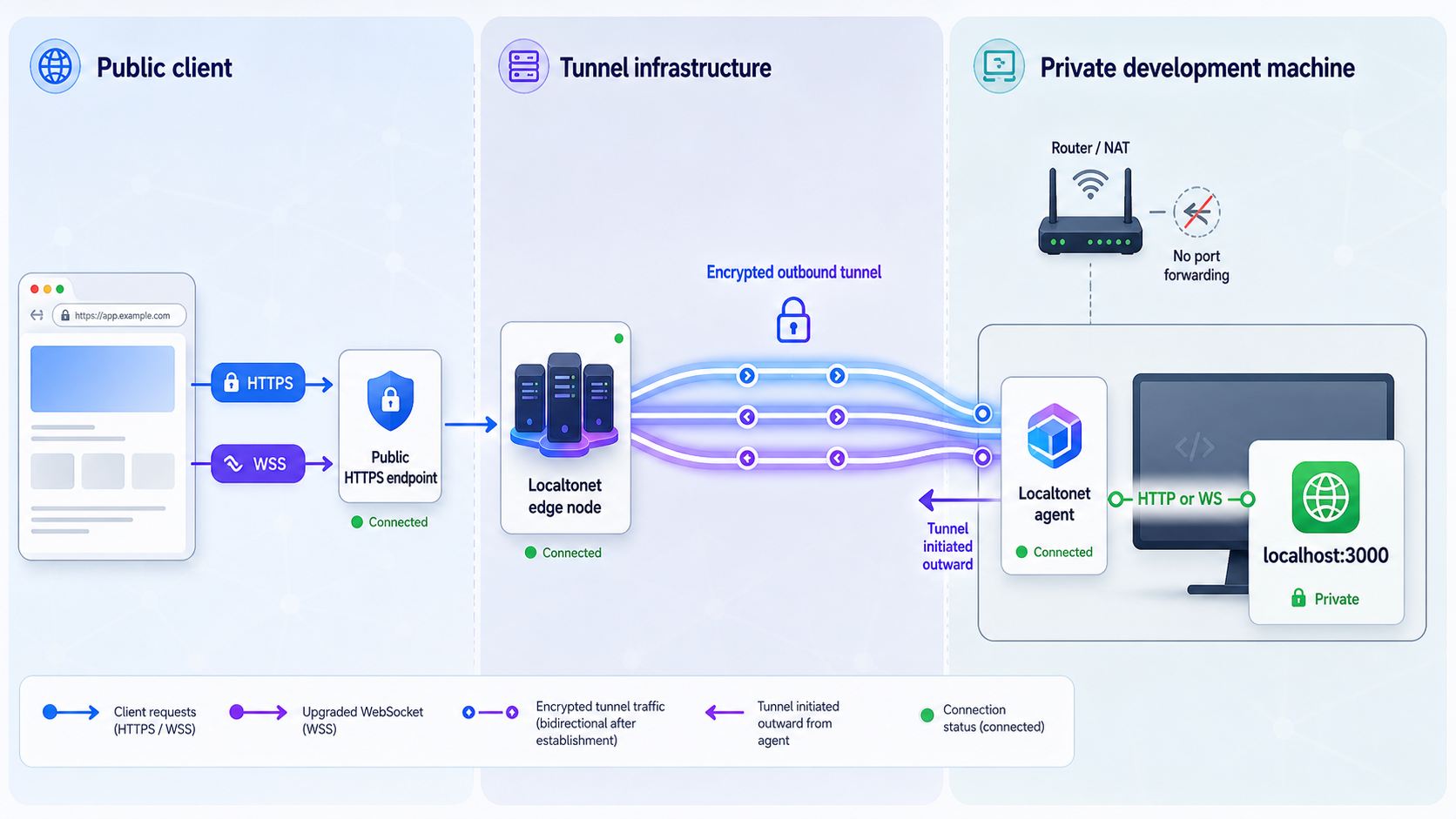
With Localtonet, our client runs on a device that can reach the application. It establishes an outbound connection to a Localtonet relay server. The HTTP tunnel provides a public URL and forwards requests to the selected local IP address and port. This does not require inbound router port forwarding, firewall changes, VPN setup, or a public IP address.
The tunnel is available only while the selected client is connected and the tunnel is running. Creating a tunnel does not start it automatically. It can later be stopped or deleted when public access is no longer required.
Prepare the local API or WebSocket service
A tunnel cannot repair a service that is not running, listens on the wrong port, rejects the expected hostname, or fails its own WebSocket protocol. Verify the local application from the same device or network environment that will run the Localtonet client.
- Record the local IP address reachable from the client device.
- Record the application's actual listening port.
- Choose an existing HTTP route with a predictable status and body.
- Record the exact WebSocket path and any required subprotocol.
- Identify the public frontend origin that HTTP CORS and WebSocket origin checks should allow.
- Enable an appropriate authentication and authorization design before exposure.
- Prepare the Localtonet device-specific auth token without placing it in code, screenshots, or logs.
- Select a relay server currently available in the dashboard rather than copying a historical server code.
| Deployment arrangement | Meaning of localhost | What to verify |
|---|---|---|
| Application and client on the same host | The host's loopback interface | Exact loopback address, port, route, and process |
| Application in a container and client on the host | Container loopback is normally separate from host loopback | Published container port and reachability from the host |
| Application on another LAN device | Client localhost refers to the client device, not the application device | Reachable private address, listener binding, routing, and LAN controls |
| Application and client in separate virtual machines | Each virtual machine has its own loopback interface | Virtual networking, host firewall, target address, and port |
Verify HTTP locally
Start the application through its documented startup procedure. From the environment that will run the Localtonet client, request an existing route and confirm the expected status code and body. Do not infer the port from a framework default.
curl -i http://LOCAL_IP:LOCAL_PORT/EXISTING_HEALTH_ROUTEA successful result should include the status your application documents, commonly a 2xx response for a health route, and the expected body. A 404 proves that an HTTP server may have answered, but it does not prove that the desired route is configured.
Verify WebSockets locally
Use the application's own test client or a suitable WebSocket client to open the exact local route. Confirm that the connection upgrades, at least one expected application frame can be exchanged, and the service does not immediately close because of a missing subprotocol or authentication step.
Review host validation, HTTP CORS, WebSocket origin validation, trusted-proxy behavior, and authentication before creating a tunnel. Allow the intended public origin narrowly rather than disabling each check globally.
Configure the Localtonet HTTP tunnel
The current Localtonet HTTP workflow follows the sequence below. The dashboard is authoritative for available process types, domain options, relay servers, regions, and plan-specific availability.
Localtonet clients are available for supported operating systems, but the supplied verified material for this revision does not contain current OS-specific package names, installer commands, or service-start commands. We do not reproduce unverified commands. Use the installation path presented by the current Localtonet HTTP tunnel documentation, install the client on the device that can reach the service, and confirm that the device is connected before creating the tunnel.
Install and run the Localtonet client
Follow the current operating-system installation path in our HTTP tunnel documentation. Run the client on the device that can reach the verified local IP address and port.
Open the HTTP Tunnel page
In the Localtonet dashboard, go to the HTTP Tunnel configuration page. Use an HTTP tunnel for a browser-facing HTTP API or a web application that also serves its WebSocket route through the same local HTTP service.
Select the process type
Choose the available Random Sub Domain, Custom Sub Domain, or Custom Domain process type appropriate to the account and deployment. All three provide a public HTTPS address for the configured content, but availability and domain requirements can vary.
Select the device auth token and relay server
Select the device-specific auth token for the connected client and choose a relay server currently offered by the dashboard. Keep the token private and do not hardcode server values copied from old examples.
Enter the local IP address and port
Use the exact target verified from the client device. If the application and client are in different containers, virtual machines, or devices, do not use localhost unless it genuinely resolves to the application from the client's environment.
Start the tunnel
Press Start and wait for the tunnel to run. Record the assigned public HTTPS URL displayed by the current dashboard. Creating or saving the configuration alone does not make it reachable.
Do not publish the device auth token, tunnel identifiers, private endpoints, or credentials. If you use a custom domain, follow the current DNS instructions shown by Localtonet rather than relying on a generic record copied from another deployment.
Do not expose an unauthenticated administrative API, debugger, database console, or service with unsafe development routes. Authenticate sensitive operations, reduce the available surface, and stop or delete the tunnel after the testing window.
Verify HTTPS APIs, CORS and WebSocket upgrades
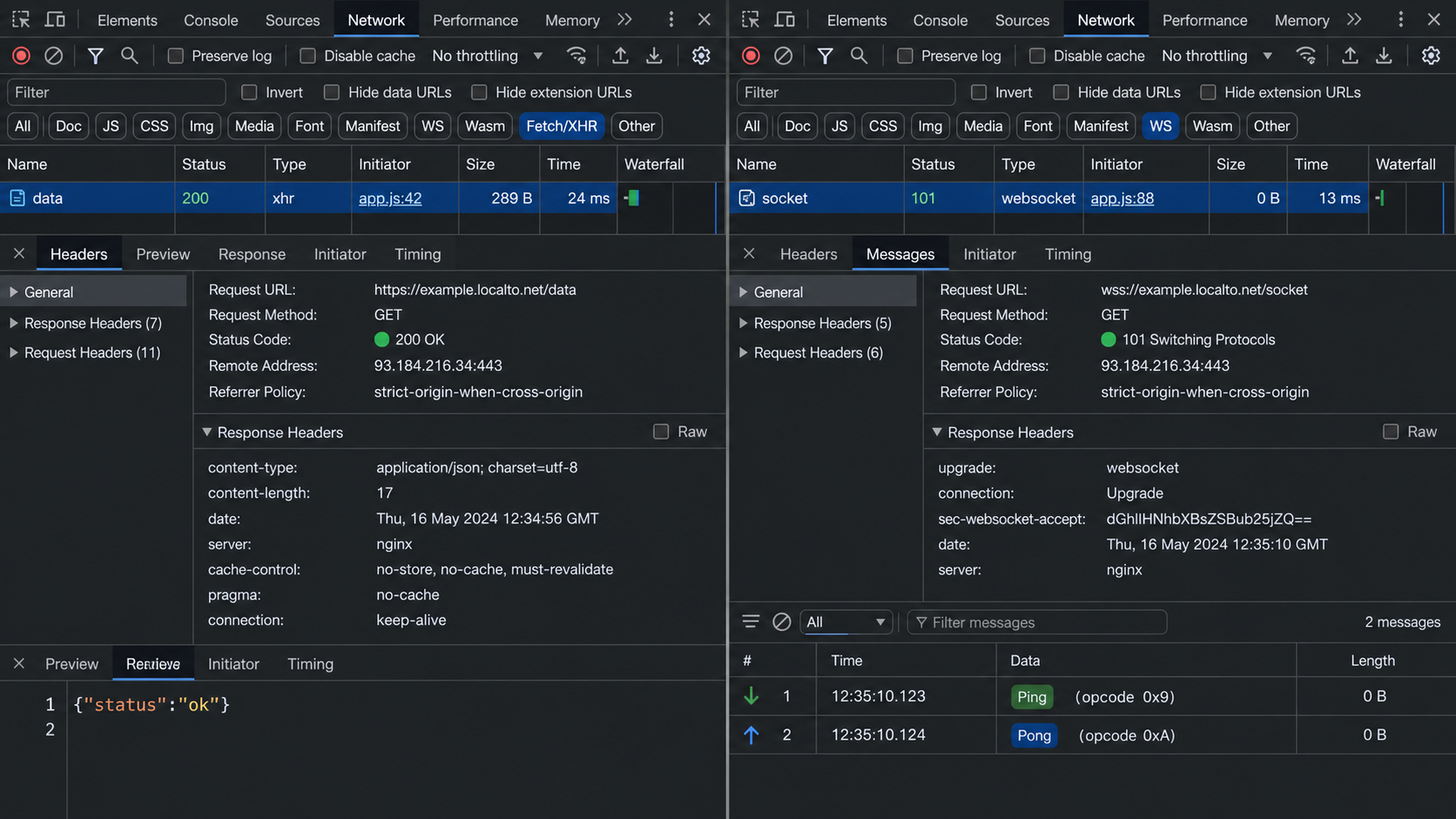
Verify the public path in layers. First confirm basic HTTPS reachability, then browser CORS behavior, then the WebSocket upgrade, and finally application frames and authorization. This sequence prevents a CORS message from hiding a target error or a successful status 101 from hiding an application-protocol failure.
1. Confirm HTTPS reachability outside browser JavaScript
curl -i https://PUBLIC_HOST/EXISTING_HEALTH_ROUTEThe expected successful result is the same application status and body observed during the local test, allowing for intentional host-specific output. This confirms that the public endpoint, running tunnel, local target, and HTTP route can exchange a response.
Interpret failures precisely:
- No connection can indicate a stopped tunnel, disconnected client, DNS issue, or TLS failure.
- HTTP 404 usually indicates that an HTTP server answered but the requested route was not found.
- HTTP 401 means the route requires authentication.
- HTTP 403 means the request reached a policy that refused it.
- HTTP 5xx indicates an application or upstream processing failure and should be correlated with server logs.
2. Confirm the browser request and any CORS preflight
const apiUrl = "https://PUBLIC_HOST/EXISTING_API_ROUTE";

fetch(apiUrl, {
  method: "GET",
  credentials: "omit"
})
  .then(async response => {
    console.log("HTTP status:", response.status);
    console.log("Response body:", await response.text());
  })
  .catch(error => {
    console.error("Browser request failed:", error);
  });
The expected result is a visible network request followed by the application's response. If Chrome sends an OPTIONS preflight, the expected successful preflight is a 2xx response containing CORS headers that match the requesting origin, method, and requested headers. The actual API request should follow only after the preflight succeeds.
A command-line request succeeding while fetch() fails usually means browser policy remains unresolved. Check the Console and Network panel for CORS, mixed-content, credential, or frontend configuration errors. A public Localtonet destination removes the direct public-to-local LNA transition, but it does not generate CORS headers for the application.
3. Confirm the WebSocket upgrade
const socket = new WebSocket(
  "wss://PUBLIC_HOST/EXISTING_WEBSOCKET_PATH"
);

socket.addEventListener("open", () => {
  console.log("WebSocket connected");
});

socket.addEventListener("message", event => {
  console.log("WebSocket message:", event.data);
});

socket.addEventListener("error", event => {
  console.error("WebSocket error:", event);
});

socket.addEventListener("close", event => {
  console.log(
    "WebSocket closed:",
    event.code,
    event.reason,
    event.wasClean
  );
});
In Chrome DevTools, select the WebSocket entry in the Network panel. A successful handshake should show HTTP status 101 Switching Protocols. That status means the HTTP connection was accepted for upgrade to WebSocket. It is not an ordinary success response with an HTTP body, and it does not prove application authentication.
After status 101, inspect the Frames or Messages view. The expected application-level result is protocol-specific. For example, a service might send a welcome frame, expect an authentication frame, or wait for a documented subscription message. Do not send guessed messages merely to keep the connection open.
4. Interpret close codes and frames
Record the close code, close reason, whether the browser reports a clean close, and the last frames exchanged. Code 1000 represents a normal WebSocket closure. Code 1006 is a browser-reported abnormal closure and is not a close frame sent over the wire. Application-specific codes in the permitted private range must be interpreted using that application's protocol documentation.
A connection that receives status 101 and then closes has passed tunnel reachability and WebSocket upgrade. Investigate application authentication, required subprotocols, message order, idle behavior, server exceptions, and authorization. Conversely, an HTTP 401, 403, 404, or 5xx during the handshake means the connection never reached the WebSocket frame phase.
5. Correlate browser and application logs
Record the request time, public hostname, route, HTTP status, WebSocket close code, and an application-generated request or session identifier that contains no secret. Then compare those details with application logs.
- No application log entry suggests failure before the application, such as browser policy, DNS, TLS, tunnel state, or an incorrect target.
- An application log with a 404 suggests route or base-path mismatch.
- An origin rejection indicates application policy, not tunnel reachability.
- A failed CORS preflight can reach the application even though the actual API request is never sent.
- A successful upgrade followed by an error frame indicates an application-protocol problem.
6. Compare direct LNA and public-endpoint behavior
When diagnosing a migration, run a controlled comparison from the same public HTTPS frontend:
- Attempt the direct loopback or private-network URL and record the LNA permission state and first Console diagnostic.
- Attempt the public Localtonet HTTPS or
wss://URL. - Check whether each request appears in the Network panel.
- Check whether the local application logs either attempt.
- Compare CORS, authentication, status, upgrade, frame, and close information.
If direct access is denied by LNA while the public endpoint reaches the application, the difference is the browser-facing destination. If both reach the application but only one is rejected, investigate host, origin, authentication, and application configuration.
Secure the API and WebSocket before sharing access
Do not place durable secrets in browser source, URLs, WebSocket query strings, source maps, or screenshots. Browser-delivered code is inspectable, and URLs can appear in history, logs, diagnostics, and copied messages. Use the application's supported authentication flow and prefer narrowly scoped, short-lived credentials where the design permits them.
A successful WebSocket handshake must not unlock every channel or command. Authenticate the session, authorize subscriptions and operations, enforce message limits, and close connections cleanly when credentials expire or policy fails.
Protect local-only services too. A direct LNA deployment can still expose the local server to a site that the user has permitted, and network permission does not make unsafe API behavior acceptable. Host validation, origin checks, CSRF defenses where relevant, and operation-level authorization remain necessary.
Troubleshooting Chrome, APIs and WebSockets
| Symptom | Likely layer | What to inspect |
|---|---|---|
| Direct local request never appears in application logs | LNA, secure context, mixed content, DNS, or transport | Chrome version, permission state, page scheme, destination resolution, Console, and Network panel |
| User previously denied local access | Stored site permission | Permissions API state and Chrome Site settings for the current origin |
| Top-level page works but embedded UI fails | Permissions Policy | Response policy, iframe allow attribute, nested ancestors, and child origin |
| Local service works but public URL does not connect | Tunnel lifecycle or target | Connected device, running tunnel, selected token, local IP, port, and process |
curl works but browser fetch fails |
CORS, mixed content, credentials, or browser policy | Console error, OPTIONS request, response headers, origin, and page scheme |
| WebSocket handshake returns 404 | Routing | Exact path, base path, target port, and application route |
| WebSocket handshake returns 401 or 403 | Authentication, authorization, or origin rejection | Request headers, cookies, supported authentication flow, origin allowlist, and server logs |
| WebSocket receives 101 and immediately closes | Application protocol | Frames, close code, subprotocol, required first message, authentication, and server exception logs |
The calling page is not a secure context
Confirm that the public page is loaded over HTTPS and that Chrome reports no certificate error. Do not try to repair direct LNA by disabling browser security. Move the calling application to a valid secure context and retest.
The permission query reports denied
Stop automatic retries and show recovery guidance. The user must change or reset the permission through Chrome's site controls. After the change, let the user retry through a button and query the state again where supported.
The iframe lacks delegation
Inspect both the iframe's allow attribute and the document's Permissions Policy. For nested frames, inspect all ancestors. Remember that delegation only makes the feature available to the frame. It does not grant the site permission automatically.
The service is listening in another network namespace
A container, virtual machine, or remote device has its own loopback interface. Test the target from the environment running the Localtonet client. Change the listener only when necessary, and apply host firewall and application controls if the service must listen beyond loopback.
The application rejects the public host or origin
Some frameworks restrict the HTTP Host header or WebSocket Origin header. Add the assigned public origin through the framework's documented allowlist mechanism. Do not disable host or origin validation globally.
The CORS preflight fails
Inspect the OPTIONS request itself. Confirm that it is not redirected into a login page and that middleware does not reject it before CORS processing. The response must match the actual requesting origin, method, and requested headers. LNA permission does not waive CORS.
The browser behavior differs across users
Compare exact browser versions, managed policies, site permissions, extensions, service workers, secure-context status, and runtime URL configuration. Test in a clean profile, but do not rely exclusively on private browsing because permission and policy behavior may differ from a normal managed profile.
Experimental flags, unsafe command-line options, or disabled web security can hide the actual deployment problem and create serious risk. Fix the secure context, permission flow, iframe policy, destination architecture, and application security instead.
Frequently asked questions
Which Chrome versions enforce LNA for APIs and WebSockets?
Chrome 142 introduced the current permission-based LNA rollout for covered HTTP requests in October 2025. Chrome 147 extended enforcement to applicable WebSocket connections in April 2026. These milestones were rechecked on August 20, 2026. Test other Chromium products and browser families independently because their schedules and controls can differ.
Is Local Network Access the same as Private Network Access?
No. Private Network Access proposed a server opt-in model based on CORS-style preflights and the Access-Control-Allow-Private-Network header. Chrome's current Local Network Access model uses a browser permission for covered access to protected local destinations. Standard CORS can still apply independently.
Does the user have to load the public site over HTTPS?
Yes for the normal Chrome LNA permission flow. LNA is restricted to secure contexts, so a public application should be served over HTTPS. Mixed-content and target-scheme rules remain separate checks.
How can my application recover after the user clicks Block?
Query local-network-access through the Permissions API where supported and show a denied-state explanation. The user must change or reset the permission in Chrome's site controls. The page cannot silently reverse the denial. Offer a manual Retry action after the user updates the setting.
Does an iframe automatically inherit Local Network Access?
Not necessarily. The embedding application must allow the local-network-access Permissions Policy feature for the intended frame. In nested deployments, every relevant ancestor must permit it. Delegation does not replace the user's permission decision.
Does a Localtonet tunnel disable Chrome's LNA protection?
No. The browser connects to a public HTTPS endpoint rather than directly to loopback or a private address. Our client carries the request through an outbound tunnel to the configured local target. This changes the destination architecture instead of disabling a browser control.
Do I still need CORS when using a Localtonet HTTP tunnel?
Yes when browser JavaScript calls the public API from a different origin. The application must return a CORS policy appropriate to the frontend origin, methods, headers, and credential model. The tunnel does not generate that application policy.
What exactly does WebSocket status 101 prove?
Status 101 Switching Protocols proves that the server accepted the HTTP Upgrade request and switched the connection to WebSocket. It does not prove that later messages are authenticated, authorized, correctly formatted, or accepted by the application.
Why does curl work when fetch fails?
Command-line HTTP clients do not enforce browser CORS, mixed-content, Permissions Policy, or Local Network Access rules. Successful curl output confirms useful transport and application behavior, but browser JavaScript can still be blocked by a separate browser layer.
Does the Localtonet client have to run on the API host?
It must run on a device that can reach the configured local IP address and port. The same host is often convenient, but the target can be another reachable device. Remember that localhost refers to the environment in which the client runs.
Test your local API through a public HTTPS endpoint
Verify the service locally, run the Localtonet client on a device that can reach it, create and start an HTTP tunnel, and test the assigned HTTPS and secure WebSocket URLs. Keep device tokens private, secure every exposed operation, and stop the tunnel when the testing session ends.
Get Started Free →

