

Choose an AI deployment by tracing every request, credential, file, and tool call across its real network boundaries
A cloud AI subscription and a self-hosted gateway can expose similar chat or API interfaces while producing very different data paths. The important question is not simply where the model runs. You also need to determine where prompts are stored, which systems receive uploaded files, how credentials move, whether tools can reach internal services, and what happens when remote users need access. This guide provides a practical architecture review, then explains how a confirmed local gateway can remain private or be published through an outbound Localtonet HTTP tunnel when a public HTTPS endpoint is genuinely required.
📋 What's in this guide
Start with the architecture decision, not the feature list
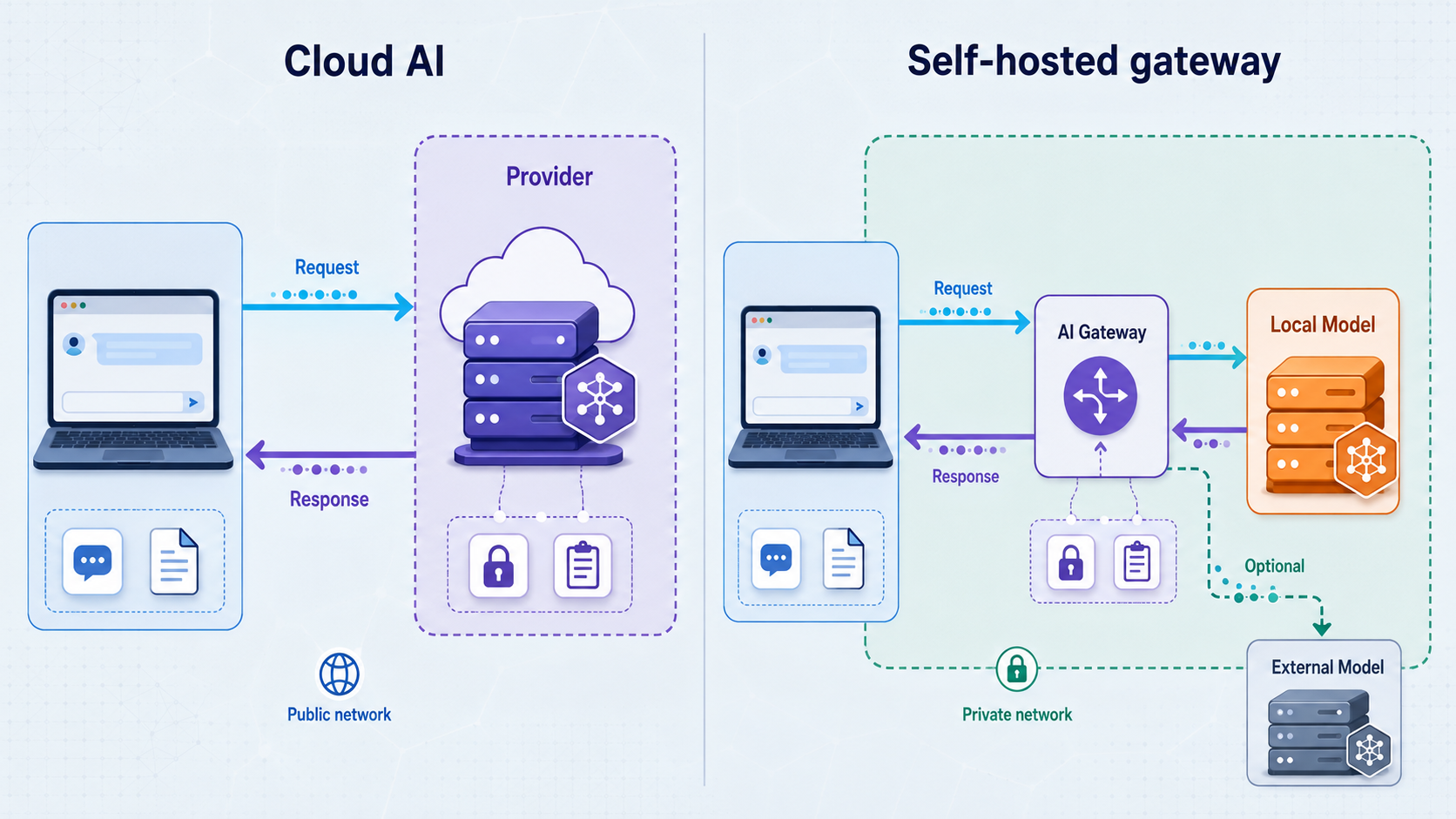
The phrase “cloud AI versus self-hosted AI” can hide several separate decisions. A cloud subscription may provide a browser workspace, user accounts, file uploads, model selection, saved conversations, and team administration as one managed service. A self-hosted deployment may consist of a local model, a gateway API, a browser interface, a vector database, tool integrations, and one or more upstream model providers. The second system is not automatically isolated merely because one component runs on your hardware.
Begin by writing down the task you are trying to support. Examples include interactive chat, code assistance, document analysis, retrieval over internal knowledge, automated API calls, or an agent that can invoke tools. Then identify who needs access, from which networks, and with which data. This prevents a long list of models or interface features from distracting you from the system’s actual security and operational requirements.
A useful architecture review separates six questions:
Neither deployment model wins every category. A managed subscription can reduce the work involved in installation, upgrades, availability, account administration, and user support. A self-hosted gateway can give you direct control over some components and network paths. It also makes you responsible for configuring, updating, monitoring, backing up, and safely exposing those components.
For a formal review process, the NIST AI Risk Management Framework organizes AI risk work around four functions: Govern, Map, Measure, and Manage. This checklist is especially useful during the Map stage, where teams establish context, identify affected parties, document system boundaries, and understand how an AI system interacts with people and other technology. The companion NIST Generative AI Profile adds guidance for risks specific to generative AI. These resources do not choose a deployment for you, but they provide a disciplined structure for recording assumptions, evidence, owners, and unresolved risks.
A gateway running on your workstation can still forward prompts and files to an external model API. Conversely, a browser interface hosted elsewhere might connect to an inference service under your control. Draw the path actually taken by data instead of assigning privacy properties from the deployment label.
Map the complete AI data path
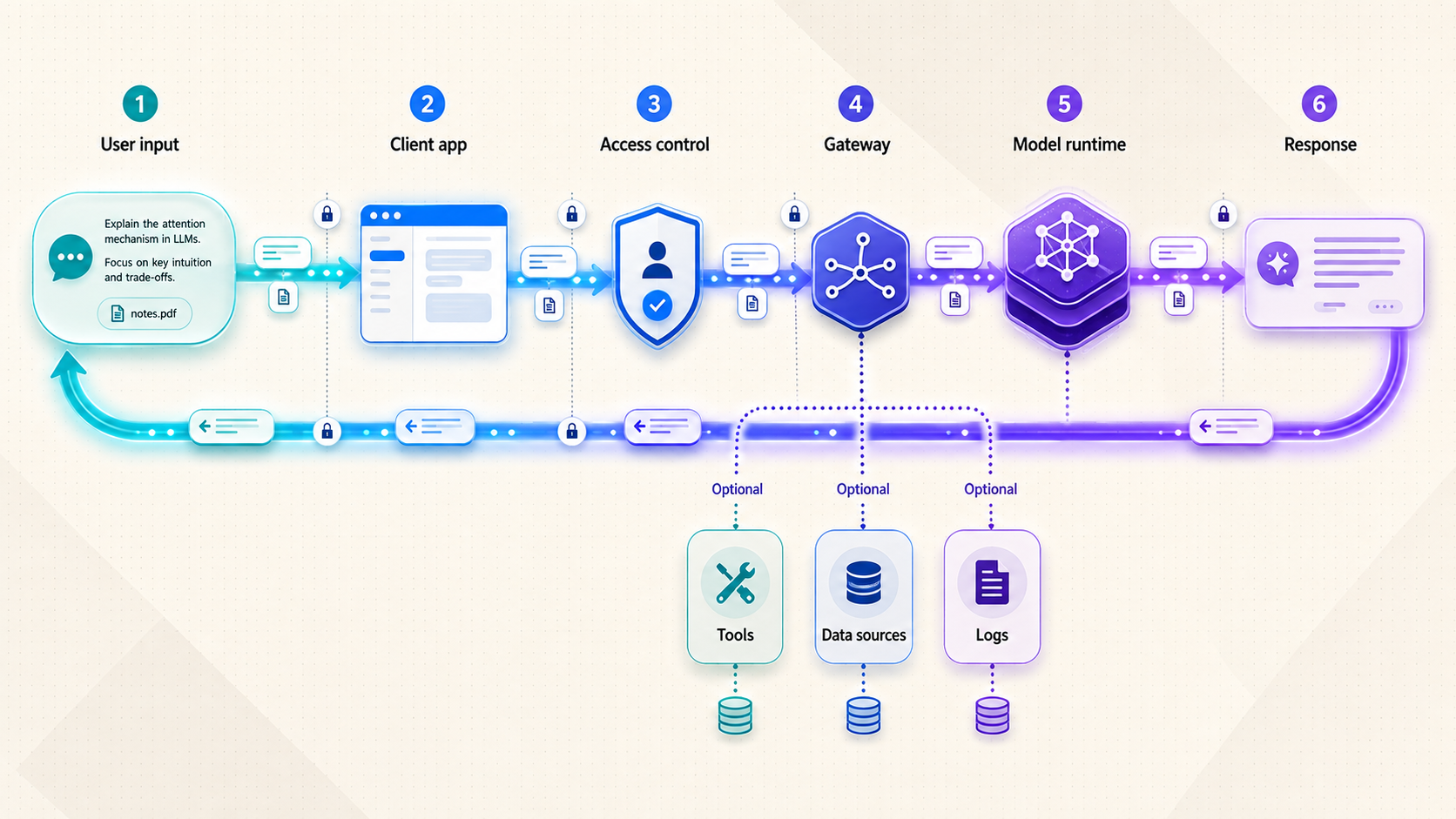
A data-path map should follow information from the user’s first action to final storage or deletion. Do not stop at the model endpoint. Modern AI workflows frequently include browser code, an application backend, an API gateway, retrieval services, databases, object storage, observability systems, content filters, external models, and tools. Each component can create another copy, log, cache, or authorization decision.
1. Prompts and conversation context
Trace the prompt from the user interface to the system that performs inference. If a gateway adds a system instruction, conversation history, retrieved documents, account metadata, or tool descriptions, mark those additions on the diagram. The model may receive substantially more information than the text visible in the prompt box.
Ask whether conversations are saved, how long they remain available, who can search them, whether administrators can export them, and what deletion actually removes. For a cloud service, these answers should come from current product settings and contractual terms. For a self-hosted gateway, inspect its configured databases, local files, caches, and logs. Do not assume that closing a browser clears server-side state.
2. Uploaded files and extracted content
A file upload can create several representations. The original file may be stored in object storage or on disk. A parser may produce extracted text. A retrieval pipeline may divide the text into chunks and generate embeddings. Preview systems may create thumbnails or converted documents. Logs may retain filenames, identifiers, processing errors, or portions of content.
Record each derivative rather than writing a single box labeled “file.” Deleting the original object does not prove that extracted text, embeddings, cached responses, backups, or log records have also disappeared. If a workflow handles customer information, source code, financial material, or unpublished documents, test deletion behavior with non-sensitive sample data before approving production use.
3. Credentials and identity
Keep user identity separate from machine credentials. A browser session identifies a person to an interface. A gateway API key may authorize software. An upstream model key authorizes requests to a model provider. A tool token may permit actions in a code repository, ticketing system, database, or cloud account. One request can involve all four.
Document where each secret is entered, stored, transmitted, read, rotated, and revoked. Determine whether the browser ever receives an upstream provider key. In a safer architecture, high-value backend credentials generally remain on the server that needs them rather than being embedded in browser code or distributed to every user. The exact implementation depends on the selected gateway, so verify behavior rather than assuming it.
4. Retrieval and embeddings
Retrieval-augmented generation adds at least two paths: document ingestion and query-time retrieval. Determine where embeddings are generated and where the vector index lives. If an external embedding service is used, document what text is sent to it. At query time, identify which chunks are selected, whether access permissions are checked before retrieval, and whether retrieved text crosses another boundary on its way to the model.
Authorization must apply to retrieved content, not merely to the chat page. A user who can ask a gateway questions should not automatically gain access to every indexed document. Test with accounts that have intentionally different permissions, and verify that retrieval filters cannot be bypassed through direct API requests.
5. Tool and agent calls
Tool use changes the architecture from data processing to action execution. A model may propose a function call, but another component parses that proposal, validates it, chooses credentials, and performs the operation. Map every tool endpoint and its reachable resources. Identify whether calls are read-only or capable of creating, changing, sending, executing, or deleting data.
Treat tool output as potentially sensitive input to the next model request. Also treat external tool output as untrusted data. Web pages, issue descriptions, documents, emails, and messages can contain instructions that attempt to redirect an agent. OWASP describes this class of risk in its Prompt Injection guidance, including indirect prompt injection delivered through external content rather than the user’s visible prompt.
Prompt filtering alone is not a sufficient control. The application should constrain what a model can cause to happen even when the model produces an unsafe or manipulated request. OWASP’s guidance on Excessive Agency emphasizes limiting tool functionality, permissions, and autonomy. In practical terms, give each tool the minimum operations, credentials, and network access required; validate arguments outside the model; and require human approval for consequential actions where appropriate.
6. Responses, telemetry, and errors
Model output can be stored in chat history, copied into application logs, sent to analytics services, cached by a gateway, or forwarded into another tool. Error paths deserve equal attention. Failed requests sometimes expose request bodies, headers, stack traces, or provider responses more broadly than successful requests.
Build the map using arrows labeled with protocol, authentication method, data category, and destination owner. Add a retention note beside every system that stores data. If you cannot answer one of those fields, mark it as unknown and resolve it before using sensitive production information.
Compare cloud and self-hosted trust boundaries
A useful comparison avoids claims that one model is inherently private or secure. Instead, compare which party operates each component, which controls are available, and which failures your team must handle. Product behavior varies widely, so this table describes architectural questions rather than promises about a particular provider or gateway.
| Area | Cloud subscription review | Self-hosted gateway review |
|---|---|---|
| Inference | Confirm which model service receives prompts and whether model selection changes the destination. | Confirm whether inference is genuinely local or whether the gateway calls one or more external APIs. |
| Conversation state | Review account settings, retention behavior, administrative visibility, export, and deletion. | Inspect the gateway’s configured database, files, caches, backup process, and log destinations. |
| Identity | Evaluate individual accounts, team roles, offboarding, session controls, and administrative ownership. | Configure and test the gateway’s own authentication and authorization rather than relying on obscurity. |
| Updates | The service operator normally manages application deployment, but customers still need to review changes and settings. | Your operators must plan gateway, model runtime, dependency, operating-system, and integration updates. |
| Network exposure | The service is usually reached at an existing internet endpoint controlled by its operator. | You choose whether the gateway is loopback-only, LAN-accessible, privately routed, or publicly exposed. |
| Availability | Review documented service behavior and your dependency on internet connectivity and provider availability. | Account for host power, local connectivity, gateway process health, model capacity, and any remote-access path. |
| Tools | Determine which built-in connectors are enabled and what permissions they receive. | You control integrations, but you must also restrict their credentials, network reach, and allowed actions. |
| Revocation | Test user removal, session termination, credential rotation, and data deletion controls. | Test gateway account removal, secret rotation, tunnel shutdown, tool revocation, and local data cleanup. |
Responsibility is the central tradeoff. Operating software yourself can reduce reliance on a managed application layer, but it does not remove external dependencies such as model APIs, package repositories, identity systems, DNS, storage, or remote-access relays. It also does not automatically supply authentication, rate limiting, backups, audit records, or secure defaults.
Similarly, a cloud service should not be judged only by its landing page. Test it with representative but non-sensitive work. Confirm which features and models are actually included, how usage limits affect normal workloads, how team accounts are separated, and whether access can be removed promptly. Evaluate output quality as part of the decision, but keep output quality distinct from the network and data-handling assessment.
Use synthetic documents, test accounts, and replaceable credentials while mapping a new service or gateway. Approve real data only after you understand storage, logs, external calls, deletion, access control, and incident procedures.
Choose the smallest remote-access surface that works
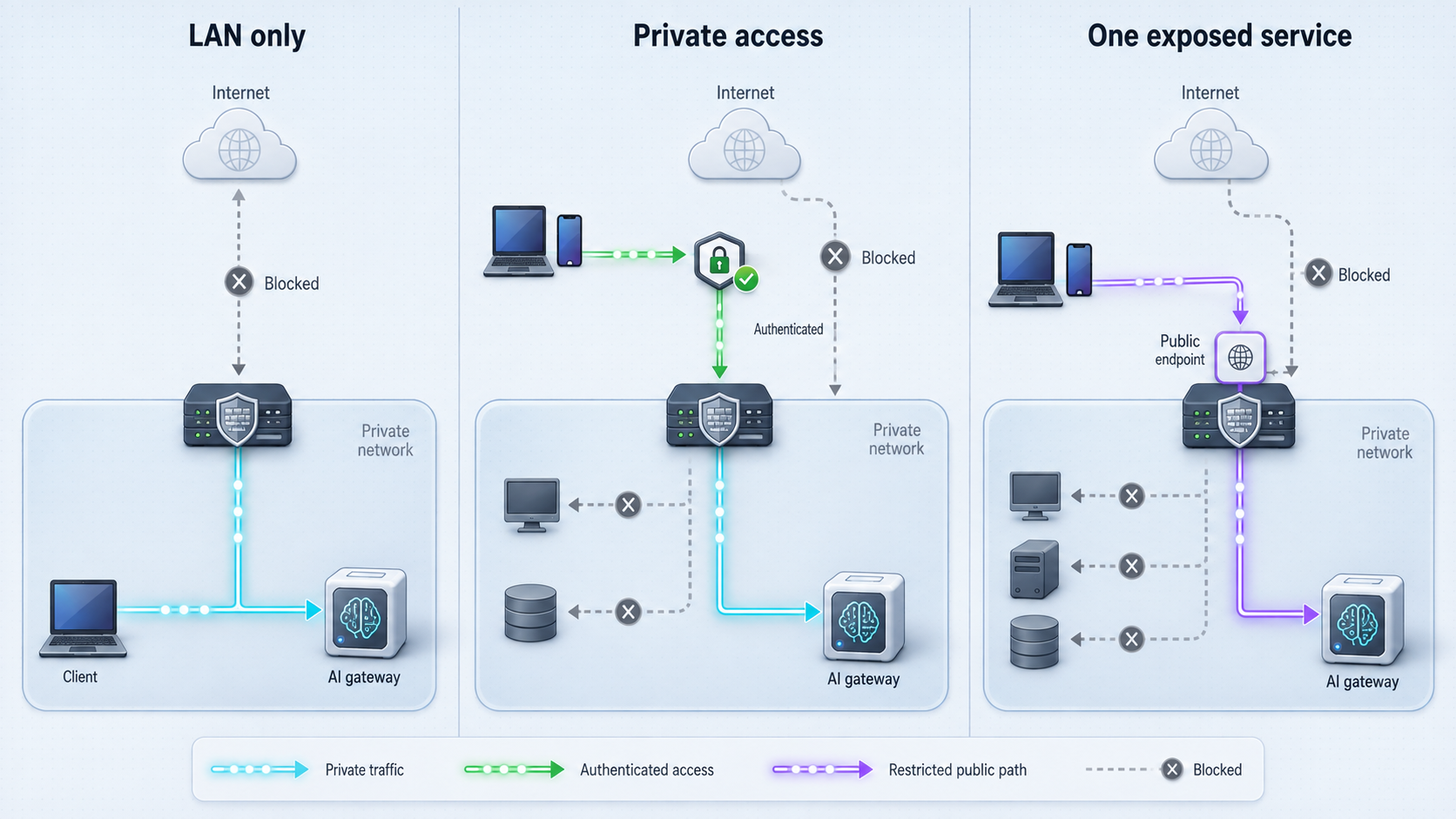
A self-hosted gateway does not need a public endpoint merely because it provides an HTTP interface. Exposure should follow the users and integrations that genuinely require access. Start with the narrowest workable option and expand only when a documented requirement justifies it.
| Access model | Best fit | Main review questions |
|---|---|---|
| Local-only | One user or local software on the same host | Is the gateway bound only where intended? Can another local process access it? Are local credentials still required? |
| LAN access | Known devices on one trusted local network | Which network interfaces accept connections? Are guest and untrusted devices separated? Does the gateway authenticate every user? |
| Private mesh | Remote users or devices that can join an approved private network | How are devices enrolled and removed? Which peers and subnets are reachable? What firewall rules limit movement? |
| Public HTTPS endpoint | Webhooks, external clients, distributed users, or services that cannot join a private network | How does the application authenticate requests? What is internet-visible? How are abuse, revocation, logs, and failures handled? |
Keep it local when remote access adds no value
Local-only operation is appropriate when a desktop interface, development tool, or automation process runs on the same machine as the gateway. This removes the need for an internet route, but it does not eliminate application security. Other local users and processes may still be relevant to the threat model, and an external model provider may still receive requests if the gateway is not performing local inference.
Use LAN access deliberately
A gateway shared with nearby devices may only need a local network address. Verify which interfaces it listens on and whether the network contains unmanaged, guest, or embedded devices. A private address is not an authentication mechanism. Use the gateway’s supported identity and authorization controls, and avoid exposing administrative functions merely because users need inference access.
Use a private mesh for enrolled participants
When access should be limited to approved devices or private networks, a mesh design may be more suitable than a public URL. Our VPN Manager is the Localtonet feature intended for a private mesh VPN. It supports granular firewall rules and can bridge local LANs. Standard HTTP, TCP, UDP, TLS, and File Server tunnels should not be described as VPN functionality.
A private mesh and a public tunnel solve different problems. The mesh is useful when participants can be enrolled into the private network. A public endpoint is often necessary when an external webhook sender, hosted automation platform, mobile client, or other integration cannot join that mesh.
Publish only the application endpoint that must be public
A public HTTPS route can make a local HTTP service reachable without directly opening a router port, but it also changes the gateway’s audience from a restricted network to the internet. Publish a dedicated application endpoint, not a model runtime’s administrative interface or an unrelated service on the host. Authentication and authorization must be enforced by a suitable application layer.
A reverse proxy and a tunnel are not interchangeable concepts. A reverse proxy accepts a request and forwards it to an upstream service, often while applying routing or application-layer policy. A tunnel provides a network path between a public address and a local target. A deployment may use both. Neither term, by itself, guarantees user authentication, authorization, safe tool execution, or appropriate retention.
AI gateway security and data-path checklist
Use this checklist during design review and again after implementation. Written answers are more valuable than assumptions. Record the owner of each control and attach evidence from a test, configuration review, or current service setting where possible. NIST’s AI RMF can provide the broader governance process, while OWASP’s generative AI guidance can help identify application-level threats that should become concrete tests.
Endpoint and network scope
- List every listening address and port used by the interface, gateway, model runtime, database, retrieval service, and tool adapter.
- Identify which endpoints are local-only, LAN-reachable, privately routed, or publicly reachable.
- Confirm that administrative and health interfaces are not exposed merely because the user-facing API is required.
- Document every reverse proxy, tunnel, load balancer, DNS name, and relay in the request path.
- Verify that stopping one remote-access route does not leave an older route or direct router rule active.
Authentication and authorization
- Require individual identities where accountability matters instead of distributing a shared credential.
- Separate ordinary use, tool execution, configuration, and administration.
- Determine whether API clients and browser users use different credential types and revocation paths.
- Test authorization at the API, retrieval, file, and tool layers rather than only in the visible user interface.
- Define how quickly access can be removed when a user, device, integration, or secret is no longer trusted.
Secrets
- Inventory model-provider keys, gateway secrets, tool credentials, database passwords, tunnel device tokens, and signing secrets.
- Do not place backend secrets in browser code, screenshots, source repositories, example requests, or public logs.
- Give each integration only the permissions required for its task.
- Establish a rotation procedure and test it before an incident.
- Keep the Localtonet device auth token private. Tokens are device-specific and must not be guessed, published, or copied into documentation.
Prompts, files, and retention
- Classify acceptable and prohibited data before users begin experimenting.
- Trace originals, extracted text, embeddings, caches, chat history, logs, telemetry, and backups independently.
- Confirm whether deletion covers derived data and whether backup retention creates a delayed removal path.
- Check whether filenames, prompt fragments, tool output, or request bodies appear in normal and error logs.
- Use redaction where supported, but verify it with representative inputs rather than assuming it catches every sensitive field.
- Record the configured retention period for every storage location, including services operated by another provider.
Tool and agent safety
- List every operation available to the model and distinguish read actions from write, send, execute, and delete actions.
- Restrict tool credentials and network reach even if the model is instructed to behave safely.
- Validate tool names, arguments, destinations, and requested resources in deterministic application code before execution.
- Require an appropriate approval step for consequential actions.
- Plan for malicious or misleading instructions inside documents, web content, messages, and tool responses.
- Test whether indirect prompt injection can cause the system to reveal data, select an unauthorized tool, alter a destination, or exceed the current user’s authority.
- Prefer narrowly scoped tools over a general shell, unrestricted browser, broad database account, or all-purpose cloud credential.
Logging and observability
- Decide which events are needed for security, debugging, billing, and capacity planning.
- Avoid recording complete prompts, credentials, or file contents unless there is a justified requirement and controlled retention.
- Make administrative changes, authentication failures, credential use, tool calls, and exposure changes observable where the selected software supports them.
- Ensure logs have an owner, access policy, retention period, and deletion process.
- Test error handling because exceptional paths may log more data than successful requests.
Failure and revocation
- Define what the user sees when the model, gateway, tool, internet connection, host, or tunnel becomes unavailable.
- Prevent retries from repeating a consequential tool action without an idempotency or confirmation design.
- Test whether expired or revoked sessions stop working promptly.
- Document how to stop the gateway, stop its public route, revoke tool credentials, and isolate the host.
- Confirm who is authorized to perform emergency shutdown and how that person gains access during an incident.
Treat every public AI gateway endpoint as discoverable and reachable by untrusted clients. A hard-to-guess URL should not replace supported authentication, authorization, input validation, least-privilege tool credentials, or application-level abuse controls.
Publish a confirmed local AI gateway with Localtonet
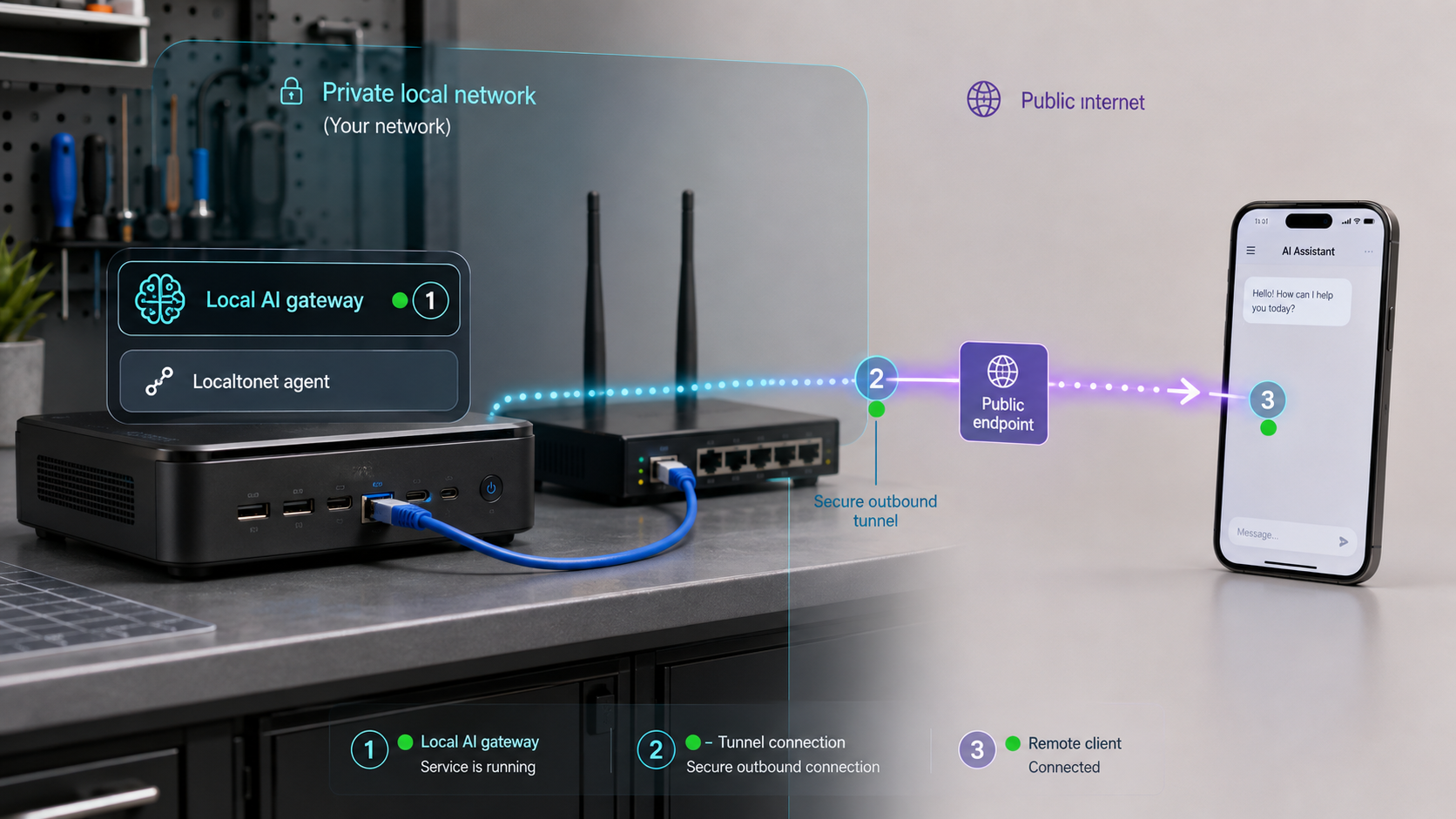
When the architecture review establishes that a public HTTPS endpoint is necessary, our HTTP tunneling model can expose a web service running on the Localtonet client device or otherwise reachable from it. The client establishes an outbound connection to a Localtonet relay server. This avoids inbound router port forwarding, firewall changes, VPN setup, and the need for a public IP address.
Before creating the tunnel, finish the gateway’s own installation and configuration. Confirm that its intended HTTP endpoint works locally, that authentication behaves correctly, and that you know the exact local IP address and port. Localtonet provides reachability to that target. It does not determine which gateway route is safe to publish, add missing gateway authorization, or correct an application that is listening on the wrong interface.
The sequence below follows the current documented Localtonet HTTP tunnel workflow. Current client installation commands, available relay servers, and selectable options can change, so obtain those values from the current Localtonet application, dashboard, and HTTP tunnel documentation. Do not copy an unverified command, token, or region code from an old tutorial.
Install and run the Localtonet client
Run the client on the device that can reach the AI gateway’s confirmed local HTTP endpoint. The target can be on that device or reachable from it, but validate the route from the client device before continuing. Use the current installation instructions for your operating system rather than relying on a command copied from an older article.
Authenticate or select the client device
Use the device-specific auth token associated with the client that will run the tunnel. Keep the token secret. Do not place it in source code, screenshots, issue reports, shell history examples, or shared tutorial commands.
Select an available relay server
Choose from the server or region values currently presented by our platform. Availability can vary, so this guide does not hardcode a server code or claim that every option is available on every plan.
Create the HTTP tunnel configuration
Select the HTTP tunnel type and point it to the verified local IP address and port of the gateway. For HTTP tunnels, the process type can be Random Sub Domain, Custom Sub Domain, or Custom Domain. These process types serve the content at a public HTTPS address. Check current documentation before configuring custom-domain DNS because exact DNS requirements can change and are not established in this guide.
Start the tunnel
Creating a tunnel does not make it run. Use the Start button and confirm that the selected client device remains connected. The assigned public URL is usable only while the tunnel is running and its client is connected.
Use and control the assigned public endpoint
Test the public HTTPS address with an authorized client. When remote access is no longer required, stop the tunnel. Delete it when the configuration should no longer exist. Also revoke or rotate application credentials independently when their trust has changed.
A saved tunnel configuration and a running tunnel are different states. The public route depends on both the selected Localtonet client being connected and the tunnel being started. Include client connectivity and tunnel state in troubleshooting and incident procedures.
Localtonet supports several tunnel and proxy families, but protocol choice should follow the application. A browser-based gateway or HTTP API normally calls for an HTTP tunnel. Do not select raw TCP or another category simply to avoid understanding the application protocol. Likewise, do not present an HTTP tunnel as a VPN. If the requirement is private network membership rather than a public application URL, evaluate Localtonet VPN Manager instead.
Some AI workflows use an MCP endpoint rather than a general model gateway. Our MCP Gateway tunnel is specifically intended to expose a locally running McpNet Gateway. We also provide the Localtonet MCP Server, which allows supported AI coding assistants such as Claude Code and Cursor to create, start, and stop Localtonet tunnels from the assistant. These are separate capabilities with different purposes.
Confirm current MCP naming and availability in the dashboard or the linked product articles before designing around these features. MCP-related options are shipping, but they are not necessarily represented in the main tunnel documentation navigation, and this article does not claim that every capability is included in every subscription plan.
Verify the result from the inside out
Verification should prove both functionality and containment. A successful chat response confirms only that one request completed. It does not prove that authentication is enforced, administrative routes are hidden, secrets are protected, retention matches policy, or revocation works.
Verify the gateway before exposing it
From the device that will run the Localtonet client, request the exact gateway route you intend to publish. Confirm that the expected application responds and that a different local service has not been selected accidentally. Test an unauthenticated request, a valid credential, an invalid credential, and an account without sufficient permission. If the gateway provides separate user and administrative routes, verify that only the intended route is part of the exposure design.
Observe the gateway’s outbound connections during a representative request. This is where a supposedly local workflow may reveal an external model, embedding, analytics, storage, or tool dependency. Repeat the test with a file upload, retrieval request, and tool call because those features can follow different paths from plain chat.
Verify the public path
Start the tunnel and use the assigned public HTTPS address from a network that is not the gateway’s LAN. Test the actual client type your users or integrations will employ. A browser test alone may not represent an API client, webhook sender, streaming response, or long-running request.
Confirm that an unauthenticated internet client receives the gateway’s intended rejection rather than useful model output or an administrative page. Verify that malformed requests do not disclose stack traces, secrets, local paths, or internal addresses. Inspect application logs to ensure credentials and complete sensitive request bodies are not recorded unexpectedly.
Test authorization and agent boundaries
Use accounts with deliberately different permissions. Confirm that a user cannot retrieve another user’s documents, invoke an administrative tool, substitute a different resource identifier, or cause the gateway to use a more privileged backend credential. When the application uses tools, include indirect prompt-injection tests in documents or test web content and verify that deterministic controls still restrict the resulting action.
The goal is not to prove that the model will always ignore a hostile instruction. The goal is to prove that the surrounding application limits the damage if model behavior becomes unreliable. A manipulated model response should not be enough to grant new permissions, reveal a credential, select an unrestricted tool, or bypass an approval requirement.
Test negative and failure cases
- Stop the Localtonet tunnel and confirm that the public route is no longer available.
- Restart the tunnel and confirm that the intended authenticated workflow returns.
- Disconnect the selected client and verify the expected loss of public availability.
- Stop the gateway while leaving the tunnel running and document the user-visible failure.
- Revoke a gateway user or API credential and confirm that existing and new requests behave as intended.
- Disable a tool credential and verify that the tool fails safely without exposing its secret.
- Test oversized, malformed, and unsupported input within the gateway’s documented behavior.
- Confirm that retries cannot repeat a write operation without appropriate safeguards.
- Attempt to access administrative and health routes through the public endpoint.
- Confirm that an old tunnel, direct port-forwarding rule, or alternate hostname does not preserve unintended access.
Repeat the data-path review after deployment
Compare observed traffic and stored artifacts with the original diagram. Check chat storage, upload directories, databases, embedding indexes, caches, logs, and backups. If the implementation created an unplanned destination, update the design or remove that path before production approval.
Record what was tested, when it was tested, which configuration was active, and who reviewed the evidence. Retest after changes to the gateway, model provider, retrieval pipeline, identity system, tool set, public exposure, or retention settings. A data-path diagram is an operational record, not a one-time drawing.
HTTPS describes the public connection presented to the client, but a complete security review must also examine the local target protocol, gateway behavior, credentials, relays, proxies, logs, and upstream model or tool connections. This article does not claim encryption properties beyond verified Localtonet behavior.
Plan routine operations before production use
The architecture is not complete until someone can operate it safely. Self-hosting shifts routine decisions to your team, while a cloud subscription still requires account governance, data rules, and periodic review. Assign named owners rather than relying on whoever initially assembled the proof of concept.
Updates and configuration control
Track the versions and configuration of the gateway, model runtime, user interface, retrieval components, tool adapters, operating system, and Localtonet client. Review release changes before deployment and maintain a recovery path appropriate to the software. Avoid treating a container image or package tag as a complete record of configuration.
Separate development and production credentials. A developer should be able to test a change without gaining unnecessary access to production files, model accounts, or tools. If the gateway supports configuration exports, inspect them for embedded secrets before storing them.
Capacity and dependency management
Measure representative workloads rather than relying on a successful single-user test. Local inference can be constrained by compute and memory. External inference depends on provider availability, quotas, and network connectivity. File analysis and retrieval can create bursts that differ from ordinary chat. Public exposure can also attract unauthenticated traffic, so failure under unwanted load must be considered even when the application rejects those requests.
Do not invent assumptions about Localtonet bandwidth, rate limits, uptime, region coverage, encryption details, or subscription entitlements. Those details are not established in this article and can vary by plan, client version, region, or deployment. Check current product and plan information for the deployment you are approving.
Access reviews and offboarding
Periodically compare active users, API clients, Localtonet devices, gateway credentials, model-provider keys, and tool accounts with current business needs. When a person or integration leaves, revoke each layer independently. Removing a user from the chat interface does not necessarily invalidate a separately issued API key, browser session, model-provider credential, or tool token.
For urgent public-access shutdown, stop the Localtonet tunnel and confirm that it has stopped. If the configuration is no longer needed, delete it. Then address the underlying incident by revoking compromised application credentials, reviewing logs, and correcting the gateway. Tunnel shutdown reduces reachability, but it is not a substitute for credential response or host investigation.
Retention and deletion reviews
Retention behavior can change when a new feature is enabled. Adding file analysis, retrieval, conversation search, observability, or backup software can introduce storage that did not exist in the original design. Review deletion tests after these changes and distinguish immediate deletion from later expiration in backups or provider-managed systems.
Cloud and self-hosted systems both require evidence. For a managed service, retain the applicable configuration, contractual, and administrative records. For a self-hosted system, retain the relevant configuration and test results without copying live secrets into the review record. If a retention or deletion behavior cannot be verified, mark it as an unresolved dependency rather than assuming the preferred outcome.
Revisit the original decision
A deployment that made sense during evaluation may no longer fit after the number of users, data sensitivity, tools, or availability expectations changes. Review whether local-only, LAN, private mesh, or public access is still appropriate. Also review whether the team is actually using the features that justified a managed subscription or whether self-hosting costs more operational time than expected.
The best choice is the one whose complete path you understand and can govern. That may be a managed workspace, a local model behind a private interface, a gateway that brokers approved external models, or a mixed design. The architecture label matters less than verified answers about data movement, authority, exposure, retention, and revocation.
Frequently asked questions
Is a self-hosted AI gateway automatically more private than a cloud AI subscription?
No. A self-hosted gateway may still send prompts, retrieved documents, embeddings, telemetry, or tool data to external services. It may also retain local logs and databases that your team must secure. Compare the actual destinations, storage, controls, and operational responsibilities instead of relying on the self-hosted label.
Does a local AI gateway need to be exposed to the internet?
Not necessarily. Keep it local when only software on the same host needs access. Use LAN access for appropriately controlled nearby devices, or a private mesh when approved remote participants can join that network. A public endpoint is appropriate only when external users or services require internet reachability and the gateway is prepared for that exposure.
What does Localtonet change in the AI data path?
The Localtonet client establishes an outbound connection to a relay server and provides a public URL for the configured local HTTP target. This removes the need for inbound router port forwarding, firewall changes, VPN setup, or a public IP address. It does not remove the gateway, model providers, storage systems, tools, or their security responsibilities from the data path.
Does creating a Localtonet tunnel immediately make it available?
No. Creating the configuration and running it are separate lifecycle states. You must start the tunnel, and the selected Localtonet client must remain connected. The tunnel can later be stopped or deleted.
Does the public Localtonet URL authenticate AI gateway users?
Do not assume that it does. The tunnel supplies the public route to the configured target. Use the gateway or an appropriate application layer to enforce supported authentication, authorization, input validation, and least privilege. Test unauthenticated and unauthorized requests from an external network before production use.
Should I expose the model runtime or the gateway?
Expose the narrowest application endpoint designed for remote clients. A gateway may provide authentication, request validation, routing, and policy that a model runtime does not provide, but capabilities vary by project. Never assume a runtime or gateway is safe for public access without checking its official documentation and testing its configured controls.
When should I use VPN Manager instead of an HTTP tunnel?
Consider VPN Manager when approved devices or networks need private mesh connectivity and can be enrolled accordingly. Use an HTTP tunnel when a specific web application or API needs a public HTTPS address, such as for an external service that cannot join the private mesh. Standard tunneling is not VPN functionality.
How should prompt injection be handled in a tool-using gateway?
Treat prompts, retrieved documents, web content, messages, and tool responses as potentially untrusted. Do not rely only on instructions telling the model to ignore malicious content. Restrict available tools, validate tool arguments in deterministic code, use narrowly scoped credentials, separate user and administrative authority, and require approval for consequential actions.
What should be tested before sensitive data is approved?
Test authentication, authorization, file handling, retention, deletion, logging, retrieval permissions, external model calls, prompt-injection containment, tool restrictions, credential rotation, user revocation, tunnel shutdown, and failure behavior. Use synthetic data and replaceable credentials until the observed system matches the approved data-path diagram.
Publish only the AI endpoint your architecture requires
Once your gateway works locally, its access controls have been tested, and a public HTTPS route is justified, use Localtonet to connect the confirmed local endpoint through an outbound tunnel without inbound router port forwarding or a public IP address.
Get Started Free →

