

Make the public OAuth origin and the local Next.js application agree
An OAuth flow can work on localhost yet fail when an identity provider redirects through a public HTTPS tunnel. The usual cause is disagreement between the registered redirect URI, the application’s external origin, trusted-host handling, cookie scope, or the address used to reach a containerized Next.js process. This guide provides a reproducible Auth.js walkthrough, followed by a framework-neutral diagnostic procedure for custom OAuth implementations. It also shows how to expose the verified application through a Localtonet HTTP tunnel without confusing the public HTTPS address with the local target.
📋 What's in this guide
Understand the OAuth request path before changing settings
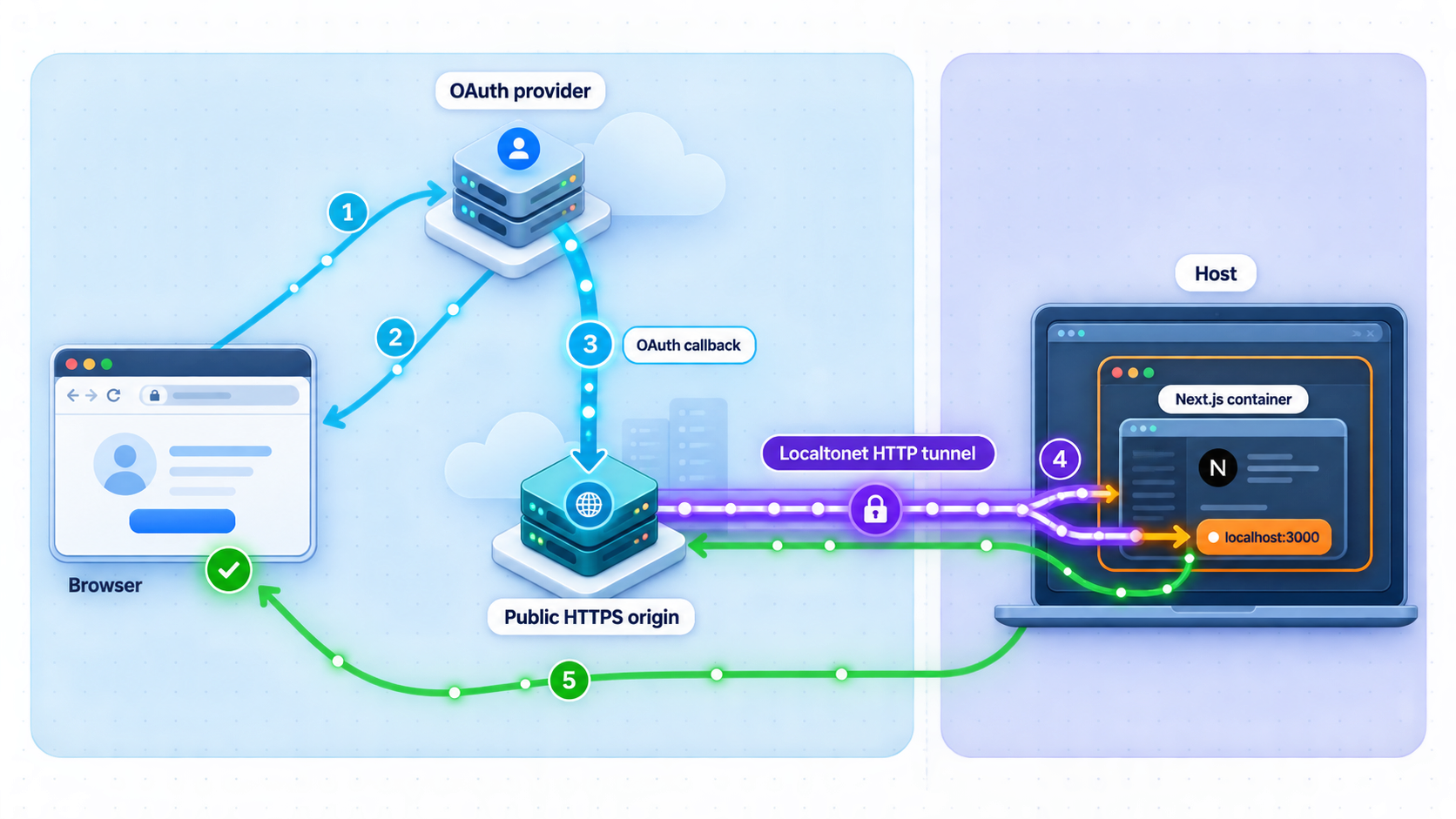
A tunneled OAuth flow crosses several boundaries. The browser begins at a public HTTPS address, the authorization request goes to the identity provider, and the provider redirects the browser to a registered callback URI. The Localtonet tunnel carries that callback to a Next.js service listening on the client device or inside a container. The authentication implementation then validates temporary OAuth data, exchanges the authorization code where required, creates a session, and redirects the browser back into the application.
Every participant must agree on the externally visible origin. In this guide, public origin means the scheme and authority visible to the browser, such as https://public-name.example. A complete callback URI also includes the callback path expected by the authentication integration. For the Auth.js GitHub example used later, that path is /api/auth/callback/github.
OAuth redirect URI comparison is intentionally strict. Section 3.1.2.3 of OAuth 2.0 RFC 6749 requires the authorization server to compare a supplied redirect URI with the registered value. When a complete redirect URI has been registered, the comparison uses simple string comparison. A difference in scheme, hostname, port, path, capitalization, or trailing slash can therefore cause the provider to reject the authorization request.
The local target is a separate address. It is the IP address and port where the Localtonet client can reach Next.js. It may use plain HTTP even though the browser uses HTTPS because these values describe different connections. The public callback must not be changed to the local target merely because Next.js ultimately receives the request there.
The public HTTPS URL is the identity-provider-facing origin. The local IP and port are only the tunnel target. They do not need the same scheme or hostname, but the authentication layer must still understand that the original browser request used the public HTTPS origin.
Use a clearly scoped Next.js and Auth.js baseline
The concrete walkthrough in this article is scoped to a Next.js App Router application using Next.js 15.5.7 and Auth.js v5 through next-auth@5.0.0-beta.30. It uses the documented Auth.js catch-all route and GitHub provider, producing the callback path /api/auth/callback/github. The diagnostic principles also apply to other providers, but provider identifiers and callback paths must match the provider configured in the application.
Auth.js v5 remains materially different from NextAuth.js v4 in environment-variable naming, route examples, deployment behavior, and trusted-host handling. Do not copy the v5 settings below into a v4 application without checking the Auth.js v5 migration guidance. Likewise, a custom OAuth implementation does not automatically use Auth.js routes or settings.
Identify the versions actually installed
Run the package-manager command that matches the project. These commands inspect the dependency tree rather than assuming that the version range in package.json is the exact installed version.
npm ls next next-auth --depth=0pnpm list next next-auth --depth=0yarn why next
yarn why next-authYou can also ask Node.js to read the installed package metadata:
node -p "require('next/package.json').version"
node -p "require('next-auth/package.json').version"
For this walkthrough, the expected output is 15.5.7 for next and 5.0.0-beta.30 for next-auth. If the project reports different versions, preserve that result in your debugging notes and consult the documentation matching those installed versions before applying version-sensitive settings.
Confirm the routing model and package scripts
This example uses the App Router. Its Auth.js handler is exposed through app/api/auth/[...nextauth]/route.ts. A Pages Router application instead places the handler under pages/api/auth/[...nextauth].ts, so first determine which structure exists:
find app pages -path '*api/auth*' -maxdepth 8 2>/dev/nullInspect the project’s documented package scripts rather than assuming how its maintainer starts it:
npm pkg get scripts
A typical Next.js project includes dev, build, and start scripts, but the project’s own package.json is authoritative. The official
Next.js self-hosting guidance
distinguishes development from production startup: development commonly uses the project’s dev script, while a production-style check normally requires a successful build followed by the project’s start script.
| Item | Reference walkthrough | What changes in another project |
|---|---|---|
| Next.js release | 15.5.7 | Startup behavior, framework defaults, and deployment guidance can change between releases. |
| Authentication package | next-auth@5.0.0-beta.30 |
Environment variables and host-trust behavior differ from NextAuth.js v4 and may change in later v5 releases. |
| Router | App Router | Pages Router uses a different handler file even though the public Auth.js path can remain under /api/auth. |
| Example provider | GitHub | Another provider uses its own provider identifier, credentials, console, scopes, and callback registration. |
| Callback path | /api/auth/callback/github |
A custom route or another authentication library may use a completely different path. |
| Host trust | AUTH_TRUST_HOST=true or the equivalent Auth.js v5 configuration |
This setting does not apply universally to custom OAuth code or older authentication-library versions. |
Do not paste OAuth client secrets, Localtonet device tokens, authorization codes, access tokens, refresh tokens, cookies, state values, nonce values, PKCE verifiers, or private callback query strings into commands, screenshots, tickets, or public logs. Record package versions, origins, paths, status codes, and redacted attributes instead.
Configure and verify the Next.js application locally
Establish a working local boundary before adding the tunnel. A process appearing in a task list is not sufficient. It must listen on the intended address and port, the Auth.js route must exist in the running build, and the Localtonet client environment must be able to reach it.
Create the Auth.js v5 handler
For the scoped GitHub example, create an Auth.js configuration such as the following. The trustHost option is significant behind a trusted reverse proxy because Auth.js validates the request host. The
Auth.js deployment documentation
describes the deployment environment variables and host-trust requirement, while the
Auth.js UntrustedHost documentation
explains why Auth.js refuses to rely on a host that has not been trusted.
import NextAuth from "next-auth"
import GitHub from "next-auth/providers/github"

export const { handlers, auth, signIn, signOut } = NextAuth({
  providers: [GitHub],
  trustHost: true,
})
Save that configuration as auth.ts in the location used by the project’s import aliases. Then expose its request handlers from the App Router route:
import { handlers } from "@/auth"

export const { GET, POST } = handlers
The second file belongs at app/api/auth/[...nextauth]/route.ts. With the GitHub provider identifier, Auth.js handles the provider callback at /api/auth/callback/github. That documented integration route is why the complete external callback later becomes:
https://PUBLIC_TUNNEL_HOST/api/auth/callback/githubConfigure placeholders without publishing credentials
Auth.js v5 recognizes AUTH_SECRET and provider-specific variables such as AUTH_GITHUB_ID and AUTH_GITHUB_SECRET. Use real values only in the project’s approved local secret store. Do not commit them.
AUTH_SECRET="REPLACE_IN_YOUR_LOCAL_SECRET_STORE"
AUTH_GITHUB_ID="REPLACE_WITH_DEVELOPMENT_CLIENT_ID"
AUTH_GITHUB_SECRET="REPLACE_WITH_DEVELOPMENT_CLIENT_SECRET"
AUTH_TRUST_HOST="true"
In Auth.js v5, AUTH_TRUST_HOST=true maps to trusted-host behavior. It allows Auth.js to rely on host information supplied through the request path. Set it only when the application is intentionally reached through infrastructure you trust. The explicit trustHost: true example and the environment variable are alternative ways to express the same v5 behavior. Use one deliberate project convention rather than scattering duplicate settings across deployment files.
Auth.js v5 generally infers the external URL from the incoming request, so a base URL does not always need to be pinned. If the deployment requires an explicit URL, Auth.js v5 supports AUTH_URL. In that case, set it to the current public origin, not the callback path:
AUTH_URL="https://PUBLIC_TUNNEL_HOST"
An explicit URL is useful only if it accurately represents the active tunnel. If a generated tunnel hostname changes, update AUTH_URL, restart the application so the environment change is loaded, and update the provider registration. A stable subdomain or custom domain avoids repeatedly changing those values where that option is available for the account.
Start through the project’s package script
After confirming the scripts in package.json, start the project with its documented development script. For a standard npm project:
npm run devFor a production-style local test, use the project’s build and start scripts:
npm run build
npm run start
Do not run both modes on the same port. Use the mode relevant to the failure, because middleware, environment loading, optimization, and startup behavior can differ between development and production builds.
Confirm the listening service
Read the actual local URL from the Next.js startup output. Do not assume port 3000 if the project prints another port. On Linux, inspect the listening socket with:
ss -ltnp
On macOS or another system with lsof:
lsof -nP -iTCP -sTCP:LISTENSet a shell variable to the confirmed address and test both the application and a harmless Auth.js discovery endpoint:
export LOCAL_URL="http://127.0.0.1:3000"

curl -i "$LOCAL_URL/"
curl -i "$LOCAL_URL/api/auth/providers"
The providers endpoint should return an Auth.js response that includes the configured provider. The exact body can change, so the important checks are that the request reaches the expected application, does not return a generic route 404, and identifies GitHub as an available provider.
A direct request to /api/auth/callback/github lacks the required provider response parameters and is not expected to complete sign-in. It may return an authentication error or redirect. That result can still prove that the route reaches Auth.js rather than another service. Never copy a real callback URL containing an authorization code into a terminal or ticket.
Fix the process state, listening address, firewall policy, route file, build output, local reverse proxy, or Docker publication before creating a public tunnel. OAuth configuration cannot repair a connection that never reaches Next.js.
Expose the verified service with a Localtonet HTTP tunnel
With Localtonet, our client on the device establishes an outbound connection to a Localtonet relay server. This exposes the selected local service without inbound router port forwarding, firewall changes, VPN setup, or a public IP address. For this browser-based Next.js application, use an HTTP tunnel so the public side receives an HTTPS URL while the tunnel points to the verified local IP address and port.
The current setup follows the sequence in our HTTP tunnel documentation: run the client, select the device token and available server, configure the HTTP target and process type, then start the tunnel. Dashboard labels and available process types can vary by account or client version, so use the values currently presented rather than copying a server code or hostname from an old example.
Install and run the Localtonet client
Run our client on the device that can reach the verified Next.js local URL. If Next.js runs in Docker, test the published container endpoint from this same device before continuing.
Select the client device
Select the device-specific authentication token associated with the client. Treat the token as a secret and never place it in source code, screenshots, browser logs, or sample commands.
Select an available relay server
Choose from the servers or regions currently available in the dashboard. Available values must come from the current product rather than a hardcoded article example.
Configure the HTTP tunnel
Select Random Sub Domain, Custom Sub Domain, or Custom Domain where available, then enter the local IP address and port that passed the earlier reachability tests. All three process types serve the configured content at a public HTTPS address.
Start the tunnel
Creating a tunnel does not make it run. Use the Start button and confirm that the selected device is connected and the tunnel is running.
Record and test the public HTTPS URL
Open the assigned URL and confirm that it reaches the intended Next.js application. Record its scheme and hostname exactly. This is the public origin used for Auth.js and the provider callback.
Test a distinctive public route and the Auth.js providers endpoint:
export PUBLIC_ORIGIN="https://PUBLIC_TUNNEL_HOST"

curl -i "$PUBLIC_ORIGIN/"
curl -i "$PUBLIC_ORIGIN/api/auth/providers"
Replace the placeholder with the assigned Localtonet origin. Do not include a trailing slash in PUBLIC_ORIGIN for these examples. If the local endpoints work but the public endpoints do not, investigate the selected device, tunnel state, target IP, target port, and whether another local service occupies that port.
The public address works only while the selected Localtonet client is connected and the tunnel is running. Check the device and tunnel lifecycle before changing OAuth settings when a previously working callback becomes unreachable.
Align the Auth.js callback, public origin, and provider registration
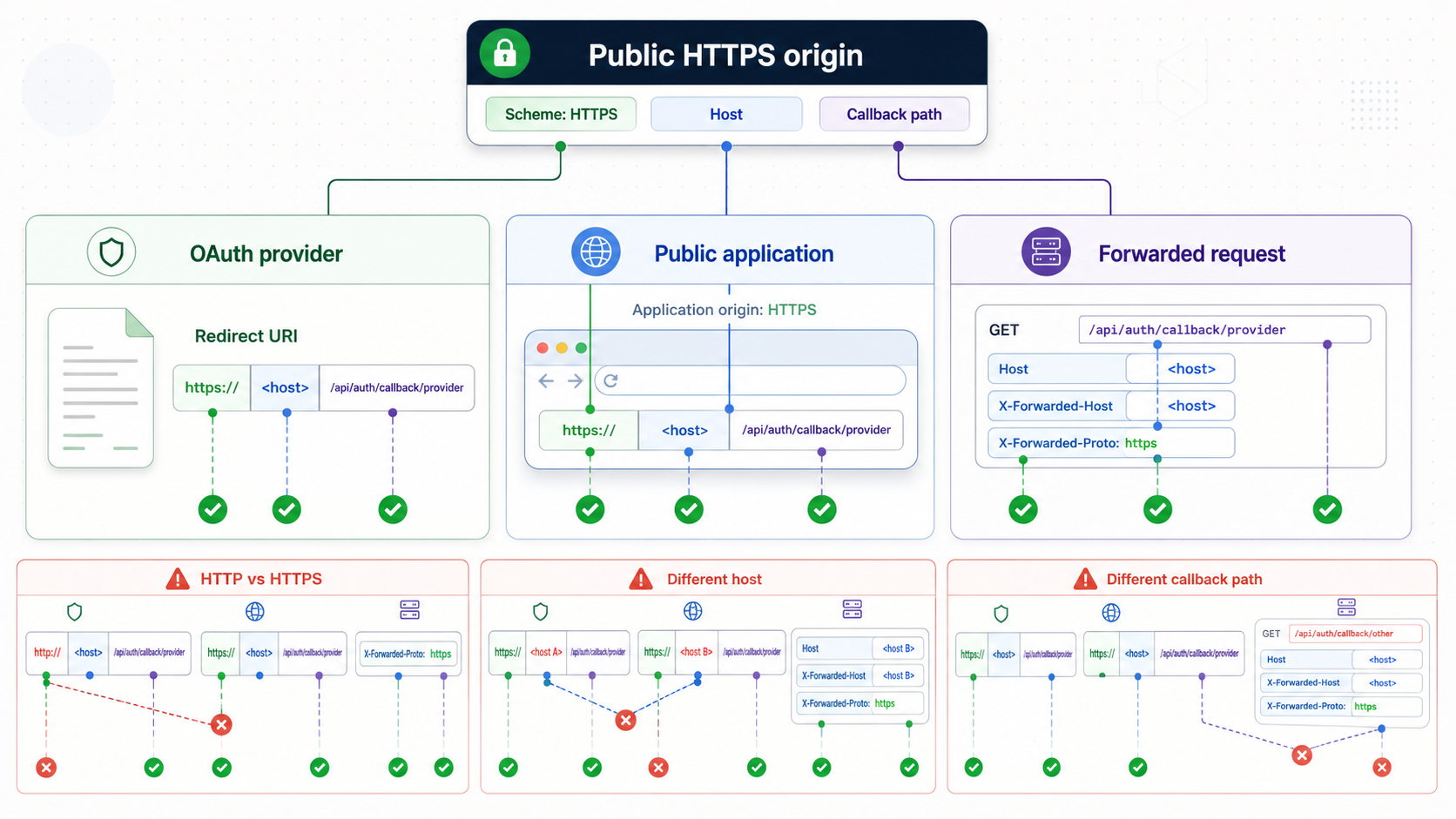
For the scoped Auth.js v5 GitHub example, construct the callback from the Localtonet public origin and the documented provider callback path:
export PUBLIC_ORIGIN="https://PUBLIC_TUNNEL_HOST"
export CALLBACK_URI="$PUBLIC_ORIGIN/api/auth/callback/github"

printf '%s\n' "$CALLBACK_URI"
Register the printed URI as the authorization callback URL in the GitHub OAuth application used by this development environment. GitHub documents this field in its OAuth application authorization guidance. Use development credentials and keep them separate from production credentials where that matches your provider-management model.
These values must agree:
- The callback URI registered in the provider console.
- The
redirect_urisent in the authorization request. - The URI to which the provider redirects the browser.
- The host and protocol accepted or inferred by Auth.js.
- The public origin used to start the sign-in flow.
Understand what is version-specific
In the selected Auth.js v5 baseline, AUTH_TRUST_HOST=true or trustHost: true enables trusted-host behavior. AUTH_URL can explicitly identify the external application URL when inference is not suitable. Provider environment variables use the AUTH_ prefix, and the App Router exports Auth.js GET and POST handlers.
NextAuth.js v4 commonly uses different configuration names, including NEXTAUTH_URL, and has a different handler initialization pattern. Custom OAuth code may build redirect_uri directly, derive it from request headers, read a project-specific environment variable, or hardcode a callback. Those implementations should use the general origin-alignment method in this article, not the Auth.js-specific variable names.
Do not trust arbitrary host data
Host and protocol information influences callback generation, redirects, origin validation, and cookies. Trusted-host mode is appropriate only when the application is intentionally behind a known proxy or tunnel path. It is not a reason to accept arbitrary forwarded headers from every network interface.
If another reverse proxy sits between the Localtonet target and Next.js, it may preserve, overwrite, append, or discard forwarded request information. Inspect each hop separately. Temporarily targeting Next.js directly can help determine whether the local proxy is changing the host or protocol, provided that doing so is safe for the development environment.
If temporary server logging is needed, record only the request path, effective host, effective protocol, status code, and selected header names with sanitized values. Never log authorization headers, credentials, callback query strings, authorization codes, cookies, state, nonce, PKCE verifiers, sessions, or Localtonet device tokens.
Run a reproducible end-to-end OAuth verification
Once the local route, public route, Auth.js configuration, and provider callback agree, test one clean authorization attempt. Use a private browsing window or clear only the cookies for the public test hostname. Do not begin at localhost and then switch to the tunnel hostname.
Verify the installed baseline and running script
Record the output of the package-version commands, inspect the package scripts, and start the application through the intended dev or start script.
Verify the local Auth.js endpoint
Request /api/auth/providers from the confirmed local address. Make sure the response comes from the expected build and includes the configured GitHub provider.
Verify the public Auth.js endpoint
Start the Localtonet HTTP tunnel and request the same providers endpoint through the public HTTPS origin. Local and public responses should identify the same application configuration.
Register the exact callback
Register https://PUBLIC_TUNNEL_HOST/api/auth/callback/github with the GitHub OAuth application. Check the scheme, host, path, and slash handling character by character.
Start sign-in from the public application
Open the application at the Localtonet HTTPS origin and initiate GitHub sign-in there. Do not first create the sign-in cookies on localhost.
Inspect the generated redirect URI
In the browser network panel, locate the request to the provider authorization endpoint. Inspect the decoded redirect_uri parameter and confirm that it equals the registered public callback.
Follow the first callback
After provider authorization, locate the first request to /api/auth/callback/github. Record only its hostname, path, status code, sanitized cookie presence, and response location.
Confirm session creation and final origin
Verify that the callback produces the expected application session, that the browser accepts the session cookie, and that the final redirect remains on the same public HTTPS hostname.
Interpret the first failing checkpoint
| Observed result | First check | Likely boundary |
|---|---|---|
| Local providers endpoint fails | Route file, application startup, build output, and listening port | Next.js or Auth.js configuration |
| Local endpoint works but public endpoint fails | Client connection, tunnel state, target address, and target port | Localtonet-to-application routing |
| Provider rejects the authorization request | Compare the generated redirect_uri with the registered URI |
Provider registration or origin generation |
| Generated callback uses HTTP or localhost | Auth.js public URL inference, AUTH_URL, and trusted-host configuration |
Application or proxy origin detection |
| Application reports an untrusted host | AUTH_TRUST_HOST or trustHost in this Auth.js v5 baseline |
Auth.js host validation |
| Callback arrives but reports state, nonce, or PKCE failure | Whether the temporary cookie was stored and returned | Browser cookie scope or callback correlation |
| Callback succeeds but the browser loops | Session cookie acceptance and final redirect location | Session creation, cookie policy, or stale origin |
A provider-hosted redirect error means the request failed before the callback. A connection error means the request did not reach the intended service. An Auth.js error response proves that the callback reached the authentication handler and narrows the problem to provider exchange, state validation, origin handling, or session creation.
A 404 has several possible meanings: the callback path is incorrect, the deployed build lacks the route, a reverse proxy removed a path segment, or the tunnel targets another process. Compare the public path with the route received by Next.js before rotating credentials or changing cookie settings.
Debug missing state, nonce, PKCE, and session cookies
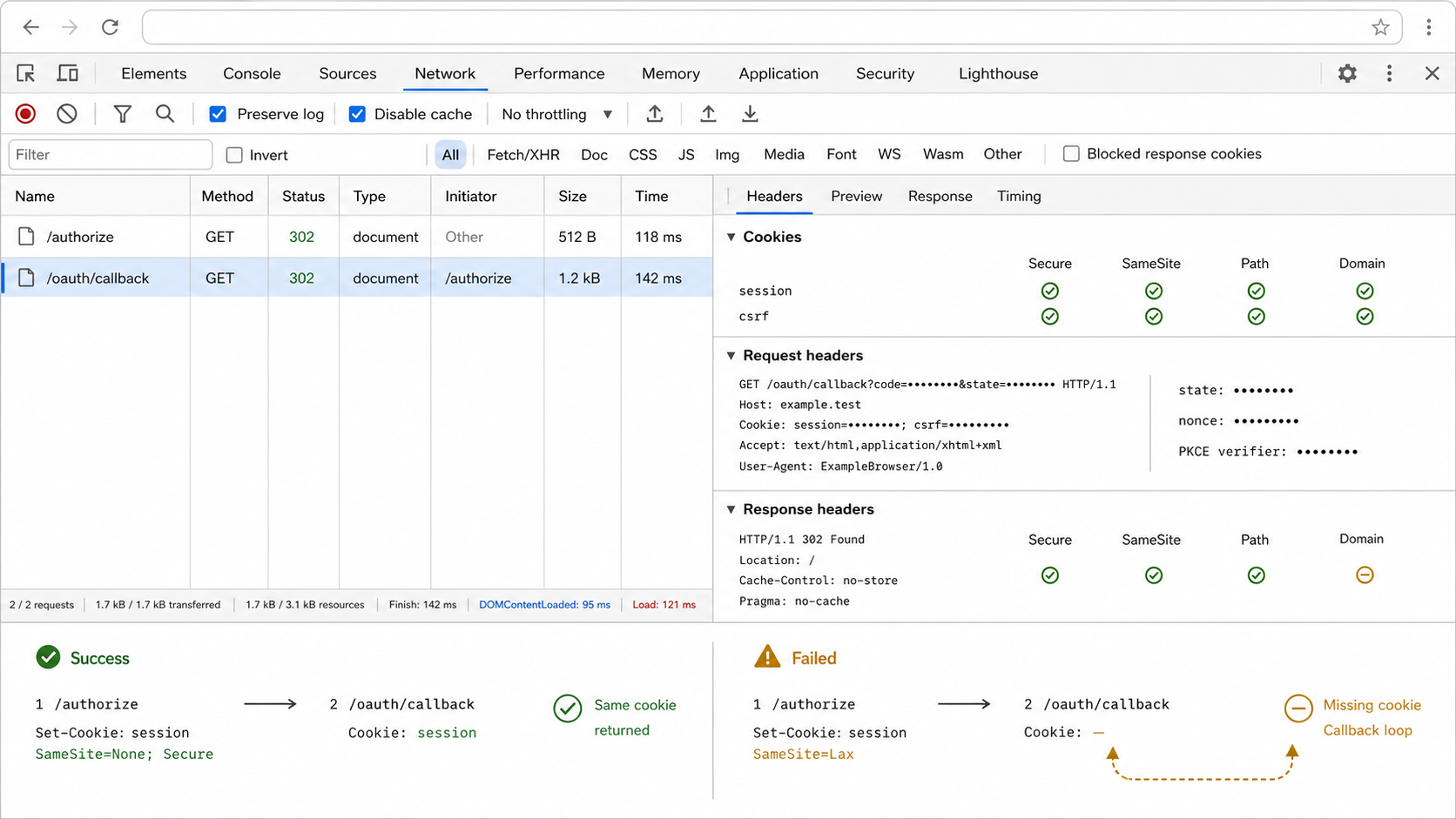
OAuth implementations use temporary browser state to bind a callback to the sign-in attempt. Depending on the provider and library, that data can include state, nonce, and a PKCE verifier. If the callback reaches Next.js but the related cookie is absent, expired, scoped to another host or path, or rejected by the browser, Auth.js may reject the callback or restart sign-in.
Start and finish on one hostname
Initiate the OAuth flow from the same public hostname that receives the callback. Opening the application on localhost and returning through the tunnel crosses hostname boundaries. A host-only cookie created for localhost does not belong to the public tunnel hostname.
A generated hostname can change after a tunnel is recreated. When the public hostname changes, update the provider registration and any explicit AUTH_URL value, restart Next.js, and begin a fresh browser session. A stable public origin is preferable for repeated OAuth testing because the provider callback, application configuration, bookmarks, and browser cookie scope can remain aligned.
Inspect cookie attributes, not secret values
In the browser’s storage and network tools, locate the temporary cookie set immediately before the redirect to the provider. Record its domain or host scope, path, Secure attribute, SameSite value, expiration, and any browser blocking explanation. On the callback request, confirm whether the cookie name is present without copying its value.
Browsers normally send a cookie marked Secure only over HTTPS. There is an important development qualification: browsers commonly treat http://localhost as a potentially trustworthy origin and may apply a localhost exception. MDN documents this behavior in its
Set-Cookie Secure attribute guidance.
Do not assume that the same exception applies to arbitrary LAN addresses, container hostnames, or public HTTP hosts. The Localtonet workflow uses a public HTTPS origin, so browser requests to that origin satisfy the normal secure transport requirement.
SameSite behavior depends on the navigation, browser, and exact authentication implementation. Do not override Auth.js cookie settings merely because a generic tutorial recommends a particular SameSite value. First determine whether the expected cookie was created, whether the browser accepted it, and whether it was attached to the first callback.
Recognize the first failed callback
A loop commonly follows this sequence: the callback reaches Auth.js, temporary state cannot be validated or a session cannot be established, the application redirects to sign-in, and the cycle repeats. Later requests are consequences. Preserve the first callback in the browser network panel and ask:
- Did the callback use the expected public hostname and exact Auth.js path?
- Was the expected temporary cookie attached by the browser?
- Did the callback reach the same application instance that initiated sign-in?
- Did Auth.js infer or use the expected public HTTPS origin?
- Did the callback response set a session cookie?
- Did the browser accept that cookie or report a policy rejection?
- Did the final response stay on the public origin or switch to HTTP, localhost, or an old hostname?
Clear stale cookies only after recording the relevant attributes and failure reason. Repeatedly clearing storage can make one attempt work while concealing the underlying origin or path mismatch.
Fix callbacks that reach the tunnel but not the Next.js container
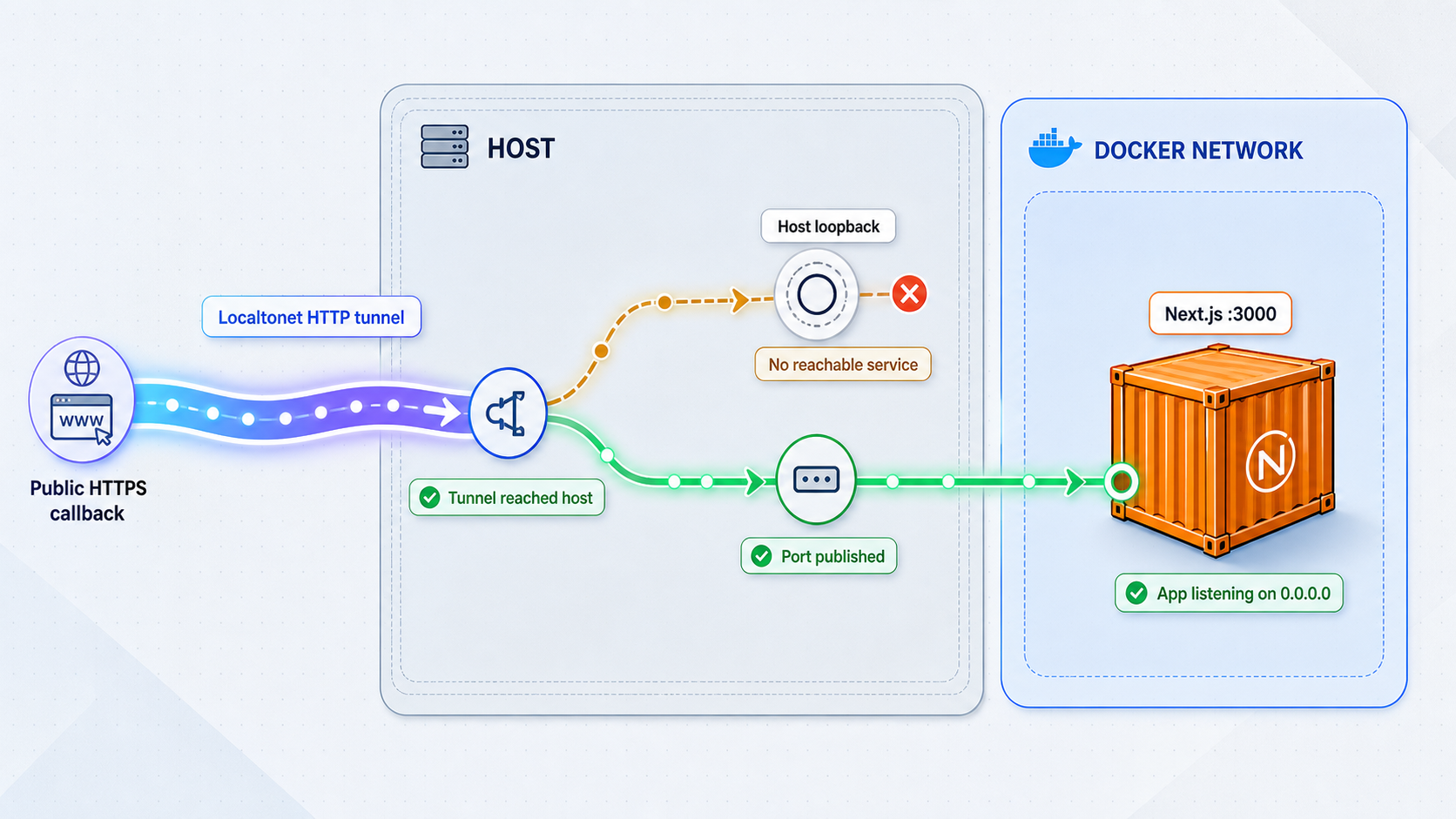
Docker introduces a separate routing question: which address can the Localtonet client reach? A container’s internal address, a Compose service name, the Docker host’s loopback address, a published host port, and another container’s loopback address are not interchangeable.
Docker’s port publishing documentation explains that a container port is not automatically available on the host. Publishing maps a host port to a container port. If the Localtonet client runs on the Docker host, target a host-side address and published port that succeeds from that host.
Inspect the running publication
docker ps
docker port NEXTJS_CONTAINER_NAME
Replace the placeholder with the actual container name. These commands show whether the intended container is running and which host address and port Docker has published. Do not expose secrets by printing the complete container environment.
Test progressively:
- From inside the application container, request the actual Next.js listening endpoint.
- From the Docker host, request the published host address and port.
- From the environment running the Localtonet client, request the exact tunnel target.
- After those checks succeed, request the Localtonet public HTTPS URL.
If the first test fails, investigate Next.js startup and its listening interface. If the first succeeds but the host test fails, investigate port publishing or the mapping between the host and container ports. If the host test succeeds but the Localtonet client cannot reach the target, determine whether the client runs in a different network namespace.
127.0.0.1 refers to the current host or container. If Localtonet and Next.js run in separate containers, loopback inside the Localtonet container points back to that container, not to Next.js. Use an intentional Compose network path or a published host endpoint that is demonstrably reachable from the client environment.
Avoid changing Docker publication and OAuth configuration at the same time. First prove that the public route reaches the correct application. Then investigate generated redirects and cookies. This preserves a clear distinction between transport failures and authentication failures.
Keep OAuth debugging safe and the public origin stable
A development tunnel creates a real public entry point. Treat the assigned address as internet-accessible even when the hostname is difficult to guess. Expose only the intended application service, retain application authentication and authorization, and stop or delete the tunnel when remote access is no longer required.
Use separate development OAuth credentials when the provider and your operational model support them. Keep client secrets in the project’s approved secret-management mechanism, not in browser code, repository files, container images, or shell history. Never weaken state, nonce, PKCE, callback validation, host checks, or cookie protections to force a test to pass.
Stable origins simplify OAuth testing. If the account provides an appropriate Custom Sub Domain or Custom Domain option, it can reduce repeated changes to callback registration and explicit application URL settings. Availability varies, and custom-domain DNS requirements must be followed from the current Localtonet documentation and dashboard rather than inferred from this OAuth example.
Keep the Next.js application’s normal authentication, authorization, origin validation, and least-privilege controls enabled. A successful tunnel connection only proves that traffic can reach the selected service.
Frequently asked questions
What is the callback URL for the Auth.js GitHub example?
For the Auth.js v5 App Router example in this guide, it is https://PUBLIC_TUNNEL_HOST/api/auth/callback/github. Replace the placeholder with the exact Localtonet public hostname. This path is specific to the configured GitHub provider and should not be assumed for custom OAuth routes or another authentication library.
Should the OAuth callback use the Localtonet URL or localhost?
A flow initiated and completed through the public tunnel should register the tunnel’s public HTTPS origin plus the application’s exact callback path. The local IP and port remain the Localtonet target and are not the provider-facing callback.
Does Auth.js v5 require AUTH_URL behind a tunnel?
Not always. Auth.js v5 can infer the external URL from the incoming request when host information is trusted. If inference is unsuitable, AUTH_URL can pin the public application origin. When using a generated tunnel hostname, update the value and restart the application whenever that hostname changes.
What causes an Auth.js UntrustedHost error?
Auth.js does not trust the request host by default in every deployment. In the v5 baseline used here, configure trusted-host behavior with AUTH_TRUST_HOST=true or trustHost: true when the request arrives through infrastructure you intentionally trust. Do not disable host validation indiscriminately.
Why does OAuth work on localhost but fail through the tunnel?
The tunnel introduces a different scheme and hostname. Common causes include a provider registration that still uses localhost, an application-generated callback containing HTTP or an internal host, missing trusted-host configuration, cookies scoped to localhost, or a tunnel target that cannot reach the Next.js process.
Does a Secure cookie always require HTTPS?
Browsers normally restrict Secure cookies to HTTPS, but localhost commonly receives a development exception because browsers may treat it as potentially trustworthy. Do not rely on that exception for LAN addresses, container names, or ordinary public HTTP hosts. The public Localtonet endpoint in this workflow uses HTTPS.
Why do I receive a state, nonce, or PKCE error after the callback?
First confirm that the temporary cookie created before authorization was accepted and returned on the first callback request. Starting on localhost and returning to the public hostname, using a stale hostname, applying an incompatible cookie path, or reaching a differently configured application instance can break callback correlation.
Does the local Next.js server also need HTTPS?
No, not necessarily. The public browser endpoint and local tunnel target are separate connections. A Localtonet HTTP tunnel can provide a public HTTPS address while pointing to a local HTTP service. Auth.js must nevertheless interpret the external browser origin as HTTPS.
What address should Localtonet target when Next.js runs in Docker?
Use the IP address and port reachable from the environment running the Localtonet client. If the client runs on the Docker host, this is commonly an intentionally published host endpoint. If both services run in containers, use a deliberate container-network path. Verify it with a request rather than assuming loopback reaches Next.js.
Will the callback work after the Localtonet client closes?
No. The tunnel is available only while the selected client device is connected and the tunnel is running. The provider cannot deliver a new browser callback through that public address while the client or tunnel is stopped.
Test your Next.js OAuth callback with Localtonet
Verify the Auth.js route locally, create an HTTP tunnel to the reachable Next.js target, register the exact public callback, and follow the first authorization and callback requests from one consistent HTTPS origin.
Get Started Free →

