

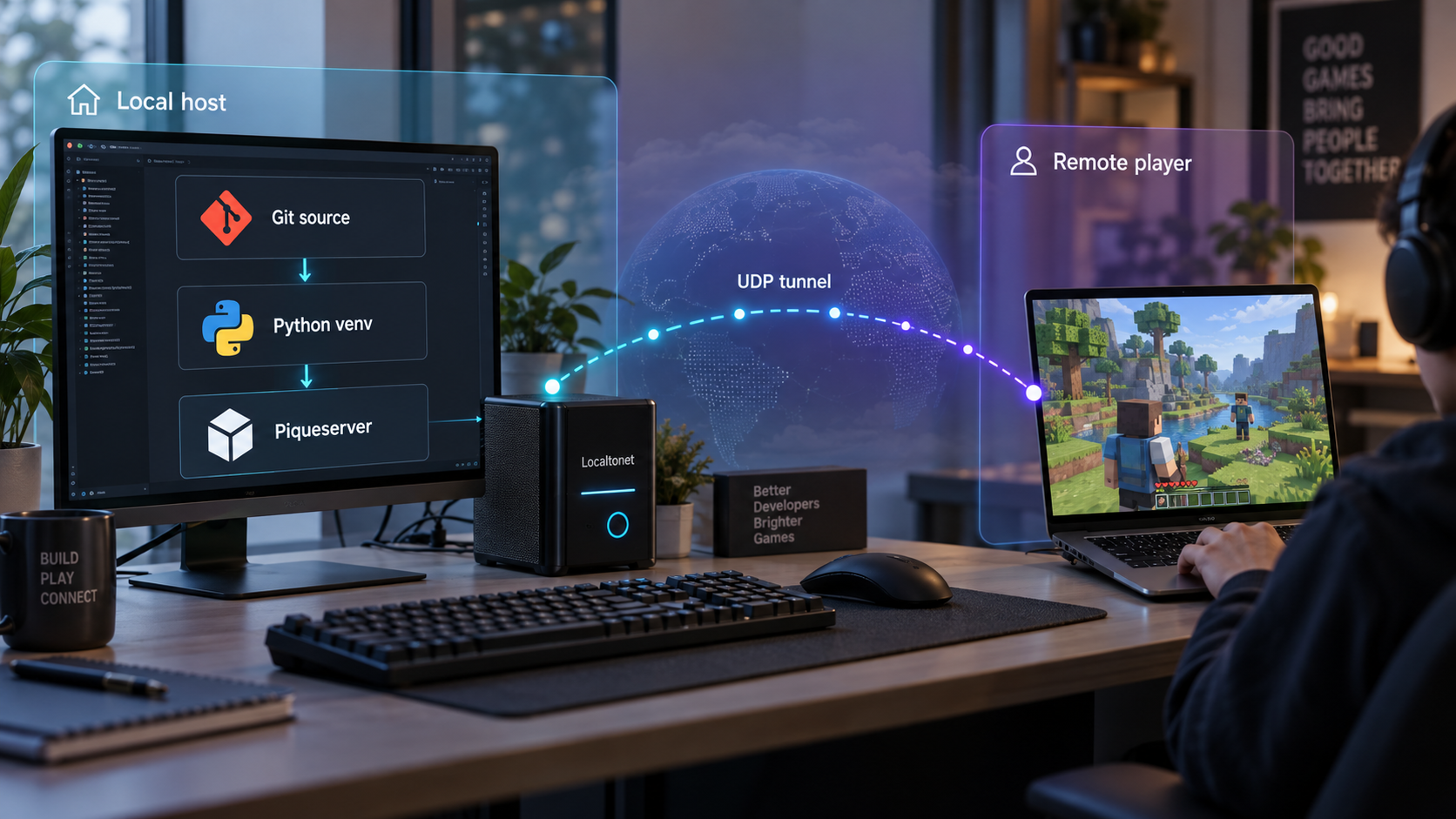
Build the game server in an isolated Python environment, verify it locally, then publish its UDP listener
Piqueserver is an open-source server for Ace of Spades 0.75 clients, including OpenSpades. This guide installs the project directly from its Git repository inside a Python virtual environment, generates the default TOML configuration, starts the server, and explains how to verify the local listener without assuming an undocumented port. Once the local server works, we will configure a Localtonet UDP tunnel so remote players can reach it without inbound router port forwarding, firewall changes, VPN setup, or a public IP address. The source installation tracks the project repository, so it should be treated differently from installing the stable package published through pip.
📋 What's in this guide
How the Piqueserver and Localtonet workflow fits together
Piqueserver is a continuation of PySnip that runs an Ace of Spades 0.75-compatible game server on modern Python systems. It supports Ace of Spades 0.75 clients, including OpenSpades, and includes capabilities such as map rotation, scripts, administrator commands, multiple game modes, spectator mode, rollback, map metadata, and an optional remote console. The project is free software under the GPLv3 license.
The installation and networking stages should be handled separately. First, Piqueserver must start correctly and accept connections on the local network endpoint defined by its configuration. Only after that endpoint has been confirmed should it be passed to a Localtonet UDP tunnel. This order prevents application errors, incorrect ports, and tunnel configuration problems from becoming mixed together.
The Localtonet client runs on the Piqueserver host, or on another device that can reach the Piqueserver listener. Our client establishes an outbound connection to a Localtonet relay server. When the UDP tunnel is started, remote players receive a public host and port that forwards traffic to the configured local IP address and port.
The available Piqueserver project evidence identifies UDP in the repository metadata, but the supplied installation documentation does not explicitly establish the listener port, bind address, or corresponding configuration keys. We therefore do not guess them. Use the values in the configuration generated by your installed version, and confirm the active listener before creating the Localtonet tunnel.
Prerequisites and platform considerations
Piqueserver requires Python 3.10 or newer. The project currently provides builds for Linux x86_64 and Windows x86 and x86_64. If the system is outside those listed combinations, the project states that a recent C++ compiler is also required. A source installation can involve compiling components, so a missing compiler or platform development toolchain may surface as an error during pip install ..
This particular workflow also requires Git because the source is cloned from the official repository. The documented source commands use python3, a virtual environment named venv, and the POSIX-shell activation command source venv/bin/activate. They are directly suitable for environments that provide those commands.
Windows is a supported Piqueserver build platform, but the exact Windows virtual-environment activation command is not included in the source installation excerpt used for this guide. Do not enter the POSIX source command unchanged in a Windows shell that does not support it. Create the environment with the correct Python launcher for your installation, then use the activation method generated for your Windows shell. Once activated, the remaining Python package installation and Piqueserver commands are intended to run inside that environment.
Checklist before cloning the repository
- Python 3.10 or newer is installed and available as
python3for the documented command sequence. - Git is installed and can clone an HTTPS repository.
- Your user account can create files in the chosen project directory.
- A recent C++ compiler is available if your platform requires a local build.
- A compatible Ace of Spades 0.75 client is available for local testing.
- You can inspect and edit the generated TOML configuration.
- The Localtonet client can later run on the Piqueserver host or another device that can reach its local UDP listener.
Choose the installation path intentionally
Piqueserver documents both stable pip installation and source installation from Git. This article follows the Git workflow because it gives you a checked-out source tree and installs that tree into a virtual environment. The project describes this route as the bleeding-edge installation path. If you only want the packaged stable version and do not need a repository checkout, the stable pip route may be simpler.
| Installation option | Documented command | When it fits |
|---|---|---|
| Stable package | pip3 install piqueserver |
Use this when you want the packaged stable version without maintaining a Git checkout. |
| Stable package with optional features | pip3 install piqueserver[ssh,from] |
Installs the documented SSH manhole support and the optional feature used by the from command to geolocate players by IP. |
| Git source installation | git clone, virtual environment, then pip install . |
Use this when you specifically want to install the repository source. This is the workflow covered below. |
The documented clone command checks out the repository's default branch. That source can advance after you install it, so two installations performed at different times may not contain identical code. Record the commit or release you tested before operating a long-lived public server. The project has published releases, but the source installation excerpt does not prescribe a release-pinning workflow, so this guide does not invent one.
Install Piqueserver from Git in a Python virtual environment
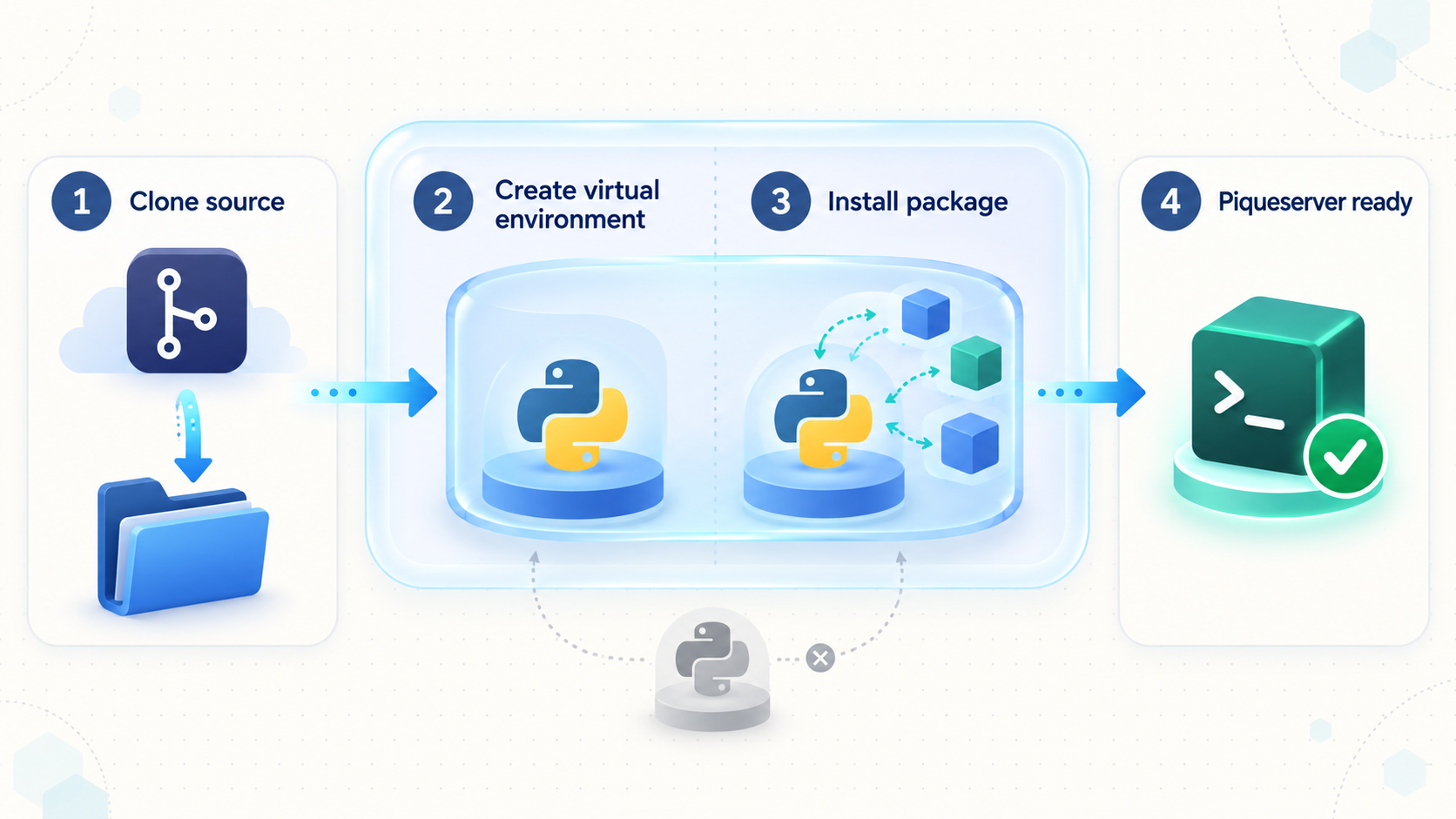
Run the following sequence from the directory in which you want the project folder to be created. The steps preserve the installation order documented by Piqueserver. Keep the virtual environment active through installation, configuration generation, and startup.
Clone the official Piqueserver repository
Download the source tree with Git. This creates a directory named piqueserver.
git clone https://github.com/piqueserver/piqueserverEnter the repository directory
Change into the cloned project before creating the environment and installing the local package.
cd piqueserverCreate the virtual environment
Ask Python 3 to create an isolated environment in the repository's venv directory.
python3 -m venv venvActivate the environment
In the POSIX shell used by the official source instructions, activate the environment with the following command. Use the shell-appropriate activation method on Windows.
source venv/bin/activateInstall the checked-out source
Install the package from the current repository directory. When this finishes successfully, the piqueserver executable is available on the command path while the virtual environment is active.
pip install .Generate the default configuration
Copy the project's default configuration as a starting point. By default, Piqueserver uses ~/.config/piqueserver/ for its configuration files.
piqueserver --copy-configStart Piqueserver
Launch the server from the active virtual environment. Keep this terminal open while performing the initial verification.
piqueserver
A successful package installation should make the piqueserver command available while the virtual environment is active. If the shell reports that the command cannot be found, first confirm that the environment is still active and that pip install . completed without an error. Do not proceed to Localtonet while the local executable or server startup remains unresolved.
Generate and review the Piqueserver configuration
Piqueserver uses TOML configuration files. The generated configuration is intended to be a commented base that you can adapt. The default configuration directory is ~/.config/piqueserver/. If you want to place the configuration elsewhere, Piqueserver documents the -d option for both configuration generation and startup.
piqueserver --copy-config -d custom_dir
piqueserver -d custom_dir
Use the same directory consistently. Generating files with -d custom_dir and later starting without that option can cause the process to load the default configuration directory instead of the files you edited. Conversely, starting with -d custom_dir requires the intended configuration to exist in that location.
What to review before public access
Open the generated files and read their comments before changing values. At minimum, identify the server's network bind setting and game listener port as represented by your installed version. Also review the server identity, map rotation, gameplay, administrator, script, and logging-related settings that are relevant to your deployment.
This guide deliberately does not provide guessed TOML property names. The generated files from your installed revision are the authoritative local reference because repository source can change and the extracted installation documentation does not state those exact keys. Preserve TOML syntax when editing. Quoted strings, arrays, booleans, and section names must remain valid for the version you installed.
Piqueserver advertises features including an SSH-based remote console, a JSON query webserver, and a status server. The available installation evidence does not provide enough endpoint, authentication, bind, or setup detail to expose those services safely in this workflow. The Localtonet configuration below is only for the verified game-server UDP listener. Do not add other listeners unless you have separately configured, authenticated, and tested them.
Choose a bind address that matches the tunnel placement
The appropriate bind address depends on where the Localtonet client runs. If both processes run on the same machine, the target can use an address that the Localtonet client can reach locally. If our client runs on another device, Piqueserver must listen on an address reachable from that device across the private network. The exact address must come from the Piqueserver configuration and the host's networking arrangement.
Do not infer a bind address merely from a process starting successfully. A service bound only to one interface may not be reachable through another. Equally, changing a bind setting to a broader interface has security consequences because it may make the server reachable by other devices on the local network. Use the narrowest setting that satisfies the intended architecture.
Verify Piqueserver locally before creating a tunnel
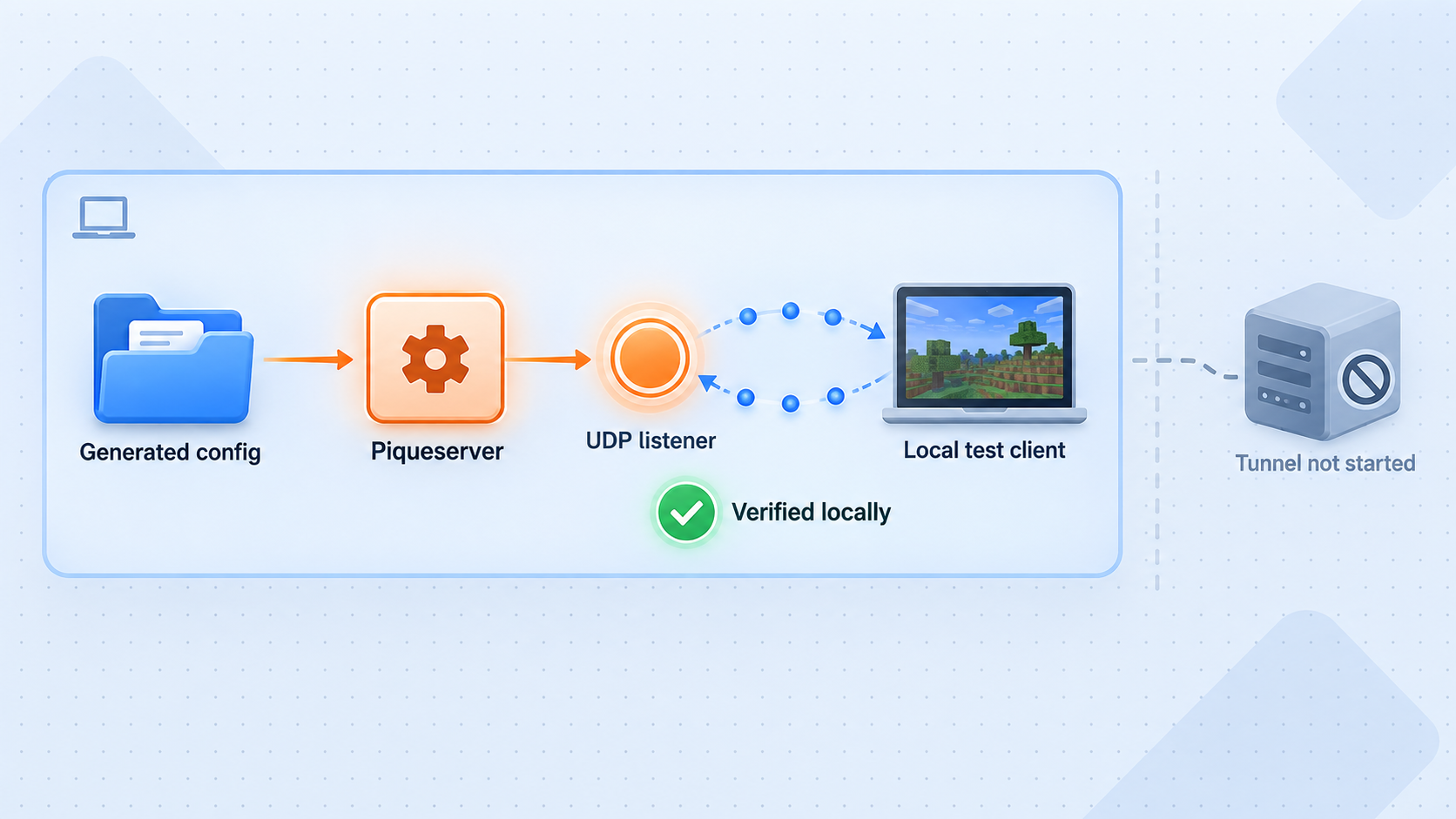
Local verification is the most important diagnostic boundary in this setup. Localtonet can forward traffic to a reachable local endpoint, but it cannot make a stopped process listen, correct invalid TOML, choose the application's port, or repair incompatible game-server and client versions.
1. Confirm clean startup
Start Piqueserver from the activated environment:
piqueserverIf you selected a custom configuration directory, use the documented matching form:
piqueserver -d custom_dirRead the terminal output for configuration parsing failures, missing dependencies, compilation-related problems, unavailable files, or network binding errors. A process that exits immediately is not ready for tunneling. Resolve the first reported error and start it again.
2. Determine the actual local endpoint
Record the listener port and bind address from the generated configuration and confirm that the running process is using them. Operating-system listener inspection tools differ by platform, and the available project evidence does not prescribe one command, so this guide does not claim a universal command. Use your operating system's trusted network-listener view to verify that the Piqueserver process owns the expected UDP endpoint.
The Localtonet target must be an IP address and port reachable from the machine running our client. Do not enter the public Localtonet address as the local target, and do not substitute a commonly mentioned game port found in an unrelated tutorial. The generated configuration and observed listener are the values that matter.
3. Test with a compatible client on the local path
Use an Ace of Spades 0.75-compatible client, such as OpenSpades, to test the server through the local or private-network address appropriate to your setup. The precise connection interface is client-specific and is not established by the supplied Piqueserver installation documentation, so follow the client's normal direct-connect procedure and provide the locally verified server endpoint.
A useful local test goes beyond seeing the process in a task list. Confirm that the client can reach the server, enter a session, and exchange gameplay traffic. If local gameplay does not work, leave Localtonet out of the test until the application issue is fixed.
| Checkpoint | Successful result | If it fails |
|---|---|---|
| Package installation | pip install . completes and the command is available in the active environment. |
Review the first installation error, Python version, platform support, and compiler requirement. |
| Configuration generation | The default files are copied to the default or explicitly selected directory. | Confirm the virtual environment, command availability, target directory, and filesystem permissions. |
| Server startup | The process remains running without an immediate configuration or bind failure. | Correct the reported TOML, file, dependency, or endpoint problem before continuing. |
| UDP listener | The running Piqueserver process owns the configured local UDP endpoint. | Recheck the configured bind address, port availability, and whether the correct configuration directory was loaded. |
| Local gameplay | A compatible client can connect through the local or private-network path. | Troubleshoot Piqueserver and the client before creating a public tunnel. |
Make the verified Piqueserver listener reachable with Localtonet UDP
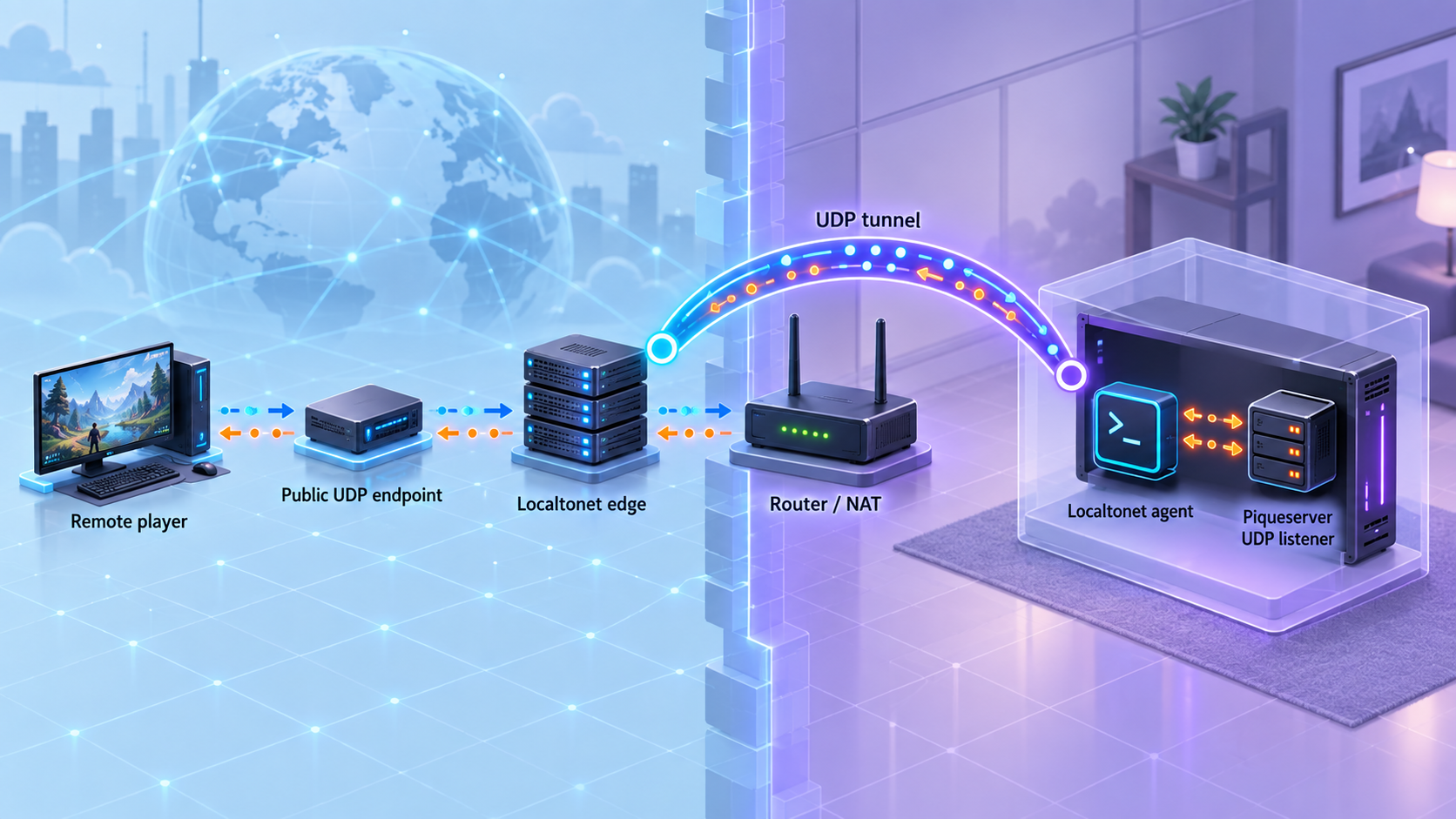
Once the local UDP endpoint works, the tunneling stage is comparatively small. Install and run our client on the Piqueserver machine or on a device that has reliable network access to it. The client establishes an outbound connection to our relay infrastructure, so the workflow does not require inbound router port forwarding, a public IP address, VPN setup, or firewall changes.
UDP is appropriate for this workflow because the Piqueserver repository identifies the project with UDP metadata. Nevertheless, the running server configuration remains authoritative. Confirm the active listener protocol and endpoint on your installed revision before exposing it.
Install and run the Localtonet client
Install our client for the operating system on the device that can reach Piqueserver. Current installation guidance is available through the Localtonet documentation. Exact installation commands can vary by operating system and client version, so use the current documented method rather than an unverified command.
Authenticate or select the tunnel device
Use the device-specific authentication token associated with the client that will run the tunnel. Treat that token as a secret. Never place it in a game configuration, screenshot, public post, shared command history, or article.
Select an available relay server or region
Choose from the server or region values currently presented by our dashboard. Availability can vary, so this guide does not hardcode a server code or claim that every location is available on every plan.
Create a UDP tunnel for the local listener
Select the UDP tunnel type and enter the local IP address and port verified in the previous section. The address must be reachable from the Localtonet client device. If Piqueserver and our client run on different machines, use the appropriate private-network address rather than assuming a loopback target.
Start the tunnel
Creating the tunnel does not mean it is active. Press Start and confirm that the selected device is connected and the tunnel is running. Localtonet will provide the public host and port used for remote access.
Test the public endpoint from a remote network
Give an authorized remote player the assigned public host and port, then test with a compatible client from outside the Piqueserver host's local network. Keep Piqueserver, the Localtonet client, and the UDP tunnel running throughout the test.
Share the public host and port only with intended players, review Piqueserver's administrator and gameplay controls, keep the host and Python environment maintained, and stop the tunnel when remote access is not required. A tunnel provides connectivity. It does not replace application-level access controls, secure administration, safe configuration, monitoring, or host maintenance.
Remote players use the public host and port assigned to the running tunnel. Localtonet forwards that traffic to the local IP address and port configured as the target. Always communicate the complete public endpoint and keep the local endpoint private unless there is a specific operational need to disclose it.
Routine operation, shutdown, and source maintenance
Starting the server after opening a new shell
A virtual environment only affects the shell in which it is activated. After opening a new terminal, return to the repository and activate the environment again before running Piqueserver:
cd piqueserver
source venv/bin/activate
piqueserver
If you use a custom configuration directory, include the same -d argument used during setup:
piqueserver -d custom_dirFor unattended operation, use a process-management approach appropriate to your operating system. The supplied project evidence confirms that Piqueserver starts from the command line and can be incorporated into scripts, but it does not prescribe a specific service manager or provide a verified service-unit definition. We therefore do not provide an invented system service file.
Starting and stopping remote access
Piqueserver and the tunnel have separate lifecycles. Starting the game server does not start Localtonet, and creating a Localtonet tunnel does not start Piqueserver. Remote access requires all of the following:
- The Piqueserver process is running.
- The expected UDP listener is active.
- The Localtonet client device is connected.
- The UDP tunnel is started.
- The tunnel targets the correct local IP address and port.
Stop the UDP tunnel when public access is no longer needed. You can later start it again while the selected client remains connected. Deleting a tunnel is different from stopping it, so reserve deletion for configurations you no longer intend to use.
Handling source updates carefully
A Git installation should not be updated blindly while players are connected. Record the currently tested source revision, preserve the configuration, stop the public tunnel, stop the server, and review the project's changes before replacing the running code. Re-run the local verification sequence after any source or dependency update.
The extracted Piqueserver installation instructions do not define a canonical production upgrade procedure, migration command, rollback command, or compatibility promise for moving between arbitrary repository revisions. Because of that limitation, this guide does not prescribe an unverified update command sequence. Use Git practices appropriate to your chosen revision strategy, then reinstall and test the checked-out source according to the project's current instructions.
Configuration backups
Back up the configuration directory before changing maps, scripts, gameplay options, administrator settings, or source revisions. Remember that the default configuration resides under ~/.config/piqueserver/, not necessarily inside the cloned repository. If you chose a custom directory with -d, back up that directory instead.
Keep secrets and administrative details out of a public source repository. The Localtonet device token must never be stored in the Piqueserver repository or included in configuration backups shared with other people.
Troubleshooting installation, startup, and remote connections
python3 -m venv venv fails
Confirm that the selected interpreter is Python 3.10 or newer and that it includes virtual-environment support. The exact package needed to add that support varies by operating system and distribution, so use the package provided for your installed Python version. Avoid replacing or modifying the system Python environment merely to force the command to work.
pip install . fails while building
Start with the first meaningful error rather than the final summary line. Confirm the Python version and platform architecture. Piqueserver states that a recent C++ compiler is required when the system is outside the platforms for which it currently provides builds. A compiler-related failure on another architecture may therefore be a missing prerequisite rather than a Piqueserver configuration problem.
Also confirm that the virtual environment is active and that the command is being run from the cloned repository directory containing the project files. Do not switch to global installation as a workaround without understanding which interpreter and package location will then be used.
The piqueserver command is not found
The executable is placed on the command path when the virtual environment is active. Activate the environment again, verify that installation completed successfully, and ensure the current shell is using that environment. Opening a new terminal requires activation again.
The configuration is generated, but startup fails
Read the error output and confirm that you edited valid TOML. If using a custom directory, start with the same -d path used when copying the configuration. Check that referenced maps, scripts, and files exist and are readable. If startup reports a bind failure, verify that another process is not already using the configured endpoint and that the bind address belongs to the host.
Piqueserver works locally, but the tunnel does not
Confirm that the Localtonet tunnel type is UDP, the selected device is connected, and the tunnel has been started. Compare the tunnel's local target with the address and port used by the running Piqueserver process. If our client runs on another machine, test whether that machine can reach the private Piqueserver endpoint before expecting the tunnel to do so.
A frequent category error is entering the public Localtonet endpoint as the local target. The target must be the local or private address of Piqueserver. The assigned public host and port belong in the remote player's client.
The public endpoint exists, but remote players cannot join
Test one layer at a time. Make sure the Piqueserver process still runs, the UDP listener is present, local gameplay still works, the Localtonet device is connected, and the tunnel status is running. Confirm that the player entered both the assigned public host and public port and is using a compatible Ace of Spades 0.75 client.
If a local client works but a remote one does not, compare the exact tunnel target with the verified listener. If neither local nor remote clients work, return to Piqueserver configuration and startup rather than repeatedly changing the tunnel.
The tunnel stopped working after a reboot
Reboots stop ordinary foreground processes. Piqueserver must be started again, the Localtonet client must reconnect, and the tunnel must be running. If the private address of a separate Piqueserver host changed after reboot, update the local tunnel target to the address that is currently reachable. For unattended deployments, configure process startup through a platform-appropriate mechanism after testing the manual workflow.
Players can connect, but administration is unsafe or incomplete
Connectivity and administration are different concerns. Review Piqueserver's generated configuration and current documentation for administrator controls. Do not expose the optional SSH remote console, JSON query server, or status server merely because the game tunnel works. Those are separate services and may have separate bind addresses, ports, and security requirements that are outside the verified scope of this setup.
Frequently asked questions
What Python version does Piqueserver require?
Piqueserver requires Python 3.10 or newer. The documented source workflow creates a virtual environment with python3 -m venv venv and installs the checked-out source with pip install ..
Why install Piqueserver in a virtual environment?
The virtual environment isolates Piqueserver and its Python dependencies from the system Python installation. It also makes the piqueserver executable available on the active environment's command path. The environment must be activated again when you open a new shell.
Is installing from Git the same as installing the stable pip package?
No. The project documents pip3 install piqueserver as the stable installation and describes the Git source route as bleeding edge. The Git route clones the repository and installs the current checkout with pip install .. Record and test the source revision used for a long-lived server.
Where does Piqueserver store its default configuration?
The documented default is ~/.config/piqueserver/. Generate the base configuration with piqueserver --copy-config. To use another directory, pass the same -d custom_dir location when generating the files and starting the server.
Which local port should I enter in the Localtonet UDP tunnel?
Enter the port defined by the generated configuration and confirmed on the active Piqueserver UDP listener. The supplied installation evidence does not establish a default listener port, so this guide intentionally does not guess one.
Does Localtonet require router port forwarding for Piqueserver?
No. Our client establishes an outbound connection to a Localtonet relay server, allowing the local UDP service to receive traffic through an assigned public host and port without inbound router port forwarding, firewall changes, VPN setup, or a public IP address.
Does creating the UDP tunnel make it active immediately?
No. Creating a tunnel and running it are separate actions. The selected Localtonet device must be connected, and you must press Start for the tunnel to become available. It remains reachable only while the client is connected and the tunnel is running.
Can the Localtonet client run on a different device from Piqueserver?
Yes, provided the Localtonet client device can reach the Piqueserver IP address and UDP port over the private network. Configure the tunnel with that reachable private address. Test connectivity from the client device before starting the public tunnel.
Can I expose Piqueserver's SSH console or status server through the same UDP tunnel?
No. The UDP tunnel in this guide targets the game listener. The optional SSH console, JSON query webserver, and status server are separate services with their own configuration and security considerations. The available evidence does not establish enough setup detail to expose them safely here.
Make your verified Piqueserver endpoint reachable
After Piqueserver starts cleanly and a compatible client can connect locally, create a Localtonet UDP tunnel using the exact local IP address and port you verified. Keep the device token private, start the tunnel only when needed, and share the assigned public host and port with authorized players.
Get Started Free →

