

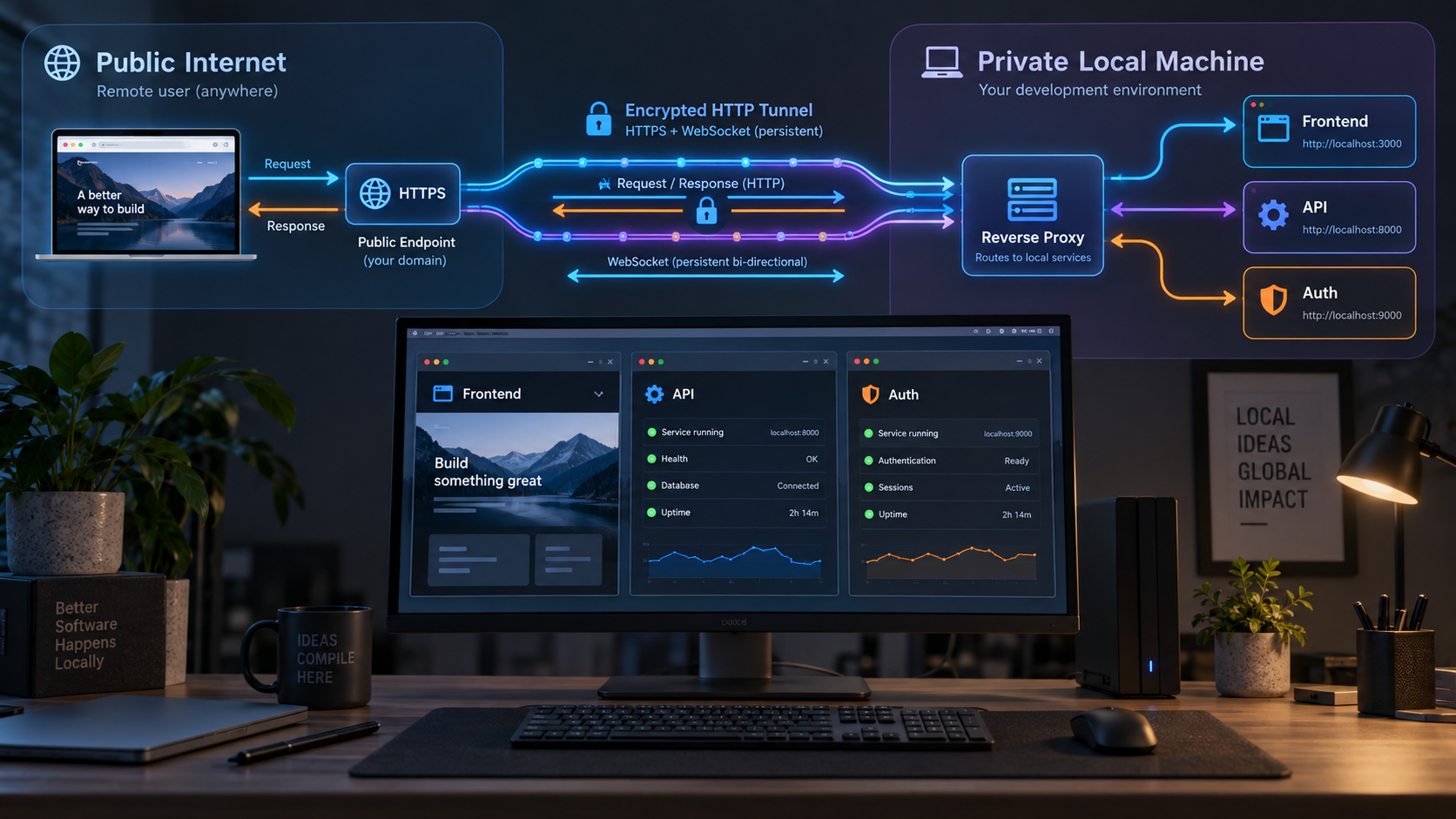
Give every frontend, API, authentication flow, and WebSocket connection a predictable public address
A multi-service monorepo may look like one application in source control while behaving like several independent network services at runtime. The frontend, API, authentication service, and development WebSocket server can each listen on a different local port, which makes public HTTPS access an architecture decision rather than a simple port-forwarding task. In this guide, we design a consistent origin map, compare a shared local reverse proxy with separate HTTP tunnels, and explain the effects on CORS, cookies, OAuth callbacks, WebSockets, verification, and service isolation. We then show how to publish the chosen ingress points with Localtonet without requiring inbound router port forwarding, firewall changes, VPN setup, or a public IP address.
📋 What's in this guide
Why a multi-service monorepo needs an origin architecture
A monorepo is a source-code organization model, not a networking model. Even when the frontend, backend, authentication code, and shared packages live in one repository, the running system can contain several independent listeners. A browser application might load from one local port, call an API on another, redirect through an authentication service on a third, and connect to a WebSocket endpoint used for hot reload or live application events.
On the local machine, developers often hide this complexity behind addresses such as localhost with different ports. Public HTTPS changes the situation. Every browser-visible scheme, hostname, and port contributes to an origin. OAuth providers compare redirect addresses, cookies are sent according to host, domain, path, security, and same-site rules, and WebSocket clients need a reachable public endpoint using the correct scheme. A tunnel can provide connectivity, but it cannot decide which services should share an origin or automatically reconcile application configuration.
The architectural question is therefore not simply, “Which port should we expose?” It is, “What public origin topology should this application present?” There are three common answers:
/api, /auth, and /ws to different services. One Localtonet HTTP tunnel publishes the proxy.
None of these models is universally correct. A shared ingress is often the simplest browser experience because requests remain on one origin. Separate tunnels are useful when services need independent public lifecycles, direct external access, distinct hostnames, or realistic cross-origin testing. A hybrid model is appropriate when only some boundaries matter to the test.
With Localtonet, an HTTP tunnel points to a local IP address and port on, or reachable from, the device running our client. If that target is a reverse proxy, the reverse proxy decides which upstream service receives each path. If the target is an individual service, that service must understand the public host, path, protocol, and browser policy relevant to the request.
Build a public origin map before creating tunnels
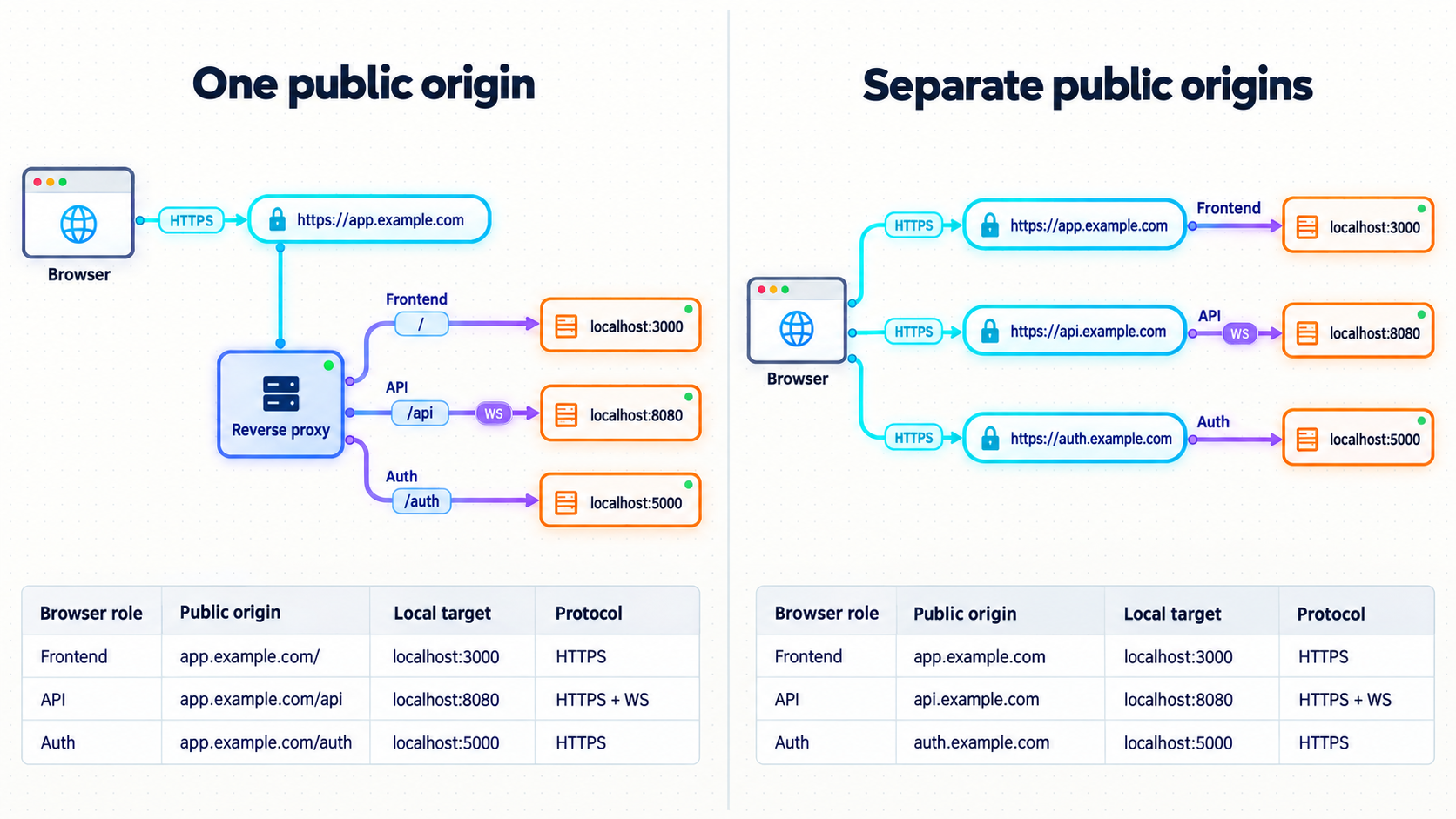
Start with an inventory of every connection that crosses a browser or external-system boundary. Internal calls between backend processes do not necessarily need public addresses. A frontend loaded in a browser, an OAuth redirect initiated by an identity provider, a webhook sent by an external platform, and a WebSocket opened from a remote browser do need routes that the initiating system can reach.
For each public interaction, record the caller, destination service, local listener, desired public address, protocol, path, and security requirements. Do not begin by copying local ports into several dashboard forms. First decide which listeners should be consolidated and which should remain independent.
| Traffic flow | Local destination | Possible shared-origin route | Separate-origin alternative |
|---|---|---|---|
| Browser loads frontend | Frontend development or preview server | https://PUBLIC_ORIGIN/ |
https://FRONTEND_PUBLIC_HOST/ |
| Frontend calls API | API service | https://PUBLIC_ORIGIN/api/... |
https://API_PUBLIC_HOST/... |
| OAuth provider returns user | Frontend callback or authentication service | https://PUBLIC_ORIGIN/auth/callback |
https://AUTH_PUBLIC_HOST/callback |
| Browser opens application WebSocket | WebSocket server | wss://PUBLIC_ORIGIN/ws |
wss://WS_PUBLIC_HOST/ |
| Development client opens hot-reload socket | Frontend development server | A proxy route on the shared origin | A public address configured in the development client |
| External system sends a webhook | Webhook handler in the API or a dedicated service | https://PUBLIC_ORIGIN/webhooks/... |
https://WEBHOOK_PUBLIC_HOST/... |
The placeholders above are design notation, not Localtonet-assigned addresses. Replace them only after the dashboard has assigned the actual public URL or after a supported custom hostname has been configured. HTTP tunnels can use Random Sub Domain, Custom Sub Domain, or Custom Domain as their Process Type. Availability and any plan-specific conditions can vary, so use only the values currently displayed for your account. Custom-domain DNS requirements should be taken from the current Localtonet documentation and dashboard rather than assumed.
Separate public and private service addresses
Keep two layers of configuration distinct. The private service map describes how processes reach each other locally. The public origin map describes how browsers and external systems reach selected entry points. A backend service that calls another backend over a local or container network should usually continue using that private address. Sending internal traffic out through a public tunnel and back into the same machine adds an unnecessary dependency and can complicate authentication, observability, and failure diagnosis.
It is helpful to keep one canonical configuration value for each public role rather than reconstructing URLs in multiple packages. For example, define a frontend origin, an API base URL, an authentication callback URL, and a WebSocket URL. The exact configuration mechanism depends on the frameworks in the monorepo, so this guide does not invent universal environment-variable names. Use the documented configuration interface of each application and make the generated client configuration consistent with the server configuration.
Decide whether paths are part of the service contract
A reverse proxy can route a public prefix such as /api to an API, but the API may expect requests at /, at /api, or under another base path. Decide whether the proxy preserves or removes the prefix. The application’s route generation, redirects, OpenAPI links, static resources, and cookie paths must agree with that decision.
Apply the same discipline to authentication callbacks and WebSockets. A callback path registered with an OAuth provider must be the path the application actually handles. A WebSocket path expected by the client must reach the correct upgrade-capable upstream. Merely forwarding the correct port is insufficient if the path contract is inconsistent.
When to use one reverse proxy and one HTTP tunnel
In the shared-ingress model, a local reverse proxy becomes the application’s single public entry point. The proxy listens on one local IP address and port. It serves or forwards the frontend at the root path, forwards API requests under a selected prefix, routes authentication paths to the appropriate service, and proxies WebSocket upgrades to the correct listener. A single Localtonet HTTP tunnel then targets the reverse proxy.
This model is usually attractive when the remote experience should resemble a conventional web application with one origin. Browser requests can use relative paths such as /api/projects instead of embedding a second hostname. Because the scheme, host, and port remain the same, ordinary same-origin API calls do not require CORS permission.
What the reverse proxy must handle
The proxy needs explicit route ownership. A broad frontend fallback can accidentally consume API or authentication paths, especially in single-page applications that return the main HTML document for unknown routes. Put specific service routes ahead of any generic frontend fallback according to the configuration semantics of the chosen proxy.
The proxy must also preserve the request information each upstream needs. Applications commonly use the external host and protocol when constructing redirects, absolute links, cookie settings, and callback addresses. Configure trusted proxy behavior deliberately within the application and reverse proxy. Do not blindly trust forwarding headers from arbitrary sources, since those headers can affect security-sensitive URL construction.
WebSocket forwarding deserves a specific route and configuration. An ordinary HTTP route can appear healthy while failing to preserve the protocol upgrade needed for a WebSocket connection. Confirm that the chosen reverse proxy supports WebSocket proxying and configure it using that proxy’s official syntax. There is no framework-neutral configuration file that is safe to paste into every stack.
Costs of the shared model
One public origin also creates one public failure boundary. If the reverse proxy stops, every routed service becomes unavailable through that tunnel. Route conflicts can make one service shadow another, and developers must maintain a proxy configuration as services are added or renamed. A shared ingress can also hide cross-origin bugs if the production system actually places the frontend and API on different origins.
Use one tunnel when a unified browser origin is the behavior you want to test, not merely because it creates fewer tunnel records. The architecture should represent the test objective.
When separate HTTP tunnels are the better boundary
Separate tunnels give selected services independent public origins. The frontend tunnel targets the frontend listener, the API tunnel targets the API listener, and another tunnel can target the authentication or WebSocket service if it genuinely needs an independent public entry point. The Localtonet client must run on a device that can reach every configured local target.
This approach is useful when teams need to test the same origin separation used in another environment, expose only one backend without the frontend, restart services independently, provide a dedicated webhook address, or diagnose a service without a reverse proxy between the relay and the application.
| Decision factor | One shared tunnel | Separate tunnels |
|---|---|---|
| Browser origin model | Normally one origin with path routing | One origin per public service |
| CORS | Usually unnecessary for browser calls that remain on the shared origin | Required when browser JavaScript calls another origin |
| OAuth callback management | One host with an explicit callback path | Callback may use a dedicated authentication or frontend host |
| Cookie design | Can use host-only cookies on the shared host | Must account for host boundaries and cross-origin credential rules |
| WebSocket routing | Reverse proxy must route the upgrade to the proper upstream | Client connects directly through the service’s public tunnel |
| Isolation | Services share one ingress lifecycle | Each tunnel can be started or stopped separately |
| Configuration overhead | More local proxy configuration | More public URLs and application-origin configuration |
A hybrid arrangement often provides the best test surface
It is not necessary to expose every process in the same way. A practical hybrid can place the frontend, browser API, and application WebSocket behind one reverse proxy while giving a webhook receiver its own tunnel. Another option is to keep authentication under the shared browser origin but publish an independently tested API through a second tunnel.
Each additional origin should have a reason. If a service is used only by another local backend, keep it private. If a service must receive an external callback directly, needs independent lifecycle control, or is intentionally being tested across origins, a separate tunnel can be justified.
Development servers can include debugging routes, administrative endpoints, source maps, permissive test behavior, or unauthenticated utilities. Publish only the entry points required for the current workflow. Stop or delete tunnels that are no longer needed, and enforce authentication and least privilege in the application.
How the design affects CORS, cookies, OAuth, and WebSockets
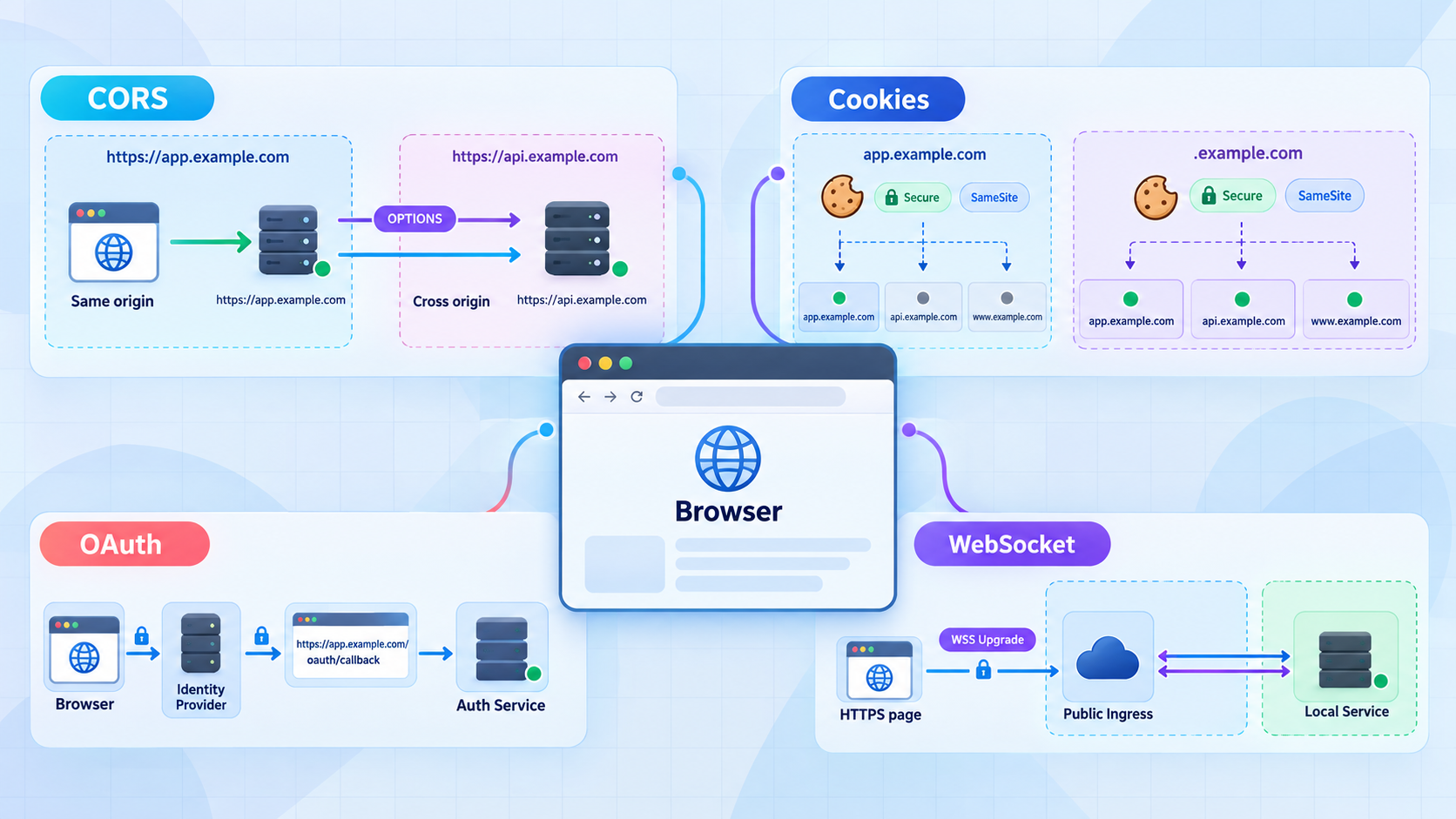
CORS follows the browser origin, not the repository structure
A browser origin is determined by scheme, hostname, and port. Two services belong to different origins if any of those components differ. Paths do not create different origins, so https://PUBLIC_ORIGIN/ and https://PUBLIC_ORIGIN/api are same-origin. Conversely, a frontend and API on different public hostnames are cross-origin even if they come from the same monorepo.
When separate tunnels are used, configure the API to allow the exact frontend public origin required by the workflow. Avoid reflecting arbitrary origins or using a broad wildcard as a shortcut. If browser requests include credentials, CORS policy must explicitly support credentials and return a permitted origin rather than relying on a wildcard. The frontend must also use the credential behavior expected by the API.
Preflight requests can fail even when the main API method is correctly implemented. The API or proxy must handle the browser’s OPTIONS request and permit the requested method and headers. Diagnose the preflight separately from the application request.
Cookies have host, path, security, and same-site boundaries
Public HTTPS does not automatically make an existing local cookie design work. Check the cookie’s host or domain scope, path, Secure behavior, SameSite policy, expiration, and whether the browser request includes credentials.
Host-only cookies are generally easier to reason about when the frontend and authentication routes share one public host. Separate hosts require a deliberate session design. A cookie created for one host is not automatically available to an unrelated host. Even where sibling hostnames may qualify as the same site under browser rules, origin restrictions and credential handling still apply. Do not infer cookie behavior merely because hostnames look similar.
Inspect the actual Set-Cookie response and the browser’s cookie storage. Browser developer tools often explain why a cookie was rejected or excluded. Typical causes include a domain that does not match the public host, an incorrect callback path, a same-site policy incompatible with the navigation, or a frontend request that does not include credentials.
OAuth redirect URIs must match the active public topology
An OAuth redirect URI is part of the security boundary. Register the exact public HTTPS callback that the application uses, including the scheme, hostname, path, and any relevant port. A callback configured for a local address will not become correct merely because the application is reachable through a tunnel.
Keep the browser initiation URL, application callback handler, OAuth provider registration, and server-side redirect construction aligned. If a generated public hostname changes, update the provider registration and application configuration before testing again. A stable custom subdomain or custom domain can reduce callback churn where currently available to the account, but availability and DNS setup must be confirmed in the current dashboard and documentation.
Preserve and validate OAuth state, use the provider and framework’s documented security controls, and never place client secrets or tunnel authentication tokens in browser-visible configuration. A public callback address is not a substitute for OAuth validation.
WebSockets need the correct public scheme, path, and upgrade route
A page loaded over HTTPS should use a secure WebSocket address with the wss scheme. If the application constructs a local ws://localhost URL at build time, remote browsers will try to connect to their own machine or may block the connection as mixed content. Configure the client with the actual public WebSocket address or derive the address from the current page when the shared-origin design permits it.
For one shared origin, the local reverse proxy must forward the WebSocket route to the correct service and support the upgrade. For separate tunnels, the client must point to the WebSocket service’s public hostname and the service may need to validate the browser’s Origin header. Hot-reload systems can have framework-specific public-host, client-port, or allowed-host settings. Use the documented settings for the development server rather than assuming that an API WebSocket configuration also controls hot reload.
A production-style application socket can work while the development server’s hot-reload connection fails. Verify the URL generated by each client independently. The browser Network panel shows the requested WebSocket address, handshake status, and whether the connection remains open.
Configure the chosen public ingress with Localtonet
Before creating a tunnel, start every required service and verify it locally. For a shared design, verify the reverse proxy rather than testing only the individual upstream ports. For separate tunnels, verify each selected service on the exact local IP address and port that our client will target.
You need the Localtonet client on the device that can reach those listeners, a device-specific authentication token, an available relay server or region selected from the current product, and a completed origin map. Tokens and available server codes must be obtained from the current dashboard. Do not copy a token into documentation, source control, shell history shared with others, screenshots, or frontend configuration.
Install and run the Localtonet client
Install our client for the operating system on the device that can reach the local service or reverse proxy. Keep the client running for as long as the public tunnel is needed. The tunnel is unavailable when the selected client or device is disconnected.
Authenticate and select the device
Use the device-specific authentication token from your Localtonet account and select the client device that will run the tunnel. Treat the token as a secret. Do not guess, publish, or embed it in application code.
Select a currently available relay server
Choose a server or region from the values currently offered in the dashboard. Available values can vary, so this guide does not hardcode a relay name or server code.
Create the HTTP tunnel configuration
For one shared ingress, point the HTTP tunnel to the local IP address and port of the reverse proxy. For separate origins, create an HTTP tunnel for each service that must be independently public and point each one to its verified local target. Select Random Sub Domain, Custom Sub Domain, or Custom Domain according to the options currently available for the account and workflow.
Start the tunnel
Creating a tunnel does not make it active. Use the Start button for each required tunnel and confirm that the selected client remains connected. Record the assigned public HTTPS URL in the origin map.
Apply the assigned addresses and control the lifecycle
Update the frontend API base, OAuth callback registration, allowed browser origins, cookie configuration, WebSocket client URL, and any external webhook destination that depends on the public address. Use the assigned URL or public host only while the tunnel is running. Stop or delete the tunnel when the workflow is complete.
The shared model normally needs one Localtonet HTTP tunnel because the local reverse proxy is the only public target. The separate model needs one tunnel for each independently public service, not necessarily every service in the repository. For current setup details, use the Localtonet HTTP tunnel documentation alongside the fields displayed in your dashboard.
A configured tunnel must be started, and the selected Localtonet client must remain connected. If the public URL stops responding, check both the tunnel state and the device connection before changing application code.
Verify the complete workflow from outside the local machine
Local verification and public verification answer different questions. A successful local request proves that a service is listening and can handle at least one request. A successful public request also verifies the running client, tunnel state, selected target, public routing, reverse-proxy behavior, and application handling of the external host and protocol.
Verify local listeners first
Test each service directly from the device running the Localtonet client. If using a reverse proxy, request every public route through the proxy’s local listener. Confirm that the frontend returns the expected document, API paths reach the API rather than the frontend fallback, authentication paths reach the intended handler, and WebSocket routes are configured for upgrades.
If the application runs in containers or virtualized environments, verify reachability from the client device rather than only from inside the application container. A service can be healthy inside its own network while remaining unreachable at the local IP address and port entered in the tunnel configuration.
Verify the public document and API routes
Open the assigned public HTTPS URL in a browser that is not relying on a local development proxy. Use the Network panel to inspect the frontend document, static assets, API requests, redirects, preflights, cookies, and WebSocket handshakes.
A basic command-line request can confirm the public HTTP response without depending on frontend JavaScript:
curl -i https://PUBLIC_ORIGIN/
Replace PUBLIC_ORIGIN with the actual assigned hostname. Test only routes that genuinely exist in the application. Do not assume that every service implements a /health endpoint.
For separate origins, test an API request with the same Origin value the browser will send. The following is a diagnostic pattern, not a universal API path:
curl -i \
  -H "Origin: https://FRONTEND_PUBLIC_HOST" \
  https://API_PUBLIC_HOST/KNOWN_API_PATH
Inspect the returned CORS headers and status. A command-line client does not enforce browser CORS, so a successful response alone does not prove that browser JavaScript can read it. The response headers must also satisfy the browser’s policy.
Run an end-to-end authentication test
Begin from the public frontend, follow the provider redirect, and verify the exact callback address in the browser. Confirm that state validation succeeds, the callback reaches the expected service, a session is established as designed, and the browser sends the session on the next relevant request.
Test in a clean browser profile or private window when old cookies could obscure the result. A stale cookie created for a previous generated hostname can make a configuration problem appear intermittent.
Verify both WebSocket channels if applicable
Test application WebSockets and hot reload independently. In browser developer tools, confirm that the requested URL uses the intended public host and wss scheme, that the handshake upgrades successfully, and that messages or reload notifications continue after the initial connection.
Finally, test the remote experience from another network or device where practical. This catches accidental dependencies on local DNS names, loopback addresses, browser extensions, local proxy settings, and cached service workers.
Troubleshoot by identifying the failing layer
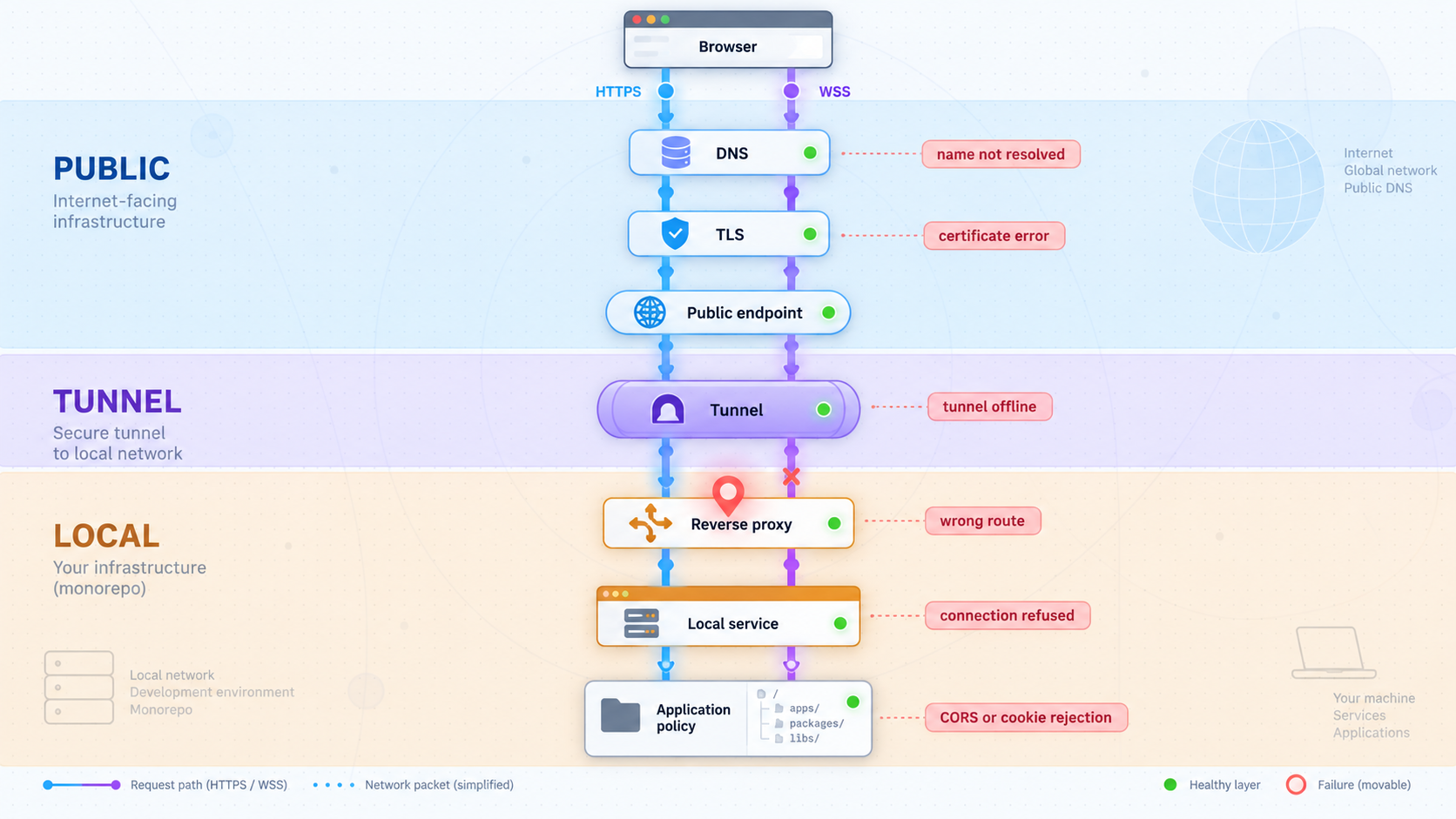
Avoid changing CORS, proxy, OAuth, and tunnel configuration at the same time. Start at the local listener and move outward. The point where behavior changes usually identifies the responsible layer.
| Symptom | Likely layer | What to check |
|---|---|---|
| Public URL does not connect | Tunnel lifecycle or local reachability | Confirm the selected client is connected, the tunnel is started, and the configured local IP and port are reachable from the client device. |
| Every route returns frontend HTML | Reverse-proxy route ordering | Check whether a broad frontend fallback is matching API, auth, or WebSocket paths before their specific routes. |
| API works in curl but fails in the browser | CORS or browser credentials | Inspect the browser console, preflight response, allowed origin, allowed method and headers, and credential settings. |
| OAuth provider rejects the redirect URI | Provider registration | Compare the complete public callback address character by character, including scheme, host, path, and any relevant port. |
| OAuth returns successfully but the session disappears | Cookie or proxy-aware URL handling | Inspect Set-Cookie, host or domain, path, Secure, SameSite, and whether later requests include credentials. |
| Page loads but WebSocket connection fails | WebSocket URL or proxy upgrade | Check for ws versus wss, a stale localhost hostname, wrong path, failed upgrade, or rejected origin. |
| Application socket works but hot reload does not | Development-server client configuration | Inspect the hot-reload URL generated by the framework and review its documented public host, path, protocol, and client-port settings. |
| Redirect points to localhost | Application external-origin configuration | Set the application’s documented public base URL and configure trusted proxy handling where required. |
Use a layered diagnostic sequence
- Confirm the target process is running.
- Confirm the Localtonet client device can reach the configured local IP and port.
- For shared ingress, confirm the reverse proxy routes each path to the expected upstream.
- Confirm the Localtonet client is connected.
- Confirm the tunnel is started.
- Request the assigned public URL without relying on frontend JavaScript.
- Inspect browser-origin behavior such as CORS, cookies, redirects, and WebSockets.
- Test the complete user flow from an external browser.
If direct local service requests work but requests through the local reverse proxy fail, the tunnel is not yet the relevant layer. If the reverse proxy works locally but the public URL does not connect, inspect the client, selected target, and tunnel state. If public HTTP works but only browser JavaScript fails, investigate browser policy and client configuration.
Keep a simple verified request for each layer: direct local service, local reverse proxy if used, and public HTTPS URL. Re-run those checks after each configuration change. This prevents a browser-only symptom from being mistaken for a general connectivity failure.
Secure a publicly reachable development topology
A public HTTPS URL makes the selected service reachable from the internet while the tunnel and client are running. It does not add application authorization, remove unsafe debug behavior, or determine who should be allowed to call an endpoint. Treat the public origin as an internet-facing entry point.
Review development-only routes before exposure. Disable unnecessary debug panels and test utilities, restrict administrative operations, and avoid using real production data when a representative test data set is sufficient. If an external service sends webhooks or OAuth callbacks, validate signatures, state, nonces, timestamps, or other controls required by that protocol.
Be careful with proxy-aware application settings. Trust only the proxy chain appropriate to the deployment. Incorrectly trusting arbitrary forwarding headers can allow a request to influence generated URLs or security decisions. The exact trusted-proxy syntax depends on the server framework and must come from that framework’s current documentation.
Use separate tunnels when isolation is a security or operational objective, but do not assume separation alone creates authorization. Conversely, a shared reverse proxy can centralize route controls, but it should not become an accidental route to every listener on the machine.
Frequently asked questions
Should every service in a monorepo have its own Localtonet tunnel?
No. Create public entry points only for services that must be reached by a browser or external system. Backend-only services can remain on the private local or container network. If several browser-facing services should behave as one origin, place them behind one local reverse proxy and point one HTTP tunnel to that proxy.
Does using one reverse proxy eliminate CORS?
It eliminates CORS requirements for browser requests that remain on the same scheme, hostname, and port. For example, a page and an API path under the same public HTTPS origin are same-origin. Requests to another hostname, scheme, or port remain cross-origin even if the services are in the same repository.
Can one Localtonet HTTP tunnel forward directly to several local ports?
An HTTP tunnel points to one local IP address and port. To present several services through that one target, run a local reverse proxy on the target port and configure it to route paths or hosts to the appropriate upstream services. Otherwise, create separate HTTP tunnels for the independently public services.
Why does an OAuth callback still point to localhost after the tunnel starts?
Starting a tunnel does not rewrite application-generated URLs. Configure the application’s documented external base URL or callback setting, register the exact public HTTPS callback with the OAuth provider, and configure trusted proxy handling if the framework requires it. All values must describe the same active public origin.
Why do API requests work from curl but fail in the browser?
Command-line clients do not enforce browser CORS rules. Inspect the browser’s preflight and main request. Verify the allowed frontend origin, method, headers, and credential behavior. Also check whether the frontend is calling the intended public API address rather than a stale localhost URL.
Can the frontend and API share authentication cookies across separate tunnel hostnames?
Do not assume that they can. Cookie delivery depends on the actual host or domain, path, security, same-site policy, and browser credential behavior. Host-only cookies are not automatically shared with another hostname. Design and test the session boundary using the exact public hosts assigned to the workflow.
Why does hot reload fail when the public page itself loads?
The development client may be constructing a separate WebSocket URL that still uses localhost, the wrong port, the wrong path, or the insecure ws scheme. Inspect the browser’s WebSocket request and configure the development server using its documented public client-host, protocol, path, or port settings. If a reverse proxy is used, confirm that the relevant path supports the WebSocket upgrade.
Will the public URL remain available after the Localtonet client stops?
No. The tunnel is available only while the selected client device is connected and the tunnel is running. Creating the tunnel does not start it automatically. Start it when needed, and stop or delete it when public access is no longer required.
Should we use a random subdomain, custom subdomain, or custom domain?
A random subdomain is suitable when the address can be updated for each test. A stable hostname can reduce configuration churn for OAuth callbacks and shared test links. Localtonet HTTP tunnels support Random Sub Domain, Custom Sub Domain, and Custom Domain process types, but availability can vary by account, plan, or current configuration. Use the options shown in the dashboard and follow current documentation for any custom-domain DNS requirements.
Publish the ingress topology you actually intend to test
Map the frontend, API, authentication callbacks, and WebSockets first. Then use one Localtonet HTTP tunnel for a shared local reverse proxy, or create separate tunnels only for services that need independent public origins.
Get Started Free →

