

Build local HTTPS deliberately, then expose the simplest verified HTTP listener
Local HTTPS and public HTTPS belong to different trust boundaries. Using both can be intentional, but accidentally sending a tunnel through a workstation-only TLS endpoint adds certificate validation, protocol, redirect, and proxy-header failure modes. This tutorial builds a complete Docker Compose project with nginx, mkcert, explicit host and container ports, service-name routing, forwarded headers, local verification, and a separate HTTP target for Localtonet. The result preserves trusted HTTPS at foo.test while avoiding unnecessary TLS on the recommended public tunnel path.
📋 What's in this guide
Understand the local and public TLS boundaries
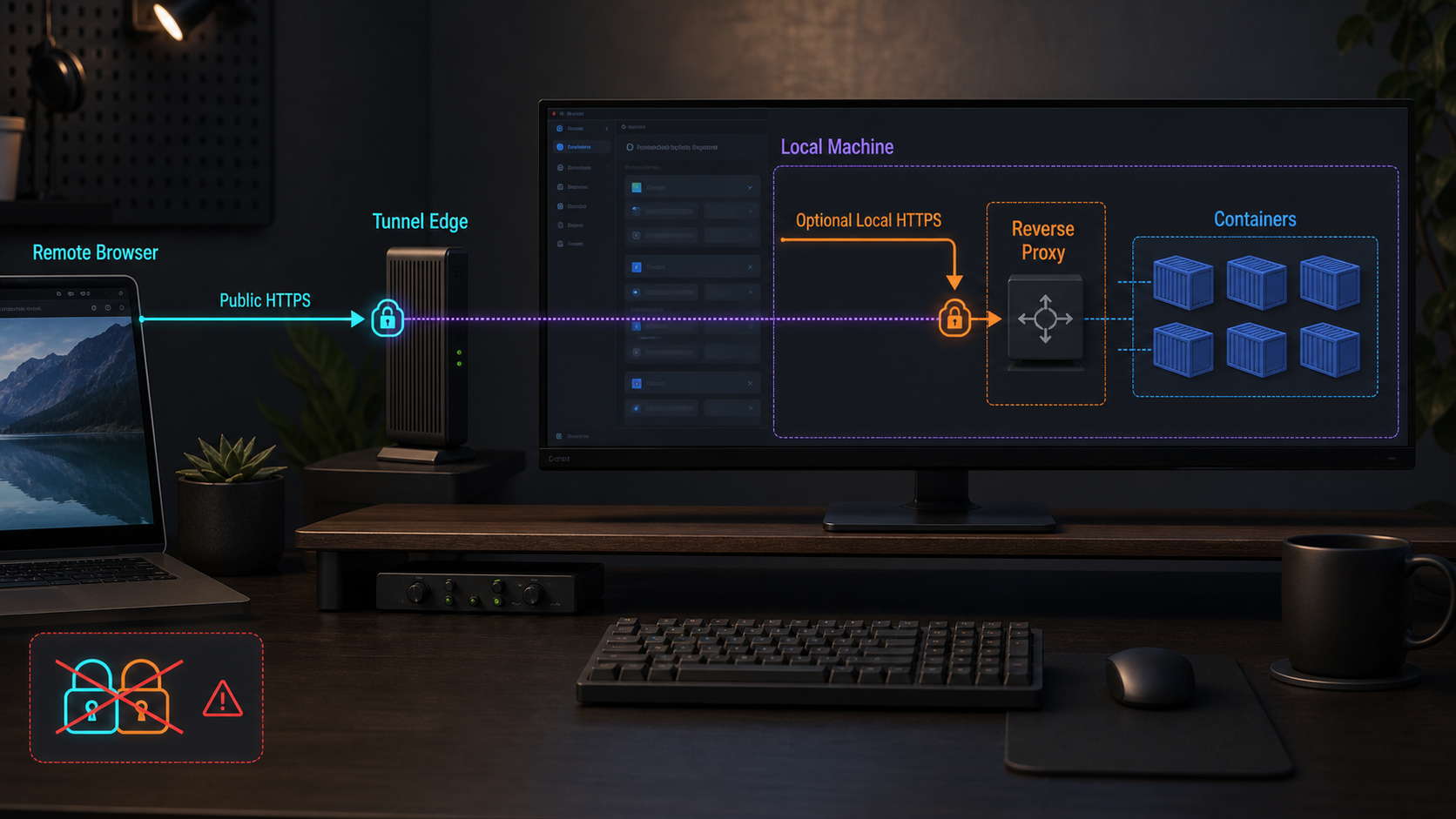
A Docker Compose application can encounter HTTPS at more than one point. A developer may open a locally trusted address such as https://foo.test:8443, where nginx terminates TLS with a certificate created by mkcert. A remote browser can separately open a public HTTPS address assigned to a Localtonet HTTP tunnel. Those connections are not one continuous TLS session.
In the reference project below, the application itself listens for plain HTTP on container port 8080. Docker publishes that listener as 127.0.0.1:8080. nginx reaches the application through the Compose network at app:8080, publishes local HTTP at 127.0.0.1:8081, and publishes local HTTPS at 127.0.0.1:8443.
The recommended Localtonet topology targets 127.0.0.1:8080, not nginx port 8443. Public users receive an HTTPS URL from the HTTP tunnel, while the verified local target speaks ordinary HTTP. Local nginx remains available for browser tests that specifically require a secure local origin.
foo.test to loopback and trusts the mkcert development CA. nginx presents the certificate and forwards HTTP to app:8080.
app and container port 8080. It does not use a changing container IP address or another container's loopback interface.
Public HTTPS followed by HTTPS to a local reverse proxy can be intentional when the public test must exercise that exact TLS ingress path. It becomes fragile when the connecting component does not trust the local CA, sends HTTP to a TLS-only port, omits the required server name, or supplies request identity that the application interprets incorrectly. This guide avoids accidental or unnecessary double TLS. It does not claim that every multi-segment TLS design is defective.
Choose the simplest topology that meets the test
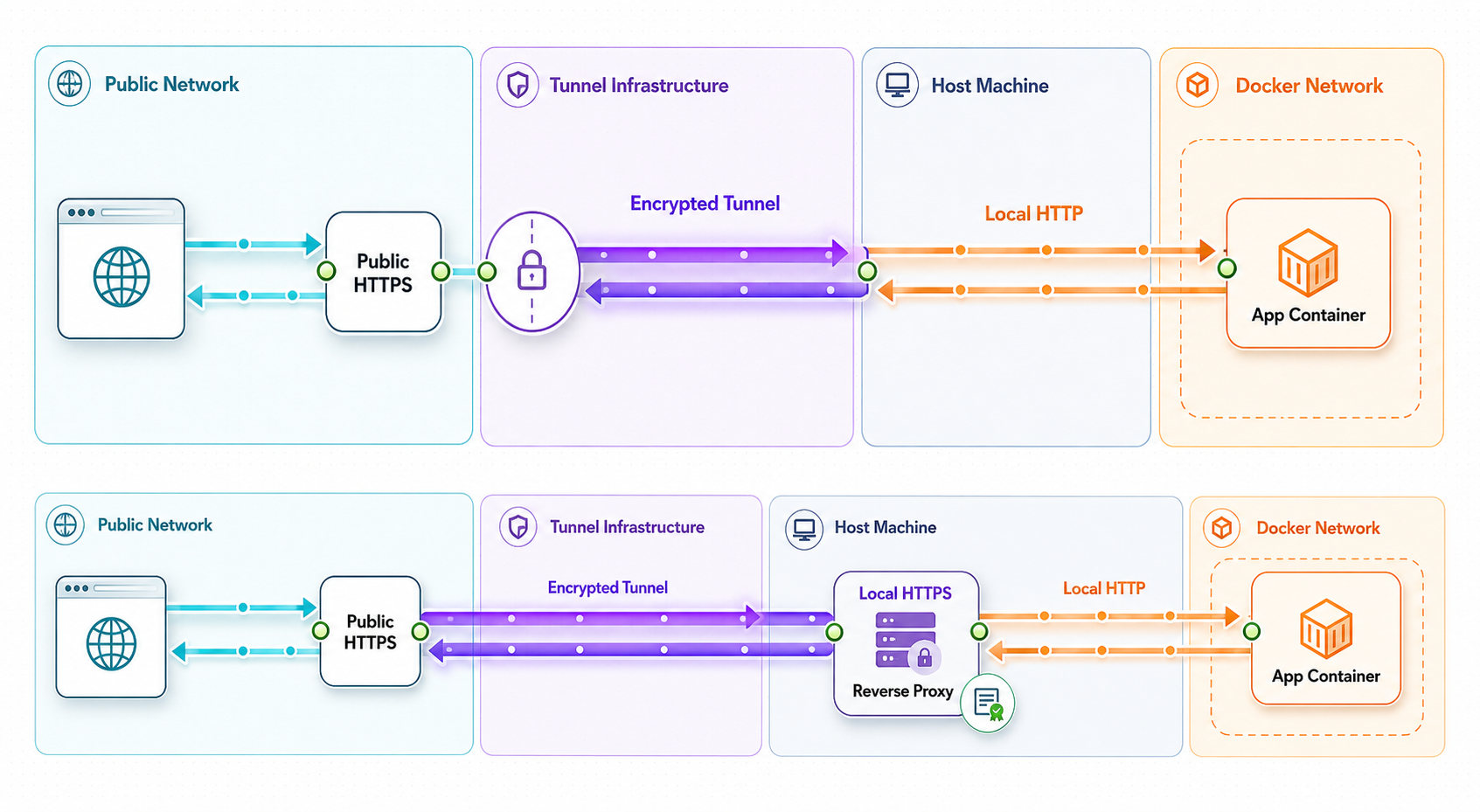
Decide what must be tested before selecting a target. If the requirement is simply to make a working local web application reachable through a public HTTPS address, target a verified HTTP listener. If nginx performs required path routing, authentication, header normalization, or other application behavior, the tunnel may need to target nginx instead. That choice should be explicit.
| Path | Reference listener | Use it when | Main concern |
|---|---|---|---|
| Direct local application HTTP | 127.0.0.1:8080 |
Verifying the application or providing the recommended Localtonet target | The application may need a configured public origin for links, redirects, and callbacks |
| Local nginx HTTP | 127.0.0.1:8081 |
Testing proxy routing without certificate concerns | The application observes an HTTP proxy path and must trust only the intended proxy |
| Local nginx HTTPS | https://foo.test:8443 |
Testing secure cookies, secure-context browser behavior, or local TLS termination | The client must trust the mkcert CA and use a hostname covered by the certificate |
| Public HTTPS to local application HTTP | Public URL to 127.0.0.1:8080 |
Remote previews, callbacks, webhooks, and other internet-facing development tests | The public origin differs from foo.test and must be configured separately |
| Public path through local nginx HTTPS | Conditional HTTPS-capable target to port 8443 |
Only when the public test must include that local TLS listener | Current tunnel support, local certificate trust, server-name handling, and headers must all agree |
This tutorial recommends separate local and public entry points. Developers use nginx at https://foo.test:8443. Localtonet targets the application's plain HTTP listener at 127.0.0.1:8080. That public route does not traverse nginx, so it does not need to validate the workstation-only certificate.
Port 8443 in this project is TLS-only. A plain HTTP client cannot communicate with it because nginx expects a TLS handshake before parsing an HTTP request. Configure the recommended Localtonet HTTP target as local IP 127.0.0.1 and local port 8080. If you deliberately choose a local HTTPS target instead, confirm the current HTTPS local-target behavior in the dashboard and the current HTTP/s tunnel documentation before using port 8443.
Install Docker, Compose, mkcert, and local trust
The reference project requires Docker Desktop, or Docker Engine with the Docker Compose plugin, plus mkcert on the workstation. Confirm Docker and Compose before creating files:
docker version
docker compose version
Both commands should print version information without a connection error. The project uses Compose service names and features supported by the current Docker Compose plugin. It does not require the legacy standalone docker-compose command.
Install mkcert for the workstation platform
Use one platform-appropriate installation path. Package availability can vary with operating-system and repository versions, so review the package presented before approving installation.
-
macOS with Homebrew:
The optionalbrew install mkcert brew install nssnsspackage supports Firefox trust integration when Firefox uses its own trust store. -
Windows with Chocolatey in an elevated terminal:
choco install mkcert -
Debian or Ubuntu when mkcert is available from the configured repositories:
sudo apt update sudo apt install mkcert libnss3-tools -
Fedora when mkcert is available from the configured repositories:
sudo dnf install mkcert nss-tools
If the operating-system repository does not provide mkcert, use the installation method published by the mkcert project. Do not download an executable from an unrelated mirror.
After installation, create and install the local development CA:
mkcert -installThis is a per-workstation trust step. It does not install the CA in other developers' machines, remote clients, containers, or the Localtonet relay path.
The mkcert CA private key can issue certificates trusted by machines where that CA is installed. Never copy the CA private key into the project, a container image, a CI artifact, a support ticket, or source control. The nginx container needs only the leaf certificate and private key generated for this project.
Create the project directories
mkdir -p docker-compose-https/app
mkdir -p docker-compose-https/nginx
mkdir -p docker-compose-https/certs
cd docker-compose-https
On PowerShell, create the same directory structure using the filesystem tools available on the workstation. All paths below are relative to the project root.
Generate a certificate for foo.test
Once mkcert is installed and initialized, this certificate-generation command is portable across supported mkcert platforms:
mkcert \
  -cert-file certs/foo.test.pem \
  -key-file certs/foo.test-key.pem \
  foo.test localhost 127.0.0.1 ::1
The resulting leaf certificate covers foo.test, localhost, and the listed loopback addresses. The nginx configuration uses the exact filenames supplied above. The certificate hostname does not include a port, so it remains valid when the browser uses https://foo.test:8443.
Exclude certificate material from Git
Create a project-level .gitignore:
certs/*
!certs/.gitkeep
.env
*.log
Add an empty certs/.gitkeep only if the repository needs to retain the directory:
touch certs/.gitkeep
Each developer should generate their own certificate and private key. Do not commit foo.test-key.pem. Although the leaf certificate itself is not secret, ignoring the entire generated certificate directory reduces the chance of committing the private key by mistake.
Resolve foo.test to the local machine
On macOS and Linux, add this entry to /etc/hosts:
127.0.0.1 foo.testOn Windows, add the same line to:
C:\Windows\System32\drivers\etc\hosts
Editing the hosts file normally requires administrator privileges. This mapping applies only to the configured workstation. It does not create public DNS and does not make foo.test reachable from another device.
Build the complete nginx and Docker Compose project
The reference implementation uses nginx as the local reverse proxy and a small dependency-free Node.js HTTP service as the application. The application exposes a health endpoint and reports a limited set of request properties so that the proxy behavior can be verified without installing a framework.
The example pins maintained major image lines rather than using latest. Before adopting it in a long-lived repository, review the image tags, apply current security updates, and consider pinning approved image digests through the project's normal dependency process.
Create the application
Save the following as app/index.js:
const http = require('node:http');

const port = Number(process.env.PORT || 8080);

const server = http.createServer((req, res) => {
  if (req.url === '/health') {
    res.writeHead(200, { 'content-type': 'text/plain; charset=utf-8' });
    res.end('ok\n');
    return;
  }

  const response = {
    message: 'Hello from Docker Compose',
    method: req.method,
    path: req.url,
    host: req.headers.host || null,
    forwardedHost: req.headers['x-forwarded-host'] || null,
    forwardedProto: req.headers['x-forwarded-proto'] || null,
    forwardedForPresent: Boolean(req.headers['x-forwarded-for'])
  };

  res.writeHead(200, { 'content-type': 'application/json; charset=utf-8' });
  res.end(`${JSON.stringify(response, null, 2)}\n`);
});

server.listen(port, '0.0.0.0', () => {
  console.log(`app listening on 0.0.0.0:${port}`);
});
Save this as app/Dockerfile:
FROM node:22-alpine

WORKDIR /app

COPY index.js ./index.js

ENV NODE_ENV=production
ENV PORT=8080

EXPOSE 8080

USER node

CMD ["node", "index.js"]
Binding to 0.0.0.0 inside the container is important. If the process bound only to container loopback, nginx in another container could not reach it through the Compose network.
Create the nginx configuration
Save the following as nginx/default.conf:
map $http_upgrade $connection_upgrade {
    default upgrade;
    '' close;
}

upstream compose_app {
    server app:8080;
    keepalive 16;
}

server {
    listen 80;
    server_name foo.test localhost;

    location / {
        proxy_pass http://compose_app;
        proxy_http_version 1.1;

        proxy_set_header Host $http_host;
        proxy_set_header X-Forwarded-Host $http_host;
        proxy_set_header X-Forwarded-Proto http;
        proxy_set_header X-Forwarded-For $proxy_add_x_forwarded_for;

        proxy_set_header Upgrade $http_upgrade;
        proxy_set_header Connection $connection_upgrade;
    }
}

server {
    listen 443 ssl;
    server_name foo.test localhost;

    ssl_certificate /etc/nginx/certs/foo.test.pem;
    ssl_certificate_key /etc/nginx/certs/foo.test-key.pem;
    ssl_protocols TLSv1.2 TLSv1.3;

    location / {
        proxy_pass http://compose_app;
        proxy_http_version 1.1;

        proxy_set_header Host $http_host;
        proxy_set_header X-Forwarded-Host $http_host;
        proxy_set_header X-Forwarded-Proto https;
        proxy_set_header X-Forwarded-For $proxy_add_x_forwarded_for;

        proxy_set_header Upgrade $http_upgrade;
        proxy_set_header Connection $connection_upgrade;
    }
}
nginx routes to app:8080, where app is the Compose service name and 8080 is the application's container port. It does not route to localhost:8080. Inside the nginx container, localhost refers to nginx itself.
The HTTPS server sets X-Forwarded-Proto to https because nginx directly accepted the TLS connection. The HTTP server sets it to http. nginx also replaces the forwarded host values with information from the request it accepted instead of blindly passing arbitrary client-supplied X-Forwarded-Host or X-Forwarded-Proto values.
Create the Compose file
Save this as compose.yaml:
services:
  app:
    build:
      context: ./app
    environment:
      PORT: "8080"
    expose:
      - "8080"
    ports:
      - "127.0.0.1:8080:8080"
    healthcheck:
      test:
        - CMD
        - node
        - -e
        - "require('node:http').get('http://127.0.0.1:8080/health', r => process.exit(r.statusCode === 200 ? 0 : 1)).on('error', () => process.exit(1))"
      interval: 5s
      timeout: 3s
      retries: 10
      start_period: 3s
    restart: unless-stopped

  proxy:
    image: nginx:1.27-alpine
    depends_on:
      app:
        condition: service_healthy
    ports:
      - "127.0.0.1:8081:80"
      - "127.0.0.1:8443:443"
    volumes:
      - ./nginx/default.conf:/etc/nginx/conf.d/default.conf:ro
      - ./certs/foo.test.pem:/etc/nginx/certs/foo.test.pem:ro
      - ./certs/foo.test-key.pem:/etc/nginx/certs/foo.test-key.pem:ro
    restart: unless-stopped
The certificate, key, and nginx configuration are mounted read-only. Both services join the default Compose network automatically, which allows nginx to resolve app. The application port is published only on host loopback so that the Localtonet client running on the same Docker host can reach 127.0.0.1:8080.
The mapping 127.0.0.1:8080:8080 means host address 127.0.0.1, host port 8080, and container port 8080. The mapping 127.0.0.1:8443:443 means local clients use port 8443, while nginx listens on port 443 inside its container. Localtonet should target the host listener at 127.0.0.1:8080 in the recommended topology.
Validate and start the stack
First ask Compose to parse and render the project:
docker compose configExpected result: Compose prints the normalized configuration and exits successfully. A missing certificate file, invalid YAML structure, or unsupported Compose feature should be corrected before startup.
Build and start both services:
docker compose up -d --build
docker compose ps
Expected result: app becomes healthy and proxy is running. The published ports should include loopback mappings for 8080, 8081, and 8443.
Caddy as an adaptation
nginx is the complete maintained implementation in this tutorial. Caddy can implement the same architecture, but it is not a drop-in file replacement. A Caddy adaptation must load the generated foo.test certificate and key, listen on the intended HTTP and HTTPS ports, reverse proxy to app:8080, preserve the host, and communicate the original scheme to the application.
If a project chooses Caddy, keep the same Compose port model and the same recommended Localtonet target. Do not enable a second automatic certificate workflow for foo.test while also manually mounting mkcert files. Validate the configuration against the documentation for the exact Caddy image version selected by the project.
Verify the application, proxy, certificate, and headers locally
Confirm container health
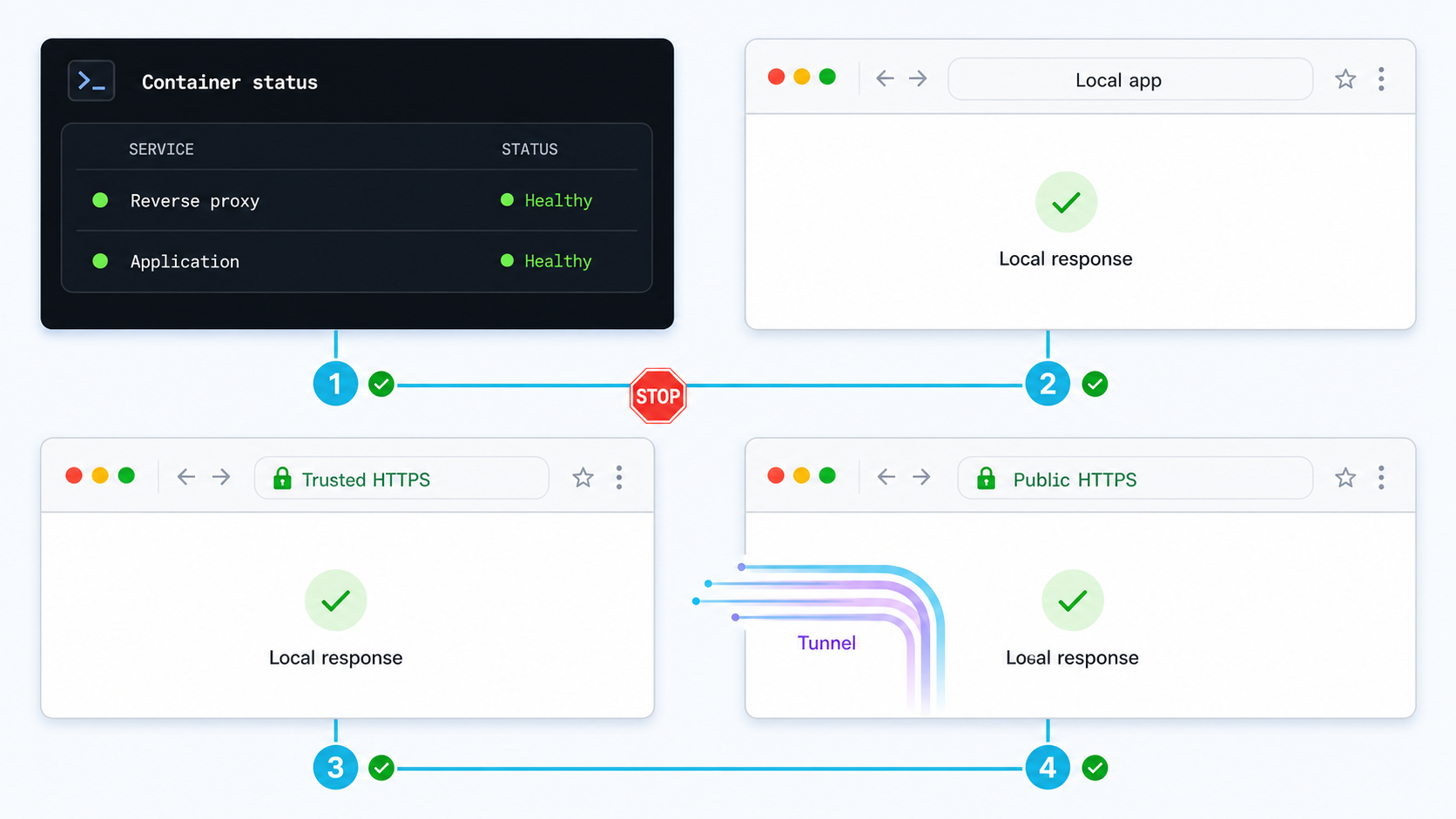
Run docker compose ps. The application should report healthy, and nginx should remain running rather than restarting because of a certificate or configuration error.
Test the direct application listener
Request http://127.0.0.1:8080/health. This is the exact listener recommended as the Localtonet target.
Test nginx over local HTTP
Request http://foo.test:8081/ and confirm that nginx reaches the application by its Compose service name.
Test nginx over locally trusted HTTPS
Request https://foo.test:8443/ without disabling certificate verification. Confirm that the response reports an HTTPS forwarded scheme.
Inspect logs before tunneling
Review application and proxy logs for startup failures, connection refusals, certificate-loading errors, or unexpected requests.
Check the direct HTTP target
curl --fail-with-body http://127.0.0.1:8080/healthExpected response:
okThis proves that a process on the Docker host can reach the application through the published HTTP listener. If this request fails, do not create the tunnel yet.
Check nginx over HTTP
curl --fail-with-body http://foo.test:8081/
Expected result: an HTTP 200 JSON response containing "message": "Hello from Docker Compose", a host similar to foo.test:8081, and "forwardedProto": "http". The exact forwarded client address is intentionally not printed.
Check nginx over HTTPS
curl --fail-with-body https://foo.test:8443/
Expected result: the certificate validates without -k or --insecure, the response status is 200, and the JSON includes values similar to:
{
  "message": "Hello from Docker Compose",
  "method": "GET",
  "path": "/",
  "host": "foo.test:8443",
  "forwardedHost": "foo.test:8443",
  "forwardedProto": "https",
  "forwardedForPresent": true
}
Open https://foo.test:8443 in the local browser as a separate trust-store check. A command-line client and a browser can use different certificate stores, especially on systems where Firefox maintains separate trust settings.
The -k option disables certificate verification. It can help prove that a listener exists, but it does not prove that local HTTPS is configured correctly. A finished local setup should validate the hostname and trust chain without disabling verification.
Review focused logs
docker compose logs app
docker compose logs proxy
Use continuous logs only while diagnosing a request:
docker compose logs --follow --tail=100 app proxy
Stop following logs with Ctrl+C. This does not stop the containers.
Expose the verified HTTP listener with Localtonet
The Localtonet client must run on the Docker host or another device that can reach the selected local target. In this project, the application is bound to host loopback, so a client running on the same host can use 127.0.0.1:8080. A client running in another container, virtual machine, or physical device cannot assume that its own 127.0.0.1 refers to the Docker host.
With Localtonet, the client establishes an outbound connection to our relay. You do not need inbound router port forwarding, firewall changes, VPN setup, or a public IP address for this workflow. Creating the tunnel and starting it remain separate lifecycle actions.
Install and run the Localtonet client
Run our client on the Docker host or another device that can reach the selected target. From that same device, confirm that http://127.0.0.1:8080/health returns ok.
Authenticate and select the device
Use the device-specific authentication token associated with the client. Keep the token out of Compose files, environment examples, screenshots, logs, and source control.
Select an available relay server
Choose a server or region from the values currently available in our dashboard. Do not hardcode a server code copied from another account or environment.
Create the HTTP tunnel
Configure the local target IP as 127.0.0.1 and the local target port as 8080. This listener speaks plain HTTP and already passed direct local verification.
Start the tunnel
Use the Start control after creating the configuration. Wait until the selected client and tunnel report that they are connected before testing the public address.
Verify the public endpoint
Open the assigned public HTTPS URL from a separate browser or network. Request both /health and /, then exercise the actual callback, webhook, or preview workflow.
For the current dashboard sequence and HTTP/s options, use the Localtonet HTTP/s tunnel documentation. HTTP tunnels may use a generated subdomain, a selected subdomain where supported, or a custom domain. Check current DNS requirements before configuring a custom domain.
Expected public result
If the assigned address is represented as https://your-public-host.example, test:
curl --fail-with-body https://your-public-host.example/health
curl --fail-with-body https://your-public-host.example/
Replace the placeholder with the exact address shown by the running tunnel. The health request should return ok. The root request should return the application's JSON response with a 200 status. The exact host and forwarded-header values depend on the active public path, so inspect what actually arrives instead of assuming that every tunnel configuration emits the same headers.
The public address remains available only while the selected device is connected and the tunnel is running.
Do not treat an unadvertised URL as private. Require application authentication where appropriate, use least-privilege test accounts, avoid production data, and remove diagnostics that disclose cookies, authorization headers, tokens, environment variables, or personal information. Apply relevant application and tunnel access controls, then stop the tunnel when the external test is complete.
Connect forwarded-header trust to the actual proxy path

The nginx configuration in this tutorial explicitly sets Host, X-Forwarded-Host, X-Forwarded-Proto, and X-Forwarded-For. For the local HTTPS path, nginx knows it accepted TLS and therefore sets X-Forwarded-Proto to https. For the local HTTP path, it sets the value to http.
This metadata allows a framework behind nginx to reconstruct the client-visible origin, but only if the framework's trusted-proxy feature is enabled correctly. Blindly trusting forwarded headers from any caller is unsafe. A direct client can send its own X-Forwarded-Proto: https, false host, or false client address unless the trusted ingress replaces those values and the application accepts them only from known proxy paths.
| Property | Reference nginx behavior | Application use | Failure when wrong |
|---|---|---|---|
| Host | Preserved from the request accepted by nginx | Routing, canonical links, callback validation, and origin checks | Links point to localhost, a service name, or an unintended host |
X-Forwarded-Proto |
Set to http or https according to the nginx listener |
Secure-cookie decisions, redirects, and absolute URL generation | Redirect loops or generated HTTP callbacks |
X-Forwarded-Host |
Replaced with the host accepted by nginx | External-host reconstruction | Public links use the wrong hostname or port |
X-Forwarded-For |
Appended by nginx using $proxy_add_x_forwarded_for |
Auditing and policy when the entire proxy chain is trusted | Spoofed addresses or every request appearing to come from the proxy |
The recommended Localtonet path bypasses nginx and targets 127.0.0.1:8080. Therefore, the nginx header configuration governs local proxy tests but does not automatically govern public requests. We do not claim that every Localtonet HTTP tunnel configuration supplies the same forwarded headers. Inspect the public request received by the application and use the application's documented external-origin and trusted-proxy settings.
For applications that require one stable public origin, configure the exact assigned public HTTPS origin through the application's supported setting. This is often more predictable than deriving an origin from arbitrary incoming headers. If the public address changes, update callback registrations and application configuration together.
Cookies, OAuth, and generated links
A cookie scoped to foo.test will not be sent to the public tunnel hostname. Local and public origins are distinct even when they reach the same container. Review Domain, Path, Secure, expiration, and SameSite independently.
OAuth callback URLs normally require an exact scheme, hostname, port, and path match. Do not register foo.test with a provider that must call the public endpoint. Use the public HTTPS origin and update stale registrations when the assigned development URL changes.
The same principle applies to webhook endpoints, password-reset links, email-verification links, asset URLs, and API documentation. Correct the application's canonical-origin behavior rather than adding broad host allowlists or disabling validation.
Troubleshoot the project by symptom and layer
Compose reports that a certificate path does not exist
Confirm that the mkcert command created certs/foo.test.pem and certs/foo.test-key.pem in the same project directory as compose.yaml. File names and capitalization must match the volume mounts and nginx directives.
nginx exits immediately
Inspect docker compose logs proxy. Certificate-loading errors usually indicate a missing file, unreadable mount, or invalid certificate. Configuration errors identify the affected nginx directive. Do not debug the public tunnel until nginx stays running locally.
nginx returns 502 Bad Gateway
Confirm that the application is healthy and listening on 0.0.0.0:8080. The nginx upstream must remain app:8080. Do not replace it with localhost:8080 or host port 8080. The proxy and application communicate through the Compose network using the container port.
foo.test does not resolve
Recheck the workstation hosts file and confirm that it contains 127.0.0.1 foo.test. Browser DNS caches, VPN software, managed DNS settings, or an incorrectly edited hosts file can affect resolution. The mapping must be configured on the machine performing the local test.
The browser reports an untrusted certificate
Confirm that mkcert -install completed for the active user and trust store. Verify that the browser is opening foo.test, not another hostname. Regenerate the certificate if the requested hostname is absent. Firefox may require NSS integration or separate trust handling depending on the platform.
curl works only with -k
The listener is probably reachable, but the command-line client's trust store does not trust the mkcert CA or the requested hostname does not match the certificate. Do not leave certificate verification disabled. Repair trust or use the intended plain HTTP path for components that do not need local TLS.
Port 8080, 8081, or 8443 is already allocated
Identify and stop the conflicting local process, or choose another host port. If changing a host port, keep the container-side port unchanged unless the service configuration also changes. Update verification commands and the Localtonet target when changing host port 8080.
The public URL returns a gateway error or resets
From the exact device running our client, request http://127.0.0.1:8080/health. Confirm that the tunnel targets port 8080, not TLS-only port 8443. Also confirm that the selected client is connected and the tunnel was started after creation.
The site works locally but public redirects are wrong
Docker reachability is probably working. Inspect the application's canonical external URL and the request metadata received through the public path. A public browser may use HTTPS while the final local hop uses HTTP. Configure the framework's supported public-origin or trusted-proxy mechanism instead of writing ad hoc header parsing.
The application redirects forever
Inspect the Location response header. A loop often occurs when the application sees HTTP at the final hop and repeatedly redirects to HTTPS even though the browser already used HTTPS. Fix scheme reconstruction for the actual trusted path and verify that an arbitrary client cannot spoof the accepted headers.
A secure cookie is set but never returned
Compare the hostname used when the cookie was issued with the hostname of the next request. A cookie for foo.test does not belong to the public hostname. Inspect Domain, Path, Secure, and SameSite in browser developer tools.
An OAuth callback is rejected
Compare the complete callback URL character by character, including scheme, hostname, optional port, and path. Confirm that the provider registration and application configuration both contain the current public HTTPS origin rather than foo.test, localhost, or a stale tunnel address.
WebSockets or live reload fail publicly
The nginx configuration includes conventional upgrade headers for the local proxy path, but the recommended public tunnel bypasses nginx. Determine which host, path, port, and protocol the browser is attempting to use. Framework-specific live-reload behavior and current tunnel support must be checked against the actual application and current dashboard rather than inferred from ordinary HTTP success.
A container cannot trust https://foo.test:8443
Containers do not inherit the workstation trust store. This project intentionally sends inter-container traffic over HTTP at app:8080, so containers do not need the mkcert CA. If another container must deliberately call the local HTTPS endpoint, install only the required CA certificate into that client's trust store using an approach appropriate for its base image and runtime. Never disable all TLS verification globally.
Operate, inspect, and shut down the exposure safely
Use a staged routine whenever the project changes:
- Run
docker compose config. - Start the stack with
docker compose up -d --build. - Verify
http://127.0.0.1:8080/health. - Verify
http://foo.test:8081/. - Verify
https://foo.test:8443/without disabling certificate checks. - Start the Localtonet tunnel targeting
127.0.0.1:8080. - Test the assigned public HTTPS origin.
- Stop the tunnel and Compose stack when the test is complete.
View current container status with:
docker compose psRestart one service after a configuration change:
docker compose restart proxyIf the nginx file changed and you want Compose to recreate the service predictably, use:
docker compose up -d --force-recreate proxyStop and remove the project's containers and default network:
docker compose down
Add --volumes only when intentionally removing project volumes. This reference project does not define a named data volume, but copied commands may affect an expanded application that does.
Stop the Localtonet tunnel separately in our dashboard. Stopping Docker does not delete the tunnel configuration, and creating a tunnel does not mean it is running. Delete the tunnel if the configuration should not be retained.
Keep device tokens outside repositories and images. Use synthetic data and least-privilege accounts. Turn off verbose diagnostics after testing, particularly if a real application can log authorization headers, session cookies, OAuth codes, webhook signatures, or personal data.
Document the chosen topology in the project README. State that local HTTPS is served at foo.test:8443, nginx routes internally to app:8080, and the recommended Localtonet target is host listener 127.0.0.1:8080. If the architecture later changes so the public path must traverse nginx, record the new protocol and trust assumptions explicitly.
Frequently asked questions
Do I need mkcert if Localtonet provides a public HTTPS address?
Not necessarily. mkcert provides local trust for a hostname such as foo.test. The public tunnel address solves remote access. If local browser testing does not require a secure context, you can omit local TLS and expose a verified HTTP listener. Use mkcert when local HTTPS behavior is part of the test.
Is every two-segment TLS path a bad design?
No. Multiple TLS segments can be intentional. They require compatible protocols, certificate validation, server-name handling, and correct request identity at each boundary. This tutorial avoids an unnecessary local TLS segment because the public test can use the verified HTTP listener directly.
What exact Localtonet target should I use for this project?
When our client runs on the Docker host, create an HTTP tunnel with local IP 127.0.0.1 and local port 8080. Confirm http://127.0.0.1:8080/health from that device before starting the tunnel.
Why does nginx use app:8080 instead of localhost:8080?
nginx and the application run in separate containers. Inside the nginx container, localhost refers to nginx itself. Compose service discovery resolves the service name app to the application container on the shared project network.
Why publish both port 8080 and port 8443?
Port 8080 is the simple HTTP listener used for direct verification and the recommended tunnel target. Port 8443 is the locally trusted nginx HTTPS listener used for secure-context browser tests. Publishing both makes the two trust boundaries explicit.
Can I target nginx instead of the application?
Yes, when nginx performs behavior that the public test must exercise. Port 8081 is the plain HTTP nginx listener in this reference project. Targeting TLS-only port 8443 is a separate, conditional design that requires current HTTPS local-target support and compatible certificate handling.
Should my application trust every X-Forwarded header?
No. Trust forwarded identity only through the application's documented trusted-proxy mechanism and only from known ingress paths. Untrusted clients can submit false forwarded headers. The first trusted proxy should replace or sanitize values that clients are not allowed to control.
Does creating a Localtonet tunnel start it automatically?
No. Creating and starting a tunnel are separate actions. The selected client must be connected, and the tunnel must be started. The public endpoint remains available only while that client is connected and the tunnel is running.
Expose the verified HTTP entry point with Localtonet
Build the Compose project, prove that 127.0.0.1:8080 works, and then create an HTTP tunnel for that exact listener. Keep foo.test:8443 for local HTTPS testing, configure the public origin separately, and stop the tunnel when external access is no longer required.


