

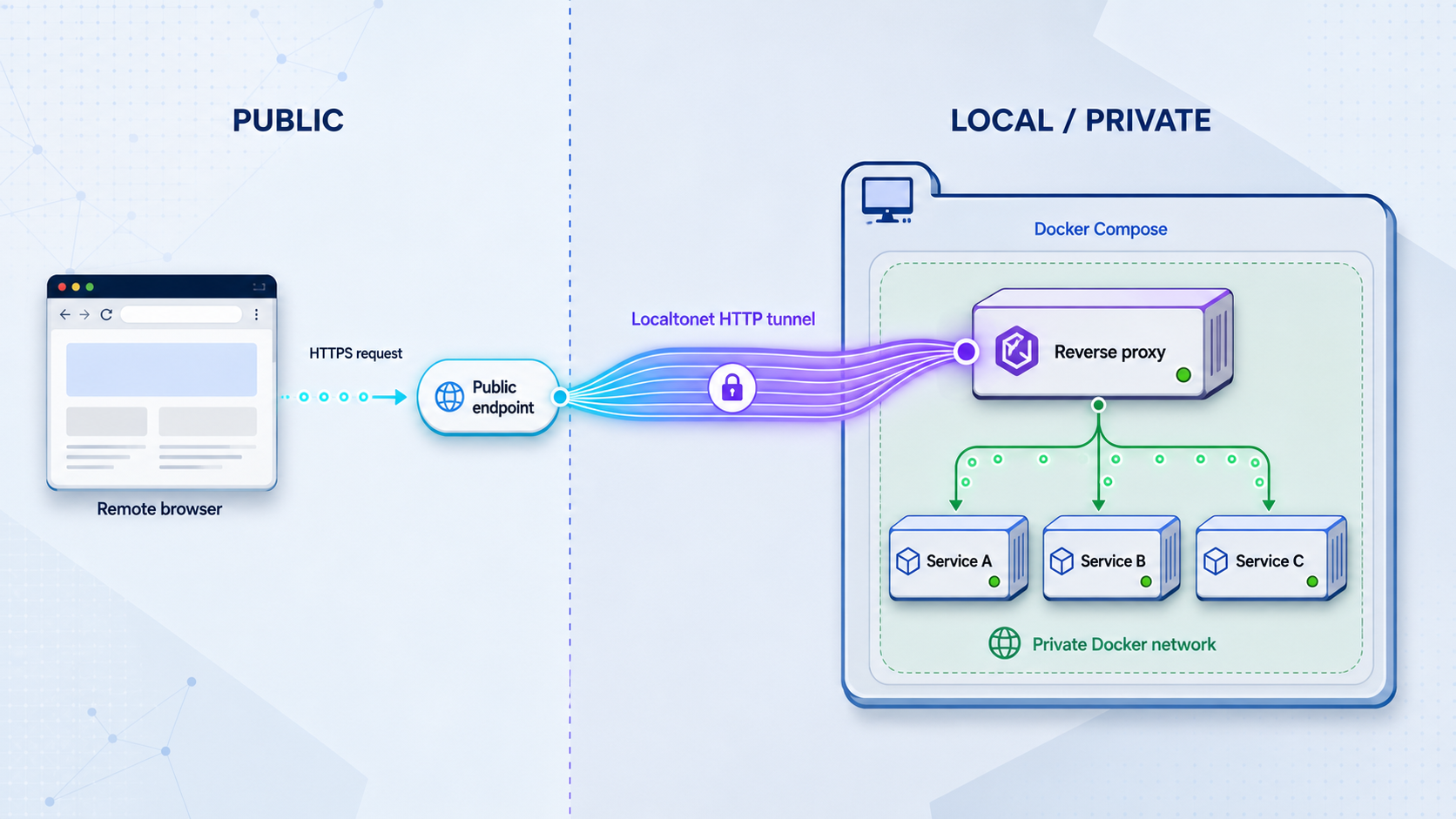
Publish one controlled ingress instead of exposing every container separately
A Docker Compose project can contain a frontend, API, WebSocket endpoint, administration interface, and other internal services, but each service does not necessarily need its own public tunnel. In this guide, we place an Nginx reverse proxy inside the Compose network, route requests by URL path, bind that ingress to the host loopback interface, and expose only the shared endpoint through a Localtonet HTTP tunnel. We also compare path-based routing with host-based routing and separate tunnels, then cover forwarded headers, WebSocket upgrades, OAuth callback URLs, verification, operations, security, and troubleshooting.
📋 What's in this guide
How the single-ingress architecture works
Docker Compose gives services on the same Compose network a practical way to reach one another by service name. If a service is named api, another container on the same network can connect to api at the port on which that application listens inside its container. The reverse proxy can therefore route to app and api without publishing either backend directly on the host.
The architecture in this guide has three layers. The application containers form the private backend layer. An Nginx container forms the local ingress layer and publishes one loopback-only host port. The Localtonet client connects that local ingress to a Localtonet relay through an outbound connection. When the HTTP tunnel is running, visitors use the assigned public HTTPS address, while the application containers remain behind the reverse proxy.
Public client
    |
    | HTTPS request to the Localtonet public address
    v
Localtonet relay
    |
    | Outbound tunnel connection established by the Localtonet client
    v
127.0.0.1:8080 on the Docker host
    |
    v
Nginx gateway container
    |                         |
    | /app/                   | /api/
    v                         v
app:80                     api:80
private Compose service    private Compose service
This design creates one public entry point, not one public port per application. Nginx makes the routing decision after the request reaches the local machine. Localtonet does not need to know which Compose backend ultimately handles /app/ or /api/; its local target is the gateway at 127.0.0.1:8080.
The Localtonet HTTP tunnel carries public requests to one local HTTP endpoint. Nginx decides which internal service receives each request. Authentication, application authorization, route-level access policy, and backend isolation still need to be implemented in the appropriate application or proxy layer.
Path routing, host routing, or separate tunnels
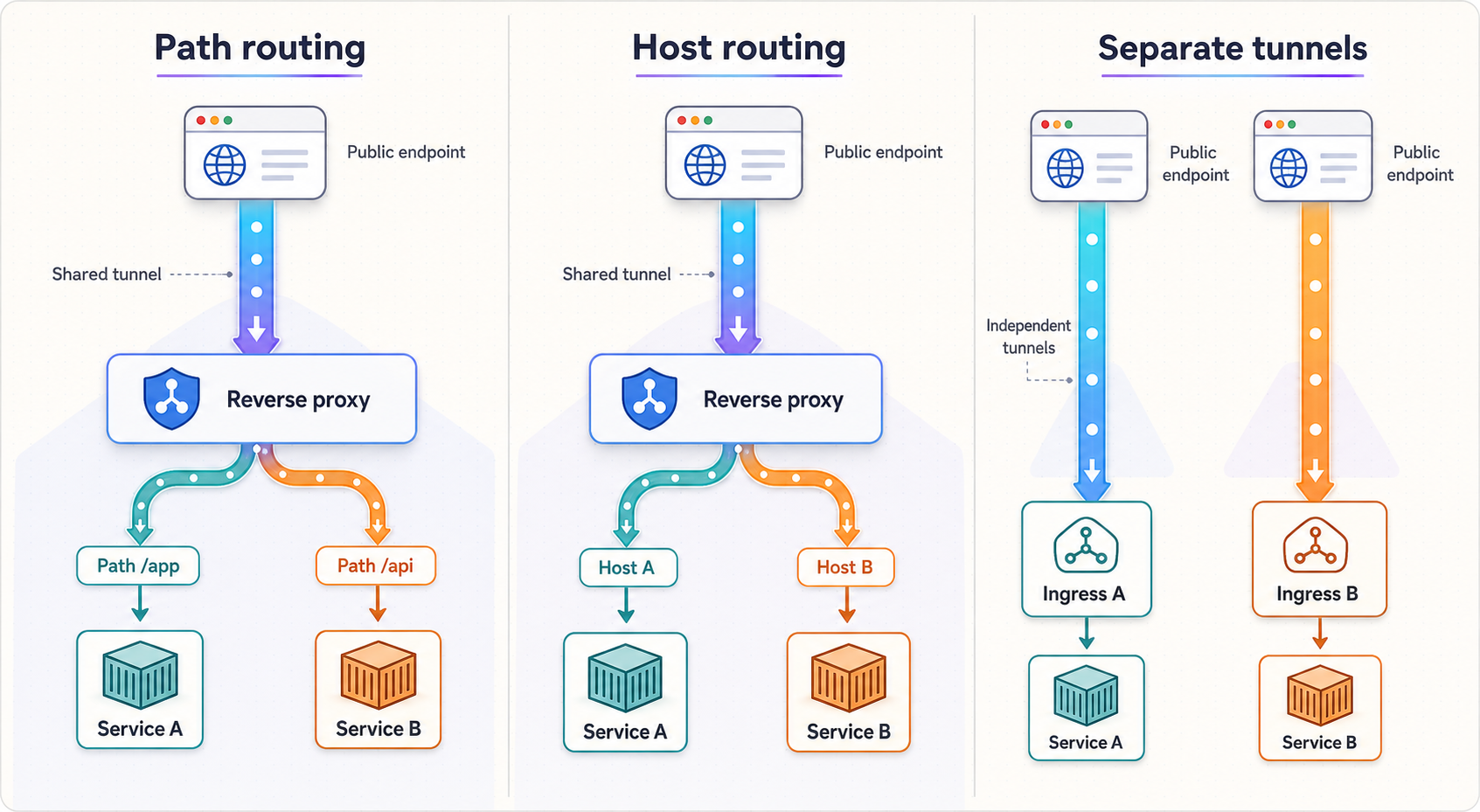
The best topology depends on how independent the services need to be. A dashboard and its API often fit naturally behind one origin, such as / and /api/. Unrelated applications may work better with independent public addresses and independent tunnels. Host-based routing can preserve root paths for several applications, but it requires the incoming hostnames and public domain configuration to match the proxy rules.
| Option | Best for | Main advantage | Main constraint |
|---|---|---|---|
| Path-based routing | Related frontend, API, WebSocket, and documentation services | Several services share one public origin and one Localtonet HTTP tunnel | Applications must work correctly below prefixes such as /app/ or /api/ |
| Host-based routing | Applications that expect to run at the root of separate hostnames | Each application can keep routes such as /login and /assets/ |
Public hostname and custom-domain behavior must align with current Localtonet and DNS configuration |
| Separate tunnels | Unrelated services, different lifecycles, or independently controlled exposure | Each service receives its own public endpoint and can be started or stopped separately | There are more tunnel configurations and public addresses to manage |
When path-based routing is the simplest choice
Path routing is usually the cleanest option when one browser application calls one API. Serving both through the same public origin simplifies browser origin handling and gives the deployment one canonical external scheme and host. For example, JavaScript loaded from https://public-address/app/ can call /api/ without constructing a second public hostname.
Path routing is not transparent to every application. A frontend may generate absolute asset URLs beginning with /, an API may publish redirects without its external prefix, or a documentation interface may assume it owns the site root. Configure an application's base path when it supports one. Treat response-body rewriting as a last resort because it is more fragile than making the application prefix-aware.
When host-based routing fits better
Host routing lets Nginx select an upstream from the request's Host header. It can be useful when applications cannot run under prefixes. However, one generated tunnel hostname cannot represent several arbitrary public hostnames by itself. Localtonet HTTP and File Server tunnels support Random Sub Domain, Custom Sub Domain, and Custom Domain process types, but exact availability can vary, and custom-domain DNS instructions must be checked against current Localtonet documentation before deployment.
DNS targets and validation requirements can change with the selected configuration. Use the values shown by the current Localtonet dashboard and documentation. Do not copy a record target from another account, an old tutorial, or an unrelated tunnel service.
When separate tunnels are safer operationally
Use separate tunnels when services need distinct exposure windows, separate public identities, or simpler root-path behavior. For example, a customer-facing preview and an internal administration interface should not be combined merely to reduce the number of tunnels. A management route hidden behind an obscure URL is still public if it is reachable through the gateway.
Prerequisites and project decisions
This example uses two static Nginx backend containers so the complete routing path can be tested without relying on an external application repository. In a real Compose project, replace those backend definitions with your existing frontend and API services while preserving the network and routing principles.
Before starting, prepare the following:
- A machine with Docker and the Docker Compose v2 command available as
docker compose. - Permission to create files and run containers on that machine.
- Host port
8080available on the loopback interface, or another explicitly selected port used consistently throughout the configuration. - The Localtonet client installed and running on the machine that can reach the gateway.
- A Localtonet device authentication token selected through our platform. Tokens are device-specific and must not be placed in Compose files, source control, screenshots, or article examples.
- An available Localtonet relay server or region selected from the current dashboard rather than copied from a hardcoded example.
The sample deliberately binds the gateway as 127.0.0.1:8080:8080. That makes it reachable from processes on the Docker host, including a Localtonet client running there, while avoiding a listener on every host network interface. If the Localtonet client runs on another device, 127.0.0.1 will refer to that other device and this target will not work. In that design, choose a deliberately reachable private address and protect it with suitable host and network policy.
The example uses the public nginx:alpine image tag for readability. Production deployments should follow their own image approval, version pinning, update, vulnerability management, and rollback policies. Do not assume that a tutorial tag is an immutable production dependency.
Build the Docker Compose ingress
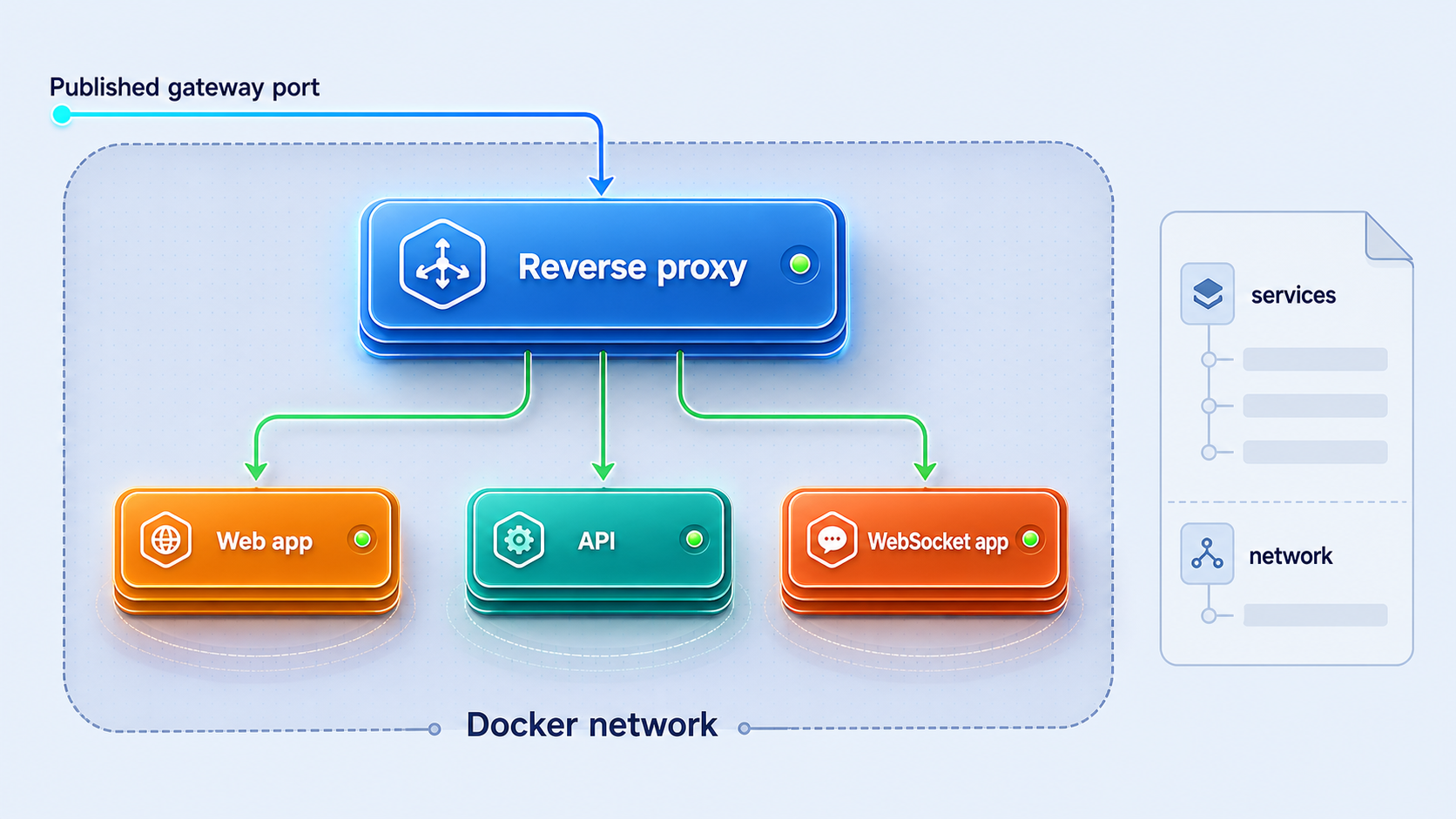
The following workflow creates a self-contained demonstration with an app service, an api service, and a gateway. Only the gateway publishes a host port. Compose places all three services on the same project network, so the gateway can resolve the backend names.
Create the project directories
Create separate directories for the two test sites. The gateway configuration will remain in the project root.
Add identifiable backend content
Give each backend a distinct response so local and public tests can prove which service handled a request.
Configure the Nginx gateway
Route /app/ to app:80 and /api/ to api:80, forwarding the request context needed by common applications.
Define the Compose services
Keep backend containers private and publish only the gateway on 127.0.0.1:8080.
Validate and start the project
Ask Compose to render and validate the configuration before starting the containers in detached mode.
1. Create the working tree
mkdir -p compose-ingress/app compose-ingress/api
cd compose-ingress
2. Create two test responses
cat > app/index.html <<'EOF'
<!doctype html>
<html lang="en">
<head><meta charset="utf-8"><title>App service</title></head>
<body><h2>Response from the app service</h2></body>
</html>
EOF

cat > api/index.html <<'EOF'
{"service":"api","status":"ok"}
EOF
These are only diagnostic backends. They let us verify path routing without introducing application-specific installation steps, environment variables, databases, or credentials.
3. Create the reverse proxy configuration
map $http_upgrade $connection_upgrade {
    default upgrade;
    ''      close;
}

server {
    listen 8080;
    server_name _;

    location = / {
        return 302 /app/;
    }

    location /app/ {
        proxy_pass http://app/;
        proxy_http_version 1.1;

        proxy_set_header Host $host;
        proxy_set_header X-Forwarded-Host $host;
        proxy_set_header X-Forwarded-Proto $http_x_forwarded_proto;
        proxy_set_header X-Forwarded-For $proxy_add_x_forwarded_for;

        proxy_set_header Upgrade $http_upgrade;
        proxy_set_header Connection $connection_upgrade;
    }

    location /api/ {
        proxy_pass http://api/;
        proxy_http_version 1.1;

        proxy_set_header Host $host;
        proxy_set_header X-Forwarded-Host $host;
        proxy_set_header X-Forwarded-Proto $http_x_forwarded_proto;
        proxy_set_header X-Forwarded-For $proxy_add_x_forwarded_for;

        proxy_set_header Upgrade $http_upgrade;
        proxy_set_header Connection $connection_upgrade;
    }
}
Save this as gateway.conf. The trailing slash in each proxy_pass value is intentional. With this configuration, a request for /api/index.html is sent to the API backend as /index.html. If your backend expects to receive the original /api/ prefix, use a routing configuration designed to preserve it instead. Do not change this detail without checking the application's expected base path.
The gateway accepts a forwarded scheme value from the upstream tunnel path. Applications should only trust forwarded headers when requests arrive through a trusted proxy chain. If the same gateway is directly reachable by untrusted clients, define an explicit trust strategy rather than assuming every supplied forwarding header is authoritative.
4. Create the Compose file
services:
  gateway:
    image: nginx:alpine
    ports:
      - "127.0.0.1:8080:8080"
    volumes:
      - ./gateway.conf:/etc/nginx/conf.d/default.conf:ro
    depends_on:
      - app
      - api
    restart: unless-stopped

  app:
    image: nginx:alpine
    volumes:
      - ./app:/usr/share/nginx/html:ro
    restart: unless-stopped

  api:
    image: nginx:alpine
    volumes:
      - ./api:/usr/share/nginx/html:ro
    restart: unless-stopped
Save this file as compose.yaml. Notice that app and api have no ports entries. Their port 80 listeners are available to the gateway over the Compose network, but they are not published as host listeners by this file.
5. Validate and start the containers
docker compose config
docker compose up -d
docker compose ps
The first command renders the effective configuration and reports syntax or interpolation problems. The second creates and starts the services. The third shows their current state. Container startup does not guarantee that an application is ready to answer every request, so the HTTP checks in the next section remain important.
depends_on is not an application readiness test
It establishes a startup relationship in this example, but a real API may still be initializing after its container starts. Use application health checks and readiness-aware operational procedures when your services require them.
Configure real applications for paths, headers, WebSockets, and OAuth
Replacing the demonstration backends with real applications requires more than changing image names. Public URL generation, cookies, browser security checks, redirect behavior, WebSocket handling, and OAuth callbacks all depend on the external address seen by the user.
Docker service names are internal addresses
A container should connect to another Compose service through its service name and container port, such as http://api:3000 if the real API is configured to listen on port 3000 inside its container. Do not configure a container to reach another container through localhost. Inside the gateway container, localhost means the gateway container itself.
Similarly, do not confuse the host-published port with the internal application port. The mapping 127.0.0.1:8080:8080 connects host port 8080 to gateway container port 8080. It does not change the ports used by the gateway when connecting to app or api.
Base paths and generated asset URLs
An application mounted at /app/ must either generate URLs relative to that path or be told that its external base path is /app/. The exact setting is framework-specific, so use the documented base-path option for your application. We do not recommend guessing an environment variable name because frameworks use different names and semantics.
Check HTML script and stylesheet URLs, redirects after login, API documentation links, form actions, and client-side router fallbacks. A page returning HTTP 200 is not enough if its browser assets subsequently request nonexistent root paths.
Forwarded host, scheme, and client information
A public request may arrive over HTTPS even though the final hop from the Localtonet client to the local gateway uses HTTP. The application therefore needs a trustworthy way to understand its external scheme when generating secure redirects or callback URLs. Forwarded headers are commonly used for this purpose, but applications frequently require an explicit trusted-proxy setting before they honor them.
Configure trust narrowly. Blindly trusting forwarding headers from any direct client can allow spoofed host, scheme, or client-address information. The appropriate proxy trust syntax is application-specific and should come from that application's documentation.
WebSocket upgrades
A WebSocket connection begins as an HTTP request and then requests a protocol upgrade. The Nginx sample forwards the Upgrade and Connection headers and uses HTTP/1.1 for upstream proxying. This makes the gateway configuration compatible with a WebSocket-capable backend route, but it does not turn the static demonstration API into a WebSocket server.
For a real deployment, point the intended path to the service and port on which the WebSocket server actually listens. Also review application and proxy timeout requirements. Long-lived connections can fail even when ordinary HTTP requests work, so verify with an actual WebSocket client rather than relying only on curl.
OAuth and OpenID Connect callback consistency
OAuth providers normally compare a callback URI against a registered value. The scheme, hostname, port, path, and sometimes trailing-slash form must match the provider's configuration. If a user begins authentication at the Localtonet public HTTPS address, the application should generate a callback based on that same canonical public address, not localhost, a Docker service name, or an internal HTTP URL.
Generated random public subdomains can be convenient for temporary testing, but a changed public hostname also changes the OAuth callback URI. For workflows that require a stable callback, use an appropriate stable Localtonet process type where available and configure the identity provider accordingly. If selecting a custom domain, follow the current dashboard and Localtonet documentation for its DNS requirements.
Do not use broad wildcard callbacks unless the identity provider explicitly supports them and your security review approves the design. Prefer an exact, stable public callback and keep client secrets out of images, Compose files committed to source control, browser code, and proxy configuration.
Verify every local layer before creating the tunnel
Local verification separates Docker or proxy problems from tunnel problems. If the gateway cannot serve both paths through 127.0.0.1:8080, creating a public tunnel will not fix the upstream configuration.
Check the root redirect
curl -i http://127.0.0.1:8080/
The response should be a redirect to /app/. Follow it with:
curl -L http://127.0.0.1:8080/The response body should identify the app service.
Check each routed backend directly through the gateway
curl -i http://127.0.0.1:8080/app/
curl -i http://127.0.0.1:8080/api/
The first response should contain the app HTML. The second should contain the JSON text from the API test file. These checks prove that the host binding, gateway listener, Compose DNS resolution, proxy route, and backend HTTP listener all work together.
Inspect state and logs
docker compose ps
docker compose logs gateway
docker compose logs app
docker compose logs api
Use docker compose logs -f gateway when you need to observe gateway activity while sending requests. Stop the live log stream with Ctrl+C; this stops log viewing, not the containers.
Confirm that only the gateway is published
Review the port information shown by docker compose ps. The gateway should show the loopback host mapping. The sample app and api services should not have host-published ports. This is an important architectural check, not merely a formatting preference.
Validate configuration changes safely
After editing gateway.conf, test the Nginx configuration inside the running gateway before recreating or restarting it:
docker compose exec gateway nginx -tIf the test succeeds, recreate or restart the gateway according to your change procedure. For this small example, the following command applies the current Compose configuration to the gateway service:
docker compose up -d gatewayRepeat the local HTTP checks after every routing change. A syntactically valid proxy configuration can still send a path to the wrong backend or apply the wrong prefix behavior.
Expose the gateway with a Localtonet HTTP tunnel
Once http://127.0.0.1:8080 works locally, expose that single ingress through our platform. The maintained product context establishes the workflow below. Exact client installation commands, currently available relay codes, plan-dependent options, and some dashboard labels are not included here because they can change. Obtain those values from the current Localtonet client and dashboard rather than guessing them.
Install and run the Localtonet client
Run the client on the Docker host or on another device that can reach the gateway. For the loopback target used in this guide, the client must run on the Docker host because 127.0.0.1 is local to that machine.
Authenticate or select the device
Select the device-specific authentication token for the client that will run the tunnel. Keep the token private and do not add it to compose.yaml, gateway configuration, logs, or shared screenshots.
Select an available relay server or region
Choose from the current values presented by our platform. Do not hardcode a server code from an unrelated configuration because available values may vary.
Create the HTTP tunnel configuration
Choose an HTTP tunnel and set its local target to IP address 127.0.0.1 and port 8080. Select the appropriate process type from the currently available Random Sub Domain, Custom Sub Domain, or Custom Domain choices.
Start the tunnel and use its public address
Creating a tunnel does not start it. Press Start, wait for the selected client and tunnel to be connected, and then use the assigned public HTTPS address. The tunnel remains available only while the selected client is connected and the tunnel is running.
The current configuration workflow is also available in the Localtonet HTTP tunnel documentation. Use the live documentation and dashboard whenever an option or field differs from this architectural example.
Verify the public routes
Replace PUBLIC_URL below with the public HTTPS address assigned to your running tunnel. Do not paste private tokens or dashboard-only endpoints into commands.
curl -i "PUBLIC_URL/"
curl -i "PUBLIC_URL/app/"
curl -i "PUBLIC_URL/api/"
Verify the same routing behavior observed locally. Then use a browser to check scripts, stylesheets, redirects, cookies, login flows, API calls, and any WebSocket connection. Browser testing matters because a simple HTTP client does not reproduce all origin, cookie, and client-side routing behavior.
The Compose gateway must be healthy, and the selected Localtonet client and tunnel must be connected. A running gateway does not make the tunnel public by itself, and a running tunnel cannot compensate for an unavailable local target.
Apply least-privilege exposure
A shared ingress reduces the number of public endpoints, but it also concentrates access through one gateway. Review every route as if it were directly internet-facing. Do not assume that a route is private because its backend lacks a published Docker port.
Avoid accidentally exposing management routes
Common high-risk additions include database administration tools, container dashboards, debug consoles, framework profilers, metrics endpoints, and unauthenticated health details. Keeping them under paths such as /hidden-admin/ does not provide access control. If remote administration is required, enforce authentication, least privilege, suitable restrictions, and application-specific security controls.
Review cookies and browser boundaries
Services under one hostname share an origin even when they occupy different URL paths. Cookie path and name choices can cause one service's cookies to be sent to another path, and a security issue in one same-origin application can affect the broader deployment. Separate tunnels or hostnames may provide a clearer boundary for unrelated or differently trusted applications.
Control upload and request behavior
If any exposed route accepts uploads or large request bodies, configure deliberate limits and storage handling in the gateway and application. The correct values depend on the workload and are not universal. Also review timeouts for long API requests and WebSocket sessions rather than copying arbitrary settings.
Troubleshooting the complete request path
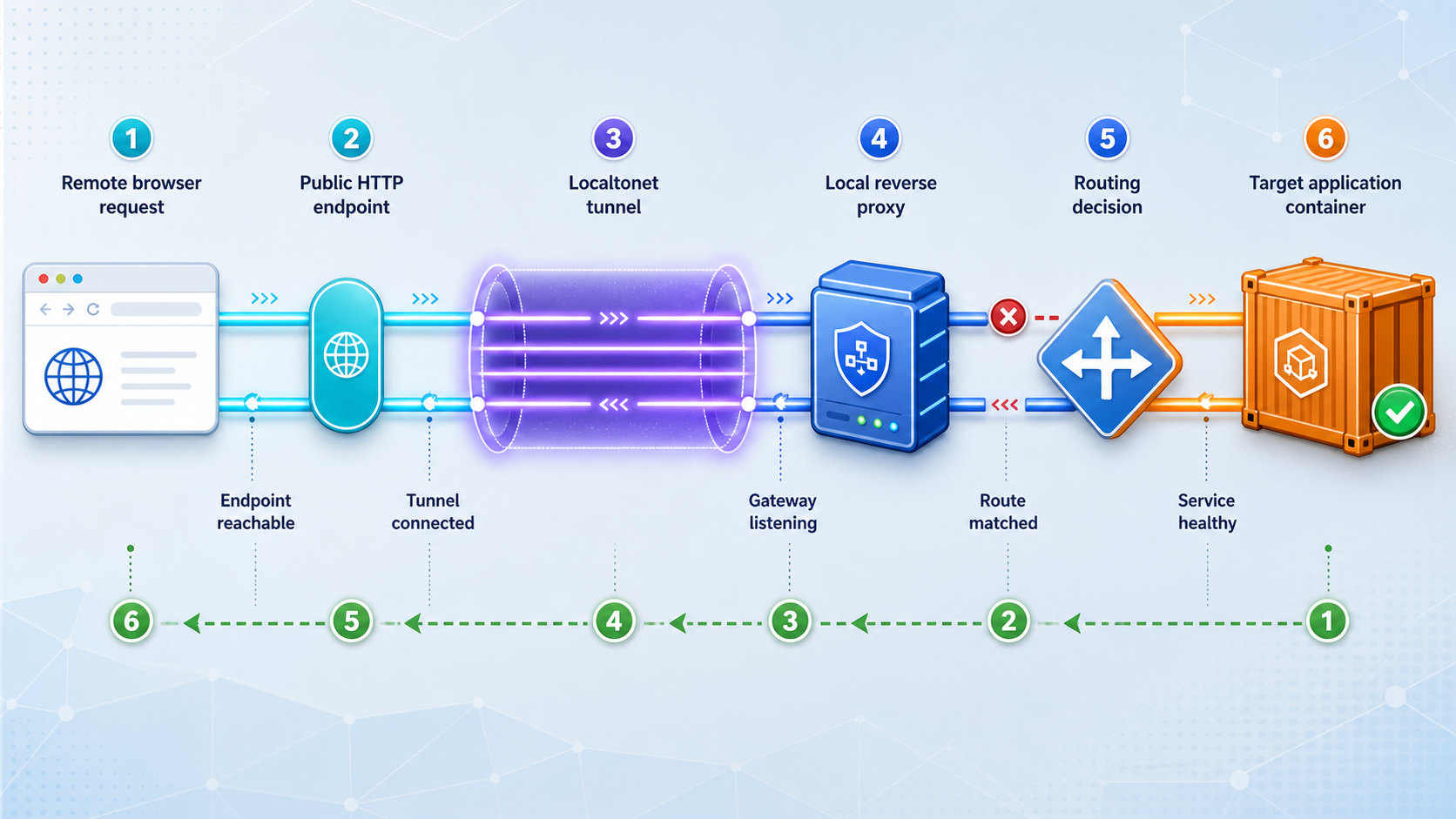
Diagnose from the inside outward: backend, gateway, host loopback, Localtonet client, tunnel state, and finally public application behavior. This order avoids changing the tunnel when the failure is actually within Compose.
| Symptom | Likely layer | What to check |
|---|---|---|
| Local request cannot connect to port 8080 | Gateway or host binding | Run docker compose ps, inspect gateway logs, and confirm the loopback port mapping |
| Nginx returns 502 Bad Gateway | Gateway-to-backend connection | Check the service name, internal port, backend process state, and Compose network membership |
| One path returns 404 | Path matching or prefix handling | Compare the location rule, trailing slash, proxy_pass URI behavior, and backend base path |
| HTML loads but assets fail | Application base URL | Inspect browser requests for root-relative asset URLs and configure the application's supported base path |
| Local routes work but public URL does not | Client or tunnel lifecycle | Confirm the selected device is connected, the HTTP tunnel is started, and the local target is 127.0.0.1:8080 |
| Public redirects point to HTTP or localhost | Forwarded-header trust or external URL setting | Review the application's canonical URL and trusted-proxy configuration |
| OAuth provider rejects the callback | External identity configuration | Compare the exact registered and generated scheme, hostname, path, port, and trailing slash |
| Normal HTTP works but WebSocket fails | Upgrade path or backend | Verify upgrade headers, upstream route and port, backend WebSocket support, origin policy, and timeouts |
Resolve a 502 response
A 502 response from Nginx means the request reached the gateway, but the gateway could not obtain a valid response from its configured upstream. Inspect the gateway log first:
docker compose logs gateway
Confirm that the upstream name exactly matches the Compose service name and that the port is the backend's container port. If a real API listens on port 3000, routing to api:80 will fail even if the container itself is running.
Resolve path-related 404 responses
Determine whether the 404 came from Nginx or the backend. Check the gateway access and error logs, then compare a request made through the gateway with a request made from inside the Compose network if your operational policy permits such testing. Pay special attention to whether Nginx strips or preserves the prefix.
Redirects can reveal the same issue. If /app/login redirects to /login, the application may not know its external base path. Fix this in the application's supported configuration rather than layering increasingly complex proxy rewrites over an incorrect canonical URL.
Resolve a public-only failure
If all local checks pass, confirm that the Localtonet client is running on the expected device, that the selected device token corresponds to that client, and that the tunnel has been started. A tunnel is available only while the client is connected and the tunnel is running.
Also confirm the target from the client's point of view. A client running in another container or on another host cannot use the Docker host's loopback address as though it were local. Networking between a containerized client and the host varies by deployment, so use a documented and deliberately tested reachability method rather than guessing a special hostname.
Resolve incorrect HTTPS redirects
If an application repeatedly redirects, creates http:// links, or marks secure cookies incorrectly, inspect how it determines the external scheme. Confirm the gateway receives the expected forwarded scheme and that the application trusts the intended proxy. Avoid forcing all applications to trust all forwarded headers globally without considering direct-access paths.
Operate and stop the stack
Routine Compose operations for this example include:
docker compose ps
docker compose logs -f gateway
docker compose restart gateway
docker compose down
Stop the Localtonet tunnel when public access is no longer needed. Stopping the Compose stack and stopping the tunnel are separate actions. If the tunnel remains configured but its local target is down, public requests cannot reach the application, but the tunnel's lifecycle should still be managed intentionally.
Frequently asked questions
Can one Localtonet HTTP tunnel expose multiple Docker Compose services?
Yes. Point one HTTP tunnel at a local reverse proxy, then configure that proxy to route requests to multiple Compose services. Localtonet targets the shared local ingress, while the proxy selects a backend by path or, where the public hostname design supports it, by host.
Do the backend containers need published host ports?
Not in this architecture. The reverse proxy reaches backends by service name and container port over the Compose network. Only the gateway publishes a host port, and the example restricts that binding to 127.0.0.1.
Should the Localtonet target be the container name?
For a Localtonet client running directly on the Docker host, use the gateway's published host address and port, such as 127.0.0.1:8080 in this example. Docker service names are normally resolved within the Compose network, not by ordinary host processes.
Is path-based routing better than creating a tunnel per service?
It is often better for closely related components that should share one origin, such as a frontend and API. Separate tunnels are clearer when services are unrelated, need independent lifecycle control, cannot operate under URL prefixes, or require stronger separation of public identities.
Does the example support WebSockets?
The Nginx gateway forwards the standard HTTP upgrade headers and uses HTTP/1.1 for upstream proxying. A real WebSocket connection still requires a WebSocket-capable backend, a correctly routed path and port, suitable origin policy, and appropriate timeout behavior. The static demonstration backends are not WebSocket servers.
What URL should be registered as an OAuth callback?
Register the exact public HTTPS callback used by the application, including the hostname and callback path. Do not register a Docker service name, loopback URL, or internal HTTP address for a browser flow that begins at the public endpoint. Stable callback workflows generally need a stable public hostname.
Can I use host-based routing with one tunnel?
Host-based routing requires the intended incoming hostnames to reach the tunnel and remain available to the reverse proxy. Localtonet HTTP tunnels support generated, selected, and custom-domain process types, but exact availability and custom-domain DNS requirements must be checked in the current dashboard and documentation. Do not assume that one generated hostname automatically represents several arbitrary hosts.
Does creating the Localtonet tunnel make it immediately available?
No. Creating and running are separate lifecycle states. Start the tunnel after creating it. It remains available only while the selected Localtonet client is connected and the tunnel is running.
Expose your shared Docker ingress with Localtonet
Verify your reverse proxy locally, create an HTTP tunnel targeting its loopback port, and publish only the routes your remote users actually need.
Get Started Free →

