

Scaffold and test a TypeScript agent locally, then expose its verified development listener through a controlled HTTP tunnel
B4.run is a TypeScript framework that adds file-system routes, generated types, testing conventions, persistence primitives, and build targets around LangGraph.js. This guide covers the evidence-backed path for creating and testing a B4.run application, identifying the startup procedure supplied by the generated project, verifying its actual local HTTP listener, and connecting that listener to Localtonet. The current primary evidence does not establish one universal startup command, port, route URL, invocation request, or production launch command for every current scaffold. For that reason, this is a development exposure workflow rather than a claim that one fixed command produces a durable production deployment.
📋 What's in this guide
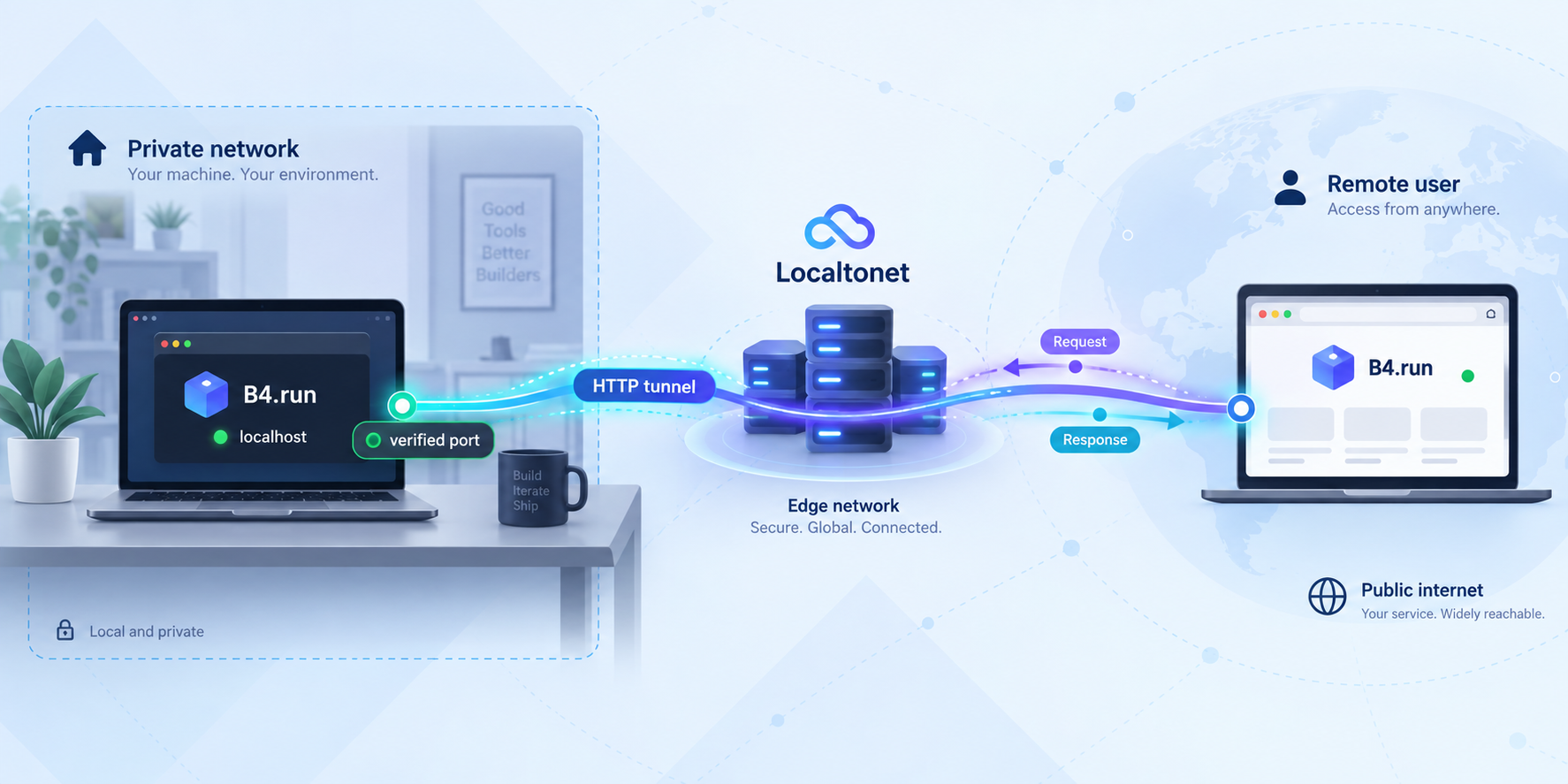
How B4.run and Localtonet fit together
B4.run helps TypeScript teams organize AI agents and workflows as application routes. Its current project materials describe agents, workflows, raw graphs, and chains as supported route entries. A route is placed under src/app/, with a supported entry in that route's index.ts. Shared tools can live under src/tools/, while route-local tools can be placed beside the route and remain subject to its runtime policy.
B4.run builds on LangGraph.js rather than replacing it. LangChain integrations remain available for the built-in agent path, while raw graph and chain routes control their own imports and provider behavior. B4.run targets TypeScript and Node.js. It is not a Python framework, model provider, hosted AI platform, or infrastructure provisioner.
You can review the changing framework behavior on the B4.run homepage and in the B4.run source repository. Because the project is still before version 1.0, generated scripts, runtime behavior, routes, and deployment details should be checked against the exact scaffold version installed in your project. The B4.run v0.11.0 release record is useful release evidence, but it should not be treated as proof that all future scaffolds expose identical commands or defaults.
The self-hosting boundary is important. B4.run can emit a runnable Node.js server, Dockerfile, and LangSmith graph artifacts from its default build. The application operator still manages the runtime machine, process lifecycle, storage, model credentials, authentication, authorization, network policy, updates, and backups.
Localtonet provides the connectivity layer after the application works locally. Our client runs on the B4.run host or on another device that can reach it. The client establishes an outbound connection to a Localtonet relay server. An HTTP tunnel then provides a public HTTPS address that forwards to the configured local IP address and port. This workflow does not require inbound router port forwarding, a public IP address, VPN setup, or a firewall port-forwarding rule.
A successful scaffold does not prove that its tests pass. Passing tests do not prove that an HTTP process is running. A local HTTP response does not prove that the intended agent route works. Creating a Localtonet tunnel does not start it. Verify each layer independently so that failures remain easy to isolate.
Prerequisites and scope
The official B4.run quickstart requires Node.js 24 or later. The scaffold is invoked through npm, so npm must be available in the same shell. Use a machine where you can create a project directory, install dependencies, run tests, and keep a Node.js process active while testing the tunnel.
Required software and access
- Node.js 24 or later: older Node.js major versions do not satisfy the documented B4.run requirement.
- npm: used to invoke the generator and install the generated dependencies.
- A writable project directory: the generator creates a new application directory.
- Package-registry access: npm must be able to retrieve the generator and project dependencies.
- A browser or HTTP client: required to test the local service and later compare it with the public result.
- A Localtonet account and client: required only after local B4.run verification succeeds.
- A device-specific Localtonet auth token: this identifies the client device and must remain private.
Check the active Node.js and npm versions before generating the project:
node --version
npm --version
The Node.js output must show major version 24 or later. If Node.js is missing or too old, install or select a compatible release using the supported method for your operating system. The B4.run evidence used here does not prescribe one universal operating-system package command, so this article does not invent one.
Install the Localtonet client before tunnel configuration
Localtonet client installation varies by operating system and current client release. Before creating a tunnel, use the installation path presented in our current HTTP tunnel documentation, install the client for the B4.run host's operating system, and run it on the machine that will originate the tunnel. If the client runs on another device, that device must be able to reach the B4.run host over the local network.
Exact platform-specific installer names and shell commands are not included here because the supplied verified product evidence does not establish a current universal command for every supported operating system. Confirm the installer and startup instructions in the current Localtonet documentation rather than copying an older command from an unrelated tutorial.
What this tutorial does and does not promise
This guide documents a controlled development exposure workflow. It shows how to scaffold and test the application, how to derive startup information from the installed project, how to require a real local HTTP result before tunneling, and how to configure the Localtonet target.
The supplied current B4.run evidence uses b4 dev terminology and confirms that default SQLite-backed state can survive a development-server restart when the application root and SQLite files persist. However, it does not establish one exact current scaffold command that starts HTTP, one listener port, one generated route URL, one invocation request, or one expected HTTP response for all current installations. Those details must come from the generated project's scripts, documentation, and runtime output.
Do not guess a command, port, route, or request body. If the generated package scripts and project instructions do not provide enough information to start and verify an HTTP listener, stop before configuring Localtonet and consult the current B4.run project documentation or repository for the installed version.
Scaffold and test the B4.run application
The official quickstart uses the current create-b4-app package. The project name my-agent is only an example. Replace it if you need a different directory name.
Confirm Node.js and npm
Run node --version and verify Node.js 24 or later. Confirm that npm --version also returns successfully.
Generate a new B4.run application
From the parent directory where the project should be created, run npm create b4-app@latest my-agent. The @latest tag resolves when the command runs, so record the resulting package versions if repeatability matters.
Enter the generated directory
Change into my-agent before running project-specific npm commands.
Install the project dependencies
Run npm install and wait for dependency installation to finish.
Run the generated tests
Run npm test. Resolve installation or test failures before attempting to start an HTTP process or expose the project.
npm create b4-app@latest my-agent
cd my-agent
npm install
npm test
The B4.run project records a credential-sanitized clean-room activation from August 31, 2026 in which npm resolved create-b4-app 0.8.21, the generated starter installed, and its default fixture suite passed with one opt-in test file skipped. That is date-specific and version-specific evidence, not a promise that the current @latest output will have identical package versions, scripts, files, or test counts.
The current B4.run homepage shows a basic template containing AGENTS.md, b4.config.ts, a src/app/hello/ route, a typed greeting tool, an evaluation file, and a test file. Treat that layout as current product information that may evolve. Inspect what your own generator produced rather than creating missing files solely because they appeared in a previous example.
Why the initial tests may not require a provider key
B4.run's documented first activation follows a no-key path. Fixture-backed tests replay committed responses and fail when an interaction does not match a fixture instead of silently calling a model provider. Live and recording modes remain explicit opt-ins. This makes the initial test run useful for checking the generated project without immediately spending provider resources.
Live agent execution is different. Provider credentials, model availability, environment variables, and route-specific integrations depend on the generated project and selected provider. Inspect the generated files before attempting a live invocation. Never guess secret names or paste provider keys into source control.
Inspect the generated application before startup
Open the generated package.json and review its scripts object. Also read the generated README, AGENTS.md, and any startup instructions supplied with the project. These files are the local source of truth for the commands exposed by the installed scaffold.
Do not add a guessed dev, start, or serve script merely to match a tutorial. A script name can wrap framework-specific configuration, type generation, environment preparation, or a target-specific runtime. Replacing that behavior with an assumed command can produce a process that starts but does not represent the supported application runtime.
| Project concern | What you provide | What B4.run handles |
|---|---|---|
| Route entry | An agent, workflow, raw graph, or chain in a route's index.ts |
Route discovery and the runtime entry |
| Tools | Shared or route-local TypeScript functions | The discovered tool set, subject to runtime policy and constraints |
| Types | Parameters, state schemas, and tool signatures | Generated declarations where the definitions are discoverable |
| Testing | Application tests, configuration, and fixtures | Deterministic fixture replay, with live and recording paths kept explicit |
| Build output | Application source and target choices | A runnable Node.js server, Dockerfile, and LangSmith graph artifacts from the default build |
| Infrastructure | Runtime host, secrets, storage, authentication, and network policy | B4.run does not provision or operate the hosting environment |
Start and verify the generated service locally
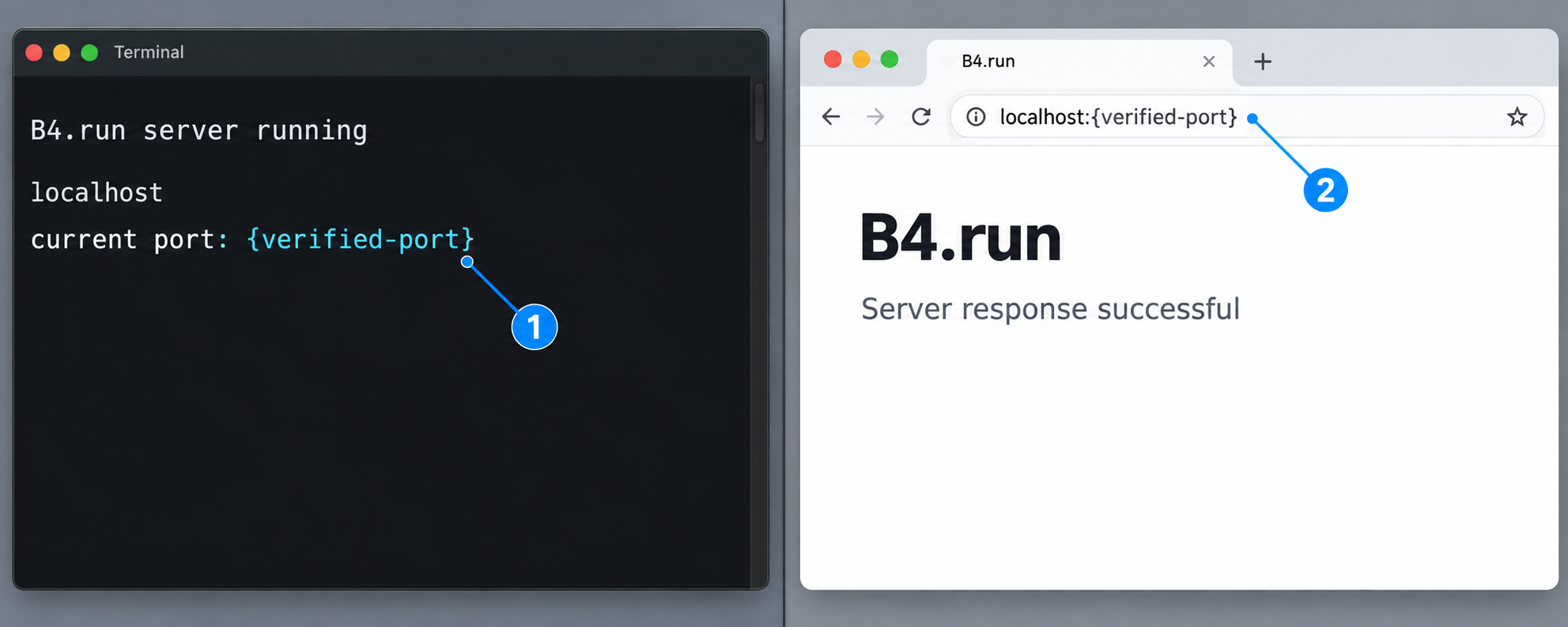
This is the release-sensitive part of the workflow. The available primary evidence confirms b4 dev terminology but does not provide a verified, universal current HTTP startup command for the generated package. It also does not establish a fixed listener port or a route request that applies to every current scaffold. Unsupported historical port assumptions have therefore been removed from this guide.
Determine the supported startup command
- Open the generated
package.json. - Review the available npm scripts without editing them.
- Read the generated README and
AGENTS.mdfor the installed project. - Identify the script or documented framework invocation that starts the development HTTP service.
- Run only that generated or documented command from the project root.
If the project exposes an npm script, invoke that exact script using normal npm script syntax. If it documents a direct B4 command instead, use the documented invocation. This article intentionally does not print a substitute command because the supplied evidence does not verify one current invocation across all scaffold versions.
Capture the actual listener
Keep the startup terminal open and read its full output. Record the host, port, and any route information reported by the process. The service must remain running without a compilation error, missing dependency, provider failure, or address conflict.
Do not infer the port from a previous release, a screenshot, another B4.run template, or an unrelated development server. Also confirm that the listening process is the B4.run application rather than another program already using that port.
Make a real local HTTP request
Open a second terminal or a browser on the same machine. Request the exact local URL and route identified by the generated project or startup output. A generic request has this shape:
curl -i http://127.0.0.1:<reported-port>/<generated-route>Replace both placeholders with values from your installed project. Do not run the placeholder literally. If the generated route expects another HTTP method, headers, or a request body, follow the generated route instructions exactly. The current supplied evidence does not establish a universal invocation payload, so this article does not fabricate one.
The expected result is a response from the intended B4.run route that matches the behavior documented by your generated project. A connection refusal means no reachable service answered. A response from an unrelated page means the wrong process or path was tested. A 404 can prove that an HTTP server answered, but it does not verify the intended route. A provider error may prove that routing works while showing that live model configuration is incomplete.
Local verification checklist
- The generated test suite finishes with the expected result.
- The documented development process starts and remains running.
- The process reports or otherwise confirms a local host and port.
- A request reaches a route that the generated application actually defines.
- The returned status and body are consistent with that route's documented behavior.
- If live execution is required, provider credentials and model access are tested separately.
- The verified host and port are recorded for Localtonet configuration.
A guessed target can produce a public connection error or expose an unrelated local service. Configure Localtonet only after a local request has reached the intended B4.run route on the exact host and port you plan to forward.
Connect the verified B4.run listener with Localtonet
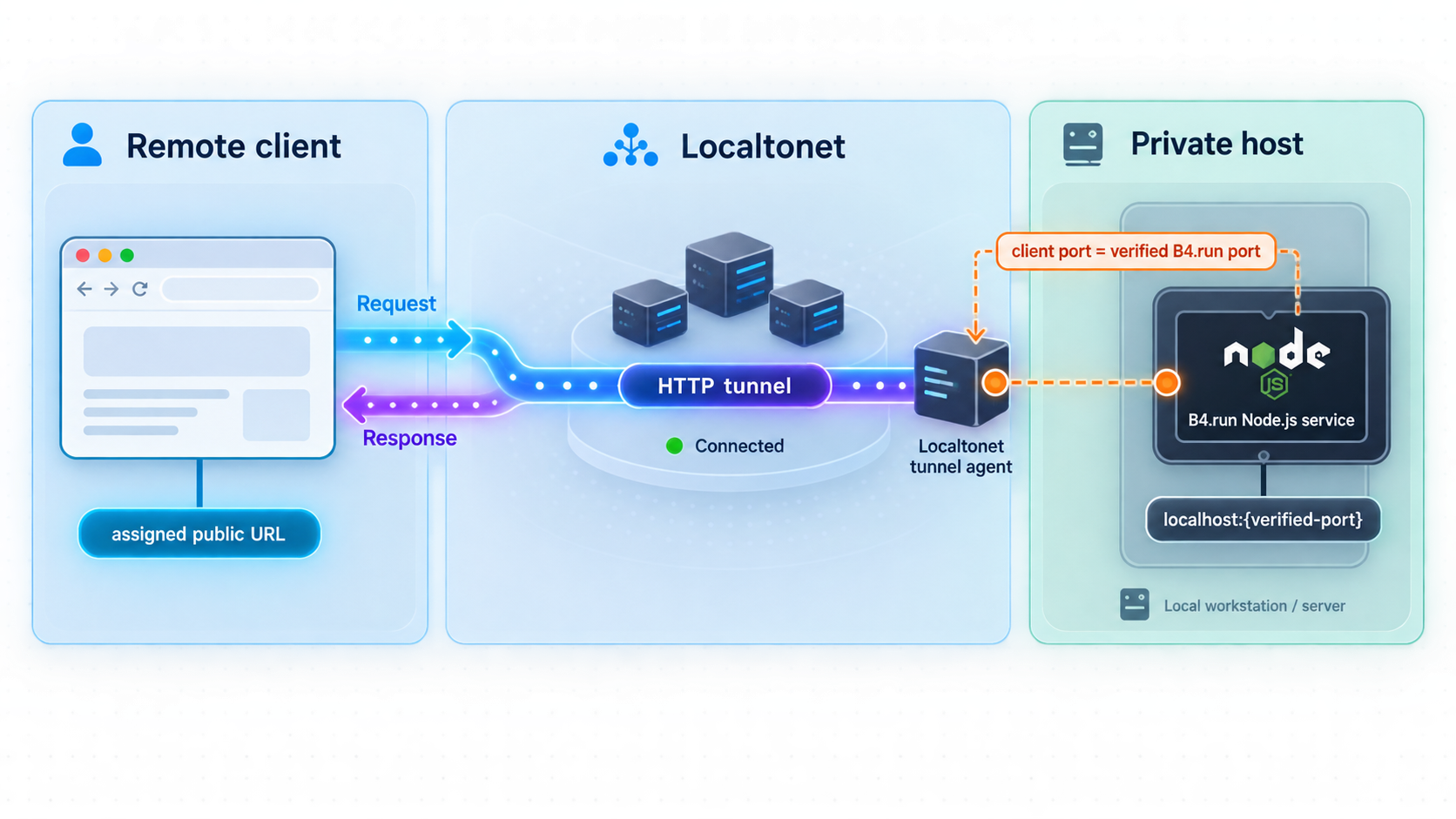
Use an HTTP tunnel for a B4.run service that accepts HTTP requests. The target is the verified local IP address and port. The Localtonet client should run on the B4.run machine or on another machine that can reach that target.
Install and run the Localtonet client
Follow the current installation path in the Localtonet HTTP tunnel documentation for your operating system. Run the client on the B4.run host or on another device that can reach the verified listener.
Authenticate or select the client device
Use the device-specific auth token for the client that will run the tunnel. Keep the token out of source code, screenshots, shared terminal output, logs, and the B4.run repository.
Select an available relay server
Select a currently available server or region in the Localtonet interface. Obtain available values from the current dashboard rather than copying a hardcoded server code.
Create the HTTP tunnel
Enter the local IP address and port that passed B4.run verification. If both processes run on the same machine, use the appropriate local address for that listener. If they run on different devices, use an address reachable from the Localtonet client.
Start the tunnel
Creating the tunnel does not make it run. Use the Start button and confirm that the selected client is connected and the tunnel is running.
Test the public HTTPS address
Request the same known B4.run route through the assigned public address. Compare the public status and response with the local result, then stop the tunnel when remote access is no longer required.
HTTP tunnels can use a random subdomain, a custom subdomain where supported, or a custom domain. These process types serve the same target content at a public HTTPS address. Custom-domain DNS requirements should be checked against current Localtonet documentation before changing DNS. Do not assume every process type, option, region, or capability is included in every subscription plan.
The endpoint works only while the B4.run HTTP process is accepting requests, the selected Localtonet client is connected, and the tunnel is running. Stopping or restarting either process can interrupt access.
Development exposure versus durable deployment
A temporary development server and a durable self-hosted deployment are not interchangeable. The development workflow is useful for evaluation, route development, fixture-backed testing, demonstrations, and short controlled integrations. It often runs in an interactive shell and may include development-oriented diagnostics or rebuilding behavior.
A durable deployment needs a validated build artifact, a defined production startup command, process supervision, persistent storage, secret management, authentication, logging, backups, updates, and a recovery plan. The current B4.run evidence confirms that the default build emits a runnable Node.js server, Dockerfile, and LangSmith graph artifacts. It does not provide the exact generated build script, artifact path, production start command, listener output, or production route invocation required for a universal copy-and-paste procedure.
| Concern | Development exposure | Durable deployment |
|---|---|---|
| Process lifecycle | Often tied to an interactive terminal | Managed by an appropriate service or container supervisor |
| Runtime artifact | Development process from the generated project | Validated runnable Node.js or container build output |
| Storage | Project-local state may persist between restarts | Documented persistent paths, ownership, backup, and restore behavior |
| Errors | May include development-oriented diagnostics | Controlled error responses and protected operational logs |
| Availability | Stops when the terminal, host, client, or tunnel stops | Requires deliberate startup, restart, health, and maintenance procedures |
| Updates | Frequent source changes are expected | Changes should pass tests, migration checks, and rollback planning |
How to validate a production artifact
- Record the installed B4.run and generator versions.
- Inspect the generated package scripts and project documentation.
- Run the exact build command supplied by that project.
- Identify the runnable Node.js or container artifact it emits.
- Start that artifact using its documented production procedure.
- Confirm its host, port, environment, storage paths, and credentials.
- Make a successful local request to a real application route.
- Only then update the Localtonet target if it differs from development.
This validation sequence is complete as a decision process, but the command placeholders must come from the generated release because the supplied evidence does not verify exact current build and production-start commands. Until those details have been established for your installed version, describe the service as a development exposure rather than a production deployment.
Persistence behavior
B4.run's current project evidence states that default SQLite-backed state can survive a b4 dev restart when the application root and its SQLite files persist. Restarting development is therefore not necessarily a clean reset. Identify the actual database files before replacing a project directory, rebuilding a container, changing a mount, or automating cleanup.
Persistent state may include threads, prompts, tool outputs, memory, or other application data. Protect the host account, project directory, database files, logs, and backups according to the sensitivity of that information.
Secure and operate the exposed service
A Localtonet tunnel provides reachability. It does not decide whether a remote user may invoke an agent, consume model credits, access stored state, call tools, modify files, or approve an action. Apply security controls at the application and deployment boundaries before sharing the public URL.
Require authentication and authorization
Do not treat an unlisted URL as access control. Protect non-public routes with application-level authentication and authorization appropriate to the audience. Administrative, approval, debugging, and operational interfaces should be more restricted than routes intentionally designed for public use.
Limit tools and agent permissions
Review every tool available to the exposed route. A greeting function and a tool that executes commands, modifies files, sends messages, or accesses internal systems have very different risk profiles. Apply least privilege, keep route-local tool sets focused, validate tool inputs, and preserve human approval for sensitive actions.
B4.run supports approval-oriented application patterns, but the application defines the actual control. Verify that sensitive actions pause as intended and that approved data cannot be replaced before execution.
Protect secrets and provider resources
Keep model keys, service credentials, Localtonet device tokens, and private endpoints out of source control, fixtures, route responses, browser-delivered code, screenshots, and public logs. If a public request can trigger a paid model call, consider authentication, quotas, request-size controls, provider budgets, and abuse monitoring.
Use a deliberate operating sequence
For a temporary development session, start and stop the components in an order that preserves clear failure boundaries.
Start sequence
- Start the B4.run process using the command supplied by the generated project.
- Wait for startup to complete and confirm the listener.
- Request a known route locally.
- Start or confirm the Localtonet client connection.
- Start the HTTP tunnel.
- Test the public route from a separate browser or network.
Stop sequence
- Stop the Localtonet tunnel so that new public requests no longer arrive.
- Allow in-progress application work to finish where appropriate.
- Stop the B4.run process.
- Back up persistent state before maintenance that could affect it.
- Apply changes and repeat local verification before restoring access.
Keep the tunnel stopped while repairing or reconfiguring the application. Do not expose unrelated local ports. Stop or delete the tunnel when the remote-access requirement ends, and retain application authentication even when access is temporary.
Troubleshooting B4.run and Localtonet
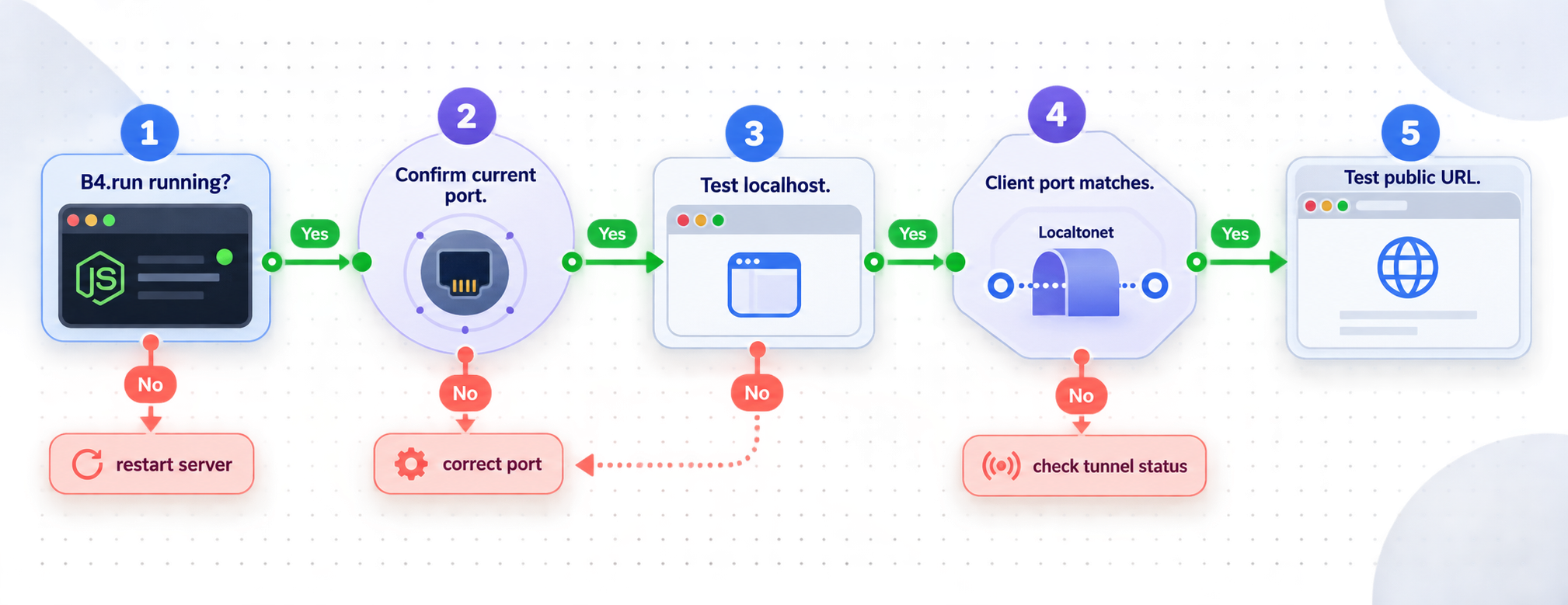
The scaffold command fails
Check node --version and confirm Node.js 24 or later. Confirm npm is available and can access the package registry. If the generator created a partial project directory, inspect or remove it deliberately before retrying so that files from separate attempts are not mixed.
npm install fails
Read the first meaningful npm error rather than only the final summary. Relevant categories include an incompatible runtime, registry or network failure, filesystem permission problem, or dependency-resolution issue. Preserve the lockfile and error output. Do not use force flags as the default response because they can hide a compatibility problem.
The tests report a skipped opt-in file
A skipped opt-in test is not automatically an installation failure. The documented August 31, 2026 clean-room activation passed the default fixture suite while one opt-in test file was skipped. Read the current test output and generated instructions to determine whether a skipped test requires credentials, live mode, or another explicit configuration.
No startup command is obvious
Inspect the generated package.json, README, AGENTS.md, and configuration files. The current framework evidence uses b4 dev terminology, but that alone does not prove how every generated project exposes the command. Do not create a guessed package script. Check the current
B4.run repository
for documentation matching the installed version.
The server does not print a port
Review the generated configuration and project instructions for the listener definition. You can also use operating-system tools to identify listening processes, but confirm that the process belongs to B4.run before forwarding it. If you cannot establish the listener and a successful local route request, do not create the tunnel.
The local request refuses the connection
Confirm that the B4.run process is still running and that the request uses the correct host and port. Check the startup terminal for compilation errors, missing dependencies, a crash, or an address-in-use message. A test suite passing does not mean the HTTP process is active.
The local path returns 404
A 404 shows that an HTTP server answered, but not that the intended application route exists at that path. Inspect the generated src/app/ structure and project instructions, then request a route the scaffold actually defines.
The route responds, but live execution fails
Separate transport from provider execution. If the request reaches the expected route, HTTP startup may already be working. Check the B4.run process output for missing provider credentials, invalid model configuration, unavailable storage, tool failures, sandbox requirements, or application exceptions.
Local access works, but the public address does not
Verify that the Localtonet client is connected, the intended device token is selected, and the tunnel was started. Compare the tunnel target with the exact host and port used for the successful local request. Remember that tunnel creation and tunnel startup are separate actions.
The Localtonet client runs on another device
The address 127.0.0.1 refers to the machine making the connection. If Localtonet runs on a different device, its loopback interface does not point to the B4.run host. B4.run must listen on an address reachable from the client, and the tunnel must target the appropriate LAN address. Make this change only within your network and host-firewall policy.
The public endpoint stops after a terminal closes
The public route depends on the B4.run process, the Localtonet client, and the running tunnel. Closing an interactive process can interrupt access. For unattended operation, first validate the generated production artifact and then use an operating-system or container process manager appropriate to your environment. Paths, users, environment files, and startup commands vary, so this article does not invent a universal service definition.
State remains after restarting development
Default SQLite-backed state can survive a development restart when the application root and SQLite files remain in place. Identify whether the behavior comes from source code, generated artifacts, fixtures, memory, or persistent state before deleting anything. Back up required data first.
Frequently asked questions
What Node.js version does B4.run require?
The current documented quickstart requires Node.js 24 or later. Confirm the active version with node --version before generating the project.
What is the verified command for creating and testing a B4.run project?
The documented sequence is npm create b4-app@latest my-agent, cd my-agent, npm install, and npm test. The exact HTTP startup command must be confirmed from the generated project's scripts and instructions.
Which port does B4.run use?
The current supplied primary evidence does not establish one universal port for every generated scaffold. Use the listener reported or configured by your installed project, then verify a real route locally before creating the tunnel.
Does the initial B4.run test require a model-provider key?
The documented first activation uses fixture-backed tests and follows a no-key path. Live execution is provider-specific and may require credentials and additional configuration.
Does Localtonet require router port forwarding?
No. Our client establishes an outbound connection to a Localtonet relay server. This workflow does not require inbound router port forwarding, a public IP address, VPN setup, or a firewall port-forwarding rule.
Does creating a Localtonet tunnel start it automatically?
No. Creating and starting a tunnel are separate lifecycle actions. Use the Start button after creating the HTTP tunnel, and keep the selected client connected.
Can the Localtonet client run on another device?
Yes, if that device can reach the B4.run host and listener over the local network. In that arrangement, use a reachable LAN address rather than the Localtonet device's loopback address.
Is the public Localtonet URL enough to secure an AI agent?
No. The tunnel provides connectivity. The application still needs suitable authentication, authorization, least-privilege tools, input validation, secret protection, provider controls, and approval boundaries.
Will B4.run state survive a development restart?
Default SQLite-backed state can survive a b4 dev restart when the application root and its SQLite files persist. Verify the generated project's actual storage configuration before relying on that behavior.
Is this a production deployment guide?
No. It is a development exposure workflow. B4.run can emit runnable Node.js and Docker build artifacts, but the exact current production build and startup commands must be verified from the generated project before claiming a durable deployment.
Connect a locally verified B4.run service with Localtonet
After the generated project passes its tests and a real route responds on a confirmed local listener, create a Localtonet HTTP tunnel to that exact target and test it through the assigned public HTTPS address.
Get Started Free →

