

Plan a large GGUF across your GPUs, protect the llama.cpp API, verify inference locally, and publish only the tested endpoint
ggrun is a launcher for llama.cpp and ik_llama.cpp that evaluates a GGUF model against available VRAM, system RAM, GPU bandwidth, and backend capabilities before starting an inference server. This guide covers quick and version-controlled installation paths, hardware discovery, inspection of the generated placement and backend command, API-key authentication, a complete OpenAI-compatible test request, and controlled remote access through a Localtonet HTTP tunnel. The workflow deliberately proves model inference and rejects an unauthenticated request before the API becomes internet-reachable.
📋 What's in this guide
How ggrun, llama.cpp, and Localtonet fit together
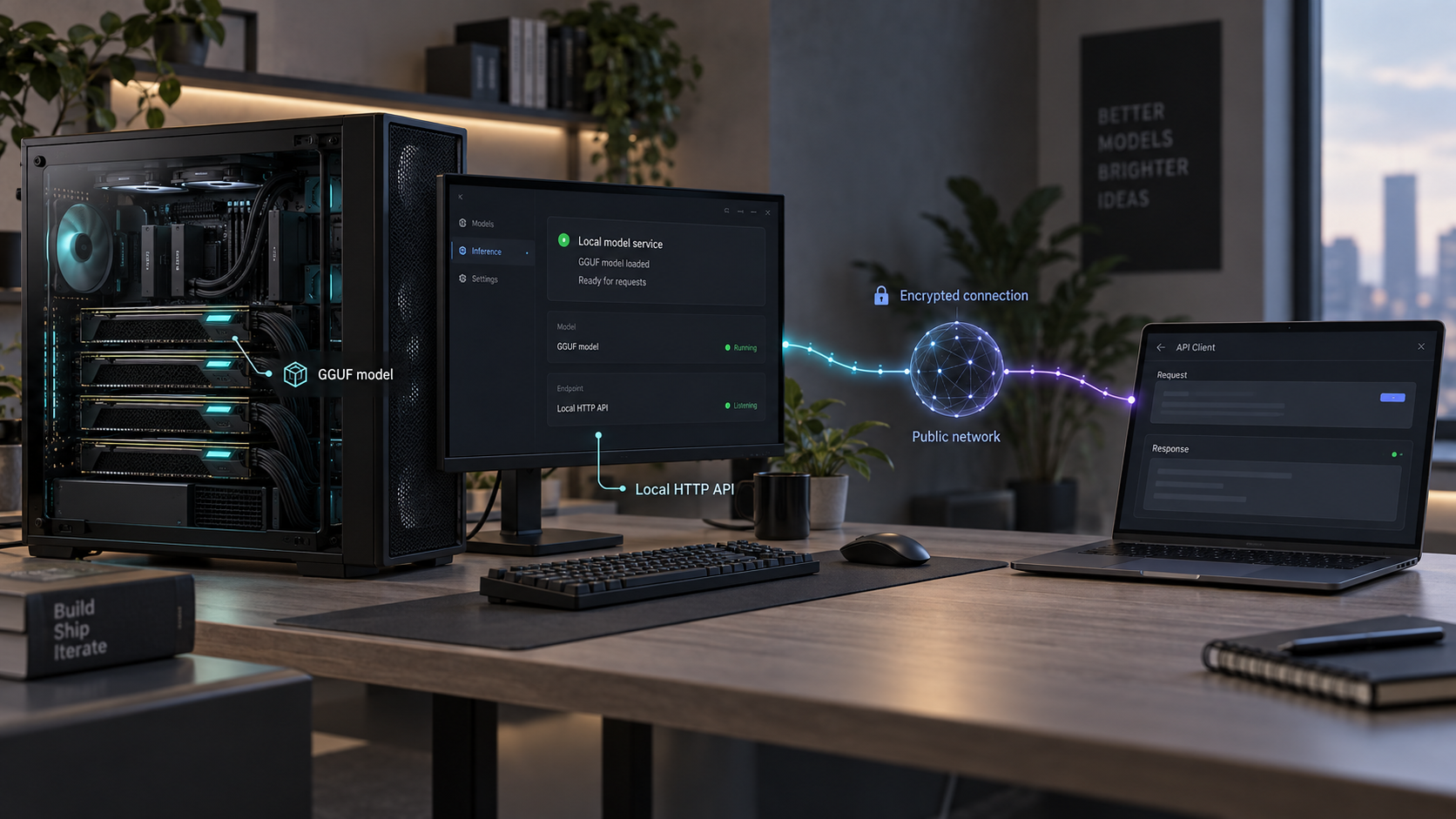
ggrun is not an inference engine. It reads the selected GGUF and the resources available on the machine, builds a launch plan for llama.cpp or ik_llama.cpp, checks model placement, KV-cache requirements, and safety headroom, and then starts the selected backend. The backend performs inference and serves the HTTP API.
This separation is especially useful on multi-GPU systems whose cards do not have identical VRAM capacities or transfer characteristics. Manually placing a large dense or mixture-of-experts model can require repeated experiments with layer counts, tensor splits, CPU offload, and cache settings. ggrun uses the GGUF tensor layout, available VRAM and RAM, measured or derived bandwidth information, and backend capabilities to prepare a configuration that fits.
The resulting placement is not necessarily a simple equal division of model layers. Depending on the model and selected backend, placement can involve backend-supported tensor splitting, layer assignment, CPU or RAM offload, and other generated options. The important operational artifact is the actual plan and backend command displayed for the current launch.
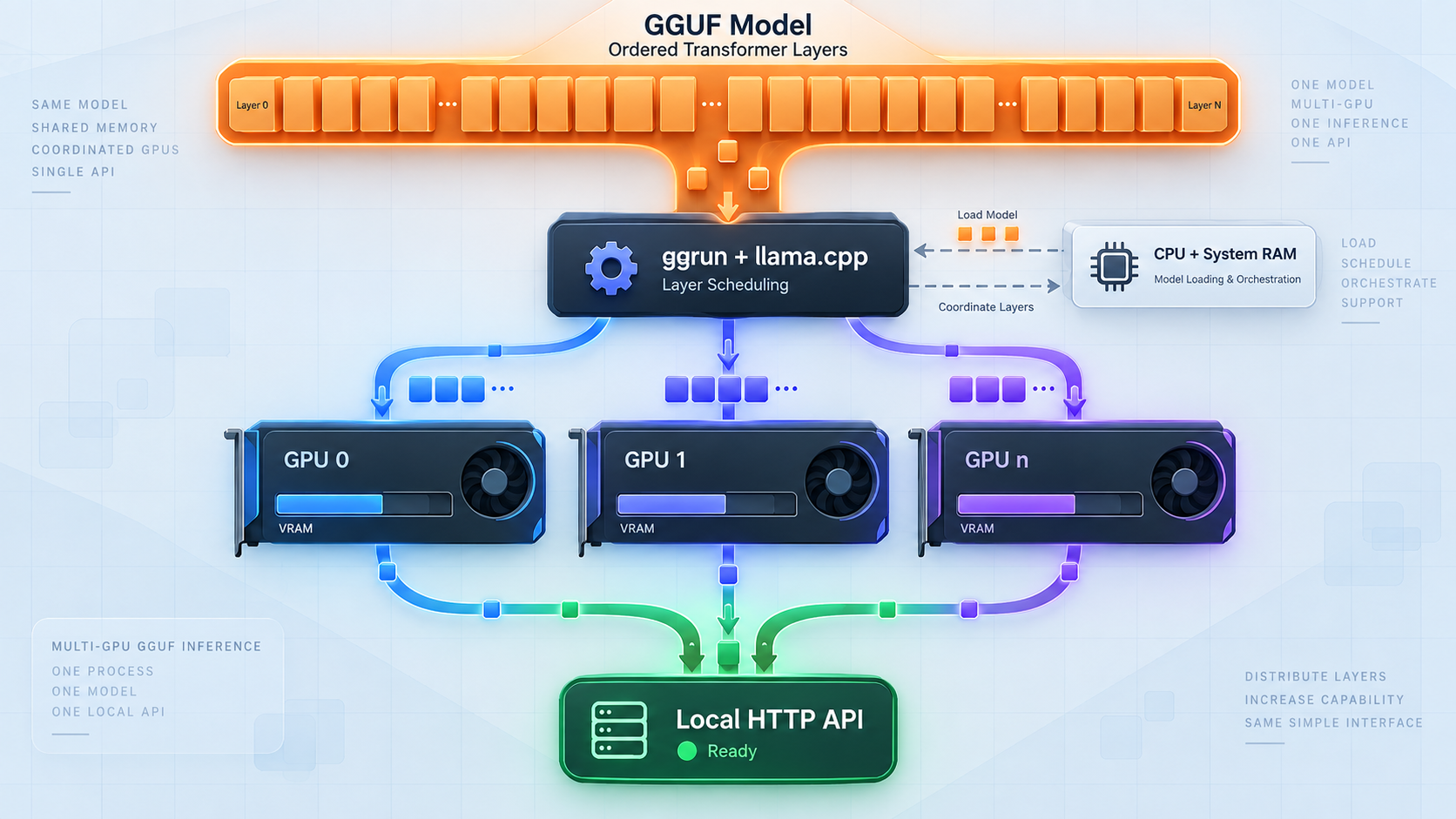
When the backend starts, llama.cpp exposes an OpenAI-compatible /v1 API for chat completions and completions at the configured host and port. ggrun also supports the Anthropic-compatible endpoint used by its local Claude Code workflow. This guide focuses on the OpenAI-compatible chat-completions path because it gives us a small, reproducible functional test.
Localtonet enters the workflow only after the local service has passed its startup, authentication, and inference checks. Our client establishes an outbound connection to a Localtonet relay. The machine therefore does not need inbound router port forwarding, a public IP address, inbound firewall changes for internet traffic, or a separate VPN setup. An HTTP tunnel maps a public HTTPS address to the exact local IP address and port that you verified.
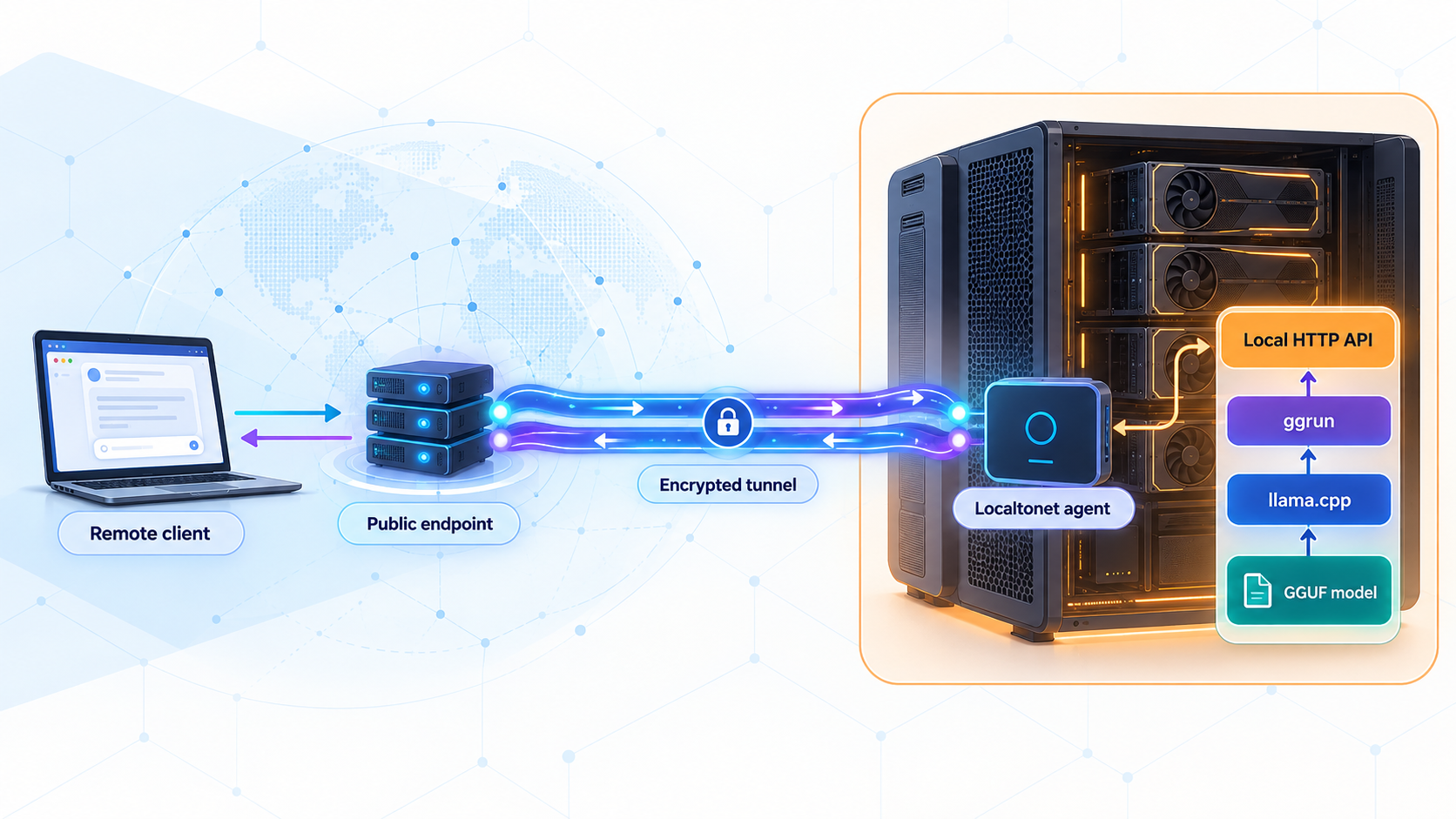
Authorization: Bearer header.
Prerequisites and decisions to make first
Start with a machine that can run the intended llama.cpp or ik_llama.cpp backend. The required GPU model, driver, RAM, storage, and operating-system versions depend on the selected acceleration stack, model architecture, quantization, context length, cache type, and concurrency. There is no universal minimum configuration that applies to every GGUF.
ggrun performs fit checks, but it cannot make a model fit resources that are not physically available. CPU or RAM offload can make additional configurations possible, although performance will depend on the model, hardware topology, and workload. Leave operational headroom instead of planning to consume every reported byte of VRAM and RAM.
| Requirement | Why it matters | What to confirm |
|---|---|---|
| Linux, macOS, or Windows host | ggrun provides installation paths for these platforms. | Use Bash with required command-line tools on Linux or macOS, or PowerShell on Windows. |
| Supported backend environment | llama.cpp or ik_llama.cpp must be able to use the CPU, GPUs, and acceleration stack. | Confirm backend compatibility with the installed drivers and hardware before choosing a production model. |
| Sufficient VRAM, RAM, and disk | Weights, KV cache, runtime allocations, safety headroom, and downloaded files all consume capacity. | Select a quantization and context size appropriate for the actual machine. |
| A local GGUF or repository | ggrun needs a model to inspect and launch. | Review the model license, architecture, quantizations, file size, and backend compatibility. |
| Installation tools | The installation path may need curl, Git, Go, or PowerShell. |
For a pinned source checkout, have Git available. Linux source builds can use Go when it is available. |
| A protected API key file | The public API must not rely on URL secrecy. | Use a long random credential, restrict access to its file, and never commit it to a repository. |
| A known HTTP host and port | API clients and the tunnel need an exact target. | Record the listener from the generated command and running server output instead of assuming a default. |
| Localtonet client access | Our client must run on a device that can reach the inference listener. | Keep its device-specific token private and use a relay currently available in the dashboard. |
Plan the local network boundary before launching the backend. When ggrun and the Localtonet client run on the same machine, bind the inference server to loopback if the selected backend configuration permits it. Our client can then target that local listener without making the API reachable by every device on the LAN.
If the Localtonet client runs on another device, the inference server must listen on an address reachable from that device. Restrict the host firewall to the necessary local source rather than broadly opening the port. Localtonet removes the need for an inbound internet rule, but it does not replace careful local access control.
Complete the local authenticated request and the negative request without credentials before creating the public tunnel. If the exact llama.cpp server build does not document and enforce the authentication option used here, stop and keep the service local until you have a reviewed authenticated layer in front of it.
Install ggrun with an appropriate version strategy
The ggrun project offers fast installers from its main branch, published releases, and source controls. These choices have different reproducibility properties. A script retrieved from main can change between installations, so it is suitable for evaluation but should not be treated as a pinned production deployment.
The supplied project evidence identifies v3.2.10 as the latest published release at the time of review. Newer releases may exist when you follow this guide. Choose a version deliberately, record it with the deployment, and verify the installed launcher instead of assuming that an installer selected the intended build.
Option 1: quick installation from main
Use this path when you accept that the installer logic can change. Review the script before executing it, especially on a shared inference host.
Linux and macOS:
curl -fsSL https://raw.githubusercontent.com/raketenkater/ggrun/main/setup.sh -o setup.sh
less setup.sh
bash setup.sh
Windows PowerShell:
$s = irm https://raw.githubusercontent.com/raketenkater/ggrun/main/install.ps1
$s | Out-File -FilePath .\install.ps1 -Encoding utf8
Get-Content .\install.ps1
iex "& { $s }"
The PowerShell form invokes the retrieved text as a script block. This avoids historical problems with leading characters such as a UTF-8 byte-order mark and allows the installer to handle redirected input correctly. Open a new terminal if the installer adds ggrun to PATH.
The documented standard locations can be used immediately when applicable:
~/ggrun/ggrun& "$env:USERPROFILE\ggrun\ggrun.cmd"
The project states that the quick commands fetch installers from main. Windows normally installs the latest published launcher, while Linux setup can build the current source when Go is available. A successful check on main does not prove that the same changes are in the latest packaged release.
Option 2: check out a named release before installation
For a controlled source tree, clone a named tag and inspect the files from that checkout. The following example uses the verified v3.2.10 tag:
git clone --branch v3.2.10 --depth 1 https://github.com/raketenkater/ggrun.git ggrun-v3.2.10
cd ggrun-v3.2.10
git describe --tags --always
less setup.sh
bash setup.sh
The git describe result should identify v3.2.10. This pins the checked-out setup logic and source files. Review the installer before running it because an installer may still retrieve additional components according to its own documented behavior.
On Windows, clone the same tag, inspect install.ps1, and run it from the checked-out directory:
git clone --branch v3.2.10 --depth 1 https://github.com/raketenkater/ggrun.git ggrun-v3.2.10
Set-Location .\ggrun-v3.2.10
git describe --tags --always
Get-Content .\install.ps1
& .\install.ps1
If your policy requires the launcher binary itself to be exactly the tagged release, use the appropriate artifact from that release rather than allowing an installer to resolve a newer launcher. Asset names and checksums can change between releases, so select the artifact for your operating system from the chosen release and apply your normal checksum or signature-verification policy.
Verify the installed launcher
Open a new terminal and check the launcher version:
ggrun --version
Record the reported version with the machine configuration. If that invocation is not recognized by an older build, run ggrun, inspect the version shown by its interface or startup output, and do not claim a pinned deployment until the installed build can be matched to the intended release.
Finally, start the terminal interface:
ggrunReaching the interface confirms that the launcher is callable. It does not prove that the backend can access every GPU, that a particular model fits, that authentication is supported, or that an HTTP listener has started.
Update without losing the verification boundary
Stop the Localtonet tunnel and inference server before updating. For a pinned checkout, review the target release notes, check out the new tag in a separate directory, install it according to that release, and verify the reported version. For the quick channel, rerun the reviewed current installer while accepting that it may resolve different code than a previous run.
After every update, repeat GPU detection, inspect the generated command, confirm authentication support in the selected backend, and run both local API tests. Do not restart the public tunnel merely because the launcher itself opens successfully.
Verify GPU discovery, placement, and the backend command
On NVIDIA hardware, ggrun can measure host-memory and pinned PCIe transfer bandwidth. Run this once and repeat it after changing GPUs or card slots:
ggrun detect --bandwidthThe cached profile is accepted only on the CPU, RAM, GPU, and PCI layout that produced it. If the profile is absent, stale, incomplete, or corrupt, normal detection and launches fall back to derived PCIe values instead of trusting measurements from a different topology.
Do not treat a completed detection command as sufficient evidence by itself. Read its output and confirm that every GPU intended for inference appears with the expected identity and memory capacity. If a card is missing, duplicated, or reports an unexpected capacity, resolve the driver, visibility, container, or hardware issue before planning the model.
Then choose one of the supported model entry points:
ggrun model.gguf
Replace model.gguf with the real path to a local GGUF. To download through ggrun, the project provides:
ggrun unsloth/Qwen3.6-27B-GGUF --downloadIts equivalent download form is:
ggrun download unsloth/Qwen3.6-27B-GGUFThe repository name is an example, not a guarantee that the model will fit your hardware. Review its current files, model license, quantizations, disk requirements, and backend compatibility before downloading it.
Inspect three outputs before API testing
- Detected devices: verify that the intended GPUs and system memory are represented in the current detection result.
- Placement plan: review which resources receive model tensors, cache allocations, and any offloaded work. Confirm that the fit check includes operational safety headroom.
- Generated backend command: record the exact llama.cpp or ik_llama.cpp server binary, host, port, placement flags, and authentication options passed to it.
Do not invent expected numeric output. GPU indices, tensor distribution, layer allocation, split modes, memory reservations, and generated flags depend on the exact model, hardware, backend, and runtime settings. The observable requirement is that the current output identifies the intended devices, produces a plan that passes its fit checks, and displays the command that will actually run.
ggrun passes unknown flags through to llama-server. This permits backend-level configuration, but it also means that a copied option must be supported by the exact backend binary selected for the launch. A flag from another llama.cpp release is not sufficient evidence.
ggrun also supports bounded tuning with --ai-tune. Eligible launches can compare a stable baseline with one high-confidence finalist and preserve measured evidence for the same setup. Its synthetic serving workload uses repeated cache-backed turns and mixed prefill and decode activity. This is useful configuration evidence, but it does not prove maximum hardware throughput or predict every agent workload.
Quantization, context length, cache configuration, tensor placement, CPU offload, and concurrency can all change memory pressure. Begin with a plan that passes its checks and completes an inference request. Adjust one major variable at a time so failures remain diagnosable.
Configure and prove llama.cpp API authentication
HTTPS transport and an obscure public URL do not authorize API clients. Before starting a tunnel, configure a credential supported by the exact llama-server binary in the generated ggrun command.
Confirm support in the selected backend build
Copy the exact backend binary path from ggrun's generated command and inspect its help output. On Linux or macOS:
LLAMA_SERVER="/exact/path/from-the-generated-command/llama-server"
"$LLAMA_SERVER" --help | grep -E -- '--api-key|--api-key-file'
Replace the example path with the actual path. Continue only if the help output for that binary documents the authentication option you intend to use. Current llama.cpp server builds can provide API-key options, including an API-key file where supported, but the exact selected build remains the authority.
If neither --api-key nor --api-key-file appears, do not pass an assumed flag and do not publish the listener. Upgrade to a reviewed backend version that supports the required authentication behavior or place a separately reviewed authenticated application layer in front of it.
Create a protected credential file
Prefer an API-key file when the exact backend supports --api-key-file. It avoids placing the secret directly in a reusable shell command or shell history.
umask 077
openssl rand -hex 32 > "$HOME/.ggrun-api-key"
chmod 600 "$HOME/.ggrun-api-key"
GGRUN_API_KEY="$(cat "$HOME/.ggrun-api-key")"
export GGRUN_API_KEY
Keep the file outside repositories and shared model directories. Do not include its contents in screenshots, support messages, process-manager definitions committed to source control, or client-side browser code. On Windows, create the secret through your approved credential process and restrict the file ACL to the account running the backend.
Pass the verified option through ggrun
Because ggrun passes unknown options to llama-server, launch the model with the documented flag confirmed by the exact backend help:
ggrun /absolute/path/to/model.gguf --api-key-file "$HOME/.ggrun-api-key"Inspect the newly generated backend command. Confirm that it contains the expected API-key-file option, the intended credential path, the planned GPU placement, and the correct listener. Never assume that a requested option reached the backend without checking the generated command.
If your exact build documents only --api-key, supply the key using a protected service configuration or another secret-handling mechanism appropriate for the host. Be aware that command-line arguments can be visible to local process inspection on some systems. The file option is preferable when supported.
Understand how clients authenticate
An OpenAI-compatible client supplies the credential as a bearer token:
Authorization: Bearer YOUR_API_KEYApplications that ask for an OpenAI API key normally construct this header automatically. Store the key in the application's secret store or protected environment configuration. Do not append it to the URL and do not use a query parameter unless the exact server and client explicitly document that mechanism.
Verify transport, authorization, and inference locally
Keep the authenticated ggrun process running and record the exact listener shown by the generated command and server output. The examples below use loopback and an environment variable so no default port is assumed:
PORT=REPLACE_WITH_THE_REPORTED_PORT
API_BASE="http://127.0.0.1:${PORT}"
Replace the port assignment with the real numeric port. If the backend intentionally listens on another address, use the locally reachable address instead.
Confirm model and cache initialization
The backend must remain running after loading. Resolve an out-of-memory error, unexpected exit, or incomplete initialization before testing HTTP.
Confirm the actual listener
Match the running host and port to the generated backend command. Do not reuse a port from another llama.cpp tutorial.
Prove that an unauthenticated API request fails
Request a protected /v1 resource without the bearer header. It must return a non-success authorization response and must not disclose the model list.
Prove that the credential is accepted
Repeat the model-list request with the bearer token. A successful JSON response confirms that the tested credential reaches the authenticated backend.
Send a real chat-completions request
Use a small payload that exercises authentication, JSON parsing, model inference, and OpenAI-compatible response generation.
Observe resource stability
Confirm that the request completes without a backend crash or memory failure. Then test representative context sizes and concurrency before depending on the service.
Negative authentication test
curl -i "${API_BASE}/v1/models"
This request must not return a successful model-list response. An authorization failure, commonly an HTTP 401 response, is the expected security signal. If it returns the protected model data with a success status, stop the backend and correct the authentication configuration before continuing.
Authenticated model-list test
curl -i \
  -H "Authorization: Bearer ${GGRUN_API_KEY}" \
  "${API_BASE}/v1/models"
Expect a successful HTTP response containing JSON model data. If the unauthenticated request fails and this request succeeds, the credential boundary is working for this endpoint.
Complete OpenAI-compatible inference request
Use the first model identifier returned by /v1/models, then send a small chat request:
MODEL_ID="$(
  curl -fsS \
    -H "Authorization: Bearer ${GGRUN_API_KEY}" \
    "${API_BASE}/v1/models" |
  python3 -c 'import json,sys; print(json.load(sys.stdin)["data"][0]["id"])'
)"

curl -fsS \
  -H "Authorization: Bearer ${GGRUN_API_KEY}" \
  -H "Content-Type: application/json" \
  -d "{
    \"model\": \"${MODEL_ID}\",
    \"messages\": [
      {
        \"role\": \"user\",
        \"content\": \"Reply with exactly: local inference works\"
      }
    ],
    \"temperature\": 0,
    \"max_tokens\": 16
  }" \
  "${API_BASE}/v1/chat/completions"
A successful result is a JSON chat-completions response containing an assistant choice. The exact wording can vary despite the short instruction, but the response must be valid JSON from the inference endpoint and must contain generated assistant content. An HTTP success from the root URL alone is not equivalent to this functional test.
Failure signals include an authorization response despite the bearer header, an empty model list, an invalid model identifier, a malformed-request response, a backend crash, an out-of-memory error, or a response that never reaches completion. Resolve these locally before involving the tunnel.
Many OpenAI-compatible applications ask for a base URL such as http://127.0.0.1:PORT/v1. Others ask for a complete operation URL such as /v1/chat/completions. Follow the client's field description and avoid adding /v1 twice.
Create the Localtonet HTTP tunnel in documented order
Use an HTTP tunnel because the backend is an HTTP API. Install our client on the inference host when possible. This allows the llama.cpp server to remain bound to loopback while Localtonet targets it locally.
HTTP process types include Random Sub Domain, Custom Sub Domain, and Custom Domain. They serve the configured local content at a public HTTPS address. Availability may vary by plan or current dashboard configuration. If you select a custom domain, follow the current DNS instructions shown by Localtonet rather than copying DNS values from an unrelated setup.
Install and run the Localtonet client
Install the current Localtonet application on the device that can reach the authenticated ggrun listener. Keep the client running throughout the remote session.
Open the HTTP tunnel configuration
In the Localtonet dashboard, create or configure an HTTP tunnel for the verified inference service.
Select the Process Type
Choose Random Sub Domain, Custom Sub Domain, or Custom Domain according to the options currently available for your account. This controls the public HTTPS address, not the local inference behavior.
Select the device AuthToken
Select the device-specific token for the Localtonet client that can reach the API. Keep this token private and never reuse the llama.cpp API key as the Localtonet device token.
Select an available relay server
Choose a server or region currently offered in the dashboard. Do not hardcode a relay code from another account or article because available values can vary.
Enter the verified local IP address and port
Use the exact listener that passed the local tests. When both processes share a host, use the verified loopback target. When they run on separate devices, use the deliberately configured LAN-reachable address.
Start the tunnel and verify the public API
Use the Start action, wait for the tunnel to become active, and repeat the negative and authenticated API tests through the assigned public URL. Creating a tunnel does not start it automatically.
The complete current dashboard reference is available in our HTTP tunnel documentation. Exact relay values, device tokens, client commands, and custom-domain DNS records must come from the current product and your account.
Set the public origin without adding /v1:
PUBLIC_BASE="https://YOUR_ASSIGNED_PUBLIC_HOST"First repeat the negative test:
curl -i "${PUBLIC_BASE}/v1/models"It must fail authorization just as the local request did. Then send the authenticated request:
curl -fsS \
  -H "Authorization: Bearer ${GGRUN_API_KEY}" \
  -H "Content-Type: application/json" \
  -d "{
    \"model\": \"${MODEL_ID}\",
    \"messages\": [
      {
        \"role\": \"user\",
        \"content\": \"Reply with exactly: remote inference works\"
      }
    ],
    \"temperature\": 0,
    \"max_tokens\": 16
  }" \
  "${PUBLIC_BASE}/v1/chat/completions"
A remote client uses the same bearer credential. If an application asks for an API key, provide the llama.cpp API key through its protected secret setting. If it asks for an OpenAI-compatible base URL, use https://YOUR_ASSIGNED_PUBLIC_HOST/v1. Do not provide the Localtonet device token to API consumers.
The address is internet-reachable while the selected client is connected and the tunnel is running. HTTPS protects transport to the public endpoint, but it does not replace application authentication, credential hygiene, least privilege, workload limits, or appropriate handling of prompts and outputs.
Security controls for a remotely reachable inference API
An unrestricted model endpoint can allow unknown users to consume GPU time, fill context windows, interfere with local workloads, or submit sensitive content. If the model participates in an agent workflow with tools, files, repositories, or credentials, the impact can extend beyond inference capacity.
- Bind narrowly: prefer loopback when the Localtonet client runs on the same host.
- Require the bearer key: keep the key out of URLs, source repositories, screenshots, and browser-delivered client code.
- Test denial explicitly: a request without credentials must fail both locally and through the public URL.
- Separate secrets: the llama.cpp API key and Localtonet device token serve different purposes and must not be reused.
- Use least privilege: an inference consumer should not automatically receive filesystem, shell, repository, or cloud credentials.
- Separate model serving from agent tools: exposing inference does not require exposing every local service used by an agent.
- Limit distribution: share the public URL and API key only with intended users through approved channels.
- Stop unused access: stop or delete the Localtonet tunnel when remote access is no longer needed.
- Review data handling: self-hosting changes where inference occurs, but it does not remove model-license obligations or privacy requirements.
Browser clients may introduce cross-origin requirements. Do not enable unrestricted cross-origin access by default. Configure only the origins and methods required by the intended application, using settings documented by the exact backend or an approved application layer.
Routine operation, model changes, and updates
A dependable deployment has two separate lifecycles. The inference lifecycle includes device discovery, model availability, placement planning, backend startup, authentication, memory allocation, and request handling. The connectivity lifecycle includes the Localtonet client, selected device, relay, tunnel state, and public URL.
Starting a session
- Confirm that the expected GPUs, system RAM, model storage, and protected API-key file are available.
- Run bandwidth detection again if an NVIDIA GPU, PCIe slot, CPU, or relevant system layout changed.
- Launch the GGUF through ggrun with the verified authentication option.
- Inspect detected GPUs, placement, generated backend command, listener, and key-file option.
- Run the local request without credentials and confirm that it fails.
- Run the authenticated local chat-completions request and confirm generated content.
- Start the Localtonet client and then use Start on the HTTP tunnel.
- Repeat both authorization tests through the public address.
Stopping a session
Stop incoming traffic first so new work is not submitted while the backend is shutting down. Stop the Localtonet tunnel, then stop the ggrun-managed server using the normal terminal or service-management mechanism for the way it was launched. If the process runs under an operating-system service manager, use that manager instead of starting a duplicate interactive process.
Changing a model or listener
A new model can produce a different placement, cache requirement, model identifier, and generated command. Repeat local verification before reusing the tunnel. If the local host or port changes, update the Localtonet HTTP target and test again. A tunnel can remain configured while still pointing to an obsolete listener.
Rotating the API key
Stop the public tunnel, create a new protected key, update the server's key file, restart the backend, and repeat the local negative and positive tests. Update authorized clients through their secret-management process. Restart the tunnel only after the old credential no longer succeeds and the new credential completes an inference request.
Updating ggrun or the backend
Treat updates as configuration changes. Record the old version, review the new release, preserve model and operational settings, install through the same chosen channel, and verify the resulting version. Recheck the backend help because supported authentication flags and behavior belong to the selected backend version. Repeat GPU discovery, placement inspection, local authorization tests, inference, and public verification.
Evaluating performance
Separate startup success from acceptable application performance. A model can fit safely but respond too slowly for an interactive workload. Test the prompt sizes, context lengths, concurrency, and agent behavior you actually intend to run. ggrun's bounded measurements can help compare safe configurations, but synthetic measurements do not replace application-level testing.
Troubleshooting the complete request path
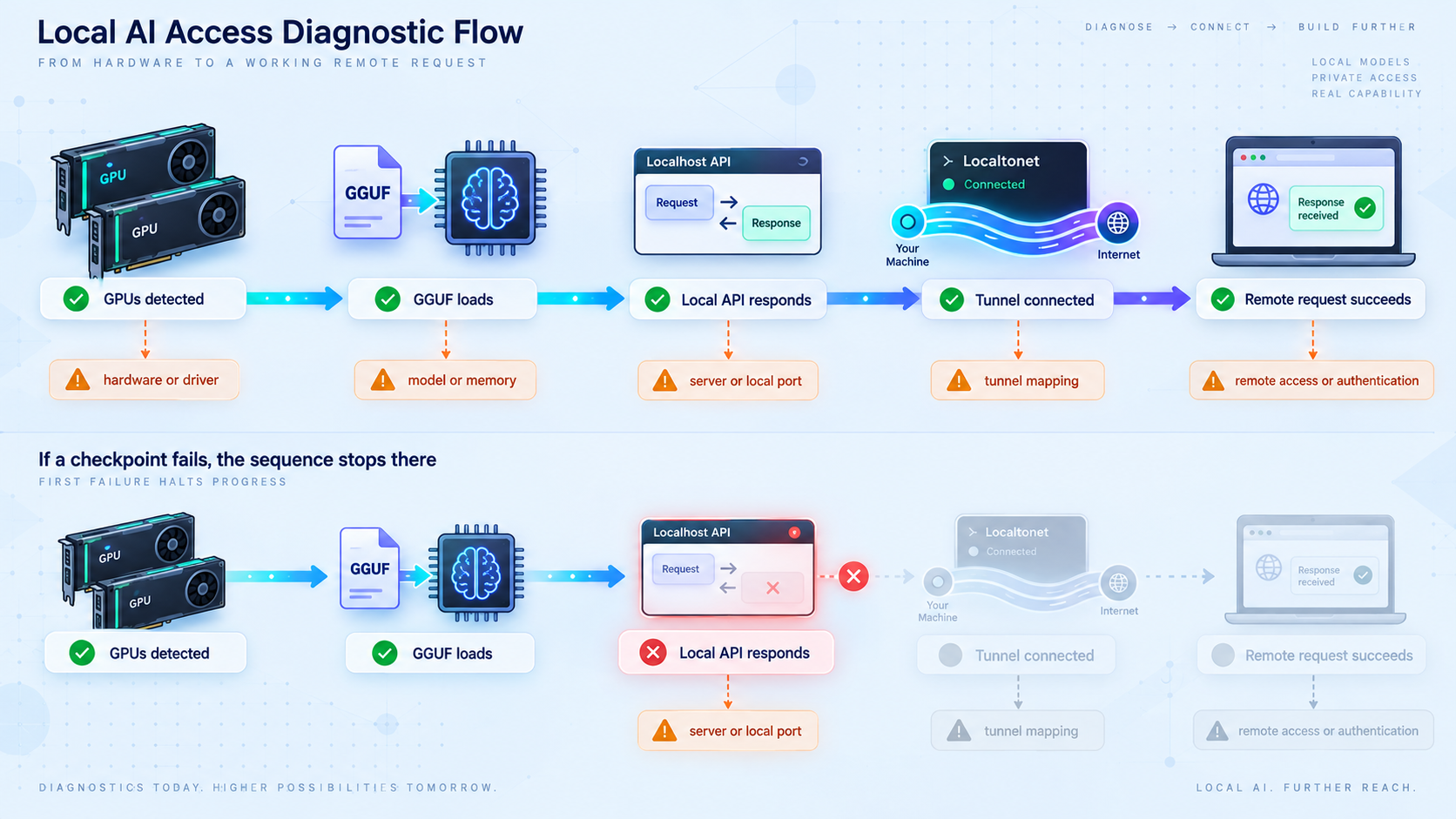
| Symptom | Likely layer | What to check |
|---|---|---|
ggrun is not found |
Installation or PATH | Open a new terminal. Try ~/ggrun/ggrun on Linux or the documented $env:USERPROFILE\ggrun\ggrun.cmd path in PowerShell. |
| The reported version is not the intended release | Installation channel | Check whether the installer resolved the latest launcher. Use the intended tagged checkout or release artifact and verify again. |
| A GPU is missing from detection | Driver or device visibility | Resolve the hardware, driver, container, or process visibility issue before accepting a placement plan. |
| Placement looks stale after hardware changes | Hardware profile | Run ggrun detect --bandwidth again. Cached measurements are accepted only for the matching CPU, RAM, GPU, and PCI layout. |
| The model does not fit | Model and memory planning | Review quantization, context, cache requirements, VRAM, RAM, safety headroom, and available offload choices. |
| The API-key flag is rejected | Backend version | Inspect llama-server --help for the exact binary in the generated command. Do not expose a build that cannot enforce the intended authentication method. |
| The request without credentials succeeds | Authentication configuration | Stop the tunnel or keep it stopped. Confirm that the key option reached the generated backend command and restart the server with the verified option. |
| The authenticated request returns an authorization error | Credential handling | Check the bearer header, whitespace in the key file, client secret value, and whether the backend restarted after key rotation. |
| The model loads, but local HTTP is refused | Backend listener | Confirm that the process is running and use the host and port shown by the current generated command and server output. |
/v1/models works, but chat completion fails |
Functional API or model | Use an identifier returned by the current model-list response, valid JSON, and the exact /v1/chat/completions path. Review backend output for inference errors. |
| Local API works, but the public URL fails | Localtonet target or lifecycle | Confirm the selected device is connected, the tunnel was explicitly started, and the local IP and port match the verified listener. |
| The tunnel works only when both processes share a host | LAN reachability | Loopback on another Localtonet client device refers to that device, not the inference host. Configure a restricted LAN-reachable listener if separation is required. |
| The application reports an invalid API path | Base URL configuration | Determine whether the application expects the server origin, the /v1 base, or a complete operation path. Avoid appending /v1 twice. |
| Requests are slow despite successful startup | Workload performance | Test representative prompts and concurrency, then compare controlled placement, context, cache, and offload changes one at a time. |
Verify installed version, GPU discovery, model fit, generated command, backend startup, unauthenticated denial, authenticated local inference, Localtonet client connection, tunnel state, and authenticated remote inference in that order. This prevents a model or credential problem from being misdiagnosed as a tunnel failure.
Frequently asked questions
Is ggrun an alternative inference engine to llama.cpp?
No. ggrun is a launcher around llama.cpp and ik_llama.cpp. It analyzes the GGUF and machine, builds and checks a placement plan, starts the selected backend, and displays the generated command. The backend performs inference and serves the API.
Does ggrun require identical GPUs?
No. A central use case is planning model placement across mismatched multi-GPU systems. A successful launch still depends on sufficient total resources and support from the selected backend.
Does ggrun always split a model by layers?
No universal layer-only behavior should be assumed. Placement depends on the GGUF layout, hardware, selected backend, and supported tensor-splitting or offload modes. Inspect the plan and generated command for the actual launch.
What port does the ggrun API use?
This guide does not assume a default. Use the listener shown by the generated backend command and running server output, verify it locally, and enter that exact address and port as the Localtonet target.
How does an OpenAI-compatible client send the API key?
It sends the llama.cpp API key in the Authorization: Bearer YOUR_API_KEY header. Applications with an API-key field usually construct this header automatically. Store the key as a secret and never substitute the Localtonet device token.
Why test a request without credentials?
A successful authenticated request proves that a credential works, but it does not prove that the credential is required. The negative test confirms that the protected endpoint rejects an unauthenticated caller before the listener is published.
Does Localtonet require router port forwarding?
No. Our client establishes an outbound connection to a Localtonet relay. The tunnel can provide a public URL without inbound router port forwarding, a public IP address, inbound internet firewall changes, or a separate VPN setup.
Should the inference server listen on every network interface?
Not when that exposure is unnecessary. If the Localtonet client runs on the same machine, target a loopback listener. Use a LAN-reachable binding only when another approved device must reach it, and restrict local firewall access accordingly.
Is a Localtonet tunnel active immediately after it is created?
No. Creating and running a tunnel are separate actions. The selected client device must be connected and the tunnel must be started. The endpoint becomes unavailable when the client disconnects or the tunnel is stopped or deleted.
Does the public HTTPS address replace API authentication?
No. HTTPS protects transport to the public endpoint. It does not decide who may use the inference service. Configure authentication in the exact backend, verify that requests without credentials fail, and stop the tunnel when remote access is unnecessary.
Connect your verified ggrun API with Localtonet
Confirm the installed version, detected GPUs, generated placement, backend command, protected API key, unauthenticated denial, and authenticated local inference request. Then create a Localtonet HTTP tunnel for that exact listener and repeat both authorization tests through the public URL.
Get Started Free →

