

Run a complete Agno agent platform locally, verify its AgentOS API, and share only the intended HTTP service
Installing the Agno Python package is not the same as installing an AgentOS platform. The platform workflow adds an API runtime, PostgreSQL storage, an MCP server, and the AgentOS Control Plane through an official starter. This guide uses Agno's Docker starter, explains both the coding-agent and manual Docker Compose paths, verifies the local API on its published host port, and then connects that API to a Localtonet HTTP tunnel. The procedure was checked against the official Agno documentation, main repository, and agentos-docker starter workflow on August 20, 2026.
📋 What's in this guide
Understand what you are installing
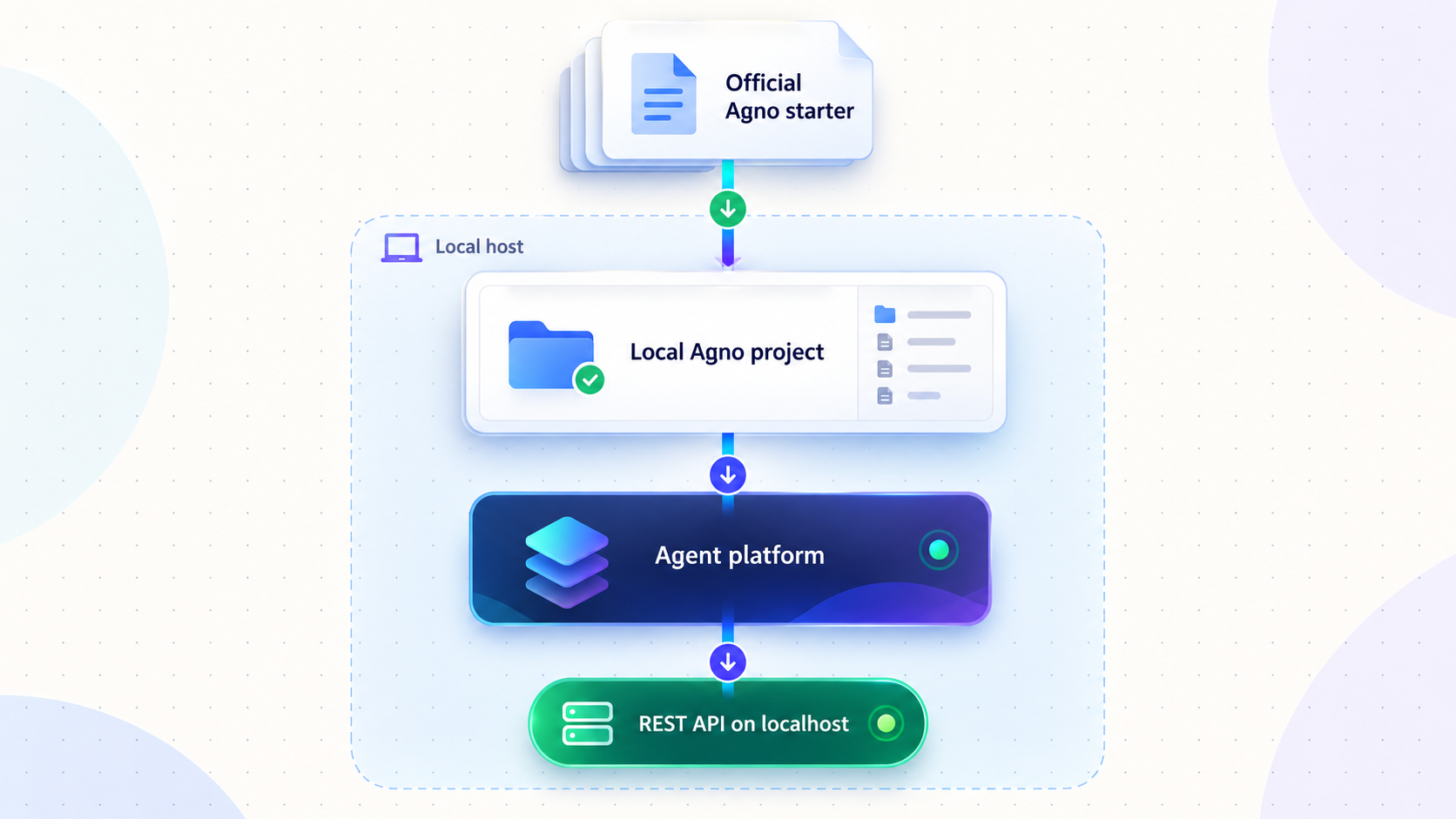
Agno describes itself as a framework and runtime for agent platforms. Its stack has three related layers. Developers use the Agno SDK to build agents, teams, and workflows. AgentOS runs that work as an API and MCP server. The AgentOS Control Plane supplies a web interface for monitoring and managing the platform.
That is materially different from running a package installation command in an otherwise empty Python environment. The official platform starter creates a multi-service application with an AgentOS runtime, PostgreSQL storage for application data and traces, an MCP interface, and a control plane. The Docker starter packages those parts into a repeatable container workflow.
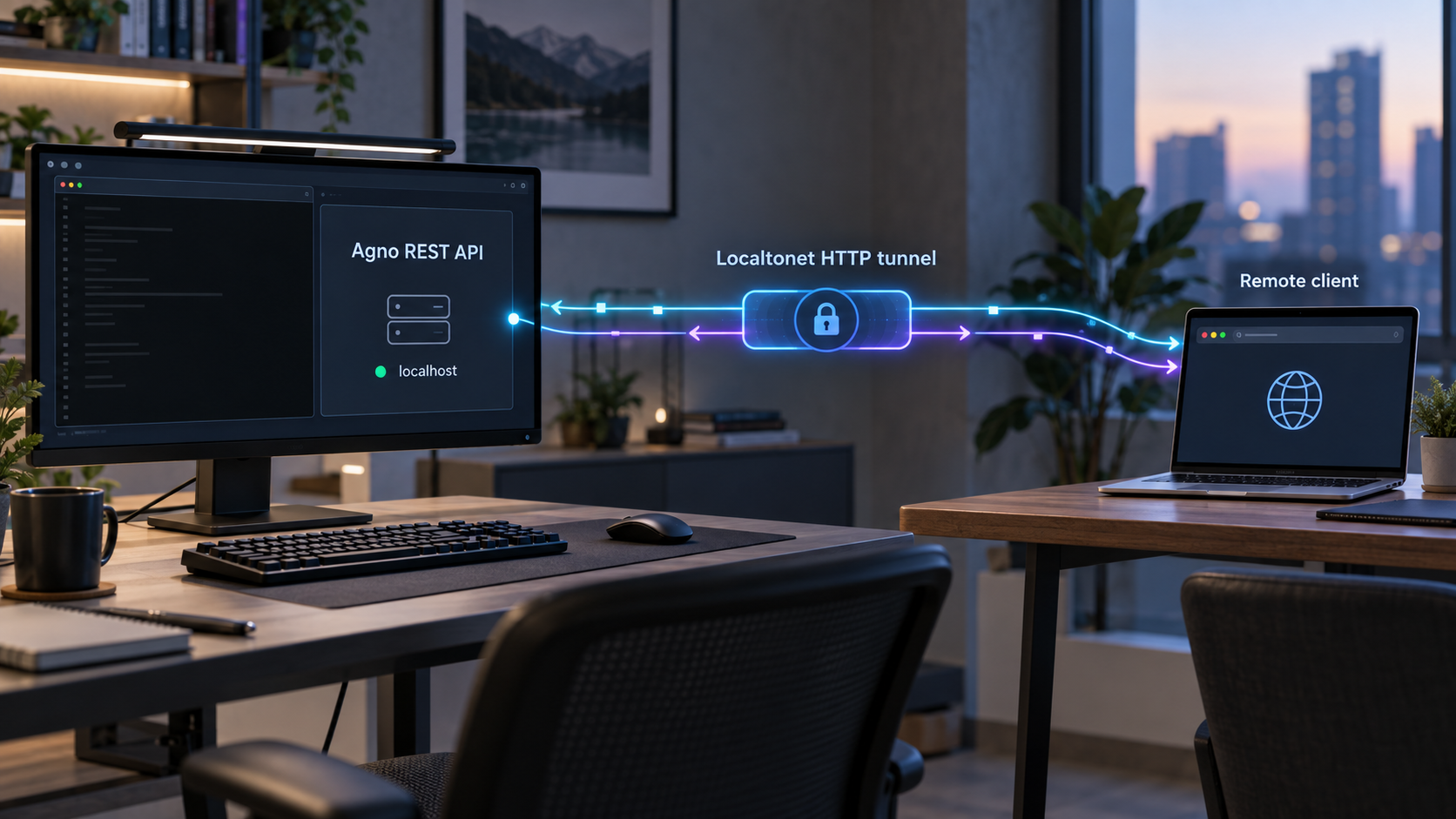
The request path in this tutorial is intentionally narrow. A remote client reaches the public Localtonet HTTPS address. Our relay forwards that request over the outbound client connection to the published AgentOS HTTP port on the authorized host. PostgreSQL remains private, and the MCP and management interfaces are not automatically included in that exposure decision.
The Agno workflow in this guide was verified against the official documentation and the default branch of the official Docker starter on August 20, 2026. Because a moving default branch can change, record the exact commit checked out on your machine before modifying the project. The command is included below.
You can review the primary project material directly in the Agno documentation, the main Agno repository, and the official AgentOS Docker starter. These links supplement the procedure below. You do not need to leave this guide to discover the normal setup, startup, verification, or shutdown sequence.
Prepare the Docker host and required credentials
Use a machine on which you are authorized to run containers and publish a local host port. The normal local path requires Git, Docker with the Compose plugin, enough storage for the application and database images, and a supported shell. Docker Desktop supplies Docker Compose on common desktop platforms. On a Linux host, install Docker Engine and its Compose plugin using Docker's supported installation method for that distribution.
Verify the tools before cloning the starter:
git --version
docker --version
docker compose version
docker info
The first three commands should print version information. The final command must reach the Docker daemon successfully. If docker info reports a permission or connection failure, repair the Docker installation before proceeding. Do not work around a broken daemon by granting broad permissions without reviewing the security consequences.
The starter's example agent requires a model-provider credential to perform a real model-backed run. The setup process obtains the required value through the starter's environment configuration. Do not paste provider keys into source files, Docker Compose YAML, a coding-agent transcript, screenshots, or this tutorial. Use the local environment file created from the starter's example and ensure it remains excluded from version control.
| Prerequisite | Purpose | Verification |
|---|---|---|
| Git | Clones the official starter and records the exact source revision. | git --version |
| Docker daemon | Runs AgentOS and its supporting services. | docker info |
| Docker Compose plugin | Builds and operates the multi-container starter. | docker compose version |
| Model-provider credential | Allows the included agent to call its configured model provider. | Confirm the required variable in the checked-out example environment file. |
| Available host port | Publishes AgentOS from Docker to the local host. | Inspect the resolved Compose configuration and startup status. |
| Localtonet account and client | Creates the outbound connection used by the later HTTP tunnel. | Install the current client for the operating system and connect the authorized device. |
A model-provider key, database password, JWT signing secret, and Localtonet device token serve different purposes. Do not reuse them or place them in committed files. A Localtonet device token identifies the client device and must never be guessed, published, or copied into an example.
Decide whether to use a coding agent
Agno currently presents a coding agent as its preferred onboarding interface. The documentation homepage tells the coding agent to clone the Docker starter and run the setup-platform skill in .agents/skills/. The main Agno repository uses slightly broader wording: clone the selected starter, read its README, and follow the get-started guide.
These are complementary instructions rather than incompatible installation methods. The README defines the repository-level workflow and context. The included setup skill automates that workflow for a supported coding agent. A safe interpretation is therefore:
- Clone the official starter.
- Read its README and inspect the repository at the checked-out revision.
- Use the included
setup-platformskill if working with a coding agent. - Use Docker Compose directly if following the documented manual path.
In either case, review every proposed command and file change. A coding agent is an installation assistant, not an authority to which secrets or unrestricted administrative access should automatically be granted.
Install AgentOS with the official Docker starter
The following procedure installs the complete Docker-based platform. It does not merely install the agno Python package.
Clone the official Docker starter
Clone the repository into the directory name used by Agno's onboarding instructions, then enter it.
Record and inspect the checked-out revision
Save the full commit identifier, read the README, and inspect the setup skill before allowing automation to change the project.
Create the local environment file
Copy the starter's example environment file to the local environment file and provide the model-provider value requested by that revision. Keep the resulting file out of version control.
Validate the resolved Compose configuration
Ask Docker Compose to resolve the project before starting it. This catches malformed YAML, missing substitutions, and conflicting configuration early.
Build and start the platform
Start the services in detached mode and allow Docker to build the application image when required.
Check service state and health
Inspect Compose status and logs. Continue only after the database and AgentOS service are running without a repeating startup failure.
Clone and identify the exact revision
git clone https://github.com/agno-agi/agentos-docker.git agent-platform
cd agent-platform
git rev-parse HEAD
git status --short --branch
Save the value printed by git rev-parse HEAD with your deployment notes. It gives you an immutable identifier for the files you actually installed, even if the repository's default branch changes later.
Before setup, inspect the repository instructions and included skill:
sed -n '1,240p' README.md
find .agents/skills -maxdepth 2 -type f -print
The skill directory is part of the supported coding-agent path. Reading it first lets you see which files it plans to create, which questions it asks, and which Docker actions it performs.
Recommended coding-agent path
Give a coding agent the current Docker-specific prompt from the Agno documentation:
Help me set up my agent platform and build my first agent. Clone https://github.com/agno-agi/agentos-docker into a folder called agent-platform, cd in, and run the setup-platform skill (in .agents/skills/).
If you have already cloned the project, tell the agent to work inside that existing checkout instead of cloning a second copy. Require it to read README.md and the setup skill before executing commands. Review environment-file changes and Docker commands before approving them.
Supported manual Docker Compose path
The manual path performs the same essential repository operations without delegating them to a coding agent. Start by listing the environment templates supplied by your checkout:
find . -maxdepth 2 -type f \( -name "example.env" -o -name ".env.example" -o -name "*.env.example" \) -print
In the reviewed Docker starter workflow, the example environment file is copied to the local .env file. If a later checkout renames the template, use the filename printed by the command above and by that revision's README rather than silently creating an unrelated environment file.
cp example.env .env
Open .env locally and fill the provider variable requested by the example agent. Do not remove database or service values already supplied by the template unless the README directs you to change them. You can list variable names without printing their secret values by running:
grep -E '^[A-Za-z_][A-Za-z0-9_]*=' example.env | cut -d= -f1This is the reliable way to identify the required variables for the exact revision on your machine. Agno supports many model providers and integrations, so a universal list copied into an article could be wrong for a changed starter or a customized first agent.
Commands such as cat .env, unrestricted Compose configuration output, and verbose shell tracing can reveal credentials. Inspect the file in a trusted editor. When sharing diagnostic output, redact secret values before copying it.
Validate the project configuration before starting containers:
docker compose config --quietA successful command normally exits without output. An error identifies a missing substitution, invalid Compose structure, or another configuration problem that should be corrected before startup.
Build and start the platform:
docker compose up --build -dThen inspect the service state and recent logs:
docker compose ps
docker compose logs --tail=200
The status output shows which services are running, which health checks have passed, and which host ports are published. The reviewed Docker configuration publishes AgentOS on host port 7777. Confirm that your own docker compose ps output still shows that mapping before using it. A local override, occupied port, or later starter revision can change the effective host-side value.
To inspect the resolved port mappings without relying on memory, use:
docker compose config | sed -n '/ports:/,/^[^ ]/p'
docker compose ps
Docker Compose networking gives containers internal service names and ports, while the ports mapping makes selected services available on the host. A Localtonet client running directly on the host must target the published host address and port, not a private Compose service name.
Optional Agno telemetry setting
Agno states that it sends one telemetry event for each agent run to help prioritize model providers. It also states that prompts, messages, and outputs are not sent through this telemetry. To disable the event, add the documented setting through the starter's environment mechanism:
AGNO_TELEMETRY=false
Recreate the affected service after changing its environment. Editing .env does not alter the environment of an already running container:
docker compose up -dVerify the AgentOS API locally
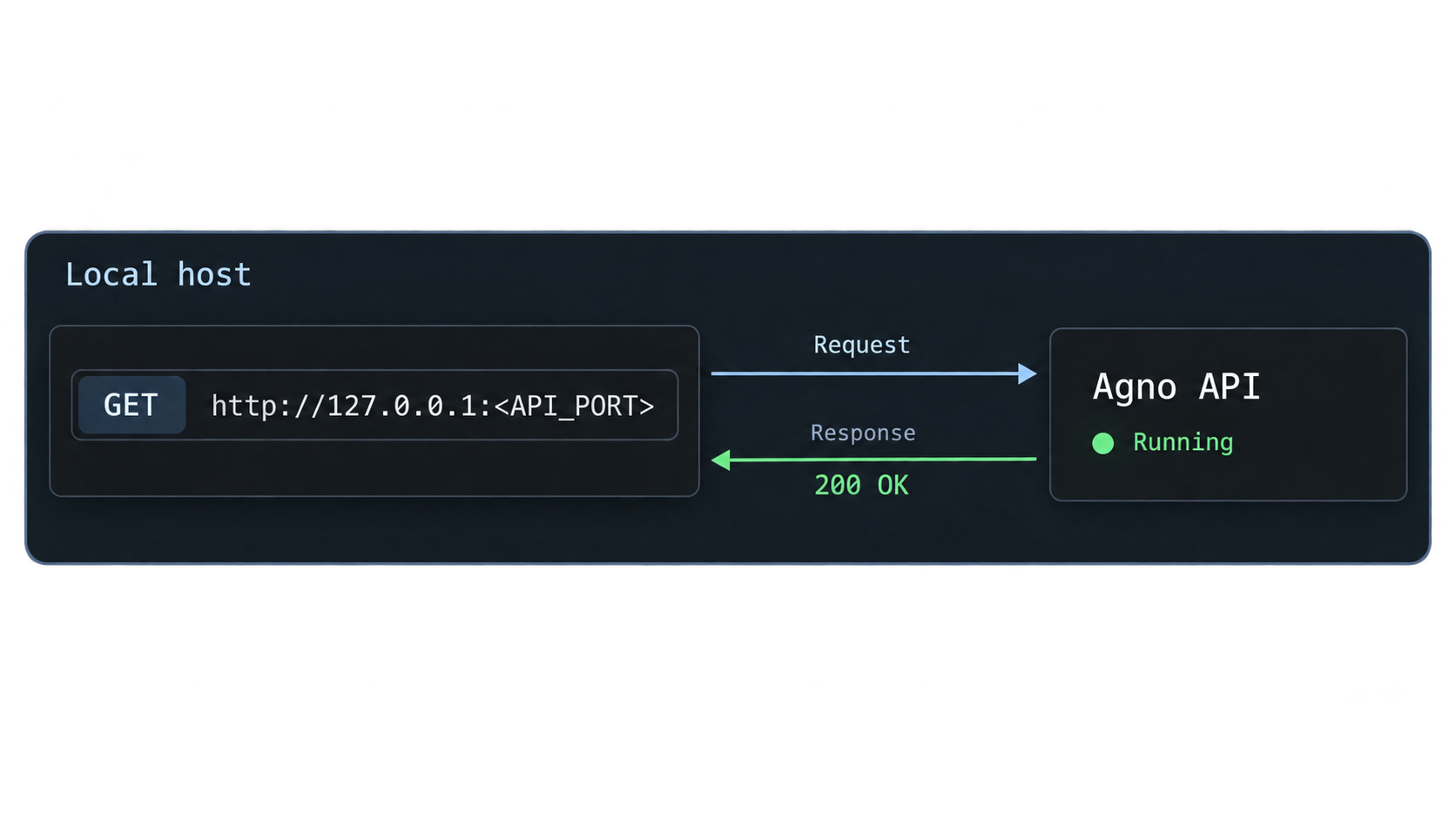
Verify AgentOS before creating a tunnel. This establishes that Docker networking, the database dependency, the API listener, and the selected route work independently of Localtonet.
Check container and health status
docker compose ps
docker compose logs --tail=200
The AgentOS service should remain running, and PostgreSQL should not be cycling through initialization or authentication failures. If the Compose file defines container health checks, allow them to reach a healthy state. A container that is merely listed as running can still contain an application that failed to initialize correctly, so inspect the logs as well as the state column.
Confirm the published host port
The reviewed starter publishes the AgentOS HTTP listener on host port 7777. Confirm the effective mapping in your runtime output:
docker compose ps
Look for a host mapping that includes port 7777. If your checkout or an override publishes another host port, use the value shown by Docker rather than editing the Localtonet tunnel to match this article.
Use the concrete health endpoint
Test the AgentOS health route from the Docker host:
curl -i http://127.0.0.1:7777/healthA healthy service should return a successful HTTP status and a health response from AgentOS. The exact JSON fields can evolve, so treat the HTTP success status and a valid AgentOS health payload as the stable checks. An HTML page from another application, a connection refusal, or a response from an unexpected server means you have not yet verified the intended target.
You can also open the local AgentOS endpoint in a browser as directed by the starter's runtime output. Use routes printed by the checked-out application rather than assuming that every optional interface is enabled. The health route is suitable for reachability checks, but it does not prove that a model-backed agent run will succeed.
Perform an application-level test
After the health check succeeds, use the AgentOS UI or an API route documented by the running starter to invoke the included first agent. A complete application test should confirm all of the following:
- The request reaches the intended agent.
- The configured model provider accepts the credential.
- The platform can write any required session or trace data to PostgreSQL.
- The response follows the expected streaming or non-streaming behavior.
- Authentication and authorization behave as configured.
Do not use an undocumented POST request copied from a different AgentOS version. AgentOS exposes a broad production API, and request schemas can differ by route and release. The health check establishes a stable local connectivity baseline, while the selected starter and its generated API documentation define the current invocation body.
/health request receives a successful response from AgentOS on the published host port.
Test from the actual Localtonet client device
If the Localtonet client will run on the same machine as Docker, 127.0.0.1:7777 is normally the narrowest target. If the client runs on a different authorized device, 127.0.0.1 would refer to that other device. Test the Docker host's reachable private address from the client device instead:
curl -i http://DOCKER_HOST_ADDRESS:7777/health
Replace DOCKER_HOST_ADDRESS with the actual address assigned to your Docker host. This is an environment-specific network value, not a Localtonet setting. If the remote client device cannot complete this request, do not create the tunnel yet. Correct the host binding, local firewall policy, or client placement while exposing no more of the machine than necessary.
| Local result | Meaning | Next action |
|---|---|---|
| Successful health response | The AgentOS HTTP listener is reachable at the tested target. | Perform an authenticated agent test, then configure the tunnel. |
| Connection refused | No process accepts connections on the address and port. | Check Compose status, logs, and the effective host-port mapping. |
| Timeout | The address may be unreachable or filtered, or the service may be stalled. | Test on the Docker host first, then test from the Localtonet client device. |
404 Not Found |
An HTTP server answered, but the requested path was not found. | Confirm that the request uses /health on the AgentOS port. |
401 or 403 |
The service answered and enforced an access decision. | Use an authorized identity without disabling the security policy. |
500-class response |
The request reached the application, but an internal dependency or operation failed. | Review AgentOS, database, model-provider, and integration logs. |
Share the verified AgentOS API with Localtonet
Once the health check and an application-level request work locally, use a Localtonet HTTP tunnel for the REST API. The Localtonet client establishes an outbound connection to one of our relay servers. Remote clients receive a public HTTPS address without requiring inbound router port forwarding, a public IP address, VPN setup, or an inbound firewall rule for the internet.
Install the current Localtonet client
Sign in to Localtonet and download the client offered for the operating system of the device that can reach AgentOS. Use the current installation path shown by the Localtonet dashboard or the operating-system instructions linked from our documentation. Run the installed application and authenticate that device with its assigned token.
Do not copy a token from another device or place it in the Agno .env file. The token identifies the Localtonet client device, not the AgentOS application. Keep the client running while the public endpoint is required.
For the maintained dashboard sequence and operating-system guidance, use the Localtonet HTTP tunnel documentation. Relay values and available options should always be selected from the current dashboard rather than copied from an old command or screenshot.
Install and run the Localtonet client
Install the current client on the Docker host or another authorized device that can complete the AgentOS health request. Leave it running while the tunnel is needed.
Select the authorized device
Authenticate or select the device using its own token. Keep that token private and confirm that the dashboard reports the intended device as connected.
Select an available relay server
Choose a server or region from the current values offered in the Localtonet dashboard. Do not hardcode a relay code from another account or an older tutorial.
Create the HTTP tunnel target
Enter the exact local IP address and host port that passed the health check. When the client runs on the Docker host, this is normally 127.0.0.1 and the confirmed published AgentOS port, which is 7777 in the reviewed starter.
Start the tunnel
Creating or saving a tunnel does not start it. Use the Start action and wait for both the selected device and tunnel to report a connected state.
Verify the public endpoint
Append /health to the assigned public HTTPS address and compare the result with the local health response. Then test an authorized AgentOS request through the public address.
For example, if Localtonet assigns https://YOUR_ASSIGNED_HOST, the health check has this shape:
curl -i https://YOUR_ASSIGNED_HOST/healthReplace the sample hostname with the exact address assigned in your dashboard. A successful result shows that the public request reaches the same AgentOS listener. It does not by itself prove that private agent routes are sufficiently protected.
HTTP and File Server tunnels can use a random subdomain, a custom subdomain where supported, or a custom domain. Availability can vary by current product configuration. If you choose a custom domain, follow the current Localtonet documentation for its DNS requirements rather than guessing records.
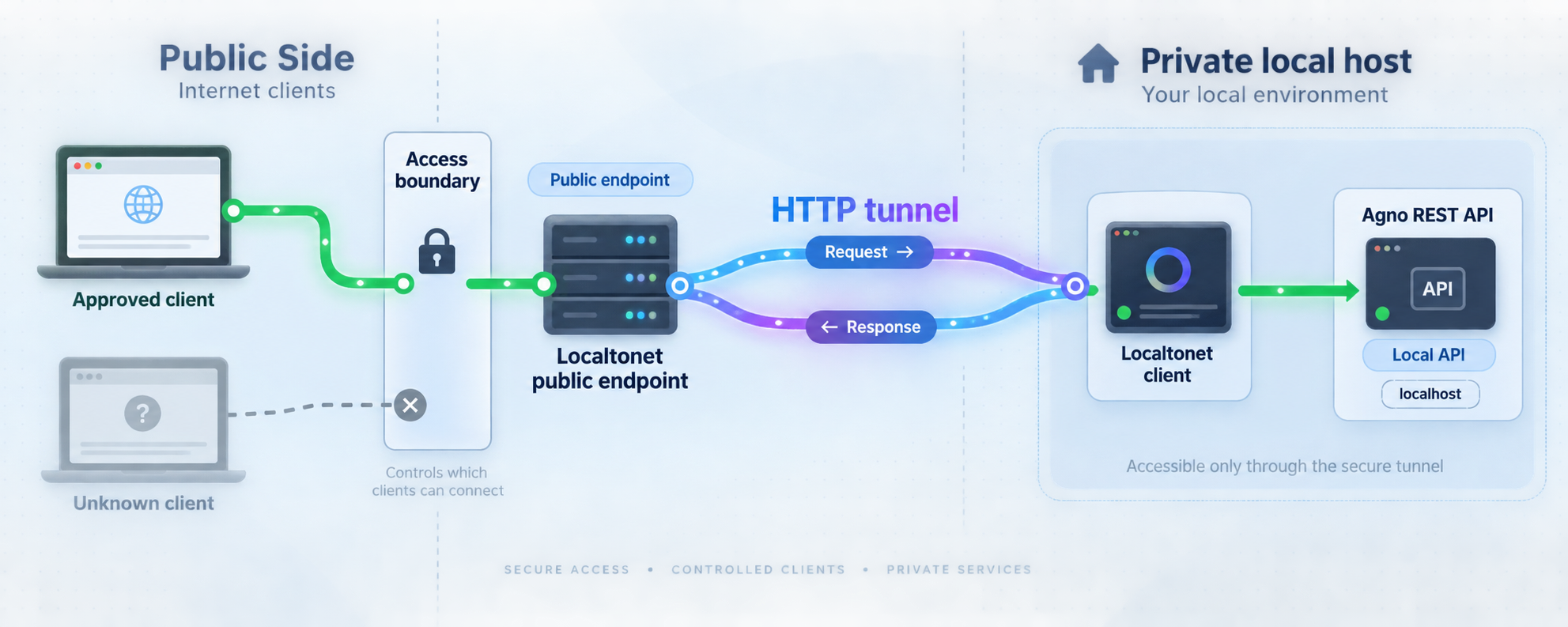
Localtonet provides connectivity to the configured target. Keep AgentOS authentication and authorization active, use least-privilege roles, and verify that unauthorized requests are rejected. Do not rely on an unlisted hostname as the only access control.
Protect the AgentOS security boundary
An agent platform can call external tools, retrieve private knowledge, preserve memory, and perform actions in connected systems. Publishing its API therefore requires a stricter review than sharing a static development page.
Keep authentication enabled
Agno documents JWT-based role-based access control and multi-user, multi-tenant isolation. Confirm how those controls are enabled in your checked-out starter and application. Test one permitted request and one unauthorized request before distributing the public address. The permitted request proves functionality, while the rejected request confirms that the access boundary is active.
Give each remote client the smallest role required for its task. A client that needs to invoke one agent should not automatically receive control-plane administration, configuration, trace-management, or unrestricted tool permissions.
Separate the services
Do not expose PostgreSQL through this HTTP tunnel. It is an internal dependency, not a public application API. Likewise, do not assume that the MCP server and Control Plane should be published simply because they run beside AgentOS. Each interface has a different client population and security model.
If remote administration is genuinely required, evaluate the management interface as a separate service. Apply strong authentication, least privilege, appropriate network restrictions, and a limited exposure period. Avoid using the same broad credential for application clients and administrators.
Constrain agent tools
Agno supports integrations with systems such as GitHub, Slack, and PostgreSQL. A request to an internet-reachable agent can indirectly exercise those integrations if the agent is authorized to use them. Restrict tool credentials to the exact resources needed by the agent, and require human approval for sensitive actions when the application design supports it.
Treat retrieved content as untrusted input. An agent that reads documents, web content, issues, or messages should not receive unrestricted administrative tools merely because the data originated in an approved repository or workspace.
Protect logs and traces
AgentOS provides run history, traces, audit information, and observability options. These are useful for diagnosing failures and investigating unexpected behavior, but they can also contain sensitive operational context. Restrict access to the Control Plane and telemetry backends, define retention appropriate to the handled data, and redact credentials from shared diagnostics.
Operate, stop, and update the platform
Routine startup
From the cloned agent-platform directory, start the existing services without forcing an unnecessary rebuild:
docker compose up -d
docker compose ps
curl -i http://127.0.0.1:7777/health
If the effective host port differs in your Compose status, use that port in the health request. Start the Localtonet tunnel only after the local check succeeds.
Follow logs during development
docker compose logs -f
Stop following the output with Ctrl+C. This ends the log-viewing command but does not stop detached containers. Avoid sharing raw logs until you have checked them for prompts, user data, internal addresses, and credentials.
Restart after configuration changes
If you change environment values or application code that is copied into the image, recreate or rebuild the services as required:
docker compose up --build -d
docker compose ps
Repeat the local health and application tests before testing through Localtonet. A previously working tunnel can only forward what the local service currently provides.
Stop without deleting stored data
docker compose downThis stops and removes the Compose containers and network. Named volumes are normally retained unless you explicitly request their removal. Do not add the volume-removal option unless you intend to delete persisted database data and understand the starter's storage configuration.
Stop the Localtonet tunnel as a separate action. Stopping AgentOS does not automatically delete the tunnel configuration, and stopping the tunnel does not stop Docker.
Update with a rollback point
Avoid release-specific assumptions in routine operations. Before updating, record the current revision, preserve relevant data, and inspect incoming starter changes:
git rev-parse HEAD
git status --short
git fetch origin
git log --oneline --decorate HEAD..origin/main
Review changed README, Compose, environment-template, dependency, and migration files before applying the update. If you choose to move to the current default branch, do so only after preserving local work:
git pull --ff-only
docker compose up --build -d
docker compose ps
curl -i http://127.0.0.1:7777/health
The fast-forward-only option avoids silently creating a merge commit in a deployment checkout. If the pull cannot fast-forward, stop and reconcile your local changes deliberately. After rebuilding, repeat the agent-level test and authorization checks before restarting public access.
| Operation | Primary check | Safe practice |
|---|---|---|
| Start AgentOS | Compose status, health state, and local /health |
Wait for dependencies before starting public access. |
| Start remote access | Connected device, selected relay, target IP, and target port | Target only the verified AgentOS HTTP listener. |
| Test the platform | Health route, agent request, and rejected unauthorized request | Do not weaken authentication to make a test pass. |
| Change configuration | Recreated container environment and startup logs | Never print completed secret files into shared output. |
| Stop access | Localtonet tunnel state and Docker service state | Stop each layer explicitly because their lifecycles are independent. |
| Upgrade | Commit history, starter files, migrations, and local verification | Preserve a rollback revision and relevant database state. |
Troubleshoot the combined setup
Docker Compose reports a missing variable
Confirm that the local environment file exists and that its variable names match the example supplied by the checked-out revision:
test -f .env && echo ".env exists"
grep -E '^[A-Za-z_][A-Za-z0-9_]*=' example.env | cut -d= -f1
docker compose config --quiet
Do not copy a random environment file from another Agno starter. Platform-specific repositories can change deployment values even when their application structure is similar.
The database is unhealthy
Inspect Compose status and logs:
docker compose ps
docker compose logs --tail=200
Look for initialization, storage-permission, disk-space, or credential errors. If you changed database credentials after a volume was initialized, the persisted database and new container environment may no longer agree. Do not delete the volume as a first troubleshooting step because doing so may destroy stored data.
Port 7777 is already in use
Another process may already own the host port. Confirm the conflict using the operating system's networking tools, then either stop the unintended listener or apply a deliberate Compose override that publishes AgentOS on another unused host port. After any change, use docker compose ps to obtain the effective mapping and use that same value for local verification and the Localtonet target.
The local health check is refused
A refusal normally means no service is listening at that address and port. Check whether the application container exited, whether the build failed, and whether Docker published a different host port. Do not begin by changing Localtonet settings because the local target is not ready.
Local access works, but the public URL fails
Confirm that the Localtonet client is connected and that the tunnel was started. Compare the configured target with the exact address and port used by the successful local request. If the client runs on another machine, repeat the health request from that machine. An address valid on the Docker host may not be reachable from a separate device.
A public 401, 403, or 404 is different from a connection failure. It proves that an HTTP service answered. Compare the public path, method, headers, and credentials with the corresponding local request before changing the tunnel.
The health check succeeds, but an agent run fails
The network path and base runtime may be healthy while a provider or tool invocation fails. Review AgentOS logs for rejected provider credentials, unavailable models, invalid request schemas, tool errors, and database failures. Confirm that the required variables reached the running container after the most recent configuration change.
The public endpoint stops unexpectedly
Check both lifecycles. AgentOS must remain healthy and reachable, while the selected Localtonet client must remain connected and the tunnel must remain started. A failure in either layer interrupts access. Saving a tunnel configuration does not keep it active when the client application is closed.
Start with docker compose ps, application logs, and the local /health request. Move to the public URL only after those checks pass. This prevents tunnel changes from hiding an application or database failure.
Frequently asked questions
Is this the same as installing the Agno Python package?
No. A package installation gives a Python project access to the Agno SDK. The Docker starter installs a broader AgentOS platform with a REST API, PostgreSQL storage, an MCP server, and the AgentOS management interface.
Should I read the README or run the setup-platform skill?
Do both when using a coding agent. The main Agno repository tells the agent to read the starter README and follow its get-started guide. The Agno documentation gives the more specific Docker instruction to run the included setup-platform skill. Reading the README first provides context, and the skill automates the repository workflow.
Can I install AgentOS without a coding agent?
Yes. Clone the Docker starter, copy its example environment file to .env, provide the required provider configuration, validate the Compose project, and run docker compose up --build -d. The coding agent is a recommended setup interface, not a requirement for operating Docker Compose.
Which port should the Localtonet HTTP tunnel target?
The reviewed Docker starter publishes AgentOS on host port 7777. Confirm the effective mapping with docker compose ps because local overrides or later revisions can change it. Use the host-side port reachable from the Localtonet client, not a container-only service address.
How do I verify AgentOS before creating the tunnel?
Check docker compose ps, inspect recent logs, and request http://127.0.0.1:7777/health from the Docker host. Then perform an agent-level request through a route documented by the running starter. If the Localtonet client is on another device, repeat the health check from that device using the Docker host's reachable address.
Does the public Localtonet address replace AgentOS authentication?
No. The tunnel provides network reachability to the configured local service. Keep application authentication and authorization active, use least-privilege roles, and verify that unauthorized requests are rejected.
Should I expose PostgreSQL, MCP, or the Control Plane?
Not as part of this REST API workflow. PostgreSQL is an internal dependency, while MCP and the Control Plane are separate interfaces with different security implications. Expose only the AgentOS HTTP service required by the remote client, and evaluate any additional interface separately.
How do I stop everything safely?
Stop the Localtonet tunnel in the dashboard, then run docker compose down from the AgentOS project directory. This removes the running containers and Compose network while normally preserving named volumes. Delete the tunnel configuration only if you no longer need it.
Will the public endpoint remain available after I close Localtonet?
No. The tunnel is available only while the selected client device is connected and the tunnel is running. AgentOS must also remain healthy and reachable from that device.
Share your verified AgentOS API with Localtonet
Install the official Docker starter, confirm the local AgentOS health and application routes, and then create an HTTP tunnel to the exact host address and published port. Keep authentication active and stop the tunnel whenever remote access is no longer required.
Get Started Free →

