

Delegate bounded Claude Code work to an LM Studio model locally, across a trusted LAN, or through an authenticated remote route
Houtini LM is a local stdio MCP server that lets Claude Code hand bounded work to another model through an OpenAI-compatible endpoint. This guide installs the current 3.3 release, prepares and verifies LM Studio, registers the MCP server with the documented LM_STUDIO_URL configuration, and tests each boundary independently. It also explains how to protect LM Studio with an API token before considering a Localtonet HTTP tunnel. The tunnel publishes the LM Studio inference API, not the local Houtini LM process.
📋 What's in this guide
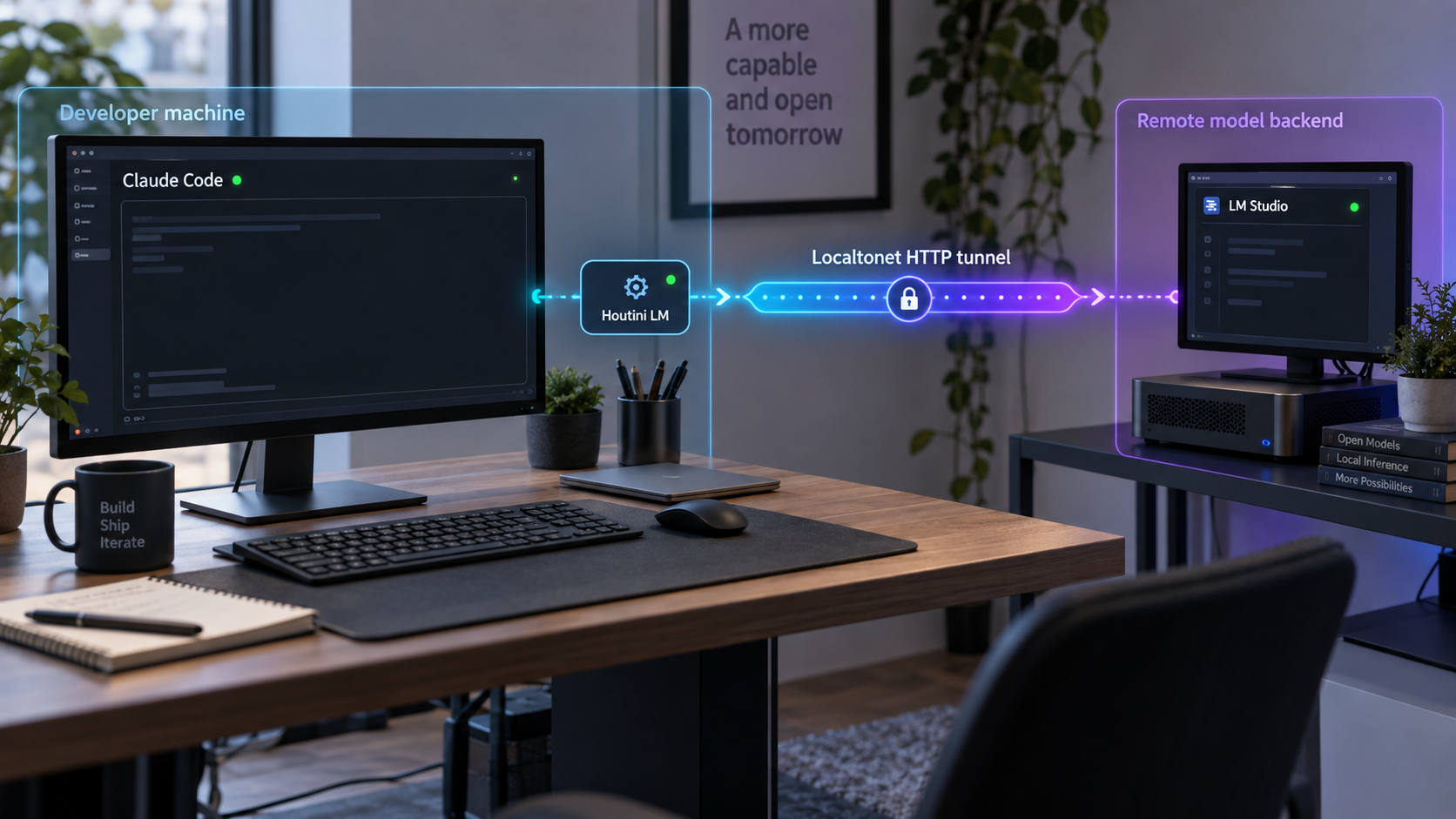
How Claude Code, Houtini LM, and LM Studio fit together
The three components have separate responsibilities and separate lifecycles. Claude Code is the MCP client and orchestrator. It launches Houtini LM as a local process, decides when to call one of its tools, and reviews the returned result. Houtini LM translates a bounded job into a request for an OpenAI-compatible model endpoint. LM Studio hosts the model and performs inference.
Houtini LM communicates with Claude Code over standard input and output. It is not the network service listening on LM Studio's usual port. The HTTP service that may need LAN or remote connectivity is LM Studio's API. This distinction matters because exposing a port for the MCP process would target the wrong component.
The current Houtini LM 3.3 documentation covers more endpoint types than earlier releases, including local servers, routers, and cloud providers. This tutorial deliberately limits its configuration to LM Studio. The documented LM Studio endpoint variable used here is LM_STUDIO_URL. Older examples using HOUTINI_LM_ENDPOINT_URL should not be copied into a current installation.
Houtini LM is launched locally over stdio and has no documented inbound listener in this workflow. If remote connectivity is required, the relevant target is the authenticated LM Studio HTTP API.
Choose appropriate delegation tasks
Houtini LM is intended for bounded work that can be described precisely and reviewed after completion. Current project examples include code review, test stubs, boilerplate, commit messages, documentation, format conversion, mock data, type definitions, code explanation, and asking a second model for an independent opinion.
The current documentation specifically describes code_task_files as a way for the Houtini LM process to read supplied files and send them to the delegated model without first placing their full contents into Claude's conversation. That behavior can reduce the amount of bulky source material Claude must read, but it also means the selected files are sent to the configured backend. Review file contents before delegation and do not include secrets or unrelated sensitive data.
Do not hardcode a complete tool inventory from an older article or release. Houtini LM 3.3 has broader endpoint and model handling than earlier versions, and the tools exposed by the installed package should be treated as authoritative. Inspect the MCP server in Claude Code after installation and use the current Houtini LM repository and manual when a tool requires release-specific arguments.
Broad architecture decisions, long autonomous workflows, unrestricted filesystem operations, and changes that depend on substantial project history are poor first delegation tests. Begin with a small task whose answer can be checked quickly. Local inference can also take longer than hosted inference depending on the model and hardware, so a slow response is not automatically a network failure.
Prerequisites and topology choices
Begin with all components on one computer if possible. A localhost installation removes firewall, routing, binding, DNS, and tunnel variables from the first test. After local delegation works, move LM Studio to a trusted LAN host. Add a public tunnel only after authentication has been enabled and verified.
| Requirement | Required state | Verification |
|---|---|---|
| Claude Code | Installed and available in the terminal | Run claude --version and use the current Claude Code MCP workflow. |
| Node.js | Version 22.5 or newer | Run node --version in the same environment that launches Claude Code. |
| npx | Available through the Node.js installation | Run npx --version. |
| LM Studio | A compatible model is downloaded, loaded, and served | Query /v1/models and record the returned model identifier. |
| LM Studio authentication | Required before public tunnel exposure | An unauthenticated request must fail while a token-authenticated request succeeds. |
| Localtonet client | Required only for the cross-network tunnel workflow | The selected device is connected and the HTTP tunnel is running. |
Check the local command environment
claude --version
node --version
npx --version
Houtini LM 3.3 requires Node.js 22.5 or newer. This revision does not repeat older claims about a special Node.js version for an internal model cache because that behavior should not be assumed from a previous release. If Node.js or npx is unavailable, repair the installation before registering the MCP server.
Check these commands in the same environment that will launch Claude Code. A terminal can have a different executable path from a desktop launcher, integrated development environment, remote shell, or service account. A registration that succeeds in one shell can still fail when Claude Code later tries to launch npx under another environment.
Select a topology
| Topology | LM Studio binding | Houtini LM URL | Security position |
|---|---|---|---|
| All components on one computer | Loopback | http://127.0.0.1:1234 |
Best starting point. No network publication is required. |
| LM Studio on a trusted LAN host | Local-network access enabled | The host's reachable LAN address and port | Restrict access with host and network policy. Authentication is recommended. |
| LM Studio behind Localtonet | Loopback is sufficient if the Localtonet client shares the host | The assigned public HTTPS URL | LM Studio authentication must be enabled and verified first. |
Do not publish an LM Studio listener that accepts unauthenticated inference requests. If your installed LM Studio release cannot require an API token, or if your installed Houtini LM release cannot pass that token to the backend, limit the workflow to localhost or a protected private network. A difficult-to-guess URL is not authentication.
Install and configure the LM Studio backend
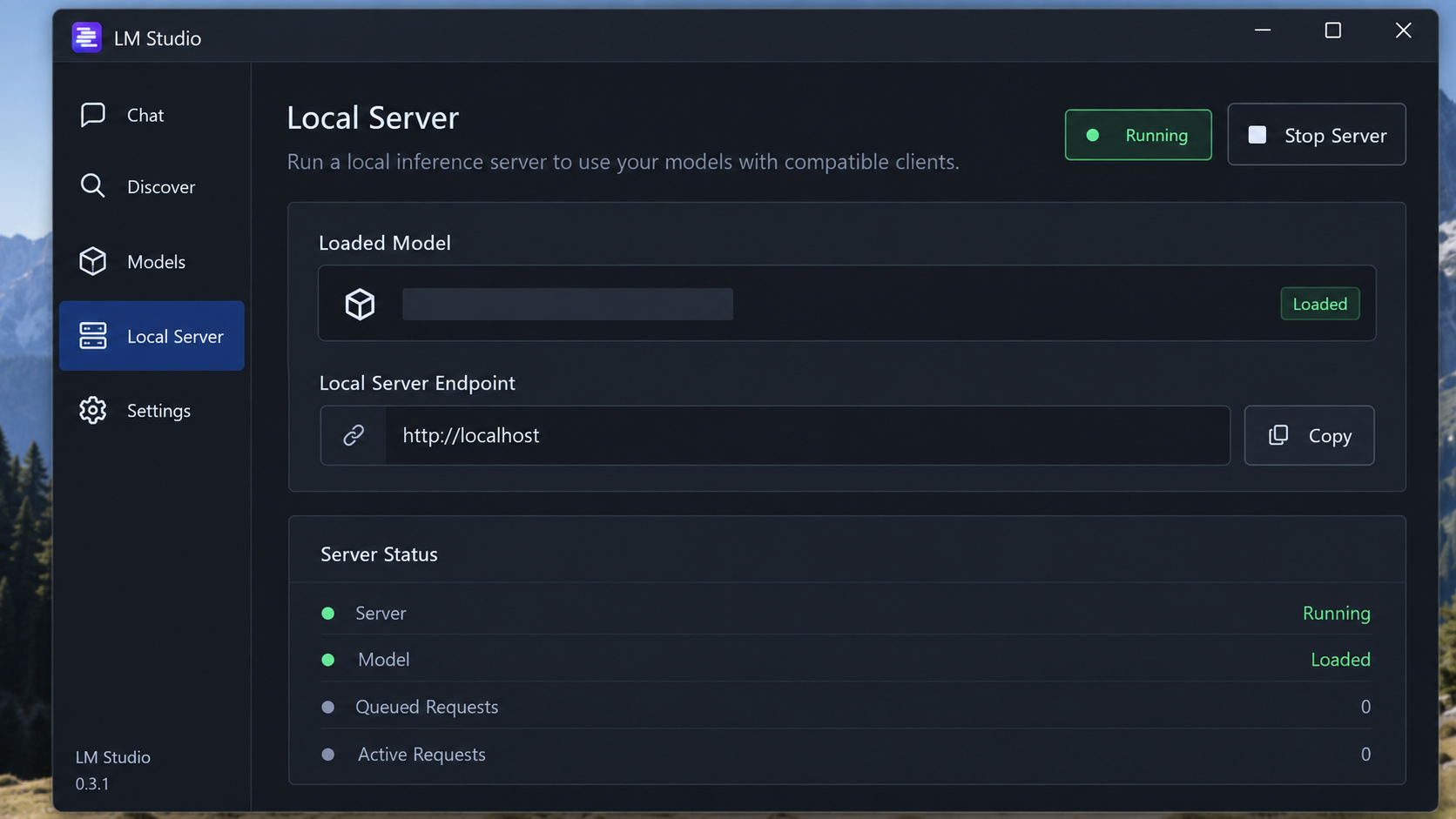
Install the current LM Studio release using the supported installer for the model host. Operating-system support and installer formats can change, so use the current LM Studio documentation rather than copying an old package command. The following procedure focuses on the server state required by Houtini LM.
Install and open LM Studio
Install the current supported LM Studio build on the computer that will perform inference. Apply any operating-system permissions required for the application and model storage.
Download a model that fits the host
Choose a model based on available memory, accelerator support, task requirements, and desired context size. A model name alone does not prove that it will fit the available hardware.
Load the intended model
Load the model into LM Studio. Downloading a model does not make it available to the API. Note the loaded model and avoid silently switching models during verification.
Open the server controls
Open LM Studio's developer or local-server area and select the loaded model for serving. Confirm the displayed listen port. The common documented example is port 1234, but the value shown by your installation is authoritative.
Choose the network binding
Keep the server on loopback for a same-computer setup. Enable LM Studio's local-network serving control only when another trusted LAN device must connect. If the Localtonet client runs on the same model host, loopback remains the preferred target because LM Studio does not need to listen across the LAN.
Enable authentication before remote publication
In the current server settings, enable the authentication requirement and create an API token. Store the token in an approved secret manager or protected local configuration. Do not place it in source control, prompts, screenshots, shared shell transcripts, or article examples.
Start the server and identify the model
Start the LM Studio server, query its models endpoint, and record the exact model identifier returned by the API. Use that identifier when testing a chat completion instead of guessing from a display name or downloaded filename.
Consult the LM Studio server documentation for the current server controls and the LM Studio authentication documentation before exposing the service outside the host. Interface labels can change between LM Studio releases, so verify that authentication is actually enforced with an HTTP request rather than relying only on the state of a toggle.
Verify an unauthenticated local server first
For the initial loopback-only installation, query the OpenAI-compatible models endpoint:
curl --fail-with-body --silent --show-error \
  http://127.0.0.1:1234/v1/models
A successful JSON response proves that an HTTP server is listening. It does not prove that a model can generate output, and it does not prove that authentication is enabled.
Verify authentication without writing the token into the command
After enabling authentication, first confirm that the same request without a token fails. LM Studio should return an authorization failure rather than the model list:
curl --silent --output /dev/null \
  --write-out '%{http_code}\n' \
  http://127.0.0.1:1234/v1/models
Then load the token into an environment variable without placing the value directly in shell history:
read -rsp "LM Studio API token: " LM_STUDIO_API_KEY
echo
export LM_STUDIO_API_KEY

curl --fail-with-body --silent --show-error \
  -H "Authorization: Bearer ${LM_STUDIO_API_KEY}" \
  http://127.0.0.1:1234/v1/models
Inspect the returned JSON and record the exact id for the loaded model. Keep the terminal and its environment private while the variable exists. When testing is complete, remove it from the shell with unset LM_STUDIO_API_KEY.
Install Houtini LM in Claude Code
The current Houtini LM installation uses npx and requires Node.js 22.5 or newer. Claude Code stores an MCP server definition and later launches the package as a local stdio process. For current Claude Code MCP behavior and scope options, consult the Claude Code MCP documentation.
Choose between a pinned and moving package version
An unpinned package reference follows the package version resolved by npx and npm. That is convenient for trying the newest release, but it can change behavior after an update. A version pin makes restarts reproducible until you deliberately change the registration.
| Package reference | Behavior | Best use |
|---|---|---|
@houtini/lm |
Uses the package version resolved without an explicit release pin | Testing current releases when automatic change is acceptable |
@houtini/lm@3.3.0 |
Requests the named release | Reproducible team or production-like development setups |
| A reviewed newer version | Changes only when the registration is updated intentionally | Controlled upgrades after reading release notes and retesting boundaries |
Keep LM Studio running
Confirm that the intended model is loaded and that the local API test succeeds before introducing the MCP process.
Register Houtini LM
Add the MCP server with the documented npx process. Use the pinned command when repeatability is more important than automatically following package updates.
Restart or reopen Claude Code
Start a fresh session so Claude Code launches the newly registered MCP process. Do not treat successful registration as proof that the process can reach LM Studio.
For the current unpinned package:
claude mcp add houtini-lm -- npx -y @houtini/lmTo pin the 3.3.0 release described by the current project documentation:
claude mcp add houtini-lm -- npx -y @houtini/lm@3.3.0
With LM Studio listening at its local default, Houtini LM can use the default local endpoint. To make the endpoint explicit, register it with the current LM_STUDIO_URL variable:
claude mcp add houtini-lm \
  -e LM_STUDIO_URL=http://127.0.0.1:1234 \
  -- npx -y @houtini/lm@3.3.0
The current Houtini LM evidence uses LM_STUDIO_URL. The older HOUTINI_LM_ENDPOINT_URL instruction is not used in this revision because it is not supported by the supplied current 3.3 documentation.
Register an authenticated backend carefully
The current Houtini LM configuration uses LM_STUDIO_API_KEY for the backend credential. Claude Code must make that variable available to the Houtini LM child process. The registration therefore stores the credential in the MCP configuration associated with the selected Claude Code scope.
Read the secret without typing it into shell history, register the process, and then clear the temporary shell variable:
read -rsp "LM Studio API token: " LM_STUDIO_API_KEY
echo
export LM_STUDIO_API_KEY

claude mcp add houtini-lm \
  -e LM_STUDIO_URL=http://127.0.0.1:1234 \
  -e LM_STUDIO_API_KEY="${LM_STUDIO_API_KEY}" \
  -- npx -y @houtini/lm@3.3.0

unset LM_STUDIO_API_KEY
This avoids placing the literal token in the typed command, but the MCP configuration still needs the value so the child process can authenticate. Protect that configuration with normal operating-system account permissions. Do not commit project-scoped MCP files containing a token, copy them into support tickets, or include them in screenshots.
npx may use npm's local package cache when resolving the requested package. That does not guarantee a particular Houtini LM model-profile cache behavior. This tutorial does not rely on older cache claims. Pin the package version when reproducible startup behavior matters.
Verify the local API, MCP registration, and delegated task
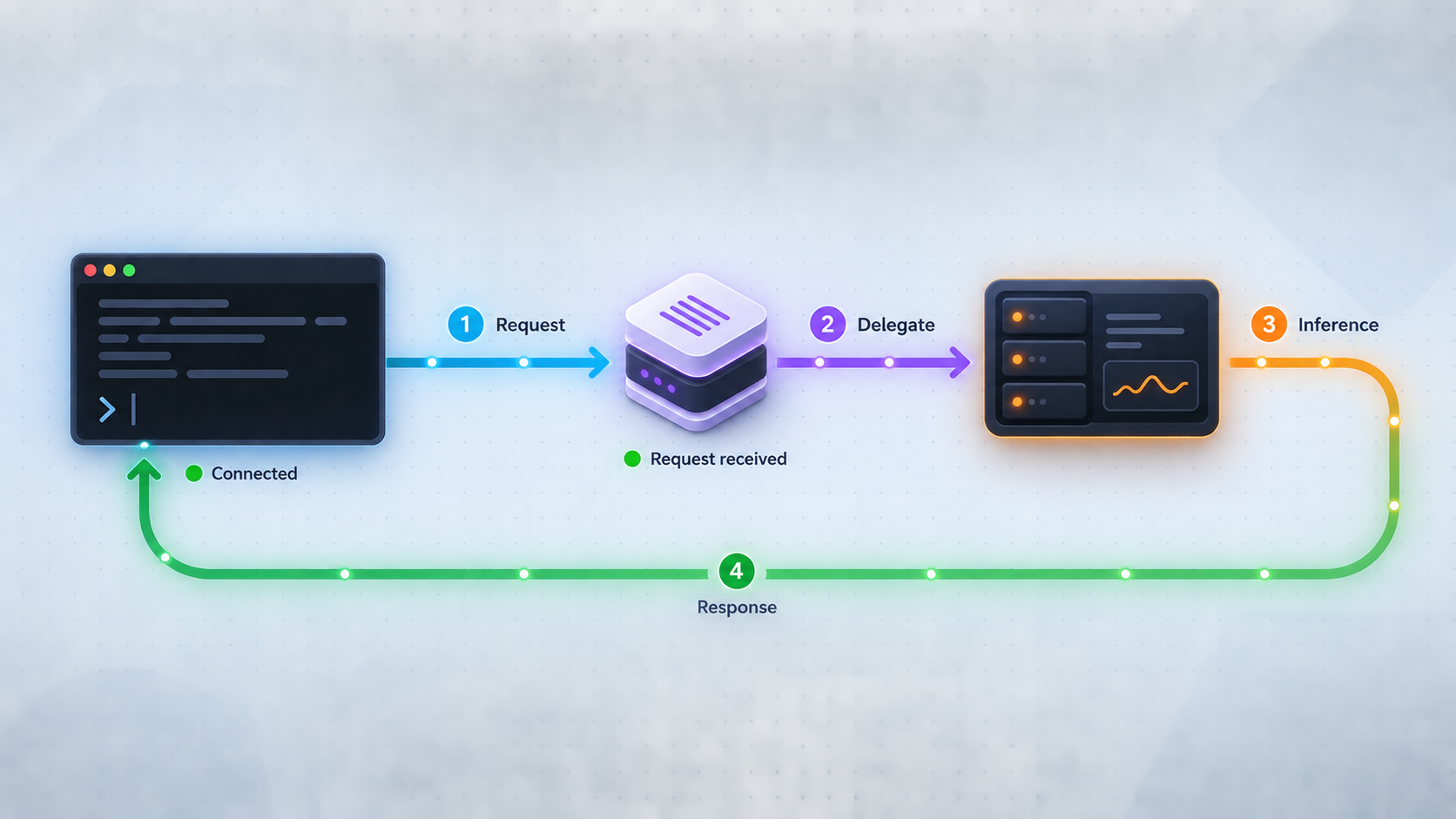
An observational check such as seeing LM Studio open is not enough. Test the HTTP API directly, confirm the model identifier, confirm Claude Code's MCP registration, and then request a delegated result.
1. Test an authenticated model request
Set the model identifier to the exact value returned by /v1/models. The following request asks for a deterministic, short response and keeps the secret out of the literal command:
export LM_STUDIO_MODEL="replace-with-returned-model-id"

curl --fail-with-body --silent --show-error \
  -H "Authorization: Bearer ${LM_STUDIO_API_KEY}" \
  -H "Content-Type: application/json" \
  http://127.0.0.1:1234/v1/chat/completions \
  -d "{
    \"model\": \"${LM_STUDIO_MODEL}\",
    \"messages\": [
      {
        \"role\": \"user\",
        \"content\": \"Reply with exactly: LM Studio API ready\"
      }
    ],
    \"temperature\": 0
  }"
Confirm that the response contains the expected text. If the server rejects temperature for the selected model, remove that field and repeat the test. Model families can differ in which OpenAI-compatible parameters they accept.
2. Check Claude Code's MCP registration
claude mcp list
Confirm that houtini-lm appears. Registration proves only that Claude Code has a server definition. A startup or connection error still requires checking the Claude Code MCP output, npx output, and LM Studio logs.
3. Start a fresh Claude Code session
Open Claude Code after LM Studio is ready. Inspect the MCP status from the Claude Code interface and confirm that Houtini LM starts rather than exiting immediately. If the current interface reports individual tools, use that live list instead of assuming an older tool inventory.
4. Request one bounded delegated task
Use a prompt whose result is easy to distinguish from normal conversation. For example:
Delegate this bounded task through Houtini LM:

Review the following JavaScript function for one correctness issue.
Return exactly two headings: Finding and Suggested fix.

function first(items) {
  return items[1];
}
The expected review should identify that the first array element uses index 0, not index 1. Confirm that Claude actually invokes Houtini LM, that LM Studio records an inference request, and that the result returns to Claude Code. Then review the answer rather than applying it automatically.
5. Clear temporary test secrets
unset LM_STUDIO_API_KEY
unset LM_STUDIO_MODEL
Clearing a shell variable does not remove a credential already stored in Claude Code's MCP configuration. It only removes the temporary copy from the current shell.
Configure authenticated remote LM Studio access
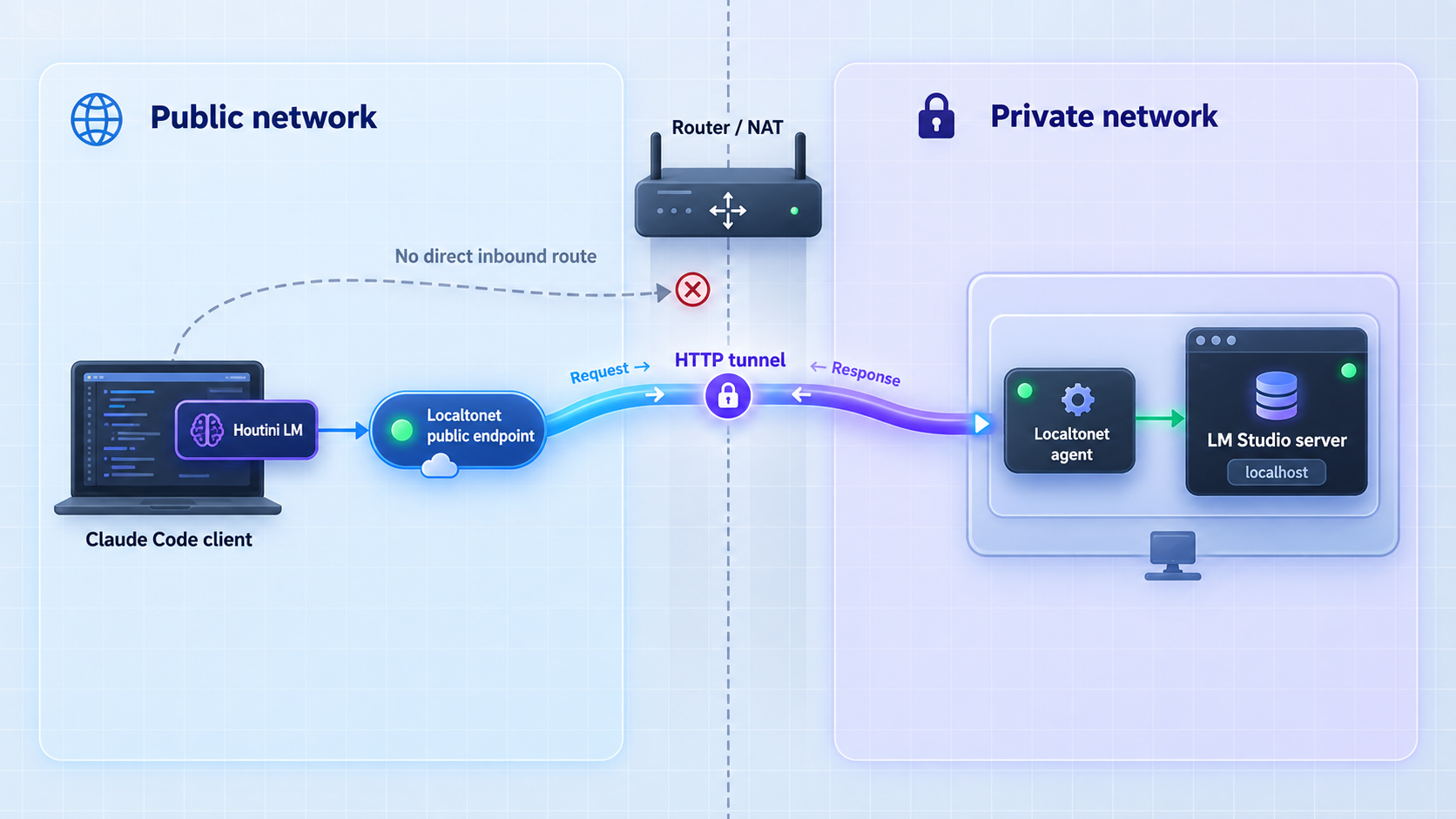
Use this section only after local authenticated delegation works. With Localtonet, the client on the model-host side establishes an outbound connection to one of our relay servers. The tunnel can provide a public HTTPS URL without inbound router port forwarding, a public IP address, VPN setup, or firewall changes solely to establish the tunnel.
The tunnel does not replace LM Studio authentication. Its target is the authenticated LM Studio listener, normally 127.0.0.1 and port 1234 when the Localtonet client and LM Studio share a computer. Keeping LM Studio on loopback narrows local exposure while the tunnel provides the intended remote route.
Before creating a public route, prove that LM Studio rejects an unauthenticated request and that Houtini LM can send the configured token. If either check fails, do not continue with an internet-facing tunnel. Use localhost, a trusted LAN with restrictive policy, or Localtonet VPN Manager for an authorized private mesh design instead.
Install and run the Localtonet client
Run our client on the LM Studio host or another device that can reach the authenticated LM Studio listener. The same-host design can target loopback and is the narrowest configuration.
Authenticate the selected device
Use the device-specific Localtonet authentication token assigned to that client. Do not place it in source files, article examples, screenshots, prompts, or public logs.
Select an available relay server
Choose an available server or region from the current dashboard. Do not hardcode a server code from another installation because availability can vary.
Create the HTTP tunnel
Configure the local target as the address and port where the Localtonet client reaches LM Studio. Use 127.0.0.1 and 1234 when both processes share the host. If the client is on another LAN device, use the model host's reachable address and protect that LAN listener.
Start the tunnel
Creating a tunnel does not start it. Press Start and wait until it is running. Record the assigned public HTTPS URL privately.
Verify authentication before registering Houtini LM
Test the public models endpoint first without a token and then with the token. Continue only if the first request is rejected and the second succeeds.
See the Localtonet HTTP tunnel documentation for the current dashboard workflow. Available process types, relay servers, regions, and account capabilities can vary, so select current values from the dashboard rather than copying them from an example.
Register Houtini LM with the authenticated tunnel URL
After the remote authentication checks in the next section pass, replace the local endpoint with the exact assigned HTTPS URL. Do not append an assumed API path because Houtini LM constructs the endpoint-specific request paths.
read -rsp "LM Studio API token: " LM_STUDIO_API_KEY
echo
export LM_STUDIO_API_KEY

claude mcp remove houtini-lm

claude mcp add houtini-lm \
  -e LM_STUDIO_URL=https://your-assigned-hostname \
  -e LM_STUDIO_API_KEY="${LM_STUDIO_API_KEY}" \
  -- npx -y @houtini/lm@3.3.0

unset LM_STUDIO_API_KEY
The hostname is a placeholder. Use the HTTPS URL assigned to the running tunnel. Do not put the API token in the URL, and do not publish either the token or the private endpoint configuration.
Verify the authenticated remote path boundary by boundary
Remote verification should demonstrate both connectivity and denial of unauthorized access. Perform the checks from the Claude Code computer, not only from the LM Studio host.
Prove that unauthenticated remote access is rejected
Request the tunneled /v1/models endpoint without an authorization header. Expect an authentication failure. A successful model list means the service is publicly usable and the tunnel should be stopped immediately.
Prove that the valid token succeeds
Repeat the request with the token held in a protected environment variable. Confirm that the model list contains the same identifier verified locally.
Verify Claude Code MCP status
Restart Claude Code, inspect the MCP status, and confirm that Houtini LM remains connected with the remote endpoint configuration.
Repeat the bounded delegated task
Send the same small test used for local verification. Confirm a corresponding request in LM Studio's server logs and review the returned result.
Unauthenticated remote check
export LM_STUDIO_REMOTE_URL="https://your-assigned-hostname"

curl --silent --output /dev/null \
  --write-out '%{http_code}\n' \
  "${LM_STUDIO_REMOTE_URL}/v1/models"
The status must indicate that authorization is required. Do not continue if this request returns the model list or otherwise succeeds as an authenticated API call.
Authenticated remote check
read -rsp "LM Studio API token: " LM_STUDIO_API_KEY
echo
export LM_STUDIO_API_KEY

curl --fail-with-body --silent --show-error \
  -H "Authorization: Bearer ${LM_STUDIO_API_KEY}" \
  "${LM_STUDIO_REMOTE_URL}/v1/models"
Compare the returned model ID with the local result. If the public URL reaches another service, model, or stale tunnel target, stop and correct the routing before using Claude Code.
Confirm the delegated request
Run claude mcp list, open a fresh Claude Code session, and repeat the exact bounded prompt from local verification. A successful result should satisfy all of these conditions:
- Claude Code reports Houtini LM as available.
- Claude invokes Houtini LM rather than answering the requested delegated task directly.
- LM Studio records an authenticated inference request for the intended model.
- The result returns through Houtini LM to Claude Code.
- The returned content passes your factual, code-review, or test-based checks.
Clear temporary variables after testing:
unset LM_STUDIO_API_KEY
unset LM_STUDIO_REMOTE_URL
Security, updates, credential rotation, and shutdown
The workflow combines four independent components: Claude Code, the Houtini LM child process, LM Studio, and optionally the Localtonet client and tunnel. Operate each lifecycle deliberately.
Update or pin Houtini LM intentionally
Before changing versions, note the current package reference and verify that local delegation works. Read the current repository release notes and manual for changed variables, tools, endpoint handling, or Node.js requirements. Then remove and recreate the registration with the reviewed version:
claude mcp remove houtini-lm

claude mcp add houtini-lm \
  -e LM_STUDIO_URL=http://127.0.0.1:1234 \
  -- npx -y @houtini/lm@3.3.0
If the backend requires authentication, include the protected LM_STUDIO_API_KEY registration procedure rather than using the unauthenticated example unchanged. After any package change, repeat the API, MCP status, and delegated-task tests. If the new version fails, restore the previously tested pin.
Rotate or revoke the LM Studio token
Rotate a backend token when it may have been exposed, when a team member or device loses access, or according to your normal credential policy. A safe rotation sequence is:
- Stop the Localtonet tunnel so the endpoint is no longer publicly reachable.
- Create a replacement token in LM Studio.
- Verify the replacement token against the local API.
- Remove and recreate the Houtini LM MCP registration with the replacement token.
- Revoke the previous token in LM Studio.
- Restart Claude Code and test local delegation.
- Restart the tunnel and repeat both unauthenticated and authenticated remote checks.
If LM Studio exposes only a replace or regenerate operation in the installed release, follow that current interface and expect the previous credential to stop working immediately. Do not leave an old token active merely to avoid updating the MCP configuration.
Review what is sent to the model host
Delegated prompts can include source code, diffs, documentation, filenames, and task instructions. File-oriented tools may read files directly and send their contents to the configured endpoint. Check for API keys, private certificates, customer information, production connection strings, or unrelated proprietary material before delegation.
An LM Studio host under your control can keep inference on that host, but the request still crosses the network when Claude Code and LM Studio are on different computers. Follow the data-handling rules that apply to the project and network.
Rollback and shutdown
To end a remote session, stop the Localtonet tunnel first. A saved tunnel configuration is not necessarily running, and closing Claude Code does not stop a tunnel managed by a separate Localtonet client. After the tunnel is stopped, stop LM Studio's server or unload the model if it is no longer required.
Remove the Claude Code MCP registration when you want to prevent future launches:
claude mcp remove houtini-lmRevoke the LM Studio API token if the integration is being retired rather than temporarily paused. Stop or delete the Localtonet tunnel when remote access is no longer required. Deleting a tunnel and revoking an LM Studio credential are separate actions.
Troubleshooting by failure boundary
Claude Code cannot launch Houtini LM
Run node --version and npx --version in the same account and environment used by Claude Code. Node.js must be 22.5 or newer. Check Claude Code's MCP output for an executable-not-found error, an npm package resolution error, or a Houtini LM startup exception.
If a pinned release cannot be resolved, confirm that the package reference is correct and that the environment can reach its configured npm registry. Do not switch to an unpinned package merely to hide an installation problem without understanding what version will run.
The local API returns connection refused
LM Studio is not listening at the requested address and port. Confirm that its server is started, inspect the displayed port, and verify the binding. Use 127.0.0.1 only from the same host. A downloaded or selected model does not imply that the API server is active.
The API returns 401 or 403
This is an authentication or authorization problem, not a tunnel-routing failure. Confirm that authentication is enabled, the token has not been revoked, and Houtini LM receives the current LM_STUDIO_API_KEY. Check for accidental whitespace introduced while copying the credential.
An unauthenticated request returning 401 or 403 is the expected result when authentication is required. The problem exists only when the authenticated request is also rejected.
The public URL returns 404
Confirm that the tunnel URL was copied exactly and that the request uses a valid API path such as /v1/models. Do not add an arbitrary prefix to LM_STUDIO_URL. Also verify that the tunnel targets the LM Studio port rather than another local web service.
The public URL returns 502, 503, or another gateway error
Work from the model host outward. Confirm that LM Studio is running, the Localtonet client can reach its configured target, the correct device is connected, and the tunnel is started. A gateway-style error commonly means that the public route exists but its local target is unavailable.
If the Localtonet client runs on a different computer from LM Studio, 127.0.0.1 points to the tunnel client itself. Use the LM Studio host's reachable LAN address and configure LM Studio to accept that LAN connection.
The models endpoint succeeds but completion fails
Confirm that the request uses the exact model ID returned by /v1/models. The model may be listed but not fully loaded, or the host may lack enough memory to complete loading. Inspect LM Studio's server logs for load failures, unsupported parameters, or runtime errors.
Some model families reject parameters accepted by other OpenAI-compatible models. Houtini LM 3.3 includes broader endpoint and model behavior, but a hand-written curl test can still fail if it sends an unsupported field. Remove optional parameters and retry with a minimal request.
The model reports a context-length error
Reduce the prompt, number of files, requested output, or conversation material sent in the delegated task. A model's available context is finite, and the usable amount may be lower after system instructions and output reservation are considered. Splitting a large review into independent bounded jobs is usually safer than increasing every request to the maximum size.
Delegation returns weak or incomplete output
Successful transport does not establish model quality. Make the assignment smaller, provide only the necessary context, state the output format, and define an objective completion condition. Check the current Houtini LM response footer or metadata exposed by the installed release, but do not treat metadata as a substitute for tests and review.
Keep architecture, complex multi-file judgment, and final approval with Claude or a human reviewer when the delegated model is unreliable for the task.
The setup worked until a restart
Check each lifecycle independently. Claude Code must still be able to launch npx. The registered package and environment variables must remain valid. LM Studio must be running with the intended model loaded. For remote access, the Localtonet client must be connected and the tunnel must be running. An expired or revoked LM Studio token also causes an otherwise unchanged route to fail.
The wrong model answered
Query /v1/models through the same URL Houtini LM uses and inspect the LM Studio server state. A tunnel may point to a different host, an LM Studio restart may load another model, or a stale registration may still contain an old endpoint. Do not infer model identity from response style alone.
Frequently asked questions
Does Houtini LM listen on port 1234?
No. Houtini LM is launched locally as a stdio MCP process. Port 1234 is the common LM Studio API port in this workflow. Remote networking should target the authenticated LM Studio service, not the Houtini LM process.
Which endpoint variable should Houtini LM 3.3 use for LM Studio?
Use LM_STUDIO_URL. This replaces the unsupported HOUTINI_LM_ENDPOINT_URL instruction from the previous article. Use LM_STUDIO_API_KEY when the LM Studio backend requires its API token.
What Node.js version does Houtini LM require?
The current Houtini LM 3.3 documentation requires Node.js 22.5 or newer. Check the version in the same environment that Claude Code uses to launch the MCP process.
Do I need Localtonet when everything runs on one computer?
No. Use the loopback LM Studio endpoint when Claude Code, Houtini LM, and LM Studio share a computer. Localtonet is relevant only when the authenticated backend must be reached across separate networks.
Can I expose LM Studio before enabling its API token?
No. An unauthenticated inference API should remain on localhost or a protected private network. A Localtonet HTTP tunnel provides connectivity, but it does not replace application-level authentication.
How do I prove that remote authentication is working?
Request the tunneled /v1/models endpoint without a token and confirm that it is rejected. Repeat the request with the LM Studio token and confirm that it succeeds. Then restart Claude Code, verify Houtini LM's MCP status, and complete a bounded delegated task.
Should I pin the Houtini LM package version?
Pinning is recommended when you need repeatable behavior. An unpinned npx reference is convenient for testing current releases, but updates may change tools, endpoint handling, requirements, or output behavior. Retest every boundary after an upgrade.
Does closing Claude Code stop the Localtonet tunnel?
No. The tunnel lifecycle is separate. A tunnel remains available only while its selected Localtonet client is connected and the tunnel is running. Stop or delete it separately when remote model access is no longer required.
Should every Claude Code task be delegated?
No. Delegate bounded, self-contained work with a reviewable result. Keep broad architecture, complex project judgment, unrestricted tool use, and final approval with Claude or a human reviewer when those tasks exceed the delegated model's reliable scope.
Connect an authenticated LM Studio host with Localtonet
First verify LM Studio and Houtini LM locally. Then require an LM Studio API token, prove that unauthenticated requests are rejected, and create an HTTP tunnel to the narrowest required listener. Stop the tunnel and revoke unused credentials when the remote session ends.
Get Started Free →

