

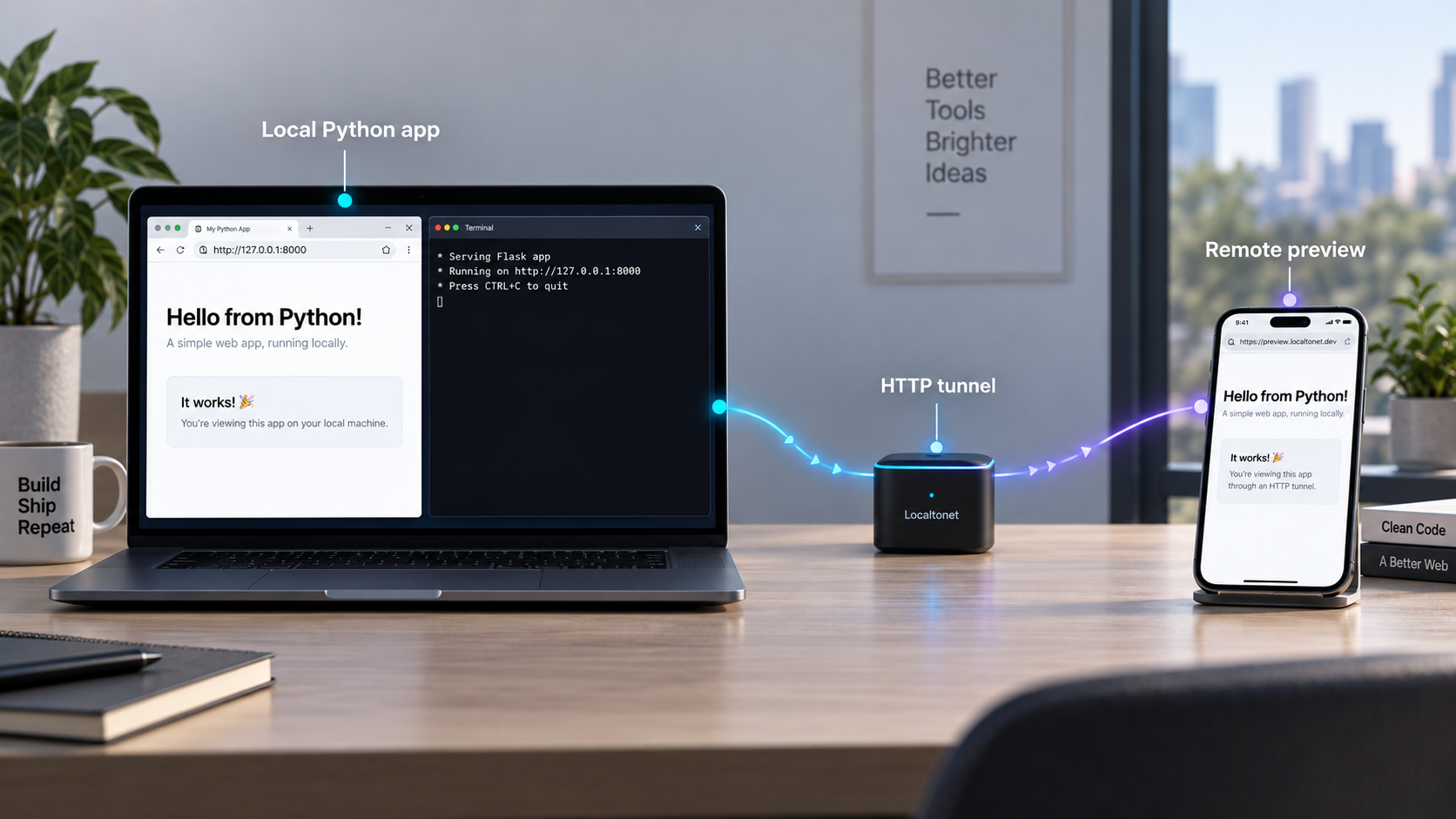
Turn a local Python development server into a temporary public web endpoint
A Flask, Django, or FastAPI application does not always need to be deployed before someone else can test it. In this guide, we prepare each framework for local access, verify the application, and expose it through a Localtonet HTTP tunnel. The application continues running on your computer while our client creates an outbound connection and provides the public address. This workflow is useful for remote previews, webhook development, mobile testing, API integrations, and short-lived collaboration without inbound router port forwarding, firewall changes, VPN setup, or a public IP address.
📋 What's in this guide
What it means to expose a local Python application
When Flask, Django, or FastAPI starts a web server on your computer, the application normally listens on a local network address and port. A browser on the same computer can reach that listener through an address such as http://127.0.0.1:5000 or http://127.0.0.1:8000. A remote browser, webhook provider, or mobile device outside that computer cannot normally use the loopback address because 127.0.0.1 always refers to the device making the request.
With Localtonet, the Python application remains on your machine. Our client runs on a device that can reach the application and establishes an outbound connection to a Localtonet relay server. An HTTP tunnel maps the resulting public URL to the local IP address and port where the Python server is listening. Requests arriving through that URL are forwarded to the local application, and its responses travel back through the tunnel.
This is exposure, not deployment. We do not copy your Python project into a hosted runtime, install its dependencies in the cloud, move its database, or keep the process alive after your computer disconnects. Your application, Python environment, files, and supporting services continue to run where you started them. The public endpoint is available only while the selected Localtonet client is connected, the tunnel is running, and the local application remains reachable.
WSGI and ASGI in practical terms
Python web frameworks use standard interfaces between application code and a web server. WSGI is the long-established synchronous interface commonly associated with Flask and traditional Django deployments. ASGI is the newer asynchronous interface used by FastAPI and supported by modern Django versions. ASGI can also support patterns such as long-lived connections and asynchronous request handling when the framework, server, and application are designed for them.
The distinction matters when choosing how to start the application, but it does not change the basic Localtonet configuration. Our HTTP tunnel targets an IP address and TCP port. It does not import your Flask object, Django settings module, or FastAPI application object. Your chosen WSGI or ASGI server receives the forwarded HTTP request on the configured local listener.
| Framework | Typical interface | Common local server | Tunnel target |
|---|---|---|---|
| Flask | WSGI | Flask development server during development | The local address and port printed when Flask starts |
| Django | WSGI or ASGI, depending on the server and application | Django development server during development | The address and port printed by runserver |
| FastAPI | ASGI | An ASGI server such as Uvicorn | The address and port on which the ASGI server listens |
Flask, Django, Uvicorn, or another application server executes the Python code and produces HTTP responses. Localtonet provides connectivity between the public endpoint and that existing local listener. Starting a tunnel does not start the Python application, and restarting the application does not automatically create or start a tunnel.
Prerequisites and information to collect
Before creating the tunnel, make sure the application works locally. Tunnel configuration is much easier to diagnose when the framework, dependencies, routes, templates, database connection, and static assets are already functioning on the development computer.
You need a supported Python installation for your project, the project dependencies installed in its intended environment, and a known command for starting the application. Using a virtual environment is recommended because it isolates framework and server packages from other Python projects. The exact supported Python version and dependency set belong to your application, so check its project metadata rather than assuming that every Flask, Django, or FastAPI project uses the same versions.
You also need the Localtonet client installed and running on the device that can reach the Python service. If the client and application are on the same computer, a loopback target such as 127.0.0.1 is usually the narrowest useful listener. If the client is on another machine, container, or virtual environment, the target must be an address that is actually reachable from that client.
- Application entry point: identify the Flask application, Django project, or FastAPI application object used by the startup command.
- Local IP address: record the interface where the server listens, such as
127.0.0.1. - Local port: record the actual port shown by the application server.
- Test route: choose a harmless route such as a health endpoint or home page for verification.
- Localtonet device: install and run our client on the device that can reach the target.
- Device token: use the device-specific authentication token from your account and never place it in source code, screenshots, logs, or shared instructions.
- Relay selection: obtain currently available server or region choices from the dashboard rather than copying a value from an old guide.
Review the application before making it public. Remove debug pages that disclose environment variables, configuration, file paths, stack traces, request headers, database details, or credentials. Keep secret keys, Localtonet device tokens, API keys, and private callback secrets out of URLs and source examples.
Understand local bind addresses
A server bound to 127.0.0.1 accepts connections only through that machine's loopback interface. This is usually appropriate when both the Localtonet client and Python application run on the same host. A server bound to 0.0.0.0 listens on all available IPv4 interfaces. That can make it reachable from other machines on the local network, depending on host firewall and network policy.
Binding to 0.0.0.0 does not mean that clients browse to http://0.0.0.0:PORT. It is a server-side wildcard indicating which interfaces should accept connections. For local verification, use a concrete address such as 127.0.0.1 or the machine's applicable network address.
Do not broaden the listener merely because a public tunnel is being used. If our client runs on the same host, keep the service on loopback unless the application has another documented networking requirement. If the client runs in a container or on another device, determine a reachable target deliberately and apply the least network exposure needed.
Start Flask, Django, or FastAPI locally
The examples below show conventional development workflows. Project layout, module names, settings, dependency managers, and server choices vary, so substitute the names used by your project. Run commands from the project directory with the correct virtual environment active.
Flask
A minimal Flask module can define an application object and a route. In this example, the module is named app.py and the application object is named app.
from flask import Flask

app = Flask(__name__)

@app.get("/")
def index():
    return {"status": "ok", "framework": "flask"}
With Flask installed in the active environment, start the development server by identifying the module:
flask --app app run
Read the startup output and record the exact local URL. A conventional Flask development server commonly uses 127.0.0.1:5000, but command-line options, environment configuration, project wrappers, or an occupied port can change that value. The output from your running process is authoritative for the tunnel target.
If the Localtonet client runs on a different device and your security policy permits local-network access, Flask can be given an explicit host. Only use an all-interface listener when it is actually required:
flask --app app run --host 0.0.0.0 --port 5000Flask's development server is intended for development. A public tunnel does not turn it into a production server or add production process management. For sustained or production traffic, choose and configure a suitable WSGI server and deployment architecture according to your application's requirements.
Django
A Django project normally includes manage.py. Run pending project-specific setup, including migrations when required by that project, before starting the development server. Then use:
python manage.py runserver
Django commonly starts its development server on 127.0.0.1:8000. Confirm the address printed in the terminal rather than relying on that conventional value. An explicit address and port can be supplied when the Localtonet client must connect through another reachable interface:
python manage.py runserver 0.0.0.0:8000
Django validates the incoming HTTP host against ALLOWED_HOSTS. A request sent through a public tunnel can therefore be rejected even while the local URL works. Add only the public hostname that Django needs to accept. Do not use a wildcard merely to silence an error.
ALLOWED_HOSTS = [
    "your-assigned-public-hostname.example"
]
The hostname above is intentionally a placeholder. Replace it with the hostname from the public URL assigned to your running tunnel. Do not include https://, a path, or a trailing slash in ALLOWED_HOSTS.
If a public page submits a form or sends another unsafe browser request protected by Django's CSRF checks, Django may also require the complete HTTPS origin in CSRF_TRUSTED_ORIGINS:
CSRF_TRUSTED_ORIGINS = [
    "https://your-assigned-public-hostname.example"
]
This setting is not required for every route. Add it only when the public origin must legitimately submit CSRF-protected requests. Keep the list narrow and remove temporary entries when the sharing session ends.
Detailed error pages can reveal settings, local paths, request data, code context, and other sensitive information. A temporary tunnel is still a public network path. Use an appropriate non-debug configuration whenever anyone outside your trusted development group can reach the URL.
FastAPI
FastAPI is an ASGI framework. A minimal module named main.pyapp:
from fastapi import FastAPI

app = FastAPI()

@app.get("/")
async def root():
    return {"status": "ok", "framework": "fastapi"}

@app.get("/health")
async def health():
    return {"status": "healthy"}
Start the application with an ASGI server such as Uvicorn:
uvicorn main:app
Here, main is the module and app is the object inside it. Uvicorn conventionally listens on 127.0.0.1:8000 unless its configuration says otherwise. Confirm the startup output before configuring Localtonet.
During active local development, automatic reload can be useful:
uvicorn main:app --reloadReload mode monitors source files and restarts the worker when code changes. It is a development convenience, not a production process model. A restart may briefly interrupt requests passing through the tunnel.
If our client cannot reach loopback because it runs in another container or device, Uvicorn can listen on all IPv4 interfaces:
uvicorn main:app --host 0.0.0.0 --port 8000As with Flask and Django, use this broader bind only when necessary. FastAPI's automatically generated documentation routes can reveal endpoint shapes and request schemas. Decide whether those routes should be reachable during a public test and apply application-level access controls where needed.
Verify the application before creating a tunnel
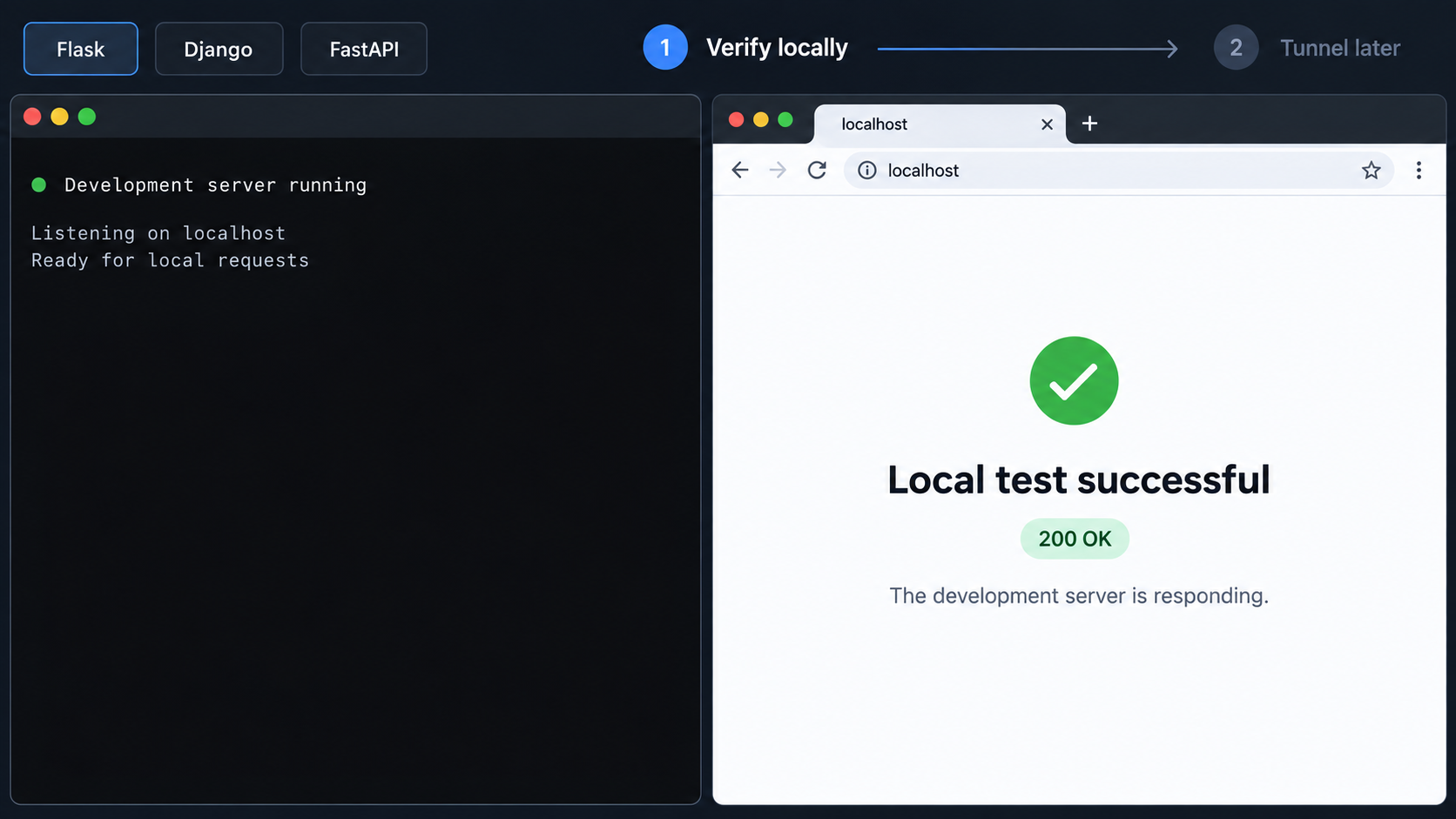
Local verification separates application failures from tunnel failures. Keep the Python process running and open the exact local URL printed by the server. Check a simple route first, then exercise the specific route that remote users or webhook providers will call.
A browser is sufficient for a basic page or GET endpoint. You can also use an HTTP client from the same machine:
curl -i http://127.0.0.1:8000/health
Change the port and path to match the application. For Flask's conventional development port, for example, the request might target http://127.0.0.1:5000/. Do not copy a sample port into the tunnel unless the running server actually uses it.
Confirm all of the following before continuing:
- The process remains running after startup and does not exit with an import or configuration error.
- The local request reaches the intended route and returns the expected status code.
- Templates, static assets, API responses, and database-backed operations needed for the test work locally.
- The terminal displays the incoming request, if the selected server logs requests.
- The application does not redirect the request to an unrelated internal hostname or port.
- The target address is reachable from the device running the Localtonet client.
Verify from the Localtonet client environment
If Python and our client run on the same operating system, a successful loopback request is normally a useful reachability test. Containers, virtual machines, remote development environments, and subsystem-based workflows introduce separate network namespaces. In those cases, 127.0.0.1 inside one environment may not refer to the service in another.
Test from the same environment where the Localtonet client runs. If that environment cannot open the local URL, the tunnel will not repair the underlying reachability problem. Correct the application's bind address, container port publication, host address, or network policy first. There is no single safe container hostname or gateway address that applies to every operating system and runtime, so use values established by your actual environment rather than guessing.
A lightweight route that returns a small response helps distinguish networking from application logic. Once that route works both locally and publicly, move on to authentication, file uploads, database operations, webhooks, or other complex behavior.
Create and start the Localtonet HTTP tunnel
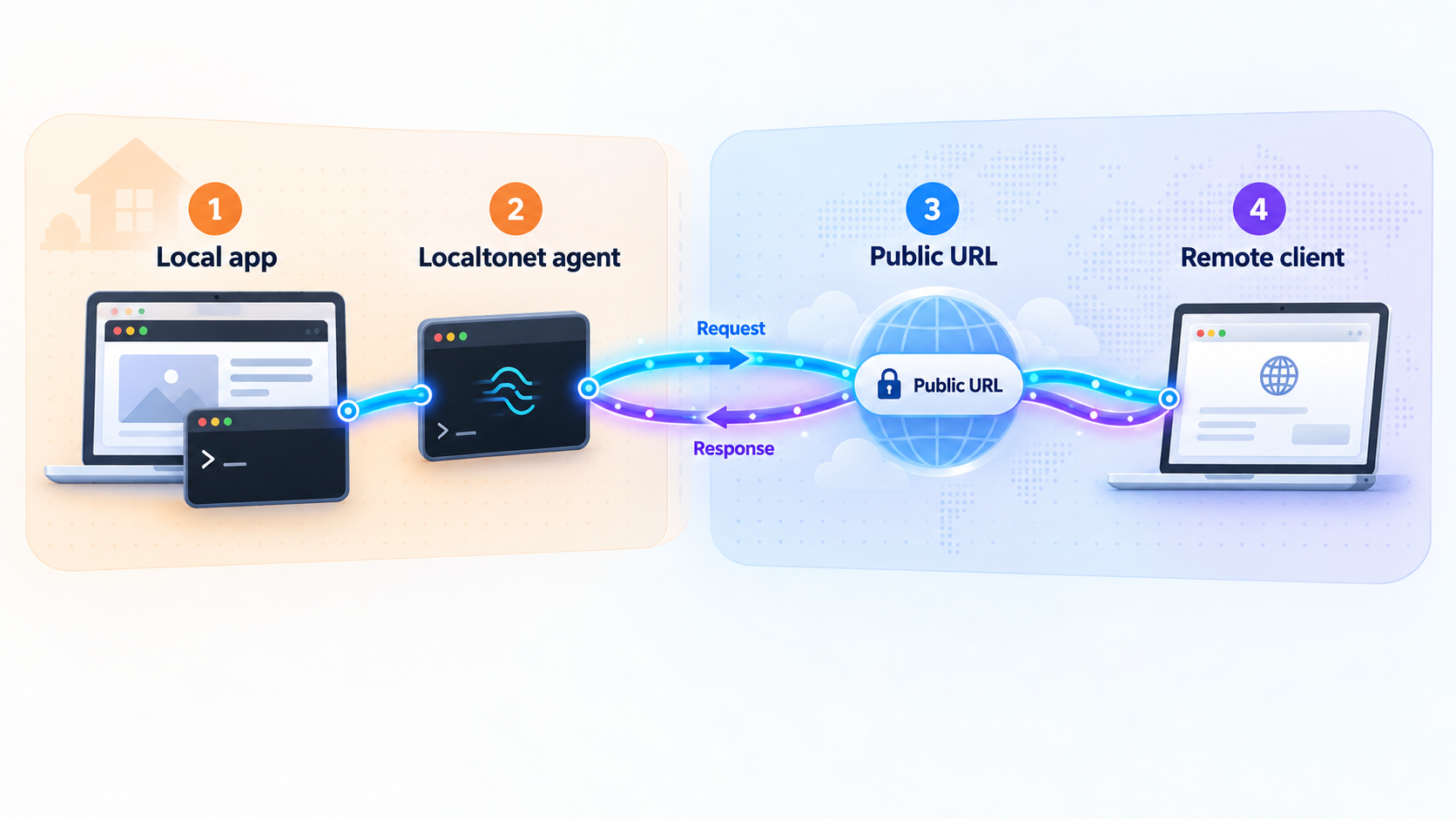
After the application is reachable locally, configure an HTTP tunnel to its listener. The sequence below follows our documented platform workflow. Dashboard availability, relay choices, and options can vary, so use the current values shown in your account rather than hardcoding a server code or assuming that every option is included in every plan.
Install and run the Localtonet client
Install our client for the operating system on the device that can reach the Python application. Start the client and keep it running for the duration of the remote session. The tunnel cannot remain available after the selected device disconnects.
Authenticate and select the client device
Use the device-specific authentication token associated with the client that will run the tunnel. Treat the token as a credential. Do not paste it into application code, commit it to a repository, or include it in public troubleshooting output.
Select an available relay server
Choose from the server or region values currently offered in the dashboard. Available values can change and may vary by account or plan, so this guide does not prescribe a server code.
Create an HTTP tunnel for the local address and port
Configure an HTTP tunnel whose local target matches the Python server. When both processes run on the same host, this may be 127.0.0.1 and the port printed by Flask, Django, or Uvicorn. HTTP tunnels can use a random subdomain, a custom subdomain where supported, or a custom domain. Check the current dashboard and documentation for availability and any custom-domain DNS requirements.
Start the tunnel and copy its public URL
Creating a tunnel does not make it run. Use the Start button, wait for the tunnel to become active, and then use the assigned public URL. Open that URL from a separate browser session or remote device and compare the result with the local application.
Stop or delete the tunnel after testing
Stop the tunnel when remote access is no longer required. Delete it if the configuration should not be reused. Also stop the development server and remove temporary host, origin, callback, or authentication settings that are no longer needed.
For the current dashboard sequence and available options, consult our Localtonet HTTP tunnel documentation. The documentation supplements the workflow above, but the central requirement remains simple: the selected client must be able to reach the exact local IP address and port configured as the target.
Test the public endpoint
Open the assigned URL in a private browser window or on a device that is not relying on the development machine's loopback interface. For an API, send a request to a known route:
curl -i https://your-assigned-public-hostname.example/healthReplace the placeholder with the actual URL assigned to your tunnel. Compare the public response status, body, and headers with the local result. Watch the Python server terminal while making the request. If the request appears in the local server log, tunnel connectivity is working and any remaining error is likely within the application or its host, origin, authentication, or proxy handling.
Handle the public URL, host, scheme, and forwarded information
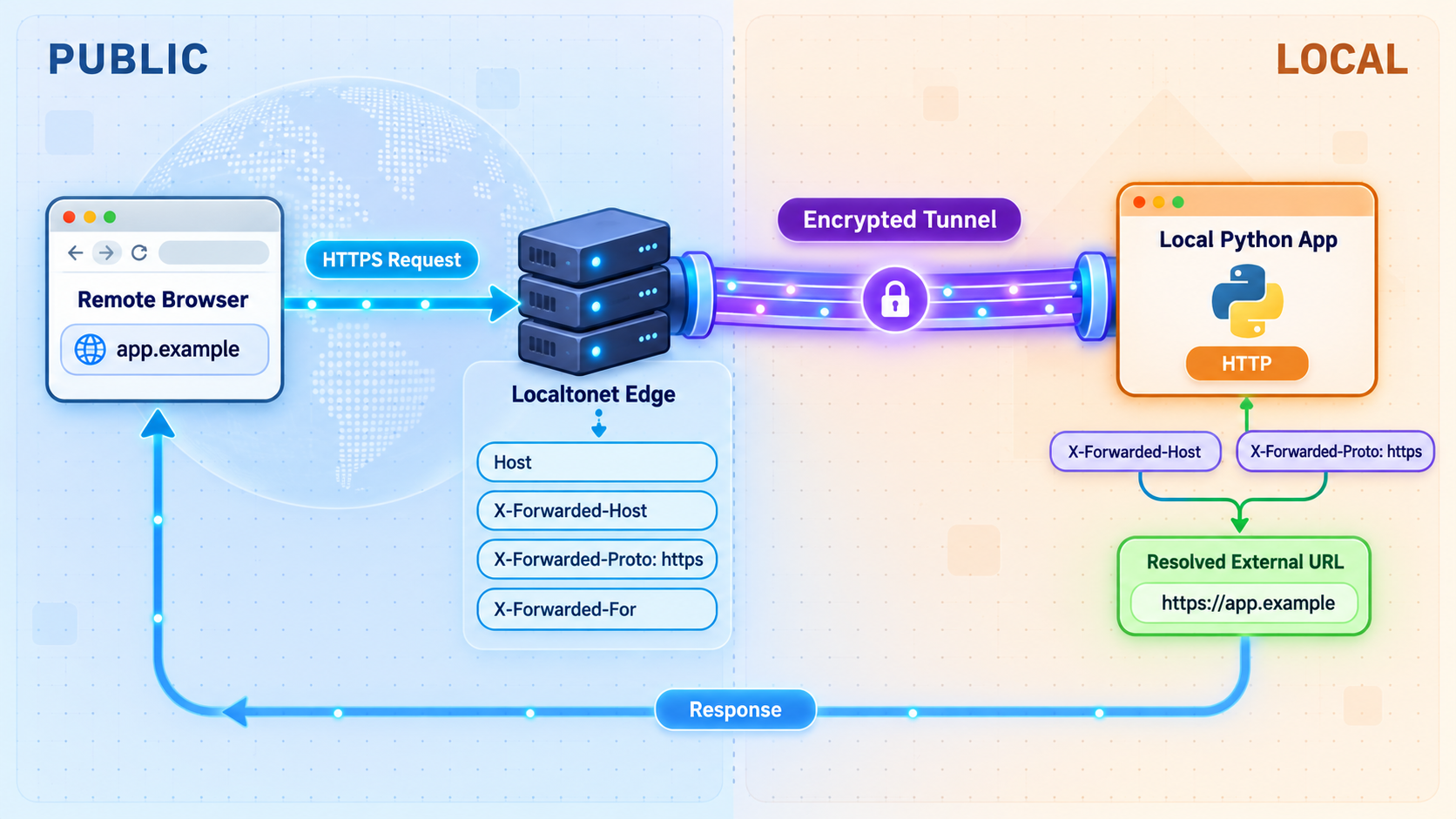
A tunneled request differs from a direct local request in several important ways. The browser uses a public hostname rather than 127.0.0.1, and the public-facing scheme can be HTTPS even though the application receives traffic on its local HTTP listener. Framework security checks, absolute URL generation, redirects, cookies, and OAuth callbacks may depend on these values.
Host validation
Django's ALLOWED_HOSTS is the most visible example of host validation, but any framework or middleware can enforce an allowlist. If the local route works while the public request returns a host-related error, add the exact public hostname to the application's trusted configuration. Avoid broad wildcards because they weaken the protection against unexpected Host headers.
HTTPS and absolute URLs
A browser reaches the public HTTP tunnel through its assigned public address. The local application may still see its immediate connection as HTTP because it is listening on a local HTTP port. An application that constructs an absolute redirect or callback from untrusted or incorrectly interpreted headers can therefore generate a URL with the wrong scheme or hostname.
WSGI and ASGI servers can expose proxy-related information to frameworks, but the exact trusted-proxy configuration depends on the server, framework, middleware, and network path. Do not enable every proxy-header trust option globally without understanding which peers and headers are trusted. An overly broad configuration can allow clients to influence scheme, host, or client-address decisions that the application uses for security.
Proxy headers can affect secure-cookie behavior, redirect generation, IP-based controls, audit logs, and origin checks. Configure the framework or application server according to its version-specific documentation, restrict trusted proxies where supported, and test the resulting scheme and host values. Localtonet configuration alone does not determine how your application interprets every forwarded header.
Webhook callback URLs
For webhook testing, append the application's route to the assigned public base URL. If the application handles callbacks at /webhooks/provider, the provider should receive a URL in this form:
https://your-assigned-public-hostname.example/webhooks/providerConfigure the provider's expected HTTP method and any signing secret according to that provider's requirements. A successful browser GET does not prove that a webhook POST, signature check, content type, or request body parser is correct. Send a provider test event and inspect both the provider's delivery result and the local application logs.
A temporary URL may also need to be registered as an OAuth redirect URI, CORS origin, CSRF-trusted origin, or external callback base. These are application and integration settings, not tunnel settings. If the public hostname changes, update the affected allowlists. Remove obsolete entries when the tunnel is no longer used.
Cross-origin browser requests
CORS applies when browser JavaScript loaded from one origin calls another origin. It does not control ordinary server-to-server webhook requests, and it is not a substitute for authentication. If a remote front end calls the tunneled API, allow only the origins, methods, and headers that workflow requires. Avoid enabling unrestricted origins together with credentials.
Secure a temporarily public development application
A public tunnel should be treated as internet exposure, even when it exists for only a few minutes. A difficult-to-guess URL is not an authorization system. Anyone who obtains the address may be able to send requests until the tunnel is stopped or the application denies them.
| Risk | Why it matters | Recommended control |
|---|---|---|
| Interactive debug mode | Error pages can reveal code, paths, configuration, request data, or other sensitive details. | Disable detailed debug behavior before sharing the endpoint with untrusted users. |
| Unauthenticated routes | A public address can be used by anyone who discovers or receives it. | Require application-level authentication and apply least privilege. |
| Write or delete operations | Development APIs may modify real files, records, or connected services. | Use isolated test data, narrow permissions, and disable unnecessary operations. |
| Webhook forgery | An attacker can imitate a webhook POST if the application trusts every request. | Verify the provider's documented signature or authentication mechanism. |
| Broad host or origin allowlists | Wildcards can weaken host, CSRF, or browser-origin protections. | Add the exact required hostname or origin and remove it after testing. |
| Long-lived tunnel access | An endpoint left running extends the period in which it can be reached. | Stop or delete the tunnel immediately after the intended session. |
Use application-level authorization
Protect administrative pages, write endpoints, preview environments, and sensitive API routes with real authentication. Where possible, create a limited test account rather than sharing an administrator credential. Authorization should be enforced by the application for every protected operation, not just hidden in the user interface.
IP restrictions can be useful in some architectures, but confirm how the application obtains the client address before relying on them. Proxying changes the network path, and blindly trusting a client-supplied forwarding header can make an IP rule ineffective.
Isolate test data and dependencies
A locally running application may still connect to production databases, object stores, email services, payment systems, or internal APIs. Before exposing it, check every configured dependency. Prefer disposable records, sandbox credentials, non-production queues, and accounts with narrowly scoped permissions.
Be especially careful with webhook routes that trigger side effects. Providers may retry failed deliveries, users may refresh pages, and automated systems may send the same event more than once. Design handlers to validate requests and, where appropriate, handle duplicate event delivery safely.
Protect device tokens and application secrets
The Localtonet device token identifies the client device and must remain private. It should not appear in Python settings, environment examples committed to a repository, screenshots, support posts, or browser-delivered code. The same principle applies to Flask secret keys, Django secret keys, JWT signing material, database passwords, OAuth client secrets, and webhook signing secrets.
If a secret is accidentally disclosed during testing, stopping the tunnel is not sufficient remediation. Rotate the affected credential through the system that issued it, update the application, and review logs or activity where available.
Troubleshooting common Flask, Django, and FastAPI tunnel problems
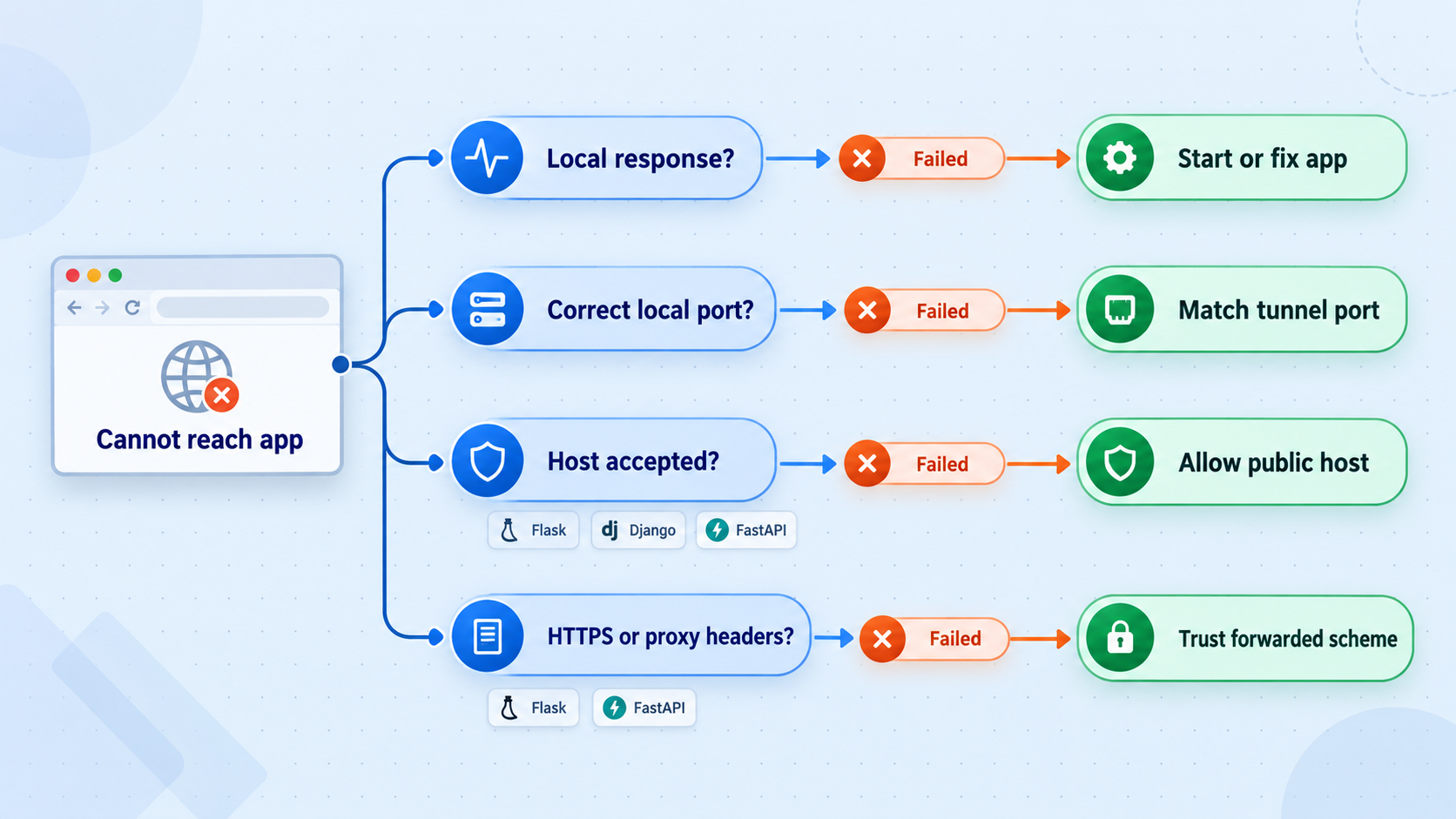
The public URL returns a connection or gateway error
First verify that the Python process is still running. Then test the configured target locally from the environment where the Localtonet client runs. The most common causes are a stopped process, wrong port, wrong target address, or a service listening only inside another container or virtual machine.
Confirm that the tunnel targets the port currently printed by the server. If a development server restarted on a different port, the existing tunnel configuration will still point to the old one. Also verify that the selected Localtonet client is connected and that the tunnel itself was started. Creating it without pressing Start does not make the public endpoint active.
The local URL works, but Django rejects the public request
Inspect the Django error and server log. If it reports an invalid HTTP host, add the exact public hostname to ALLOWED_HOSTS. If a browser form or unsafe request fails CSRF origin checks, add the complete HTTPS origin to CSRF_TRUSTED_ORIGINS only when that origin is genuinely trusted.
Restart the Django development server if your settings-loading workflow requires it, then test again. Do not solve either issue by disabling the protection globally.
Redirects point to localhost or use HTTP instead of HTTPS
Determine whether the redirect is hardcoded, derived from application settings, or generated from request information. Replace hardcoded development callback URLs with configuration appropriate to the temporary public endpoint. If the framework is interpreting proxy information incorrectly, follow the version-specific guidance for the WSGI or ASGI server in use.
Do not indiscriminately trust forwarding headers from every source. After changing proxy handling, inspect a diagnostic endpoint or application log to confirm the resulting scheme and host, then remove any temporary diagnostics that expose request internals.
HTML loads, but CSS, JavaScript, or images do not
Open the browser's network panel and inspect failed asset URLs. Absolute asset links may still point to localhost, an internal hostname, or the wrong scheme. Relative links normally follow the current public origin, but framework static-file configuration and front-end build settings can override them.
Also check whether the application expects a separate development asset server. If the page references another local port, tunneling only the Python application does not automatically expose that second service. Decide whether to proxy assets through the application, configure the front-end build for the public origin, or create a separate, appropriately secured tunnel for the additional service.
A webhook provider reports a timeout
Confirm that the provider uses the correct public URL, path, and HTTP method. Watch the local server log while sending a test event. If no request appears, verify tunnel state and provider configuration. If the request appears but the provider times out, the handler may be waiting on a database, debugger breakpoint, external API, or slow task.
Webhook providers often expect a prompt success response and may retry failures. Move lengthy work out of the immediate request path when the application's design requires it. The exact timeout and retry behavior belongs to the provider, so consult its current integration settings rather than assuming a universal value.
The webhook arrives, but signature verification fails
Verify the request using the provider's documented algorithm and the exact raw body expected by that algorithm. Parsing and re-serializing JSON before verification can change whitespace or ordering. Confirm that the correct signing secret is loaded into the local process and that the application is reading the correct signature header.
Do not log the secret or full sensitive payload merely to diagnose the failure. Log safe metadata such as event identifiers, content type, body length, and verification outcome.
FastAPI works locally but its browser client is blocked by CORS
CORS is enforced by browsers based on the page's origin. Add the exact front-end origin to the application's CORS configuration and permit only the methods and headers it needs. A command-line HTTP client may succeed while a browser fails because command-line clients do not apply browser CORS policy.
Changes are not appearing
Confirm whether the server is running with a reload mechanism. If not, restart it after changing source code or settings. Browser caching, service workers, template caching, and front-end build output can also preserve an older result. Test a simple response value, inspect the server process start time, and use the browser network panel before assuming the tunnel is caching content.
The endpoint disappears unexpectedly
The public endpoint depends on three live components: the Python application, the selected Localtonet client, and the running tunnel. A laptop sleeping, losing connectivity, stopping the client, restarting the server, or stopping the tunnel can interrupt access. This lifecycle is appropriate for temporary development access, but it is not a substitute for a deployment designed for continuous availability.
Frequently asked questions
Does exposing Flask, Django, or FastAPI with Localtonet deploy the application?
No. The Python application, dependencies, files, and supporting services continue to run on your device. Our HTTP tunnel forwards requests from a public URL to the local IP address and port. Access stops if the application, selected client, or tunnel stops running.
Do I need to bind the Python server to 0.0.0.0?
Not when the Localtonet client can reach the application through loopback on the same host. In that case, 127.0.0.1 is usually the narrower choice. A broader listener may be necessary when the client runs in another container, virtual machine, or device, but it can also expose the server to the local network. Use the least broad listener that satisfies the actual topology.
Can I use a Localtonet HTTP tunnel for webhook testing?
Yes. Append the local webhook route to the assigned public URL and register that complete URL with the provider. Validate the provider's authentication or signature, use test data, account for retries, and stop the tunnel after the session. A successful page load does not replace testing the provider's real HTTP method, headers, payload, and signature behavior.
Why does Django show an invalid Host header error through the tunnel?
The public request uses the tunnel's hostname, which may not be present in Django's ALLOWED_HOSTS. Add the exact hostname without the scheme or path. Keep the allowlist narrow instead of using a wildcard. Browser form submissions may separately require the complete HTTPS origin in CSRF_TRUSTED_ORIGINS.
Does a public URL make a development server production-ready?
No. The tunnel provides connectivity, not production process management, scaling, application hardening, data isolation, or continuous availability. Flask and Django development servers and Uvicorn reload mode remain development tools. Use an appropriate server and deployment architecture for production workloads.
Can I use the public URL from a phone on another network?
Yes, while the client is connected, the tunnel is running, and the local application is reachable. This is useful for checking responsive layouts and browser behavior without placing the phone on the same local network. Authentication and other application security controls still apply.
What happens when I stop the Localtonet client or tunnel?
The public endpoint can no longer forward requests through that tunnel. The local Python application may continue running and remain accessible locally. Start the appropriate client and tunnel again when remote access is needed.
Should I use an HTTP tunnel or a raw TCP tunnel for these frameworks?
For a conventional Flask, Django, or FastAPI web application, use an HTTP tunnel because the service speaks HTTP and remote users need a web URL. Raw TCP tunnels are intended for services that need direct TCP forwarding rather than an HTTP-oriented public endpoint.
Expose your local Python application with Localtonet
Start the Flask, Django, or FastAPI application on a verified local address and port, connect the device to our platform, and create an HTTP tunnel when a remote preview or callback endpoint is needed. Keep access temporary, authenticated, and limited to test data.
Get Started Free →

