

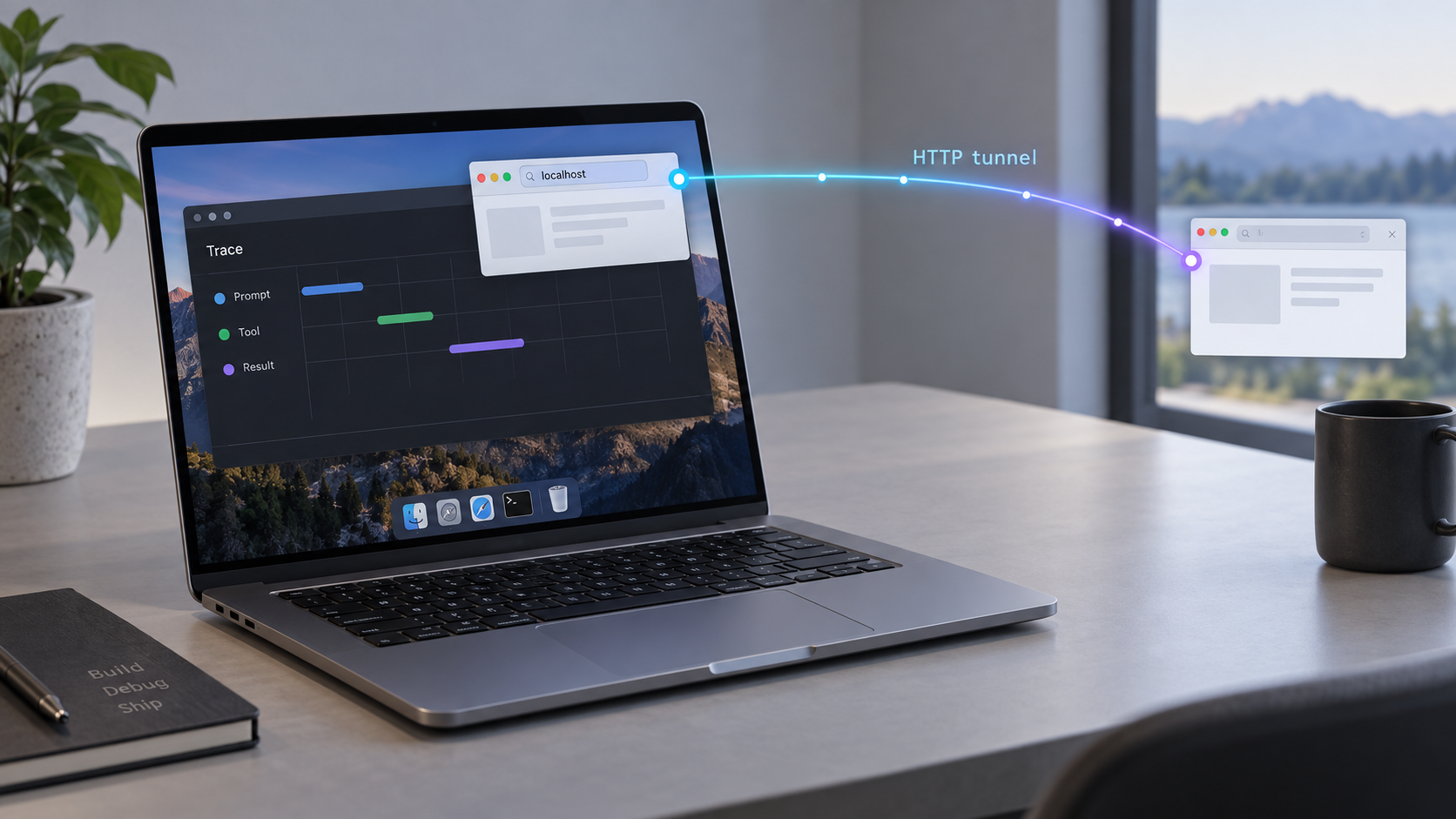
Turn local Claude Code session logs into a browser-based debugging workspace you can reach when you need it
Claude Code Trace reads the JSONL session history stored on your Mac and presents conversations, tool calls, timestamps, token data, MCP activity, and live sessions in a more usable interface. This guide starts with the macOS installation, explains the available interface modes, verifies the local browser service, and then connects that working service through a Localtonet HTTP tunnel. Because Claude Code traces can contain source code, prompts, file paths, tool output, and other sensitive development information, the remote-access portion also emphasizes controlled, temporary exposure.
📋 What's in this guide
What Claude Code Trace does
Claude Code stores local session history as JSONL files under ~/.claude/projects/. Although those files can be opened with ordinary text-processing tools, raw JSONL is inconvenient for following a long conversation or understanding how an agent used its tools. Claude Code Trace converts those records into a navigable session viewer.
The viewer can render conversations, display timestamps and available token counts, expand tool calls, recognize Model Context Protocol tool calls, search sessions by user message, and follow active sessions through live tailing. Its focus is local Claude Code history rather than a general-purpose telemetry pipeline. The project provides desktop, browser, and terminal interfaces, so the appropriate mode depends on where and how you want to inspect the logs.
For the workflow in this guide, Web Mode is the important interface. It gives the application a local browser endpoint that can first be tested from the Mac itself. Once that local endpoint works, the Localtonet client can connect it to a public HTTPS address through an outbound tunnel. This ordering matters because it separates application problems from tunnel problems.
Local viewing and remote access are separate decisions
Installing Claude Code Trace does not mean its browser interface must be published to the internet. The desktop application or a local-only Web Mode session is usually the safest default. A tunnel is an additional step for situations where you deliberately need to inspect the interface from another device or location.
With Localtonet, the client on your Mac establishes an outbound connection to one of our relay servers. You do not need inbound router port forwarding, a public IP address, firewall changes, or a VPN setup for a standard HTTP tunnel. The tunnel remains available only while the selected client is connected and the tunnel is running.
A trace may contain prompts, generated code, shell commands, tool arguments, filesystem paths, error output, repository details, environment information, or text copied from private files. Review the sensitivity of your sessions before enabling remote access. Do not assume that a hard-to-guess public URL is an authorization mechanism.
Prerequisites for this macOS workflow
Prepare the application and verify its data source before working on remote access. This prevents a tunnel from obscuring basic installation, filesystem, or application issues.
| Requirement | Why it is needed | What to check |
|---|---|---|
| Apple Silicon Mac | The documented one-line macOS installer supports Apple Silicon. | Confirm the Mac uses Apple silicon before choosing this installation path. |
| Claude Code session data | The viewer reads JSONL session files from the local Claude Code projects directory. | Confirm that ~/.claude/projects/ exists and contains the sessions you expect to inspect. |
| Terminal access | The documented macOS installation method is a shell command that downloads and runs the installer. | Use a macOS account that can install the application into /Applications. |
| A local web browser | The browser is used to test Web Mode before any public tunnel is created. | Make sure the local endpoint can be opened directly on the Mac. |
| Localtonet client and account | The client creates the outbound connection used by the HTTP tunnel. | Install and run the client only after the Claude Code Trace endpoint works locally. |
Check the expected Claude data directory
Claude Code Trace expects Claude Code project sessions under ~/.claude/projects/. The tilde represents the current user's home directory. The application needs to run as the same macOS user that owns or can read those files. If you have used Claude Code under a different account, container, virtual machine, or remote host, the local Mac may not contain the session history you expect.
Avoid changing permissions broadly just to make the viewer work. First confirm that you launched the application as the intended user and that the expected files are actually present. Granting unnecessary read access to development logs can expose information to other local processes or users.
The documented one-line macOS installer is identified as Apple Silicon only. The supplied project evidence does not establish an equivalent prebuilt Intel macOS package or a verified Intel-specific command. If you are using an Intel Mac, do not run an unverified replacement command. Consult the current project release information or evaluate a documented source-build path that matches your environment.
Install Claude Code Trace on macOS
The documented macOS path downloads the latest release and installs Claude Code Trace.app into /Applications. It does not require cloning the repository or installing build tools. The project distributes the macOS application as a compressed application bundle rather than a DMG.
Confirm that the Mac uses Apple silicon
Use this installer only on the platform documented by the project. If the machine is an Intel Mac, stop here and use a currently documented compatible installation path rather than assuming the same binary will work.
Review the installer before executing it
The one-line method retrieves a shell script and sends it to Bash. In a security-conscious environment, open and inspect the referenced script first so you understand the download and installation actions. This is especially appropriate on a development machine with access to private repositories or credentials.
Run the documented macOS installer
Open Terminal and run the following project-provided command. It downloads the latest release and places the application in /Applications.
curl -fsSL https://raw.githubusercontent.com/delexw/claude-code-trace/main/script/install-macos.sh | bashLaunch the installed application
Open Claude Code Trace from Spotlight or from the Applications folder. Confirm that the application starts before attempting Web Mode or a Localtonet tunnel.
Confirm that sessions are visible
Verify that the viewer can read the expected Claude Code history. Open a known session, inspect its conversation, and expand a tool call if one is available. If the application opens but displays no expected sessions, troubleshoot the local data path before continuing.
Why the installer does not require an xattr workaround
According to the project's installation documentation, the installer downloads the application in a way that does not set the macOS downloaded-file quarantine flag. The project therefore does not instruct users to remove quarantine attributes manually. Do not add broad xattr or Gatekeeper-disabling commands to this workflow when the documented installation method does not require them.
Alternative installation approaches
The project also documents source and Docker-oriented workflows, while Linux and Windows have their own prebuilt packages. For this macOS tutorial, the one-line application installer is the most direct route because it provides the installed application and avoids introducing a compiler toolchain.
Docker is useful when you specifically want a containerized browser service. The documented container pattern builds the project image, mounts the host's ~/.claude directory read-only, publishes container Web Mode on host port 1421, and is then opened at http://localhost:1421. A read-only mount is important because the viewer should not need to modify the underlying Claude Code history simply to display it.
A correct container command must preserve the project's expected container path, working directory, image build context, and runtime behavior. Those exact details should be copied from the current project repository rather than reconstructed from assumptions. The reliable facts for planning are that Docker Web Mode uses host port 1421 in the documented example and that ~/.claude is mounted read-only.
Start Claude Code Trace Web Mode
The installed application's documented browser endpoint is http://localhost:1420. This is distinct from the Docker example, which publishes the service at http://localhost:1421. Use the port that belongs to the installation mode you actually started.
Launch the installed application and start its documented Web Mode. The available evidence establishes the endpoint but does not establish a stable command-line flag or a version-independent name for every UI control. We therefore do not provide a guessed terminal command or fabricated button label. Use the Web Mode action shown by your installed release, keep the application running, and continue with local browser verification.
| Interface or service | Documented endpoint | Role in this guide |
|---|---|---|
| Installed application Web Mode | http://localhost:1420 |
Primary local browser endpoint for the macOS application workflow. |
| Docker Web Mode example | http://localhost:1421 |
Alternative container-oriented browser endpoint when the documented Docker workflow is used. |
| Separate HTTP API | Port 11423 |
Credentialed API service, not the primary browser interface and not the target used in this tutorial. |
Claude Code Trace also has an HTTP API on port 11423 that requires signed accepted-client credentials. That API is not the browser UI endpoint described here. Pointing an HTTP tunnel at the wrong port can expose a different interface and will not produce the intended Web Mode experience.
Choose one active endpoint
Do not alternate between ports simply because one fails. If you installed and started Web Mode through the macOS application, begin with port 1420. If you intentionally followed the project's Docker workflow, use the published host port 1421. A connection failure usually means the corresponding service is not running or is not listening where expected.
The hostname localhost means the same machine making the request. When the browser and application are both on your Mac, that is appropriate. For Localtonet, the client also needs to run on that Mac, or on another device capable of reaching the Mac's chosen address and port. Running both applications on the same Mac keeps the target simple and avoids introducing LAN routing and host-firewall questions.
Verify Claude Code Trace locally
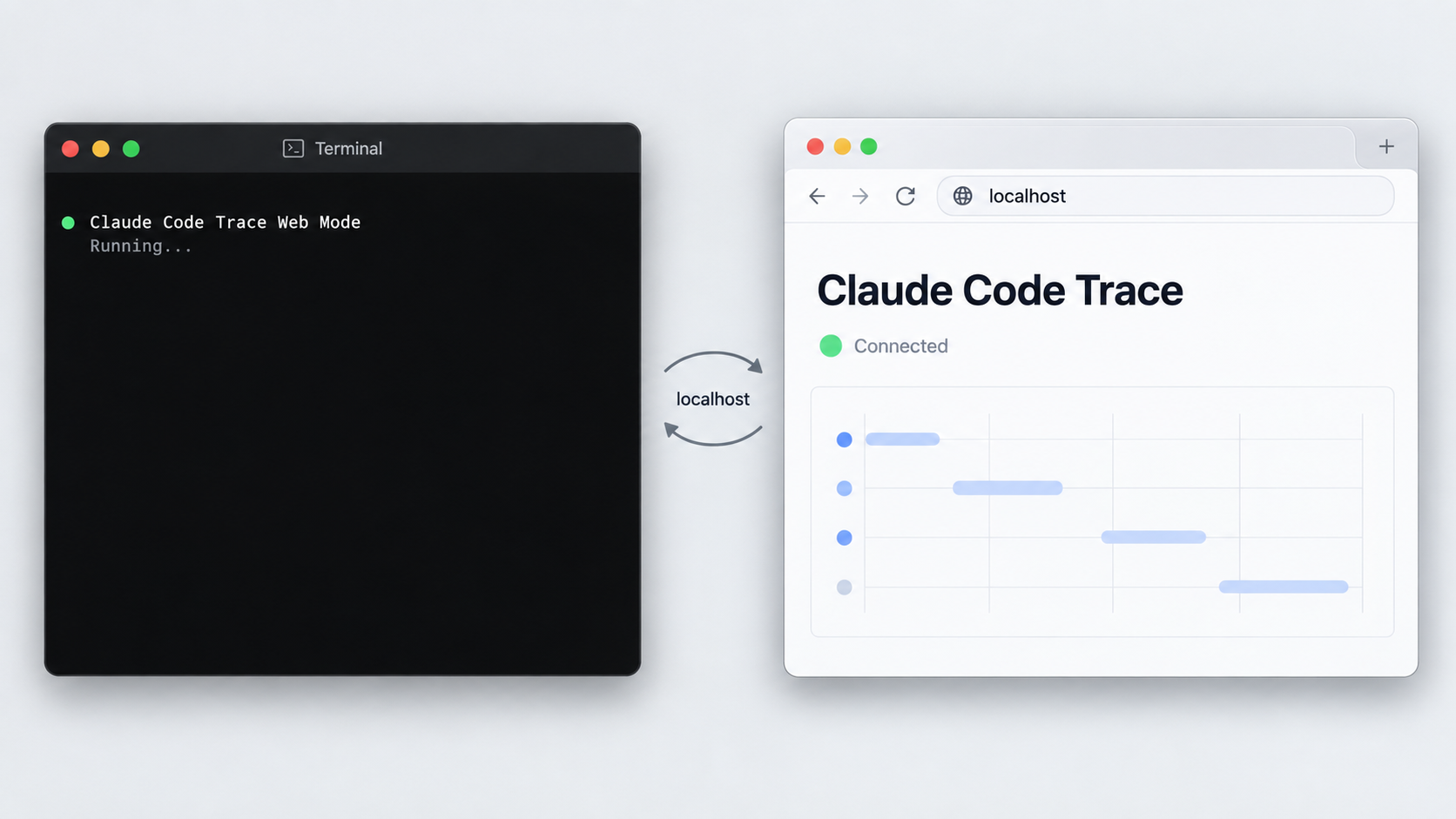
Local verification is the most important diagnostic checkpoint. A tunnel cannot make an inactive or broken local application healthy. It can only forward requests to a target that the Localtonet client can already reach.
Keep Claude Code Trace and Web Mode running
Do not close the application after enabling Web Mode. The local endpoint must remain active while you test it and while remote access is required.
Open the local browser address
For the installed macOS application, open http://localhost:1420. For the documented Docker workflow, open http://localhost:1421.
Load a known session
Select a session you recognize and verify that its messages render. This confirms more than a listening port: it shows that the application can access and interpret the local Claude Code data.
Test an interactive function
Search for a session, expand a tool call, or observe an active session through live tailing. This helps identify partial failures where the initial page loads but required data operations do not work.
What a successful local test proves
A successful local test confirms that Web Mode is running, the selected port is correct, the browser can communicate with the service, and Claude Code Trace can read at least one expected session. It does not prove that the future public URL is appropriately protected. Connectivity and authorization are separate concerns.
If the page does not open
First verify that Web Mode is still running. Then confirm that you chose the endpoint associated with your installation method. A macOS application workflow should not be tested against the Docker example port unless Docker is actually publishing that port.
If the page loads but the expected sessions are absent, check which macOS account launched Claude Code Trace and whether that account's ~/.claude/projects/ directory contains the data. If only recently active sessions appear incomplete, allow time for files to be read and ensure Claude Code has written the relevant records.
Current releases include background session indexing for large project directories. Instead of blocking while every session file is read, the picker can populate from newer sessions while indexing continues. A progress indicator reports session and byte progress. On a large history directory, an initially incomplete list may therefore represent ongoing indexing rather than missing data.
Connect Web Mode through a Localtonet HTTP tunnel
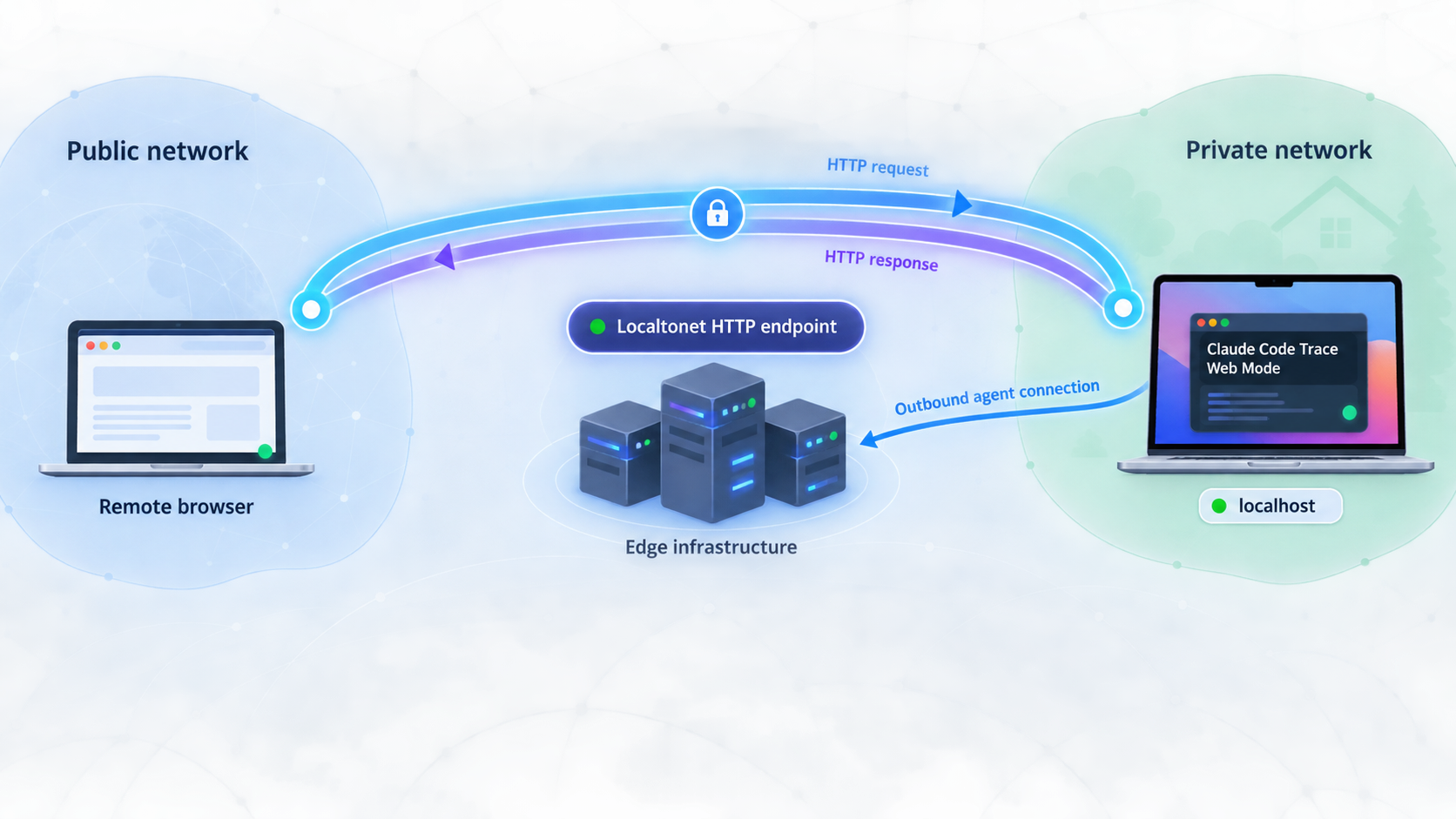
Proceed only after the local browser test succeeds. An HTTP tunnel is the appropriate Localtonet family for a browser-based HTTP service such as Claude Code Trace Web Mode. It provides a public HTTPS address that forwards requests to the configured local IP address and port.
The Localtonet client establishes the relay connection outbound from your Mac. This means you do not need to open an inbound router port or obtain a public IP address. Creating the configuration alone does not make it active. The tunnel must also be started, and it remains available only while the selected client is connected and the tunnel is running.
Install and run the Localtonet client on the Mac
Run our client on the same Mac as Claude Code Trace. This allows the tunnel to target the locally verified Web Mode endpoint without depending on another device or LAN route.
Authenticate or select the Mac with its device token
Use the device-specific token associated with the client that will run the tunnel. Treat this token as a secret. Do not paste it into documentation, screenshots, issue reports, shell history examples, or shared configuration files.
Select an available relay server
Choose a server or region currently offered in your Localtonet dashboard. Available values can vary, so this guide does not hardcode a server code or claim that every region is available on every plan.
Create an HTTP tunnel to Web Mode
Configure the local target as the Mac's local service and use port 1420 for the installed application workflow. If you deliberately used the documented Docker workflow, target the published host port 1421 instead. Choose the HTTP Process Type appropriate to your account, such as a random subdomain, supported custom subdomain, or custom domain. All three Process Types serve the content at a public HTTPS address.
Start the tunnel and test the assigned URL
Press Start, wait for the tunnel and selected client to be connected, and open the assigned public HTTPS URL from a separate browser context or remote device. Confirm that the same Claude Code Trace interface appears and that a known session can be opened.
For the current dashboard sequence and field definitions, consult our Localtonet HTTP tunnel documentation. Dashboard options can change, so the current interface remains authoritative for available servers, Process Types, and account-specific choices.
Saving an HTTP tunnel does not mean it is publicly reachable. The selected Localtonet client must be connected and the tunnel must be started. If the public address stops responding later, check both states before changing the Claude Code Trace configuration.
Which local address should you use?
When the Localtonet client and Claude Code Trace run on the same Mac, target the local service on that machine. The exact dashboard format should follow the current HTTP tunnel documentation. Do not substitute the Mac's public address, and do not configure router forwarding. The purpose of this workflow is for our client to reach the local service and carry traffic outward through the relay connection.
If Claude Code Trace is in Docker, remember that Localtonet targets the host-published port, not an unverified internal container address. Confirm http://localhost:1421 from the Mac first. If that address is unavailable locally, correct the container publication before troubleshooting Localtonet.
Protect sensitive Claude Code traces
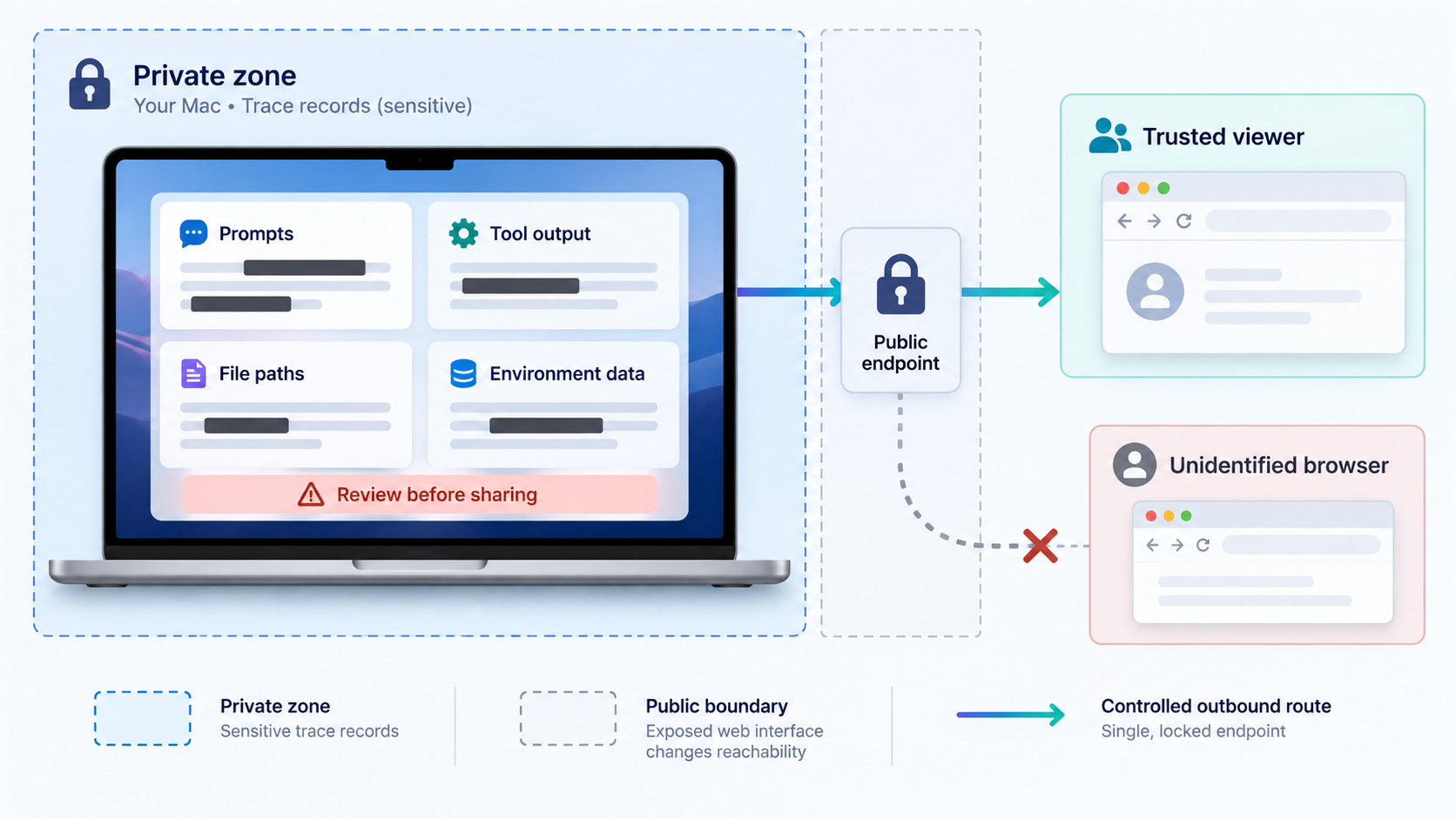
Remote access changes the risk profile of a local observability tool. On localhost, the service is ordinarily reachable only from the machine itself. A running HTTP tunnel creates a public address that can carry requests to the service. The content does not become harmless simply because HTTPS is used for the public address.
Before exposing Web Mode, decide whether the application itself provides adequate authorization for your current release and configuration. The supplied evidence does not establish a universal built-in Web Mode login or a Localtonet HTTP authentication option that can be documented here. We therefore do not claim that either layer automatically restricts viewers to you.
Do not publish credentials with troubleshooting material
A Localtonet device token identifies the client device and must remain private. Redact it from screenshots and logs. Also avoid sharing public tunnel addresses while they are active, especially in public issue trackers or chat rooms. If a URL has been disclosed, stop the tunnel and review the current dashboard controls before reusing that exposure.
Understand the optional Jev privacy boundary
Viewing local Claude Code sessions does not inherently require sending the traces to a general observability service. The optional Jev-powered analysis is a separate action. Its workflow presents the exact redacted payload and requires confirmation before sending it for analysis. API tokens for this integration are stored in the platform credential facility, including macOS Keychain on macOS.
A Localtonet HTTP tunnel and optional Jev analysis solve different problems. The tunnel transports requests to your running browser interface. It does not initiate Jev analysis, choose a redaction policy, or change which payload you approve for analysis.
An HTTPS public address protects transport to the tunnel edge, but transport security alone does not decide who should be allowed to view your traces. Confirm authentication and access-control behavior before leaving the service exposed, and stop the tunnel whenever remote access is no longer needed.
Routine operation and troubleshooting
Starting a remote review session
Begin by launching Claude Code Trace and enabling Web Mode. Open the local endpoint and confirm that a known session loads. Next, run the Localtonet client and verify that the intended device is connected. Start the existing HTTP tunnel, then test the public URL.
This sequence is preferable to starting every component at once. It creates a clear diagnostic boundary: application first, tunnel second, remote browser last.
Ending a remote review session
Stop the Localtonet tunnel when remote access is no longer required. If Web Mode is also unnecessary, stop it or close the application according to its normal controls. Deleting the tunnel is optional if you expect to reuse the configuration, but stopping it is essential when the public route should no longer be active.
The local page works but the public URL does not
Check whether the Localtonet client is connected, whether the intended device token was selected, and whether the tunnel was started. Then compare the configured target port with the local URL that actually worked. A common mismatch is configuring 1421 after installing the native application, or configuring 1420 while using the Docker publication.
Also verify that the selected relay server is currently available in your dashboard and that you are testing the URL assigned to this specific tunnel. Do not reuse an address from an unrelated or stopped configuration.
The public page opens but sessions are missing
If the interface itself loads remotely, the tunnel is forwarding HTTP successfully. Missing session data is then usually an application or local filesystem matter rather than a relay problem. Recheck the local interface, the macOS user running the application, and the contents of ~/.claude/projects/.
For a large projects directory, watch the indexing progress. Recent Claude Code Trace releases perform session indexing in the background and publish sessions as they are discovered, newest first. Allow indexing to continue before concluding that older sessions are missing.
The interface is slow during initial indexing
Large JSONL histories can take time to inspect. Background indexing is designed to avoid a long blank, blocking picker and to reduce competition with other work on the machine. Progress is measured in bytes rather than only file count, which gives a more useful signal when one very large session exists beside many small files.
Do not expose Web Mode merely to test whether remote access makes indexing faster. The indexing work happens where Claude Code Trace runs. A tunnel changes reachability, not the speed at which the local application reads its data.
The tunnel stops unexpectedly
A Localtonet tunnel is available only while its selected client is connected and the tunnel is running. Sleep, application shutdown, network loss, or stopping the client can interrupt access. Confirm that the Mac is awake, connected to the network, running the Localtonet client, and still running Claude Code Trace Web Mode.
Web Mode is available on the Mac but not to the Localtonet client
The simplest supported arrangement is to run both on the same Mac. If the client runs on another device, that device must be able to reach the Mac's service over the local network, and the service may need to listen beyond loopback. The supplied project evidence does not establish a safe, version-independent bind-address option, so this guide does not invent one. Move the Localtonet client to the Mac or consult the current Claude Code Trace documentation for explicit network-binding behavior.
Frequently asked questions
What URL does Claude Code Trace Web Mode use on macOS?
The installed application's documented Web Mode endpoint is http://localhost:1420. The documented Docker example instead publishes Web Mode at http://localhost:1421. Use the endpoint associated with the installation method you actually started.
Can I install Claude Code Trace on an Intel Mac with the one-line installer?
The documented one-line macOS installer is identified as Apple Silicon only. The available evidence does not confirm an Intel-compatible prebuilt application or equivalent installer command. Use a currently documented compatible path rather than assuming the Apple Silicon release works on Intel hardware.
Does Claude Code Trace upload all of my session logs?
Its core viewer reads local Claude Code JSONL files from ~/.claude/projects/. Optional Jev-powered analysis is a separate workflow that shows the privacy-reviewed, redacted payload and requires confirmation before sending it. Creating a Localtonet tunnel makes the browser interface reachable through its public address, so access to that interface still needs to be treated carefully.
Should I tunnel port 11423 for the browser interface?
No. Port 11423 belongs to a separate HTTP API that requires signed accepted-client credentials. The browser-oriented Web Mode endpoints documented for this workflow are port 1420 for the installed application and host port 1421 for the Docker example.
Do I need router port forwarding to access Web Mode remotely?
No. The Localtonet client establishes an outbound connection to our relay server, so a standard HTTP tunnel does not require inbound router port forwarding, a public IP address, firewall changes, or VPN setup.
Is the public tunnel URL enough to protect my Claude Code sessions?
No. A public URL should not be treated as authorization simply because it is difficult to guess. Confirm that an appropriate authentication or application-layer access-control mechanism protects the service, limit the exposure period, and stop the tunnel when remote access is no longer required.
Why does the public URL stop working when my Mac sleeps?
The tunnel depends on the selected Localtonet client remaining connected, and Claude Code Trace Web Mode must also remain active. If the Mac sleeps, loses connectivity, stops the client, or closes the application, the local service or outbound relay connection may become unavailable.
Can I leave the tunnel configured without leaving it publicly active?
Yes. Creating a tunnel and running it are separate lifecycle states. You can stop the tunnel when remote viewing is not needed and start it again later, provided the selected client is connected and the local Web Mode target is running.
Connect your verified Web Mode endpoint with Localtonet
Install Claude Code Trace, confirm its browser interface locally, then create a temporary HTTP tunnel for the exact port you verified. Keep your device token private, apply appropriate access controls, and stop the tunnel as soon as the remote review is complete.
Get Started Free →

