

Give remote MCP clients a reachable network endpoint while keeping inbound router ports closed
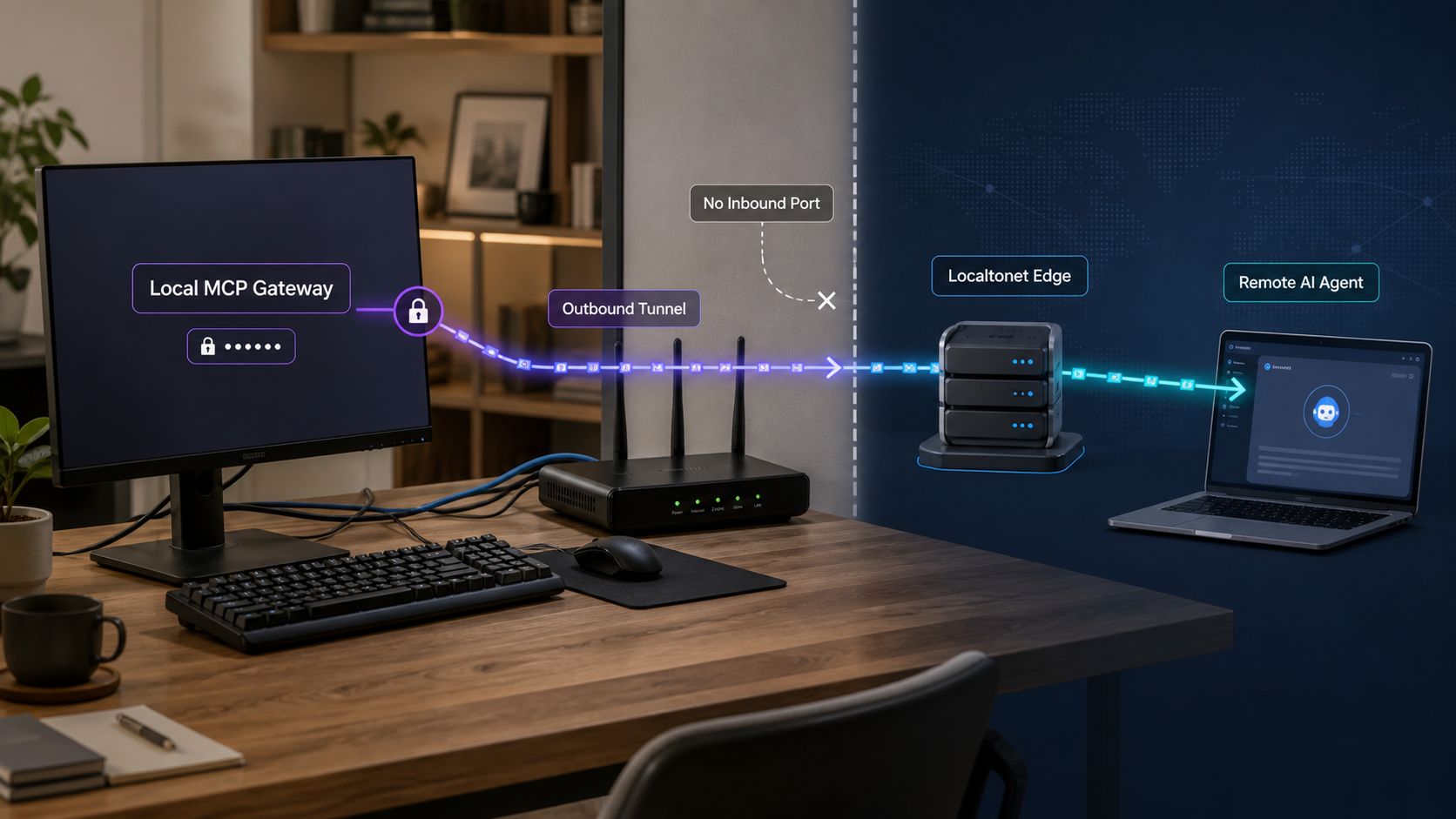
A gateway running on a workstation, home lab, or private server is not normally reachable from the public internet. With Localtonet, the client device establishes an outbound connection to our relay and publishes the locally reachable gateway through an assigned public endpoint. This avoids inbound router port forwarding, firewall changes, a public IP address, and separate VPN setup. This guide defines the specific McpNet Gateway scenario covered, explains the verified exposure lifecycle, and shows how to validate connectivity without confusing it with authentication or MCP transport support.
📋 What's in this guide
What McpNet Gateway means in this guide
The phrase MCP Gateway is used by several unrelated projects. It can describe a lightweight bridge in front of local MCP servers, an aggregator that combines multiple backends, a container-based management layer, or a Kubernetes control and data plane. Those implementations have different installation procedures, transports, routes, authentication systems, and client configurations.
This article covers the locally running McpNet Gateway used with Localtonet's MCP Gateway tunnel. It does not provide interchangeable setup instructions for Microsoft MCP Gateway, Docker MCP Gateway, NetFoundry or OpenZiti MCP Gateway, an AI-provider API gateway, or any other project that happens to use the same generic name.
The verified Localtonet product information available for this revision confirms that our MCP Gateway tunnel exposes a locally running McpNet Gateway to the public internet. It does not publish the McpNet installation command, package identifier, gateway startup command, default bind address, default port, route suffix, authentication syntax, or remote-client configuration schema. Those values must therefore come from the current McpNet release and its primary documentation. They must not be copied from another gateway project.
A command, route, token format, or client configuration written for another project may be incompatible with McpNet Gateway. Confirm the implementation name and version before installing software or configuring a tunnel. This guide intentionally does not invent missing McpNet commands or default values.
This evidence boundary affects how the tutorial presents implementation-specific fields. Where a value depends on McpNet, the instructions explain what must be established and verified without guessing the command or port. Where behavior is verified for Localtonet, such as the outbound connection model and the difference between creating and starting a tunnel, it is stated directly.
Why a local gateway needs a connectivity layer
A service bound to a loopback address such as localhost is reachable only from the same host. A service bound to a private LAN address may be reachable from other devices on that LAN, but internet clients cannot route directly to the private address. This is normal network isolation, not an MCP-specific failure.
One traditional solution is an inbound router rule that forwards a public port to the gateway host. That requires control of the network edge, a suitable public IP arrangement, and careful firewall configuration. It may be unavailable behind carrier-grade NAT, on a shared office network, or anywhere the operator is not permitted to modify the router.
Localtonet changes the direction of the connection. The Localtonet client application runs on the gateway host, or on another device that can reach the gateway over the local network. The client establishes an outbound connection to a Localtonet relay server. The tunnel then provides a public URL or public host and port appropriate to its type.
Connectivity and authorization are different controls
Localtonet transports traffic between the assigned public endpoint and the configured local target. The gateway still decides which MCP servers, tools, or resources exist, how clients authenticate, and which operations each identity may perform.
This distinction is especially important for MCP endpoints. A conventional web endpoint might return information, while an MCP tool can potentially read a repository, change a file, query a database, call an internal API, or trigger another operation. The ability to reach the gateway must never be treated as permission to use every tool behind it.
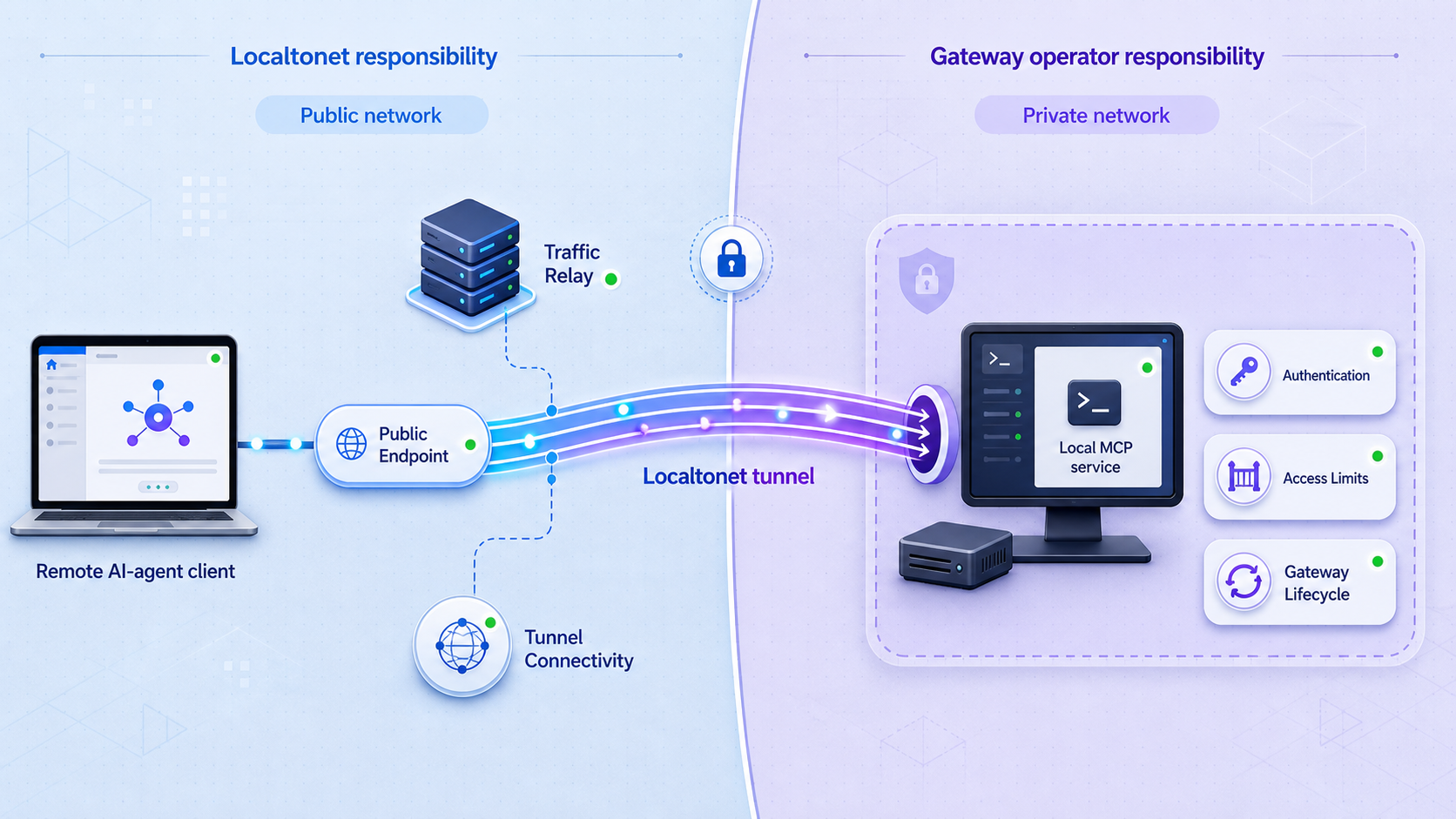
| Responsibility | Handled by | Practical meaning |
|---|---|---|
| Public endpoint connectivity | Localtonet tunnel | The relay makes the configured local target reachable while the selected client and tunnel are running. |
| MCP protocol behavior | McpNet Gateway | The gateway implements the supported MCP transport, routes, sessions, and protocol responses. |
| Tool and resource behavior | McpNet Gateway and its backends | The gateway and connected servers determine which capabilities exist and what each operation does. |
| Client authentication | Gateway or application access layer | The operator must configure the authentication mechanism supported by the current McpNet release. |
| Tool authorization | Gateway and backend services | Each client should receive only the tools, resources, paths, and operations required for its task. |
| AI provider credentials | Gateway, application, or protected secret store | Provider credentials remain separate from Localtonet device tokens and tunnel configuration. |
| Provider usage and billing | Selected AI provider | The tunnel transports traffic but does not include model credits or change provider account terms. |
| Exposure duration | Localtonet client and tunnel lifecycle | Availability requires the selected device to stay connected and the tunnel to remain running. |
Exposing McpNet Gateway does not supply AI models, inference credits, provider accounts, provider API keys, or MCP tool definitions. Configure those separately where the gateway or its backends require them.
Prerequisites before creating the tunnel
Complete the following checks before making the gateway publicly reachable. The most reliable troubleshooting strategy is to prove the gateway locally first, then add the tunnel, and only then configure a remote client.
Confirm the gateway installation and version
Record the McpNet Gateway version you are testing. Confirm that its installation completed successfully and that its required runtime or dependencies are available. If McpNet offers more than one distribution method, follow the one supported for your operating system and release.
This article cannot safely supply the installation command because that command is not included in the verified McpNet evidence available for this revision. Do not replace it with a command from Microsoft MCP Gateway, Docker MCP Gateway, OpenZiti MCP Gateway, or another similarly named package.
Identify the listener without assuming a default port
Start McpNet Gateway according to its current documentation and identify the address and port reported by the process or configured in its settings. Also identify the MCP route and transport. Record those values for the local test and for the Localtonet target.
If Localtonet runs on the same host, a loopback listener may be reachable by the Localtonet client. If Localtonet runs on another device, a loopback-only listener on the gateway host will not be reachable from that device. In that arrangement, bind McpNet Gateway to an appropriate private interface only if its documentation supports that configuration, and protect the service with host firewall rules and gateway authentication.
Changing a listener from localhost to all interfaces can make it reachable across the LAN. Use the narrowest bind address compatible with your deployment, restrict local network access, and confirm that authentication is active before proceeding.
Prepare authentication and least-privilege permissions
Use the authentication method supported by the installed McpNet Gateway version. The current evidence does not provide a verified McpNet token command, header name, identity-provider workflow, or role configuration, so this article does not invent one.
Authentication answers who the caller is. Authorization determines what that caller may do. Restrict file paths, database roles, repositories, internal APIs, shell access, and write operations according to the client's actual purpose. Prefer read-only access when modification is unnecessary and use disposable development resources for initial tests.
Keep the Localtonet device token, McpNet client credential, backend service credentials, and AI-provider keys separate. Do not place any of them in a public URL, query string, article, public repository, support transcript, or unredacted screenshot.
MCP transport compatibility and endpoint reachability
A network tunnel can publish only a service that is reachable over the network from the Localtonet client device. This requirement is easy to miss because many MCP servers are launched by a desktop client and communicate only through standard input and standard output.
A stdio-only MCP server cannot be published directly as a host-and-port target. It has no network listener for Localtonet to connect to. To expose it through a network tunnel, use McpNet Gateway or another appropriate bridge that accepts the stdio backend and presents a network endpoint supported by the remote client.
| Local service form | Directly network-reachable? | What to verify |
|---|---|---|
| Streamable HTTP endpoint | Yes, when listening on an address reachable by the Localtonet device | Confirm the scheme, host, port, MCP route, authentication, and client compatibility. |
| Legacy HTTP and SSE endpoint | Yes, when the gateway and remote client both support that transport | Confirm the exact event and message routes required by the installed implementation. |
| Raw network listener | Potentially | Use only when the documented McpNet and Localtonet tunnel types are compatible with that listener. |
| Stdio-only MCP server | No | Add a gateway or bridge that exposes a supported network transport before creating the tunnel. |
Transport names are not interchangeable. A client configured for Streamable HTTP may not work with an endpoint that provides only legacy SSE, and a stdio client entry cannot be converted into a network client merely by inserting a public URL. The client, gateway, and tunnel must agree on the communication model.
Before creating the tunnel, verify the gateway using the same transport and route that the remote client will use. A generic response from the root URL is not sufficient proof if the actual MCP endpoint lives on another path or requires session behavior.
Verified workflow for exposing McpNet Gateway
The current Localtonet product evidence confirms the lifecycle below: run the client on a device that can reach the gateway, select that device and an available relay, create the appropriate MCP Gateway tunnel, and start it. The evidence does not publish the current McpNet installation command or a stable list of MCP Gateway dashboard fields. For that reason, the workflow identifies the required values but does not fabricate labels, defaults, commands, or route formats.
Install, configure, and start McpNet Gateway
Use the supported installation and startup procedure for the exact McpNet release in your environment. Configure only the intended MCP backends and tools. Record the resulting listener address, port, MCP transport, route, and authentication requirement. These McpNet-specific values are not published in the verified evidence supplied for this article, so obtain them from the current McpNet documentation rather than another gateway project.
Verify the gateway from the Localtonet device
Test the real MCP endpoint from the same host that will run Localtonet. If Localtonet will run on another LAN device, test from that device instead. Confirm that an authorized request reaches the gateway and that an unauthorized request is rejected before public exposure.
Install and run the Localtonet client
Run the Localtonet application on the device that passed the local reachability test. Keep the client connected because the tunnel depends on its outbound connection to our relay.
Select the connected device and an available relay
Select the device using its device-specific authentication token and choose an available relay server or region from the current dashboard. Never publish the token or copy a relay code from an outdated example.
Create the MCP Gateway tunnel for the verified target
Choose the current MCP Gateway tunnel option and enter the target information requested by the dashboard using the address and port already verified from the Localtonet device. Preserve the gateway's required MCP route when configuring the remote client. Creation stores the tunnel configuration but does not start public forwarding.
Start the tunnel and record the assigned public endpoint
Use the Start action after reviewing the target. The selected Localtonet client must remain connected. Use the public URL or public host and port assigned by the current tunnel rather than predicting its format.
Configure and test the remote MCP client
Configure a client that supports the same MCP transport as McpNet Gateway. Combine the assigned public base endpoint with the documented McpNet route only where the client requires a full route. Configure gateway authentication through the client's supported protected mechanism, then run positive and negative authorization tests.
For Localtonet-specific product background, see our guide to exposing an MCP Gateway with Localtonet . Use the current dashboard for tunnel availability and target fields because those details can change.
A saved tunnel configuration is not automatically running. Public connectivity requires the selected Localtonet device to be connected and the tunnel to be started. This distinction is important when diagnosing an endpoint that exists in the dashboard but cannot be reached.
Configure the remote client without guessing its schema
Remote MCP client configuration is implementation-specific. Some clients accept a URL and protected authorization headers. Others expect separate transport and endpoint fields. Stdio-oriented clients may require a network-to-stdio connector rather than accepting a URL directly.
Use the client documentation to configure four verified pieces of information: the transport supported by McpNet Gateway, the public endpoint assigned by Localtonet, the McpNet MCP route, and the gateway's authentication mechanism. Do not paste the Localtonet device token into the MCP client. That token identifies the Localtonet device and is not an MCP client credential.
A concrete client configuration cannot be supplied safely without the client name, its version, the current McpNet route, and the gateway authentication format. Inventing a generic JSON object could lead readers to place credentials in an unsupported field or configure a stdio client as though it were an HTTP client.
Verify connectivity, authentication, and tool permissions
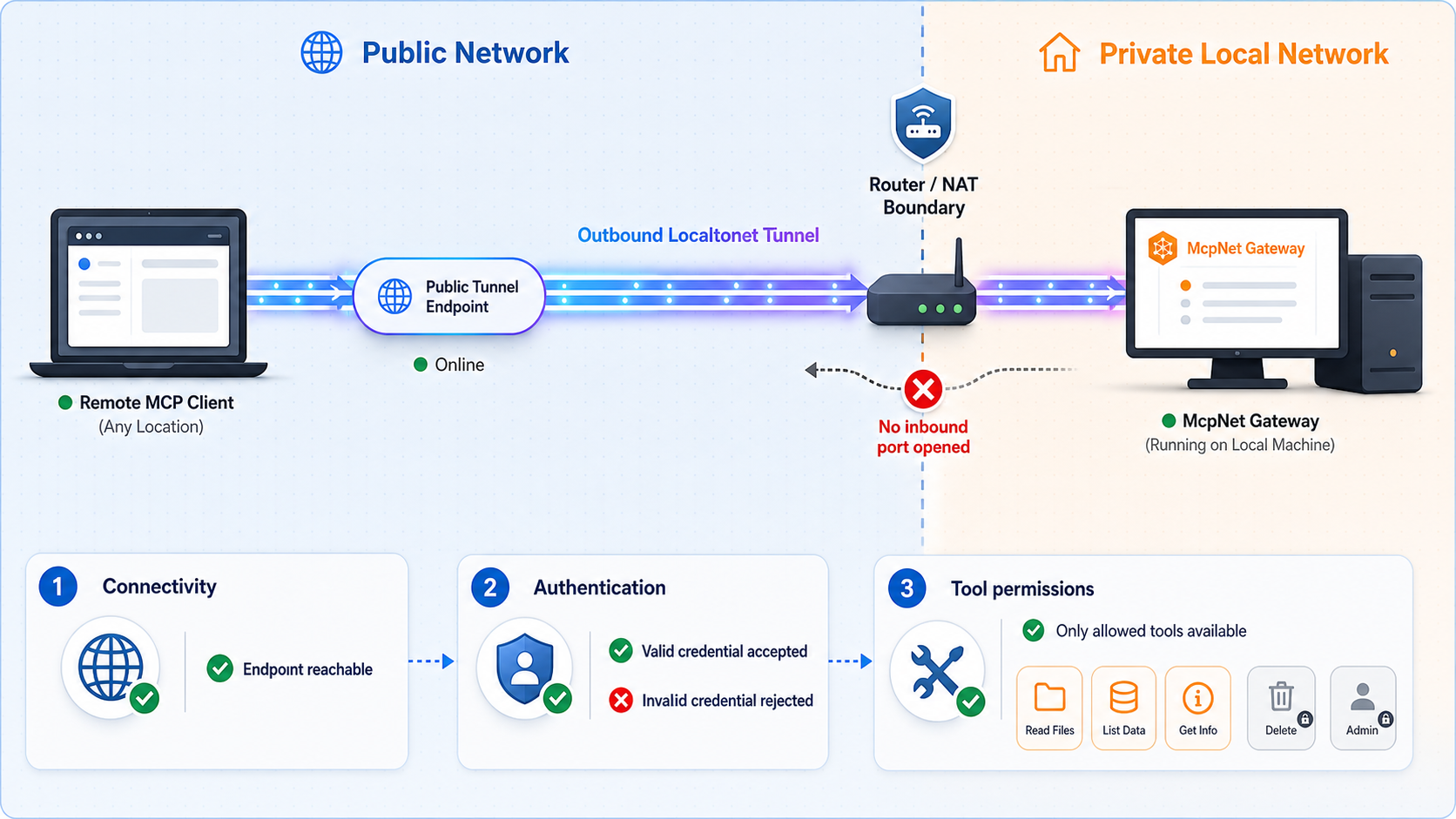
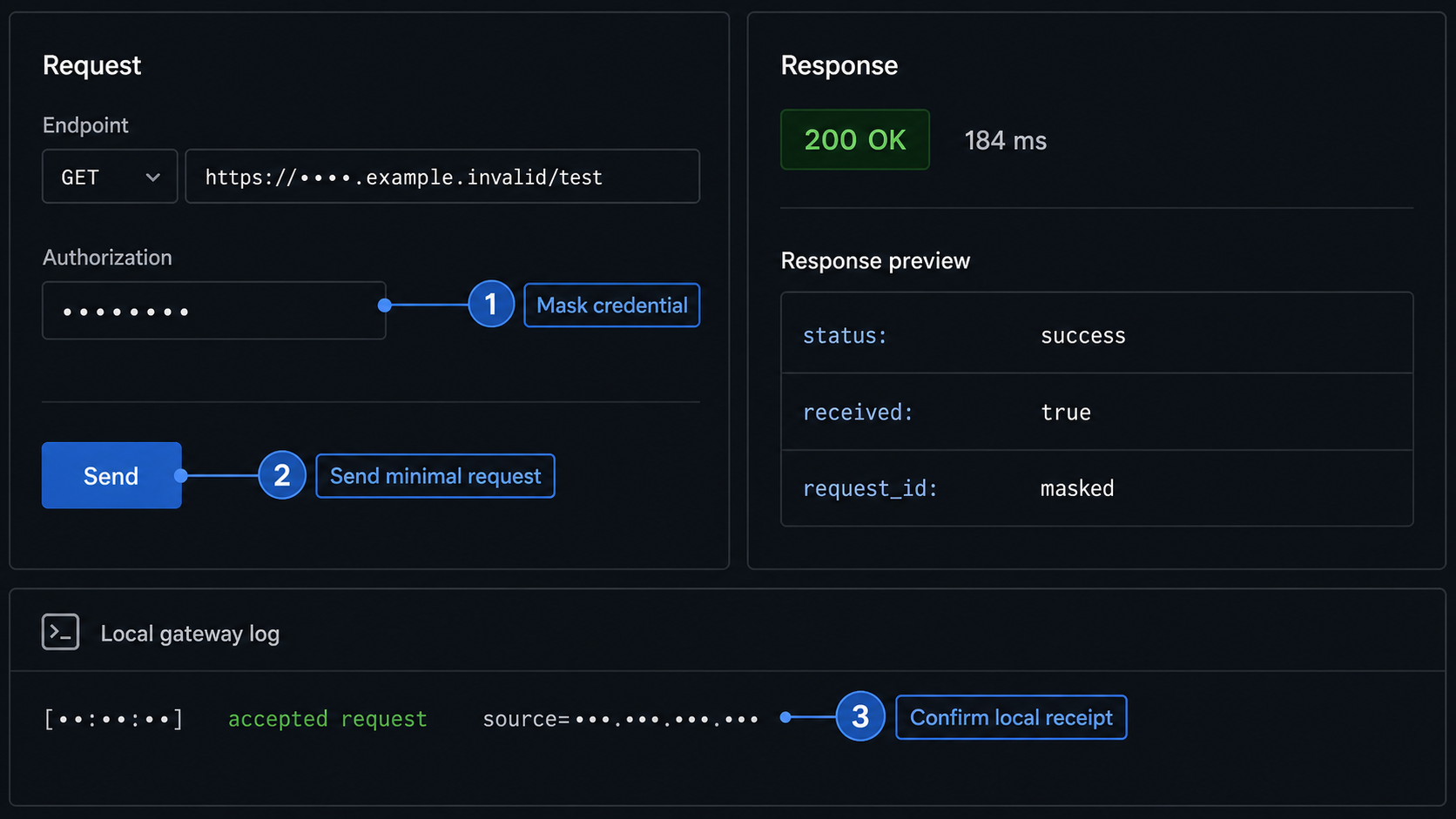
A successful test must prove more than the existence of a public response. Test each layer separately so that a networking problem is not mistaken for an authorization or backend failure.
1. Prove the local MCP endpoint
With the tunnel stopped, connect to McpNet Gateway from the Localtonet device using a compatible test client. Verify that the expected MCP handshake or initialization succeeds. Confirm that the tool list contains only the intended capabilities and that a harmless, minimally privileged operation completes.
If this local test fails, do not troubleshoot the relay yet. Correct the gateway listener, route, transport, authentication, or backend configuration first.
2. Prove the public transport path
Start the tunnel and connect through the assigned public endpoint using the same MCP transport. Confirm that the request appears in the McpNet Gateway logs. A response from an unrelated root route does not prove that the actual MCP endpoint works.
3. Run a positive authorization test
Use a dedicated low-privilege test identity. Confirm that it can discover or invoke only the tools intended for that identity. If a tool writes data, use a disposable development resource and verify the exact resulting change.
4. Run negative authorization tests
Repeat the request with no credential, an invalid credential, and an identity that lacks the required permission. Each request should be rejected by the gateway or application access layer without invoking the protected backend.
Also attempt an operation outside the identity's intended scope. For example, a read-only identity should not be able to invoke a write tool. This verifies authorization rather than merely proving that a token is syntactically valid.
5. Review logs without leaking secrets
Correlate the remote request with McpNet Gateway and backend logs. Record timestamps, response status, tool name, and a safe request identifier where supported. Avoid logging authorization headers, device tokens, provider keys, sensitive prompts, complete tool output, or private filesystem paths.
Confirm both allowed and denied behavior. An endpoint that responds correctly to an authorized client may still expose excessive tools, accept missing credentials, or grant broader backend access than intended.
Stop, restart, and maintain the endpoint
The tunnel is available only while the selected Localtonet device is connected and the tunnel is running. This provides a clear operational lifecycle, but it does not replace authentication. Treat stopping the tunnel as an availability control and gateway authorization as the access control.
Stopping temporary exposure
Stop the tunnel after a demonstration, support session, or temporary development task when remote access is no longer required. Stop McpNet Gateway as well if no local clients need it. Delete the tunnel configuration only when it will not be reused.
Restarting after a planned shutdown
Start McpNet Gateway first and repeat the local endpoint test. Confirm that it is listening on the expected address and port. Then verify that the Localtonet client is connected, start the existing tunnel, and test the public endpoint.
Do not assume that every endpoint detail remains unchanged after updates or configuration changes. Compare the current gateway listener and route with the saved tunnel target and remote-client configuration.
Reviewing changes before re-exposure
Recheck permissions whenever you add a backend, enable a tool, change a bind address, update McpNet Gateway, rotate a credential, alter an MCP transport, or modify a downstream service account. New tools should not inherit broad access merely because an existing client can connect to the gateway.
Troubleshooting the McpNet Gateway tunnel
Diagnose the system from the local gateway outward. This isolates gateway failures from Localtonet connectivity, client transport, authentication, and backend tool errors.
The gateway is not reachable locally
Confirm that the McpNet process is running and listening on the expected address and port. Verify the MCP route and use a client that supports the configured transport. If Localtonet runs on another device, make sure the gateway is not restricted to loopback and that local firewall policy permits access from that device.
If changing the bind address is necessary, use the narrowest private interface supported by McpNet and retest authentication. Do not expose all interfaces merely to make the error disappear.
The tunnel exists but the public endpoint does not respond
Check whether the selected Localtonet device is connected and whether the tunnel is actually running. Creation alone is not enough. Verify that the saved target still matches the gateway address and port that passed the local test.
If the gateway moved to a different port after an update or restart, correct the target through the current supported dashboard workflow. Do not change multiple layers at once. First restore local reachability, then restart and retest the tunnel.
The Localtonet client disconnects
The public endpoint depends on the selected client device's outbound connection. Confirm that the Localtonet application is still running and that the host has outbound network connectivity. After the device reconnects, verify the tunnel's running state before retesting the remote client.
If you selected the wrong device token when creating the tunnel, choose the connected device that can actually reach McpNet Gateway. Never move a token between devices by guessing or publishing it.
The selected relay does not work as expected
Use only relay servers or regions currently available in the Localtonet dashboard. Do not rely on a server code copied from an old configuration or third-party article. Confirm the local gateway remains healthy before changing relay selection so that a gateway outage is not mistaken for a relay issue.
The remote client reports an authorization failure
An authorization rejection usually means the network path is working and the gateway has received the request. Verify that the remote client is using the authentication mechanism required by the installed McpNet version. Check credential validity, identity assignment, required roles or permissions, and tool-specific policy without printing the credential in logs.
Do not replace a gateway credential with the Localtonet device token. They serve different purposes. If the authorized request succeeds but an underprivileged request also succeeds, treat that as an authorization defect and stop public exposure until the policy is corrected.
The client and gateway use different MCP transports
Confirm whether McpNet Gateway exposes Streamable HTTP, legacy HTTP and SSE, or another documented network transport. Configure the client for that exact mode. A stdio-only client entry cannot consume a URL unless the client supports a connector or bridge that translates between network transport and stdio.
Check the complete MCP route as well as the public base address. A request sent to the wrong route can return a conventional HTTP error even though the tunnel and gateway process are healthy.
The connection works but a backend tool fails
Once the MCP session succeeds and the request appears in gateway logs, investigate the tool and its backend. Verify backend credentials, file permissions, database roles, working directories, environment variables, dependency availability, and network access required by that tool.
Keep backend failures separate from tunnel troubleshooting. Localtonet can transport a request successfully even when the gateway returns an application error because a tool is misconfigured.
The public endpoint works without credentials
Stop the tunnel and review McpNet Gateway authentication immediately. A public address is not an authorization mechanism, even if it is difficult to guess. Re-enable exposure only after unauthenticated requests are rejected and least-privilege tests pass.
| Symptom | Likely layer | First check |
|---|---|---|
| Local request fails | McpNet Gateway | Process state, listener, route, transport, and local authentication |
| Tunnel is saved but unreachable | Localtonet lifecycle | Connected device and running tunnel state |
| Remote connection fails after local success | Target or client configuration | Assigned endpoint, saved local target, route, and transport |
| Unauthorized response | Gateway access layer | Credential type, identity, role, and tool permission |
| MCP session opens but a tool errors | Gateway backend | Backend logs, service credentials, permissions, and dependencies |
| Access stops after device disconnect | Localtonet client | Client process, outbound connectivity, and tunnel state |
Frequently asked questions
Do I need to open a router port for a Localtonet MCP Gateway tunnel?
No. The Localtonet client establishes an outbound connection to our relay. The workflow does not require inbound router port forwarding, firewall changes, a public IP address, or separate VPN setup.
Can Localtonet directly expose a stdio-only MCP server?
Not as a conventional network target. A stdio-only process has no network address or port for the tunnel to reach. Use McpNet Gateway or an appropriate bridge to present a supported network endpoint first.
Does creating the tunnel immediately make the gateway public?
No. Creating and running are separate lifecycle states. The selected Localtonet device must be connected, and the tunnel must be started before its assigned public endpoint can forward traffic.
Does Localtonet authenticate MCP users automatically?
The tunnel provides connectivity, not a complete MCP authorization policy. Configure authentication and least-privilege tool access through the mechanisms supported by McpNet Gateway and its backends.
What public endpoint format will Localtonet assign?
Use the public URL or public host and port shown for the current tunnel. The exact format depends on the tunnel type and current product configuration, so it should not be predicted or hardcoded in a tutorial.
Does this workflow apply to every product called MCP Gateway?
No. This article covers the locally running McpNet Gateway used with Localtonet's MCP Gateway tunnel. Other projects may use different installation commands, transports, routes, authentication systems, or deployment architectures.
Does the tunnel include AI model credits or provider API access?
No such capability is part of this tunneling workflow. Provider accounts, model availability, API credentials, usage charges, and billing remain separate from Localtonet connectivity.
What happens if the Localtonet client disconnects?
The tunnel is available only while the selected device is connected and the tunnel is running. If the client disconnects, the relay cannot continue forwarding traffic to McpNet Gateway through that tunnel.
Should I put a provider key or Localtonet device token in the public URL?
No. Never place device tokens, gateway credentials, provider keys, or other secrets in public URLs. Store each credential through the appropriate protected mechanism and rotate it after accidental disclosure.
Publish your McpNet Gateway with controlled access
Verify the gateway locally, run Localtonet on a device that can reach its network endpoint, create and start the MCP Gateway tunnel, then test both allowed and denied client behavior before enabling sensitive tools.
Get Started Free →

