

Separate browser CORS failures from Server Action origin rejections and fix the policy that is actually blocking the request
A Next.js application can work on localhost yet fail when opened through a public HTTPS tunnel. The public address introduces a different browser origin, while a reverse-proxy path can also affect the host information that Next.js evaluates for Server Actions. This App Router tutorial provides a reproducible test route, explicit CORS and credential examples, a version-scoped Server Actions configuration, Localtonet HTTP tunnel setup, and a layered verification workflow.
📋 What's in this guide
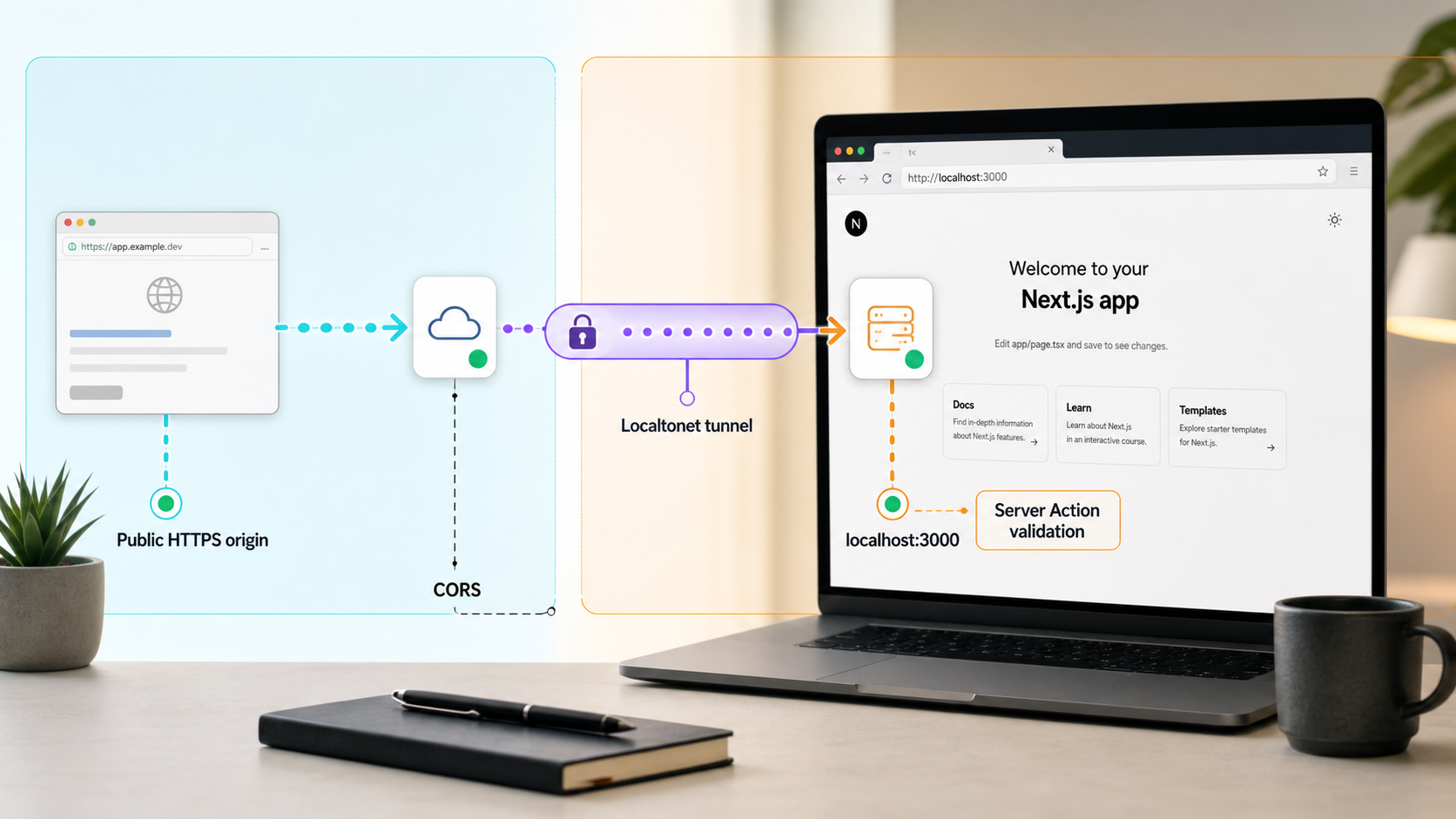
Use the tested baseline and confirm your project before editing it
The runnable implementation in this guide is scoped to an existing Next.js App Router project. The version-scoped baseline is Next.js 15.5.7, Node.js 20.19.5, and npm 10.8.2. The examples use TypeScript files under the root-level app directory and the standard npm scripts generated for a Next.js project.
If your project uses src/app, place every example beneath src/app instead of app. If it uses the Pages Router, do not copy these route-handler or Server Action file paths. The runnable implementation in this article is App Router only. The origin, cookie, and CORS concepts still apply to Pages Router applications, but their API handlers use the response object under pages/api, and Server Actions are an App Router workflow.
The experimental.serverActions.allowedOrigins placement shown later is for the stated Next.js 15.5.7 baseline. Check the documentation matching your installed release before copying it into an older or newer project. Releases with different configuration placement or stability status must use the syntax documented for that release.
Prerequisites
- An existing Next.js App Router project that runs locally.
- Node.js and the package manager required by that project.
- Permission to add an App Router test page, route handler, and Server Action.
- A Localtonet account and client application on the device that runs Next.js or can reach it.
- A browser with access to its Network, Console, and cookie inspection tools.
- An available local port. The examples use
3000, but the terminal output from your application is authoritative.
Check the installed runtime and framework versions
Run these commands from the project directory. The first commands identify the runtime and package manager. The final command reads the exact installed Next.js package rather than relying only on the version range in package.json.
node --version
npm --version
node -p "require('next/package.json').version"
For this baseline, the expected values are Node.js v20.19.5, npm 10.8.2, and Next.js 15.5.7. If your output differs, record it before troubleshooting. CORS behavior is based on HTTP and browser rules, but Next.js configuration placement and Server Action behavior can be release-sensitive.
Inspect the routing model and project scripts
npm pkg get scripts
find app src/app pages src/pages -maxdepth 4 -type f 2>/dev/null
A typical project exposes dev, build, and start scripts, but the project's own package.json is authoritative. Use the equivalent inspection command if the repository is managed with pnpm or Yarn. Do not switch package managers merely to follow this guide.
Development normally starts with:
npm run devA production-style local check normally requires a build followed by a separate startup:
npm run build
npm run start
Stop the development process before starting the production process if both use the same port. Configuration in next.config.ts, next.config.mjs, or next.config.js is loaded when Next.js starts. After changing Server Action configuration, stop the process and start it again. Hot reload should not be treated as proof that startup configuration was reloaded.
Why localhost and a public HTTPS URL are different origins
A browser origin combines a URL's scheme, hostname, and port. If any component changes, the browser sees a different origin. For example, http://localhost:3000 and https://app.example.test differ by scheme and hostname. Similarly, http://localhost:3000 and http://localhost:3001 differ by port.
A Localtonet HTTP tunnel gives a locally reachable web application a public address. The browser connects to that public HTTPS address, while the Localtonet client on the selected device maintains an outbound connection to our relay. The local Next.js process remains the target, but the browser-facing origin is the public HTTPS origin.
That difference does not automatically require CORS. If a page loaded from the public tunnel calls a relative endpoint such as /api/tunnel-test, the browser resolves the URL against the public origin. The page and endpoint are therefore same-origin from the browser's perspective, even though Localtonet forwards the traffic to a local HTTP listener.
CORS becomes relevant when browser JavaScript loaded from one origin requests another origin. Examples include a local frontend calling an API through the public tunnel, a separate frontend domain calling the tunneled API, or a public page that mistakenly retains an absolute http://localhost:3000/api/... URL.
Inspect the page origin and complete request URL. A relative request from the public page to the same public host is same-origin. Do not enable broad CORS merely because a relay exists between the browser and Next.js.
Add a reproducible App Router test page and Server Action
Before testing policy changes, add a small page that exercises a same-origin route and a Server Action. This isolates the tunnel path from the application's production API and business logic. Remove the test files when debugging is complete if they are not part of the intended application.
Create the same-origin route handler
Create app/api/tunnel-test/route.ts, or src/app/api/tunnel-test/route.ts if the project uses a src directory:
import { NextResponse } from "next/server";

export async function GET() {
  return NextResponse.json({
    ok: true,
    message: "Next.js route handler is reachable",
    time: new Date().toISOString(),
  });
}
Create a minimal Server Action
Create app/tunnel-test/actions.ts:
"use server";

export async function confirmTunnelAction() {
  return {
    ok: true,
    message: "Server Action completed",
    time: new Date().toISOString(),
  };
}
Create the browser test page
Create app/tunnel-test/page.tsx. The page uses a relative API URL, so it remains same-origin whether it is opened through localhost or the public tunnel.
"use client";

import { useState } from "react";
import { confirmTunnelAction } from "./actions";

export default function TunnelTestPage() {
  const [apiResult, setApiResult] = useState("Not tested");
  const [actionResult, setActionResult] = useState("Not tested");

  async function testApi() {
    const response = await fetch("/api/tunnel-test");
    const body = await response.json();

    setApiResult(
      `${response.status}: ${JSON.stringify(body)}`
    );
  }

  async function testAction() {
    const body = await confirmTunnelAction();
    setActionResult(JSON.stringify(body));
  }

  return (
    <main>
      <h2>Tunnel verification</h2>

      <button type="button" onClick={testApi}>
        Test same-origin API
      </button>
      <pre>{apiResult}</pre>

      <button type="button" onClick={testAction}>
        Test Server Action
      </button>
      <pre>{actionResult}</pre>
    </main>
  );
}
Start and verify the application locally
npm run dev
Read the actual address printed by Next.js. With the example port, open http://localhost:3000/tunnel-test. Select both buttons and confirm that the API returns a JSON result and the Server Action reports completion. Also open http://localhost:3000/api/tunnel-test directly.
This local test must pass before a tunnel is introduced. If it fails, fix the project compilation, route placement, scripts, or local listener first. CORS and Localtonet cannot repair an application that is not serving the expected local route.
Identify the failure and configure CORS only where required
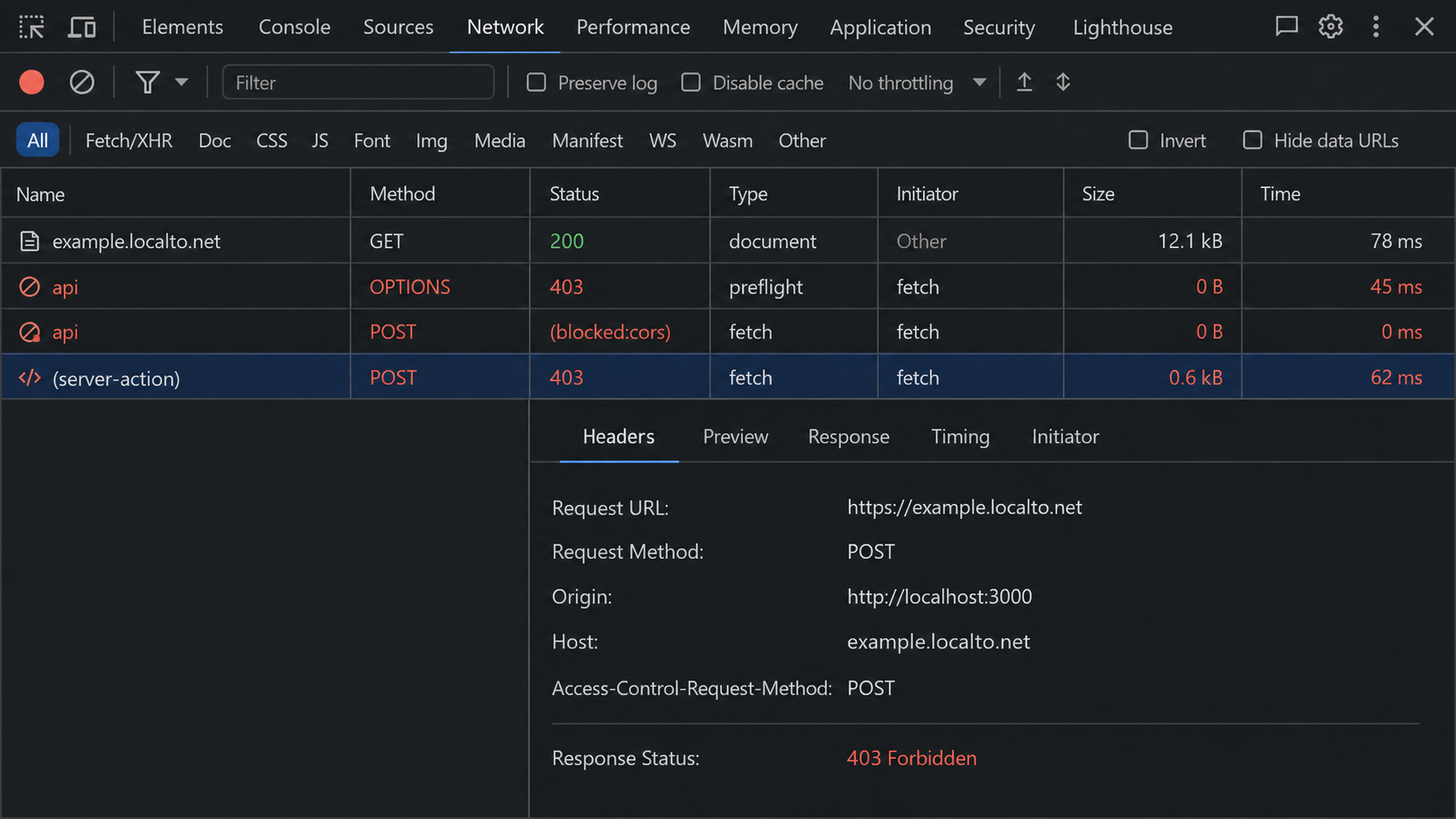
Broadly enabling CORS will not fix a Server Action origin mismatch. Adding an allowed Server Action origin will not fix a separate API response. Select the failed browser request and record its URL, method, status, Origin request header, response headers, and any preceding OPTIONS request.
| Symptom | Likely layer | Inspect |
|---|---|---|
| CORS header is missing or the origin is not allowed | Browser CORS enforcement | Origin and Access-Control-Allow-Origin |
OPTIONS fails before the intended request |
Preflight handling | Status, allowed methods, allowed headers, and route matching |
| Wildcard origin fails with credentials | Credentialed CORS | Exact allowed origin and credential permission |
| Next.js logs an origin and host mismatch | Server Action validation | Public hostname, Origin, host information, and allowedOrigins |
| The request succeeds but no session is present | Cookie or fetch policy | Credentials mode, cookie scope, Secure, and SameSite |
Create a route with an explicit CORS allowlist
The following App Router implementation supports same-origin requests and one trusted cross-origin frontend. It handles preflight requests, preserves CORS headers on allowed application errors, and intentionally omits CORS permission for untrusted origins.
Replace app/api/tunnel-test/route.ts with:
import { NextRequest, NextResponse } from "next/server";

function corsHeaders(request: NextRequest): Headers {
  const headers = new Headers();
  const origin = request.headers.get("origin");
  const allowedOrigin = process.env.APP_ALLOWED_ORIGIN;

  if (origin && allowedOrigin && origin === allowedOrigin) {
    headers.set("Access-Control-Allow-Origin", origin);
    headers.set("Access-Control-Allow-Methods", "GET, POST, OPTIONS");
    headers.set("Access-Control-Allow-Headers", "Content-Type");
    headers.set("Vary", "Origin");
  }

  return headers;
}

function isUntrustedCrossOrigin(
  request: NextRequest,
  headers: Headers
): boolean {
  return (
    request.headers.has("origin") &&
    !headers.has("Access-Control-Allow-Origin")
  );
}

export async function OPTIONS(request: NextRequest) {
  const headers = corsHeaders(request);

  if (isUntrustedCrossOrigin(request, headers)) {
    return NextResponse.json(
      { error: "Origin not allowed" },
      { status: 403 }
    );
  }

  return new NextResponse(null, {
    status: 204,
    headers,
  });
}

export async function GET(request: NextRequest) {
  const headers = corsHeaders(request);

  if (isUntrustedCrossOrigin(request, headers)) {
    return NextResponse.json(
      { error: "Origin not allowed" },
      { status: 403 }
    );
  }

  return NextResponse.json(
    {
      ok: true,
      message: "Next.js route handler is reachable",
    },
    { headers }
  );
}

export async function POST(request: NextRequest) {
  const headers = corsHeaders(request);

  if (isUntrustedCrossOrigin(request, headers)) {
    return NextResponse.json(
      { error: "Origin not allowed" },
      { status: 403 }
    );
  }

  let body: unknown;

  try {
    body = await request.json();
  } catch {
    return NextResponse.json(
      { error: "Expected a JSON request body" },
      { status: 400, headers }
    );
  }

  return NextResponse.json(
    { ok: true, received: body },
    { status: 200, headers }
  );
}
Set the separate frontend origin in .env.local. Use an origin only, with no path. The variable name is specific to this tutorial and is not a built-in Next.js or Localtonet setting.
APP_ALLOWED_ORIGIN=http://localhost:3001
Restart Next.js after editing the environment file. A page served by the same Next.js host does not need this value because its relative request is same-origin. The handler therefore returns a normal response without CORS headers when no cross-origin Origin is present.
An untrusted cross-origin request receives a 403 response without Access-Control-Allow-Origin. That omission is intentional. Browser JavaScript on the untrusted site is not allowed to read the response. By contrast, an allowed origin that submits malformed JSON receives a 400 application error with the approved CORS headers, so its frontend can read the useful error body.
Copying any supplied Origin directly into Access-Control-Allow-Origin is effectively an allow-all policy. Compare it with a server-controlled allowlist. CORS does not replace authentication, authorization, CSRF protection, input validation, or rate controls.
Implement credentialed CORS and keep cookie scope separate
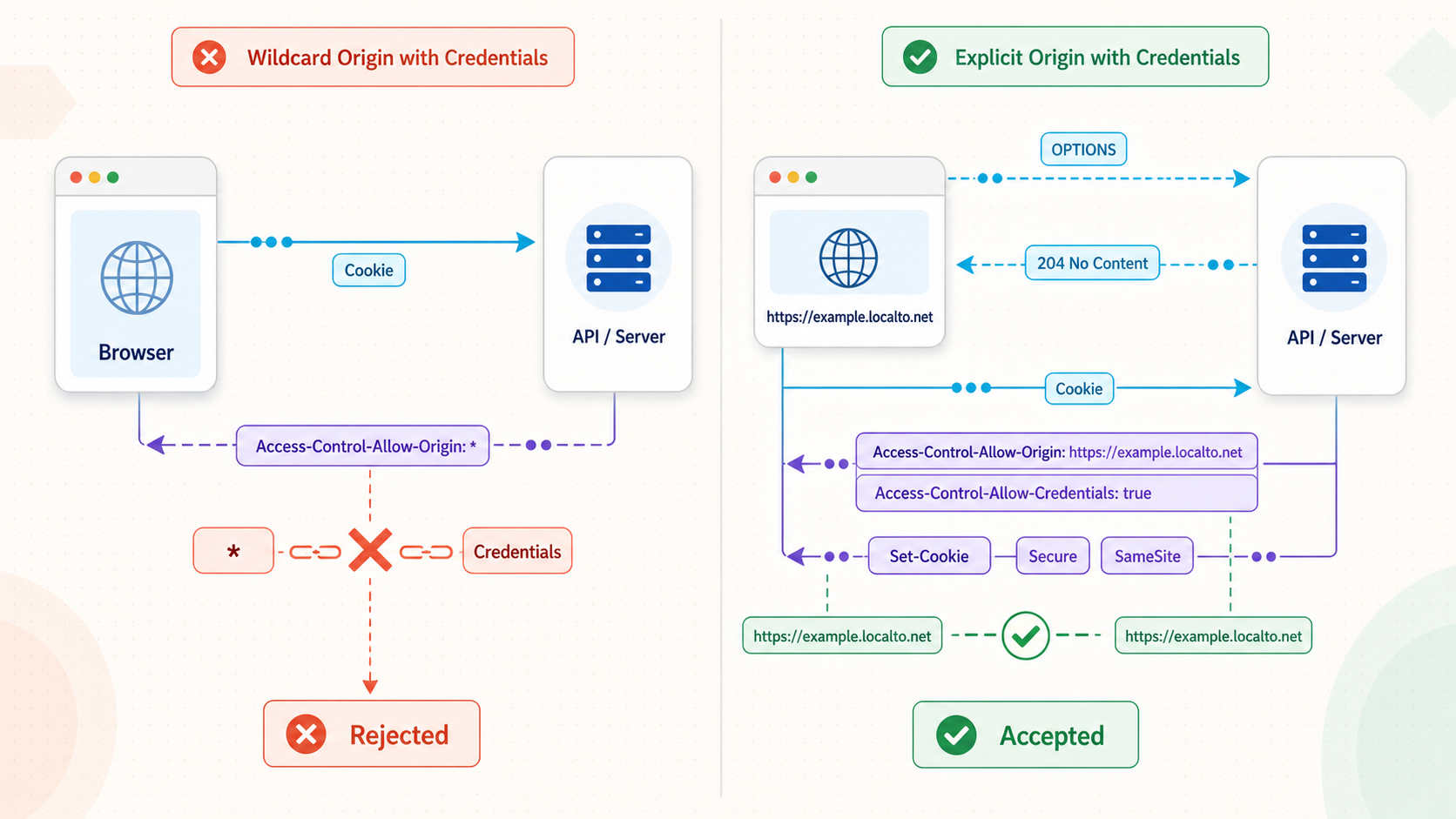
Credentialed CORS requires cooperation from both sides. The frontend uses credentials: "include", while the server returns the exact approved origin and Access-Control-Allow-Credentials: true. A wildcard origin cannot be combined with credentialed browser access.
Origin and site are related but different concepts. Origin includes scheme, hostname, and port. The browser's SameSite cookie decision is based on whether a request is same-site or cross-site, not merely whether it is same-origin. Two URLs can be different origins because their ports differ while still being same-site. Conversely, unrelated registrable domains are cross-site.
Cookie controls also remain separate from CORS:
Domaindetermines which hosts can receive a cookie. Omitting it creates a host-only cookie.Pathlimits the request paths to which the cookie applies.Securerestricts transmission to secure contexts, subject to browser handling for localhost.SameSitecontrols cross-site cookie behavior.- The fetch
credentialsmode determines whether the browser includes credentials for that request and whether it accepts relevant credential responses. - CORS determines whether frontend JavaScript may read the cross-origin response.
Complete credentialed route example
Create app/api/tunnel-session/route.ts. This example sets a host-only demonstration cookie and then confirms whether a later request contains it. It is a transport test, not a complete authentication system.
import { NextRequest, NextResponse } from "next/server";

function credentialCors(request: NextRequest): Headers {
  const headers = new Headers();
  const origin = request.headers.get("origin");
  const allowedOrigin = process.env.APP_ALLOWED_ORIGIN;

  if (origin && allowedOrigin && origin === allowedOrigin) {
    headers.set("Access-Control-Allow-Origin", origin);
    headers.set("Access-Control-Allow-Credentials", "true");
    headers.set("Access-Control-Allow-Methods", "GET, POST, OPTIONS");
    headers.set("Access-Control-Allow-Headers", "Content-Type");
    headers.set("Vary", "Origin");
  }

  return headers;
}

function originRejected(request: NextRequest, headers: Headers) {
  return (
    request.headers.has("origin") &&
    !headers.has("Access-Control-Allow-Origin")
  );
}

export async function OPTIONS(request: NextRequest) {
  const headers = credentialCors(request);

  if (originRejected(request, headers)) {
    return NextResponse.json(
      { error: "Origin not allowed" },
      { status: 403 }
    );
  }

  return new NextResponse(null, {
    status: 204,
    headers,
  });
}

export async function POST(request: NextRequest) {
  const headers = credentialCors(request);

  if (originRejected(request, headers)) {
    return NextResponse.json(
      { error: "Origin not allowed" },
      { status: 403 }
    );
  }

  const response = NextResponse.json(
    { ok: true, message: "Test cookie created" },
    { headers }
  );

  response.cookies.set({
    name: "tunnel_session_test",
    value: "present",
    httpOnly: true,
    secure: true,
    sameSite: "none",
    path: "/",
    maxAge: 600,
  });

  return response;
}

export async function GET(request: NextRequest) {
  const headers = credentialCors(request);

  if (originRejected(request, headers)) {
    return NextResponse.json(
      { error: "Origin not allowed" },
      { status: 403 }
    );
  }

  const cookie = request.cookies.get("tunnel_session_test");

  return NextResponse.json(
    {
      ok: true,
      cookieReceived: cookie?.value === "present",
    },
    { headers }
  );
}
From the trusted frontend configured in APP_ALLOWED_ORIGIN, run:
const apiOrigin = "https://YOUR-PUBLIC-TUNNEL-HOST";

const createResponse = await fetch(
  `${apiOrigin}/api/tunnel-session`,
  {
    method: "POST",
    credentials: "include",
  }
);

console.log(createResponse.status, await createResponse.json());

const checkResponse = await fetch(
  `${apiOrigin}/api/tunnel-session`,
  {
    method: "GET",
    credentials: "include",
  }
);

console.log(checkResponse.status, await checkResponse.json());
Replace the placeholder with the exact Localtonet HTTPS origin. Do not include an unrelated path in apiOrigin. The successful responses must contain the exact frontend origin in Access-Control-Allow-Origin and must include Access-Control-Allow-Credentials: true.
The demonstration cookie deliberately omits Domain, making it host-only for the public API hostname. It uses Path=/, Secure, and SameSite=None for a genuinely cross-site HTTPS test. Production session cookies require application-specific expiry, rotation, invalidation, CSRF, and authorization design that is outside this transport test.
CORS controls whether browser JavaScript can access a response. Non-browser clients do not rely on browser CORS enforcement. Sensitive routes must still authenticate the caller and authorize every operation.
Configure Server Actions for the Next.js 15.5.7 baseline
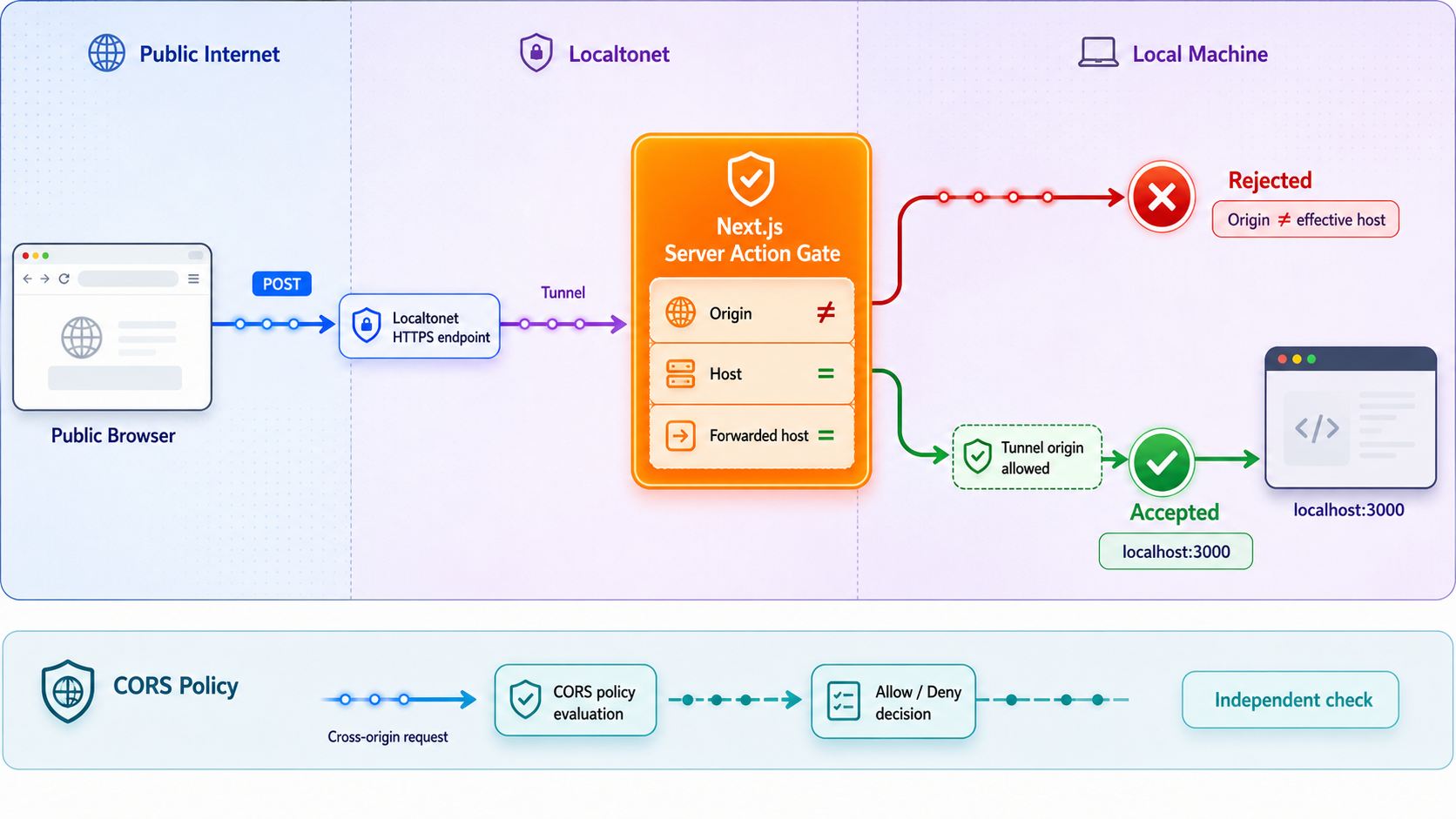
Next.js applies framework-side origin validation to Server Actions. In the normal case, same-host requests are allowed because the request origin agrees with the host through which the application is being accessed. allowedOrigins adds trusted proxy or alternate browser-visible hostnames when the normal comparison does not match. It is not a deny-list for the application's own host.
For the Next.js 15.5.7 baseline, place allowedOrigins under experimental.serverActions. Values use hostname syntax, not complete URL syntax. Do not include https://, a path, query string, or trailing slash.
If the project uses next.config.ts, use:
import type { NextConfig } from "next";

const nextConfig: NextConfig = {
  experimental: {
    serverActions: {
      allowedOrigins: [
        "YOUR-PUBLIC-TUNNEL-HOST",
      ],
    },
  },
};

export default nextConfig;
For example, if the browser opens https://demo-name.example, the entry is demo-name.example. It is not https://demo-name.example and not https://demo-name.example/tunnel-test. Preserve any unrelated settings already present in the configuration object.
If the project uses CommonJS in next.config.js, the equivalent baseline structure is:
/** @type {import('next').NextConfig} */
const nextConfig = {
  experimental: {
    serverActions: {
      allowedOrigins: [
        "YOUR-PUBLIC-TUNNEL-HOST",
      ],
    },
  },
};

module.exports = nextConfig;Approve only the public hostname that legitimately submits Server Actions. If a generated tunnel hostname changes, update the value deliberately and restart Next.js. Continue to authenticate users, authorize actions, validate input, and protect sensitive operations.
Restart and verify the Server Action setting
Stop the active Next.js process, save the configuration, and start it again:
npm run devFor a production-style local test, rebuild because configuration can affect the build output:
npm run build
npm run start
Open the public /tunnel-test page and select Test Server Action. Watch the browser Network panel and the Next.js terminal. Success should return the action result without an origin mismatch message.
If it still fails, compare the browser's Origin hostname with the hostname in allowedOrigins. Then inspect the server error for the host Next.js received. A custom reverse proxy or custom server can alter host-related headers. Do not fabricate or overwrite forwarded headers merely to force acceptance. Those headers must accurately represent a trusted proxy path.
This configuration is explicitly scoped to Next.js 15.5.7. If your installed release places Server Actions outside experimental, changes accepted hostname matching, or no longer accepts this structure, use the configuration documented for that exact release. Keep the same security objective: allow the required browser-visible proxy hostname as narrowly as possible.
Adding an entry is unnecessary when the Server Action already succeeds through the same public host. Same-host action requests remain valid independently of extra entries. The option exists for additional proxy origins and host comparison scenarios, not to disable normal same-host behavior.
Create the Localtonet HTTP tunnel in the documented sequence
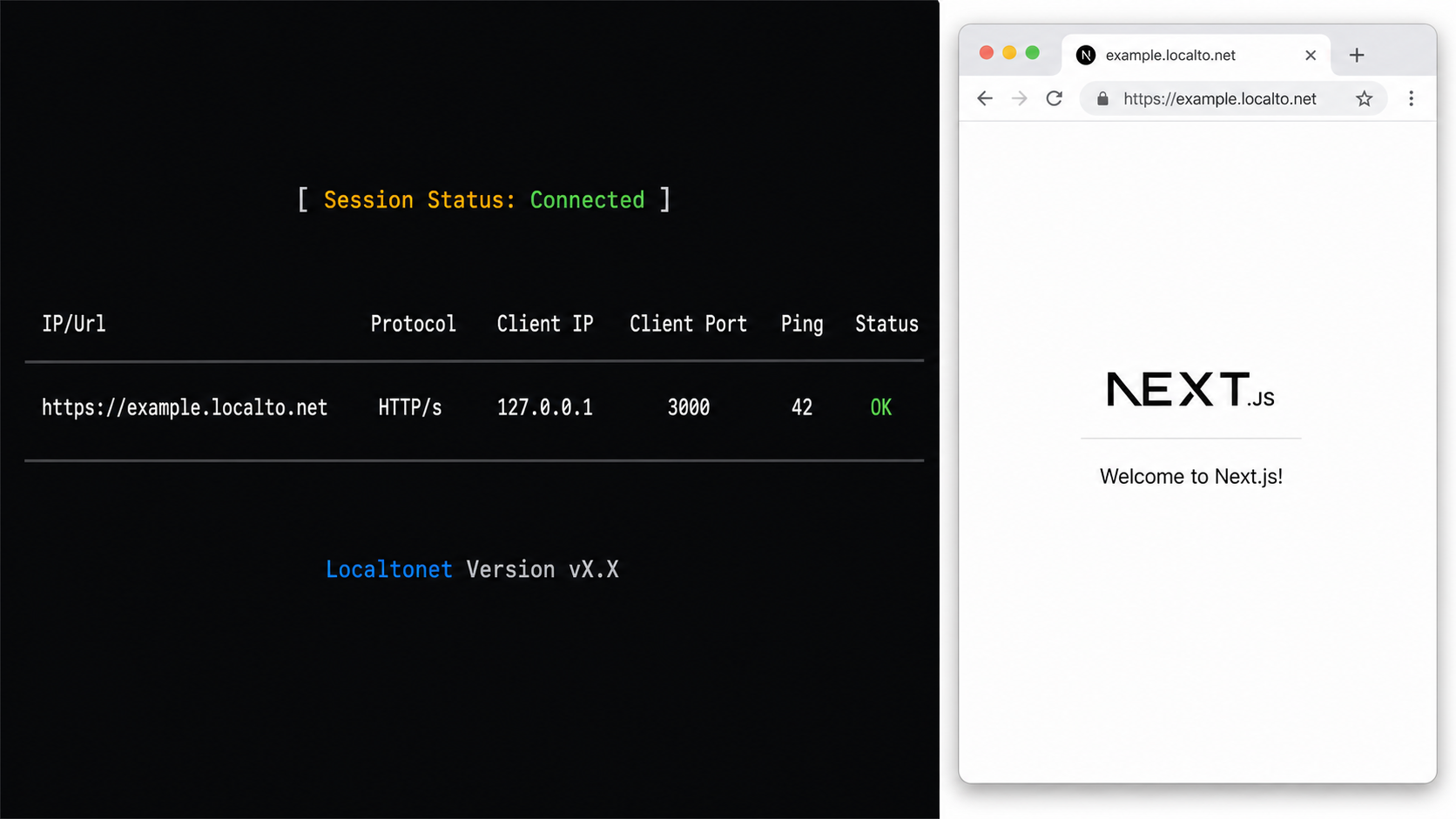
Verify the application locally before configuring Localtonet. The device running our client must be able to reach the Next.js IP address and port. Our client creates an outbound connection to a Localtonet relay, so this workflow does not require inbound router port forwarding, firewall changes, VPN setup, or a public IP address.
Install and run the Localtonet client
Install our client for the device's operating system and keep it running on a device that can reach the verified Next.js listener.
Select the client device with its authentication token
Use the device-specific token associated with the client that will run the tunnel. Treat it as a secret and never place it in source code, screenshots, logs, or frontend configuration.
Select an available relay server
Choose a currently available server or region from the dashboard. Obtain available values from the current product interface rather than hardcoding a server code from an article.
Create the HTTP tunnel
Select the required Process Type and enter the local IP address and port used by Next.js. HTTP tunnels can use Random Sub Domain, Custom Sub Domain, or Custom Domain process types. Current availability can vary, so use the options shown for your account.
Start the tunnel
Creating a tunnel does not start it. Press Start, wait for the selected client and tunnel to be connected, and then open the assigned public HTTPS address.
See our HTTP tunnel documentation for the current product interface. The public endpoint remains available only while the selected client is connected and the tunnel is running.
Apply application policy after recording the public address
Application remediation is separate from Localtonet setup. First copy the exact public origin and hostname from the running tunnel. Then decide which application change is actually required:
- For a page and API on the same public host, keep the frontend request relative. No cross-origin API allowlist entry is needed.
- For a separate trusted frontend calling the tunneled API, set its complete origin in
APP_ALLOWED_ORIGINand restart Next.js. - For a Server Action host mismatch on the 15.5.7 baseline, place the public hostname, without scheme or path, in
experimental.serverActions.allowedOriginsand restart Next.js. - For a changed generated hostname, update obsolete development configuration rather than leaving old tunnel hosts permanently approved.
A development server exposed through a public URL can receive internet traffic. Require authentication for sensitive functions, apply least privilege, avoid exposing debug or administrative endpoints, validate input, and stop the tunnel after testing. An origin allowlist is not an access-control system.
Verify reachability, CORS, credentials, and Server Actions independently
Verify the application locally
Open the local /tunnel-test page and confirm that both test buttons succeed before adding the public path.
Verify basic public reachability
Open the public /tunnel-test page. If it cannot load, check the client connection, tunnel state, target IP, target port, and local Next.js process before changing CORS.
Verify the same-origin API request
Select the API test button on the public page. Confirm that the Request URL uses the same public scheme, hostname, and port as the page.
Verify intentional cross-origin access
Use the separate trusted frontend and inspect the preflight and actual response. Confirm an exact origin match and only the required methods and headers.
Verify credential behavior
Run the credentialed example, inspect whether the browser accepts the cookie, and confirm that the later request sends it. Check fetch mode and cookie attributes separately from CORS.
Verify the Server Action
Trigger the action from the public page while watching the Next.js terminal. Resolve a framework origin rejection through the version-scoped Server Action setting, not API CORS headers.
Inspect a preflight directly
curl -i -X OPTIONS "https://YOUR-PUBLIC-TUNNEL-HOST/api/tunnel-test" \
  -H "Origin: http://localhost:3001" \
  -H "Access-Control-Request-Method: POST" \
  -H "Access-Control-Request-Headers: Content-Type"
For the configured trusted origin, expect a successful preflight with the matching allowed origin, POST in the method list, and Content-Type in the header list. Then test the actual request:
curl -i "https://YOUR-PUBLIC-TUNNEL-HOST/api/tunnel-test" \
  -X POST \
  -H "Origin: http://localhost:3001" \
  -H "Content-Type: application/json" \
  --data '{"message":"tunnel test"}'
Command-line clients do not enforce browser CORS policy. These commands inspect the server's response. The browser Network panel remains the authoritative place to observe whether browser JavaScript can access it.
Troubleshoot common Next.js tunnel failures by layer
The public page still requests localhost
Search the Network panel for absolute localhost URLs. In a remote user's browser, localhost refers to that user's device, not the tunnel target. For an API served by the same Next.js application, use a relative URL such as /api/tunnel-test.
The preflight returns 404 or 405
The route may not export OPTIONS, the request may target the wrong path, or another application layer may reject the method. A method named in Access-Control-Allow-Methods does not create an OPTIONS handler by itself.
The preflight succeeds but the actual request is blocked
Inspect the actual response. It also needs the applicable CORS headers. Compare the allowed origin exactly with the request's Origin. A missing scheme, different port, trailing path, or obsolete hostname does not match.
Allowed application errors become unreadable CORS failures
Preserve the approved CORS headers when an allowed request produces a validation, authentication, or other application error. The runnable route returns its 400 malformed JSON response with the same approved headers. Untrusted-origin responses intentionally omit permission.
The server reflects untrusted origins
Reflection without allowlist validation is unsafe. Compare the request origin with fixed server-side values and return only the matching approved origin. Include Vary: Origin when a response can change according to origin.
The cookie is set but not returned
Check the browser's blocked-cookie reason, host, Domain, Path, Secure, SameSite, expiry, and request credentials mode. A localhost cookie does not automatically belong to the public tunnel hostname. Remember that SameSite evaluates site boundaries, while CORS evaluates origins.
The Server Action still reports a mismatch
Confirm that the entry contains only the current public hostname and that Next.js was fully restarted. Verify the installed Next.js version. If the setting is correct, investigate whether a custom proxy or server is replacing host-related headers. Do not add CORS headers to the API route as a substitute.
The tunnel exists but the URL is unavailable
Creation and execution are separate lifecycle states. Confirm that the correct Localtonet client is connected and that the tunnel was started. Verify that the client device can reach the configured local IP and port.
Changes seem to have no effect
Confirm that the environment file belongs to the active project and that the process was restarted. Check for multiple development servers, stale production processes, or a build running on another port. Recheck the local route before changing additional policies.
Opening every origin appears to fix the issue
That result shows only that origin policy was involved. Restore the narrow allowlist and identify the exact browser origin that needs access. Broad wildcard approval weakens protections and remains incompatible with credentialed browser requests.
Frequently asked questions
Does a Localtonet HTTPS tunnel automatically require CORS?
No. A page loaded from the public URL can call a relative API route on the same public origin. CORS is required only when browser JavaScript intentionally requests a different origin.
What value belongs in Server Actions allowedOrigins?
For the Next.js 15.5.7 baseline in this guide, use the additional trusted hostname without a scheme, path, query, or trailing slash under experimental.serverActions.allowedOrigins. Verify different releases against their matching documentation.
Do same-host Server Actions need an allowedOrigins entry?
Normally, no. Same-host requests are accepted through the normal host comparison. The setting adds approved proxy or alternate hostnames when that comparison does not match the browser-visible host.
Will Access-Control-Allow-Origin fix a Server Action rejection?
No. CORS governs browser access to cross-origin responses. Server Action origin validation is a separate framework-side protection and must be diagnosed through the Next.js server output and host configuration.
Can authenticated APIs use Access-Control-Allow-Origin with a wildcard?
Not for credentialed browser requests. Return the exact trusted origin and Access-Control-Allow-Credentials: true, then enforce authentication and authorization independently.
Is SameSite based on origin?
No. SameSite is based on site boundaries. Origin also includes the port and has a different comparison model. Cookie Domain, Path, Secure, fetch credentials mode, and CORS are separate controls.
Why does curl work while the browser reports a CORS error?
Command-line clients do not automatically enforce browser CORS rules. Use curl to inspect connectivity and headers, but use the browser Network panel to confirm the browser's actual enforcement decision.
Does creating a Localtonet tunnel make it immediately available?
No. Creating and running a tunnel are separate lifecycle steps. Start the tunnel and keep the selected client connected. The public address is available only while that client is connected and the tunnel is running.
Do I need router port forwarding for this workflow?
No. Our client establishes an outbound connection to a Localtonet relay, so inbound router port forwarding, firewall changes, VPN setup, and a public IP address are not required. The client device must still be able to reach Next.js locally.
Test your Next.js application through a controlled public HTTPS origin
Verify the App Router test page locally, start a Localtonet HTTP tunnel, and change only the CORS or Server Action policy identified by the browser and server evidence. Keep approved origins narrow and stop the tunnel when testing is complete.
Get Started Free →

