

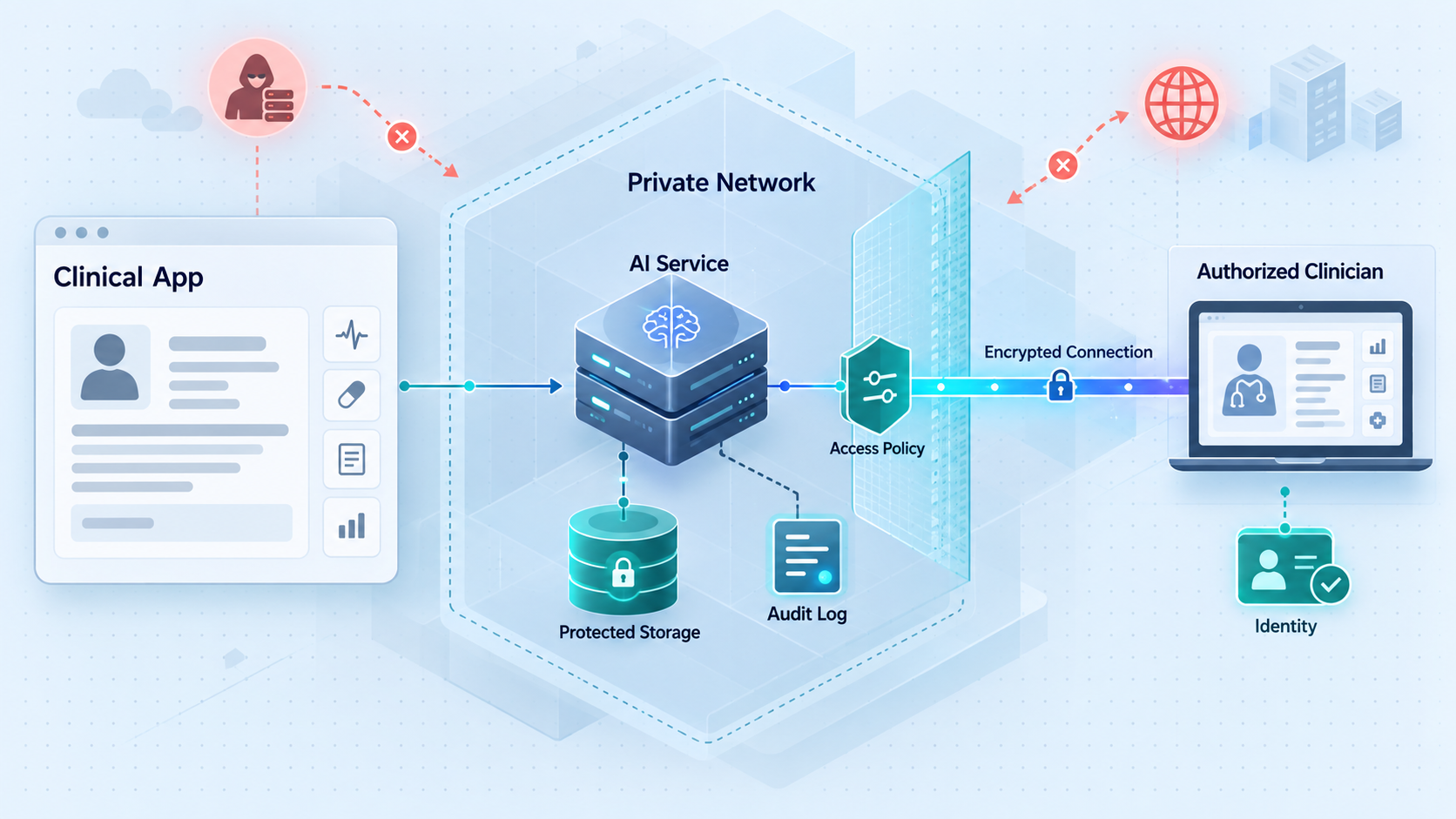
Design the PHI path before opening the network path
Connecting a local healthcare model, agent, dashboard, or API to remote users is an architectural decision with privacy, security, operational, and contractual consequences. This guide explains how to map protected health information flows, reduce unnecessary exposure, select an appropriate connectivity model, and surround that connection with application-level controls. It also clarifies why a secure tunnel is only one component of a HIPAA-aware system and is not, by itself, evidence that a deployment is HIPAA compliant.
📋 What's in this guide
Start with the compliance boundary, not the tunnel
A healthcare AI endpoint rarely exists in isolation. Even a model that runs entirely on a workstation may receive prompts from a clinical application, retrieve records from another system, write output to a database, generate logs, call tools, or return results to a remote user. Each transition creates a data path and potentially a new trust boundary.
The first question is therefore not, “How do we make this local API reachable?” The first question is, “What information will cross the connection, who is permitted to receive it, and what systems will process or retain it?” Connectivity should be selected only after those boundaries are understood.
HIPAA compliance is an organization-wide legal, administrative, physical, and technical responsibility. A tunnel can help carry traffic between systems, but it cannot determine whether a user is entitled to view a patient record, whether a disclosure satisfies the minimum necessary standard, whether retention is appropriate, or whether contracts cover every service involved. It also cannot make the clinical application’s authentication, authorization, auditing, model behavior, or storage compliant.
The available product information does not establish that Localtonet is HIPAA compliant, that every Localtonet configuration is suitable for PHI, or that a Business Associate Agreement is available. Before transmitting PHI through any tunnel, healthcare organizations must obtain current contractual and technical information, review the proposed use with their privacy, security, compliance, procurement, and legal teams, and confirm that the complete architecture satisfies their policies and applicable law.
That distinction matters during prototyping. A development team may safely demonstrate network reachability with synthetic records while the compliance team evaluates the proposed production path. Successful connectivity testing must not be treated as approval to replace synthetic data with PHI. Production authorization should be a separate, recorded decision.
Define exactly what “healthcare AI” means in this deployment
The label can cover very different systems. A local language model used to summarize de-identified test notes has a different risk profile from a clinical agent that retrieves identified records and writes recommendations into an electronic health record. An imaging model may handle large diagnostic files. A scheduling assistant may process names, appointment details, and contact information. A monitoring dashboard may continuously display measurements tied to identifiable patients.
Document the system’s purpose, intended users, data categories, clinical role, and permitted actions. Clarify whether it is a research prototype, an administrative assistant, a clinician-facing decision-support tool, or a component that directly affects care. Connectivity cannot resolve questions about clinical validation, medical-device obligations, patient consent, or acceptable model use. Those require separate assessment.
Map every place PHI can travel or persist
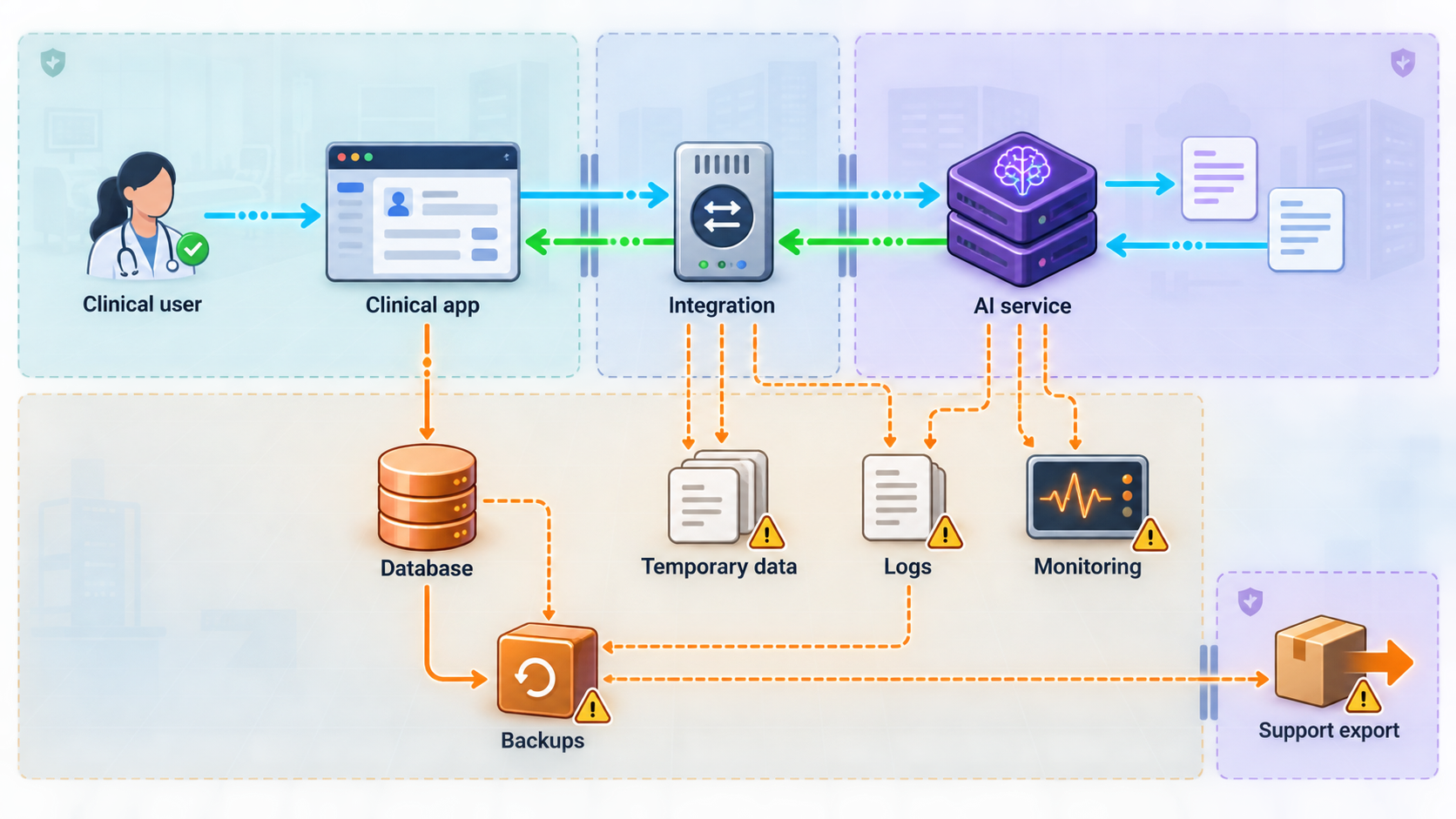
A useful data-flow map follows information from its origin to its final deletion. Do not stop at the model’s request and response. Include all intermediate systems and operational copies, including queues, caches, temporary files, prompt histories, database replicas, backups, observability pipelines, support exports, and user devices.
Begin with the data source. Record whether information comes from an electronic health record, imaging archive, laboratory system, patient form, wearable device, microphone, uploaded document, or another API. Then follow the request into the local AI application. Note any preprocessing, retrieval, tool calls, local storage, model inference, post-processing, and response delivery.
Ask these questions for every transition
- What data crosses the boundary? List concrete fields and payload types rather than writing only “patient data.”
- Is the data identifiable? Do not assume that removing a name is sufficient to de-identify a record.
- Why is each field required? Remove fields that are convenient but unnecessary for the approved function.
- Who initiates the transfer? Identify the human user, service account, scheduled job, agent, or external system.
- Who receives it? Include applications, infrastructure operators, service providers, and downstream tools.
- Where can it persist? Consider memory, application storage, logs, model history, temporary directories, browser caches, exports, and backups.
- How long is it retained? Define the actual deletion mechanism, not only the intended policy.
- How is access authorized? State the patient, encounter, role, purpose, and time constraints where applicable.
- What evidence is recorded? Determine whether an investigator can reconstruct who accessed what, when, and through which workflow.
- What happens on failure? Document retries, queued requests, partial writes, duplicate submissions, and fallback paths.
AI systems create some less obvious persistence locations. Prompts may be retained for debugging. Retrieved context may be copied into traces. Agent tool results may appear in execution histories. Model output may contain source data even when the prompt itself is not retained. A reverse proxy may record complete URLs, while query strings can contain sensitive values if the application is poorly designed. Error messages may include request bodies or database fragments.
URLs, hostnames, dashboard labels, analytics records, browser histories, screenshots, and support artifacts can be copied beyond the clinical application. Use opaque identifiers where an identifier is required, keep sensitive values in appropriately protected request bodies, and review every logging layer before production use.
Classify data by purpose and sensitivity
A practical inventory distinguishes input records, retrieved context, model output, operational metadata, credentials, and audit evidence. These categories often need different access and retention rules. For example, a diagnostic image may be part of the patient record, while a transient performance metric may not need any patient identifier. Audit evidence may need to show which record was accessed without copying the complete record into the log.
| Data location | Questions to answer | Common risk to investigate |
|---|---|---|
| Request and prompt | Which fields are required, and can identifiers be reduced? | Sending an entire record when the model needs only a limited excerpt |
| Retrieval or tool calls | Can the agent access only the approved patient, encounter, and operation? | An overly broad service account retrieving unrelated records |
| Model context and output | Is context retained, and can output reproduce sensitive source material? | Prompt history or generated output persisting longer than intended |
| Application and proxy logs | Are bodies, headers, identifiers, and query strings recorded? | PHI or credentials appearing in routine diagnostic logs |
| User device or browser | Can results be downloaded, cached, printed, or copied? | Clinical information remaining on an unmanaged endpoint |
| Backups and support exports | Who can access copies, and how are deletion obligations applied? | Primary records being deleted while secondary copies remain accessible |
Choose an access model based on audience and exposure
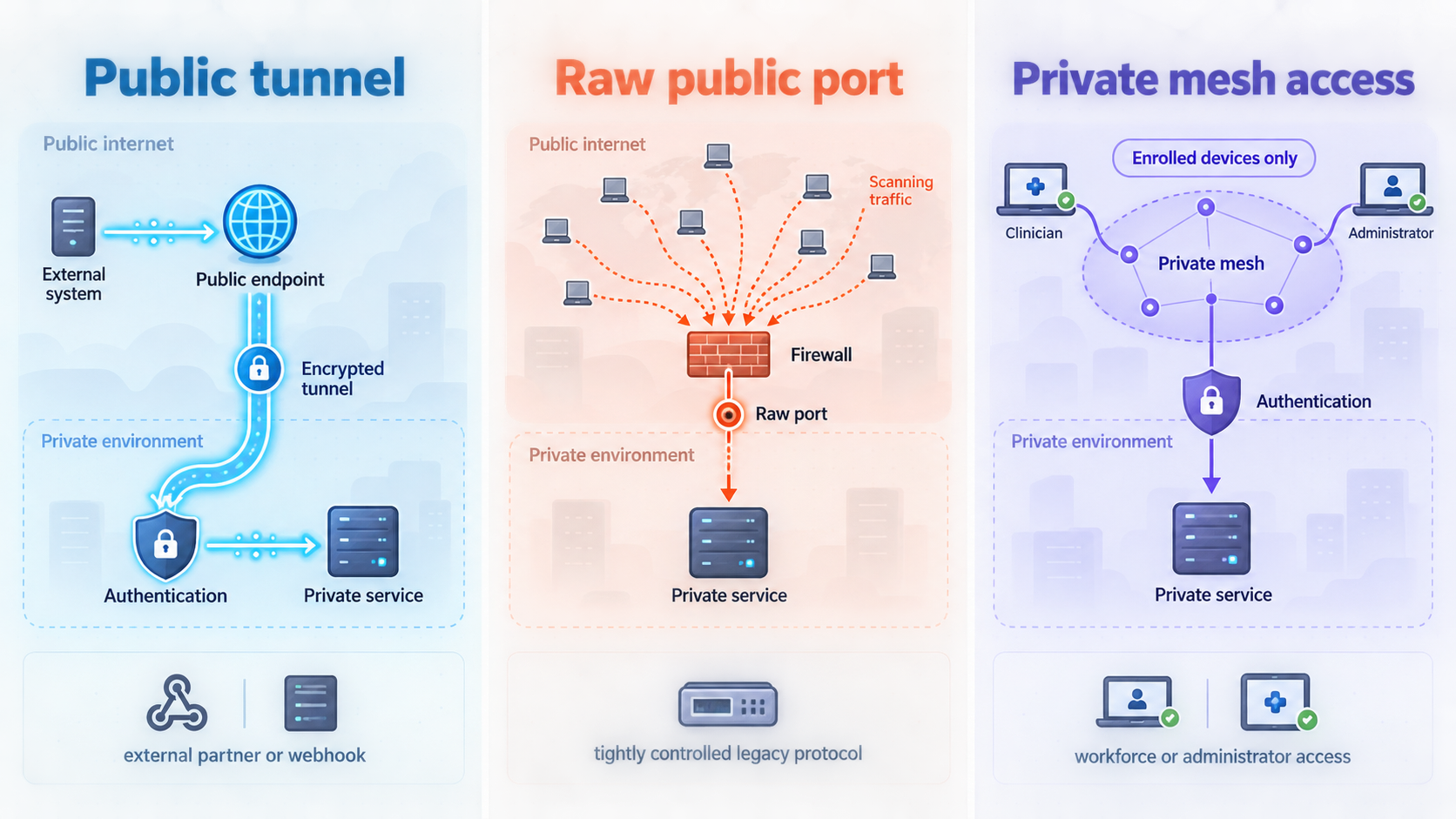
Once the data flow is documented, select the narrowest connectivity pattern that supports the approved users. With Localtonet, the client application runs on a device that can reach the local service and establishes an outbound connection to a Localtonet relay server. This avoids inbound router port forwarding, firewall changes, VPN setup for standard tunnels, and the need for a public IP address.
Depending on the tunnel family, the result is a public URL or a public host and port. The tunnel is available only while the selected client or device is connected and the tunnel is running. That lifecycle behavior is useful operational context, but stopping a tunnel is not a substitute for revoking application sessions, rotating compromised credentials, or completing incident-response procedures.
The appropriate model depends primarily on who needs access and which protocol the application uses. A browser-facing application has different requirements from a private administrative service or a non-HTTP protocol. Do not choose a raw port merely because it is technically reachable. Prefer the smallest protocol and audience surface that supports the workflow.
| Connectivity option | Potential fit | Exposure and control questions |
|---|---|---|
| HTTP/s tunnel | A web dashboard, webhook receiver, REST API, or browser-based AI application that must be reached through a public HTTPS address | Who may discover or call the address, where authentication occurs, how authorization is enforced, and whether request content appears in logs |
| TCP or TLS tunnel | A supported non-browser protocol or service that genuinely requires raw port connectivity | Whether the service has strong protocol-level authentication, safe client configuration, restricted privileges, and appropriate transport protection |
| UDP or combined UDP/TCP tunnel | A protocol with a documented need for UDP or both transport protocols | Whether the protocol is appropriate for sensitive data, how peers are authenticated, and how activity is monitored |
| VPN Manager | Private mesh connectivity between approved devices or local networks where public endpoint exposure is unnecessary | Which devices and networks may communicate, how firewall rules enforce least privilege, and how device membership is governed |
Public HTTPS access
A public HTTPS address can be appropriate when an approved external application or distributed user population must reach an HTTP service. Localtonet HTTP tunnels point to a local IP address and port. HTTP tunnel process types include Random Sub Domain, Custom Sub Domain, and Custom Domain, and they serve content at a public HTTPS address.
Public reachability should be treated as an internet-facing condition even if the URL is shared only with a small group. A hard-to-guess address is not an authorization mechanism. The application or an approved gateway must authenticate callers, authorize each action, reject malformed input, limit abuse, and avoid exposing administrative or diagnostic routes.
Raw port access
A TCP, TLS, UDP, or combined UDP/TCP tunnel exposes the relevant service through a public host and port. This can support protocols that do not use HTTP, but it also places more responsibility on the service protocol. Confirm that the service is intended for remote use, has an appropriate authentication model, is patched, and does not expose a management interface or database listener that was designed only for a trusted local network.
The existence of a TLS tunnel type should not be used to infer undocumented encryption properties for every other tunnel family or for the application’s stored data. Validate the complete transport path and configuration against current documentation and organizational requirements.
Private mesh access
If only managed staff devices, approved servers, or specific sites need connectivity, public exposure may be unnecessary. Our VPN Manager provides a private mesh VPN with granular firewall rules and can bridge local LANs. It is the Localtonet feature that should be evaluated for a private network design. Standard HTTP, TCP, UDP, TLS, combined UDP/TCP, and File Server tunnels should not be described as VPN functionality.
Private addressing reduces public exposure, but it does not eliminate the need for application authentication, record-level authorization, managed devices, audit logging, or incident response. A compromised device inside a private mesh remains a security concern. Firewall rules should permit only required peers, destinations, and services.
If an endpoint is intended only for a small set of managed devices, begin by evaluating private mesh access. If an approved external service must call a web API, evaluate a public HTTP tunnel with strong application controls. Use a raw port tunnel only when the required protocol cannot be served appropriately over HTTP and its security model has been reviewed.
Controls that must surround the connection
A tunnel solves reachability. The healthcare application and its operating environment still need controls that establish identity, limit access, preserve evidence, protect stored information, and support safe recovery. These controls should be designed together rather than added after a successful network test.
Authentication and credential handling
Every human user and machine caller should have an approved identity. Shared credentials make accountability difficult and complicate revocation. Service accounts should be scoped to a specific workload, stored outside source code, rotated under an established procedure, and disabled when no longer needed. Administrative identities should be separated from routine clinical or application access.
Localtonet device authentication tokens identify the client device that runs a tunnel. They are device-specific and must not be guessed, published, embedded in an article, committed to a repository, placed in screenshots, or copied into ordinary logs. Treat them as secrets. Application credentials remain a separate control and should not be replaced by possession of a tunnel URL.
Fine-grained authorization
Authorization should answer more than whether a person has the role “clinician” or “administrator.” The application may need to evaluate whether that person is permitted to access this patient, for this encounter, for this purpose, at this time, and whether the requested operation is read-only or can change a record.
AI agents require the same discipline. An agent that can call tools should receive only the tools and data scopes needed for the approved task. The model should not decide its own permissions. Enforce access at the application and data layers, validate tool arguments, and require additional controls for consequential actions. Human review may be appropriate before an AI-generated result is committed to a clinical system, depending on the workflow and applicable requirements.
Auditability
Logging only that a user signed in is usually insufficient for investigating access to clinical information. Design structured audit events that can answer who performed an action, which record or resource was involved, what operation occurred, when it happened, whether it succeeded, and which authorization context allowed it.
Avoid solving auditability by copying full prompts, responses, or patient records into logs. Record enough information to support investigation without creating another uncontrolled PHI repository. Protect audit data from unauthorized alteration, define access to it, synchronize system time appropriately, monitor for gaps, and test whether investigators can reconstruct a realistic event.
Retention, deletion, and backup behavior
Define retention separately for source records, model context, generated output, temporary files, application logs, audit records, backups, and incident evidence. Verify the actual software behavior. A policy that says “temporary” is not useful unless the system has an implemented deletion schedule and operators can demonstrate it.
Deletion also needs a failure path. Determine what happens when a backup is offline, a replica is delayed, a job fails, or a user exports data. Document legal holds and approved exceptions. Ensure that monitoring alerts on retention failures rather than silently allowing data to accumulate.
Contracts and vendor scope
Build an inventory of every organization and hosted service that may create, receive, maintain, or transmit PHI in the proposed workflow. Legal and compliance teams should determine whether Business Associate Agreements or other contractual measures are required and whether current terms cover the exact service and configuration.
This review must occur before PHI is introduced. Do not infer contractual suitability from a security feature, a tunnel protocol, or successful technical testing. For Localtonet specifically, obtain current information directly from our team and have authorized organizational reviewers decide whether the proposed use is permitted.
Incident response and operational ownership
Assign owners for the local AI service, Localtonet client, tunnel configuration, application identities, logs, endpoint devices, and clinical integration. Define who can stop a tunnel, disable a user, revoke a service credential, isolate a host, preserve evidence, assess notification obligations, and restore service safely.
Practice scenarios such as a leaked application credential, exposed device token, unexpected tunnel start, unauthorized record access, compromised workstation, excessive request volume, missing audit events, or model output sent to the wrong destination. Connectivity should be included in incident exercises rather than treated as an invisible infrastructure detail.
A HIPAA-aware architecture checklist
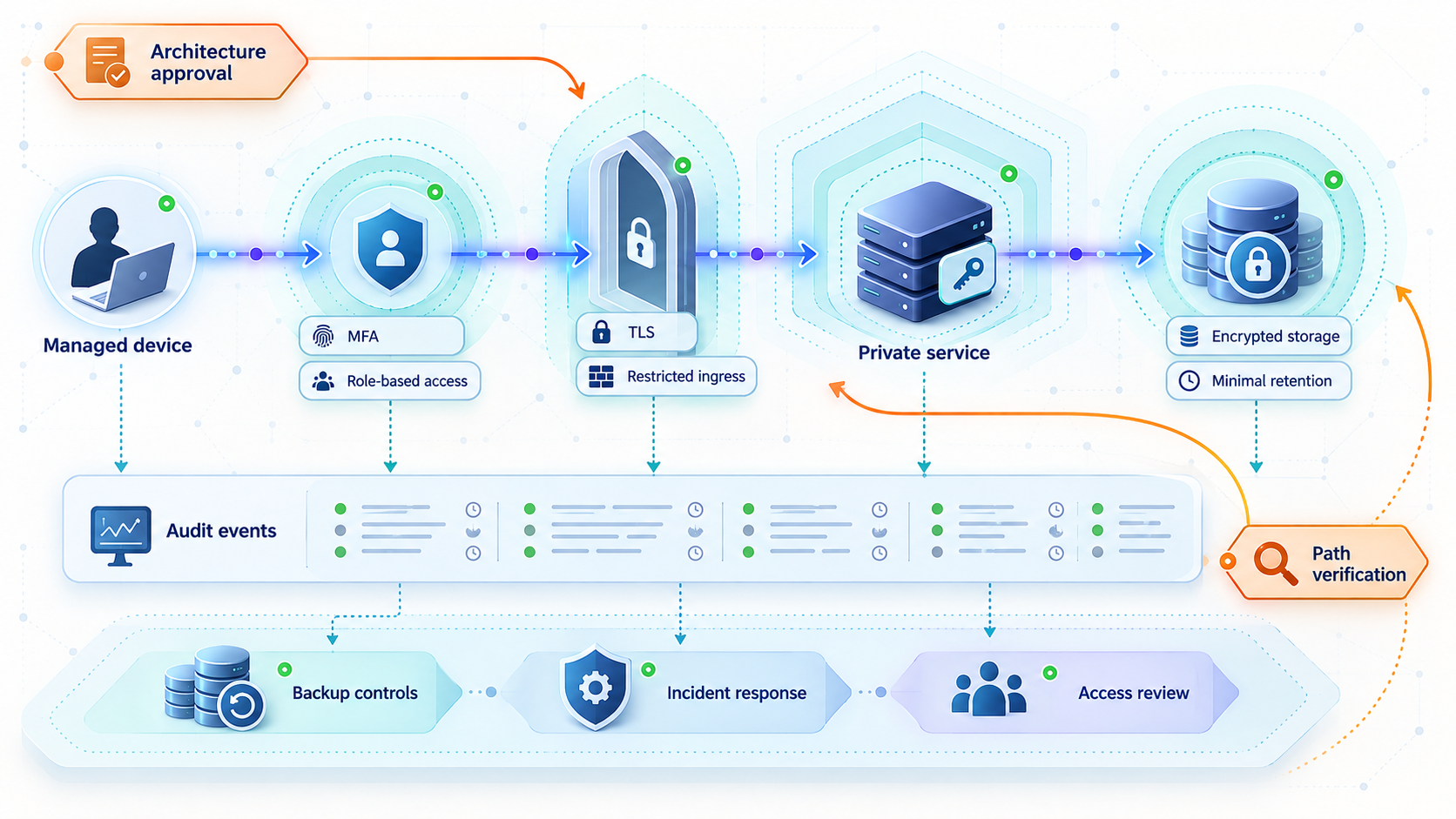
The following sequence is an engineering and review checklist, not a certification process. Completion does not establish legal compliance. It is intended to expose unanswered questions early, while the design can still be changed.
Define the approved use case and decision owner
Record the clinical or administrative purpose, intended users, environment, model responsibilities, prohibited uses, and accountable business and technical owners. Separate experimental, staging, and production approval.
Inventory PHI and map every data path
Follow data through input, preprocessing, retrieval, inference, tools, responses, logs, caches, exports, and backups. Mark each trust boundary and identify every system or organization that can receive or maintain the information.
Reduce the data and network scope
Remove fields that are not necessary, limit model context, disable unneeded routes and tools, and decide whether private mesh access can replace a public endpoint. Expose only the required service and port.
Design identity and authorization
Establish unique human and machine identities, record-level or resource-level permissions, service-account scopes, session behavior, revocation, and controls for consequential agent actions.
Define logging without unnecessary disclosure
Specify the audit events needed to reconstruct access while preventing PHI, secrets, and complete prompts from appearing in ordinary diagnostics. Define access, retention, integrity, monitoring, and review responsibilities for the audit trail.
Review contracts and current product facts
Have privacy, compliance, procurement, security, and legal reviewers confirm vendor scope, agreements, organizational policies, current technical documentation, and whether the proposed configuration is authorized for PHI.
Test with synthetic data
Validate routing, authentication, authorization failures, rate behavior, audit events, retention, shutdown, and recovery without introducing real patient information. Treat this as technical validation, not production approval.
Approve, monitor, and reassess
Record the production decision, configuration owner, monitoring plan, incident procedures, and review interval. Reassess after model changes, new tools, new data sources, network changes, vendor changes, or a revised clinical workflow.
Configure Localtonet only after the architecture is approved
Once the organization has selected an approved connectivity pattern, Localtonet can provide the network path. The client must run on a device that can reach the intended local service. For a service bound to the same machine, the target may be a loopback or local interface selected by the operator. For another device on the local network, the client device must be able to reach that target under the organization’s network rules.
Do not guess the local port. Obtain it from the healthcare AI application’s actual configuration and verify locally before creating the tunnel. Also confirm whether the service expects HTTP, HTTPS, TCP, UDP, or another supported transport. A protocol mismatch can produce confusing failures and may lead teams to weaken controls unnecessarily while troubleshooting.
The documented Localtonet workflow is:
Install and run the Localtonet client
Install the current client application on the approved device that can reach the local healthcare AI service. Use current installation information for that operating system rather than copying an unverified command from an old guide.
Authenticate and select the device
Use the device-specific authentication token through the approved workflow and select the device that will run the tunnel. Keep the token out of source control, tickets, screenshots, chat transcripts, and application logs.
Select an available relay server
Choose from the server or region values currently available in the product or dashboard. Availability can vary, so this guide does not hardcode a server code or imply that every region is available on every plan.
Create the approved configuration
Select the appropriate HTTP, raw port, or VPN configuration. For an HTTP or raw port tunnel, enter the verified local IP address and port. Select only a tunnel type that matches the service protocol and the reviewed audience model.
Start the tunnel and test the assigned endpoint
Creating a tunnel does not start it. Use the Start control, then test the assigned public URL or public host and port from an approved external test location with synthetic data. Confirm that unauthorized requests fail before testing an authorized workflow.
Stop or delete the tunnel when it is no longer needed
Stop temporary access after the test or approved access window. Delete configurations that are no longer required under the organization’s change-management process. Remember that tunnel shutdown does not revoke application credentials or remove data already stored elsewhere.
Current tunnel categories and setup material are available in the Localtonet documentation. Exact client commands, relay choices, custom-domain DNS requirements, plan availability, and dashboard options should be checked there and in the current product interface before a production change.
Many development servers are designed for local testing and may lack production authentication, authorization, request limits, safe error handling, or hardened administrative routes. Place access control in the application or an approved gateway, bind only the required service, remove debug interfaces, and complete security review before starting a public tunnel.
Verify the complete path and operate it safely
Verification should prove more than successful reachability. A good test plan covers positive access, denied access, record boundaries, logging, tunnel lifecycle, failure behavior, and recovery. Run it first with synthetic data that resembles production structure without representing real people.
Verify the local service first
Confirm that the AI application is healthy from the same device that will run the Localtonet client. Verify its actual IP address, port, and protocol. Exercise a health endpoint or a harmless test operation if the application provides one. If local access fails, solve that problem before introducing a tunnel.
Confirm that the service is not unintentionally listening on additional interfaces or ports. Check that debug mode is disabled, default credentials are removed, test accounts are controlled, and administrative routes are not exposed through the same public path unless that access is explicitly required and reviewed.
Test denial before testing success
From an external test system, send a request without credentials and confirm that it is rejected. Repeat with an invalid or expired credential. Test a valid user requesting a record outside the user’s assigned scope. If the application supports write operations, verify that read-only users cannot perform them.
For an agent, attempt to call an unapproved tool, provide an out-of-scope record identifier, and submit malformed arguments. The authorization layer should deny these actions independently of what the model requests. Avoid relying solely on prompt instructions such as “do not access other patients.”
Inspect logs and storage
Follow a synthetic request through every logging layer. Review application logs, reverse-proxy output, model traces, tool histories, database records, temporary files, monitoring events, and client-side storage. Confirm that secrets and complete sensitive payloads are absent unless a reviewed requirement explicitly permits their storage.
Then test retention behavior. Verify that temporary content expires or is deleted as designed, that failed requests do not remain indefinitely in a queue, and that backups and replicas follow documented procedures. Confirm that audit events remain useful after sensitive payload logging is reduced.
Exercise the tunnel lifecycle
Confirm that the endpoint is reachable only while the selected client or device is connected and the tunnel is running. Stop the tunnel and verify that remote connectivity ends. Start it again under the approved procedure and verify that monitoring detects the state change as expected.
Localtonet also has platform-wide Token/Tunnel webhooks that can report Connected and Disconnected state changes for a selected Token Group. These send a WebHookRequest JSON body containing Id, ActionDate, Type, and Status. If an organization uses these webhooks for monitoring, it should authenticate and validate the receiving workflow according to its own requirements and avoid treating connectivity events as patient-access audit records. Tunnel status does not show which clinical record a user accessed.
Prepare routine operating procedures
- Identify who may create, start, stop, modify, and delete the tunnel.
- Record the approved local target and expected tunnel type.
- Review active tunnels and connected devices on a defined schedule.
- Track application and dependency updates under change management.
- Test credential revocation and device removal.
- Monitor authentication failures, authorization denials, unexpected traffic, and missing audit events.
- Revalidate the data-flow map after adding a model, tool, integration, route, or logging service.
- Define an emergency shutdown process that includes both network access and application credentials.
Troubleshoot without weakening security
Healthcare connectivity incidents can create pressure to “temporarily” disable authentication, broaden firewall rules, expose a second port, or turn on verbose body logging. Those shortcuts can create a more serious problem than the original outage. Troubleshoot from the inside out and preserve the approved control boundary.
The public endpoint cannot reach the service
First confirm that the Localtonet client device is connected and that the tunnel has actually been started. Creating a tunnel alone does not make it active. Next, test the local target from the client device. Verify the configured IP address, port, and protocol against the application’s current settings.
Check whether the application listens only on an interface that the client cannot reach. If the target is another local network device, confirm that normal routing and host firewall policy permit the client device to connect. Do not solve a local reachability problem by opening broad inbound internet access.
The endpoint responds, but authentication fails
Keep tunnel authentication and application authentication conceptually separate. A working tunnel only confirms a network path. Verify the application’s identity-provider configuration, credential audience, token expiration, clock assumptions, session settings, and user assignment. Do not place credentials in a URL while debugging.
If a valid user is denied, inspect the authorization decision rather than granting a broader role immediately. Determine which patient, encounter, operation, purpose, or time condition failed. Preserve the least-privilege model while correcting the specific policy or data issue.
The application works locally but returns protocol errors remotely
Verify that the selected tunnel type matches the service. An HTTP application should not be treated as an arbitrary raw protocol without a clear reason, and a non-HTTP service will not become an HTTP API merely because it is exposed. Confirm whether the local application expects HTTP or HTTPS and whether clients are using the assigned endpoint correctly.
Avoid changing several layers at once. Record one controlled change, test it with synthetic data, and restore the known configuration if it fails. This preserves useful evidence and reduces the chance of leaving an insecure temporary setting in production.
Sensitive data appears in logs
Treat unexpected PHI in logs as a potential incident under organizational procedures. Restrict access, preserve required evidence, notify the designated security or privacy owner, and determine where copies were forwarded or backed up. Do not simply delete evidence without authorization.
Correct the logging source by redacting or omitting sensitive fields, headers, bodies, query strings, tool results, and stack traces as appropriate. Test the change across successful, denied, and failed requests. Also verify that audit events still contain enough structured metadata to support accountability.
A device token or application credential may be exposed
Follow the organization’s credential-compromise procedure. Stop affected access if necessary, rotate or revoke the exposed secret through the appropriate current workflow, inspect relevant activity, and identify where the secret was copied. Replacing a Localtonet device token does not automatically rotate application credentials, and changing an application password does not address an exposed device token.
The tunnel stops unexpectedly
Because a tunnel is available only while the selected device is connected and the tunnel is running, inspect the client device’s availability, network connectivity, and tunnel state. Review organizational monitoring and the current Localtonet interface for status information. Do not claim a specific uptime or failover behavior unless it is established in the current service terms and approved architecture.
If the healthcare workflow requires strict availability, document that requirement separately and design appropriate application, device, network, operational, and clinical fallback procedures. A connectivity tool alone cannot establish the availability of the model, data source, identity provider, user device, or downstream EHR integration.
Frequently asked questions
Does using a Localtonet tunnel make a healthcare AI application HIPAA compliant?
No. A tunnel provides connectivity and is only one component of a larger system. HIPAA compliance depends on the organization’s complete legal, administrative, physical, and technical framework, including contracts, authentication, authorization, auditability, retention, incident response, workforce practices, and the behavior of every system that handles PHI. The available product context does not establish that Localtonet is HIPAA compliant or that a BAA is available. Obtain current information and complete organizational review before transmitting PHI.
Should a local healthcare AI API use a public HTTPS tunnel or private mesh access?
Choose according to the approved audience and protocol. If only managed devices or approved private networks need access, evaluate VPN Manager and granular firewall rules. If an approved external application must reach an HTTP API, an HTTP tunnel can provide a public HTTPS address, but the application still needs strong authentication and fine-grained authorization. Use a raw port tunnel only for a reviewed service that genuinely requires that protocol.
Is a secret or hard-to-guess tunnel URL enough to protect PHI?
No. Treat a public URL as internet-facing even if it is distributed privately. URLs can be copied into browser history, logs, messages, screenshots, and support records. Require application-level identity, authorization, session controls, input validation, monitoring, and safe error handling. Do not place PHI or credentials in the URL.
Can we test the architecture before the compliance review is complete?
Teams can usually validate technical behavior with synthetic data in an approved test environment, subject to their organizational policies. Test reachability, denied access, logging, shutdown, retention, and failure handling. Do not interpret a successful test as authorization to introduce PHI. Production approval should be explicit and recorded.
Does private mesh access remove the need for application authentication?
No. Private network membership limits network reachability, but it does not prove that a user may access a specific patient record or perform a specific action. Continue to enforce application identity, record-level authorization, managed-device requirements, auditing, and credential revocation. Use VPN Manager firewall rules to limit unnecessary peer and service access.
Can Localtonet tunnel-status webhooks serve as the healthcare audit log?
No. Platform-wide Token/Tunnel webhooks report Connected and Disconnected state changes. They do not establish which user accessed which patient record, what operation occurred, or why it was authorized. Use them as connectivity events if appropriate, while maintaining a separate application and data-layer audit trail.
What should we do first if PHI is found in an AI prompt log?
Follow the organization’s incident-response and privacy procedures. Restrict access, preserve required evidence, notify the designated owners, identify every destination and backup that received the log, and assess the event under applicable policy and law. Then remove or redact sensitive prompt logging through a controlled change and verify that useful audit evidence remains.
Plan the access boundary before starting the tunnel
After your privacy, security, compliance, procurement, and legal reviewers approve the architecture, use Localtonet to connect the approved local service through the narrowest suitable tunnel or private mesh configuration. Start with synthetic data, verify denied access and logging, and keep PHI out of the workflow until production use is formally authorized.
Get Started Free →

