

Build a private Yuxi evaluation workspace, validate RAG locally, and test controlled remote access
Yuxi is a self-hosted, multi-user knowledge-agent platform that combines document ingestion, RAG, knowledge graphs, agent workflows, tools, and permission management. This guide installs the repository-configured v0.7.3 quick-start environment, verifies the application locally, and creates a Localtonet HTTP tunnel to the Yuxi frontend. It also defines the browser, hostname, API-routing, streaming, authentication, and permission checks required before a remote pilot. The quick-start Compose environment is a development or evaluation deployment, not a complete production design for durable organizational use.
📋 What's in this guide
Scope, version, and compatibility status
This tutorial is limited to a nonproduction Yuxi pilot. It uses the Docker Compose quick start configured by the Yuxi repository for v0.7.3. The project describes that Compose command as starting a development environment. It is suitable for learning the system, validating a controlled document set, and performing a time-bounded remote-access test. It should not be treated as a production deployment merely because several people can reach it.
As of August 20, 2026, the primary Yuxi repository identifies v0.7.3 as the release used by its configured quick start. The Yuxi documentation site shows the same pinned clone, initialization, Compose startup, readiness, and browser workflow. This guide therefore uses v0.7.3 consistently instead of mixing files or instructions from earlier releases.
The Yuxi v0.7.3 quick start and the Localtonet HTTP tunnel workflow are documented independently. A reproducible end-to-end test record proving Yuxi v0.7.3 hostname handling, origin policy, API proxying, streaming, WebSocket behavior, and every browser workflow through a Localtonet hostname is not available here. No additional Yuxi setting can therefore be claimed as universally required or universally unnecessary. Complete the acceptance tests in this guide with your assigned public hostname before inviting pilot users.
This qualification matters because loading the sign-in page is not enough. A frontend may render while later requests fail because of host validation, an absolute API URL, an origin allowlist, a cookie restriction, a redirect to localhost, or a streaming connection that does not survive the public route. The acceptance section tests these behaviors separately and tells you what evidence to collect if the public path differs from local behavior.
If you need a durable remote-team service, stop after evaluating the pilot unless you have completed Yuxi's version-specific production deployment process. A production design must define its service topology, persistent storage, backups, restoration, model configuration, upgrades, migration boundaries, monitoring, capacity, and rollback procedure. Those details cannot be reconstructed safely from the development Compose command, and this article does not invent missing production commands.
Understand the pilot architecture
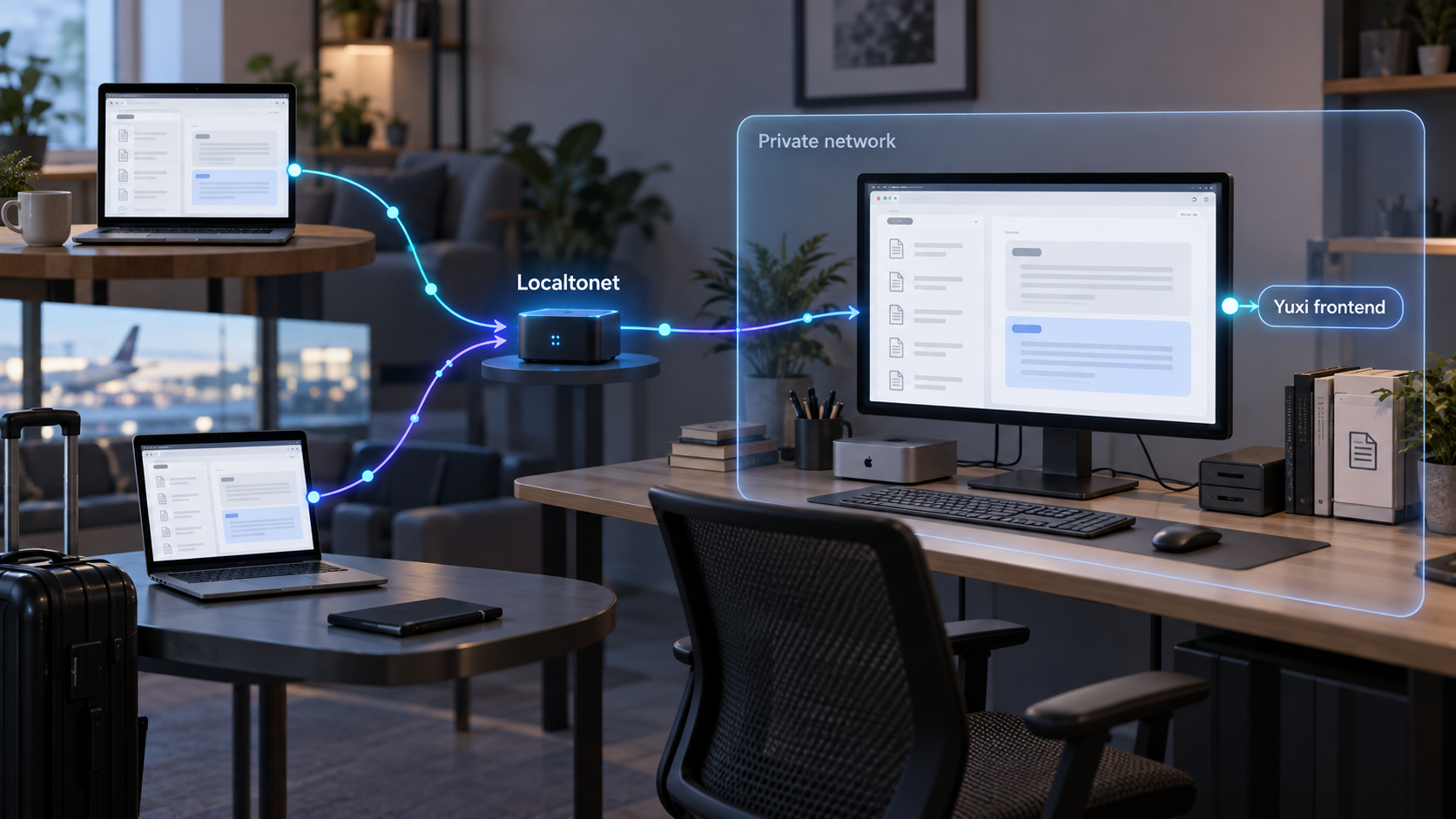
Yuxi is a multi-service application rather than a single document-search container. Its documented stack includes a Vue frontend, FastAPI backend, LangGraph-based execution, PostgreSQL, Milvus, Neo4j, document-processing components, and supporting workers. Its current project documentation describes knowledge-base ingestion, vector retrieval, reranking, RAG evaluation, knowledge graphs, agents, subagents, Skills, MCP integrations, sandbox workspaces, generated files, users, departments, and permission controls.
The local quick-start frontend is documented at http://localhost:5173. The backend readiness endpoint is http://localhost:5050/api/system/ready, and interactive FastAPI documentation is available at http://localhost:5050/docs. For this pilot, expose only the frontend on port 5173. Keep the readiness endpoint, API documentation, databases, workers, and middleware private unless you have a separately reviewed reason to publish them.
With Localtonet, our client establishes an outbound connection from a device that can reach Yuxi to a Localtonet relay server. An active HTTP tunnel supplies a public HTTPS URL without inbound router port forwarding, firewall changes, VPN setup, or a public IP address. The application remains self-hosted, but the selected endpoint is publicly reachable while the client is connected and the tunnel is running.
The tunnel transports requests to Yuxi. Yuxi must still require login, identify each user, enforce knowledge and agent permissions, protect administrator functions, and limit powerful tools. Do not distribute the URL until those controls pass a non-administrator test.
Prepare the host and credentials
Install Yuxi on a trusted host where you can administer Docker and protect persistent data. The documented quick start requires Docker Engine, Docker Compose, Git, and access to a usable large-model API. The host also needs outbound connectivity to clone the repository, obtain images or build dependencies, contact the configured model provider, and connect the Localtonet client to a relay.
| Requirement | Purpose | Preflight check |
|---|---|---|
| Docker Engine | Runs Yuxi and its supporting services. | docker version must contact the Docker engine successfully. |
| Docker Compose | Builds and manages the documented multi-container stack. | docker compose version must return a version. |
| Git | Clones the pinned Yuxi release. | git --version must succeed. |
| Model API access | Supports Yuxi model, agent, embedding, or reranking workflows as configured. | Prepare the provider credential requested during initialization. |
| Browser access | Initializes the administrator and validates local and remote behavior. | Use a trusted browser on the host or through an approved local path. |
| Localtonet account and client | Creates the outbound relay connection for the pilot URL. | Install the current client on the Yuxi host or a trusted device that can reach it. |
| Controlled pilot documents | Provides known facts for parsing, retrieval, and permission tests. | Use non-sensitive material until the complete access boundary is verified. |
The public Yuxi quick-start material does not establish one universal minimum CPU count, memory allocation, disk size, or operating-system matrix for every workload. Resource demand varies with document volume, OCR, graph construction, vector indexing, concurrent users, model choices, agents, and sandbox tasks. Confirm that the evaluation host has enough space for image builds, uploaded documents, databases, indexes, generated artifacts, logs, and temporary processing.
Protect secrets before installation
Treat model credentials, JWT secrets, API-key derivation secrets, sandbox provisioner secrets, administrator credentials, and the Localtonet device token as sensitive. Do not commit them, paste them into tickets, place them in screenshots, or include them in shell examples. Restrict access to the deployment directory and any backup containing the environment or persistent state.
Install the Localtonet client without guessing a command
Obtain the current Localtonet client for the operating system of the device that will run the tunnel. Use the installation package or method presented by the current Localtonet application and documentation, complete installation, launch the client, and associate that device with its device-specific authentication token. Installation commands and packaging can vary by operating system and client version, so this guide does not substitute an unverified command.
The simplest arrangement is to install our client on the Yuxi host. The tunnel can then target 127.0.0.1:5173. If organizational policy requires the client to run on another trusted device, that device must be able to reach the Yuxi host over the private network. In that arrangement, its own 127.0.0.1 is not the Yuxi host.
Install the Yuxi v0.7.3 quick-start environment
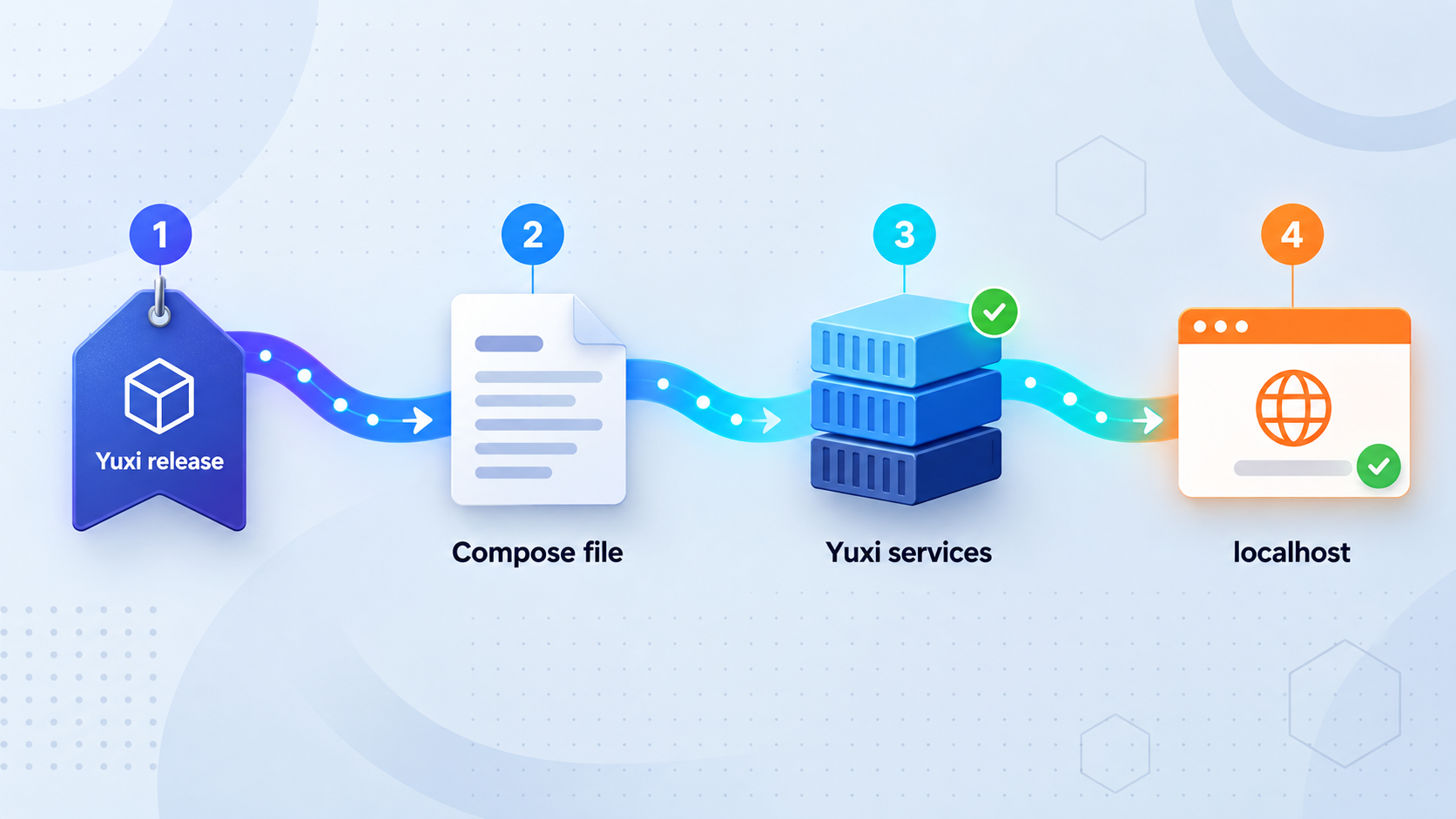
The current Yuxi quick start uses three actions: clone the configured release, run the initialization script, and build and start the development environment. Run them from a trusted administrative session.
Clone the configured v0.7.3 release
Clone the named tag with shallow history, then enter the repository:
git clone --branch v0.7.3 --depth 1 https://github.com/xerrors/Yuxi.git
cd Yuxi
Record the tag in your pilot notes. Do not replace it with the moving default branch while following version-specific initialization or migration instructions.
Initialize Yuxi configuration and secrets
On Linux or macOS, run:
./scripts/init.shOn Windows PowerShell, run:
.\scripts\init.ps1
The documented script creates .env, reads a SiliconFlow API key for the default configuration, and generates separate secrets for JWT handling, API-key derivation, and the sandbox provisioner. Yuxi also documents manual initialization by copying .env.template to .env, but the scripted path reduces the chance of omitting a required value.
Build and start the development environment
From the repository root, run the documented Compose command:
docker compose up --build -dThe first build can take longer because images and dependencies may need to be built or downloaded. Do not interpret a returned shell prompt as proof that every dependent service is ready.
Restrict it to the deployment account and authorized administrators. Never publish it, attach it to a support request without redaction, or commit it to source control.
If initialization fails, stop before starting Compose. Verify that you are in the repository root, that the selected shell can execute the release's script, that the directory is writable, and that the requested model credential was supplied. Use the exact terminal error rather than guessing an environment-variable name.
Verify the complete local application
Work from infrastructure to application behavior. A healthy local baseline makes it possible to identify whether a later failure belongs to Yuxi, the browser, the Localtonet target, or the public-host configuration.
Inspect every Compose service
List the services in the current project:
docker compose psInvestigate stopped, restarting, unhealthy, or missing services. A running frontend alone does not prove that databases, workers, vector search, graph storage, or the API are ready.
Check backend readiness
Run the documented readiness request:
curl --fail http://localhost:5050/api/system/ready
Continue only after the response reports a ready status. The --fail option makes an HTTP error fail the command instead of appearing to be a successful health check.
Initialize and authenticate the administrator
Open http://localhost:5173, follow the page instructions to initialize the super administrator, and sign in. Use a strong, unique password stored according to your organization's credential policy.
Verify the browser session and model configuration
Navigate through the primary interface and confirm that the session remains authenticated. Verify the model configuration needed for the planned pilot. A reachable provider endpoint is not enough if the selected chat, embedding, or reranking model is missing or unauthorized.
Use local API documentation only for diagnostics
If needed, inspect http://localhost:5050/docs locally. Normal pilot users should work through the frontend, and the API documentation should not receive its own public tunnel by default.
The local phase passes only when services remain stable, readiness succeeds, login works, the main interface renders without repeated browser errors, and the configured model path can complete the operation required by the pilot. Record any browser-console errors now so they are not mistakenly attributed to the public tunnel later.
A browser on the Yuxi host can use localhost:5173. A different device cannot use its own localhost to reach Yuxi. The same rule applies to a Localtonet client running on another device: configure the Yuxi host address that the client can actually reach.
Validate a controlled RAG workflow
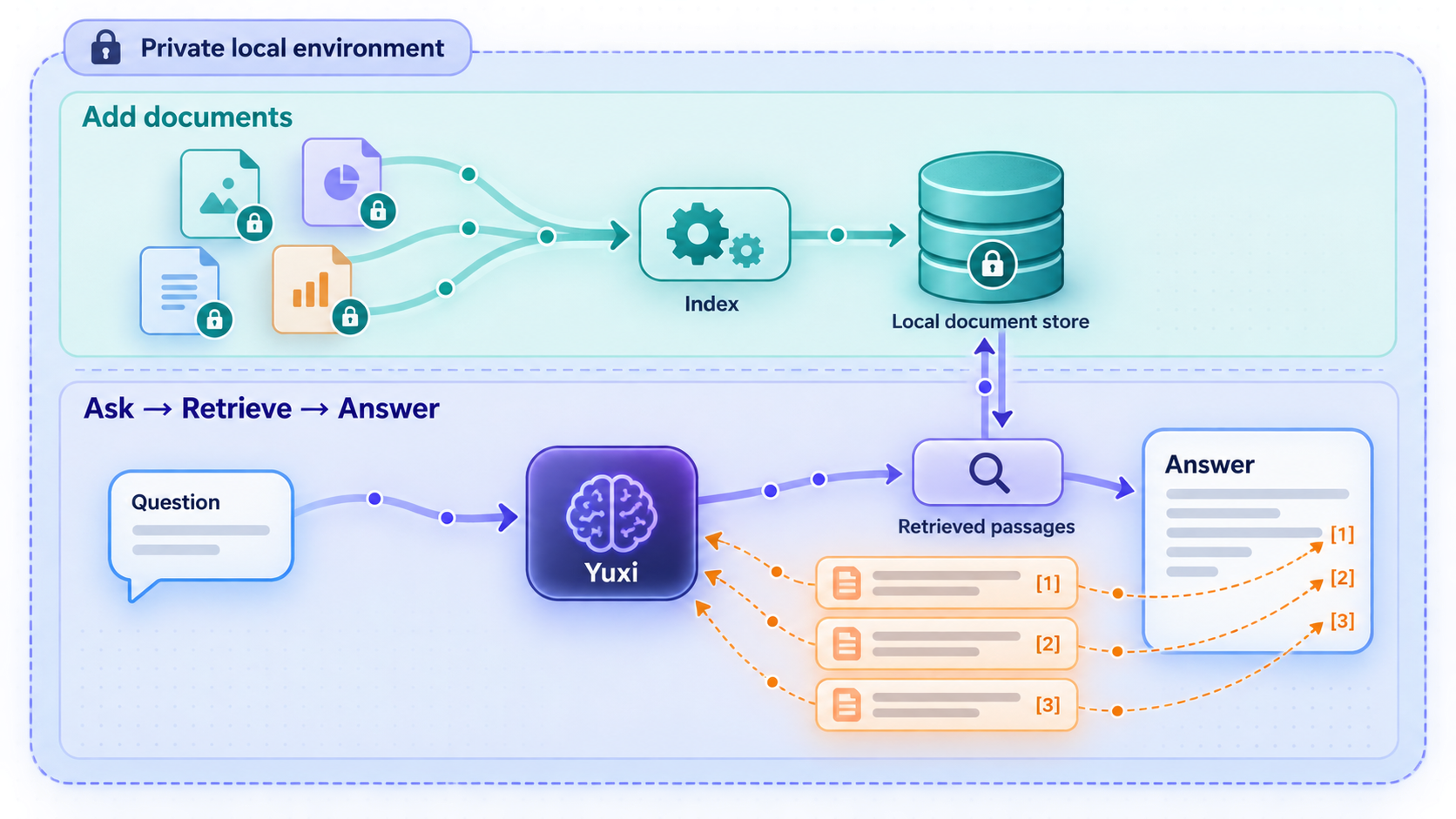
Do not expose an empty interface and call the pilot complete. Test the knowledge workflow locally first with documents whose contents and expected answers are known. Yuxi documents support for common formats including PDF, Word, PowerPoint, Excel, Markdown, and other text-oriented material.
Use a small, non-sensitive corpus
Begin with a narrow collection that contains several known facts, one deliberately unsupported question, and at least one pair of similar terms that could confuse retrieval. Avoid regulated or confidential material until authentication, permissions, logs, generated files, and knowledge sharing have all been evaluated.
Wait for parsing and indexing
Upload completion is not the same as searchable completion. Review the processing state and inspect generated chunks where the interface permits it. Confirm that headings, tables, and expected statements survived parsing. Image-heavy files, OCR, large spreadsheets, and complex layouts can require more processing than simple Markdown.
Test retrieval before judging an answer
Submit questions with known source passages through Yuxi's retrieval-testing workflow. Check whether the expected chunk appears, whether irrelevant chunks dominate, and how configured reranking changes the result. If retrieval is weak, verify parsing, chunk content, query terminology, embedding configuration, and reranking availability before rewriting the agent prompt.
Attach only the required knowledge and tools
Configure the pilot agent with the minimum knowledge bases and capabilities needed for its task. Do not grant general access to every department's documents, Skills, MCP services, tools, subagents, or sandbox files. Powerful execution capabilities require a separate risk review from basic document retrieval.
Test with a non-administrator identity
Create a representative ordinary user or department assignment and repeat the workflow. Confirm that the account can use the intended knowledge base and agent but cannot view, edit, or invoke unrelated resources. Administrator success does not prove that team authorization is correct.
Configure the Localtonet HTTP tunnel
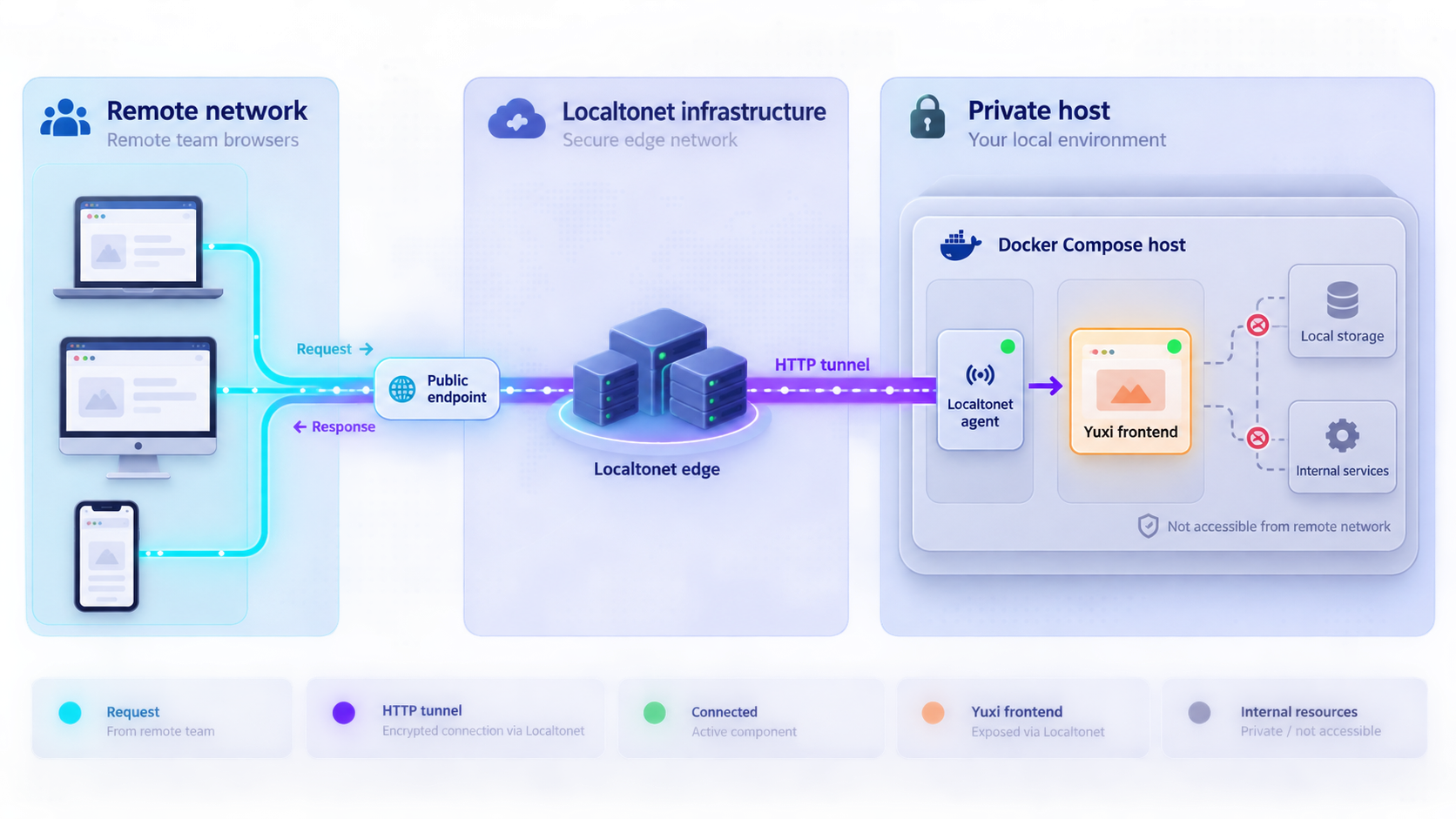
Configure remote access only after local readiness, login, model access, retrieval, and permissions pass. The current Localtonet workflow is to run our client on a device that can reach the service, select that device by its token, select an available relay server, create an HTTP tunnel for the local target, start it, and use the assigned public URL.
Install and launch the Localtonet client
Install the current application for the device's operating system and launch it. Prefer the Yuxi host so the frontend can remain reachable through loopback. If you use another device, first prove that it can open the Yuxi frontend through the Yuxi host's private address.
Authenticate or select the device
Use the device-specific authentication token associated with the client that will run the tunnel. Keep the token private. A token identifies a device and must never be guessed, reused casually, or exposed in documentation.
Select a current relay server
Choose an available server or region in the Localtonet dashboard. Obtain current values from the product rather than copying a hardcoded server code from an old tutorial.
Create an HTTP tunnel to the frontend
Select an HTTP tunnel. If the client runs on the Yuxi host, set the local target to IP address 127.0.0.1 and port 5173. If it runs elsewhere, use the Yuxi host address reachable from that client and port 5173.
HTTP tunnels can use a generated subdomain, a selected subdomain where supported, or a custom domain. If you select a custom domain, follow current Localtonet DNS instructions. Do not guess records or reuse requirements from another tunnel provider.
Start the tunnel
Creating a tunnel does not start it. Press the Start button and wait until the selected client is connected and the tunnel is running. Record the assigned public HTTPS URL for the controlled test.
Open the URL from an external device
Use an authorized device on a separate connection so the test does not silently fall back to a local route. Do not distribute the URL more broadly until every acceptance criterion below passes.
For the current product workflow and client-specific interface, consult our HTTP tunnel documentation. The tunnel remains available only while the selected client is connected and the tunnel is running.
| Endpoint | Purpose | Pilot exposure |
|---|---|---|
http://127.0.0.1:5173 |
Yuxi browser frontend on the host. | Use as the HTTP tunnel target when the client runs on the same host. |
http://localhost:5050/api/system/ready |
Backend readiness check. | Keep local. |
http://localhost:5050/docs |
Interactive API documentation. | Keep local unless a separately secured integration requires it. |
| PostgreSQL, Milvus, Neo4j, workers, and middleware | Internal application and data services. | Do not create public tunnels for ordinary users. |
Run local and external acceptance tests
Use the same user, document set, agent, and query locally and through the public URL. This isolates public-host differences from application configuration. Record the Yuxi tag, browser and version, Localtonet URL type, client location, time of test, and exact failed request without recording credentials or private document content.
Local acceptance criteria
- All required Compose services remain stable in
docker compose ps. - The readiness endpoint returns a
readystatus. - The local frontend loads and administrator authentication succeeds.
- An ordinary user can authenticate and sees only approved resources.
- A controlled document finishes parsing and indexing.
- Retrieval returns the expected source passage for a known question.
- The configured agent can complete a representative response.
- An unsupported question is handled without pretending that the pilot corpus contains an answer.
External acceptance criteria
| Test area | Pass condition | Failure signal |
|---|---|---|
| Hostname validation | The public HTTPS hostname loads the frontend without a rejected-host response. | A host-not-allowed message, HTTP 400 or 403, or frontend server rejection. |
| Origin policy | Login and authenticated application requests succeed from the public origin. | CORS errors, blocked preflight requests, origin rejection, or failed credentialed requests. |
| API routing | Browser requests use a route reachable through the public frontend and do not target the remote device's localhost. | Requests to localhost:5050, a private LAN address, or an unavailable absolute backend URL. |
| Redirects and public base URL | Login, logout, navigation, and generated links stay on the assigned public hostname. | Redirects to localhost, the private host, an old hostname, or an incorrect scheme. |
| Session cookies | The authenticated session persists through normal navigation and refresh. | Repeated sign-in prompts, missing cookies, or cookie-domain and SameSite warnings. |
| Streaming responses | A representative agent response updates and completes through the public route. | Permanent loading, early disconnects, buffered output that never completes, or transport errors. |
| WebSocket behavior | Any workflow that opens a WebSocket connects and remains usable. | Failed upgrade requests, repeated reconnect loops, or events visible locally but not remotely. |
| Uploads and downloads | A small approved file uploads, processes, previews, and downloads as expected. | Size errors, mixed-content blocks, broken generated links, or incomplete transfers. |
| RAG workflow | The same known query retrieves the expected source and completes through the public URL. | Public-only request failures, missing sources, stalled execution, or permission differences. |
| Authorization | The ordinary account can access only assigned knowledge, agents, tools, and files. | Unexpected visibility, editable administrator resources, or access to another department's content. |
| Browser compatibility | The approved desktop or mobile browsers complete login, query, streaming, and file operations. | A workflow succeeds in one browser but fails in another required browser. |
Open the browser developer tools during the external test. Inspect failed network requests, their destination host, response status, redirect location, and browser console message. If requests point to localhost or a private IP address, the frontend is using a route that a remote browser cannot reach. If the public hostname is rejected, look for a release-specific frontend host allowlist. If the browser reports an origin failure, review Yuxi's release-specific allowed-origin configuration. If a generated redirect returns to localhost, review any public-base-URL or callback setting documented by the checked-out release.
The current material available for this tutorial does not establish the exact v0.7.3 variable names for a host allowlist, allowed origins, API base URL, WebSocket URL, or public base URL. Inspect the checked-out v0.7.3 environment template and documentation before changing configuration. A variable copied from another release or another Vue and FastAPI project may be ignored or may weaken the origin boundary.
Repeat the public test after every relevant hostname, origin, proxy, or base-URL change. Restart only the services required by the version's configuration instructions, then verify local behavior again before retesting externally. Do not declare compatibility from a single page load.
Preserve the security boundary
Self-hosting describes where Yuxi runs. It does not make the Localtonet address private. Anyone who obtains the active URL can attempt to connect, so the application must enforce authentication and authorization before the URL is shared.
A generated hostname is not an authorization mechanism. Initialize Yuxi securely, create individual accounts, apply least-privilege permissions, test non-administrator access, and limit the pilot to approved users and documents.
Expose only the frontend
The pilot needs one public route to the frontend. Do not create separate tunnels for PostgreSQL, Milvus, Neo4j, internal workers, sandbox services, readiness, or API documentation. Every additional public endpoint expands the surface that must be authenticated, maintained, and monitored.
Separate administrator and user activity
Avoid shared administrator credentials. Use ordinary accounts for ordinary work and reserve administrator privileges for model, user, permission, and system configuration. Validate access with representative department memberships rather than assuming that role labels produce the intended boundary.
Limit agent capabilities
Knowledge retrieval, file creation, sandbox access, Tools, Skills, MCP services, subagents, and external operations do not have the same risk. Enable only what the pilot requires. Yuxi documents human approval for sensitive execution paths, but administrators must still review which users and agents can reach those capabilities.
Protect data and generated artifacts
RAG can surface short passages from large documents, and agent workflows can produce files containing retrieved information. Review knowledge sharing, generated artifacts, workspace permissions, previews, downloads, and any external integrations. Begin with non-sensitive documents until those paths are understood.
Review licenses before organizational deployment
Yuxi states that its own code uses the MIT License. Its Docker Compose environment also includes third-party components governed by their respective licenses. Before redistribution or commercial deployment, verify the actual image versions, upstream license terms, notices, source obligations, and organizational policy requirements. The Yuxi project specifically directs deployers to check these third-party boundaries rather than assuming the main repository license covers every container.
Know what is missing from a production deployment
Do not convert this pilot into a durable team service by simply leaving the development Compose stack and tunnel running. Yuxi provides a separate production deployment and upgrade track because production operation includes concerns that a quick start does not settle.
Yuxi explicitly warns that upgrades from v0.7.1 or v0.7.2 to the current configured release must not be performed by simply running docker compose up. The published v0.7.2 migration notes require a maintenance window, stopping API and worker writes, and a coordinated backup of PostgreSQL, MinIO, and Yuxi file volumes before release-specific storage migration.
Those notes also state that historical SQLite LangGraph checkpoints are not migrated and that some historical knowledge-base assets require special handling. This illustrates why rollback must restore a coordinated set of state from one downtime point. It does not provide enough information to invent a complete v0.7.3 production runbook here.
Before durable team use, obtain and follow the production documentation shipped for the exact Yuxi release. Document the final topology, persistent paths, model providers, secret handling, backup commands, restoration order, maintenance window, migration steps, validation checks, and rollback procedure. If any of those items is unresolved, keep the deployment classified as an evaluation.
Operate, troubleshoot, and clean up the pilot
Diagnose from the inside out
Start with docker compose ps, then check local readiness, local login, and the local RAG workflow. Only after those pass should you investigate the Localtonet client, target address, tunnel state, or public hostname.
To inspect a service listed by Compose, run:
docker compose logs SERVICE_NAME
Replace SERVICE_NAME with a name shown by docker compose ps. Redact model credentials, tokens, private URLs, user information, and document content before sharing logs.
Frontend works locally but the public page does not open
From the device running our client, verify the configured target directly. If the client is on the Yuxi host, test http://127.0.0.1:5173. If it is on another device, test the Yuxi host's private address. Then confirm that the intended Localtonet device is connected, the HTTP tunnel uses the correct IP and port, an available relay is selected, and the tunnel has been started.
The public page opens but login fails
Repeat the same login locally. If local login also fails, troubleshoot Yuxi. If only public login fails, inspect origin errors, cookie behavior, redirects, failed API requests, and whether any request targets localhost or a private address. Confirm any release-specific origin or public-URL setting from the v0.7.3 checkout before editing it.
Agent output starts but never completes
Test the same prompt locally. If it succeeds locally, inspect the public browser's network panel for a disconnected stream, failed WebSocket upgrade, repeated reconnect, or blocked request. Collect the request path and status without publishing authorization headers or private content.
Retrieval returns irrelevant passages
Verify that processing completed, expected text exists in the generated chunks, the correct knowledge base is attached, and the configured embedding and reranking services are available. Use retrieval testing before adjusting the final agent prompt.
Remote access stops unexpectedly
Check Yuxi locally, then confirm that the Localtonet client remains connected and the tunnel remains running. A healthy tunnel cannot serve a stopped frontend, and a healthy frontend is not remotely reachable after the client or tunnel stops.
Restart without changing versions
For a simple pilot restart that does not involve an upgrade or migration, operate from the same checkout with the same environment:
docker compose down
docker compose up -d
A restart does not repair an invalid configuration, unavailable model provider, failed data service, full disk, or corrupted state. Inspect logs if the failure returns.
Clean up when the pilot ends
Stop the Localtonet tunnel first so the public path is removed. Delete the tunnel if it will not be reused. Stop the Yuxi development stack according to your pilot plan, preserve only approved records, and handle uploaded documents, generated artifacts, environment files, logs, and persistent data according to organizational retention requirements.
Do not delete persistent storage casually if the pilot data must be retained. Conversely, do not leave credentials, model keys, test accounts, public tunnels, or confidential documents on an abandoned host.
Frequently asked questions
Is this a production Yuxi deployment guide?
No. It installs Yuxi's documented v0.7.3 development or evaluation environment and defines a controlled remote-access pilot. Production use requires the exact release's production topology, persistence, backup, restoration, upgrade, migration, monitoring, and rollback procedures.
Which Yuxi port should Localtonet expose?
For this browser pilot, target the frontend on port 5173. When our client runs on the Yuxi host, use 127.0.0.1:5173. Keep the backend documentation, readiness endpoint, databases, and supporting services private.
Was Yuxi v0.7.3 fully certified through Localtonet?
This article does not claim a complete compatibility certification. The quick start and HTTP tunnel are documented, but you must test the assigned public hostname for host validation, origin policy, API routing, redirects, cookies, streaming, WebSockets, uploads, downloads, and required browsers.
Does the application remain self-hosted after creating the tunnel?
Yes, Yuxi continues to run on your host. However, the tunneled frontend becomes publicly reachable through its Localtonet URL while the client is connected and the tunnel is active. Self-hosted does not mean unreachable from the internet.
Does Localtonet replace Yuxi authentication?
No. Localtonet transports traffic to the selected endpoint. Yuxi must authenticate users and enforce permissions for knowledge bases, agents, models, tools, Skills, workspaces, and administrative functions.
Does Localtonet require router port forwarding or a public IP?
No. Our client establishes an outbound connection to a Localtonet relay server, so this workflow does not require inbound router port forwarding, firewall changes, VPN setup, or a public IP address.
Can the Localtonet client run on another device?
Yes, if that device can reach the Yuxi host over an approved private path. Configure the tunnel with the Yuxi host's reachable address and port 5173. Do not use the client device's 127.0.0.1 unless Yuxi runs on that same device.
Can I upgrade Yuxi by pulling new code and running Compose again?
Do not assume that is safe. Yuxi warns that upgrades from earlier releases can require database and persistent-storage migration. Follow the exact source-to-target production upgrade instructions, create a coordinated backup, test restoration, and define rollback before changing versions.
Does the MIT License cover every Yuxi container?
No such assumption should be made. Yuxi states that its own code uses the MIT License, while third-party components included through Docker Compose retain their respective licenses. Review the actual image versions and upstream obligations before redistribution or commercial deployment.
Run a controlled Yuxi remote-access pilot
Verify Yuxi v0.7.3 locally, test retrieval and least-privilege access with non-sensitive documents, then use a Localtonet HTTP tunnel to evaluate the complete browser workflow from an external device.
Get Started Free →

