

Build a working code review service locally, verify it, and only then make it available to remote collaborators
Self-hosting Review Board gives your team control over where review requests, comments, diffs, documents, and integration settings are managed. This guide explains the supported installation paths documented by Review Board, the decisions to make before creating a site, and the checks required before remote access is introduced. Once the local web interface works reliably, we show how to connect it to a Localtonet HTTP tunnel without router port forwarding, firewall changes, a VPN, or a public IP address. Because the available evidence does not establish universal Review Board commands, ports, paths, or dependency versions, this guide deliberately avoids guessing them and explains where deployment-specific values must be confirmed.
📋 What's in this guide
Understand the Review Board deployment before installing it
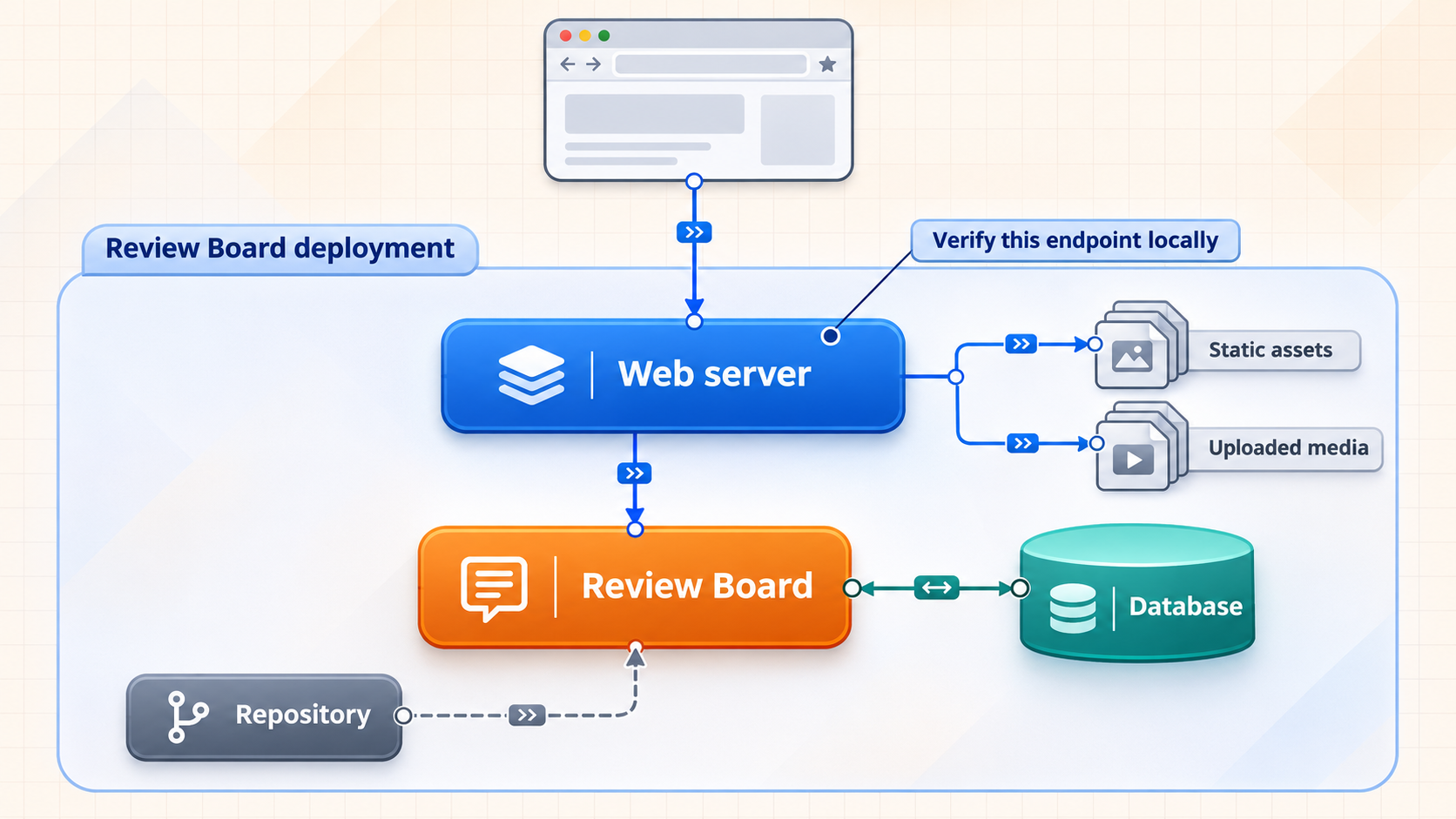
Review Board is a web-based code review platform intended for reviewing changes, discussing issues, tracking approvals, and integrating review activity with development services. Review Board 8 also introduces capabilities such as enhanced review actions, document review, expanded extension support, and additional on-premises integrations. Some features belong to paid Review Board plans, so the exact feature set depends on the edition and plan selected for the deployment.
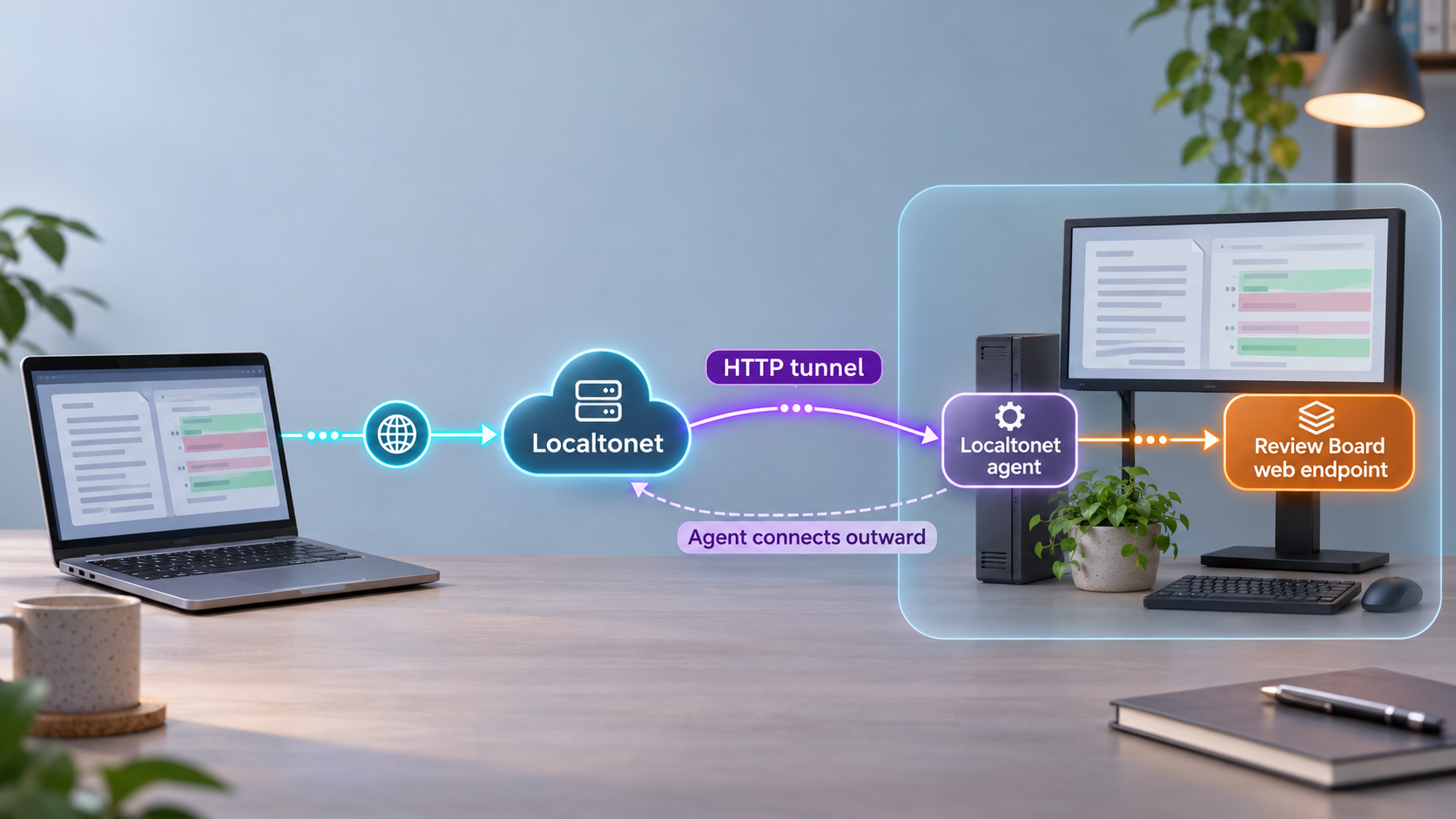
A self-hosted Review Board installation has two distinct networking layers. The first is the application deployment itself. Review Board must be installed, a site must be created, and its web interface must be served successfully on the local network or host. The second layer is reachability. A remote user needs a route to that already-working web endpoint. Localtonet addresses the second layer by connecting the machine that can reach Review Board to our relay infrastructure through an outbound connection.
Keeping these layers separate makes troubleshooting much easier. If Review Board does not load locally, creating a public tunnel will not repair its installation or web server configuration. If Review Board works locally but not through the public address, the investigation can focus on the tunnel target, host handling, application-generated URLs, or access policy.
Complete and verify the Review Board deployment first. With Localtonet, the tunnel forwards traffic to a local target. It does not install Review Board, create its site, configure repositories, repair application errors, or replace Review Board authentication.
Prepare the host and deployment decisions
Review Board's current administration documentation presents several installation paths: a Linux installer, Docker, manual installation on Linux, installation on macOS, installation on Windows, and installation of development releases. The appropriate path depends on the operating system, desired isolation model, operational experience, and whether the instance is for evaluation or sustained team use.
Do not combine commands from different installation paths. A Docker deployment, for example, has different lifecycle and storage concerns from a manually installed application. Likewise, development-release instructions are not a substitute for the stable installation path. Select one current official path and follow it consistently through installation and site creation.
| Installation path | When to consider it | Important planning point |
|---|---|---|
| Linux installer | A supported Linux deployment where the official installer fits the host | Confirm current compatibility and installer requirements before changing the system |
| Docker | A container-oriented deployment with an established container operations process | Plan persistent data, configuration, upgrades, and the locally published web endpoint |
| Manual Linux installation | An administrator who needs direct control over the application environment | Follow the current dependency and compatibility instructions exactly |
| macOS or Windows | A supported installation following the dedicated operating-system guide | Do not assume Linux commands, paths, services, or permissions apply |
| Development release | Testing work that specifically requires unreleased development code | Avoid using this path as the default for a stable team service |
Record the values that the tunnel will eventually need
Before adding remote access, identify the machine that will run Review Board, the machine that will run the Localtonet client, and the network path between them. They may be the same machine. If they are different, the Localtonet client device must be able to reach the Review Board web endpoint over the local network.
Record the actual local IP address or resolvable local hostname and the actual listening port shown by your completed Review Board deployment. Do not assume a conventional web port. The supplied Review Board evidence does not establish one universal local URL or port, and container port publishing, reverse proxy configuration, or operating-system choices can alter the endpoint.
Plan identity, storage, and recovery before inviting users
A code review service can hold source-code diffs, repository metadata, comments, uploaded files, integration credentials, API tokens, user information, and audit-relevant decisions. Decide who will administer the site, how users will authenticate, which repositories they may access, and how deployment data will be backed up. Review Board's administration guide includes dedicated areas for access control, authentication, users, permission groups, file storage, logging, e-mail, repositories, webhooks, integrations, site maintenance, database management, and health checks.
The exact database, web server, Python version, package commands, file paths, and credentials must come from the current installation path selected for the target Review Board release. Those values are not established in the supplied evidence, so reproducing a guessed command sequence here would risk creating an unsupported or insecure installation.
There is no evidence-backed universal Review Board port, installation directory, database command, administrator password, or container mapping that applies to every supported installation path. Use values produced by your selected official installation workflow, and never place real passwords, repository credentials, Localtonet device tokens, or API tokens in shared notes or command examples.
Install Review Board using one supported path
Begin with the installation section of the current Review Board Administration Guide. Select the dedicated instructions for the operating system or container model you intend to maintain. Review Board's project README directs installers to its interactive installation material and administration manual rather than supplying a single universal command.
This distinction matters because a reliable installation tutorial cannot safely invent package names or dependency versions. The current official guide is authoritative for the supported platform matrix and release-specific requirements. Before executing its installation actions, confirm that the guide applies to the Review Board version being deployed and to the host's operating-system release.
For the Linux installer path
Use the current Linux installer instructions as a complete workflow. Check the documented system compatibility first, then follow the installer preparation and execution stages in their published order. Record any directories, service names, local addresses, and generated configuration locations reported by the installer. Do not substitute manual-install commands halfway through the process unless the documentation explicitly tells you to do so.
For the Docker path
Use the current Review Board Docker instructions and images specified by the project. Treat container data as persistent application data rather than disposable container state. Record the host-side address and published port that actually expose the Review Board web service. This host-side endpoint, not an unverified internal container address, is normally the target that must be reachable from the Localtonet client.
Container health and public reachability are separate checks. A running container is not proof that the application is initialized, that its site exists, or that the web endpoint is usable. Confirm the application response through the host's local endpoint before moving on.
For manual Linux, macOS, or Windows installation
Follow the dedicated operating-system section rather than translating commands from another platform. Pay close attention to filesystem permissions, service accounts, application dependencies, and the mechanism used to serve the site. A successful package installation only establishes that software was installed. It does not prove that a Review Board site was created or that its web interface is available.
Avoid development releases unless they are intentional
The administration guide lists a separate development-release installation path. Use it only when testing unreleased behavior is the actual goal. For a shared review service, choose the stable release and plan documented by Review Board unless the project has a specific, tested reason to do otherwise.
Review Board supports multiple installation models, but the supplied installation evidence does not contain the concrete commands, package versions, dependency matrix, or platform-specific defaults from those individual guides. We therefore preserve the supported decision process without fabricating commands that may be wrong for the current release or operating system.
Create and configure the Review Board site
Installing the software and creating a Review Board site are distinct stages in the official administration structure. After completing the selected installation path, continue to the documented site-creation workflow. Review Board provides the rb-site tool for site management, but its exact invocation, prompts, paths, and options must be taken from the current site-creation instructions for the installed release.
During site creation, preserve the values chosen or generated by the workflow. Administrators commonly need to know where site files live, how the web service is started, which local address serves the application, and where logs can be inspected. The exact values are deployment-specific, so record the output from the actual installation rather than relying on examples from a different operating system.
Complete the initial web administration
Once the web interface is reachable, sign in using the administrator identity established by the site-creation process. Review the administration areas relevant to the intended workflow before adding remote users. At minimum, consider general site settings, authentication, access control, users, permission groups, repositories, e-mail, logging, file storage, and any integrations the team requires.
Repository access deserves particular care. A successful Review Board login should not automatically be treated as authorization to every connected repository. Configure repository credentials and Review Board permissions according to the team's access model. Apply least privilege to service accounts, integration credentials, API tokens, and administrator roles.
Decide how users will address the site
Web applications may generate absolute links, redirects, callback addresses, webhook destinations, or e-mail links based on site settings and the incoming request. Review Board's exact setting names and required values must be confirmed in the current administration interface. If remote users will use a Localtonet public hostname, test whether sign-in redirects, review links, static assets, API responses, and integration callbacks remain on the intended public address.
Do not change the application's canonical URL speculatively. First obtain the public address by creating and starting the tunnel, then evaluate the current Review Board settings and documented external URL requirements. A configuration that serves only a subpath may also need extra care because a tunnel forwards to the local service but does not rewrite the application's internal routing assumptions.
Verify the local Review Board service completely
Local verification is the gate between installation and tunneling. Perform it from the Review Board host first. If the Localtonet client will run on another device, repeat the test from that device using the exact local address and port intended for the tunnel.
Open the Review Board site in a browser and confirm that the response is the application itself rather than a default web server page, installation placeholder, directory listing, or unrelated service. Sign in with a test account, navigate the dashboard, and load the administration interface with an authorized administrator account.
Use a functional verification checklist
- Confirm that the login page and static assets load without browser errors.
- Confirm that an authorized user can sign in and sign out.
- Confirm that the dashboard and review pages load through the same local origin.
- Confirm that the administration interface is restricted to the appropriate account.
- Confirm that the intended repository connection works using the configured permissions.
- Confirm that a representative review request or test workflow can be opened.
- Confirm that uploaded content required by the team can be retrieved.
- Confirm that application and web-service logs do not show unresolved startup or request errors.
- Confirm that the service returns after the supported restart procedure for the chosen deployment.
If the site is available only through a loopback address on the Review Board host, the Localtonet client generally needs to run on that same host to use that loopback target. If the client runs elsewhere, Review Board must be available at an address reachable from the client device. Do not broaden the local bind address without understanding the resulting LAN exposure and host firewall policy.
A tunnel cannot correct an application startup failure, a broken repository integration, a missing site, an incorrect local port, or a web server that is serving the wrong content. Resolve the local problem first and record the exact working local endpoint before configuring Localtonet.
Expose the verified Review Board endpoint with Localtonet
Review Board is a browser-based web application, so an HTTP tunnel is the appropriate Localtonet family for forwarding its local web endpoint. The Localtonet client establishes an outbound connection to our relay server. This provides a public address without requiring inbound router port forwarding, a public IP address, firewall changes, or VPN setup.
Creating a tunnel does not start it. The selected Localtonet client must remain connected, and the tunnel must be running for the public address to work. Follow the sequence below only after the local Review Board target has passed the verification checks.
Install and run the Localtonet client
Install the Localtonet client on the Review Board host or on another device that can reach the verified Review Board endpoint. Keep the client running so it can establish its outbound connection.
Authenticate and select the client device
Use the device-specific authentication token associated with the client that will run this tunnel. Treat the token as a secret. Never publish it in documentation, screenshots, shell history, source control, or support messages.
Select an available relay server
Choose a currently available server or region from the Localtonet dashboard. Do not copy a server code from an old tutorial because available values may vary and must be obtained from the current product interface.
Create an HTTP tunnel to Review Board
Select an HTTP tunnel and enter the exact local IP address and port verified earlier. For HTTP tunnels, choose the appropriate Process Type from Random Sub Domain, Custom Sub Domain, or Custom Domain. These process types serve the same local content at a public HTTPS address. Confirm current availability and any domain requirements in the dashboard before choosing an option.
Start the tunnel
Use the Start button after reviewing the local target. Tunnel creation alone does not make it active. The selected device must be connected and the tunnel must be running.
Test the assigned public address
Open the assigned public HTTPS address from a network outside the Review Board host's LAN. Verify login, navigation, review pages, static assets, redirects, and any API or integration flow that remote users require. Stop or delete the tunnel when public reachability is no longer needed.
The detailed dashboard workflow is also available in our Localtonet HTTP tunnel documentation. Use it to confirm current dashboard labels and available options, especially when selecting a subdomain or configuring a custom domain.
An HTTP tunnel can provide a public HTTPS address while forwarding to the local Review Board web endpoint. Confirm the actual local protocol and port from the working deployment rather than assuming them. If Review Board is already served locally through HTTPS, use the tunnel configuration supported by the current dashboard and documentation for that target.
Secure Review Board before sharing the public address
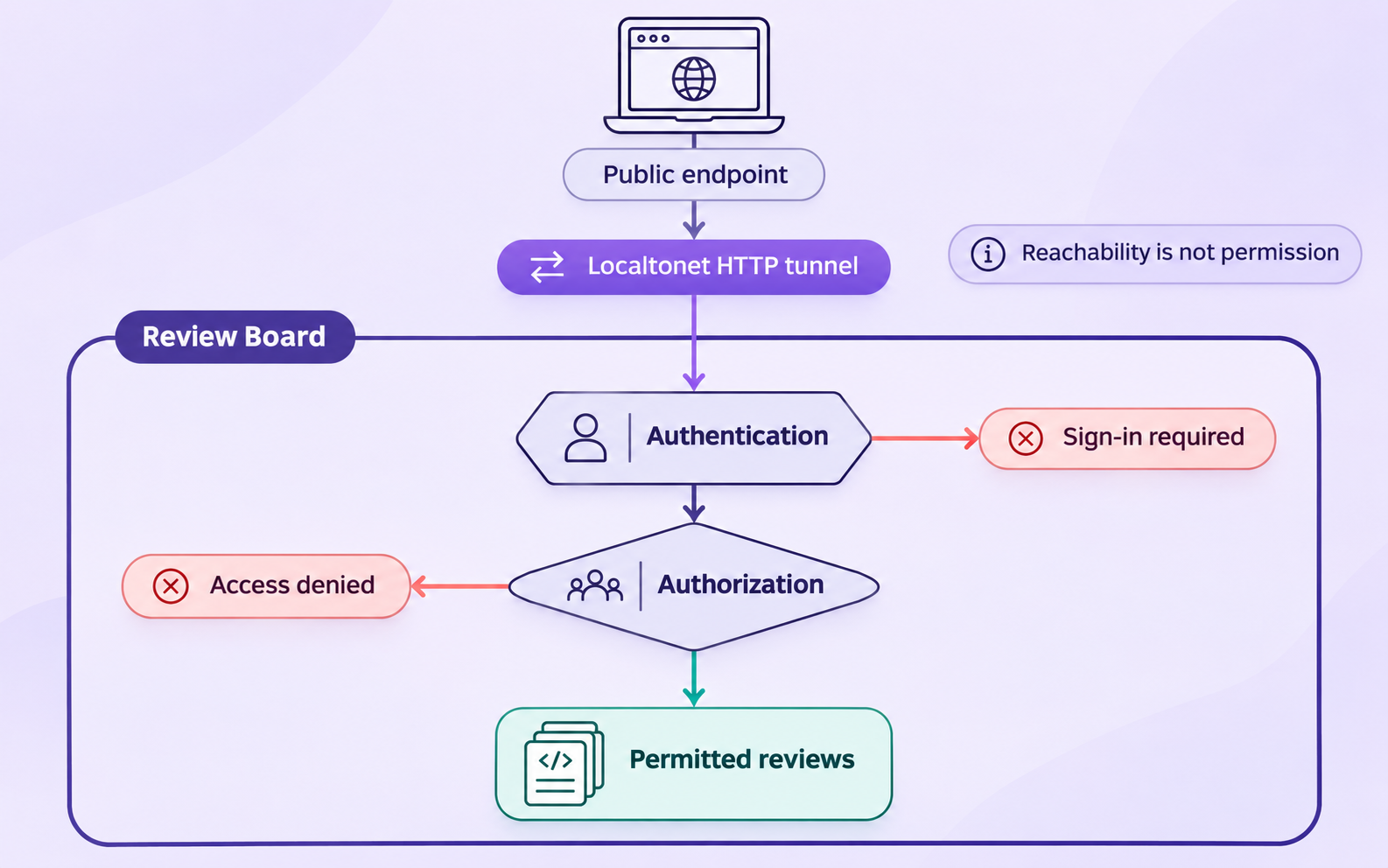
A public address changes the application's threat surface. Anyone who learns or discovers the address may be able to reach its login page even if authentication prevents access to review data. Treat Review Board authentication and authorization as required controls, not optional additions.
Use individual accounts and least privilege
Avoid shared administrator credentials. Give each collaborator an individual account and grant only the permissions required for their role. Contractors, temporary reviewers, automation accounts, and repository service identities should not receive broad administrative access by default. Review group membership and repository visibility should reflect actual project boundaries.
Protect all credentials
Review Board may interact with repositories, integrations, webhooks, APIs, and authentication systems. Store associated secrets using the supported Review Board and operating-system mechanisms. Do not place them in public repository files, review descriptions, screenshots, tunnel names, or URLs.
A Localtonet authentication token identifies the client device and must also remain secret. It is not an end-user login for Review Board and should never be distributed to reviewers. Remote users need only the public Review Board address and their authorized Review Board credentials.
Review application-generated links and callbacks
Test e-mail links, API consumers, webhooks, repository integrations, and any sign-in callback behavior after introducing the public hostname. An application that believes it is hosted at a different origin can generate incorrect links or reject callbacks. Use Review Board's current documented settings to correct the external site identity instead of applying unverified proxy headers or arbitrary rewrites.
Limit the exposure window
If remote access is needed only for a review session, start the tunnel shortly before that session and stop it afterward. For a persistent team deployment, monitor both the Review Board service and the Localtonet client. Remember that the public endpoint is available only while the selected device remains connected and the tunnel is running.
Do not use remote tunneling to evade organizational network controls, repository policies, or application authorization. Obtain approval for the exposure, apply Review Board access controls, protect credentials, and make the public endpoint available only to the intended workflow.
Operate and troubleshoot the combined deployment
Operate Review Board and the tunnel as two observable services. Review Board has its own application, web-service, repository, storage, and integration health. Localtonet has a device connection and tunnel lifecycle. Checking each layer independently usually identifies the failing component quickly.
| Symptom | Likely investigation area | Recommended check |
|---|---|---|
| Review Board fails locally and remotely | Application or local web service | Inspect the chosen deployment's service state, health checks, and logs before touching the tunnel |
| Review Board works locally but the public address does not | Localtonet device, tunnel state, or target | Confirm the client is connected, the tunnel is started, and the target IP and port match the verified endpoint |
| The public page loads but assets or redirects fail | Review Board external URL or host configuration | Test the public origin and review current site settings for generated URLs, accepted hosts, or proxy deployment requirements |
| Login works but a repository operation fails | Review Board repository configuration | Check repository permissions, credentials, connectivity, and application logs rather than changing the tunnel |
| The public address stops responding later | Tunnel lifecycle or client availability | Confirm that the selected Localtonet device remains online and that the tunnel is still running |
| Users reach an unexpected website | Incorrect local target | Open the configured target directly from the Localtonet client device and verify that it serves Review Board |
Routine operations
Document how the chosen Review Board deployment is started, stopped, restarted, upgraded, backed up, and restored. These procedures differ between Docker, an installer-managed deployment, and a manual operating-system installation. Use the current Review Board upgrade instructions for both the software and its sites rather than replacing files or images without a documented migration plan.
Before an upgrade, identify the required backup scope and test the recovery process appropriate to the deployment. After an upgrade, repeat local verification before restarting public access. Verify login, repositories, representative reviews, uploaded files, integrations, and logs. Then start or recheck the Localtonet tunnel and repeat the public-origin tests.
Target connection refused
A connection-refused result usually means no service is listening at the configured target, the local address is wrong, the port is wrong, or the service is bound to a different interface. Test the exact target from the machine running the Localtonet client. If that direct test fails, correct the Review Board or web-service endpoint before editing unrelated tunnel options.
Timeouts between the client and Review Board
If the Localtonet client runs on another device, confirm ordinary LAN reachability between that device and Review Board. Check the host's local network policy and whether the web service listens on an address reachable from the client. Do not disable security controls broadly merely to make a test pass. Prefer a specific, documented network path.
Redirect loops or wrong-host redirects
Compare the browser's requested public URL with the destination in each redirect. A loop can indicate disagreement between the public HTTPS origin and Review Board's configured understanding of its external address or proxy environment. Consult the current Review Board deployment documentation for the applicable setting instead of guessing header values.
Public access works, but API or webhook traffic does not
Confirm that the integration uses the active public URL and an endpoint supported by Review Board. Verify authentication and authorization separately from reachability. Also remember that stopping the tunnel makes its public endpoint unavailable, which matters for integrations that send events at any time.
Frequently asked questions
Which port does Review Board use?
The supplied Review Board evidence does not establish one universal local port. The effective port depends on the selected installer, Docker publishing configuration, web server, reverse proxy, and site deployment. Use the exact address and port that successfully load Review Board from the Localtonet client device.
Should I use an HTTP or TCP tunnel for Review Board?
Use an HTTP tunnel for the normal Review Board web interface. It maps the local web service to a public HTTPS address and matches browser-based access. A raw TCP tunnel is not the default choice for this workflow.
Does Localtonet install or configure Review Board?
No. Review Board must already be installed, have a created site, and serve a working local endpoint. With Localtonet, we provide the public route to that endpoint. Review Board configuration, users, repositories, upgrades, backups, and authorization remain part of the Review Board deployment.
Does the Review Board host need a public IP address?
No. The Localtonet client establishes an outbound connection to our relay server, so this workflow does not require a public IP address or inbound router port forwarding. The client device must be able to reach the local Review Board endpoint and remain connected while the tunnel is in use.
Can the Localtonet client run on a different device?
Yes, provided that device can reach Review Board at the configured local IP address and port. If Review Board listens only on the host's loopback interface, either run the client on that host or use a supported, carefully controlled configuration that makes the service reachable from the selected client device.
Is the tunnel active as soon as I create it?
No. Creating a tunnel and running it are separate lifecycle actions. Start it with the Start button. The public endpoint remains available only while the selected client device is connected and the tunnel is running.
Does the public HTTPS address replace Review Board authentication?
No. Transport reachability and application authorization are separate. Keep Review Board authentication enabled, use individual accounts, restrict administrative and repository permissions, and protect integration credentials and API tokens.
Can I use a custom domain for the public Review Board address?
HTTP tunnels support Random Sub Domain, Custom Sub Domain, and Custom Domain process types, subject to current dashboard availability and applicable plan or configuration requirements. Check the current Localtonet documentation before changing DNS because exact custom-domain requirements are not established in the supplied context.
Connect your verified Review Board site with Localtonet
Once Review Board works from the Localtonet client device and its access controls are ready, create an HTTP tunnel to the verified local address and test the assigned public HTTPS URL with an authorized remote user.
Get Started Free →