

Run focused yes-or-no AI inference locally, validate the API, then connect it to authorized remote applications
jevos is a self-hosted inference service for answering yes-or-no questions about text or structured JSON input. In this guide, we acquire the source repository, install and verify uv, download the documented GGUF model, prepare the machine-specific llama.cpp runtime, start the local HTTP server, and test its health and inference endpoints. We also cover request design, file-based operation, licensing boundaries, security, and common failure modes. Once the service works locally, we show how to connect it through an HTTP tunnel with Localtonet without inbound router port forwarding, firewall changes, VPN setup, or a public IP address.
📋 What's in this guide
What jevos does and when to use it
jevos is an open-source local inference project designed for binary decisions. An application sends some state, asks one or more yes-or-no questions, and receives a probability for each answer. Instead of asking a general-purpose model to produce prose, the caller gets a value named noul between 0 and 1. That value represents the model's probability that the answer is yes.
This structure is useful for classification, triage, routing, moderation assistance, and policy evaluation. For example, an application can ask whether a support message describes a billing problem, whether a customer appears upset, or whether a request satisfies a policy stated in the question. The application remains responsible for deciding which probability threshold to use and what action to take.
The documented server implements the TypeSafe Jev wire format for yes-or-no questions. Its primary endpoint is POST /v1/systemone. The project also documents GET /v1/models, GET /health, and a browser demonstration at /dino. By default, the service listens on 127.0.0.1:8017, which limits direct access to the same machine.

requests.
jev decide command can process a request file without keeping the HTTP server running.
jevos is intentionally narrower than a general chat service. The documented interface supports yes-or-no questions. Choice and score question types are refused with HTTP status 422. The optional criteria field from the compatible wire format is accepted but is not read, so decision rules should be placed directly in the question's instructions.
A value above or below 0.5 can be a convenient example threshold, but the correct threshold depends on the consequences of false positives and false negatives. Evaluate the model on representative data before allowing its output to trigger consequential actions.
Prerequisites, acquisition options, and documented limitations
The upstream quickstart assumes that you have a local copy of the repository, the uv command is available, and you can download the model release asset. It then uses uv sync to prepare the project environment. The repository does not provide a complete operating-system support matrix, minimum memory or disk figures, an artifact checksum, or a supported production-service matrix.
Before continuing, make sure you have the following:
- A local checkout or downloaded archive of the feder-cr/jev repository.
- A working installation of
uv. - Enough local storage for the repository, Python environment, runtime, and
jevos-q4_k_m.ggufmodel. - Permission to download project dependencies and the machine-specific llama.cpp runtime.
- A CPU thread count appropriate for your machine and its other workloads.
curlor another HTTP client for local API verification.- The Localtonet client later, if controlled remote access is required.
Acquire the jevos repository
If Git is installed, clone the primary repository and enter its project directory:
git clone https://github.com/feder-cr/jev.git
cd jev
If Git is unavailable, open the jevos repository page, use GitHub's source download option to obtain a ZIP archive, extract it, and open a terminal in the extracted directory. Whichever method you use, run the remaining project commands from the directory containing pyproject.toml and uv.lock.
Install uv through an official pathway
Follow the official uv installation documentation for the currently supported methods. The standalone installer is one documented route. On macOS and Linux, the official documentation provides this command:
curl -LsSf https://astral.sh/uv/install.sh | shOn Windows PowerShell, the official documentation provides:
powershell -ExecutionPolicy ByPass -c "irm https://astral.sh/uv/install.ps1 | iex"The uv documentation also lists installation through package managers, including PyPI, Homebrew, and WinGet. Choose a method supported by your operating environment and software-management policy. In a managed workplace, review scripts before running them and use the installation channel approved by your administrator.
After installation, open a new terminal if your installer changed PATH, then verify that the command is available:
uv --versionContinue only after that command prints a version rather than a command-not-found error. This check verifies command availability, not compatibility with every possible operating system or hardware configuration.
Download the documented model asset
Open the jevos release page and select the asset named jevos-q4_k_m.gguf. The asset can also be reached through the direct jevos-q4_k_m.gguf release download. Save it in the repository directory if you want the quickstart command to use the simple relative filename.
Confirm that the browser or download tool completed the transfer and that the file is named exactly jevos-q4_k_m.gguf. A partial-download suffix or an automatically added duplicate number changes the path expected by the example command.
The repository and release evidence used for this guide do not provide a checksum or signature verification procedure for the GGUF asset. Do not invent or copy a checksum from an unrelated source. Obtain the asset from the project's release page, retain its provenance, and apply your organization's software-supply-chain controls before production use.
Understand the licensing boundary
The repository identifies its source code as licensed under the MIT License and includes a LICENSE file. That source-code license should not automatically be treated as the license for every separately distributed model artifact. The available release evidence does not establish complete model-weight licensing terms in the extracted release description.
Before redistributing the GGUF file, embedding it in another product, or using it in a regulated or commercial deployment, inspect the release, repository notices, model metadata, and any upstream model terms that apply. Source-code permission and model-weight permission are separate questions unless the publisher explicitly states otherwise.
| Requirement | What is documented | What you must determine locally |
|---|---|---|
| Project environment | The quickstart uses uv sync. |
Which official uv installation pathway fits your operating system and policy. |
| Model | Use the jevos-q4_k_m.gguf release asset. |
Storage location, applicable model terms, and any additional provenance controls. |
| Artifact verification | No checksum procedure is established by the supplied release evidence. | Whether your environment requires an independently approved verification process. |
| Inference runtime | jev download --only runtime downloads llama.cpp for the current machine. |
Whether the downloaded runtime works on your particular host. |
| CPU allocation | The server defaults to 4 threads; the quickstart example uses 16. | A thread count that leaves sufficient capacity for other applications. |
| Network binding | The default host and port are 127.0.0.1 and 8017. |
Whether another process already uses that port. |
| Host sizing | No complete RAM, disk, or operating-system support matrix is supplied. | Whether the repository, model, dependencies, and runtime fit your host. |
| Production deployment | No complete authentication or production-service support matrix is established. | Startup, supervision, access control, logging, limits, and recovery requirements. |
The supplied project documentation does not establish built-in authentication, authorization, TLS configuration, request limits, or a production hardening model. Keep the initial server bound to 127.0.0.1, test locally, and add a separately verified authentication and authorization layer before allowing untrusted or production callers to reach it.
Install and start jevos
The following sequence preserves the project's documented quickstart after repository acquisition, uv installation, and model download. Commands assume your terminal is open in the repository directory. If your model is stored elsewhere, replace the filename with its real local path.
Synchronize the project environment
From the repository directory containing pyproject.toml and uv.lock, run uv sync. This prepares the project environment from its declared dependency and lock information.
Download the machine-specific runtime
Run the documented download command with --only runtime. The project describes this as downloading llama.cpp for the current machine.
Start the local HTTP server
Start jevos with the downloaded GGUF model, select the CPU explicitly, and choose an appropriate thread count. The quickstart uses 16 threads. The server option defaults to 4, and the project recommends fewer threads when other heavy applications are running.
Synchronize the environment:
uv syncDownload the runtime:
uv run jev download --only runtimeStart the server using the documented model and CPU configuration:
uv run jev serve --gguf jevos-q4_k_m.gguf --device cpu --threads 16
Keep this terminal running. Unless you override the server options, the service listens on 127.0.0.1:8017. A process bound to 127.0.0.1 accepts connections originating from the same host, not direct connections addressed to the machine from another device.
Choosing a CPU thread count
The documented default is 4 threads, while the quickstart demonstrates 16. More threads are not automatically the best choice for every system. If the machine also runs a web application, database, desktop workloads, or other inference processes, allocate fewer threads so that jevos does not contend for all available CPU capacity.
Start with a value supported by your actual hardware, submit representative requests, and observe responsiveness across the whole machine. The project documentation does not provide a universal sizing formula, so capacity planning should be based on your workload rather than copied from the example.
Changing the host or port
The server documents --host and --port options, with defaults of 127.0.0.1 and 8017. For the simplest Localtonet workflow, changing the host is unnecessary because our client can run on the same device and connect to the loopback service.
Keeping the loopback binding also avoids opening the application directly to the local network. If you change the port, use the same value consistently in local tests, application configuration, and the Localtonet tunnel target.
Verify the local server before remote access
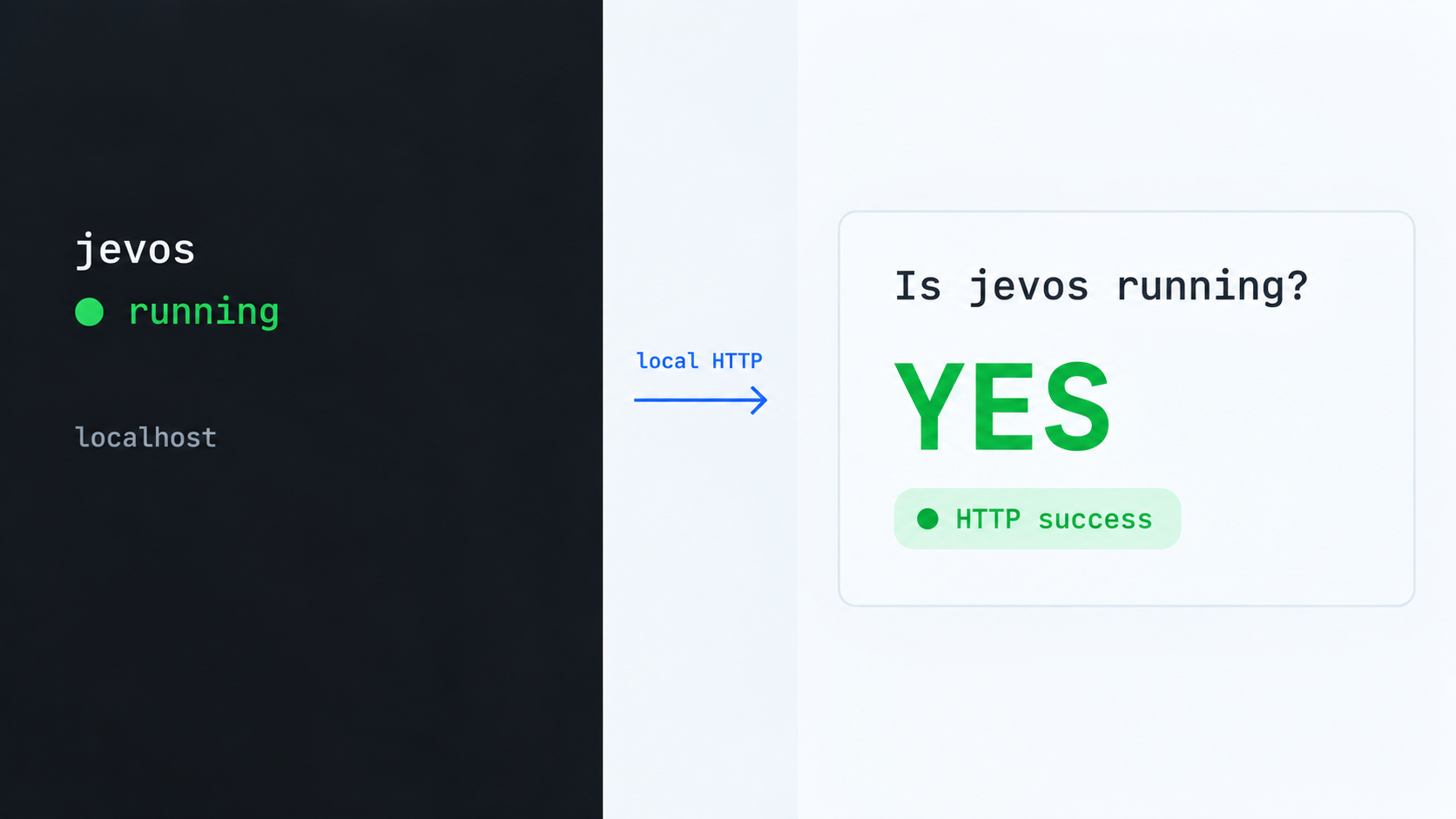
Do not create a tunnel until the application responds locally. Local verification separates application problems from tunnel configuration problems and gives you a known-good target.
Check readiness
The health endpoint returns a response containing {"status":"ready", ...} once the model has loaded. Call it from the same machine:
curl http://127.0.0.1:8017/healthA connection error means the HTTP process is not reachable at that address. Check whether the server terminal is still running, whether model loading failed, and whether you changed the host or port. A response that is not ready may indicate that startup is still in progress.
Inspect available model names
The models endpoint returns the served model and its jev-latest alias:
curl http://127.0.0.1:8017/v1/models
Using jev-latest lets a client address the served model through the compatible alias. The API also accepts the served model's name, and the documentation states that any jev-* name works for this field.
Submit a yes-or-no decision
Send a JSON body to POST /v1/systemone. This example asks whether a customer statement describes a billing problem:
curl http://127.0.0.1:8017/v1/systemone \
  -H 'Content-Type: application/json' \
  -d '{
    "model": "jev-latest",
    "state": "I was charged twice for the same order.",
    "questions": {
      "billing": {
        "type": "noul",
        "instructions": "Is this a billing problem?"
      }
    }
  }'
A successful response contains the model name, an answers object keyed by your question name, and usage information. The relevant value is found at answers.billing.noul. It will be between 0 and 1. The project shows this example response:
{
  "model": "jevos-q4_k_m",
  "answers": {
    "billing": {
      "type": "noul",
      "noul": 0.9
    }
  },
  "usage": {
    "input_tokens": 27,
    "output_tokens": 0
  }
}
Model output is probabilistic, so do not require every installation or request variation to reproduce the example probability exactly. Verify the response shape and probability range, then test behavior with examples from your intended domain.
Open the demonstration page
With the server running locally, open http://127.0.0.1:8017/dino in a browser on the same machine. This is useful as a quick interactive check, but API clients should integrate with the documented JSON endpoints rather than depend on the demonstration interface.
Each response includes a Server-Timing header carrying inference time. End-to-end latency observed by a client can also include connection setup, HTTP processing, tunnel transit, application code, and queueing under load.
Design reliable yes-or-no requests
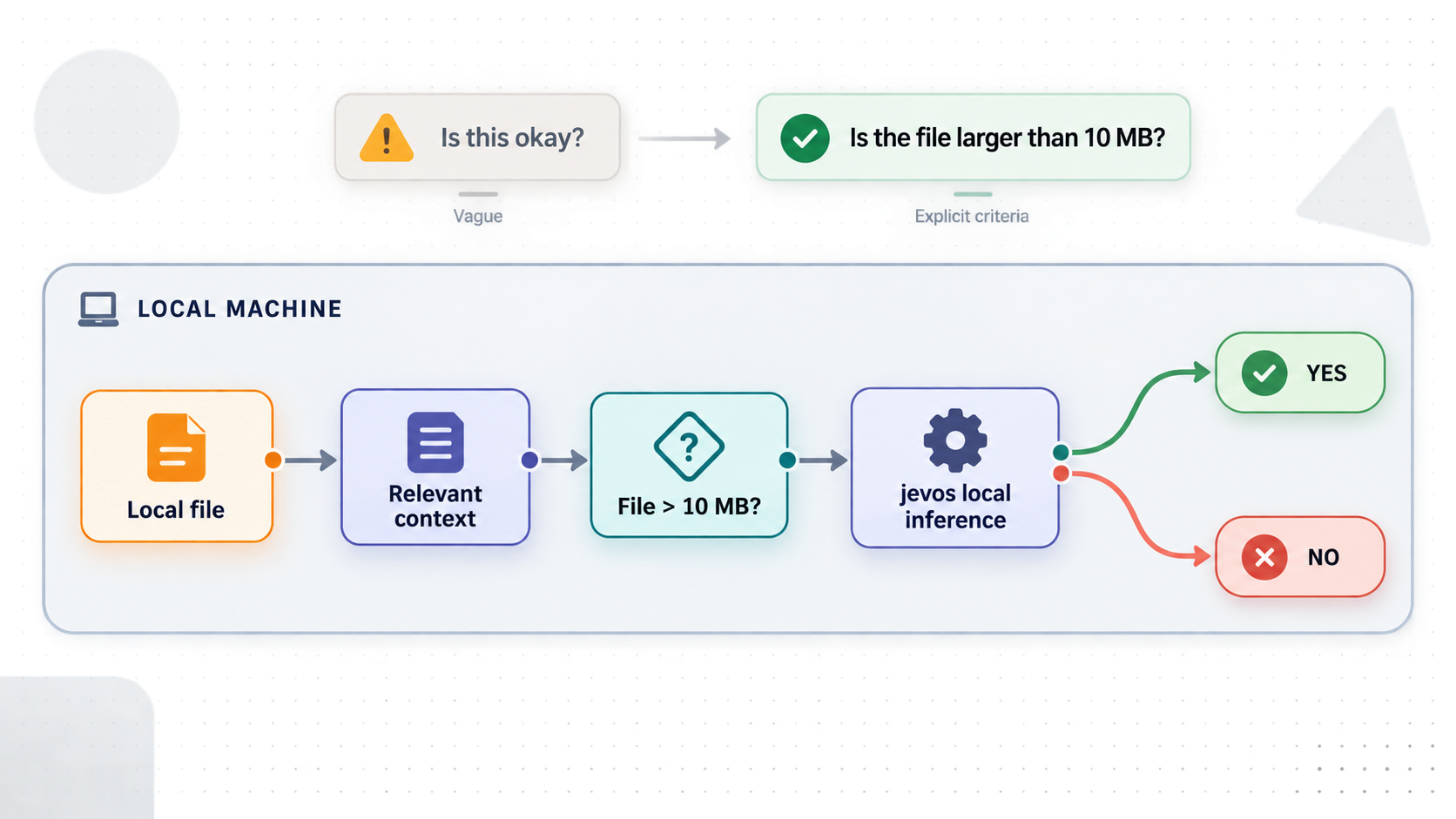
The quality of a binary decision depends heavily on the state and question. The API does not turn an ambiguous policy into an unambiguous rule. Give the model the relevant facts, ask one clearly defined yes-or-no question for each named answer, and include decision rules in instructions.
Use the state for evidence
The state field may be a string, object, or array. A string works for a message or document excerpt. An object is often better when the application already has structured facts because it preserves field boundaries.
{
  "model": "jev-latest",
  "state": {
    "item": "wireless mouse",
    "delivered": "5 days ago",
    "customer_message": "The box arrived empty. This is the second time!"
  },
  "questions": {
    "refund": {
      "type": "noul",
      "instructions": "Our policy refunds items reported missing within 30 days of delivery. Should this customer get a refund?"
    },
    "upset": {
      "type": "noul",
      "instructions": "Is the customer upset?"
    },
    "wrong_item": {
      "type": "noul",
      "instructions": "Does the customer say they received the wrong item?"
    }
  }
}
Questions in the same request share the state. The project reports that shared-state requests can be more efficient than making a separate request for every question because the state is read once. Group questions when they genuinely evaluate the same evidence, but keep names stable so downstream code can map each answer reliably.
Put the rule in the instructions
If a decision depends on a refund window, eligibility rule, severity definition, or another policy, state that rule in the relevant question. Do not rely on the model to know a private organizational policy. The optional criteria field is accepted but not read, so placing the decisive rule there would not produce the intended behavior.
Interpret probabilities deliberately
A simple integration might classify values over 0.5 as yes. That is only a starting point. A workflow where a false positive merely adds a label can tolerate a different threshold from one where a false positive automatically issues a refund, blocks a user, or changes access.
Build an evaluation set containing clear positives, clear negatives, ambiguous cases, incomplete records, adversarial wording, and examples near policy boundaries. Record the returned probability, compare it with the expected decision, and choose thresholds based on acceptable error tradeoffs. For sensitive outcomes, route uncertain probabilities to human review instead of forcing every input into an automated action.
Call the API from Python
The following project pattern uses the Python requests package and reads the named probability:
import requests

answer = requests.post(
    "http://127.0.0.1:8017/v1/systemone",
    json={
        "model": "jev-latest",
        "state": "I was charged twice for the same order.",
        "questions": {
            "billing": {
                "type": "noul",
                "instructions": "Is this a billing problem?"
            }
        },
    },
).json()

if answer["answers"]["billing"]["noul"] > 0.5:
    print("send to billing")
Production application code should also handle connection failures, timeouts, non-success HTTP statuses, malformed responses, and missing keys. It should validate that noul has the expected numeric type and range before applying a threshold. Those safeguards are application responsibilities and are not shown in the minimal project example.
Local operation and file-based inference
Keep the server command running for applications that need an HTTP endpoint. Stopping that process stops the local API, and a Localtonet tunnel cannot make an inactive target available. If the machine reboots, the supplied evidence does not establish an automatic startup mechanism, so restart behavior must be designed for your operating environment.
The documentation does not provide a supported systemd unit, Windows service definition, macOS launch configuration, process supervisor setup, container health policy, or complete production support matrix. Avoid copying an unverified service definition into a production host. An administrator should define startup, restart, logging, user permissions, resource limits, patching, and recovery according to the target system.
Run a single decision without a server
For batch jobs or local scripts, jev decide processes a request file using the same body shape as POST /v1/systemone:
uv run jev decide --gguf jevos-q4_k_m.gguf --device cpu request.jsonBy default, the answer is printed. To write it to a new file, use the documented output option:
uv run jev decide --gguf jevos-q4_k_m.gguf --device cpu request.json --output answer.jsonAn existing output file is never overwritten. Choose a new filename, archive or rename the old output, or remove it deliberately after confirming it is no longer needed.
If the request file omits model, the command treats it as the engine's native request and returns the engine's fuller output, including probabilities, prompt hashes, and timings. Use the HTTP-compatible body when you want the same request and response shape across file-based and server-based workflows.
| Mode | Best suited to | Operational behavior |
|---|---|---|
| HTTP server | Applications making repeated or interactive requests | The process stays running and serves JSON endpoints on the configured host and port. |
| File-based decision | Local scripts, scheduled batches, and one-off evaluation | A request file is processed without starting a persistent server. |
| HTTP server through Localtonet | Authorized remote applications that cannot connect to loopback directly | Our client reaches the local HTTP target and provides a public tunnel address while the tunnel and selected device remain connected. |
Connect the working jevos API with Localtonet
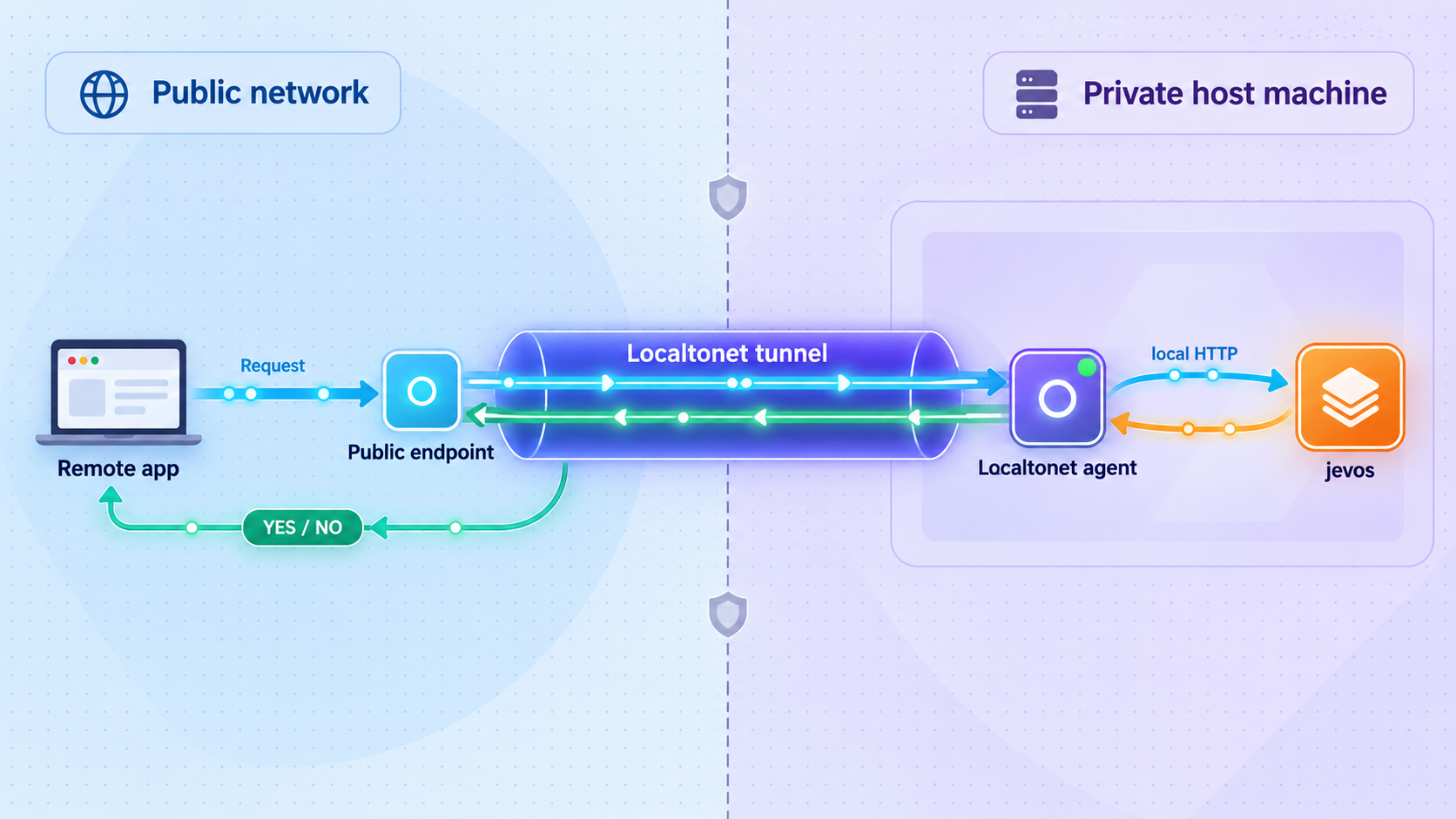
After local health and inference tests succeed, Localtonet can expose the HTTP service for controlled testing or access by an authorized remote application. Our client establishes an outbound connection to a Localtonet relay, so this workflow does not require inbound router port forwarding, firewall changes, VPN setup, or a public IP address.
Run the Localtonet client on the jevos machine or another device that can reach the configured local target. The simplest arrangement is to run both on the same machine and target 127.0.0.1:8017. If the client runs elsewhere, 127.0.0.1 refers to that other device, not the jevos host. In that topology, the target must be an address genuinely reachable from the client, and any broader jevos network binding must be reviewed separately.
The following sequence reflects the current documented HTTP tunnel workflow and the Localtonet tunnel lifecycle. Dashboard options and availability can vary, so select the values shown in your current account rather than copying a relay code from another deployment.
Install and run the Localtonet client
Install our client on the device that can reach the working jevos HTTP service. Keep jevos running and confirm from that device that the intended local IP address and port respond.
Open the HTTP tunnel configuration
In the Localtonet dashboard, create an HTTP tunnel. Select the appropriate Process Type for the public address you intend to use. HTTP process types can provide a random subdomain, a supported custom subdomain, or a custom domain.
Select the AuthToken and relay server
Select the device-specific AuthToken for the client that can reach jevos, then select an available server from the current dashboard. Keep the token secret and obtain server choices from the product rather than hardcoding an old server code.
Enter the local jevos target
Enter the local IP address and port that the selected client uses to reach jevos. When both processes run on the same device with the documented defaults, use 127.0.0.1 and port 8017.
Start the tunnel
Creating the tunnel does not make it active. Use the Start button and copy the assigned public HTTPS address from the dashboard. The tunnel is available only while the selected client is connected and the tunnel is running.
Test and end temporary access
For controlled testing, call the health endpoint and submit one harmless inference request through the assigned URL. Stop the tunnel when temporary access is no longer needed, or delete it when the configuration should not be retained.
Review our HTTP tunnel documentation while configuring the tunnel so that you use the current dashboard fields and available options. Exact custom-domain DNS requirements are not reproduced here because they should be checked against the current documentation before changing DNS records.
Translate local API URLs to the public tunnel URL
Keep the endpoint paths unchanged and replace only the local origin. If the dashboard assigns a URL represented here as https://your-assigned-host, the corresponding remote endpoints are:
https://your-assigned-host/healthhttps://your-assigned-host/v1/modelshttps://your-assigned-host/v1/systemonehttps://your-assigned-host/dino
The hostname above is intentionally a placeholder, not a real endpoint. Always copy the actual assigned public URL from the dashboard. Use harmless sample data for connectivity testing and never publish credentials, device tokens, or sensitive request content.
An active HTTP tunnel gives the assigned URL a network path to the local service. It does not authenticate callers or decide who is allowed to submit inference requests. Because the supplied jevos documentation does not establish built-in authentication or authorization, unauthenticated exposure should be limited to tightly controlled testing with harmless data. A separately verified authentication and authorization layer is required before access by untrusted or production callers.
Security and production-readiness checklist
Local execution can keep model inference on hardware you control, but remote access still requires a complete security design. The request state may contain customer messages, operational records, policy information, or other sensitive content. Protect the endpoint and minimize what each caller can submit.
Do not place the Localtonet device token in a jevos request, client-side application, repository, screenshot, or shared configuration file. The token identifies the client device and must remain secret. Likewise, do not treat an unguessable-looking public URL as a credential.
Separate development and production data. Test remote connectivity first with harmless sample text, verify that only expected paths and methods are used, and observe the behavior when jevos is stopped. A remote application should fail safely if the inference service is unavailable rather than silently approving an action.
Protect the authentication layer itself. Confirm how it validates credentials, where secrets are stored, how access is revoked, which paths it covers, and whether health or demonstration routes should be remotely available. A partially protected deployment that leaves an alternate inference path open does not provide meaningful application authorization.
The supplied evidence does not establish request logging behavior, audit retention, compliance certifications, uptime guarantees, backup requirements, model update procedures, or a hardened production topology for jevos. Evaluate those requirements explicitly instead of assuming that a successful local demonstration satisfies them.
Troubleshooting common setup and access problems
uv is not found
Run uv --version in a new terminal. If the command is still unavailable, revisit the official uv installation instructions for your platform and check whether the installer added its executable directory to PATH. Use an administrator-approved installation method on managed systems.
uv sync does not run
Confirm that uv --version succeeds, then verify that the terminal is in the repository directory containing pyproject.toml and uv.lock. If dependency retrieval fails, inspect the exact terminal error and verify that your network or package policy permits the required downloads.
The model download is missing or incomplete
Return to the jevos release page and obtain the asset named jevos-q4_k_m.gguf. Confirm that the browser has finished downloading it. The available evidence does not provide a checksum procedure, so do not substitute an invented hash.
The runtime download fails
Confirm that the machine has outbound network access and that the project environment synchronized successfully. Retry from the same repository environment. The runtime is described as machine-specific, so avoid copying an arbitrary runtime from another architecture or operating system unless the project explicitly documents that combination.
The server cannot find the GGUF model
The command uses jevos-q4_k_m.gguf as a relative path. That path resolves from the current working directory. Confirm the filename, download completion, and terminal location. If the file is stored elsewhere, supply its real path to --gguf.
Port 8017 is unavailable
Another process may already be listening on the documented default port. Stop the conflicting process or use the documented --port option to choose an available port. If you change it, update every local request and the Localtonet tunnel target.
The health endpoint refuses the connection
Confirm that the jev serve process is still running and that you are testing from the correct machine. Verify the host and port shown by your server configuration. If the process exited during model loading, inspect its terminal output before investigating Localtonet.
The API returns HTTP 422
Check the request schema and question type. jevos supports yes-or-no questions using "type": "noul". The documented server refuses choice and score questions with status 422. Also confirm that the JSON is valid and required fields are present.
The model ignores a decision rule
Put the rule directly in the question's instructions. Do not rely on the optional criteria field because the implementation accepts but does not read it. Include relevant facts in state and avoid referring to policies that are not present in the request.
Local requests work but the public URL does not
Check the layers in order. Confirm jevos still answers at its local target. Confirm the Localtonet client is connected. Confirm the tunnel has been started, because creation alone does not run it. Finally, confirm that the tunnel points to the same IP address and port used by the successful local test.
The Localtonet client runs on another device
On that device, 127.0.0.1 refers to the Localtonet client device itself, not the jevos host. The client needs a network-reachable address for jevos. Changing jevos from loopback to a broader bind can expose it to the local network, so evaluate firewall rules, authorization, and network policy before making that change.
The public API works without credentials
Stop the tunnel unless this is a controlled test using harmless data. A working URL does not prove that the deployment is secure. Add and verify an authentication and authorization layer before allowing untrusted users or production systems to call the endpoint.
Remote inference is slower than local inference
Compare the response's Server-Timing inference value with end-to-end client timing. If inference time is stable but total duration rises, examine network transit and surrounding application behavior. If inference time itself rises, inspect CPU contention, the chosen thread count, and concurrent workloads.
The output file is not updated
The documented --output behavior never overwrites an existing file. Use a new output filename or intentionally remove or archive the existing file after checking its contents.
Frequently asked questions
What does jevos return for a yes-or-no question?
It returns a noul probability between 0 and 1 for each named question. Higher values indicate stronger support for yes. Your application decides how to interpret that probability and which threshold or review policy to apply.
Can jevos answer multiple-choice or scoring questions?
Not through the documented implementation covered here. It supports yes-or-no noul questions. Choice and score question types are refused with HTTP status 422.
Does jevos require the HTTP server for every decision?
No. The uv run jev decide command can process a request JSON file without starting the persistent server. HTTP mode is more suitable when applications need repeated or interactive requests.
Can one request contain several questions?
Yes. Add several named entries under questions. They share the same state, which is read once. Each answer appears under the corresponding question name in the response.
Does the repository's MIT License automatically cover the GGUF model?
Do not assume that it does. The repository identifies its source code as MIT licensed, but a separately distributed model artifact can have separate terms. Review the release notices, model metadata, and any applicable upstream model license before redistribution or production use.
Does the project publish minimum RAM, disk, and operating-system requirements?
The available upstream evidence does not provide a complete operating-system, memory, or disk support matrix. Confirm that your host can store the repository, environment, runtime, and model, then validate startup and representative inference locally.
Is Docker required or officially documented for this setup?
Docker is not required by the documented quickstart, and the supplied evidence does not establish an official Docker deployment for this workflow. This guide uses the repository's uv sync, runtime download, and jev serve sequence.
Do I need to bind jevos to all network interfaces for Localtonet?
No when our client runs on the same machine. It can target the documented loopback address 127.0.0.1:8017. If the client runs on another device, it needs an address reachable from that device, and broadening the bind requires an additional security review.
Does creating a Localtonet tunnel make it active immediately?
No. After creating the tunnel, use the Start button. The assigned address remains available only while the selected client device is connected and the tunnel is running.
Does Localtonet remove the need for API authentication?
No. Tunneling provides network reachability to the local target. It does not authenticate or authorize application users. Keep unauthenticated exposure limited to controlled testing with harmless data, and add a separately verified access-control layer before untrusted or production use.
Can I use a custom domain for the HTTP tunnel?
HTTP tunnels can use a random subdomain, a supported custom subdomain, or a custom domain. Consult the current Localtonet HTTP tunnel documentation before configuring a custom domain because exact DNS requirements should not be copied from an outdated example.
Connect your local jevos API with Localtonet
Acquire jevos from its primary repository, verify the local API on 127.0.0.1:8017, add the access controls required for your audience, then create an HTTP tunnel so authorized remote applications can reach the service without inbound router port forwarding.


