

Install a pinned newserv release, prove it works locally, and evaluate remote PSO connectivity safely
newserv is a game server, proxy, and reverse-engineering toolkit for Phantasy Star Online, commonly abbreviated PSO. This tutorial covers the game-server role using the canonical newserv repository and the tagged v2026-09-02 revision. It separates packaged macOS or Windows releases, source builds, and the repository Dockerfile, then explains local startup, client-specific connection requirements, persistence, verification, maintenance, and remote-access constraints. Because PSO editions use different connection and patching workflows, select one edition first and do not expose the server until that client completes a local session.
📋 What's in this guide
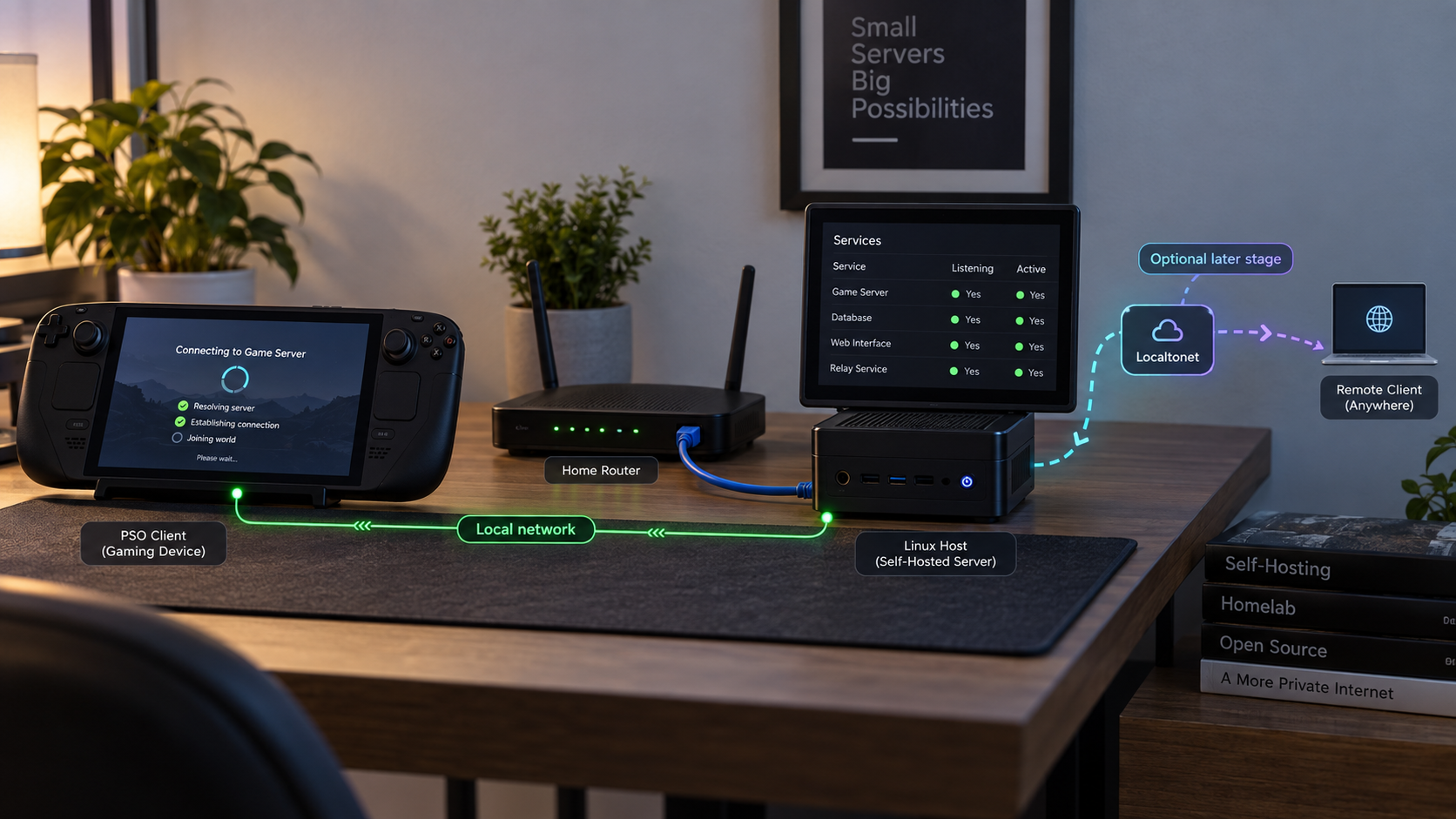
Scope, release date, and supported roles
The canonical project is the fuzziqersoftware/newserv repository. Its author describes newserv as a PSO game server, proxy, and reverse-engineering tool. These are separate roles. This guide focuses on running newserv as a game server. Proxy mode is discussed only where it affects installation and network exposure.
The pinned revision used here is v2026-09-02. The date in the tag name is September 2, 2026. GitHub displays the release publication time as September 3, 2026. Those dates describe the same tagged release and should not be confused with two different versions.
newserv covers several generations of PSO, but they do not all connect in the same way. The repository has separate documentation for compatibility, PC and Blue Burst patch directories, client connection methods, cross-version play, Episode 3, memory patches, and the DOL loader. For a first deployment, choose one exact client edition and complete a local login and game session before enabling another.
newserv does not grant a license to distribute PSO clients, disc images, proprietary game data, or copyrighted quests. Use software and data you are entitled to use, and follow the laws and service agreements applicable to your location.
The repository README is the authoritative compatibility and configuration reference for the selected revision. Its Server setup, PC and Blue Burst patch directories, and How to connect sections should be read together. The project also maintains TODO.md and a public issue tracker for known work, defects, and community reports.
Prepare the host and protect existing saves
The repository contains CMake build configuration, a Dockerfile, source code, tests, static resources, and a system directory. newserv works on Windows, although the project explicitly notes that compiling it there is difficult. The v2026-09-02 release is labeled for macOS and Windows, so those users should normally evaluate the packaged release before attempting a native Windows build.
Linux and other Unix-like hosts can use the source-build path when the required compiler and libraries are available. The project evidence does not publish a universal CPU, memory, or disk minimum. Allocate capacity based on the PSO editions, quests, logs, account state, and server-side saves you enable, then observe the host during a representative local test.
| Installation path | Appropriate host | What is verified |
|---|---|---|
| Tagged release assets | macOS or Windows | The v2026-09-02 release is labeled for both platforms and has three assets. GitHub may load the asset list dynamically. |
| Source build | A host with Git, CMake, a supported C++ toolchain, and dependencies detected by the project | The repository includes CMakeLists.txt and is designed to be built from source. |
| Repository Dockerfile | A Docker-capable host used for controlled evaluation | A Dockerfile exists, but the available project instructions do not define a complete production container deployment with persistent mounts and published ports. |
| Native Windows compilation | Advanced development use | The project says newserv works on Windows but is difficult to compile there. A packaged release avoids that build path. |
Required preparation
- A supported PSO client and a backup of its character or memory-card data.
- A dedicated directory for newserv, its configuration, logs, quests, account data, and server-side saves.
- A terminal with permission to create and modify files in that directory.
- Git and CMake for a source build.
- A C++ compiler and any libraries reported by CMake as missing.
- A trusted LAN client for testing before public exposure.
- Docker only if evaluating the repository Dockerfile.
The project history explains that malformed PSO traffic has caused crashes and save corruption in the wider PSO ecosystem. Back up client saves, memory-card images, account state, and any existing server-side saves before introducing a new server, proxy, quest, patch, or cross-version option. Test with disposable data first.
Install the macOS or Windows release
Use this path when an asset for your operating system and architecture is present on the tagged release page. Do not download an asset from an unrelated fork or unpack files over an active server installation. Keep each version in its own directory so rollback remains possible.
Open the tagged release
Open newserv v2026-09-02. Confirm that the tag shown is v2026-09-02 and that the release comes from fuzziqersoftware/newserv.
Select the matching asset
Download the macOS or Windows asset that explicitly matches the host. Do not treat GitHub's automatically generated source-code archives as prebuilt application packages. The release page is the source of truth for the current asset names and architectures.
Extract into a versioned directory
Create a directory such as newserv-v2026-09-02 and extract the complete package into it. Preserve the package's directory hierarchy. newserv uses supporting resources as well as an executable, so moving only the executable is not a valid installation.
Inspect the included server files
Verify that the extracted tree includes the executable and the supplied resource or system directories. Compare the result with the release notes and repository layout before modifying configuration.
Start from a terminal
Open Terminal or PowerShell in the extracted directory and invoke the packaged newserv executable from there. Starting in the installation directory keeps relative resource paths aligned. Preserve the complete startup output for verification and troubleshooting.
On macOS, the executable may require permission to run if an archive did not preserve its executable bit. On Windows, run it from PowerShell or Command Prompt rather than hiding startup output behind a file-manager launch. Do not disable operating-system security controls globally to bypass a warning. Verify the repository, tag, and downloaded file before applying a narrow exception.
Asset names are deliberately not hardcoded here because the release page is the authoritative inventory and GitHub can change how attached assets are presented. If you already use GitHub CLI, the following command downloads all assets attached to the pinned tag into the current directory:
gh release download v2026-09-02 \
  --repo fuzziqersoftware/newserv
Review the downloaded filenames and extract only the package for the intended platform. Downloading all assets does not make all of them applicable to the current host.
Build newserv from source
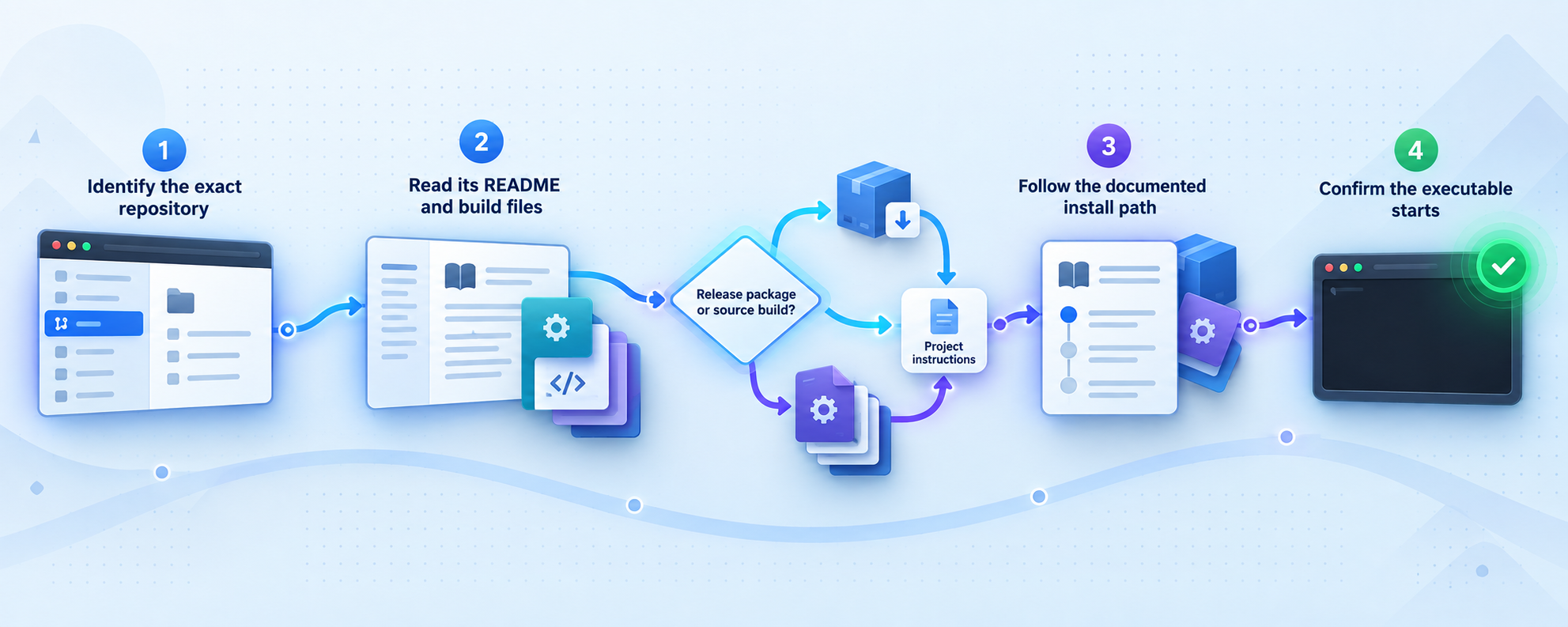
A source build is useful on Linux, for development, or when no packaged asset matches the host. Build the tagged revision rather than an unrecorded moving branch. The commands below use an out-of-tree CMake build so generated files do not overwrite the source tree.
Install the general build toolchain
Install Git, CMake, and a C++ compiler using the host operating system's supported package mechanism. CMake will report any project dependency it cannot find. Resolve the named dependency from the operating system's package repository rather than guessing unrelated packages.
Clone the canonical repository
Clone directly from the project's canonical GitHub URL and enter the resulting directory.
git clone https://github.com/fuzziqersoftware/newserv.git
cd newservCheck out the pinned tag
Fetch tags, check out v2026-09-02, and verify the resulting revision. Git will report a detached HEAD, which is normal when building a release tag.
git fetch --tags
git checkout v2026-09-02
git rev-parse --short HEADConfigure the build with CMake
Generate build files in a dedicated build directory. A successful configuration ends without a fatal CMake error and writes build files to that directory.
cmake -S . -B buildCompile newserv
Ask CMake to invoke the generated build system. The command returns successfully only if compilation and linking complete.
cmake --build build --parallelLocate the built executable
Build layouts can differ by generator and operating system. Locate the resulting executable instead of assuming that every generator writes it to the same path.
find build -type f -name newserv -perm -111 -printStart newserv from the repository tree
Run the located executable while the current directory is the repository root. This allows the process to resolve the supplied static and system trees using the layout associated with the checked-out revision. Capture its terminal output.
A successful compiler exit proves that the selected source revision built on the host. It does not prove that game data, accounts, client patches, network listeners, or server-side saves are correctly configured. Continue through local client verification before treating the deployment as operational.
Understand the Dockerfile before using it
The canonical repository contains a Dockerfile, so its image can be evaluated with Docker. However, the available project documentation does not define a complete production container contract covering persistent data mounts, every required PSO port, container health checks, or a Docker Compose deployment. The presence of a Dockerfile should not be interpreted as a documented one-command production installation.
To build the Dockerfile from the pinned source tree:
git clone https://github.com/fuzziqersoftware/newserv.git
cd newserv
git checkout v2026-09-02
docker build -t newserv:v2026-09-02 .
Inspect the built image before running it:
docker image inspect newserv:v2026-09-02
Confirm its working directory, entry point, command, declared volumes, and exposed ports. A Docker EXPOSE entry is metadata, not proof that the full client workflow needs only that port. PSO can involve initial services followed by another connection or server-directed transition.
Publishing one guessed port can produce a misleading partial success, such as reaching an initial connection while failing during login, ship selection, block selection, or game entry. Build a listener inventory from the selected configuration and a successful local client session before writing any -p mappings. Also identify the writable account, save, quest, and log paths before deleting a container.
Until those mounts and mappings are confirmed for the pinned revision, use the Dockerfile as an isolated build and evaluation path. A native release or source-tree run is easier to inspect because the relevant directories remain directly visible on the host.
Configure accounts, data, quests, and persistence
Preserve the repository's static and system directory structure. Before editing anything, create a baseline copy and inventory the files in the pinned revision:
find static system -maxdepth 3 -type f -print | sortThis inventory prevents assumptions based on another newserv version. Use configuration examples supplied by the tag, and keep a record of every changed file. If a configuration field is not described for the selected revision, do not copy a value from an unrelated server project.
Choose one client edition
Enable and test the minimum configuration needed for one edition. PC and Blue Burst use their respective patch directories and client procedures. Console clients may use DNS, a loader, a patched client, or another platform-specific mechanism described in the repository. Cross-version play should be introduced only after each participating version works independently.
Accounts
Read the repository's User accounts section before creating players. Establish how the selected edition identifies accounts, where the associated records are stored, and which files change after a successful login. Use test accounts during validation and do not publish account records in screenshots or issue reports.
Server-side saves
newserv documents server-side saves. If enabled for the selected client, locate the files that change when a test character saves, back them up, and perform a restoration test. Do not assume that every PSO edition uses the same save model. Some client data may remain client-side even when another edition stores important state on the server.
Quests and gameplay data
Add quests only after the base server works. The repository has sections for installing quests and item tables and drop modes. Introduce one content change at a time, record its source and date, restart only as documented, and test with disposable character data.
REST API and administrative functions
newserv includes a documented REST API, chat commands, proxy behavior, and other advanced functions. Do not expose these merely because the main server starts. Identify their bindings, authentication requirements, and intended operators from the active revision. Keep administrative listeners on a trusted network unless there is a reviewed reason to provide remote access.
Connect the selected PSO client
There is no single universal connection procedure for every PSO release. The correct method is determined by the client edition, platform, region, and executable revision. Use the repository's How to connect section and apply only the subsection matching the client in front of you.
| Client family | Connection preparation | Important distinction |
|---|---|---|
| PSO PC | Use the PC-specific patch directory and connection instructions supplied by newserv. | Do not substitute Blue Burst patches merely because both run on a PC. |
| PSO Blue Burst | Use the Blue Burst patch directory and instructions for the exact client executable. | Blue Burst includes services and account behavior that differ from earlier PC releases. |
| Dreamcast | Follow the Dreamcast connection method documented by newserv for the chosen client and network environment. | A DNS-based or patched-client flow may impose address and port constraints beyond one raw endpoint. |
| GameCube and Episode 3 | Use the documented GameCube connection path and Episode 3 configuration where applicable. | Episode 3 has additional server features and should be tested independently. |
| Xbox | Use the Xbox-specific compatibility and connection guidance. | Do not infer Xbox support or setup from the GameCube workflow. |
Make a reversible client copy
Back up the executable, patch directory, configuration, character data, or memory-card image used by the selected client. Do not test against the only copy of a valuable save.
Apply only the matching connection method
Follow the newserv subsection for the exact edition. When a patch directory is required, use the PC or Blue Burst directory associated with that client instead of combining patches.
Point the client at the LAN deployment
Use the server's trusted LAN address wherever the documented connection method accepts or embeds a server address. Do not begin with a public relay endpoint.
Complete the full game transition
Proceed beyond the first connection. Verify login, ship or block selection where applicable, lobby entry, game creation, quest loading, and a clean disconnect. Watch the server output throughout the sequence.
The client may make several TCP connections during this workflow or receive another address or port from the server. Reaching the first listener is therefore not proof that a tunnel for one public host and port can carry the complete PSO session.
Verify the process, listeners, and game session locally
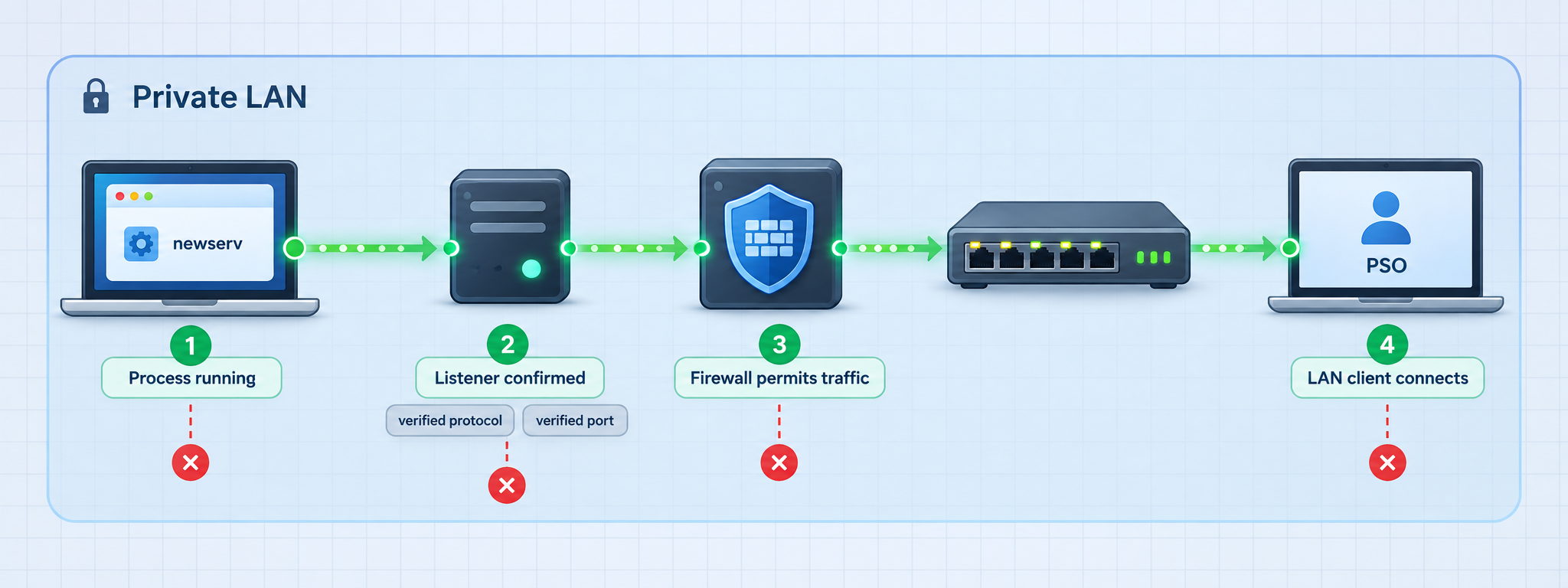
Keep the startup terminal open and save its output. A usable start should load the intended configuration and resources without a fatal error, remain running, and create the listeners required by the selected PSO edition. Missing files, parse errors, failed binds, and permission failures must be corrected before client testing.
Inspect listeners on Linux
ss -lntp
ss -lnup
The first command lists listening TCP sockets. The second lists UDP sockets. Match the process identifier and executable to newserv, then record every address and port associated with it.
Inspect listeners on macOS
lsof -nP -iTCP -sTCP:LISTEN
lsof -nP -iUDP
Inspect listeners on Windows
Get-NetTCPConnection -State Listen |
  Sort-Object LocalPort

Get-NetUDPEndpoint |
  Sort-Object LocalPort
Correlate the resulting process ID with the newserv process. Do not expose every socket shown by these commands. The host may also be running file sharing, remote administration, databases, or unrelated applications.
Record the complete connection inventory
| Connection stage | Evidence to record | Expected result |
|---|---|---|
| Server startup | Loaded configuration, resource paths, and absence of fatal errors | The process remains running and creates the intended listeners. |
| Initial client contact | Destination address, destination port, and transport | newserv logs or otherwise observes the client connection. |
| Authentication | Account result and any new or modified state files | The test account is handled according to the selected configuration. |
| Ship, block, or lobby transition | Any new connection and any address or port supplied to the client | The client reaches the intended lobby instead of stalling after login. |
| Game and quest entry | Additional connections, loaded quest files, and server messages | The client can create or join a game and load a known-good quest. |
| Persistence | Changed account or save files followed by a reconnect | Test state returns as expected for the selected edition and save mode. |
If the listener output alone does not reveal the sequence, capture traffic only on your own test network and only for systems you control. A packet capture can show whether the client creates a second connection or whether newserv advertises another endpoint. Redact account names, addresses, and other identifying data before sharing a trace.
Evaluate Localtonet against the verified connection sequence
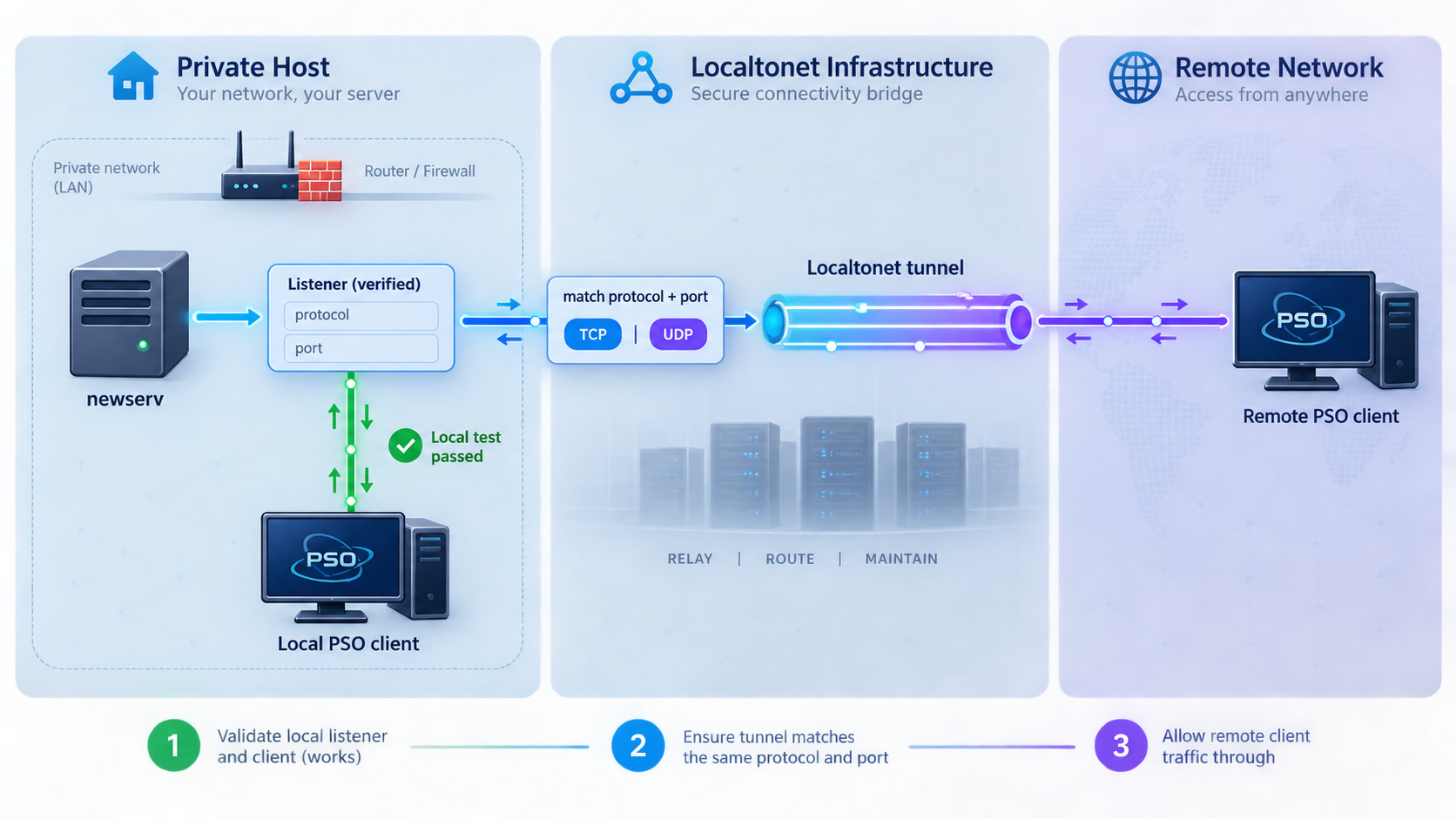
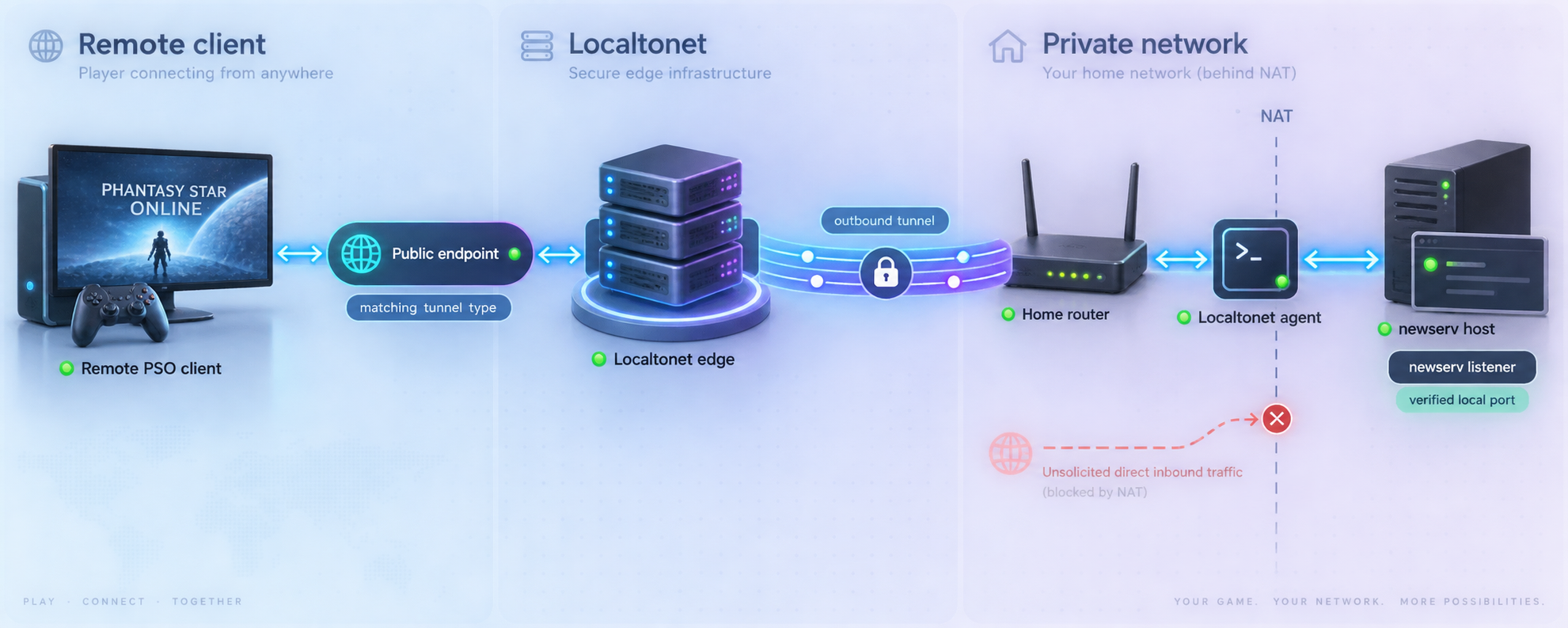
With Localtonet, our client application establishes an outbound connection from the selected device to a relay. A raw TCP tunnel can map an assigned public host and port to a confirmed local newserv TCP listener without inbound router port forwarding or a public IP address. The Localtonet client device must be able to reach the local target, and the tunnel is available only while that device is connected and the tunnel is running.
PSO server compatibility cannot be established merely by forwarding the first listening port. A selected client may use several public-facing connections, may expect a particular destination port, or may receive another server address or port during login, ship selection, block selection, or game entry. DNS-based console workflows add another constraint because a Localtonet raw-port endpoint is not automatically a replacement for the DNS behavior expected by the console.
The available evidence does not prove that every newserv game-server mode can advertise a Localtonet-assigned public host and port for every subsequent PSO connection. It also does not prove that every client patch can encode a hostname and arbitrary public port. Treat remote access as an edition-specific compatibility test, not as a generally supported newserv deployment claim.
When a Localtonet TCP tunnel is a valid test
- The local listener is confirmed to use raw TCP.
- The client can accept the assigned public hostname or resolve it to an address.
- The client can use the assigned public port for that connection stage.
- newserv does not redirect the client to an unreachable private address.
- Every later connection has either been shown to reuse that endpoint or has its own verified mapping.
- No administrative, REST, or diagnostic listener is accidentally included.
If any of those conditions is false, do not claim that the assigned endpoint supports the complete game session. A successful socket connection followed by a failed lobby transition is evidence of partial reachability, not successful remote hosting.
Configure a verified raw TCP listener with Localtonet
Install and run the Localtonet client
Run our client on the newserv host or another device that can reach the confirmed listener. Keep the Localtonet device token private. The token identifies that client device and must not appear in screenshots, logs, patches, or public repositories.
Select the client device
In the Localtonet dashboard, select the authenticated device that can reach newserv. Do not target a device on another network unless it has verified connectivity to the local listener.
Select an available relay server
Choose from the relay servers or regions currently shown in the dashboard. Available choices can vary, so do not copy an old server code from another tutorial.
Create a TCP tunnel for one confirmed listener
Select a raw TCP tunnel. Enter the local IP address and port proven during the LAN test. If newserv runs on the same device as our client, use the local address that the client can actually reach. Do not enter the public endpoint as the local target.
Start the tunnel
Creating a tunnel does not start it. Use the Start button and confirm that the tunnel reports a running connection. Record the assigned public host and port without recording the device token.
Apply the public endpoint only where the client supports it
Enter or patch the assigned host and port only if the connection method for the selected PSO client supports an arbitrary endpoint. Preserve an untouched client copy so the change can be reversed.
Test from an external network
Use a network outside the newserv LAN. Repeat login, ship or block selection, lobby entry, game creation, quest loading, and disconnect. Compare newserv output with the successful local session and note the exact stage where behavior diverges.
The same documented workflow can be repeated for another verified TCP listener, but only if the PSO client and newserv can use each assigned public endpoint correctly. Separate tunnels do not automatically solve an embedded-address or fixed-port requirement. Do not choose UDP, combined UDP/TCP, or HTTP without evidence that the exact listener needs that protocol.
Consult the Localtonet documentation for the current client and tunnel controls. Stop or delete test tunnels when they are no longer required.
Operate, back up, upgrade, and roll back newserv
Routine operation
Start newserv from the same installation or repository directory used during validation. Keep its terminal output or configured logs available while players connect. Monitor the process separately from the Localtonet client. A running tunnel does not prove newserv is accepting connections, and a running newserv process does not prove the tunnel is active.
Shut down newserv using the normal interactive or process-control method supported by the active build. Avoid terminating the host while account or save data may be changing. After shutdown, confirm that the process has exited before copying persistent state or replacing files.
Backup inventory
Back up the exact configuration, account, save, quest, and customized gameplay-data files identified during testing. Include a manifest containing the newserv tag or commit, host platform, build method, client editions, and the date of the backup. Keep Localtonet device tokens and unrelated credentials out of the archive.
A useful backup must be restorable. Restore a copy into a separate test directory, start the same pinned revision, and connect with a disposable account. Confirm that the expected configuration and test state return before relying on the process for production data.
Upgrade procedure
Record the working revision
Save the current tag or commit, installation method, executable checksum if used, configuration inventory, and listener map.
Stop remote access and newserv
Stop the Localtonet tunnel first so players cannot begin a session during maintenance, then shut down newserv cleanly.
Back up persistent data
Copy the verified configuration, account, save, quest, and customized data paths after the process has stopped.
Install the new revision separately
Extract or build into a new versioned directory. Do not overwrite the known-good installation. Review release changes and compare supplied configuration material before migrating custom values.
Repeat local verification
Start locally, inspect every listener, connect the selected client, enter a game, verify persistence, and test installed quests before restoring remote access.
Roll back if verification fails
Stop the failed revision, restore the previous directory and backup, then repeat the known-good local test. Restart the Localtonet tunnel only after the original service is working again.
Troubleshoot one layer at a time
CMake cannot find a compiler or dependency
Read the first fatal CMake message. Confirm that CMake and a C++ compiler are installed and available in the current terminal. If CMake names a missing library or development package, install that exact dependency through the host's supported package mechanism, remove the incomplete build directory if necessary, and run configuration again.
The build succeeds but newserv immediately exits
Run it from the repository root or complete release directory so relative resource paths remain valid. Look for the first missing-file, parse, permission, or bind error. Confirm that static, system, and any other supplied directories were not separated from the executable.
A listener cannot bind
Another process may already own the address or port, the selected port may require elevated privileges, or the configured address may not exist on the host. Use the operating-system listener commands in this guide to identify the conflicting process. Do not run all of newserv with broad administrative privileges merely to conceal a binding problem.
The client never reaches newserv
Recheck the exact client-edition connection method, patch directory, destination address, and local firewall policy. Verify that newserv listens on an address reachable from the LAN rather than only loopback. Compare the client executable or platform with the compatibility information for the pinned revision.
Login works, but ship, block, or lobby selection fails
Capture the server output at the transition. Inspect whether the client creates another connection or receives another address or port. Confirm that every required local listener is active and that the client-specific patching method matches the configured server behavior. Do not interpret initial login as a complete connectivity test.
A quest fails or the client disconnects while loading
Return to a known-good supplied quest or base configuration. Remove the most recently installed custom quest, verify its intended game version, and retest with disposable character data. Keep networking unchanged while isolating a content failure.
Local play works, but the Localtonet endpoint fails immediately
Confirm that the selected Localtonet device is connected, the tunnel was explicitly started, the tunnel type is TCP, and its target matches the successful local address and port. Test from a truly external network. If no connection appears in newserv, the problem is before the application listener.
Remote login works, but a later transition fails
This commonly indicates that the complete connection sequence is not represented by the first tunnel. Compare local and remote sessions to determine whether the client opens another connection or receives a private address, fixed port, or other endpoint that cannot be represented by the assigned public host and port. Do not open random tunnels. If the client cannot accept the necessary assigned endpoints, mark that edition or mode as incompatible with this tunnel arrangement.
The public endpoint stops responding
Check four components separately: the newserv process, the required local listeners, the Localtonet client connection, and the tunnel's running state. Localtonet tunnels remain available only while the selected device is connected and the tunnel is running.
Frequently asked questions
What is newserv?
newserv is a game server, proxy, and reverse-engineering toolkit for Phantasy Star Online. Its canonical documentation covers compatibility, server setup, client connection, accounts, quests, item tables, cross-version play, server-side saves, Episode 3, proxy use, chat commands, and a REST API.
Is the v2026-09-02 release dated September 2 or September 3?
The tag is named v2026-09-02, so its tag date is September 2, 2026. GitHub displays the release publication time as September 3, 2026. Both labels refer to the same tagged release.
Can newserv run on Windows?
Yes. The project says newserv works on Windows but is difficult to compile there. The v2026-09-02 release is labeled for macOS and Windows, so an applicable packaged release is generally the simpler Windows path.
Does newserv support Docker?
The canonical repository contains a Dockerfile and can be built as an image. The available project instructions do not define a complete production container deployment with verified persistent mounts and every PSO port mapping, so inspect the image and selected configuration before running it.
Which port does newserv use?
Do not reduce newserv to one universal port. The required listeners depend on the selected PSO edition, enabled services, and connection stage. Use the pinned configuration, startup output, socket inspection, and a complete local session to inventory the actual addresses, ports, and protocols.
Can one Localtonet TCP tunnel host every PSO edition?
That is not established. A PSO client may make several connections, expect fixed ports, use DNS behavior, or receive another endpoint from newserv. One TCP tunnel is suitable only for a verified TCP connection stage whose client can use the assigned public host and port.
Do I need router port forwarding with Localtonet?
No inbound router port forwarding is required for a matching Localtonet tunnel. Our client establishes an outbound connection to a relay. The device must remain connected, the tunnel must be running, and it must be able to reach the verified local newserv listener.
Should I expose the newserv REST API with the game service?
No. Treat the REST API as a separate administrative surface. Keep it private unless its binding, authentication, authorization, and remote-use requirements have been reviewed for the selected revision. Never expose it simply because it belongs to the same process.
Where should I report a newserv bug?
Check the project's TODO file and GitHub issue tracker first. When reporting a reproducible defect, include the revision, platform, client edition, installation method, sanitized logs, and exact reproduction steps. Remove account data, device tokens, and private endpoints.
Test a verified newserv listener with Localtonet
First complete a local PSO session and record every connection stage. If the selected client can use an assigned public host and port for a confirmed raw TCP listener, create a matching Localtonet tunnel and repeat the complete workflow from an external network.
Get Started Free →

