

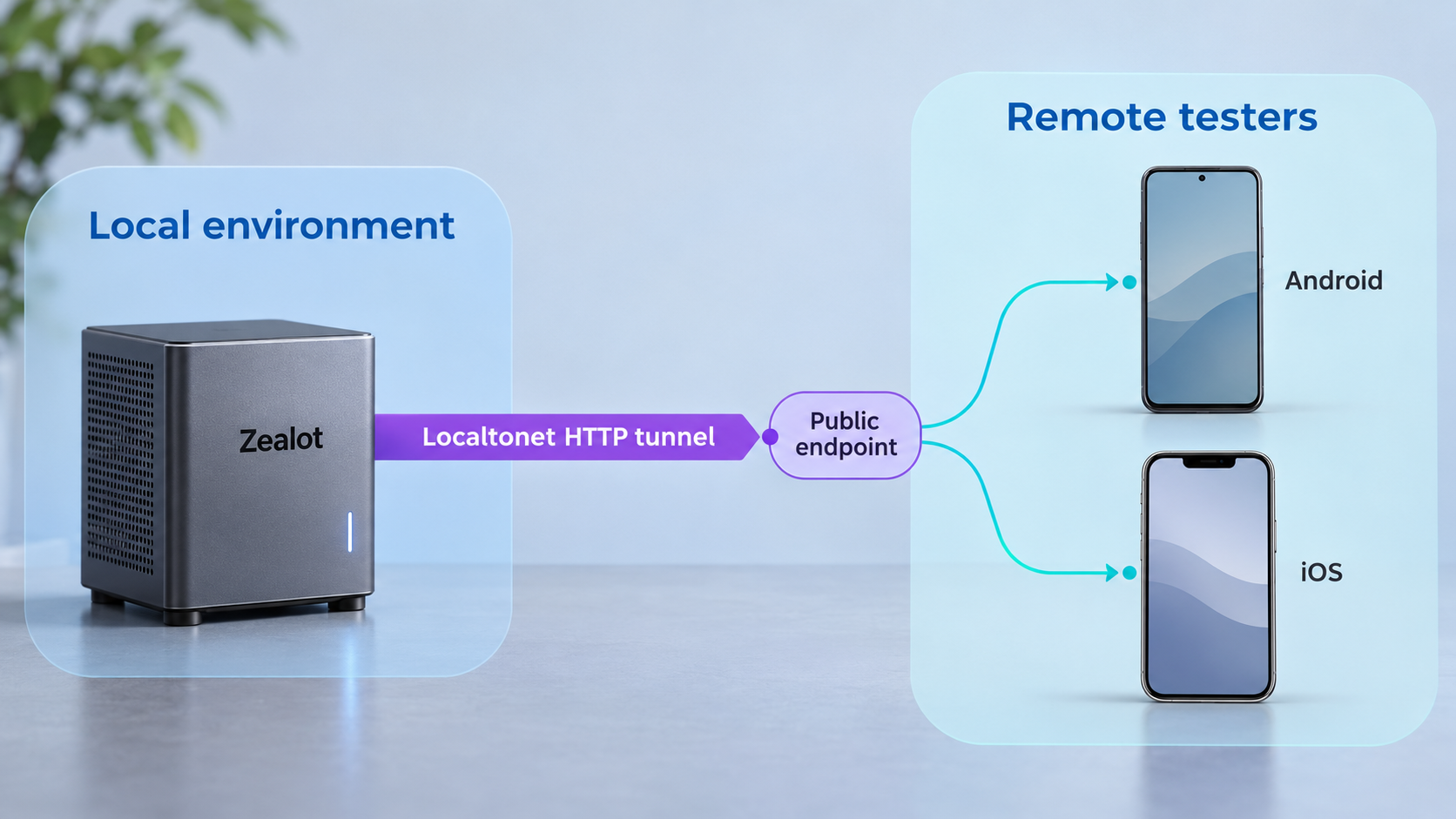
Build a private beta distribution workflow, verify it locally, and then make it available to remote testers
Zealot is a self-hosted web platform for distributing Android, iOS, macOS, Windows, and Linux application builds. This guide explains what is verified about the Zealot 6.2.2 deployment process, how to prepare and validate the installation without guessing undocumented commands, and how to plan uploads, tester access, and routine operations. Once the local service works, we show how to expose its HTTP endpoint with Localtonet so testers and authorized automation systems can reach it without inbound router port forwarding, firewall changes, a VPN, or a public IP address.
📋 What's in this guide
What Zealot provides and where remote access fits
Zealot is a Rails-based, self-hosted beta application distribution platform. Its documentation identifies support for Android packages, including APK and AAB files, as well as iOS, macOS, Windows, and Linux applications. Instead of sending every build through chat, email, or an unrelated file-sharing system, a team can use one web service to organize applications and make approved builds available to testers.
The platform is not limited to a download page. Zealot documents a REST API, Android and iOS SDKs, a fastlane plugin, webhooks, application metadata processing, application channels, team management, and third-party authentication options. Its documented authentication integrations include GitHub, GitLab, Google, LDAP, OIDC, and Lark or Feishu. The exact options available to you should be checked against the version you deploy and the settings shown by that installation.
These capabilities create several distinct network clients. A tester might open a distribution page in a mobile browser. A CI job might upload a newly built package through an API or fastlane. An installed application might use a Zealot SDK to check for an update. A notification workflow might send information to another service after Zealot receives a build. Each client needs a route to the Zealot server, but the server should first be installed, configured, and tested on the private network before any public route is added.
Zealot documentation currently labels version 6.2.2 and describes deployment support for amd64 and arm64 architectures. The project also publishes container images under ghcr.io/tryzealot/zealot and tryzealot/zealot. However, an image name by itself is not a complete installation specification. A production deployment also needs version-specific information about required services, environment values, persistent storage, startup commands, and the listening port.
Localtonet does not install or repair Zealot. The HTTP tunnel forwards traffic to an already running local endpoint. Complete local startup and browser verification before creating the tunnel so application problems are not confused with remote connectivity problems.
Prerequisites and deployment decisions
Begin with a host that matches a deployment path documented for the Zealot release you intend to use. Zealot promotes Docker deployment and publishes images for amd64 and arm64, but the supplied version 6.2.2 documentation extract does not establish a minimum Docker version, Docker Compose requirement, operating-system list, memory requirement, storage requirement, database topology, or exact container command. We therefore do not invent those values here.
Before deploying, retrieve the current instructions from the official Zealot self-hosted installation guide. Keep that guide aligned with the exact Zealot version being installed. Avoid copying commands from an old 5.x tutorial into a 6.2.2 deployment because the older 5.3 documentation is explicitly marked as no longer actively maintained.
Prepare the host
The host must have enough persistent capacity for the application builds and related data your team expects to retain. Build artifacts can be substantially larger than ordinary web content, and repeated uploads can consume storage quickly. Capacity planning should account for the number of applications, channels, versions, debug files, and retention practices used by the team.
Decide where application data and configuration will persist before starting the container. A disposable container filesystem should not be treated as a backup strategy. Use only the volume paths and service layout specified by the current official installation guide. The evidence available for this draft does not identify those paths, so providing guessed mount points would risk placing data outside the intended persistent locations.
Choose the internal network endpoint
Zealot must listen on an address and port reachable by the Localtonet client. If both programs run on the same host, a loopback or host-local endpoint may be appropriate. If the Localtonet client runs on a different machine, that machine must be able to reach the Zealot host over the private network.
The supplied Zealot evidence does not state a default port or local URL. Record the actual published port from the version-specific installation configuration rather than assuming a common Rails or container port. That observed address and port become the local target for the Localtonet HTTP tunnel.
Plan identity and permissions
Decide who may administer Zealot, who may upload builds, and who may download them. If you plan to configure GitHub, GitLab, Google, LDAP, OIDC, or another supported identity provider, verify its redirect and callback requirements against the Zealot documentation and the provider configuration. A public URL may need to remain stable for an OAuth or OIDC integration, but that requirement depends on the provider and configuration. It should not be assumed from the existence of the integration alone.
Prepare a safe test build
Use a non-sensitive build for the first upload and download test. That makes it possible to validate channels, permissions, download behavior, and remote reachability without exposing a production package. Test data should still be handled responsibly because application packages can contain endpoints, identifiers, certificates, or embedded configuration.
| Requirement | What is verified | What must be confirmed during installation |
|---|---|---|
| Deployment format | Zealot promotes Docker deployment and publishes container images. | The exact version tag, commands, services, and deployment file for the selected release. |
| CPU architecture | The current user guide identifies amd64 and arm64 deployment support. | Whether every dependency and selected image tag supports the host architecture. |
| Persistent storage | A self-hosted distribution service needs durable storage for operational data and builds. | The official volume paths, ownership requirements, and backup procedure. |
| Local endpoint | Zealot is a browser-accessible web application with a REST API. | The actual local IP address, published port, base URL, and any proxy-related settings. |
| Authentication | Zealot documents GitHub, GitLab, Google, LDAP, OIDC, and Lark or Feishu integrations. | The enabled provider, callback URL, credentials, role mapping, and access policy. |
| Localtonet client | The client makes an outbound connection to a Localtonet relay server. | The current client package, device-specific token, and an available relay selection. |
Install Zealot without relying on guessed commands
The official Zealot self-hosted page describes its purpose as installing and setting up a production-ready Zealot service. The project website also states that Docker deployment is supported. The extracted installation evidence supplied for this article does not include the concrete Docker command, Compose file, environment-variable list, dependency versions, persistent-volume paths, initial credentials, or default HTTP port.
Because those values control whether data persists and whether the application starts correctly, it would be unsafe to manufacture a copy-and-paste deployment block. Use the following installation sequence as a verification framework while applying the exact commands shown by the current 6.2.2 self-hosted guide.
Select the Zealot release and architecture
Confirm the version you intend to deploy and match its image to the host architecture. The current documentation identifies version 6.2.2 and describes amd64 and arm64 deployment support. Pin the version according to the official deployment instructions rather than silently switching versions during later restarts.
Obtain the official deployment definition
Retrieve the exact container or deployment configuration from the current Zealot self-hosted guide. Review every referenced service, environment value, network, and storage mount before starting it. Do not infer a complete production configuration from the container image badge alone.
Configure durable storage and required values
Apply the documented persistent paths and required configuration values. Store secrets outside source control and limit access to the deployment files. The exact variable names and mount paths are version-specific details that must come from the official guide.
Start the documented services
Run the startup procedure from the version-matched guide and monitor the container or service output. Record the local address and published HTTP port actually created by the deployment. Do not proceed to remote access while a required service is repeatedly restarting or reporting initialization errors.
Complete application initialization
Open the local service and follow the initialization flow presented by the installed version. Create or secure administrative access according to the documented process. The supplied evidence does not establish default credentials, so none should be assumed or copied from the public demonstration service.
Zealot publishes credentials for a demonstration instance that resets its data daily. Those credentials describe the public demo only. They are not verified defaults for a self-hosted deployment and must not be treated as an installation account, production password, or recovery mechanism.
A successful container start is not sufficient proof that Zealot is ready. The application must remain running, return its web interface, accept an authorized session, retain data after a controlled restart, and serve an uploaded test build. Those checks should happen before Localtonet is introduced.
Configure Zealot for beta distribution
After the base service starts, configure it around the way builds enter the system and the way testers retrieve them. Zealot supports multiple application channels, so teams can separate release streams by product, environment, customer group, or testing stage. The names and access rules should be understandable without requiring testers to infer whether a package is intended for them.
Create a controlled application and channel structure
Begin with one test application and one clearly labeled test channel. Upload a non-production package and confirm that Zealot recognizes the intended platform and makes the build visible to an authorized user. Add more channels only after the basic workflow is working. A small initial scope makes permission and routing mistakes easier to identify.
Choose an upload workflow
Manual upload is useful for initial verification, while automated upload is appropriate after the service has a stable endpoint and access policy. Zealot documents REST API support and a fastlane plugin. Its best-practices documentation shows fastlane workflows that build an application, upload the package to a Zealot endpoint using a token and channel key, and optionally upload iOS dSYM or Android Proguard-related debug files.
Treat endpoint values, API tokens, and channel keys as secrets. Store them in the secret manager provided by the CI system rather than committing them to a repository or embedding them in an image. Limit each credential to the workflow that needs it and rotate it according to your organization’s policy.
Configure update and notification behavior
Zealot SDKs can support version checks, change-log display, and installation-related functionality in client applications. Zealot also documents webhooks that can notify another service when a new application version is received. These are Zealot application integrations and are separate from Localtonet platform-wide tunnel status webhooks.
Test each automation component independently. First verify a manual upload and download. Next test the API or fastlane upload from a trusted network. Then add notifications or SDK-based update checking. This order prevents a failed CI job, webhook destination, or mobile SDK configuration from hiding a healthy base installation.
CI endpoint settings, mobile SDK configuration, webhook destinations, and identity-provider callbacks may store a base URL. If a generated public hostname changes later, those integrations may need to be updated. When a stable hostname is required, check current Localtonet process-type and custom-domain requirements before choosing an address.
Verify Zealot locally before creating a tunnel
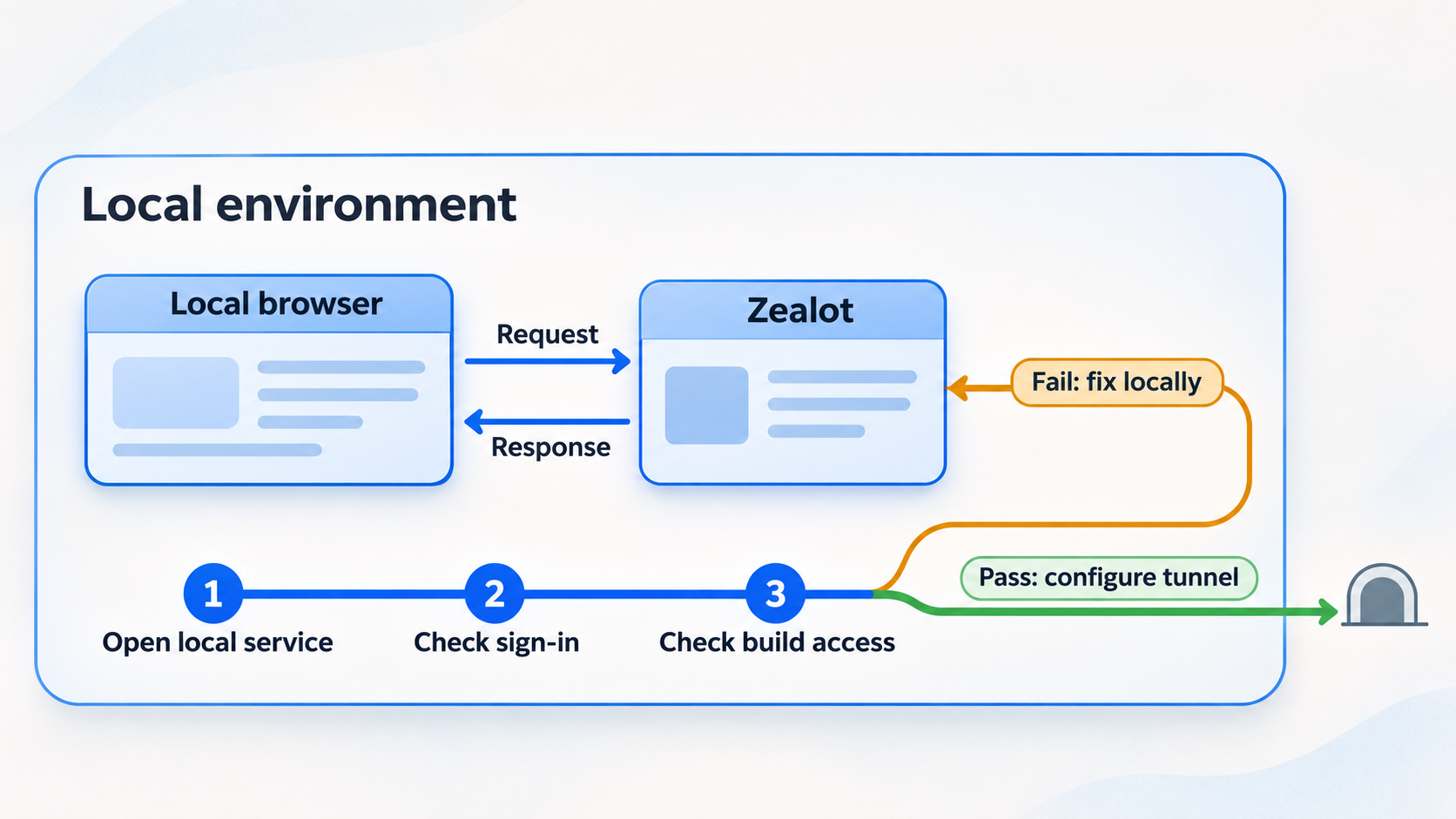
Local verification should prove the complete distribution path, not merely the presence of a login page. Perform the checks from a device that can reach the Zealot host directly. Use the real address and port produced by the deployment.
Confirm service health
Check that all services required by the official deployment remain running. Review their logs for initialization failures, permission errors, missing configuration, storage failures, or repeated restarts.
Open the local web interface
Browse to the actual local endpoint. Confirm that the page loads without redirect loops, missing assets, or server errors. Record the working IP address and port because Localtonet will forward to this endpoint.
Test authorized access
Sign in using the account or identity configuration created for this deployment. Confirm that an unauthorized visitor cannot perform administrative or upload actions that should require authorization.
Upload and classify a test build
Add a non-sensitive Android, iOS, or other supported test package. Place it in the intended application and channel, then verify that its metadata and download page appear as expected.
Download from a second local device
Use another authorized device on the private network to open the page and download the package. This checks network binding, permissions, links, and artifact storage from a tester’s perspective.
Test persistence
Follow the documented controlled restart procedure, then confirm that accounts, application records, channels, and uploaded builds remain available. If data disappears, correct the persistence configuration before exposing the service.
For iOS testing, confirm current Apple requirements and Zealot’s version-specific instructions before promising over-the-air installation. HTTPS is commonly relevant to mobile distribution workflows, but the supplied Zealot evidence does not define the complete iOS OTA requirements. A public HTTPS page alone does not replace signing, provisioning, device eligibility, manifest, or platform-policy requirements.
Expose the verified Zealot service with Localtonet
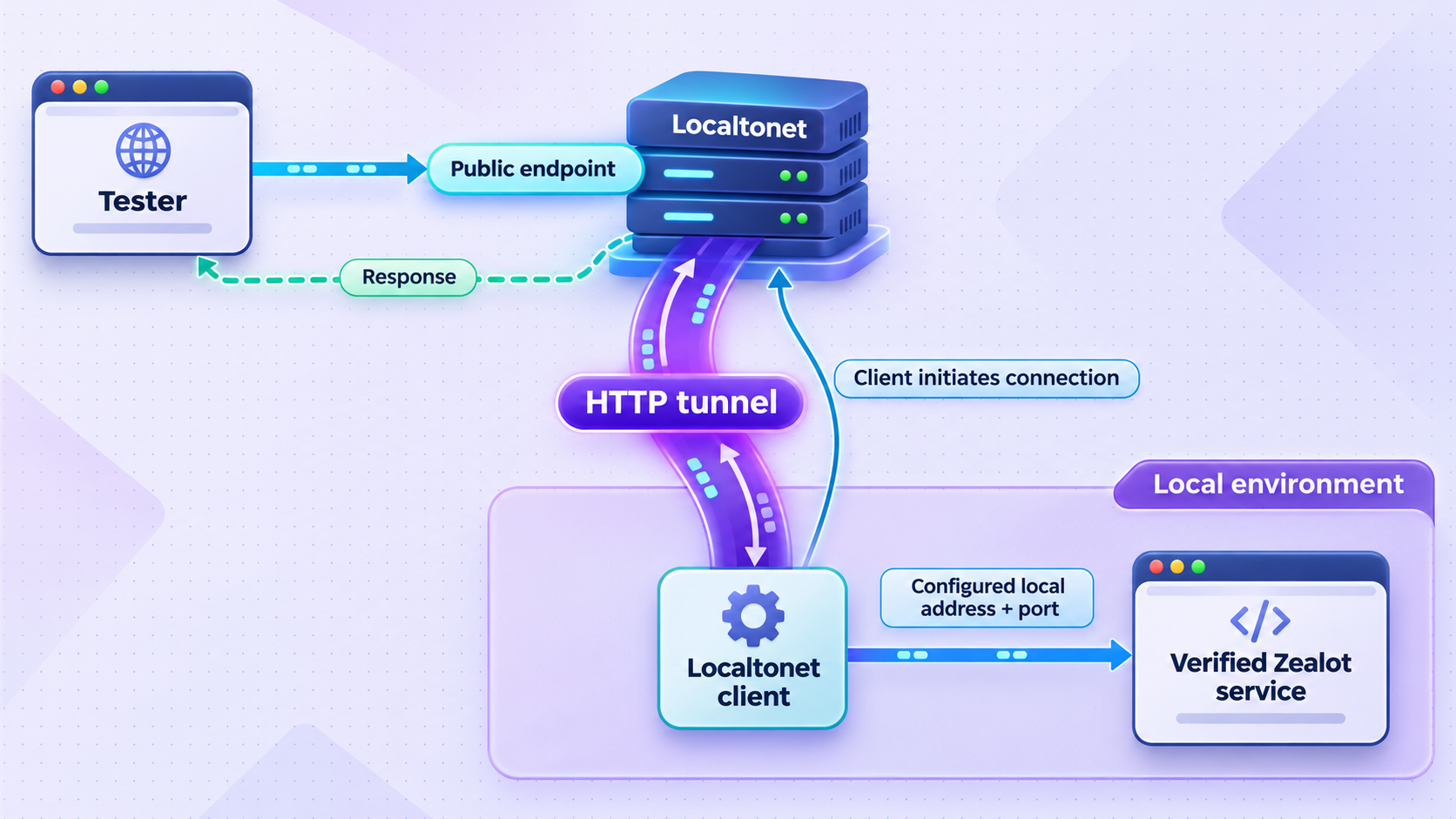
Once the local endpoint passes the previous checks, an HTTP tunnel is the appropriate Localtonet tunnel family for the Zealot browser interface and REST API. The Localtonet client runs on a device that can reach Zealot and establishes an outbound connection to one of our relay servers. The tunnel then provides a public URL without requiring inbound router port forwarding, firewall changes, VPN setup, or a public IP address.
Creating a tunnel does not automatically mean it is running. The selected Localtonet client must be connected, and the tunnel must be started. The public endpoint remains available only while that client is connected and the tunnel is running.
Install and run the Localtonet client
Install our client on the Zealot host or another device that can reach the verified Zealot IP address and port. Keep the client running for as long as remote access is required.
Authenticate the correct device
Select the device using its device-specific authentication token. Do not place the token in this article, a public repository, CI log, screenshot, or tester documentation.
Select an available relay server
Choose a currently available server or region from the Localtonet dashboard. Available values can vary, so use the current product selection rather than copying a server code from an old tutorial.
Create an HTTP tunnel
Configure the tunnel to point to the exact local IP address and port that passed local verification. HTTP tunnels may use Random Sub Domain, Custom Sub Domain, or Custom Domain process types, and each serves the local content at a public HTTPS address. Availability can vary, and custom-domain DNS requirements must be checked against current documentation.
Start the tunnel
Use the Start button after reviewing the target. Wait until the tunnel is running, then copy the assigned public URL. Creating the configuration without starting it will not make Zealot reachable.
Test from an external network
Open the public URL from a device that is not using the Zealot host’s private network, such as a phone on mobile data. Sign in as a non-administrator tester, open the test application, and download the non-sensitive build.
For the current product workflow and interface details, review our Localtonet HTTP tunnel documentation while configuring the tunnel. Use the actual Zealot endpoint discovered during local verification. This article intentionally does not assign a default port because the supplied Zealot evidence does not establish one.
Publishing Zealot makes its public pages and authentication surface reachable from the internet. Require authentication, limit administrative privileges, remove unused accounts, protect API tokens, and expose only the service that testers need. Do not interpret tunneling as a way to bypass organizational network policy or application authorization.
Operate the distribution service securely
A beta distribution server holds executable packages and may also hold debug files, release notes, user information, API credentials, and integration settings. Treat it as a production service even when the applications it distributes are pre-release builds.
Separate administrator, uploader, and tester responsibilities
Administrators should configure the service, identity integrations, channels, and access policy. CI systems should receive only the credentials required to upload to their intended destination. Testers should receive only the access needed to view and download approved builds. Avoid sharing one administrator account across all three roles.
Protect automation credentials
Zealot’s fastlane examples use an endpoint, token, and channel key. Store those values in a protected CI secret store and mask them in job logs. Never place them in a public pipeline definition, mobile application, downloadable configuration file, or tunnel description. Revoke and replace a token if it appears in logs or source history.
Plan URL stability before broad adoption
A generated URL can be suitable for evaluation or a short testing window. A team that embeds the endpoint into CI jobs, SDK settings, bookmarks, identity-provider callbacks, or tester instructions may require a stable address. Localtonet HTTP process types include generated and selected subdomain options where supported, as well as custom domains. Confirm current availability and DNS instructions before relying on a specific option.
Back up data and test restoration
Back up the persistent data identified by Zealot’s official deployment documentation. A backup is useful only if it can restore application records and uploaded artifacts into a compatible version. Keep backup credentials separate from application credentials, restrict access to stored packages, and test the restoration procedure on an isolated system.
Patch deliberately
Review Zealot release information before upgrading. Preserve the current deployment definition and backup the documented persistent data. Pinning a version can make deployments repeatable, but it also means updates require an intentional change. After an upgrade, repeat local login, upload, download, API, and persistence checks before reopening remote tester access.
Stop access when it is no longer needed
Stop the Localtonet tunnel when a temporary test ends. Delete obsolete tunnel configurations when they will not be reused. Remember that stopping the Zealot container, disconnecting the selected Localtonet client, or stopping the tunnel will make the public endpoint unavailable.
| Remote client | Typical activity | Recommended control |
|---|---|---|
| Tester browser | View release information and download an approved build. | Use an individual account or approved identity flow with tester-level permissions. |
| CI pipeline | Upload a package and related debug files. | Use protected secrets and scope the credential to the required workflow and channel. |
| Mobile SDK | Check for a new version and display update information. | Do not embed administrator credentials or unrestricted upload tokens in the application. |
| Administrator | Manage users, applications, channels, and integrations. | Use a separate privileged account and avoid routine administration on untrusted devices. |
| Webhook workflow | Send notifications after Zealot receives a build. | Validate the destination and keep webhook-related secrets out of application packages and logs. |
Troubleshoot installation and remote access
The Zealot page does not open locally
Do not troubleshoot the tunnel yet. Confirm that the documented Zealot services are running, then inspect their logs. Verify the actual published port, network binding, and local address. If the service is bound only inside a container network, the host or separate Localtonet device may not be able to reach it. Correct that using the network method supported by the official Zealot deployment, not by guessing an internal port.
The local page works, but the public URL does not
Confirm that the Localtonet client is connected under the selected device token and that the tunnel has been started. Recheck the local target IP address and port from the Localtonet client’s perspective. If the client runs on another machine, 127.0.0.1 refers to that other machine, not automatically to the Zealot host.
The public page loads, but assets or links are incorrect
This can indicate that the application needs version-specific external URL or proxy configuration. The supplied Zealot evidence does not establish the relevant setting names, so do not invent environment variables. Consult the current self-hosted guide for external URL, trusted proxy, forwarded header, or base-path requirements that apply to version 6.2.2.
Login through an external identity provider fails
Compare the public URL with the callback URL registered at the identity provider and the URL configured in Zealot. Check scheme, hostname, path, and any provider-specific restrictions. If the provider expects a stable callback, avoid changing the public hostname after registration. Use only the callback format documented by Zealot and the selected provider.
A CI upload succeeds locally but fails remotely
Confirm that the CI runner can resolve and reach the public URL. Check whether its endpoint value includes the correct scheme and path, and verify that the secret store supplied the intended token and channel key. Review the Zealot application log without printing credentials. A large or long-running upload may also expose storage or upstream timeout issues, but no Zealot or Localtonet upload limit is established by the supplied evidence, so a specific limit should not be assumed.
An uploaded build disappears after a restart
This strongly suggests a persistence or storage-mount problem. Stop adding new builds and compare the deployment against the version-specific storage instructions. Determine whether application data and artifacts were written inside a disposable container layer. Restore from a validated backup if available.
Remote access stops unexpectedly
Check three independent layers: the Zealot service, the Localtonet client, and the tunnel state. The public endpoint depends on all three. A running tunnel cannot serve an application that has stopped, and a healthy Zealot server cannot remain publicly reachable through Localtonet if the selected client disconnects or the tunnel is stopped.
Test Zealot from the host, then from the Localtonet client device, and finally through the public URL. This sequence identifies whether a failure belongs to the application, the private network path, the client connection, or the public tunnel.
Frequently asked questions
What is Zealot used for?
Zealot is a self-hosted beta application distribution platform for Android, iOS, macOS, Windows, and Linux builds. It provides a web interface and supports application channels, team access, a REST API, SDKs, fastlane integration, and webhooks.
Can Zealot be installed with Docker?
Yes. Zealot promotes Docker deployment and publishes images under ghcr.io/tryzealot/zealot and tryzealot/zealot. Use the exact deployment instructions for the selected release because the supplied evidence does not establish the complete command, service dependencies, volume paths, configuration variables, or default port.
What port does Zealot use by default?
The evidence available for this guide does not establish a default port. Use the port published by the official deployment configuration and verify it locally. Enter that observed port as the local target when creating the Localtonet HTTP tunnel.
Which Localtonet tunnel type should I use for Zealot?
Use an HTTP tunnel for the Zealot web interface and REST API. Point it to the verified local IP address and port. Localtonet then provides a public HTTPS address while the selected client is connected and the tunnel is running.
Does Localtonet require router port forwarding?
No. Our client establishes an outbound connection to a Localtonet relay server, so the workflow does not require inbound router port forwarding, firewall changes, VPN setup, or a public IP address.
Will the Zealot public URL remain available if the Localtonet client stops?
No. The tunnel is available only while the selected client device is connected and the tunnel is running. The Zealot service itself must also remain healthy and reachable from that client.
Can a CI system upload builds through the tunnel?
Zealot documents a REST API and fastlane integration, so an authorized CI runner can use a reachable Zealot endpoint. Configure the workflow only after browser access and a manual upload work. Store the endpoint, token, and channel key in protected CI secrets and never expose them in logs or repositories.
Is a public HTTPS URL enough for iOS over-the-air installation?
Not necessarily. HTTPS may be part of an iOS distribution workflow, but signing, provisioning, device registration, manifests, and current Apple requirements can also apply. Verify the current Zealot and Apple instructions for the exact iOS distribution method before inviting testers.
Share your verified Zealot service with Localtonet
After Zealot works locally and your authentication policy is ready, create an HTTP tunnel to give authorized testers and automation systems a public route to the service without opening an inbound router port.
Get Started Free →