

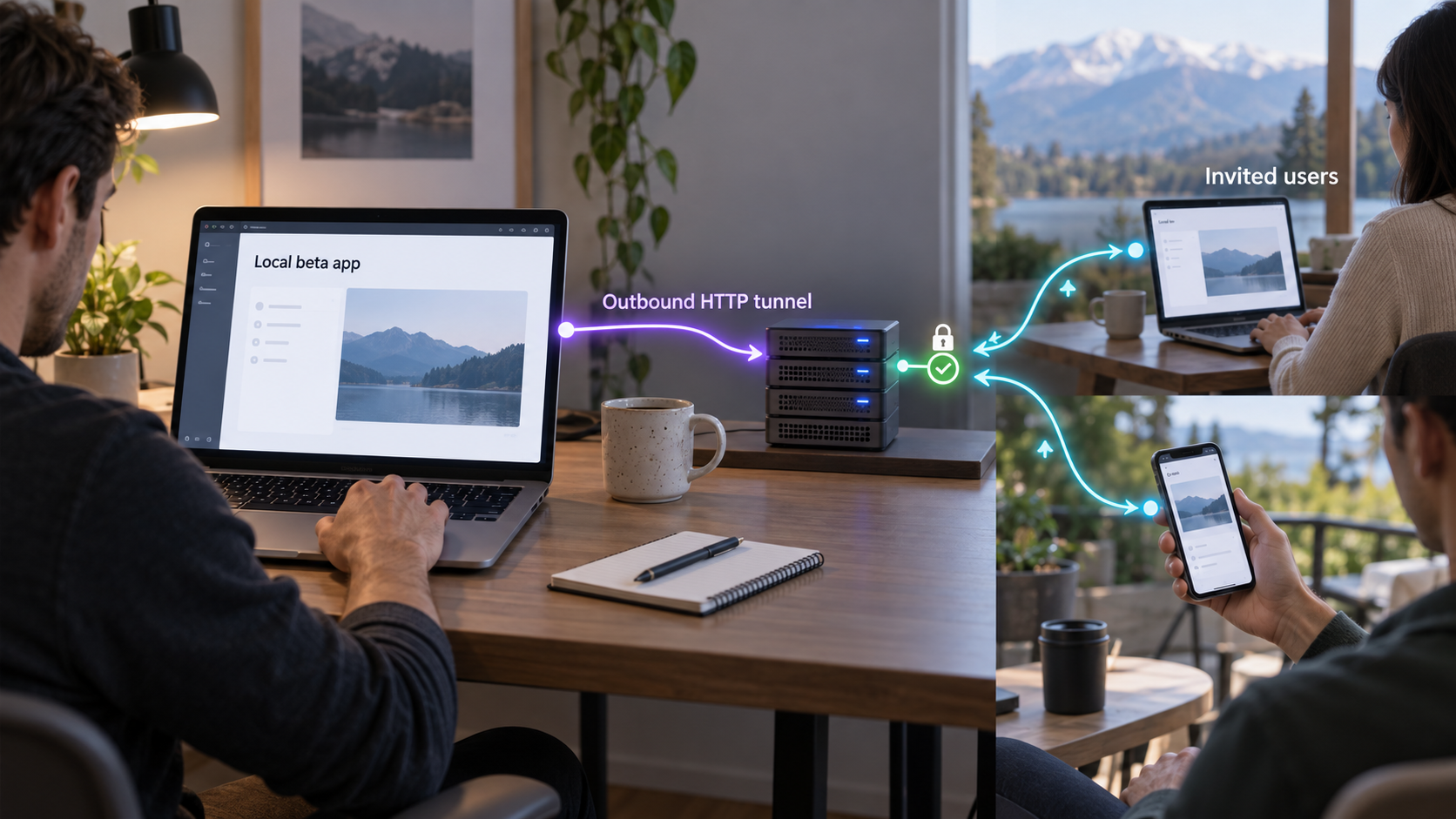
Validate a real SaaS workflow before committing to production infrastructure
A private beta can help us learn whether a SaaS product solves the right problem without first building a full production platform. In this guide, we explain how to run a web application on a development machine or dedicated local device, protect it with application-level authentication, verify it locally, and make it reachable through a Localtonet HTTP tunnel. We also cover data handling, tester access, operations, troubleshooting, and the signals that indicate it is time to move to dedicated production infrastructure. The result is a controlled validation environment, not a shortcut around security or a permanent hosting strategy.
📋 What's in this guide
What a private SaaS beta should accomplish
A private beta sits between an internal prototype and a production release. The product is functional enough for selected people to complete a meaningful workflow, but the team is still learning what users need, which assumptions are wrong, and where the software fails outside the developer's own environment. Access is intentionally limited, expectations are explicit, and the system is operated as a temporary validation environment.
The objective is not to imitate a mature production architecture on day one. It is to test the smallest complete version of the customer journey. A useful beta might let an invited user create an account, sign in, perform the product's central task, review the result, and provide feedback. Features that do not help validate that journey can usually wait.
This distinction matters because infrastructure can consume time without resolving product uncertainty. Building automated regional deployments, complex orchestration, elaborate service boundaries, and large-scale observability does not prove that customers understand or value the product. A smaller environment can produce better early evidence when it is reliable enough for the invited group and when its limitations are managed honestly.
Choose the beta question before choosing infrastructure
Write down the central question the beta must answer. Examples include whether a team can complete a workflow without assistance, whether a generated result is useful enough to retain, or whether users return after their first session. This question should determine which features, user roles, integrations, and data are necessary.
Define success and stopping conditions as well. A beta can be successful even when it reveals that the product needs a different workflow. It should be paused if it creates unacceptable security exposure, loses data, cannot provide a usable experience, or requires more manual support than the team can safely deliver.
A hard-to-guess invitation or public URL is not an authorization mechanism. Once an HTTP endpoint is published, requests can potentially arrive from outside the invited group. Protect the application with authentication and authorization before sharing its address.
A minimum viable architecture for controlled testing
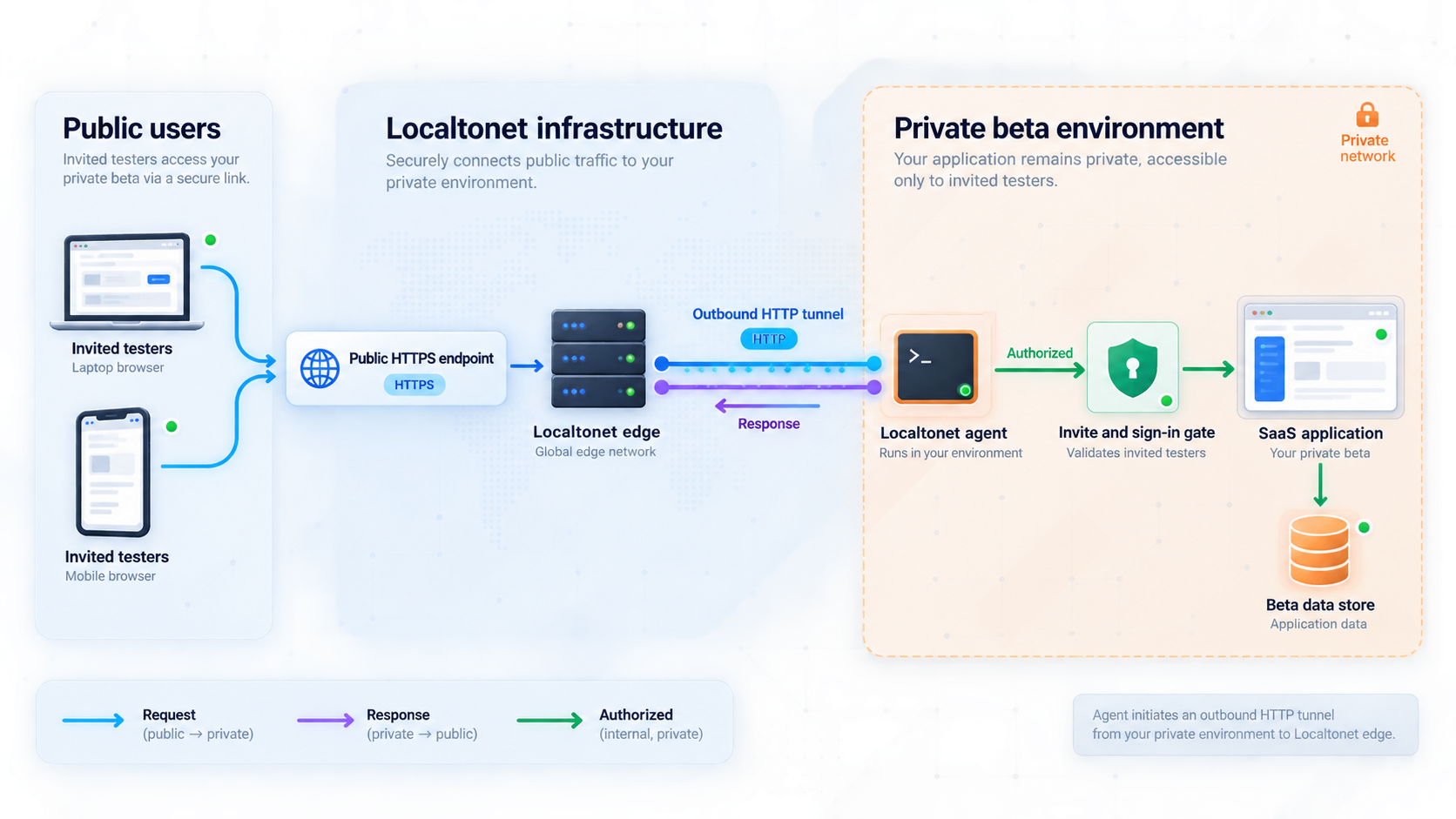
A lean beta architecture can remain understandable without being careless. At minimum, it normally contains the web application, the data store or external services the application actually needs, an authentication and authorization layer, a backup process for important data, and a controlled connectivity path for testers.
With Localtonet, the application continues running on a machine under your control. Our client application runs on a device that can reach the service and establishes an outbound connection to a Localtonet relay server. The HTTP tunnel then provides a public HTTPS address for the selected local IP address and port. This does not require inbound router port forwarding, a public IP address, VPN setup, or an inbound firewall change.
The machine can be the developer's computer for a short, supervised test. For a longer beta, a dedicated local device is usually easier to reason about because development restarts, sleep settings, experimental branches, and unrelated workstation activity are less likely to interrupt testers. This is an architectural recommendation rather than a Localtonet requirement.
| Environment | Appropriate use | Main limitation |
|---|---|---|
| Developer workstation | Short, supervised sessions with a few invited testers | Development work, restarts, sleep, and network changes can interrupt access |
| Dedicated local device | A limited beta that needs better separation from daily development | The device, application, local network, Localtonet client, and tunnel must all remain available |
| Dedicated production infrastructure | Customer-facing service with formal availability, capacity, operational, or compliance requirements | Requires a deliberate deployment, monitoring, backup, security, and incident-response design |
Separate connectivity from application security
The tunnel solves a connectivity problem. It carries requests from a public endpoint to the HTTP service that the Localtonet client can reach. It does not decide which beta tester may view a workspace, modify a record, use an administrative feature, or access another customer's data. Those decisions remain the responsibility of the SaaS application and its identity system.
This separation is useful during design reviews. We can ask one set of questions about connectivity, such as whether the client device can reach the target address and whether the tunnel is running. We can separately ask whether sessions expire, authorization is enforced on the server, administrative routes are restricted, and tenant boundaries are tested.
Understand the availability chain
A Localtonet tunnel is available only while the selected client device is connected and the tunnel is running. The local web application must also be running and reachable at the configured local IP address and port. The host machine must remain powered on, its local network must work, and any required database or external dependency must remain available.
These dependencies are acceptable for a scheduled or closely managed beta if testers understand them. They become a reason to migrate when customers expect continuous access, contractual availability, unattended recovery, or support across time zones.
Prepare the application and beta environment
Do not create the public tunnel first and then decide whether the application is safe to expose. Prepare the service locally, test its controls, and confirm the target endpoint before connecting it to the internet.
Define users, roles, and data boundaries
Create a list of invited testers and decide how accounts will be provisioned. Self-registration may be unnecessary for a small beta. If registration is enabled, do not assume that possession of the beta URL is sufficient proof that a person should receive an account.
Define the minimum roles the beta needs. A simple application might have a tester role and an operator role. Avoid granting administrative privileges merely because it is convenient. Administrative functions should be unavailable to ordinary testers at both the user-interface and server-authorization layers.
For a multi-tenant SaaS, test ownership checks directly. A signed-in user should not be able to retrieve another tenant's data by changing an identifier in a URL, request body, or API call. Hiding links in the interface is not a substitute for enforcing authorization on every protected operation.
Choose beta-safe data
Use synthetic, anonymized, or low-sensitivity data whenever the product can be validated without real customer information. Collect only what is required to answer the beta question. A narrow data set reduces the consequences of application defects, accidental sharing, incorrect permissions, and backup mistakes.
If the product necessarily processes sensitive or regulated information, a local beta exposed through a tunnel should not be treated as automatically suitable. The team must evaluate its legal, contractual, compliance, retention, access-control, and incident-response obligations. The supplied Localtonet product information does not establish that every workload or subscription satisfies any particular compliance regime, so those conclusions must be made from current verified requirements rather than assumed.
Prepare persistence and recovery
Decide what must survive an application restart, machine restart, or failed update. Back up important application data and configuration to an appropriate separate location. A backup is not proven until the team has restored it and confirmed that the recovered application works.
Document the recovery sequence in plain language. It should identify where the data resides, how it is backed up, who may access it, how a restore is performed, and how the restored system is checked. Do not include real credentials, authentication tokens, or private endpoints in the document.
Choose a stable local endpoint
Identify the exact local IP address and port on which the web application listens. Localtonet needs those values when the HTTP tunnel is configured. Do not guess the port from a framework convention. Confirm it from the application's startup output or configuration and then test it.
When the Localtonet client runs on the same machine as the application, the service can be targeted through an address reachable from that machine. When the client runs on a different device, the application must listen on an interface reachable from that client device, and local firewall rules must permit that connection. Avoid unnecessarily exposing the application to an entire local network. Restrict local reachability to what the architecture requires.
Before exposing the endpoint, disable or restrict debugging consoles, framework development tools, database administration pages, test login shortcuts, verbose error pages, and internal diagnostic routes. Review the actual service listening on the selected port so the tunnel cannot point to the wrong process.
Build least-privilege access into the beta
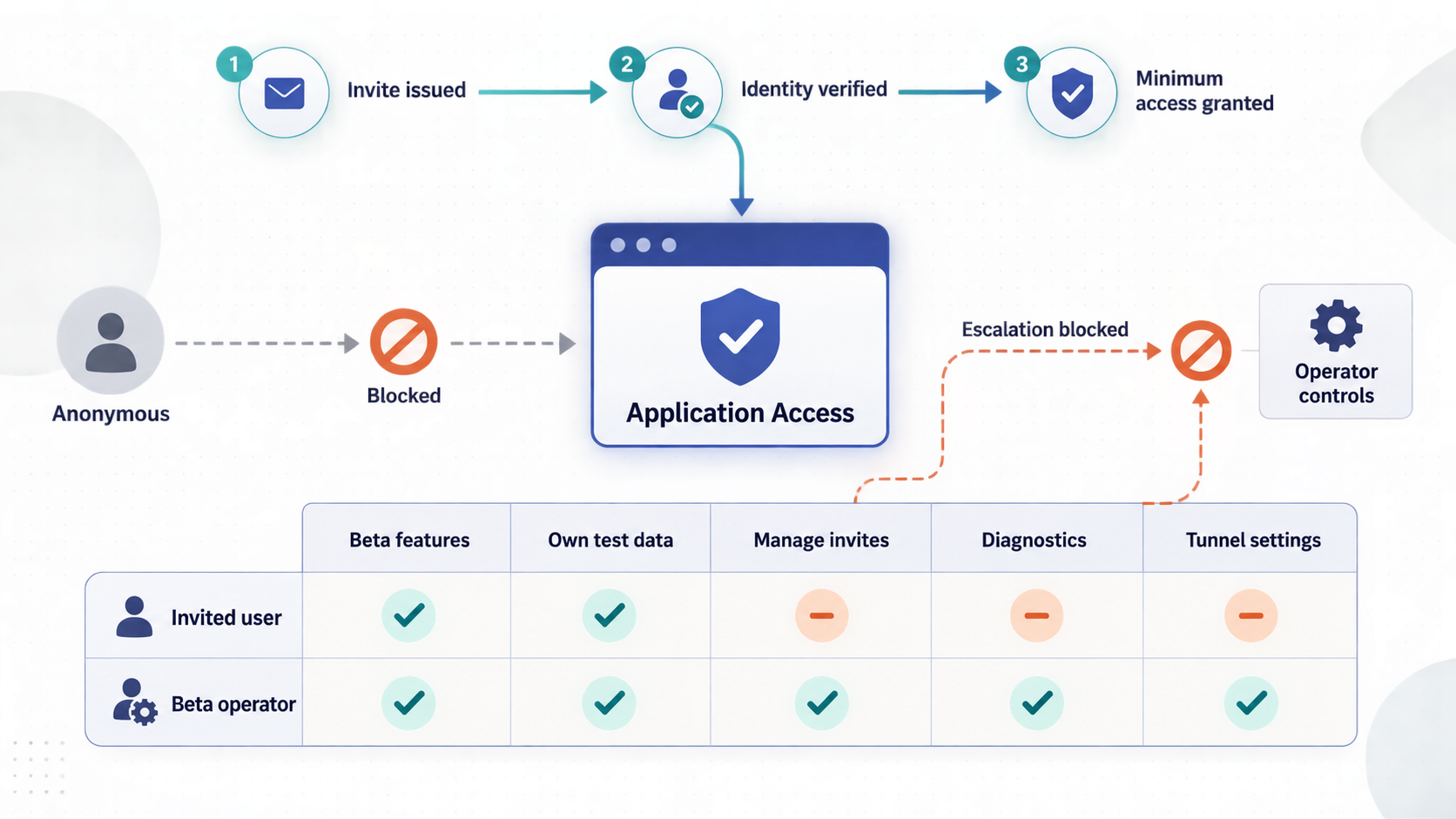
A private beta should be small in audience, not weak in security. The controls can be simple, but they must cover identity, authorization, session handling, data access, operational access, software maintenance, and revocation.
Use real authentication
Protect the application with an established authentication design appropriate to its stack. Passwords, passwordless links, or an external identity service can all be valid in the right implementation, but a shared URL or a user-name field without verification is not authentication. Do not place example credentials in the page, client-side source, repository, or invitation message.
Sessions should use secure cookie and expiry behavior appropriate to an internet-facing application. State-changing operations should be protected against cross-site request forgery where the architecture requires it. Failed logins and sensitive account actions should be handled in a way that does not disclose unnecessary account information.
Protect secrets and operational privileges
Keep database credentials, signing keys, API credentials, Localtonet device tokens, and other secrets out of source control and browser-delivered code. Limit access to the people and processes that require each secret. If a secret appears in logs, screenshots, chat, or a repository, treat it as exposed and rotate it through the responsible system.
The Localtonet device authentication token identifies the client device that runs the tunnel. It is device-specific and must not be guessed, copied into an article, embedded in a public repository, or shared with beta testers. Testers need the application's public address and their application account, not the device token.
Plan a rapid shutdown path
Before invitations are sent, identify who can stop the tunnel and who can disable application accounts. If the wrong service is exposed, sensitive data becomes visible, or an authorization defect is found, stop access first and investigate second. With Localtonet, a tunnel can be stopped and later deleted if it is no longer required.
Verify the complete application locally
Local verification separates application problems from tunnel problems. If the service does not work through its confirmed local endpoint, publishing that endpoint will not fix it.
Start the application and its required dependencies
Start the web application, database, worker processes, and any other component required for the beta workflow. Confirm that each process starts without a fatal configuration or connection error.
Open the exact local endpoint
Use the confirmed local IP address and port that will become the tunnel target. If the Localtonet client will run on another device, perform this check from that device rather than only from the application host.
Complete the tester journey
Sign in as a non-administrative tester, complete the central product task, sign out, and sign back in. Confirm that persistence, validation, background work, and expected error handling behave correctly.
Test authorization boundaries
Verify that an ordinary account cannot open administrative features or another user's records. Test server responses directly through the application's normal requests rather than trusting hidden buttons or links.
Review errors and exposed diagnostics
Trigger safe validation failures and confirm that users receive useful messages without stack traces, secrets, local file paths, database details, or internal configuration values.
Rehearse restart and recovery
Restart the application and verify that required data remains available. Perform the documented backup restore test in a safe environment before accepting valuable beta input.
Record the confirmed address and port without recording credentials. This is the target to use in the Localtonet configuration. If the local endpoint changes every time the application starts, stabilize the application configuration before inviting testers.
Publish the confirmed HTTP endpoint with Localtonet
After the application is secure and works locally, Localtonet can provide the external connectivity layer. Use an HTTP tunnel for a browser-based SaaS application served over HTTP on the local device or on a device reachable by the Localtonet client.
HTTP tunnels can use Random Sub Domain, Custom Sub Domain, or Custom Domain as their Process Type. These options serve the content at a public HTTPS address. Availability can vary by plan or current product configuration, so use only the options shown for your account. Exact custom-domain DNS instructions should be checked against current Localtonet documentation before changing DNS records.
Install and run the Localtonet client
Install the current Localtonet client on the application host or on another device that can reach the application's verified local endpoint. Use the current installation instructions for the device's operating system rather than copying an unverified command.
Authenticate or select the client device
Use the device-specific authentication token through the supported Localtonet workflow and select the device that will run the tunnel. Keep the token private and never place it in tester instructions or application source code.
Select an available relay server
Choose from the relay servers or regions currently available in the dashboard. Do not rely on hardcoded server codes from an old tutorial because availability can vary over time, by deployment, or by plan.
Create the HTTP tunnel configuration
Choose the appropriate HTTP tunnel and Process Type, then enter the exact local IP address and port verified earlier. Recheck that this target is the SaaS application and not a debugging console, database interface, or unrelated local service.
Start the tunnel
Creating a tunnel does not make it active. Use the Start button and confirm that the selected client is connected and the tunnel is running. Localtonet then provides the public URL associated with the configuration.
Test the assigned public address
Open the public HTTPS address from a device and network separate from the host when practical. Complete the same authenticated tester journey, check browser behavior, and verify that no internal-only route has become unintentionally accessible.
The current product documentation should be used to confirm the interface shown in your account. See the Localtonet HTTP tunnel documentation when performing the configuration.
A saved tunnel configuration is not necessarily online. The tunnel must be started, and it remains available only while the chosen client device is connected and the tunnel is running. It can later be stopped or deleted.
Beta testers should receive the public application address and their own least-privilege application identity. Do not give them Localtonet authentication tokens, dashboard access, server credentials, database credentials, or administrator accounts unless a separately reviewed operational role genuinely requires them.
Perform a remote acceptance test
Test from at least one browser that has no existing administrator session. Also test from a mobile device if mobile use is part of the intended workflow. Check login, logout, account recovery if enabled, navigation, form submission, file handling if applicable, and any callback or redirect that depends on the application's public origin.
Pay particular attention to application-generated links. Some frameworks derive absolute URLs from configuration or request headers. If the application still generates a local address, correct its public-origin configuration according to that application's official documentation. There is no universal environment variable or setting for this, so do not copy a value intended for another framework.
Operate the beta as a managed experiment
A small beta still needs an owner, a schedule, and a response process. Decide who starts and stops the application, checks that the Localtonet client is connected, starts the tunnel, handles tester reports, and restores service after an interruption.
Use a pre-session checklist
Before each scheduled test, verify that the host device is powered on, the network is stable, the application and dependencies are running, the application works locally, the Localtonet client is connected, and the tunnel is running. Then open the public URL through a non-administrator session.
If the beta is not intended to run continuously, stop the tunnel after the scheduled session. A smaller exposure window does not replace authentication, but it can reduce unnecessary availability of a temporary environment.
Collect useful operational signals
Focus first on measurements that explain the customer journey: whether users can sign in, where they abandon the workflow, which actions fail, how long important requests take, and how often testers need help. Record enough application logs to diagnose failures, but do not log passwords, session tokens, authentication secrets, complete payment information, or unnecessary personal data.
Technical signals should include application errors, database failures, storage capacity, resource exhaustion, dependency failures, and restart events. Monitoring capabilities and guarantees vary by the tools used in the application stack. Localtonet should not be described as replacing application monitoring, database monitoring, backup verification, or incident response.
Control changes during active tests
Keep a known-good version available and avoid deploying unrelated changes immediately before a tester session. Record which application version was running when a defect occurred. For database changes, use the migration and rollback practices supported by the application's actual framework and database rather than making untracked manual edits.
Development can remain fast without changing the running beta unpredictably. A dedicated branch, tagged build, container image, or other repeatable artifact can help, but the correct method depends on the project. The important point is that the team can identify and restore the version testers used.
Close access deliberately
When a tester leaves the beta, disable the individual account and invalidate active sessions where supported. When the beta ends, stop the Localtonet tunnel, delete it if it is no longer needed, disable beta accounts, remove unnecessary data according to the retention plan, and preserve only the records required for product learning or legitimate obligations.
Troubleshoot the application and tunnel systematically
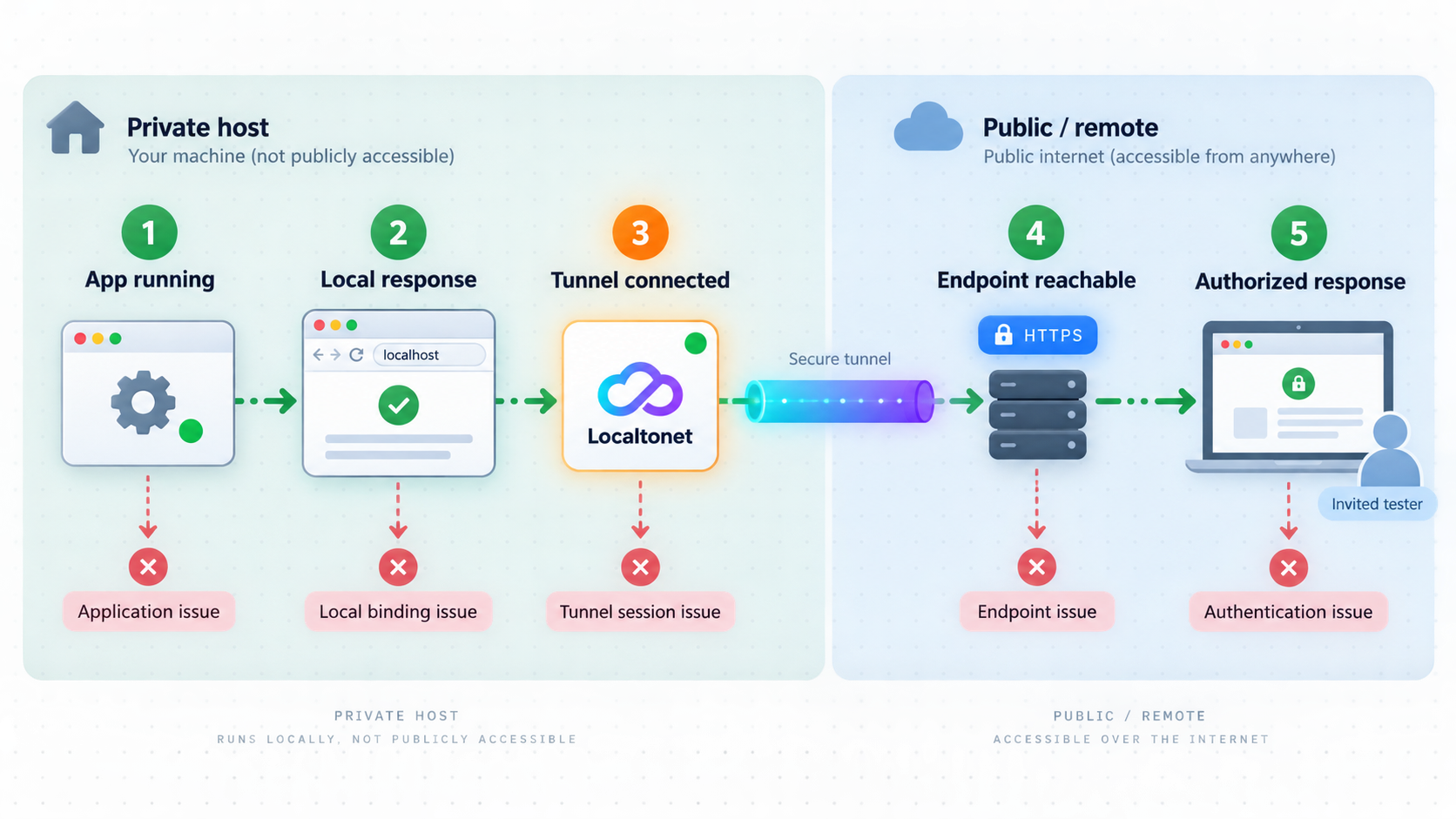
Diagnose failures from the inside out. Start with the application process, then its local endpoint, the connection from the Localtonet client device, the client status, the tunnel state, and finally the public user journey. This order avoids changing tunnel settings when the underlying service is unavailable.
| Symptom | Likely area | What to verify |
|---|---|---|
| The application fails locally | Application or dependency | Confirm the process is running, the configured port is correct, and required database or worker services are available |
| It works on the host but not from the client device | Local binding or firewall | Confirm the service listens on an address reachable from that device and that local network rules allow only the required connection |
| The tunnel exists but the URL is unavailable | Tunnel lifecycle | Confirm the selected Localtonet client is connected and the saved tunnel has been started |
| The public URL reaches the wrong service | Target configuration | Recheck the configured local IP address and port, then stop the tunnel until the target is corrected |
| Login works locally but not remotely | Application origin or session configuration | Review the application's public URL, redirect, cookie, proxy-awareness, and trusted-origin settings using its official documentation |
| Access stops after the machine sleeps | Host availability | Wake the device, restore network connectivity, restart required processes, reconnect the client, and confirm the tunnel state |
| One user can access another user's data | Application authorization | Stop the tunnel, preserve relevant diagnostic evidence safely, correct server-side ownership checks, and retest before reopening |
Local service works, but remote requests fail
Verify that the tunnel target exactly matches the tested endpoint. If the Localtonet client is on another machine, testing from the application host alone is insufficient. The client device itself must be able to reach the target. Check local firewall and service-binding behavior without opening the service more broadly than necessary.
The page loads, but redirects point to a local address
This is normally an application configuration issue. The application may be generating absolute links from a configured base URL or may not be interpreting forwarded request information as expected. Consult the framework's current deployment documentation and set the public origin safely. Do not disable host validation or trust every proxy globally as a quick workaround.
Testers see stale or inconsistent behavior
Confirm that only the intended application instance is running and that workers use the same configuration and data store. Check whether browser caching, service workers, old sessions, background jobs, or incomplete database migrations explain the difference. Record the running application version so reports can be reproduced.
A security defect is discovered
Stop the tunnel immediately when continued access could expose users or data. Disable affected accounts or functionality, determine what information may have been accessed, rotate exposed credentials, repair the defect, and retest authorization before restarting. Follow any applicable notification or incident-handling obligations rather than treating the beta label as an exemption.
Know when the beta has outgrown temporary hosting
A local private beta is valuable while the main objective is supervised learning with a small invited audience. It should not become permanent infrastructure merely because it is already working. Migration should be driven by user expectations, operational risk, data sensitivity, capacity, and the team's ability to support the service.
Production does not necessarily mean a complicated distributed system. It means the architecture and operating model are designed for actual customer commitments. A small managed deployment can be more appropriate than an elaborate platform if it provides the required availability, security, recovery, monitoring, and deployment controls.
Plan the migration before it becomes urgent
Keep the application portable by documenting dependencies, configuration, persistent storage, external services, background jobs, and public-origin behavior. Separate secrets from code and maintain a repeatable way to construct the application environment. Test data export and restore so the team knows how beta records will move if they need to be retained.
Before redirecting users, create the production environment, apply security controls, restore or migrate approved data, and run the full customer journey. Plan how DNS or application links will change based on the selected production design. Exact custom-domain steps vary and should be verified against the current services involved rather than inferred from the beta tunnel.
Keep the beta environment closed during final migration when concurrent writes could create inconsistent data. After cutover, confirm that users reach the intended environment, monitor errors closely, and retire the old tunnel and local data according to the retention plan.
Our HTTP tunnel can expose a reachable local web service without inbound port forwarding, but it does not replace application authentication, authorization, backups, monitoring, capacity planning, compliance review, deployment automation, database operations, or disaster recovery. Build those controls according to the commitments of the service.
Frequently asked questions
Can I launch a SaaS beta from my development computer?
Yes, for a small and supervised private beta, provided the application is secured, the machine remains available, data is backed up appropriately, and testers understand the limitations. A dedicated local device is often a better choice for longer tests because development restarts, experimental changes, sleep, and unrelated workstation activity are less likely to interrupt access.
Does a private or unlisted URL prevent unauthorized access?
No. The URL should not be treated as a password. Protect the SaaS with real authentication, enforce server-side authorization, issue individual accounts, minimize stored data, and maintain a way to revoke access promptly.
Does Localtonet require router port forwarding or a public IP address?
No. The Localtonet client establishes an outbound connection to a relay server, so the normal tunnel workflow does not require inbound router port forwarding, a public IP address, VPN setup, or an inbound firewall change.
Is the tunnel available after I create it?
Not automatically. Creating a tunnel does not mean it is running. It must be started with the Start button, and it remains available only while the selected Localtonet client device is connected and the tunnel is running.
Does an HTTP tunnel replace application authentication?
No. The tunnel provides connectivity to the configured local service. The application must still authenticate users and enforce roles, tenant separation, ownership, session security, and access to every protected operation.
Should testers receive my Localtonet authentication token?
No. The device token identifies the Localtonet client device and must remain private. Testers should receive the public application address and individual application credentials with the minimum privileges required for the beta.
Which Localtonet relay server or region should I enter?
Select from the options currently available in the Localtonet dashboard. Server codes and region availability should not be copied from an old article or guessed because available values can vary by plan, client version, region, or deployment.
When should I move the beta to production infrastructure?
Move when users expect continuous availability, real demand requires capacity planning, paying customers create operational commitments, sensitive data introduces stronger obligations, or the service needs automated deployment, monitoring, recovery, and incident response. Production can remain simple, but it should be intentionally designed for those requirements.
Start a controlled SaaS beta with Localtonet
Verify your application locally, protect it with least-privilege authentication and authorization, then use a Localtonet HTTP tunnel to share the confirmed endpoint with invited testers without configuring inbound router port forwarding.
Get Started Free →

