

Add a filtering layer before public traffic reaches your PHP origin
A Localtonet HTTP tunnel can publish a locally running PHP application without inbound router port forwarding, but making an application reachable also makes its attack surface reachable. This guide designs a defense-in-depth path where our tunnel connects to a local web application firewall or filtering reverse proxy instead of connecting directly to PHP. We cover virtual patching, request and response controls, rate limiting, access logs, local verification, emergency shutdown, and safe rollback. A WAF can reduce exposure while remediation is underway, but it does not replace the applicable PHP, framework, plugin, or application security update.
📋 What's in this guide
Why put a local WAF before the PHP application?
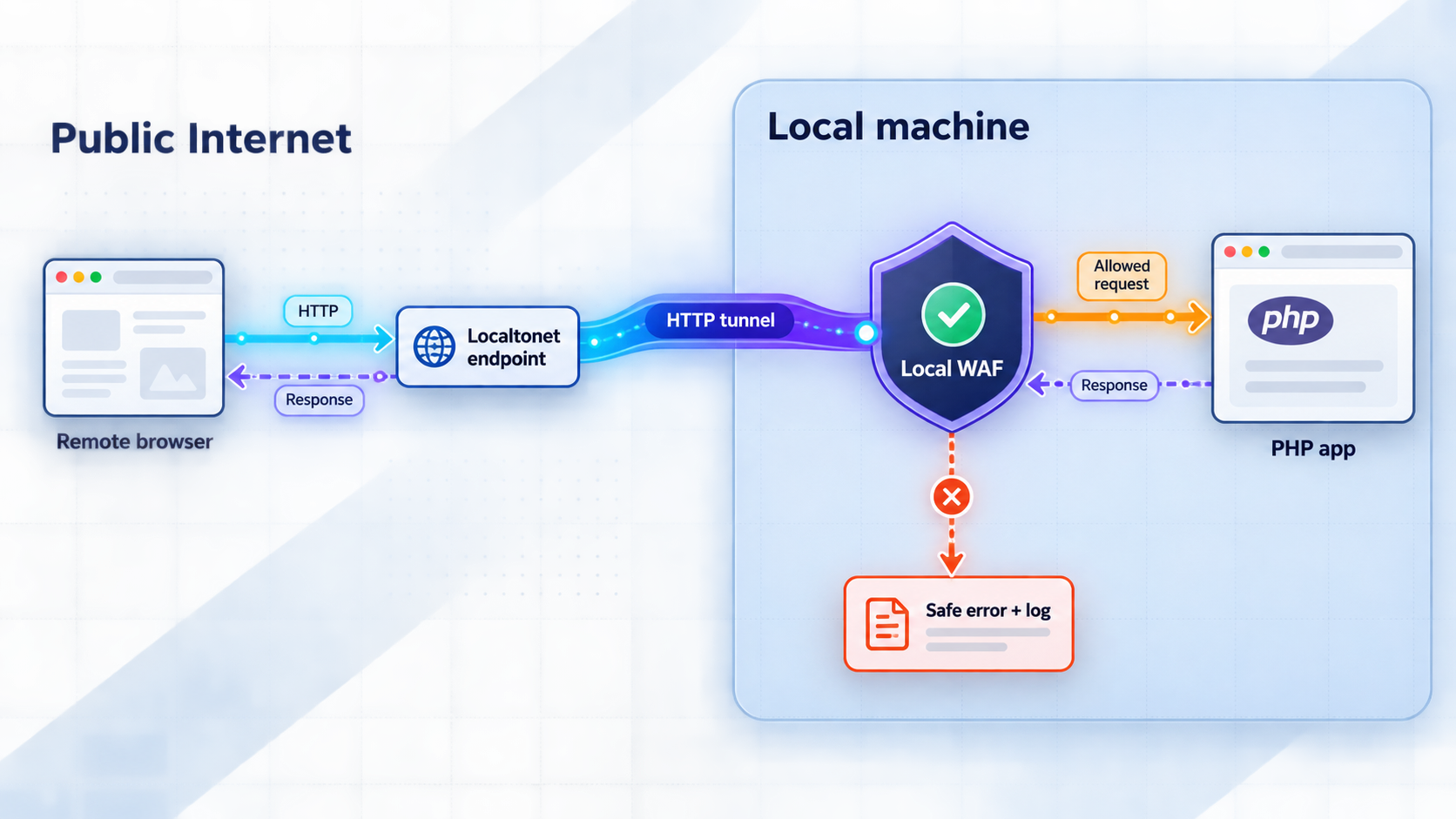
The safest routing model keeps the application origin out of the public request path until traffic has passed through a deliberate inspection and policy layer. In this design, the public client connects to the HTTPS address assigned to the Localtonet HTTP tunnel. The Localtonet client, running on a device that can reach the protected service, receives the tunneled traffic and sends it to a local WAF or filtering reverse proxy. Only requests accepted by that layer continue to the PHP application.
Internet client
    |
    v
Public Localtonet HTTPS endpoint
    |
    v
Localtonet client and HTTP tunnel
    |
    v
Local WAF or filtering reverse proxy
    |
    v
PHP web server or application origin
The critical configuration decision is the tunnel target. It should be the listening IP address and port of the filtering proxy, not the PHP application server itself. The PHP origin should then accept requests only from the proxy path where the local operating system, container network, and web server configuration allow that restriction. This reduces the chance that a second local interface or an accidentally exposed port bypasses the WAF.
Localtonet provides the public tunnel in this architecture. We do not claim that an HTTP tunnel automatically supplies application-specific WAF rules, virtual patches, exploit signatures, or response inspection. Those controls belong to the local WAF or reverse proxy you select and configure. Its exact capabilities vary, so confirm that the chosen software supports every control on which your mitigation depends.
Why request-only signatures may be insufficient
A request can be unusual without being malicious, while a successful exploit may depend on how the PHP runtime, framework, or application interprets that request. Looking only for a short string often creates a weak rule: broad matching can block legitimate users, and narrow matching can be bypassed through alternate encodings, duplicate parameters, parser differences, or payload mutations.
Response context can provide another signal. An unexpected status, error fragment, disclosure marker, or response shape may indicate that a suspicious request reached vulnerable behavior. If the selected WAF supports full request-and-response transaction inspection, it may be possible to prevent a matching response from reaching the requester. This must be tested carefully because buffering or inspecting responses can affect streaming, downloads, memory use, latency, and application behavior.
Treat every virtual patch as temporary risk reduction. Apply the relevant PHP runtime, web server, framework, dependency, extension, plugin, or application update as soon as it can be tested and deployed. Attack techniques can change, and a rule written for one observed payload may not cover another path to the same vulnerable behavior.
Prerequisites and decisions to make first
Before changing the tunnel, document the working application path and the expected traffic. A rushed emergency rule is much safer when the team already knows which routes, methods, content types, uploads, callbacks, and long-running responses the application legitimately needs.
- A PHP application that works locally through its current web server or application server.
- A separate local listening address and port for the WAF or filtering reverse proxy.
- A Localtonet client installed on the device that can reach the WAF listener.
- A device-specific Localtonet authentication token. Do not place it in examples, tickets, logs, screenshots, or source control.
- A current Localtonet relay server or region selected from the dashboard rather than copied from an old guide.
- Administrative access to the host, container network, reverse proxy, and PHP service configuration.
- A repeatable local test plan containing ordinary pages, authentication, form submissions, uploads, APIs, webhooks, and error cases relevant to the application.
- A backup of the last known-good proxy and WAF configuration.
- A maintenance and rollback plan that identifies who can stop the tunnel if filtering cannot be trusted.
This guide is intentionally implementation-neutral. No WAF package, web server, operating system, container platform, or PHP framework was specified in the approved scope, so it would be unsafe to invent installation commands, configuration paths, module names, service names, or default ports. Use the official documentation for the exact WAF and reverse proxy version you deploy. The architecture and verification requirements below remain applicable regardless of the implementation.
Choose separate listeners
Assign one listener to the WAF and another to the origin. Avoid assuming a particular port number. Record both explicitly:
WAF listener:    <WAF_IP>:<WAF_PORT>
PHP origin:      <ORIGIN_IP>:<ORIGIN_PORT>
Tunnel target:   <WAF_IP>:<WAF_PORT>
The two endpoints must not be confused. If the tunnel targets <ORIGIN_IP>:<ORIGIN_PORT>, the filtering layer is bypassed. If the WAF forwards back to its own listener, it creates a proxy loop. The WAF upstream must be the PHP origin, while the Localtonet tunnel target must be the WAF.
Reduce direct access to the origin
Prefer an origin listener reachable only from the WAF or a tightly controlled local network. Depending on the deployment, that could mean binding the origin to a loopback address, using an isolated container network, or applying host firewall rules. The correct mechanism depends on the operating system and deployment model.
Do not break administrative recovery. If local administrators need direct origin access for diagnosis, define a controlled procedure rather than leaving a broadly reachable bypass open. A bypass that is convenient during setup can silently become the permanent public attack path.
Our client establishes an outbound connection to a Localtonet relay server, so the workflow does not require inbound router port forwarding, a public IP address, VPN setup, or inbound firewall changes. The tunnel remains available only while the selected client or device is connected and the tunnel is running.
Design the filtering and virtual-patching policy
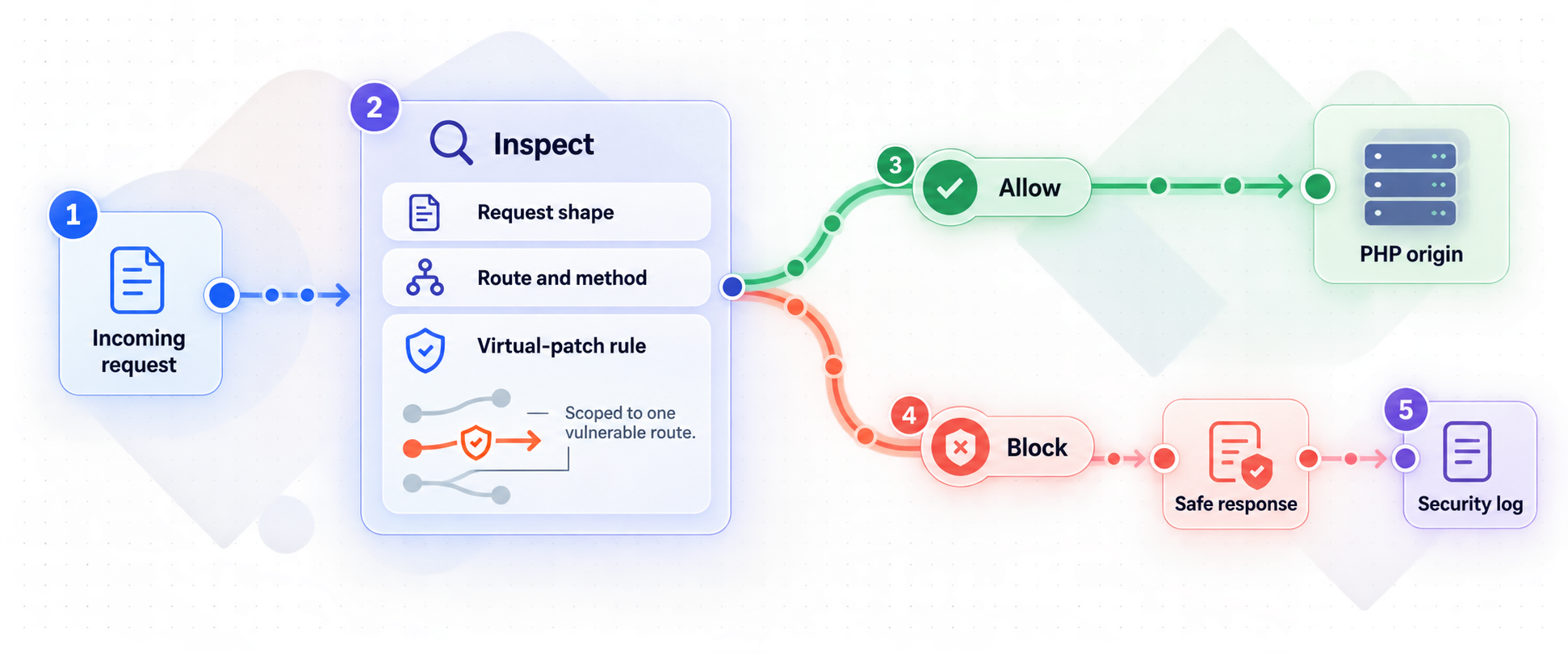
Start with the behavior the application must support, then add the narrowest control that reduces the identified risk. An emergency policy should be easy to explain: which traffic it examines, why a match is dangerous, what action it takes, how operators can observe the decision, and when the temporary rule will be removed.
| Control | Useful purpose | Important limitation |
|---|---|---|
| Method allowlist | Reject HTTP methods the application never uses | Must account for APIs, upload flows, preflight requests, and integrations |
| Path restriction | Disable or constrain a vulnerable route | Alternate routing, rewritten paths, and encoded forms must be tested |
| Body and parameter inspection | Detect suspicious input in forms, JSON, XML, or query parameters | The WAF must parse the relevant content type and body size correctly |
| Request size limit | Reduce oversized-body abuse and resource consumption | Can disrupt legitimate uploads and large API requests |
| Rate limit | Constrain repeated authentication attempts or expensive operations | Client identity must be reliable, and shared users may be grouped together |
| Response inspection | Suppress a response that indicates exploitation or data leakage | Not every WAF supports it, and buffering can affect application behavior |
| Error normalization | Return a generic external error instead of sensitive diagnostics | Detailed evidence must remain available in restricted internal logs |
| Temporary route shutdown | Remove a vulnerable feature from public reach | May interrupt required business functions and integrations |
Prefer positive constraints where practical
A positive rule describes what is allowed. Examples include accepted methods for a route, known content types, bounded body sizes, and expected parameter structures. These controls can be more durable than blocking one exploit string, but they require an accurate understanding of the application. An incomplete allowlist can produce outages.
Signature-style blocking is still useful for emergency virtual patching, especially when a vulnerability has a high-confidence request characteristic. Keep the match as close as possible to the affected route and parser context. Avoid global substring rules when the same text may appear harmlessly in user content, uploaded files, search terms, or encoded data.
Normalize before comparing when supported
Attackers may vary case, encoding, separators, duplicate parameters, whitespace, nesting, or content type. A filtering product may normalize some of these representations before applying rules, but the exact behavior is product-specific. Confirm how the selected WAF handles URL decoding, repeated decoding, malformed encodings, duplicate headers, duplicate query parameters, multipart bodies, JSON nesting, and conflicting length indicators.
Parser disagreement is particularly important. The proxy and the PHP stack may not interpret an ambiguous request identically. Reject malformed or ambiguous requests when doing so is compatible with the application, and test the complete chain rather than testing only the WAF parser in isolation.
Use response controls carefully
Configure production PHP and application error handling so stack traces, filesystem paths, source fragments, secrets, connection strings, and internal host details are not sent to users. This application-level setting is the primary control. A proxy can provide another layer by replacing selected error responses with a generic message or blocking a response that contains a high-confidence leakage marker.
Do not replace every error indiscriminately. Operators still need the original details in protected server-side logs, and clients may depend on documented API error formats. If response inspection is not supported by the selected WAF, state that limitation in the incident plan rather than assuming the feature exists.
Build rate limits around reliable identity
Rate limiting can reduce automated scanning, password guessing, and repeated requests to resource-intensive endpoints. It is not a substitute for authentication, authorization, input validation, or patching. Limits should distinguish routes where possible because a login endpoint, API search, webhook receiver, and large download have different traffic patterns.
Do not assume which forwarding headers contain the original client address. Header behavior must be verified for the actual tunnel and proxy chain. Configure trusted-proxy processing narrowly, and never trust a client-supplied forwarding header merely because it has a familiar name. If reliable client identity is unavailable, choose limits that do not accidentally treat all traffic as one user, or use application-level identities after authentication where appropriate.
If the WAF is required to mitigate an unpatched vulnerability, do not configure a failure mode that silently sends traffic directly to the PHP origin. If the filtering layer cannot start, cannot load its policy, or cannot reach the origin safely, return an unavailable response or stop the Localtonet tunnel until the control is restored.
Configure the local WAF and reverse-proxy path
Complete and test the local path before changing the public tunnel. The following sequence is implementation-neutral because exact commands and file locations depend on the selected WAF, operating system, and web server.
Record the current origin behavior
Verify the PHP application locally and save representative status codes, redirects, headers, cookies, response bodies, upload behavior, and API results. This baseline helps distinguish a WAF regression from an existing application problem.
Create a dedicated WAF listener
Configure the filtering proxy on a separate local IP address and port. Do not reuse the origin listener unless the selected product explicitly supports that deployment and the resulting path is unambiguous.
Set the PHP service as the upstream
Point the proxy upstream to the actual PHP web server or application endpoint. Check host handling, redirects, cookies, body-size limits, connection timeouts, and any protocol features the application requires.
Load a narrow initial policy
Begin with high-confidence controls for the affected route or request shape. Select blocking, logging, rate limiting, or response suppression intentionally. Do not enable a broad ruleset in production without testing how it interacts with legitimate requests.
Protect the origin from bypass
Restrict the origin listener so ordinary clients cannot reach it directly. Confirm that the WAF can still connect and that required local administration has a documented, controlled route.
Validate locally through the WAF
Send the normal application test set to the WAF listener, not the origin. Confirm accepted requests reach PHP, blocked requests do not, rejection responses are safe, and each decision appears in the intended logs.
Save the tested configuration and rollback point
Preserve the complete working proxy and policy configuration, note the deployment time, and document how to restore the previous tested version. Keep credentials and sensitive log data out of configuration archives that do not need them.
Test application features that proxies often affect
A home page returning a successful response is not enough. Test authentication redirects, session cookies, form submissions, API requests, large and small uploads, downloads, webhook callbacks, cache behavior, compressed responses, error pages, and long-running requests that are part of the application. If the application uses streaming or upgraded connections, verify that the entire selected path supports the required behavior before public exposure.
Also check generated absolute URLs and redirect locations. Applications often make scheme or host decisions from request metadata. Trust only proxy metadata supplied by the known proxy path, and use the application framework's documented trusted-proxy mechanism. Never enable blanket trust of arbitrary forwarded headers.
Point the Localtonet HTTP tunnel at the WAF
After the filtering path passes local tests, configure the public path with Localtonet. Our HTTP tunnel should target the WAF listener. Creating a tunnel does not start it, so the final Start action is a separate lifecycle step.
Install and run the Localtonet client
Run the Localtonet client on the device that can reach the WAF listener. Installation details vary by operating system and current client release, so use the current Localtonet installation flow for that device rather than copying an unverified command.
Authenticate or select the device
Use the device-specific authentication token associated with the client that will run the tunnel. Treat the token as a secret and never embed it in an article, configuration example, repository, or diagnostic message.
Select an available relay server
Choose a currently available server or region from the Localtonet dashboard. Do not hardcode a server code from an older tutorial because availability can change.
Create the HTTP tunnel configuration
Create an HTTP tunnel and set its local target to <WAF_IP>:<WAF_PORT>. Do not enter <ORIGIN_IP>:<ORIGIN_PORT>. HTTP tunnels can use Random Sub Domain, Custom Sub Domain, or Custom Domain process types, and each serves the content at a public HTTPS address. Check current dashboard availability and current DNS instructions before relying on a particular subdomain or custom-domain option.
Start the tunnel
Use the Start button after confirming the target one final time. A saved or newly created tunnel is not running until it has been started.
Use and govern the assigned public address
Test the assigned public URL through the WAF, monitor the result, and stop or delete the tunnel when it is no longer required. The public route is available only while the selected client is connected and the tunnel is running.
For the current product workflow, consult the Localtonet HTTP tunnel documentation alongside this security design. Dashboard labels and available choices can evolve, so current product documentation should be used for time-sensitive interface details.
Public verification should begin only after local WAF verification succeeds. If the application is known or suspected to be vulnerable and the filtering control is not ready, keep the tunnel stopped. Convenience is not a reason to publish the unfiltered PHP listener temporarily.
Verify the complete path safely
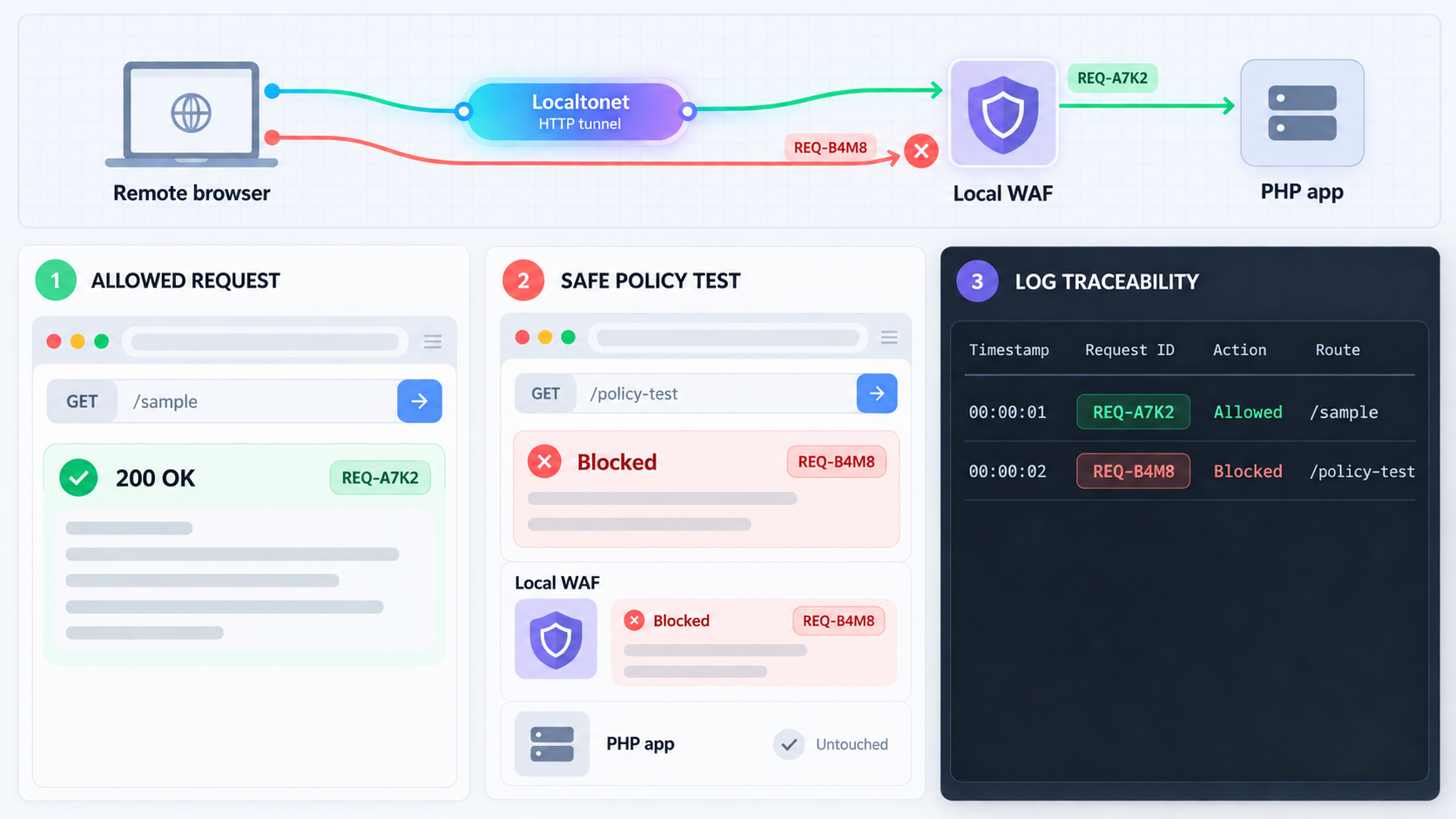
Verification must prove both functionality and enforcement. A useful test answers four questions: did legitimate traffic succeed, did prohibited traffic stop at the WAF, did the origin remain inaccessible through unintended paths, and did the logs preserve enough information to explain the result?
1. Confirm normal public behavior
Repeat the local baseline through the assigned Localtonet public URL. Check expected pages, API operations, authentication, session continuity, redirects, forms, uploads, downloads, callbacks, and application-specific error responses. Compare status codes and response semantics, not only visual appearance.
If a request fails publicly but works through the local WAF listener, compare host handling, scheme detection, redirect construction, cookie attributes, request size, and timeout behavior. Do not weaken a security rule until the exact cause is understood.
2. Confirm the WAF is actually on the path
Create a harmless test rule with an unmistakable match that does not resemble a real exploit. For example, use a dedicated test path or a controlled header known only to the test team, provided the chosen WAF can inspect it. Verify that a matching public request receives the intended rejection and creates the expected WAF log event.
Then verify that the PHP origin did not process the blocked request. The most reliable evidence depends on the application, but may include absence from origin access logs, absence of an application trace, or no expected test-side effect. A WAF rejection page alone does not prove that the origin was untouched if the configuration permits post-processing or duplicate routing.
3. Test the virtual patch with safe fixtures
Do not run live exploit code against production merely to confirm a rule. Use a non-destructive fixture that exercises the matching logic without invoking vulnerable behavior. Test alternate encodings and content types only when they can be generated safely and are relevant to the documented vulnerability.
Evaluate both sides of the decision:
- Known-safe requests that look similar must continue to work.
- The controlled malicious-shaped fixture must be blocked or otherwise mitigated.
- The log must identify the rule, action, route, and time without recording unnecessary secrets.
- If response inspection is part of the mitigation, the protected response must not reach the test client.
- If the WAF is stopped or its policy fails to load, the origin must not become publicly reachable by fallback.
4. Verify origin isolation
Check every network path relevant to the deployment: loopback, LAN addresses, container-published ports, development servers, old reverse-proxy listeners, and prior tunnel configurations. A correctly filtered tunnel does not protect a second listener that exposes the same application directly.
Stop or remove obsolete public routes. If another tunnel points to the PHP origin, the WAF architecture can be bypassed even though the new tunnel is configured correctly.
5. Verify safe errors and logs
Trigger controlled application errors and confirm the public response does not disclose secrets, stack traces, source code, internal paths, database details, or private host information. Ensure detailed diagnostics remain available only in restricted internal logs.
Review logging at each layer. Timestamps should be consistent enough to correlate a public test with the WAF and origin. Avoid logging passwords, authorization values, session cookies, raw authentication tokens, or complete sensitive request bodies. Apply access controls and retention appropriate to the data the application handles.
| Test | Expected public result | Expected internal evidence |
|---|---|---|
| Normal application request | Expected content and status | Accepted WAF event and corresponding origin request |
| Harmless test-rule match | Controlled rejection | WAF block event and no origin processing |
| Oversized request | Defined safe error | Limit event at the intended layer |
| Repeated rate-limited operation | Defined throttling behavior | Rate-limit decision associated with reliable identity |
| Controlled application error | Generic external message | Restricted internal diagnostic record |
| WAF unavailable | Service unavailable or tunnel stopped | No direct fallback to the PHP origin |
Operate the protected tunnel without turning temporary rules into permanent debt
A virtual patch starts an operational process. Assign an owner, record why the rule exists, link it to the affected component and remediation task, and define a review date. Without ownership, emergency rules tend to accumulate until no one knows whether they remain necessary.
Monitor block quality
Review matches for false positives and bypass attempts. A sudden increase may represent attack traffic, a broken client release, or an overly broad rule. Look at the route, method, normalized request characteristics, action, and outcome. Do not collect more sensitive content than the investigation requires.
If a rule is adjusted, repeat the regression set. Small syntax changes can alter decoding, scope, operator precedence, or response behavior. Treat policy changes like application changes: review them, test them, deploy them intentionally, and retain a rollback point.
Separate WAF events from availability events
A blocked request is not the same as a disconnected tunnel. Localtonet supports platform-wide Token and Tunnel webhooks that report when an item in a selected Token Group changes to Connected or Disconnected. Their JSON body identifies the item, action date, type, and status. These lifecycle events can help operations notice loss of connectivity, but they are not request-level WAF alerts and should not be presented as such.
WAF rule matches, rate-limit events, and response-inspection decisions must come from the filtering product's own logs or integrations. Keep these event streams distinct so responders do not confuse application attacks with tunnel availability.
Use a controlled change sequence
- Test proposed rules against recorded safe fixtures in a non-public environment where possible.
- Review the rule scope and expected false-positive surface.
- Save the active configuration before deployment.
- Apply the change to the WAF without changing the tunnel target.
- Run the local and public verification sets.
- Monitor errors, blocks, latency, resource use, and application health.
- Roll back the WAF configuration if necessary, but do not redirect the tunnel around it while the origin remains vulnerable.
Keep the public window intentional
Stop the tunnel when the application does not need to be public, during unsafe maintenance states, or when the required control cannot be enforced. Stopping and deleting are different lifecycle actions. Stop preserves the configuration for later use, while deletion removes the tunnel configuration. Select the action that matches the operational need.
Continue to enforce authentication, authorization, least privilege, secure session handling, input validation, output encoding, safe file handling, dependency maintenance, and protected secrets inside the application. The tunnel and local WAF do not remove those responsibilities.
Patch the application and roll back the virtual patch safely
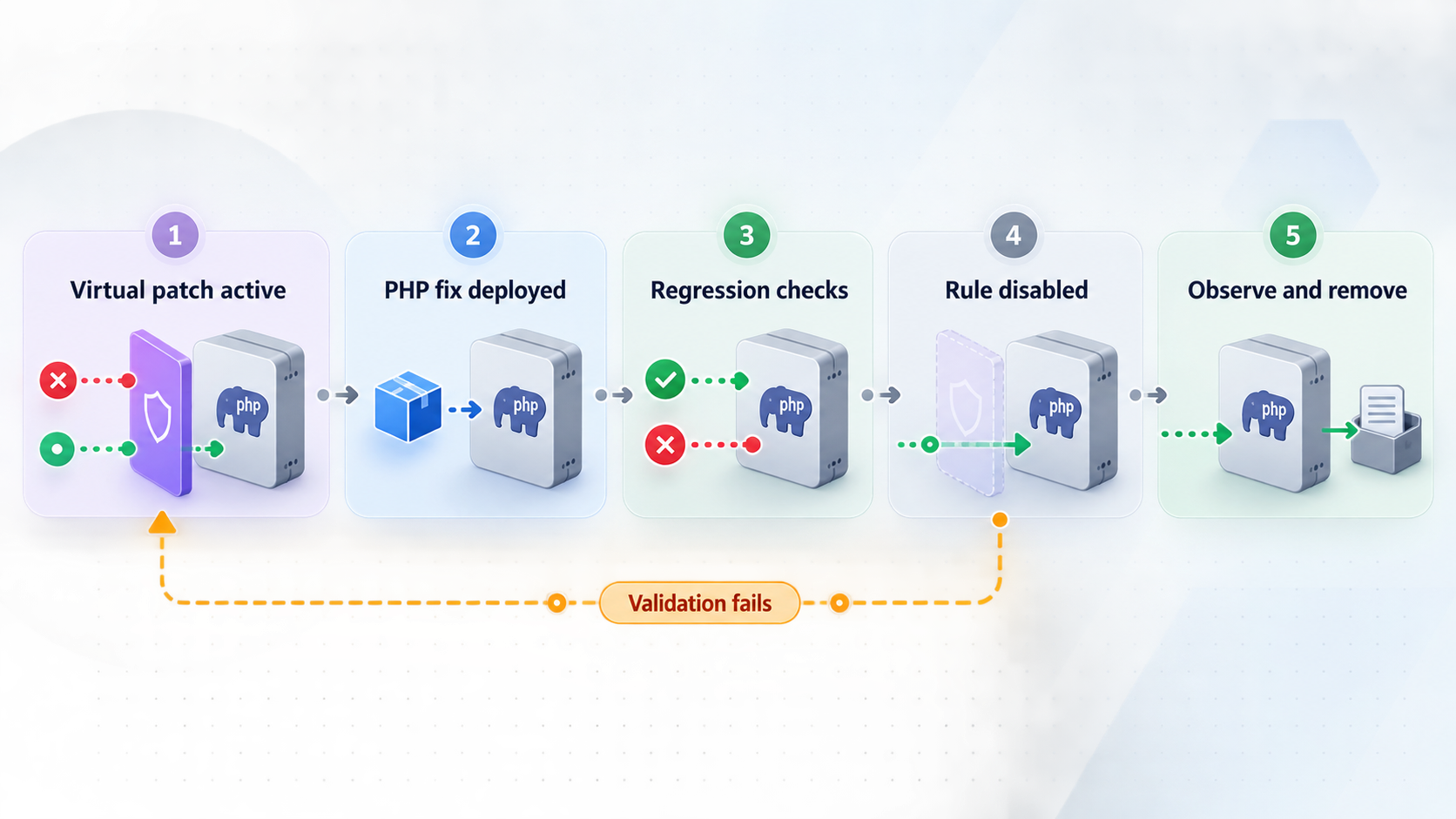
The desired end state is a patched PHP stack with the useful defense-in-depth controls retained, not an application that depends indefinitely on one emergency signature. Determine which component is vulnerable and update that component according to its official security guidance. The fix may involve PHP itself, a web server integration, an extension, a framework, a package, a plugin, or application code.
Patch a staging or otherwise controlled copy first where practical. Repeat the same functional and security tests used for the WAF deployment. Confirm the running service actually uses the updated component, because updating files without restarting or redeploying the relevant runtime may leave old code active.
Keep the WAF in enforcement while preparing the update
Do not remove the temporary mitigation merely because a patch is available. Preserve it while the corrected runtime or application build is tested.
Apply and verify the applicable security update
Update the affected component using its supported procedure, restart or redeploy as required by that component, and confirm the active version or corrected behavior through trustworthy local evidence.
Run functional and security regression tests
Test ordinary application behavior, the controlled malicious-shaped fixture, error handling, logging, and origin isolation through both the local WAF listener and the public tunnel.
Observe the patched application with the rule still active
Use an appropriate monitoring period for the application's risk and traffic. Look for update regressions, unexpected WAF matches, and evidence that clients depend on behavior changed by the patch.
Remove only the temporary rule
Retire the narrow virtual patch after the software fix is verified. Keep generally useful controls such as safe error handling, route constraints, logging, and appropriate rate limits when they remain compatible and maintained.
Retest and document closure
Repeat the regression set without the temporary signature, save the final configuration, record the installed fix, and close the incident only when the patched application and remaining controls behave as intended.
If removing the rule causes unexpected exposure or instability, restore the last tested WAF configuration. If no safe filtering configuration is available, stop the tunnel rather than repointing it directly to the vulnerable origin.
Troubleshooting the WAF, PHP origin, and tunnel chain
The public URL returns an unavailable or gateway error
Test in layers. First verify the PHP origin locally. Next verify the same operation through the WAF listener. Then verify that the Localtonet client is connected, the HTTP tunnel is running, and its target exactly matches the WAF address and port. A failure at the origin cannot be repaired by changing the tunnel, while a working WAF listener with a failing public URL points investigation toward the client, tunnel state, or target selection.
The tunnel works, but requests bypass the WAF
Recheck the tunnel target and search for duplicate tunnels, old proxy listeners, container-published ports, router rules, or LAN exposure. Confirm that blocked test requests do not appear in origin logs. Restrict the origin listener so bypass is technically prevented rather than merely discouraged by documentation.
Every request is blocked
Restore the last tested policy if production availability is affected. Then inspect rule scope, parsing mode, default action, content-type assumptions, body limits, and host matching. Test one rule at a time with known-safe fixtures. Do not solve the outage by changing the tunnel target to the origin.
Legitimate uploads fail
Compare limits at the client, tunnel-facing proxy, WAF engine, reverse proxy, web server, PHP runtime, and application. The smallest body or timeout limit in the chain controls the result. Also verify multipart parsing and temporary storage. Use values justified by the application's real upload requirements rather than disabling limits globally.
Redirects loop or use the wrong scheme
Check how the application determines its public scheme and host. Verify proxy metadata at each hop and configure the framework's trusted-proxy settings narrowly. Do not trust arbitrary client-provided forwarding headers. Test redirects from both authenticated and unauthenticated routes because middleware may behave differently.
Rate limiting groups unrelated users together
The proxy may not be receiving or trusting client identity as expected. Confirm actual header behavior for the deployed path instead of assuming a header name or format. If reliable source identity cannot be established, use authenticated application identities where appropriate or choose coarser limits that will not lock out all users through a shared value.
WAF logs contain secrets
Reduce request and response capture, redact sensitive fields, restrict log access, and adjust retention. Authorization values, cookies, passwords, authentication tokens, personal data, and uploaded content should not be recorded merely because deep inspection is available. Preserve enough metadata for investigation without creating a second sensitive-data store.
Response inspection breaks downloads or streaming
The selected WAF may buffer response bodies or may not support streaming safely when inspection is enabled. Narrow response rules to affected routes or content types if the product supports that scope. If it cannot inspect the required responses without breaking the application, document the limitation and rely on patched application behavior, safe production error settings, and other compatible controls.
The WAF fails after a restart
Validate configuration before reload where the selected software supports that procedure. Ensure service startup ordering does not create a direct-origin fallback. The safe result is temporary unavailability, not unfiltered access. Keep the Localtonet tunnel stopped until the WAF listener and its policy have been verified.
Frequently asked questions
Does a Localtonet HTTP tunnel include a PHP WAF?
This architecture does not assume built-in application-specific WAF rules from Localtonet. Our HTTP tunnel provides the public route to a local target. To use a WAF, run the filtering proxy locally and configure the tunnel target as the WAF listener rather than the PHP origin.
Can a virtual patch replace updating PHP?
No. A virtual patch is temporary risk reduction. It can block an observed request pattern, disable a vulnerable route, or suppress a dangerous response while the real update is tested. It may miss alternate exploit techniques, so the affected PHP runtime, framework, package, plugin, extension, or application code must still be corrected.
What should the HTTP tunnel target?
Set the local target to the IP address and port on which the local WAF or filtering reverse proxy listens. The WAF then forwards accepted requests to the separate PHP origin address and port. Pointing the tunnel directly at the origin bypasses the intended control.
Should the WAF fail open or fail closed?
When the WAF is required to contain an unpatched vulnerability, fail closed. If the proxy or policy is unavailable, return an unavailable response or stop the tunnel. Do not silently redirect traffic around the filtering layer to the vulnerable origin.
Is request filtering enough, or should responses be inspected too?
Request filtering is valuable, but response context can sometimes distinguish an exploit attempt from legitimate input or prevent sensitive output from reaching a requester. Response inspection is product-specific and can affect buffering, streaming, downloads, latency, and memory. Use it only if the chosen WAF supports it and the complete application path has been tested.
How can I prove blocked requests did not reach PHP?
Use a harmless, dedicated test match and correlate the WAF decision with origin access or application logs. The expected result is a WAF block event with no corresponding origin request or application-side effect. Also verify that no alternate listener or tunnel exposes the origin directly.
Can I stop public access without deleting the configuration?
Yes. A Localtonet tunnel can be stopped and later started again. Deleting it is a separate action. The public route is available only while the selected client is connected and the tunnel is running.
When should the temporary WAF rule be removed?
Remove it only after the applicable software fix is installed, the running service is confirmed to use the corrected component, functional and security regression tests pass, and an appropriate observation period shows stable behavior. Keep generally useful controls that remain accurate and maintainable.
Publish the filtered endpoint with Localtonet
Build and verify the local WAF-to-PHP path first, then use a Localtonet HTTP tunnel to publish the WAF listener without inbound router port forwarding. Keep the tunnel stopped whenever the required filtering or application controls are unavailable.
Get Started Free →

