

Diagnose the listener first, isolate each network layer, then share the service safely
localhost:8080 tells a client to contact port 8080 in its own machine or network namespace. A failure can come from application startup, name resolution, IPv4 or IPv6 binding, port ownership, HTTP behavior, container publishing, firewall policy, or proxy configuration. This guide separates those layers so you can identify the observable failure instead of changing settings at random. Once the local HTTP service works, it also explains how to expose it through Localtonet without inbound router port forwarding, firewall changes, VPN setup, or a public IP address.
📋 What's in this guide
What localhost:8080 actually means
The URL http://localhost:8080/ contains a scheme, host, port, and path. http selects the application protocol. localhost identifies the destination host. 8080 selects a TCP port on that host. The final slash requests the root path from the HTTP application.
On a typical computer, localhost resolves to the IPv4 loopback address 127.0.0.1, the IPv6 loopback address ::1, or both. Loopback traffic returns to the same host. It does not identify an address that another computer can enter to reach your application.
The phrase “same host” also depends on the network namespace. A process in a container usually has a different loopback interface from the container host. A virtual machine has its own operating system and loopback interface. As a result, localhost:8080 can work inside a container while failing on the host, or work on the host while failing inside a virtual machine.
Port 8080 has no universal application assigned to it. Development servers, APIs, administrative tools, reverse proxies, and container examples frequently use it, but the number itself does not start a server. A process must successfully bind and listen on the relevant address and port before a client can connect.
localhost directs a connection to the client’s own machine or network namespace, not to another device on the LAN.
http:// and https:// are not interchangeable. The URL scheme must match the protocol configured by the service.
IPv4 and IPv6 can produce different results
The name localhost can resolve to both loopback families, but an application might listen on only one. For example, a server listening on 127.0.0.1:8080 may answer an explicit IPv4 request while a request to ::1 fails. The reverse is also possible.
Wildcard bind addresses have different forms. 0.0.0.0:8080 generally indicates a listener on available IPv4 interfaces. [::]:8080 indicates an IPv6 wildcard listener, although whether it also accepts IPv4 connections depends on operating system and socket configuration. Inspect and test both families rather than assuming one display value covers both.
0.0.0.0 and :: are useful wildcard values in server configuration and listener output. Users should connect with a real destination such as 127.0.0.1, ::1, a LAN address, or an assigned public hostname.
Why localhost:8080 fails and what each result means
“Localhost is not working” is not one diagnosis. A request can fail before a TCP connection is established, during protocol negotiation, or after the application receives the HTTP request. The exact result determines which layer to investigate.
| Observed result | What it establishes | Next checks |
|---|---|---|
| Name resolution failure | The client could not resolve localhost to a usable address. |
Hosts-file entries, resolver output, browser proxy settings, and explicit 127.0.0.1 or ::1 tests. |
| Connection refused | The connection was actively rejected at the selected destination rather than accepted by the application. | Listener presence, address family, application startup, container publishing, and any host or network policy that actively rejects traffic. |
| Connection timeout | No successful TCP connection was completed within the allowed time. | Dropped traffic, incorrect destination, firewall policy, routing, proxy behavior, or an unresponsive network path. |
| Address already in use | A new process could not claim the requested address and port under the current socket rules. | Existing listener ownership, duplicate application instances, container mappings, and startup logs. |
| HTTP 301, 302, 307, or 308 | An HTTP server answered and redirected the client. | The Location header, redirect target, scheme, host, port, and whether the application redirects to an internal-only URL. |
| HTTP 401 or 403 | The server answered but requires authentication or rejected authorization. | Application credentials, session state, access policy, host rules, and intended permissions. |
| HTTP 404 | The server answered, but the requested route or resource was not found. | Application routes, base path, reverse-proxy prefix, virtual host rules, and exact URL. |
| HTTP 500 or another 5xx response | The request reached an HTTP server that encountered an application or upstream failure. | Application logs, dependencies, database connections, upstream services, and error handling. |
| TLS or certificate error | The endpoint may expect HTTPS, present an untrusted certificate, or be receiving the wrong protocol. | The intended scheme, server TLS configuration, certificate names, trust chain, and startup output. |
| Wrong page or unexpected application | A process answered, but it may not be the service you intended to reach. | Port ownership, virtual host configuration, container mapping, reverse proxy rules, and application identity. |
Connection refused needs a qualified interpretation
The most common cause of a refusal is that no process is accepting connections on the resolved address and port. That is not the only possible cause. A host firewall, network device, or other policy can actively reject a connection instead of silently dropping it. A service can also be listening on IPv4 while the client attempts IPv6, or listening in a container namespace without a published host port.
Treat refusal as evidence that the connection was rejected, then inspect the listener and network context. Do not conclude from the browser message alone that the application is stopped.
A systematic localhost:8080 troubleshooting workflow
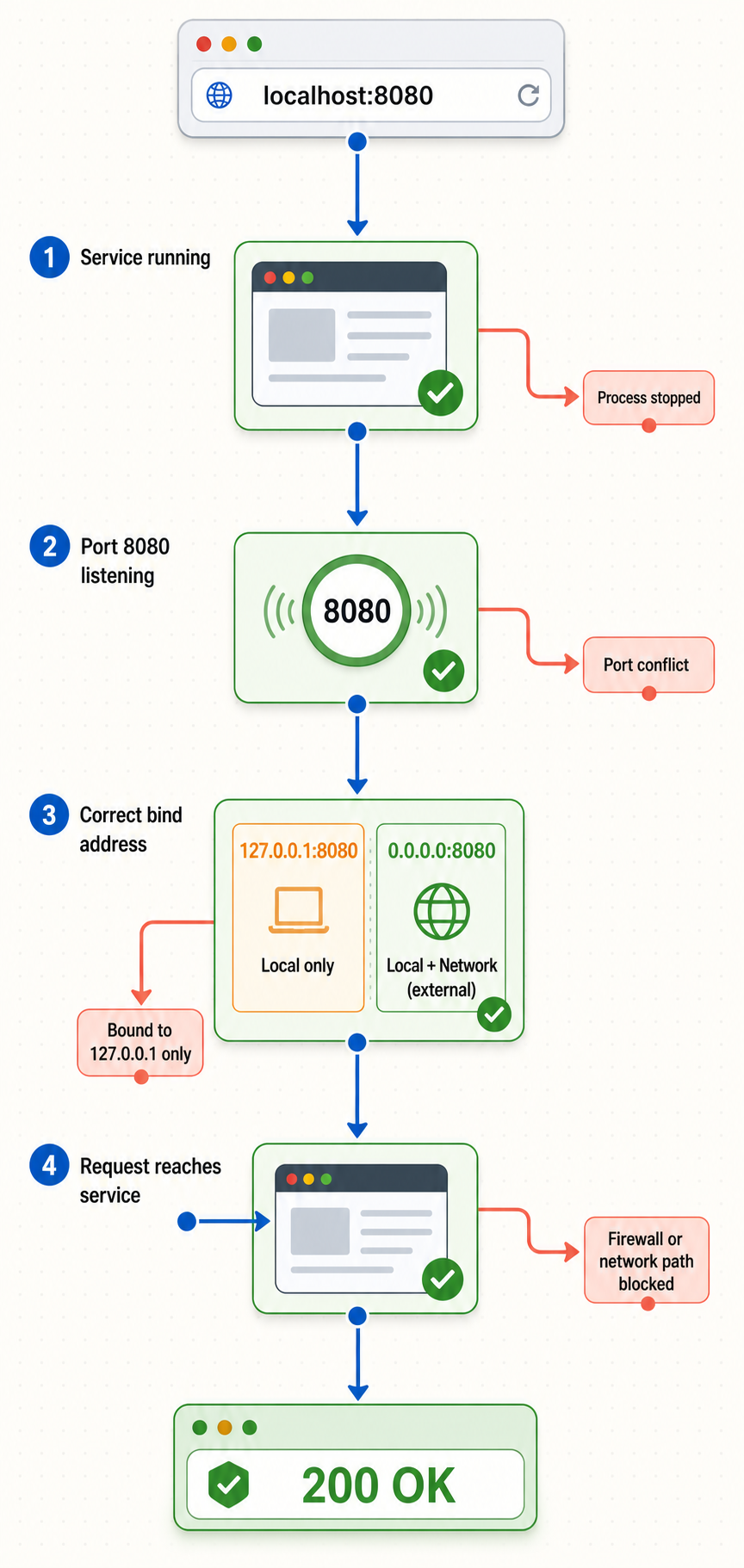
Work from the application outward. Record the result of each test before changing configuration. This preserves evidence and helps distinguish a listener failure from an HTTP route, container, firewall, or proxy problem.
Confirm that the application started and stayed running
Read the terminal and application logs. Confirm that startup completed, the process remains active, and the reported listening port is 8080. A program can print an initial message and then terminate because of a configuration error, unavailable dependency, permission problem, or port conflict. If the logs report another port, test that port instead of assuming 8080.
Check localhost name resolution
Determine whether localhost resolves to 127.0.0.1, ::1, or both. Then test the explicit addresses. If an explicit address works while the hostname fails, inspect local resolver configuration, hosts-file entries, and proxy behavior rather than changing the application port.
Test IPv4 and IPv6 independently
Request 127.0.0.1:8080 and [::1]:8080 separately. A result from only one address family usually indicates a family-specific listener or resolver ordering issue. Do not widen the bind address merely to make both work unless the application actually needs that scope.
Inspect the listener and identify its process
Use an operating system tool to confirm whether port 8080 is listening, which local address owns it, and which process identifier is associated with it. Tool availability and process details vary by operating system. Elevated privileges may be required to see another user’s process name or PID.
Separate TCP success from HTTP behavior
Use a verbose HTTP client and record whether the connection succeeds, which address is selected, what status is returned, and whether the server redirects. A 404, 401, or 500 proves that an HTTP server answered. Continue at the application layer instead of treating the response as a closed port.
Check container or virtual machine boundaries
If the service runs in another network namespace, test inside that environment and then from the intended client environment. Verify the container port, host publishing rule, host address, and guest networking. Success inside a container does not prove that the host can connect.
Review firewall and endpoint security behavior
For loopback failures, verify whether host firewall or endpoint security policy is rejecting the connection. For LAN tests, confirm that the service listens on an appropriate interface and that authorized firewall rules permit the traffic. Do not disable the firewall globally as a troubleshooting shortcut.
Bypass unintended proxies and retest
Browsers, command-line clients, development tools, and corporate endpoint software can use HTTP proxy settings. Ensure that localhost, 127.0.0.1, and ::1 are excluded where appropriate. Compare the proxied result with a direct request before changing the server.
Run explicit HTTP tests
If curl is installed, start with verbose IPv4 and IPv6 requests:
curl -v http://127.0.0.1:8080/
curl -g -v http://[::1]:8080/
The verbose output shows the attempted address, TCP connection result, request, response headers, and HTTP status. Use the application’s documented route if the root path is not expected to exist.
To inspect response headers and redirects without assuming that every application supports a useful response to HEAD, use either a normal verbose request or an explicit header request:
curl -v http://127.0.0.1:8080/
curl -I http://127.0.0.1:8080/
If the service is configured for HTTPS on port 8080, test the correct scheme:
curl -v https://127.0.0.1:8080/
A certificate trust or hostname error is different from sending plain HTTP to a TLS endpoint. The -k
If HTTPS is required, correct the certificate name, trust chain, or server configuration. Repeatedly disabling certificate verification can conceal an important identity or interception problem.
Check proxy environment variables
Command-line tools may read HTTP_PROXY, HTTPS_PROXY, ALL_PROXY, and NO_PROXY variables. Names and case handling vary by tool and operating system. Inspect the active environment rather than assuming a browser and terminal use the same proxy configuration.
With curl, the following test bypasses proxies for the request:
curl --noproxy "*" -v http://127.0.0.1:8080/
If this works while the normal request fails, review the proxy exclusion list. A typical local exclusion needs to account for localhost, 127.0.0.1, and ::1, using the syntax supported by the relevant proxy client.
Inspect listeners, addresses, and process ownership
Listener inspection answers three important questions: whether anything is accepting connections, which address family and bind address it uses, and which process owns the socket. Commands can be missing from minimal installations, and PID or executable details may require elevated privileges.
Linux
Modern Linux systems commonly provide ss through the iproute2 tools. The following command lists TCP listeners associated with port 8080:
ss -ltnp 'sport = :8080'If process details are hidden, run the inspection with appropriate administrative privileges:
sudo ss -ltnp 'sport = :8080'
lsof is another useful option when installed:
lsof -nP -iTCP:8080 -sTCP:LISTEN
Minimal containers and lightweight distributions may include neither command. Install diagnostic tools through the operating system’s approved package process or inspect the service from the host. Older guides often use netstat, but it may require a legacy networking-tools package on modern Linux.
macOS
macOS commonly supports the same lsof listener query:
lsof -nP -iTCP:8080 -sTCP:LISTENIf a process belongs to another user, elevated privileges may be needed for complete ownership information:
sudo lsof -nP -iTCP:8080 -sTCP:LISTENUse the PID and command name to locate the actual application. Do not terminate an unfamiliar process until you understand why it is running.
Windows
In Command Prompt, list entries associated with port 8080:
netstat -ano | findstr :8080The final column is the PID. After recording it, identify the process:
tasklist /FI "PID eq 1234"
Replace 1234 with the reported PID. PowerShell can also resolve a known PID:
Get-Process -Id 1234An elevated terminal may be required to inspect all processes or obtain complete executable details. Windows also provides a direct connectivity check:
Test-NetConnection 127.0.0.1 -Port 8080A successful TCP test does not prove that the expected HTTP route works. Follow it with an HTTP request and inspect the status and response.
Resolve address-in-use conflicts deliberately
A process reporting “address already in use” could be colliding with another application instance, a service manager that restarted an older instance, a container publishing the host port, or a listener bound to a wildcard address. Inspect ownership before stopping anything.
Prefer the application’s normal shutdown procedure. If both services are required, configure one to use another available port. Then update every dependent setting, including health checks, test clients, callback URLs, container mappings, reverse proxies, and Localtonet tunnel targets.
The listener may belong to another project, a local proxy, a container runtime component, or an operating system service. Identify the command, owner, and purpose first. Forced termination can cause data loss or trigger an automatic restart that leaves the conflict unresolved.
Container and virtual machine boundaries
Inside a container, localhost normally refers to the container itself. It does not automatically refer to the host or to a neighboring container. A web application can therefore answer successfully inside the container while the host’s localhost:8080 has no listener.
Docker port publishing maps a host address and port to a container port. For example, the following command publishes host port 8080 to port 80 in the container:
docker run --rm -p 8080:80 nginx
The service would then be requested from the host at http://127.0.0.1:8080/, while the application listens on port 80 inside the container. The host and container port do not need to match.
A publishing rule without a host IP can bind beyond loopback, depending on the Docker host and daemon networking configuration. That can make the published service reachable through host network interfaces rather than only from the local computer. When only local access is required, constrain the host side explicitly:
docker run --rm -p 127.0.0.1:8080:80 nginxThis example requests an IPv4 loopback-only host binding. Confirm the resulting listener on the host instead of assuming that a container command produced the intended exposure scope.
Treat Docker port publishing as a network exposure decision. A service that was private inside a container can become reachable from the host’s network interfaces. Use an explicit loopback host address when only local access is needed, and review firewall policy and authentication before allowing LAN access.
Inspect existing Docker port mappings
List running containers and their published ports:
docker psFor a specific container, display its published port mapping:
docker port CONTAINER_NAME
Replace CONTAINER_NAME with the real container name or ID shown by docker ps. Check both sides of the mapping. If the output maps host port 8080 to container port 80, testing port 8080 inside the container may be incorrect.
The application must also listen on an address reachable through the container’s network interface. A process bound only to 127.0.0.1 inside the container can be inaccessible through the published port even when Docker shows a mapping. Where the application supports it and the security model permits it, it commonly needs to bind to an appropriate container interface such as its IPv4 wildcard address.
Virtual machines require the same context-aware testing
A virtual machine has its own loopback interface and virtual network adapter. Test the application inside the guest first, then test the guest address from the host. Depending on the configured virtual networking mode, reaching the guest may require a host-to-guest route or a virtual-machine port-forwarding rule.
If the Localtonet client runs on the host, the host must be able to reach the configured local target. If the client runs inside the virtual machine, the target must be reachable from the guest. A tunnel cannot repair a local route that does not exist.
A successful request inside a container proves that the application is listening there. It does not prove that a Localtonet client on the host can reach it. Run the final local-target test from the device and network context where the Localtonet client will run.
Local access, LAN access, and public access are different
Loopback access remains inside the local machine or namespace. LAN access uses an address assigned to a network interface and requires the application to listen on an appropriate interface. Host firewall and network policy must also allow the authorized traffic.
Public access adds internet routing, address translation, firewall, authentication, and exposure concerns. Manually publishing a home or office service often requires inbound router port forwarding and a reachable public IP address. Directly exposing an unprotected development service can broaden its attack surface.
| Access scope | Typical destination | Required reachability | Main security consideration |
|---|---|---|---|
| Loopback | 127.0.0.1:8080 or [::1]:8080 |
Client and service share the relevant host or namespace. | Other local processes and users may still be able to connect. |
| LAN | A private interface address and port | Listener, local routing, and authorized firewall policy permit LAN traffic. | Other devices on the local network may gain access. |
| Container host | A published host address and port | The container port is published and the application listens on a reachable container interface. | Publishing without a host-address constraint can expose more interfaces than intended. |
| Public tunnel | An assigned public URL | The tunnel client can reach the local target, remains connected, and the tunnel is running. | The application must be suitable for an internet audience and enforce authorization. |
Localtonet uses an outbound connection model. Our client application connects from the device to a Localtonet relay server. An HTTP tunnel can then provide a public URL for the local HTTP target without inbound router port forwarding, firewall changes, VPN setup, or a public IP address.
Standard HTTP tunneling is not a VPN. It publishes the configured HTTP target through a public URL. Localtonet VPN Manager is our separate private mesh VPN feature with granular firewall rules.
How to expose a working localhost:8080 service with Localtonet
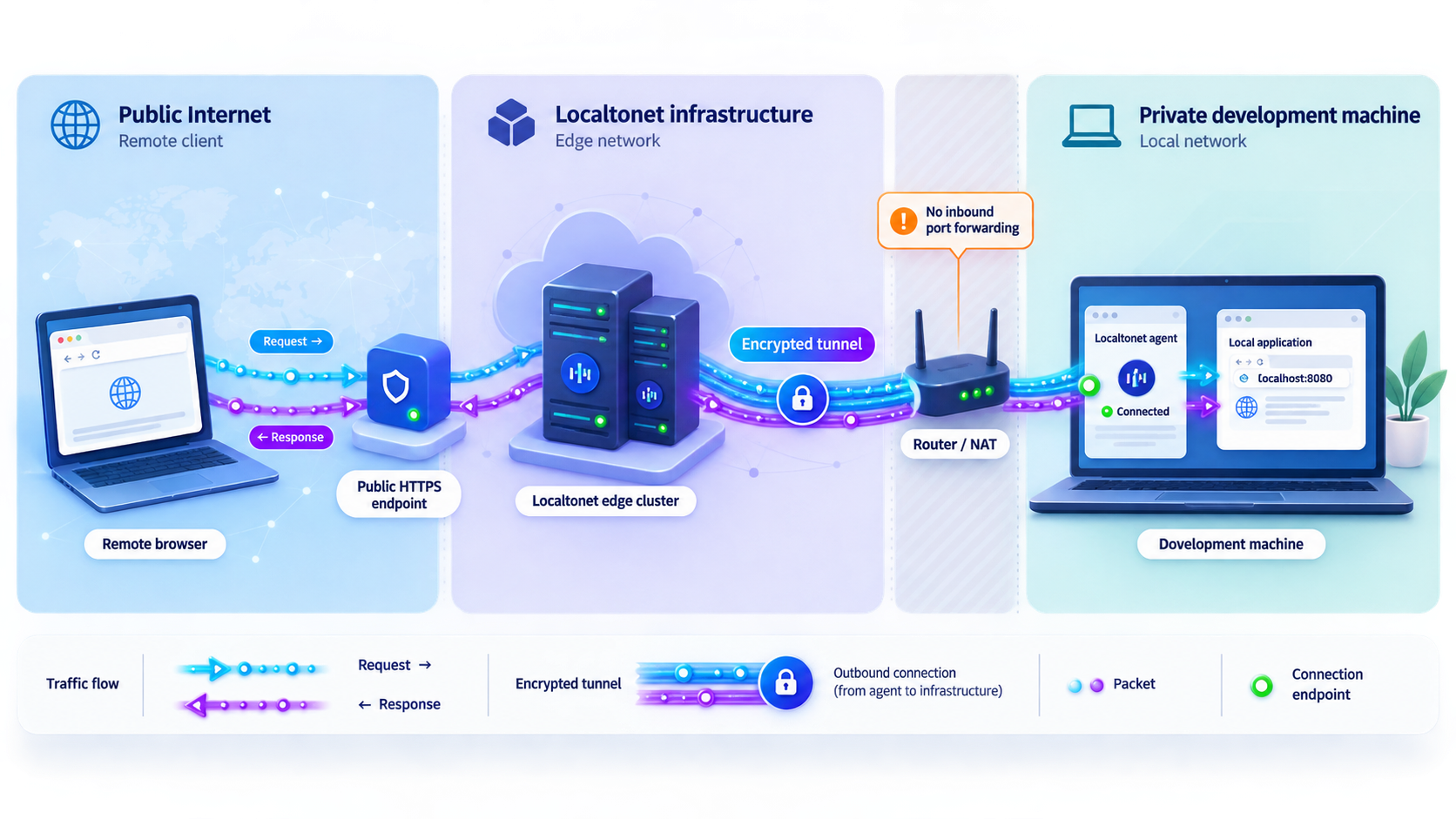
Complete local troubleshooting before creating the tunnel. From the exact device that will run our client, confirm that the intended target returns the expected HTTP result. For a service running directly on that device, the target may be 127.0.0.1 and port 8080. A container or virtual machine may require a different address reachable from the client device.
Localtonet provides client applications for supported desktop operating systems, including Windows, macOS, and Linux. Use the current installation choice presented for your operating system rather than copying an old package command from another tutorial. Installation packaging and available client versions can change, so this article does not hardcode an installer filename or package-manager command that is not present in the supplied product evidence.
For the current product screens and HTTP-specific configuration details, use the Localtonet HTTP tunnel documentation. The complete operational sequence is included below so the documentation link is a supplement rather than a substitute for the tutorial.
Install and run the Localtonet client
Install the current Localtonet application for Windows, macOS, or Linux on the device that can reach the service. Start the client and keep it running. If the application is in a container or virtual machine, first use an HTTP client on this device to prove that the intended target address and port are reachable.
Authenticate or select the client device
Use the device-specific authentication token for the client that will run the tunnel, or select that authenticated device in the dashboard. The token identifies the device and must be treated as a credential. Never guess a token or place it in source code, screenshots, browser output, shared logs, or public documentation.
Select an available relay server
Choose an available relay server or region from the current Localtonet dashboard. Available values can vary by current product availability and plan, so select from the options shown instead of copying a server code from an older article.
Create the HTTP tunnel configuration
Select an HTTP tunnel and choose the required Process Type: Random Sub Domain, Custom Sub Domain, or Custom Domain. All three serve the configured content at a public HTTPS address. Set the local target to the IP address and port reachable from the selected client device. For a direct host service, use the verified loopback target and port 8080. For a container or virtual machine, use the address that succeeded from the client device. Check current documentation before making exact custom-domain DNS changes.
Start the tunnel and confirm its lifecycle state
Creating the configuration does not start the tunnel. Use the Start button, confirm that the selected client device remains connected, and verify that the tunnel is running. The public endpoint is available only while both conditions remain true.
Verify the public URL, then stop or delete the tunnel when finished
Open the assigned public URL from another device or network, such as a phone using mobile data rather than the same Wi-Fi. Confirm the expected route, status, authentication behavior, redirects, and application content. When remote access is no longer required, stop the tunnel. Delete it if the configuration is no longer needed.
Verify the public endpoint layer by layer
A browser page alone can conceal the layer that failed. Use the assigned Localtonet URL exactly as shown in the dashboard and inspect the result from a different network.
- DNS: Confirm that the public hostname resolves. A DNS failure occurs before the request can reach the tunnel endpoint.
- TCP and TLS: A verbose HTTPS request should show whether the client connected and completed TLS negotiation. Do not substitute
http://for the assigned publichttps://URL. - HTTP status: Record the exact status. A
404or500means an HTTP response was returned and should be diagnosed differently from a connection failure. - Redirects: Inspect the
Locationheader. An application may redirect the remote browser tolocalhost:8080, an internal hostname, or the wrong scheme. - Route behavior: Test the intended application path, not only
/. An API or development tool may have no root route. - Authentication: Confirm that protected routes reject unauthenticated requests and that authorized access works as designed.
Isolate public failures from local-target failures
If the public URL fails, immediately retest the local target from the Localtonet client device. If the local request now fails, return to application, listener, container, firewall, and proxy troubleshooting. Localtonet cannot forward to a stopped or unreachable service.
If the local target works, confirm that the selected client is connected, the intended tunnel is running, and the configured IP address and port match the successful local test. Also check whether the application rejects an unfamiliar host header, redirects to an internal URL, or expects HTTPS on the local port while the tunnel target was configured as HTTP.
Record the exact local scheme, address, port, path, and expected status before creating the tunnel. When remote behavior differs, compare one element at a time instead of changing the listener, container mapping, and tunnel configuration simultaneously.
Post-tunnel verification and shutdown checklist
- Confirm the selected Localtonet client device shows as connected.
- Confirm the intended HTTP tunnel shows as running after pressing Start.
- Test the assigned public HTTPS URL from another network.
- Verify the expected route, response status, redirects, and authentication.
- Confirm that debug, administrative, profiling, and unrelated routes are not unintentionally available.
- Retest the local target if the public endpoint fails.
- Stop the tunnel as soon as remote access is no longer required.
- Delete the tunnel if its configuration should not be reused.
- Keep the device authentication token private and rotate or replace credentials through supported account controls if exposure is suspected.
Secure exposure practices for development services
A public URL changes the audience of an application. A route that seemed safe while bound to loopback may not be designed for untrusted traffic. Before starting a tunnel, inventory the available routes and remove unnecessary administrative, debugging, profiling, file-browsing, database-management, and development-only interfaces.
Require application authentication where appropriate and use least-privilege accounts. Do not expose secrets through query strings, browser output, verbose errors, source maps, sample data, or logs. If the application supports access restrictions, configure them for the smallest practical audience. Disable development modes that reveal stack traces, environment details, internal paths, or configuration values.
Review application redirects and generated URLs. Some frameworks assume they are always opened at localhost:8080 and produce absolute links pointing back to loopback. Those links will cause a remote visitor’s browser to contact its own computer. Configure the application’s supported public base URL or proxy-awareness settings when required, using that application’s documentation.
The public HTTPS address and local target are separate parts of the route. Do not infer unsupported end-to-end transport details from the public URL alone. Localtonet documents TLS termination at the tunnel edge for File Server, but this HTTP tutorial does not claim additional HTTP tunnel encryption behavior beyond the verified public HTTPS address. Review current Localtonet documentation when a specific threat model requires exact transport details.
Do not use remote exposure to bypass organizational policy or security controls. Obtain authorization before publishing a workplace service, customer environment, internal API, device console, or administrative tool. Protect the application with authentication, least privilege, and the narrowest access appropriate for the task.
The authentication token identifies the client device that runs the tunnel. Do not embed it in application code, commit it to a repository, paste it into public support messages, or include it in screenshots. Treat it with the same care as another operational credential.
Frequently asked questions
What is localhost port 8080?
It is a host and port combination. localhost refers to the current machine or network namespace, while port 8080 identifies an endpoint where a process may listen. Nothing is automatically available there merely because 8080 appears in the URL.
Does connection refused always mean no application is running?
No. An absent listener is the common cause, but a connection can also be actively rejected by host or network policy. The client may also be using IPv6 while the application listens only on IPv4, or contacting the host while the listener exists only inside a container. Inspect the actual listener and network context.
How do I check what is using port 8080?
On Linux, use ss or lsof when installed. On macOS, lsof can show the listener and PID. On Windows, use netstat -ano, then resolve the PID with tasklist or Get-Process. Administrative privileges may be required for complete process details.
What is the difference between 127.0.0.1 and 0.0.0.0?
127.0.0.1 is an IPv4 loopback destination. In server bind configuration, 0.0.0.0 generally means available IPv4 interfaces. It is a wildcard bind value, not the destination users should type into a browser. Binding to all interfaces can permit LAN access and should be done only after reviewing authentication and firewall policy.
Why does 127.0.0.1 work while localhost fails?
The hostname may resolve to IPv6 first while the application listens only on IPv4, or local name resolution may be misconfigured. Proxy rules can also treat the hostname differently from the numeric address. Test 127.0.0.1 and ::1 separately, then inspect resolver and proxy settings.
Does an HTTP 404 mean port 8080 is closed?
No. A 404 is an HTTP response, so a server accepted the connection and processed the request. Check the path, base URL, virtual host, reverse-proxy prefix, and application routes.
Why does localhost inside a container not reach the host?
Containers usually have separate network namespaces. Inside a container, localhost refers to that container, not automatically to the host. Use the networking mechanism supported by the container platform and verify connectivity from the environment that needs to act as the client.
Does Docker publishing expose port 8080 to the LAN?
A publishing rule without an explicit host IP can bind beyond loopback, depending on the Docker host and daemon configuration. If access should remain local, request a loopback-only host mapping such as 127.0.0.1:8080:80 and verify the resulting host listener.
Does creating a Localtonet tunnel immediately make it available?
No. Creating the configuration does not mean the tunnel is running. Use the Start button and keep the selected client device connected. The tunnel can later be stopped or deleted.
Can Localtonet fix a broken localhost service?
No. Localtonet can expose a service reachable from its client device, but it does not start a stopped application, correct an invalid bind address, or repair a missing container mapping. Verify the local target from the client device before creating the HTTP tunnel.
Is a Localtonet HTTP tunnel the same as a VPN?
No. An HTTP tunnel publishes a selected HTTP service through a public URL. Localtonet VPN Manager is the separate feature for a private mesh VPN with granular firewall rules. Standard HTTP, TCP, UDP, and File Server tunneling should not be described as VPN functionality.
Expose your verified local HTTP service with Localtonet
Once the intended localhost:8080 route responds correctly from the Localtonet client device, create an HTTP tunnel, select the device and relay, start the tunnel, and verify the assigned public URL from another network. Stop or delete the tunnel when remote access is no longer required.


