

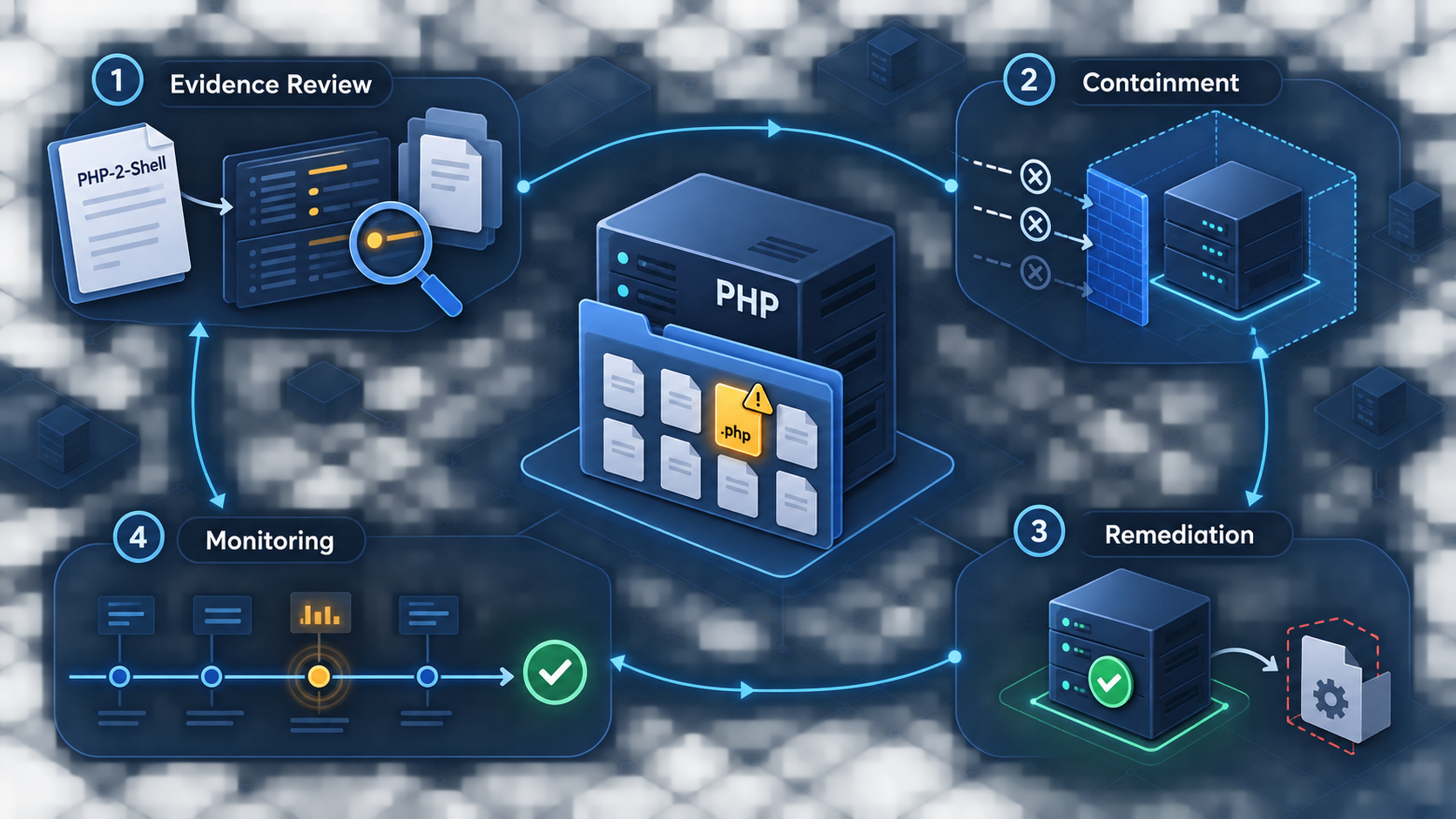
Assess a reported PHP shell risk without turning an uncertain name into an unsupported conclusion
A report labeled “PHP-2-Shell” can indicate a specific project, a vulnerability nickname, a web-shell technique, or simply an imprecise scanner finding. This guide gives developers a safe process for identifying what the report actually refers to, determining whether a PHP application is exposed, containing suspicious activity, removing persistence, and validating recovery. It also explains how public access through Localtonet affects the investigation and when to stop a tunnel while remediation is in progress.
📋 What's in this guide
What does “PHP-2-Shell vulnerability” mean?
The first task is to establish what the name identifies. “PHP-2-Shell” is not enough, by itself, to determine an affected package, vulnerable version range, exploit condition, patch, or severity. No external advisory or project documentation was supplied for this article, so we cannot responsibly attribute the name to a particular PHP package or claim that a specific version is vulnerable.
In practice, a phrase like this may refer to several different things. It could be the name of a repository or utility, a vendor-specific detection label, a scanner signature, a proof-of-concept name, or an informal description of a PHP web shell. Those interpretations lead to different investigations. A vulnerable dependency calls for package and version analysis. A web shell found on disk calls for incident response. A scanner signature may be a false positive that must be validated against the scanner’s evidence.
Do not delete files, upgrade an unrelated package, block a guessed URL, or declare a system compromised solely because a report contains the phrase “PHP-2-Shell.” Preserve the original alert and identify the affected asset, file, route, package, version, request, and detection rule before deciding what the finding means.
Start by obtaining the complete finding rather than relying on its title. A useful report should identify the system that produced the alert, the time of detection, the affected host or application, the evidence used for the match, and any associated identifier. Look for a CVE identifier, vendor advisory, package name, repository URL, file path, checksum, HTTP route, process name, or request sample. Record the scanner product and signature version as well, because detection names are not standardized across security tools.
Questions that should be answered before triage
- Which host, container, virtual machine, or developer workstation generated the finding?
- Is the affected system production, staging, a local development environment, or an archived image?
- Did the tool identify a package version, a suspicious file, an HTTP response, or runtime behavior?
- Is there a recognized advisory identifier or a publisher-maintained security notice?
- When was the artifact first observed, and does that time align with an approved deployment?
- Was the application reachable from the public internet, a private network, or only the local machine?
- Did the alert include evidence of execution, or only the presence of code that resembles a signature?
These distinctions matter because “vulnerable,” “exposed,” and “compromised” are not synonyms. Vulnerable means a relevant weakness is present. Exposed means an attacker can potentially reach the affected component. Compromised means there is evidence that unauthorized activity occurred. Good incident handling keeps those conclusions separate until evidence supports them.
Why a PHP web shell is dangerous
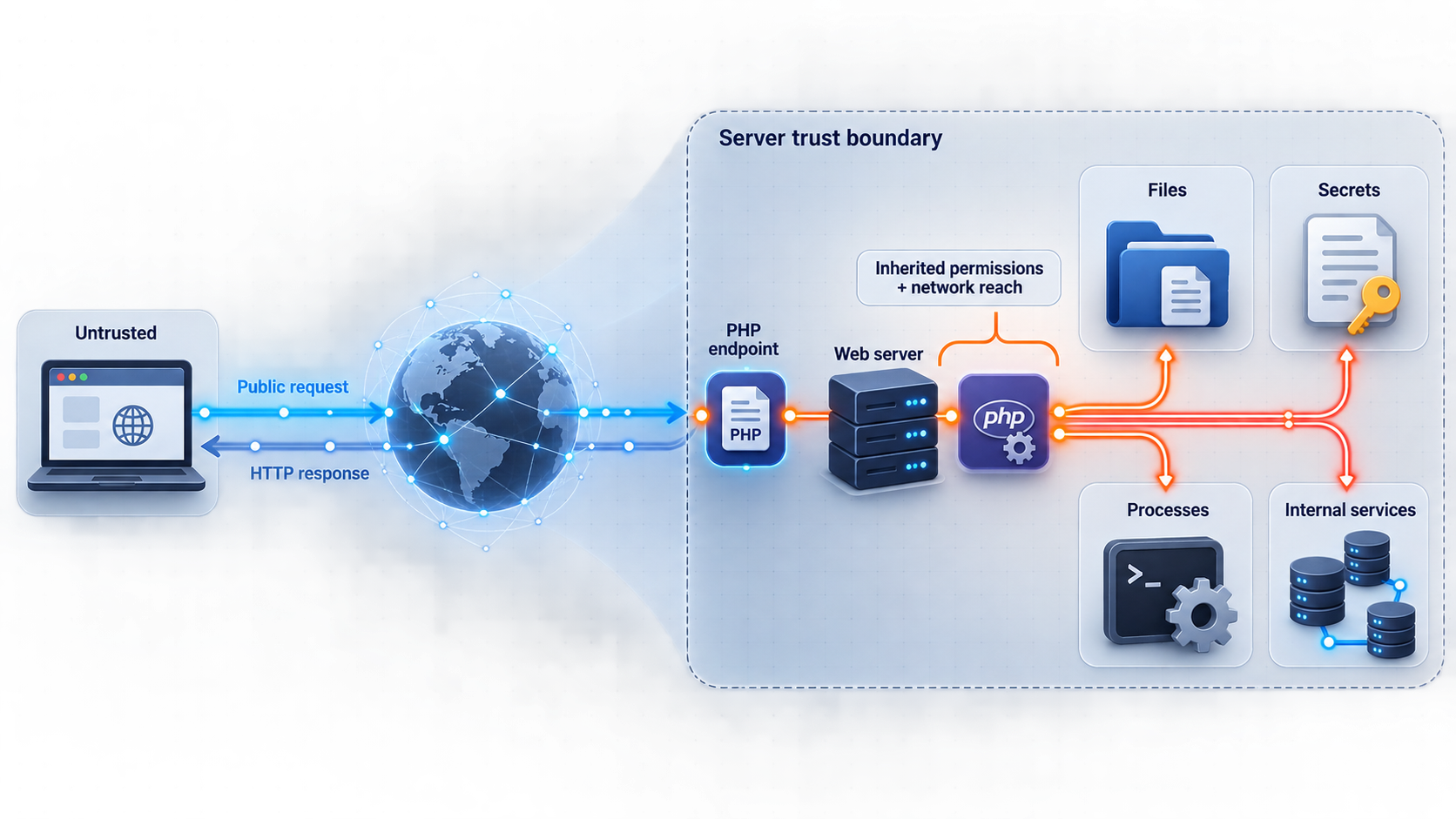
A web shell is server-side code that accepts input and performs actions on the host through the web application’s execution context. In a PHP deployment, that context is usually constrained by the identity, permissions, runtime configuration, filesystem access, network access, and container or operating-system controls assigned to the PHP or web-server process.
The practical impact therefore depends on where the file runs and what that process can do. A shell running as an unprivileged account inside a tightly restricted container has a different impact from code running with broad filesystem access and credentials mounted into the runtime. Even limited code execution can still expose application data, configuration, session material, source code, internal services, or credentials available to the process.
A web shell can also provide persistence. Removing the initially exploited route does not remove a malicious file that has already been written elsewhere. Likewise, deleting one suspicious PHP file does not prove that scheduled tasks, startup hooks, modified dependencies, unauthorized accounts, or additional payloads are absent.
| Observed condition | What it supports | What it does not prove |
|---|---|---|
| A scanner reports “PHP-2-Shell” | A rule matched some supplied input or observed artifact | That exploitation occurred or that every similarly named package is affected |
| An unfamiliar PHP file exists | The file requires provenance and content review | That the file is malicious, since deployments can contain generated or vendor code |
| A file contains process-execution functions | The code may have powerful runtime behavior | That an attacker placed or invoked it |
| Logs show a suspicious request | An attempt may have reached the server | That the request succeeded or executed code |
| A suspicious response contains command output | There may be strong evidence of successful server-side execution | The full scope, persistence mechanism, or attacker activity |
| A known-good deployment differs from production | Unauthorized or undocumented changes may exist | That every difference is malicious without reviewing deployment history |
Common paths from weakness to shell access
Without a verified advisory, we should not claim a specific exploit path for “PHP-2-Shell.” More generally, PHP web shells can appear after insecure file upload handling, arbitrary file write vulnerabilities, compromised deployment credentials, dependency compromise, stolen administrative sessions, exposed management tools, or an existing remote-code-execution weakness.
File uploads deserve particular attention. Checking only a browser-supplied filename or MIME type is not a sufficient security boundary. Uploads should be authorized, validated according to the application’s actual business need, renamed by the application, stored outside executable web roots where possible, and served as data rather than interpreted as PHP. The web process should not have broad write permission across application code.
Direct code execution is not the only concern. A malicious file may implement an application-specific backdoor that modifies records, steals sessions, reads environment configuration, sends outbound requests, or creates new administrative users. Detection therefore requires more than searching for one command-execution function.
How to assess a report safely
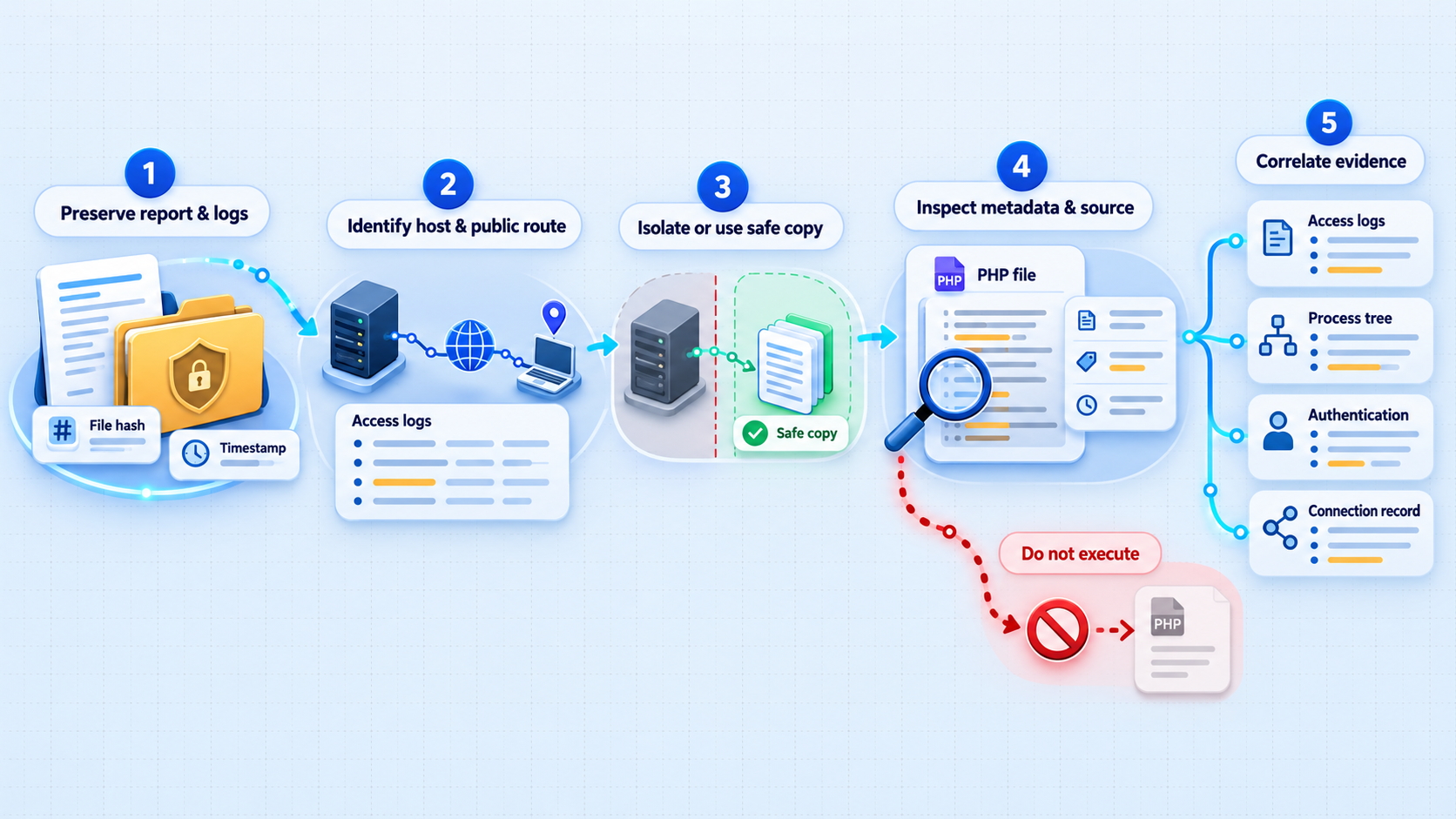
Assessment should answer four questions: what was detected, whether the artifact belongs on the system, whether an attacker could reach it, and whether it executed. Work from preserved evidence and compare the affected environment against a trusted baseline. Avoid testing suspected command execution through a production endpoint. That can alter evidence, trigger payloads, or cause operational damage.
Preserve the complete finding
Save the original alert, timestamps, host identity, scanner details, matched file or request, and any supplied advisory identifier. Record times with their timezone. Do not copy secrets, authentication tokens, or private endpoint values into ordinary tickets or chat messages.
Identify the affected component
Determine whether the alert concerns a Composer dependency, an application file, an uploaded artifact, a container image, a web route, or observed runtime behavior. Confirm the component’s exact name and version from the deployed system rather than inferring them from the alert title.
Establish expected provenance
Compare the artifact with source control, signed release artifacts, package lock data, deployment manifests, container image records, and a known-good build. Determine who created or deployed it and whether that action was authorized.
Map every reachable path
Review direct public listeners, reverse proxies, load balancers, development servers, Localtonet tunnels, private networks, and administrative routes. Confirm which paths were active during the suspected time window, not merely which paths exist now.
Inspect historical evidence
Review web access and error logs, application audit events, authentication events, deployment records, file metadata, process telemetry, outbound connection records, and relevant host events. Correlate them by time while accounting for clock and timezone differences.
Classify the finding
Label the result as a confirmed incident, a vulnerable but not demonstrably exploited component, a suspicious artifact requiring deeper analysis, a false positive, or an inconclusive finding. Document the evidence supporting the classification and the remaining uncertainty.
Review the deployed application, not only the repository
Source control represents intended code, while an incident affects the deployed environment. Generated files, uploads, caches, mounted storage, release directories, package installations, and manual production changes may not be represented in the repository. Compare the live environment with the exact build or image that should have been deployed.
If the application uses Composer, inspect the deployed dependency metadata and lock state. A package listed in a development workstation’s lock file does not prove that the same version is running in production. Conversely, a manually changed vendor directory may not match the repository. Preserve unexpected differences before rebuilding or reinstalling dependencies.
Examine suspicious PHP carefully
Look for unexplained files, unusual names, recently modified code, PHP content inside upload or cache directories, heavily encoded content, dynamic evaluation, unexpected network access, and code that launches processes or modifies other files. None of these traits proves malicious intent in isolation. Framework caches, installers, administrative utilities, and legitimate libraries can also contain unusual patterns.
Avoid executing a suspicious file to “see what it does.” Static review should happen on a copy in an isolated analysis environment. If specialist dynamic analysis is required, use a controlled sandbox with no production credentials, no trusted network access, and appropriate monitoring. An ordinary development machine is not a safe malware-analysis environment.
Logs may have rotated, failed to capture request bodies, omitted successful application-level actions, or been altered during an intrusion. A clean log search lowers confidence in some hypotheses, but it does not by itself prove that a suspicious file was never invoked.
Estimate impact from execution context
If execution is confirmed or strongly suspected, identify everything available to the PHP process. Review filesystem permissions, mounted volumes, database credentials, API credentials, cloud or infrastructure credentials, writable application paths, internal network reachability, and administrative capabilities. Do not print secret values into the incident report. Record the identity, scope, owner, and rotation status instead.
Treat credentials readable by the affected process as potentially exposed when the evidence justifies that assumption. Rotation must consider dependency order. For example, deploy an application configuration that accepts the replacement credential before revoking the old one when operational continuity requires it. If an attacker might still control the host, rotating secrets from that host can immediately disclose the replacements.
Contain suspected PHP shell activity
Containment limits additional access while preserving enough evidence to determine what happened. The exact response depends on business impact and confidence, but a credible sign of unauthorized code execution should be treated as more than a routine bug ticket.
Restrict access first
Remove the affected service from public reach, disable the vulnerable route, stop the relevant tunnel, or apply an access control that blocks untrusted users. Choose the narrowest control that contains the threat reliably. If the system can be isolated without powering it off, that may preserve volatile evidence. If it is actively harming other systems, immediate isolation takes priority.
Do not assume that deleting the suspected endpoint is sufficient. Existing sessions, copied credentials, additional files, scheduled tasks, modified startup behavior, or unauthorized accounts may survive. Record each containment action and its time so responders can distinguish defensive changes from attacker activity.
Preserve evidence before cleanup
- Preserve the suspicious files and record their cryptographic hashes using an approved incident-response process.
- Capture relevant application, web-server, authentication, deployment, and system logs before retention windows expire.
- Record active processes and network connections if your response process permits it.
- Preserve container or virtual-machine state where practical, including the exact image and mounted volumes.
- Retain configuration and deployment history that explains when the affected release became active.
- Keep an action log identifying who performed each response step and when.
Sending commands to a suspected web shell can execute attacker-controlled code, destroy evidence, or expand the incident. Use trusted administrative access and established forensic procedures. If your organization lacks that capability, escalate to a qualified incident-response team.
Rotate credentials from a trusted environment
If the PHP process could read database passwords, API credentials, signing keys, deployment credentials, or other secrets, plan their replacement. Perform rotation from a clean administrative system. Revoke unauthorized sessions and review recently created accounts, access keys, tokens, and permission changes.
Scope matters. A secret that can only read a narrow dataset does not present the same impact as a credential with infrastructure administration privileges. Document each credential’s effective permissions and reduce those permissions where possible. Incident recovery is also an opportunity to correct excessive privilege.
Remediate the root cause and remove persistence
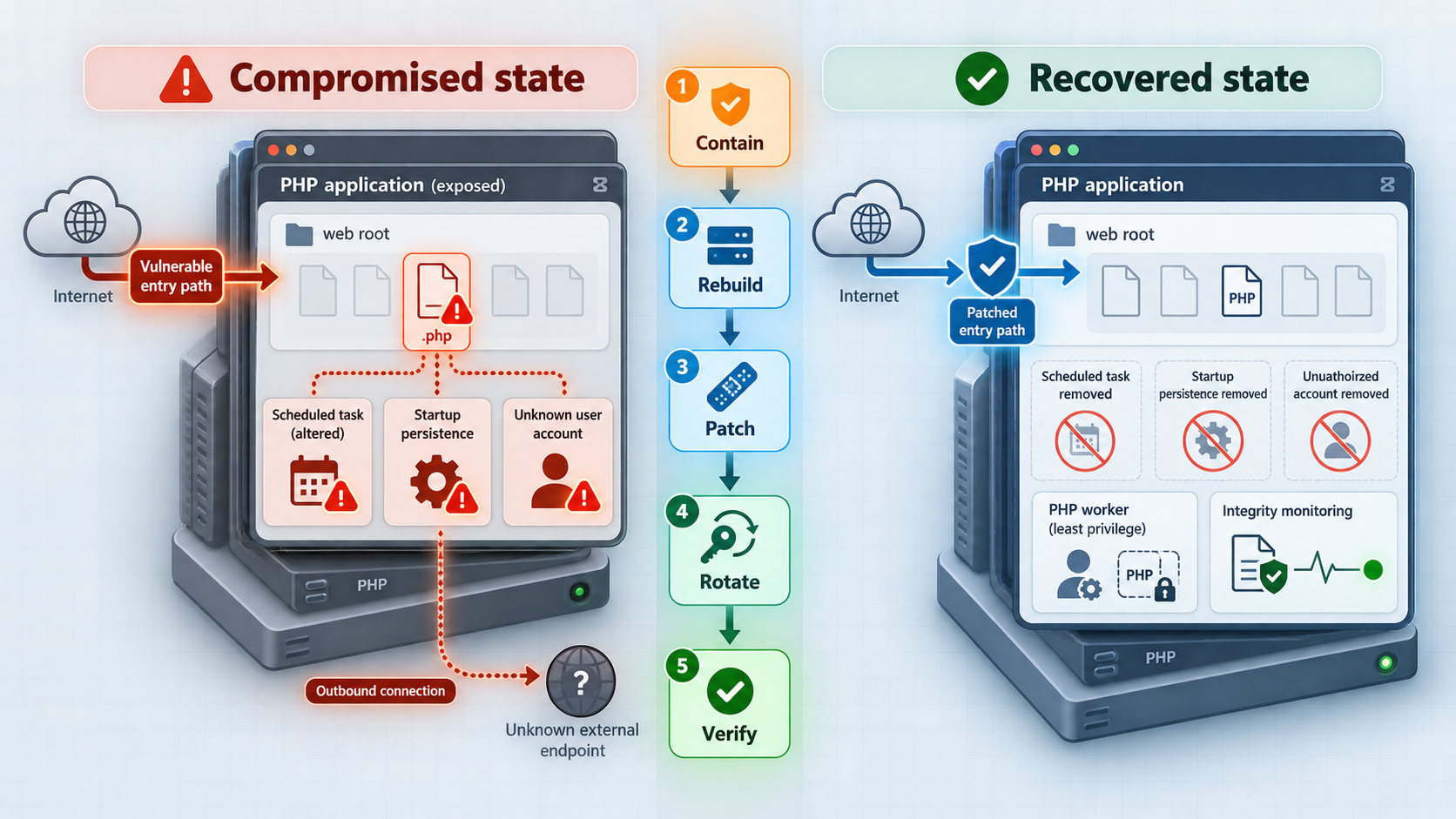
Remediation should address both the entry point and the post-exploitation state. If the root cause is an affected dependency, install the publisher’s verified fixed release or mitigation after confirming the exact package. If it is an insecure upload path, correct authorization, validation, storage, and execution behavior. If deployment credentials were stolen, fixing application code alone will not prevent reinfection.
Prefer a clean rebuild
When unauthorized code execution is confirmed, rebuilding from trusted source and known-good dependencies is generally more reliable than deleting visible malicious files. A rebuild should use reviewed source, pinned dependency information, controlled build infrastructure, and a clean target environment. Restore only necessary data after validating it, especially when writable application storage could contain executable content.
Review persistent storage separately from immutable application code. Replacing a container image does not remove malicious content from mounted volumes. Similarly, redeploying a release may leave uploads, generated PHP, modified configuration, or scheduled jobs untouched.
Harden the application boundary
Address upload and writable-directory design
Restrict accepted uploads to the formats genuinely needed by the application. Validate content as well as metadata, assign server-generated names, and avoid exposing storage through an interpreter-capable path. Apply size and quantity controls appropriate to the service. Authorization should govern both upload and retrieval.
Keep executable application code read-only to the runtime wherever the architecture permits. Writable locations should be explicit and minimal. If a PHP application can modify its own code tree, an application-level weakness may be converted into durable server-side persistence.
Patch only after confirming applicability
Since no verified advisory was supplied for the name “PHP-2-Shell,” this article cannot provide a safe package name, version threshold, patch command, or fixed release. Obtain those facts from the maintainer’s canonical security notice and match them against the deployed component. Avoid copying commands from an unrelated report with a similar title.
If there is no authoritative advisory, continue treating the item as an unverified detection. Ask the scanner vendor or report author for the rule documentation and evidence. A security ticket should be closed as a false positive only after the matched artifact and detection logic have been explained.
Review public access through Localtonet
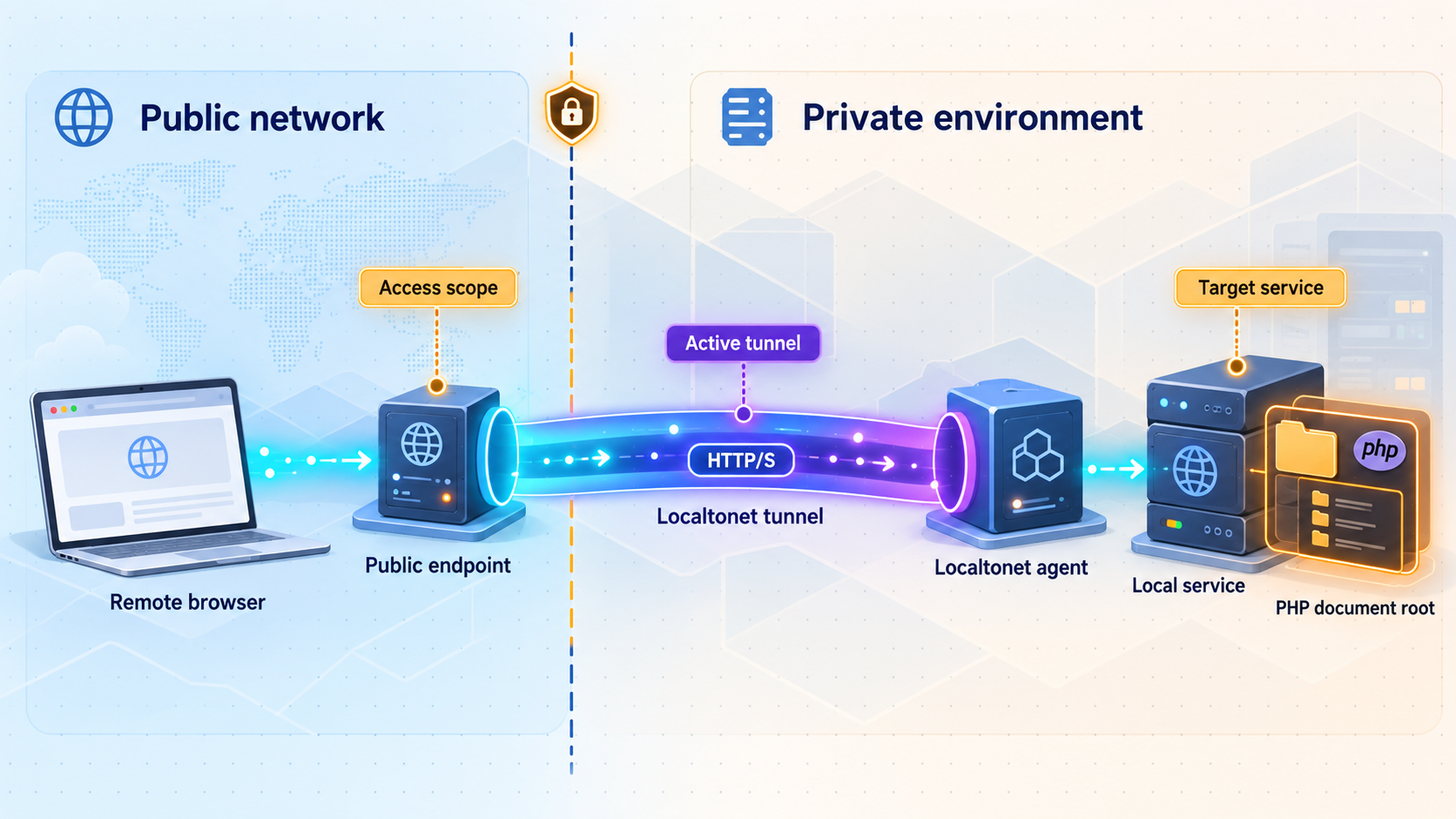
With Localtonet, the client on your device establishes an outbound connection to a Localtonet relay server. A running tunnel can provide a public URL or a public host and port for a service reachable from that device. This avoids inbound router port forwarding, firewall changes, VPN setup, and the need for a public IP address.
That connectivity does not remove the application’s own security responsibilities. If a PHP development server is exposed through an HTTP tunnel, anyone who can reach the assigned public address may be able to interact with the routes the application makes available. Authentication, authorization, secure application configuration, and least privilege remain essential.
During an investigation, establish whether a Localtonet tunnel existed, whether it was started, which client device was selected, and what local target it reached. Creating a tunnel does not mean it is running. The tunnel is available only while the selected client or device is connected and the tunnel is running.
Contain a Localtonet-exposed application
If a Localtonet tunnel is one of the application’s public access paths and compromise is suspected, stop the tunnel as part of containment. Stopping public access does not clean the host or invalidate credentials, but it can remove that route while responders investigate. Delete the tunnel if it is no longer required, or leave it stopped if its configuration must be preserved for review according to your incident process.
Identify the client device
Confirm which device was running the Localtonet client and could reach the PHP service. Treat its device-specific authentication token as a secret and do not place it in tickets, screenshots, code samples, or public incident notes.
Identify the tunnel and local target
Determine which tunnel exposed the application and verify the configured local IP address and port. Record the public address and relevant configuration without exposing credentials or private endpoint information unnecessarily.
Confirm its active window
Establish whether the selected client was connected and the tunnel was running during the period under investigation. A configured but stopped tunnel is not equivalent to an active public path.
Stop the tunnel when containment requires it
Use the Stop action to remove the public route while preserving the configuration if appropriate. Coordinate this action with the incident lead so its time and operational effect are recorded.
Remediate and verify locally
Rebuild or repair the PHP application, rotate affected credentials, and test it through a trusted local path before restoring internet access. Do not use the public tunnel as the first verification route.
Restart only after approval
Start the tunnel again only when the application has passed security and functional checks and public access remains necessary. Stop or delete it when it is no longer needed.
A browser-based PHP application normally presents an HTTP service, while raw TCP and UDP tunnels address different protocols. File Server publishes a local folder rather than a PHP application, and proxy tunnel types make the connected device an exit node rather than forwarding to a conventional local IP and port. Standard tunneling should not be described as VPN functionality. VPN Manager is our separate private mesh VPN feature.
If you later need to restore an HTTP tunnel, follow the current Localtonet HTTP tunnel documentation for the current dashboard workflow. Available relay servers, regions, process options, and subscription availability can vary, so obtain current values from the dashboard instead of copying a hardcoded server code from an old incident note.
Use webhooks for connectivity awareness, not intrusion detection
Our platform-wide Token/Tunnel webhooks can report when a token or tunnel in a selected Token Group changes to Connected or Disconnected. These events can help establish availability and operational changes. They do not, by themselves, report PHP exploitation, file creation, command execution, or application compromise.
Do not confuse those platform events with File Server file-event webhooks. File Server webhooks concern upload, delete, rename, and move events in that feature and can support HMAC signing. They are a separate webhook system from Token/Tunnel connectivity events.
Verify recovery and monitor for recurrence
Recovery is complete only when the root cause has been corrected, unauthorized persistence has been removed, affected secrets have been handled, and the rebuilt service behaves as expected. A successful page load is necessary for functional testing, but it is not sufficient security validation.
Perform local verification before restoring access
- Confirm that the application starts from the intended build or image.
- Verify that deployed source and dependencies match the approved release.
- Check that upload and writable directories cannot execute PHP content.
- Confirm that the runtime cannot modify application code unless a documented requirement makes that unavoidable.
- Test authentication and authorization for sensitive routes.
- Verify that replacement credentials work and superseded credentials have been revoked.
- Confirm that logs capture useful security and deployment events without recording secrets.
- Search persistent storage and restored data for the original indicators and related unexplained artifacts.
Monitor behavior after restoration
Watch for recreation of removed files, unexpected modifications, anomalous authentication, new administrative users, unusual child processes, unplanned outbound connections, unexplained deployments, and repeated requests to the affected route. Tune monitoring to the application’s normal behavior so responders can distinguish expected framework activity from suspicious events.
Maintain a clean deployment baseline. File integrity monitoring is most useful when generated files, caches, logs, and uploads are separated from immutable application code. Otherwise, expected changes can overwhelm the signal.
Define clear closure criteria
Before closing the incident, document the original finding, validated interpretation, exposure period, affected assets, evidence of exploitation or lack of evidence, containment actions, root cause, remediation, credential decisions, restored access paths, and remaining uncertainty. If the result is inconclusive, say so. Uncertainty should be managed explicitly rather than converted into an unsupported all-clear.
| Recovery check | Evidence to retain | Desired result |
|---|---|---|
| Trusted rebuild | Build record, source revision, dependency state, image identity | Deployment originates from reviewed inputs |
| Persistence review | Filesystem comparison, account review, scheduled-task review | No unexplained mechanism remains |
| Credential response | Scope, owner, rotation time, revocation confirmation | Potentially exposed authority is replaced or explicitly risk-accepted |
| Application testing | Functional and security test results | Required behavior works without restoring the weakness |
| Public access review | Approved listeners, proxies, tunnels, and access controls | Only necessary and authorized paths are active |
| Post-recovery monitoring | Alert rules, ownership, observation period, escalation path | Recurrence or related activity can be detected and handled |
Frequently asked questions
Is PHP-2-Shell a confirmed vulnerability in PHP itself?
That conclusion cannot be supported from the name alone. No authoritative advisory, CVE identifier, affected package, or vulnerable version range was supplied for this article. Treat “PHP-2-Shell” as an ambiguous report label until the originating evidence identifies the affected component and detection basis.
Does finding a suspicious PHP file prove that the server was compromised?
Not automatically. Establish the file’s provenance, compare it with the approved deployment, inspect its content safely, and correlate its timestamps with request and system evidence. An unexplained executable file can be serious, but its presence, origin, reachability, and execution are separate questions.
Should I send a harmless command to test whether a suspected shell works?
No. Interacting with a suspected shell can execute attacker-controlled behavior, alter evidence, and create additional risk. Preserve the artifact and use trusted administrative access, static analysis, and an approved isolated analysis process.
Is deleting the suspicious file enough?
Usually not when compromise is confirmed or plausible. The original weakness may remain, and an attacker may have added other files, accounts, scheduled tasks, modified dependencies, or stolen credentials. A clean rebuild from trusted inputs is generally more reliable than removing only the visible artifact.
Does stopping a Localtonet tunnel remove the web shell?
No. Stopping the tunnel removes that public access path while the tunnel is stopped, but it does not modify the PHP application, remove files, end local persistence, or rotate credentials. Treat it as a containment action followed by host and application remediation.
Can a configured Localtonet tunnel expose the application when it is not running?
A tunnel must be started, and the selected client or device must be connected, for the tunnel to be available. Creating its configuration alone does not mean it is running. Investigators should still verify the actual state during the relevant historical period.
Can Localtonet webhooks confirm that exploitation occurred?
Platform-wide Token/Tunnel webhooks report Connected or Disconnected state changes for tokens or tunnels in a selected Token Group. They can help establish connectivity, but they do not prove that a PHP route was exploited. Application, web-server, host, and security telemetry are still required.
When is it safe to restore public access?
Restore access after the affected component and root cause are understood, the application has been rebuilt or remediated, persistence has been reviewed, affected credentials have been handled, and local security and functional checks pass. Continue monitoring after restoration and keep only the public access paths that are necessary.
Restore controlled access with Localtonet
After your PHP application has been remediated and verified locally, use Localtonet to expose the required service without inbound router port forwarding. Keep tunnels stopped when they are not needed, protect device tokens, and preserve application-level authentication and authorization.
Get Started Free →

