

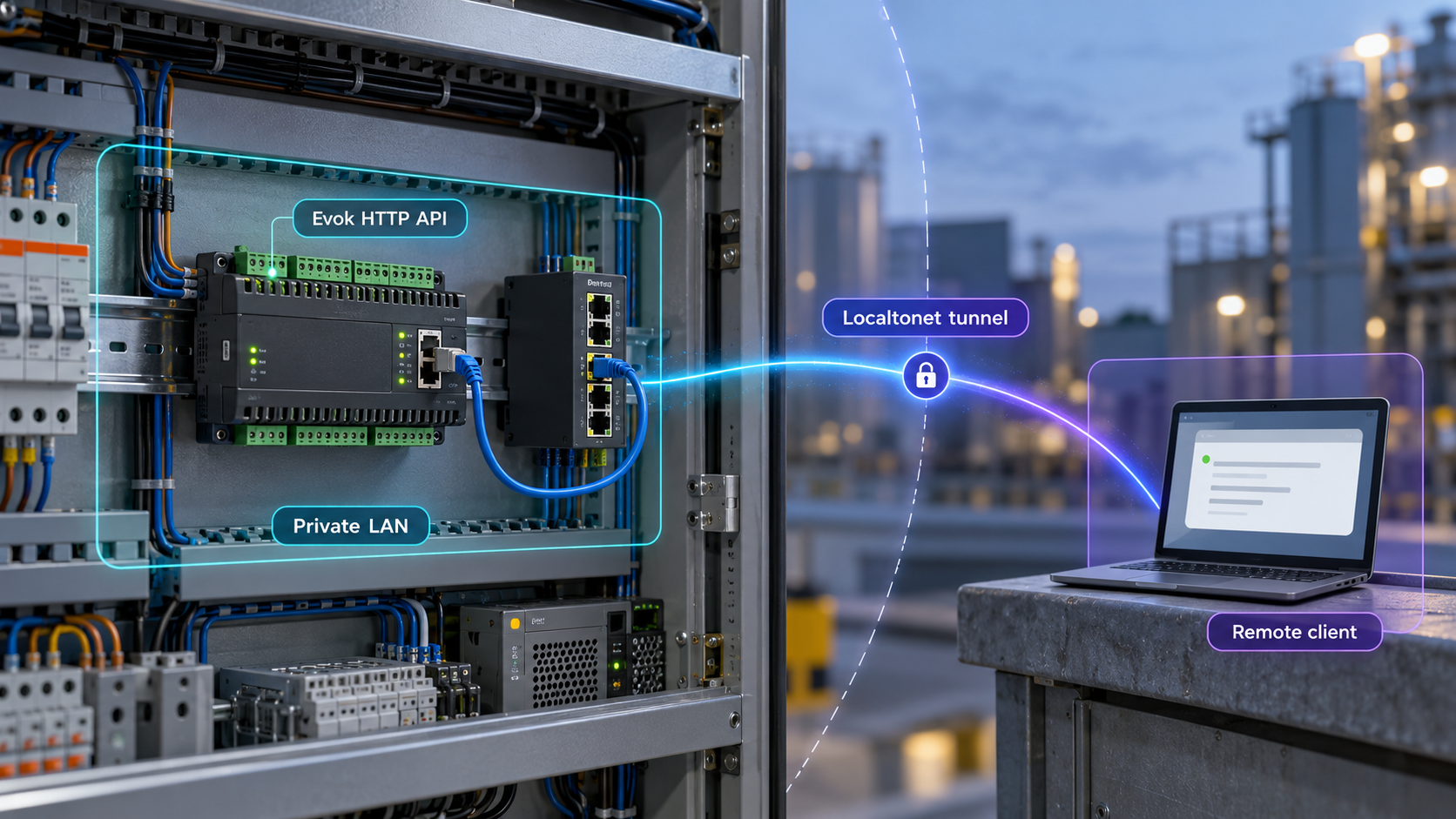
Run the Unipi I/O API locally first, verify it safely, then publish only the HTTP listener you intend to reach
Evok provides programmatic access to inputs, outputs, and communication interfaces on compatible Unipi controllers. This guide explains how to plan an Evok deployment, identify the installation details that must come from the documentation for your controller and operating-system image, verify the API locally, and troubleshoot the service before introducing remote access. After Evok works on the local network, we show how to connect its HTTP listener to a public HTTPS address with Localtonet. We do not assume a package command, container image, port, bind address, API route, or credential because those details are not established by the available project evidence and may differ between installations.
📋 What's in this guide
How Evok and Localtonet fit together
Evok is the API layer used to access and control I/O on supported Unipi controllers. The project describes interfaces including RESTful WebForms, RESTful JSON, bulk JSON, JSON-RPC, and WebSocket access. That makes it useful for applications that need to read controller state, write supported values, integrate I/O into supervisory software, or connect a Unipi controller to a custom automation service.
Evok and Localtonet have different responsibilities in this workflow. Evok communicates with the controller hardware and provides the application interface. Localtonet does not install Evok, configure the controller, define its I/O model, or replace its API. Once Evok is running and reachable on a known local IP address and port, our platform can expose that HTTP service through a public address.
The Localtonet client runs on the controller itself or on another device that can reach the Evok listener. The client establishes an outbound connection to a Localtonet relay server. This avoids requiring inbound router port forwarding, a public IP address, VPN setup, or firewall changes for an inbound listener. The public tunnel is available only while the selected Localtonet client is connected and the tunnel is running.
Request path from a remote client
A remote request is sent to the public HTTPS address assigned to the HTTP tunnel. Localtonet relays that request to the configured local IP address and port through the connected client. The Evok service receives the request and returns its response through the same path. The local target must therefore be reachable from the machine running our client.
If the client runs directly on the Unipi controller, the target may be a loopback listener, depending on Evok's actual configuration. If the client runs on a separate machine, the Evok service must listen on an address reachable from that machine, and the intervening local network must permit the connection. Do not change Evok from a loopback-only listener to a network-wide listener merely for convenience without evaluating the resulting LAN exposure.
Ordinary REST and JSON-RPC calls use conventional HTTP request and response behavior. A WebSocket connection begins over HTTP and then upgrades to a persistent connection. Confirm the behavior required by your application with your installed Evok version, and test the exact interface through the tunnel before relying on it operationally.
Prerequisites and facts to collect before installation
Begin with the exact controller model, its current operating-system image, and the version of Evok that is supported for that combination. Unipi produces several families of controllers and gateways, and the existence of an Evok release does not prove that every release can be installed on every device or image. Compatibility must be checked against the official Evok and Unipi documentation for the hardware in front of you.
You also need administrative access appropriate to the controller installation procedure. The required account, package mechanism, service manager, and file locations are not established by the supplied project evidence, so this guide does not invent them. If the controller is already operating machinery or building systems, plan a maintenance window and preserve the current configuration before changing software.
| Information | Why it matters | Where to confirm it |
|---|---|---|
| Exact Unipi model | Hardware support and available I/O differ between controller families and configurations. | Controller label, inventory records, and model-specific Unipi documentation |
| Operating-system image and version | Installation commands, package availability, dependencies, and service management can depend on the image. | The running controller and its image documentation |
| Supported Evok release | The newest project release is not automatically the correct release for every deployed controller. | Official compatibility and installation guidance for the controller |
| Evok bind address | It determines whether only the controller, the local LAN, or another client device can reach the service. | The installed Evok configuration and active listener |
| Evok HTTP port | Localtonet needs the actual local destination port rather than an assumed default. | The installed configuration, service output, or active listener |
| Required API route | A successful response from one route does not prove that the application's required interface works. | Evok documentation for the installed version and the consuming application's configuration |
| Localtonet client location | The selected device must be able to reach the Evok target address and remain connected while access is needed. | Your deployment design and local network layout |
Choose where the Localtonet client will run
Running the client on the controller can keep the target connection local to that device, provided the controller supports the current Localtonet client and has appropriate resources. Running it on another computer can avoid adding software to the controller, but Evok must then be reachable over the LAN from that computer. Do not assume platform compatibility or installation commands. Obtain the current client package for the operating system you will actually use.
Whichever location you choose, keep the device-specific Localtonet authentication token private. The token identifies the client device that will run the tunnel. It should not be written into screenshots, public issue reports, shell history examples, source repositories, or shared configuration samples.
Evok is an I/O control API, not merely a status page. Depending on the exposed routes and controller configuration, remote requests may affect outputs or automation behavior. Test against noncritical equipment where possible, use the least privilege available in the surrounding system, and do not expose a controller until you understand what every permitted client can do.
Install and configure Evok without guessing platform details
The Evok repository directs users to its official documentation for installation and configuration, but the evidence available for this draft does not establish one universal package command, operating-system procedure, container image, bind address, port, service name, or configuration path. Providing any of those as fixed values would risk giving incorrect instructions for a controller. The safe installation workflow is therefore to use the documented procedure specifically matched to the controller model and image, while recording the resulting runtime details needed for verification and tunneling.
Identify the controller and operating-system image
Record the exact Unipi model, hardware revision where relevant, operating-system image, image version, and currently installed Evok version if one exists. Do not select an installation path based only on a generic Linux label or on the latest repository release.
Back up the working controller configuration
Preserve the existing Evok configuration and any controller-specific settings using the supported backup process for that deployment. Also record how the current service starts and which applications depend on it. A file copy is useful only if the platform documentation confirms that the copied files are the complete configuration.
Follow the installation path documented for that device
Use the official Evok instructions that match the identified controller and image. Apply the documented package, upgrade, or image procedure exactly. This article intentionally provides no speculative package-manager, Python, container, repository, or source-build command because the available evidence does not establish one as correct.
Review the installed Evok configuration
Locate the configuration using the path documented for the installed version. Record the HTTP bind address, HTTP port, enabled API interfaces, hardware definitions, and any access-control settings that are explicitly supported. Keep secrets out of notes and screenshots.
Start Evok with the documented service method
Use the startup or service-management procedure supplied for the controller image. Do not substitute a guessed service name. Confirm that startup completes without configuration, dependency, hardware communication, or address-binding errors.
Record the verified local target
Write down the exact reachable IP address and port after confirming the active listener. These become the Localtonet HTTP tunnel target later. Also record one documented, low-risk API request that can be used as a health check without changing controller state.
Bind address selection
The bind address controls where Evok accepts connections. A loopback address restricts direct access to software on the controller. A specific LAN address can make the service reachable through that interface. A wildcard listener may accept connections on multiple interfaces. The correct choice depends on where the Localtonet client runs and on the controller's security design.
If our client runs on the same device and can reach a loopback listener, retaining loopback access reduces unnecessary LAN exposure. If our client runs elsewhere, use only a documented and intentional network listener, then restrict local network access using controls appropriate to the environment. Never change the bind address without checking whether another interface, management network, or untrusted network will also gain access.
Do not infer a port from examples
The project information supplied for this article does not state Evok's listener port. Read it from the installed configuration and confirm it against the active process. A port copied from an old tutorial, another controller, or a different software version can point to the wrong service. The same rule applies to API paths: use the route documented for the installed Evok version rather than constructing one from the interface name.
A reproducible command is useful only when its operating system, repository, package name, dependencies, and supported hardware are known. Those facts are not present in the approved evidence for this draft. We therefore preserve the installation workflow while explicitly requiring the model-specific official procedure instead of presenting an unverified command as universal.
Verify Evok locally before adding remote access
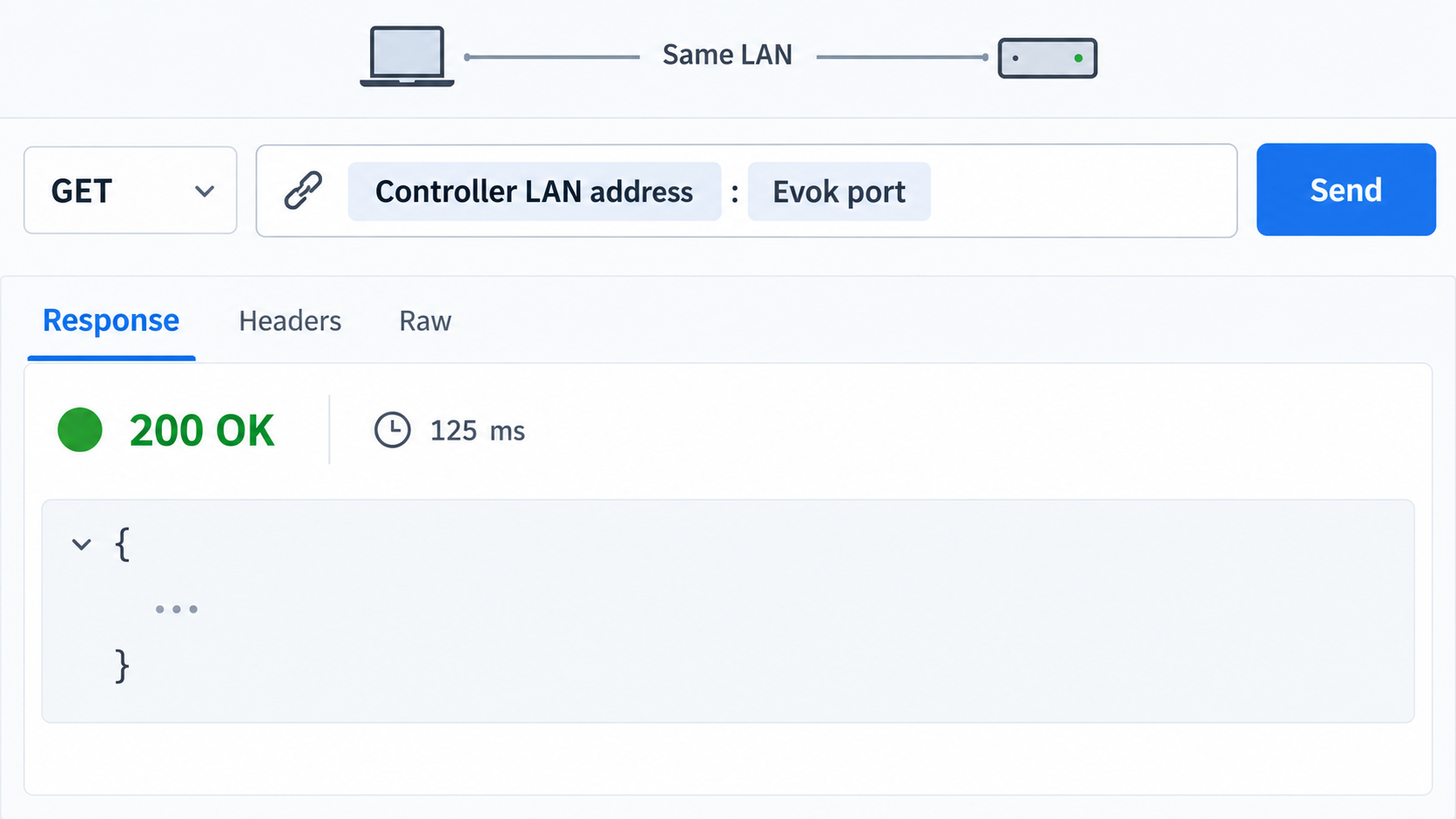
Verification should proceed from the service process to the network listener, then to a documented API read. This order separates installation problems from networking problems. It also prevents a Localtonet tunnel from obscuring a failure that already exists locally.
1. Confirm that the service stays running
Use the service-status mechanism documented for the controller image. Check that Evok remains active after startup rather than starting and immediately exiting. Review its logs for configuration parsing errors, missing dependencies, hardware discovery failures, permission problems, or an inability to bind to the configured address and port.
If the service fails, resolve that failure before proceeding. Repeatedly restarting it without reading the first relevant error can hide the root cause and may disrupt applications already connected to the controller.
2. Confirm the active listener
Use the operating system's supported network inspection tools to confirm that a process is listening on the address and port recorded from the configuration. The exact inspection command differs by image and is not established by the supplied evidence. Verify all three facts: the expected process owns the listener, the port matches the configuration, and the address is reachable from the intended Localtonet client location.
If Evok is bound only to loopback, a separate LAN machine will not be able to use that listener directly. If it is bound to a LAN address, testing from the controller alone does not prove that another device can reach it. Perform the test from the machine that will run our client whenever those are different devices.
3. Send a documented, non-destructive API request
Choose a read-only request from the official documentation for the installed Evok version. Prefer a request that reports known controller or I/O state without writing an output. Do not guess a route, resource identifier, request body, or authentication header. A generic request pattern looks like the following, but every placeholder must be replaced with a verified value:
curl -i "http://<verified-evok-address>:<verified-evok-port>/<documented-read-only-route>"The expected status code and response body depend on the documented route. Validate more than basic TCP connectivity. Confirm that the response format matches the selected interface, that it identifies the expected controller resource, and that the returned state is plausible.
4. Verify the interface your application will actually use
A successful RESTful JSON read does not automatically validate bulk JSON, JSON-RPC, WebForms, or WebSocket behavior. Test the exact interface required by the consuming system. For a WebSocket client, verify connection establishment, expected messages, reconnection behavior, and safe handling of a service restart. For JSON-RPC or write operations, begin with a documented low-risk operation in a controlled environment.
Receiving valid JSON proves that a route is functioning. It does not establish authorization, safe output behavior, rollback capability, network isolation, or operational suitability. Complete the security review before exposing the listener beyond the trusted local environment.
Expose the verified Evok HTTP listener with Localtonet
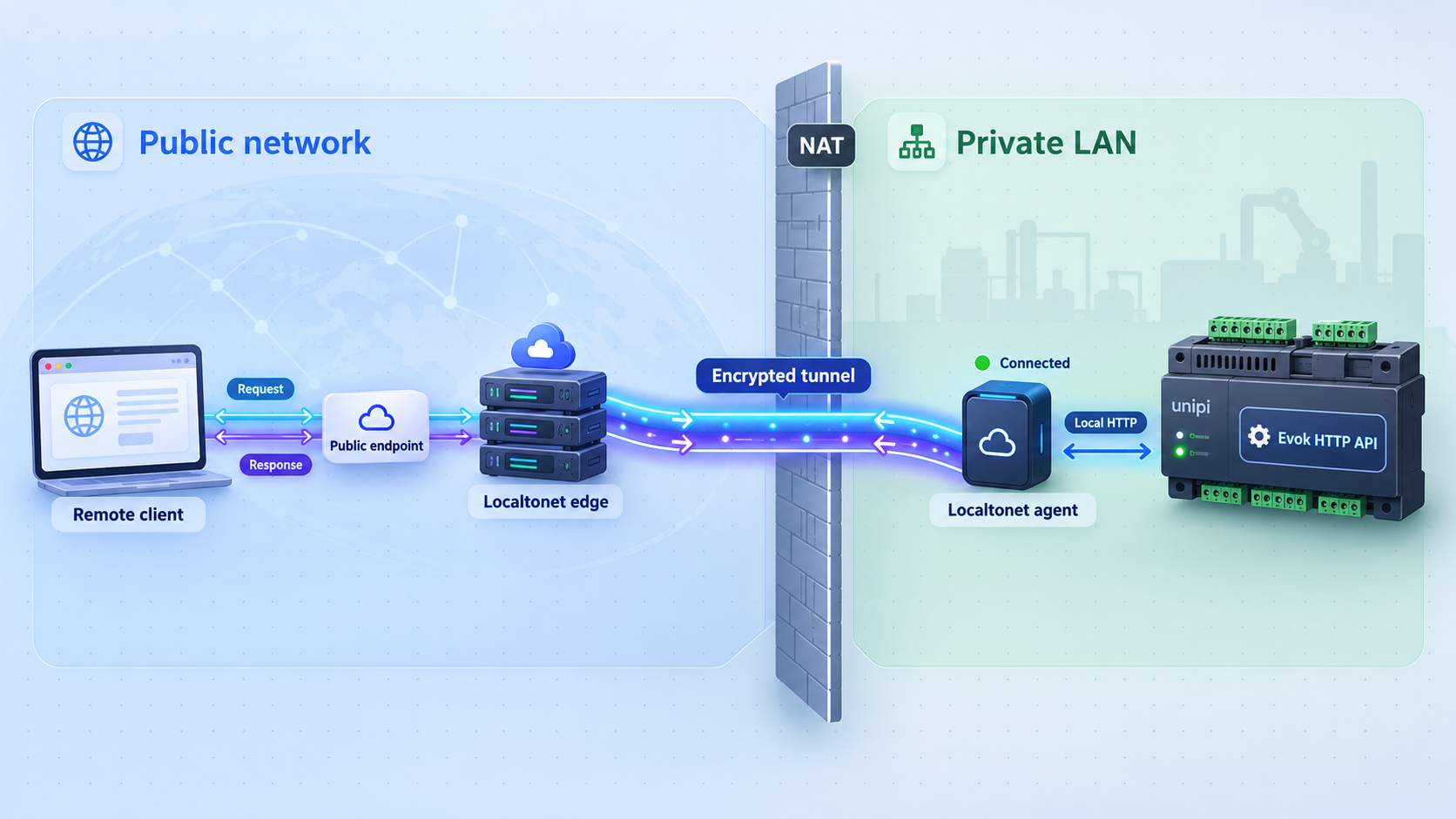
Add remote access only after you know the exact local target and have successfully called the required API from the Localtonet client device. For this workflow, use an HTTP tunnel because the target is Evok's local HTTP API listener. HTTP and File Server tunnels can use a random subdomain, a custom subdomain, or a custom domain as their Process Type, with each serving content at a public HTTPS address.
Available relay servers and regions can vary, so select from the current values shown in our dashboard rather than copying a server code from an article. Likewise, do not assume that every option is included in every subscription plan.
Install and run the Localtonet client
Install the current Localtonet client on the Unipi controller or on another device that can reach Evok. Use the installation package appropriate to that operating system. Before continuing, verify from this device that the recorded Evok IP address and port are reachable.
Authenticate or select the client device
Use the device-specific authentication token associated with the client that will run the tunnel. Keep this token private. Confirm that the intended device is connected in our dashboard before configuring the tunnel.
Select an available relay server
Choose a currently available Localtonet relay server or region from the dashboard. Do not hardcode a server value from an unrelated deployment because availability can vary.
Create an HTTP tunnel to the Evok target
Select the HTTP tunnel family and enter the exact local IP address and port verified earlier. Choose the required Process Type from the options available to your account. Do not enter an assumed Evok default, and do not point the tunnel at a different management interface on the controller.
Start the tunnel
Creating a tunnel does not make it active. Use the Start button and confirm that both the selected client and the tunnel show a connected state. The tunnel remains available only while that client is connected and the tunnel is running.
Test the assigned public address
Send the same documented read-only request through the assigned public HTTPS address. Preserve the documented route after the public base address. Compare the remote result with the local result before configuring production software or attempting write operations.
If the local request succeeds but the public request fails, keep the distinction between tunnel state and application state in mind. Confirm that the tunnel is started, the correct client is connected, and the configured target exactly matches the address reachable from that client. If the public base responds but a particular API route fails, investigate route, method, payload, header, or application compatibility rather than changing the target port at random.
Our HTTP tunnel provides a public HTTPS address. This does not mean every part of the deployment has automatically acquired application authorization or safe write controls. TLS at the public tunnel edge protects the public HTTPS connection, but you must still review the local target path, Evok's supported protections, and the privileges available through the API.
Security guidance for an industrial controller API
Remote access to a controller API deserves a stricter review than publishing a read-only demonstration page. Inputs can disclose operational state, and outputs may influence connected equipment. Treat the public address as sensitive even when it is difficult to guess.
Avoid exposing unrelated controller services
Point the HTTP tunnel specifically at Evok's verified listener. Do not publish an administrative shell, operating-system management page, package interface, or unrelated web service as a shortcut. A single controller can have several listeners, and choosing a port based only on whether it returns a page can expose the wrong application.
Separate monitoring from control
If the deployment only needs telemetry, configure the application around documented read operations and avoid granting write capability where the software supports that distinction. If remote control is required, define valid ranges, expected timing, failure behavior, and the physical consequences of stale or repeated commands. These controls may belong in Evok, the consuming application, the PLC logic, or another approved safety layer. Localtonet transports requests but does not define controller safety logic.
Plan for loss of connectivity
The tunnel is unavailable when the Localtonet client is disconnected or the tunnel is stopped. Internet connectivity can also be interrupted independently of local controller operation. Industrial logic should therefore have a documented safe behavior when a remote client disappears, a request times out, or a WebSocket disconnects. Do not make safe local operation depend solely on continuous public connectivity unless the complete system has been engineered for that requirement.
A public address creates a path to the configured service. It does not decide which Evok operations are safe for a user or application. Use the authentication, authorization, least-privilege, network restriction, and safety controls available in the complete deployment. If the installed Evok version does not provide protections appropriate to public exposure, place an approved access-control layer in front of it or keep it private.
Routine operation and troubleshooting
Starting and stopping access
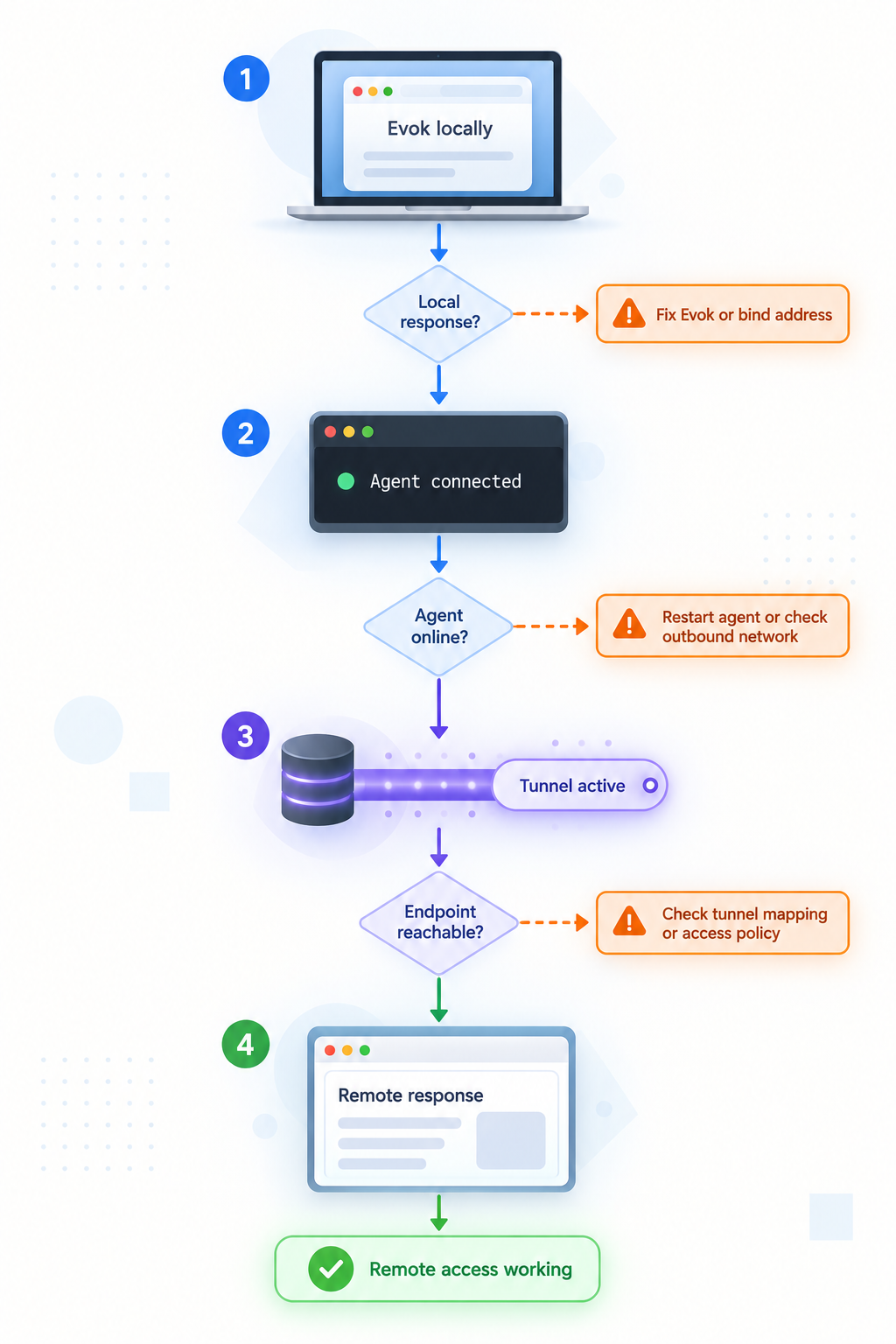
Evok and the Localtonet tunnel have separate lifecycles. Start Evok using the controller's documented service method and verify it locally. Start the Localtonet client and then start the configured tunnel. To remove public reachability while leaving local automation running, stop the tunnel rather than stopping Evok. Delete the tunnel only when the configuration is no longer required.
After a controller reboot, verify each layer independently. Confirm that Evok started as intended, that its listener address and port remain the same, that the Localtonet client reconnected as intended for your deployment, and that the tunnel is running. Do not assume that creating either service once guarantees its behavior after every reboot or software update.
Updating Evok
Review release information and compatibility guidance before changing versions. Back up the supported configuration, record the current package or image state, and preserve a rollback path. After an update, repeat local process, listener, read-only API, required-interface, and public tunnel tests. Pay particular attention to response formats and write failures because client applications can depend on details beyond basic connectivity.
Troubleshooting matrix
| Symptom | Likely layer | What to check |
|---|---|---|
| Evok will not stay running | Installation or configuration | Review the first relevant service error, version compatibility, dependencies, permissions, hardware configuration, and address-binding conflicts. |
| No process listens on the recorded port | Evok configuration | Confirm the active configuration file, startup method, bind address, port, and whether startup completed successfully. |
| The controller can call Evok, but the Localtonet client device cannot | Local network or bind scope | Check whether Evok is loopback-only, whether the target IP is correct, and whether local network policy permits the client device to connect. |
| Local API works, but the public address does not | Localtonet tunnel | Confirm the correct device is connected, the tunnel has been started, the target matches the verified listener, and the selected relay is currently available. |
| The public base responds, but an API route fails | Application request | Verify the path, HTTP method, request body, headers, interface type, resource identifier, and installed Evok version. |
| Reads work, but writes fail | Evok or request semantics | Check documented write syntax, value type, valid range, resource state, access controls, and Evok logs. Do not retry uncontrolled writes repeatedly. |
| WebSocket connects and then drops | Application, network, or lifecycle | Check Evok logs, client reconnect behavior, tunnel and device state, expected WebSocket route, and whether the application handles service restarts. |
Use layer-by-layer diagnostics
A useful diagnostic sequence is: Evok process, local listener, request from the controller, request from the Localtonet client device, tunnel state, and request through the public address. Stop at the first failed layer. This method is more reliable than changing multiple settings at once because every successful layer narrows the fault domain.
When asking for support, provide nonsecret facts such as controller model, operating-system image, Evok version, whether the client is local or on another LAN device, sanitized listener information, the request method and route, response status, and relevant error text. Remove authentication tokens, credentials, private endpoint values, and operational data before sharing logs.
Frequently asked questions
What port does Evok use?
The approved evidence for this article does not establish a universal Evok port. Read the port from the installed Evok configuration and confirm it against the active listener. Use that verified value as the Localtonet HTTP tunnel target.
Can I install Evok with Docker, pip, or a single package command?
This draft does not have verified evidence establishing any of those methods as a universal installation path. Use the official procedure for the exact Unipi controller and operating-system image. Do not apply a generic Python, container, or package command to an operational controller unless the corresponding official documentation supports it.
Should the Localtonet client run on the Unipi controller?
It can run on the controller if that operating system is supported by the current client and the deployment has suitable resources. It can also run on another device that can reach Evok over the local network. Confirm current platform support rather than assuming it, and prefer the design that minimizes unnecessary network exposure.
Why use an HTTP tunnel instead of a raw TCP tunnel?
Evok exposes HTTP-oriented interfaces, including RESTful and JSON-RPC APIs, so an HTTP tunnel matches the application protocol and provides a public HTTPS address. Use the interface and tunnel type that match the verified application requirement rather than choosing raw TCP by default.
Does creating a Localtonet tunnel start it automatically?
No. Creating the tunnel and running it are separate lifecycle actions. After configuration, use the Start button. The public address remains available only while the selected client is connected and the tunnel is running.
Does the public HTTPS address make every Evok operation safe?
No. HTTPS protects the public web connection, but it does not determine which controller operations a client should be allowed to perform. Review Evok's supported access controls, local network exposure, application authorization, controller safety logic, and the consequences of write requests.
Can I verify Evok by opening only its base URL?
A base response can confirm limited connectivity, but it does not prove that the required API interface works. Test a documented read-only route and then test the specific REST, bulk JSON, JSON-RPC, WebForms, or WebSocket behavior required by your application.
What happens if the Localtonet client disconnects?
The tunnel becomes unavailable while the selected client is disconnected. Evok may continue operating locally, depending on its own service state. Design remote applications to handle timeouts and reconnection, and ensure the controller has an appropriate safe local behavior when remote connectivity is lost.
Connect your verified Evok API with Localtonet
Once Evok is installed, running, and confirmed through a documented local request, create an HTTP tunnel to its exact local address and port. Keep the device token private, start the tunnel only when remote access is required, and validate the public endpoint with a non-destructive request before enabling control operations.
Get Started Free →

