

Publish the Plex TCP service through an outbound tunnel instead of opening your home router
Plex Media Server normally sits behind a private network boundary that prevents unsolicited internet connections from reaching it. Router port forwarding is the conventional solution, but it may be unavailable behind carrier-grade NAT, restricted ISP equipment, multiple routers, or a network you do not administer. In this guide, we configure a Localtonet TCP tunnel that forwards an assigned public host and port to Plex on the private network. We also connect that endpoint to Plex's Remote Access settings, verify the result from an external client, and troubleshoot direct, indirect, and failed connections.
📋 What's in this guide
How Plex remote access through a TCP tunnel works
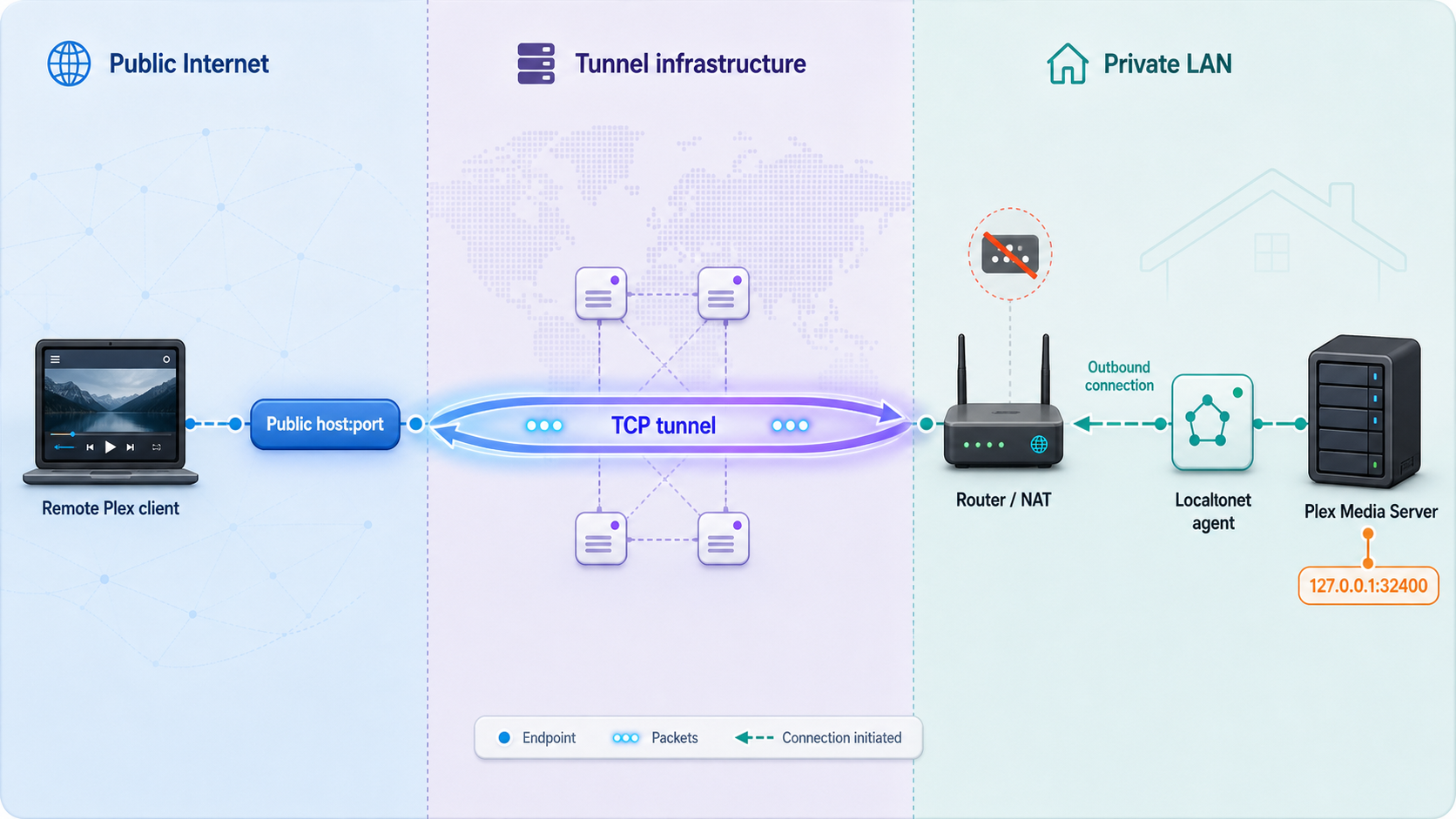
Plex Media Server commonly listens for TCP connections on private port 32400. A client on the same local network can reach that service because it has a route to the server's private address. A client on the public internet cannot normally initiate the same connection. Private addresses are not internet-routable, and the router or another upstream network boundary rejects unsolicited inbound traffic unless a forwarding mechanism exists.
Traditional port forwarding creates a rule on the edge router. The rule receives traffic on a public TCP port and sends it to private TCP port 32400 on the Plex server. That requires control of the correct router and an internet connection on which inbound traffic can reach that router. It becomes difficult or impossible with carrier-grade NAT, nested NAT, managed equipment, or provider policies that prevent inbound connections.
Localtonet changes the direction in which the reachable path is established. Our client runs on the Plex host or another device that can reach Plex over the LAN. The client establishes an outbound connection to a selected Localtonet relay. A running TCP tunnel then accepts connections at an assigned public host and port and forwards the TCP stream through the client to the configured local IP address and port.
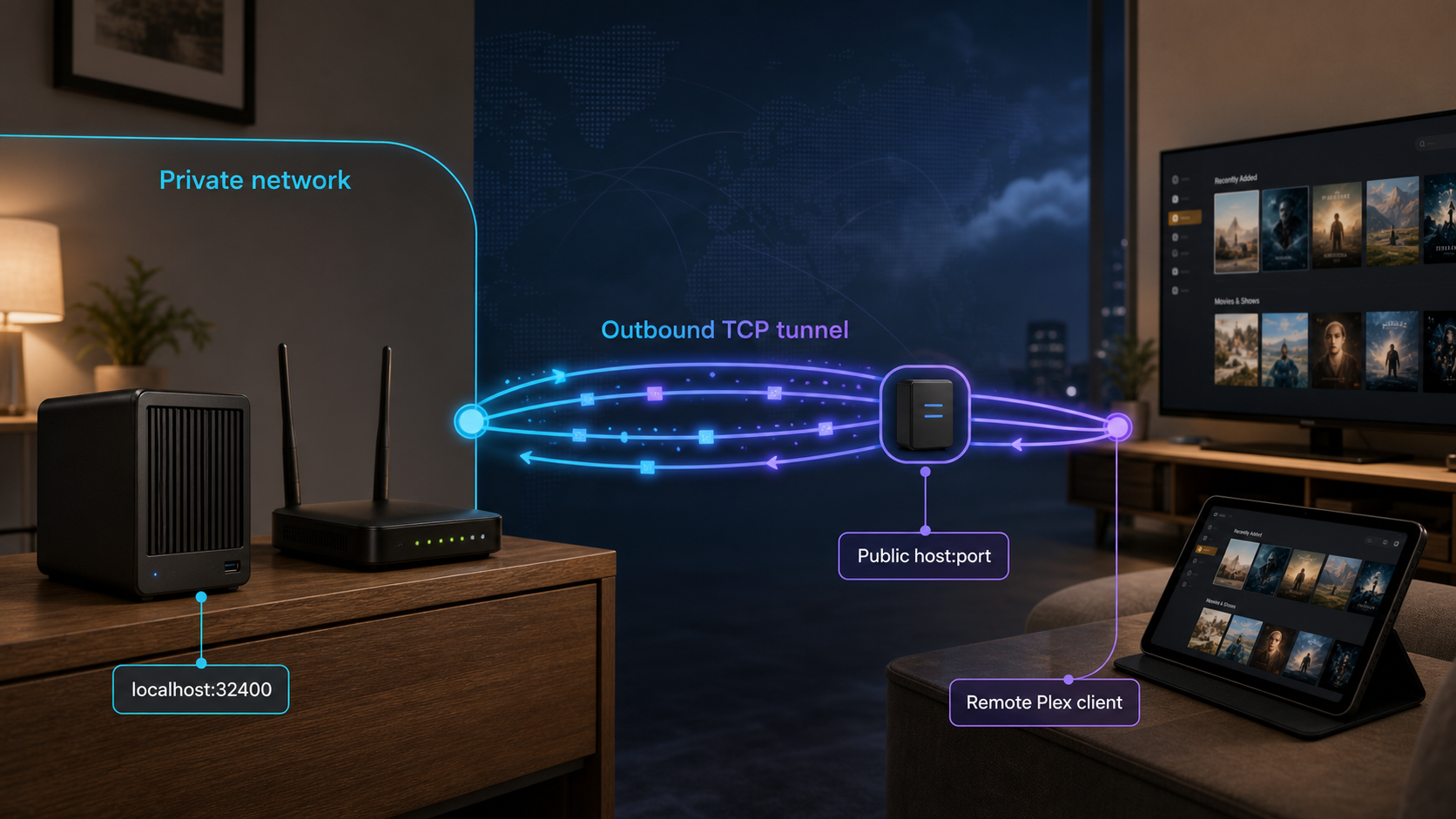
This removes the requirement for an inbound router or edge-firewall rule. It does not mean that every firewall and network policy is irrelevant. The host firewall must allow the Localtonet client to reach Plex, and the network must allow the client to establish its outbound relay connection. Security software, outbound filtering, DNS filtering, or a managed-network policy can still prevent the workflow.
The private port and public port have different roles
The most important configuration detail is the distinction between Plex's private service port and the tunnel's public port. The Localtonet tunnel can assign a public port that is different from 32400. That is normal. The two values belong on opposite sides of the tunnel:
| Value | Where it is used | Purpose |
|---|---|---|
| Plex private port | Localtonet local target | The TCP port on which Plex Media Server listens inside the private network, commonly 32400 |
| Localtonet public host | Remote endpoint and, when necessary, Plex custom server access URL | The assigned public hostname that resolves to the Localtonet relay endpoint |
| Localtonet public port | Plex manual public-port field | The internet-facing port that remote clients use before traffic is forwarded to Plex's private port |
For example, if a running tunnel displays the assigned endpoint <assigned-public-host>:<assigned-public-port>, its target can still be 192.168.1.50:32400. In Plex, the manually specified public port is <assigned-public-port>, not automatically 32400. Do not copy the assigned public port into the Localtonet private target unless Plex actually listens on that same port.
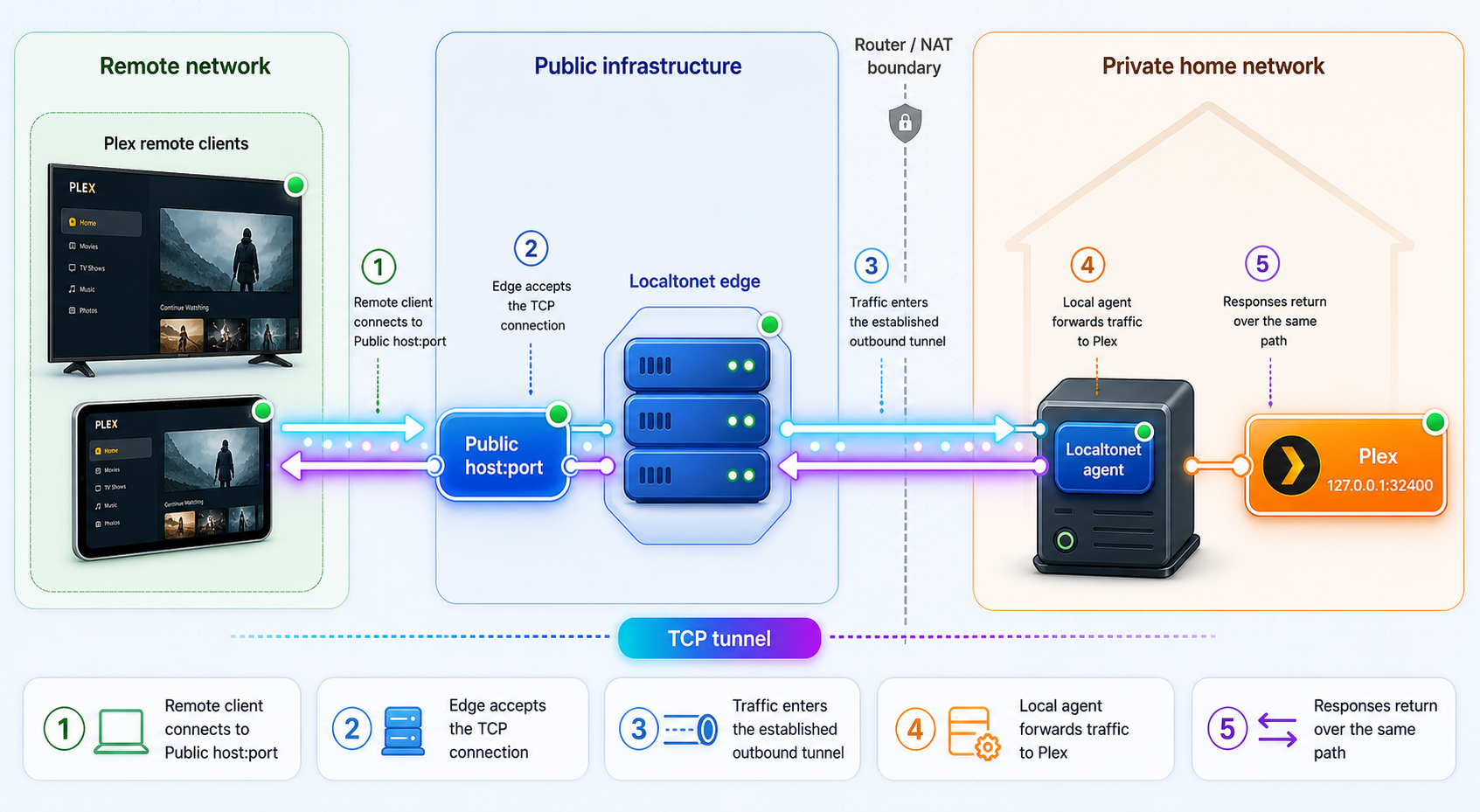
Creating a tunnel stores its configuration. Remote access begins only after the selected Localtonet device is connected and the tunnel has been started. Plex must also remain running and reachable from that device.
Prerequisites and information to collect
Complete the following checks before changing Plex Remote Access. Doing so separates local Plex problems from tunnel and remote-discovery problems.
Choose where the Localtonet client will run
The simplest arrangement is often to run Localtonet on the Plex server itself. In that case, the local target may be a loopback address if Plex is listening there and the client can connect to it. Running the client on another always-on LAN device is also supported by the tunneling model. In that arrangement, use the Plex server's reachable LAN address rather than the Localtonet device's loopback address.
The selected device must remain powered on, connected to the local network, and able to reach both Plex and the internet. If Plex runs in a container, virtual machine, or segmented network, confirm that the address entered into Localtonet is reachable from the client environment. An address that works only inside a container namespace may not work from a client installed on the host.
Select the appropriate client package
The current Localtonet download and getting-started documentation lists Windows 64-bit, Windows 32-bit, Windows ARM or ARM64, Linux builds for several architectures and MUSL environments, macOS 64-bit and ARM64, Docker, and Android. Choose the package that matches the operating system and processor of the device that will run continuously.
This guide does not invent an installation command because the supported package and startup method depend on that choice. Download the current build shown for the platform, install it using the provided package workflow, and run the client. Do not reuse a command, binary URL, or server code copied from an old tutorial.
Account and policy requirements
Sign Plex Media Server in to the account that owns the server. Confirm that remote users have access only to the intended libraries and that the server is not using an unclaimed or unintended account. On the Localtonet side, select the authentication token belonging to the actual device that will run the tunnel.
If the server is on a workplace, school, hosted, or otherwise managed network, obtain authorization before exposing it. The absence of a router change does not override acceptable-use rules, content licensing obligations, outbound network policy, or administrative controls.
Device tokens, Plex credentials, private endpoint details, and account information must be redacted from screenshots and support posts. The public tunnel endpoint may also be sensitive because it identifies an internet-reachable service.
Verify Plex locally before creating the tunnel
A tunnel can forward only to a service the Localtonet client can already reach. First confirm that Plex works locally and determine the correct target.
Confirm Plex Media Server is running
Open Plex Web using the normal local method and confirm that the intended server appears under the server settings. Browse a library and start a short playback test to verify more than the availability of the settings page.
Identify the private address and port
Record the LAN address of the Plex server. Plex commonly uses private TCP port 32400. If this installation has been placed behind another local proxy or uses an unusual network arrangement, verify the port that is actually reachable from the Localtonet client.
Test from the Localtonet device
From the computer that will run Localtonet, open the Plex server's local web endpoint or otherwise confirm a TCP connection to the recorded private address and port. If the client runs on the Plex host, test the exact loopback or LAN address that will be entered into the tunnel.
Resolve local firewall or routing failures
If the test fails, check that Plex is listening on an interface reachable from the client, that the host firewall permits the local connection, and that VLAN, container, or guest-network isolation is not blocking the path. Do not proceed until this local connection works.
A successful local test proves that Plex and the private path work. It does not yet prove that Plex will advertise the tunnel endpoint, that Plex authentication will succeed remotely, or that a client will establish a direct secure connection. Those are separate checks later in the guide.
Configure the Localtonet TCP tunnel
The Localtonet side of the setup publishes one TCP endpoint and points it to the verified Plex service. Use current device, relay, and availability values from the dashboard.
Install and run the Localtonet client
Install the current Localtonet application for the chosen operating system or deployment method. Run it on the Plex server or on another reliable device that can reach the verified private Plex address and TCP port.
Authenticate or select the correct device
Use the device-specific authentication token associated with the client that will carry the tunnel. Confirm that this device appears connected. Never guess a token or copy one from another installation.
Select an available relay server
Choose a currently available relay server or region from the product interface. Names and availability can vary by current product state or plan, so do not hardcode a server code from an older guide.
Create a TCP tunnel to Plex
Choose the TCP tunnel type. Enter the Plex server's verified private IP address and TCP port as the local target. A typical target is a reachable LAN address with private port 32400, but use the value confirmed for this installation.
Start the tunnel
Use the Start button after saving the configuration. Creating the tunnel does not mean it is running. Confirm that the tunnel reports a running or connected state and record its assigned public host and public port.
Keep the endpoint available only as needed
Leave the selected client connected and the tunnel running while remote Plex access is required. Stop the tunnel to withdraw the public path, or delete it when the configuration is no longer needed.
Write down the endpoint mapping
Record the result in a private administration note using this structure:
Public endpoint: <assigned-public-host>:<assigned-public-port>
Local target:    <plex-private-address>:32400
Protocol:        TCP
The assigned public host and port come from Localtonet. The local target comes from the successful local Plex test. This mapping prevents the most common mistake, which is entering the public port as Plex's private listening port or assuming both ports must match.
Use the endpoint displayed for the current tunnel. Availability and persistence can vary with the selected product options. Do not assume that deleting and recreating a tunnel, changing its relay, or changing its configuration will preserve the same public host and port. If the endpoint changes, update the corresponding Plex settings and repeat the external test.
Configure Plex Remote Access for the tunnel endpoint
The TCP tunnel supplies reachability, but Plex must also know which public port should be used for remote access. Plex interface wording and placement can change between versions. The current workflow is performed in Plex Web while signed in as the server owner or administrator. If the labels in an installed release differ slightly, use the server's Remote Access and advanced Network settings rather than substituting unrelated client settings.
Set the assigned Localtonet port as Plex's manual public port
Open the server settings in Plex Web
Sign in to Plex Web with the account that owns or administers the server. Open Settings, select the intended Plex Media Server if more than one server is available, and open the Remote Access section.
Reveal the advanced Remote Access controls
Use Show Advanced if the manual-port option is not visible. Locate the option labeled Manually specify public port.
Enter the Localtonet public port
Enable Manually specify public port and enter the public port assigned to the running Localtonet tunnel. Do not enter Plex's private port unless Localtonet actually assigned the same number on the public side.
Apply or retry the Remote Access check
Apply the setting or use the available Retry control so Plex tests remote reachability again. Keep the Localtonet client connected and the tunnel running throughout this check.
Review the reported status
A successful Plex Remote Access test is normally shown as Fully accessible outside your network. Treat that status as one check, not the final proof. Leave the page open briefly and confirm that the status remains successful rather than changing after the initial test.
Plex's private service remains on the verified local port, commonly 32400. The manual field describes only the public port. The complete mapping should therefore look like this:
Plex manual public port: <assigned-public-port>
Localtonet public side:  <assigned-public-host>:<assigned-public-port>
Localtonet private side: <plex-private-address>:32400
For Plex's current explanation of manual remote access and status checks, see the official Plex Remote Access guidance. The installed server's interface remains authoritative for the controls available in that version.
When a custom server access URL may be relevant
Plex's manual public-port field accepts a port, not a Localtonet hostname. In a conventional router-forwarding setup, Plex can associate that port with the home's detected public address. A Localtonet TCP endpoint can use a relay hostname and address that differ from the server network's detected public address. In that situation, setting only the manual public port may not give remote clients the correct host.
Plex provides Custom server access URLs under the server's advanced Network settings. Plex publishes the listed URLs for server discovery. This setting may be relevant when Plex is advertising the wrong host, when the Remote Access check cannot associate the assigned relay hostname with the manual public port, or when remote clients keep attempting the household WAN address instead of the tunnel endpoint.
To use it, open the Plex server's Network settings, select Show Advanced, find Custom server access URLs, and add the Localtonet endpoint as a complete URL:
http://<assigned-public-host>:<assigned-public-port>Save the Network settings, return to Remote Access, retry the check, and then test an actual remote client. If the field already contains required URLs for another proxy or access method, preserve those values and follow Plex's comma-separated format rather than overwriting them without review.
A raw TCP tunnel transports Plex traffic but does not by itself establish that the assigned public hostname has a certificate valid for Plex. Entering https:// in a custom URL does not create a valid certificate or prove that the application connection is secure. Use a scheme and secure-connection design supported by the actual Plex endpoint, and verify the connection status in the client.
A custom server access URL is not automatically required in every installation. If Plex's normal discovery publishes a working endpoint and external clients establish the intended direct connection, adding another advertised URL can create unnecessary ambiguity. Use it to solve an observed host-advertisement problem, then verify the resulting client path.
Verify the complete connection from outside the LAN
Verification must cover more than whether the public TCP port accepts a connection. A complete test confirms that the tunnel reaches the correct server, Plex authenticates the user, the client sees the intended library, playback starts, and the connection is direct and secure when that is required by your policy.
Move the test client to an external network
Disconnect the test device from the Plex server's Wi-Fi or LAN. Use mobile data or a separate internet connection. This prevents local discovery and private addressing from producing a false success.
Sign in through a supported Plex client
Sign in with a Plex account authorized for the intended server and library. Confirm that the correct server appears. Failure at this stage may be an account, sharing, discovery, or advertised-URL problem rather than a TCP failure.
Start a playback test
Open an intended library item and start playback. Browse-only success is incomplete because playback can expose connection, transcoding, bandwidth, or client-compatibility issues not visible on a settings page.
Inspect the Plex connection path
Use the Plex dashboard or the client's connection information to determine whether playback is direct or indirect. Also review the secure-connection indication. A reachable tunnel endpoint alone does not establish either property.
Repeat with the intended client platforms
Test the actual phone, browser, television, streaming device, or desktop application that will be used remotely. Client platforms can differ in discovery behavior, secure-connection requirements, codecs, and fallback behavior.
Direct, indirect, and failed connections
| Observed result | What it means | What to inspect next |
|---|---|---|
| Direct remote connection | The client reached Plex without using Plex's indirect relay path | Confirm the connection is using the intended endpoint and review its secure-connection status |
| Indirect connection | Plex could not establish the preferred direct path and used its relay mechanism where available | Check the advertised host, manual public port, tunnel state, DNS resolution, and secure-connection compatibility |
| Server unavailable | The client could not obtain or use a working path to the server | Check Plex account access, custom URLs, device connectivity, tunnel lifecycle, local reachability, and host firewall policy |
| Endpoint reachable but playback fails | Basic connectivity exists, but the application or media session is failing | Review Plex logs, authentication, client support, secure connections, transcoding, and media compatibility |
An indirect connection is not evidence that the Localtonet path is being used successfully. It means Plex found a fallback route through its own relay behavior. If the goal is direct access through the Localtonet endpoint, inspect the active connection in Plex rather than treating any successful playback as proof.
Likewise, a green Remote Access status does not replace an external-client test. The status confirms Plex's test at that moment, while the client test verifies server discovery, account authorization, application compatibility, playback, and the actual connection route.
Port forwarding, TCP tunneling, and private VPN access compared
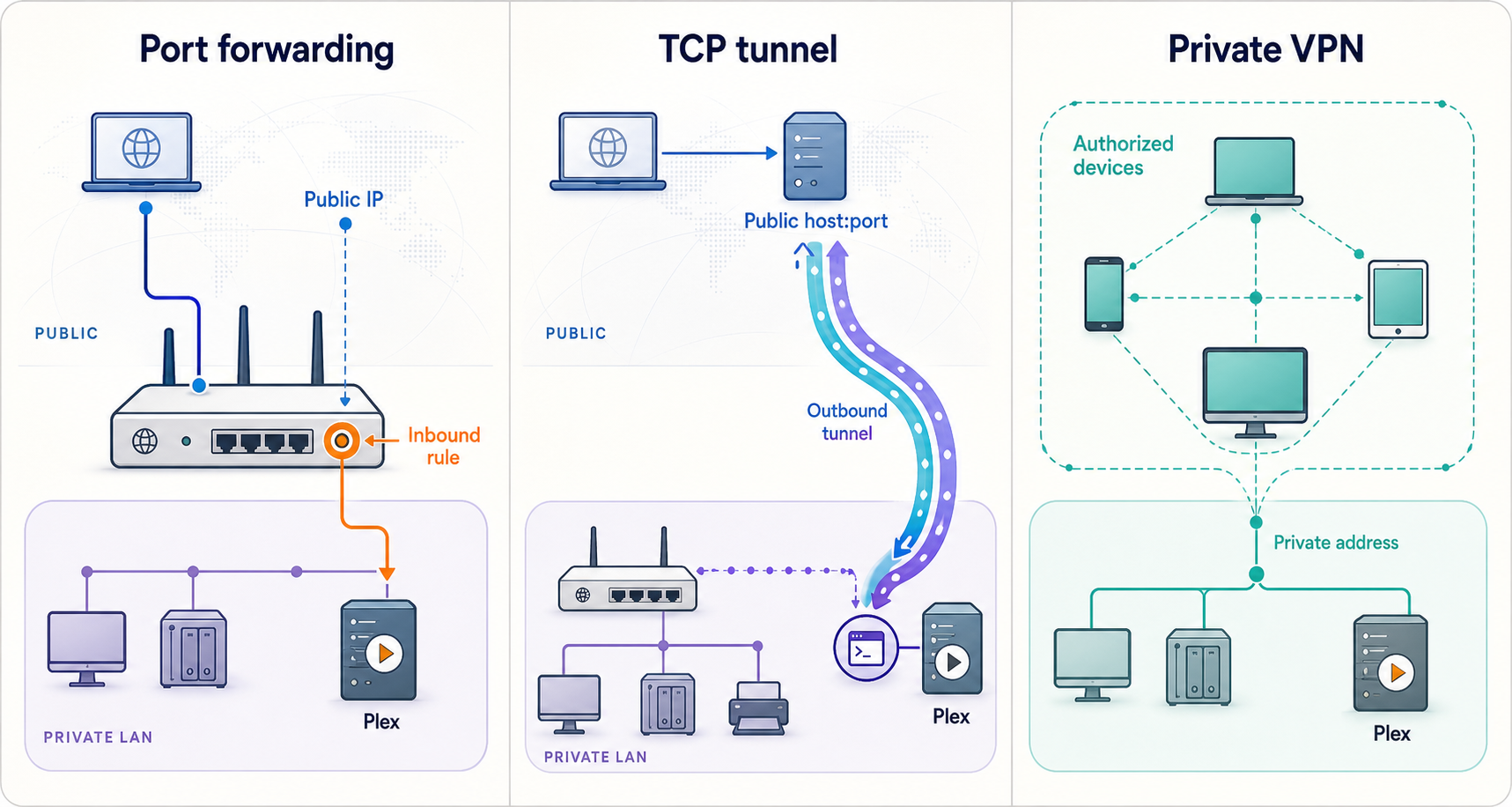
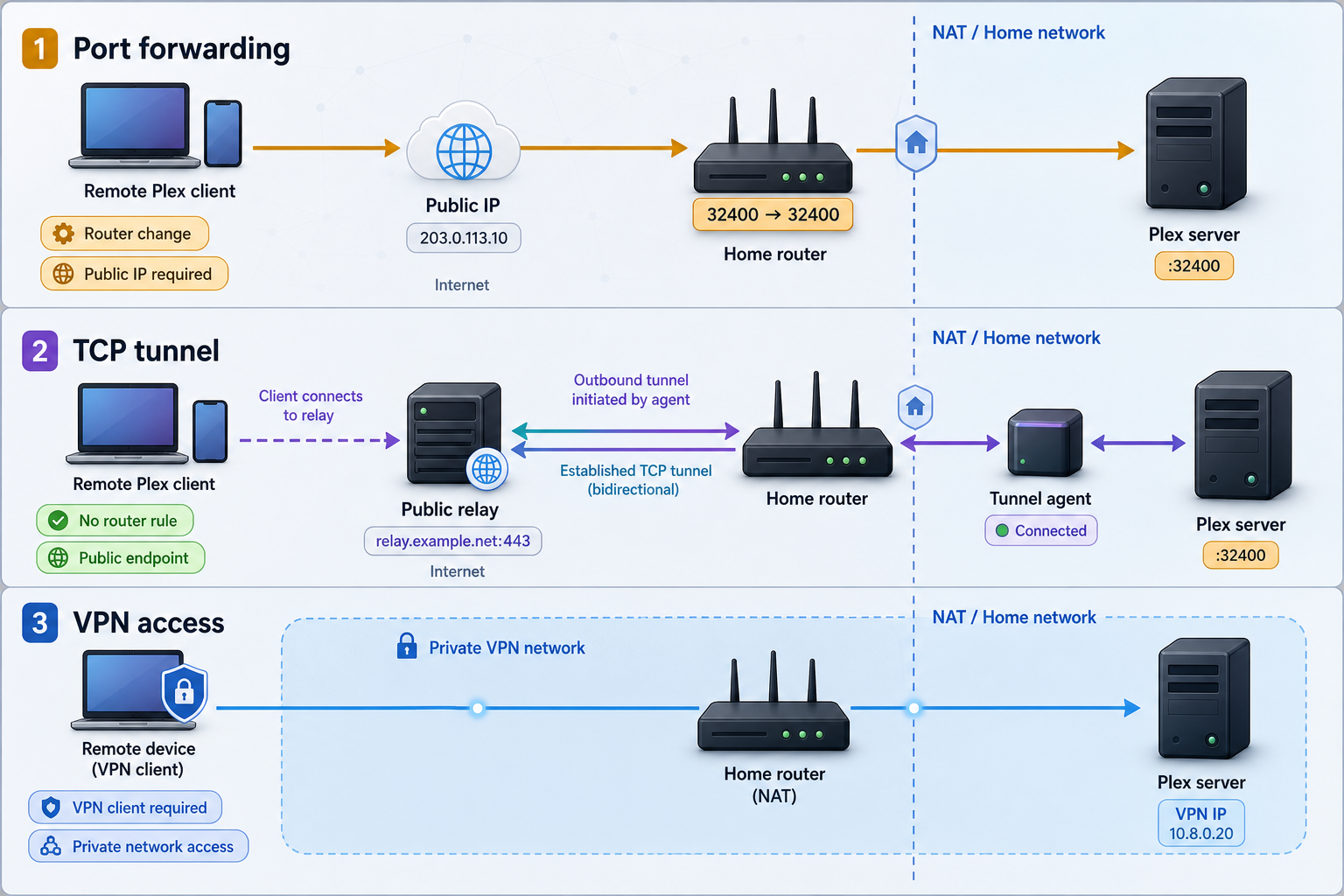
| Approach | Connection model | Typical requirements | Important consideration |
|---|---|---|---|
| Router port forwarding | The edge router maps an inbound public TCP port to Plex on the LAN | Router administration and an internet path on which inbound traffic can reach the router | The rule remains part of the router configuration until removed or disabled |
| Localtonet TCP tunnel | An outbound Localtonet client connection carries public TCP traffic through a relay | A connected client, running tunnel, and reachable private Plex target | Plex must advertise or use the assigned endpoint correctly, and the tunnel lifecycle must be maintained |
| Private mesh VPN | Authorized devices join a private network and reach private resources | VPN participation and configuration on the relevant devices | This provides private network membership rather than publishing one public TCP endpoint |
Standard Localtonet TCP tunneling is not VPN functionality. Our separate VPN Manager feature provides a private mesh VPN with granular firewall rules and can bridge local LANs. A TCP tunnel is narrower: it forwards one assigned public TCP endpoint to one local IP address and port.
A VPN can fit a private-device model in which every authorized remote device can join the network. A TCP tunnel can fit a service-publication model where installing a VPN on every remote Plex client is undesirable or unsupported. The correct choice also depends on the security policy, client platforms, and whether Plex can establish the intended secure direct connection through the published endpoint.
Routine operation, restarts, and endpoint changes
Understand every dependency
Remote access depends on several components operating together: Plex Media Server, the Plex host's local networking, the device running Localtonet, that device's outbound connection, the selected relay, the running tunnel, DNS resolution for the assigned host, Plex discovery, and the remote client. A failure in any one layer can make the server appear unavailable.
After restarting Plex or the host
Confirm that Plex has returned to a locally reachable state before diagnosing remote access. Then confirm that the Localtonet client is connected and that the tunnel is running. Do not assume that saving a tunnel configuration guarantees automatic startup after every operating-system restart. Startup behavior can vary with the client version and deployment method, so verify it on the actual device.
If Localtonet runs in Docker or another managed runtime, the surrounding service manager also becomes part of the lifecycle. Confirm that the runtime starts, networking is available, and the client can still reach the Plex target after a reboot.
When the public endpoint changes
Compare the currently displayed Localtonet host and port with the values recorded in Plex. If the public port changed, update Manually specify public port. If the public host changed and a custom server access URL is in use, update that URL as well. Save the settings, retry Plex Remote Access, and repeat the external playback test.
Stopping access intentionally
Stop the tunnel when remote access is not required. This removes the public forwarding path without changing the Plex server's local availability. Deleting the tunnel is appropriate when the endpoint and configuration are no longer needed, but recreation may result in different public endpoint values.
Monitoring status changes
Localtonet platform-wide Token/Tunnel webhooks can report Connected and Disconnected changes for tokens or tunnels in a selected Token Group. These lifecycle events are separate from Plex monitoring and from File Server file-event webhooks. A tunnel-connected event does not prove that Plex is healthy, authenticated, direct, or securely connected, so application-level verification remains necessary.
Troubleshooting the complete Plex connection path
Plex is not reachable from the Localtonet device
Return to the private target. Confirm that Plex is running and that the configured local address belongs to the Plex server. If Localtonet runs on another LAN device, do not use 127.0.0.1 because that points back to the Localtonet device itself. Use the Plex server's reachable LAN address.
Check whether Plex is listening on the expected interface and TCP port. Review the host firewall on the Plex server, security software, container port publication, virtual-machine networking, and VLAN or guest-network isolation. No inbound router rule is required, but local firewall policy must permit the Localtonet device to connect to Plex.
The Localtonet device shows disconnected
Confirm that the client application is running on the device associated with the selected token. Check general internet access, local DNS resolution, system time, and outbound network policy. A managed firewall or security product may prevent the client from reaching the relay even though ordinary web browsing works.
Also verify that the tunnel was assigned to the correct device token. Tokens are device-specific. Selecting a token belonging to an offline or different device prevents the intended client from carrying the tunnel.
The device is connected but the tunnel is unavailable
Check the tunnel's own lifecycle state. A connected device does not automatically start every saved tunnel. Use Start and confirm the active state. If the tunnel immediately stops or cannot be started, review the current dashboard status and configuration rather than repeatedly changing Plex.
Plex has the wrong public port
Compare the public endpoint shown by Localtonet with Plex's Manually specify public port value. The Plex field must contain the assigned public port. The Localtonet target must contain Plex's private listening port. These values may differ.
Do not change Plex's private service to the public port merely to make the numbers match. The tunnel performs that mapping. After correcting the public port, apply the setting and retry Remote Access while the tunnel is running.
Plex advertises the household WAN address instead of the tunnel host
This can occur because a manual public-port value does not itself supply Plex with the assigned Localtonet hostname. Review the advanced Custom server access URLs field. If the observed discovery problem requires it, add the complete Localtonet URL with the assigned host and public port, save, and test again.
Avoid leaving obsolete endpoint URLs in this field. Clients may try published addresses that no longer point to the running tunnel. Preserve only addresses that are intentional and currently valid.
The assigned hostname does not resolve
Test DNS resolution from the external client network. If the client cannot resolve the assigned hostname, confirm that it was copied correctly and still matches the running tunnel. Try another external network to identify local DNS filtering. Managed networks, parental-control resolvers, security products, or stale DNS caches can interfere with resolution.
Do not replace the hostname with an arbitrary relay IP unless the current Localtonet interface explicitly supplies and supports that value. A service hostname can be part of how the endpoint is routed.
Plex shows an indirect connection
Indirect playback indicates that Plex did not use the intended direct route and fell back to its relay mechanism where available. Confirm the manual public port, custom server access URL if used, tunnel state, and external DNS. Inspect the Plex dashboard while the client plays content to determine the actual route.
Secure-connection negotiation can also affect whether a client accepts a direct endpoint. Review Plex's secure server connection guidance. Do not globally weaken secure-connection requirements merely to make a test pass without understanding the exposure.
Plex authentication succeeds but the library is missing
Verify that the remote account has been granted access to the intended server and libraries. Confirm that the client is signed in to the expected account and has selected the correct server. A valid connection to Plex does not grant library authorization by itself.
The endpoint accepts TCP connections but Plex does not work
A generic TCP test proves only that something accepted the connection. It does not prove that the stream reached the correct Plex server, that Plex discovery advertised the endpoint, that authentication succeeded, or that the client accepted the connection's security properties.
Recheck the local target, open Plex Web through the intended path where appropriate, inspect Plex logs, and perform a signed-in external-client test. If more than one Plex server exists, confirm that Localtonet is not forwarding to the wrong host.
One Plex client works and another does not
Test each intended platform independently. Browser, mobile, television, and streaming-device clients may differ in server discovery, certificate handling, codecs, connection policy, and support for indirect fallback. Update the affected Plex client and Plex Media Server before comparing behavior.
Determine whether the working client is direct while the failing client requires a secure direct route it cannot establish. Also check whether one device is still on the local network or has cached an obsolete server endpoint.
Remote Access status changes from successful to unavailable
A brief success can be followed by failure if the tunnel stops, the Localtonet device disconnects, the public endpoint changes, Plex republishes another address, or an upstream policy interrupts the outbound connection. Recheck the status after waiting, then verify from an external client.
Plex's official Remote Access troubleshooting guidance provides additional application-specific checks. Apply those checks to the Localtonet mapping rather than creating an inbound router rule unless you have intentionally chosen to return to conventional port forwarding.
Security and least-exposure guidance
A public TCP tunnel creates an internet-reachable path to Plex. The fact that the Localtonet control connection is established outbound does not make the published application private. Anyone who discovers the endpoint can attempt to connect, so Plex authentication, authorization, updates, and secure-connection behavior remain important.
Separate tunnel transport from Plex connection security
Localtonet carries the TCP stream between the public endpoint and the configured local target. Plex controls its own application authentication and secure-connection negotiation. A running tunnel does not, by itself, prove that the Plex client reports a secure connection. It also does not prove that playback is direct rather than relayed.
Review the Plex dashboard or client connection information during an external playback session. If organizational policy requires secure connections and the custom tunnel hostname cannot establish the required Plex security properties, do not treat simple reachability as sufficient. Use an architecture that satisfies the requirement, which may include a correctly configured supported endpoint or private VPN access.
Require Plex accounts and limit library access
Keep the server claimed by the intended Plex account. Grant access only to known users and only to the libraries they require. Remove stale users and review sharing permissions periodically. Do not rely on obscurity of the assigned hostname or public port as an access-control mechanism.
Keep every component updated
Apply supported updates to Plex Media Server, Plex clients, the operating system, container runtime where applicable, and the Localtonet client. Updates can contain security fixes as well as changes to networking and compatibility behavior. After a significant update, repeat both the local test and an external playback test.
Protect the Localtonet device token
A device token identifies the client that runs the tunnel. Never place it in an article, shell history example, screenshot, public issue, or chat transcript. Redact it before sharing diagnostic material. If a token may have been exposed, use the current account controls and support process to replace or revoke it rather than continuing to trust it.
Expose only the Plex TCP target
Configure the tunnel for the single verified Plex TCP service. Do not expose an entire host, unrelated administrative interface, or broad set of ports to make troubleshooting easier. Stop the tunnel when it is not needed, especially if remote access is temporary.
Before relying on the setup, verify Plex authentication, the authorized account and libraries, the direct or indirect connection state, and the secure-connection indication from a real external client. Follow the rules of the network and the licensing requirements that apply to the media being accessed.
Frequently asked questions
Can Localtonet expose Plex without router port forwarding?
Yes. A Localtonet TCP tunnel can provide a public host and port while the client establishes the relay connection outbound. This removes the need for an inbound router or edge-firewall rule and does not require a public IP address or VPN setup. Local host-firewall and outbound network policies can still block the client or its connection to Plex.
Which port belongs in the Localtonet target?
Enter the private TCP port on which Plex is reachable from the Localtonet device. This is commonly 32400. Verify it locally before creating the tunnel, particularly when Plex runs in a container, virtual machine, or unusual proxy configuration.
Which port belongs in Plex's manual public-port field?
Enter the public port assigned to the running Localtonet TCP tunnel. It does not need to equal Plex's private port. Localtonet maps that public port to the private Plex target.
Do I need a Plex custom server access URL?
Not always. It may be needed when Plex advertises the home's detected public address rather than the assigned Localtonet hostname. If normal discovery already produces a working direct connection, adding another URL may be unnecessary. When used, enter the complete assigned host and public port using a scheme supported by the actual endpoint.
Must Localtonet run on the Plex server?
No. It can run on the Plex host or another device that can reliably reach the server's private IP address and TCP port. The selected device must stay powered, connected, and authenticated while the tunnel is needed.
Does creating the tunnel make Plex immediately available?
No. The selected Localtonet device must be connected and the tunnel must be started. Plex must be reachable locally, its manual public port must match the assigned tunnel port, and its advertised endpoint must be usable by the remote client.
Does successful playback prove the Localtonet connection is direct?
No. Plex may use an indirect relay connection when it cannot establish the preferred direct path. Inspect the Plex dashboard or client connection information during playback to confirm whether the connection is direct, indirect, and secure as required.
Will the Localtonet public endpoint remain the same after a restart?
Use the endpoint currently displayed for the tunnel and check the current product options for persistence. Do not assume that deleting, recreating, moving, or changing a tunnel preserves its host and port. If either value changes, update Plex and repeat the external verification.
Is a Localtonet TCP tunnel the same as a VPN?
No. A TCP tunnel publishes a specific TCP service through a public endpoint. Localtonet VPN Manager is the separate private mesh VPN feature for connecting authorized devices and bridging local networks.
Connect Plex through an outbound TCP tunnel
Create a Localtonet account, install the appropriate client on a device that can reach Plex, and map an assigned public TCP endpoint to the verified private Plex service without adding an inbound router rule.
Get Started Free →

