

Install and validate Qwen Code daemon mode locally, then apply a strict security gate before connecting it to a tunnel
Qwen Code includes an experimental qwen serve mode for a shared agent session over HTTP and Server-Sent Events using ACP. This revision targets Qwen Code v0.22.3 and separates what current evidence verifies from what remains unsafe to assume. You can install the selected version, validate the ordinary coding agent, start the daemon, identify the information required by Localtonet, and prepare an HTTP tunnel configuration. However, the available evidence does not establish a complete v0.22.3 listener configuration, endpoint path, daemon authentication model, origin policy, or supported remote-client command. For that reason, this guide does not recommend starting a public tunnel until those controls and protocol details have been confirmed for the installed release.
📋 What's in this guide
What this tutorial can and cannot safely complete
Qwen Code is an open-source coding agent that normally runs in a terminal. Its current project overview also lists IDE integrations, desktop applications, SDKs, messaging channels, and daemon mode. The documented daemon entry point is qwen serve, described as an experimental shared agent session over HTTP and SSE using ACP, with multiple clients connected to one agent. You can confirm that description in the current Qwen Code repository overview.
This tutorial targets Qwen Code v0.22.3 because a named version is necessary when documenting an experimental interface. The v0.22.3 release notes report daemon work including a standalone session API for creating, listing, resuming, archiving, and deleting top-level sessions. They do not, in the evidence available for this revision, define a complete public deployment recipe.
The evidence supplied for Qwen Code v0.22.3 does not specify a stable daemon bind flag, default listener address, default port, ACP endpoint path, SSE endpoint path, authentication credential format, authorization policy, allowed-origin configuration, or complete supported remote-client command. Those are essential deployment facts. Guessing them could expose an agent capable of interacting with source files and shell-oriented tools. Complete the local installation and inspection stages, but do not start a public Localtonet tunnel unless the documentation or startup output for your exact build explicitly provides those values and you have validated its access-control model.
The current Qwen Code documentation index links to dedicated daemon architecture, runtime, permission mediation, session identity, SSE event bus, authentication and security, TypeScript client, configuration, troubleshooting, observability, operations, and HTTP protocol sections. Those section names indicate that more detailed documentation exists. The extracted evidence provided for this revision does not include their configuration values or examples, so this article cannot responsibly reproduce them.
This distinction is important. A tutorial should not substitute likely defaults for verified defaults. It would be easy to invent a loopback address, a familiar development port, an endpoint such as /events, or an authorization header. Any of those guesses could be wrong for v0.22.3, could refer to a different service, or could omit a required security control.
The Localtonet side is more clearly defined. Our HTTP tunnel needs a local IP address and port reachable from the selected Localtonet client. The client establishes an outbound connection to a Localtonet relay, and a started tunnel provides a public HTTPS address. Tunnel creation and tunnel startup are separate lifecycle actions. Localtonet does not determine Qwen Code's ACP path or add application-level authorization to the daemon.
How the Qwen Code and Localtonet layers fit together
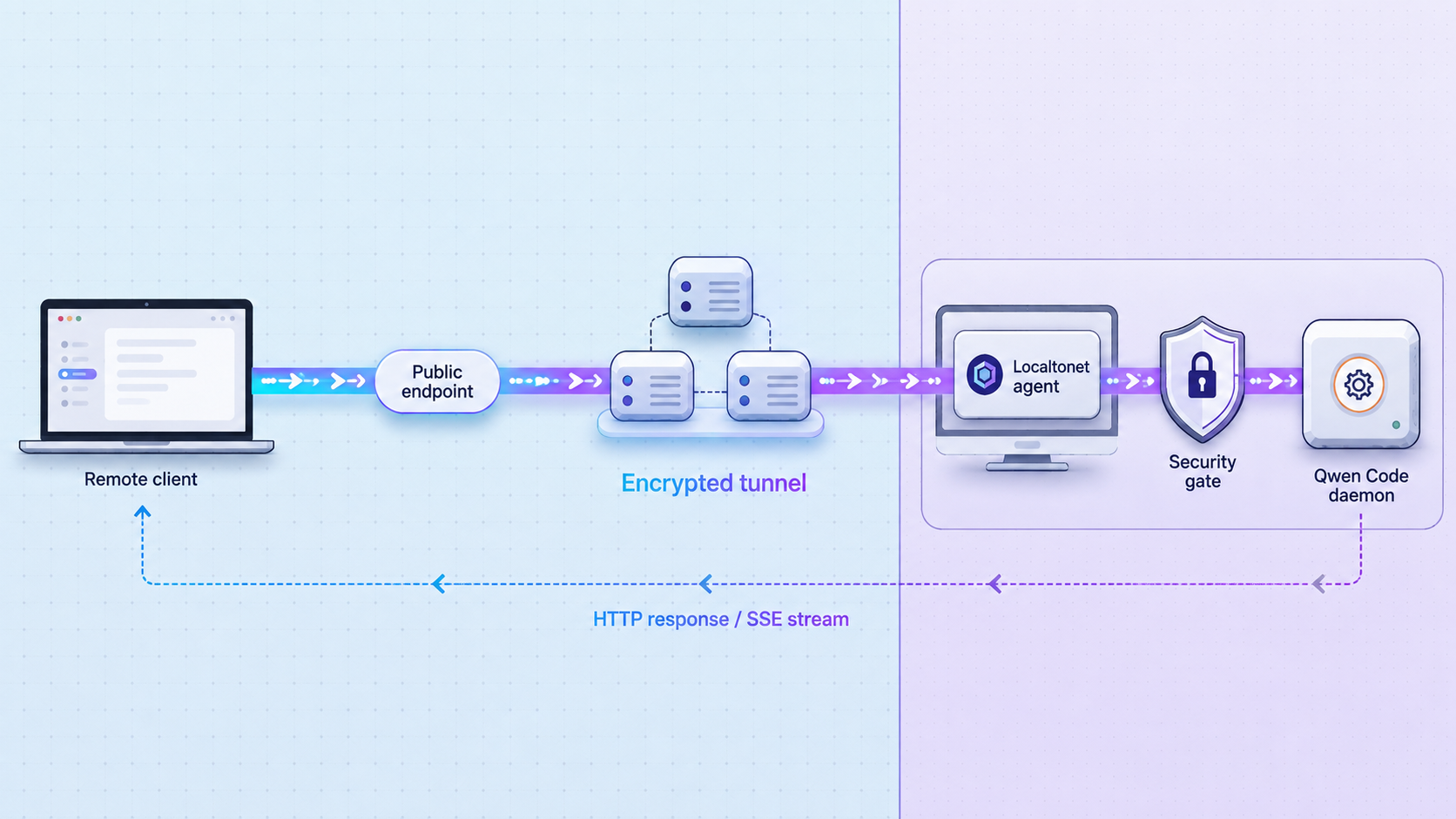
There are four independent parts in this workflow: the Qwen Code process, its model-provider connection, the daemon protocol, and the Localtonet tunnel. Treating them as separate layers makes setup and troubleshooting safer.
qwen serve exposes a shared agent session over HTTP and SSE using ACP. Multiple clients can share one agent session.
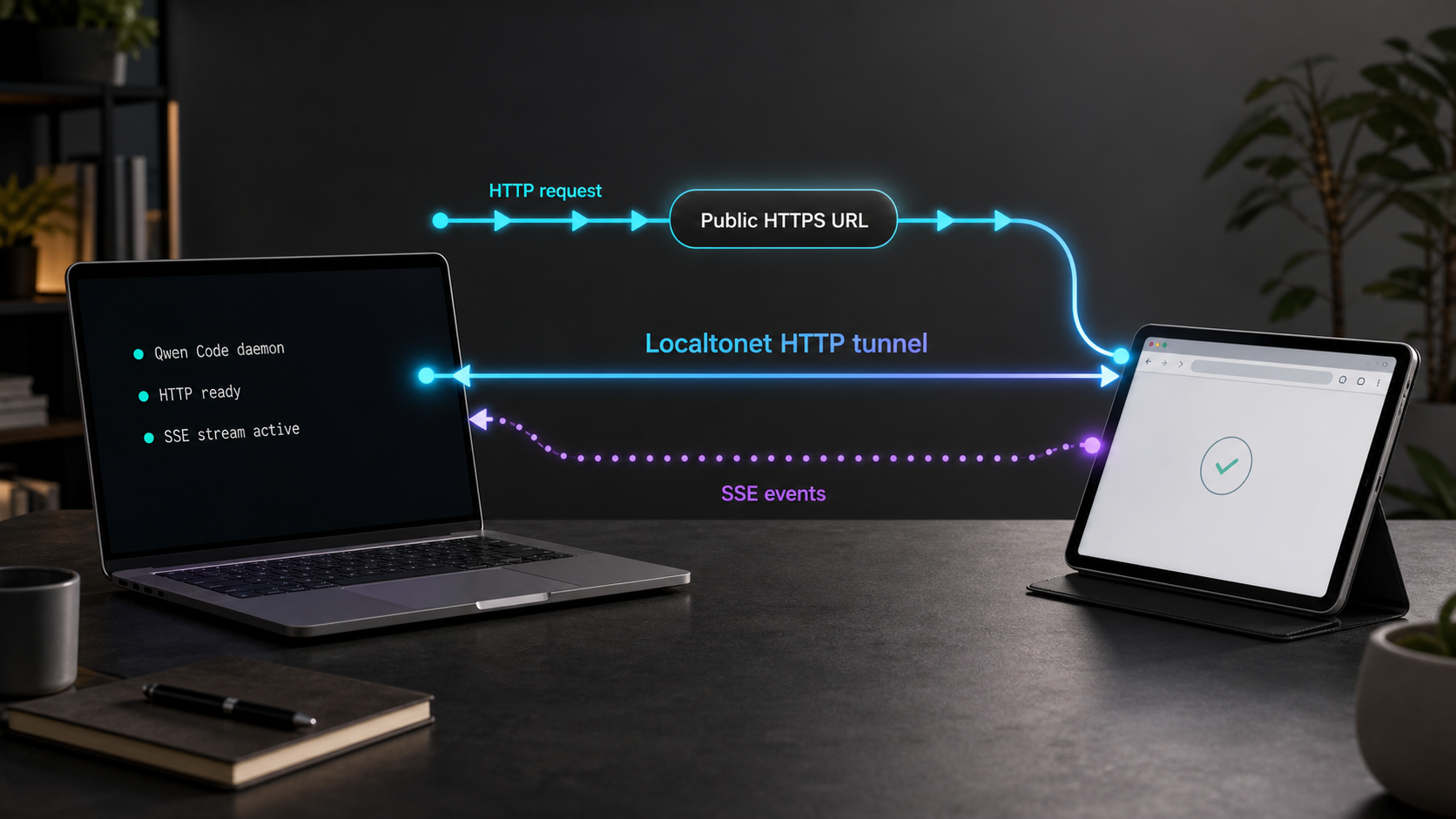
Why an HTTP tunnel is the candidate tunnel family
Qwen Code describes daemon mode as HTTP plus SSE. That makes an HTTP tunnel the logical Localtonet family to evaluate because the daemon is presented as an HTTP application rather than an arbitrary undocumented raw TCP service.
This protocol match is not the same as a tested compatibility guarantee. The available Localtonet evidence does not explicitly confirm Qwen Code's particular SSE implementation, reconnect behavior, headers, buffering expectations, idle duration, or ACP client behavior. This revision therefore does not claim that a Localtonet HTTP tunnel has been verified to preserve every required Qwen daemon behavior.
A successful remote test must use a Qwen-supported daemon client, establish the documented ACP connection, receive events over the SSE stream, preserve required authentication and headers, and complete a harmless agent interaction. Loading the public address in a browser or receiving an HTTP status code is not sufficient protocol verification.
Two separate lifecycles
The Qwen daemon and Localtonet tunnel start and stop independently. Starting qwen serve does not create a Localtonet tunnel. Creating a tunnel does not launch Qwen Code. Remote access is available only while all of the following remain true:
- The intended Qwen daemon process is running.
- The daemon is listening on the local address and port configured as the tunnel target.
- The selected Localtonet device is connected.
- The Localtonet tunnel has been started.
- The remote client uses the correct daemon protocol and endpoint path.
- The daemon's authentication, authorization, origin, permission, and session requirements are satisfied.
Prerequisites and deployment decisions
For the version-pinned path in this guide, prepare a supported environment with Node.js 22 or later and npm on PATH. Current Qwen Code documentation also provides standalone installers and a Homebrew package, but those moving installation channels do not inherently guarantee v0.22.3. Pinning the npm package gives this procedure a specific version boundary.
You also need a model-provider account or compatible provider endpoint supported by Qwen Code, a deliberately selected project directory, permission to run the Qwen Code and Localtonet clients, and a second trusted device or environment for any eventual remote test.
| Requirement | Why it is needed | Verification point |
|---|---|---|
| Node.js 22 or later | Current Qwen Code documentation requires Node.js 22 or later for npm installation. | Confirm your Node.js environment before installing the package. |
| npm on PATH | The version-pinned installation uses the published global npm package. | Run npm successfully in the same shell and user context used for installation. |
| Dedicated project directory | The agent should start in the repository it is intended to inspect and modify. | Review the directory before launching Qwen Code. |
| Model-provider access | Qwen Code needs a configured provider to complete an agent request. | Complete a harmless interactive request before daemon testing. |
| Localtonet client and account | The client creates the outbound connection used by a running tunnel. | Confirm the intended device appears connected without revealing its token. |
| Documented daemon security configuration | Public agent access requires known authentication, authorization, origin, session, and permission behavior. | This is a mandatory gate before starting the public tunnel. |
Select a narrow workspace
Start Qwen Code from the repository it should use, not from a home directory, drive root, shared secrets directory, or broad parent folder. The current Qwen Code documentation index includes trusted folders, ignored files, approval mode, sandboxing, file-system tools, shell tools, and permission mediation. The supplied evidence does not contain the detailed rules for those controls, so review their version-matched documentation before granting remote access.
Use a dedicated operating-system account where practical. That account should have only the repository, command, and network permissions required for the intended work. Do not run the daemon as an administrator or root merely to avoid a file permission problem.
Keep the Localtonet device token secret
A Localtonet device token identifies the client device that carries the tunnel. It is not a Qwen Code credential and must never be sent to a daemon client. Do not include it in command examples, screenshots, source files, issue reports, shell transcripts, or shared deployment notes.
Relay server and region choices must be selected from the current Localtonet dashboard. Available values can vary by account, plan, client version, region, or deployment, so this guide does not hardcode a server code.
Install the version-pinned Qwen Code package
The following installation path deliberately selects v0.22.3 rather than the moving latest tag. Run it in an environment with Node.js 22 or later:
npm install -g @qwen-code/qwen-code@0.22.3Use npm itself to confirm which global package version is installed:
npm list -g @qwen-code/qwen-code --depth=0
The package listing should identify @qwen-code/qwen-code@0.22.3. If another version appears, stop and determine whether a different installation method or global npm location is taking precedence.
Installing Qwen Code through npm, Homebrew, and a standalone installer on the same host can leave multiple executables in different locations. An older executable may then run even though npm reports v0.22.3. Use one managed installation path for this tutorial and document it before upgrading.
Alternative moving installation channels
Current Qwen Code documentation provides the following Linux and macOS standalone installer:
curl -fsSL https://qwen-code-assets.oss-cn-hangzhou.aliyuncs.com/installation/install-qwen-standalone.sh | bashWindows users are given this PowerShell installer:
irm https://qwen-code-assets.oss-cn-hangzhou.aliyuncs.com/installation/install-qwen-standalone.ps1 | iexHomebrew installation is also documented for macOS and Linux:
brew install qwen-code
These are valid documented installation choices, but this article cannot assert that they will install v0.22.3 at the time you run them. If version-specific daemon behavior matters, verify the installed release before proceeding. Restart the terminal after installation if qwen is not immediately available.
Authenticate and verify the interactive agent locally
Validate the ordinary terminal workflow before invoking daemon mode. This isolates package, project, and provider problems from daemon networking problems.
Open the intended repository
Change to the project that the agent is allowed to inspect. Review the directory for credentials, private keys, environment files, unrelated repositories, and production configuration before continuing.
Launch Qwen Code
Run qwen from that directory. Do not use elevated operating-system privileges unless you have a separately reviewed requirement.
Configure a provider
Follow the first-launch provider workflow or enter /auth inside the interactive session. Qwen Code documents Alibaba ModelStudio, built-in third-party providers, and a custom-provider path. Required credentials and endpoint fields depend on the selected provider.
Perform a harmless request
Ask Qwen Code to describe the project before approving file changes or shell operations. A successful response confirms the basic installation, working directory, provider configuration, and model connection.
A minimal local sequence is:
cd your-project
qwen
Replace your-project with the real repository path. Inside the session, use:
/authAfter authentication, a low-risk first request is:
what does this project do?Do not continue to daemon mode if this request fails. A Localtonet tunnel cannot fix a missing executable, invalid provider credential, unsupported model, provider outage, or incorrect project context.
Start Qwen Code daemon mode and inspect its contract
Exit or retain the interactive session as appropriate for your environment, return to the intended project directory, and start the documented daemon command:
cd your-project
qwen serve
Keep the terminal visible during initial inspection. Do not place the process into an unattended service yet. Because daemon mode is experimental, the startup output and behavior of the installed v0.22.3 executable are part of the evidence you must review.
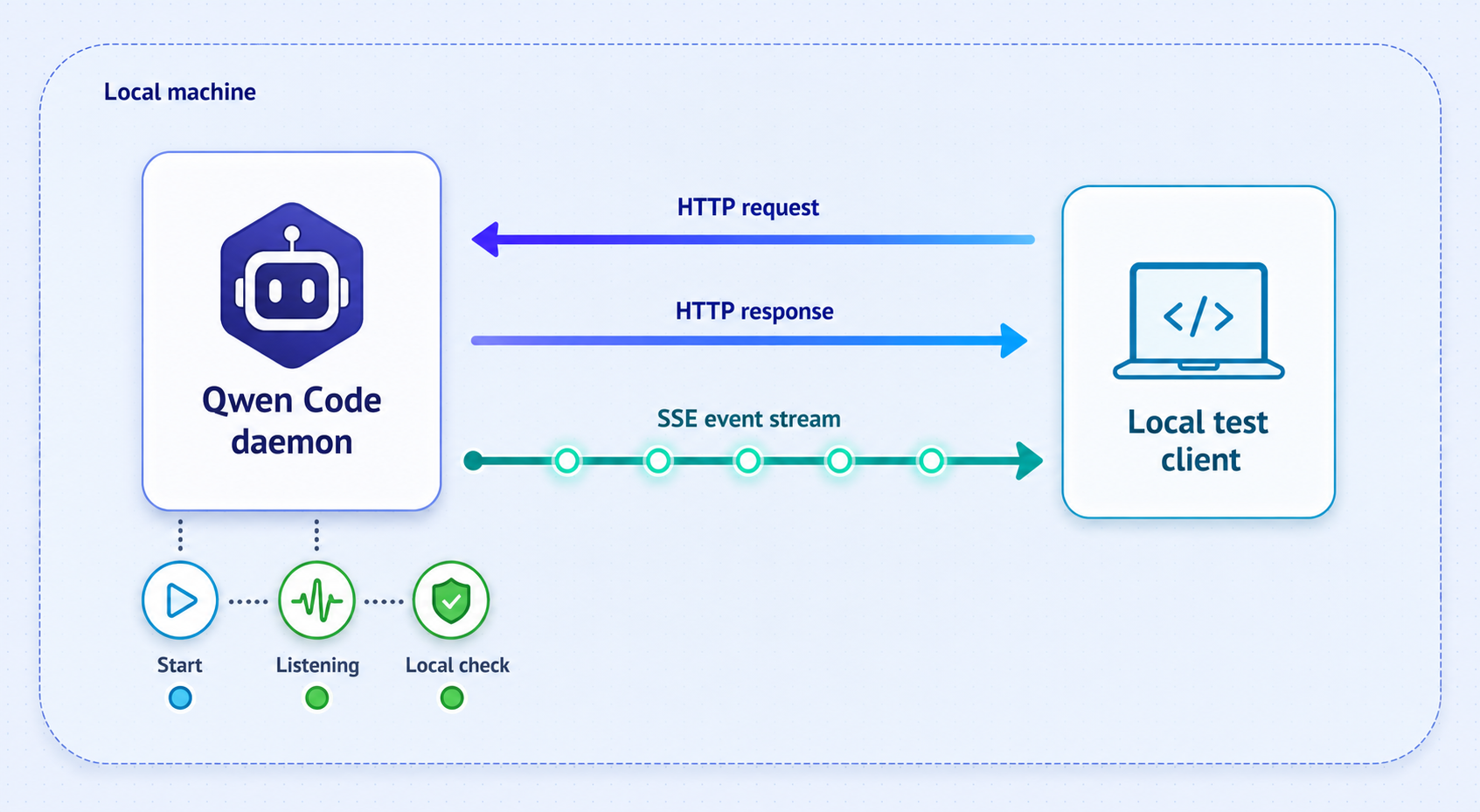
Record the required listener and protocol values
Before opening the Localtonet dashboard, obtain all of the following from the v0.22.3 startup output or version-matched daemon documentation:
- The exact bind address.
- The exact TCP port.
- The base HTTP URL used by a supported daemon client.
- Every required ACP, session, command, and SSE endpoint path.
- The supported daemon protocol version.
- The supported client package and its exact configuration format.
- The authentication credential type and how it is generated, stored, transmitted, rotated, and revoked.
- The authorization boundary between clients, owners, sessions, workspaces, and tools.
- The origin policy for browser-based or embedded clients.
- The permission mediation and approval behavior for file and shell operations.
- The session creation, identity, resumption, archive, and deletion behavior.
- The documented shutdown procedure and relevant logs.
The evidence available for this revision does not provide these values. It also does not provide a complete command for the TypeScript daemon client or another supported adapter. Without a known endpoint and authentication model, neither a generic browser request nor an improvised curl command is a valid or safe daemon test. Keep the process on a non-public interface and do not start the tunnel.
Understand bind addresses before changing one
A server bind address determines which local network interfaces accept connections. A client address determines where another process attempts to connect. A loopback listener is generally reachable only from the same host. A wildcard or LAN listener can expose the service to other devices on the local network.
Do not change the daemon to a wildcard address merely because the Localtonet client cannot reach it from another machine. The safer topology is to run Localtonet on the same host when the documented daemon configuration supports that arrangement. Even then, the exact target must come from verified listener information.
Use a supported daemon client
The current Qwen Code documentation index includes a TypeScript SDK daemon client and several daemon adapter categories. The repository overview also describes ACP-based delegation through acpx. The supplied extracts do not include their version-specific installation, endpoint, credential, or connection commands.
Do not replace a supported client with an ordinary browser tab. A browser might show a root response or error without exercising ACP, session creation, permission mediation, or SSE delivery. Local daemon validation is complete only when a supported client performs a harmless interaction and receives the expected typed events.
Prepare the Localtonet HTTP tunnel
Once the daemon has a verified local address and port, you can prepare the Localtonet configuration. Follow the current Localtonet HTTP tunnel documentation for the dashboard interface available to your account.
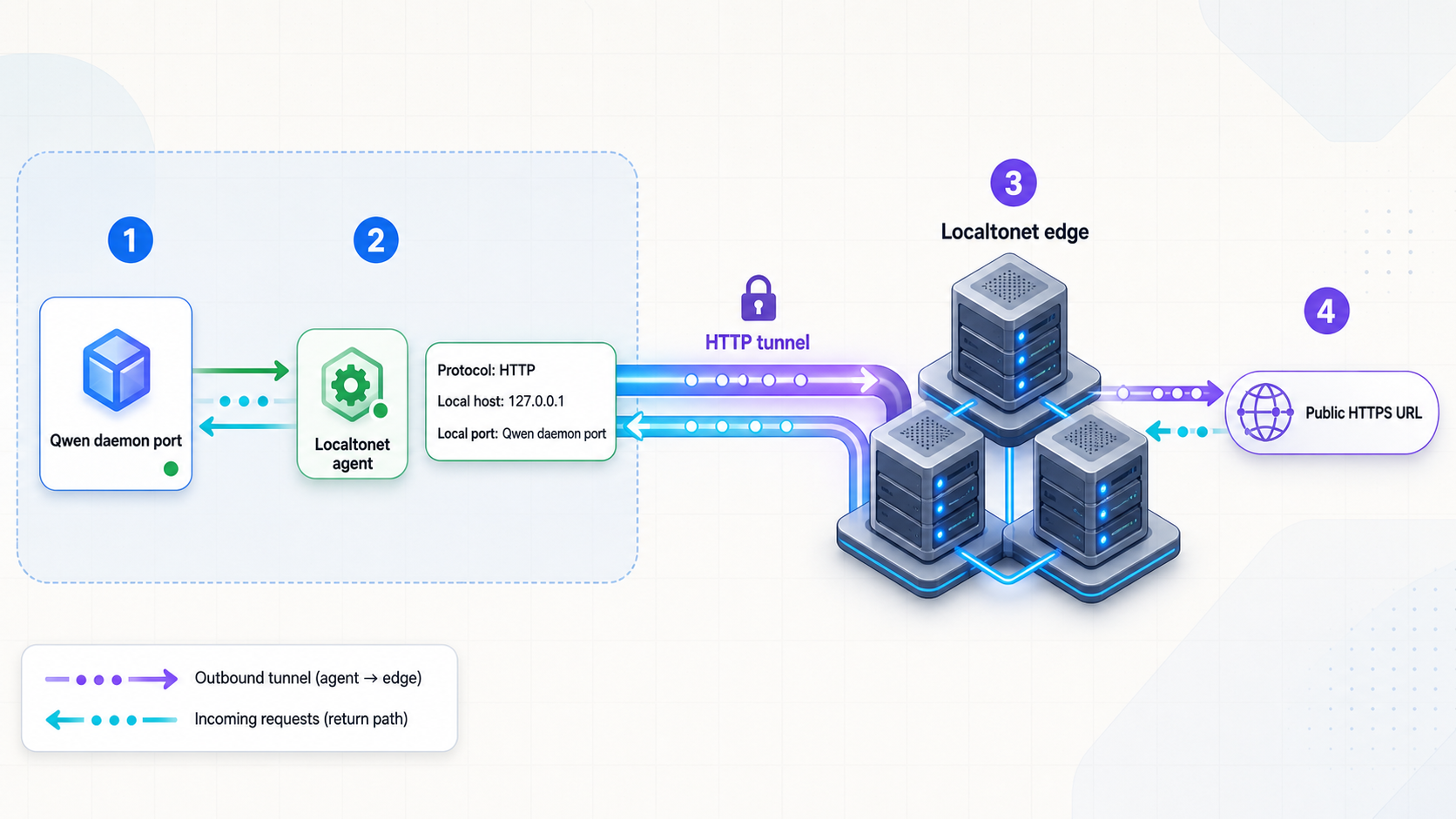
Install and run the Localtonet client
Run our client on the Qwen Code host or on another device that can reach the daemon's confirmed local listener. The same-host topology avoids making a loopback-only daemon reachable across the LAN.
Authenticate or select the intended device
Use the device-specific token through the approved client workflow, then select that connected device in the dashboard. Do not disclose the token to the Qwen client or include it in deployment notes.
Select an available relay server
Choose a currently available server or region from the dashboard. Do not copy a historical server code because availability may vary by account, plan, client version, region, or deployment.
Create an HTTP tunnel configuration
Select the HTTP tunnel family and enter the exact local IP address and port confirmed for the running daemon. Choose Random Sub Domain, Custom Sub Domain where supported, or Custom Domain as the Process Type. Check current DNS documentation before configuring a custom domain.
Start only after the security gate passes
Creating the configuration does not make it active. Press Start only after local ACP and SSE validation succeeds, application authentication and authorization are confirmed, and the remote client has a supported configuration. The tunnel then provides the public address used in place of the verified local base address while preserving the exact documented application path.
A public HTTPS address does not create Qwen Code user authentication, session ownership, tool authorization, or origin validation. If v0.22.3 lacks controls suitable for internet-facing use, leave the tunnel stopped. An unpredictable subdomain is not a substitute for authentication.
Do not guess the remote endpoint
Localtonet replaces the local network address with a public address. It does not discover or rewrite an unknown Qwen daemon path for you. If a known-good local client uses a documented path, the remote client must use that same application path under the assigned public address unless Qwen documentation explicitly says otherwise.
Preserve all protocol headers and credentials required by Qwen Code. Do not place long-lived credentials in a query string unless Qwen's official security model specifically requires that format. URLs are commonly retained in browser history, logs, screenshots, and monitoring systems.
Apply the daemon security gate
A coding agent can represent a powerful administrative surface. Depending on its configuration and granted approvals, it may inspect files, modify a repository, invoke tools, or execute shell-oriented operations. Its exposure must be evaluated differently from a static site or read-only status endpoint.
Required checks before public startup
- A supported v0.22.3 daemon client succeeds against the local listener.
- The client receives continuing SSE events, not only an initial HTTP response.
- The daemon rejects a request without valid application credentials.
- An authenticated identity cannot access sessions or workspaces outside its intended scope.
- Origin behavior is documented and tested for the selected client type.
- Session creation, ownership, resumption, archival, and deletion are understood.
- File and shell operations remain subject to the intended permission and approval model.
- The daemon runs under a non-elevated account with a narrow workspace.
- Provider keys and Localtonet device tokens do not appear in URLs, screenshots, logs, or source control.
- The shutdown procedure has been tested before remote access begins.
If even one of the first seven application-level checks cannot be completed from version-matched Qwen documentation and local testing, public deployment is incomplete. Keep the tunnel configuration stopped while evaluating a safer architecture, such as an authenticated intermediary explicitly supported by the daemon documentation.
Routine operation, shutdown, upgrades, and logs
Start in a controlled order
Start Qwen Code first and validate it locally. Next, confirm the selected Localtonet client is connected. Start the tunnel last. This order prevents an active public tunnel from pointing at an unknown process that happens to occupy the configured local port.
Stop and delete are operational actions
Stopping and deleting a tunnel are not installation steps. Stop the tunnel when remote access is no longer required but you want to retain its configuration. Delete it when the configuration itself is no longer needed.
Manage the Qwen daemon separately. The supplied evidence confirms qwen serve as its startup command but does not provide a universal graceful-shutdown command or service-management unit. Use the shutdown mechanism documented for the installed version and process environment. Test shutdown while the service is still local.
Record non-secret deployment information
Operational notes should include the Qwen Code version, installation method, operating-system account, project directory, provider type, listener address, listener port, protocol paths, client package and version, Localtonet device identity, tunnel type, and selected Process Type. Keep provider credentials, daemon credentials, session identifiers, private public addresses, and Localtonet device tokens out of ordinary notes.
Handle upgrades as security-sensitive changes
Daemon mode is experimental and v0.22.3 includes daemon-related development. Before upgrading, stop the Localtonet tunnel, record the current working configuration, and test the newer Qwen Code release locally. Revalidate listener settings, endpoint paths, protocol versions, authentication, authorization, origins, permissions, sessions, client compatibility, SSE behavior, logging, and shutdown before restoring remote access.
If you installed the pinned npm package, do not replace it with a moving latest release in unattended automation without a separate validation process. The current package can be identified with:
npm list -g @qwen-code/qwen-code --depth=0Use logs without leaking secrets
The current Qwen Code documentation index includes observability and debugging guidance, but the supplied extract does not define v0.22.3 log paths or logging flags. Do not invent a path or enable verbose logging blindly. Follow the version-matched observability documentation and redact provider keys, daemon credentials, authorization headers, session identifiers, private project paths, prompts containing proprietary code, and Localtonet device tokens before sharing logs.
Troubleshooting by layer
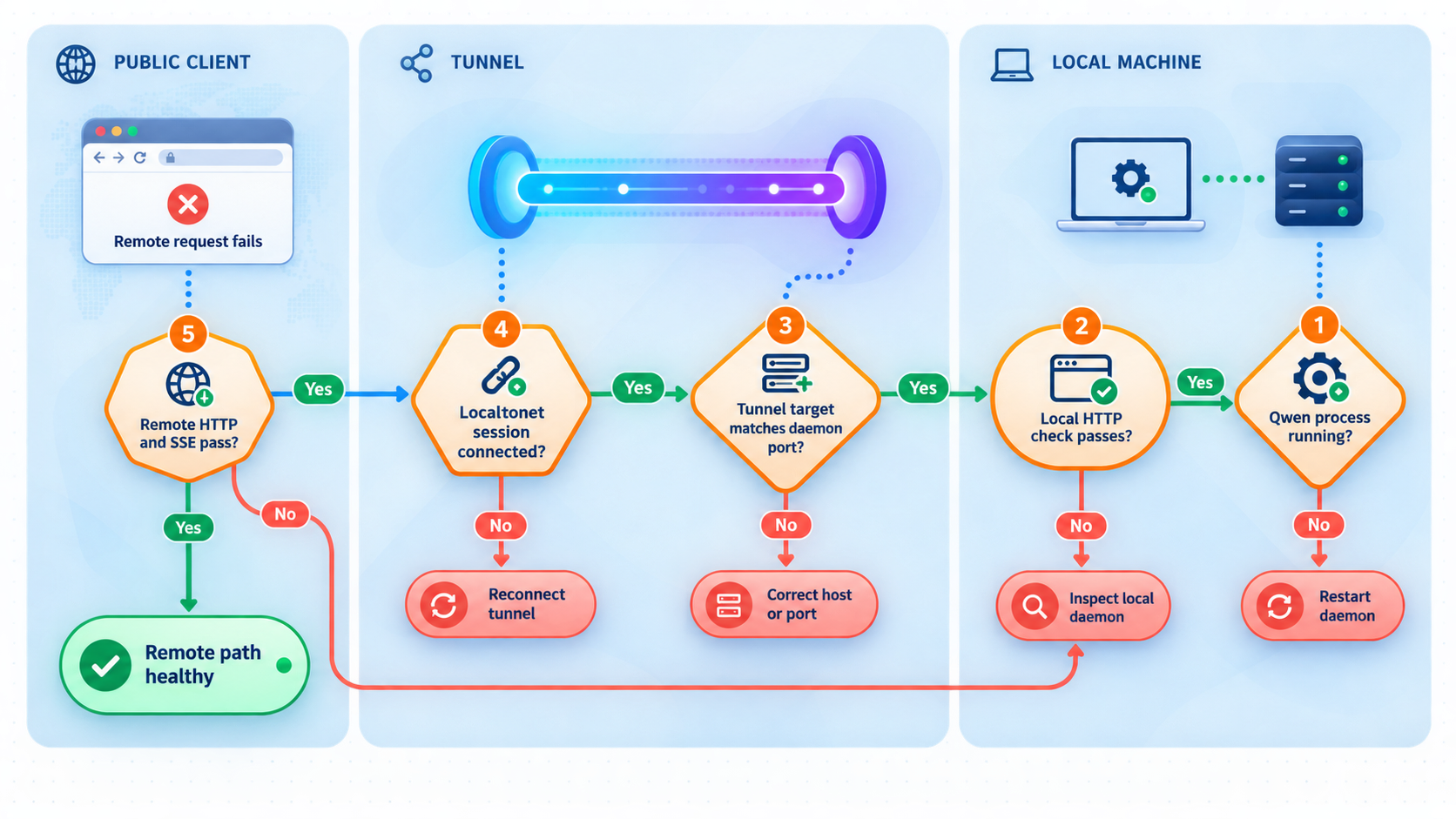
The qwen command is not found
Restart the terminal after installation. Confirm that Node.js 22 or later and npm are available in the current user environment. Use npm's global package listing to confirm that v0.22.3 is installed. If Qwen Code was previously installed through another method, identify which executable the shell resolves before reinstalling anything.
The interactive agent cannot complete a request
Use /auth to inspect the selected provider workflow. Confirm the provider credential, endpoint, account state, and model availability according to that provider's documentation. Do not change Localtonet settings because the tunnel is not involved in a local interactive provider request.
qwen serve is unavailable
Confirm that the shell is launching the intended v0.22.3 installation. Multiple package managers can leave an older executable earlier on PATH. The Qwen Code repository overview documents qwen serve, so absence of the command is a local installation or version-selection issue.
The daemon starts but does not report a usable listener
Do not choose a port by trial and error. Review the v0.22.3 serve runtime and configuration documentation. If the installed daemon and matching documentation still do not provide an explicit address and port, the Localtonet target cannot be configured reliably. Stop at this stage.
A local HTTP response appears, but the client does not work
Basic HTTP reachability does not prove ACP compatibility. Check the supported client version, protocol version, endpoint path, authentication material, origin requirements, session lifecycle, and SSE event handling. Do not treat a root-page response or an HTTP error as successful daemon validation.
Local access works, but the tunnel cannot reach the daemon
Confirm that the Localtonet client runs on a device able to reach the configured local IP address and port. A daemon listening only on loopback is not reachable from a different LAN device. Running Localtonet on the Qwen host may avoid that mismatch without broadening the daemon's LAN exposure.
The tunnel configuration exists but the public address is unavailable
Confirm that the intended Localtonet device is connected and that the tunnel was explicitly started. Creating a tunnel does not start it. Also verify that you are using the public address assigned to the active configuration.
The public address responds, but SSE or ACP fails
Compare the remote supported-client configuration with the known-good local configuration. Change only the base address required for remote access. Preserve the documented path, headers, credentials, protocol version, and client options. Because end-to-end Qwen SSE compatibility is not confirmed by the supplied Localtonet evidence, a failure at this stage requires protocol-level testing rather than an assumption that either product is working incorrectly.
A client reaches the wrong workspace or session
Stop the tunnel immediately. Verify the project directory from which the daemon was launched, the local process bound to the target port, the client identity, and the daemon's session-selection behavior. Do not approve file or shell operations until the workspace and session owner are unambiguous.
The connection drops during a long session
Check the remote client, Qwen daemon process, Localtonet client connection, and tunnel state independently. Then consult the version-matched Qwen SSE event bus, backpressure, session lifecycle, and error-remediation documentation. Do not assume that an interrupted stream can be resumed safely or that replayed events are automatically deduplicated.
Frequently asked questions
What command starts Qwen Code daemon mode?
Run qwen serve from the intended project directory. Qwen Code describes this experimental mode as a shared agent session over HTTP and SSE using ACP, with multiple clients connected to one agent.
Which Qwen Code version does this guide target?
The version-pinned installation targets v0.22.3. Daemon mode is experimental, so do not assume that another release has identical listener, endpoint, client, security, session, or shutdown behavior.
Which port and endpoint does v0.22.3 use?
The supplied evidence does not establish a universal v0.22.3 port, bind address, ACP path, or SSE path. Obtain those values from the installed daemon and version-matched Qwen documentation. Do not guess them when configuring Localtonet.
Can I complete a safe public deployment from this article alone?
No. The available evidence does not provide the complete daemon listener, endpoint, supported-client, authentication, authorization, origin, permission, and session configuration required for a safe public deployment. This guide intentionally stops public startup at that security gate.
Should I configure a Localtonet HTTP or TCP tunnel?
HTTP is the candidate tunnel family because Qwen Code describes daemon mode as HTTP plus SSE. This does not constitute a verified guarantee that every Qwen ACP and SSE behavior works through the tunnel. Complete an end-to-end supported-client test before relying on it.
Does the Localtonet HTTPS address authenticate Qwen Code clients?
No application-level authentication should be assumed. The public HTTPS address provides the tunnel endpoint, but Qwen Code must define and enforce its own client identity, authorization, session, origin, and permission requirements.
Can the Localtonet client run on another machine?
Yes, if that machine can reach the daemon's confirmed local IP address and port. It cannot reach a listener bound only to loopback on the Qwen host. Do not broaden the daemon bind address without reviewing the resulting LAN exposure and Qwen's documented security controls.
Why is stopping the tunnel separate from installation?
Installation prepares the Localtonet client, while tunnel creation stores a configuration. Starting, stopping, and deleting are later lifecycle operations. Stop the tunnel to end public availability while retaining the configuration, or delete it when the configuration is no longer needed.
Prepare Localtonet without exposing an unverified agent
Install Qwen Code v0.22.3, validate the interactive agent, inspect qwen serve locally, and create the Localtonet HTTP configuration only after you know the real listener values. Start public access only when a supported client, daemon authentication, authorization, origins, sessions, permissions, and end-to-end SSE behavior have all been verified.


