

Match the remote access path to the protocol, resource, and intended audience
Remote access is safest and easiest to operate when you begin with the resource that a user actually needs. A website, SSH server, game service, shared folder, proxy exit node, and private LAN require materially different access models. This guide explains those models, the prerequisites for using them, how to verify a service before exposing it, and how to test and troubleshoot the resulting endpoint. With Localtonet, the client establishes an outbound connection to our relay infrastructure, so you can publish a selected resource without inbound router port forwarding or a public IP address.
📋 What's in this guide
Why protocol should come before router configuration
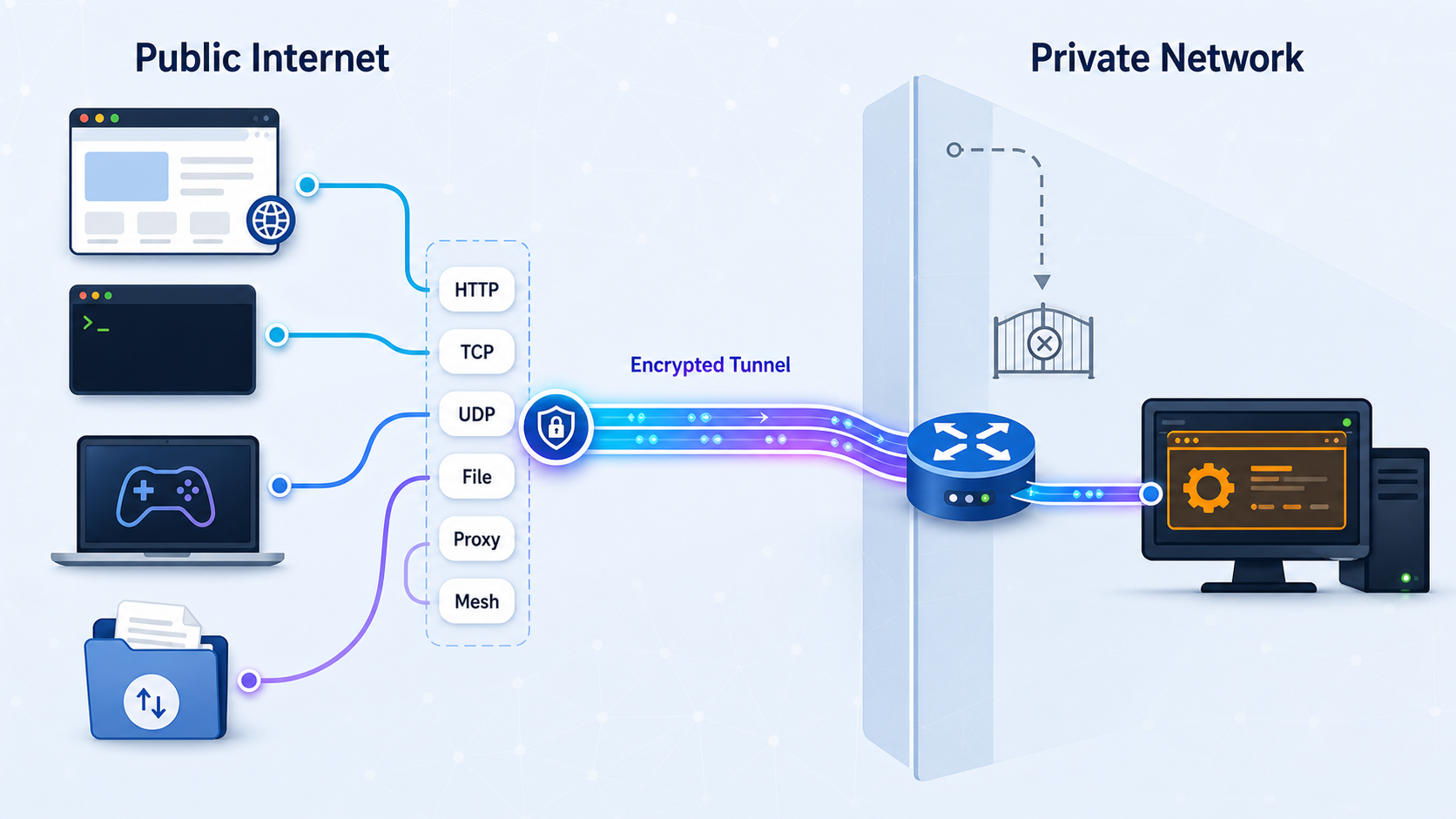
Traditional remote-access planning often starts at the network edge: identify the router, reserve an internal address, create a port-forwarding rule, and determine how remote clients will find the public connection. That sequence focuses on network transport before establishing what the user needs. It can also fail when the router is outside the administrator’s control, the internet connection does not have a directly reachable public address, or inbound traffic cannot be forwarded.
A protocol-first design reverses that process. First identify the resource, its native protocol, its listening address and port, its intended users, and the minimum operations those users require. A local web application generally belongs behind an HTTP tunnel. SSH normally needs raw TCP connectivity. Datagram-oriented software may require UDP, while some applications need both TCP and UDP. A file-only task can use File Server instead of exposing the whole desktop. Access to multiple private devices or network segments belongs in a private mesh design rather than a collection of public administration endpoints.
The distinction matters because a public endpoint exposes the selected application to remote traffic. The tunnel does not replace the target application’s authentication, authorization, update process, or safe configuration. Publishing a narrowly scoped service can avoid exposing unrelated LAN resources, but the selected service must still be treated as remotely reachable.
How outbound tunneling changes the network requirement
The Localtonet client application runs on the device that hosts the target or can reach it over the local network. That client establishes an outbound connection to a Localtonet relay server. Once the relevant tunnel is created and started, remote users receive either a public URL or a public host and port, depending on the tunnel family.
This means no inbound router port-forwarding rule is required. It also means the local internet connection does not need a public IP address that remote users can address directly. A dynamic public address is less relevant because users connect to the assigned Localtonet endpoint rather than locating the changing address of the local router.
Carrier-grade NAT, commonly called CGNAT, places subscribers behind address translation controlled by the provider. Customers usually cannot create an inbound mapping on that provider-managed layer. An outbound tunnel avoids depending on such an inbound mapping because the client initiates the relay connection from inside the network. This does not mean every restricted network will permit the connection. An organization or provider can still filter outbound traffic, intercept protocols, require a proxy, or apply other network policies.
Localtonet does not require an inbound router port or inbound firewall rule for the tunnel. The client must still have suitable outbound connectivity to the selected relay. On a tightly controlled business, school, hosting, or industrial network, the owner may need to permit that outbound connection under the organization’s policies.
The remote access models and what each one publishes
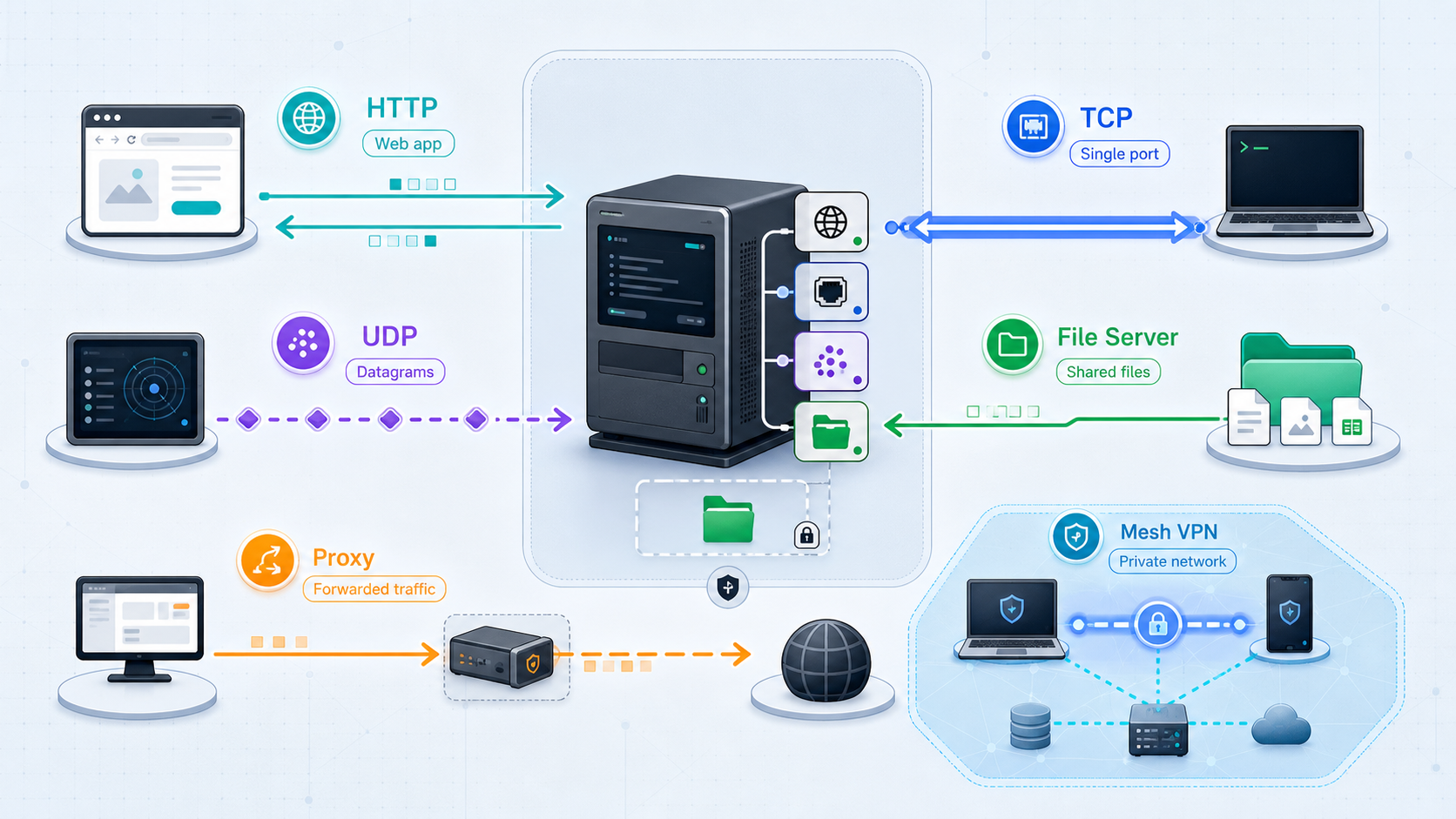
HTTP, TCP, UDP, combined UDP/TCP, TLS, and File Server tunnels publish selected resources. They do not join devices into a private network. Localtonet VPN Manager is the feature designed for private mesh connectivity and bridging local LANs.
HTTP and HTTPS behavior
An HTTP tunnel is intended for applications that speak HTTP or HTTPS and need a browser-compatible public address. HTTP and File Server tunnels can use Random Sub Domain, Custom Sub Domain, or Custom Domain process types. All three process types serve the selected content at a public HTTPS address. They change how the public name is selected, not the underlying purpose of the tunnel.
A TLS tunnel is not equivalent to that HTTP publishing behavior. TLS is a security layer used by many application protocols, and a TLS tunnel targets a local IP address and port like other conventional port-forwarding tunnel types. Select it only when it matches the service and the current product configuration. Do not assume that choosing TLS supplies HTTP routing behavior, a browser application, or the same process-type options as an HTTP tunnel.
Public endpoints versus private connectivity
HTTP, TCP, UDP, combined UDP/TCP, and TLS tunnels give remote clients an endpoint for one selected local service. File Server gives users controlled access to one folder path. A proxy makes the connected device an exit node for authorized proxy users. VPN Manager solves a different problem by connecting approved devices or LANs through a private mesh and enforcing granular firewall rules.
That boundary should drive the design. If a webhook provider must call one development URL, an HTTP tunnel is appropriately narrow. If an administrator needs to reach several internal hosts, a private mesh can express that requirement more clearly than publishing each management interface to the public internet.
Prerequisites before creating remote access
Complete the following checks before opening the Localtonet dashboard. Most apparent tunnel failures are actually local service, reachability, or protocol problems that can be found before any public endpoint is created.
Install the client on a suitable device
Use the current Localtonet installation option for the operating system of the device that can reach the target. The maintained product guidance does not provide one universal command or a fixed operating-system matrix suitable for copying into this protocol-wide article. Installation packages and instructions can change, so obtain the supported path from the current Localtonet product and Localtonet documentation rather than running an unverified command from an older tutorial.
The client does not always need to run on the same host as the service. For example, a Localtonet client on a server can target an embedded device elsewhere on the same LAN, provided that the client device can route to the embedded device and connect to its listening port. If local routing, VLAN rules, or the target host’s firewall blocks that connection, the public tunnel cannot repair the local path.
Identify the bind address, target address, and port
A service bound to 127.0.0.1 or localhost accepts connections only from the same machine. That is suitable when the Localtonet client runs on that machine and targets the loopback address. It is not reachable from a different Localtonet client elsewhere on the LAN. For a remote LAN target, the application must listen on an address reachable from that client, and local firewall policy must allow the connection.
Confirm the port from the target application’s configuration or logs. Do not choose a familiar default merely because the application often uses it. Administrators commonly move SSH, development servers, dashboards, and game services to nondefault ports.
Protect the device token
The authentication token identifies the client device. Treat it as a credential. Do not publish it in screenshots, source repositories, tickets, chat transcripts, examples, or shell history shared with others. Never guess a token or reuse a value shown in a tutorial. Select the device using its actual token through the supported Localtonet workflow.
Protocol and scope decision guide
| Resource or goal | Likely Localtonet approach | Target and remote access | Key security question |
|---|---|---|---|
| Local website, API, webhook receiver, or web dashboard | HTTP tunnel | Local IP and port, reached through a public HTTPS address | Does the application enforce appropriate authentication and authorization? |
| SSH administration | TCP tunnel | Local SSH address and port, reached through a public host and port | Are accounts, keys, privileges, and server updates configured safely? |
| Remote desktop | TCP, UDP, or combined UDP/TCP as required by the protocol | Local service address and required port or ports | Should this sensitive administration interface remain private through VPN Manager? |
| TLS-based non-HTTP service | TLS tunnel when it matches the application | Local IP and port for the TLS-speaking target | Does the remote client expect the service’s actual TLS protocol rather than HTTPS? |
| Game server or real-time application | TCP, UDP, or combined UDP/TCP | Transport and local port must match the server configuration | Which exact transports and ports are necessary? |
| IoT dashboard or device API | HTTP or a raw port tunnel, depending on the protocol | One selected device interface reachable from the client | Was the device designed and maintained for remote exposure? |
| One local folder | File Server | Local folder path through Default, SFTP, or WebDAV | Which paths and file operations should each user receive? |
| Connected device as an internet exit | HTTP or SOCKS5 proxy | The client device becomes the proxy exit node | Who may use the proxy, and is that use authorized? |
| Multiple private devices or broader LAN access | VPN Manager | Private mesh connectivity, granular firewall rules, and LAN bridging | Which peers and network segments should communicate? |
Web applications, development servers, and APIs
Choose an HTTP tunnel when the target speaks HTTP or HTTPS and a remote browser, API consumer, or webhook provider needs a public HTTPS address. Typical examples include a local development site, an API under test, a webhook receiver, and a browser-based IoT dashboard.
Development servers often expose debugging information, administrative actions, sample credentials, permissive cross-origin settings, or unfinished authorization logic. Before starting the tunnel, disable unnecessary debug behavior, require appropriate authentication, remove routes that remote users do not need, and avoid using a public endpoint for an administration panel that should remain private.
SSH and remote desktop
SSH is a TCP service, so a TCP tunnel is the direct transport match. The tunnel forwards traffic to the SSH server’s reachable local IP address and listening port. The remote SSH client then uses the public host and port assigned to the tunnel. Keep SSH’s own security controls enabled, restrict available accounts, prefer strong credentials, apply least privilege, and maintain the server.
Remote desktop products vary. Some use TCP, some use UDP, and some use both. Confirm the current requirements for the selected remote desktop service rather than assuming that every implementation uses the same transport. Because remote desktop often grants broad control over a machine, consider whether private VPN Manager access is a better trust boundary.
Game servers and datagram applications
Do not select UDP simply because an application is described as real time. Confirm what the server actually listens on. Some games use TCP, some use UDP, and others use both for different functions. A transport mismatch can produce confusing symptoms, including a visible endpoint that the game client cannot use.
Publish only the gameplay ports that are required. Do not expose a management console, database, host file service, or SSH daemon merely because it runs on the same machine. Administration can use a separate, more restricted access path with its own lifecycle.
IoT devices and other LAN targets
HTTP, TCP, UDP, combined UDP/TCP, and TLS tunnel types can point to a local IP address and port on or reachable from the client device. This is useful when the target is a camera, sensor, controller, or embedded computer that cannot run the Localtonet client itself.
Reachability does not establish that an embedded interface is safe for public use. Many device consoles assume a trusted LAN and may receive infrequent security updates. If users need access to several devices, or if the interfaces should remain private, VPN Manager with granular firewall rules is usually the more appropriate Localtonet model.
When File Server is the narrower choice
If the actual task is to retrieve, upload, organize, synchronize, or share files, exposing remote desktop or machine administration can grant much more capability than necessary. A Localtonet File Server tunnel publishes a selected local folder path instead of forwarding to an arbitrary local IP address and port.
The Default browser file manager supports upload, download, rename, move, copy, delete, folder creation, search, preview, tags, archives, sharing, and keyboard-based cut, copy, and paste. It has no upload size limit. Global permission flags cover Upload, Download, Delete, Create Folder, Move, and Share. Per-path overrides are also available, with the most specific matching path taking precedence. Permission changes apply without restarting the tunnel.
Public share links can include an expiry date, download limit, and separate link password. File-event webhooks can report upload, delete, rename, and move events, with an optional path filter and HMAC signing. These file-level events are separate from platform-wide Token and Tunnel webhooks, which report Connected and Disconnected status changes.
Security defaults in the Default web manager include path-traversal protection, per-IP rate limiting, hidden dotfiles, blocked executable extensions with an optional allowlist mode, and TLS termination at the tunnel edge. Additional capabilities include a recycle bin, version history, full-text document search, an inline document viewer, a code editor, real-time interface updates, directory statistics, Smart Collections, disk spanning, and cloud backup to S3 or S3-compatible storage, FTP, or SFTP.
Per-folder encryption in the Default web manager uses AES-256-CBC. Its key is derived through PBKDF2 with 100,000 iterations. The password and key are not stored. Only a salt and verification hash are kept in a hidden .fsvault file, and unlock tokens last 30 minutes. There is no administrator override or password recovery, so preserve the folder password safely.
Current verified information does not establish whether per-folder encryption, Immich-compatible mobile backup, or Smart Collections applies to the SFTP and WebDAV sub-types. Plan around documented behavior for the selected sub-type rather than assuming feature parity.
Configure the selected Localtonet access model
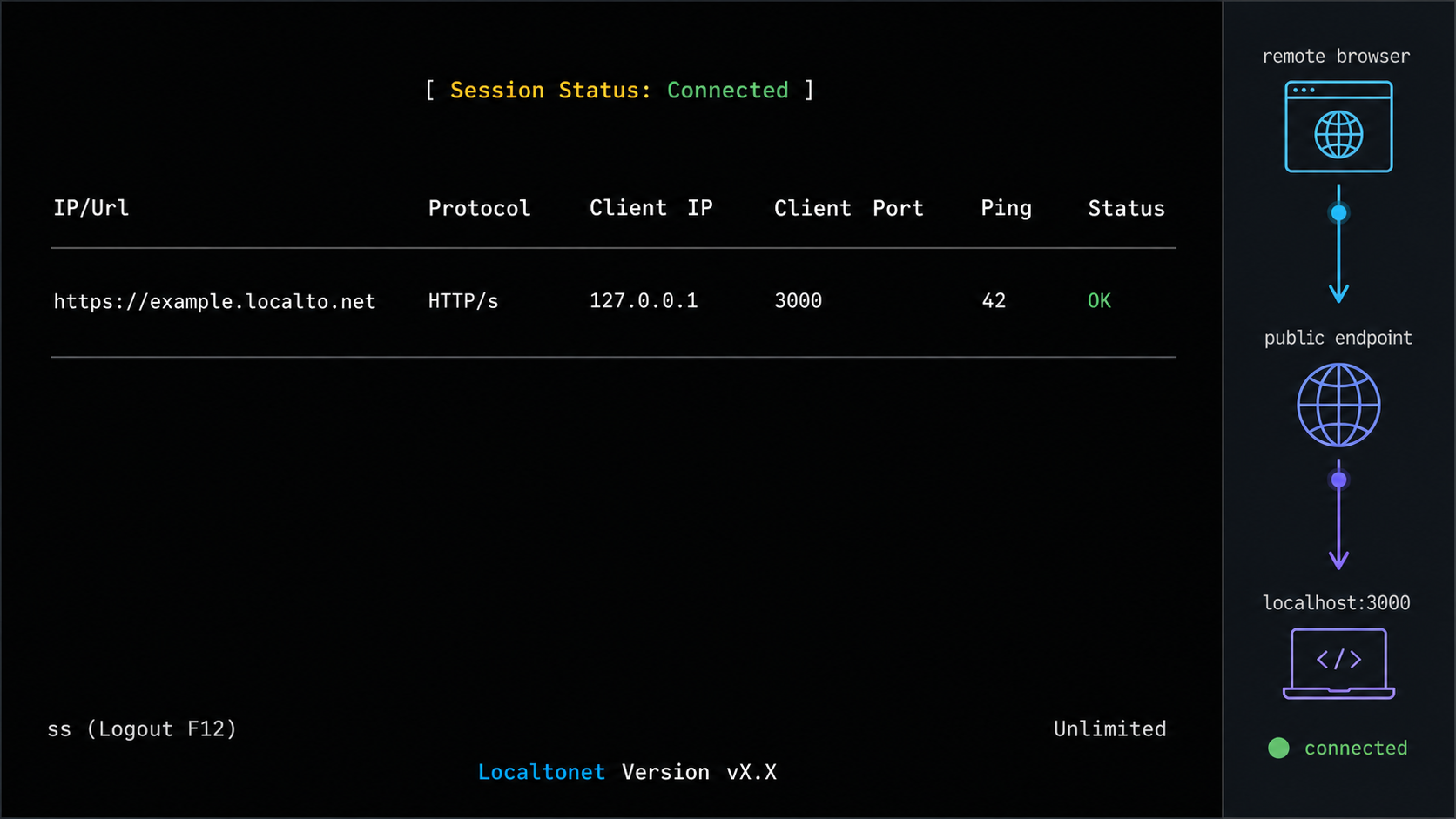
There is one shared lifecycle across Localtonet: run the client, select the device, create an appropriate configuration, start it, use the assigned endpoint, and stop or delete it when it is no longer required. However, the configuration fields are not identical across every product family. Conventional tunnels use a local IP and port, File Server uses a folder path, proxy modes use the connected device as an exit node, and VPN Manager creates private mesh connectivity.
Workflow for HTTP, TCP, UDP, combined UDP/TCP, and TLS tunnels
Use the following lifecycle for conventional local-target tunnels. The exact fields and available options must be taken from the current tunnel page and the relevant section of the official Localtonet documentation. This article does not imply that every tunnel type has the same process-type, naming, or endpoint fields.
Install and run the Localtonet client
Run the client on the service host or another device that can reach the target over the local network. Confirm that the client is connected before expecting a tunnel to become available.
Select the client device and current relay
Select the device through its device-specific authentication token, then choose an available relay server or region shown by the current product. Keep the token secret and do not hardcode an old server code.
Choose the matching tunnel type and local target
Select HTTP, TCP, UDP, combined UDP/TCP, or TLS according to the application. Enter the local IP address and port that the client has already verified it can reach. For HTTP tunnels, select the applicable process type shown in the interface.
Create and deliberately start the tunnel
Creating a tunnel does not mean it is running. Use Start after reviewing the target, then obtain the public URL or public host and port assigned to that tunnel.
Test remotely and end access when finished
Test with a compatible client from an external network. Stop the tunnel to end active access, or delete the configuration when it is no longer required.
Documented File Server workflow
File Server has a specific documented setup sequence. See the Localtonet File Server documentation for the current interface alongside this self-contained workflow.
Install the Localtonet app for your operating system
Install and run the Localtonet application on the device that has access to the folder you intend to publish.
Open the File Server Tunnel page
Go to the File Server Tunnel page in Localtonet rather than creating a conventional IP-and-port tunnel.
Select the Process Type
Choose the applicable Random Sub Domain, Custom Sub Domain, or Custom Domain process type from the current interface.
Select the AuthToken and server
Select the device-specific authentication token for the client and choose a currently available server. Do not expose the token or copy an obsolete server value.
Enter the local folder path
Enter the path to the intended folder, such as C:\Users\Work on Windows or /root or /usr/share on Linux or macOS. Verify that the client process has the required file-system access.
Press Start
Start the File Server tunnel, then test the resulting access method with a browser, SFTP client, or WebDAV client as appropriate for the selected sub-type.
Proxy Server and VPN Manager are not local-target tunnels
Do not enter an invented local service target for a proxy mode. HTTP and SOCKS5 proxy tunnels make the connected client device the proxy exit node. Proxy credentials and authorization must be managed carefully because an unauthorized user could send traffic through that device and network connection.
VPN Manager is also separate from conventional tunnel configuration. It creates a private mesh VPN and can bridge local LANs with granular firewall rules. Use the VPN Manager setup and design guidance when the requirement is peer-to-peer or private LAN access rather than one public URL or public port.
Treat every public URL and public host and port as an externally reachable entry point. Keep application authentication enabled, apply least privilege, restrict users and operations where supported, patch the target service, and avoid exposing unrelated administration interfaces. Stop temporary tunnels after the task is complete.
Verify locally first, then test the public endpoint
Prove the local service before creating exposure
Test from the Localtonet client device using the same target address, port, and protocol that the tunnel will use. For a service on the same machine, this may mean opening its local URL or connecting to its loopback port. For a target elsewhere on the LAN, connect to that device’s LAN address from the Localtonet client device.
A successful test from some other computer is not always sufficient. The critical question is whether the device running the Localtonet client can reach the exact target. VLAN policy, host firewalls, interface binding, and route differences can make the path available from one machine but unavailable from another.
Confirm more than a listening socket. For a web application, load a meaningful route and complete an expected authenticated action. For SSH, verify that the server presents its identity and accepts the intended authentication method. For a game or custom service, use its real client or health check. For File Server, confirm that the selected folder exists and that the Localtonet client process has the intended read or write access.
Test a public URL
HTTP and browser-based File Server endpoints provide a public HTTPS address. Open that exact address from a device that is not relying on the same local-only path. A phone using cellular data is a practical option when available. Verify the expected page, certificate behavior, login flow, authorization rules, and important application actions.
Also test negative cases. A signed-out user should not receive authenticated content. A read-only file user should not be able to delete or upload. A webhook endpoint should reject invalid requests according to the application’s design. Successful reachability is only one part of verification.
Test a public host-and-port endpoint
TCP, UDP, combined UDP/TCP, TLS, SFTP, and similar protocol clients must use the public host and port assigned by the tunnel. Do not substitute the local port unless the public endpoint specifically displays the same value. Configure the remote application with the assigned host, assigned port, and matching protocol.
For SSH, use the normal SSH client and specify the assigned public host and port. For remote desktop, enter the public endpoint through the client’s supported host-and-port format. For a game server, use the game client’s connection interface. For SFTP, configure an SFTP client rather than a web browser. UDP testing must use a client that actually sends and expects the application’s UDP traffic because a TCP connection check cannot prove UDP functionality.
Check the complete tunnel lifecycle
Creating the configuration is not the same as running it. Verify that the selected Localtonet client is connected and that the tunnel has been started. The endpoint is available only while that client remains connected and the tunnel is running.
After successful testing, stop the tunnel and verify that the endpoint is no longer usable. Start it again only if continued access is required. If the configuration was temporary or should not be reused, delete it rather than leaving an obsolete entry without an owner.
Least privilege and routine operation
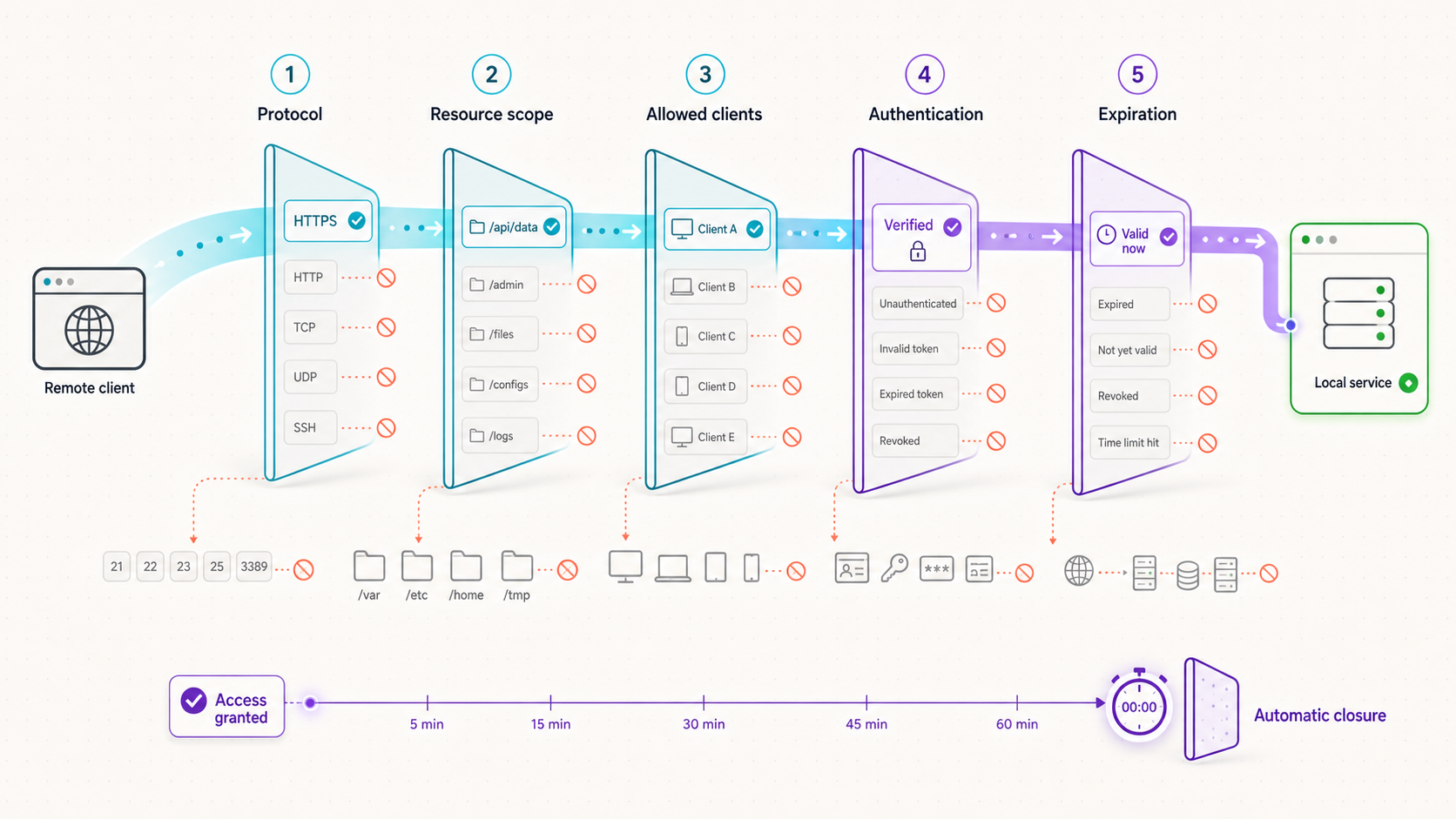
Start by recording the remote user, target resource, required protocol, permitted actions, and intended lifetime. If a collaborator only needs to preview a web application, do not provide SSH. If an automation job only needs one folder through SFTP, do not expose the desktop. If administrators need several private systems, avoid publishing every management interface when a private mesh and firewall rules better describe the intended boundary.
Separate service access from administration
A public game endpoint can remain independent from server administration. A browser application can be published while its database remains private. An IoT data endpoint does not require exposing the device’s configuration console. Separate tunnels let each access path use the correct protocol, users, controls, and lifetime.
Keep sensitive administrative systems private unless there is a carefully reviewed reason to publish them. Router consoles, hypervisor interfaces, storage administration, camera management, and infrastructure dashboards frequently provide broad control and may have been designed for trusted local networks. VPN Manager can provide a private mesh and granular firewall rules for these use cases.
Protect credentials and tokens
Store the device authentication token as a secret. Do not embed it in public code, documentation, issue reports, or screenshots. Keep target-service credentials separate from the tunnel configuration, use unique accounts where practical, and remove credentials when a collaborator or device no longer needs access.
A public endpoint address should not be treated as a password. Even when an address is difficult to predict, the target still needs appropriate identity and authorization controls. Use the application’s authentication, File Server permissions, proxy authorization, or VPN firewall rules that fit the selected access model.
Review active access periodically
Maintain an inventory that identifies the owner, purpose, target, protocol, permitted users, and expected end date for each tunnel. Periodically confirm that the service still needs remote access, the target has not changed, and the application remains patched and safely configured. Remove stale configurations instead of relying on memory.
Platform-wide Token and Tunnel webhooks can report Connected and Disconnected status changes for a selected Token Group. Their JSON event describes an ID, action date, object type, and connection status. These lifecycle notifications are separate from File Server’s file-event webhooks for uploads, deletes, renames, and moves.
When a task ends, stop the tunnel. Delete it if the configuration should not be reused. If a device token may have been exposed, treat that as a credential incident and replace or revoke access through the current supported account workflow rather than merely stopping one tunnel.
Troubleshooting common remote access failures
The Localtonet client is inactive or disconnected
A tunnel cannot remain available without its selected client device. Confirm that the machine is powered on, the Localtonet application is running, the intended device token was selected, and the client shows as connected. If the client disconnects repeatedly, check the device’s internet connection, sleep behavior, service supervision, and outbound network policy.
The tunnel exists but is stopped
Creation and execution are separate lifecycle stages. Open the tunnel configuration and confirm that Start has been used. If the tunnel was intentionally stopped during an earlier task, review its target and security controls before starting it again rather than assuming the old configuration is still appropriate.
The application is bound to the wrong address
A service listening only on 127.0.0.1 can be reached by a Localtonet client on the same machine, but not by a client on another LAN device. If the client and target are separate, configure the application to listen on an appropriate reachable interface and retain restrictive local firewall rules. Do not bind broadly without understanding the resulting LAN exposure.
A target on another LAN device is unreachable
From the Localtonet client device, test the target’s LAN address and port directly. If that fails, investigate local routing, VLAN boundaries, Wi-Fi client isolation, host firewall rules, incorrect addresses, and whether the target service is running. Localtonet can forward to a reachable LAN service, but it cannot make an unavailable local route work.
The transport does not match the application
Confirm whether the application uses HTTP, raw TCP, UDP, both TCP and UDP, or a TLS-based protocol. A TCP tunnel cannot carry a UDP-only service. A browser cannot validate an arbitrary TCP service. A TLS tunnel should not be assumed to behave like an HTTP tunnel. Compare the tunnel type with the server’s current protocol documentation and listening configuration.
The local service works but the public endpoint does not
Check the client connection, tunnel running state, selected device, relay selection, target address, target port, and protocol. Verify that the remote client uses the assigned public URL or the assigned public host and port exactly as displayed. A remote client configured with the local LAN address or local-only port will not be testing the tunnel endpoint.
A restrictive network blocks the outbound connection
The outbound model removes the need for an inbound router rule, but the client still needs to reach the Localtonet relay. Corporate egress filtering, required outbound proxies, DNS restrictions, captive portals, provider filtering, or endpoint security software can interrupt that connection. Work with the network owner and follow the current Localtonet documentation. Do not bypass organizational policy.
The tunnel connects but the application rejects the request
A tunnel can deliver traffic successfully while the target application rejects it. Common application-level causes include invalid credentials, insufficient permissions, host validation, origin checks, an unexpected URL path, unsupported protocol negotiation, account lockout, or application-specific access policy. Review the target application’s logs and test the same request locally where possible.
File Server opens but operations fail
Confirm that the configured folder path exists and that the Localtonet client process can read or modify it as required. Then check global File Server permissions and any more-specific per-path override. The most specific path rule wins. For encrypted folders, use the correct password and remember that no administrator recovery or override exists.
The endpoint stops working after the device sleeps or restarts
The endpoint is available only while the selected client is connected and the tunnel is running. Device sleep, shutdown, network changes, or a client process that does not resume can interrupt access. After recovery, confirm both client connectivity and tunnel state before troubleshooting the target application.
Frequently asked questions
Can I use Localtonet without opening router ports?
Yes. The Localtonet client establishes an outbound connection to our relay server, so no inbound router port forwarding or public IP address is required. The client still needs permitted outbound connectivity, and restrictive network policies may need to allow its connection.
Does Localtonet work when my public address changes or my provider uses CGNAT?
The outbound tunnel does not depend on remote users connecting directly to your router’s public address, so a changing address or lack of a directly reachable public address does not require inbound port forwarding. The client must still be able to establish and maintain its outbound relay connection.
Should I use an HTTP tunnel or a TCP tunnel?
Use HTTP for websites, APIs, webhook receivers, and browser dashboards that should receive a public HTTPS address. Use TCP for raw TCP protocols such as SSH. Select the tunnel according to the target service’s actual protocol, not merely its general purpose.
Is a TLS tunnel the same as publishing an HTTPS website?
No. An HTTP tunnel is the web-oriented option that provides a public HTTPS address for an HTTP or HTTPS application. A TLS tunnel is a separate local IP-and-port tunnel category for a matching TLS-based service. Do not assume it provides HTTP routing or browser behavior.
Can a tunnel reach another device on the same LAN?
Yes, for local-target tunnel types, provided the Localtonet client device can reach the other device’s IP address and port. Verify that path from the client device before creating the tunnel.
When should I use VPN Manager instead of several tunnels?
Use VPN Manager when approved devices need private mesh connectivity, access to multiple private resources, or connectivity across local LANs. Use an individual tunnel when the requirement is to publish one clearly defined service through a public URL or host and port.
Is File Server preferable to remote desktop for file access?
It can be the narrower option when users only need a selected folder. File Server supports Default browser access, SFTP, and WebDAV, while remote desktop grants interactive access to a much broader part of the machine.
Does creating a tunnel make it immediately available?
No. Creating and running are separate lifecycle stages. You must start the tunnel, and its endpoint remains available only while the selected client device is connected and the tunnel is running.
Does an outbound tunnel make an insecure application safe?
No. The outbound tunnel removes the need for inbound router configuration, but the published service still needs appropriate authentication, authorization, updates, and safe configuration. Use the narrowest access scope and stop temporary exposure when it is no longer needed.
Build a protocol-first remote access path
Verify the target locally, select the matching HTTP, TCP, UDP, TLS, File Server, proxy, or VPN model, and start only the access path you need. With Localtonet, you can manage that lifecycle without opening an inbound router port.
Get Started Free →

