

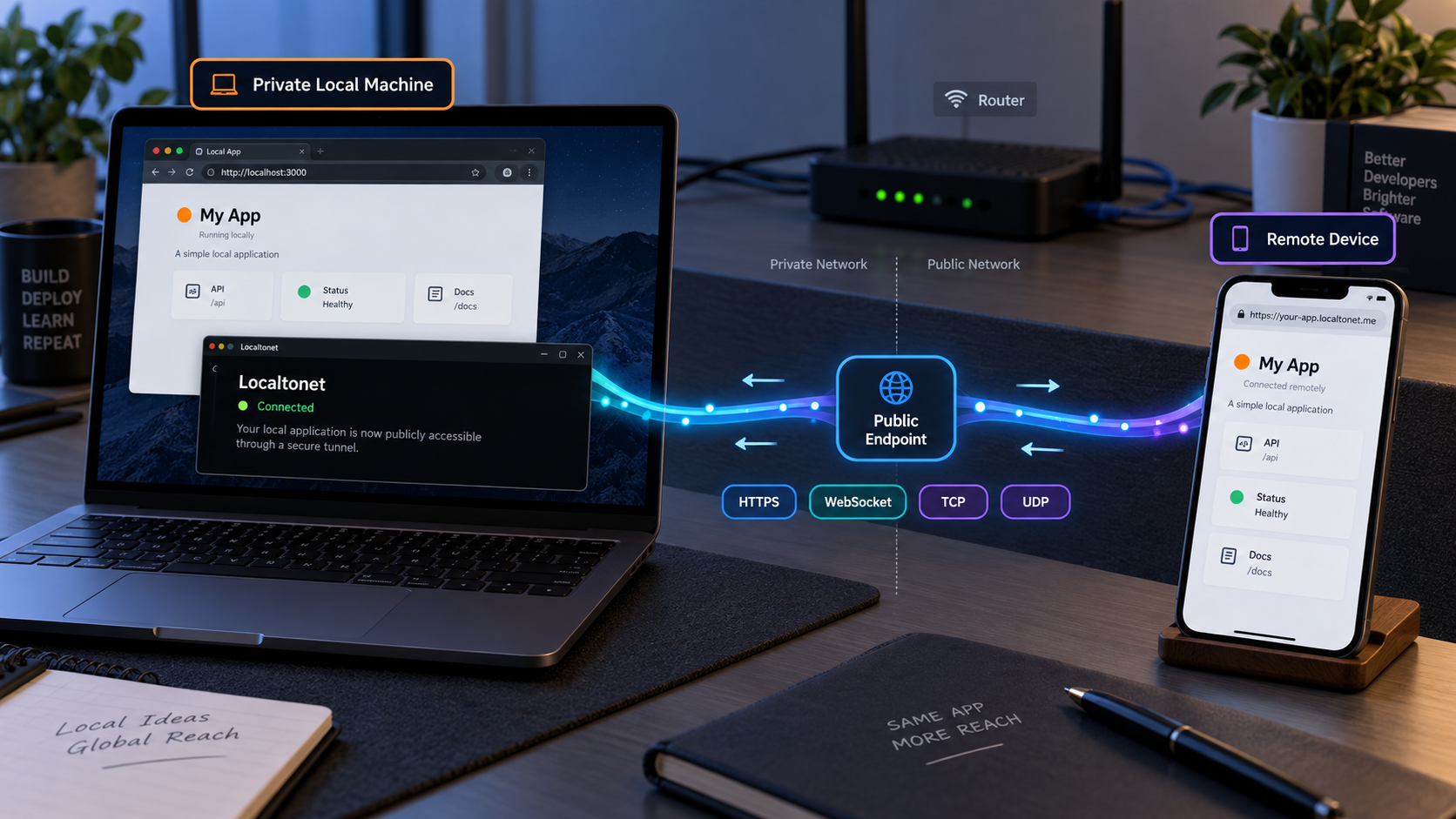
Replace demo-driven adoption with repeatable protocol evidence
A framework can look impressive on localhost and still fail when it encounters public HTTPS, callback delivery, connection upgrades, raw sockets, authentication boundaries, or interrupted connectivity. This guide shows how to build a reusable compatibility lab for evaluating unfamiliar frameworks, API runtimes, databases, developer tools, and network services under realistic conditions. We will establish a local baseline, define a protocol-first test matrix, add temporary public access with Localtonet, test failures deliberately, and record enough evidence to support an adoption decision.
📋 What's in this guide
Why build a network compatibility lab?
New technologies are usually demonstrated under favorable conditions. A quick-start example binds to localhost, uses one process, accepts a simple request, and returns a successful response. That proves the software can execute, but it does not prove that it fits the network behavior of a real application.
Production-facing systems encounter different hostnames, HTTPS origins, authentication headers, reverse proxies, callbacks, long-lived connections, multiple clients, disconnects, retries, and partial failures. A database or message service may use raw TCP rather than HTTP. A discovery or real-time system may rely on UDP. A browser application may behave differently after moving from a local origin to a public HTTPS origin. A webhook consumer must receive an inbound request initiated by another system rather than by the developer who started the application.
A compatibility lab turns those concerns into a controlled experiment. Instead of asking whether a tool “works,” the lab asks which protocols work, under which conditions, with which controls, and how the tool behaves when an assumption fails. The same procedure can be reused for several candidates, making comparisons less dependent on documentation quality, conference demos, or individual intuition.
The goal is not to imitate an entire production environment on a laptop. The goal is to eliminate obvious incompatibilities early and produce evidence about the risks that remain. Load testing, high-availability validation, regional latency analysis, and a formal security review still require environments designed for those purposes.
Public reachability can reveal behavior that localhost hides, but it does not reproduce every proxy, firewall, load balancer, identity provider, or failure mode in a production architecture. Treat tunnel results as compatibility evidence within a defined setup, not as a production guarantee.
Prerequisites and lab boundaries
Start by defining what you are evaluating. A vague objective such as “try the new framework” produces vague results. A useful objective names the candidate, the version, the feature under test, the protocol, the client, and the acceptance condition.
For example, an API evaluation might ask whether a particular runtime can receive an authenticated JSON callback at a public HTTPS address, reject an invalid signature, preserve the request body required for verification, and recover after a process restart. A real-time framework evaluation might ask whether a remote client can establish a WebSocket connection, exchange messages in both directions, detect a disconnect, and reconnect without duplicating application state.
What to prepare
- A disposable project or isolated branch containing the candidate framework or service.
- A known working client for each protocol being tested.
- A machine on which the service can run and on which the Localtonet client can reach it.
- Test data that contains no production secrets, customer records, or sensitive payloads.
- Application logs with enough detail to correlate requests and connection events.
- A written expected result for every test case.
- A time limit and cleanup plan for temporary public exposure.
- A Localtonet device/auth token kept outside source control, screenshots, shared logs, and test reports.
Do not begin public testing until the service works locally. A local baseline separates application defects from reachability or tunnel configuration problems. It also gives you a known request, response, and log entry that can be repeated through the public endpoint.
Choose an isolated environment
Prefer a container, virtual machine, disposable host, or dedicated development environment over a workstation containing unrelated services and sensitive files. Run only the candidate and its required dependencies. Bind dependencies narrowly when they do not need to be reached through the test tunnel.
The service must listen on an address reachable by the Localtonet client. If both processes run on the same host, that may be the local interface used by the application. If the service runs in a container, virtual machine, subsystem, or another device, verify the actual reachable IP address and port rather than assuming that one process's localhost refers to the other process's network namespace.
Anyone who obtains a public endpoint may attempt to connect to it. Require appropriate application authentication, use least-privilege test accounts, remove unnecessary administrative routes, and avoid real credentials or production data. Stop or delete the tunnel when the test is complete.
Create a protocol-first test matrix
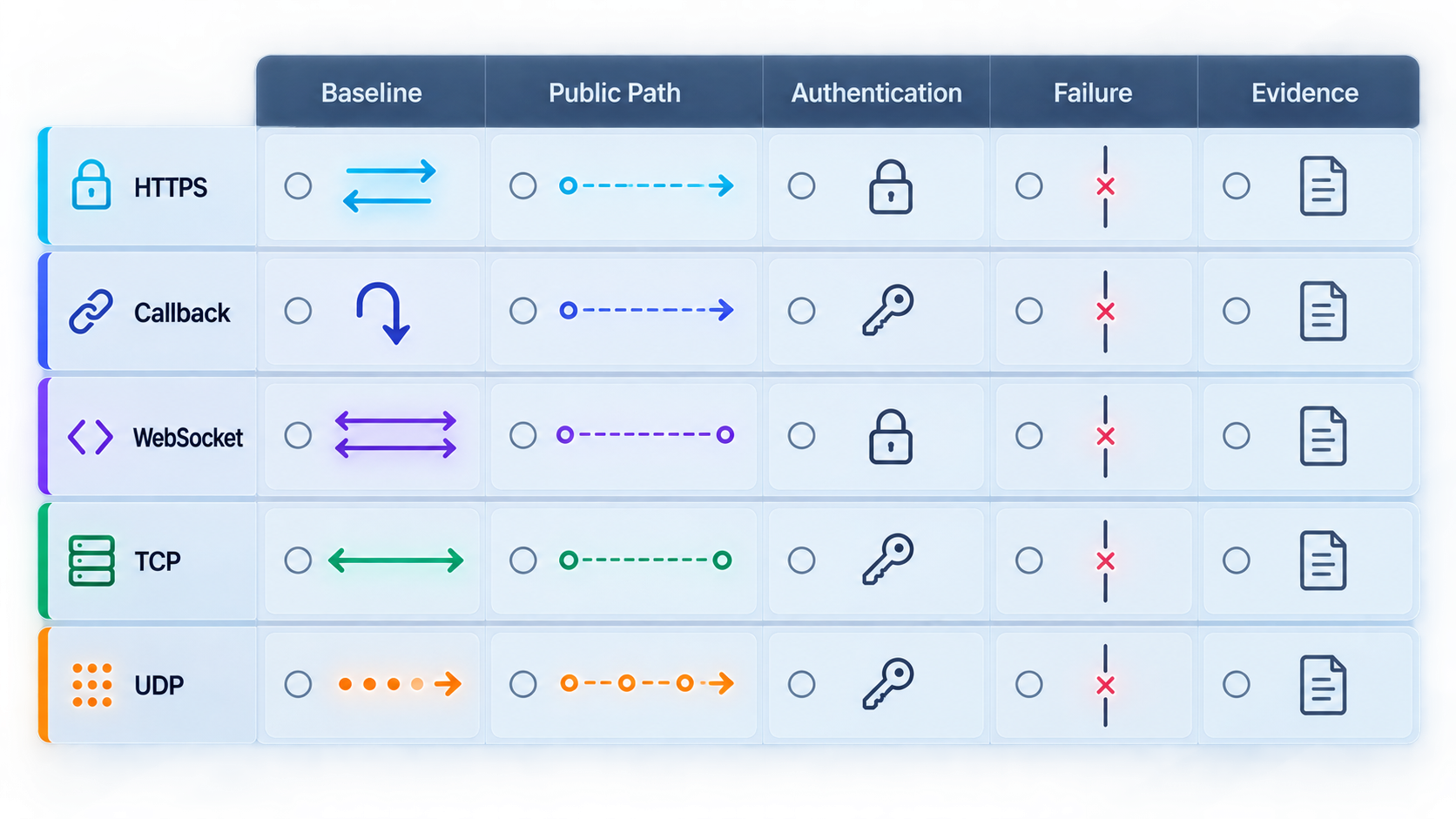
Build the matrix before running tests. This prevents the evaluation from drifting toward whichever feature happens to work first. Each row should state the transport, purpose, precondition, action, expected result, evidence to retain, and cleanup requirement.
| Test area | Question to answer | Evidence to capture |
|---|---|---|
| Local HTTP | Does the service return the expected status, headers, and body before public access is introduced? | Request, response, application log, listening address, and port |
| Public HTTPS | Does the application behave correctly when a remote client uses a public HTTPS origin? | Public request result, observed host and scheme behavior, and correlated server log |
| Inbound callback | Can an external callback sender reach the endpoint, and can the application validate and process the request? | Sender event ID, timestamp, response status, validation result, and application-side event ID |
| WebSocket | Can a remote client connect, exchange messages, remain connected, disconnect, and reconnect correctly? | Connection events, messages in both directions, close information, and reconnect outcome |
| Raw TCP | Can the actual protocol client complete its normal session over a public host-and-port endpoint? | Connection result, protocol exchange, authentication result, and disconnect behavior |
| UDP | Can datagrams reach the service, and does the application tolerate loss, duplication, or reordering where relevant? | Sent and received identifiers, timestamps, loss observations, and application behavior |
| Authentication | Are valid requests accepted and missing, invalid, expired, or insufficient credentials rejected? | Status or protocol result for each credential state, without recording secrets |
| Failure and recovery | What happens when the process, tunnel, or client connection stops and later returns? | Error surfaced to the client, timeout duration observed, logs, retry behavior, and recovery result |
Define pass, fail, and inconclusive
A pass means the observed result matches a written acceptance condition. A fail means the result contradicts that condition. Inconclusive means the test setup cannot distinguish between causes. For example, a failed WebSocket connection is inconclusive if the application did not log the handshake, the client reported only a generic network error, and no control request confirmed that the public endpoint was active.
Avoid changing several variables at once. If an HTTP callback fails, first repeat the known local request. Then check ordinary public HTTP behavior. Then test the callback-specific authentication and payload. This sequence narrows the fault domain.
Use identifiers for correlation
Give each test run a unique non-secret identifier and place it in a safe request header, message field, or payload property supported by the application. Record the same identifier in the worksheet. Correlation is especially important when clients retry automatically or when multiple developers share a lab.
Do not put credentials, personal data, or internal infrastructure details in correlation identifiers. Sanitize logs before attaching them to tickets or adoption records.
Establish and preserve the local baseline
The local baseline proves that the candidate starts, listens where expected, and implements the behavior under test. Because installation and startup commands differ by project, language, and version, this lab method does not invent a universal command. Use the candidate's verified installation instructions, record the exact version, and save the commands or configuration actually used in your environment.
Pin the candidate version
Record the framework, runtime, driver, and dependency versions. If the project uses a lock file or immutable image reference, retain it with the lab record. A repeatable evaluation must not silently move to a newer dependency set.
Start the smallest representative service
Include the behavior being evaluated without unrelated application complexity. For an HTTP runtime, this may mean a health route and one representative API route. For a socket service, implement the actual protocol exchange required for the decision rather than testing only whether a port opens.
Confirm the listening target
Record the IP address, port, and protocol. Verify that the Localtonet client environment can reach that target. Pay special attention to containers, virtual machines, and subsystem networking, where localhost may refer to a different environment.
Run positive and negative local tests
Send one valid request or connection and at least one invalid case. Confirm the status, response, application state, and logs. Negative cases should include the authentication and malformed-input conditions relevant to the service.
Save the baseline evidence
Retain sanitized requests, responses, timestamps, configuration revisions, and log excerpts. These become controls for the public and failure tests.
Include a health check if the candidate provides a suitable mechanism, but do not confuse health with compatibility. A successful health response proves only what that endpoint checks. It does not establish that authentication, callbacks, WebSockets, TCP sessions, or UDP datagrams work.
Add temporary public access with Localtonet
Once the local baseline passes, use Localtonet as a distinct next step. Our client establishes an outbound connection from the device to a Localtonet relay server. This can provide a public URL or a public host and port without inbound router port forwarding, firewall changes, a public IP address, or separate VPN setup.
Select the tunnel family according to the application protocol. HTTP applications use an HTTP/s tunnel pointed at a local IP address and port. Raw services use TCP, UDP, combined UDP/TCP, or TLS as appropriate to the verified service behavior. Do not select a tunnel based only on the tool's marketing category. Select it according to what appears on the wire.
| Local service | Localtonet configuration family | Public form |
|---|---|---|
| Web application, REST API, or HTTP callback receiver | HTTP/s tunnel targeting the local IP address and port | Public HTTPS address |
| Raw TCP application protocol | TCP tunnel targeting the local IP address and port | Public host and port |
| Datagram-based service | UDP tunnel targeting the local IP address and port | Public host and port |
| Service requiring both TCP and UDP on the tested interface | Combined UDP/TCP tunnel | Public host and port |
| Applicable TLS-oriented raw service | TLS tunnel targeting the local IP address and port | Public endpoint appropriate to that tunnel |
WebSockets begin with an HTTP-based handshake and then use a long-lived upgraded connection, but successful ordinary HTTP requests do not prove that a particular application, client, intermediary, or current tunnel configuration will handle the complete session. Run the dedicated connection, message, close, and reconnect tests described below. Check current Localtonet documentation when exact tunnel behavior or dashboard naming is material to the evaluation.
Follow the Localtonet tunnel lifecycle
The available relay server or region values must come from the current Localtonet dashboard rather than from a copied or hardcoded value. Device/auth tokens identify client devices and must not be exposed in test output.
Install and run the Localtonet client
Run the client on the device that can reach the local service. If the target is on another machine or inside an isolated environment, confirm reachability from the client device before proceeding.
Authenticate or select the device
Use the device-specific auth token through the supported Localtonet workflow. Keep the token private and never place it in source code, shell history shared with others, screenshots, issue reports, or article examples.
Select an available relay server
Choose from the servers or regions currently offered in the product. Availability can vary, so the lab record should note the selected value without presenting it as universally available.
Create the appropriate tunnel configuration
Choose HTTP/s, TCP, UDP, combined UDP/TCP, or TLS according to the protocol under test, then provide the local IP address and port. For an HTTP tunnel, choose the required Process Type from Random Sub Domain, Custom Sub Domain, or Custom Domain. These HTTP Process Types serve the same content at a public HTTPS address. Exact custom-domain DNS instructions should be taken from current documentation rather than guessed.
Start the tunnel
Creating a tunnel does not make it run. Use the Start button and confirm that the selected client or device is connected. Record the assigned public URL or public host and port in the private lab worksheet.
Stop or delete the tunnel after testing
When the test window ends, stop the tunnel. Delete it if the configuration is no longer needed. A tunnel is available only while the selected client or device is connected and the tunnel is running.
Our dashboard and REST API provide management paths, but this guide does not invent API requests or automation fields. Establish the workflow manually first. If you automate it later, use the current documented API contract and protect all credentials.
Run HTTP, callback, WebSocket, TCP, and UDP tests
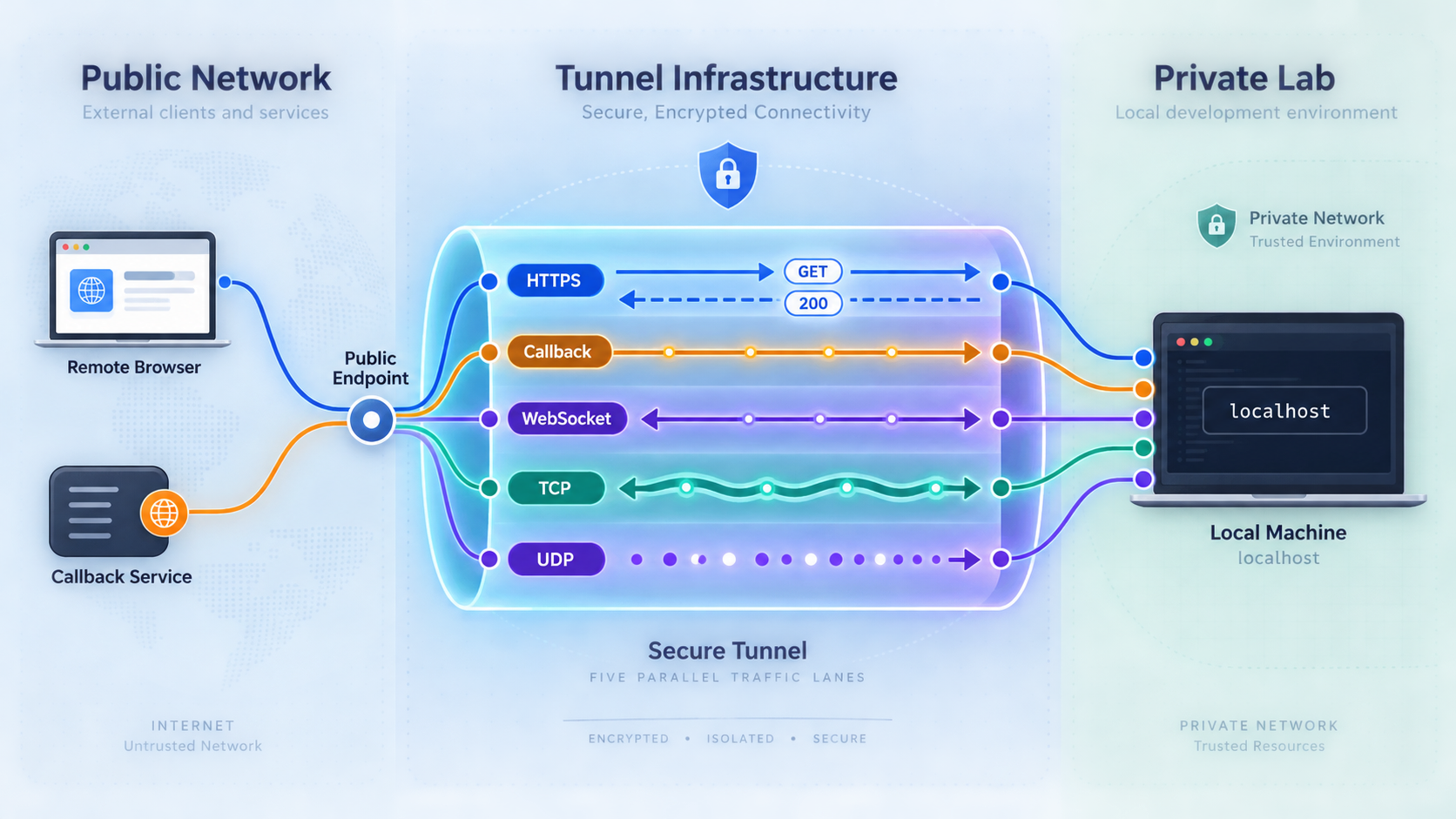
Public HTTPS and API behavior
Repeat the local control request through the public HTTPS address. Compare more than the response body. Record the status code, relevant response headers, content type, redirects, generated links, cookies, and application logs. Frameworks sometimes derive behavior from the request host or scheme, so inspect whether externally visible URLs and redirects are correct.
If the application enforces allowed origins, trusted hosts, secure cookies, or cross-origin rules, test those controls explicitly. Do not weaken them globally merely to make the experiment pass. Make the smallest test-specific configuration change, record it, and determine whether the production architecture can support the same requirement safely.
Test at least one invalid route, one malformed request, and one payload near the size or structure expected in the intended use case. This lab is not a performance benchmark, but representative payloads can reveal parsers, body handling, and timeout assumptions that a trivial hello-world request misses.
Inbound callbacks and webhooks
A callback test should use the real sender when practical because a locally replayed request does not test public delivery. Configure the temporary public HTTPS endpoint in the sender, trigger one controlled event, and correlate the sender's event identifier with the receiver's logs.
Validate the request before changing application state. If the sender uses signatures, timestamps, shared secrets, tokens, or another verification mechanism, exercise the documented scheme exactly. Test a valid callback and relevant invalid cases, such as a missing credential or invalid signature. Do not publish callback secrets in the URL, screenshots, logs, or report.
Determine how the framework exposes the raw request body if signature verification depends on exact bytes. Also establish how duplicate delivery is handled. Many callback workflows can retry, so the application should have an explicit idempotency strategy where the integration requires one.
WebSocket sessions
A useful WebSocket test covers the whole connection lifecycle. First connect a remote client and confirm that the server records the connection. Send a uniquely identified client-to-server message and verify the application response. Then trigger a server-to-client message if the candidate supports that flow.
Leave the connection open for a defined interval and observe whether the application or client closes it. Record ping, pong, heartbeat, or idle behavior only when the tested implementation exposes it. Next, close the client cleanly and inspect the server event. Repeat with an abrupt client interruption. Finally, restart the local application or stop the tunnel and observe how the client reports the loss and whether its reconnection behavior is safe.
If an HTTP request succeeds but the WebSocket does not, compare the public URL scheme, client path, application route, origin policy, authentication transfer, handshake response, and logs. Do not conclude that the framework lacks WebSocket support until the client, application, and network setup have been isolated.
Raw TCP services
A successful TCP connection proves that a stream was established, not that the application protocol is compatible. Use the real protocol client or a minimal client that performs a valid exchange. Test authentication, request framing, response parsing, orderly close, abrupt disconnect, and reconnect behavior.
Record whether the client accepts a public host and port without assumptions about local DNS or fixed addresses. If the protocol embeds addresses or ports inside its own messages, verify those values separately. A transport tunnel cannot automatically correct application-level addressing assumptions.
Never expose a database, administrative interface, or unauthenticated management protocol merely to see whether its port opens. If remote compatibility must be evaluated, use an isolated disposable instance, strong protocol authentication, a least-privilege account, synthetic data, and the shortest practical test window.
UDP services
UDP testing requires different expectations because datagrams do not provide TCP-style connection establishment, ordering, retransmission, or reliable delivery. Give each test datagram an identifier and timestamp, then compare sent and received records. Test the response pattern required by the actual application rather than relying only on a generic port probe.
Where the application must tolerate loss, duplication, or reordering, simulate or observe those cases deliberately and document the result. Do not infer UDP correctness from a TCP result on the same numeric port. If the service genuinely needs both transports, evaluate both and consider the combined UDP/TCP tunnel family for the matching Localtonet configuration.
Test authentication and authorization boundaries
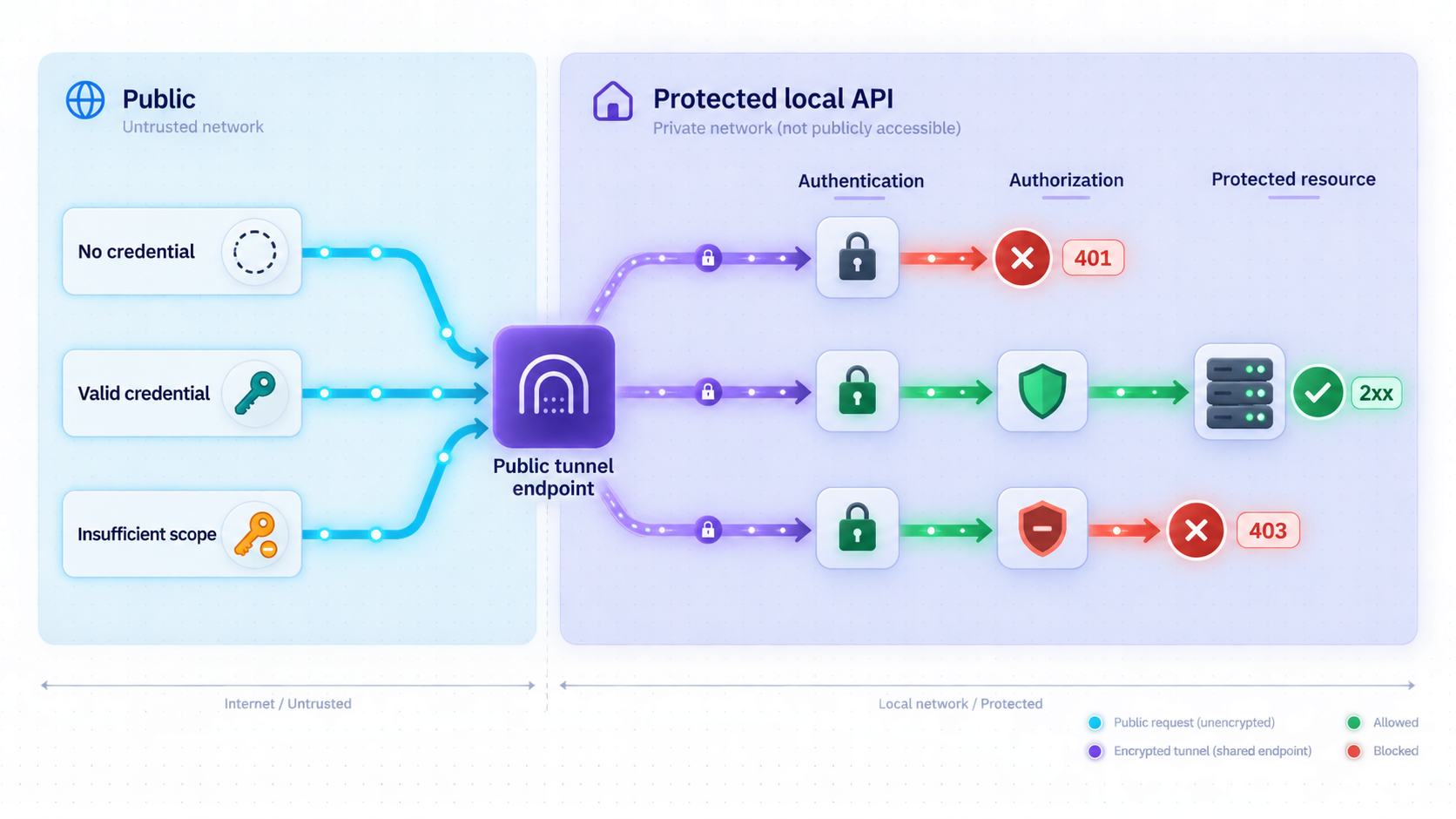
Compatibility includes secure rejection. A candidate that serves valid requests but accepts invalid credentials is not compatible with a security-sensitive architecture. Build an authorization matrix for each externally reachable operation.
| Credential state | Expected behavior | What to verify |
|---|---|---|
| Valid and sufficient | The intended operation succeeds | Identity, scope, result, and audit-safe log entry |
| Missing | The operation is rejected without sensitive detail | Status or protocol error, no state change, and no secret disclosure |
| Invalid | The operation is rejected consistently | No fallback to anonymous or broader access |
| Expired or revoked | The credential is no longer accepted | Cache behavior and revocation timing relevant to the design |
| Valid but insufficient | The protected operation is denied | Least privilege and separation between roles or scopes |
| Malformed input | The request fails safely | No crash, unsafe fallback, stack trace, or unintended state change |
Test authentication separately from network reachability. A timeout, connection refusal, and authorization rejection are different outcomes. The client should expose enough information to distinguish them without revealing sensitive implementation details.
Also inspect logs. Credentials and complete authorization headers should not appear in ordinary logs. If test tooling records requests, configure redaction before execution. Review generated reports for public URLs, payload content, and tokens before sharing them.
Expose only the local IP address and port required for the current test. Disable debug consoles, development dashboards, directory listings, and unrelated routes when possible. Use synthetic data and separate test credentials. Public reachability must remain subject to the same authorization principles as any other internet-facing service.
Exercise tunnel lifecycle and failure behavior
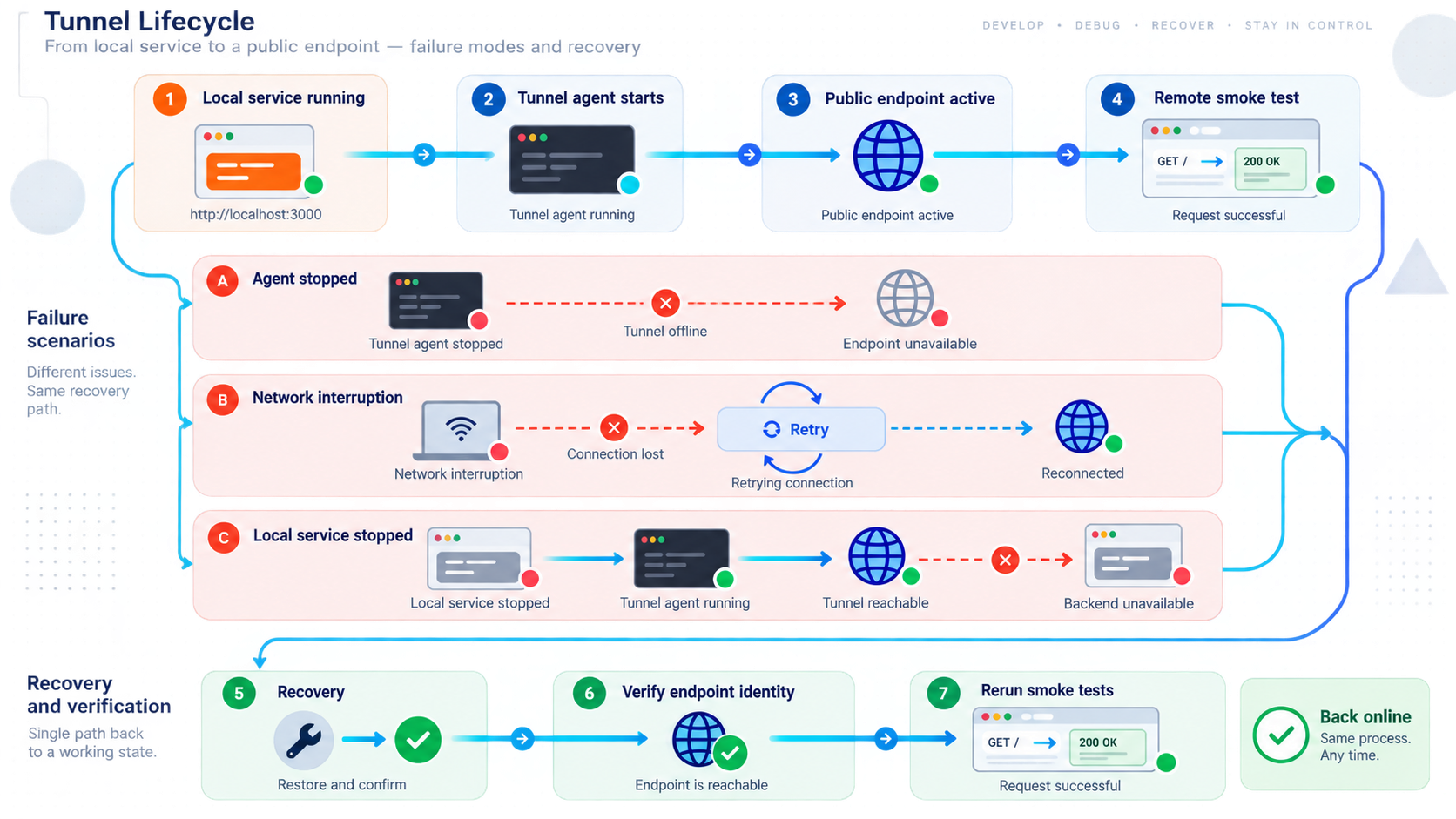
Successful happy-path traffic provides only part of the adoption evidence. Real systems restart, networks disappear, clients retry, requests arrive twice, and dependencies become unavailable. Run controlled failures one at a time so their effects remain attributable.
Stop the application while the tunnel remains configured
Make a successful request or connection, stop the local application, and repeat the operation. Record the remote client's error, the time until it appears, and any Localtonet or application-side state available to the operator. Restart the application and determine whether new traffic succeeds without recreating the tunnel.
Stop the tunnel while the application remains healthy
Confirm the local baseline still passes, then stop the Localtonet tunnel. Observe the remote client's behavior and any retry policy. Starting the tunnel again should be treated as a separate recovery check. Remember that creating the tunnel configuration is not equivalent to starting it.
Disconnect the selected client device
The tunnel is available only while the selected client or device is connected and the tunnel is running. Test this dependency explicitly if it matters to the intended workflow. Record how operators distinguish a stopped local process, a stopped tunnel, and a disconnected device.
Interrupt a long-lived connection
For WebSocket or TCP sessions, interrupt the path after exchanging a known message. Confirm that both ends eventually release resources. Then reconnect and check for duplicated subscriptions, stale session state, repeated commands, or lost acknowledgements.
Repeat a callback
Deliver the same synthetic event identifier more than once when the integration's expected behavior includes retries or duplicate delivery. Record whether the application detects the duplicate and whether repeated processing would be safe. The exact idempotency policy belongs to the application and integration design, not to the tunnel.
Send malformed and unexpected input
Use safe malformed cases appropriate to the protocol: invalid JSON, unsupported content type, truncated application frames, incorrect credentials, or unknown message types. The expected result is a controlled rejection, not a process crash or silent unsafe fallback.
Record actual timestamps and client-visible outcomes. Do not turn a single development test into a performance, uptime, regional coverage, or reliability claim. Those conclusions require dedicated methodology and verified product or deployment data.
Turn lab results into an adoption decision
Finish the experiment with a decision record rather than a collection of screenshots. The record should identify the candidate and version, environment, protocols tested, Localtonet tunnel family used, test dates, acceptance criteria, results, unresolved risks, and cleanup confirmation.
Classify findings by consequence. A documentation gap with a verified workaround is different from a protocol incompatibility. A development-only configuration change is different from a control that would weaken production security. An intermittent result should remain inconclusive until reproduced and isolated.
Recommended decision categories
- Adopt: Required behaviors passed, security boundaries were preserved, and remaining limitations are acceptable.
- Adopt with conditions: The candidate is viable only with documented configuration, architectural constraints, monitoring, or additional testing.
- Prototype further: Important results are inconclusive, or the lab could not represent a required production dependency.
- Reject for this use case: A required protocol, authentication boundary, recovery behavior, or operational constraint failed.
Preserve enough material for another developer to repeat the evaluation, but remove secrets and temporary endpoint details. Record that the tunnel was stopped or deleted, test credentials were revoked where appropriate, callback registrations were removed, and disposable data was destroyed.
A compact repeatable runbook
- Define the candidate, version, protocol, and acceptance criteria.
- Create an isolated service with synthetic data and test credentials.
- Verify positive and negative behavior locally.
- Install and run the Localtonet client on a device that can reach the service.
- Create and start the matching HTTP/s, TCP, UDP, combined UDP/TCP, or TLS tunnel.
- Repeat the baseline through the public endpoint.
- Run protocol-specific, authentication, and failure tests.
- Save sanitized evidence and classify each result.
- Stop or delete the tunnel and remove temporary integrations.
- Make an adoption decision with explicit conditions and unresolved risks.
This process keeps framework evaluation tied to requirements rather than novelty. It also makes comparisons fairer: every candidate receives the same transport tests, invalid cases, recovery checks, and evidence standard.
Frequently asked questions
Why is localhost testing not enough for framework evaluation?
Localhost testing does not exercise public hostnames, HTTPS-facing access, remote callback delivery, cross-origin behavior, long-lived connections across a public path, or the lifecycle of an external endpoint. It remains the essential first baseline, but it should be followed by protocol-specific remote tests when those behaviors matter to the intended architecture.
Does creating a Localtonet tunnel make it immediately available?
No. Creating a tunnel does not mean it is running. Start it with the Start button and confirm that the selected client or device is connected. The tunnel remains available only while that device is connected and the tunnel is running.
Which Localtonet tunnel should an API compatibility lab use?
Use an HTTP/s tunnel for a web application, REST API, or HTTP callback receiver, targeting the service's reachable local IP address and port. Use TCP, UDP, combined UDP/TCP, or TLS only when the service's actual protocol requires that family. Select current relay and Process Type options from the dashboard rather than hardcoding values from another environment.
Can an open TCP port prove that a database or network service is compatible?
No. It proves only that a TCP stream could be established. Compatibility requires the real client to complete the application protocol, authenticate, exchange representative data, close safely, and recover from interruption. Sensitive services should be tested with isolated instances, synthetic data, least-privilege accounts, and short exposure windows.
Should WebSocket compatibility be inferred from a successful HTTPS request?
No. A WebSocket session includes an upgrade handshake and a long-lived bidirectional connection. Test connection establishment, messages in both directions, authentication, clean close, abrupt interruption, idle behavior, and reconnection. Confirm current tunnel behavior and configuration rather than assuming that an ordinary HTTP success covers the entire session.
Does this lab replace production load or security testing?
No. The lab identifies functional network compatibility, authentication behavior, and basic recovery characteristics in a controlled environment. Capacity planning, performance benchmarking, resilience engineering, penetration testing, compliance review, and production readiness require separate scopes and evidence.
How should auth tokens and test credentials be handled?
Treat the Localtonet device/auth token and application credentials as secrets. Do not place them in source control, public logs, screenshots, command examples, tickets, or shared reports. Use test-specific least-privilege credentials, redact recorded traffic, and revoke temporary credentials after the evaluation when appropriate.
When should a temporary tunnel be stopped or deleted?
Stop it as soon as the active test window ends. Delete the tunnel when the configuration is no longer needed. Cleanup should also remove temporary callback registrations, revoke test credentials where appropriate, and confirm that no sensitive test artifacts remain exposed.
Build your next compatibility test with Localtonet
Establish the local baseline first, then use a temporary Localtonet HTTP/s, TCP, UDP, combined UDP/TCP, or TLS tunnel to test the candidate through the protocol it actually uses. Record the evidence, test failure behavior, and stop or delete the tunnel when the evaluation is complete.
Get Started Free →

