

Install the ADHDev dashboard locally, verify it on port 3847, and then publish it through a controlled HTTP tunnel
ADHDev provides a self-hosted dashboard for launching, monitoring, approving, and steering AI coding-agent sessions. This guide starts with the project’s documented standalone command, explains how to verify the dashboard locally, and identifies important limitations that the available project documentation does not establish. After the local service works, we connect it to an HTTP tunnel with Localtonet so it can be reached from a remote browser without configuring inbound router port forwarding or requiring a public IP address. We also cover exposure risks, routine operation, validation, and troubleshooting.
📋 What's in this guide
How the ADHDev and Localtonet workflow works
ADHDev describes itself as a control plane for coding agents. Its dashboard is intended to bring agent sessions, machines, tasks, approvals, and related activity into one view. The project documents compatibility with workflows involving tools such as Claude Code, Codex, Kimi, Cursor CLI, and Antigravity CLI. It also describes task queues, isolated Git worktrees, dependency-aware task chaining, an append-only activity ledger, quota-aware routing, and a Refinery workflow that validates and converges completed work.
This article has a deliberately narrower goal than configuring every ADHDev orchestration feature. We focus on getting the standalone daemon running, confirming that its web interface is available at the documented local endpoint, and exposing that specific HTTP service through Localtonet. Repository-specific automation, agent-provider configuration, cloud-edition features, and multi-machine dispatch require their own project-level configuration and are not prerequisites for proving that the standalone dashboard starts.
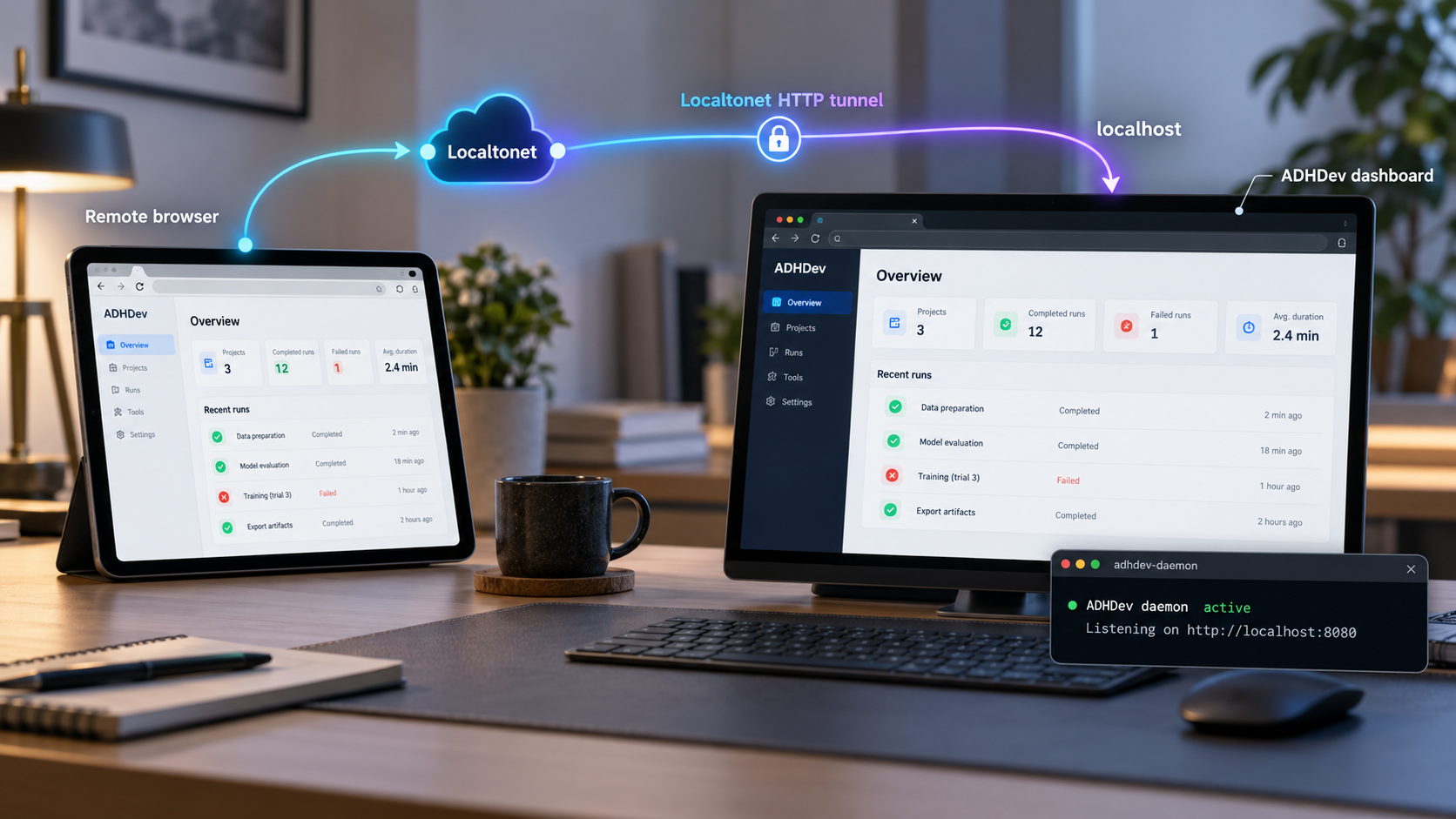
The two systems retain separate responsibilities. ADHDev runs the application and serves its local dashboard. The Localtonet client establishes an outbound connection from the device to one of our relay servers. An HTTP tunnel then maps a public address to the local ADHDev endpoint. Because the client initiates the connection, this workflow does not require inbound router port forwarding, firewall changes, VPN setup, or a public IP address.
http://localhost:3847.
The ADHDev project states that a single-machine mesh can run locally, while spreading a mesh across multiple machines requires its cloud edition. Publishing the standalone dashboard through Localtonet makes that local web interface reachable remotely. It does not by itself enable ADHDev cloud-edition features or convert a local mesh into ADHDev’s cross-machine dispatch architecture.
Prerequisites and known documentation limits
The official quick-start command uses npx, which is distributed with npm in standard Node.js installations. You therefore need a working environment in which the npx command is available. The supplied ADHDev evidence does not specify a minimum Node.js version, supported operating-system matrix, package-manager alternative, required memory allocation, or architecture restrictions. We should not invent any of those details.
Before starting, open a terminal and confirm that the required command-line tools are present:
node --version
npm --version
npx --version
These checks report the versions installed on your machine. They do not prove that a particular version is officially supported by ADHDev because the available quick-start documentation does not define a version requirement. If one of the commands is missing, install a current Node.js release using the installation method appropriate for your operating system, then repeat the checks. For a production deployment, consult the project’s current release documentation before standardizing on a runtime version.
You will also need the following:
- A terminal account permitted to run npm packages and create any application data needed by ADHDev.
- A web browser on the local machine for the first verification.
- Availability of local TCP port
3847, which is the port in ADHDev’s documented standalone endpoint. - A Localtonet account and the Localtonet client installed on the machine running ADHDev, or on another device that can reach the ADHDev service over the local network.
- A device-specific Localtonet authentication token obtained from your account. Do not place this token in documentation, screenshots, shell history, or public configuration files.
- An available relay server selected from the current Localtonet dashboard. Server codes and regional availability can change, so this guide does not hardcode one.
| Item | What is established | What remains unspecified |
|---|---|---|
| Launch command | npx @adhdev/daemon-standalone |
Alternative package-manager commands and pinned-version policy |
| Local dashboard | http://localhost:3847 |
Whether the listening address or port can be changed |
| Runtime | The quick start depends on npx |
Minimum or recommended Node.js and npm versions |
| Persistent operation | The documented command starts the standalone daemon | Official service-manager, container, restart, and upgrade procedures |
| Dashboard access control | A local browser endpoint is documented | Default authentication behavior for the standalone dashboard |
| Network binding | The documented browser URL uses localhost |
Whether configuration for other listening interfaces is supported |
The available ADHDev quick-start evidence does not establish whether the standalone dashboard requires authentication by default. Because the interface can monitor or control coding-agent activity, treat it as sensitive. Verify the current ADHDev authentication behavior and apply suitable authorization before sharing a public tunnel address. If you cannot confirm an appropriate access-control boundary, keep the dashboard local.
Install and start the ADHDev standalone daemon
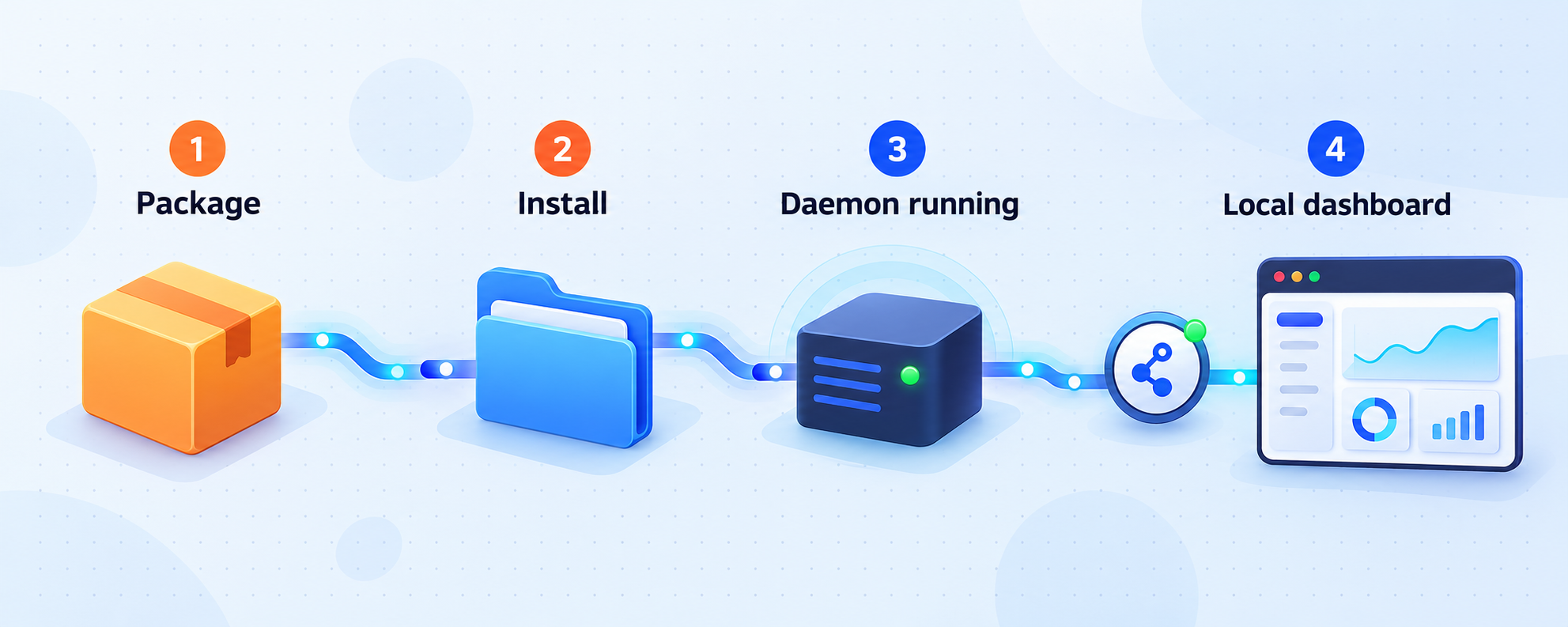
ADHDev’s documented quick start is intentionally short. The command uses npx to obtain and execute the standalone daemon package. It does not require cloning the project repository for this basic workflow.
Open a terminal on the host
Use the computer that will run ADHDev. Confirm that node, npm, and npx are available before continuing. The account should have permission to download and execute npm packages.
Run the documented standalone command
Start ADHDev with the command published by the project. Keep the terminal visible during the first launch so that you can inspect any startup output or errors.
Open the documented local dashboard
After the daemon starts, open http://localhost:3847 in a browser on the same machine. Confirm local access before introducing a tunnel or any other network layer.
npx @adhdev/daemon-standalone
During the first execution, npx may need network access to retrieve the package. Read any package-installation prompt and terminal output rather than accepting unexpected behavior without review. The exact output can vary with the installed npm version and the current ADHDev package release, so this guide does not provide a fabricated success message.
The command as documented does not pin a package version. That is convenient for an initial evaluation, but it also means separate launches at different times may resolve to different published versions according to npm’s behavior and the package’s release state. The supplied project evidence does not define an official version-pinning, upgrade, downgrade, or rollback procedure. Teams that require repeatable deployments should review the current ADHDev release guidance and test upgrades before using the dashboard for important repositories.
What this command does not establish
A successful interactive launch is not the same as a persistent production installation. The documented quick start does not specify a system service, startup task, container image, health-check endpoint, log directory, backup location, or graceful restart procedure. It also does not establish where the daemon stores state. Avoid creating an improvised production service definition until you know which files need to persist and how the current release handles shutdown and upgrades.
For the workflow in this guide, leave the daemon running in its original terminal. This keeps the initial test easy to understand: if the process exits, the local dashboard stops, and the tunnel will no longer have a working target.
Verify ADHDev locally before creating a tunnel
Local verification is the most important diagnostic boundary in this setup. A tunnel can forward traffic only to a service that is already running and reachable from the device hosting the Localtonet client. If the dashboard does not load locally, creating or changing a tunnel will not repair ADHDev.
On the ADHDev host, open:
http://localhost:3847A successful check means the browser can connect to the endpoint and render the ADHDev interface. Inspect the page rather than relying only on the absence of a browser error. If the interface appears incomplete, return to the daemon terminal and look for failed requests, runtime exceptions, or missing dependencies.
Use a simple verification sequence
- Confirm that the terminal running
npx @adhdev/daemon-standaloneis still active. - Open the exact documented URL, including
http://and port3847. - Refresh the page and verify that the interface remains available.
- Open the browser’s developer tools only if needed to identify failed browser requests.
- Resolve all local errors before configuring Localtonet.
If you run the browser on a different computer, localhost refers to that other computer, not to the ADHDev host. The official quick-start evidence does not say whether the daemon listens on a LAN interface or whether its binding address is configurable. Therefore, first test from the same host. The most reliable Localtonet arrangement for this documented endpoint is to run our client on that same host and target the loopback address.
Running ADHDev and the Localtonet client on the same device lets the tunnel target the service through the host’s loopback interface. This avoids depending on undocumented ADHDev LAN-binding behavior. If our client runs on another device, you must first prove that the second device can reach ADHDev over the local network. The supplied ADHDev evidence does not establish that configuration.
Set up remote HTTP access with Localtonet
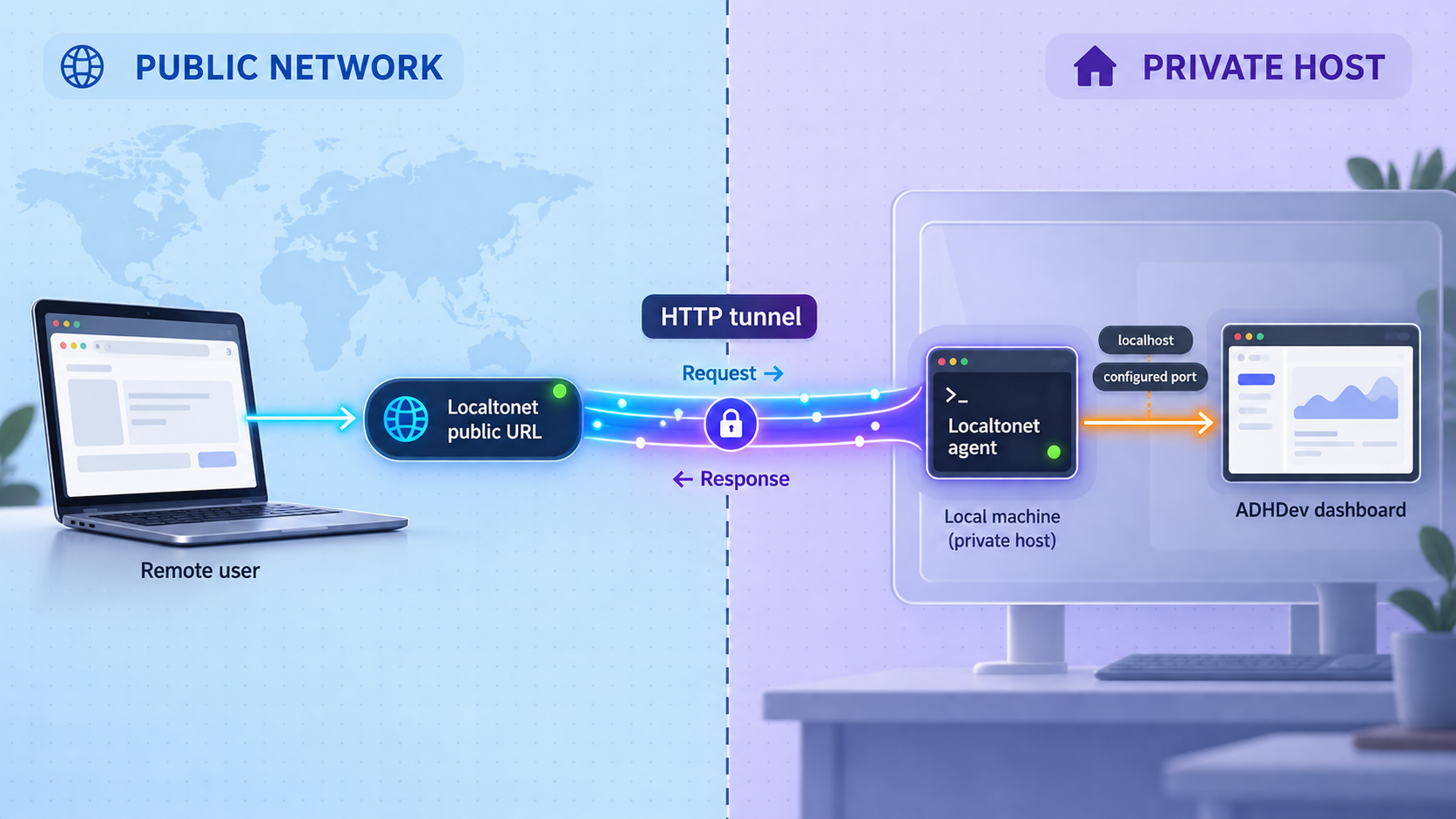
Once http://localhost:3847 works locally, you can create an HTTP tunnel. HTTP is the appropriate tunnel family because ADHDev exposes a browser-based HTTP dashboard rather than a raw protocol that needs direct TCP or UDP handling.
Our platform uses a device-specific authentication token to identify the Localtonet client. The client connects outbound to a selected relay server, and the tunnel forwards requests from its public address to the configured local IP address and port. Creating the tunnel configuration does not automatically mean it is running. You must start it, and it remains available only while the selected client is connected and the tunnel is running.
Install and run the Localtonet client
Install our client for the operating system on the device running ADHDev. Start the client and keep it connected. If you place the client on a different device, that device must already be able to reach the ADHDev host and port over the local network.
Authenticate or select the client device
Use the device-specific authentication token from your Localtonet account and select the corresponding connected device for the tunnel. Treat the token as a secret. Never substitute a guessed value or copy a token into public instructions.
Select an available relay server
Choose a server or region offered in the current dashboard. Availability can vary, so use a current dashboard value rather than a server code copied from an old tutorial.
Create an HTTP tunnel to ADHDev
Configure the HTTP tunnel’s local target as the loopback address on the client device and port 3847. This corresponds to ADHDev’s documented http://localhost:3847 endpoint. Select the currently available HTTP process type appropriate for your account, such as a random subdomain, supported custom subdomain, or custom domain. All three process types serve the target through a public HTTPS address.
Start the tunnel and use its assigned address
Press the Start button after reviewing the target. Copy the public address assigned by the dashboard and open it from a separate browser session or remote device. Stop or delete the tunnel when remote access is no longer required.
For the current dashboard sequence and field names, consult our Localtonet HTTP tunnel documentation. Exact custom-domain DNS instructions are intentionally not reproduced here because DNS requirements must be checked against the current documentation before configuration.
| HTTP process type | When it fits | Important consideration |
|---|---|---|
| Random Sub Domain | Fast evaluation and temporary remote access | Use the public address assigned to the running tunnel |
| Custom Sub Domain | A selected subdomain where supported | Availability may depend on current product and account options |
| Custom Domain | A domain name controlled by your organization | Follow the current DNS instructions rather than guessing records |
Validate from outside the host
Do not treat a Running status alone as complete validation. Open the assigned address from a device or network that is not using the ADHDev host’s local browser session. Confirm that the page renders and that the interactions you actually need work as expected.
The complete request path is:
Remote browser
  → Localtonet public HTTP address
  → selected Localtonet relay
  → outbound client connection
  → local ADHDev target on port 3847
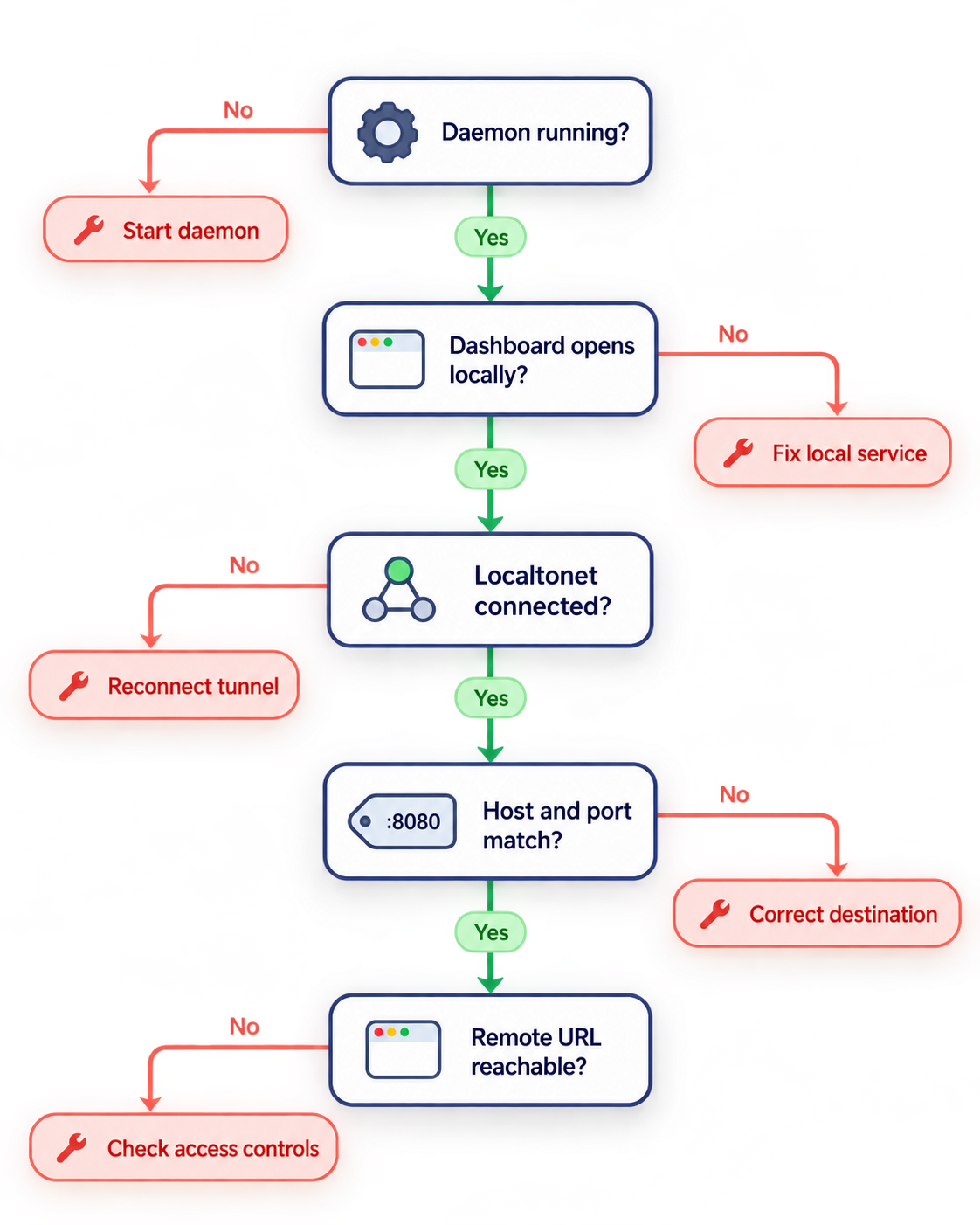
If the public page does not load, test each boundary in that order only after confirming the local endpoint again. A configured tunnel cannot serve the dashboard when the ADHDev process has exited. Likewise, a running daemon is not remotely reachable when the Localtonet client is disconnected or the tunnel has not been started.
Secure remote access to an agent control dashboard
Remote access changes the threat model. A service reachable only through localhost is not equivalent to a service available at a public address. ADHDev is designed to monitor and control coding-agent workflows, so its interface may reveal repository details, task descriptions, operational activity, machine information, approvals, or controls that affect development work.
The supplied ADHDev documentation excerpt does not establish whether the standalone dashboard has authentication enabled, how users are created, or which authorization roles are available. Do not infer protection merely because the local endpoint worked without additional setup. Confirm the current project behavior before exposing the service, and do not distribute the public address if access cannot be appropriately restricted.
Apply least exposure
Start the tunnel only for the period in which remote access is required. Stop it afterward. If you no longer need the configuration, delete it. Remember that the public address is available only while the selected client is connected and the tunnel is running, but that lifecycle behavior should not be treated as a replacement for application authentication.
Protect credentials and repository information
Do not paste Localtonet authentication tokens, agent-provider credentials, repository credentials, private endpoints, or other secrets into issue reports or screenshots. If ADHDev displays sensitive task or repository information, review what a remote viewer can see before sharing access with anyone else.
Respect organizational controls
Remote tunneling should be used only on systems and networks you are authorized to administer. It must not be used to bypass an employer’s access policy, repository controls, authorization requirements, or security review. For managed development environments, obtain approval and document who can reach the dashboard.
Separate transport reachability from application authorization
The tunnel solves the connectivity problem. It does not automatically define who should be permitted to operate ADHDev. Application authentication, least-privilege permissions, repository protections, agent-provider controls, and approval policies remain separate responsibilities. Review the access controls currently available in ADHDev and in your Localtonet account before adopting a long-lived deployment.
Routine operation, stopping, and change management
The initial setup has two independent runtime dependencies: the ADHDev daemon and the Localtonet client. Both must remain operational, and the HTTP tunnel itself must be started. This distinction makes routine checks straightforward.
http://localhost:3847 loads on the host before investigating remote connectivity.
Stopping the standalone daemon
When running interactively, return to the terminal that launched ADHDev and use the terminal’s normal process-interruption mechanism. After the process exits, verify that the local dashboard is no longer available. The available project evidence does not document a separate administrative shutdown command, so this guide does not invent one.
Restarting after a host reboot
The one-command quick start does not establish automatic startup. After a reboot, assume that you must launch ADHDev again unless you have implemented and tested a supported persistence method. Also restart or verify the Localtonet client according to your installation. Finally, confirm that the tunnel is running. Avoid assuming that all three states will recover automatically.
Updating ADHDev
Because the published command is not version-pinned, package resolution may change over time. Before updating an important environment, record the currently working version, inspect current release information, back up any documented persistent data, and test the new release against a non-critical repository. The extracted evidence does not identify ADHDev’s state paths or backup procedure, so those details must be confirmed from the release you deploy.
Monitoring availability
Localtonet supports platform-wide Token and Tunnel webhooks that report Connected and Disconnected status changes for tokens or tunnels in a selected Token Group. Those webhooks can help an operations workflow notice connectivity changes, but they do not prove that the ADHDev application itself is healthy. A connected tunnel may still point to an application that has stopped or is returning errors.
Platform-wide webhooks are also different from File Server file-event webhooks. ADHDev uses an HTTP tunnel, not a Localtonet File Server tunnel, so file upload, delete, rename, or move events are unrelated to this workflow.
Troubleshooting ADHDev and remote HTTP access
The npx command is not found
Confirm that Node.js and npm are installed and available in the current shell. Open a new terminal after installation so updated executable paths are loaded, then run:
node --version
npm --version
npx --version
If the commands exist but ADHDev still fails, preserve the exact error output. Do not solve the problem by selecting an arbitrary Node.js version from an unofficial tutorial because the supplied ADHDev evidence does not define supported versions.
The package cannot be downloaded
The initial npx execution may need access to the npm package registry. Check DNS resolution, outbound network access, proxy configuration, and any corporate package-registry policy. Also verify the package name exactly:
@adhdev/daemon-standaloneDo not enter Localtonet tokens or unrelated application credentials into an npm authentication prompt.
Port 3847 is already in use
Another process may already be listening on the documented port, or a previous ADHDev process may still be active. Identify the process with operating-system tools and determine whether it is safe to stop. The available ADHDev quick-start evidence does not document a supported port-setting option, so this article does not recommend an unverified command-line flag or environment variable.
The browser cannot open the local endpoint
Make sure the ADHDev terminal is still running and revisit its output. Enter the full endpoint as http://localhost:3847. Do not change it to HTTPS for the local test unless ADHDev’s current documentation explicitly instructs you to do so. Also confirm that browser proxy settings or local security software are not redirecting loopback traffic.
The dashboard works locally but not through Localtonet
Check the layers separately:
- Reload
http://localhost:3847on the ADHDev host. - Confirm that the Localtonet client device is connected.
- Verify that the HTTP tunnel targets the loopback address on the correct device and port
3847. - Confirm that the tunnel has been started, not merely created.
- Use the current public address shown by the dashboard.
- Test from another browser session or remote device.
If the Localtonet client runs in a container, virtual machine, or separate host, its loopback address refers to that environment rather than necessarily to the machine where ADHDev runs. In that topology, use a local target that is actually reachable from the client after independently validating the route. Because ADHDev’s documented listen-address configuration is unknown, co-locating both processes is the least ambiguous option.
The public address opens but the interface does not work correctly
Compare the browser behavior at the local and public addresses. If both fail in the same way, investigate ADHDev. If only the public address fails, inspect browser errors and verify the tunnel target. Some web applications also depend on assumptions about origins, cookies, or persistent browser connections. The supplied ADHDev evidence does not document its origin policy or remote-proxy requirements, so capture the exact browser and daemon errors rather than guessing configuration values.
The tunnel disconnects unexpectedly
Confirm that the Localtonet client process is still running and that the host has outbound connectivity. Also check whether the device slept, restarted, changed networks, or lost access to the selected relay. The tunnel is available only while the selected client remains connected and the tunnel is running.
Frequently asked questions
What command starts the ADHDev standalone daemon?
The project documents npx @adhdev/daemon-standalone as its one-command standalone launch method. It then instructs users to open http://localhost:3847. The available quick-start evidence does not specify a required Node.js version, persistent service configuration, or alternative launch command.
Do I need to clone the ADHDev repository?
Not for the documented standalone quick start. The published command executes the standalone npm package through npx. Development from source, contributing to ADHDev, or configuring repository internals would be a separate workflow.
Why should I verify ADHDev locally before creating the tunnel?
Local verification separates an application problem from a connectivity problem. If http://localhost:3847 does not work on the host, an HTTP tunnel has no healthy service to forward requests to. Fix the daemon first, then test the Localtonet layer.
Does Localtonet require router port forwarding for this setup?
No. Our client establishes an outbound connection to a Localtonet relay server. This lets you publish the local HTTP service without configuring inbound router port forwarding, requiring a public IP address, changing inbound firewall rules, or setting up a VPN.
Is the ADHDev standalone dashboard authenticated by default?
The supplied project evidence does not establish the standalone dashboard’s default authentication behavior. Verify the current ADHDev documentation and the actual deployed interface before public exposure. If you cannot confirm appropriate authorization, keep the service local and do not share a tunnel address.
Can the Localtonet client run on a different machine?
A Localtonet HTTP tunnel can target a local IP address and port reachable from the client device. However, ADHDev’s extracted quick-start documentation establishes only the localhost endpoint and does not establish configurable LAN binding. Running both processes on the same machine avoids relying on undocumented network-listening behavior.
Does exposing the dashboard enable ADHDev multi-machine orchestration?
No. The tunnel makes the existing web interface reachable. It does not change ADHDev’s feature model. The project states that a single-machine mesh can run locally and that spreading a mesh across machines requires its cloud edition.
Will the public dashboard remain available after I close the daemon?
No. The HTTP tunnel needs a running local service. Remote availability also requires the selected Localtonet client to remain connected and the tunnel to remain started. If any of those components stops, the complete access path is interrupted.
Connect your verified ADHDev dashboard with Localtonet
Start ADHDev locally, confirm the dashboard at port 3847, review its authentication behavior, and then create a Localtonet HTTP tunnel when you are ready for controlled remote access.
Get Started Free →

