

Receive external events in self-hosted n8n without opening inbound network ports
An n8n instance on localhost can build and run workflows, but external services cannot send events to a private address. This tutorial uses a Docker Compose deployment of self-hosted n8n, configures n8n's WEBHOOK_URL, and connects it to a public Localtonet HTTP tunnel. It also covers test and production webhook registration, reproducible verification, public-route exposure, authentication, payload limits, lifecycle management, and practical troubleshooting.
📋 What's in this guide
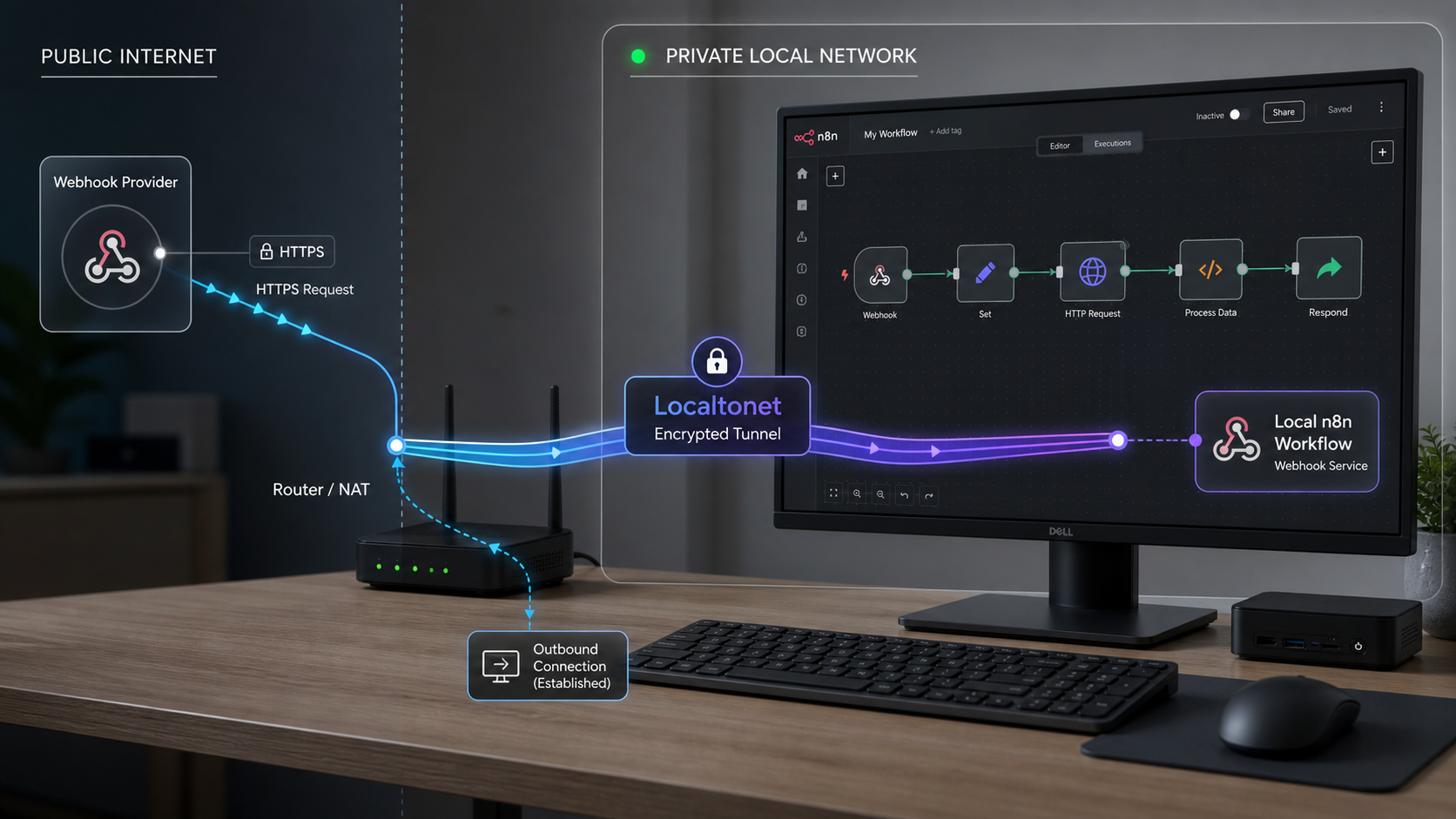
Why localhost webhooks need a public request path
When n8n runs on a workstation, home server, or private lab device, it commonly listens on a local address such as http://localhost:5678. The word localhost always refers to the machine making the request. If a remote webhook provider calls that address, it tries to connect to port 5678 on its own infrastructure rather than on your n8n host.
A private LAN address has a related limitation. It may be reachable from other devices on the same network, but it is not normally routable from the public internet. Network address translation, router rules, firewalls, and the absence of a public IP can prevent unsolicited inbound requests from reaching the service.
Webhook providers therefore need a public callback URL. They store that URL and make an HTTP request when an event occurs. The URL must reach the correct n8n Webhook node path, and the request method must match the method selected in that node.
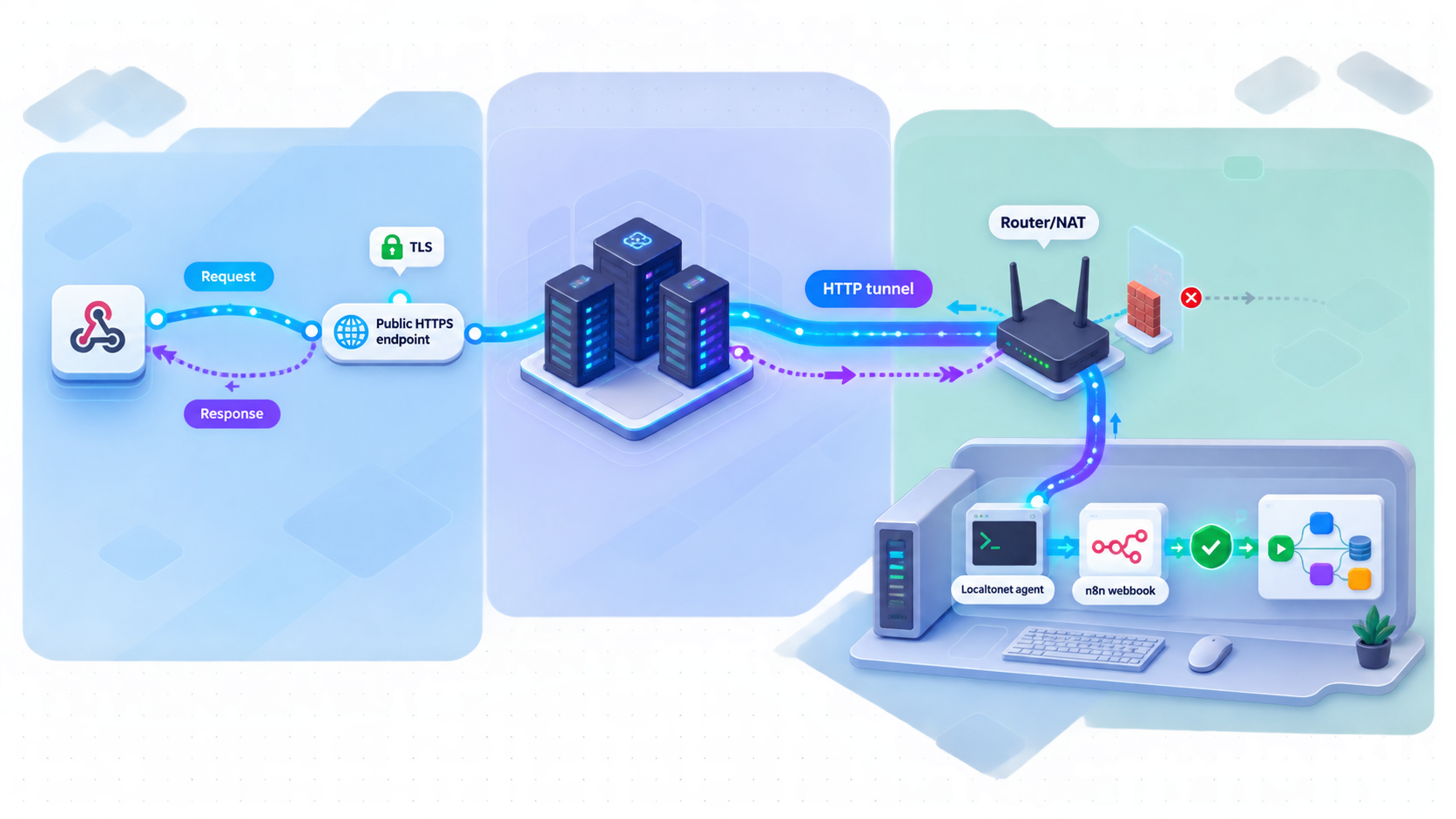
With Localtonet, our client runs on a device that can reach n8n and establishes an outbound connection to a Localtonet relay server. An HTTP tunnel supplies a public URL and forwards requests arriving there to the configured local IP address and port. This workflow does not require inbound router port forwarding, firewall changes, VPN setup, or a public IP address.
A successful request follows four stages. The provider sends a request to the public HTTPS URL, the Localtonet relay accepts it, the running tunnel carries it to the selected client, and the client forwards it to n8n. n8n then looks for a registered webhook with the same test or production path and HTTP method.
Localtonet forwards HTTP requests to the configured n8n web service. Pointing the tunnel at n8n's service port can make the editor, login page, API routes, and other paths served on that port publicly reachable. A workflow path is not an access boundary. This tutorial includes checks for unintended exposure, but deployments that require public webhooks with a private editor need an additional path-filtering reverse proxy or another architecture designed for that separation.
Prerequisites and deployment scope
This tutorial covers one reproducible installation path: self-hosted n8n running in Docker Compose on the same machine as the Localtonet client. n8n also supports self-hosting through Docker, npm, Docker Compose, and supported platforms, but startup commands and persistence differ among those methods. Limiting the implementation to Docker Compose lets us show the complete configuration without mixing incompatible instructions.
Before starting, prepare the following:
- A computer that can remain awake and connected while webhook requests are expected.
- Docker Engine or Docker Desktop with the Docker Compose command available.
- A browser and terminal access on the host.
- A Localtonet account and the Localtonet client for the host operating system.
- Permission to register or change the callback URL at the external webhook provider.
- A non-sensitive sample event for testing.
The Docker Compose configuration below publishes container port 5678 on host port 5678 and stores n8n data in a named volume. The named volume is important because removing and recreating a container must not remove workflows, credentials, or instance configuration stored under n8n's data directory.
A local tunnel is useful for development, integration testing, demonstrations, and controlled self-hosted scenarios. Availability still depends on the n8n process, Docker, the host, the Localtonet client, and the tunnel remaining online. Evaluate operational and security requirements separately before treating a workstation-based deployment as a production service.
n8n's official deployment overview explains the distinction between managed n8n Cloud and self-hosted installations. This article specifically uses the self-hosted model described in the n8n deployment documentation.
Run n8n locally with Docker Compose
Start by running n8n without a public webhook override. This gives you a known-good local service before adding tunnel configuration. Separating local application verification from public connectivity makes later failures much easier to diagnose.
Create a project directory
Create a dedicated directory for the Compose file and future environment configuration, then enter it.
Create the Docker Compose configuration
Define the official n8n image, publish port 5678, and mount a named data volume. Do not add WEBHOOK_URL yet because the Localtonet public address has not been assigned.
Start the n8n container
Start the Compose project in detached mode and inspect its status. Initial startup can require time while the image is downloaded and the service initializes.
Complete local n8n setup
Open the local editor, complete the self-hosted account setup shown by n8n, and confirm that you can create a workflow before making the service public.
Create and enter the project directory:
mkdir n8n-local
cd n8n-local
Save the following as compose.yaml:
services:
  n8n:
    image: docker.n8n.io/n8nio/n8n
    ports:
      - "5678:5678"
    volumes:
      - n8n_data:/home/node/.n8n

volumes:
  n8n_data:
Start n8n and confirm that the container is running:
docker compose up -d
docker compose ps
Open http://localhost:5678 in a browser on the Docker host. Complete n8n's initial setup if prompted. You can also inspect startup output with:
docker compose logs n8nAt this stage, the browser should reach n8n locally. If it cannot, do not proceed to the public tunnel. Check the container status, logs, published port, and whether another process already uses port 5678.
When the Localtonet client will run on another device, localhost on that device will not refer to the Docker host. In that topology, n8n must be reachable through an appropriate LAN address from the client device. Test that exact address from the client's network context before configuring the tunnel.
Create and start the Localtonet HTTP tunnel
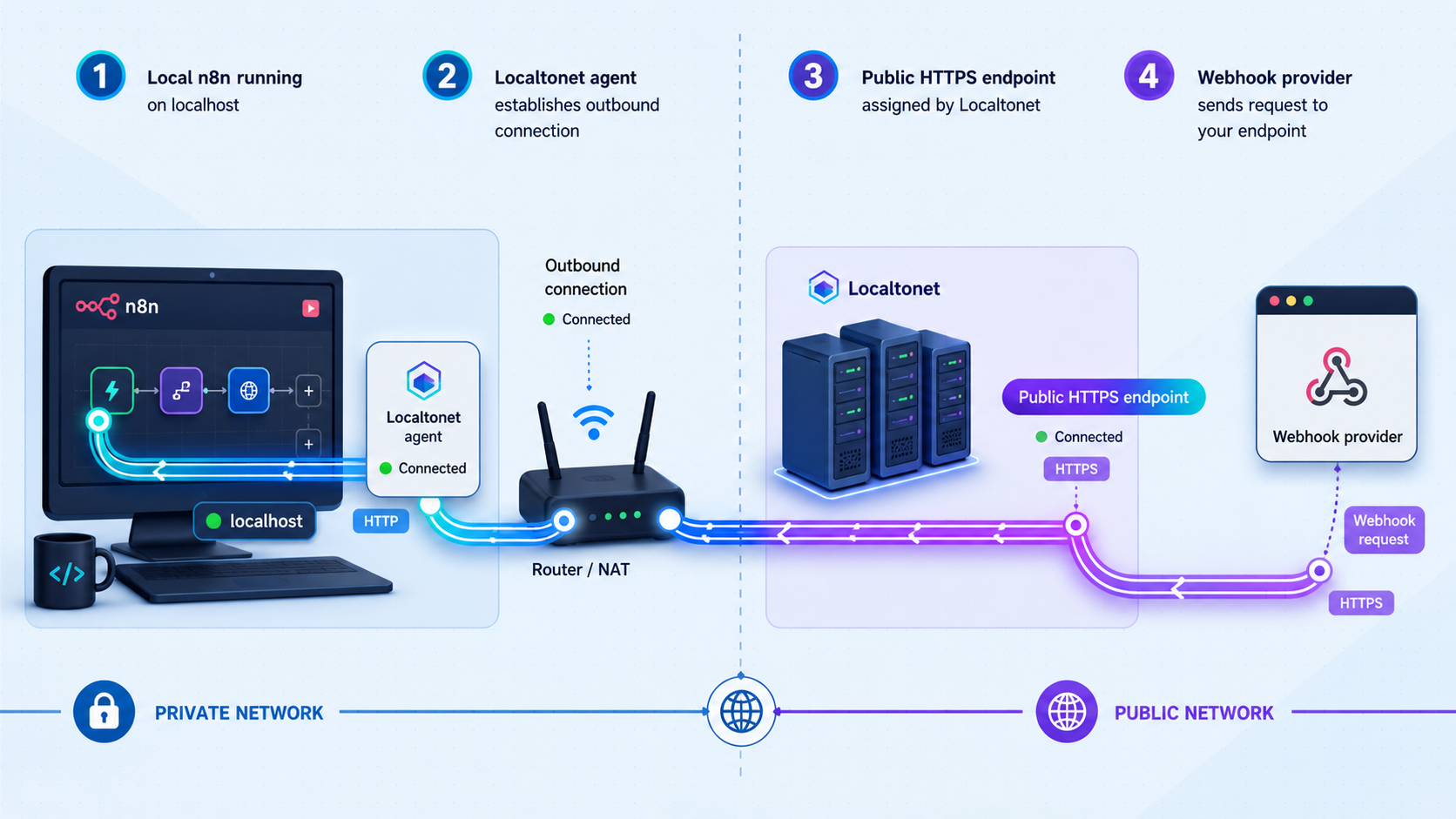
Localtonet's HTTP tunnel configuration points to the local IP address and port where n8n is reachable. For the same-host Docker Compose setup above, that target is normally 127.0.0.1 on port 5678 because Docker publishes the container port on the host.
Follow the documented product sequence below. Current relay choices, region availability, process-type availability, and plan capabilities must be taken from the dashboard rather than copied from a hardcoded example.
Install and run the Localtonet client
Install the Localtonet application for the host operating system and run it on the device that can reach n8n. Confirm that n8n still responds at the intended local target.
Open the HTTP tunnel configuration
Go to the HTTP tunnel area and select the Process Type appropriate for the callback. HTTP tunnels can use Random Sub Domain, Custom Sub Domain, or Custom Domain, with availability depending on the current product configuration.
Select the device and relay server
Select the device-specific AuthToken for the client that will run the tunnel, then select an available server or region from the current dashboard. Treat the token as a credential and never place it in workflow data, screenshots, repositories, or webhook requests.
Enter the local n8n target
Set the local IP address and port to the address that the selected Localtonet client can use to reach n8n. For the same-host deployment in this guide, use the loopback address and port 5678. Use a reachable LAN address instead when the client and n8n run on different devices.
Start the tunnel
Press Start and copy the assigned public HTTPS URL. Creating the configuration alone does not make it active. The selected client must remain connected and the tunnel must remain in the running state.
Keep the complete public base URL, including https://, available for the next step. Consult the
Localtonet HTTP tunnel documentation
when confirming current dashboard options.
The Localtonet AuthToken identifies the client device. It is not part of the public URL and must never be sent to a webhook provider. Likewise, avoid placing provider secrets or credentials directly in a callback URL unless that provider's documented integration specifically requires it.
Configure n8n's WEBHOOK_URL and persist it
A working tunnel does not automatically change the URLs generated by n8n. Without an override, a self-hosted instance may continue displaying webhook URLs based on its internal localhost address. n8n uses the WEBHOOK_URL environment variable to define the externally reachable base URL for webhook generation.
Add the variable to the Compose file rather than setting it only in an interactive shell. A value placed only in a temporary shell can disappear after logout, restart, container recreation, or host reboot. Compose configuration and a project .env file provide a repeatable way to recreate the container with the same public base address.
Update the n8n service in compose.yaml:
services:
  n8n:
    image: docker.n8n.io/n8nio/n8n
    ports:
      - "5678:5678"
    environment:
      - WEBHOOK_URL=${WEBHOOK_URL}
    volumes:
      - n8n_data:/home/node/.n8n

volumes:
  n8n_data:
In the same directory, create a file named .env. Replace the example hostname with the exact public HTTPS base URL assigned to your tunnel:
WEBHOOK_URL=https://your-public-host.example/The hostname above is intentionally a placeholder and will not work as written. Use the Localtonet URL shown for your running tunnel. Keep the trailing slash so n8n can combine the base address with its webhook paths cleanly.
Recreate the service so the container receives the new environment variable:
docker compose up -d --force-recreate
docker compose ps
The named n8n_data volume remains attached when Compose recreates the container. Recreating the container is different from deleting the named volume. Do not remove that volume unless you intentionally want to remove the stored n8n data associated with it.
Verify that the variable is present without printing unrelated environment values:
docker compose exec n8n printenv WEBHOOK_URL
Then open a workflow, add a Webhook node, and inspect both URLs displayed at the top of the node panel. They should begin with the Localtonet HTTPS address rather than http://localhost:5678. If they do not, verify the spelling of WEBHOOK_URL, confirm that Compose loaded the expected project files, and recreate the container again.
If you replace the tunnel or its public hostname changes, update WEBHOOK_URL, recreate n8n, verify the generated URLs, and update every provider that stored the previous callback. Changing only one layer leaves stale URLs elsewhere in the request path.
Configure test and production webhooks correctly
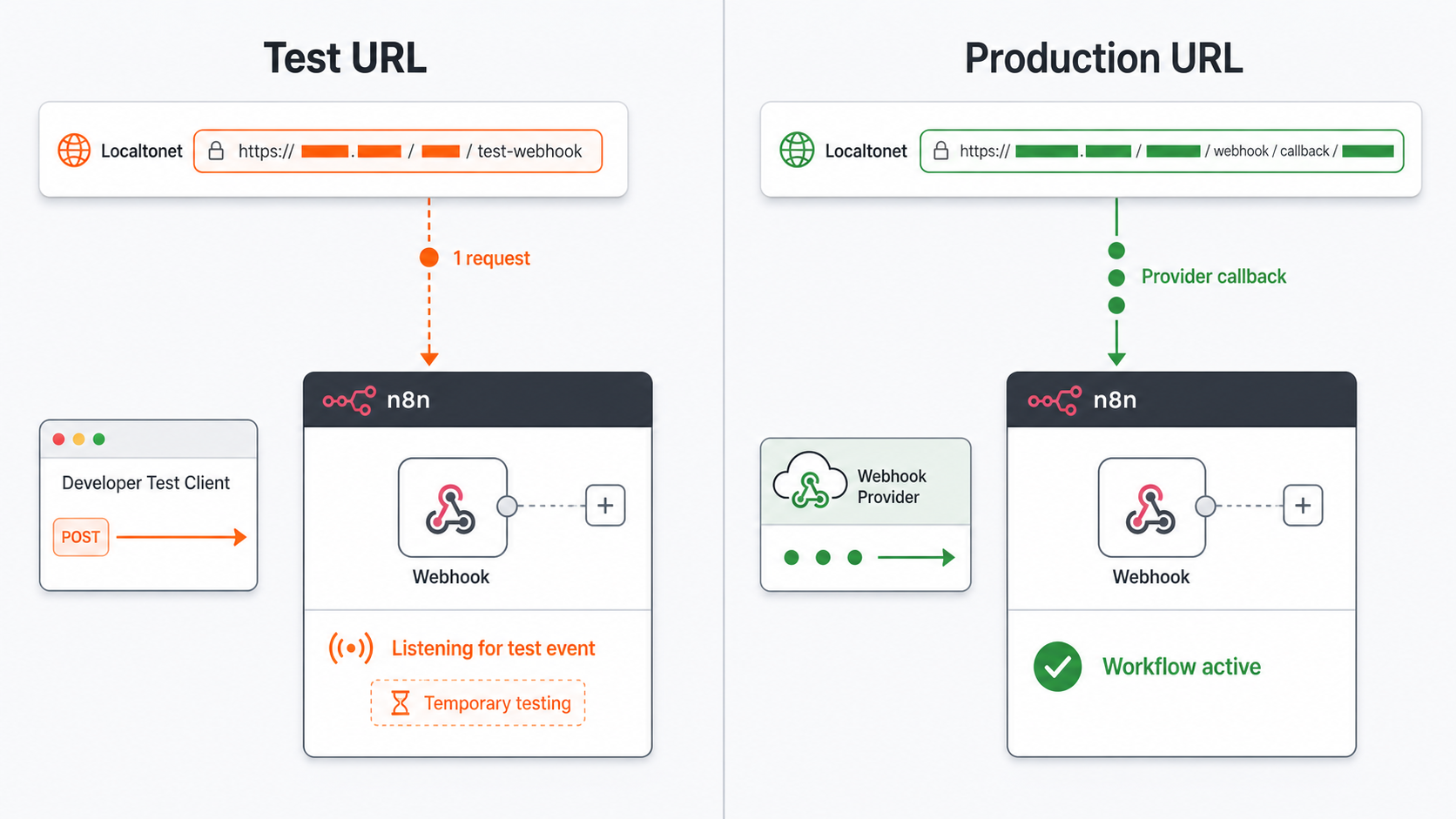
The n8n Webhook node provides separate test and production URLs. Select Test URL or Production URL in the node panel to see the appropriate address. These are separate routes with different registration behavior, so they are not interchangeable.
According to the n8n Webhook node documentation, n8n registers a test webhook when you select Listen for Test Event or execute an inactive workflow in the applicable development flow. The incoming data appears in the workflow editor. This listener is temporary, so a provider calling the test URL later may find that no test webhook is registered.
n8n registers the production webhook when you publish the workflow. Production requests do not display their data in the editor as a test event. Open the workflow's Executions tab and select the relevant execution to inspect the input and result.
| Mode or address | Use it for | Required state and verification |
|---|---|---|
| Local n8n address | Host-side setup and diagnosis | Verify that n8n responds before testing the tunnel. Do not register localhost with an external provider. |
| Test webhook URL | Capturing a development event in the editor | Select Listen for Test Event or use the applicable test execution flow, then send the request while the listener is active. |
| Production webhook URL | Ongoing provider callbacks | Publish the workflow, send the request to the production path, and inspect the execution in the Executions tab. |
| Random Localtonet subdomain | Short-lived tests | Confirm the address whenever a tunnel is replaced. Do not assume every generated hostname remains unchanged. |
| Custom subdomain or domain | Callbacks needing a deliberately selected name | Confirm current availability and DNS requirements in the dashboard and Localtonet documentation. |
Create a minimal POST webhook
For a controlled first test, create a workflow with a Webhook node and use these values:
- HTTP Method: POST
- Path:
localtonet-check - Authentication: None for this isolated non-secret connectivity test only
- Respond: Respond Immediately
The Webhook node supports DELETE, GET, HEAD, PATCH, POST, and PUT. The sender and node must use the same method. A POST request sent to a node configured for GET is not an equivalent test.
The path can be generated by n8n or set manually. Manually selecting a stable path can be useful when a provider needs a consistent route, but path secrecy is not authentication. Use an authentication or signature-validation mechanism before allowing a webhook to perform sensitive actions.
Understand response modes
The response mode affects both what the provider receives and how long it may need to wait:
- Respond Immediately returns the configured response code and the message
Workflow got startedafter the workflow begins. - When Last Node Finishes waits for workflow processing and can return output from the last node.
- Using Respond to Webhook Node lets the workflow define the response through a dedicated Respond to Webhook node.
- Streaming response supports real-time output when the workflow contains nodes with streaming support.
A provider with a short acknowledgement deadline may retry or mark delivery as failed if the webhook waits for a long workflow. Respond Immediately is useful when the provider only needs prompt acceptance, while the other modes suit integrations that genuinely require calculated response data. Return only the data the caller needs because workflow output can contain internal values.
Know the payload limit
The default n8n webhook maximum payload size is 16 MB. A larger request can fail before the workflow handles it. For self-hosted n8n, the documented override is the N8N_PAYLOAD_SIZE_MAX environment variable. If an integration requires a different limit, add that variable to the persistent Compose environment using a value supported by current n8n documentation, recreate the container, and retest with a controlled payload.
Raising a payload limit increases the amount of request data the service may need to receive and process. Confirm that the provider's own limit, Localtonet account capabilities, available memory, workflow behavior, and timeout requirements are also suitable. Do not raise a limit merely to mask an unexpected oversized request.
Verify the webhook from end to end
A complete verification proves more than public reachability. It confirms local n8n availability, the active tunnel, the generated public base URL, the selected webhook mode, the HTTP method, the path, the response, and the resulting n8n execution.
Test the temporary test URL
- Open the Webhook node and select its test URL.
- Select Listen for Test Event.
- Copy the complete generated test URL. It should start with the Localtonet HTTPS hostname.
- Send the non-secret request below while the listener is active.
curl -i -X POST "https://your-public-host.example/webhook-test/localtonet-check" \
  -H "Content-Type: application/json" \
  -d '{"event":"localtonet-check","id":"demo-001","secret":false}'
Replace the entire sample URL with the exact test URL displayed by n8n. Do not assume the route shown in the example if n8n generated a different path.
With Respond Immediately and the default successful response configuration, expect a successful HTTP response and the message Workflow got started. The editor should display the captured request data, including the sample event and id values. A customized response code or body will change the HTTP output, so compare it with the node's actual response settings.
Test the production URL
- Publish the workflow so n8n registers its production webhook.
- Select and copy the production URL from the Webhook node.
- Send the same sample JSON to that production URL.
- Open the workflow's Executions tab and inspect the new production execution.
curl -i -X POST "https://your-public-host.example/webhook/localtonet-check" \
  -H "Content-Type: application/json" \
  -d '{"event":"localtonet-check","id":"demo-002","secret":false}'
The exact production path must come from the node. A successful HTTP response without the expected execution can indicate a route mismatch, response from another handler, or a workflow condition that prevented normal processing. Inspect the execution history and n8n logs rather than relying only on the caller's status code.
Check for unintended public routes
Open the public base URL without the webhook path in a private browser window. Also inspect its headers from the terminal:
curl -I "https://your-public-host.example/"A response that redirects to or displays the n8n sign-in page proves that the tunnel exposes more than the workflow callback. Even when n8n requires login, the editor-facing service is still internet-reachable. Authentication reduces unauthorized use, but it does not make the route private.
This behavior is expected from a basic tunnel pointed at n8n's service root. Localtonet forwards requests to the configured service and does not automatically add path-level isolation. If your requirement is public webhook paths with a private editor, place a correctly configured reverse proxy in front of n8n and tunnel to that proxy, or use another deployment architecture that explicitly separates those routes. Reverse-proxy path-filter configuration is environment-specific and is outside the setup scope of this article.
Secure public n8n webhook traffic
Public reachability and request authorization are separate concerns. Localtonet provides the route to n8n, while n8n and the workflow must decide whether a request is allowed and trustworthy. Treat every request body, header, parameter, and query value as untrusted input.
Authentication and signatures are not interchangeable
Webhook node authentication controls whether the caller can satisfy the credential mechanism configured in n8n. Provider signature verification checks whether the message was signed using the provider's documented scheme, often including the raw body, a timestamp, and a shared secret or public key.
Do not replace provider-specific verification with a check that merely confirms a header exists. Verify the calculated signature, use constant-time comparison where required by the provider's algorithm, reject stale timestamps when the protocol supports them, and preserve the raw body if the signature specification requires byte-for-byte verification. n8n's Webhook node provides a Raw Body option for cases where raw request data is needed.
Apply request restrictions in layers
n8n can restrict a Webhook node with an IP allowlist. Addresses outside the configured list receive a 403 response. This is useful only when the sender publishes reliable source ranges and uses them consistently. It is a poor fit for providers with dynamic, incomplete, or undocumented egress addresses.
n8n also provides an Only Run If expression. It can evaluate the request body, headers, path parameters, or query values and run the workflow only when the expression is true. This option runs after IP allowlist and authentication checks. It can reduce unnecessary executions, but it should not replace cryptographic authentication. The documented behavior also allows a request through if the expression itself fails to evaluate, so do not treat it as the sole security boundary.
Protect credentials and operational data
- Keep the Localtonet device AuthToken out of n8n workflow input and output.
- Store provider credentials and webhook secrets using appropriate credential or secret-management facilities.
- Do not paste real customer events into documentation, screenshots, issue trackers, or chat messages.
- Avoid returning raw downstream errors to the webhook caller.
- Review execution retention and logs for sensitive payloads.
- Use non-sensitive synthetic events for routine health checks.
A standard Localtonet HTTP tunnel publishes a configured local web target through a public address. Our separate VPN Manager provides private mesh VPN functionality with granular firewall rules, but VPN Manager is not the public webhook mechanism described in this tutorial.
Operations, lifecycle, and troubleshooting
Troubleshoot from the inside out. Start with the local n8n process, then the container network, Localtonet client, tunnel state, generated URL, webhook registration, provider request, and workflow execution. This order prevents an application failure from being mistaken for a tunneling problem.
| Symptom | Likely cause | Action |
|---|---|---|
| Localhost does not load | n8n is stopped, initializing, unhealthy, or the port is unavailable | Run docker compose ps, inspect docker compose logs n8n, and confirm port 5678 is published. |
| Local n8n works but the public URL fails | The Localtonet client is disconnected, the tunnel is stopped, or the local target is wrong | Confirm the selected client is connected, the tunnel is running, and its target matches the address reachable from that client. |
| Container works only from inside Docker | Port publishing or container networking is incorrect | Confirm that Compose maps host port 5678 to container port 5678. Target the published host address rather than an isolated container-only address. |
| Test URL says the webhook is not registered | The temporary test listener is inactive | Select Listen for Test Event and send the request while n8n is actively waiting. |
| Production URL does not start the workflow | The workflow is unpublished or the provider uses the test path | Publish the workflow, copy the production URL again, and update the provider's callback. |
| Request receives a method-related failure | The caller and Webhook node use different HTTP methods | Match GET, POST, PUT, PATCH, DELETE, or HEAD exactly on both sides. |
| Webhook URLs still show localhost | WEBHOOK_URL was not loaded or n8n was not recreated |
Check the Compose environment, recreate the service, and inspect both generated URLs again. |
| Large event is rejected | The request exceeds n8n's default 16 MB webhook limit or another layer has a lower limit | Confirm actual payload size and all applicable limits. For self-hosted n8n, review N8N_PAYLOAD_SIZE_MAX before changing it. |
| Provider reports a timeout but n8n later completes | The response mode waits for the workflow to finish | Review the provider's acknowledgement deadline and consider Respond Immediately or an explicit Respond to Webhook step. |
| Webhook stops working after sleep or reboot | The host, Docker, n8n, Localtonet client, or tunnel is no longer active | Restore each dependency and verify local reachability before retesting the public URL. |
| Webhook fails after replacing the tunnel | n8n or the provider still stores the old hostname | Update WEBHOOK_URL, recreate n8n, verify generated URLs, and update the provider registration. |
| Legitimate provider receives 403 | The IP allowlist excludes an actual sender address | Compare the request source with the provider's current published ranges. Remove the restriction if stable ranges are not available and use stronger request authentication. |
Local reachability and container networking
If the Localtonet client and Docker run on the same host, test http://127.0.0.1:5678 from that host. If the client runs elsewhere, test the Docker host's reachable LAN address from the client device. A successful browser request from your laptop does not prove that another device can reach the same target.
Do not point Localtonet at a container-only address unless the client actually shares the relevant container network and that topology is intentional. The Compose file in this guide publishes n8n on the host specifically so the host-side Localtonet client can reach it.
Test listener and production registration
A test webhook is temporary. If a test worked once and later returns an unregistered-webhook response, reactivate Listen for Test Event. For repeated callbacks, publish the workflow and configure the provider with the production URL instead.
After changing a Webhook node's path or method, copy its URL again and update the provider. Do not assume that editing the node automatically updates callback registrations stored on an external platform.
Stable callback management
Many providers retain a callback until an administrator changes it. A generated random subdomain can be convenient for a short development session, but do not assume that a replacement tunnel will receive the same hostname. Where available and appropriate, a Custom Sub Domain or Custom Domain can provide a deliberately selected public name. Confirm current product and plan availability before relying on either option, and consult current Localtonet documentation before changing DNS records.
Maintain a small callback inventory for long-lived integrations. Record the provider, workflow, node, test or production mode, public hostname, HTTP method, authentication scheme, owner, and last verification date. Do not record secrets in that inventory.
Stopping and deleting the tunnel
Stop the tunnel when temporary public access is no longer required. Delete it when the configuration will not be reused. The public route is available only while the selected client is connected and the tunnel is running.
Stopping a tunnel does not remove a callback URL stored by an external provider. Disable or update that registration too, especially if the provider will continue retrying failed requests. If a public hostname is retired, remove it from WEBHOOK_URL or replace it with the next intended address before recreating n8n.
Frequently asked questions
Why can a provider not call my local n8n URL?
A localhost address refers to the provider's own machine when the provider makes the request. Private LAN addresses are also not normally routable from the public internet. The provider needs a public URL that forwards requests to the local n8n service.
What does WEBHOOK_URL change in n8n?
WEBHOOK_URL tells self-hosted n8n which external base address to use when generating Webhook node URLs. It does not create or start the Localtonet tunnel. The variable must be persisted in the deployment configuration, n8n must be recreated or restarted as required, and the generated URLs must be inspected afterward.
Should I register the n8n test URL or production URL?
Use the test URL while n8n is actively listening for a development event. Use the production URL after publishing the workflow. Production execution data is available through the workflow's Executions tab.
Does a Localtonet tunnel expose only my Webhook node?
No path-level isolation should be assumed. A basic HTTP tunnel forwards requests to the configured n8n web service, so other paths on that service can also be reachable. Test the public root explicitly. Use a path-filtering reverse proxy or another suitable architecture if the editor must remain private while webhook routes are public.
Does creating a Localtonet tunnel make it active immediately?
No. Creating the configuration does not mean it is running. Press Start and keep the selected client connected. You can later stop or delete the tunnel.
Does the tunnel automatically authenticate webhook requests?
No. Public connectivity does not replace application-level authorization. Configure a supported n8n Webhook node authentication method where compatible, verify provider-specific signatures when available, validate input, and restrict workflow credentials to the permissions they require.
What is n8n's default webhook payload limit?
The default maximum webhook payload is 16 MB. Self-hosted n8n can change this through N8N_PAYLOAD_SIZE_MAX. Review resource usage and every other applicable request limit before increasing it.
Will the webhook work while my computer is asleep?
No reliable forwarding can occur while the selected device is asleep, offline, or disconnected. Docker and n8n must be running, the Localtonet client must be connected, and the tunnel must be started.
Do I need router port forwarding, a public IP, or a VPN?
Not for this Localtonet HTTP tunnel workflow. Our client establishes an outbound connection to a relay, so the setup does not require inbound router port forwarding, firewall changes, VPN setup, or a public IP address.
Connect your local n8n webhook with Localtonet
Verify n8n locally, create an HTTP tunnel to its reachable host port, persist the assigned HTTPS address in WEBHOOK_URL, and test both the callback and the public service surface. Add authentication and provider-specific request validation before processing real events.


